

Why Trust Our Software Recommendations
6,700+
Reviews
20
Industry experts
16+
Evaluation factors
14
Years
Our team has been testing and reviewing software since 2012. As legal practice leaders ourselves, we know how difficult—and important—it is to choose the right software.
For this guide, we evaluated tools using hands-on testing and independent research, scoring tools using our selection criteria.
Our reviews reflect our human editorial judgment, not a sales pitch.
Comparison Table: Legal Transcription Software
This comparison table summarizes pricing details for my top legal transcription software selections.
| Tool | Best For | Trial Info | Price | ||
|---|---|---|---|---|---|
| 1 | Best for editable deposition transcript drafts | Free plan available | From $16/user/month (billed annually) | Website | |
| 2 | Best for real-time multi-speaker meeting notes | Free plan available | From $16.99/user/month | Website | |
| 3 | Best for searchable court document exports | 7-day free trial | Pricing upon request | Website | |
| 4 | Best for human-verified legal transcript accuracy | Free demo available | From $1.02/minute | Website | |
| 5 | Best for AI-powered legal video evidence review | Free plan available | From $0.015/credit | Website | |
| 6 | Best for multi-language legal audio transcription | 30-minute free trial | From $10/hour | Website | |
| 7 | Best for certified court-ready transcripts | Free plan available | From $29.99/user/month | Website | |
| 8 | Best for live deposition transcription support | Free demo available | From $24/month | Website | |
| 9 | Best for GDPR-compliant legal transcript creation | Free plan available | From €19/month | Website | |
| 10 | Best for legal dictation workflow integration | Not available | Pricing upon request | Website |


Legal Transcription Software Reviews
Below are my detailed summaries of the best legal transcription software that made it onto my shortlist. My reviews offer a detailed look at the features, capabilities, and best use cases of each software to help you find the best one for you.
 Best for editable deposition transcript drafts
- Free plan available
- From $16/user/month (billed annually)
Visit WebsiteCustomer Rating:4.6/5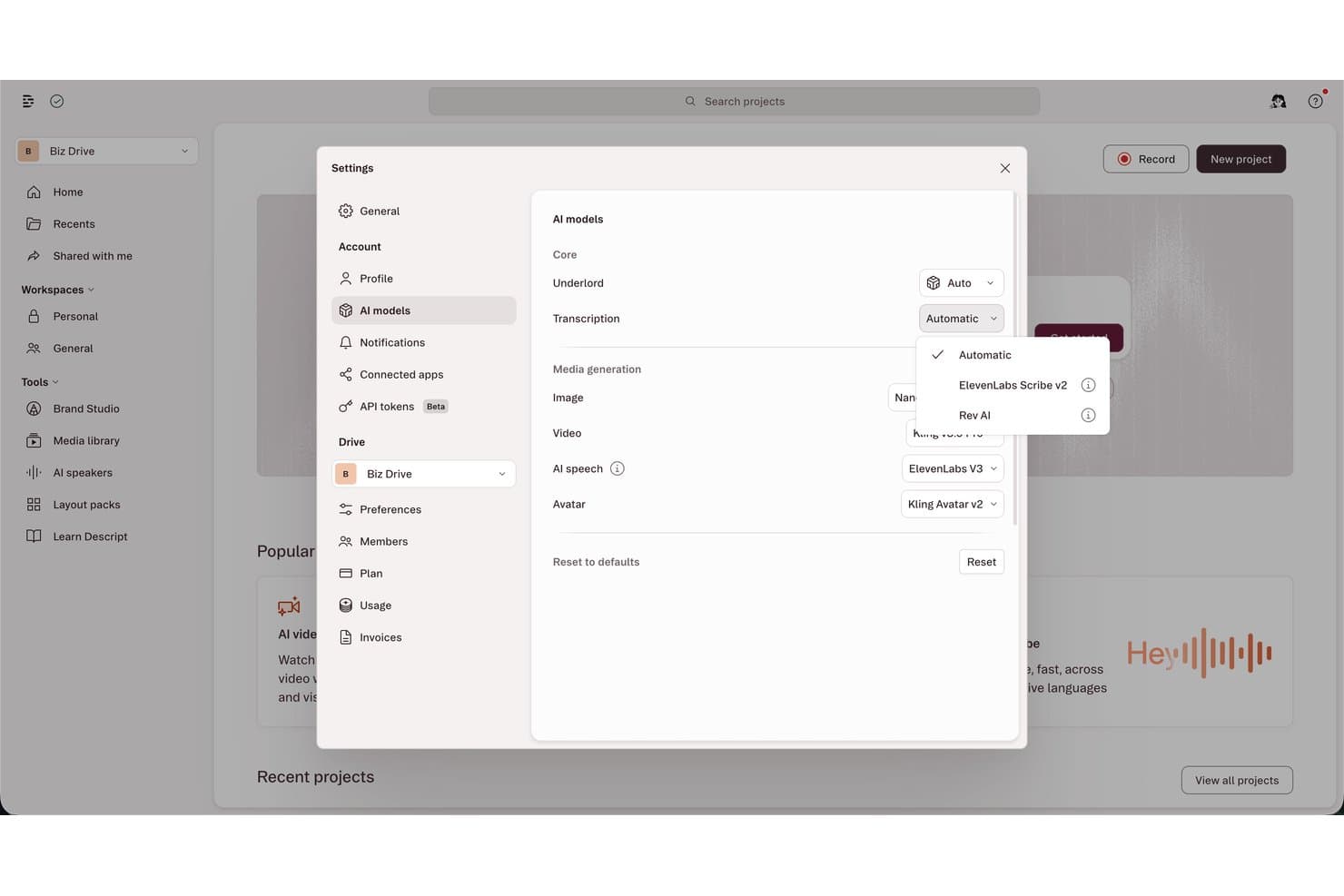
Descript lets users choose transcription engines like Rev AI or ElevenLabs. Descript is an AI-powered audio and video transcription tool that converts recordings into editable, text-based transcripts with automatic multi-speaker detection, word-level timestamping, and support for multi-track sessions.
Who Is Descript Best For?
Descript is a practical fit for paralegals and litigation support staff who need fast, editable rough drafts of recorded depositions or client interviews for internal review.
Why I Picked Descript
I picked Descript as one of the best because the text-based editing approach maps directly onto producing a clean deposition draft. I can delete an objection or off-the-record exchange as a line of text and the corresponding audio drops out automatically. Word-level timestamps stay anchored to each edit, so every segment of the cleaned draft still syncs to the original recording for playback reference.
Descript Key Features
- Speaker detection and labeling: Automatically detects and labels multiple speakers within each recording for easy identification.
- Multitrack transcription: Generates synchronized transcripts from separate audio and video tracks in complex legal recordings.
- Word-level time-coding: Syncs every transcript word to its exact location in the original audio or video file.
- Custom transcription glossary (Enterprise): Allows you to add case-specific terminology or names to improve AI transcript accuracy.
Descript Integrations
Descript offers native integrations with YouTube, Slack, and Zoom, and it connects with Zapier. An API is available for custom integrations.
Pros and Cons
Pros:
- Multi-speaker detection labels deposition participants automatically
- Word-level timestamps sync to original recording
- Editable transcript doubles as a review draft
Cons:
- AI accuracy drops on heavily accented speakers
- No legal-specific formatting or certified transcript templates
Learn more about Descript: Best for real-time multi-speaker meeting notes
- Free plan available
- From $16.99/user/month
Visit WebsiteCustomer Rating:4.4/5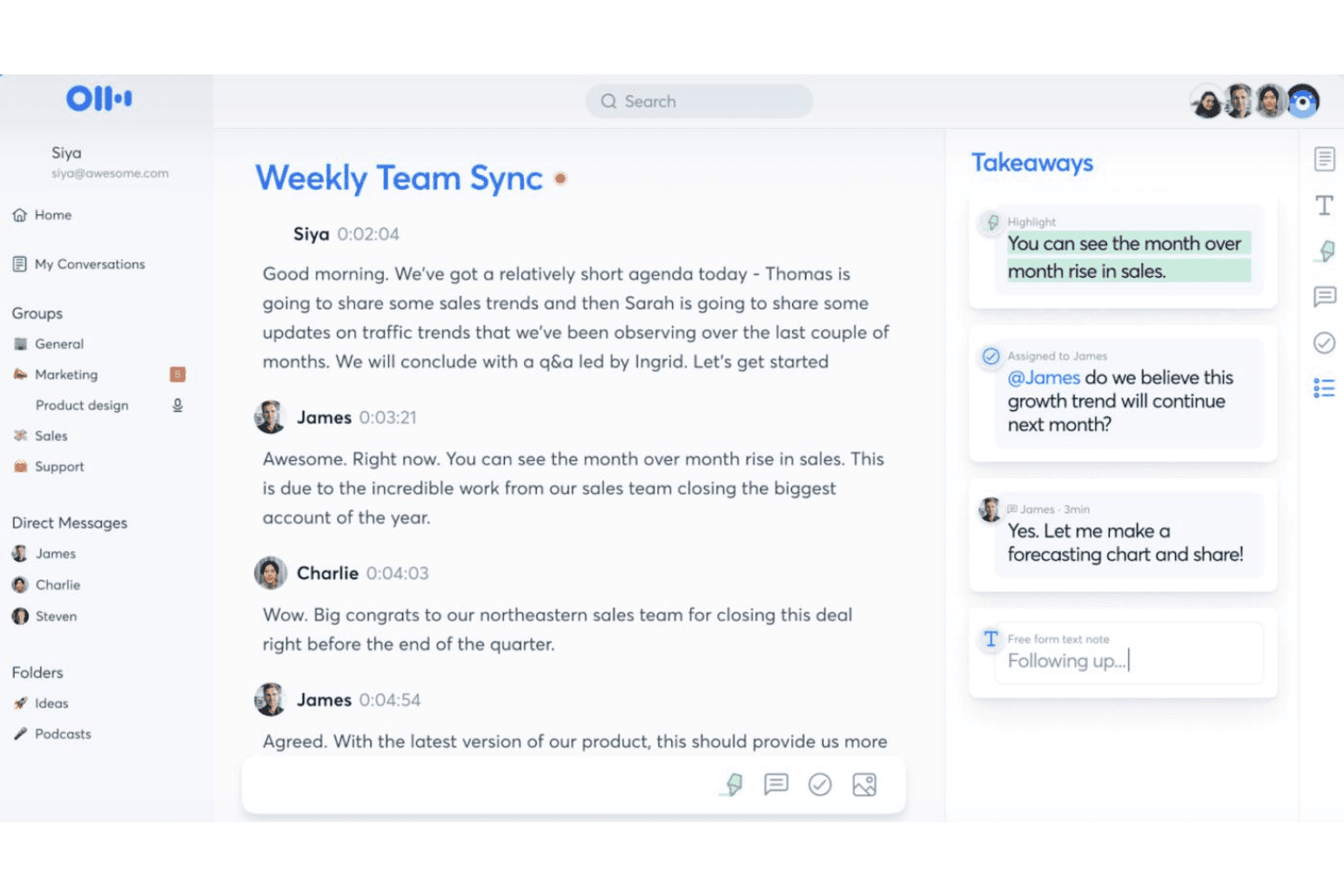
Otter.ai captures live meeting transcriptions alongside AI-generated takeaways, action items, and note-taking tools during a Weekly Team Sync. Otter.ai is an AI-powered transcription and meeting notes tool that captures spoken conversations in real time, identifies multiple speakers, and generates searchable transcripts with automated summaries and action items.
Who Is Otter.ai Best For?
Otter.ai suits legal professionals who need a quick, affordable way to document client intake interviews and internal team meetings.
Why I Picked Otter.ai
I picked Otter.ai because its real-time multi-speaker diarization handles fast-moving, multi-party conversations better than most general transcription tools. When OtterPilot joins a Zoom or Google Meet client intake call, it tags each speaker's dialogue as it happens, so I'm not sorting through a wall of unlabeled text afterward. I also rely on the searchable meeting archive, which lets me pull an exact quote from any speaker across hundreds of past sessions in seconds.
Otter.ai Key Features
- Multi-language transcription: Supports transcription in English, French, and Spanish for diverse meeting scenarios.
- Custom vocabulary: Lets you add legal names, terms, or acronyms to improve transcript accuracy.
- Automatic meeting summaries: Generates concise outlines, decisions, and action items after each recorded session.
- Audio and video file import: Allows users to upload standard formats like MP3, MP4, and WAV for transcription.
Otter.ai Integrations
Otter.ai offers native integrations with Zoom, Google Meet, Google Calendar, and Microsoft Teams. An API is available for custom integrations.
Pros and Cons
Pros:
- OtterPilot auto-joins scheduled video calls
- Searchable transcript archive across all sessions
- Real-time multi-speaker diarization works well
Cons:
- Accuracy drops with heavy legal terminology
- No legal-specific formatting or certified templates
Learn more about Otter.ai: Best for searchable court document exports
- 7-day free trial
- Pricing upon request
Visit WebsiteCustomer Rating:4/5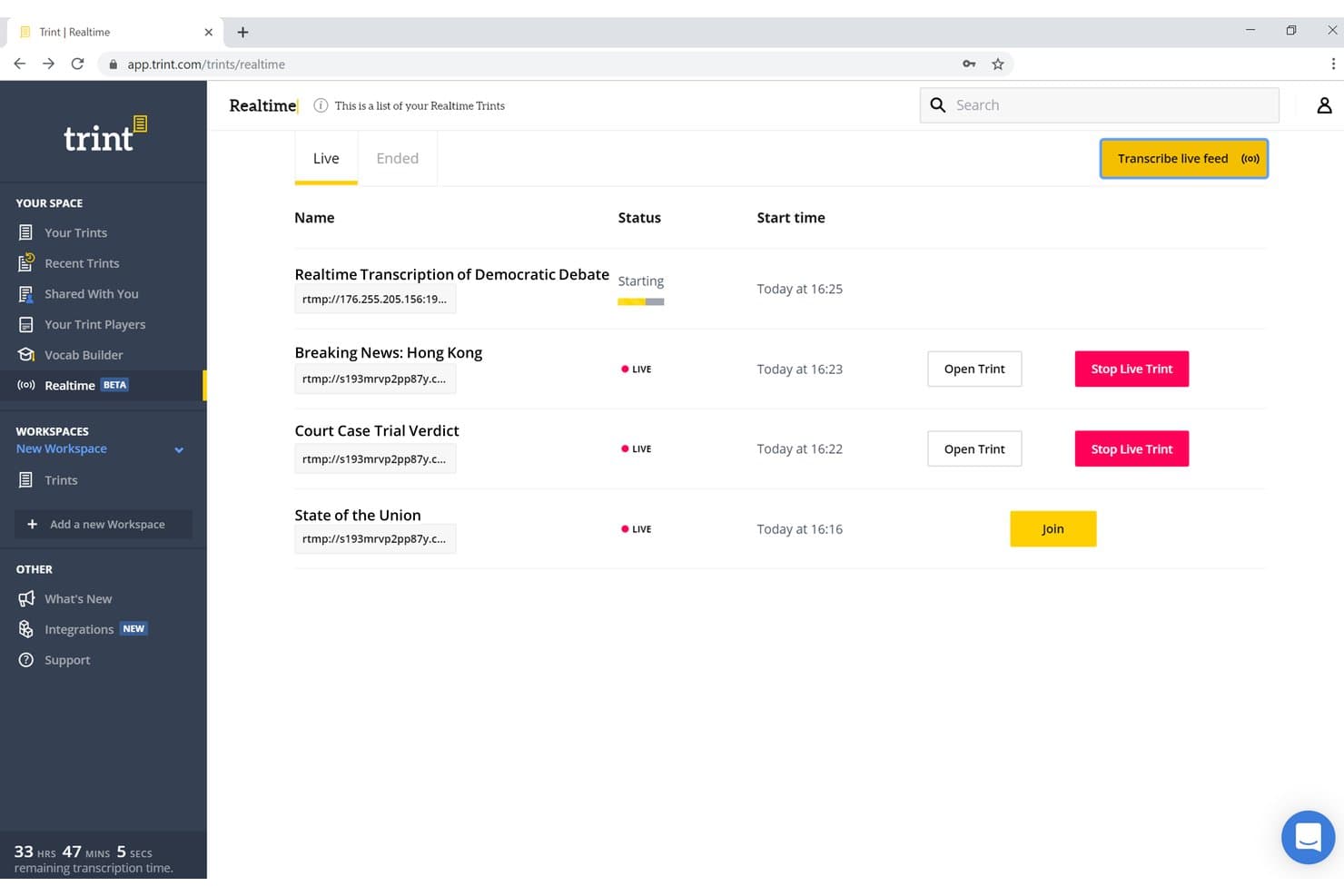
Trint lets users manage multiple live transcription feeds simultaneously. Trint is an AI transcription platform that converts audio and video recordings, including depositions and client consultations, into searchable, time-coded documents with speaker identification, bulk upload support, and multi-format export.
Who Is Trint Best For?
Trint suits litigation attorneys and legal operations teams at law firms that regularly transcribe recorded depositions, hearings, or client interviews at volume.
Why I Picked Trint
I picked Trint as one of the best because its word-level time-coding makes every transcript fully searchable down to the exact second a term was spoken. When reviewing a deposition, I can search for a specific phrase and jump directly to that moment in the recording. Trint exports to nine formats, including DOCX and SRT, so pulling court-ready documents from a finished transcript is straightforward.
Trint Key Features
- Speaker recognition: Identifies previously transcribed speakers to improve accuracy across depositions and hearings.
- BulkScribe bulk upload: Processes large archives of audio or video files in a single workflow for discovery projects.
- Live transcription capture: Generates transcripts in real time during calls, interviews, or hearings.
- Multi-language transcription and translation: Supports 40+ source languages and translates transcripts into 70+ languages.
Trint Integrations
Trint offers native integrations with Zoom and Adobe Premiere Pro, connects with Zapier, and provides an API for custom integrations.
Pros and Cons
Pros:
- Exports to nine formats including DOCX
- BulkScribe handles large deposition audio batches
- Word-level time-coding pinpoints exact spoken moments
Cons:
- No dedicated legal transcript formatting templates
- Accuracy drops with heavy accents or crosstalk
Learn more about Trint: Best for human-verified legal transcript accuracy
- Free demo available
- From $1.02/minute
Visit WebsiteCustomer Rating:5/5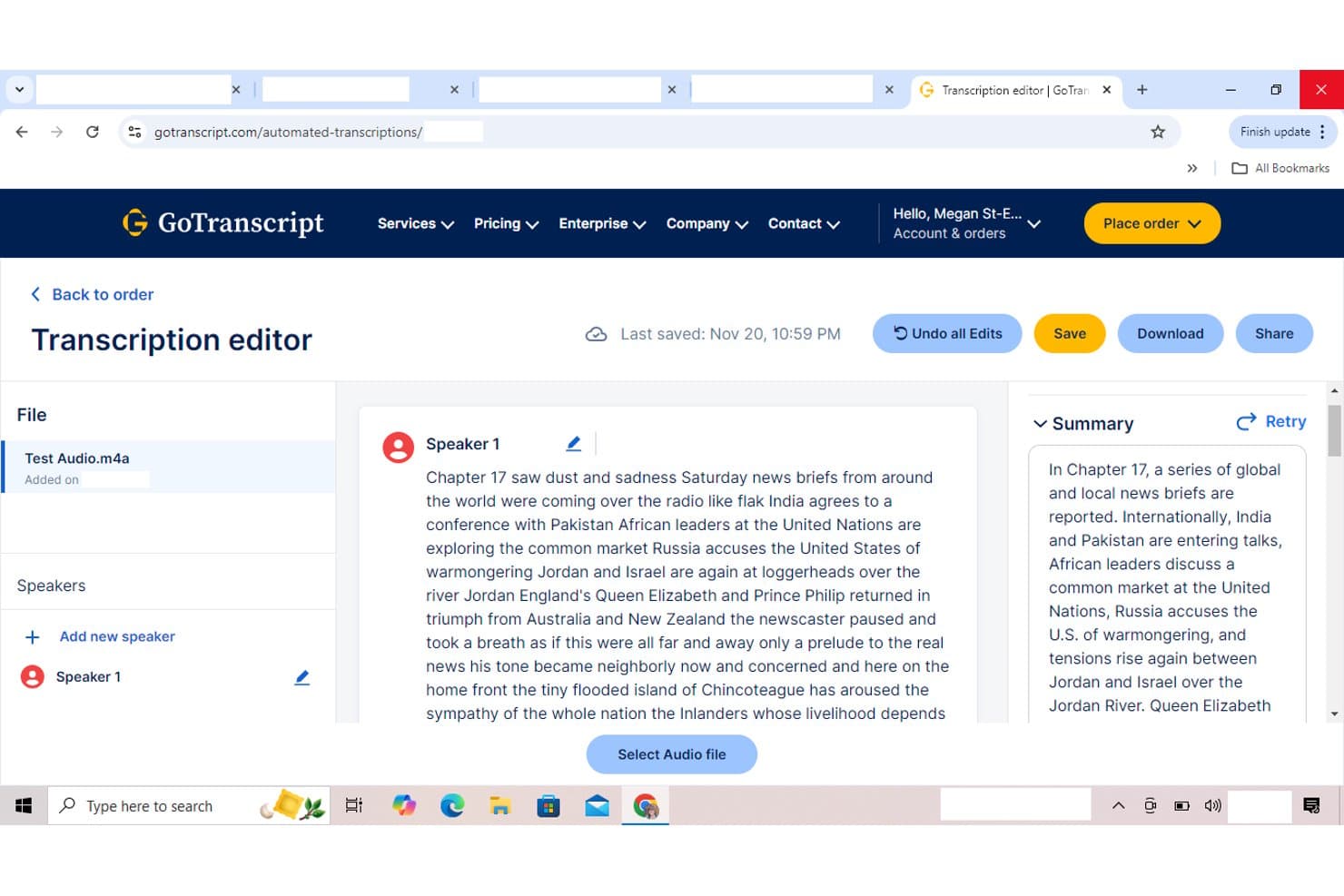
GoTranscript lets users edit and review transcriptions with an AI summary panel. GoTranscript is a human-powered legal transcription service that converts court recordings, depositions, and legal audio into formatted, speaker-labeled transcripts with timestamps and verbatim output options.
Who Is GoTranscript Best For?
GoTranscript suits litigation teams and law firms that prioritize court-admissible accuracy over speed, especially when handling complex multi-speaker recordings or multilingual evidence.
Why I Picked GoTranscript
GoTranscript earns its spot on my shortlist because every transcript goes through both a transcriber and a dedicated editor before delivery, which is what separates it from AI-only tools in legal contexts. I like that you can upload a custom glossary at order submission, so case-specific terminology is applied from the start rather than corrected after the fact. The strict verbatim option captures every objection, false start, and interruption, which matters when a transcript may be used as an evidentiary record.
GoTranscript Key Features
- Multi-language support: Transcribe audio in over 140 languages for global legal matters and cross-border cases.
- REST API integration: Automate file uploads, job status tracking, and retrieval of completed transcripts in custom legal workflows.
- Legal document formatting: Generate Q&A, line-numbered, and certified transcript templates to match court requirements.
- Multiple export formats: Download transcripts in DOCX, PDF, TXT, SRT, or VTT for use in case files or evidence presentation.
GoTranscript Integrations
GoTranscript offers an API for custom integrations. Native integrations are not clearly documented.
Pros and Cons
Pros:
- Custom glossary reduces legal terminology errors
- Strict verbatim option captures all speech artifacts
- Human editors verify every transcript before delivery
Cons:
- No speaker role tagging for legal proceedings
- Slower turnaround than AI-only transcription tools
Learn more about GoTranscript: Best for AI-powered legal video evidence review
- Free plan available
- From $0.015/credit
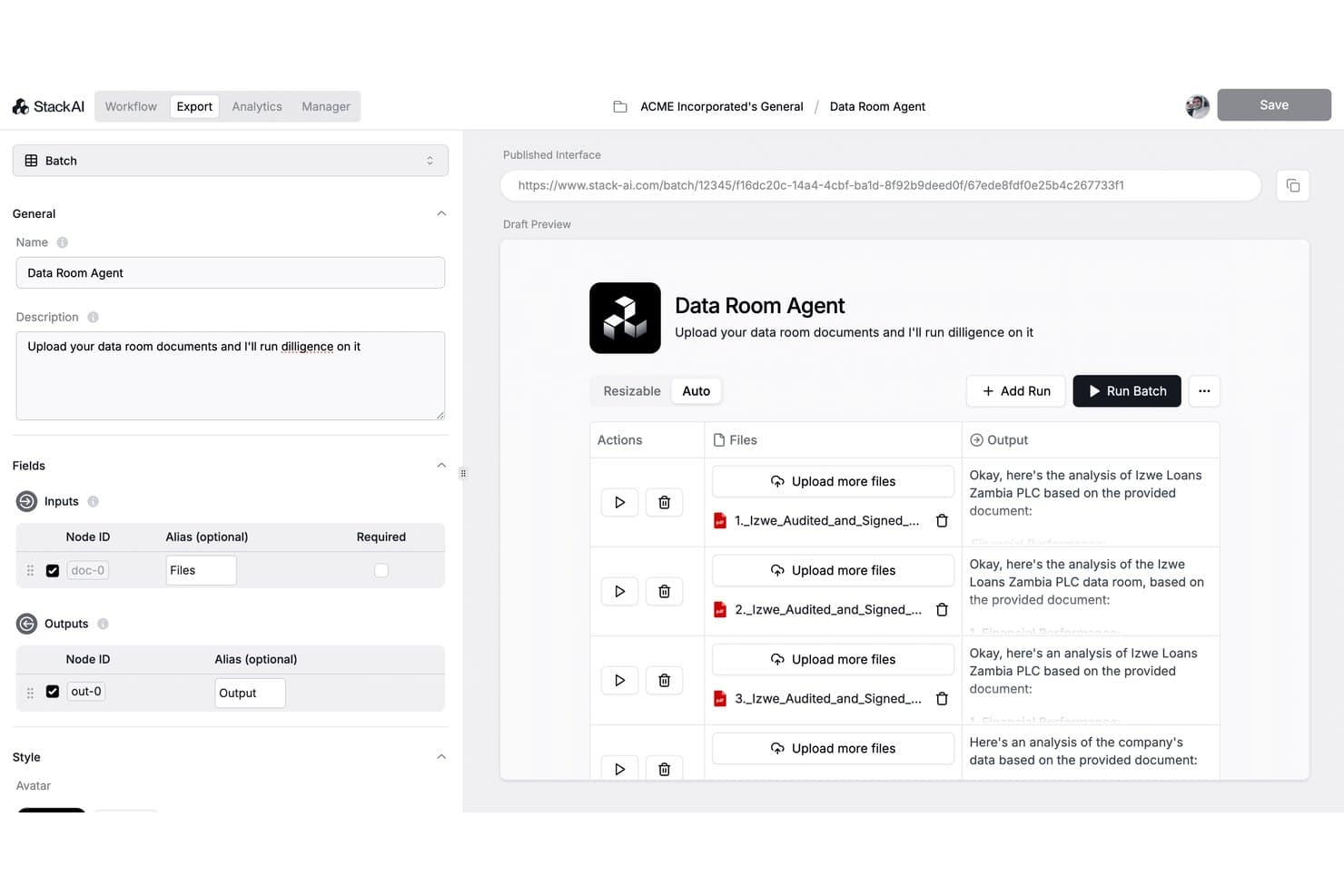
Reducto lets users run batch due diligence across multiple uploaded documents. Reducto is an AI-powered document parsing platform that uses agentic OCR and computer vision to convert PDFs, scanned files, and complex legal documents into structured, LLM-ready data for extraction and analysis.
Who Is Reducto Best For?
Reducto suits AI engineering teams and legal tech developers who need to build accurate document parsing pipelines on top of complex, high-volume legal files.
Why I Picked Reducto
I picked Reducto as one of the best because its agentic OCR layer reviews and corrects parsing outputs in real time, which matters when extracting text from legal documents like video-embedded transcripts and evidence exhibits. I also like how the Extract API returns per-field citations with bounding boxes, so teams can trace exactly where each data point originated in source materials. Reducto's Zero Data Retention and SOC 2 Type II compliance keep privileged material protected throughout.
Reducto Key Features
- Batch document processing: Upload and process thousands of legal documents at once through a single API endpoint.
- Layout-aware table extraction: Extracts structured tables from contracts, pleadings, and discovery materials while preserving cell relationships.
- Multi-language OCR support: Recognizes and parses legal documents written in over 100 languages for cross-border matters.
- Role-based access controls: Set user permissions to manage who can view, parse, or export sensitive legal files within your workspace.
Reducto Integrations
Native integrations are not clearly documented. Reducto offers an API for custom integrations.
Pros and Cons
Pros:
- Per-field citations trace source document locations
- SOC 2 Type II certified data handling
- Agentic OCR self-corrects parsing errors automatically
Cons:
- Requires developer setup to process audio files
- No native legal transcript formatting templates
Learn more about Reducto: Best for multi-language legal audio transcription
- 30-minute free trial
- From $10/hour
Visit WebsiteCustomer Rating:4.9/5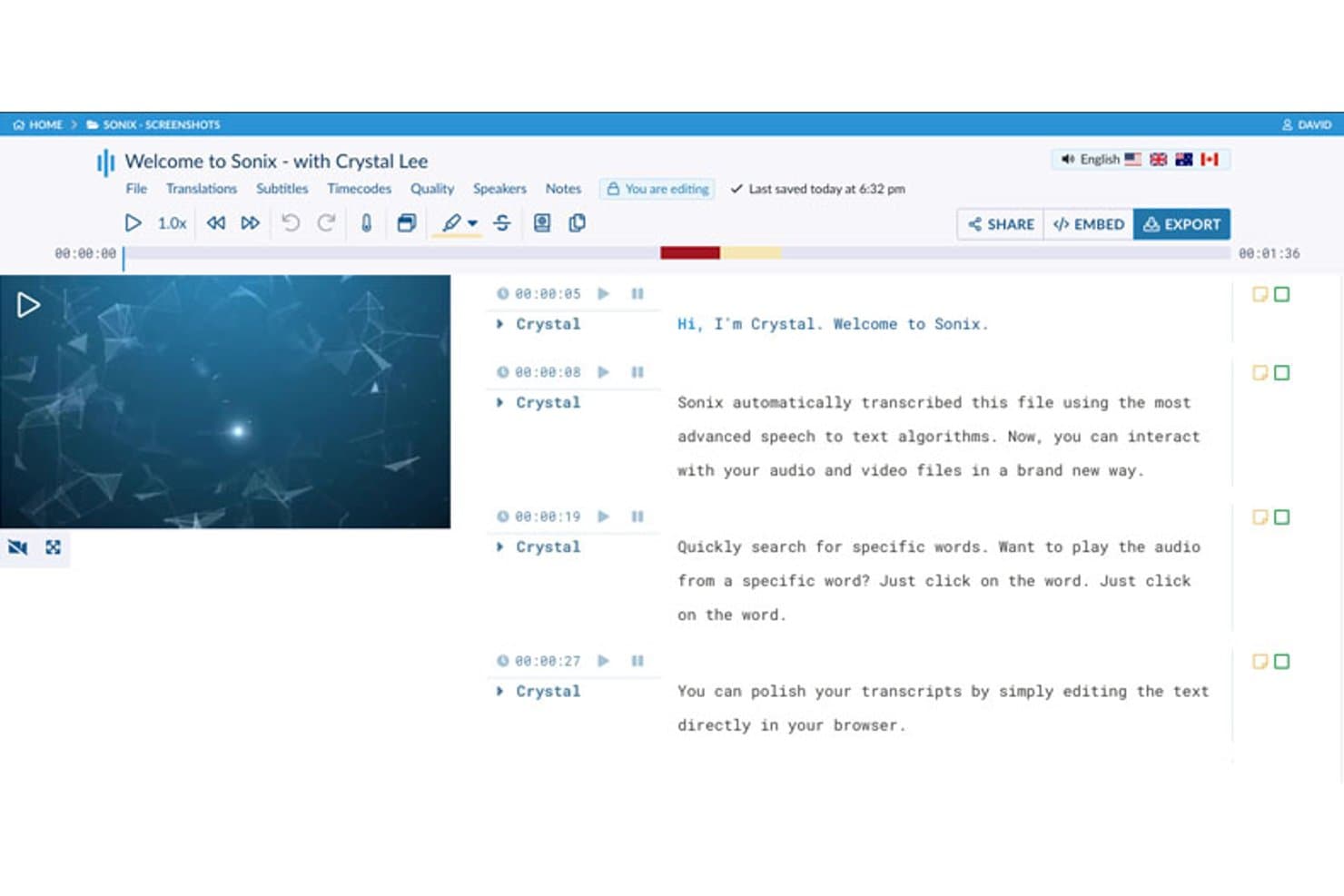
Sonix auto-transcribes audio and video files with an editable transcript editor. Sonix is an AI transcription platform that converts legal audio and video—depositions, hearings, client interviews, and court recordings—into searchable, editable transcripts across 54+ languages with speaker diarization and word-level timestamps.
Who Is Sonix Best For?
Sonix is a strong fit for litigation teams and legal ops professionals handling multilingual matters or international proceedings.
Why I Picked Sonix
I've included Sonix in my top picks because no other tool on this list matches its language range for legal audio. With support for 54+ languages and translation across 55+, I can run a foreign-language deposition recording through Sonix and get a timestamped, speaker-labeled transcript without sourcing a separate human interpreter. The custom legal dictionary lets me add jurisdiction-specific terms and case citations so they're recognized correctly from the first transcription.
Sonix Key Features
- In-browser transcript editor: Edit transcripts with word-level timestamps, speaker labels, and click-to-play audio sync.
- SOC 2 Type II and HIPAA compliance: Ensure secure handling of privileged legal data with enterprise-grade certifications and controls.
- Multi-file search and cross-transcript review: Search keywords or phrases across all transcripts in your workspace and surface timestamped context.
- Automated redaction tools: Redact sensitive information directly within transcripts, silencing matching audio for compliance.
Sonix Integrations
Sonix offers native integrations with Clio, NetDocuments, Relativity, and Zoom, and connects with Zapier. An API is available for custom integrations.
Pros and Cons
Pros:
- Custom vocabulary catches jurisdiction-specific legal terms
- Word-level timestamps sync with source audio
- 54+ languages supported for multilingual matters
Cons:
- Accuracy decreases with poor audio quality
- No certified human transcript review option
Learn more about Sonix: 7Best for certified court-ready transcripts
Rev
- Free plan available
- From $29.99/user/month
Visit WebsiteCustomer Rating:4.7/5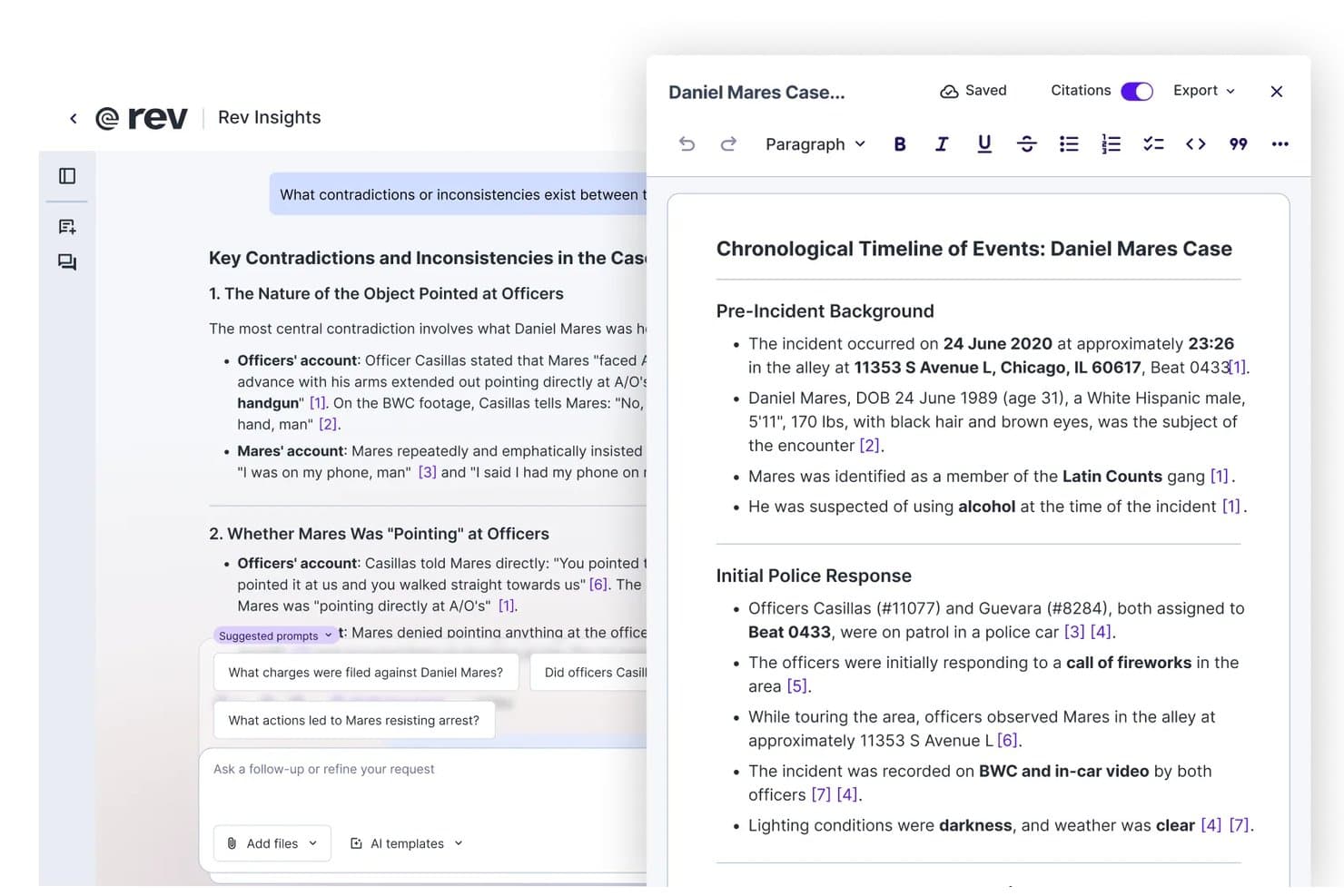
Rev lets users build cited legal timelines from transcribed case files. Rev is a legal transcription and investigative intelligence platform that combines AI-powered multi-file case analysis, human-verified court-ready transcripts, and in-platform evidence markup tools for legal professionals.
Who Is Rev Best For?
Rev is a strong fit for litigation attorneys and legal operations teams who need certified, jurisdiction-compliant transcripts for depositions, hearings, and court proceedings.
Why I Picked Rev
Rev earns its spot on my shortlist because of its tiered human-verified transcript system. It spans Rough Draft, Ready to Certify, and Ready to Certify Premium, each formatted to meet jurisdiction-specific requirements. I particularly like SmartDepo, which delivers deposition summaries with guaranteed 100% accurate page-line citations. I've found this genuinely useful when building exhibits or preparing oral arguments from dense witness testimony.
Rev Key Features
- AI multi-file analysis: Analyze audio, video, and documents together as one case record for deeper investigation.
- In-platform transcript editor: Mark up, annotate, and clip transcripts with evidence references inside the browser.
- Mobile dictation and sync: Record notes or interviews from a phone and sync them directly to the platform.
- Clio Manage integration: Connect case transcripts and files to your legal practice management system.
Rev Integrations
Rev offers native integrations with Clio Manage, Google Drive, Dropbox, and YouTube. An API is available for custom integrations.
Pros and Cons
Pros:
- Tiered human verification levels for legal work
- Guaranteed 100% page-line citation accuracy
- Certified, jurisdiction-ready transcript formatting available
Cons:
- AI-only transcripts not accepted as court-ready
- No on-premise deployment option available
Learn more about Rev: Best for live deposition transcription support
- Free demo available
- From $24/month
Visit WebsiteCustomer Rating:4.4/5
Verbit offers AI-powered transcription and captioning for multiple industries. Verbit is a legal transcription platform built around a proprietary AI speech recognition engine trained on legal language, offering real-time and recorded transcription for depositions, hearings, digital evidence, and court proceedings.
Who Is Verbit Best For?
Verbit is a strong fit for enterprise law firms and court reporting agencies that handle high volumes of depositions and need court-admissible transcripts.
Why I Picked Verbit
Verbit earns its spot on my shortlist because of Legal Visor, which compares live spoken testimony against past depositions and the discovery corpus in real time. I love how it layers AI-generated insights directly onto a live deposition, so attorneys can spot inconsistencies as testimony unfolds rather than after the fact. The Captivate™ ASR engine underneath it is trained specifically on legal language, which keeps accuracy high even through dense terminology and multi-speaker exchanges.
Verbit Key Features
- Certified transcript export: Generate court-admissible transcripts with required formatting, certification pages, and jurisdictional compliance.
- Broad audio and video format support: Submit recordings in formats including MP3, WAV, MP4, and others commonly used in legal workflows.
- Custom legal templates: Access templates for depositions, pleadings, and affidavits that match court standards and line numbering requirements.
- Automated redaction and PII masking: Automatically redact confidential or privileged information from transcripts before sharing or filing.
Verbit Integrations
Verbit offers native integrations with Relativity, Zoom, Microsoft Teams, Google Drive, Dropbox, Box, and OneDrive. An API is available for custom integrations.
Pros and Cons
Pros:
- Human-verified transcripts available for court use
- Legal vocabulary recognition trained on legal language
- Real-time transcription during live depositions
Cons:
- AI accuracy drops on heavily accented speech
- Turnaround times can vary by request volume
Learn more about Verbit: Best for GDPR-compliant legal transcript creation
- Free plan available
- From €19/month
Visit WebsiteCustomer Rating:4.3/5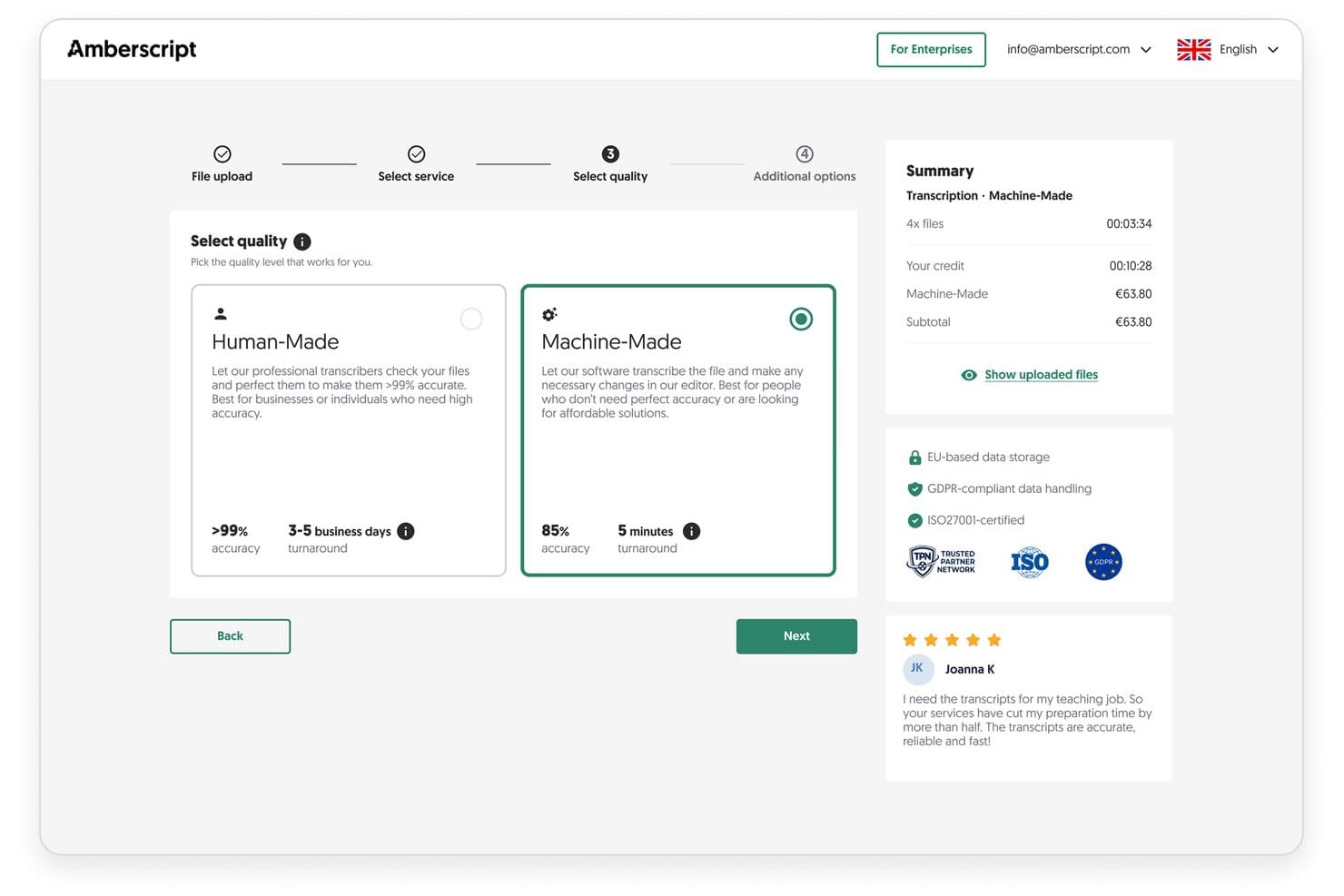
Amberscript lets users choose transcription quality for fast legal audio files. Amberscript is a transcription platform that converts audio and video recordings into text using AI-automated or human-edited transcription, with dedicated workflows for depositions, hearings, and legal meetings across 90+ languages.
Who Is Amberscript Best For?
Amberscript is a strong fit for EU-based law firms and legal operations teams that handle sensitive recordings under GDPR and European data residency requirements.
Why I Picked Amberscript
I picked Amberscript as one of the best because its GDPR compliance goes well beyond a checkbox. Data is stored on EU servers, and you can execute NDA and DPA agreements directly within the service, which I haven't seen offered as standard by most transcription tools. Its human-made tier pairs >99% accuracy with transcribers trained in legal terminology, making it particularly suited for deposition and hearing recordings where precision on names and case citations is non-negotiable.
Amberscript Key Features
- Automatic multi-speaker diarization: Detects and labels multiple speakers in recordings for accurate legal documentation.
- Online editor with annotation tools: Allows you to mark up, comment, and highlight key passages directly in the transcript.
- Broad audio and video format support: Accepts files in MP3, WAV, MP4, and more for seamless deposition and court recording uploads.
- Custom dictionary for legal terms: Lets you add jurisdiction-specific terminology, case citations, and Latin phrases for improved transcription precision.
Amberscript Integrations
Native integrations are not clearly documented. Amberscript provides an API for custom integrations.
Pros and Cons
Pros:
- Supports 90+ languages for multilingual legal work
- Human-edited transcripts exceed 99% accuracy
- EU-based data storage for GDPR compliance
Cons:
- Limited legal formatting templates available
- No SOC 2 or HIPAA certification documented
Learn more about Amberscript:
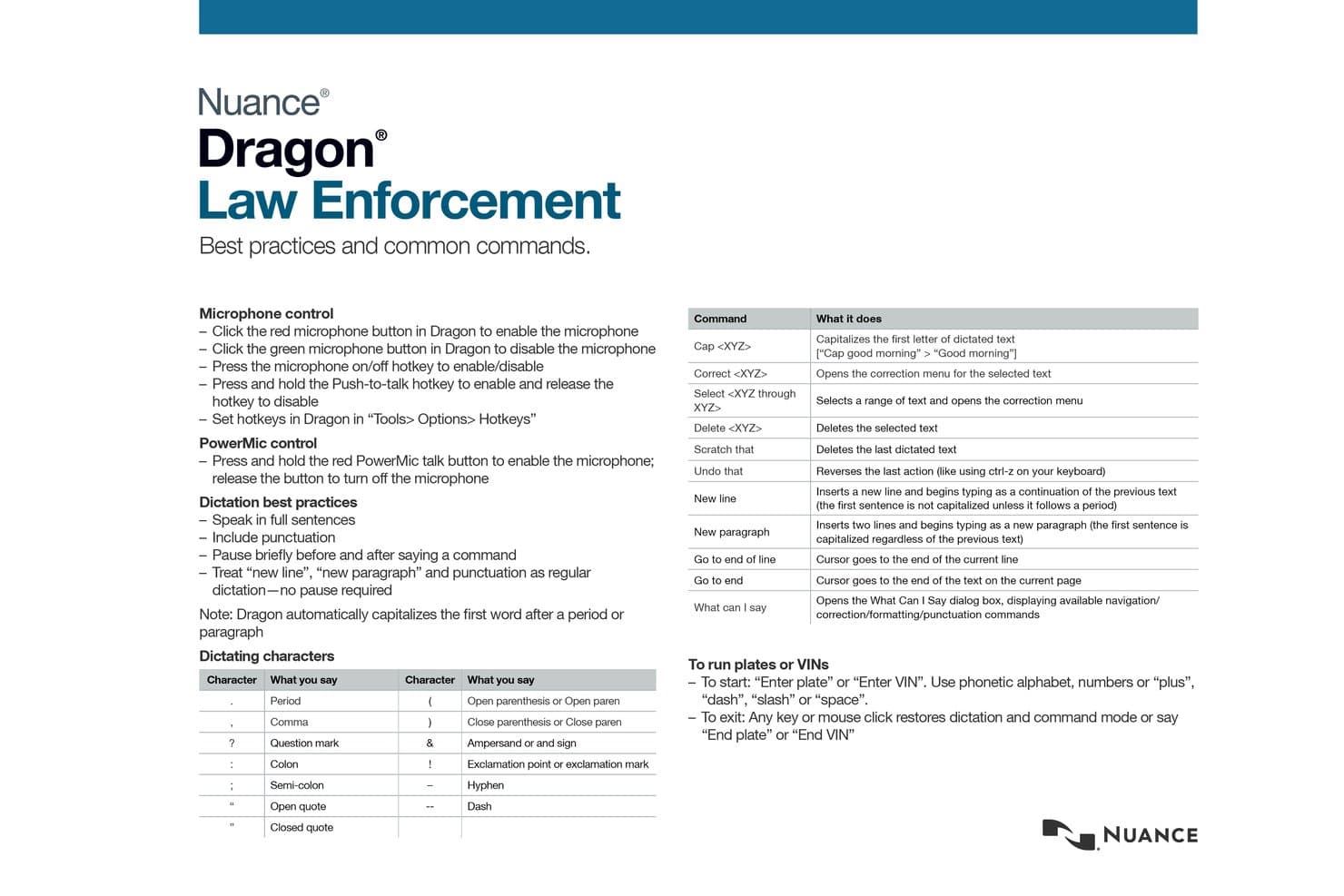
Nuance supports law enforcement dictation with voice commands and shortcuts. Nuance Dragon Legal is a voice recognition and dictation platform built for legal professionals, featuring a legal-specific vocabulary, custom voice commands, and both live and audio-file speech-to-text transcription for legal document creation.
Who Is Nuance Best For?
Dragon Legal is a strong fit for solo practitioners and small law firm attorneys on Windows who dictate their own briefs, contracts, and motions directly into formatted documents.
Why I Picked Nuance
I've included Nuance Dragon Legal in my top picks because its dictation-to-document workflow is genuinely built around how attorneys actually work. The built-in legal vocabulary, trained on over 400 million words from legal documents, means I can dictate a motion or brief without stopping to correct every Latin phrase or case citation. I also rely on the custom voice command macros to insert standard clauses with a single spoken phrase, cutting real time out of drafting repetitive document sections.
Nuance Key Features
- Front-end and back-end speech recognition: Supports both live dictation and transcription from pre-recorded audio files.
- Nuance Management Center integration: Allows IT teams to centrally manage user profiles, licenses, and customizations.
- Legal citation formatting: Automatically applies standard formatting to legal citations and case references within documents.
- PowerMic 4 device support: Integrates with a programmable microphone designed for efficient dictation and navigation.
Nuance Integrations
Nuance Dragon Legal offers native integrations across the Microsoft ecosystem, including Microsoft Word, Microsoft Outlook, and Microsoft 365. An API is also available for custom integrations.
Pros and Cons
Pros:
- Transcribes both live and recorded audio
- Custom macros for repetitive clause insertion
- Highly accurate legal vocabulary recognition
Cons:
- No automatic multi-speaker diarization for depositions
- Windows-only with no macOS version available
Learn more about Nuance:
Other Legal Transcription Software
Here are some additional legal transcription software options that didn’t make it onto my shortlist, but are still worth checking out:
- 11TranscribeMeBest for legal industry-trained transcriptionists
- 12GMR TranscriptionBest for U.S.-based secure legal data handling
- 13Ditto TranscriptsBest for transcription by US-based professionals
- 14WhisperitBest for AI-driven transcript automation workflows
- 15JusticeTextBest for organizing and reviewing court recordings
Related Reviews
How I Evaluate Legal Transcription Software
My evaluation of these tools breaks down into two layers: what a solution must do—like handling depositions and privileged data—and what separates the best options from the rest.
Core Functionality (Table Stakes For This List)
When I'm selecting tools for my list, I rank each one on a scale from 0 (does not offer the functionality) to 5 (excels in this area) for each core functionality listed below. I then calculate the tool's total score into a percentage, using 65% as a benchmark to help assess its overall fit for the list.
- Legal-Grade Accuracy: I look for strong recognition of case citations, Latin phrases, and jurisdiction-specific terminology—not just general speech-to-text accuracy.
- Speaker Identification: Multi-party recordings like depositions need automatic diarization that labels counsel, witnesses, and the judge without manual cleanup.
- Audio/Video Support: I check whether each tool accepts the formats firms actually use—MP3, WAV, MP4—from dictation devices and video depositions alike.
- Confidentiality & Compliance: Handling privileged data means I evaluate encryption standards, access controls, and certifications like SOC 2, HIPAA, or GDPR readiness.
- Timestamping & Time-Coding: Useful transcripts link text to audio or video at the segment level, so attorneys can jump to a specific exchange during evidence review.
- Legal Formatting & Export: I look for output in court-standard layouts—Q&A, line-numbered, certified pages—with export to DOCX, PDF, or TXT ready for filing.
Once I have a list of tools that meet the criteria, I consider what sets each platform apart.
Differentiating Factors (What Sets Vendors Apart)
Here's how I compare and contrast different vendors:
Standout Features
Redaction and PII masking is a major differentiator—when you need to share a deposition transcript with co-counsel or file it publicly, automated tools that strip SSNs and privileged content save hours of manual review. I also evaluate custom legal templates, since pre-formatted layouts for depositions and affidavits with line numbering and certification pages cut prep time before filing. Legal vocabulary recognition matters here too: built-in dictionaries that handle Latin terms, statutes, and case citations mean fewer corrections before a transcript is court-ready.
Beyond Features
Confidentiality and data security is where I spend the most time—I check for encryption standards, data retention policies, and certifications like SOC 2 or HIPAA that confirm a vendor can handle privileged communications. Integrations with your legal tech stack also matter: transcripts that flow directly into platforms like Clio or iManage save paralegals from manually uploading files to each matter. I also evaluate turnaround options, since a deposition transcript needed before a motion deadline requires SLA-backed rush delivery, not just a "best effort" estimate.
How to Choose Legal Transcription Software
Trying to find legal transcription software that reliably handles your firm’s depositions, hearings, and evidence review? Here’s how to map your top priorities to the right solution:
| If your priority is... | Look for... |
| Certified court filings | Sample certified transcript and line-numbered legal templates |
| Rapid turnaround on last-minute depositions | Written SLA for expedited transcription delivery |
| Data confidentiality and compliance | SOC 2, HIPAA, or GDPR attestation documents from the vendor |
| Paralegal-friendly workflow integration | Direct integrations with your DMS or practice management platform |
| Multi-party hearings and accuracy | Demonstrated speaker diarization and legal vocabulary recognition |
How to Vet Your Shortlist
- Request a certified transcript sample: Ask each vendor for an export with official formatting from a court-ready case.
- Submit a support ticket: File a hypothetical data privacy question and track response time and completeness.
- Test a real file: Upload a multi-speaker deposition (with a challenging section) and review the speaker tags and legal term accuracy.
- Ask to review compliance certifications: Request official documentation showing security standards and regulatory controls.
- Consider this core tradeoff: Decide if true human-verified accuracy is more critical than the speed or affordability of AI-driven results.
What Is Legal Transcription Software?
Legal transcription software converts legal proceedings, depositions, interviews, and audio or video evidence into accurate, formatted text that meets court and compliance standards. These solutions support speaker identification, time-coding, and legal vocabulary recognition so your team can search, edit, and export transcripts for filings, case management, or review—all while protecting confidential information and supporting workflows typical in litigation and legal operations.
Features of Legal Transcription Software
When selecting legal transcription software, keep an eye out for the following key features:
- Legal-grade accuracy: Recognizes legal terms, citations, and Latin phrases to ensure transcripts reflect precise legal language found in hearings and filings.
- Speaker identification: Separates and labels each speaker—such as judge, attorney, or witness—automatically within the transcript for clear attributions.
- Multi-format audio/video support: Accepts standard legal recording types (MP3, WAV, MP4) so you can transcribe from various devices and evidence sources.
- Timestamping and time-coding: Generates time markers alongside transcript entries, letting you reference or replay the exact moment a statement was made.
- Confidentiality and compliance controls: Includes encryption, access restrictions, and data management tools to help safeguard client-attorney privileged information.
- Custom legal templates: Offers ready-to-use templates for depositions, Q&A formats, and line-numbered pages formatted to legal standards.
- Certified export options: Provides export-ready documents (DOCX, PDF, TXT) formatted for official use, filing, or submission in courts.
- User and role management: Lets you assign permissions or limit access so teams, paralegals, and outside counsel only see what’s relevant to their case.
- Redaction and PII masking: Allows you to easily hide or remove sensitive information—like personal identifiers—from transcripts before sharing or filing.
- Audit trails and activity logs: Tracks who accessed, edited, or exported documents to ensure full transparency and support compliance or discovery needs.
Common Legal Transcription Software AI Features
Beyond the standard legal transcription software features listed above, many of these solutions are incorporating AI with features like:
- Automated speech recognition: Uses AI to convert spoken language from legal recordings into text with high speed and accuracy, even in complex or noisy environments.
- Contextual legal term detection: AI models trained on legal language can identify, interpret, and correctly transcribe specialized terminology, statutes, and case citations without manual intervention.
- Intelligent speaker diarization: AI distinguishes and labels multiple speakers in real time, even when voices overlap or audio quality varies, reducing manual editing.
- Predictive error correction: AI algorithms flag likely transcription errors and suggest corrections based on context, improving overall transcript reliability before human review.
- Smart summarization: Automatically generates concise summaries or key point extracts from lengthy transcripts, helping legal teams quickly identify critical testimony or arguments.
- Adaptive learning from edits: The software learns from user corrections over time, refining its models to better handle firm-specific language, names, and recurring case details.
Benefits of Legal Transcription Software
Implementing legal transcription software provides several benefits for your team and your business. Here are a few you can look forward to:
- Accuracy in legal records: Automated legal terminology recognition and speaker labeling ensure your transcripts reliably reflect what was said in hearings or depositions.
- Faster turnaround times: AI-powered transcription and human review workflows let you access case-ready documents much faster than manual transcription alone.
- Stronger confidentiality: Encryption, access controls, and compliance features help safeguard privileged client data and meet regulatory standards.
- Cost-effective document production: Streamlined audio and video importing, export-ready templates, and bulk file handling cut labor and outsourcing costs.
- Improved search and evidence review: Time-coding and segment indexing let you quickly find, reference, or share critical testimony from lengthy court recordings.
- Custom workflow integration: Seamless connection with matter management or document management systems reduces manual uploads and helps maintain organized case files.
- Auditability and compliance: Built-in activity logs and certified export features support e-discovery demands and provide a clear trail for legal or regulatory review.
Costs and Pricing of Legal Transcription Software
Selecting legal transcription software requires an understanding of the various pricing models and plans available. Costs vary based on features, team size, add-ons, and more. The table below summarizes common plans, their average prices, and typical features included in legal transcription software solutions:
Plan Comparison Table for Legal Transcription Software
| Plan Type | Average Price | Common Features |
| Free Plan | $0 | Basic audio import, limited transcript minutes, no legal templates, and entry-level support. |
| Personal Plan | $20-$50/user/month | Extended transcript hours, improved accuracy, speaker labels, and export in multiple formats. |
| Business Plan | $60-$150/user/month | Team management, legal templates, integration options, redaction tools, and enhanced security controls. |
| Enterprise Plan | $200+/user/month | Advanced compliance, custom templates, API access, dedicated support, on-premise deployment options, and audit trails. |
Legal Transcription Software FAQs
Here are some answers to common questions about legal transcription software:
How accurate are legal transcription software solutions?
Most legal transcription software offers at least 85% accuracy with AI-only transcripts, while human-verified services routinely exceed 99%. For court filings or certified records, I recommend always requesting a sample transcript to judge real-world results.
Can legal transcription software handle multiple speakers and overlapping dialogue?
Yes, leading solutions include advanced speaker diarization that labels each participant and recognizes overlapping speech. This is especially important for depositions, hearings, and multi-party meetings where precise attribution is critical.
Is it possible to redact confidential or privileged information before sharing transcripts?
Yes, most modern legal transcription software includes built-in redaction tools and PII masking capabilities. You can quickly remove sensitive data—like Social Security numbers or addresses—before exporting or sharing files.
What file formats do legal transcription software platforms support for imports and exports?
You can typically import standard legal recording formats such as MP3, WAV, and MP4, and export transcripts as DOCX, PDF, or TXT files. Some solutions also integrate directly with legal document management systems for seamless workflow.
How do I know if a legal transcription software vendor meets data privacy requirements?
Ask for documentation covering security certifications like SOC 2, HIPAA, or GDPR compliance. I suggest requesting a written summary of the vendor’s data retention, encryption standards, and access controls to confirm they meet your firm’s standards.