


LEAP Vs. Clio: Comparison and Expert Reviews in 2026
I break down the real pros, cons, and standout features of LEAP vs. Clio—so you can choose the legal practice management software that’ll move your firm forward in 2026.

We review tools independently, and commissions help fund our testing. See our transparency policy, our methodology, or suggest a tool.
LEAP
4.3/5
- Free demo available
- Pricing upon request
Clio
4.7/5
- Free trial available
- From £79/user/month
Why Trust Our Software Recommendations
6,700+
Reviews
20
Industry experts
16+
Evaluation factors
14
Years
Our team has been testing and reviewing software since 2012. As legal practice leaders ourselves, we know how difficult—and important—it is to choose the right software.
For this guide, we evaluated tools using hands-on testing and independent research, scoring tools using our selection criteria.
Our reviews reflect our human editorial judgment, not a sales pitch.
| LEAP | Clio | |
|---|---|---|
| Free Trial | Free demo available | Free trial available |
| Pricing | Pricing upon request | From £79/user/month |
LEAP vs. Clio Pricing & Hidden Costs
LEAP and Clio both work on subscription pricing, but the way they bundle features can affect your total bill. LEAP typically sells itself as an all-in-one package—features like document management, time tracking, and billing come standard. Still, you might run into extra costs for add-ons, advanced integrations, or premium support.
Clio, on the other hand, offers a tiered approach. Core case management comes with every plan, while things like advanced reporting, e-signatures, or extra integrations often sit in higher-priced tiers or require separate purchases. Both vendors will likely charge per user, and watch for onboarding or data migration fees that can add up if you’re moving a large practice onto the platform.
The secret to choosing the right pricing model is to dig beneath the surface. Instead of just comparing monthly fees, make a list of the exact features your firm needs—and count up the potential ‘nice to haves’ you may want later. Ask about charges for onboarding, premium support, and integrations that matter to your firm’s workflows.
Then, talk to each vendor about your list and ask them to walk you through a sample invoice so you know exactly what you’d pay in real life. That way, you’ll get a clearer view of which offer makes sense for your budget without getting tripped up by hidden costs down the line.
Both LEAP and Clio put the essentials front and center—case management, document automation, billing, and time tracking all come standard. You’ll also find trust accounting, secure client communications, calendars, and mobile access in both toolkits, making day-to-day legal work reliably smooth regardless of your choice.
When it comes to what sets them apart, LEAP shines with deep legal content and forms baked right in—especially for firms that want ready-to-use templates tuned for their jurisdiction. Clio, on the other hand, stands out with a huge marketplace of integrations and flexible API access, letting tech-savvy teams customize their workflows and stack up the tools that fit their exact needs.
| LEAP | Clio | |
|---|---|---|
| 2-Factor Authentication | Yes | Yes |
| API | Yes | Yes |
| Approval Workflows | Yes | Yes |
| Audit Trail | Yes | Yes |
| Calendar Management | Yes | Yes |
| Compliance Tracking | Yes | Yes |
| Contract Management | Yes | Yes |
| Custom Reports | Yes | Yes |
| Customer Management | No | Yes |
| Data Export | Yes | Yes |
| Data Import | Yes | Yes |
| Document Management | Yes | Yes |
| External Integrations | Yes | Yes |
| Multi-User | Yes | Yes |
| NDA Management | No | Yes |
| Notifications | Yes | Yes |
| Policy Management | No | Yes |
| Scheduling | Yes | Yes |
| Workflow Management | Yes | Yes |
| Integration | LEAP | Clio |
|---|---|---|
| IntegrationMicrosoft 365 | LEAP✅ | Clio✅ |
| IntegrationXero | LEAP✅ | Clio✅ |
| IntegrationQuickBooks Online | LEAP✅ | Clio✅ |
| IntegrationLawPay | LEAP❌ | Clio✅ |
| IntegrationNetDocuments | LEAP✅ | Clio❌ |
| IntegrationInfoTrack | LEAP✅ | Clio❌ |
| IntegrationZoom | LEAP❌ | Clio✅ |
| IntegrationGoogle Drive | LEAP❌ | Clio✅ |
| IntegrationAPI | LEAP✅ | Clio✅ |
| IntegrationZapier | LEAP❌ | Clio✅ |
LEAP and Clio both cover the legal essentials, but Clio’s vast marketplace—including Zapier and Google Drive—gives you more room to build a stack that fits your team. LEAP does offer deep integrations for legal content and document management, but Clio appeals more if your firm needs broad customization and workflow connections.Security, Compliance, Reliability
| Factor | LEAP | Clio |
|---|---|---|
| FactorData Encryption | LEAPUses bank-grade encryption for data both in transit and at rest, guarding files and messages. | ClioEncrypts all data at rest and in transit with industry-standard protocols for firm and client communications. |
| FactorRegulatory Compliance | LEAPBuilt to meet common legal standards, with built-in trust accounting and audit trails. | ClioOffers compliance features aligned with law society rules, including audit logs and trust accounting tools. |
| FactorData Residency | LEAPStores data in-region to support local compliance and privacy for international clients. | ClioLets firms choose data residency to help meet regional regulations and privacy needs. |
| FactorUptime & Reliability | LEAPCommits to high uptime with published service stats, backed by robust disaster recovery. | ClioGuarantees 99.9% uptime SLAs and transparent status updates, plus automated cloud backups. |
| FactorAccess Controls | LEAPCustomizable permissions and user roles to restrict sensitive case information. | ClioGranular control over user access, including two-factor authentication and detailed user permissions. |
Both LEAP and Clio hit the key security and compliance marks for law firms, but Clio’s flexibility with data residency and transparent SLA appeals if you want control and clear guarantees. I think LEAP wins for in-country privacy requirements while Clio gives you peace of mind with its uptime commitment and granular user access controls.
| Factor | LEAP | Clio |
|---|---|---|
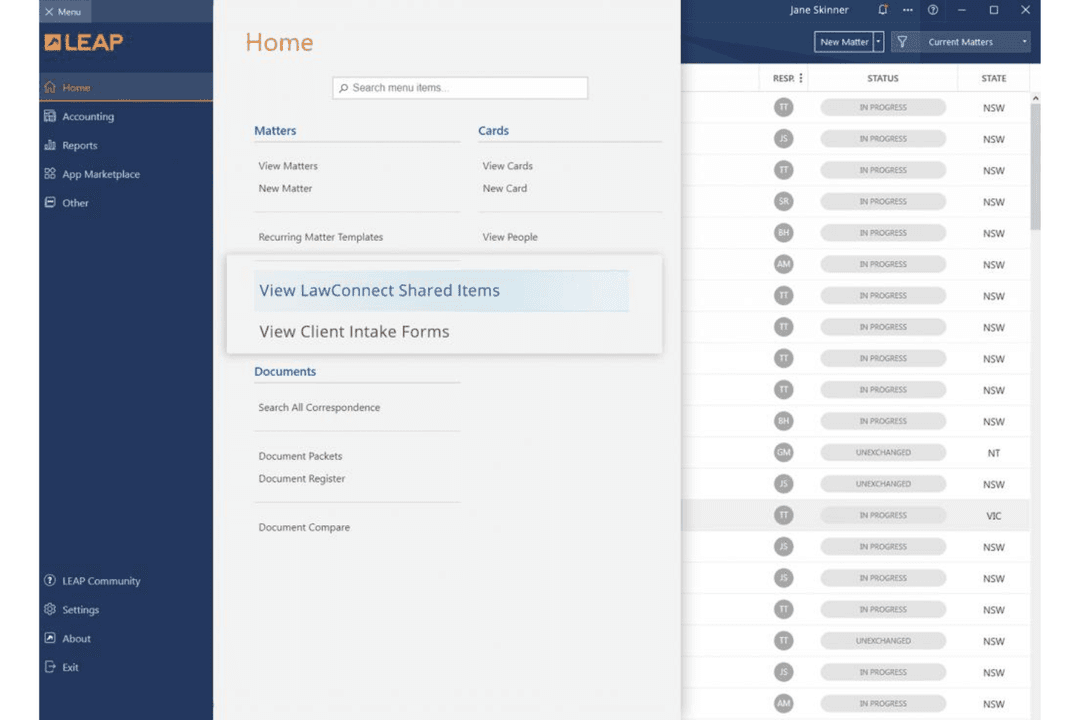
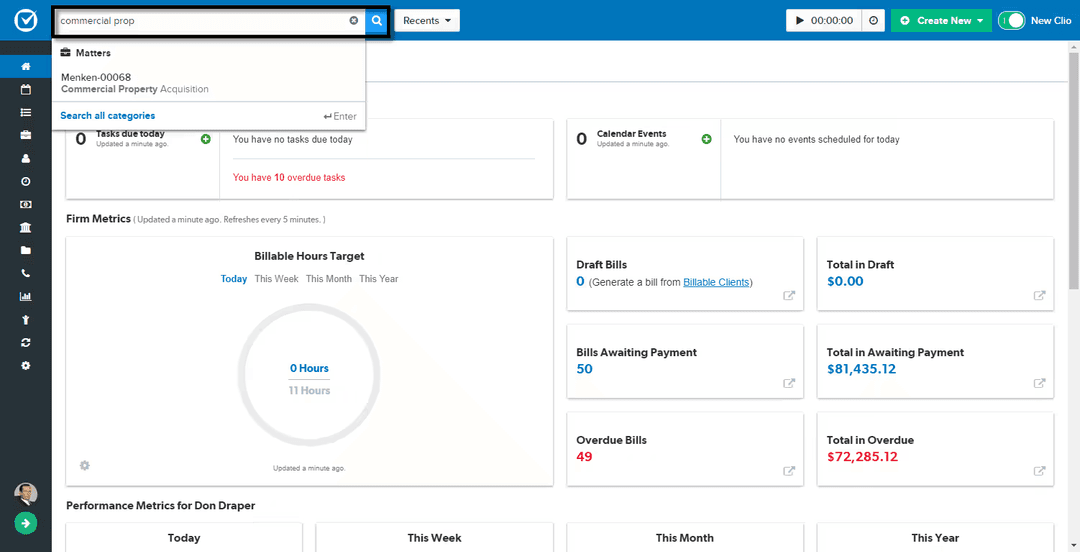
| FactorUser Interface | LEAPClassic interface designed for legal workflows, but can feel dated and busy to new users. | ClioModern, intuitive dashboard with clean navigation and quick access to common tasks. |
| FactorOnboarding | LEAPGuided setup with legal-specific templates, though some tasks take longer to master. | ClioStreamlined onboarding with in-app tips and a clear learning path for new users. |
| FactorCustomization | LEAPBuilt-in legal document templates, but custom workflows require extra setup time. | ClioFlexible workflow customization with drag-and-drop tools and easy settings changes. |
| FactorSupport Access | LEAPIn-app help and regional teams, but response times can vary during peak periods. | ClioExtensive online help center and live chat support, usually fast to respond. |
| FactorMobile Access | LEAPFully-featured mobile app, yet interface feels busier on smaller screens. | ClioSleek mobile app with simplified menus and strong feature parity with web version. |
Clio comes out ahead if you want a quick, easy start and a clean interface, while LEAP is a good fit if you favor built-in legal content and don’t mind a busier layout. I find Clio’s user experience to be more polished and beginner-friendly, but LEAP’s legal-specific customizations win if your team prioritizes deep legal workflows.
LEAP
- Document automation saves time on repetitive drafting tasks
- Built-in trust accounting supports compliance with state bar rules
- Mobile app lets you manage cases and billing remotely
- Data migration can be slow and error-prone for some firms
- Some users report slow customer support response times
- Limited compatibility with non-Microsoft email platforms
Clio
- The software provides efficient billing and invoicing tools to streamline your financial tasks.
- Clio offers responsive customer support that helps your team quickly resolve issues.
- You can manage cases and documents easily with Clio's intuitive interface.
- Some users report occasional glitches that disrupt their workflow.
- Advanced customization options are limited compared to other tools.
- Your team might find the onboarding process a bit cumbersome.
LEAP
- Solo PractitionersLEAP’s all-in-one platform reduces the need for multiple tools and manual processes.
- Small Law FirmsMatter management, billing, and document automation are tailored for firms with limited IT resources.
- Family Law PracticesPre-built templates and forms for family law streamline casework and filings.
- Real Estate LawIntegrated conveyancing tools and e-signature support real estate transactions.
- Legal Aid OrganizationsCloud access and mobile app help manage high case volumes on the go.
- In-House Legal TeamsCentralized document storage and compliance features support internal legal operations.
Clio
- Solo PractitionersYou can easily handle client interactions and document management with Clio's straightforward interface.
- Small Law FirmsUse Clio's billing and case management tools to help your small firm manage tasks efficiently without the need for extensive resources.
- Family Law PracticesClio's intuitive tools keep your case management organized, ensuring you focus on your clients' needs.
- Legal DepartmentsThe platform supports your legal department with responsive customer service and efficient workflow management.
- Real Estate Law FirmsClio's document automation and billing features streamline your work, allowing you to handle transactions smoothly.
- Corporate Legal DepartmentsClio's powerful features help your corporate team maintain compliance and manage cases effectively.
Who Should Use LEAP, and Who Should Use Clio?
LEAP is a great fit for small to midsized law firms that want deep legal content, jurisdiction-specific forms, and a familiar, lawyer-friendly interface right out of the box. Clio is better for teams that need flexibility, broad integration options, and a clean experience—especially if you want to supercharge workflows or build your own tech stack.
If your practice runs on specialized templates or strict legal workflows, LEAP feels like home. If you want modern usability, a big integration marketplace, and fast onboarding, Clio is the clear pick.
| LEAP | Clio | |
|---|---|---|
| Integrations | LEAP Focuses on deep, legal-centric integrations like NetDocuments and InfoTrack. | Clio Offers a large app marketplace, including Zapier, Google Drive, and video meetings. |
| Legal Templates | LEAP Pre-loaded with jurisdiction-specific forms and legal content tailored for local law. | Clio Fewer built-in templates, but supports custom documents and form creation. |
| Pricing Model | LEAP All-in-one subscription with most features standard, plus paid extras and add-ons. | Clio Tiered pricing plans—core features in lower tiers, premium features in higher plans. |
| User Interface | LEAP Classic, legal-focused interface with lots of detail and a busier layout. | Clio Modern, clean dashboard designed for quick access and easy onboarding. |
| Workflow Flexibility | LEAP Built-in legal workflows, but customizations take extra setup and time. | Clio Highly customizable workflows and automations with drag-and-drop tools and open API. |
| Billing & Timekeeping | Each one offers built-in time tracking, expense logging, and flexible billing, including support for trust accounting and compliance with legal billing standards. |
|---|---|
| Cloud-Based Access | Both solutions run entirely in the cloud, giving your team anywhere access with secure logins, automatic updates, and synced data across devices and locations. |
| Core Case Management | Both LEAP and Clio give you core case and matter management tools—track deadlines, link documents, automate calendaring, and manage contacts all from one dashboard. |
| Mobile Access | LEAP and Clio both provide fully-featured mobile apps, so you can work on cases, track time, and manage documents whether you’re in the office or on the move. |
| Security Compliance | LEAP and Clio meet high legal security standards—bank-grade encryption, audit logs, granular access controls, and data management features tailored for law firm needs. |