

Legal invoice review software is a valuable asset for any company. With the right software, teams can enhance billing accuracy and improve cost efficiency. But finding the right legal invoice review software can be a challenge, especially with so many options available.
Using my experience with legal practice software, I tested and compared several of the top legal invoice review software available. From there, I compiled my results into detailed reviews to help you find the best software for your needs.
Why Trust Our Software Recommendations
6,700+
Reviews
20
Industry experts
16+
Evaluation factors
14
Years
Our team has been testing and reviewing software since 2012. As legal practice leaders ourselves, we know how difficult—and important—it is to choose the right software.
For this guide, we evaluated tools using hands-on testing and independent research, scoring tools using our selection criteria.
Our reviews reflect our human editorial judgment, not a sales pitch.
Legal Invoice Review Software Comparison Table
This comparison table summarizes pricing details for my top legal invoice review software selections:
| Tool | Best For | Trial Info | Price | ||
|---|---|---|---|---|---|
| 1 | Best for financial tracking | Free demo available | Pricing upon request | Website | |
| 2 | Best with extensive enterprise integrations | Free demo available | Pricing upon request | Website | |
| 3 | Best with customizable billing rules | Free demo available | Pricing upon request | Website | |
| 4 | Best for data analytics | Free demo available | Pricing upon request | Website | |
| 5 | Best for AI-driven billing guideline compliance | Free demo available | Pricing upon request | Website | |
| 6 | Best for insurance claims | Not available | Pricing upon request | Website | |
| 7 | Best for global compliance | Free demo available | Pricing upon request | Website | |
| 8 | Best for hybrid human and automated reviews | Free demo available | Pricing upon request | Website | |
| 9 | Best for effortless integration | 7-day free trial available | From $29/month | Website | |
| 10 | Best for detailed audits | Not available | Pricing upon request | Website |


Best Legal Invoice Review Software Reviews
Below are my detailed summaries of the best legal invoice review management software that made it onto my shortlist. My reviews offer a detailed look at the key features, pros & cons, integrations, and ideal use cases of each tool to help you find the best one for you.
 Best for financial tracking
- Free demo available
- Pricing upon request
Visit WebsiteCustomer Rating:4.6/5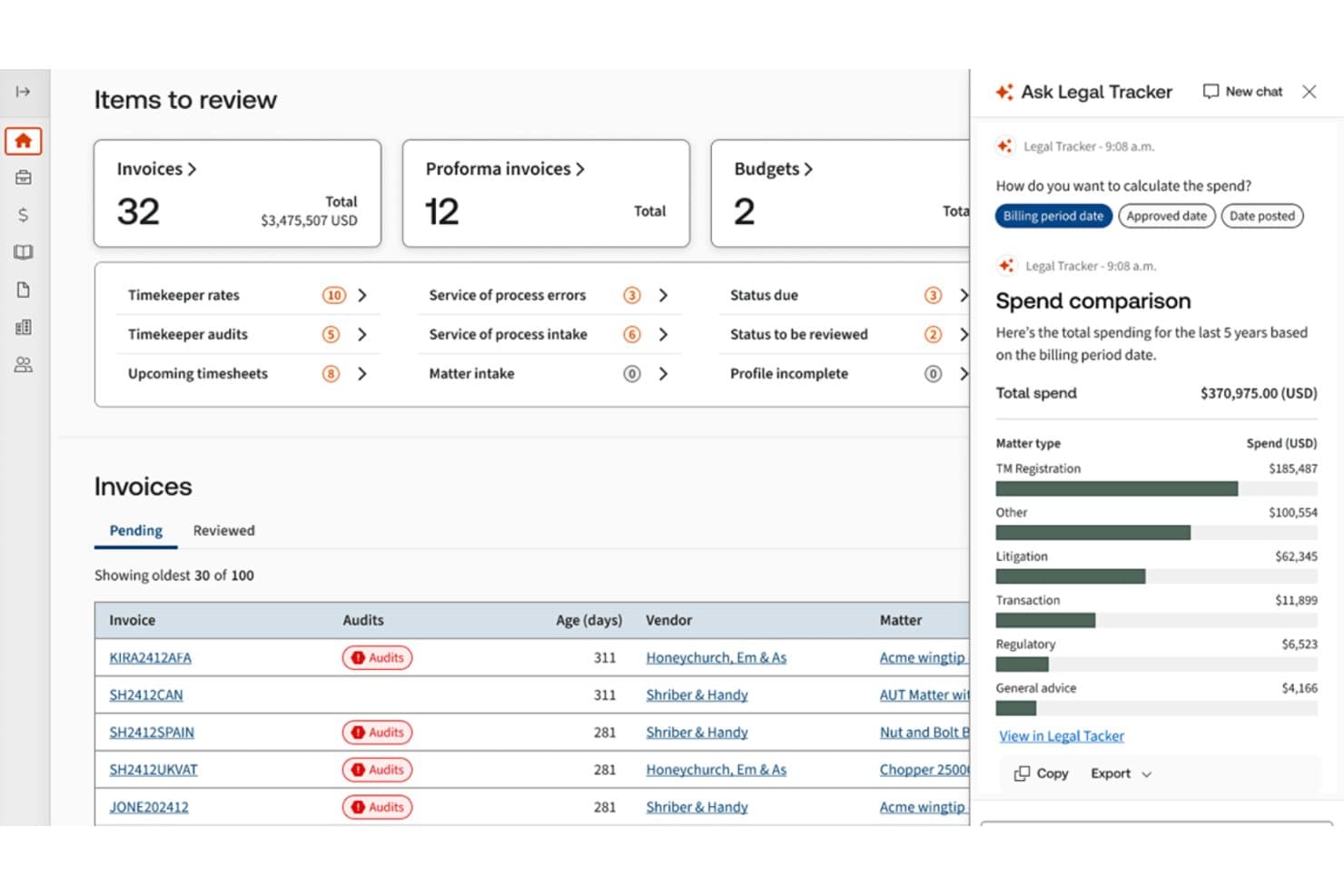
Legal Tracker offers an AI-powered spend comparison panel alongside an invoice review dashboard showing pending invoices, audit flags, and matter-type spending breakdowns. Legal Tracker is an enterprise e-billing and matter management platform that ingests LEDES-formatted invoices, applies AI-driven billing guideline enforcement, and connects outside counsel spend to matter budgets, rate cards, and approval workflows.
Who Is Legal Tracker Best For?
Legal Tracker is a strong fit for large enterprise legal departments managing high volumes of outside counsel invoices across multiple matters, firms, and jurisdictions.
Why I Picked Legal Tracker
Legal Tracker earns its spot on my shortlist because no other platform I've reviewed matches its financial tracking depth. I particularly like the Legal Tracker Advanced add-on, which benchmarks your legal costs against $310B of aggregated spend data across 1,800 corporate legal departments, giving you concrete numbers to back rate negotiations with outside counsel. The built-in Power BI and Tableau connectors also mean I can surface that spend data in the reporting tools my finance team already works in.
Legal Tracker Key Features
- Global e-billing support: Accepts and processes invoices in LEDES, PDF, and other international formats across 160 currencies.
- Automated accruals reporting: Collects, validates, and centralizes accruals data from outside counsel for forecasting.
- Customizable matter management: Centralizes all legal matters with configurable automation and matter-specific access controls.
- Vendor diversity tracking: Captures and reports on outside counsel diversity metrics for compliance and reporting needs.
Legal Tracker Integrations
Legal Tracker offers native integrations with iManage, NetDocuments, SharePoint, SAP, Oracle, NetSuite, Coupa, Power BI, and Tableau. An API is available for custom integrations.
Pros and Cons
Pros:
- Automated accruals collection from outside counsel
- Phase-based matter budgets tied to invoices
- Peer benchmarking across 1,800 legal departments
Cons:
- Reporting setup requires dedicated BI expertise
- Implementation can take up to 120 days
Learn more about Legal Tracker: Best with extensive enterprise integrations
- Free demo available
- Pricing upon request
Visit WebsiteCustomer Rating:4.6/5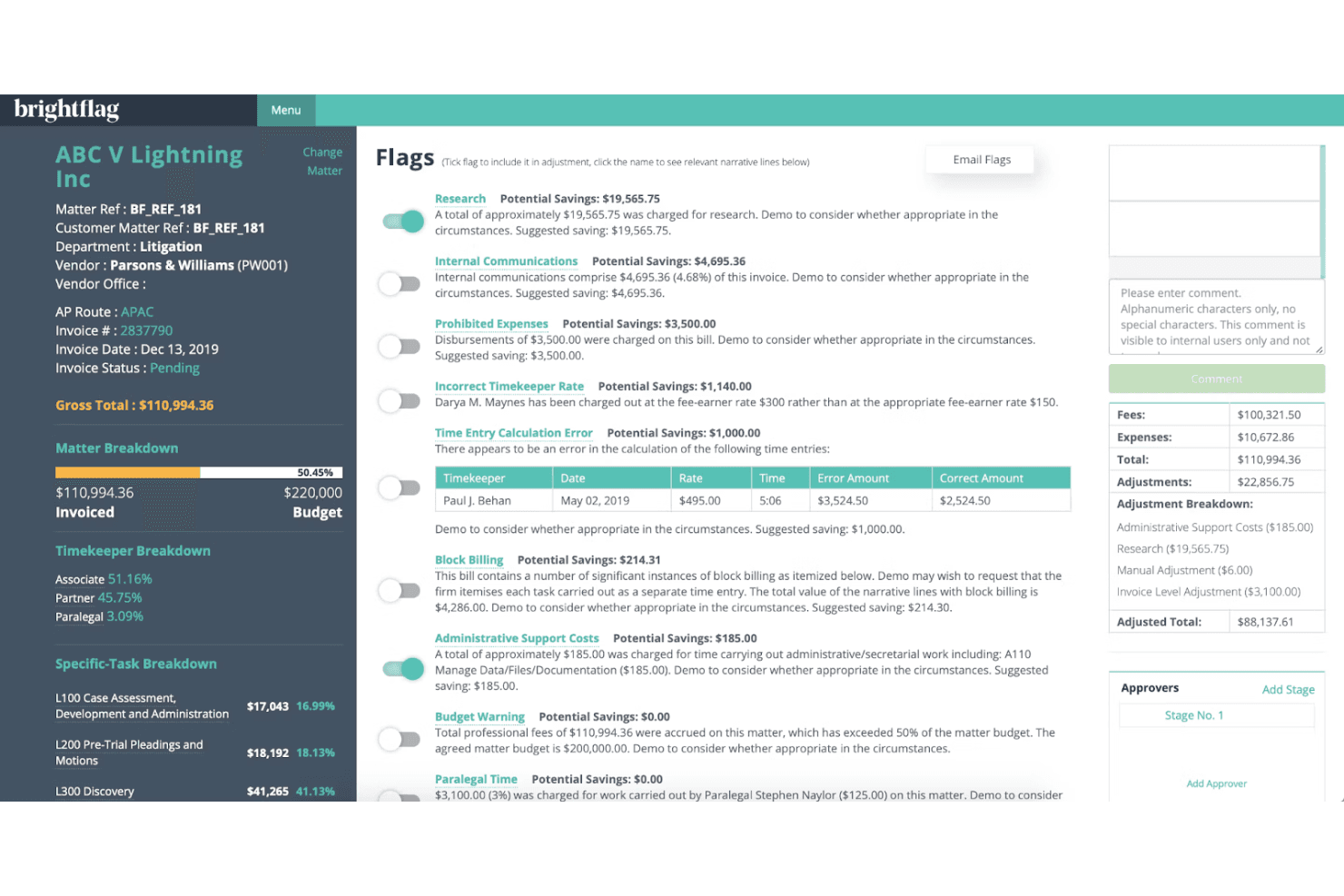
Brightflag leverages AI to automate invoice review, ensuring compliance and cost control. Brightflag is an AI-powered legal e-billing and matter management platform that automates invoice review, enforces outside counsel billing guidelines, and tracks legal spend across matters, vendors, and practice areas.
Who Is Brightflag Best For?
Brightflag is a strong fit for enterprise in-house legal teams that manage significant outside counsel spend and need structured controls across multiple firms, regions, and AP systems.
Why I Picked Brightflag
I picked Brightflag as one of the best because its finance system integration goes deeper than most e-billing tools I've reviewed. It supports a tiered connection model, from simple email delivery to real-time API sync with Workday, Oracle, and Coupa, keeping GL codes, vendor pay sites, and cost centers aligned automatically. That's genuinely useful when a legal team operates across multiple regions with different AP systems, since Brightflag handles all of them without manual reconciliation.
Brightflag Key Features
- AI-driven PDF invoice ingestion: Accepts and processes invoices in PDF format alongside LEDES files for seamless review.
- Accruals management automation: Automatically gathers and reconciles accrual data from outside counsel each month.
- Timekeeper rate card management: Centralizes approval workflows and negotiated rates for every law firm and timekeeper.
- Vendor diversity tracking: Captures data on law firm staffing demographics and diversity spend metrics for compliance and reporting.
Brightflag Integrations
Brightflag offers native integrations with Workday, Oracle, NetSuite, Coupa, Power BI, and Tableau. An API is available for custom integrations.
Pros and Cons
Pros:
- Benchmarking data informs firm rate negotiations
- Detailed accruals tracking across outside counsel
- Strong AI-driven billing guideline enforcement
Cons:
- Reporting customization requires additional configuration time
- Firm onboarding can be slow and resource-intensive
Learn more about Brightflag: Best with customizable billing rules
- Free demo available
- Pricing upon request
Visit WebsiteCustomer Rating:4.2/5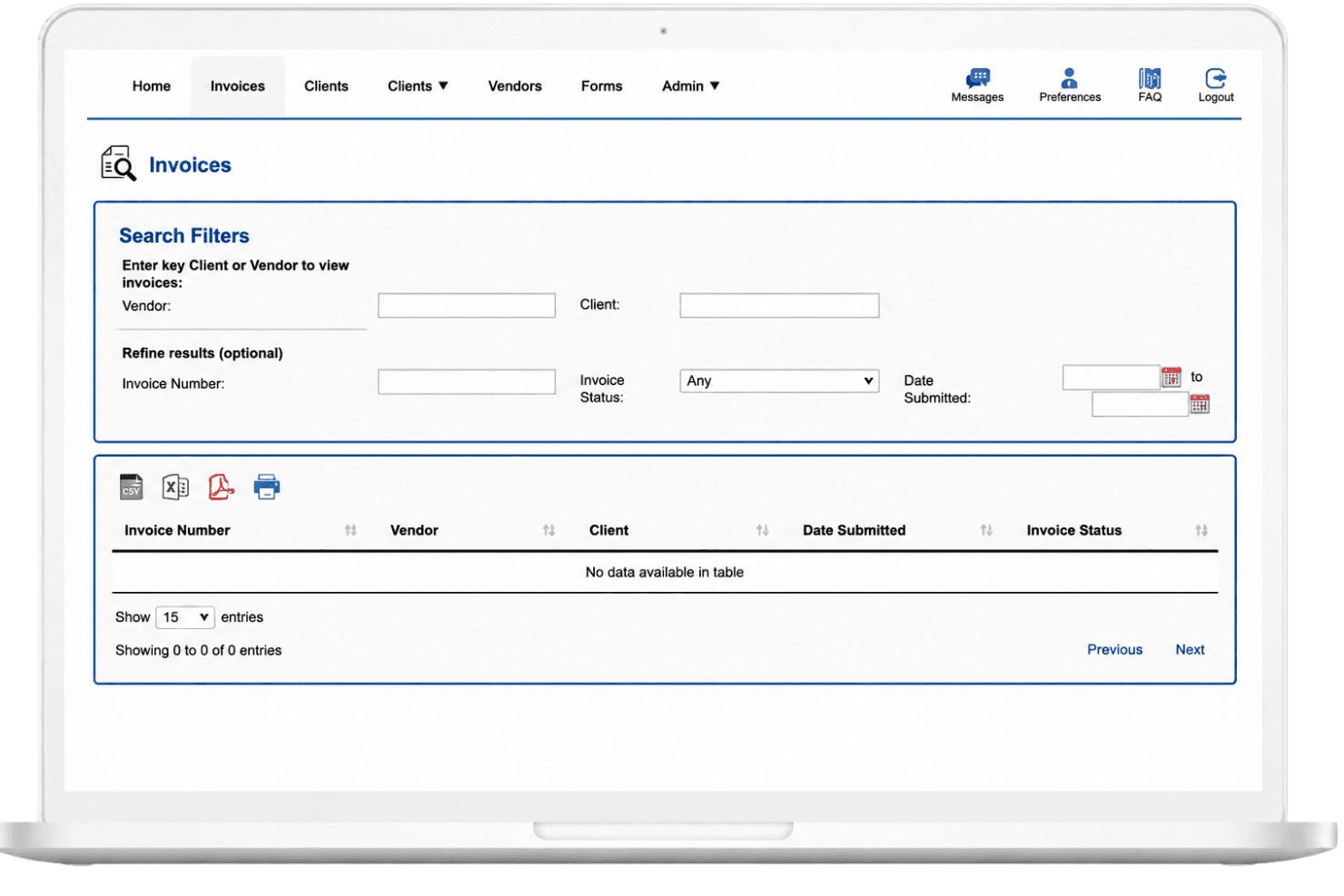
Mitratech Managed Bill Review dashboard showing invoice search filters and centralized invoice tracking interface. Mitratech Managed Bill Review is a managed legal bill review service that combines AI-powered invoice analysis with expert human review to validate outside counsel invoices, enforce billing guidelines, and track legal spend.
Who Is Mitratech Managed Bill Review Best For?
It's a strong fit for corporate legal departments and insurance organizations that manage high volumes of outside counsel invoices and need consistent, auditable billing guideline enforcement.
Why I Picked Mitratech Managed Bill Review
Mitratech Managed Bill Review earns its spot as one of the best on my shortlist because of how far its billing rule customization goes. I can configure rules that reflect specific outside counsel guidelines, flagging unauthorized timekeepers, block billing, and rate violations before a single invoice reaches payment. What I find especially useful is the 97% AI/ML predictive accuracy layered on top, which catches subtle discrepancies that static rules miss entirely.
Mitratech Managed Bill Review Key Features
- LEDES and UTBMS code validation: Ingests LEDES-formatted invoices and validates activity, task, and expense codes for compliance.
- Legal spend reporting dashboard: Delivers real-time analytics on legal costs by matter, firm, and timekeeper.
- PlatoBI benchmarking analytics: Provides anonymized peer benchmarking on rates, matter costs, and law firm performance.
- Centralized rate card management: Supports managing rate cards, timekeeper approvals, and negotiated discounts across outside counsel.
Mitratech Managed Bill Review Integrations
Mitratech Managed Bill Review offers native integrations with TeamConnect, TAP Workflow Automation, and the broader Mitratech platform. An API is available for custom integrations.
Pros and Cons
Pros:
- Dedicated human review team included
- 97% AI/ML predictive invoice accuracy reported
- Highly configurable outside counsel billing rules
Cons:
- Setup complexity is high for smaller teams
- Firm onboarding can be time-consuming
Learn more about Mitratech Managed Bill Review:
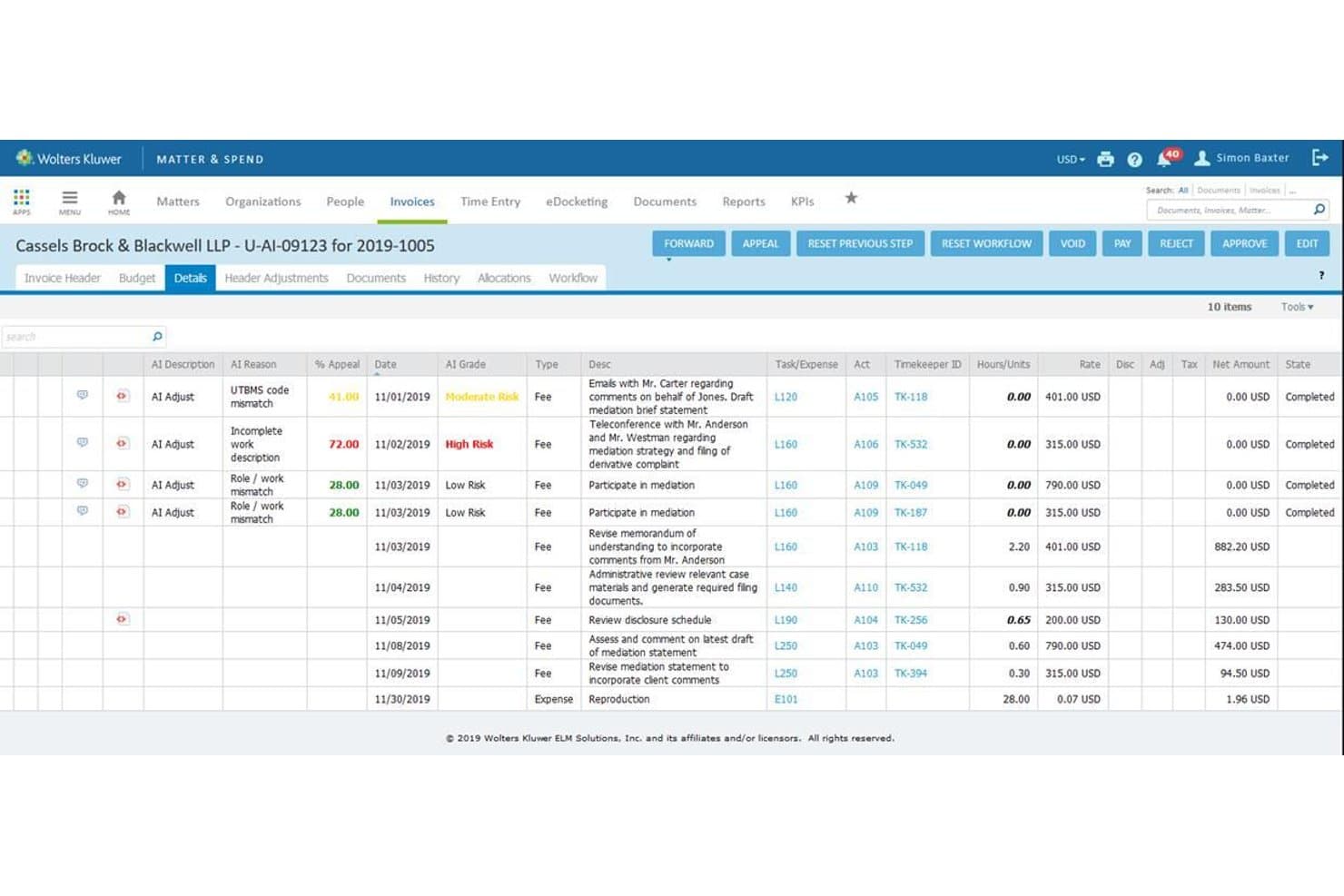
LegalVIEW BillAnalyzer offers AI-driven invoice line-item review with risk grading, adjustment flags, and detailed billing descriptions for legal matter invoices. LegalVIEW BillAnalyzer is an AI-powered legal bill review solution by Wolters Kluwer that combines machine learning, expert reviewer oversight, and a proprietary legal spend database to automate billing guideline compliance across outside counsel invoices.
Who Is LegalVIEW BillAnalyzer Best For?
It's a strong fit for enterprise legal departments and legal operations teams managing high volumes of outside counsel invoices across multiple firms and practice areas.
Why I Picked LegalVIEW BillAnalyzer
I picked LegalVIEW BillAnalyzer as one of the best because the data analytics depth here is unmatched in the legal bill review space. The built-in dashboard lets me drill into adjustments by practice area, vendor, task, and reason code, so I can pinpoint exactly where billing violations cluster across my outside counsel panel. Every insight is benchmarked against more than $230 billion in real legal spend data, meaning I'm comparing outside counsel performance against actual industry baselines, not just internal averages.
LegalVIEW BillAnalyzer Key Features
- Automated adjustment and approval workflows: The system routes invoice adjustments for multi-level approval and manages appeals from outside counsel.
- Custom billing rules configuration: Configure and maintain detailed billing guideline rules tailored to your organization’s specific requirements.
- LEDES and UTBMS code validation: Ingests common LEDES formats and validates UTBMS billing codes for every invoice line item.
- Timekeeper rate card management: Centralized management of rate cards, including approvals for new timekeepers and rate changes.
LegalVIEW BillAnalyzer Integrations
LegalVIEW BillAnalyzer offers native integrations with TyMetrix 360°, Passport, and Power BI. An API is available for custom integrations.
Pros and Cons
Pros:
- Built-in vendor diversity tracking across firms
- Automated accruals collection from outside counsel
- Deep benchmarking against $230B+ in legal spend
Cons:
- Primarily built for large enterprise legal departments
- Implementation can take 60-120 days to complete
Learn more about LegalVIEW BillAnalyzer: Best for AI-driven billing guideline compliance
- Free demo available
- Pricing upon request
Visit WebsiteCustomer Rating:4.8/5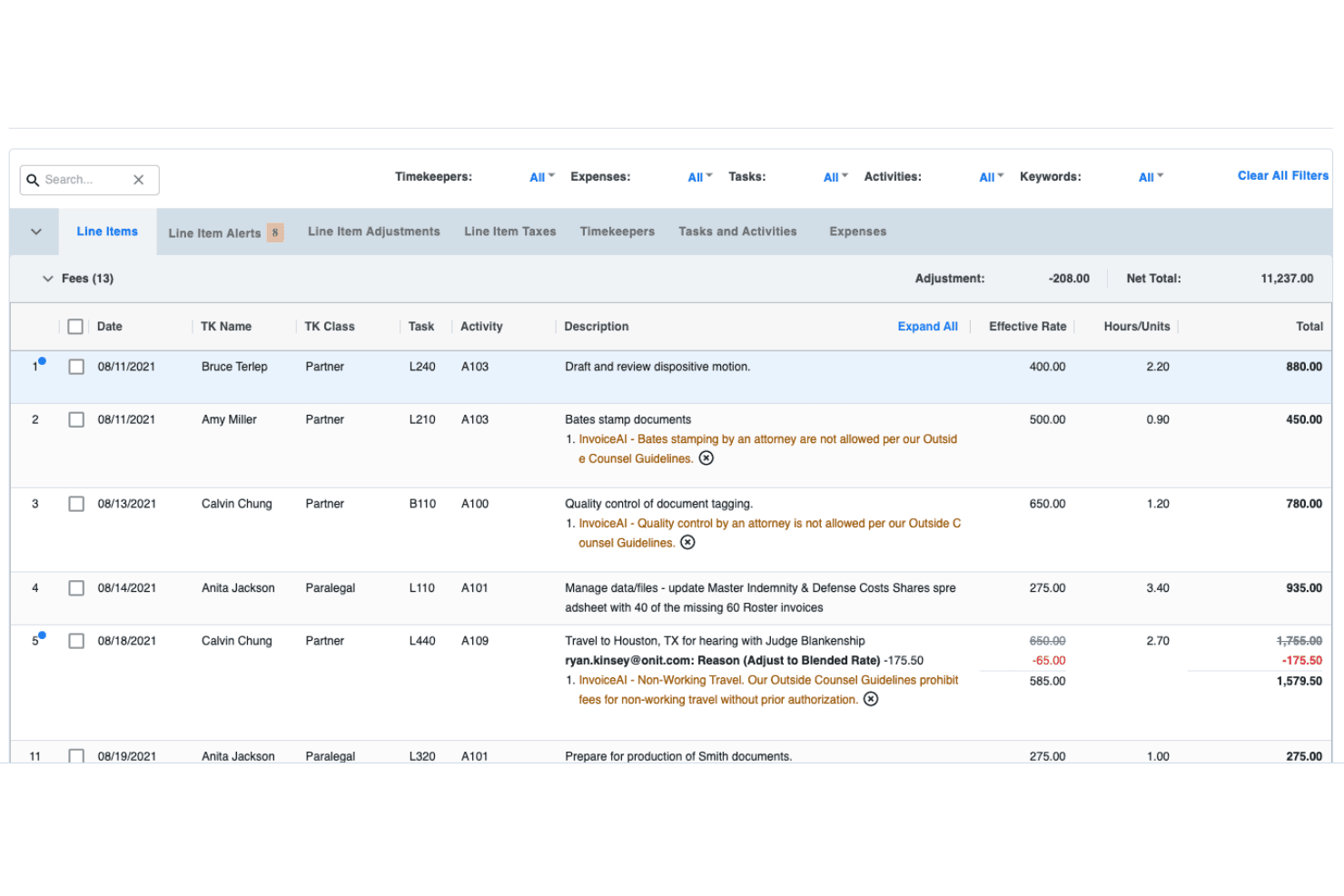
Onit InvoiceAI automates invoice reviews, improves accuracy, and enforces compliance. Onit InvoiceAI is an AI-native legal e-billing platform that automates outside counsel invoice review, applies billing guideline compliance checks, and delivers line-item analysis across matter, vendor, and timekeeper spend.
Who Is Onit InvoiceAI Best For?
It's a strong fit for enterprise legal operations teams managing high volumes of outside counsel invoices across multiple firms, matters, and jurisdictions.
Why I Picked Onit InvoiceAI
Onit InvoiceAI earns its spot on my shortlist because its Spend Agent applies natural language understanding to billing guidelines, catching violations at the line-item level with 38% greater accuracy than human reviewers. I particularly like how every flagged item comes with a plain-language explanation, so my team can act on or dispute adjustments without digging back through the original guideline document. The full audit trail behind each decision also makes compliance defensible when outside counsel pushes back on reductions.
Onit InvoiceAI Key Features
- Full LEDES and UTBMS support: Imports, parses, and validates all major LEDES formats with integrated UTBMS code sets.
- Matter-linked spend reporting: Real-time dashboards organize invoice data by matter, firm, or timekeeper for budget tracking and analysis.
- Integrated rate card management: Centralizes outside counsel rate approvals and tracks negotiated discounts and increases by firm.
- Accruals automation: Automatically collects and validates monthly spend accruals from outside counsel for accurate forecasting.
Onit InvoiceAI Integrations
Onit InvoiceAI offers native integrations with SAP, Salesforce, Tableau, and has native integrations across the Microsoft ecosystem, including Microsoft 365 and Azure. An API is available for custom integrations.
Pros and Cons
Pros:
- Scales across large outside counsel firm panels
- Full audit trail behind every invoice adjustment
- Highly accurate AI-driven line-item compliance checks
Cons:
- Reporting setup may require dedicated IT support
- Long deployment timelines for large firm panels
Learn more about Onit InvoiceAI:
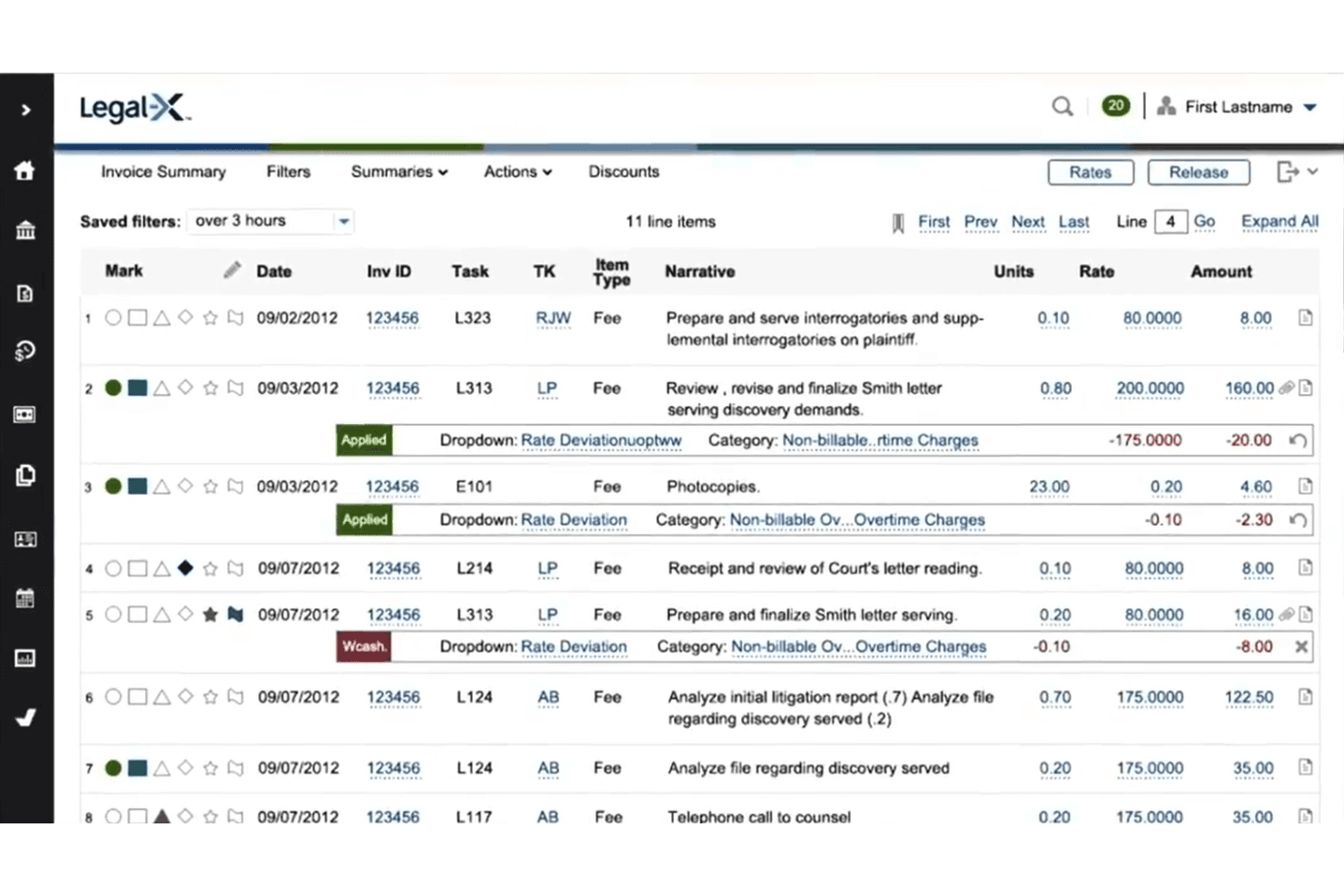
Bottomline’s solution uses AI and audits to manage invoices and reduce costs. Bottomline is a legal bill review platform that combines automated invoice validation with expert attorney auditors to help insurance carriers, TPAs, and self-insured organizations review outside counsel invoices for billing guideline compliance.
Who Is Bottomline Best For?
Bottomline is purpose-built for P&C insurance carriers, third-party administrators, and self-insured organizations managing high volumes of outside counsel invoices.
Why I Picked Bottomline
Bottomline earns its spot as one of the best on my shortlist because of how deeply it's built around P&C insurance bill review. I like that its nearly 200 attorney auditors, averaging 14+ years of insurance defense experience, apply your specific carrier guidelines to each invoice, catching issues automated rules miss. PartnerSelect adds another layer I appreciate: claims teams can assign matters to vetted law firms, track performance scores, and flag budget warnings before invoices escalate.
Bottomline Key Features
- LEDES and UTBMS code ingestion: Supports all major LEDES electronic invoice formats and validates UTBMS codes for billing consistency.
- Customizable billing rule engine: Enables configuration of automated guidelines to flag and manage non-compliant billing entries.
- Legal spend reporting dashboards: Provides real-time dashboards and ad-hoc reports by matter, firm, and timekeeper.
- Integrated vendor portal: Connects invoice review workflows with outside counsel records, rate cards, and budget tracking.
Bottomline Integrations
Native integrations are not clearly documented. The tool supports integrations via API for custom connections.
Pros and Cons
Pros:
- Deep P&C insurance billing expertise built in
- PartnerSelect tracks law firm performance scores
- Nearly 200 attorney auditors review invoices
Cons:
- Limited public documentation on platform capabilities
- Not built for non-insurance legal departments
Learn more about Bottomline:
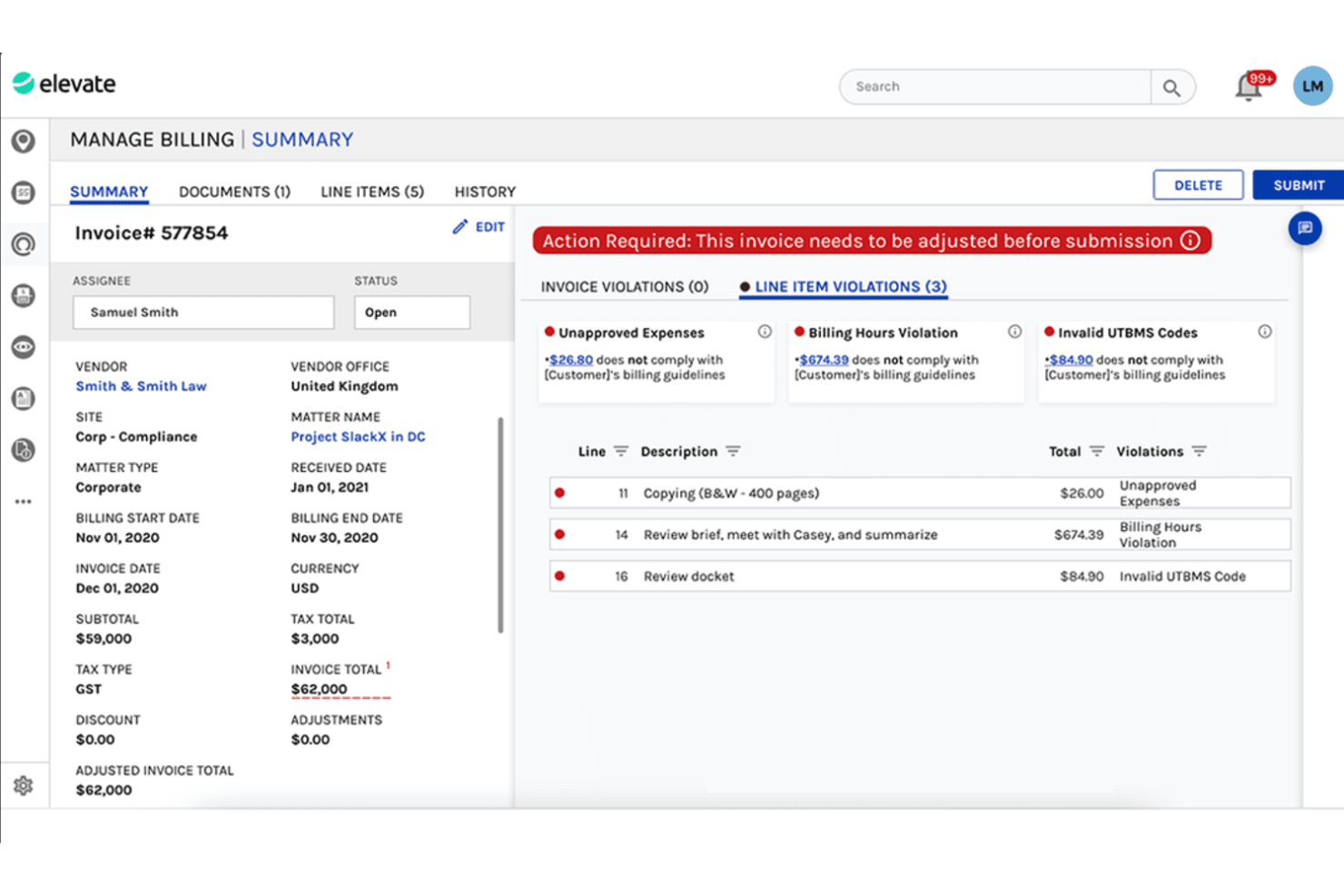
Elevate reviews invoices using AI and experts, boosting compliance and cost control. Elevate Managed Invoice Review is a hybrid AI and expert-led invoice review service for law departments that audits outside counsel invoices against billing guidelines, flags non-compliant entries, and provides multi-jurisdictional legal spend analytics.
Who Is Elevate Best For?
Large in-house legal teams at global enterprises managing outside counsel relationships across multiple regions and legal systems are Elevate's primary fit.
Why I Picked Elevate
I've included Elevate in my top picks because no other provider I've reviewed captures 100% of billing data from global suppliers regardless of their location, size, or technical infrastructure. That matters when your outside counsel network spans Asia, Europe, and Latin America, where billing formats and OCG conventions vary widely. Elevate's delivery teams operate across four continents with multi-language support and a consistent 7-point review methodology applied everywhere.
Elevate Key Features
- AI invoice insights reports: Get analytics on law firm compliance and billing trends through AI-powered dashboards.
- OCG enforcement automation: Automatically identifies and flags billing entries that fail to comply with custom outside counsel guidelines.
- Multi-level approval workflows: Route invoices through customizable, multi-step review and approval processes before final payment.
- Global e-billing system integration: Connect seamlessly with existing e-billing, finance, and matter management platforms across regions.
Elevate Integrations
Elevate offers native integrations with Mitratech, BusyLamp, and its proprietary Cael ELM suite. An API is available for custom integrations.
Pros and Cons
Pros:
- Strong enforcement of outside counsel guidelines
- Covers invoices across four continents consistently
- Expert human reviewers back AI flagging
Cons:
- Managed service limits in-house configuration control
- No self-serve software portal available
Learn more about Elevate: Best for hybrid human and automated reviews
- Free demo available
- Pricing upon request
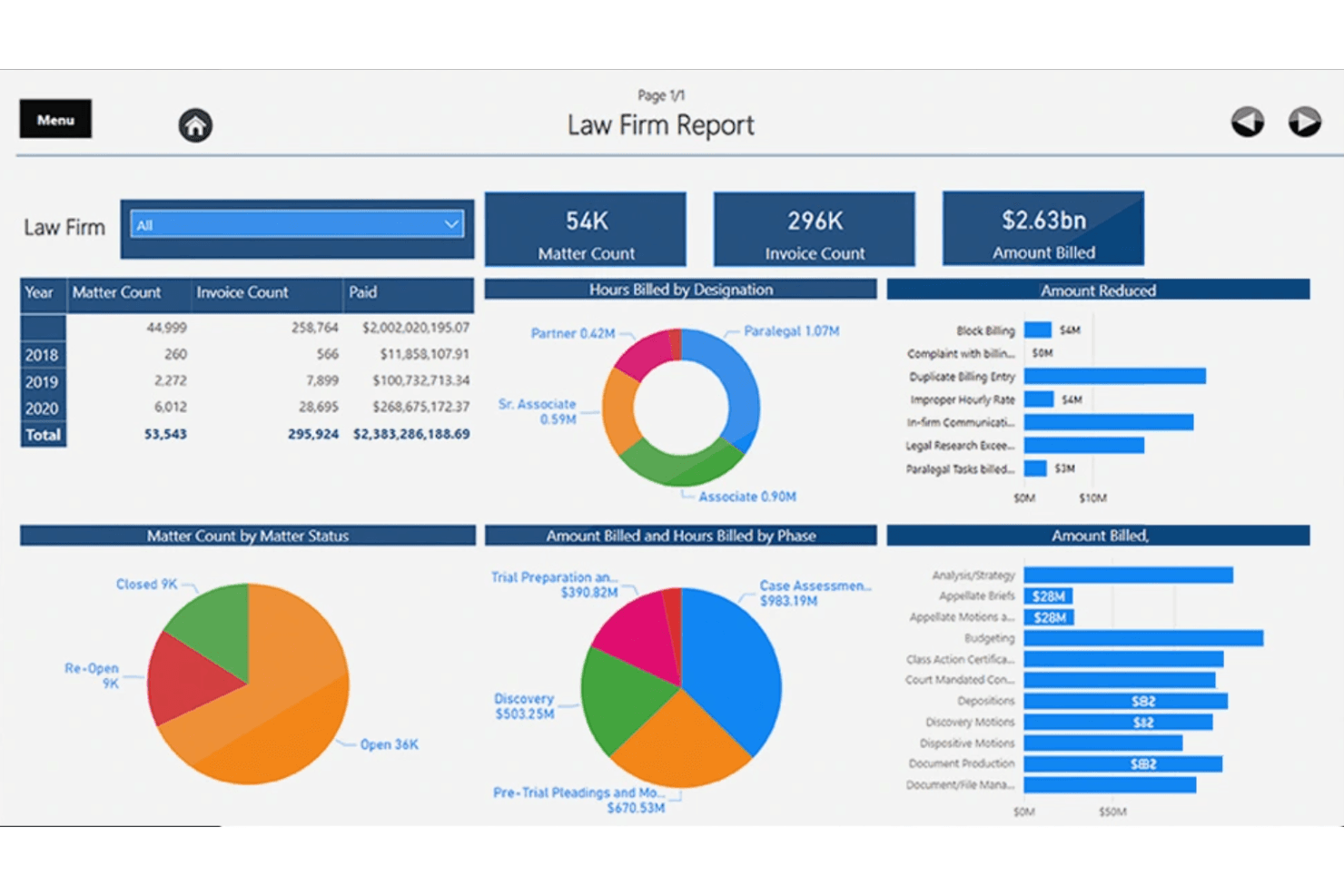
LSG's AI-bill uses AI to automate invoice review, ensuring accuracy and compliance. LSG AI-Bill is a legal invoice review platform that combines AI-powered narrative analysis with human legal fee auditors to assess outside counsel invoices for billing guideline compliance, rate accuracy, and UTBMS code validation.
Who Is LSG AI-Bill Best For?
LSG AI-Bill suits insurance carriers, TPAs, and corporate legal departments that manage high volumes of outside counsel invoices and need rigorous spend oversight.
Why I Picked LSG AI-Bill
LSG AI-Bill earns its spot as one of the best on my shortlist because no other tool in this space pairs BERT-based NLP analysis with attorneys who each hold a minimum of 10 years' post-qualification experience. I like that Quark, LSG's AI engine, scans every invoice line before a human auditor makes the final call, which catches both pattern-based issues and nuanced judgment calls that pure automation misses. I also appreciate that Quark is trained on client-specific billing guidelines rather than generic legal data, so the flags it surfaces are actually relevant to how a given client operates.
LSG AI-bill Key Features
- Comprehensive LEDES and UTBMS code validation: Ingests electronic invoices and verifies each line against legal billing standards.
- Multi-level approval workflows: Supports routed invoice approvals, write-off decisions, and law firm appeals before payment.
- Spend analytics and benchmarking dashboards: Tracks legal spend, vendor trends, and invoice outcomes across your entire panel.
- ERP and AP system integration: Connects invoice review results seamlessly with payment and general ledger platforms.
LSG AI-bill Integrations
Native integrations are not clearly documented. The tool supports integrations via API for custom connections to ERP, AP, and matter management systems.
Pros and Cons
Pros:
- Flags issues missed by pure automation
- AI engine trained on client-specific guidelines
- Human auditors catch nuanced billing judgment calls
Cons:
- Limited public transparency on deployment timelines
- Less suitable for fully self-service teams
Learn more about LSG AI-bill:
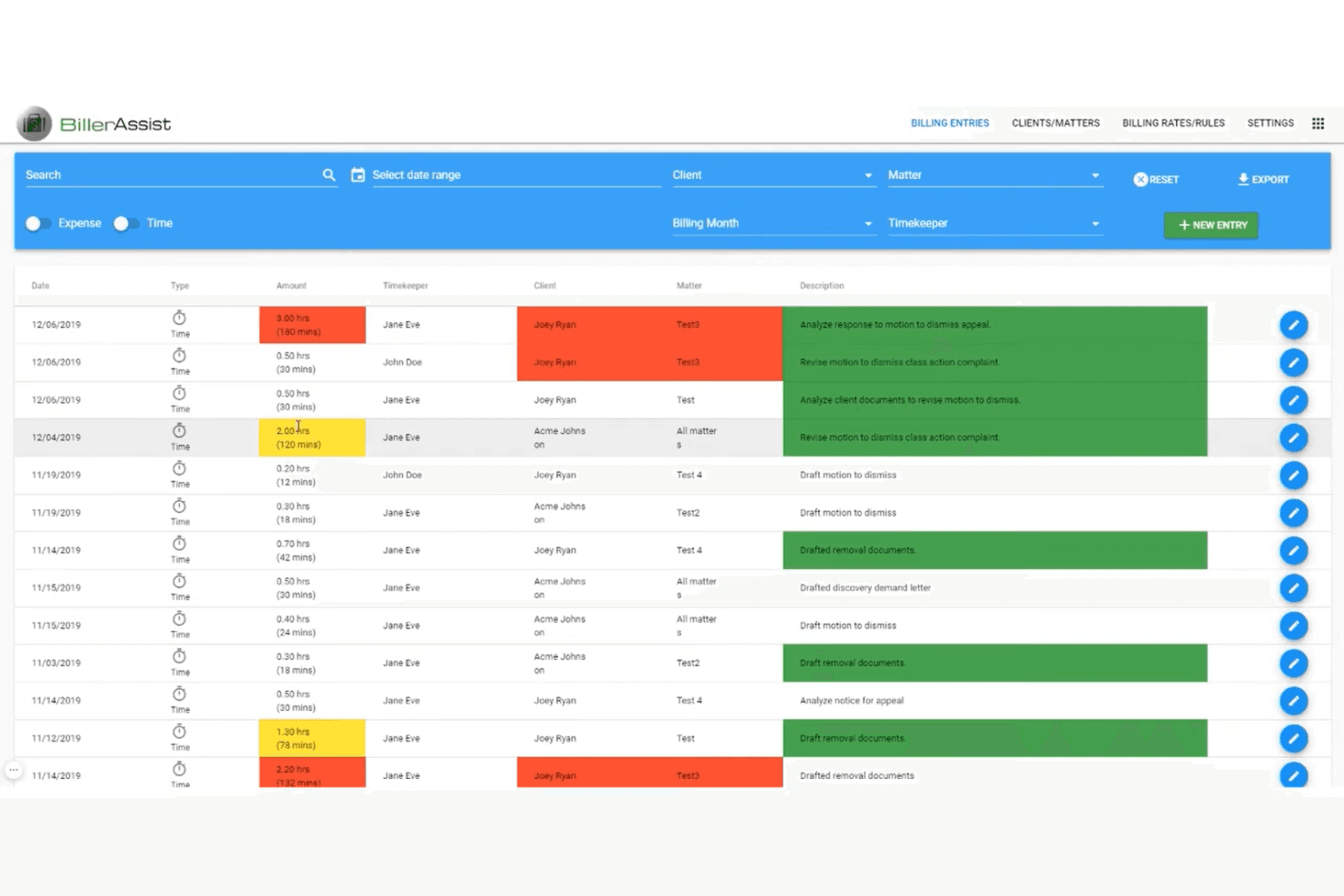
BillerAssist flags billing errors and compliance issues, speeding up invoice reviews. BillerAssist is an AI-powered legal invoice review tool that automates UTBMS coding, flags billing guideline violations, and processes LEDES-formatted invoices from within a firm's existing billing system.
Who Is BillerAssist Best For?
Law firm billing administrators and in-house legal teams looking to enforce outside counsel billing guidelines without replacing their existing billing system.
Why I Picked BillerAssist
BillerAssist earns its spot on my shortlist because it plugs directly into billing platforms like Clio, ActionStep, and Rocket Matter via one-click import, without displacing them. I like that it applies UTBMS codes automatically and flags OCG violations using the firm's own historical billing data as the compliance benchmark. In practice, that means my team can enforce billing guidelines from day one, without a costly system migration.
BillerAssist Key Features
- Color-coded error flagging: Billing entries are automatically highlighted with color codes to quickly indicate compliance issues or violations.
- Automatic OCG enforcement: Client or matter-specific guidelines are set and applied to identify non-compliant activities immediately.
- Historical data analysis: The system reviews new entries against past billing records from your own database, not just generic models.
- UTBMS auto-coding and LEDES file import: Time entries are automatically assigned UTBMS codes with support for importing LEDES files for nearly any billing system.
BillerAssist Integrations
BillerAssist offers native integrations with Clio, ActionStep, Rocket Matter, and PracticePanther. An API is available for custom integrations.
Pros and Cons
Pros:
- Color-coded flags speed up error identification
- Flags OCG violations using historical billing data
- Auto-applies UTBMS codes to time entries
Cons:
- Less suited for large enterprise legal departments
- Limited matter-level spend reporting depth
Learn more about BillerAssist:
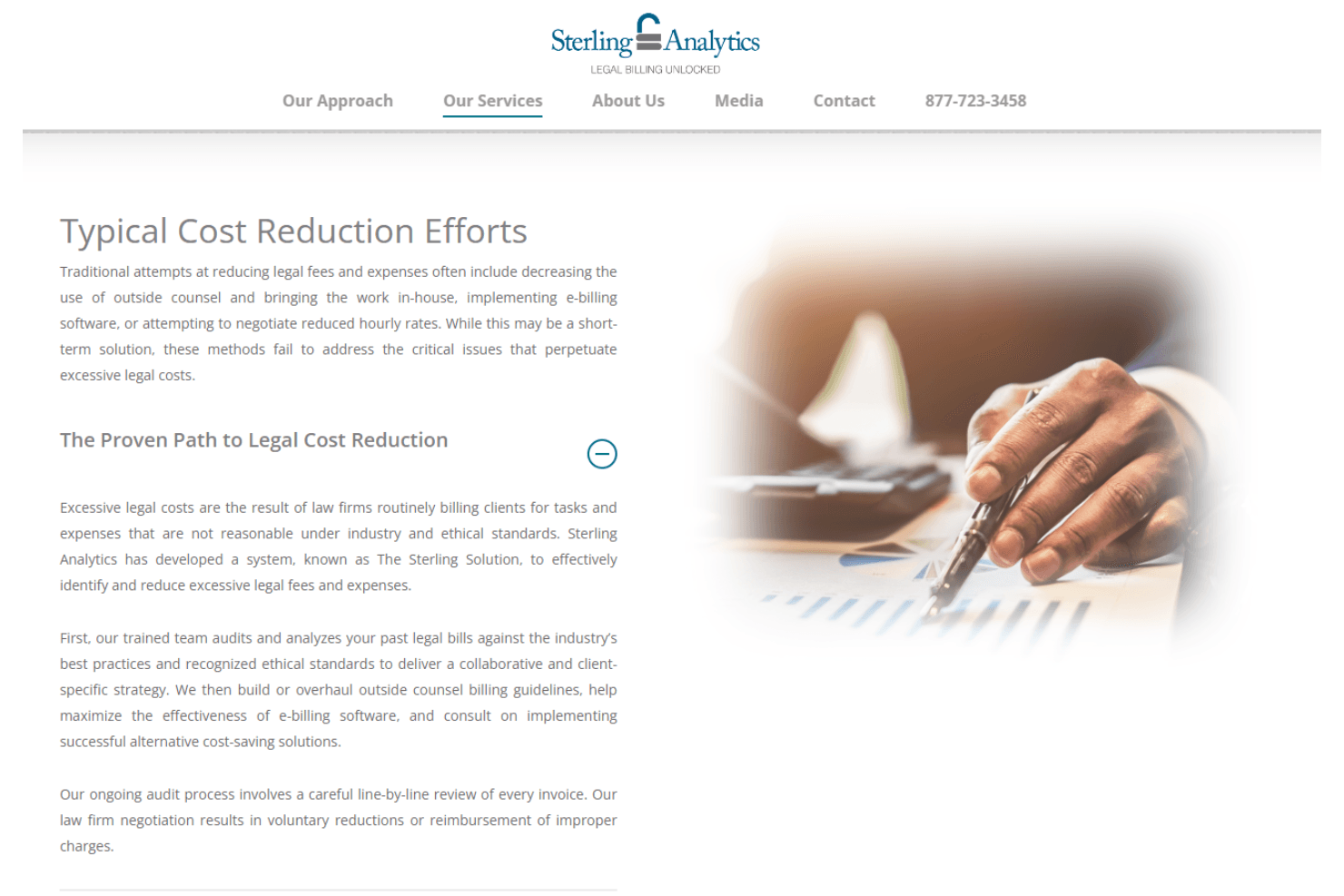
Sterling Analytics audits invoices line-by-line, reducing excessive fees and ensuring compliance. Sterling Analytics is an attorney-led legal bill review service that conducts line-by-line invoice audits, develops outside counsel billing guidelines, and delivers ongoing spend analysis for corporate legal departments.
Who Is Sterling Analytics Best For?
Sterling Analytics suits corporate legal departments at mid-to-large companies with significant outside counsel spend, particularly in insurance and financial services.
Why I Picked Sterling Analytics
Sterling Analytics earns its spot on my shortlist because its audit depth goes beyond what any automated rules engine can deliver. I picked it for its attorney-led, line-by-line invoice review, which catches nuanced issues like inappropriate timekeeper billing levels that static checks routinely miss. The Sterling Solution's six-step methodology, spanning historical analysis, billing guideline development, and direct law firm negotiation, means my team isn't just flagging problems but actively recovering improper charges.
Sterling Analytics Key Features
- Collaborative billing guideline development: Senior attorneys work directly with clients to draft or refine custom outside counsel billing guidelines.
- E-billing platform agnostic approach: Service adapts to any existing e-billing, matter management, or document management system.
- Line-by-line invoice auditing by attorneys: Every invoice is reviewed by trained legal professionals for compliance, appropriateness, and accuracy.
- Custom reporting deliverables: Clients receive tailored reports summarizing billing trends, compliance issues, and cost recovery recommendations.
Sterling Analytics Integrations
Native integrations are not clearly documented. The tool adapts to work with existing e-billing and matter management systems as specified by each client.
Pros and Cons
Pros:
- Billing guideline development included in service
- Six-step methodology covers full billing lifecycle
- Attorney-led review catches nuanced billing issues
Cons:
- Limited scalability for high-volume invoice batches
- No self-service software platform available
Learn more about Sterling Analytics:
Other Legal Invoice Review Software
Here are some additional legal invoice review software options that didn’t make it onto my shortlist, but are still worth checking out:
- 11LegalBillReview.comBest for small firms
- 12Legal DecoderBest for cost management
- 13Mitratech AlyneBest for enterprise solutions
- 14Onit SimpleLegalBest for e-billing simplicity
- 15LawVuBest for legal ops teams
- 16TyMetrix 360°Best for data-driven insights
- 17EffortlessLegal BillerAssistBest for client billing needs
- 18ApperioBest for real-time tracking
- 19BillBLASTBest for invoice automation
How I Evaluate Legal Invoice Review Software
I evaluate tools on two layers: baseline criteria—like LEDES parsing and automated billing rules—and the differentiators that separate a good platform from the right one for your legal ops team.
Core Functionality (Table Stakes For This List)
When I'm selecting tools for my list, I rank each one on a scale from 0 (does not offer the functionality) to 5 (excels in this area) for each core functionality listed below. Then, I calculate the tool's total score into a percentage. Each tool needs to achieve a minimum total score of 65% to be considered for inclusion.
- LEDES & UTBMS Parsing: I check whether a platform can ingest major LEDES formats (1998B, 98BI, XML 2.0) and validate UTBMS codes, since firms that can't submit electronically create bottlenecks fast.
- Automated Billing Rules: Each tool should let you configure custom guidelines—rate caps, block billing flags, unauthorized timekeeper alerts—and auto-apply them at the line-item level on intake.
- AI-Driven Invoice Analysis: Beyond static rules, I look for ML-powered narrative review that catches issues like vague descriptions or duplicate entries a rules engine alone would miss.
- Adjustment & Approval Workflows: The platform should support line-item reductions, firm appeals, and multi-level routing so reviewers, legal ops, and approvers each have a clear step in the process.
- Legal Spend Reporting: Dashboards that break down spend by matter, firm, timekeeper, and budget variance give legal ops the visibility they need for quarterly business reviews and panel evaluations.
- Matter & Vendor Integration: I evaluate how well the tool links invoices to matter records, rate cards, and budgets—disconnected data means you're reconciling in spreadsheets instead of the platform.
Once I have a list of tools that meet this criteria, I consider what sets each platform apart.
Differentiating Factors (What Sets Vendors Apart)
Here's how I compare and contrast different vendors:
Standout Features
Timekeeper rate management is a big differentiator. I look for platforms that centralize rate cards and handle approval workflows when firms submit annual increases. Matter budgeting tools also carry weight, especially phase-based budgets that trigger alerts when spend exceeds thresholds mid-litigation. Benchmarking analytics round out the picture, giving legal ops anonymized peer data to pressure-test whether their panel rates are competitive before renewal season.
Beyond Features
Integration with ERP and AP systems matters a lot here. If your platform can't sync approved invoices to SAP or Oracle for payment, your team ends up doing double data entry. I also evaluate implementation support closely—onboarding hundreds of outside counsel firms to a new e-billing portal is a project in itself, and vendors that provide dedicated firm enablement make a real difference. For global legal departments, multi-currency and VAT handling is worth checking early, since gaps there create manual workarounds at scale.
How to Choose Legal Invoice Review Software
It’s easy to get distracted by long feature lists and overlapping billing capabilities. To keep your software selection focused, use this checklist to compare legal invoice review platforms against your team’s actual review process:
| Factor | What to Consider |
|---|---|
| FactorScalability | What to ConsiderCan the software handle growing invoice volumes, additional matters, more law firms, and multiple legal entities without slowing down the review process? |
| FactorIntegrations | What to ConsiderDoes it connect with your existing e-billing, matter management, legal spend management, accounting, and ERP systems? Confirm whether invoice and matter data sync automatically. |
| FactorInvoice format support | What to ConsiderDoes the platform support the invoice formats your outside counsel uses, including LEDES and electronic invoices? Confirm how non-standard invoices are handled. |
| FactorCustomizability | What to ConsiderCan your team adjust approval workflows, review rules, thresholds, exception handling, and reporting without relying heavily on vendor support? |
| FactorEase of use | What to ConsiderHow easily can reviewers identify billing violations, make adjustments, add comments, approve invoices, and track disputed charges? Test the workflow from an actual reviewer’s perspective |
| FactorImplementation and onboarding | What to ConsiderWhat is required to migrate billing guidelines, historical invoices, vendor records, rates, and matter data? Ask about configuration support, training, testing, and rollout assistance. |
| FactorCost | What to ConsiderCan you predict the total cost based on invoice volume, users, matters, or spend under management? Check for additional charges tied to implementation, integrations, support, or advanced review capabilities. |
| FactorSecurity safeguards | What to ConsiderHow does the vendor protect confidential invoice and matter information? Review encryption, role-based access, audit logs, data retention policies, and relevant security certifications. |
| FactorSupport availability | What to ConsiderWhat support is available when invoice processing or approval issues occur? Clarify support channels, response times, escalation procedures, and access to implementation or account specialists. |
What Is Legal Invoice Review Software?
Legal invoice review software helps legal teams manage and audit their billing processes for accuracy and compliance. Legal professionals, such as in-house counsel and law firm accountants, generally use these tools to ensure billing practices align with guidelines and to optimize financial management and case management.
Features like AI-powered insights, predictive analytics, and customizable workflows help identify billing errors, forecast expenses, and adapt processes to fit team needs. Overall, these tools offer significant value by improving billing accuracy and supporting effective financial planning in legal operations.
Features Of Legal Invoice Review Software
When selecting legal invoice review software, keep an eye out for the following key features:
- AI-powered insights: Analyzes billing data to identify patterns and potential issues, improving accuracy.
- Predictive analytics: Forecasts future expenses, helping teams plan and manage budgets effectively.
- Customizable workflows: Allows teams to tailor processes to fit their needs, enhancing flexibility.
- Comprehensive reporting: Provides detailed reports on billing trends and discrepancies for better financial oversight.
- Real-time alerts: Notify users of billing issues as they occur, enabling quick resolution.
- Timekeeping: Offers records to attach tasks to time logs, and time logs to invoice and accounting software.
- Detailed audits: Scrutinizes invoices to ensure compliance and uncover potential savings.
- Cost management tools: Helps identify unnecessary expenses and optimize legal spending.
- Sustainability features: Supports digital invoicing to reduce paper use and promote environmentally friendly practices.
- Advanced budgeting tools: Allows financial goal setting and tracking to maintain control over legal expenses and expense tracking.
Benefits Of Legal Invoice Review Software
Implementing legal invoice review software provides several benefits for your team and your law practice. Here are a few you can look forward to:
- Improved billing accuracy: AI-powered legal e-billing insights help identify and correct billing errors, ensuring precise invoices.
- Better financial planning: Predictive analytics and advanced budgeting tools assist in forecasting expenses and setting financial goals.
- Increased compliance: Detailed audits and real-time alerts ensure adherence to billing guidelines and quick resolution of issues.
- Cost savings: A cost management solution to help identify unnecessary expenses and optimize legal spending.
- Enhanced flexibility: Customizable workflows allow teams to adapt processes to their specific needs, increasing operational efficiency.
- Sustainability: Features supporting digital invoicing reduce paper use, like online payments and digital financial reporting records.
- Transparency and trust: Blockchain technology ensures transaction records are tamper-proof, building trust in the billing process.
Costs And Pricing Of Legal Invoice Review Software
Selecting legal invoice review software requires an understanding of the various pricing models and plans available. Costs vary based on features, team size, add-ons, firm billing volume, and more. The table below summarizes common plans, their average prices, any flat fees or subscription plans, and typical features included in legal invoice review software solutions:
Plan Comparison Table for Legal Invoice Review Software
| Plan Type | Average Price | Common Features |
|---|---|---|
| Plan TypeFree Plan | Average Price$0 | Common FeaturesBasic invoice auditing, limited reporting, and email support. |
| Plan TypePersonal Plan | Average Price$10-$30/user/month | Common FeaturesAdvanced analytics, customizable alerts, and priority support. |
| Plan TypeBusiness Plan | Average Price$40-$80/user/month | Common FeaturesComprehensive reporting, cost management tools, and team collaboration features. |
| Plan TypeEnterprise Plan | Average Price$100-$200/user/ month | Common FeaturesPredictive analytics, AI-powered insights, and dedicated account management. |