

Hukuk alanının tüm inceliklerini bilen biri olarak, günlük karşılaştığınız; faturalandırılabilir saatleri takip etmek, faturaları yönetmek ve verimli bir iş akışını sürdürmek gibi zorlukları anlıyorum. İşte hukuk alanı için zaman takibi yazılımları bu noktada yardımcı olabilir.
Hukuk alanı için zaman takibi yazılımları , zaman kayıtlarını yönetme ve faturalandırma doğruluğunu sağlama; hukuk bürosu araçlarıyla entegrasyon; hukuki faturalandırma standartlarını uygulama ve anlaşmazlıkları önlemek için kesin zaman kayıtları sunma gibi yaygın sorunları çözer. Faturalandırılabilir saatleri doğru ve verimli bir şekilde takip etmekte zorlanıyorsanız hukuk alanı için zaman takibi yazılımına ihtiyacınız olabilir.
Bir hukuk teknolojileri analisti olarak, en iyi önerilerimi öğrenmek için okumaya devam edin.
Why Trust Our Software Recommendations
6,700+
Reviews
20
Industry experts
16+
Evaluation factors
14
Years
Our team has been testing and reviewing software since 2012. As legal practice leaders ourselves, we know how difficult—and important—it is to choose the right software.
For this guide, we evaluated tools using hands-on testing and independent research, scoring tools using our selection criteria.
Our reviews reflect our human editorial judgment, not a sales pitch.
Hukuk Alanı İçin Zaman Takibi Yazılımları Karşılaştırma Tablosu
Bu karşılaştırma tablosu, hukuk alanı için en iyi zaman takibi yazılımı seçimlerimin fiyatlandırma ayrıntılarını özetlemektedir
Sorted by: Default
| Tool | Starting Price | Website | |
|---|---|---|---|
Best for billing, invoicing, and a client portal in one place | 4.8 out of 5 | $49/user/month Free trial available | Website |
Best for Microsoft 365-centered teams | 4.5 out of 5 | $7/user/month Free plan + 14-day trial + demo available | Website |
Best for flexible time tracking | 4.6 out of 5 | $6/user/month Free plan + Free trial + Free demo available | Book Demo |
Best for attorneys desiring a detailed view of time utilization | 4.7 out of 5 | $3.99/user/month Free plan + free trial + free demo available | Website |
Best for firms seeking a complete legal practice management suite | 4.7 out of 5 | $49/user/month 7-day free trial | Website |
Best for firms wanting robust project management features | 4.5 out of 5 | Pricing upon request 10-day free trial + demo available | Website |
Best for cloud-based convenience with integrated expense tracking | 4.7 out of 5 | Free plan | Website |
Best for AI-powered timesheets | 4.3 out of 5 | $6/user/month Free trial + demo available | Website |
Best for firms needing personalized, professional invoice creation | 4.3 out of 5 | Free forever plan Not available | Website |
Best for firms seeking advanced case management and time tracking | 4.4 out of 5 | $45/user/month Free plan + free demo available | Website |


Hukuk Alanı İçin En İyi Zaman Takibi Yazılımı İncelemeleri
Aşağıda, kısa listeme giren hukuk alanı için en iyi zaman takibi yazılımlarına ilişkin ayrıntılı özetlerimi bulabilirsiniz. İncelemelerim, size en uygun aracı bulmanıza yardımcı olmak için her aracın temel özelliklerine, artılarına ve eksilerine, entegrasyonlarına ve ideal kullanım alanlarına ayrıntılı bir bakış sunuyor.
 Best for billing, invoicing, and a client portal in one place
- Free trial available
- From $49/user/month
Visit WebsiteCustomer Rating:4.8/5
Main dashboard of Bill4Time Bill4Time is a comprehensive legal time tracking and billing software that combines the power of an intuitive invoicing system with a versatile client portal. It's a one-stop solution for law firms that are looking to manage billing, invoicing, and client interactions within a single platform.
Why I Picked Bill4Time: I chose Bill4Time for its comprehensive blend of billing, invoicing, and client portal features. This blend makes it an all-in-one tool, a rarity in the market, and its intuitive design ensures that these features work harmoniously together. For law firms seeking a unified solution for these areas, Bill4Time stands out as the best fit.
Standout Features & Integrations:
Features include detailed time entries, streamlined invoice creation, and a client portal that facilitates secure client communications and document sharing.
Integrations include popular applications such as QuickBooks, PayPal, and Stripe make it easy to sync data and simplify financial operations.
Pros and Cons
Pros:
- Affordable pricing with a comprehensive feature set
- Integrated client portal for easy communication and document sharing
- Comprehensive billing and invoicing capabilities
Cons:
- Certain features may have a steep learning curve for new users
- User interface can seem outdated compared to some other tools
- Limited customizability may not suit firms with unique workflow requirements
Learn more about Bill4Time: Best for Microsoft 365-centered teams
- Free plan + 14-day trial + demo available
- From $7/user/month (billed annually)
Visit WebsiteCustomer Rating:4.5/5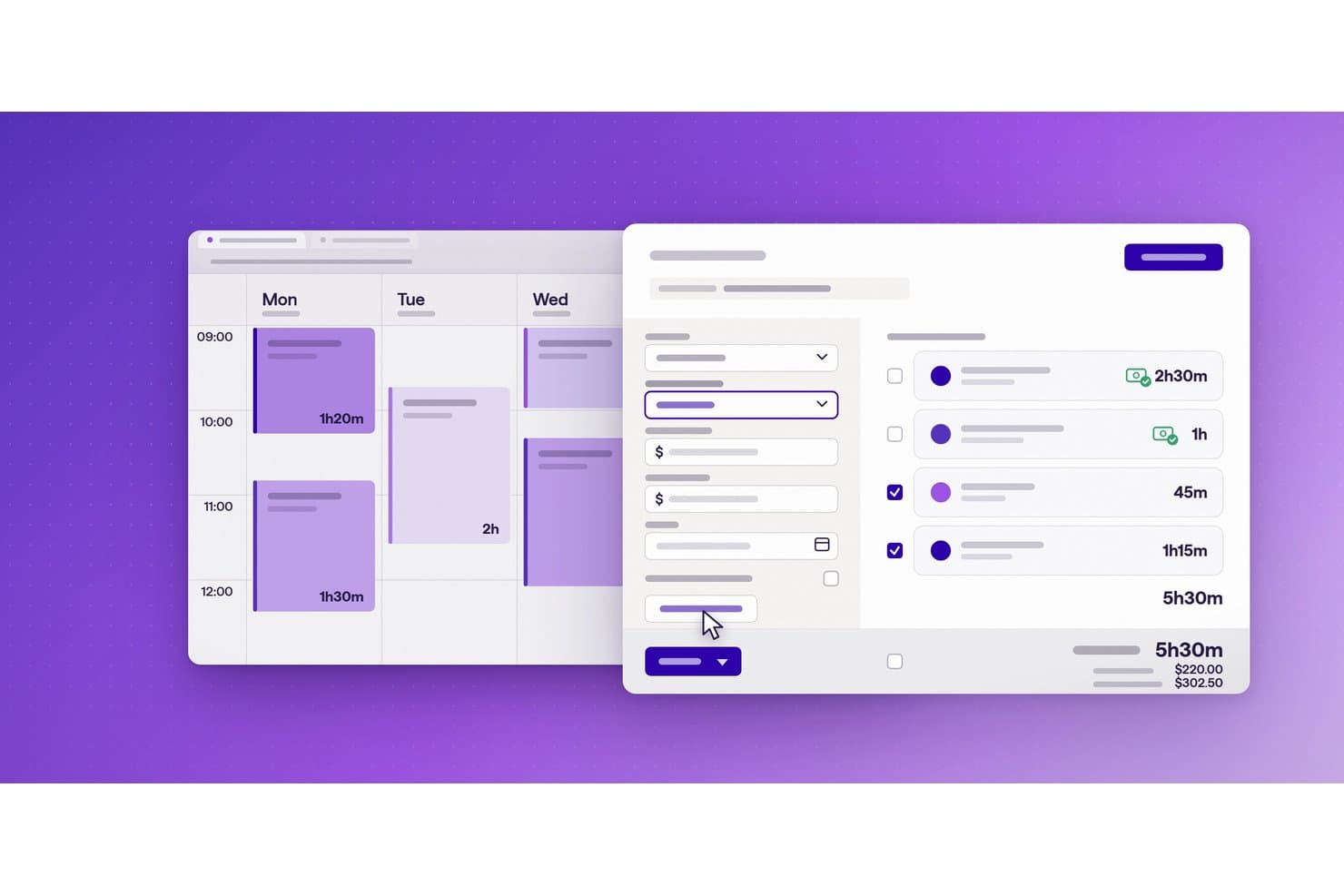
Lucen Track separates billed and unbilled time entries with totals. Lucen Track is a Microsoft 365-native time tracking tool that lets teams log billable and non-billable hours against clients and projects, track budgets, manage approvals, and generate reports.
Who Is Lucen Track Best For?
Lucen Track is a good fit for legal teams already embedded in the Microsoft 365 ecosystem who need straightforward time and budget tracking without switching tools.
Why I Picked Lucen Track
I've included Lucen Track in my top picks because it's the only tool here built natively into Microsoft 365, which matters if your team already lives in Teams and Outlook. Outlook calendar events convert directly into suggested time entries, so capturing billable hours tied to client meetings takes seconds. Lucen Track also supports manager approvals and time-entry locking, giving legal teams a structured review layer before hours reach an invoice.
Lucen Track Key Features
- Billable vs. non-billable time distinction: Mark individual time entries as billable or non-billable so client invoices only reflect chargeable hours.
- Budget alerts: Set hourly or monetary budget thresholds on projects and receive alerts before work exceeds the agreed scope.
- Expense tracking: Log project-related expenses alongside time entries to keep billable costs in one place.
- Power BI export: Send tracked time data directly to Power BI to build custom reports on hours, costs, and margins.
Lucen Track Integrations
Lucen Track offers native integrations across the Microsoft ecosystem, including Microsoft Teams, Outlook Calendar, Microsoft Planner, Microsoft To Do, Azure DevOps, and Power BI. It also integrates with Google Calendar, Asana, Jira, Monday.com, and GitHub, and provides a public API for custom integrations.
Pros and Cons
Pros:
- Entry approvals and locking support review
- Reports show hours across clients and projects
- Simple client and project time capture
Cons:
- No LEDES, UTBMS, or billing-guideline controls
- No legal matter structures or phases
Learn more about Lucen Track: Best for flexible time tracking
- Free plan + Free trial + Free demo available
- From $6/user/month
Visit WebsiteCustomer Rating:4.6/5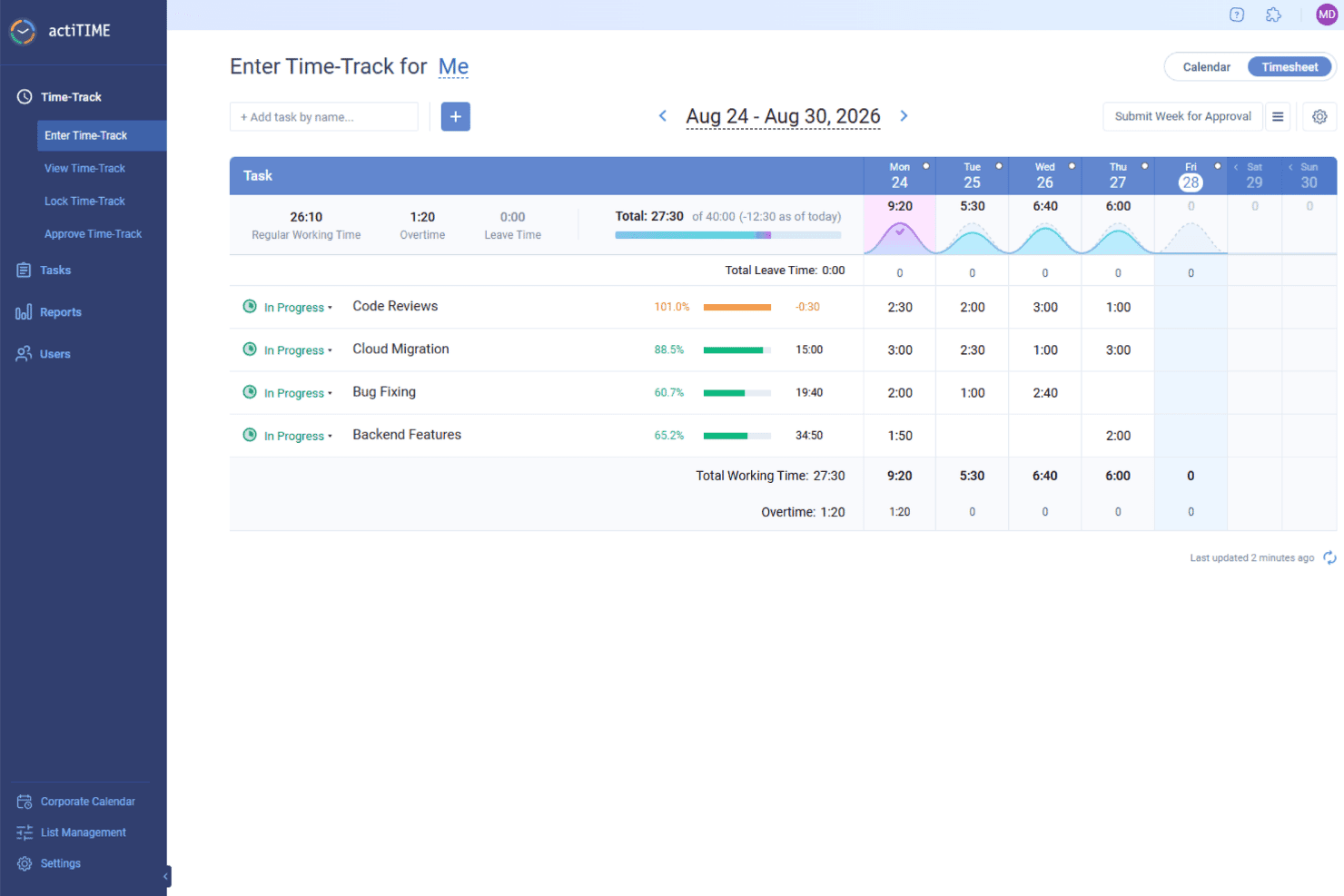
actiTIME helps legal teams track billable hours by task and client, apply billing rates, and turn recorded time into invoices. actiTIME is a time-tracking software designed to help businesses manage projects, track work hours, and analyze performance.
Why I Picked actiTIME: I like that you can define types of work to distinguish between billable and non-billable tasks, ensuring accurate client billing and internal cost assessment. This feature helps in calculating billable amounts and comparing them to project costs, providing a clear picture of profitability. actiTIME also has flexible time-tracking options. You can log hours using online timesheets, specify start and end times in a weekly calendar view, or capture time automatically with a Chrome extension.
Standout Features & Integrations:
Features include customizable workflows, mobile app access, calendar view for visual time management, automatic time tracking, client billing capabilities, and time-off management.
Integrations include QuickBooks, Zapier, actiPLANS, GitHub, Salesforce, Jira, Trello, Outlook, Evernote, Todoist, and Bamboo HR.
Pros and Cons
Pros:
- Provides detailed reporting tools
- Allows customization of work structures
- Offers multiple methods for time tracking
Cons:
- Some users find the user interface cluttered
- The mobile version lacks some features of the desktop version
Learn more about actiTIME: Best for attorneys desiring a detailed view of time utilization
- Free plan + free trial + free demo available
- From $3.99/user/month (billed annually)
Visit WebsiteCustomer Rating:4.7/5
Desktop and mobile view for the timer feature for TimeCamp legal time tracking software TimeCamp is a versatile time tracking tool that allows for deep insights into how time is spent. It is a perfect fit for attorneys looking for detailed time utilization information to optimize their workflows and increase productivity.
Why I Picked TimeCamp: In my search for an optimal time tracking app for attorneys, TimeCamp's detailed reporting functionality stood out. What sets it apart is its ability to deliver a comprehensive view of how time is spent, thus helping attorneys to optimize their efficiency. Given this capability, I deemed TimeCamp best for attorneys who desire a detailed view of their time utilization.
Standout Features & Integrations:
Features include automatic time tracking app, detailed reports, and a user-friendly dashboard that makes it easy to get an overview of time utilization.
Integrations include popular tools like Trello, Asana, Google Calendar, and more, making it easy to sync data and work efficiently.
Pros and Cons
Pros:
- User-friendly dashboard simplifies data interpretation
- Integrates well with popular productivity and project management tools
- Detailed reports offer comprehensive insights into time utilization
Cons:
- The interface might feel less modern compared to some of its competitors
- Some users may find the auto-tracking feature intrusive
- May not be as feature-rich as some other tools in terms of project management
Learn more about TimeCamp: 5Best for firms seeking a complete legal practice management suite
Clio
- 7-day free trial
- From $49/user/month
Visit WebsiteCustomer Rating:4.7/5
Main dashboard of Clio Clio is a comprehensive legal practice management software that offers a variety of functionalities, including case management, billing, client intake, and more. Designed specifically for law firms, it provides a centralized platform for lawyers to handle all aspects of their practice effectively. Considering its extensive features tailored to the unique needs of law offices, Clio is best suited for firms seeking a complete practice management solution.
Why I Picked Clio: When choosing Clio, I appreciated its specialized, all-in-one approach to legal practice management. It's different from other tools due to its comprehensive feature set that caters specifically to legal practitioners. This is why I chose Clio as the "Best for..." firms that want a complete solution for managing their legal practice without the need for multiple, disjointed tools.
Standout Features & Integrations:
Features include detailed case management, robust billing and invoicing, client intake and relationship management, and task tracking. The platform also offers a client portal for secure communication and document sharing.
Integrations include popular software like QuickBooks, LawPay, Dropbox, and Microsoft Office 365, providing users with a well-rounded, efficient workspace.
Pros and Cons
Pros:
- Wide range of integrations with popular software
- Secure client portal for communication and document sharing
- Comprehensive, all-in-one legal practice management
Cons:
- The learning curve might be steep for non-tech savvy users
- Higher price point compared to more basic tools
- May be too feature-rich for smaller firms
Learn more about Clio: Best for firms wanting robust project management features
- 10-day free trial + demo available
- Pricing upon request
Visit WebsiteCustomer Rating:4.5/5
client management page of TimeSolv legal time tracking software TimeSolv is a web-based time tracking and billing solution that also provides extensive project management features. Designed specifically for professional services firms, it helps effectively monitor billable and non-billable hours, manage invoices, and supervise projects. Its emphasis on project management and time tracking integration makes it an ideal choice for firms that want these two crucial aspects in one place.
Why I Picked TimeSolv: In my assessment of various tools, I singled out TimeSolv for its impressive amalgamation of time tracking, billing, and project management features. Its emphasis on not only tracking time but also managing projects in a comprehensive way makes it unique. In my judgement, for firms seeking to improve their project management capabilities while keeping an accurate account of their billable time, TimeSolv is the best option.
Standout Features & Integrations:
Features include detailed work breakdown structures, budgeting and forecasting, and comprehensive task management. Its features extend beyond time tracking and billing, incorporating robust project management capabilities.
Integrations include other popular tools such as QuickBooks, Dropbox, and LawPay.
Pros and Cons
Pros:
- Wide range of integrations with popular tools
- Detailed work breakdown structure feature for efficient task organization
- Comprehensive project management capabilities integrated with time tracking
Cons:
- Customization options could be more extensive
- Occasional issues reported with mobile app functionality
- Interface might not be as intuitive for first-time users
 Best for cloud-based convenience with integrated expense tracking
- Free plan (1 user)
Visit WebsiteCustomer Rating:4.7/5
Log time feature in Amberlo legal time tracking software Amberlo is a comprehensive legal management software designed for legal professionals and law firms. With a focus on cloud-based convenience, it offers the ability to track time and expenses all in one platform.
Why I Picked Amberlo: In my search for the top legal time tracking software, I selected Amberlo primarily for its impeccable integration of time and expense tracking in a cloud-based environment. This feature set offers law professionals an opportunity to manage their time and associated costs from anywhere. The tool stands out with its commitment to convenience and flexibility, making it the best for those who value these aspects.
Standout Features & Integrations:
Features include case management, invoicing, and billing on top of its time and expense tracking capabilities. It also provides an intuitive dashboard that presents a complete overview of your firm’s activities.
Integrations include Google Calendar, enabling the scheduling of appointments and meetings directly from the platform.
Pros and Cons
Pros:
- Google Calendar integration for effective scheduling
- Robust feature set that includes case management and invoicing
- Convenient cloud-based platform for anywhere access
Cons:
- Complex interface may require a learning curve
- Lacks integration with other popular software like Outlook
- Higher cost compared to other options
Learn more about Amberlo: Best for AI-powered timesheets
- Free trial + demo available
- From $6/user/month
Visit WebsiteCustomer Rating:4.3/5
Deltek Replicon Time's timesheets let professionals log their hours across different projects and clients. Deltek Replicon Time is a time-tracking software designed to help businesses efficiently manage employee time and project hours. It offers a range of features to capture, validate, and analyze time data, making it suitable for various industries, including legal firms.
Why I Picked Deltek Replicon Time: It offers project and task time tracking that's tailored to your firm's needs. You can log hours against various attributes, making it easy to track billable hours for different cases or clients. This ensures accurate billing and saves you time. The AI-powered timesheets also help by automating timesheet completion with pre-population rules, reducing errors from manual data entry and letting your team focus more on legal work instead of administrative tasks.
Standout Features & Integrations:
Features include time off management, mobile app access, analytics tools, customizable timesheets, approval workflows, client management, project expense tracking, real-time reporting, compliance management, resource allocation, budgeting tools, and invoicing capabilities.
Integrations include Jira, Microsoft Project, QuickBooks, Sage Financials, Sage Intacct, Salesforce, SAP, ServiceNow, Xero, Zendesk, BambooHR, and ADP.
Pros and Cons
Pros:
- Mobile app enhances accessibility
- Robust reporting capabilities
- Customizable to fit business needs
Cons:
- Extensive features may be overwhelming for new users
- Reporting customization can be challenging
Learn more about Deltek Replicon Time: Best for firms needing personalized, professional invoice creation
- Not available
- Free forever plan
Visit WebsiteCustomer Rating:4.3/5
Invoice tab for Zoho Invoice legal time tracking software Zoho Invoice is a cloud-based invoicing software specifically designed for businesses to manage their invoices effectively and professionally. For firms that require a personalized touch to their invoices, Zoho Invoice is an ideal choice due to its advanced customization options and user-friendly interface.
Why I Picked Zoho Invoice: As I was evaluating various invoicing tools, Zoho Invoice came across as a tool that has successfully combined the ease of use with a high degree of customization, and it particularly excels in creating professional and personalized invoices. This is why I picked Zoho Invoice as the best option for firms that are in need of custom and professional invoice creation.
Standout Features & Integrations:
Features include detailed and personalized invoices, manage clients and projects, and even automate payment reminders. The tool provides various customization options for invoices, including custom fields, templates, and branding options.
Integrations include a range of applications, such as Zoho CRM, Zoho Projects, Zoho Books, and popular payment gateways like PayPal, Stripe, and Square.
Pros and Cons
Pros:
- Automated reminders for payments streamline the invoicing process
- Wide range of integrations with Zoho apps and other popular applications
- Advanced customization options for professional and personalized invoices
Cons:
- More integrations with third-party apps outside the Zoho ecosystem would be beneficial
- Lacks advanced project management features compared to some competitors
- The interface may take some time to get used to due to numerous features
Learn more about Zoho Invoice: 10Best for firms seeking advanced case management and time tracking
CaseFox
- Free plan + free demo available
- From $45/user/month
Visit WebsiteCustomer Rating:4.4/5
Sample case inside Casefox legal time tracking software Casefox is a cloud-based legal time tracking and case management software, crafted specifically for attorneys, paralegals, and other legal professionals. This tool shines particularly in delivering advanced case management coupled with efficient timer
Why I Picked Casefox: Casefox stood out among the multitude of options due to its specialized focus on advanced case management and efficient time tracking. The software is not merely a generic solution, but one tailored to meet the specific needs of legal firms. This specialization led me to determine that Casefox is the best option for firms that require sophisticated case management capabilities intertwined with time tracking.
Standout Features & Integrations:
Features include case notes, task tracking, invoice generation, and trust accounting, all designed to support efficient legal operations. Its built-in timesheets can track billable hours efficiently, making the billing process a less daunting task.
Integrations include QuickBooks, Google Calendar, and Dropbox, among others, to streamline workflow and information access.
Pros and Cons
Pros:
- Accessible pricing, starting from $10/user/month
- Comprehensive feature set tailored for legal firms
- Advanced case management and time tracking
Cons:
- Customer support may not always be prompt, as reported by some users
- Initial setup might take some time due to the range of features
- User interface could be more intuitive
Learn more about CaseFox:
Diğer Hukuk Alanı İçin Zaman Takibi Yazılımları
Aşağıda, kısa listeye aldığım ancak ilk 10’a giremeyen ek hukuk bürosu yönetimi yazılımlarının bir listesi yer alıyor. Kesinlikle göz atmaya değer.
- 11App4LegalBest for multi-functional case and document management
- 12ActionstepBest for managing workflows and automating administrative tasks
- 13HarvestBest for teams that value easy integrations with existing tools
- 14TimeSlipsBest for law offices prioritizing user-friendly time tracking
- 15Time59Best for solo practitioners needing comprehensive time tracking
- 16Deel HRBest for desktop and mobile
- 17InsightfulBest for automatic time mapping
- 18TogglBest for one-click billable hour tracking
- 198amBest for centralized staff scheduling
- 20ClickTimeBest for DCAA-compliant timesheets
- 21CosmoLexGood for firms looking for built-in legal accounting
- 22LegalTrekGood for larger firms requiring custom legal solutions
- 23LegalFilesGood for managing complex legal documents and cases
- 24ProTempusGood for small to mid-sized firms wanting an all-in-one practice management software
- 25TimeLedgerGood for businesses that require real-time expense tracking
How I Evaluate Legal Time Tracking Software
I split my evaluation into baseline requirements—matter-based time capture, ABA codes, LEDES invoicing—and the differentiating factors that make a tool the right fit.
Core Functionality (Table Stakes For This List)
When I'm selecting tools for my list, I rank each one on a scale from 0 (does not offer the functionality) to 5 (excels in this area) for each core functionality listed below. Then, I calculate the tool's total score into a percentage. Each tool needs to achieve a minimum total score of 55% to be considered for inclusion.
- Billable Time Capture: I check whether timers, manual entry, and mobile logging all tie directly to matters—so an attorney switching between three client calls can track each one without losing time.
- ABA/UTBMS Code Support: Each tool should include a preloaded legal billing code library, since manually building code sets from scratch defeats the purpose of standardized timekeeping.
- Matter and Client Association: I evaluate how each platform handles rate hierarchies—for example, whether you can set a different hourly rate for the same timekeeper across two matters for the same client.
- Legal Invoice Generation: LEDES export support matters here, especially 1998B format, because corporate clients and insurers increasingly require it before they'll process a payment.
- Trust/IOLTA Compatibility: I look at whether the tool tracks client trust funds with three-way reconciliation or integrates with platforms that do, since commingling errors carry real disciplinary risk.
- Practice Management Integration: The tool should connect to legal PM systems or include native matter management, so time entries flow into case files and conflict checks without duplicate data entry.
Once I have a list of tools that meet this criteria, I consider what sets each platform apart.
Differentiating Factors (What Sets Vendors Apart)
Here's how I compare and contrast different vendors:
Standout Features
Passive time capture is a real differentiator—tools like Clio and TimeSolv can monitor document edits, emails, and calendar events to surface billable work that might otherwise go unrecorded. AI narrative drafting takes this further by turning shorthand entries into polished, client-ready descriptions. I also evaluate realization rate analytics, since dashboards showing write-offs, collection trends, and timekeeper utilization help billing managers spot revenue leakage before it becomes a pattern.
Beyond Features
Firm size fit matters—a solo practitioner needs an affordable, bundled platform, while a mid-size firm requires multi-user permissions and departmental reporting. I also evaluate legal ecosystem integrations, checking whether time data syncs with tools like NetDocuments, Smokeball, or QuickBooks without manual exports. Data security deserves close attention too, since these platforms store privileged client information. I look for SOC 2 Type II certification and role-based access controls that limit who can view billing details across matters.
Hukuk Alanı İçin Zaman Takibi Yazılımı Nasıl Seçilir?
Uzun özellik listeleri ve karmaşık fiyatlandırma yapıları arasında kaybolmak kolaydır. Kendinize özgü yazılım seçme sürecinizde ilerlerken odaklanmanıza yardımcı olmak için göz önünde bulundurmanız gereken faktörleri içeren bir kontrol listesi hazırladım:
| Faktör | Dikkat Edilmesi Gerekenler |
|---|---|
| FaktörÖlçeklenebilirlik | Dikkat Edilmesi GerekenlerYazılımın hukuk büronuzla birlikte büyüyüp büyüyemeyeceğini değerlendirin. Gelecekte daha fazla kullanıcıyı veya daha büyük projeleri yönetebilecek mi? Esnek planlar sunan seçenekleri arayın. |
| FaktörEntegrasyonlar | Dikkat Edilmesi Gerekenlerİş akışında kesintileri önlemek için aracın muhasebe veya belge yönetimi yazılımı gibi mevcut sistemlerinizle entegre olup olmadığını kontrol edin. |
| FaktörÖzelleştirilebilirlik | Dikkat Edilmesi GerekenlerYazılımı özel ihtiyaçlarınıza göre uyarlama olanağını değerlendirin. Ayarları veya raporları süreçlerinize uyacak şekilde değiştirebilir misiniz? |
| FaktörKullanım Kolaylığı | Dikkat Edilmesi GerekenlerYazılımın ekibiniz için ne kadar sezgisel olduğunu değerlendirin. Kapsamlı bir eğitim gerektirecek mi, yoksa ekip üyeleriniz hemen kullanmaya başlayabilir mi? |
| FaktörKurulum ve Kullanıma Alma | Dikkat Edilmesi GerekenlerYazılımı uygulamak için gereken süreyi ve kaynakları belirleyin. Ekibinizin kullanıma geçmesine yardımcı olacak eğitim materyalleri ve destek mevcut mu? |
| FaktörMaliyet | Dikkat Edilmesi GerekenlerGizli ücretler veya gerekli yükseltmeler de dahil olmak üzere toplam sahip olma maliyetini karşılaştırın. Bütçe kısıtlarınıza uyuyor mu? |
| FaktörGüvenlik Önlemleri | Dikkat Edilmesi GerekenlerYazılımın güçlü güvenlik önlemlerine sahip olduğundan emin olun. Hassas müşteri verilerini korumak için hukuk sektöründeki standartlara uyuyor mu? |
| FaktörDestek Olanakları | Dikkat Edilmesi GerekenlerSunulan desteğin düzeyini göz önünde bulundurun. 7/24 yardım mevcut mu ve sorunlar ortaya çıktığında ne kadar hızlı destek alabilirsiniz? |
Hukuk Alanı İçin Zaman Takibi Yazılımı Nedir?
Hukuk alanı için zaman takibi yazılımı, hukuk profesyonellerinin çeşitli görevlere ve müşteri çalışmalarına harcanan zamanı doğru bir şekilde takip etmesine yardımcı olmak üzere tasarlanmış bir araçtır. Avukatlar, hukuk müşavirleri ve diğer hukuk personeli, faturalandırma doğruluğunu artırmak ve iş yüklerini verimli bir şekilde yönetmek için bu araçları kullanır.
Bir hukuki faturalandırma çözümü türü olarak hukuk alanı için zaman takibi yazılımı, doğru faturalama sürecini destekler ve müşteri faturalandırmasında şeffaflık sağlar.
Faturalandırılabilir saatleri takip etme, fatura oluşturma, zaman raporları hazırlama, müşteri projelerini yönetme ve diğer hukuk araçlarıyla entegrasyon gibi özellikler sunar. Genel olarak bu araçlar, faturalandırma doğruluğunu ve hukuk standartlarına uyumu artırarak önemli bir değer sağlar.
Özellikler
Hukuk alanı için zaman takibi yazılımı seçerken iş akışınızı kolaylaştıracak ve üretkenliği artıracak özelliklere odaklanmak çok önemlidir. Yazılımınızın modern bir hukuk bürosunun gereksinimlerini karşılamasını sağlayacak, aramanız gereken temel özellikler şunlardır.
- Otomatik Zaman Girişi: Görevlere harcanan zamanı otomatik olarak kaydederek faturalandırılabilir saatlerin atlanması riskini azaltır.
- Hukuk Bürosu Yönetim Araçlarıyla Entegrasyon: Mevcut sistemlerinizle sorunsuz şekilde eşitlenerek zamandan tasarruf sağlayan ve hataları en aza indiren birleşik bir iş akışı oluşturur.
- Mobil Erişilebilirlik: Her yerden zaman takibi yapmanıza olanak tanıyarak faturalandırılabilir saatleri kaydetme fırsatını asla kaçırmamanızı sağlar.
- Özelleştirilebilir Raporlama: Firmanızın özel ihtiyaçlarına göre uyarlanmış raporlar oluşturarak bilinçli karar almayı destekleyen içgörüler sunar.
- Faturalandırma ve Fatura Düzenleme: Kaydedilen zamanın doğru faturalara dönüştürülmesi sürecini basitleştirerek ödeme döngülerini hızlandırır.
- Güvenlik ve Uyumluluk: Güçlü şifreleme ve uyumluluk özellikleriyle hassas müvekkil verilerini koruyarak güveni ve mevzuata uygunluğu sürdürür.
- Kullanıcı Dostu Arayüz: Çok az eğitim gerektiren sezgisel bir tasarım sunarak ekibinizin kısa sürede sisteme hâkim olmasını sağlar.
- Zaman Tutma Analizleri: Zaman kullanımına ilişkin veriye dayalı içgörüler sağlayarak üretkenliği optimize etmenize ve iyileştirme alanlarını belirlemenize yardımcı olur.
- Gerçek Zamanlı İş Birliği: Ekip üyelerinin zaman takibi üzerinde gerçek zamanlı olarak iş birliği yapmasını sağlayarak koordinasyonu ve verimliliği artırır.
- Müvekkil Erişim Portalı: Müvekkillerin faturalarını ve zaman kayıtlarını görüntülemesine olanak tanıyarak şeffaflığı ve güveni artırır.
Faydalar
Hukuki zaman takibi yazılımına yatırım yapmak, hem bireysel kullanıcılar hem de kuruluşlar için önemli avantajlar sunar. Aşağıda, bu yazılımı hukuk büroları için değerli bir varlık hâline getiren başlıca faydalar yer almaktadır.
- Artan faturalandırma doğruluğu: Faturalandırılabilir saatlerin otomatik olarak takip edilmesi hataları azaltır ve müvekkillerin doğru şekilde ücretlendirilmesini sağlar.
- Verimli fatura düzenleme: Faturaların doğrudan kaydedilen zamandan oluşturulması zamandan tasarruf sağlar ve faturalandırma sürecini basitleştirir.
- Daha iyi zaman yönetimi: Zaman raporlaması, zamanın nasıl harcandığını analiz etmenize yardımcı olarak daha bilinçli kararlar almanızı sağlar.
- Gelişmiş veri güvenliği: Güvenlik önlemleri hassas müvekkil bilgilerini koruyarak güveni ve uyumluluğu sürdürür.
- Geliştirilmiş proje denetimi: Projeleri entegre araçlarla yönetmek kaynakların etkili şekilde tahsis edilmesine ve ilerlemenin takip edilmesine yardımcı olur.
- Daha fazla esneklik: Mobil uygulama işlevleri her yerden zaman takibi yapılmasına olanak tanıyarak daha uyarlanabilir bir çalışma ortamını destekler.
- Azalan idari yük: Otomatik zaman takibi ve kullanıcı dostu arayüzler, manuel veri girişini ve eğitim gereksinimlerini en aza indirir.
Maliyetler ve Fiyatlandırma
Bu bölümde hukuki zaman takibi yazılımı için ortalama planlar ve maliyetler hakkında bir tahmin sunulmaktadır. Fiyatlandırma plan türüne göre değişir ve özellikler farklı ihtiyaçları karşılayacak şekilde çeşitlenir.
| Plan Türü | Ortalama Fiyat | Yaygın Özellikler |
|---|---|---|
| Plan TürüÜcretsiz Plan | Ortalama Fiyat$0 | Yaygın ÖzelliklerTemel zaman takibi, sınırlı kullanıcı sayısı, standart raporlar |
| Plan TürüKişisel Plan | Ortalama Fiyat$10/mo | Yaygın ÖzelliklerGelişmiş zaman takibi, mobil erişim, temel fatura düzenleme |
| Plan Türüİşletme Planı | Ortalama Fiyat$30/mo | Yaygın ÖzelliklerHukuk bürosu yönetim araçlarıyla entegrasyon, özelleştirilebilir raporlar, ekip iş birliği |
| Plan TürüKurumsal Plan | Ortalama Fiyat$75/mo | Yaygın ÖzelliklerYapay zekâ destekli özellikler, gelişmiş güvenlik, sınırsız kullanıcı, öncelikli destek |
Hukuk Büroları için Zaman Takip Yazılımı SSS
Hukuk büroları için zaman takip yazılımı hakkında sık sorulan bazı soruların yanıtlarını burada bulabilirsiniz:
Hukuk büroları için zaman takip yazılımımın mevcut sistemlerle sorunsuz bir şekilde entegre olmasını nasıl sağlayabilirim?
Hukuk büroları için zaman takip yazılımlarının çoğu, yaygın hukuk bürosu yönetim araçlarıyla entegrasyon sunar. Yazılımı seçmeden önce mevcut sistemlerinizle uyumluluğunu kontrol edin. Birçok sağlayıcı, sorunsuz bir geçiş sağlamak amacıyla entegrasyon sürecine yardımcı olmak için ayrıntılı belgeler veya müşteri desteği sunar.
Bu, özellikle küçük hukuk büroları için faturalandırma yazılımı kullanıyorsanız önemlidir; çünkü bazı yazılımlar maliyetleri azaltmak için entegrasyon seçeneklerini sınırlı tutar.
Hukuk büroları için zaman takip yazılımında hangi güvenlik önlemlerini aramalıyım?
Veri şifreleme, çok faktörlü kimlik doğrulama ve GDPR veya HIPAA gibi sektör standartlarına uygunluk gibi özellikleri arayın. Bu önlemler, hassas müşteri bilgilerini korumaya ve verilerinizin bütünlüğünü sürdürmeye yardımcı olur. Düzenli yazılım güncellemeleri ve denetimler de güvenliği korumak açısından büyük önem taşır.
Hukuk büroları için zaman takip yazılımı farklı müşteriler için birden çok faturalandırma ücretini yönetebilir mi?
Evet, gelişmiş hukuk büroları için zaman takip yazılımlarının çoğu, farklı müşteriler, hukuki işler veya hatta bireysel görevler için farklı faturalandırma ücretleri belirlemenize olanak tanır. Bu esneklik, doğru faturalandırma yapılmasını sağlar ve karmaşık ücret yapılarını kolayca yönetmenize yardımcı olur.
Hukuk büroları için zaman takip yazılımındaki kullanıcı izinlerini nasıl yönetebilirim?
Kullanıcı izinleri, rol tabanlı erişim denetimleri aracılığıyla yönetilebilir. Bu özellik, büro içindeki rollerine göre kullanıcılara farklı erişim düzeyleri atamanıza olanak tanır. Örneğin ortaklar tam erişime sahip olabilirken, yardımcı avukatların belirli verilere erişimi sınırlı olabilir.
Hukuk büroları için zaman takip yazılımıyla faturalandırılamayan saatleri etkili bir şekilde takip etmek mümkün mü?
Evet, hukuk büroları için zaman takip yazılımları genellikle faturalandırılabilir ve faturalandırılamayan saatleri birbirinden ayırmanıza olanak tanır. Bu özellik, zamanın nerede harcandığını anlamanıza ve iç kaynakları daha etkili bir şekilde yönetmenize yardımcı olur; böylece faturalandırılamayan saatlerin de hesaba katılması sağlanır.
Hukuk büroları için zaman takip yazılımında genellikle hangi destek seçenekleri sunulur?
Destek seçenekleri genellikle e-posta, telefon desteği, canlı sohbet ve kapsamlı bir bilgi bankasını içerir. Bazı sağlayıcılar, özellikle daha yüksek fiyatlandırma paketlerinde, daha hızlı yanıt süreleri ve özel müşteri yöneticileri sunan üst düzey destek paketleri de sağlar.
Yeni bir hukuk bürosu için zaman takip yazılımına geçiş yaparken veri doğruluğunu nasıl sağlayabilirim?
Mevcut verilerin yedeklenmesini, geçiş sürecinin test edilmesini ve geçiş sonrasında kapsamlı veri doğrulama kontrolleri yapılmasını içeren bir veri taşıma planıyla başlayın. Birçok sağlayıcı, verileri doğru bir şekilde aktarmanıza yardımcı olmak için taşıma desteği veya araçları sunar.
Hukuk büroları için zaman takip yazılımından hangi raporlama özelliklerini beklemeliyim?
Faturalandırılabilir saatleri, üretkenlik ölçümlerini ve mali özetleri kapsayan özelleştirilebilir raporlar bekleyin. En iyi yazılım, verileri müşteriye, hukuki işe veya zaman aralığına göre filtrelemenize olanak tanıyarak büronuzun özel ihtiyaçlarına uygun içgörüler sunar.
Hukuk büroları için zaman takip yazılımı (UTBMS) hukuki faturalandırma kodlarını yönetebilir mi?
Evet, hukuk büroları için zaman takip yazılımlarının çoğu UTBMS hukuki faturalandırma kodlarını yönetebilir. Yazılım, bu kodları entegre ederek avukatların görevlerini daha verimli bir şekilde kategorilere ayırmasına yardımcı olur; böylece doğru faturalandırma yapılır ve müşteri beklentileriyle uyum sağlanır.