

Con 20 años de experiencia en la revisión de tecnología jurídica, he analizado personalmente 18 de las principales alternativas a iManage. Si tu despacho necesita una integración más estrecha con Microsoft 365 o una automatización de flujos de trabajo más flexible que la de iManage, aquí encontrarás opciones con una sólida seguridad documental y una comunicación eficiente con los clientes.
Las mejores alternativas a iManage ofrecen una gestión segura de documentos centrada en los asuntos, una integración fluida con Microsoft 365 y herramientas compatibles con los flujos de trabajo jurídicos modernos. Si estás buscando alternativas a iManage, probablemente quieras una solución que se adapte mejor a la forma de trabajar de tu despacho, sea compatible con equipos remotos o híbridos, o te proporcione un mayor control sobre la automatización y la comunicación con los clientes. Esta guía te ayudará a comparar rápidamente las principales alternativas a iManage desde la perspectiva de las operaciones jurídicas, para que puedas identificar la opción que se ajuste a las necesidades y objetivos de tu práctica.
¿Qué es iManage?
iManage es una plataforma de gestión de documentos y correos electrónicos jurídicos diseñada para despachos de abogados y equipos jurídicos corporativos. Centraliza los archivos de los asuntos, los correos electrónicos y los documentos confidenciales, y ofrece funciones avanzadas de búsqueda, control de versiones y permisos. iManage destaca por sus funciones de seguridad, herramientas de colaboración y profunda integración con Microsoft 365. Los profesionales del sector jurídico utilizan iManage para organizar, proteger y acceder eficazmente al trabajo realizado para los clientes desde cualquier lugar, cumpliendo tanto los estándares de conformidad como los de productividad.
Tabla comparativa de alternativas a iManage
Esta tabla comparativa resume los detalles de precios de las alternativas a iManage que he seleccionado.
| Tool | Best For | Trial Info | Price | ||
|---|---|---|---|---|---|
| 1 | Ideal para el seguimiento automático del tiempo y la actividad | Demostración gratuita disponible | Precio bajo solicitud | Website | |
| 2 | Ideal para herramientas de comunicación del portal del cliente | Prueba gratuita de 10 días | Desde $50/usuario/mes (facturado anualmente) | Website | |
| 3 | La mejor opción para la integración de la gestión de bufetes de abogados | Prueba gratuita de 7 días | Desde $49/usuario/mes | Website | |
| 4 | Ideal para usuarios de Microsoft 365 de pequeños despachos | Demostración gratuita disponible | Desde $210/mes (facturado anualmente) | Website | |
| 5 | Ideal para archivar documentos sin problemas desde Outlook | Demostración gratuita disponible | Precio disponible previa solicitud | Website | |
| 6 | La mejor opción para la integración con flujos de trabajo de Microsoft 365 | Prueba gratuita de 30 días | Desde $5.00/usuario/mes (facturado anualmente) | Website | |
| 7 | La mejor opción para controles de seguridad centrados en asuntos | Demostración gratuita disponible | Precios disponibles previa solicitud | Website | |
| 8 | Lo mejor para la automatización de contratos impulsada por IA | Demostración gratuita disponible | Precio bajo solicitud | Website | |
| 9 | Ideal para el almacenamiento local de documentos jurídicos | Demostración gratuita disponible | Precios bajo petición | Website | |
| 10 | La mejor opción para la gestión nativa del correo electrónico en Outlook | Prueba gratuita de 7 días | Desde $395/mes | Website |


Por qué confiar en nuestras recomendaciones de software
6,700+
Reviews
20
Industry experts
16+
Evaluation factors
14
Years
Nuestro equipo lleva probando y evaluando software desde 2012. Como líderes de despachos jurídicos, sabemos lo difícil —y lo importante— que es elegir el software adecuado.
Para esta guía, evaluamos las herramientas mediante pruebas prácticas e investigación independiente, puntuando las herramientas según nuestros criterios de selección.
Nuestras reseñas reflejan nuestro criterio editorial humano, no un discurso de ventas.
 Best for automatic time and activity tracking
- Not available
- Pricing upon request
Visit WebsiteCustomer Rating:4.8/5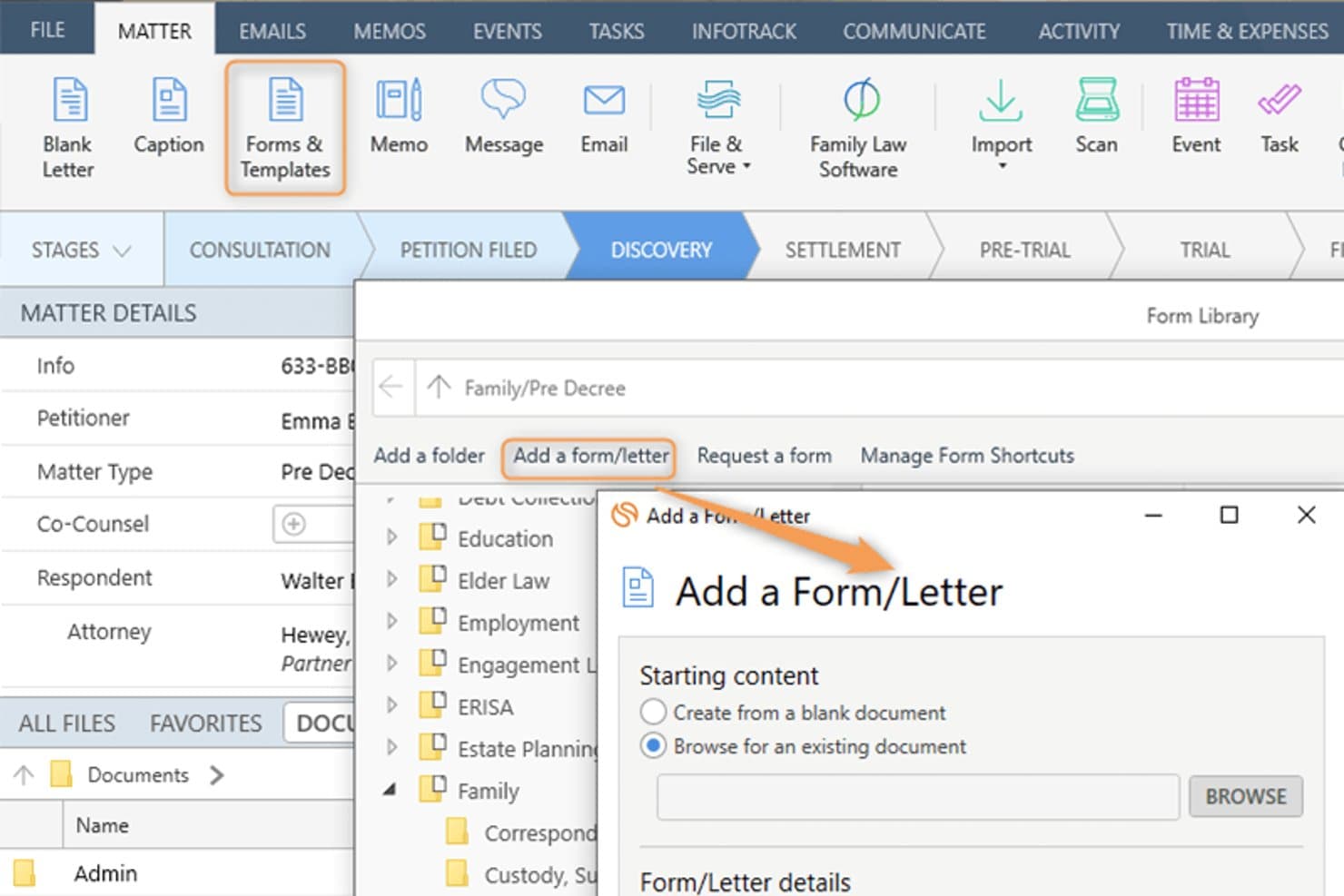
Smokeball lets users add custom forms and letters to a legal matter. Smokeball is an all-in-one legal practice management platform built for solo, small, and mid-size law firms that need matter-centric document management, email filing, billing, and Microsoft 365 integration consolidated into a single system.
Who Is Smokeball Best For?
Smokeball is a strong fit for managing partners at small private-practice law firms who handle high document volumes across multiple practice areas.
Why Smokeball Is a Good iManage Alternative
I've included Smokeball in my top picks because AutoTime is genuinely unlike anything iManage offers. It automatically captures time spent on emails, documents, calls, and tasks inside the platform, so nothing goes unbilled. I also like that matter-centric email filing works natively inside Outlook, meaning I can link emails directly to matters without ever leaving my inbox.
Smokeball Key Features
- Matter-centric document management: Store and organize legal files, templates, and forms by matter for easy retrieval.
- Custom practice area templates: Access 200+ built-in, configurable matter and document templates tailored to different legal areas.
- Native Microsoft 365 integration: Link Outlook emails and Word documents directly to matters without leaving those applications.
- Firm insights reporting: Track productivity, case progress, staff activity, and profitability with built-in dashboards and metrics.
Smokeball Integrations
Smokeball has native integrations across the Microsoft ecosystem, including Microsoft 365 and Outlook. An API is available for custom integrations.
Pros and Cons
Pros:
- Native email filing within Microsoft Outlook
- Matter-centric file organization built in
- AutoTime captures billable hours automatically
Cons:
- Better suited to smaller law firms
- Search lacks advanced metadata filtering
Learn more about Smokeball: Best for client portal communication tools
- 10-day free trial
- From $50/user/month (billed annually)
Visit WebsiteCustomer Rating:4.6/5
MyCase auto-generates task lists and deadlines directly from court rules. MyCase is a cloud-based practice management platform for small and mid-sized law firms that centralizes case management, billing, and client communication in one place.
Who Is MyCase Best For?
MyCase suits solo practitioners and small firm managing partners who handle their own billing, client intake, and day-to-day case administration.
Why MyCase Is a Good iManage Alternative
I've included MyCase in my top picks because its client portal is genuinely best-in-class for secure client communication. Clients can view case documents, send messages, and pay invoices directly through the portal, without calling or emailing the firm. The 2-way texting feature with a dedicated firm number keeps every client conversation logged and searchable inside the case record.
MyCase Key Features
- Matter-centric document storage: Organize documents within specific case folders for easy retrieval and management.
- Integrated time and expense tracking: Log billable hours and expenses directly to each matter with Smart Time Finder.
- Automated billing and invoicing: Generate and send invoices automatically based on tracked time and case activities.
- Customizable financial reporting: Access real-time analytics on payments, AR, and case profitability through built-in report tools.
MyCase Integrations
MyCase offers native integrations with QuickBooks Online, LawPay, Google Calendar, Google Drive, Dropbox, Outlook, Gmail, and CalendarRules, and provides an API for custom integrations.
Pros and Cons
Pros:
- Built-in invoicing tied directly to matters
- Two-way texting logged within case records
- Dedicated client-facing portal for secure messaging
Cons:
- No ethical wall or matter-level access controls
- Limited document version control and check-in/out
 3Best for legal practice management integration
Clio
- 7-day free trial + free demo available
- From $49/user/month
Visit WebsiteCustomer Rating:4.5/5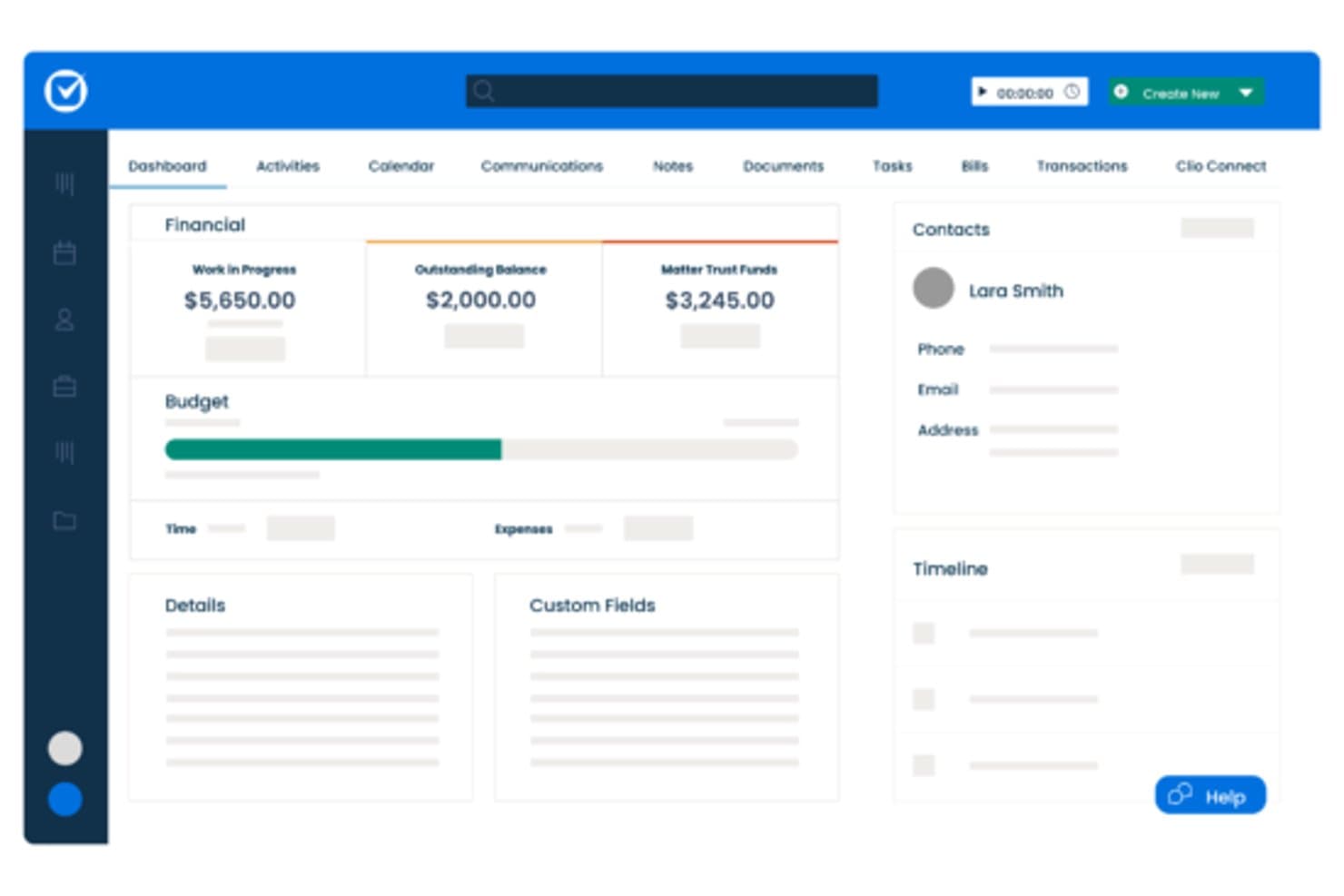
Clio centralizes matter financials, contacts, and timelines in one dashboard. Clio Manage is a cloud-based legal practice management platform built for small-to-mid-size law firms that need matter organization, billing, document storage, and client communication in one place—without the complexity of enterprise DMS tools like iManage.
Who Is Clio Best For?
Clio Manage is a natural fit for solo attorneys and small-to-mid-size law firms that want a single platform to manage matters, billing, and client files.
Why Clio Is a Good iManage Alternative
I've included Clio Manage in my top picks because it connects matter management, billing, and document storage in a single workspace that actually reflects how law firms operate day to day. I particularly like that Clio's AI can convert court documents into calendar events and turn tracked time entries into draft invoices automatically. That tight loop between case activity and billing is something iManage, as a document-only platform, simply doesn't offer.
Clio Key Features
- Matter-centric document storage: Store and organize all case files in structured, searchable matter folders.
- Integrated time and expense tracking: Track billable hours and expenses directly within each matter for accurate billing.
- Client portal for secure communication: Exchange documents and updates with clients through a dedicated, secure portal.
- Role-based access permissions: Control who can view, edit, or manage specific matters and documents throughout your firm.
Clio Integrations
Clio Manage offers native integrations with Microsoft 365, Google Workspace, DocuSign, QuickBooks Online, Dropbox, NetDocuments, Xero, Zoom, LawPay, and CalendarRules. An API is available for custom integrations.
Pros and Cons
Pros:
- AI converts court documents into calendar events
- Built-in client portal for secure file sharing
- Connects billing directly to matter activity
Cons:
- Limited version control for document-heavy workflows
- Document management less robust than iManage
Learn more about Clio: Best for small firm Microsoft 365 users
- Free demo available
- From $210/month (billed annually)
Visit WebsiteCustomer Rating:4.6/5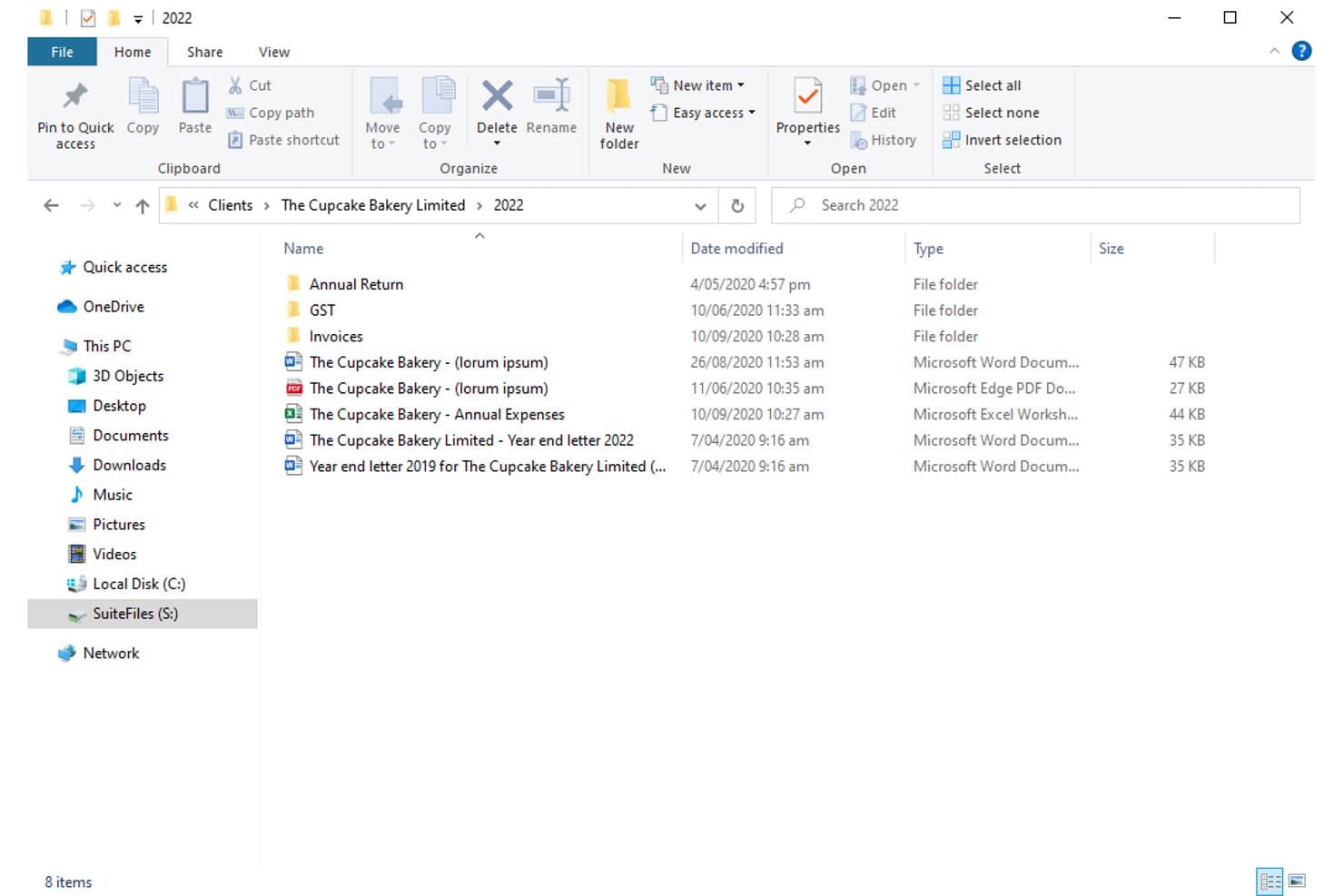
SuiteFiles organizes client documents in structured folders by year. For small law firms already deep in the Microsoft 365 ecosystem, SuiteFiles offers an all-in-one document management workspace that combines email filing, unlimited e-signing, and a secure client portal without needing separate tools.
Who Is SuiteFiles Best For?
SuiteFiles is a strong fit for small law firms that run on Microsoft 365 and want a single platform for document, email, and client file management.
Why SuiteFiles Is a Good iManage Alternative
I've included SuiteFiles in my top picks because its Microsoft 365 integration isn't an add-on, it's the foundation the whole product is built on. I can file emails directly from Outlook into client folders, co-author documents live in Word, and share finalized files through the SuiteFiles Connect portal without switching to a separate tool. Small firm teams that already run on M365 don't need to retrain staff or rebuild workflows to use it.
SuiteFiles Key Features
- Client portal (SuiteFiles Connect): Share documents securely with clients and collaborate without relying on unencrypted email.
- Task management: Assign tasks to team members and track progress alongside your documents and emails.
- PDF annotation tools: Annotate, merge, and organize PDFs directly within the SuiteFiles workspace.
- Template-driven document creation: Use customizable templates for automated client letters, proposals, and agreements.
SuiteFiles Integrations
SuiteFiles has native integrations across the Microsoft ecosystem, including Microsoft 365 and Azure. It also offers native integrations with Xero, QuickBooks Online, and Karbon, and provides an API for custom integrations.
Pros and Cons
Pros:
- SharePoint used as the underlying file storage
- Email filing directly from Outlook into matters
- Built-in e-signing without a third-party tool
Cons:
- Not suited for large or enterprise firms
- Limited advanced search versus enterprise DMS platforms
Learn more about SuiteFiles: Best for seamless Outlook document filing
- Free demo available
- Pricing upon request
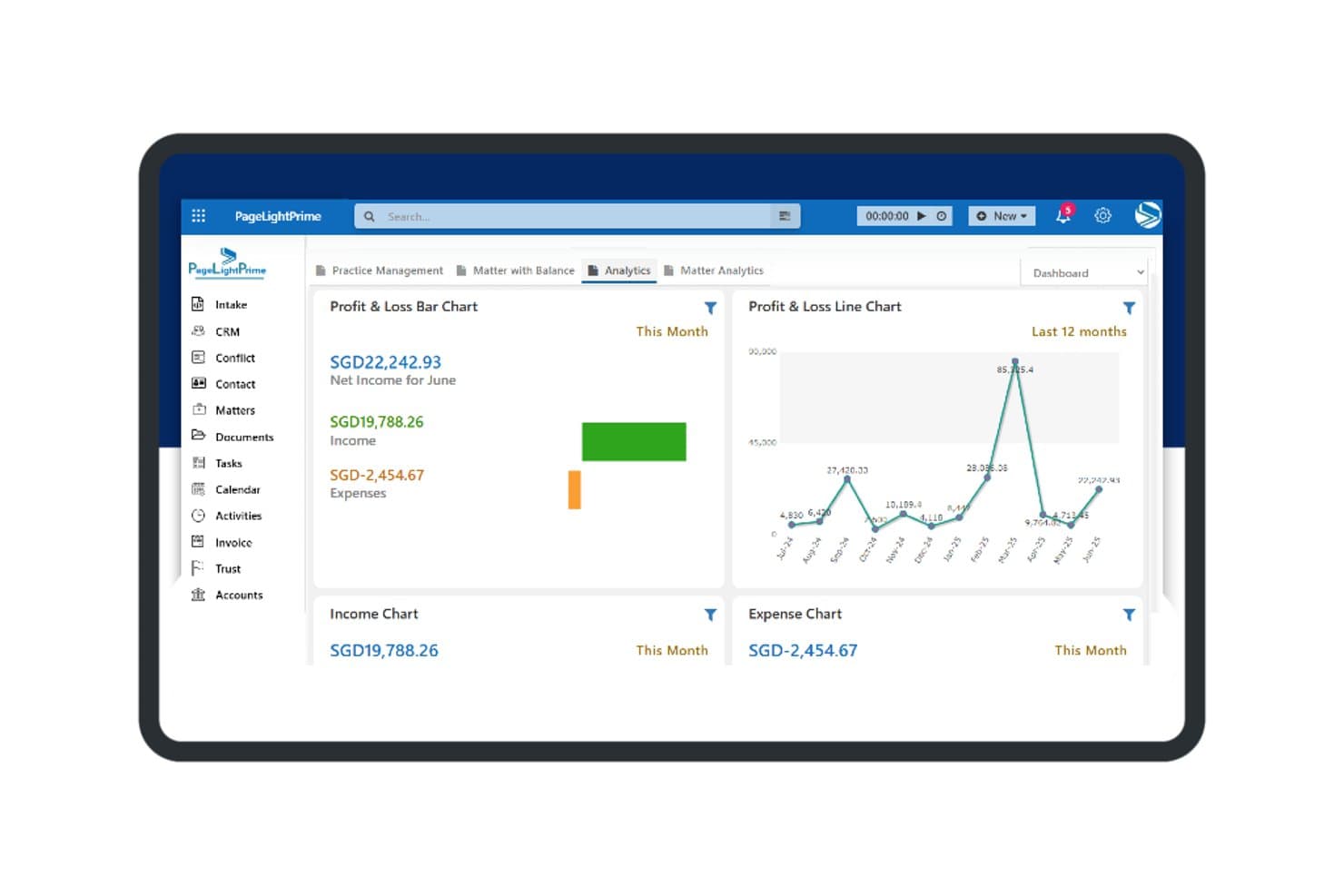
PageLightPrime offers a financial analytics dashboard with profit and loss charts, income tracking, and expense summaries for law firm management. PageLightPrime is a Microsoft 365-native legal practice management platform built for law firms that want to consolidate document management, matter tracking, and billing without stepping outside their existing Microsoft environment.
Who Is PageLightPrime Best For?
It's a strong fit for small to mid-sized law firms already running Microsoft 365 that want to replace iManage or a legacy DMS without adopting an entirely new technology stack.
Why PageLightPrime Is a Good iManage Alternative
I've included PageLightPrime in my top picks because of how it handles email filing from Outlook directly into matter workspaces. When a new matter is created, the platform auto-provisions a SharePoint folder structure with metadata already applied, so emails filed from Outlook land in the right place without manual sorting. I also appreciate that version control and audit trails run automatically alongside this, so every filed document has a tracked history from day one.
PageLightPrime Key Features
- Matter-centric SharePoint structure: Auto-generates folders and metadata for each new client and matter.
- Integrated law firm accounting: Handles billing, trust accounting, and multi-currency management within the platform.
- Client portal: Allows clients to securely access shared documents, billing information, and case updates online.
- Legal CRM and intake forms: Captures leads through web intake and links client interactions directly to matters.
PageLightPrime Integrations
PageLightPrime has native integrations across the Microsoft ecosystem, including Microsoft 365 and Azure. An API is available for custom integrations.
Pros and Cons
Pros:
- Single platform covers intake, billing, and document management
- Built-in trust accounting with IOLTA compliance support
- Runs entirely within Microsoft 365 and SharePoint
Cons:
- Smaller vendor with less established enterprise credibility
- Limited third-party ecosystem beyond Microsoft tools
Learn more about PageLightPrime: Best for Microsoft 365 workflow integration
- 30-day free trial
- From $5.00/user/month (billed annually)
Visit WebsiteCustomer Rating:4.4/5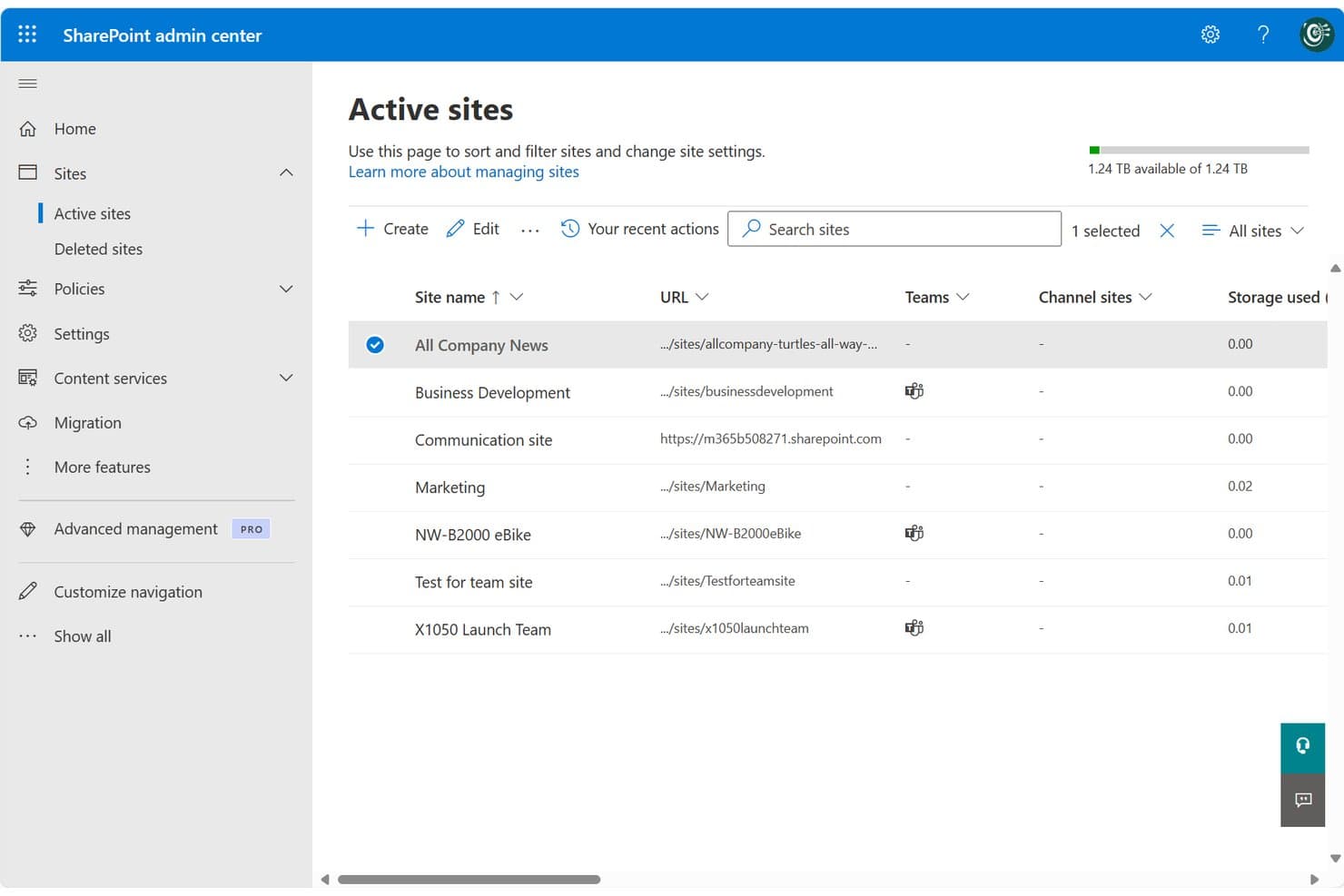
SharePoint centralizes site management across teams and projects in one admin view. SharePoint is Microsoft's cloud-based collaboration and document management platform, well-suited for legal teams and law firms already running on Microsoft 365 who want centralized file storage, version control, and access management without adopting a separate DMS.
Who Is SharePoint Best For?
SharePoint fits small-to-mid-sized law firms and in-house corporate legal teams that are already standardized on Microsoft 365 and want to avoid managing a separate DMS.
Why SharePoint Is a Good iManage Alternative
I've included SharePoint in my top picks because it's the only iManage alternative here that's natively embedded in Microsoft 365. Your legal team can co-author Word documents, manage matter libraries, and file directly from Outlook without switching tools. I particularly appreciate the check-in/check-out versioning system, which locks documents during active review and keeps a clean, restorable version history across matters.
SharePoint Key Features
- Matter library templates: Prebuilt site and folder structures you can use to organize documents by matter, client, or team.
- Granular permissions controls: Assign access based on matter, team, or document type to help protect privileged information.
- Full-text and metadata search: Search for documents or emails using keywords, tags, or custom filters to quickly find files.
- Audit trails and activity logs: Track all document views, edits, downloads, and sharing actions across your SharePoint environment.
SharePoint Integrations
SharePoint has native integrations across the Microsoft ecosystem, including Microsoft 365 and Azure. An API is available for custom integrations.
Pros and Cons
Pros:
- Matter-level permissions configurable without extra modules
- Built-in version history with document restore
- Native Microsoft 365 co-authoring without switching apps
Cons:
- Email filing requires manual setup and configuration
- No dedicated legal matter workspace out-of-the-box
Learn more about SharePoint: Best for matter-centric security controls
- Free demo available
- Pricing upon request
Visit WebsiteCustomer Rating:4.1/5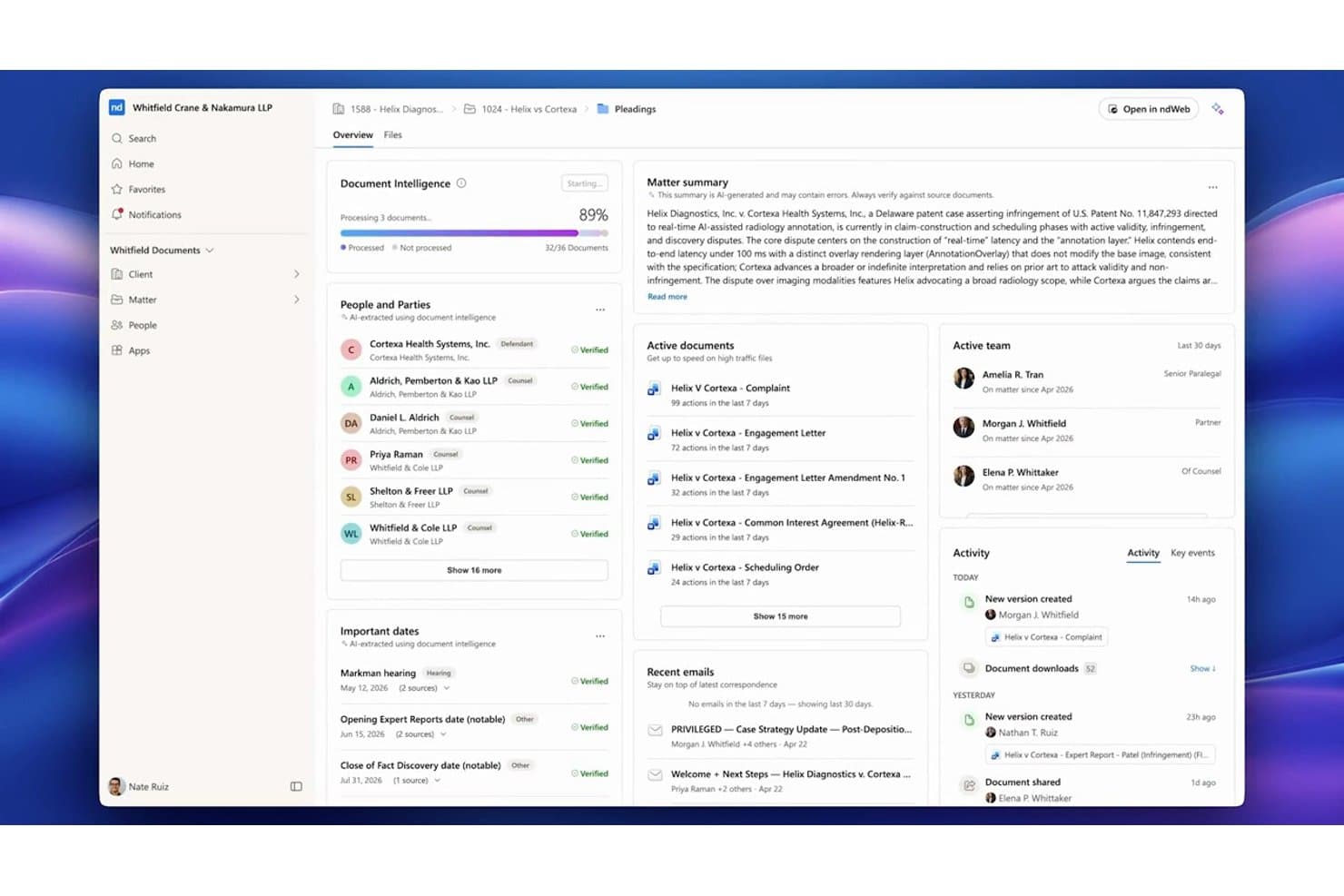
NetDocuments centralizes matter documents, parties, and key dates in one dashboard. NetDocuments is a cloud-native document management system built for law firms and corporate legal teams that need a fully hosted alternative to on-premises platforms like iManage, with matter-centric organization, AI-powered search, and enterprise-grade security controls.
Who Is NetDocuments Best For?
NetDocuments is a strong fit for mid-to-large law firms and enterprise legal departments whose IT and legal operations teams are ready to move away from on-premises infrastructure.
Why NetDocuments Is a Good iManage Alternative
NetDocuments earns its spot on my shortlist because of how precisely it handles matter-level security. I particularly like the granular ethical wall controls, which let you restrict access at the user, document, or workspace level independently. On top of that, customer-managed encryption keys and geo-aware content storage give legal teams direct control over where their data lives and who can decrypt it, which is something iManage's on-prem setup handles very differently.
NetDocuments Key Features
- AI-powered document search: Search documents and emails using natural language queries and receive answers with citations.
- Unified matter workspace: View, manage, and collaborate on all matter documents, emails, and notes from one interface.
- Built-in document bundling: Assemble and organize closing sets or litigation binders directly within the platform.
- Native Microsoft Teams integration: Access, preview, and collaborate on NetDocuments content right inside Microsoft Teams.
NetDocuments Integrations
NetDocuments offers native integrations across the Microsoft ecosystem, including Microsoft 365 and Azure, and connects directly with Clio, DocuSign, Litera, LexisNexis, Thomson Reuters, and iManage. An API is available for custom integrations.
Pros and Cons
Pros:
- AI search surfaces relevant documents without manual filtering
- Granular ethical walls built into the platform
- Strong cloud-native security for legal matter files
Cons:
- Admin configuration requires significant initial setup time
- Mobile app experience lags behind the desktop
Learn more about NetDocuments: Best for AI-powered contract automation
- Free demo available
- Pricing upon request
Visit WebsiteCustomer Rating:4.3/5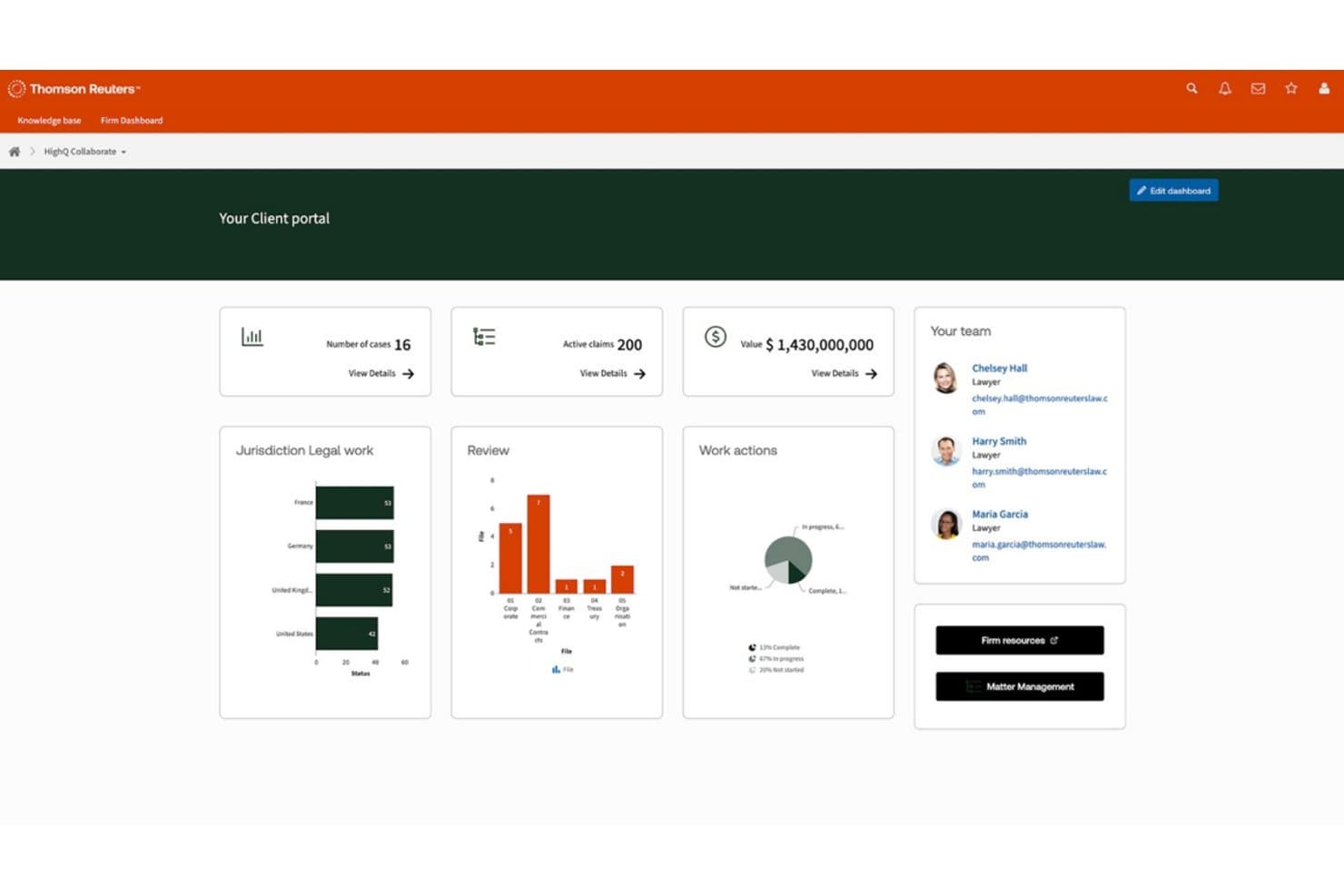
HighQ centralizes case data, team contacts, and legal workflows in one portal. HighQ is a Thomson Reuters cloud platform built for law firms and corporate legal teams that need secure document collaboration, workflow automation, and AI-powered contract tools in a single, client-facing workspace.
Who Is HighQ Best For?
HighQ is a strong fit for large law firms and enterprise legal departments managing high volumes of transactions, due diligence, or complex client matters.
Why HighQ Is a Good iManage Alternative
I picked HighQ as one of the best because its CoCounsel-powered Document Insights goes well beyond basic document storage. It automatically extracts risks, summarizes contract terms, and populates iSheets with AI-generated data during due diligence. I also like that HighQ supports the Model Context Protocol, letting AI tools like Claude and ChatGPT work securely inside your legal workspaces without manual data transfer.
HighQ Key Features
- Matter-centric workspaces: Organize documents, tasks, and discussions by matter for easy cross-team access.
- Granular access controls: Set permissions and ethical walls at the matter, folder, or document level to protect sensitive data.
- Workflow automation designer: Build multi-step legal processes using visual tools for intake, approvals, or project management.
- Microsoft 365 integration: Edit documents collaboratively in Word, Excel, and PowerPoint directly within HighQ’s secure environment.
HighQ Integrations
HighQ offers native integrations across the Microsoft ecosystem, including Microsoft 365 and Azure, as well as with DocuSign, Adobe Sign, and Legal Tracker. An API is available for custom integrations.
Pros and Cons
Pros:
- iSheets auto-populate from AI document extraction
- Client portals included out of the box
- AI-powered contract review built in natively
Cons:
- Email filing lags behind iManage's capabilities
- Less mature as a dedicated DMS
Learn more about HighQ: Best for on-premises legal document storage
- Free demo available
- Pricing upon request
Visit WebsiteCustomer Rating:4/5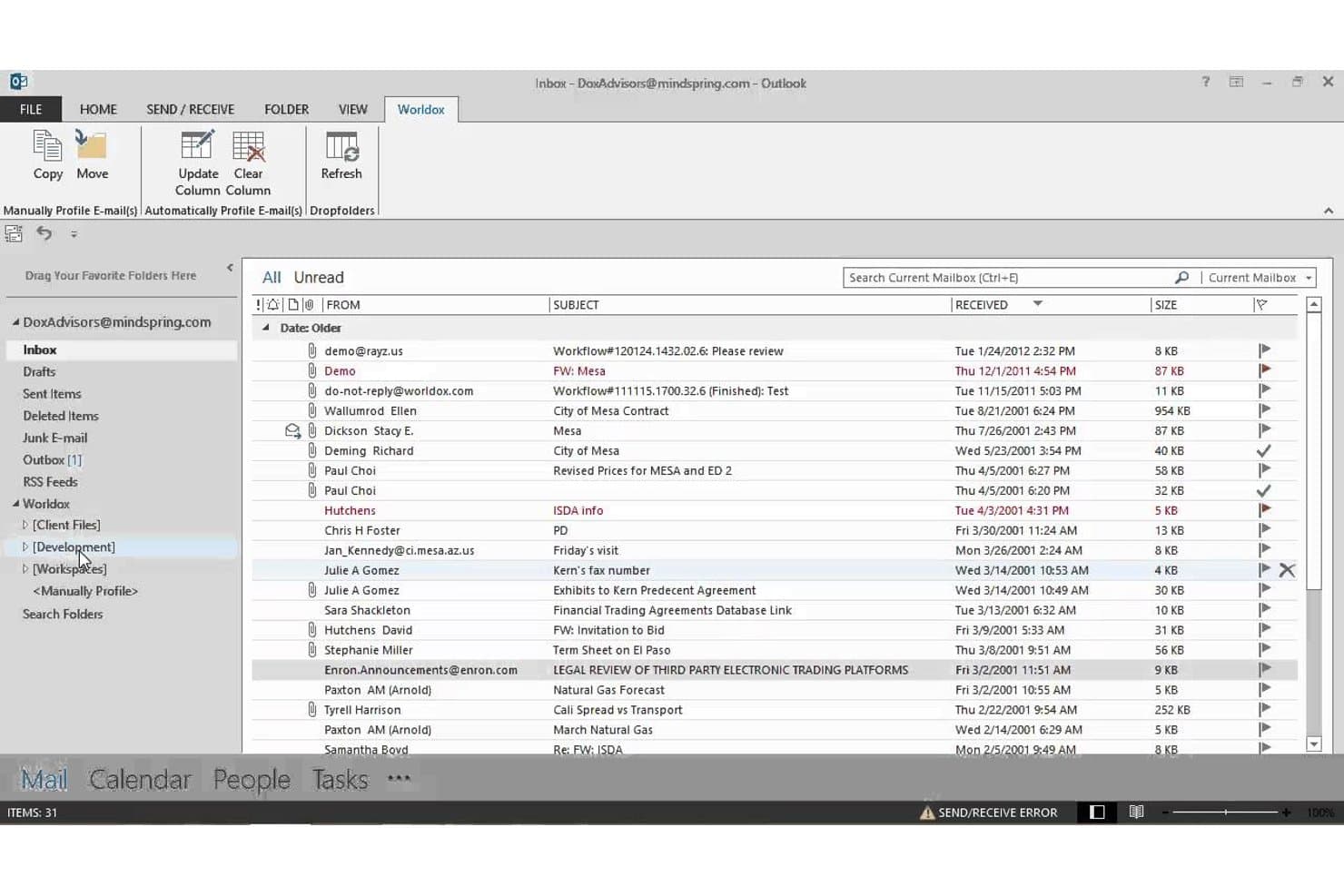
Worldox integrates directly into Outlook for seamless email filing. Worldox is a long-standing legal document management system built for law firms and corporate legal departments that need matter-centric document organization, advanced search, and email filing without moving to a cloud-based infrastructure.
Who Is Worldox Best For?
It's a strong fit for small-to-midsize law firms running Windows-based infrastructure that prefer on-premises document control over cloud-hosted alternatives.
Why Worldox Is a Good iManage Alternative
I've included Worldox in my top picks because it gives firms complete control over where their data lives. Unlike iManage, which has shifted heavily toward cloud-hosted deployments, Worldox keeps documents on your own servers, which matters when compliance obligations make cloud storage a non-starter. I particularly like the matter-centric profiling system, where every document is tagged with client, matter, and document type metadata at the point of filing, making retrieval fast and consistent across the firm.
Worldox Key Features
- Customizable metadata fields: Tag documents by client, matter, and document type for granular organization.
- Full-text and metadata search: Locate documents and emails using powerful filters tailored for legal workflows.
- Audit trail reporting: Track document access and activity for security, compliance, and accountability needs.
- Office suite integration: Work with Microsoft Word, Excel, and Outlook directly from your document management interface.
Worldox Integrations
Worldox has native integrations across the Microsoft ecosystem, including Microsoft 365 and Outlook. It also offers integrations with Tabs3 and PracticeMaster. An API is available for custom integrations.
Pros and Cons
Pros:
- Strong compatibility with Windows-based firm infrastructure
- Matter-centric profiling built for legal workflows
- True on-premises deployment for data sovereignty
Cons:
- Dated interface compared to cloud-first competitors
- No mobile app for remote document access
Learn more about Worldox: Best for native email management in Outlook
- 7-day free trial
- From $395/month
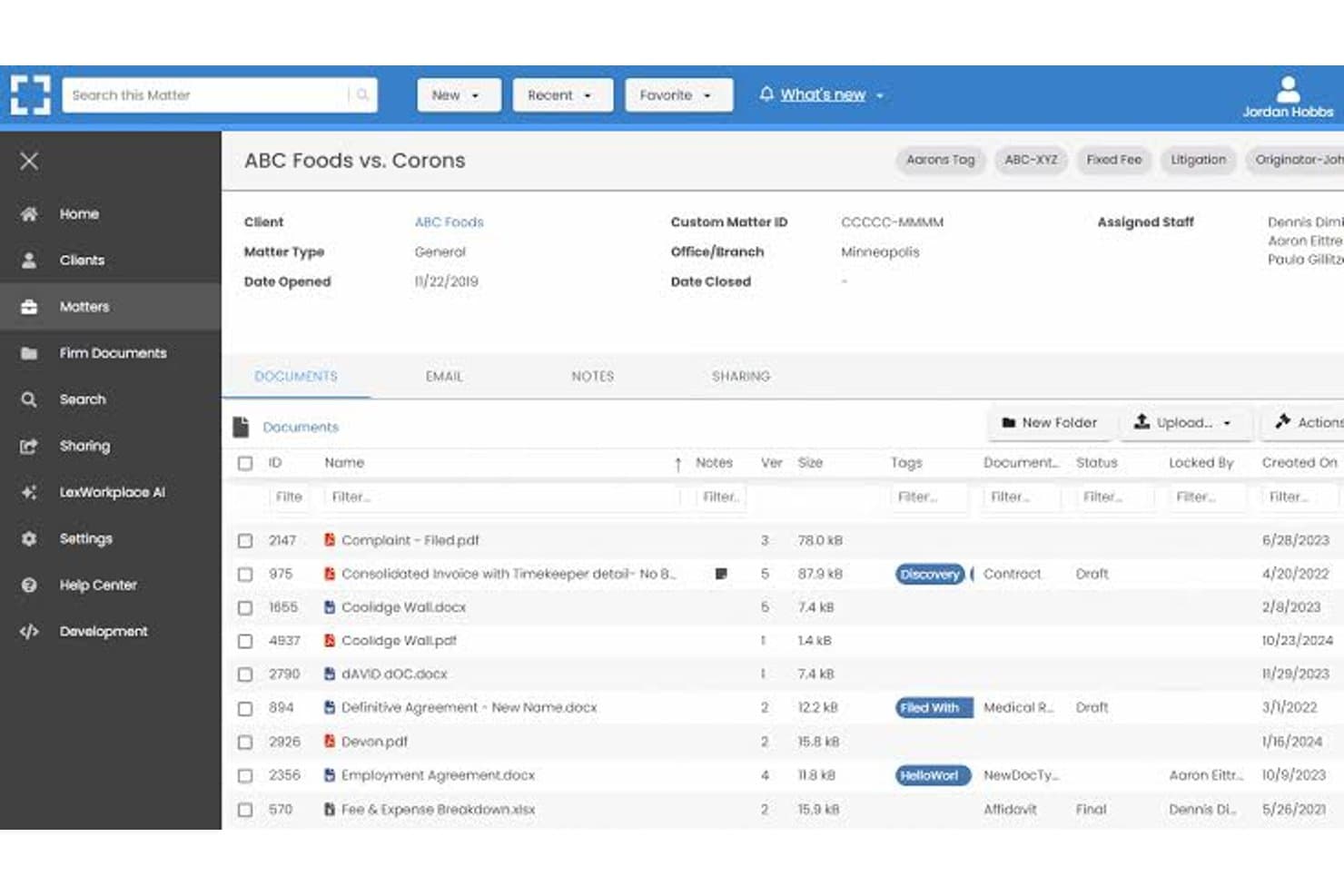
LexWorkplace dashboard for managing legal matters, documents, email, and file sharing. LexWorkplace is a cloud-based document and email management system built for small-to-midsize law firms that want matter-centric organization, full-text search, and secure cloud storage without the enterprise complexity of iManage.
Who Is LexWorkplace Best For?
LexWorkplace is a natural fit for law firms with 5–50 users that need a structured legal DMS without dedicating IT resources to deployment and maintenance.
Why LexWorkplace Is a Good iManage Alternative
I've included LexWorkplace in my top picks because its Outlook email management is genuinely best-in-class for small law firms. Smart File suggests the correct matter automatically when you're filing an email, and Multi Select lets you bulk-file entire threads in one action. Both features matter most during active litigation or transactions, where email volume spikes and misfiled messages create real compliance exposure.
LexWorkplace Key Features
- Matter-centric document management: Organize files, notes, and correspondence by client and legal matter in secure cloud workspaces.
- Integrated document versioning: Track, compare, and restore previous versions of documents, with full audit trails for all changes.
- Document AI assistant: Use built-in AI to summarize, query, and extract information from legal documents without leaving the platform.
- Full-text and metadata search: Find documents and emails instantly with full-text OCR, advanced filters, and matter-based search options.
LexWorkplace Integrations
LexWorkplace offers native integrations with Microsoft 365, including Outlook and Word, as well as Clio Manage. An API is available for custom integrations.
Pros and Cons
Pros:
- Full-text OCR search across all matter files
- Matter-centric workspaces designed for law firms
- Smart email filing natively within Outlook
Cons:
- Smaller user community than enterprise-grade alternatives
- No ethical wall automation for practice groups
Learn more about LexWorkplace:
Otras alternativas a iManage
Estas son algunas alternativas adicionales a iManage que no llegaron a mi lista de selección, pero que aún merece la pena conocer:
- 11Epona DMSIdeal para el archivado avanzado basado en metadatos
- 12PracticePantherLa mejor opción para personalizar la automatización de flujos de trabajo
- 13LEAPIdeal para la automatización integrada de formularios legales
- 14FilevineIdeal para flujos de trabajo de documentos personalizables
- 15Rocket MatterIdeal para temporizadores de documentos basados en asuntos
- 16CosmoLexIdeal para el cumplimiento integrado de la contabilidad fiduciaria
- 17CenterbaseIdeal para el ensamblaje de documentos basados en plantillas
- 18DocsvaultIdeal para la implementación en la nube híbrida y local
Cómo evalúo las alternativas a iManage
Analizo dos niveles: lo que cualquier DMS comparable a iManage debe ofrecer —archivo centrado en asuntos, gestión del correo electrónico y control de versiones— y lo que distingue a las herramientas. Diferenciadores como las barreras éticas, la redacción asistida por IA y las opciones de implementación orientan mis selecciones.
Funcionalidad principal (requisitos básicos para esta lista)
Cuando selecciono herramientas para mi lista, califico cada una en una escala de 0 (no ofrece la funcionalidad) a 5 (sobresale en este aspecto) para cada funcionalidad principal indicada a continuación. Después calculo la puntuación total de la herramienta como un porcentaje, utilizando el 65% como referencia para ayudar a evaluar su adecuación general para la lista.
- Gestión documental: Evalúo cómo organiza cada herramienta los archivos en torno a los asuntos, comprobando si ofrece estructuras de carpetas configurables, fichas de perfil y plantillas de espacios de trabajo que reflejen cómo los abogados abren y gestionan realmente los encargos de los clientes.
- Control de versiones: Es importante cómo aborda cada herramienta el seguimiento de los borradores: busco funciones de registro de entrada y salida, comparación de versiones y restauración para que los abogados puedan colaborar en escritos sin sobrescribir las ediciones de los demás.
- Gestión del correo electrónico: Compruebo si la plataforma archiva directamente los correos electrónicos y archivos adjuntos de Outlook en los espacios de trabajo de los asuntos, incluidas funciones como sugerencias de archivo automático y eliminación de duplicados en las conversaciones, que reducen la clasificación manual.
- Búsqueda avanzada: Encontrar un memorando enterrado entre miles de asuntos es una realidad cotidiana, por lo que evalúo la búsqueda de texto completo y de metadatos con filtros específicos de cada asunto que devuelvan rápidamente resultados relevantes.
- Seguridad y controles de acceso: Busco permisos a nivel de asunto, aplicación de barreras éticas, cifrado y registros de auditoría, aspectos especialmente importantes cuando un bufete gestiona simultáneamente asuntos de partes contrarias.
- Integración con Microsoft 365: La mayoría de los abogados trabajan en Word, Outlook y Teams, por lo que evalúo hasta qué punto cada herramienta se conecta con Microsoft 365 para la coautoría de documentos, el archivo de correos electrónicos y el acceso móvil.
Una vez que tengo una lista de herramientas que cumplen los criterios, analizo qué distingue a cada plataforma.
Factores diferenciadores (lo que distingue a los proveedores)
Así es como comparo y contrasto a los distintos proveedores:
Funciones destacadas
La redacción de documentos basada en IA es un diferenciador clave: busco plataformas en las que los abogados puedan resumir o comparar cláusulas directamente dentro del DMS sin cambiar a una herramienta de terceros. Los espacios de trabajo unificados para asuntos también tienen mucho peso, porque reunir documentos, correos electrónicos y notas en una sola vista ahorra tiempo real al prepararse para una audiencia o una llamada con un cliente. Las funciones integradas de marcado de cambios y comparación de versiones permiten a los abogados anotar borradores sin exportarlos a Word, algo que evalúo detenidamente en las prácticas con un uso intensivo de documentos.
Más allá de las funciones
La flexibilidad de implementación es muy importante cuando los bufetes están migrando desde iManage: compruebo si un proveedor admite modelos locales, de nube privada o híbridos para que los asuntos activos no se vean interrumpidos durante la transición. Las certificaciones de cumplimiento, como SOC 2 Type II e ISO 27001, me indican si una plataforma puede gestionar datos confidenciales de clientes con el rigor que esperan los bufetes. También evalúo el soporte para la migración, incluido si el proveedor conserva los metadatos al trasladar archivos desde sistemas heredados o unidades compartidas.
¿Por qué buscar alternativas a iManage?
Aunque iManage es una buena opción entre las alternativas de software de gestión documental jurídica, hay varias razones por las que algunos usuarios buscan soluciones alternativas. Es posible que estés buscando alternativas a iManage porque…
- Necesitas compatibilidad con implementaciones híbridas o locales
- Quieres precios más transparentes o flexibles
- Prefieres una integración más profunda con Microsoft 365 o Teams
- Necesitas controles detallados de barreras éticas o de confidencialidad de los clientes
- Buscas plataformas que faciliten la migración y la gestión del cambio
- Necesitas un servicio de atención al cliente más ágil en las distintas regiones
Si alguna de estas situaciones te resulta familiar, has llegado al lugar adecuado. Mi lista incluye varias alternativas a iManage más adecuadas para los equipos que afrontan estos desafíos con iManage y buscan soluciones alternativas.
Características principales de iManage
Estas son algunas de las características principales de iManage, que te ayudarán a contrastar y comparar lo que ofrecen las soluciones alternativas:
- Organización centrada en asuntos: Almacena, organiza y accede a documentos y correos electrónicos en torno a asuntos legales, lo que facilita que los equipos mantengan todo vinculado al caso o proyecto correcto.
- Control automático de versiones: Realiza un seguimiento de los cambios en los documentos guardando y etiquetando automáticamente cada versión, con funciones de registro y desprotección, comparación y restauración para reducir los errores derivados de sobrescrituras accidentales.
- Gestión del correo electrónico de Outlook: Archiva, etiqueta y organiza correos electrónicos y archivos adjuntos directamente desde Microsoft Outlook en el espacio de trabajo del asunto correcto, agilizando la gestión de registros y correspondencia.
- Búsqueda y filtros avanzados: Busca documentos, correos electrónicos y metadatos mediante filtros específicos del ámbito jurídico y búsquedas de texto completo, ayudando a los usuarios a encontrar rápidamente los archivos que necesitan en repositorios enormes.
- Seguridad granular y barreras éticas: Aplica permisos a nivel de asunto, confidencialidad del cliente y políticas de barreras éticas para controlar el acceso a los documentos y cumplir los requisitos normativos, incluso entre equipos distribuidos.
- Integración con Microsoft 365: Trabaja directamente en Word, Outlook, Excel y Teams mediante integraciones nativas, permitiendo a los usuarios crear, editar y colaborar en documentos dentro del entorno seguro de iManage.
- Registros de auditoría y actividad: Realiza un seguimiento del acceso a los documentos y de las acciones mediante registros detallados que cumplen los requisitos de auditoría legales y de los clientes, favoreciendo la transparencia y la rendición de cuentas.
- Acceso móvil: Revisa, edita y comparte documentos de forma segura desde smartphones y tabletas, facilitando que los abogados trabajen a distancia o mientras viajan.
- Herramientas de colaboración: Comparte documentos y agrupa archivos con partes internas y externas, incluidas funciones para compartir enlaces de forma segura y realizar anotaciones en tiempo real.
- Políticas automatizadas de conservación: Aplica reglas para conservar, archivar o destruir documentos en función de los requisitos del cliente o normativos, respaldando las prácticas de gobierno de la información.