

Como asistente jurídico, sé que es difícil ofrecer un apoyo de primera categoría a tu despacho de abogados mientras gestionas una gran carga de trabajo, equilibras prioridades y te aseguras de comunicarte eficazmente. El software para asistentes jurídicos puede ayudarte a optimizar tu flujo de trabajo, haciendo que tu lista aparentemente interminable de tareas sea más manejable y requiera menos tiempo. El software que he seleccionado cuidadosamente te permitirá gestionar el descubrimiento electrónico, la gestión de casos, la automatización de documentos, el control del tiempo, la facturación, la mensajería y mucho más con facilidad y precisión.
Por qué confiar en nuestras recomendaciones de software
6,700+
Reviews
20
Industry experts
16+
Evaluation factors
14
Years
Nuestro equipo lleva probando y evaluando software desde 2012. Como líderes de despachos jurídicos, sabemos lo difícil —y lo importante— que es elegir el software adecuado.
Para esta guía, evaluamos las herramientas mediante pruebas prácticas e investigación independiente, puntuando las herramientas según nuestros criterios de selección.
Nuestras reseñas reflejan nuestro criterio editorial humano, no un discurso de ventas.
Tabla comparativa de software para asistentes jurídicos
Esta tabla comparativa resume los detalles de precios de mi selección del mejor software para asistentes jurídicos:
| Tool | Best For | Trial Info | Price | ||
|---|---|---|---|---|---|
| 1 | La mejor opción para pagos y facturación conformes a las normativas | Demostración gratuita disponible | Precio a consultar | Website | |
| 2 | Ideal para el seguimiento centralizado de casos y documentos | Prueba gratuita de 7 días + demo gratis disponible | Desde $49/usuario/mes (facturación anual) | Website | |
| 3 | La mejor para la comunicación y colaboración con clientes | No | Desde $49/usuario/mes (facturado anualmente) | Website | |
| 4 | Mejor para profesionales legales canadienses | No | Desde $34/usuario/mes (facturado anualmente) | Website | |
| 5 | Ideal para crear plantillas de documentos | Demostración gratuita disponible | Precios bajo consulta | Website | |
| 6 | Ideal para flujos de trabajo personalizables y áreas de práctica | No | Desde $29/usuario/mes (facturado anualmente) | Website | |
| 7 | Ideal para despachos individuales y pequeños bufetes de abogados | No | Desde $129/usuario/mes (facturado anualmente) | Website | |
| 8 | Mejor para una gestión integral de casos | No | Desde $69/usuario/mes (facturado anualmente) | Website | |
| 9 | Mejor para investigación jurídica y análisis | No | Precios bajo solicitud | Website | |
| 10 | Mejor para la redacción automatizada | Prueba gratuita disponible | Desde $19/mes | Website |


Reseñas del mejor software para asistentes jurídicos
A continuación encontrarás mis resúmenes detallados del mejor software para asistentes jurídicos que llegó a mi selección. Mis reseñas ofrecen un análisis detallado de las funciones principales, ventajas y desventajas, integraciones y casos de uso ideales de cada herramienta para ayudarte a encontrar la mejor opción para ti.
 1La mejor opción para pagos y facturación conformes a las normativas
8am
- Demostración gratuita disponible
- Precio a consultar
Visit WebsiteCustomer Rating:4.6/5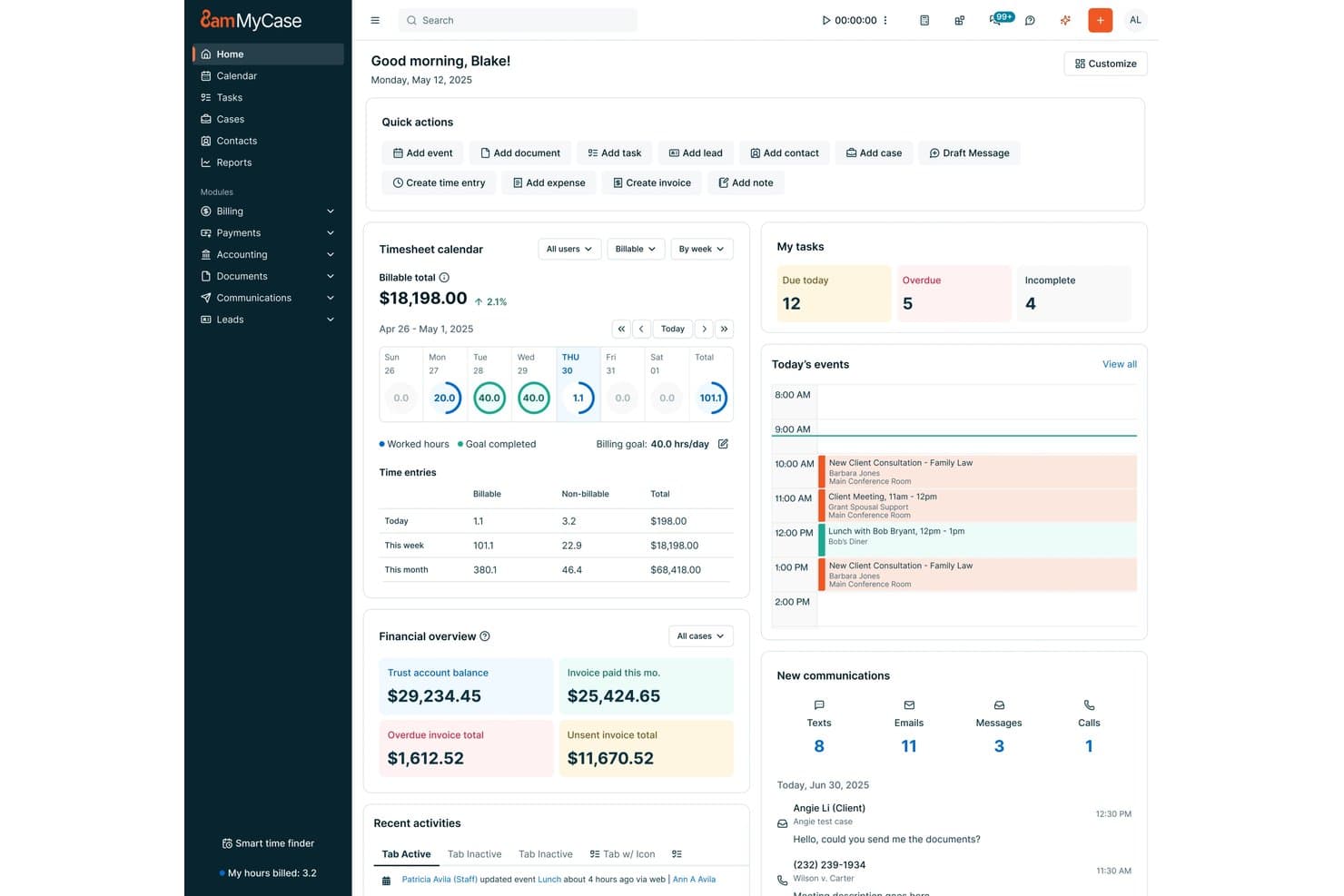
8am ofrece a los asistentes legales un panel centralizado con gestión de tareas, hojas de tiempo de facturación, resúmenes financieros y los eventos de hoy, todo en una sola vista. 8am es una plataforma de gestión para despachos jurídicos diseñada para asistentes legales y profesionales del derecho que buscan herramientas integradas para la gestión de casos, automatización de documentos, facturación, gestión de calendarios y comunicaciones seguras con clientes.
¿Para quién es mejor 8am?
Equipos legales en despachos pequeños y medianos que desean pagos integrados, facturación y gestión de casos en una sola plataforma.
Por qué elegí 8am
Elegí 8am como uno de los mejores porque confío en su procesamiento seguro de pagos y sus funciones de facturación conforme a las normativas, como la contabilidad fiduciaria nativa y la facturación LEDES integrada. Mi equipo utiliza sus flujos de trabajo financieros centralizados para simplificar los pagos aprobados por tribunales y las transacciones con clientes.
Características clave de 8am
- Gestión de asuntos: Gestiona expedientes, contactos y notas en un solo espacio de trabajo organizado.
- Automatización de documentos: Crea plantillas y genera automáticamente documentos jurídicos dentro de la plataforma.
- Calendario jurídico: Lleva el control de plazos e integra eventos con los calendarios de abogados y tribunales.
- Portal de clientes: Comparte archivos y comunícate de forma segura con los clientes a través de un portal protegido.
Integraciones de 8am
Las integraciones nativas no se encuentran listadas actualmente.
Pros and Cons
Pros:
- Gestión fiduciaria y flujos de cumplimiento incorporados
- Características detalladas de facturación y facturación LEDES
- Automatización nativa de documentos y firmas electrónicas
Cons:
- El soporte al cliente puede ser lento en responder
- Las opciones de personalización de flujos de trabajo son algo limitadas
Learn more about 8am: Ideal para el seguimiento centralizado de casos y documentos
- Prueba gratuita de 7 días + demo gratis disponible
- Desde $49/usuario/mes (facturación anual)
Visit WebsiteCustomer Rating:4.3/5
PracticePanther centraliza los expedientes y documentos para flujos de trabajo legales más rápidos. PracticePanther es una herramienta práctica para asistentes legales que necesitan un mejor control sobre el trabajo jurídico diario. Este software de gestión de despachos basado en la nube ayuda a los bufetes a manejar expedientes, organizar documentos y comunicarse con los clientes en un solo lugar. Ya sea que gestiones múltiples asuntos o trabajes con compañeros remotos, PracticePanther mantiene las tareas y la información organizadas para que puedas concentrarte en apoyar eficientemente a tu equipo legal.
Por qué elegí PracticePanther
Elegí PracticePanther por sus excepcionales capacidades de gestión de casos y documentos, que son cruciales para asistentes legales que manejan varios expedientes y plazos. El portal seguro para clientes del software permite una comunicación fluida y el intercambio de documentos, reduciendo el ida y vuelta que a menudo dificulta la eficiencia. Además, la automatización de los formularios de admisión de clientes por parte de PracticePanther ahorra tiempo valioso, permitiéndote enfocarte más en el servicio al cliente que en tareas administrativas.
Características clave de PracticePanther
Además del seguimiento centralizado de casos y documentos, PracticePanther ofrece:
- Firma electrónica: Esta función te permite enviar documentos para firmas electrónicas, reduciendo la necesidad de papeleo físico y acelerando el proceso de aprobación.
- Mensajería empresarial bidireccional por texto: Permite comunicarte directamente con los clientes mediante mensajes de texto, lo que facilita mantenerlos informados sobre el progreso de sus casos.
- Contabilidad fiduciaria: Te ayuda a gestionar fondos de clientes cumpliendo con los estándares legales, asegurando transparencia y precisión en el manejo financiero.
- Flujos de trabajo personalizables: Adapta los procesos a las necesidades específicas de tu despacho, mejorando la productividad mediante la automatización de tareas rutinarias.
Integraciones de PracticePanther
Las integraciones incluyen QuickBooks Online, LawPay, Zapier, Box, Mailchimp, Dropbox, Google Calendar, Microsoft Outlook, OneDrive y CalendarRules.
Pros and Cons
Pros:
- Automatiza tareas administrativas, ahorrando tiempo significativo cada semana
- Las herramientas de facturación integradas mejoran el flujo de cobro de pagos
- Las herramientas de gestión de clientes mantienen los asuntos bien estructurados
Cons:
- Las opciones de personalización pueden ser limitadas para necesidades específicas
- La navegación en la app móvil resulta limitada y poco intuitiva
Learn more about PracticePanther: La mejor para la comunicación y colaboración con clientes
- No
- Desde $49/usuario/mes (facturado anualmente)
Visit WebsiteCustomer Rating:4.6/5
Interfaz del software de paralegales MyCase MyCase es un software de gestión de despachos jurídicos que se centra en mejorar la comunicación y colaboración con los clientes. Ofrece una plataforma segura y fácil de usar para gestionar casos y comunicarse con los clientes, lo que lo convierte en la mejor opción para despachos que priorizan la interacción con el cliente.
Por qué elegí MyCase: Seleccioné MyCase para esta lista debido a sus capacidades excepcionales para facilitar la comunicación fluida entre los despachos de abogados y sus clientes. MyCase sobresale frente a la competencia por su énfasis en la colaboración con el cliente, lo que lo hace la mejor opción para despachos que buscan mejorar la comunicación y el compromiso con sus clientes.
Funciones y integraciones destacadas:
Las funciones clave de MyCase incluyen su portal seguro para clientes, gestión de casos, almacenamiento de documentos y pagos en línea. El portal seguro permite a los despachos comunicarse y colaborar de forma eficiente con sus clientes, mientras que las herramientas de gestión de casos ayudan a organizar y dar seguimiento a la información relacionada con los casos.
MyCase se integra con aplicaciones populares como QuickBooks Online, Microsoft Office 365 y Google Workspace.
Pros and Cons
Pros:
- Gran énfasis en la comunicación y colaboración con clientes
- Interfaz fácil de usar
- Se integra con herramientas de productividad populares
Cons:
- Sin opción de facturación mensual, requiere compromiso anual
- Opciones de personalización limitadas frente a algunos competidores
- El precio puede ser elevado para despachos pequeños
 Mejor para profesionales legales canadienses
- No
- Desde $34/usuario/mes (facturado anualmente)
Visit WebsiteCustomer Rating:4.6/5
Interfaz del software para asistentes legales de uLawPractice uLawPractice es un software de gestión de prácticas legales diseñado específicamente para profesionales del derecho en Canadá. Ofrece funciones integrales que responden a los requisitos regulatorios únicos y al panorama legal canadiense, lo que lo convierte en la mejor opción para abogados y firmas legales en Canadá.
Por qué elegí uLawPractice: Elegí uLawPractice para esta lista porque destaca como una solución hecha a la medida para profesionales legales canadienses. Su enfoque en el cumplimiento legal canadiense y sus funciones completas diseñadas específicamente para el mercado legal de Canadá lo convierten en la mejor elección para quienes ejercen en el país.
Características destacadas e integraciones:
Las funciones clave de uLawPractice incluyen contabilidad fiduciaria, gestión de casos, control del tiempo y facturación, todas diseñadas para cumplir con las regulaciones legales canadienses. La plataforma también ofrece informes completos para asegurar que las firmas legales puedan cumplir con los requisitos particulares de la práctica legal en Canadá.
uLawPractice se integra con herramientas populares como Microsoft Office 365, Google Workspace y QuickBooks Online.
Pros and Cons
Pros:
- Adaptado para profesionales legales en Canadá
- Cumple con las normativas legales canadienses
- Se integra con herramientas de productividad populares
Cons:
- No es apto para firmas legales fuera de Canadá
- Carece de algunas funciones avanzadas que tienen otras herramientas
- No hay opción de facturación mensual, se requiere compromiso anual
Learn more about uLawPractice: Ideal para crear plantillas de documentos
- Demostración gratuita disponible
- Precios bajo consulta
Visit WebsiteCustomer Rating:4.3/5
HotDocs permite a los asistentes legales rellenar plantillas preconstruidas y personalizarlas para cada situación única. HotDocs es un software de automatización de documentos robusto diseñado para ayudar en la creación, generación, ensamblaje y preparación de documentos complejos. Comúnmente utilizado en los sectores legal, financiero y gubernamental, HotDocs puede ayudar a reducir el tiempo y el esfuerzo necesarios para producir documentos adaptados a cada cliente o usuario.
Por qué elegí HotDocs: Una de las características más destacadas es su capacidad de ensamblaje de documentos, que automatiza la creación de documentos legales rutinarios. Esta automatización no solo ahorra tiempo al reducir la necesidad de ingresar datos repetitivos, sino que también minimiza el riesgo de errores. Al convertir los documentos que se utilizan con frecuencia en plantillas reutilizables, HotDocs garantiza que cada documento sea consistente y cumpla con los estándares legales.
Funciones destacadas e integraciones:
Las funciones clave de HotDocs incluyen lógica condicional, que ayuda a los usuarios a crear documentos dinámicos mediante la incorporación de declaraciones if/then. También ofrece procesamiento de documentos por lotes, firmas digitales y opciones para realizar cálculos sofisticados dentro de los documentos.
HotDocs se integra con Salesforce, Microsoft Dynamics, Sage, Microsoft 365, Microsoft Word, Tabs3, Mitratech Matter Management, Actionstep, Amicus Attorney y AbacusLaw.
Pros and Cons
Pros:
- Plantillas personalizables
- Escalable para firmas en crecimiento
- Buena automatización del flujo de trabajo de documentos
Cons:
- Puede llevar tiempo aprender a crear plantillas
- Puede ser costoso para firmas pequeñas
Learn more about Mitratech Hotdocs: Ideal para flujos de trabajo personalizables y áreas de práctica
- No
- Desde $29/usuario/mes (facturado anualmente)
Visit WebsiteCustomer Rating:4.2/5
Interfaz de software para paralegales de Actionstep Actionstep es un software integral de gestión para despachos jurídicos que se destaca por sus flujos de trabajo personalizables y su soporte para diversas áreas de práctica. Su adaptabilidad y amplio rango de funcionalidades lo convierten en la mejor opción para firmas legales que requieren soluciones adaptadas a sus necesidades particulares.
Por qué elegí Actionstep: Seleccioné Actionstep para esta lista porque sus flujos de trabajo personalizables y su soporte para múltiples áreas de práctica lo diferencian de otras herramientas de gestión legal. Considero que es la mejor alternativa para bufetes de abogados que necesitan una plataforma flexible capaz de ajustarse a sus requerimientos y áreas de práctica específicas.
Características destacadas e integraciones:
Las funciones más valiosas de Actionstep incluyen sus flujos de trabajo personalizables, la gestión de casos y capacidades de automatización.
Además, se integra con herramientas esenciales como Microsoft Office 365, Xero y LawPay, permitiendo una colaboración y gestión financiera sin interrupciones.
Pros and Cons
Pros:
- Flujos de trabajo altamente personalizables
- Soporta múltiples áreas de práctica
- Se integra con herramientas populares de productividad y finanzas
Cons:
- Se requiere compromiso de facturación anual
- Algunos usuarios pueden encontrar abrumadoras las opciones de personalización
- Integraciones limitadas en comparación con otras herramientas de gestión
Learn more about Actionstep: 7Ideal para despachos individuales y pequeños bufetes de abogados
LEAP
- No
- Desde $129/usuario/mes (facturado anualmente)
Visit WebsiteCustomer Rating:4.3/5
Interfaz del software Leap para asistentes jurídicos LEAP es un software de gestión para despachos jurídicos diseñado específicamente para abogados individuales y pequeños despachos. Su interfaz fácil de usar y sus funciones adaptadas lo convierten en la mejor opción para prácticas pequeñas que buscan una solución integral.
Por qué elegí LEAP: Incluí LEAP en esta lista porque está bien adaptado a las necesidades únicas de firmas legales individuales y pequeñas. Su diseño intuitivo y enfoque en despachos de menor tamaño lo diferencian de otras herramientas de gestión legal. Creo que es la mejor opción para firmas pequeñas que buscan una solución completa y fácil de usar y navegar.
Funciones y integraciones destacadas:
Las funciones más destacadas de LEAP incluyen la gestión de asuntos, la automatización de documentos y la facturación integrada. También se integra con herramientas esenciales como Microsoft Office 365, LawPay y QuickBooks Online, lo que facilita la optimización de las operaciones y el mantenimiento de la eficiencia en un pequeño despacho jurídico.
Pros and Cons
Pros:
- Diseñado especialmente para despachos individuales y pequeños bufetes
- Interfaz amigable para el usuario
- Se integra con herramientas de productividad y finanzas populares
Cons:
- Costoso para firmas pequeñas con presupuesto ajustado
- Requiere compromiso de facturación anual
- Opciones de personalización limitadas en comparación con otros sistemas de gestión
Learn more about LEAP: Mejor para una gestión integral de casos
- No
- Desde $69/usuario/mes (facturado anualmente)
Visit WebsiteCustomer Rating:4/5
Interfaz del software para asistentes legales de AbacusLaw AbacusLaw es un software de gestión de despachos jurídicos diseñado para ayudar a los bufetes a optimizar sus operaciones y gestionar casos de manera eficaz. Es una solución todo en uno que automatiza los aspectos esenciales de la práctica legal, convirtiéndolo en la mejor opción para una gestión integral de casos.
Por qué elegí AbacusLaw: Elegí AbacusLaw para esta lista porque ofrece una plataforma robusta y rica en funciones que simplifica el proceso de gestión de casos, documentos y finanzas para los bufetes. En comparación con otras herramientas, AbacusLaw proporciona un enfoque más completo para la gestión de casos, lo que la convierte en la mejor elección para los despachos que buscan una solución integral.
Características destacadas e integraciones:
Las características más importantes de AbacusLaw incluyen gestión de casos, automatización de documentos, calendario y facturación. Estas herramientas permiten a los usuarios gestionar sus casos eficazmente, agilizar la creación de documentos y mantenerse organizados con sus agendas.
Algunas de las integraciones más importantes que ofrece AbacusLaw incluyen Microsoft Office, QuickBooks y Abacus Private Cloud.
Pros and Cons
Pros:
- Funcionalidades integrales de gestión de casos
- Agiliza la creación de documentos mediante automatización
- Se integra bien con las principales herramientas de productividad
Cons:
- Puede ser costoso para bufetes más pequeños
- Requiere un compromiso anual
- Curva de aprendizaje para usuarios primerizos
Learn more about AbacusLaw:

Interfaz del software para asistentes legales de Thomson Reuters Thomson Reuters es un proveedor líder de herramientas de investigación jurídica y análisis, que ofrece una amplia gama de soluciones para profesionales del derecho. Su experiencia en investigación jurídica y sus avanzadas capacidades analíticas lo convierten en la mejor opción para quienes buscan información jurídica precisa y completa.
Por qué elegí Thomson Reuters: Elegí Thomson Reuters para esta lista porque sus herramientas de investigación y análisis jurídico son incomparables en la industria. Tras comparar múltiples opciones, determiné que Thomson Reuters destaca por su extenso contenido legal, analítica sofisticada y tecnología de investigación innovadora, convirtiéndolo en la mejor elección para investigación y análisis jurídico.
Funciones e integraciones destacadas:
Algunas de las funciones más importantes de Thomson Reuters incluyen su plataforma integral de investigación jurídica, Westlaw Edge, y sus herramientas analíticas de vanguardia, como Litigation Analytics y Quick Check Judicial.
Integraciones clave incluyen Practical Law, que proporciona orientación práctica y recursos para profesionales del derecho, y Drafting Assistant, que ayuda en la redacción y revisión de documentos.
Pros and Cons
Pros:
- Contenido y recursos legales extensos
- Herramientas de análisis avanzadas para obtener información basada en datos
- Innovación continua en tecnología de investigación jurídica
Cons:
- La información sobre precios no es transparente
- Puede ser costoso para despachos pequeños o abogados independientes
- Curva de aprendizaje para algunas funciones y herramientas
Learn more about Thomson Reuters: Mejor para la redacción automatizada
- Prueba gratuita disponible
- Desde $19/mes
Visit WebsiteCustomer Rating:4.8/5
Redactable te permite realizar diferentes tipos de redacción, incluyendo redacción manual y automática. Redactable es una herramienta de redacción de documentos basada en la nube, diseñada para ayudar a las organizaciones a eliminar de manera eficiente y segura información sensible de documentos PDF.
Por qué elegí Redactable: Las capacidades de IA de Redactable detectan y eliminan automáticamente información confidencial, asegurando que no se pase por alto ningún detalle crítico. Esta función es especialmente beneficiosa para los asistentes legales que manejan grandes volúmenes de documentos, ya que reduce el riesgo de errores humanos y garantiza el cumplimiento de las regulaciones de protección de datos. Además, el Asistente de Redacción de Redactable ofrece la comodidad de la redacción con un solo clic para documentos con muchas páginas.
Funciones destacadas e integraciones:
Las funciones clave incluyen limpieza de documentos, que elimina permanentemente metadatos y elementos ocultos para garantizar la seguridad de las redacciones. También ofrece herramientas de colaboración en tiempo real, control de versiones y certificados de redacción.
Redactable se integra con Google Drive, Dropbox, OneDrive y Box.
Pros and Cons
Pros:
- Utiliza IA para mejorar su proceso de redacción
- Cumple con el RGPD y otras normativas de privacidad
- Ofrece herramientas de colaboración
Cons:
- Número limitado de redacciones por plan
- No es ideal para la gestión integral de documentos legales
Learn more about Redactable:
Otro software para asistentes jurídicos
Estas son algunas opciones adicionales de software para asistentes jurídicos que no llegaron a mi selección, pero que aún merece la pena considerar:
- 11Law Ruler SoftwareIdeal para CRM legal y automatización del ingreso de casos
- 12SolunoBueno para un robusto registro de tiempo y facturación
- 13AssemblyMejor para ensamblaje y automatización de documentos
Cómo evalúo el software para asistentes jurídicos
Divido mi evaluación en aspectos fundamentales imprescindibles —como la gestión de asuntos y la gestión de calendarios jurídicos— y factores diferenciadores que separan las mejores herramientas del resto.
Funcionalidad principal (requisitos básicos para esta lista)
Al seleccionar herramientas para mi lista, califico cada una en una escala de 0 (no ofrece la funcionalidad) a 5 (sobresale en esta área) para cada funcionalidad principal indicada a continuación. Luego, convierto la puntuación total de la herramienta en un porcentaje. Cada herramienta debe alcanzar una puntuación total mínima del 65% para ser considerada.
- Gestión de casos y asuntos: Busco un centro centralizado donde los asistentes jurídicos puedan abrir un asunto y ver de inmediato los contactos, notas, documentos y casos relacionados, sin tener que alternar entre pantallas.
- Gestión y automatización de documentos: La redacción basada en plantillas es fundamental; compruebo si los asistentes jurídicos pueden generar escritos procesales estándar, cartas de contratación o solicitudes de descubrimiento a partir de plantillas reutilizables con campos autocompletados.
- Gestión de calendarios jurídicos y plazos: Evalúo si la plataforma admite calendarios basados en las normas de los tribunales, ya que calcular manualmente los plazos de respuesta a mociones o las fechas de prescripción es una receta para asumir riesgos de responsabilidad profesional.
- Seguimiento del tiempo y asistencia para la facturación: Los asistentes jurídicos necesitan registrar las horas facturables directamente contra los asuntos. Busco temporizadores integrados, registro de tiempo por lotes y la posibilidad de generar facturas listas para enviar a los clientes o exportarlas en formato LEDES.
- Gestión de tareas y flujos de trabajo: Compruebo si existen plantillas de flujos de trabajo que reflejen procesos jurídicos reales —como listas de comprobación para la incorporación de clientes, secuencias de respuesta a solicitudes de descubrimiento o carpetas de cierre—, con asignación de tareas y seguimiento del estado entre los miembros del equipo.
- Herramientas de comunicación con clientes y tribunales: Aquí se incluyen los portales seguros para clientes, la integración de firma electrónica y la presentación electrónica de documentos. Evalúo qué tan bien gestiona la herramienta el intercambio de documentos confidenciales más allá del correo electrónico básico.
Una vez que tengo una lista de herramientas que cumplen estos criterios, considero qué distingue a cada plataforma.
Factores diferenciadores (lo que distingue a los proveedores)
Así es como comparo y contrasto los distintos proveedores:
Funciones destacadas
La comprobación de conflictos es una función a la que doy mucha importancia: antes de que un despacho acepte un nuevo trabajo, los asistentes jurídicos deben realizar búsquedas automatizadas en todos los contactos y asuntos para señalar posibles problemas éticos. La contabilidad fiduciaria con cumplimiento de IOLTA también distingue a las plataformas más sólidas, especialmente para los despachos que gestionan anticipos y necesitan una conciliación de tres vías integrada en el sistema. La revisión de documentos basada en IA es otro factor diferenciador que evalúo; analizo si una herramienta puede resumir declaraciones, extraer cláusulas clave o redactar información confidencial durante el descubrimiento.
Más allá de las funciones
El cumplimiento normativo es importante: compruebo si una plataforma cumple con los estándares SOC 2 Tipo II y ofrece controles de acceso basados en roles, ya que los asistentes jurídicos manejan habitualmente datos confidenciales protegidos por el secreto profesional. La compatibilidad de las integraciones es igualmente importante; analizo si una herramienta se conecta con Microsoft 365, DocuSign y plataformas de facturación como LawPay, de las que ya dependen los equipos jurídicos. También considero el tamaño del despacho y su compatibilidad con el área de práctica, ya que las necesidades de flujo de trabajo de un asistente jurídico especializado en litigios de un despacho mediano son muy diferentes de las de un asistente jurídico especializado en inmigración que trabaja por cuenta propia.
Cómo elegir software para asistentes jurídicos
Es fácil perderse entre largas listas de funciones y estructuras de precios complejas. Para ayudarte a mantener la concentración mientras avanzas en tu singular proceso de selección de software, aquí tienes una lista de factores que debes tener en cuenta:
| Factor | Qué debes considerar |
|---|---|
| FactorEscalabilidad | Qué debes considerar¿Crecerá el software junto con tu empresa? Considera si puede gestionar un aumento de casos o usuarios adicionales sin costes extra ni problemas de rendimiento. |
| FactorIntegraciones | Qué debes considerar¿Funciona con herramientas existentes, como el correo electrónico o los sistemas de gestión documental? Comprueba que permita compartir datos sin problemas y reducir la introducción manual de datos. |
| FactorPersonalización | Qué debes considerar¿Puedes adaptar el software para que se ajuste a tus flujos de trabajo específicos? Busca opciones para modificar las plantillas y las interfaces de usuario según las necesidades de tu equipo. |
| FactorFacilidad de uso | Qué debes considerar¿Es intuitivo el software para todos los miembros del equipo? Una interfaz sencilla con una navegación clara puede ahorrar tiempo y reducir las necesidades de formación. |
| FactorImplementación e incorporación | Qué debes considerar¿Cuánto tardarás en ponerlo en marcha? Evalúa la disponibilidad de recursos de formación y asistencia para garantizar una transición fluida. |
| FactorCoste | Qué debes considerar¿Hay cargos ocultos? Compara los modelos de precios y considera los costes a largo plazo, incluidas las actualizaciones y las tarifas de asistencia. |
| FactorMedidas de seguridad | Qué debes considerar¿Cumple las normas de seguridad del sector? Asegúrate de que el paquete incluya el cifrado de datos y actualizaciones de seguridad periódicas. |
| FactorRequisitos de cumplimiento normativo | Qué debes considerar¿Se ajusta a normativas legales como el RGPD o la HIPAA? Verifica que el software incluya funciones que permitan cumplir las normas legales necesarias. |
¿Qué es el software para asistentes jurídicos?
El software para asistentes jurídicos respalda el flujo de trabajo y las tareas de los asistentes jurídicos en los despachos de abogados para agilizar sus procesos de trabajo, mejorar la eficiencia y aumentar la productividad. Ofrece una variedad de funcionalidades, como gestión documental, descubrimiento electrónico, gestión de casos, seguimiento del tiempo, gestión de calendarios, investigación jurídica y herramientas de comunicación.
Al aprovechar estas soluciones de software, los asistentes jurídicos pueden gestionar eficazmente su carga de trabajo, mantener registros precisos, realizar un seguimiento de los plazos y mejorar la eficiencia general del despacho de abogados.
Características
Al seleccionar software para asistentes jurídicos, presta atención a las siguientes características clave:
- Gestión documental: Organiza y almacena documentos jurídicos de forma segura, facilitando el acceso y el intercambio de archivos.
- Seguimiento del tiempo: Supervisa eficazmente las horas facturables para garantizar una facturación precisa a los clientes.
- Gestión de casos: Ayuda a gestionar los detalles, plazos y tareas de los casos, manteniéndolo todo organizado en un solo lugar.
- Comunicación con clientes: Facilita la comunicación directa con los clientes, mejorando las relaciones con ellos y el servicio.
- Asistencia para el cumplimiento normativo: Garantiza el cumplimiento de las normas y regulaciones jurídicas, reduciendo el riesgo de problemas de incumplimiento.
- Capacidades de integración: Se conecta con otras herramientas, como el correo electrónico y los calendarios, para agilizar el flujo de trabajo y el intercambio de datos.
- Flujos de trabajo personalizables: Permite adaptar los procesos a las necesidades específicas del despacho, mejorando la eficiencia.
- Acceso móvil: Permite trabajar desde cualquier lugar, aumentando la flexibilidad y la productividad.
- Medidas de seguridad: Protege los datos jurídicos confidenciales mediante cifrado y actualizaciones de seguridad periódicas.
- Recursos de formación: Ofrece materiales didácticos, como vídeos y tutoriales, para facilitar el proceso de incorporación.
Ventajas
La implementación de software para asistentes jurídicos proporciona varias ventajas para tu equipo y tu negocio. Estas son algunas de las que puedes esperar:
- Mejor organización: Centraliza los archivos y documentos de los casos, facilitando la gestión de la información y los plazos.
- Mayor eficiencia: Automatiza tareas repetitivas, como el seguimiento del tiempo y la generación de documentos, ahorrando tiempo y reduciendo errores.
- Mejor servicio al cliente: Facilita una mejor comunicación y tiempos de respuesta más rápidos, mejorando la satisfacción de los clientes.
- Ahorro de costes: Reduce el trabajo administrativo manual, permitiendo que tu equipo se centre en tareas facturables y aumente los ingresos.
- Mayor cumplimiento normativo: Te mantiene alineado con las normas jurídicas mediante asistencia para el cumplimiento normativo, reduciendo el riesgo de sanciones.
- Flexibilidad: Permite trabajar desde cualquier lugar mediante el acceso móvil, ofreciendo a tu equipo mayor flexibilidad y productividad.
- Seguridad de los datos: Protege la información confidencial mediante medidas de seguridad avanzadas, garantizando la confidencialidad de los clientes.
Costes y precios
Seleccionar software para asistentes jurídicos requiere comprender los distintos modelos de precios y planes disponibles. Los costes varían en función de las características, el tamaño del equipo, los complementos y otros factores. La tabla siguiente resume los planes habituales, sus precios medios y las características que suelen incluir las soluciones de software para asistentes jurídicos:
Tabla comparativa de planes de software para asistentes jurídicos
| Tipo de plan | Precio medio | Características habituales |
|---|---|---|
| Tipo de planPlan gratuito | Precio medio$0 | Características habitualesGestión documental básica, gestión de casos limitada y seguimiento del tiempo esencial. |
| Tipo de planPlan personal | Precio medio$10-$30/usuario/mes | Características habitualesGestión documental, integraciones básicas, comunicación con clientes y medidas de seguridad estándar. |
| Tipo de planPlan empresarial | Precio medio$40-$80/usuario/mes | Características habitualesGestión documental avanzada, gestión integral de casos, acceso móvil y asistencia para el cumplimiento normativo. |
| Tipo de planPlan para empresas | Precio medio$100-$200/usuario/mes | Características habitualesFlujos de trabajo personalizables, integraciones completas, seguridad mejorada, asistencia especializada e informes exhaustivos. |
Preguntas frecuentes sobre software para asistentes jurídicos
Estas son algunas respuestas a preguntas frecuentes sobre software para asistentes jurídicos:
¿Cómo puede el software para asistentes jurídicos mejorar la productividad?
El software para asistentes jurídicos mejora la productividad al automatizar tareas rutinarias como la gestión de documentos, el registro del tiempo y la programación de casos. Esta automatización libera tiempo para tareas más complejas, reduce los errores y garantiza que los procesos jurídicos se desarrollen sin problemas, lo que permite a su equipo centrarse en tareas más estratégicas.
¿Hay formación disponible para los nuevos usuarios del software para asistentes jurídicos?
Sí, la mayoría de los proveedores de software para asistentes jurídicos ofrecen recursos de formación para los nuevos usuarios. Estos pueden incluir tutoriales, seminarios web y guías interactivas para facilitar el proceso de incorporación. El acceso a una formación completa garantiza que su equipo pueda adaptarse rápidamente al nuevo sistema y aprovechar al máximo sus ventajas.
¿Cómo garantiza el software para asistentes jurídicos la seguridad de los datos?
El software para asistentes jurídicos garantiza la seguridad de los datos mediante el cifrado, controles de acceso seguros y actualizaciones de seguridad periódicas. Estas medidas protegen la información jurídica confidencial frente a accesos no autorizados y filtraciones de datos, lo que ayuda a su firma a cumplir las normas jurídicas y mantener la confidencialidad de los clientes.
¿Qué facilidad tiene migrar los datos de casos existentes a un software nuevo?
La migración de datos suele ser la parte más complicada del cambio. Debe comprobar si el proveedor ofrece herramientas de importación, compatibilidad con API o servicios de migración. Compruebe también si puede asignar correctamente sus campos y formatos antiguos al nuevo sistema o si será necesario realizar una limpieza manual. Una buena prueba de concepto o una migración de muestra le ayudará a hacer pruebas antes de la implementación completa.