

Con 20 anni di esperienza nella valutazione delle tecnologie legali, ho analizzato personalmente 18 delle principali alternative a iManage. Se il tuo studio ha bisogno di un'integrazione più stretta con Microsoft 365 o di un'automazione dei flussi di lavoro più flessibile rispetto a iManage, qui troverai una solida sicurezza dei documenti e una comunicazione efficiente con i clienti.
Le migliori alternative a iManage offrono una gestione sicura dei documenti incentrata sulle pratiche, un'integrazione perfetta con Microsoft 365 e strumenti che supportano i moderni flussi di lavoro legali. Se stai cercando alternative a iManage, probabilmente desideri una soluzione più adatta al modo di lavorare del tuo studio, che supporti team remoti o ibridi oppure che offra un maggiore controllo sull'automazione e sulla comunicazione con i clienti. Questa guida ti aiuterà a confrontare rapidamente le principali alternative a iManage dal punto di vista delle operazioni legali, così potrai individuare l'opzione più adatta alle esigenze e agli obiettivi del tuo studio.
Che cos'è iManage?
iManage è una piattaforma per la gestione dei documenti e delle email legali progettata per studi legali e team legali aziendali. Centralizza i fascicoli delle pratiche, le email e i documenti sensibili, offrendo al contempo funzionalità avanzate di ricerca, controllo delle versioni e gestione delle autorizzazioni. iManage si distingue per le sue funzionalità di sicurezza, gli strumenti di collaborazione e la profonda integrazione con Microsoft 365. I professionisti del settore legale utilizzano iManage per organizzare, proteggere e accedere in modo efficiente ai documenti di lavoro dei clienti da qualsiasi luogo, supportando sia gli standard di conformità sia quelli di produttività.
Tabella di confronto delle alternative a iManage
Questa tabella di confronto riassume i dettagli sui prezzi delle alternative a iManage che ho selezionato.
| Tool | Best For | Trial Info | Price | ||
|---|---|---|---|---|---|
| 1 | Ideale per il monitoraggio automatico del tempo e delle attività | Demo gratuita disponibile | Prezzi su richiesta | Website | |
| 2 | Ideale per gli strumenti di comunicazione tramite portale clienti | Prova gratuita di 10 giorni | A partire da $50/utente/mese (fatturato annualmente) | Website | |
| 3 | Ideale per l'integrazione della gestione degli studi legali | Prova gratuita di 7 giorni | A partire da $49/utente/mese | Website | |
| 4 | Ideale per gli utenti di Microsoft 365 dei piccoli studi | Demo gratuita disponibile | A partire da $210 al mese (fatturato annualmente) | Website | |
| 5 | Ideale per l'archiviazione fluida dei documenti da Outlook | Demo gratuita disponibile | Prezzi su richiesta | Website | |
| 6 | Ideale per l'integrazione con i flussi di lavoro di Microsoft 365 | Prova gratuita di 30 giorni | A partire da $5.00/utente/mese (con fatturazione annuale) | Website | |
| 7 | Ideale per i controlli di sicurezza incentrati sulla pratica | Demo gratuita disponibile | Prezzi su richiesta | Website | |
| 8 | Ideale per l'automazione dei contratti basata sull'IA | Demo gratuita disponibile | Prezzi su richiesta | Website | |
| 9 | Ideale per l'archiviazione dei documenti legali in sede | Demo gratuita disponibile | Prezzi su richiesta | Website | |
| 10 | Ideale per la gestione nativa delle e-mail in Outlook | Prova gratuita di 7 giorni | A partire da $395/mese | Website |


Perché fidarsi dei nostri consigli sui software
6,700+
Reviews
20
Industry experts
16+
Evaluation factors
14
Years
Il nostro team testa e recensisce software dal 2012. In quanto leader di studi legali noi stessi, sappiamo quanto sia difficile — e importante — scegliere il software giusto.
Per questa guida, abbiamo valutato gli strumenti attraverso test pratici e ricerche indipendenti, assegnando un punteggio agli strumenti in base ai nostri criteri di selezione.
Le nostre recensioni riflettono il nostro giudizio editoriale umano, non un discorso di vendita.
 Best for automatic time and activity tracking
- Not available
- Pricing upon request
Visit WebsiteCustomer Rating:4.8/5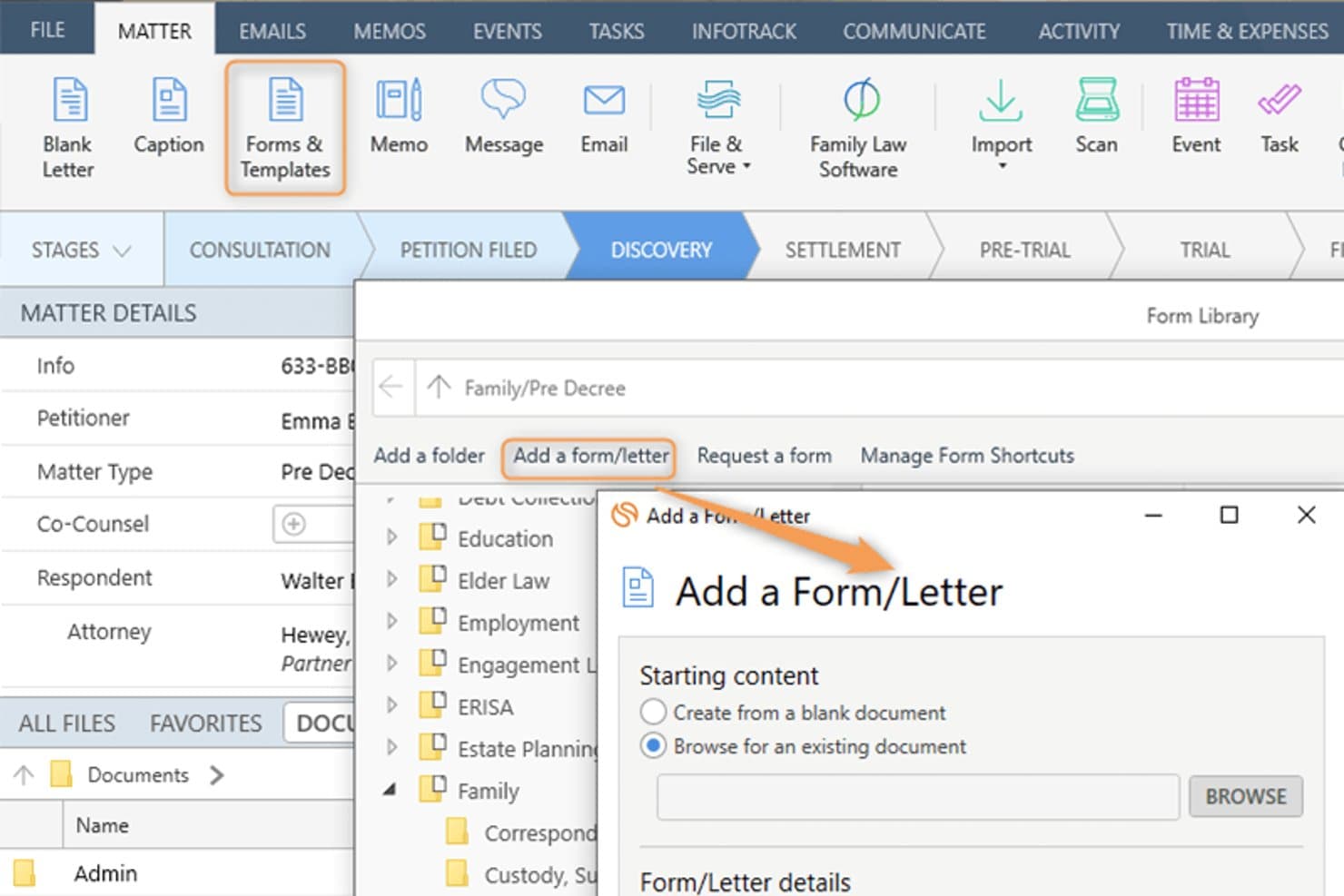
Smokeball lets users add custom forms and letters to a legal matter. Smokeball is an all-in-one legal practice management platform built for solo, small, and mid-size law firms that need matter-centric document management, email filing, billing, and Microsoft 365 integration consolidated into a single system.
Who Is Smokeball Best For?
Smokeball is a strong fit for managing partners at small private-practice law firms who handle high document volumes across multiple practice areas.
Why Smokeball Is a Good iManage Alternative
I've included Smokeball in my top picks because AutoTime is genuinely unlike anything iManage offers. It automatically captures time spent on emails, documents, calls, and tasks inside the platform, so nothing goes unbilled. I also like that matter-centric email filing works natively inside Outlook, meaning I can link emails directly to matters without ever leaving my inbox.
Smokeball Key Features
- Matter-centric document management: Store and organize legal files, templates, and forms by matter for easy retrieval.
- Custom practice area templates: Access 200+ built-in, configurable matter and document templates tailored to different legal areas.
- Native Microsoft 365 integration: Link Outlook emails and Word documents directly to matters without leaving those applications.
- Firm insights reporting: Track productivity, case progress, staff activity, and profitability with built-in dashboards and metrics.
Smokeball Integrations
Smokeball has native integrations across the Microsoft ecosystem, including Microsoft 365 and Outlook. An API is available for custom integrations.
Pros and Cons
Pros:
- Native email filing within Microsoft Outlook
- Matter-centric file organization built in
- AutoTime captures billable hours automatically
Cons:
- Better suited to smaller law firms
- Search lacks advanced metadata filtering
Learn more about Smokeball: Best for client portal communication tools
- 10-day free trial
- From $50/user/month (billed annually)
Visit WebsiteCustomer Rating:4.6/5
MyCase auto-generates task lists and deadlines directly from court rules. MyCase is a cloud-based practice management platform for small and mid-sized law firms that centralizes case management, billing, and client communication in one place.
Who Is MyCase Best For?
MyCase suits solo practitioners and small firm managing partners who handle their own billing, client intake, and day-to-day case administration.
Why MyCase Is a Good iManage Alternative
I've included MyCase in my top picks because its client portal is genuinely best-in-class for secure client communication. Clients can view case documents, send messages, and pay invoices directly through the portal, without calling or emailing the firm. The 2-way texting feature with a dedicated firm number keeps every client conversation logged and searchable inside the case record.
MyCase Key Features
- Matter-centric document storage: Organize documents within specific case folders for easy retrieval and management.
- Integrated time and expense tracking: Log billable hours and expenses directly to each matter with Smart Time Finder.
- Automated billing and invoicing: Generate and send invoices automatically based on tracked time and case activities.
- Customizable financial reporting: Access real-time analytics on payments, AR, and case profitability through built-in report tools.
MyCase Integrations
MyCase offers native integrations with QuickBooks Online, LawPay, Google Calendar, Google Drive, Dropbox, Outlook, Gmail, and CalendarRules, and provides an API for custom integrations.
Pros and Cons
Pros:
- Built-in invoicing tied directly to matters
- Two-way texting logged within case records
- Dedicated client-facing portal for secure messaging
Cons:
- No ethical wall or matter-level access controls
- Limited document version control and check-in/out
 3Best for legal practice management integration
Clio
- 7-day free trial + free demo available
- From $49/user/month
Visit WebsiteCustomer Rating:4.5/5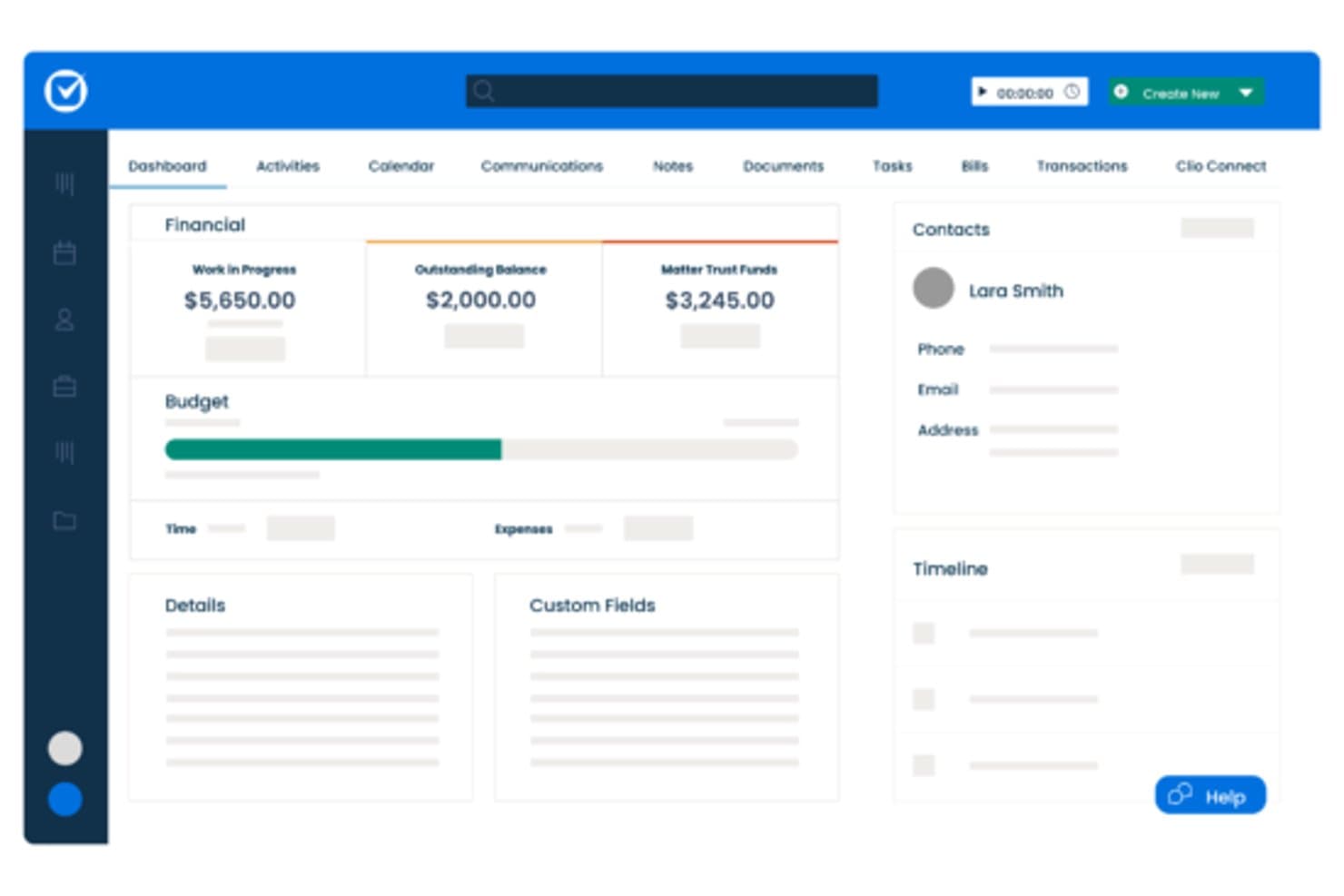
Clio centralizes matter financials, contacts, and timelines in one dashboard. Clio Manage is a cloud-based legal practice management platform built for small-to-mid-size law firms that need matter organization, billing, document storage, and client communication in one place—without the complexity of enterprise DMS tools like iManage.
Who Is Clio Best For?
Clio Manage is a natural fit for solo attorneys and small-to-mid-size law firms that want a single platform to manage matters, billing, and client files.
Why Clio Is a Good iManage Alternative
I've included Clio Manage in my top picks because it connects matter management, billing, and document storage in a single workspace that actually reflects how law firms operate day to day. I particularly like that Clio's AI can convert court documents into calendar events and turn tracked time entries into draft invoices automatically. That tight loop between case activity and billing is something iManage, as a document-only platform, simply doesn't offer.
Clio Key Features
- Matter-centric document storage: Store and organize all case files in structured, searchable matter folders.
- Integrated time and expense tracking: Track billable hours and expenses directly within each matter for accurate billing.
- Client portal for secure communication: Exchange documents and updates with clients through a dedicated, secure portal.
- Role-based access permissions: Control who can view, edit, or manage specific matters and documents throughout your firm.
Clio Integrations
Clio Manage offers native integrations with Microsoft 365, Google Workspace, DocuSign, QuickBooks Online, Dropbox, NetDocuments, Xero, Zoom, LawPay, and CalendarRules. An API is available for custom integrations.
Pros and Cons
Pros:
- AI converts court documents into calendar events
- Built-in client portal for secure file sharing
- Connects billing directly to matter activity
Cons:
- Limited version control for document-heavy workflows
- Document management less robust than iManage
Learn more about Clio: Best for small firm Microsoft 365 users
- Free demo available
- From $210/month (billed annually)
Visit WebsiteCustomer Rating:4.6/5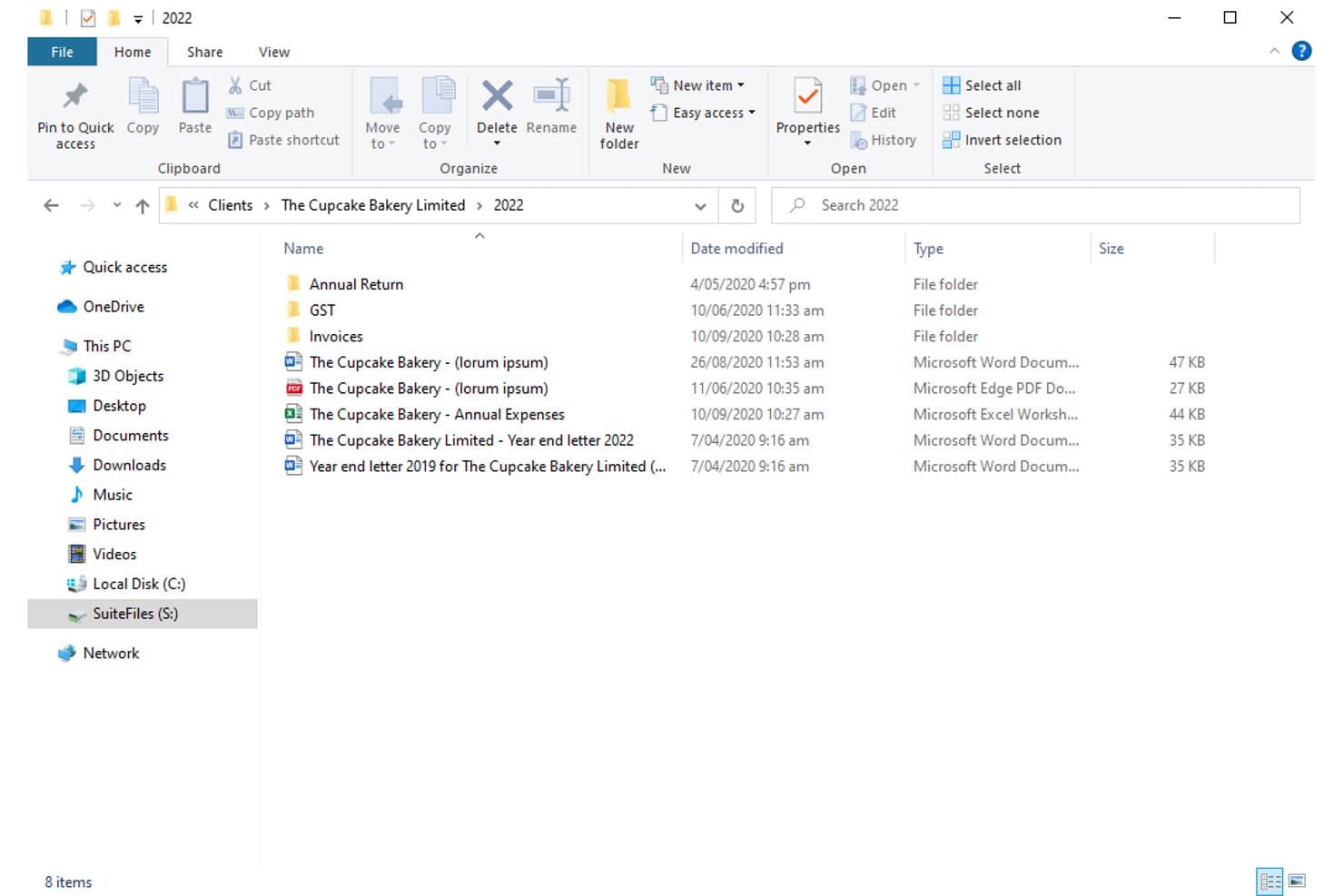
SuiteFiles organizes client documents in structured folders by year. For small law firms already deep in the Microsoft 365 ecosystem, SuiteFiles offers an all-in-one document management workspace that combines email filing, unlimited e-signing, and a secure client portal without needing separate tools.
Who Is SuiteFiles Best For?
SuiteFiles is a strong fit for small law firms that run on Microsoft 365 and want a single platform for document, email, and client file management.
Why SuiteFiles Is a Good iManage Alternative
I've included SuiteFiles in my top picks because its Microsoft 365 integration isn't an add-on, it's the foundation the whole product is built on. I can file emails directly from Outlook into client folders, co-author documents live in Word, and share finalized files through the SuiteFiles Connect portal without switching to a separate tool. Small firm teams that already run on M365 don't need to retrain staff or rebuild workflows to use it.
SuiteFiles Key Features
- Client portal (SuiteFiles Connect): Share documents securely with clients and collaborate without relying on unencrypted email.
- Task management: Assign tasks to team members and track progress alongside your documents and emails.
- PDF annotation tools: Annotate, merge, and organize PDFs directly within the SuiteFiles workspace.
- Template-driven document creation: Use customizable templates for automated client letters, proposals, and agreements.
SuiteFiles Integrations
SuiteFiles has native integrations across the Microsoft ecosystem, including Microsoft 365 and Azure. It also offers native integrations with Xero, QuickBooks Online, and Karbon, and provides an API for custom integrations.
Pros and Cons
Pros:
- SharePoint used as the underlying file storage
- Email filing directly from Outlook into matters
- Built-in e-signing without a third-party tool
Cons:
- Not suited for large or enterprise firms
- Limited advanced search versus enterprise DMS platforms
Learn more about SuiteFiles: Best for seamless Outlook document filing
- Free demo available
- Pricing upon request
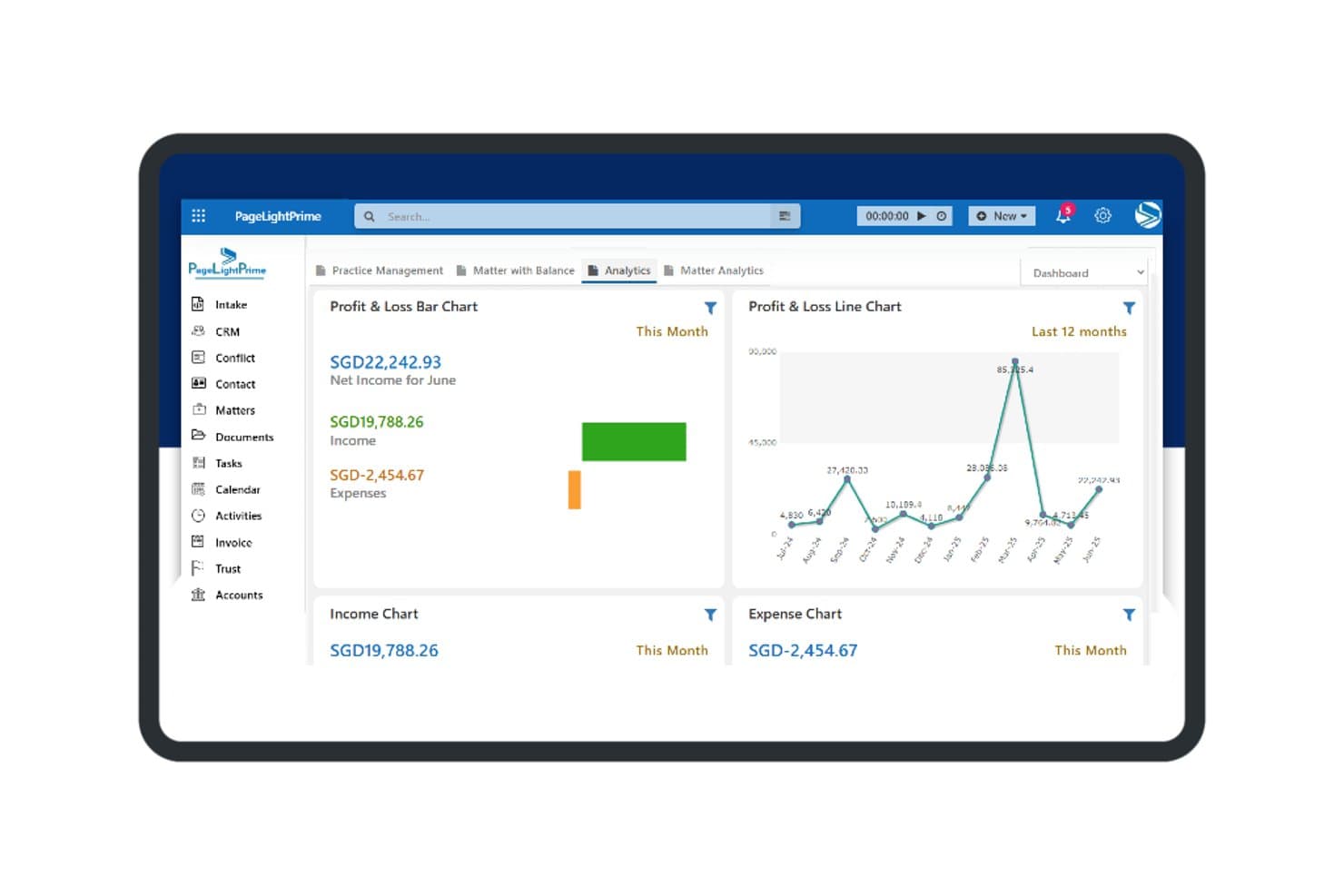
PageLightPrime offers a financial analytics dashboard with profit and loss charts, income tracking, and expense summaries for law firm management. PageLightPrime is a Microsoft 365-native legal practice management platform built for law firms that want to consolidate document management, matter tracking, and billing without stepping outside their existing Microsoft environment.
Who Is PageLightPrime Best For?
It's a strong fit for small to mid-sized law firms already running Microsoft 365 that want to replace iManage or a legacy DMS without adopting an entirely new technology stack.
Why PageLightPrime Is a Good iManage Alternative
I've included PageLightPrime in my top picks because of how it handles email filing from Outlook directly into matter workspaces. When a new matter is created, the platform auto-provisions a SharePoint folder structure with metadata already applied, so emails filed from Outlook land in the right place without manual sorting. I also appreciate that version control and audit trails run automatically alongside this, so every filed document has a tracked history from day one.
PageLightPrime Key Features
- Matter-centric SharePoint structure: Auto-generates folders and metadata for each new client and matter.
- Integrated law firm accounting: Handles billing, trust accounting, and multi-currency management within the platform.
- Client portal: Allows clients to securely access shared documents, billing information, and case updates online.
- Legal CRM and intake forms: Captures leads through web intake and links client interactions directly to matters.
PageLightPrime Integrations
PageLightPrime has native integrations across the Microsoft ecosystem, including Microsoft 365 and Azure. An API is available for custom integrations.
Pros and Cons
Pros:
- Single platform covers intake, billing, and document management
- Built-in trust accounting with IOLTA compliance support
- Runs entirely within Microsoft 365 and SharePoint
Cons:
- Smaller vendor with less established enterprise credibility
- Limited third-party ecosystem beyond Microsoft tools
Learn more about PageLightPrime: Best for Microsoft 365 workflow integration
- 30-day free trial
- From $5.00/user/month (billed annually)
Visit WebsiteCustomer Rating:4.4/5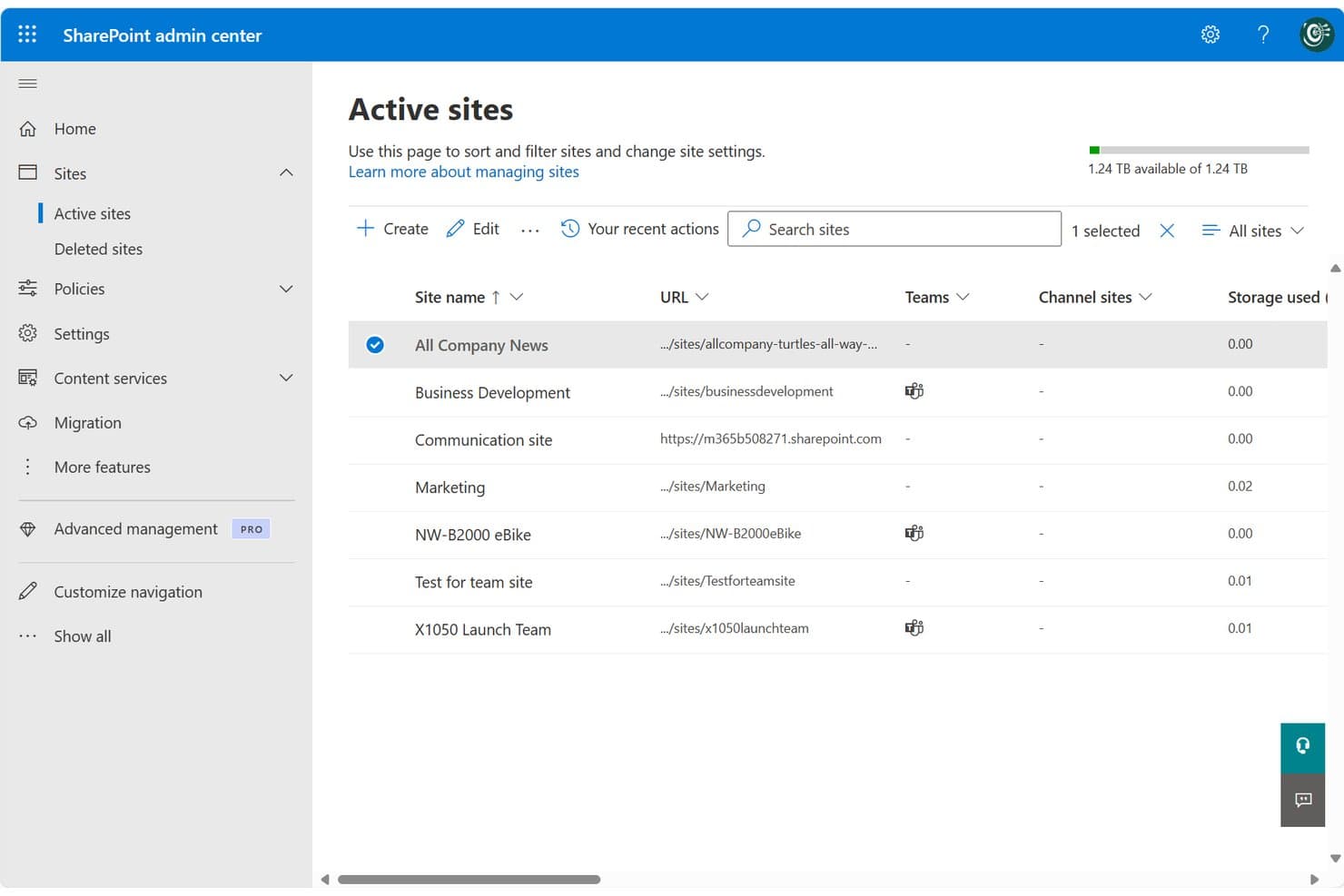
SharePoint centralizes site management across teams and projects in one admin view. SharePoint is Microsoft's cloud-based collaboration and document management platform, well-suited for legal teams and law firms already running on Microsoft 365 who want centralized file storage, version control, and access management without adopting a separate DMS.
Who Is SharePoint Best For?
SharePoint fits small-to-mid-sized law firms and in-house corporate legal teams that are already standardized on Microsoft 365 and want to avoid managing a separate DMS.
Why SharePoint Is a Good iManage Alternative
I've included SharePoint in my top picks because it's the only iManage alternative here that's natively embedded in Microsoft 365. Your legal team can co-author Word documents, manage matter libraries, and file directly from Outlook without switching tools. I particularly appreciate the check-in/check-out versioning system, which locks documents during active review and keeps a clean, restorable version history across matters.
SharePoint Key Features
- Matter library templates: Prebuilt site and folder structures you can use to organize documents by matter, client, or team.
- Granular permissions controls: Assign access based on matter, team, or document type to help protect privileged information.
- Full-text and metadata search: Search for documents or emails using keywords, tags, or custom filters to quickly find files.
- Audit trails and activity logs: Track all document views, edits, downloads, and sharing actions across your SharePoint environment.
SharePoint Integrations
SharePoint has native integrations across the Microsoft ecosystem, including Microsoft 365 and Azure. An API is available for custom integrations.
Pros and Cons
Pros:
- Matter-level permissions configurable without extra modules
- Built-in version history with document restore
- Native Microsoft 365 co-authoring without switching apps
Cons:
- Email filing requires manual setup and configuration
- No dedicated legal matter workspace out-of-the-box
Learn more about SharePoint: Best for matter-centric security controls
- Free demo available
- Pricing upon request
Visit WebsiteCustomer Rating:4.1/5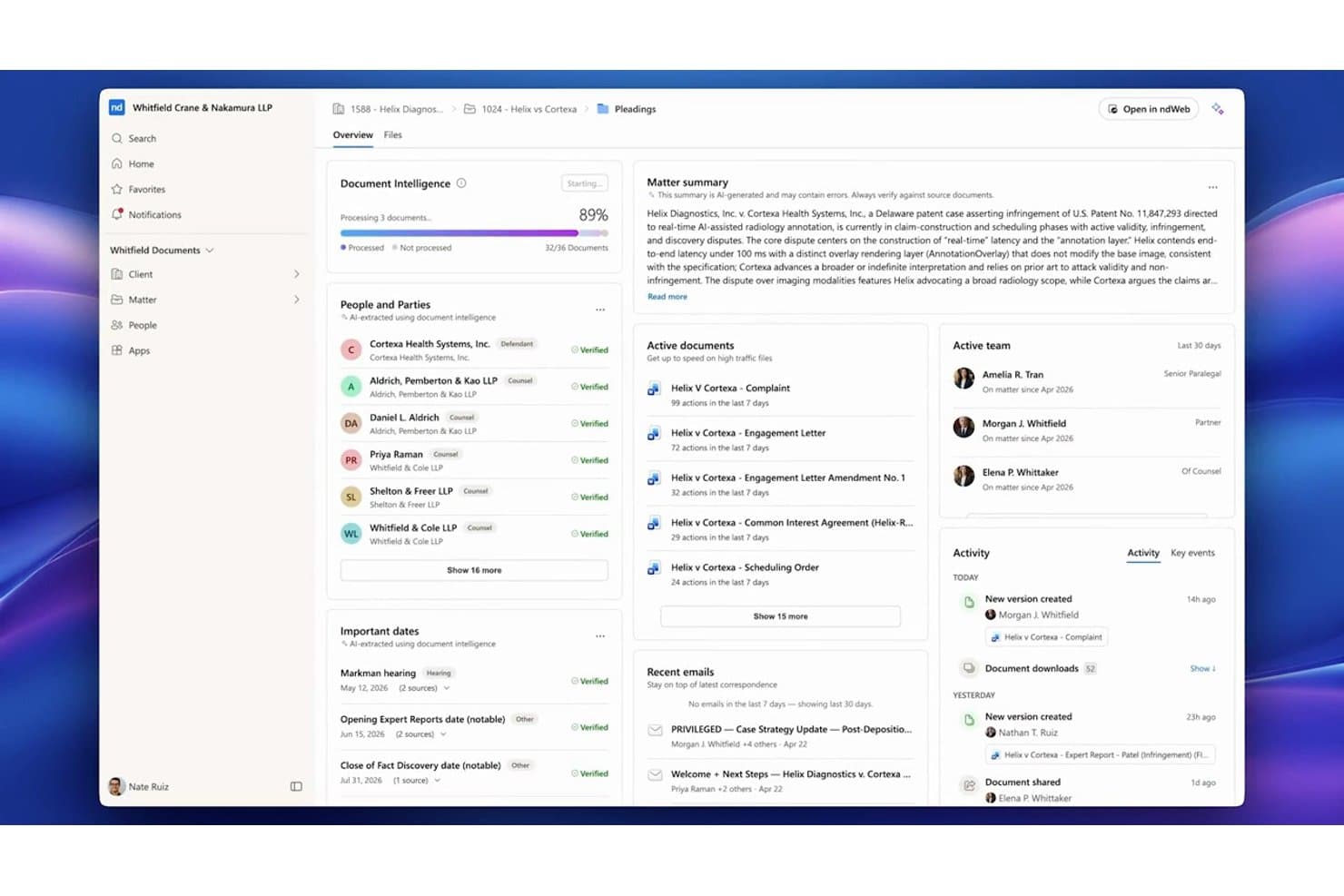
NetDocuments centralizes matter documents, parties, and key dates in one dashboard. NetDocuments is a cloud-native document management system built for law firms and corporate legal teams that need a fully hosted alternative to on-premises platforms like iManage, with matter-centric organization, AI-powered search, and enterprise-grade security controls.
Who Is NetDocuments Best For?
NetDocuments is a strong fit for mid-to-large law firms and enterprise legal departments whose IT and legal operations teams are ready to move away from on-premises infrastructure.
Why NetDocuments Is a Good iManage Alternative
NetDocuments earns its spot on my shortlist because of how precisely it handles matter-level security. I particularly like the granular ethical wall controls, which let you restrict access at the user, document, or workspace level independently. On top of that, customer-managed encryption keys and geo-aware content storage give legal teams direct control over where their data lives and who can decrypt it, which is something iManage's on-prem setup handles very differently.
NetDocuments Key Features
- AI-powered document search: Search documents and emails using natural language queries and receive answers with citations.
- Unified matter workspace: View, manage, and collaborate on all matter documents, emails, and notes from one interface.
- Built-in document bundling: Assemble and organize closing sets or litigation binders directly within the platform.
- Native Microsoft Teams integration: Access, preview, and collaborate on NetDocuments content right inside Microsoft Teams.
NetDocuments Integrations
NetDocuments offers native integrations across the Microsoft ecosystem, including Microsoft 365 and Azure, and connects directly with Clio, DocuSign, Litera, LexisNexis, Thomson Reuters, and iManage. An API is available for custom integrations.
Pros and Cons
Pros:
- AI search surfaces relevant documents without manual filtering
- Granular ethical walls built into the platform
- Strong cloud-native security for legal matter files
Cons:
- Admin configuration requires significant initial setup time
- Mobile app experience lags behind the desktop
Learn more about NetDocuments: Best for AI-powered contract automation
- Free demo available
- Pricing upon request
Visit WebsiteCustomer Rating:4.3/5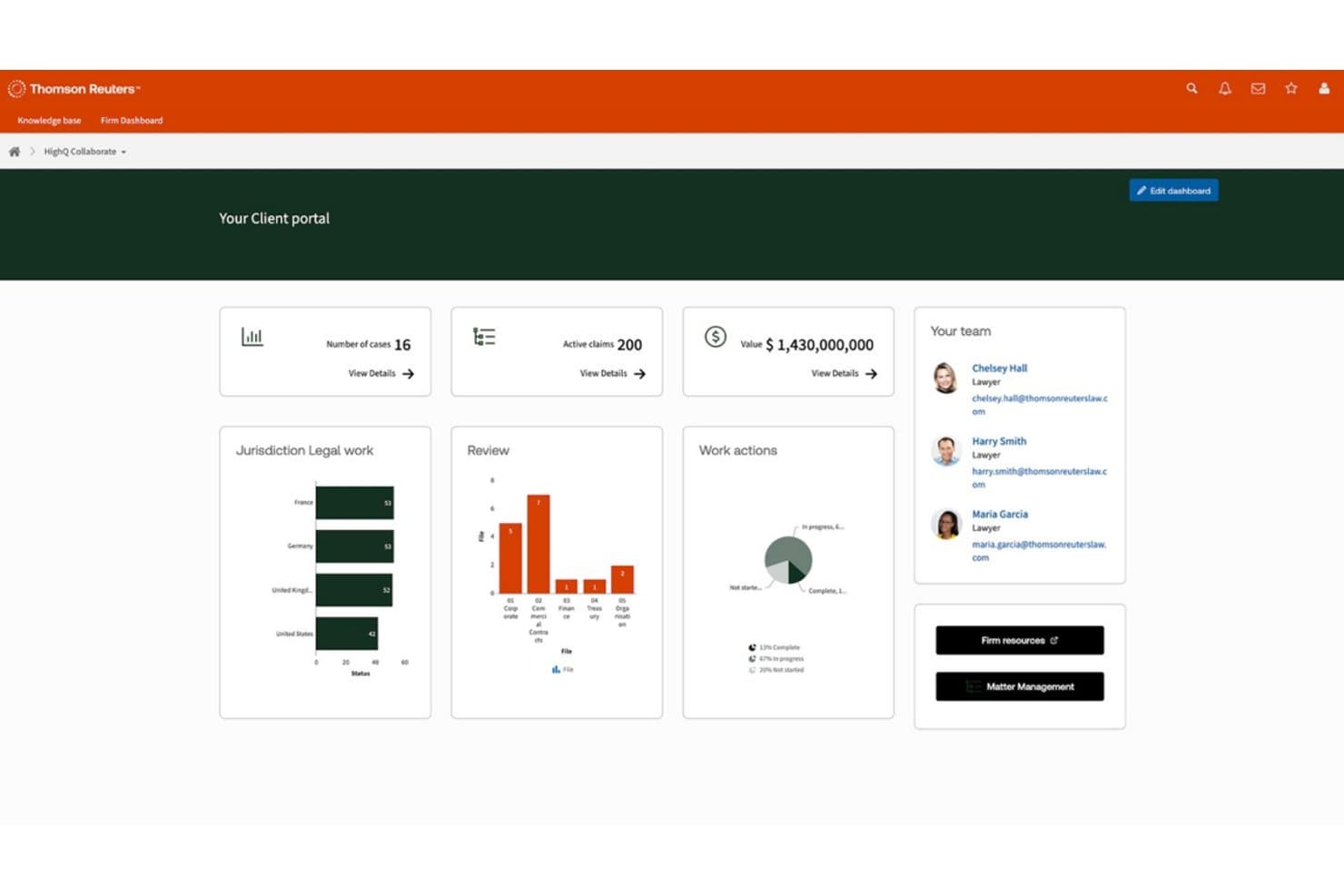
HighQ centralizes case data, team contacts, and legal workflows in one portal. HighQ is a Thomson Reuters cloud platform built for law firms and corporate legal teams that need secure document collaboration, workflow automation, and AI-powered contract tools in a single, client-facing workspace.
Who Is HighQ Best For?
HighQ is a strong fit for large law firms and enterprise legal departments managing high volumes of transactions, due diligence, or complex client matters.
Why HighQ Is a Good iManage Alternative
I picked HighQ as one of the best because its CoCounsel-powered Document Insights goes well beyond basic document storage. It automatically extracts risks, summarizes contract terms, and populates iSheets with AI-generated data during due diligence. I also like that HighQ supports the Model Context Protocol, letting AI tools like Claude and ChatGPT work securely inside your legal workspaces without manual data transfer.
HighQ Key Features
- Matter-centric workspaces: Organize documents, tasks, and discussions by matter for easy cross-team access.
- Granular access controls: Set permissions and ethical walls at the matter, folder, or document level to protect sensitive data.
- Workflow automation designer: Build multi-step legal processes using visual tools for intake, approvals, or project management.
- Microsoft 365 integration: Edit documents collaboratively in Word, Excel, and PowerPoint directly within HighQ’s secure environment.
HighQ Integrations
HighQ offers native integrations across the Microsoft ecosystem, including Microsoft 365 and Azure, as well as with DocuSign, Adobe Sign, and Legal Tracker. An API is available for custom integrations.
Pros and Cons
Pros:
- iSheets auto-populate from AI document extraction
- Client portals included out of the box
- AI-powered contract review built in natively
Cons:
- Email filing lags behind iManage's capabilities
- Less mature as a dedicated DMS
Learn more about HighQ: Best for on-premises legal document storage
- Free demo available
- Pricing upon request
Visit WebsiteCustomer Rating:4/5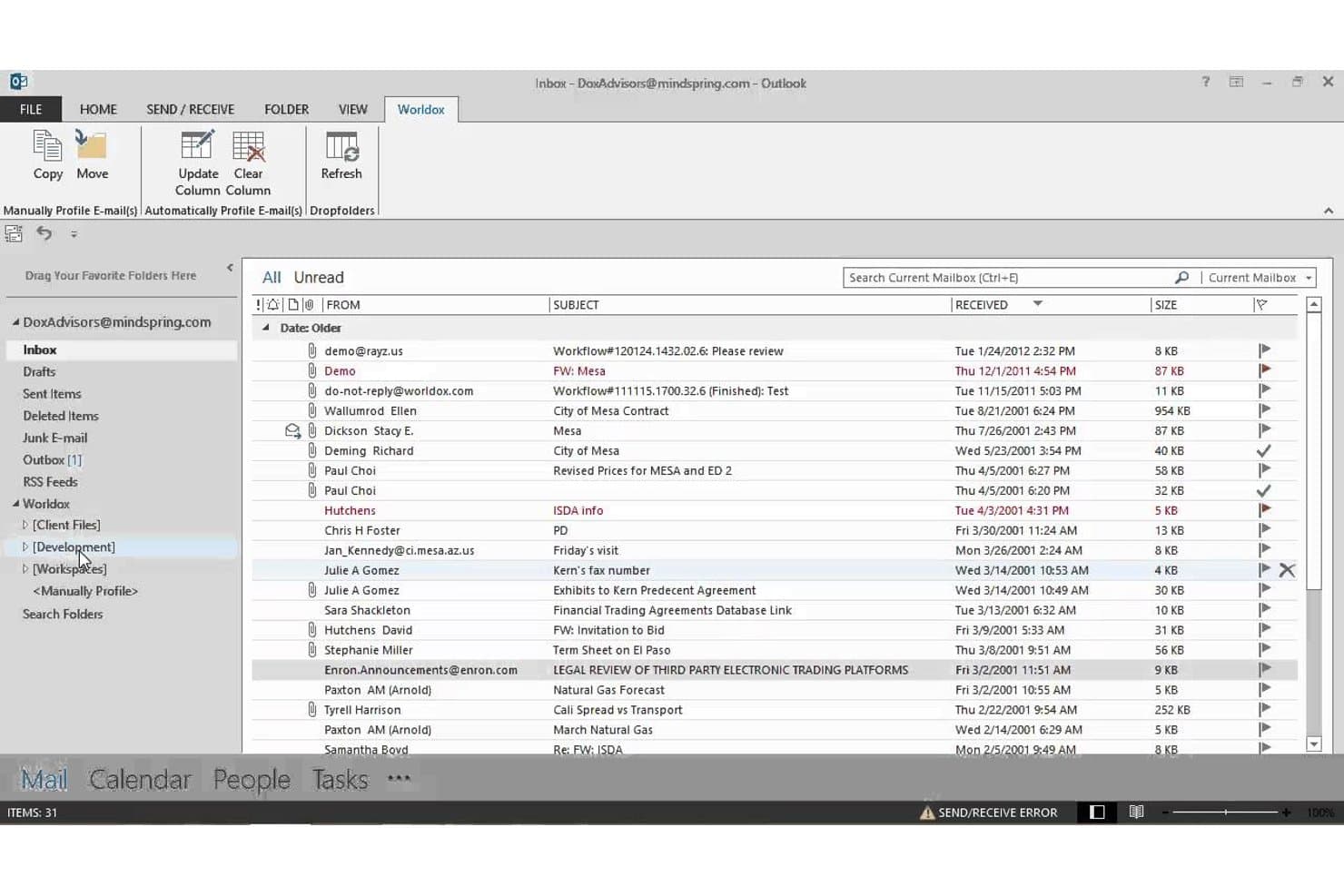
Worldox integrates directly into Outlook for seamless email filing. Worldox is a long-standing legal document management system built for law firms and corporate legal departments that need matter-centric document organization, advanced search, and email filing without moving to a cloud-based infrastructure.
Who Is Worldox Best For?
It's a strong fit for small-to-midsize law firms running Windows-based infrastructure that prefer on-premises document control over cloud-hosted alternatives.
Why Worldox Is a Good iManage Alternative
I've included Worldox in my top picks because it gives firms complete control over where their data lives. Unlike iManage, which has shifted heavily toward cloud-hosted deployments, Worldox keeps documents on your own servers, which matters when compliance obligations make cloud storage a non-starter. I particularly like the matter-centric profiling system, where every document is tagged with client, matter, and document type metadata at the point of filing, making retrieval fast and consistent across the firm.
Worldox Key Features
- Customizable metadata fields: Tag documents by client, matter, and document type for granular organization.
- Full-text and metadata search: Locate documents and emails using powerful filters tailored for legal workflows.
- Audit trail reporting: Track document access and activity for security, compliance, and accountability needs.
- Office suite integration: Work with Microsoft Word, Excel, and Outlook directly from your document management interface.
Worldox Integrations
Worldox has native integrations across the Microsoft ecosystem, including Microsoft 365 and Outlook. It also offers integrations with Tabs3 and PracticeMaster. An API is available for custom integrations.
Pros and Cons
Pros:
- Strong compatibility with Windows-based firm infrastructure
- Matter-centric profiling built for legal workflows
- True on-premises deployment for data sovereignty
Cons:
- Dated interface compared to cloud-first competitors
- No mobile app for remote document access
Learn more about Worldox: Best for native email management in Outlook
- 7-day free trial
- From $395/month
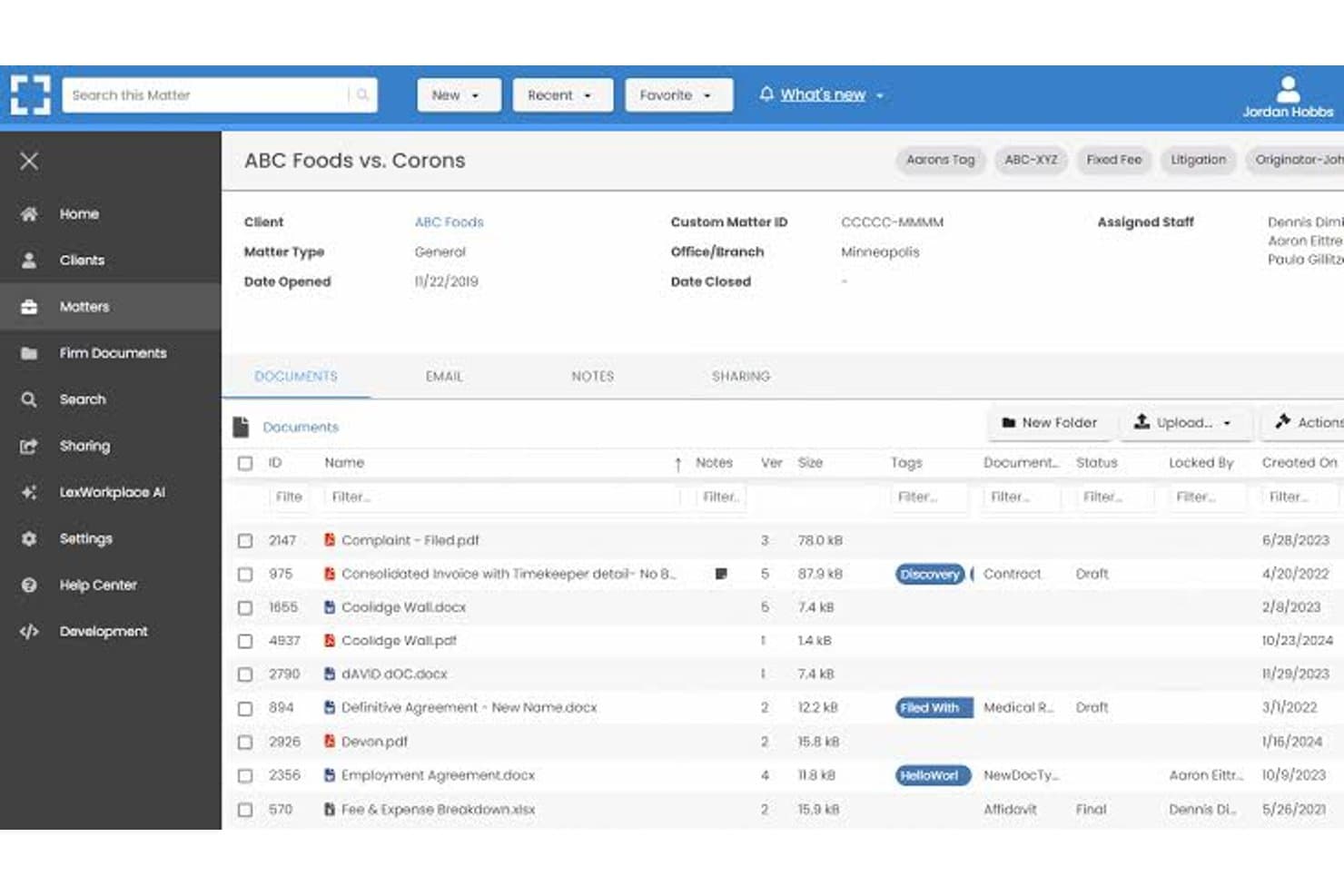
LexWorkplace dashboard for managing legal matters, documents, email, and file sharing. LexWorkplace is a cloud-based document and email management system built for small-to-midsize law firms that want matter-centric organization, full-text search, and secure cloud storage without the enterprise complexity of iManage.
Who Is LexWorkplace Best For?
LexWorkplace is a natural fit for law firms with 5–50 users that need a structured legal DMS without dedicating IT resources to deployment and maintenance.
Why LexWorkplace Is a Good iManage Alternative
I've included LexWorkplace in my top picks because its Outlook email management is genuinely best-in-class for small law firms. Smart File suggests the correct matter automatically when you're filing an email, and Multi Select lets you bulk-file entire threads in one action. Both features matter most during active litigation or transactions, where email volume spikes and misfiled messages create real compliance exposure.
LexWorkplace Key Features
- Matter-centric document management: Organize files, notes, and correspondence by client and legal matter in secure cloud workspaces.
- Integrated document versioning: Track, compare, and restore previous versions of documents, with full audit trails for all changes.
- Document AI assistant: Use built-in AI to summarize, query, and extract information from legal documents without leaving the platform.
- Full-text and metadata search: Find documents and emails instantly with full-text OCR, advanced filters, and matter-based search options.
LexWorkplace Integrations
LexWorkplace offers native integrations with Microsoft 365, including Outlook and Word, as well as Clio Manage. An API is available for custom integrations.
Pros and Cons
Pros:
- Full-text OCR search across all matter files
- Matter-centric workspaces designed for law firms
- Smart email filing natively within Outlook
Cons:
- Smaller user community than enterprise-grade alternatives
- No ethical wall automation for practice groups
Learn more about LexWorkplace:
Altre alternative a iManage
Ecco alcune ulteriori alternative a iManage che non sono entrate nel mio elenco, ma che vale comunque la pena prendere in considerazione:
- 11Epona DMSIdeale per l'archiviazione avanzata basata sui metadati
- 12PracticePantherIdeale per personalizzare l'automazione dei flussi di lavoro
- 13LEAPIdeale per l'automazione integrata dei moduli legali
- 14FilevineIdeale per flussi di lavoro documentali personalizzabili
- 15Rocket MatterIdeale per i timer dei documenti associati alle pratiche
- 16CosmoLexIdeale per la conformità della contabilità fiduciaria
- 17CenterbaseIdeale per l'assemblaggio di documenti basato su modelli
- 18DocsvaultIdeale per l'implementazione in cloud ibrido e in sede
Come valuto le alternative a iManage
Esamino due livelli: ciò che qualsiasi DMS paragonabile a iManage deve offrire—archiviazione incentrata sulle pratiche, gestione delle e-mail e controllo delle versioni—e ciò che distingue gli strumenti. Elementi distintivi come le barriere etiche, la redazione basata sull'intelligenza artificiale e le opzioni di distribuzione guidano le mie scelte.
Funzionalità fondamentali (requisiti essenziali per questo elenco)
Quando seleziono gli strumenti per il mio elenco, assegno a ciascuno un punteggio su una scala da 0 (non offre la funzionalità) a 5 (eccelle in quest'area) per ogni funzionalità fondamentale elencata di seguito. Calcolo quindi il punteggio totale dello strumento in percentuale, utilizzando il 65% come parametro di riferimento per valutarne l'idoneità complessiva all'elenco.
- Gestione dei documenti: valuto come ogni strumento organizza i file in base alle pratiche, verificando la presenza di strutture di cartelle configurabili, schede di profilazione e modelli di spazi di lavoro che rispecchiano il modo in cui gli avvocati aprono e gestiscono effettivamente gli incarichi dei clienti.
- Controllo delle versioni: è importante il modo in cui ogni strumento tiene traccia delle bozze—cerco funzionalità di blocco e sblocco, confronto delle versioni e ripristino, affinché gli avvocati possano collaborare alle memorie senza sovrascrivere le modifiche altrui.
- Gestione delle e-mail: verifico se la piattaforma archivia direttamente e-mail e allegati da Outlook negli spazi di lavoro delle pratiche, includendo funzionalità come suggerimenti per l'archiviazione automatica e deduplicazione delle conversazioni che riducono l'ordinamento manuale.
- Ricerca avanzata: trovare un memorandum sepolto tra migliaia di pratiche è una realtà quotidiana, quindi valuto la ricerca nel testo completo e nei metadati, con filtri specifici per pratica che restituiscano rapidamente risultati pertinenti.
- Sicurezza e controlli degli accessi: cerco autorizzazioni a livello di pratica, applicazione delle barriere etiche, crittografia e registri di controllo—particolarmente importanti quando uno studio gestisce contemporaneamente pratiche relative a parti avversarie.
- Integrazione con Microsoft 365: la maggior parte degli avvocati lavora in Word, Outlook e Teams, quindi valuto quanto profondamente ogni strumento si colleghi a Microsoft 365 per la co-redazione dei documenti, l'archiviazione delle e-mail e l'accesso da dispositivi mobili.
Una volta ottenuto un elenco di strumenti che soddisfano i criteri, considero ciò che distingue ciascuna piattaforma.
Fattori distintivi (ciò che differenzia i fornitori)
Ecco come confronto i diversi fornitori:
Funzionalità di spicco
La redazione di documenti basata sull'intelligenza artificiale è un elemento distintivo fondamentale—cerco piattaforme che consentano agli avvocati di riepilogare o confrontare le clausole direttamente all'interno del DMS senza passare a uno strumento di terze parti. Anche gli spazi di lavoro unificati per le pratiche hanno un peso importante, perché riunire documenti, e-mail e note in un'unica vista fa risparmiare tempo reale quando ci si prepara per un'udienza o una chiamata con il cliente. La revisione con modifiche integrata e il confronto delle versioni consentono agli avvocati di annotare le bozze senza esportarle in Word; valuto attentamente questi aspetti nelle attività caratterizzate da un uso intensivo dei documenti.
Oltre le funzionalità
La flessibilità di distribuzione è molto importante quando gli studi stanno migrando da iManage—verifico se un fornitore supporta modelli locali, cloud privato o ibridi, in modo che le pratiche attive non vengano interrotte durante la transizione. Certificazioni di conformità come SOC 2 Type II e ISO 27001 mi indicano se una piattaforma è in grado di gestire i dati riservati dei clienti con il rigore che gli studi si aspettano. Valuto inoltre il supporto alla migrazione, incluso il fatto che il fornitore conservi i metadati durante lo spostamento dei file dai sistemi precedenti o dalle unità condivise.
Perché cercare alternative a iManage?
Sebbene iManage sia una buona scelta tra le alternative ai software per la gestione dei documenti legali, ci sono diversi motivi per cui alcuni utenti cercano soluzioni alternative. Potresti cercare alternative a iManage perché…
- Hai bisogno del supporto per implementazioni ibride o locali
- Desideri prezzi più trasparenti o flessibili
- Preferisci un'integrazione più approfondita con Microsoft 365 o Teams
- Hai bisogno di controlli granulari sulle barriere etiche o sulla riservatezza dei clienti
- Cerchi piattaforme che semplifichino la migrazione e la gestione del cambiamento
- Hai bisogno di un'assistenza clienti più reattiva in tutte le aree geografiche
Se ti riconosci in una di queste situazioni, sei nel posto giusto. Il mio elenco contiene diverse alternative a iManage più adatte ai team che affrontano queste difficoltà con iManage e cercano soluzioni alternative.
Funzionalità principali di iManage
Ecco alcune delle funzionalità principali di iManage, che ti aiuteranno a mettere a confronto ciò che offrono le soluzioni alternative:
- Organizzazione incentrata sulle pratiche: archiviare, organizzare e accedere a documenti ed e-mail in base alle pratiche legali, facilitando il lavoro dei team e mantenendo tutto collegato al caso o al progetto corretto.
- Controllo automatico delle versioni: monitorare le modifiche ai documenti salvando ed etichettando automaticamente ogni versione, con supporto per la presa in carico e la restituzione, il confronto e il ripristino, così da ridurre gli errori dovuti a sovrascritture accidentali.
- Gestione delle e-mail di Outlook: archiviare, applicare etichette e organizzare e-mail e allegati direttamente da Microsoft Outlook nell'area di lavoro della pratica corretta, semplificando la gestione dei documenti e della corrispondenza.
- Ricerca e filtri avanzati: cercare documenti, e-mail e metadati utilizzando filtri specifici per il settore legale e la ricerca a testo completo, aiutando gli utenti a trovare rapidamente i file necessari all'interno di archivi vastissimi.
- Sicurezza granulare e barriere etiche: applicare autorizzazioni a livello di pratica, tutelare la riservatezza dei clienti e applicare le politiche sulle barriere etiche per controllare l'accesso ai documenti e soddisfare i requisiti di conformità, anche tra team dislocati.
- Integrazione con Microsoft 365: lavorare direttamente in Word, Outlook, Excel e Teams con integrazioni native, consentendo agli utenti di creare, modificare e creare collaborativamente documenti all'interno dell'ambiente sicuro di iManage.
- Tracce di controllo e registri delle attività: monitorare l'accesso ai documenti e le azioni eseguite tramite registri dettagliati che soddisfano i requisiti di verifica legali e dei clienti, favorendo trasparenza e responsabilità.
- Accesso da dispositivi mobili: esaminare, modificare e condividere documenti in modo sicuro da smartphone e tablet, facilitando il lavoro degli avvocati da remoto o durante gli spostamenti.
- Strumenti di collaborazione: condividere documenti e raggruppare file con soggetti interni ed esterni, incluse funzionalità per la condivisione sicura tramite link e le annotazioni in tempo reale.
- Politiche di conservazione automatizzate: applicare regole per conservare, archiviare o eliminare i documenti in base ai requisiti dei clienti o normativi, supportando le pratiche di governo delle informazioni.