

Recensione PerfectLaw: Vantaggi, Svantaggi, Funzionalità e Prezzi
PerfectLaw si distingue per il suo approccio all-in-one, ma ho scoperto che il suo vero valore emerge per gli studi che cercano un'integrazione fluida piuttosto che funzionalità appariscenti.

Recensiamo gli strumenti in modo indipendente e le commissioni ci aiutano a finanziare i nostri test. Consulta la nostra politica sulla trasparenza, la nostra metodologia o suggerisci uno strumento.
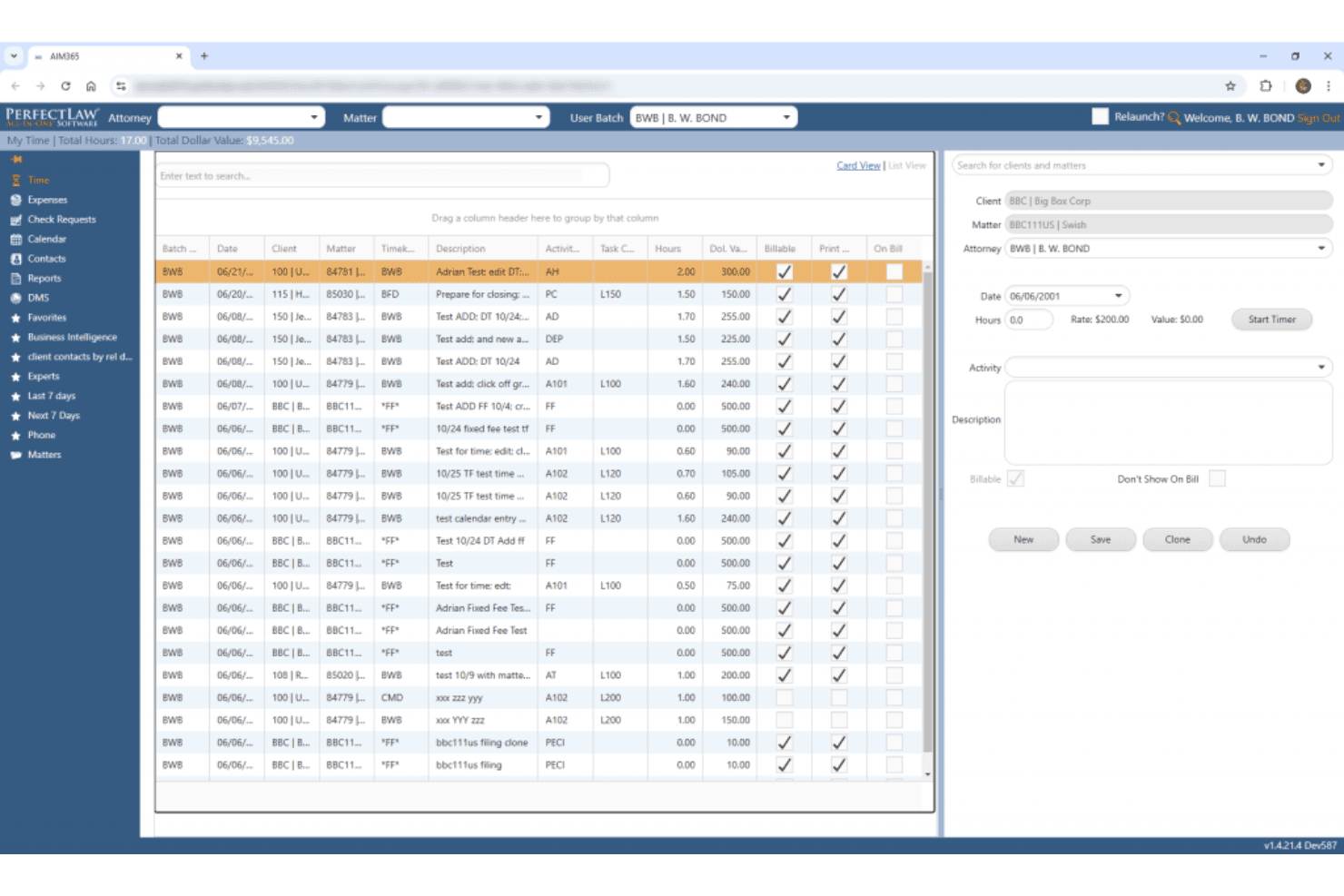
PerfectLaw is an all-in-one legal document management software built specifically for law firms that need document management, practice management, billing, and accounting in a single platform. I'd consider it if your firm is tired of stitching together separate tools and wants everything running from one system. If you've looked at NetDocuments, which handles document management well but requires integrations for the rest of your practice, PerfectLaw is worth a closer look for the built-in depth it offers across the full operational stack.
PerfectLaw Evaluation Summary
3.7/5
- Pricing upon request
- Free demo available
Perché fidarsi dei nostri consigli sui software
6,700+
Reviews
20
Industry experts
16+
Evaluation factors
14
Years
Il nostro team testa e recensisce software dal 2012. In quanto leader di studi legali noi stessi, sappiamo quanto sia difficile — e importante — scegliere il software giusto.
Per questa guida, abbiamo valutato gli strumenti attraverso test pratici e ricerche indipendenti, assegnando un punteggio agli strumenti in base ai nostri criteri di selezione.
Le nostre recensioni riflettono il nostro giudizio editoriale umano, non un discorso di vendita.
PerfectLaw Overview
When judging PerfectLaw, I think its all-in-one approach and deep workflow automation set it apart for firms that want everything under one roof. The interface feels dated compared to newer options, and integrations are limited, but support is responsive and onboarding is straightforward. Pricing is on the higher side, so I’d suggest it for midsize to large firms that value unified systems over best-of-breed tools. If you’re selecting software for complex, document-heavy practices, PerfectLaw’s automation and case management features are going to make a noticeable difference.
Pros
- Comprehensive case and document management in one platform
- Responsive customer support with live assistance
- Strong automation for legal drafting and templates
Cons
- User interface feels outdated and cluttered
- Integrations with third-party tools are limited
- Pricing is higher than many comparable solutions
Is PerfectLaw Right For Your Needs?
Who Would be a Good Fit for PerfectLaw?
PerfectLaw is a strong choice for organizations that need unified case, document, and workflow management with reliable automation. Firms handling high volumes of legal documents or complex matters will appreciate its all-in-one platform and responsive support. It’s best suited for midsize to large legal teams, especially those in regulated or document-heavy industries, where centralization and compliance are top priorities.
- Large Law FirmsCentralized case and document management supports high-volume, multi-practice operations.
- Corporate Legal DepartmentsWorkflow automation and compliance tools help manage complex, ongoing matters.
- Government AgenciesAudit trails and secure document handling meet strict regulatory requirements.
- Litigation PracticesIntegrated calendaring and deadline tracking reduce risk in litigation-heavy environments.
- Real Estate LawDocument automation speeds up repetitive contract and closing processes.
- Healthcare Legal TeamsCentralized records and compliance features support privacy and regulatory needs.
Who Would be a Bad Fit for PerfectLaw?
PerfectLaw isn’t ideal for teams that need modern interfaces, extensive integrations, or budget-friendly solutions. Smaller firms or those prioritizing flexibility and niche integrations may find it limiting. If your team relies on best-of-breed tools or needs frequent updates, you’ll likely want to look elsewhere.
- Small Law FirmsHigh pricing and broad features may overwhelm smaller practices.
- Solo PractitionersComplexity and cost outweigh benefits for single-user environments.
- Tech StartupsLimited integrations and dated interface don’t match fast-paced needs.
- Boutique IP FirmsLacks specialized IP management features found in niche tools.
- In-House IT DepartmentsMinimal customization and integration options restrict technical flexibility.
- Legal Aid OrganizationsBudget constraints and simpler workflows make it an impractical choice.
Come Testiamo e Valutiamo gli Strumenti
Abbiamo trascorso anni a costruire, perfezionare e migliorare il nostro sistema di test e valutazione del software. La nostra rubrica è progettata per cogliere le sfumature della selezione del software e ciò che rende uno strumento efficace, concentrandosi sugli aspetti critici del processo decisionale. Qui sotto puoi vedere esattamente come funzionano i nostri test e la nostra valutazione su sette criteri. Questo ci permette di offrire una valutazione imparziale del software sulla base della funzionalità principale, delle caratteristiche distintive, facilità d’uso, onboarding, assistenza clienti, integrazioni, recensioni dei clienti e rapporto qualità-prezzo.
Funzionalità Principale (25% della valutazione finale)
Il punto di partenza della nostra valutazione è sempre la funzionalità principale dello strumento. Possiede le funzionalità e le caratteristiche di base che un utente si aspetterebbe di trovare? Alcune di queste funzionalità principali sono bloccate su piani tariffari più costosi? Ci aspettiamo che uno strumento sia competitivo rispetto alle capacità di base dei suoi concorrenti.
Caratteristiche Distintive (25% della valutazione finale)
Valutiamo quindi le caratteristiche distintive e non comuni che vanno oltre la funzionalità di base generalmente presente in strumenti dello stesso tipo. Un punteggio elevato riflette caratteristiche specializzate o uniche che rendono il prodotto più veloce, più efficiente, oppure che offrono ulteriore valore all’utente. Valutiamo anche quanto sia facile integrare con altri strumenti tipici della propria infrastruttura tecnologica per espandere la funzionalità e l’utilità del software. Gli strumenti che offrono molte integrazioni native, connessioni di terze parti e accesso API per costruire integrazioni personalizzate ottengono i punteggi migliori.
Facilità d’Uso (10% della valutazione finale)
Consideriamo quanto sia rapido e semplice eseguire le attività definite nella funzionalità principale utilizzando lo strumento. Il software con punteggio più alto è ben progettato, intuitivo da usare, offre app mobili, propone modelli e rende semplici anche le attività relativamente complesse.
Onboarding (10% della valutazione finale)
Sappiamo quanto sia importante una rapida adozione da parte del team per una nuova piattaforma, quindi valutiamo quanto sia facile imparare e usare uno strumento con il minimo di formazione. Esaminiamo quanto rapidamente un membro del team può essere operativo e iniziare a usare lo strumento senza esperienza. Le soluzioni con punteggi elevati richiedono poco o nessun supporto.
Assistenza Clienti (10% della valutazione finale)
Esaminiamo quanto sia rapido e semplice sbloccarsi e trovare aiuto tramite telefono, chat dal vivo o knowledge base. Gli strumenti e le aziende che forniscono supporto in tempo reale ottengono i punteggi migliori, mentre i chatbot ottengono i punteggi peggiori.
Recensioni dei Clienti (10% della valutazione finale)
Oltre ai nostri test e alle nostre valutazioni, consideriamo il net promoter score dei clienti attuali e passati. Esaminiamo la probabilità che, se avessero la scelta, selezionerebbero di nuovo lo strumento per la funzionalità principale. Un software con punteggio alto riflette un alto net promoter score da parte dei suoi utenti.
Rapporto Qualità-Prezzo (10% della valutazione finale)
Infine, considerando tutti gli altri criteri, valutiamo il prezzo medio dei piani entry level rispetto alle funzionalità principali e consideriamo anche il valore degli altri criteri di valutazione. Il software che offre di più, al costo minore, otterrà un punteggio più elevato.
Core Features
AI-Powered Legal Research
CoCounsel AI delivers fast, synthesized answers from trusted legal sources. This helps you quickly analyze complex issues and find relevant precedents.
Standard Document Drafting
Access up-to-date templates with annotations and negotiation tips. You can draft contracts and legal documents faster with expert guidance built in.
Practice Notes
Get plain-language explanations of complex legal topics. These notes help you get up to speed on new matters or areas of law.
Dynamic Visualization Tools
Use data-driven charts and visualization features to understand legal trends. These tools make it easier to spot risks and opportunities in your matters.
Attorney-Editor Network
Tap into resources maintained by over 650 full-time attorney-editors. This ensures your guidance and templates are current and reliable.
Timely Content Updates
Benefit from resources updated continuously to reflect new laws and regulations. You always work with the latest legal information and best practices.
Ease of Use
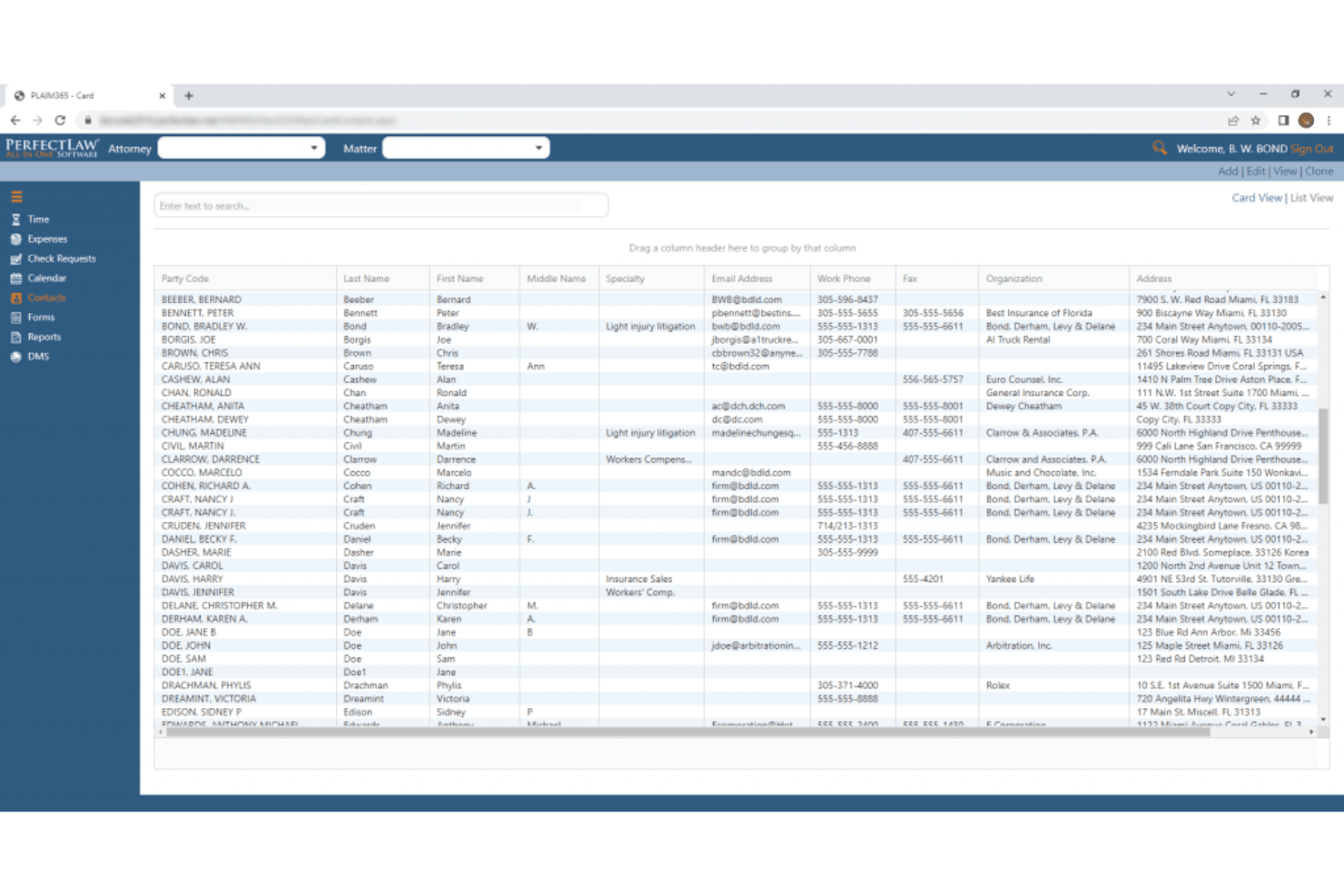
PerfectLaw’s interface feels dated and can be overwhelming at first, especially for users new to legal management software. However, once you get past the initial setup, navigation is logical and workflows are clearly mapped out. Users often mention that the platform’s automation and document tools save time, but the lack of modern design and limited customization options can slow adoption for teams used to more intuitive systems.
Integrations
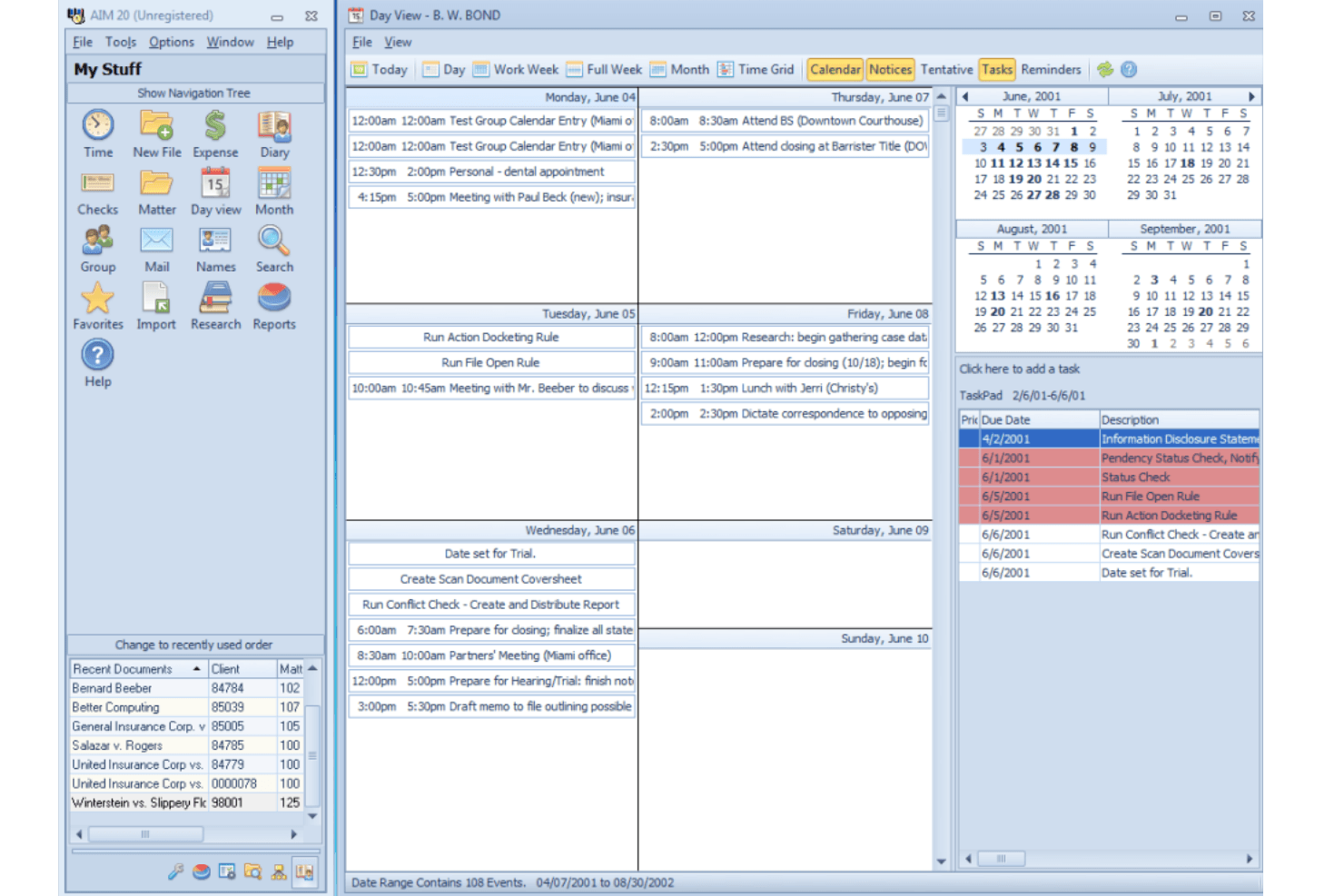
PerfectLaw integrates with Microsoft Word, Microsoft Excel, Microsoft Outlook, Microsoft Azure, SQL Server, Positive Pay, and webDMS, among others.
PerfectLaw does not advertise a public API or direct connections with third-party integration tools.
PerfectLaw Specs
- 2-Factor Authentication: Yes
- API: Yes
- Approval Workflows: Yes
- Audit Trail: Yes
- Calendar Management: Yes
- Compliance Tracking: Yes
- Contract Management: No
- Custom Reports: Yes
- Customer Management: Yes
- Data Export: Yes
- Data Import: Yes
- Document Management: Yes
- External Integrations: Yes
- Multi-User: Yes
- NDA Management: Yes
- Notifications: Yes
- Policy Management: Yes
- Scheduling: Yes
- Workflow Management: Yes


