

In qualità di assistente legale, so quanto sia difficile offrire un supporto di alto livello al proprio studio legale mentre si gestisce un carico di lavoro elevato, si stabiliscono le priorità e ci si assicura di comunicare in modo efficace. Il software per assistenti legali può contribuire a semplificare il flusso di lavoro, rendendo più gestibile e meno dispendioso in termini di tempo un elenco di attività apparentemente infinito. Il software che ho selezionato con cura ti permetterà di gestire con facilità e precisione l'individuazione elettronica, la gestione dei casi, l'automazione dei documenti, il monitoraggio del tempo, la fatturazione, la messaggistica e molto altro.
Perché fidarsi dei nostri consigli sui software
6,700+
Reviews
20
Industry experts
16+
Evaluation factors
14
Years
Il nostro team testa e recensisce software dal 2012. In quanto leader di studi legali noi stessi, sappiamo quanto sia difficile — e importante — scegliere il software giusto.
Per questa guida, abbiamo valutato gli strumenti attraverso test pratici e ricerche indipendenti, assegnando un punteggio agli strumenti in base ai nostri criteri di selezione.
Le nostre recensioni riflettono il nostro giudizio editoriale umano, non un discorso di vendita.
Tabella comparativa dei software per assistenti legali
Questa tabella comparativa riassume i dettagli dei prezzi dei migliori software per assistenti legali che ho selezionato:
| Tool | Best For | Trial Info | Price | ||
|---|---|---|---|---|---|
| 1 | Ideale per il monitoraggio centralizzato di casi e documenti | Prova gratuita di 7 giorni + demo gratuita disponibile | Da $49/utente/mese (fatturato annualmente) | Website | |
| 2 | Ideale per pagamenti e fatturazione conformi | Demo gratuita disponibile | Prezzo su richiesta | Website | |
| 3 | Ideale per la comunicazione e la collaborazione con i clienti | No | Da $49/utente/mese (fatturazione annuale) | Website | |
| 4 | Ideale per i professionisti legali canadesi | No | Da $34/utente/mese (fatturato annualmente) | Website | |
| 5 | Ideale per creare modelli di documenti | Demo gratuita disponibile | Prezzo su richiesta | Website | |
| 6 | Ideale per flussi di lavoro e aree di pratica personalizzabili | No | Da $29/utente/mese (fatturazione annuale) | Website | |
| 7 | Ideale per studi legali individuali e di piccole dimensioni | No | Da $129/utente/mese (fatturazione annuale) | Website | |
| 8 | Ideale per la gestione completa dei casi | No | Da $69/utente/mese (fatturato annualmente) | Website | |
| 9 | Ideale per ricerca e analisi legale | No | Prezzo su richiesta | Website | |
| 10 | Ideale per la redazione automatizzata | Prova gratuita disponibile | A partire da $19/mese | Website |


Recensioni dei migliori software per assistenti legali
Di seguito sono riportati i miei riepiloghi dettagliati dei migliori software per assistenti legali inclusi nel mio elenco. Le mie recensioni offrono uno sguardo approfondito alle funzionalità principali, ai pro & contro, alle integrazioni e ai casi d’uso ideali di ogni strumento, per aiutarti a trovare quello più adatto a te.
 Ideale per il monitoraggio centralizzato di casi e documenti
- Prova gratuita di 7 giorni + demo gratuita disponibile
- Da $49/utente/mese (fatturato annualmente)
Visit WebsiteCustomer Rating:4.3/5
PracticePanther centralizza pratiche e documenti per flussi di lavoro legali più rapidi. PracticePanther è uno strumento pratico per i paralegali che necessitano di un migliore controllo sulle attività legali quotidiane. Questo software di gestione dello studio basato su cloud aiuta gli studi legali a gestire i fascicoli dei casi, organizzare i documenti e comunicare con i clienti in un'unica piattaforma. Che tu stia gestendo più pratiche o lavorando con colleghi da remoto, PracticePanther mantiene le attività e le informazioni organizzate, così puoi concentrarti nel supportare il tuo team legale in modo efficiente.
Perché ho scelto PracticePanther
Ho scelto PracticePanther per le sue eccezionali capacità di gestione dei casi e dei documenti, fondamentali per i paralegali che amministrano numerosi fascicoli e scadenze. Il portale clienti sicuro del software permette comunicazioni e condivisioni di documenti senza interruzioni, riducendo gli scambi che spesso rallentano l'efficienza. Inoltre, l'automazione dei moduli di accoglienza clienti da parte di PracticePanther fa risparmiare tempo prezioso, consentendoti di dedicare più attenzione al servizio clienti che alle attività amministrative.
Funzionalità principali di PracticePanther
Oltre alla gestione centralizzata di casi e documenti, PracticePanther offre:
- Firma elettronica: Questa funzione consente di inviare documenti per la firma elettronica, riducendo la necessità di documenti cartacei e accelerando i processi di approvazione.
- Messaggistica business bidirezionale: Ti permette di comunicare direttamente con i clienti tramite messaggi di testo, semplificando l'aggiornamento sullo stato dei casi.
- Contabilità fiduciaria: Ti aiuta a gestire i fondi dei clienti nel rispetto degli standard legali, assicurando trasparenza e precisione nelle operazioni finanziarie.
- Flussi di lavoro personalizzabili: Personalizza i processi in base alle esigenze dello studio, aumentando la produttività grazie all'automazione delle attività di routine.
Integrazioni di PracticePanther
Le integrazioni includono QuickBooks Online, LawPay, Zapier, Box, Mailchimp, Dropbox, Google Calendar, Microsoft Outlook, OneDrive e CalendarRules.
Pros and Cons
Pros:
- Automatizza le attività amministrative, risparmiando notevole tempo ogni settimana
- Gli strumenti di fatturazione integrati migliorano i flussi di riscossione dei pagamenti
- Gli strumenti di gestione clienti mantengono le pratiche ben strutturate
Cons:
- Le opzioni di personalizzazione potrebbero non soddisfare esigenze specifiche
- La navigazione dell'app mobile appare limitata e poco intuitiva
Learn more about PracticePanther: 2Ideale per pagamenti e fatturazione conformi
8am
- Demo gratuita disponibile
- Prezzo su richiesta
Visit WebsiteCustomer Rating:4.6/5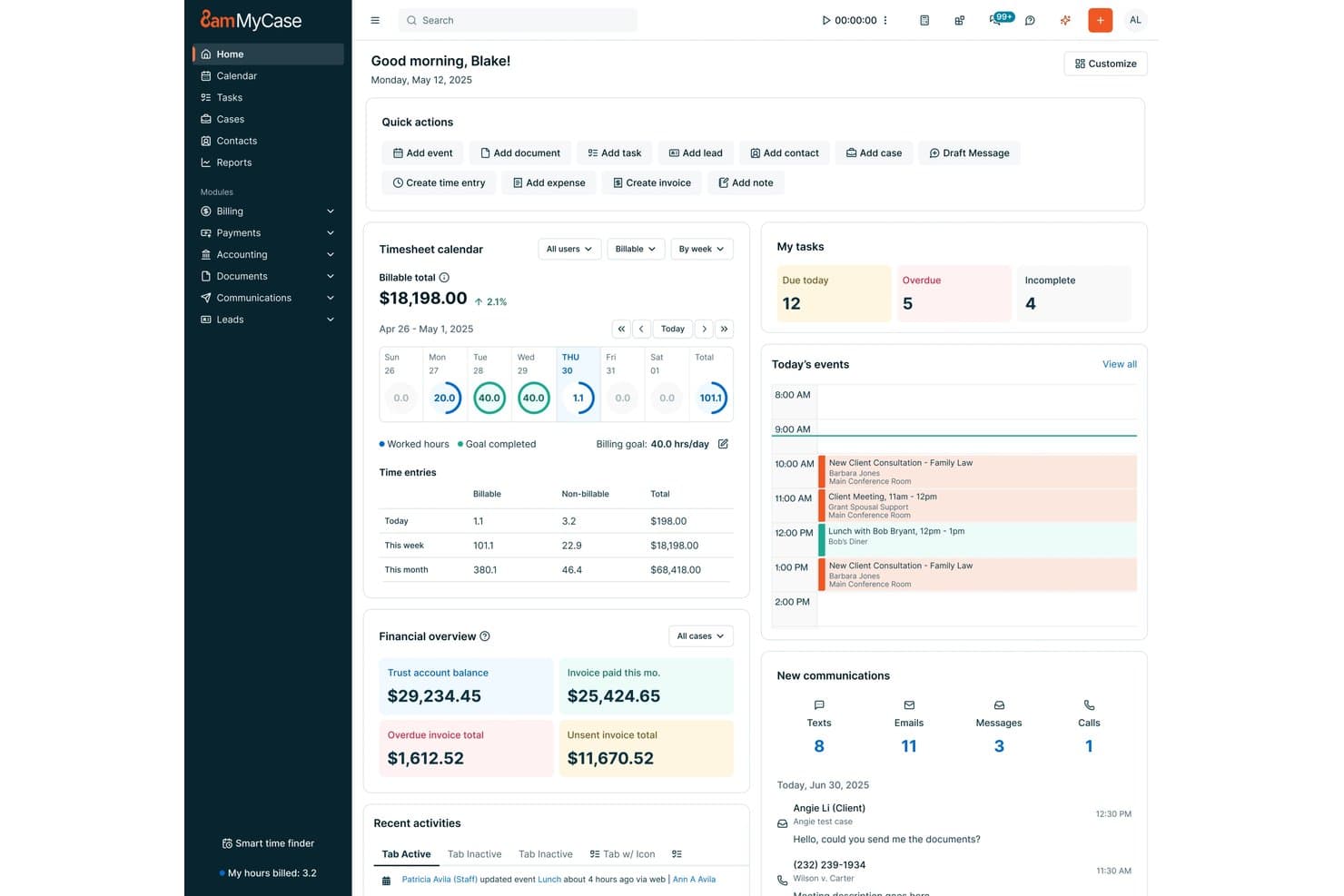
8am offre agli assistenti legali una dashboard centralizzata con gestione delle attività, fogli presenze per la fatturazione, panoramiche finanziarie e gli eventi della giornata in un'unica vista. 8am è una piattaforma di gestione per studi legali progettata per assistenti legali e professionisti del settore che cercano strumenti integrati per la gestione delle pratiche, l'automazione dei documenti, la fatturazione, la gestione del calendario e comunicazioni sicure con i clienti.
Per chi è più adatto 8am?
Team legali di studi piccoli e medi che desiderano pagamenti, fatturazione e gestione delle pratiche integrati in un'unica piattaforma.
Perché ho scelto 8am
Ho scelto 8am tra i migliori perché faccio affidamento sulle sue funzionalità sicure di elaborazione dei pagamenti e fatturazione conforme, come la contabilità fiduciaria nativa e la fatturazione LEDES integrata. Il mio team utilizza i suoi flussi finanziari centralizzati per semplificare i pagamenti approvati dal tribunale e le transazioni dei clienti.
Funzionalità principali di 8am
- Gestione delle pratiche: Gestisci fascicoli, contatti e note in un unico spazio di lavoro organizzato.
- Automazione dei documenti: Crea modelli e genera automaticamente documenti legali all'interno della piattaforma.
- Calendario legale: Tieni traccia delle scadenze e integra gli eventi con i calendari di avvocati e tribunali.
- Portale clienti: Condividi file e comunica in modo sicuro con i clienti tramite un portale protetto.
Integrazioni di 8am
Le integrazioni native attualmente non sono elencate.
Pros and Cons
Pros:
- Contabilità fiduciaria integrata e flussi di lavoro conformi
- Fatturazione dettagliata e funzionalità di fattura LEDES
- Automazione nativa dei documenti e firme elettroniche
Cons:
- Il supporto clienti può essere lento a rispondere
- Le opzioni di personalizzazione dei flussi di lavoro sono piuttosto limitate
Learn more about 8am: Ideale per la comunicazione e la collaborazione con i clienti
- No
- Da $49/utente/mese (fatturazione annuale)
Visit WebsiteCustomer Rating:4.6/5
Interfaccia software per paralegali MyCase MyCase è un software di gestione per studi legali che si concentra sul miglioramento della comunicazione e collaborazione con i clienti. Offre una piattaforma sicura e facile da usare per gestire i casi e comunicare con i clienti, rendendolo la scelta ideale per gli studi legali che danno priorità all'interazione con il cliente.
Perché ho scelto MyCase: Ho selezionato MyCase per questa lista grazie alle sue capacità eccezionali nel facilitare una comunicazione fluida tra studi legali e clienti. MyCase si distingue dalla concorrenza per il suo focus sulla collaborazione con i clienti, risultando la migliore opzione per studi legali che desiderano migliorare la comunicazione e il coinvolgimento dei clienti.
Funzionalità e integrazioni principali:
Le caratteristiche chiave di MyCase includono il portale sicuro per i clienti, la gestione dei casi, l'archiviazione dei documenti e i pagamenti online. Il portale sicuro permette agli studi legali di comunicare e collaborare con i clienti in modo efficiente, mentre gli strumenti di gestione dei casi aiutano a organizzare e tracciare le informazioni correlate ai casi.
MyCase si integra con applicazioni popolari quali QuickBooks Online, Microsoft Office 365 e Google Workspace.
Pros and Cons
Pros:
- Grande attenzione a comunicazione e collaborazione con i clienti
- Interfaccia intuitiva
- Si integra con strumenti di produttività popolari
Cons:
- Nessuna opzione di fatturazione mensile, è necessario l'impegno annuale
- Opzioni di personalizzazione limitate rispetto ad alcuni concorrenti
- Il prezzo può essere elevato per studi legali di piccole dimensioni
 Ideale per i professionisti legali canadesi
- No
- Da $34/utente/mese (fatturato annualmente)
Visit WebsiteCustomer Rating:4.6/5
Interfaccia software per paralegali uLawPractice uLawPractice è un software di gestione per studi legali progettato specificamente per i professionisti legali canadesi. Offre funzionalità complete che rispondono ai requisiti normativi e al panorama giuridico unici del Canada, rendendolo la principale scelta per avvocati e studi legali canadesi.
Perché ho scelto uLawPractice: Ho selezionato uLawPractice per questa lista perché si distingue come soluzione su misura per i professionisti legali canadesi. Il suo focus sulla conformità alle normative legali canadesi e le sue funzionalità complete, progettate specificamente per il mercato legale canadese, lo rendono la scelta migliore per i professionisti del settore.
Funzionalità e integrazioni principali:
Le caratteristiche principali di uLawPractice includono la gestione fiduciaria, la gestione dei casi, il monitoraggio del tempo e la fatturazione, tutte progettate per essere conformi alle normative legali canadesi. La piattaforma offre inoltre reportistica completa per garantire che gli studi legali possano soddisfare i requisiti unici della pratica giuridica in Canada.
uLawPractice si integra con strumenti popolari come Microsoft Office 365, Google Workspace e QuickBooks Online.
Pros and Cons
Pros:
- Su misura per i professionisti legali canadesi
- Conforme alle normative legali canadesi
- Si integra con i principali strumenti di produttività
Cons:
- Non adatto a studi legali non canadesi
- Mancano alcune funzionalità avanzate presenti in altri strumenti
- Nessuna opzione di fatturazione mensile, richiesto impegno annuale
Learn more about uLawPractice: Ideale per creare modelli di documenti
- Demo gratuita disponibile
- Prezzo su richiesta
Visit WebsiteCustomer Rating:4.3/5
HotDocs consente ai paralegali di compilare modelli preimpostati e personalizzarli per ogni scenario specifico. HotDocs è un potente software di automazione dei documenti progettato per facilitare la creazione, generazione, assemblaggio e preparazione di documenti complessi. Comunemente utilizzato nei settori legale, finanziario e governativo, HotDocs può aiutare a ridurre il tempo e lo sforzo necessari per produrre documenti specifici per clienti o utenti.
Perché ho scelto HotDocs: Una delle caratteristiche più notevoli è la sua capacità di assemblaggio dei documenti, che automatizza la creazione di documenti legali di routine. Questa automazione non solo fa risparmiare tempo riducendo la necessità di inserimenti ripetitivi di dati, ma minimizza anche il rischio di errori. Convertendo i documenti usati frequentemente in modelli riutilizzabili, HotDocs garantisce che ogni documento sia coerente e conforme agli standard legali.
Funzionalità e integrazioni di rilievo:
Le principali funzionalità di HotDocs includono la logica condizionale che permette agli utenti di creare documenti dinamici incorporando istruzioni if/then. Offre inoltre l'elaborazione in batch dei documenti, firme digitali e opzioni per eseguire calcoli sofisticati all'interno dei documenti.
HotDocs si integra con Salesforce, Microsoft Dynamics, Sage, Microsoft 365, Microsoft Word, Tabs3, Mitratech Matter Management, Actionstep, Amicus Attorney e AbacusLaw.
Pros and Cons
Pros:
- Modelli personalizzabili
- Scalabile per studi in crescita
- Ottima automazione dei flussi di lavoro documentali
Cons:
- Richiede tempo per apprendere come creare modelli
- Può essere costoso per studi più piccoli
Learn more about Mitratech Hotdocs: Ideale per flussi di lavoro e aree di pratica personalizzabili
- No
- Da $29/utente/mese (fatturazione annuale)
Visit WebsiteCustomer Rating:4.2/5
Interfaccia software Actionstep per assistenti legali Actionstep è un software completo per la gestione degli studi legali con una forte enfasi sui flussi di lavoro personalizzabili e il supporto per diverse aree di pratica. La sua adattabilità e la vasta gamma di funzionalità lo rendono la scelta migliore per gli studi legali che necessitano di soluzioni su misura per le proprie esigenze specifiche.
Perché ho scelto Actionstep: Ho selezionato Actionstep per questa lista perché i suoi flussi di lavoro personalizzabili e il supporto per più aree di pratica lo distinguono dagli altri strumenti di gestione degli studi legali. Ritengo che sia la scelta migliore per gli studi che cercano una piattaforma flessibile, capace di adattarsi ai requisiti e alle aree di attività peculiari.
Caratteristiche e integrazioni principali:
Le funzionalità più preziose di Actionstep includono flussi di lavoro personalizzabili, gestione delle pratiche e capacità di automazione.
Inoltre, si integra con strumenti essenziali come Microsoft Office 365, Xero e LawPay, consentendo una collaborazione fluida e una gestione finanziaria semplificata.
Pros and Cons
Pros:
- Flussi di lavoro altamente personalizzabili
- Supporta più aree di pratica
- Si integra con popolari strumenti di produttività e finanziari
Cons:
- Richiesto impegno annuale di fatturazione
- Alcuni utenti potrebbero trovare le opzioni di personalizzazione eccessive
- Integrazioni limitate rispetto ad altri software di gestione dello studio
Learn more about Actionstep: 7Ideale per studi legali individuali e di piccole dimensioni
LEAP
- No
- Da $129/utente/mese (fatturazione annuale)
Visit WebsiteCustomer Rating:4.3/5
Interfaccia software Leap per paralegali LEAP è un software di gestione per studi legali progettato specificamente per avvocati singoli e piccoli studi legali. La sua interfaccia intuitiva e le funzionalità su misura lo rendono la scelta migliore per le realtà più piccole che cercano una soluzione completa.
Perché ho scelto LEAP: Ho scelto LEAP per questa lista perché è particolarmente adatto alle esigenze specifiche degli studi legali di piccole dimensioni e dei liberi professionisti. Il suo design intuitivo e la focalizzazione sulle realtà più piccole lo distinguono dagli altri software di gestione legale. Ritengo che sia l’opzione migliore per i piccoli studi che desiderano una soluzione tutto-in-uno facile da usare e da navigare.
Funzionalità e integrazioni principali:
Le caratteristiche più importanti di LEAP includono la gestione delle pratiche, l'automazione dei documenti e la fatturazione integrata. Inoltre, si integra con strumenti essenziali come Microsoft Office 365, LawPay e QuickBooks Online, facilitando l’ottimizzazione delle operazioni e mantenendo l’efficienza anche nei piccoli studi legali.
Pros and Cons
Pros:
- Progettato per studi individuali e piccoli studi legali
- Interfaccia facile da usare
- Si integra con strumenti produttivi e finanziari più diffusi
Cons:
- Costoso per studi di piccole dimensioni con budget limitato
- Richiesto impegno di fatturazione annuale
- Opzioni di personalizzazione limitate rispetto ad altri software di gestione legale
Learn more about LEAP: Ideale per la gestione completa dei casi
- No
- Da $69/utente/mese (fatturato annualmente)
Visit WebsiteCustomer Rating:4/5
Interfaccia del software per paralegali AbacusLaw AbacusLaw è un software di gestione per studi legali progettato per aiutare gli studi a ottimizzare le operazioni e gestire efficacemente i casi. Si tratta di una soluzione tutto-in-uno che automatizza gli aspetti essenziali della pratica legale, rendendola la scelta migliore per una gestione dei casi completa.
Perché ho scelto AbacusLaw: Ho incluso AbacusLaw in questa lista perché offre una piattaforma solida e ricca di funzionalità che semplifica la gestione di casi, documenti e finanze per gli studi legali. Rispetto ad altri strumenti, AbacusLaw fornisce un approccio più completo alla gestione dei casi, diventando così la soluzione ideale per gli studi che cercano un sistema all-in-one.
Funzionalità e integrazioni principali:
Le caratteristiche più significative di AbacusLaw includono la gestione dei casi, l'automazione dei documenti, la pianificazione e la fatturazione. Questi strumenti consentono agli utenti di gestire efficacemente le pratiche, velocizzare la creazione di documenti e mantenere l'organizzazione degli appuntamenti.
Alcune delle integrazioni più importanti offerte da AbacusLaw includono Microsoft Office, QuickBooks e Abacus Private Cloud.
Pros and Cons
Pros:
- Funzionalità complete per la gestione dei casi
- Semplifica la creazione di documenti tramite automazione
- Si integra con i più diffusi strumenti di produttività
Cons:
- Può essere costoso per studi legali di piccole dimensioni
- Richiede un impegno annuale
- Curva di apprendimento per i nuovi utenti
Learn more about AbacusLaw:

Interfaccia software per paralegali di Thomson Reuters Thomson Reuters è un fornitore leader di strumenti per la ricerca legale e l'analisi, offrendo una vasta gamma di soluzioni per i professionisti del settore legale. La sua esperienza nella ricerca legale e le avanzate capacità analitiche lo rendono la scelta migliore per chi cerca informazioni legali accurate e complete.
Perché ho scelto Thomson Reuters: Ho incluso Thomson Reuters in questa lista perché i suoi strumenti di ricerca legale e analisi non hanno eguali nel settore. Dopo aver confrontato diverse opzioni, ho stabilito che Thomson Reuters si distingue per i suoi contenuti legali estesi, le sofisticate analisi e l'innovativa tecnologia di ricerca, rendendolo la scelta migliore per la ricerca e l'analisi legale.
Caratteristiche distintive e integrazioni:
Alcune delle caratteristiche più importanti di Thomson Reuters includono la sua piattaforma completa di ricerca legale, Westlaw Edge, e i suoi strumenti di analisi all'avanguardia, come Litigation Analytics e Quick Check Judicial.
Le principali integrazioni comprendono Practical Law, che offre orientamenti pratici e risorse per i professionisti legali, e Drafting Assistant, che supporta nella redazione e revisione dei documenti.
Pros and Cons
Pros:
- Contenuti e risorse legali estesi
- Strumenti analitici avanzati per approfondimenti guidati dai dati
- Innovazione continua nella tecnologia di ricerca legale
Cons:
- Le informazioni sui prezzi non sono trasparenti
- Può risultare costoso per studi legali di piccole dimensioni o professionisti indipendenti
- Curva di apprendimento per alcune funzionalità e strumenti
Learn more about Thomson Reuters: Ideale per la redazione automatizzata
- Prova gratuita disponibile
- A partire da $19/mese
Visit WebsiteCustomer Rating:4.8/5
Redactable ti consente di eseguire diversi tipi di redazione, incluse le redazioni manuali e automatiche. Redactable è uno strumento di redazione documentale basato su cloud progettato per aiutare le organizzazioni a rimuovere in modo efficiente e sicuro informazioni sensibili dai documenti PDF.
Perché ho scelto Redactable: Le capacità di intelligenza artificiale di Redactable rilevano e rimuovono automaticamente le informazioni sensibili, garantendo che nessun dettaglio critico venga trascurato. Questa funzione è particolarmente vantaggiosa per i paralegali che gestiscono grandi volumi di documenti, in quanto riduce il rischio di errori umani e garantisce la conformità alle normative sulla protezione dei dati. Inoltre, la Redaction Wizard di Redactable offre la comodità della redazione con un solo clic per documenti contenenti molte pagine.
Funzionalità principali e integrazioni:
Le funzionalità chiave includono il document scrubbing, che elimina in modo permanente i metadati e gli elementi nascosti per garantire la sicurezza delle redazioni. Offre anche strumenti di collaborazione in tempo reale, controllo delle versioni e certificati di redazione.
Redactable si integra con Google Drive, Dropbox, OneDrive e Box.
Pros and Cons
Pros:
- Utilizza l'IA per migliorare il processo di redazione
- È conforme al GDPR e ad altre normative sulla privacy
- Offre strumenti di collaborazione
Cons:
- Numero limitato di redazioni per piano
- Non ideale per la gestione più ampia dei documenti legali
Learn more about Redactable:
Altri software per assistenti legali
Ecco alcune ulteriori opzioni di software per assistenti legali che non sono entrate nel mio elenco, ma che vale comunque la pena prendere in considerazione:
- 11Law Ruler SoftwareIdeale per CRM legale e automazione dell'accettazione dei casi
- 12SolunoIdeale per una rilevazione delle ore di lavoro e una fatturazione robuste
- 13AssemblyIdeale per assemblaggio e automazione di documenti
Come Valuto il Software per Paralegali
Divido la mia valutazione tra i fondamentali indispensabili—come la gestione delle pratiche e la calendarizzazione legale—e quegli elementi distintivi che separano i migliori strumenti dal resto.
Funzionalità Principali (Requisiti Base per Questa Lista)
Quando seleziono gli strumenti per la mia lista, li valuto ciascuno su una scala da 0 (funzionalità non offerta) a 5 (eccelle in questa area) per ogni funzionalità principale elencata di seguito. Poi calcolo il punteggio totale dello strumento in percentuale. Ogni strumento deve raggiungere un punteggio minimo totale del 65% per essere considerato nell'elenco.
- Gestione Pratiche e Casi: Cerco un hub centralizzato dove i paralegali possano consultare una pratica e vedere immediatamente contatti collegati, note, documenti e casi correlati senza dover cambiare schermata.
- Gestione e Automazione dei Documenti: La redazione basata su modelli qui è fondamentale—verifico se i paralegali possono generare memorie standard, lettere d'incarico o richieste di discovery da modelli riutilizzabili con campi compilati automaticamente.
- Calendarizzazione Legale e Scadenze: Valuto se la piattaforma supporta la calendarizzazione sulla base delle regole dei tribunali, poiché il calcolo manuale delle scadenze di risposta a istanze o delle prescrizioni rappresenta un rischio di responsabilità professionale.
- Registrazione del Tempo e Supporto alla Fatturazione: I paralegali devono poter registrare le ore fatturabili direttamente sulle pratiche. Cerco timer integrati, inserimento multiplo del tempo e la capacità di generare fatture pronte per il cliente o di esportare in formato LEDES.
- Gestione delle Attività e dei Flussi di Lavoro: Controllo la presenza di modelli di workflow che riflettono i processi legali reali—come checklist di acquisizione cliente, sequenze di risposta a discovery o fascicoli di chiusura—con assegnazione delle attività e monitoraggio dello stato tra i membri del team.
- Strumenti di Comunicazione con Cliente e Tribunale: Portali clienti sicuri, integrazione con la firma elettronica e supporto per il deposito telematico rientrano tutti qui. Valuto quanto bene lo strumento gestisce lo scambio sicuro di documenti sensibili al di là della semplice e-mail.
Una volta che ho una lista di strumenti che soddisfano questi criteri, considero ciò che distingue ciascuna piattaforma.
Fattori Differenzianti (Ciò che Rende un Fornitore Unico)
Ecco come confronto e valuto i diversi fornitori:
Funzionalità di Spicco
La verifica dei conflitti è una funzione che considero molto—prima che uno studio prenda in carico un nuovo incarico, i paralegali devono poter eseguire ricerche automatiche su tutti i contatti e le pratiche per individuare potenziali problemi etici. La contabilità fiduciaria con conformità IOLTA separa anche le piattaforme più forti, in particolare per gli studi che gestiscono depositi e hanno bisogno della riconciliazione tripla integrata nel sistema. Un altro elemento differenziante che valuto è la revisione documentale con intelligenza artificiale, verificando se uno strumento può riassumere deposizioni, estrarre clausole chiave o oscurare informazioni sensibili durante la discovery.
Oltre le Funzionalità
La conformità è essenziale—verifico se una piattaforma rispetta gli standard SOC 2 Type II e offre controlli d'accesso basati su ruoli, poiché i paralegali gestiscono regolarmente dati riservati dei clienti. L'integrazione è altrettanto importante; guardo se uno strumento si collega a Microsoft 365, DocuSign e a piattaforme di fatturazione come LawPay, già usate dai team legali. Considero anche la dimensione dello studio e la tipologia di attività, poiché un paralegale litigator in uno studio medio ha esigenze di flusso di lavoro molto diverse da quelle di un paralegale in ambito immigrazione che lavora da solo.
Come scegliere il software per assistenti legali
È facile perdersi in lunghi elenchi di funzionalità e strutture tariffarie complesse. Per aiutarti a rimanere concentrato mentre affronti il tuo processo unico di selezione del software, ecco una lista di controllo dei fattori da tenere a mente:
| Fattore | Cosa considerare |
|---|---|
| FattoreScalabilità | Cosa considerareIl software crescerà insieme al tuo studio? Valuta se è in grado di gestire un aumento del numero di casi o di utenti senza costi aggiuntivi o problemi di prestazioni. |
| FattoreIntegrazioni | Cosa considerareFunziona con gli strumenti esistenti, come i sistemi di posta elettronica o di gestione dei documenti? Verifica la condivisione fluida dei dati e la riduzione dell'inserimento manuale. |
| FattorePersonalizzazione | Cosa considerarePuoi adattare il software ai tuoi flussi di lavoro specifici? Cerca opzioni per modificare i modelli e le interfacce utente in base alle esigenze della tua squadra. |
| FattoreFacilità d'uso | Cosa considerareIl software è intuitivo per tutti i membri della squadra? Un'interfaccia semplice con una navigazione chiara può far risparmiare tempo e ridurre la necessità di formazione. |
| FattoreImplementazione e avviamento | Cosa considerareQuanto tempo servirà per essere operativi? Valuta la disponibilità di risorse per la formazione e di assistenza, così da garantire una transizione fluida. |
| FattoreCosto | Cosa considerareCi sono costi nascosti? Confronta i modelli tariffari e considera i costi a lungo termine, inclusi gli aggiornamenti e i costi di assistenza. |
| FattoreMisure di sicurezza | Cosa considerareRispetta gli standard di sicurezza del settore? Assicurati che la crittografia dei dati e gli aggiornamenti periodici della sicurezza siano inclusi. |
| FattoreRequisiti di conformità | Cosa considerareÈ conforme alle normative legali come il GDPR o l'HIPAA? Verifica che il software includa funzionalità per supportare la conformità agli standard legali necessari. |
Che cos'è il software per assistenti legali?
Il software per assistenti legali supporta il flusso di lavoro e le attività degli assistenti legali negli studi legali, per semplificare i processi di lavoro, migliorare l'efficienza e aumentare la produttività. Offre una vasta gamma di funzionalità, tra cui gestione dei documenti, eDiscovery, gestione dei casi, monitoraggio del tempo, gestione del calendario, ricerca giuridica e strumenti di comunicazione.
Sfruttando queste soluzioni software, gli assistenti legali possono gestire efficacemente il proprio carico di lavoro, mantenere registri accurati, monitorare le scadenze e migliorare l'efficienza complessiva all'interno dello studio legale.
Funzionalità
Quando selezioni un software per assistenti legali, presta attenzione alle seguenti funzionalità chiave:
- Gestione dei documenti: Organizza e archivia i documenti legali in modo sicuro, facilitando l'accesso e la condivisione dei file.
- Monitoraggio del tempo: Monitora in modo efficiente le ore fatturabili, garantendo una fatturazione accurata dei clienti.
- Gestione dei casi: Aiuta a gestire i dettagli dei casi, le scadenze e le attività, mantenendo tutto organizzato in un unico posto.
- Comunicazione con i clienti: Facilita la comunicazione diretta con i clienti, migliorando le relazioni con i clienti e il servizio.
- Supporto alla conformità: Garantisce il rispetto degli standard e delle normative legali, riducendo il rischio di problemi di non conformità.
- Funzionalità di integrazione: Si collega ad altri strumenti, come e-mail e calendari, per semplificare il flusso di lavoro e la condivisione dei dati.
- Flussi di lavoro personalizzabili: Consente di adattare i processi alle esigenze specifiche dello studio, migliorando l'efficienza.
- Accesso da dispositivi mobili: Offre la possibilità di lavorare ovunque, aumentando flessibilità e produttività.
- Misure di sicurezza: Protegge i dati legali sensibili con la crittografia e aggiornamenti regolari della sicurezza.
- Risorse per la formazione: Offre materiali didattici, come video e tutorial, per facilitare il processo di inserimento.
Vantaggi
L'implementazione di un software per assistenti legali offre diversi vantaggi al tuo team e alla tua attività. Ecco alcuni dei vantaggi che puoi aspettarti:
- Maggiore organizzazione: Centralizza i fascicoli e i documenti dei casi, facilitando la gestione delle informazioni e delle scadenze.
- Maggiore efficienza: Automatizza attività ripetitive come il monitoraggio del tempo e la generazione di documenti, risparmiando tempo e riducendo gli errori.
- Servizio clienti migliorato: Facilita una comunicazione migliore e tempi di risposta più rapidi, aumentando la soddisfazione dei clienti.
- Risparmio sui costi: Riduce il lavoro amministrativo manuale, consentendo al team di concentrarsi sulle attività fatturabili e aumentare i ricavi.
- Maggiore conformità: Ti mantiene in linea con gli standard legali attraverso il supporto alla conformità, riducendo il rischio di sanzioni.
- Flessibilità: Consente di lavorare ovunque grazie all'accesso da dispositivi mobili, offrendo al team maggiore flessibilità e produttività.
- Sicurezza dei dati: Protegge le informazioni sensibili con misure di sicurezza avanzate, garantendo la riservatezza dei clienti.
Costi & Prezzi
La selezione di un software per assistenti legali richiede una comprensione dei vari modelli e piani tariffari disponibili. I costi variano in base alle funzionalità, alle dimensioni del team, ai componenti aggiuntivi e ad altri fattori. La tabella seguente riassume i piani comuni, i relativi prezzi medi e le funzionalità tipicamente incluse nelle soluzioni software per assistenti legali:
Tabella comparativa dei piani per software per assistenti legali
| Tipo di piano | Prezzo medio | Funzionalità comuni |
|---|---|---|
| Tipo di pianoPiano gratuito | Prezzo medio$0 | Funzionalità comuniGestione di base dei documenti, gestione limitata dei casi e monitoraggio essenziale del tempo. |
| Tipo di pianoPiano personale | Prezzo medio$10-$30/utente/mese | Funzionalità comuniGestione dei documenti, integrazioni di base, comunicazione con i clienti e misure di sicurezza standard. |
| Tipo di pianoPiano aziendale | Prezzo medio$40-$80/utente/mese | Funzionalità comuniGestione avanzata dei documenti, gestione completa dei casi, accesso da dispositivi mobili e supporto alla conformità. |
| Tipo di pianoPiano per aziende | Prezzo medio$100-$200/utente/mese | Funzionalità comuniFlussi di lavoro personalizzabili, integrazioni complete, sicurezza avanzata, supporto dedicato e reportistica approfondita. |
FAQ sul software per assistenti legali
Ecco alcune risposte alle domande più comuni sul software per assistenti legali:
In che modo il software per assistenti legali può migliorare la produttività?
Il software per assistenti legali migliora la produttività automatizzando attività di routine come la gestione dei documenti, il monitoraggio del tempo e la pianificazione dei casi. Questa automazione libera tempo da dedicare a lavori più complessi, riduce gli errori e garantisce lo svolgimento fluido dei processi legali, consentendo al tuo team di concentrarsi su attività più strategiche.
È disponibile una formazione per i nuovi utenti del software per assistenti legali?
Sì, la maggior parte dei fornitori di software per assistenti legali offre risorse formative per i nuovi utenti. Queste possono includere tutorial, webinar e guide interattive per semplificare il processo di onboarding. L’accesso a una formazione completa garantisce che il tuo team possa adattarsi rapidamente al nuovo sistema e sfruttarne al massimo i vantaggi.
In che modo il software per assistenti legali garantisce la sicurezza dei dati?
Il software per assistenti legali garantisce la sicurezza dei dati tramite la crittografia, controlli di accesso sicuri e aggiornamenti di sicurezza regolari. Queste misure proteggono le informazioni legali sensibili dagli accessi non autorizzati e dalle violazioni dei dati, aiutando il tuo studio a rispettare gli standard legali e a mantenere la riservatezza dei clienti.
Quanto è facile migrare i dati dei casi esistenti nel nuovo software?
La migrazione dei dati è spesso la parte più complessa del passaggio. Dovresti verificare se il fornitore offre strumenti di importazione, supporto API o servizi di migrazione. Verifica inoltre se mapperà correttamente i vecchi campi e formati nel nuovo sistema o se sarà necessaria una pulizia manuale. Una buona prova di concetto o una migrazione di esempio ti aiuta a eseguire i test prima dell’implementazione completa.