Managing a legal caseload gets complicated quickly. In my experience working with legal operations, the problem usually isn't a lack of information—it's that case details, deadlines, responsibilities, and next steps end up scattered across too many places.
That's why I like using a structured case management tracker as a starting point.
Free Download: Legal Case Management Template
This free legal case management template gives you one place to organize matters, assign ownership, track deadlines, and see what needs attention next.
What's A Legal Case Management Template?
A legal case management template is a structured spreadsheet used to organize essential information about active legal matters, deadlines, responsibilities, and case status.
Rather than keeping case information across emails, calendars, notes, and individual spreadsheets, the template gives your team a central place to track what is happening with each matter.
This template is built around three connected areas:
- Case Tracker: Maintain a live record of each matter, including the client, practice area, case status, assigned attorney, date opened, jurisdiction, next deadline, priority, billing status, and notes
- Deadlines & Tasks: Track filings, hearings, client follow-ups, and other date-driven work and connect each item to its corresponding Case ID
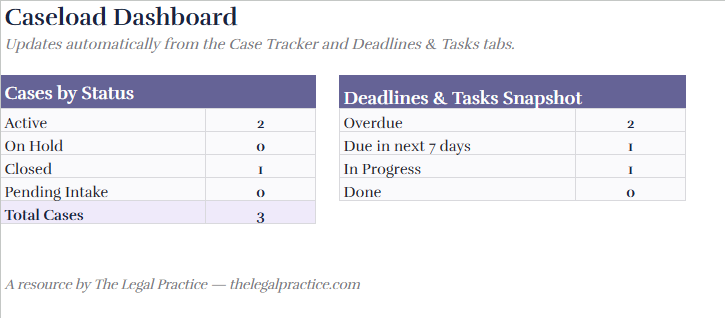
- Caseload Dashboard: See an automatically updated snapshot of active, closed, on-hold, and pending matters, along with overdue tasks and upcoming deadlines
Together, these sections give you a straightforward view of your caseload and the work that needs attention next.
What's Included in the Legal Case Management Template?
I've included the three areas I consider most useful for maintaining a basic case management workflow: a matter-level tracker, a deadline and task tracker, and a dashboard.
Case Tracker
Start here whenever you add a new legal matter.
Each case can include:
- Case ID
- Client name
- Matter type
- Practice area
- Case status
- Assigned attorney
- Date opened
- Court or jurisdiction
- Next deadline
- Days to deadline
- Priority
- Billing status
- Case notes
The sample matters show how each field works. Once you're comfortable with the structure, you can remove those examples and replace them with your own cases.
Deadlines & Tasks Tracker
Use the Deadlines & Tasks tracker for anything connected to a specific action or date.
For each item, you can record:
- Task or deadline
- Related Case ID
- Item type
- Person responsible
- Due date
- Days remaining
- Status
- Priority
I recommend recording anything that could affect the progress of a matter here, including filings, hearings, discovery deadlines, document preparation, client calls, reminders, and internal follow-ups.
Caseload Dashboard
The Caseload Dashboard turns the information in your trackers into a quick overview of your workload.
It can show:
- Active cases
- Matters on hold
- Closed cases
- Pending intake matters
- Total cases
- Overdue deadlines and tasks
- Items due within the next seven days
- Tasks currently in progress
- Completed work
Because these calculations are built into the template, the dashboard updates as your case and task information changes.
How to Use the Legal Case Management Template
1. Add Your Matters to the Case Tracker
Create one row for each matter and assign it a unique Case ID.
At minimum, I recommend recording the client, matter type, case status, responsible attorney, date opened, priority, and next deadline.

2. Add Deadlines and Tasks
Move to the Deadlines & Tasks tracker and record every important date-driven action.
Use the Related Case ID field to connect each item to the appropriate matter. This lets you immediately identify which case a filing, hearing, reminder, or client follow-up belongs to.
3. Assign Ownership
Every active matter should have a responsible attorney, and every actionable task should have an individual owner.
Assign overall case responsibility in the Case Tracker, then assign each deadline or task to the person responsible for completing it.
4. Set Status and Priority Consistently
Use the existing dropdown fields instead of creating new variations of the same category.
For example, avoid having separate status labels such as "In Progress," "in progress," and "Ongoing" if they all mean the same thing.
Consistent data makes filtering more useful and keeps dashboard calculations reliable.
5. Review Deadline Indicators
Use the Days to Deadline and Days Remaining columns to identify matters requiring immediate attention.
The template also uses visual indicators to make important information easier to scan:
- Red highlights overdue items
- Green indicates deadlines that are still comfortably on track
- Amber identifies example or editable cells that should be replaced with your firm's information
6. Check the Dashboard Regularly
I recommend using the dashboard at the beginning of the day or during regular team meetings.
Start with overdue work and deadlines due within the next seven days. These are typically the items that need reassignment, escalation, or immediate follow-up.
7. Keep the Template Updated
A case tracker only works if it reflects what is actually happening.
Update matter statuses as cases progress, mark completed tasks as done, add deadlines when they become known, and close matters once the work is finished.
Who Needs a Legal Case Management Template?
I recommend this template for legal professionals who need a simple, repeatable way to manage multiple matters without immediately investing in a dedicated software platform.
It can work well for:
- Solo attorneys managing their own caseload
- Small and midsize law firms
- Paralegals coordinating cases and deadlines
- Legal assistants managing administrative follow-up
- Practice managers monitoring workloads
- In-house legal teams managing internal matters
- Firms transitioning away from informal spreadsheets and manual tracking
Because fields such as practice area, matter type, status, attorney, priority, and jurisdiction can be customized, the same structure can support different types of legal work.
8 Legal Case Management Template Use Cases by Practice Area
The information you track will vary depending on your type of practice. Here are some common ways I would use the template across different legal practice areas:
- Litigation — Track motion deadlines, discovery cutoffs, hearing dates, court filings, and case status
- Family law — Manage custody hearings, mediation sessions, filing deadlines, client meetings, and document requests
- Corporate and transactional law — Track closing timelines, due diligence checklists, document reviews, approvals, and outstanding actions
- Immigration — Monitor petition filing windows, RFE response deadlines, interviews, document collection, and case milestones
- Estate planning and probate — Track probate filing deadlines, client meetings, document preparation, court dates, and estate administration tasks
- Personal injury — Monitor statutes of limitations, medical record requests, settlement timelines, discovery, and negotiation deadlines
- IP and patent law — Track filing deadlines, renewal dates, office action response windows, and application status
- Real estate — Manage closing dates, title review deadlines, document preparation, inspections, approvals, and outstanding conditions
The structure stays the same, but the deadlines, tasks, and milestones can be adapted to the way each practice area operates.
Why Use a Legal Case Management Template?
A legal case management template gives you more than a list of cases. Used consistently, it creates a repeatable process for tracking matters from opening through completion.
Keep Every Matter in One Place
The Case Tracker gives you a central record for every matter.
Instead of searching through separate files to determine who owns a matter or when something is due, you can quickly see the client, matter type, responsible attorney, jurisdiction, status, priority, and next deadline.
Stay Ahead of Legal Deadlines
Missing a legal deadline can have serious consequences, so deadline tracking needs to be visible and consistent.
The Deadlines & Tasks tracker gives each filing, hearing, reminder, or follow-up its own due date, assignee, status, and priority.
Prioritize the Right Work
Not every matter needs the same level of attention at the same time.
Priority fields allow you to distinguish between high-, medium-, and low-priority work so attorneys and support staff can identify what needs to be addressed first.
Standardize Case Tracking
Consistent case records make information easier to review, filter, and maintain.
Dropdown fields for categories such as status, priority, and practice area also help prevent team members from creating multiple versions of the same category.
Monitor Your Caseload at a Glance
I find dashboards particularly useful for daily reviews and team meetings because they remove the need to manually scan every case.
You can immediately identify overdue work, upcoming deadlines, active cases, pending matters, and tasks currently in progress.
Connect Matters With Their Next Actions
Knowing the status of a case isn't enough. You also need to know what happens next.
By connecting every deadline or task to a Case ID, the template links the overall matter with the individual actions required to move it forward. That makes ownership easier to assign and reduces the chance that important follow-ups stay buried in personal notes or inboxes.
When Should You Use Legal Case Management Software Instead?
A spreadsheet works well when your caseload is manageable and your team mainly needs structured case, deadline, and task tracking. Once you're managing a larger volume of matters, multiple users, document workflows, billing, client communications, automations, permissions, or integrations, I recommend moving to dedicated legal case management software. A purpose-built system can reduce the manual maintenance required to keep spreadsheets accurate as your practice grows.
Tips for Getting More From the Template
I recommend treating the template as an active operational tool rather than a case list you only update occasionally.
A few habits make it much more useful:
- Create a consistent Case ID format for every new matter
- Update case status as soon as a matter changes stage
- Record deadlines as soon as they become known
- Assign every task to a specific person
- Keep case notes brief and focused on the latest development
- Review overdue and upcoming work regularly
- Remove completed or closed matters from active working views when appropriate
- Use consistent practice area and priority labels across the firm
These habits also make a future move into case management software easier because your matter information is already structured consistently.
Legal Case Management Template FAQs
Is this legal case management template free?
Yes. You can access the template through Google Sheets and create your own copy to customize for your firm, team, or individual caseload.
What should a legal case management template include?
At minimum, I recommend tracking the Case ID, client, matter type, practice area, case status, responsible attorney, important deadlines, priority, and next action. A separate task tracker is also useful for keeping date-driven work connected to the appropriate matter.
Can I use this template for different practice areas?
Yes. The core case-tracking structure works across multiple practice areas. You can customize matter types, practice areas, statuses, deadlines, priorities, and task categories to match your firm's workflow.
More Articles
How often should I update the case management template?
Update it whenever something material changes. That includes new deadlines, completed tasks, changes in case status, reassignment of responsibility, new filings, and closed matters. For active caseloads, I recommend reviewing the dashboard at least daily.
Can multiple people use the template?
Yes. A shared Google Sheet can work for a small team as long as everyone follows the same fields, statuses, and update process. As the number of users and matters increases, however, dedicated case management software may provide better permissions, automation, collaboration, and audit controls.
What's the difference between a legal case management template and legal case management software?
A template provides a structured way to manually organize case information, tasks, and deadlines. Legal case management software adds functionality such as workflow automation, document management, client communication, billing, permissions, reporting, integrations, and automated reminders.
Can this template replace a legal calendar?
I wouldn't rely on a spreadsheet as your only calendaring or docketing control for critical legal deadlines. The template is useful for visibility and internal tracking, but firms should continue following their established calendaring, docketing, and deadline-verification procedures.
Get Started With the Legal Case Management Template
Getting started only takes a few steps:
- Open the Case Tracker and remove the sample matters when you no longer need them
- Add one row for each active legal matter
- Assign a unique Case ID to every case
- Add filings, hearings, follow-ups, and other actions to Deadlines & Tasks
- Connect each task to the relevant Case ID
- Use the dropdown fields to keep statuses, priorities, and practice areas consistent
- Review the Dashboard for overdue work and upcoming deadlines
- Keep the tracker updated as cases progress
The goal is simple: give your legal team one dependable place to see which matters are active, who owns them, what needs to happen next, and when that work is due.