

Programvare for juridiske arbeidsflyter effektiviserer repetitive administrative oppgaver og reduserer flaskehalser i dokumenthåndtering, kalenderstyring og klientkommunikasjon. Dette frigjør tid for teamet ditt, slik at dere kan konsentrere dere om å levere fremragende juridisk strategi og klientservice. Det kan være utfordrende å håndtere frister, etterlevelse og samarbeid på tvers av saker, men riktig støtte kan øke effektiviteten og redusere kostbare feil.
I denne artikkelen sammenligner og vurderer jeg de beste verktøyene for juridiske arbeidsflyter for å hjelpe deg med kjøpsbeslutningen.
Hvorfor du kan stole på våre programvareanbefalinger
6,700+
Reviews
20
Industry experts
16+
Evaluation factors
14
Years
Teamet vårt har testet og anmeldt programvare siden 2012. Vi leder selv advokatfirmaer, så vi vet hvor vanskelig og hvor viktig det er å velge riktig programvare.
I denne guiden har vi vurdert verktøyene gjennom praktisk testing og uavhengig research og gitt dem poeng ut fra våre utvelgelseskriterier.
Anmeldelsene våre bygger på vår egen redaksjonelle vurdering. De er ikke et salgsargument.
Sammenligningstabell for arbeidsflytprogramvare
Denne sammenligningstabellen oppsummerer prisdetaljene for mine beste utvalg av programvare for juridiske arbeidsflyter.
| Tool | Best For | Trial Info | Price | ||
|---|---|---|---|---|---|
| 1 | Best for seamless time tracking, billing, and matter management in one platform | Free trial available | From $49/user/month (billed annually) | Website | |
| 2 | Best for integrated billing and payments | Free trial available | Pricing upon request | Website | |
| 3 | Best for compliant digital document exchange | Free trial available | From $5,000/year (billed annually) | Website | |
| 4 | Best for automatic time tracking | Not available | Pricing upon request | Website | |
| 5 | Best comprehensive law practice software | Free trial available | From £79/user/month | Website | |
| 6 | Best for adaptable workflow management in fast-paced legal environments | 14-day free trial + free demo available | From $11/user/month (billed annually) | Website | |
| 7 | Best for automating legal workflows | 14-day free trial | From $39/user/month (billed annually) | Website | |
| 8 | Best for dedicated law firm workflow management in the cloud | Free demo available | Pricing upon request | Website | |
| 9 | Best for advanced custom automation | Free demo available | Pricing upon request | Website | |
| 10 | Best for automating legal workflows | Free demo available | Pricing upon request | Website |


Anmeldelser av den beste arbeidsflytprogramvaren
Nedenfor finner du mine detaljerte sammendrag av den beste programvaren for juridiske arbeidsflyter som kom med på utvalgslisten min. Anmeldelsene mine gir en detaljert gjennomgang av de viktigste funksjonene, fordelene & ulempene, integrasjonene og ideelle bruksområdene for hvert verktøy, slik at du kan finne det som passer best for deg.
 Best for seamless time tracking, billing, and matter management in one platform
- Free trial available
- From $49/user/month (billed annually)
Visit WebsiteCustomer Rating:4.3/5
Here's a screenshot of PracticePanther's dashboard. PracticePanther is a comprehensive legal case management software that merges time tracking, billing, and matter management into a single platform. It excels in these areas, making it an ideal choice for firms that are looking for an efficient way to handle these functions.
Why I Picked PracticePanther: I selected PracticePanther for its ability to unify multiple crucial functions into one user-friendly platform. This integration is a key differentiator for PracticePanther.
It stands out as the optimal tool for those seeking a solution for time tracking, billing, and matter management in a single, cohesive platform.
Standout Features & Integrations:
Features include integrated billing, billable time and expense tracking, messaging, and case management, along with a client portal.
Integrations include QuickBooks, Gmail, Outlook, and Microsoft Calendar, ensuring a smoother workflow.
Pros and Cons
Pros:
- Numerous integrations with commonly used applications
- User-friendly interface
- Consolidates time tracking, billing, and case management
Cons:
- Some users may find the abundance of features overwhelming
- May be expensive for smaller firms
- No free tier, only a free trial
Learn more about PracticePanther: 2Best for integrated billing and payments
8am
- Free trial available
- Pricing upon request
Visit WebsiteCustomer Rating:4.6/5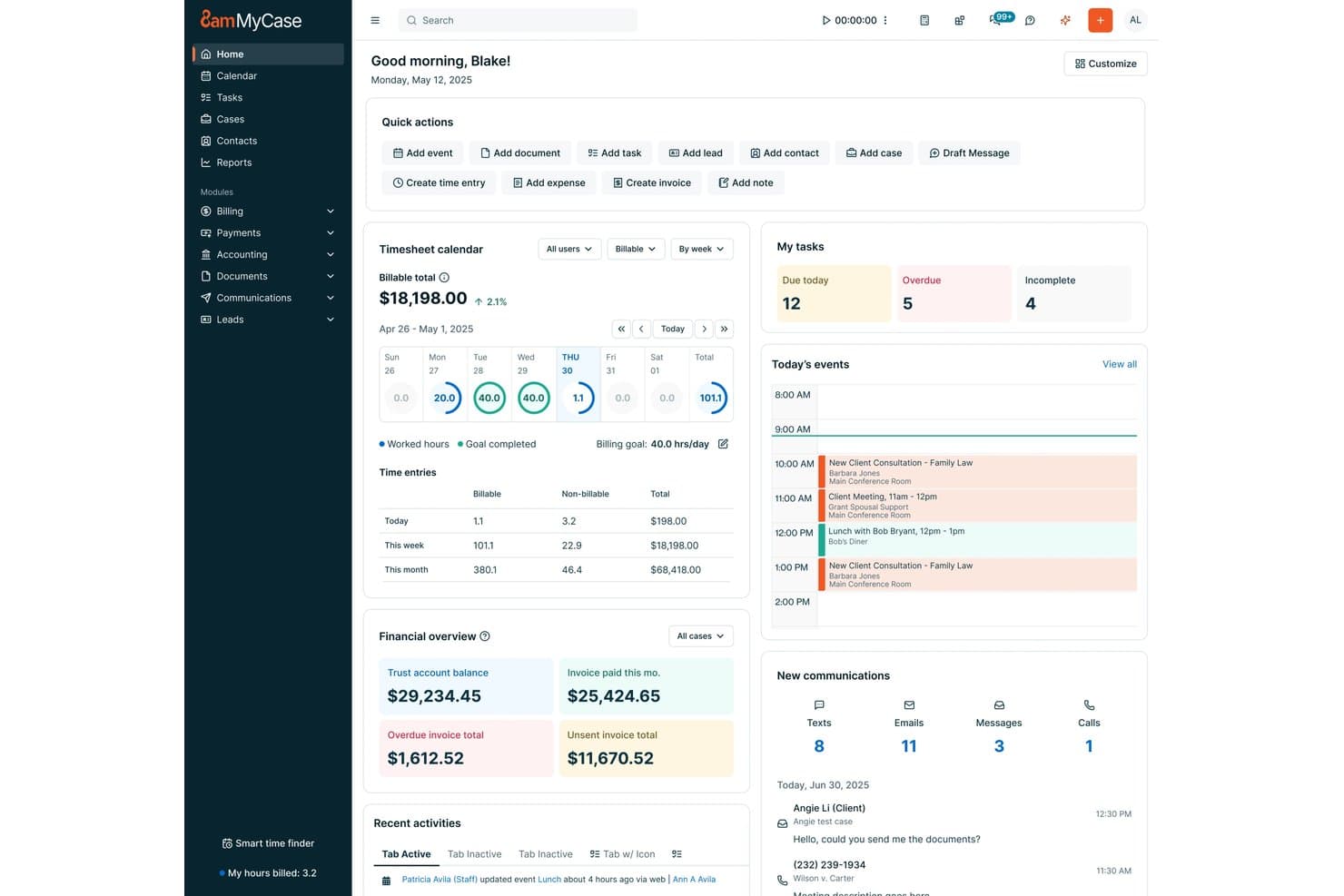
8am offers a centralized home dashboard with task management, timesheet tracking, financial overview, and today's events for legal professionals. 8am is a legal workflow software platform designed for law firms and legal teams, offering integrated case management, workflow automation, document organization, time tracking, and comprehensive billing tools.
Who Is 8am Best For?
Law firms and legal departments seeking a unified platform to manage matters, workflows, and payments in one place.
Why I Picked 8am
I picked 8am as one of the best because I can manage invoices, trust accounting, and payments in one secure system. I like that my team can generate bills directly from matters, process cards online, and automate collections with built-in compliance checks.
8am Key Features
- Matter management dashboard: Gives a unified view of all cases, tasks, and documents in one place.
- Integrated document automation: Lets you generate, edit, and organize legal documents tied to specific matters.
- Role-based user permissions: Allows firms to control access based on team members’ roles or practice area.
- Calendar and deadline tracking: Monitors court dates, appointments, and statutory deadlines across cases.
8am Integrations
8am offers native integrations with LawPay, QuickBooks Online, NetDocuments, DocuSign, Microsoft 365, Google Workspace, Xero, Infotrack, Smith.ai, and Zapier. An API is available for custom integrations.
Pros and Cons
Pros:
- Streamlined multi-method payment collection process
- Centralized matter and document management tools
- Automated trust accounting and compliance workflows
Cons:
- Occasional support responsiveness issues reported
- Limited complex workflow branching customization
Learn more about 8am: 3Best for compliant digital document exchange
Moxo
- Free trial available
- From $5,000/year (billed annually)
Visit WebsiteCustomer Rating:4.4/5
Moxo shows a workflow builder for account onboarding with automations. Moxo is a workflow orchestration platform that combines secure client workspaces, document exchange, eSignatures, and automated process flows to manage external-facing legal engagements from intake through completion.
Who Is Moxo Best For?
Moxo is a strong fit for legal teams and law firms that manage high volumes of client-facing workflows and need a structured, trackable way to coordinate document exchange and approvals outside the firm.
Why I Picked Moxo
Moxo earns its spot on my shortlist because of how it handles document exchange in compliance-sensitive legal work. Files shared through a workspace are encrypted in transit and at rest, and built-in document request actions keep intake organized by prompting clients to upload specific files at the right stage. I also use the activity log to confirm exactly when each party viewed or downloaded a document, which matters when questions arise about disclosure timing.
Moxo Key Features
- White-label client portal: Brand the client-facing workspace with your firm's logo and colours instead of Moxo's.
- In-workspace messaging: Send and receive messages with clients or co-counsel directly inside a matter workspace.
- Intake form builder: Collect structured information from clients at the start of a matter using customizable forms.
- Workflow templates: Save repeatable matter types as reusable templates to launch new client workflows quickly.
Moxo Integrations
Moxo offers data sync connectors with Salesforce, HubSpot, Microsoft Dynamics, Zoho, Filevine, Xero, Global Relay, Smarsh, Redtail, and Follow Up Boss. It also supports file uploads from Google Drive, Dropbox, Box, and OneDrive directly into workspaces, and native calendar integrations sync meetings with Google Calendar and Outlook. A REST API and webhooks are available for custom integrations, and it connects with Zapier.
Pros and Cons
Pros:
- Built-in eSignatures and file requests
- White-label branded portal for each client
- SOC 2 Type II and GDPR compliant
Cons:
- Setup requires heavy configuration time up front
- No native time tracking for matters
Learn more about Moxo: Best for automatic time tracking
- Not available
- Pricing upon request
Visit WebsiteCustomer Rating:4.8/5
Smokeball's web app interface offers easy navigation for legal professionals. Smokeball is a legal workflow software designed to enhance the efficiency of law firms. It combines technology and practical features to support various legal practice areas, ensuring that you can manage your cases and clients effectively.
Why I Picked Smokeball: I picked Smokeball because of its automatic time tracking feature, which records billable hours without manual input. This means you can focus on your legal work while knowing your time is being accurately captured. Additionally, Smokeball's legal billing software converts this tracked time into professional invoices, simplifying the billing process for both you and your clients.
Another reason is Smokeball's document automation, which integrates with Microsoft Word to automate the creation of legal documents. This reduces the risk of manual errors and ensures consistency across your firm's documentation. The software also offers dashboards and reporting tools that provide insights into your firm's performance, helping you understand your operations better.
Standout Features & Integrations
Features include a client portal that enhances communication by allowing clients to access their case information easily. The intake and onboarding tools streamline the client intake process with electronic signatures, making it easier for you to bring new clients on board. Moreover, Smokeball provides award-winning support, ensuring you have access to assistance whenever needed.
Integrations include Setmore Appointments, Clio, Microsoft Outlook, Google Tasks, Gavel, Mailchimp, Motion, Zoho Forms, Google Docs, Jotform, Slack, and HubSpot.
Pros and Cons
Pros:
- Strong document‑automation and large pre‑built form library.
- Automatic time‑tracking captures billable work without manual timers.
- Workflow automation: tasks, reminders, dependencies to manage matters.
Cons:
- Mac users and Google Workspace users may face limitations.
- Workflow‑tailoring may not meet very specialized needs.
Learn more about Smokeball: 5Best comprehensive law practice software
Clio
- Free trial available
- From £79/user/month
Visit WebsiteCustomer Rating:4.7/5
Here's the law practice management feature in Clio. Clio is a cloud-based legal practice management software that provides a comprehensive suite of tools for law firms. It encompasses all aspects of legal operations, making it the top pick for a comprehensive best law practice management software solution.
Why I Picked Clio: I chose Clio for its comprehensive feature set that caters to all legal operations. From case management to billing, it provides an all-in-one platform that stands out in its capability to handle a law firm's varied needs. That's why I consider Clio best for law practices seeking a comprehensive, one-stop solution for their operations.
Standout Features & Integrations:
Features include case management, time tracking, billing, and client communication tools.
Integrations include Google Workspace, Microsoft Office 365, and QuickBooks, thus enhancing its functionality and seamless workflow.
Pros and Cons
Pros:
- User-friendly interface and robust client communication tools
- Integration with popular productivity tools
- Comprehensive suite of features for all legal operations
Cons:
- Pricing might be on the higher side for solo practitioners or small law firms
- The extensive features may be overwhelming for smaller firms
- Doesn't offer a free plan, only a free trial
Learn more about Clio: Best for adaptable workflow management in fast-paced legal environments
- 14-day free trial + free demo available
- From $11/user/month (billed annually)
Visit WebsiteCustomer Rating:4.8/5
Here's Cflow's workflow automation tool feature. Cflow is a workflow automation tool designed to streamline and automate business processes. Particularly in fast-paced legal environments, this software excels at offering adaptability and flexibility in managing workflows.
Why I Picked Cflow: The reason I selected Cflow is due to its dynamic nature in adapting to rapidly changing legal environments. Compared to other tools, Cflow's customizability and flexible workflow design set it apart.
Because of this, I believe Cflow is best suited for those seeking adaptable workflow management in a fast-paced legal setting.
Standout Features & Integrations:
Features include process templates, automatic notifications, and real-time analytics and reporting.
Integrations include various platforms including Google Drive, Dropbox, and Microsoft Office 365, simplifying data access and collaboration.
Pros and Cons
Pros:
- Real-time analytics and reporting features available
- Provides a wide range of integrations with platforms like Google Drive and Microsoft Office 365
- Offers dynamic workflow management suitable for fast-paced environments
Cons:
- The cost may be high for small-scale legal firms
- The interface might be complex for beginners
- No free tier available, only a 14-day free trial
Learn more about Cflow: Best for automating legal workflows
- 14-day free trial
- From $39/user/month (billed annually)
Visit WebsiteCustomer Rating:4.8/5
Lawcus offers a visual task management tool with kanban boards. Lawcus is a legal practice management software designed to improve your legal workflows. It provides a centralized platform where you can manage cases, clients, and tasks.
Why I Picked Lawcus: I picked Lawcus because it offers robust case management and document automation features, allowing you to handle legal matters efficiently. The platform's workflow automation lets you automate repetitive tasks, freeing up more time to focus on your clients. Additionally, the billing and accounting functionalities help you manage financial aspects without hassle, ensuring accurate and timely invoicing.
Another reason Lawcus stands out is its client intake and CRM capabilities, which facilitate smooth client onboarding and relationship management. The software also provides customizable reporting options, enabling you to analyze firm performance and make informed decisions. With the inclusion of a client portal, you can securely communicate and share documents with your clients, fostering transparency and trust.
Standout Features & Integrations
Features include legal AI tools that assist in document review and analysis, enhancing your decision-making capabilities. The no-code automation feature allows you to create custom workflows without technical expertise, adapting the software to your firm's unique needs. Bank-grade security ensures that your client data is protected, giving you peace of mind when handling sensitive information.
Integrations include Gmail, Google Calendar, Google Drive, Dropbox, Microsoft 365, Microsoft Outlook, QuickBooks, Microsoft Exchange, Box, Microsoft OneDrive, Zapier, and LawPay.
Pros and Cons
Pros:
- Strong automation capabilities (no‑code triggers, workflow automation).
- Integrated CRM + client intake + case management in one platform.
- Good billing/time tracking features integrated with matters.
Cons:
- Integration ecosystem may be less extensive than leading alternatives.
- Mobile features described as weaker or needing improvement.
Learn more about Lawcus: Best for dedicated law firm workflow management in the cloud
- Free demo available
- Pricing upon request
Visit WebsiteCustomer Rating:4.8/5
Here's the CloudLex law firm workflow feature. CloudLex is a comprehensive, cloud-based solution that excels in handling intricate law firm workflows. Specifically designed for law firms, it offers a unified platform that significantly enhances the management of legal processes in a cloud environment.
Why I Picked CloudLex: In my evaluation, CloudLex was a standout candidate because of its exclusive focus on legal workflows and cloud-based operations. It showed a unique alignment with the needs of law firms aiming to leverage cloud technology for better workflow management.
I determined that CloudLex is the ideal option for those seeking dedicated law firm workflow management in the cloud.
Standout Features & Integrations:
Features include its matter manager, intuitive client communicator, and insightful analytics.
Integrations include Microsoft Office 365, enhancing its functionality and user convenience.
Pros and Cons
Pros:
- Integrates seamlessly with Microsoft Office 365
- Offers a range of useful features including client communicator
- Tailored for legal workflows in a cloud-based environment
Cons:
- The platform might require a learning curve for non-tech-savvy users
- High starting price may not be suitable for all budgets
- Doesn't offer a free tier
Learn more about CloudLex: Best for advanced custom automation
- Free demo available
- Pricing upon request
Visit WebsiteCustomer Rating:4.6/5
Here's an advanced custom automation feature in Lawmatics. Lawmatics is a tool designed to bring unparalleled efficiency to your law firm through advanced custom automation. It is a powerhouse that handles everything from lead and matter management to marketing automation and data reporting.
Why I Picked Lawmatics: In my selection process, Lawmatics stood out for its robust automation capabilities which I found could drastically enhance a law firm's productivity.
When comparing various software, the custom automation feature of Lawmatics struck me as unique and impactful. This tool, with its advanced custom automation, is undeniably the best fit for firms looking to supercharge their practices, making complex tasks manageable and efficient.
Standout Features & Integrations:
Features include its versatile features like automated marketing, intelligent CRM, contact management, and intuitive matter management. Its detailed reporting and data insights are equally valuable.
Integrations include Clio, Smokeball, Filevine, Rocket Matter, Mailchimp, and QuickBooks, ensuring a smooth and compatible experience.
Pros and Cons
Pros:
- Integrates with multiple popular legal platforms
- Comprehensive client relationship management
- Advanced custom automation capabilities
Cons:
- Might be on the expensive side for smaller law firms
- Initial setup fee is extra
- Lack of a free tier
Learn more about Lawmatics: Best for automating legal workflows
- Free demo available
- Pricing upon request
Visit WebsiteCustomer Rating:4.4/5
Mitratech CaseCloud offers real-time dashboards to track legal matters by type, status, and priority—all in one place. Casecloud by Mitratech is a cloud-based case management system built for legal teams in law firms and public sector agencies, offering tools to manage matters, documents, and workflows in one centralized platform.
Why I Picked Casecloud: I picked Mitratech CaseCloud because it helps legal teams handle complex processes with less manual work in their legal workflows. Features like task automation, document assembly, and built-in analytics support smoother operations and better visibility.
You also get tools for cost control and secure document collaboration, which make it easier to keep cases on track without extra overhead.
Standout Features & Integrations
Features include customizable workflows that reflect how your firm operates, helping ensure approvals, deadlines, and client follow-ups stay on track. Real-time dashboards offer visibility into potential delays or budget issues.
Integrations include Mitratech TAP for workflow automation and HotDocs for document generation, so your systems stay connected.
Pros and Cons
Pros:
- Centralizes all legal matters for easier tracking
- Built on Salesforce for easy customization
- Real-time spend tracking supports better budgeting
Cons:
- Setup can be complex without support
- Limited native integrations outside the Mitratech ecosystem
Learn more about Mitratech Casecloud:
Annen programvare for juridiske arbeidsflyter
Nedenfor finner du en liste over annen programvare for juridiske arbeidsflyter som jeg tok med på utvalgslisten, men som ikke kom med blant de 10 beste. Det er absolutt verdt å ta en titt på disse også.
- 11Mitratech HotdocsBest for customizable document workflows
- 12Mitratech TAP Workflow AutomationBest for a no-code workflow interface
- 13ActionstepBest for full-featured law firm management, from intake to invoicing
- 14OnitBest for AI-driven legal operations
- 15Pneumatic WorkflowBest for an AI-powered workflow builder
- 16LEGALFLYBest for AI-driven legal automation
- 17PatternBuilderBest for advanced document creation and collaboration
- 18BigHandBest for integrating workflow management into existing operations
- 19LawcadiaBest for introducing transparency into legal project management
- 20DazychainBest for AI-driven legal automation
- 21Caseflow AcumenBest for streamlining intricate case management workflows
- 22LEXolution.FLOWBest for case knowledge management
- 23InRuleBest for managing business logic
- 24Insight LegalBest for centralized case management
How I Evaluate Legal Workflow Software
I split my evaluation into two layers: the baseline requirements a firm needs—like matter management, document automation, and billing—and the differentiators that set one tool apart from another.
Core Functionality (Table Stakes For This List)
When I'm selecting tools for my list, I rank each one on a scale from 0 (does not offer the functionality) to 5 (excels in this area) for each core functionality listed below. Then, I calculate the tool's total score into a percentage. Each tool needs to achieve a minimum total score of 65% to be considered for inclusion.
- Matter & Case Management: I look for a centralized hub where you can link contacts, notes, documents, and communications to each matter rather than toggling between disconnected systems.
- Legal Workflow Automation: Each tool gets evaluated on whether it lets you build configurable workflows for intake requests, approval chains, and task routing across your team.
- Document Automation & Management: I check whether the platform supports template-based document generation with merge fields, version tracking, and matter-linked storage for briefs, contracts, and filings.
- Deadline & Task Tracking: Court dates, statutes of limitation, and filing deadlines can't slip through the cracks, so I evaluate how each tool handles reminders, dependent tasks, and calendar syncing.
- Time Tracking & Billing: The billing module matters—I look for legal-specific invoicing, trust accounting support, and the ability to capture time entries directly from matter records.
- Legal Integrations & Compliance: Tools like Clio, PracticePanther, and CosmoLex each handle this differently, so I evaluate connectivity with e-signature, legal research, and e-filing systems alongside data security standards.
Once I have a list of tools that meet this criteria, I consider what sets each platform apart.
Differentiating Factors (What Sets Vendors Apart)
Here's how I compare and contrast different vendors:
Standout Features
AI-assisted drafting and contract review is a major differentiator—tools that offer clause extraction or research summarization save attorneys real hours on routine work. I also evaluate whether a platform includes a secure client portal, since giving clients direct access to matter updates and documents cuts down on back-and-forth email. Conflict check automation matters most for firms with high-volume intake. Manual checks against prior clients and adverse parties become unsustainable at scale.
Beyond Features
Security and compliance standards are a top consideration—I check for SOC 2 Type II certification, ethical walls, and audit trails that align with attorney-client privilege obligations. Integration depth also matters. A platform that connects with Microsoft 365, legal research tools, and accounting systems like QuickBooks reduces manual data entry across your stack. I also evaluate firm size fit, since a tool built for Am Law firms often overwhelms a solo practitioner, and vice versa.
Slik velger du programvare for juridiske arbeidsflyter
Det er lett å gå seg vill i lange funksjonslister og komplekse prismodeller. For å hjelpe deg med å holde fokus mens du går gjennom den unike prosessen med å velge programvare, har jeg laget en sjekkliste over faktorer du bør ha i mente:
| Faktor | Hva bør du vurdere? |
|---|---|
| FaktorSkalerbarhet | Hva bør du vurdere?Vil programvaren vokse sammen med firmaet ditt? Vurder fremtidige behov og om verktøyet kan håndtere økt arbeidsmengde. |
| FaktorIntegrasjoner | Hva bør du vurdere?Kan den kobles til de eksisterende verktøyene dine? Kontroller kompatibiliteten med annen programvare du bruker daglig. |
| FaktorTilpasningsmuligheter | Hva bør du vurdere?Kan du tilpasse den til prosessene dine? Se etter alternativer for å justere arbeidsflyter og brukergrensesnitt. |
| FaktorImplementering og opplæring | Hva bør du vurdere?Hvor enkelt er det å komme i gang? Vurder tiden og ressursene som kreves for en full utrulling. |
| FaktorKostnad | Hva bør du vurdere?Passer den inn i budsjettet ditt? Vurder ikke bare prisen, men også verdien den gir sammenlignet med andre alternativer. |
| FaktorSikkerhetstiltak | Hva bør du vurdere?Hvor sikre er dataene dine? Sørg for at løsningen følger bransjestandarder, og se etter krypteringsfunksjoner. |
Hva er programvare for juridiske arbeidsflyter?
Programvare for juridiske arbeidsflyter er et digitalt verktøy som automatiserer og organiserer rutinemessige juridiske oppgaver. Den brukes av advokatfirmaer, juridiske avdelinger og juridiske driftsteam til å håndtere saksarbeid, dokumenter, frister og godkjenninger.
Ved å redusere manuelt arbeid bidrar den til å eliminere flaskehalser, forbedre nøyaktigheten og effektivisere samarbeidet på tvers av team.
Funksjoner
Når du velger programvare for juridiske arbeidsflyter, bør du se etter følgende viktige funksjoner:
- Dokumenthåndtering: Organiserer og lagrer juridiske dokumenter, slik at de blir lett tilgjengelige og søkbare.
- Automatisering av oppgaver: Automatiserer repetitive oppgaver, sparer tid og reduserer menneskelige feil.
- Saksoppfølging: Overvåker fremdriften i saker og sikrer at frister og milepæler overholdes.
- Tidsregistrering: Registrerer fakturerbare timer nøyaktig og bidrar til effektiv fakturering og utsendelse av fakturaer.
- Fakturering og utsendelse av fakturaer: Håndterer kundefakturering med strømlinjeformede prosesser for utsendelse av fakturaer.
- Tilpassbare arbeidsflyter: Lar deg tilpasse arbeidsflyter slik at de passer til dine spesifikke juridiske prosesser.
- Integrasjonsmuligheter: Kobler seg til andre verktøy du bruker og forbedrer den samlede produktiviteten.
- Mobil tilgang: Gir tilgang til programvaren på farten, slik at arbeidet kan fortsette utenfor kontoret.
- Sikkerhetstiltak: Beskytter sensitiv juridisk informasjon med kryptering og samsvar med bransjestandarder.
- Brukervennlig grensesnitt: Sørger for enkel bruk, slik at teammedlemmer raskt kan ta i bruk programvaren.
Fordeler
Implementering av programvare for juridiske arbeidsflyter gir flere fordeler for teamet og virksomheten din. Her er noen av fordelene du kan se frem til:
- Økt effektivitet: Automatisering av oppgaver og håndtering av dokumenter reduserer tiden som brukes på manuelle prosesser.
- Forbedret nøyaktighet: Funksjoner som tidsregistrering sikrer nøyaktig fakturering og reduserer feil.
- Bedre organisering: Dokumenthåndtering holder filene dine ryddige og enkle å finne frem igjen.
- Bedre samarbeid: Integrasjonsmuligheter lar teammedlemmer samarbeide ved hjelp av verktøy de kjenner.
- Fleksibilitet: Med mobil tilgang kan du administrere oppgaver og saker hvor som helst og når som helst.
- Sikkerhet: Beskyttelse av sensitiv informasjon med sikkerhetstiltak gir trygghet.
- Kostnadsbesparelser: Ved å forbedre effektiviteten og nøyaktigheten kan firmaet ditt spare driftskostnader.
Kostnader og priser
Valg av programvare for juridiske arbeidsflyter krever en forståelse av de ulike prismodellene og abonnementene som er tilgjengelige. Kostnadene varierer basert på funksjoner, teamstørrelse, tillegg og mer.
Tabellen nedenfor oppsummerer vanlige abonnementer, gjennomsnittsprisene deres og typiske funksjoner som er inkludert i løsninger for juridiske arbeidsflyter:
Sammenligningstabell for programvare for juridiske arbeidsflyter
| Abonnementstype | Gjennomsnittspris | Vanlige funksjoner |
|---|---|---|
| AbonnementstypeGratis abonnement | Gjennomsnittspris$0/bruker/måned | Vanlige funksjonerGrunnleggende dokumenthåndtering, begrenset automatisering av oppgaver og grunnleggende saksoppfølging. |
| AbonnementstypePersonlig abonnement | Gjennomsnittspris$5-$25/bruker/måned | Vanlige funksjonerAvansert dokumenthåndtering, automatisering av oppgaver og funksjoner for tidsregistrering. |
| AbonnementstypeBedriftsabonnement | Gjennomsnittspris$30-$60/bruker/måned | Vanlige funksjonerTilpassbare arbeidsflyter, integrasjonsmuligheter og mobil tilgang. |
| AbonnementstypeVirksomhetsabonnement | Gjennomsnittspris$70-$120/bruker/måned | Vanlige funksjonerOmfattende sikkerhetstiltak, avansert rapportering og personlig tilpasset støtte. |
Vanlige spørsmål om programvare for juridisk arbeidsflyt
Her er noen svar på vanlige spørsmål om programvare for juridisk arbeidsflyt:
Er datasikkerhet en bekymring med programvare for juridisk arbeidsflyt?
Ja, datasikkerhet bør ha høyeste prioritet. Se etter programvare som tilbyr kryptering, regelmessige oppdateringer og samsvar med juridiske standarder som GDPR eller HIPAA. Dette beskytter sensitiv klientinformasjon og opprettholder firmaets omdømme. Spør alltid potensielle leverandører om sikkerhetsprotokollene og databeskyttelsestiltakene deres.
Kan programvare for juridisk arbeidsflyt integreres med de eksisterende verktøyene mine?
Ja, de fleste løsninger for juridisk arbeidsflyt kan integreres med populære verktøy som e-postklienter, dokumentlagring og faktureringssystemer. Undersøk programvarens integrasjonsmuligheter for å sikre at den kan kobles til verktøyene du allerede bruker. Dette kan øke effektiviteten og minimere forstyrrelser under overgangen.
Er det vanskelig å migrere data til ny programvare for juridisk arbeidsflyt?
Datamigrering kan være utfordrende, men mange leverandører tilbyr støtte for å gjøre prosessen enklere. Se etter programvare som tilbyr verktøy for dataimport, eller ta kontakt med supportteamet deres for hjelp. Det er viktig å sikkerhetskopiere dataene dine før du starter migreringen, for å forhindre tap av data.
Hvor ofte bør jeg oppdatere programvaren for juridisk arbeidsflyt?
Du bør oppdatere programvaren for juridisk arbeidsflyt hver gang en ny versjon lanseres. Regelmessige oppdateringer sikrer at du har de nyeste funksjonene, sikkerhetsoppdateringene og forbedringene. Ved å holde programvaren oppdatert opprettholder du ytelsen og holder dataene dine sikre.
Trenger jeg opplæring for å bruke programvare for juridisk arbeidsflyt effektivt?
Ja, opplæring er ofte nyttig for å utnytte programvarens fulle potensial. Mange leverandører tilbyr veiledninger, webinarer og støtteressurser. Ved å gjøre deg selv og teamet ditt kjent med disse ressursene kan dere bruke programvaren effektivt og tilpasse den til de spesifikke arbeidsflytene deres.
Finnes det gratis alternativer for programvare for juridisk arbeidsflyt?
Selv om de fleste løsninger for juridisk arbeidsflyt er betalte, tilbyr noen gratis prøveperioder, som Cosmolex og Zola Suite, eller begrensede gratisabonnementer. Det er viktig å merke seg at disse gratisalternativene ofte har begrensninger og kanskje ikke tilbyr alle funksjonene som trengs for omfattende håndtering av juridisk arbeidsflyt. Kontroller alltid funksjonene og begrensningene før du velger et gratisabonnement.
