

Det kan være utfordrende å forstå og håndtere det juridiske landskapet, særlig når du arbeider med flere saker samtidig. Programvare for saksanalyse kan gjøre hverdagen enklere ved å organisere dataene dine og hjelpe deg med å ta informerte beslutninger.
Etter min erfaring er det avgjørende for teamets suksess å finne det riktige verktøyet. Jeg fokuserer på uavhengig testing og anmeldelser, slik at du kan stole på at innsikten min er objektiv og grundig undersøkt.
Denne artikkelen gir deg en oversikt over mine beste anbefalinger, med fokus på funksjonene deres og hvordan de kan dekke dine spesifikke behov. Du får en tydelig forståelse av hva hver programvare tilbyr, slik at du kan velge det beste alternativet for virksomheten din.
Hvorfor du kan stole på våre programvareanbefalinger
6,700+
Reviews
20
Industry experts
16+
Evaluation factors
14
Years
Teamet vårt har testet og anmeldt programvare siden 2012. Vi leder selv advokatfirmaer, så vi vet hvor vanskelig og hvor viktig det er å velge riktig programvare.
I denne guiden har vi vurdert verktøyene gjennom praktisk testing og uavhengig research og gitt dem poeng ut fra våre utvelgelseskriterier.
Anmeldelsene våre bygger på vår egen redaksjonelle vurdering. De er ikke et salgsargument.
Sammenligningstabell for programvare for saksanalyse
Denne sammenligningstabellen oppsummerer prisopplysningene for mine beste utvalgte programmer for saksanalyse
| Tool | Best For | Trial Info | Price | ||
|---|---|---|---|---|---|
| 1 | Best with specialty-specific case workflows | Free trial available | Pricing upon request | Website | |
| 2 | Best for small law firms | Not available | Pricing upon request | Website | |
| 3 | Best for cloud-based access | Free trial available | From £79/user/month | Website | |
| 4 | Best for contract analysis | Free demo available | Pricing upon request | Website | |
| 5 | Best for no-code automation | Free trial available | Pricing upon request | Website | |
| 6 | Best for integrated billing | 10-day free trial | From $49/user/month (billed annually) | Website | |
| 7 | Best for document management | Free demo available | Pricing upon request | Website | |
| 8 | Best for data visualization | Free demo available | From $50/user/month (billed annually) | Website | |
| 9 | Best for personal injury cases | Free demo available | Pricing upon request | Website | |
| 10 | Best for in-house legal teams | Free demo available | From $35/user/month (billed annually) | Website |


Anmeldelser av den beste programvaren for saksanalyse
Nedenfor finner du mine detaljerte sammendrag av den beste programvaren for saksanalyse som kom med på kortlisten min. Anmeldelsene mine gir en grundig gjennomgang av de viktigste funksjonene, fordelene og ulempene, integrasjonene og ideelle bruksområdene for hvert verktøy, slik at du kan finne det beste alternativet for deg.
 1Best with specialty-specific case workflows
8am
- Free trial available
- Pricing upon request
Visit WebsiteCustomer Rating:4.6/5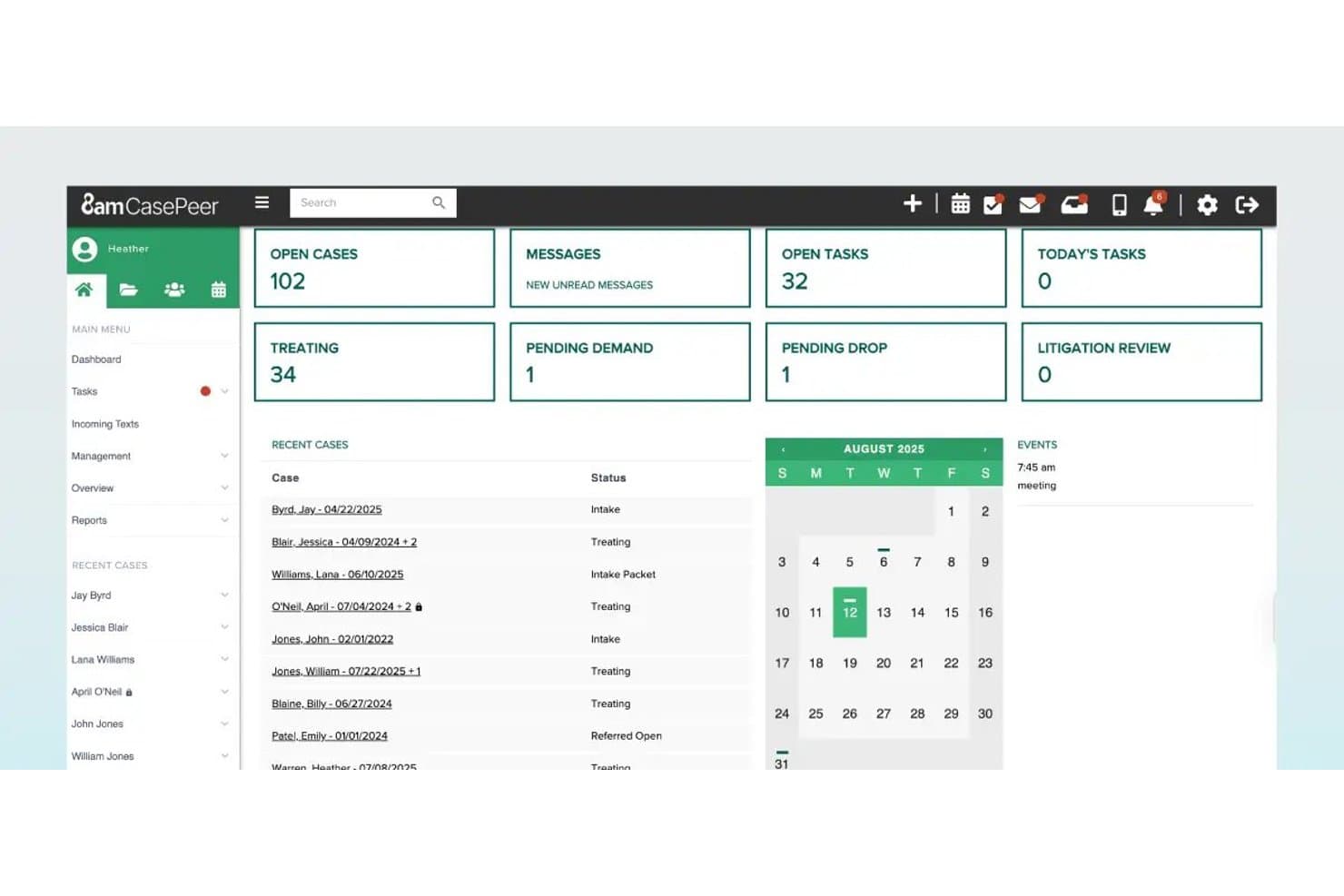
8am offers a comprehensive case management dashboard displaying open cases, tasks, treating status, and a calendar with recent case activity for law practices. 8am is a legal case analysis and management platform designed for modern law practices, offering robust tools for organizing facts, managing evidence, building timelines, mapping issues, and supporting collaboration across litigation teams.
Who Is 8am Best For?
Litigation attorneys and legal teams in small to midsize firms seeking tailored workflows for practice areas like personal injury, immigration, or family law.
Why I Picked 8am
I picked 8am because my team gets access to practice-area workflows for litigation, personal injury, and immigration. I like that we can track facts and evidence by issue or role, then pull timelines unique to each case type. The specialty-specific case workflows set 8am apart.
8am Key Features
- Document management: Upload, organize, and search documents linked to each case file.
- Role-based access control: Assign user permissions by role for secure case collaboration.
- Integrated e-signature: Capture legally binding signatures directly within the platform.
- Custom reporting tools: Generate and export case status, evidence logs, and court-ready documents.
8am Integrations
8am offers native integrations with LawPay, DocketWise, CPACharge, QuickBooks, DocuSign, Microsoft 365, and Google Workspace. An API is available for custom integrations.
Pros and Cons
Pros:
- Role-based evidence and fact tracking
- Timeline tools tailored for litigation use
- Specialty workflows for multiple practice areas
Cons:
- Complex for firms with high-volume imports
- Limited advanced fact dispute labeling
Learn more about 8am:

Smokeball Legal Case Analysis Software Interface Smokeball is a legal practice management software designed for small law firms. It assists in case management, billing, and client onboarding.
Why I picked Smokeball: Smokeball offers a user-friendly interface tailored for small law firms, making it easy for your team to manage cases efficiently. Its automatic time tracking and document automation are particularly beneficial for firms with limited resources. The platform's library of over 20,000 legal forms supports diverse legal needs, enhancing the value it provides to smaller practices. Additionally, its exceptional client support ensures your firm gets the help needed to maximize productivity.
Standout features & integrations:
Features include automatic time tracking, which captures every minute spent on a case without manual input. Document automation simplifies the creation of legal documents, saving you time and reducing errors. The library of over 20,000 legal forms ensures you have the right tools for any case.
Integrations include Microsoft Word, Outlook, LawPay, NetDocuments, Xero, QuickBooks Online, Dropbox, Google Calendar, and RingCentral.
Pros and Cons
Pros:
- Versatile for different practice areas
- Extensive legal form library
- Automatic time tracking
Cons:
- Learning curve for new users
- May not fit large firms
- Limited customization options
Learn more about Smokeball: 3Best for cloud-based access
Clio
- Free trial available
- From £79/user/month
Visit WebsiteCustomer Rating:4.7/5
Clio Legal Case Analysis Software Interface Clio is a cloud-based legal practice management software aimed at legal professionals. It supports case management, billing, and client interactions.
Why I picked Clio: Clio offers cloud-based access, allowing your team to work from anywhere, which is perfect for remote or hybrid work environments. Its comprehensive case management features ensure that all case-related information is easily accessible. The billing and time-tracking functionalities are integrated, making it simple for your team to manage finances without hassle. The platform's focus on accessibility and efficiency makes it ideal for firms looking to modernize their operations.
Standout features & integrations:
Features include intuitive time tracking, which helps you keep accurate records of billable hours. Document management is straightforward, allowing you to store and organize files efficiently. The client portal feature enables secure communication with clients, enhancing collaboration.
Integrations include Microsoft Office 365, Google Workspace, QuickBooks Online, Xero, Dropbox, NetDocuments, LawPay, Zapier, Box, and Zoom.
Pros and Cons
Pros:
- Integrated billing and time tracking
- Ideal for remote work
- Comprehensive case management tools
Cons:
- Some features need customization
- May require frequent updates
- Steep learning curve
Learn more about Clio:

Linksquares Legal Case Analysis Software Interface LinkSquares is a contract management software designed for legal teams and businesses. It specializes in contract analysis and lifecycle management.
Why I picked LinkSquares: LinkSquares excels in contract analysis, providing your team with the tools to quickly search and review contracts. Its AI-driven insights help identify key terms and obligations, reducing the time spent on manual reviews. The platform's reporting features give your team a clear overview of contract statuses and deadlines. In my experience, its focus on contract efficiency and accuracy makes it a valuable tool for businesses handling numerous agreements.
Standout features & integrations:
Features include AI-driven insights, which help your team understand and manage contract obligations. The reporting tools offer a comprehensive view of your contracts, ensuring deadlines are never missed. Automated alerts keep you updated on contract renewals and expirations.
Integrations include Salesforce, DocuSign, NetDocuments, Box, Dropbox, Microsoft OneDrive, Google Drive, Adobe Sign, Slack, and Okta.
Pros and Cons
Pros:
- Automated alerts for deadlines
- Comprehensive reporting tools
- AI-driven contract insights
Cons:
- Initial setup complexity
- Occasional data sync issues
- No clear pricing information available upfront
Learn more about LinkSquares: Best for no-code automation
- Free trial available
- Pricing upon request
Visit WebsiteCustomer Rating:4.7/5
Bryter Legal Case Analysis Software Interface BRYTER is a no-code automation platform designed for legal professionals and businesses looking to automate processes without technical expertise. It enables users to create applications that streamline workflows and enhance operational efficiency.
Why I picked BRYTER: BRYTER allows your team to automate complex workflows without needing coding skills, making it accessible for legal teams. Its drag-and-drop interface simplifies application building, enabling quick deployment of automated processes. You can create decision trees and automate routine tasks, freeing up your team to focus on more strategic work. In my experience, its no-code approach empowers legal teams to innovate without relying on IT departments.
Standout features & integrations:
Features include a drag-and-drop interface that simplifies the creation of automated workflows. Decision tree capabilities help your team map out processes clearly and efficiently. The platform also supports the quick deployment of applications, making it easier for your team to adapt to changing needs.
Integrations include Microsoft Teams, Slack, Salesforce, DocuSign, Office 365, Google Workspace, SAP, ServiceNow, SharePoint, and Workday.
Pros and Cons
Pros:
- Empowers legal teams to innovate
- Quick application deployment
- Allows for the creation of complex, logic-based applications
Cons:
- Limited to specific use cases
- May require user training
- Occasional performance issues
Learn more about BRYTER: Best for integrated billing
- 10-day free trial
- From $49/user/month (billed annually)
Visit WebsiteCustomer Rating:4.3/5
CosmoLex Legal Case Analysis Software Interface CosmoLex is a legal practice management software tailored for small to mid-sized law firms. It handles case management, billing, and trust accounting in one platform.
Why I picked CosmoLex: CosmoLex excels in integrated billing, which simplifies your firm's financial operations by combining billing with practice management. It offers features like time tracking and billing compliance, ensuring accuracy in invoicing. The trust accounting feature helps you manage client funds without needing separate software. In my experience, its all-in-one approach reduces the need for additional tools, saving your team time and effort.
Standout features & integrations:
Features include trust accounting, which allows you to manage client funds effectively. The compliance tracking feature ensures your firm stays aligned with industry standards. Automated billing processes help your team generate invoices quickly and accurately.
Integrations include QuickBooks Online, LawPay, NetDocuments, Dropbox, Box, Google Calendar, Microsoft Outlook, Stripe, PayPal, and Xero.
Pros and Cons
Pros:
- Compliance tracking included
- Comprehensive trust accounting
- Integrated billing feature
Cons:
- Limited mobile app features
- Some users find interface dated
- Not ideal for large firms
Learn more about CosmoLex: 7Best for document management
LEAP
- Free demo available
- Pricing upon request
Visit WebsiteCustomer Rating:4.3/5
Leap Legal Case Analysis Software Interface LEAP is a legal practice management software aimed at law firms of all sizes, focusing on document management and case handling. It offers a comprehensive suite of tools for managing legal documents, billing, and client communication.
Why I picked LEAP: LEAP excels in document management, providing your team with the tools to efficiently store, organize, and access legal documents. Its cloud-based system ensures that your documents are available anytime and anywhere. The software's automated workflows help reduce the manual handling of documents, saving time. In my experience, its strong document management capabilities make it a valuable asset for any law firm.
Standout features & integrations:
Features include automated workflows, which simplify the management of repetitive tasks. The time tracking feature integrates seamlessly with billing, ensuring accurate invoicing. Document automation helps your team create and manage documents quickly and efficiently.
Integrations include Microsoft Office 365, QuickBooks Online, LawPay, Xero, Dropbox, Google Workspace, NetDocuments, InfoTrack, DocuSign, and Adobe Acrobat.
Pros and Cons
Pros:
- Seamless time tracking and billing
- Automated workflows simplify tasks
- Strong document management capabilities
Cons:
- Limited customization options
- Some features need updates
- Occasional performance issues
Learn more about LEAP: Best for data visualization
- Free demo available
- From $50/user/month (billed annually)

LexisNexis Legal Case Analysis Software Interface LexisNexis CaseMap is a case analysis tool designed for legal professionals who need to manage and analyze case facts. It aids in organizing case information and visualizing data to support legal strategies.
Why I picked LexisNexis CaseMap: Its data visualization capabilities help your team map out case details clearly and effectively. You can link facts, issues, and evidence, making it easier to spot connections and build strong arguments. The tool's ability to create timelines and reports enhances your team's ability to communicate case strategies. In my experience, its focus on visual data representation makes it particularly useful for complex cases.
Standout features & integrations:
Features include the ability to create detailed timelines that help your team track case events. The reporting tools offer insights into case progress, aiding in effective case management. You can also link evidence directly to facts, providing a comprehensive view of your case.
Integrations include Microsoft Word, Microsoft Excel, Adobe Acrobat, Concordance, TextMap, TimeMap, Sanction, and Case Notebook.
Pros and Cons
Pros:
- Timelines enhance case tracking
- Links facts and evidence
- Effective data visualization tools
Cons:
- May require detailed setup
- Limited customization options
- Some features need updates
Learn more about LexisNexis CaseMap:

Prevail Legal Case Analysis Software Interface Prevail is a case management software designed specifically for legal professionals handling personal injury cases. It helps manage client information, track case progress, and handle billing and documentation.
Why I picked Prevail: Prevail is tailored for personal injury cases, offering specialized features that cater to this legal area. It includes tools for managing medical records and settlement tracking, which are crucial for personal injury work. The software's case tracking capabilities ensure you stay on top of every detail. In my experience, its focus on personal injury makes it a strong choice for firms specializing in this field.
Standout features & integrations:
Features include detailed medical records management, which helps your team keep track of essential client information. The settlement tracking feature ensures you manage and monitor settlements efficiently. Case tracking provides a comprehensive view of each case's progress, helping you keep everything organized.
Integrations include Microsoft Outlook, QuickBooks, Microsoft Word, Adobe Acrobat, Excel, Westlaw, LexisNexis, PCLaw, Tabs3, and Time Matters.
Pros and Cons
Pros:
- Comprehensive settlement tracking
- Efficient medical records management
- Specialized for personal injury cases
Cons:
- May require training for new users
- Occasional performance lags
- Limited customization options
Learn more about Prevail:

Ontra Legal Case Analysis Software Interface Ontra is a contract automation and management platform tailored for in-house legal teams. It focuses on automating routine contract tasks and managing legal workflows.
Why I picked Ontra: Ontra provides in-house legal teams with tools to manage and automate contract workflows efficiently. Its platform supports automated contract creation, reducing the manual workload for your team. The contract tracking feature ensures that you can monitor the status and progress of each contract easily. In my experience, its focus on automation helps legal teams improve productivity and manage contracts with greater accuracy.
Standout features & integrations:
Features include automated contract creation, which simplifies the process of drafting and managing contracts. The platform also offers contract tracking, allowing you to keep tabs on contract progress and deadlines. Its reporting tools give you insights into contract performance and team efficiency.
Integrations include Salesforce, DocuSign, Box, Dropbox, Google Drive, Microsoft OneDrive, Slack, Adobe Sign, Microsoft Teams, and SAP.
Pros and Cons
Pros:
- Provides insightful reporting tools
- Comprehensive contract tracking and automation
- Tailored for in-house legal teams
Cons:
- Pricing might be higher compared to other basic legal software tools
- The learning curve for leveraging AI features
- Might be overkill for smaller law firms or solo practitioners
Learn more about Ontra:
Annen programvare for juridisk saksanalyse
Her er noen flere alternativer for programvare for saksanalyse som ikke kom med på kortlisten min, men som likevel er verdt å se nærmere på:
- 11CasePeerBest for advanced case analytics
- 12FilevineBest for case collaboration
- 13Rocket MatterBest for cloud-based billing
- 14Thomson Reuters WestlawBest for legal research
How I Evaluate Case Analysis Software
I break down case analysis tools in two layers: the non-negotiables—like fact-to-evidence linking and timeline construction—and the differentiators that separate strong options.
Core Functionality (Table Stakes For This List)
When I'm selecting tools for my list, I rank each one on a scale from 0 (does not offer the functionality) to 5 (excels in this area) for each core functionality listed below. Then, I calculate the tool's total score into a percentage. Each tool needs to achieve a minimum total score of 65% to be considered for inclusion.
- Fact Management & Organization: I look for tools that let you tag, categorize, and link individual facts to sources—like connecting a witness statement to a disputed event or tying a contract clause to a breach allegation.
- Timeline Construction: A good case analysis tool should generate visual, filterable timelines from dated entries, which is especially useful when you're mapping out months of communications in a contract dispute.
- Evidence & Document Linking: I evaluate how each tool connects documents to facts and issues, checking whether you can link a specific exhibit page to a fact entry rather than just attaching a file to the case.
- Issue & Claim Mapping: Each tool should let you organize claims and legal elements in a structured way, such as mapping each element of a negligence cause of action to its supporting facts and evidence.
- Case Collaboration: I check whether teams can work on the same case file with role-based permissions—for example, giving a paralegal editing access to the fact database while limiting associate access to read-only on strategy notes.
- Reporting & Analysis Output: The platform should produce exportable reports and summaries, like a fact-by-issue matrix or a chronological evidence summary you can hand to trial counsel or attach to a motion.
Once I have a list of tools that meet this criteria, I consider what sets each platform apart.
Differentiating Factors (What Sets Vendors Apart)
Here's how I compare and contrast different vendors:
Standout Features
Visual relationship mapping is a major differentiator—being able to diagram how witnesses, entities, and evidence connect in a multi-party dispute saves hours of manual charting. I also evaluate whether a tool offers deposition and transcript analysis, since linking testimony to case facts at the citation level changes how you prep for cross-examination. AI-powered pattern detection is worth watching too, especially for surfacing overlooked connections across large fact sets.
Beyond Features
Security matters here more than in most software categories—case files contain privileged communications and confidential client data. I check for end-to-end encryption and role-based access that aligns with professional conduct obligations. Integration with your existing stack is another key consideration, particularly whether the tool connects to your practice management platform or document management system. I also evaluate how well each tool handles scale, since a platform that works fine for a two-party contract claim may struggle with a mass tort involving thousands of linked facts.
Slik velger du programvare for juridisk saksanalyse
Det er lett å gå seg vill i lange funksjonslister og kompliserte prismodeller. For å hjelpe deg med å holde fokus mens du går gjennom den unike prosessen med å velge programvare, får du her en sjekkliste over faktorer du bør ha i tankene:
| Faktor | Hva du bør vurdere |
|---|---|
| FaktorSkalerbarhet | Hva du bør vurdereVokser programvaren sammen med firmaet ditt? Vurder om den kan håndtere en økning i antall saker eller brukere uten betydelige kostnadsøkninger eller ytelsesproblemer. |
| FaktorIntegrasjoner | Hva du bør vurdereKontroller om programvaren fungerer med eksisterende verktøy, for eksempel systemer for dokumenthåndtering eller fakturering. Manglende integrasjon kan føre til datasiloer og ineffektivitet. |
| FaktorTilpasningsmuligheter | Hva du bør vurdereVurder om du kan tilpasse programvaren slik at den passer til arbeidsflytene dine. Se etter konfigurerbare oversikter eller rapportmaler som dekker firmaets behov. |
| FaktorBrukervennlighet | Hva du bør vurdereVurder læringskurven for teamet ditt. Et komplekst grensesnitt kan forsinke implementeringen. Se etter intuitiv navigasjon og tydelige instruksjoner. |
| FaktorImplementering og opplæring | Hva du bør vurdereHvor raskt kan du komme i gang? Vurder hvor tilgjengelige opplæringsressurser og støtte er under den innledende oppsettfasen. |
| FaktorKostnad | Hva du bør vurdereAnalyser de totale eierkostnadene, inkludert skjulte gebyrer eller kostnader for tilleggsfunksjoner. Sørg for at prisene er i tråd med budsjettet ditt og gir god verdi. |
| FaktorSikkerhetstiltak | Hva du bør vurdereKontroller at programvaren oppfyller sikkerhetsstandardene dine. Sørg for at den tilbyr datakryptering, regelmessige sikkerhetskopier og overholdelse av relevante personvernregler. |
| FaktorTilgjengelig kundestøtte | Hva du bør vurdereVurder nivået på støtten som tilbys. Er støtte tilgjengelig døgnet rundt? Sjekk om det finnes flere kanaler, som telefon, e-post eller chat, og vurder hvor raskt og effektivt supportteamet svarer. |
Hva er programvare for juridisk saksanalyse?
Programvare for juridisk saksanalyse er et teknologiverktøy for advokatfirmaer som hjelper advokater og juridiske team med å undersøke rettspraksis, organisere bevis og utvikle sterkere juridiske strategier. Disse plattformene bruker ofte AI, analyseverktøy og funksjoner for dokumenthåndtering til å effektivisere juridisk research, forutsi sakens utfall og redusere tiden som brukes på manuell gjennomgang.
Ved å omgjøre komplekse data til innsikt som kan brukes i praksis, forbedrer programvare for juridisk saksanalyse nøyaktigheten, øker effektiviteten og støtter mer effektive beslutninger i rettstvister og rådgivningsarbeid.
Funksjoner
Når du velger programvare for juridisk saksanalyse, bør du se etter følgende viktige funksjoner:
- Dokumenthåndtering: Organiserer og lagrer juridiske dokumenter på en sikker måte, slik at de er lett tilgjengelige for saksanalyse og samarbeid.
- Tidslinjesporing: Hjelper med å spore hendelser og frister i saken, slik at teamet ditt holder oversikt over viktige datoer og milepæler.
- Klientkommunikasjon: Tilrettelegger for sikker og effektiv kommunikasjon med klienter, noe som styrker samarbeidet og klienttilfredsheten.
- Automatiserte arbeidsflyter: Reduserer manuelle oppgaver ved å automatisere rutineprosesser, noe som sparer tid og reduserer feil.
- Integrasjonsmuligheter: Kobler seg til eksisterende verktøy og systemer, sikrer smidig dataflyt og reduserer datasiloer.
- Tilpassbare oversikter: Lar deg tilpasse grensesnittet slik at relevant informasjon vises, noe som forbedrer effektiviteten i arbeidsflyten.
- Tidsregistrering: Registrerer fakturerbare timer nøyaktig, noe som gjør fakturering og økonomistyring enklere.
- Sikkerhetstiltak: Tilbyr datakryptering og overholdelse av personvernregler for å holde sensitiv informasjon sikker.
- Rapporteringsverktøy: Gir innsikt i sakens fremdrift og teamets prestasjoner, noe som bidrar til strategiske beslutninger.
- AI-drevet innsikt: Analyserer data for å gi innsikt som kan brukes i praksis, og hjelper juridiske team med å ta informerte beslutninger.
Fordeler
Implementering av programvare for juridisk saksanalyse gir flere fordeler for teamet og virksomheten din. Her er noen av fordelene du kan se frem til:
- Bedre organisering: Holder saksdokumenter og informasjon organisert, slik at det blir enklere for teamet ditt å få tilgang til og administrere data.
- Økt effektivitet: Automatiserer rutineoppgaver og arbeidsflyter, sparer tid og reduserer risikoen for feil.
- Bedre kommunikasjon: Tilrettelegger for sikker samhandling med klienter, bidrar til å opprettholde gode relasjoner og sikrer tydelig kommunikasjon.
- Nøyaktig fakturering: Registrerer fakturerbare timer nøyaktig, noe som forenkler fakturering og økonomistyring.
- Bedre beslutninger: Gir innsikt og analyser som hjelper teamet ditt med å ta informerte beslutninger basert på sanntidsdata.
- Sikret overholdelse av regler: Sørger for at firmaet ditt oppfyller personvernreglene, slik at sensitiv informasjon holdes sikker og i samsvar med regelverket.
- Skalerbarhet: Vokser sammen med firmaet ditt og kan håndtere flere saker og brukere etter hvert som virksomheten utvides.
Kostnader & priser
Å velge programvare for juridisk saksanalyse krever en forståelse av de ulike prismodellene og abonnementene som er tilgjengelige. Kostnadene varierer basert på funksjoner, teamstørrelse, tillegg og mer. Tabellen nedenfor oppsummerer vanlige abonnementer, gjennomsnittsprisene deres og typiske funksjoner som er inkludert i programvareløsninger for juridisk saksanalyse:
Sammenligningstabell for abonnementer for programvare for juridisk saksanalyse
| Abonnementstype | Gjennomsnittspris | Vanlige funksjoner |
|---|---|---|
| AbonnementstypeGratisabonnement | Gjennomsnittspris$0 | Vanlige funksjonerGrunnleggende dokumenthåndtering, begrenset brukerstøtte og grunnleggende rapportering. |
| AbonnementstypePersonlig abonnement | Gjennomsnittspris$10-$30/bruker/måned | Vanlige funksjonerDokumenthåndtering, grunnleggende tidsregistrering, brukerstøtte via e-post og verktøy for klientkommunikasjon. |
| AbonnementstypeForretningsabonnement | Gjennomsnittspris$50-$100/bruker/måned | Vanlige funksjonerAvansert dokumenthåndtering, automatiserte arbeidsflyter, detaljert rapportering og integrasjoner. |
| AbonnementstypeVirksomhetsabonnement | Gjennomsnittspris$150-$300/bruker/måned | Vanlige funksjonerTilpassbare funksjoner, avanserte sikkerhetstiltak, prioritert brukerstøtte og omfattende analyseverktøy. |
Vanlige spørsmål om saksanalyseprogramvare
Her er noen svar på vanlige spørsmål om programvare for saksanalyse:
Kan programvare for saksanalyse integreres med de eksisterende systemene mine?
Ja, mange programvareløsninger for saksanalyse kan integreres med andre systemer, for eksempel programvare for dokumenthåndtering eller fakturering. Kontroller programvarens integrasjonsmuligheter før du kjøper den. Noen plattformer tilbyr API-er for tilpassede integrasjoner, mens andre har ferdigbygde koblinger. Sørg for at integrasjonsprosessen er enkel og ikke krever omfattende teknisk kunnskap.
Hvilken type opplæring er tilgjengelig for nye brukere?
De fleste leverandører av programvare for saksanalyse tilbyr ulike opplæringsalternativer, for eksempel videoveiledninger, nettseminarer og brukerveiledninger. Noen plattformer inkluderer interaktive produktomvisninger og støtte ved oppstart for å hjelpe deg i gang. Hvis du foretrekker praktisk læring, bør du se etter programvare med direkte opplæringsøkter eller kurs. Se etter løpende brukerstøtte for å sikre at teamet ditt kan bruke programvaren effektivt.
Er kundestøtte tilgjengelig døgnet rundt?
Ikke alle programvareleverandører tilbyr brukerstøtte døgnet rundt, så det er viktig å kontrollere dette før du kjøper. Noen tilbyr brukerstøtte hele døgnet via chat eller e-post, mens andre kan ha begrensede åpningstider. Hvis teamet ditt arbeider på tvers av ulike tidssoner, kan brukerstøtte døgnet rundt være avgjørende. Vurder hvilke brukerstøttekanaler som er tilgjengelige, for eksempel telefon, chat eller e-post, og sørg for at de dekker behovene dine.