

Som juridisk assistent vet jeg at det er utfordrende å gi advokatkontoret ditt støtte av høyeste kvalitet samtidig som du håndterer en stor arbeidsmengde, balanserer prioriteringer og sørger for effektiv kommunikasjon. Programvare for juridiske assistenter kan bidra til å effektivisere arbeidsflyten din, slik at den tilsynelatende endeløse oppgavelisten blir mer håndterlig og mindre tidkrevende. Programvaren jeg har valgt ut med omhu, gjør det enkelt og nøyaktig å håndtere elektronisk bevismateriale, saksbehandling, dokumentautomatisering, tidsregistrering, fakturering, meldinger og mer.
Why Trust Our Software Recommendations
6,700+
Reviews
20
Industry experts
16+
Evaluation factors
14
Years
Our team has been testing and reviewing software since 2012. As legal practice leaders ourselves, we know how difficult—and important—it is to choose the right software.
For this guide, we evaluated tools using hands-on testing and independent research, scoring tools using our selection criteria.
Our reviews reflect our human editorial judgment, not a sales pitch.
Sammenligningstabell for programvare for juridiske assistenter
Denne sammenligningstabellen oppsummerer prisopplysningene for mine beste utvalgte programmer for juridiske assistenter:
| Tool | Best For | Trial Info | Price | ||
|---|---|---|---|---|---|
| 1 | Best for compliant payments and billing | Free trial available | Pricing upon request | Website | |
| 2 | Best for centralized case and document tracking | 7-day free trial | From $59/user/month | Website | |
| 3 | Best for client communication and collaboration | 10-day free trial | From $50/user/month (billed annually) | Website | |
| 4 | Best for Canadian legal practitioners | From $34/user/month (billed annually) | Website | ||
| 5 | Best for creating document templates | Free demo available | Pricing upon request | Website | |
| 6 | Best for customizable workflows and practice areas | Free demo available | Pricing upon request | Website | |
| 7 | Best for solo and small law firms | Free demo available | Pricing upon request | Website | |
| 8 | Best for comprehensive case management | Free demo available | Pricing upon request | Website | |
| 9 | Best for legal research and analytics | Not available | Pricing upon request | Website | |
| 10 | Best for automated redaction | Free trial available | From $19/month | Website |


Anmeldelser av den beste programvaren for juridiske assistenter
Nedenfor finner du mine detaljerte sammendrag av den beste programvaren for juridiske assistenter som kom med på utvalgslisten min. Anmeldelsene mine gir et detaljert innblikk i de viktigste funksjonene, fordelene og ulempene, integrasjonene og ideelle bruksområdene for hvert verktøy, slik at du kan finne det som passer best for deg.
 1Best for compliant payments and billing
8am
- Free trial available
- Pricing upon request
Visit WebsiteCustomer Rating:4.6/5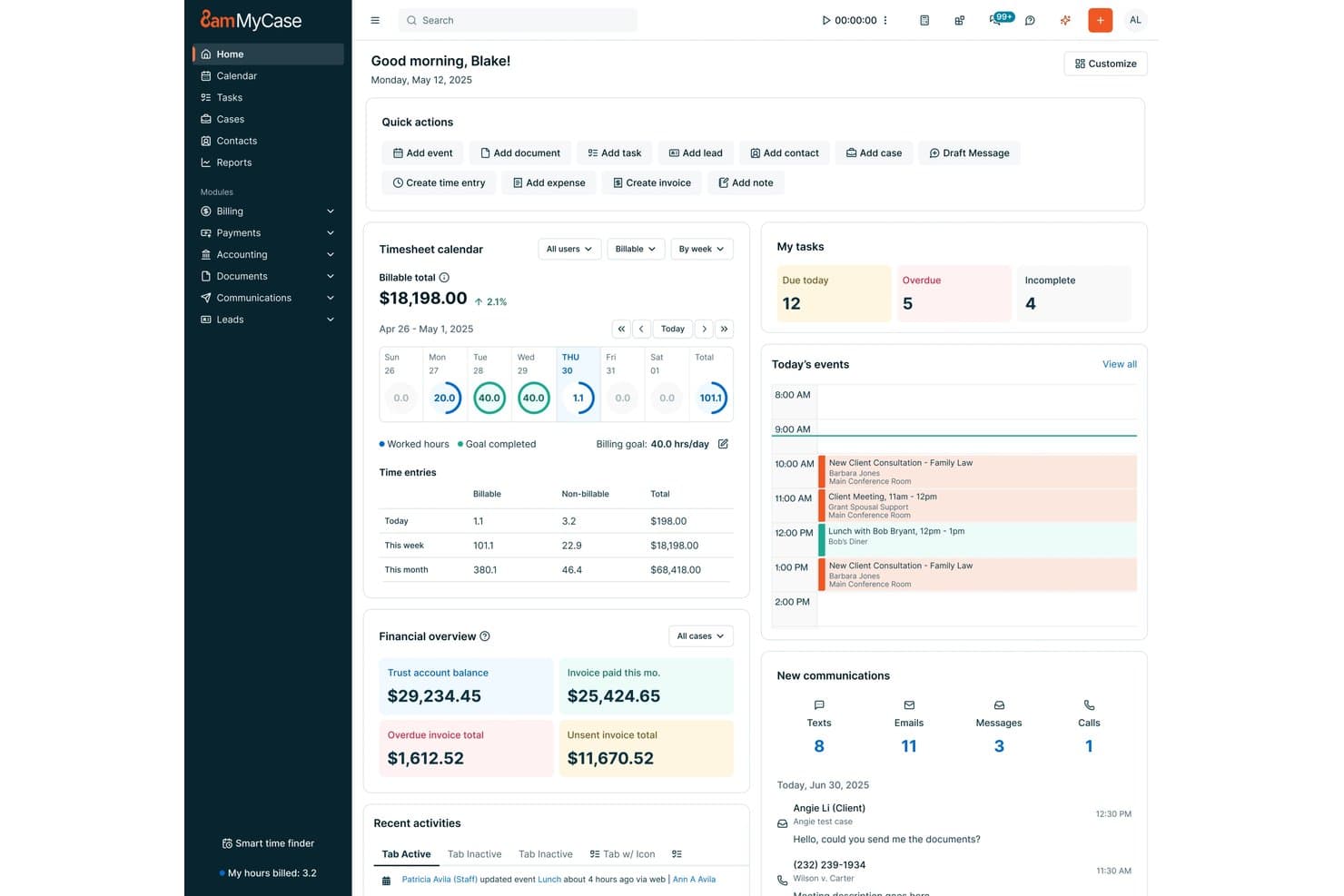
8am offers paralegals a centralized dashboard with task management, billing timesheets, financial overviews, and today's events all in one view. 8am is a legal practice management platform designed for paralegals and legal professionals seeking integrated tools for case management, document automation, billing, calendaring, and secure client communications.
Who Is 8am Best For?
Legal teams at small and midsize law firms that want integrated payment, billing, and case management in a single platform.
Why I Picked 8am
I picked 8am as one of the best because I rely on its secure payment processing and compliance-grade billing features, like native trust accounting and built-in LEDES invoicing. My team uses its centralized financial workflows to simplify court-approved payments and client transactions.
8am Key Features
- Matter management: Manage case files, contacts, and notes in one organized workspace.
- Document automation: Create templates and auto-generate legal documents within the platform.
- Legal calendaring: Track deadlines and integrate events with attorney and court calendars.
- Client portal: Share files and communicate securely with clients through a protected portal.
8am Integrations
Native integrations are not currently listed.
Pros and Cons
Pros:
- Native document automation and eSignatures
- Detailed billing and LEDES invoice features
- Built-in trust accounting and compliance workflows
Cons:
- Workflow customization options are somewhat limited
- Customer support can be slow to respond
Learn more about 8am: Best for centralized case and document tracking
- 7-day free trial
- From $59/user/month
Visit WebsiteCustomer Rating:4.3/5
PracticePanther centralizes case files and documents for faster legal workflows. PracticePanther is a practical tool for paralegals who need better control over daily legal work. This cloud-based practice management software helps law firms handle case files, organize documents, and communicate with clients in one place. Whether you’re managing multiple matters or working with remote teammates, PracticePanther keeps tasks and information organized so you can focus on supporting your legal team efficiently.
Why I Picked PracticePanther
I picked PracticePanther for its exceptional case management and document management capabilities, which are crucial for paralegals managing multiple legal files and deadlines. The software's secure client portal allows for seamless communication and document sharing, reducing the back-and-forth that often hampers efficiency. Additionally, PracticePanther's automation of client intake forms saves valuable time, allowing you to focus more on client service rather than administrative tasks.
PracticePanther Key Features
In addition to centralized case and document tracking, PracticePanther offers:
- eSignature: This feature allows you to send documents for electronic signatures, reducing the need for physical paperwork and speeding up the approval process.
- Two-Way Business Texting: Enables you to communicate directly with clients via text messages, making it easier to keep them updated on case progress.
- Trust Accounting: Helps you manage client funds in compliance with legal standards, ensuring transparency and accuracy in financial handling.
- Customizable Workflows: Tailor processes to specific practice needs, enhancing productivity by automating routine tasks.
PracticePanther Integrations
Integrations include QuickBooks Online, LawPay, Zapier, Box, Mailchimp, Dropbox, Google Calendar, Microsoft Outlook, OneDrive, and CalendarRules.
Pros and Cons
Pros:
- Client management tools keep matters well structured
- Built-in billing tools improve payment collection workflow
- Automates administrative tasks, saving significant time weekly
Cons:
- Mobile app navigation feels limited and clunky
- Customization options might be limited for specific needs
Learn more about PracticePanther: Best for client communication and collaboration
- 10-day free trial
- From $50/user/month (billed annually)
Visit WebsiteCustomer Rating:4.6/5
MyCase paralegals software Interface MyCase is a legal practice management software that focuses on enhancing client communication and collaboration. It offers a secure and user-friendly platform for managing cases and communicating with clients, making it the top choice for law firms that prioritize client interaction.
Why I Picked MyCase: I selected MyCase for this list due to its exceptional capabilities in facilitating seamless communication between law firms and their clients. MyCase stands out from the competition with its emphasis on client collaboration, making it the best choice for law firms looking to improve their client communication and engagement.
Standout features & integrations:
Key features of MyCase include its secure client portal, case management, document storage, and online payments. The secure client portal enables law firms to communicate and collaborate with clients efficiently, while the case management tools help to organize and track case-related information.
MyCase integrates with popular applications such as QuickBooks Online, Microsoft Office 365, and Google Workspace.
Pros and Cons
Pros:
- Integrates with popular productivity tools
- User-friendly interface
- Strong emphasis on client communication and collaboration
Cons:
- Pricing might be high for smaller law firms
- Limited customization options compared to some competitors
- No monthly billing option, annual commitment required
 Best for Canadian legal practitioners
- From $34/user/month (billed annually)
Visit WebsiteCustomer Rating:4.6/5
uLawPractice paralegals software Interface uLawPractice is a legal practice management software specifically designed for Canadian legal practitioners. It offers comprehensive features that cater to the unique regulatory requirements and legal landscape in Canada, making it the top choice for Canadian lawyers and law firms.
Why I Picked uLawPractice: I picked uLawPractice for this list because it stands out as a tailored solution for Canadian legal professionals. Its focus on Canadian legal compliance and its comprehensive features specifically designed for the Canadian legal market make it the best choice for practitioners in Canada.
Standout features & integrations:
Key features of uLawPractice include trust accounting, case management, timekeeping, and billing, all designed to comply with Canadian legal regulations. The platform also offers comprehensive reporting to ensure law firms can meet the unique requirements of Canadian legal practice.
uLawPractice integrates with popular tools such as Microsoft Office 365, Google Workspace, and QuickBooks Online.
Pros and Cons
Pros:
- Integrates with popular productivity tools
- Compliant with Canadian legal regulations
- Tailored for Canadian legal practitioners
Cons:
- No monthly billing option, annual commitment required
- Lacks some advanced features found in other tools
- Not suitable for non-Canadian law firms
Learn more about uLawPractice: Best for creating document templates
- Free demo available
- Pricing upon request
Visit WebsiteCustomer Rating:4.3/5
HotDocs allows paralegals to fill out pre-built templates and customize them for each unique scenario. HotDocs is a robust document automation software designed to help the creation, generation, assembly, and preparation of complex documents. Commonly used in legal, financial, and government sectors, HotDocs can help reduce the time and effort needed to produce client or customer-specific documents.
Why I Picked HotDocs: One of the most notable features is its document assembly capabilities, which automate the creation of routine legal documents. This automation not only saves time by reducing the need for repetitive data entry but also minimizes the risk of errors. By converting frequently used documents into reusable templates, HotDocs ensures that each document is consistent and complies with legal standards.
Standout features & integrations:
Key features of HotDocs include conditional logic which helps users create dynamic documents by incorporating if/then statements. It also offers batch document processing, digital signatures, and options to perform sophisticated calculations within documents.
HotDocs integrates with Salesforce, Microsoft Dynamics, Sage, Microsoft 365, Microsoft Word, Tabs3, Mitratech Matter Management, Actionstep, Amicus Attorney, and AbacusLaw.
Pros and Cons
Pros:
- Good document workflow automation
- Scalable for growing firms
- Customizable templates
Cons:
- Can be expensive for smaller firms
- Can take time to learn how to create templates
Learn more about Mitratech Hotdocs: Best for customizable workflows and practice areas
- Free demo available
- Pricing upon request
Visit WebsiteCustomer Rating:4.2/5
Actionstep paralegals software Interface Actionstep is a comprehensive legal practice management software with a strong emphasis on customizable workflows and support for various practice areas. Its adaptability and wide range of features make it the best choice for law firms that require tailored solutions for their unique needs.
Why I Picked Actionstep: I selected Actionstep for this list because its customizable workflows and support for multiple practice areas make it stand out from other legal practice management tools. I believe it is the best option for law firms that need a flexible platform capable of adapting to their specific requirements and practice areas.
Standout features & integrations:
Actionstep's most valuable features include its customizable workflows, matter management, and automation capabilities.
Additionally, it integrates with essential tools like Microsoft Office 365, Xero, and LawPay, allowing for seamless collaboration and financial management.
Pros and Cons
Pros:
- Integrates with popular productivity and financial tools
- Supports multiple practice areas
- Highly customizable workflows
Cons:
- Limited integrations compared to some other practice management tools
- Some users may find the customization options overwhelming
- Annual billing commitment required
Learn more about Actionstep: 7Best for solo and small law firms
LEAP
- Free demo available
- Pricing upon request
Visit WebsiteCustomer Rating:4.3/5
Leap paralegals software Interface LEAP is a legal practice management software designed specifically for solo practitioners and small law firms. Its user-friendly interface and tailored features make it the best choice for smaller practices seeking a comprehensive solution.
Why I Picked LEAP: I chose LEAP for this list because it's well-suited to the unique needs of solo and small law firms. Its intuitive design and focus on smaller practices set it apart from other legal practice management tools. I believe it's the best option for smaller firms looking for an all-in-one solution that's easy to use and navigate.
Standout features & integrations:
LEAP's most notable features include matter management, document automation, and integrated billing. It also integrates with essential tools like Microsoft Office 365, LawPay, and QuickBooks Online, making it easy to streamline operations and maintain efficiency in a small law firm.
Pros and Cons
Pros:
- Integrates with popular productivity and financial tools
- User-friendly interface
- Tailored for solo and small law firms
Cons:
- Limited customization options compared to some other practice management tools
- Annual billing commitment required
- Expensive for smaller firms on a budget
Learn more about LEAP: Best for comprehensive case management
- Free demo available
- Pricing upon request
Visit WebsiteCustomer Rating:4/5
AbacusLaw paralegals software Interface AbacusLaw is a law practice management software designed to help law firms streamline their operations and manage cases effectively. It is an all-in-one solution that automates the essential aspects of law practice, making it the best choice for comprehensive case management.
Why I Picked AbacusLaw: I chose AbacusLaw for this list because it offers a robust and feature-rich platform that simplifies the process of managing cases, documents, and financials for law firms. In comparison to other tools, AbacusLaw provides a more comprehensive approach to case management, making it the best choice for law firms seeking an all-inclusive solution.
Standout features & integrations:
AbacusLaw's most significant features include case management, document automation, calendaring, and billing. These tools allow users to manage their cases effectively, streamline document creation, and stay organized with their schedules.
Some of the most important integrations provided by AbacusLaw include Microsoft Office, QuickBooks, and Abacus Private Cloud.
Pros and Cons
Pros:
- Integrates well with popular productivity tools
- Streamlines document creation through automation
- Comprehensive case management features
Cons:
- Learning curve for first-time users
- Requires an annual commitment
- Can be expensive for smaller law firms
Learn more about AbacusLaw:

Thomson Reuters paralegals software Interface Thomson Reuters is a leading provider of legal research and analytics tools, offering a wide range of solutions for legal professionals. Its expertise in legal research and advanced analytics capabilities make it the best choice for those seeking accurate and comprehensive legal information.
Why I Picked Thomson Reuters: I chose Thomson Reuters for this list because its legal research and analytics tools are unparalleled in the industry. After comparing multiple options, I determined that Thomson Reuters stands out for its extensive legal content, sophisticated analytics, and innovative research technology, making it the best choice for legal research and analytics.
Standout features & integrations:
Some of the most important features of Thomson Reuters include its comprehensive legal research platform, Westlaw Edge, and its cutting-edge analytics tools, such as Litigation Analytics and Quick Check Judicial.
Key integrations include Practical Law, which provides practical guidance and resources for legal professionals, and Drafting Assistant, which assists in document drafting and review.
Pros and Cons
Pros:
- Continuous innovation in legal research technology
- Advanced analytics tools for data-driven insights
- Extensive legal content and resources
Cons:
- Learning curve for some features and tools
- May be expensive for smaller firms or solo practitioners
- Pricing information is not transparent
Learn more about Thomson Reuters:

Redactable lets you perform different types of redactions, including manual and auto redactions. Redactable is a cloud-based document redaction tool designed to help organizations efficiently and securely remove sensitive information from PDF documents.
Why I Picked Redactable: Redactable's AI capabilities automatically detect and remove sensitive information, ensuring that no critical details are overlooked. This feature is particularly beneficial for paralegals who handle large volumes of documents, as it reduces the risk of human error and ensures compliance with data protection regulations. Additionally, Redactable's Redaction Wizard offers the convenience of single-click redaction for documents containing many pages.
Standout features & integrations:
Key features include document scrubbing, which permanently removes metadata and hidden elements to ensure the security of redactions. It also offers real-time collaboration tools, version control, and redaction certificates.
Redactable integrates with Google Drive, Dropbox, OneDrive, and Box.
Pros and Cons
Pros:
- Offers collaboration tools
- Complies with GDPR and other privacy regulations
- Uses AI to enhance its redaction process
Cons:
- Not ideal for broader legal document management
- Limited number of redactions per plan
Learn more about Redactable:
Annen programvare for juridiske assistenter
Her er noen flere alternativer for programvare for juridiske assistenter som ikke kom med på utvalgslisten min, men som likevel er verdt å undersøke:
- 11Law Ruler SoftwareBest for legal CRM and intake automation
- 12SolunoGood for robust timekeeping and billing
- 13AssemblyBest for document assembly and automation
- 14QuickbaseGood for customizable app development
- 15CheckboxGood for creating legal automation apps
- 16CosmoLexGood for all-in-one legal practice management
- 17FilevineGood for comprehensive case management
- 18SmokeballGood for automated document management
- 19ClioGood for streamlining legal practice workflows
- 20Rocket MatterGood for streamlined billing and invoicing
- 21DiscoGood for AI-driven ediscovery efficiency
- 22LawyawGood for easy document drafting and editing
- 23SpellbookGood for automating document generation
How I Evaluate Software for Paralegals
I split my evaluation into must-have fundamentals—like matter management and legal calendaring—and differentiators that separate the best tools from the rest.
Core Functionality (Table Stakes For This List)
When I'm selecting tools for my list, I rank each one on a scale from 0 (does not offer the functionality) to 5 (excels in this area) for each core functionality listed below. Then, I calculate the tool's total score into a percentage. Each tool needs to achieve a minimum total score of 65% to be considered for inclusion.
- Case & Matter Management: I look for a centralized hub where paralegals can pull up a matter and instantly see linked contacts, notes, documents, and related cases without toggling between screens.
- Document Management & Automation: Template-based drafting is key here—I check whether paralegals can generate standard pleadings, engagement letters, or discovery requests from reusable templates with auto-populated fields.
- Legal Calendaring & Deadlines: I evaluate whether the platform supports court rules-based calendaring, since manually calculating motion response deadlines or statute-of-limitations dates is a recipe for malpractice risk.
- Time Tracking & Billing Support: Paralegals need to log billable hours directly against matters. I look for built-in timers, batch time entry, and the ability to generate client-ready invoices or export in LEDES format.
- Task & Workflow Management: I check for workflow templates that mirror real legal processes—like client intake checklists, discovery response sequences, or closing binders—with task assignment and status tracking across team members.
- Client & Court Communication Tools: Secure client portals, e-signature integration, and e-filing support all fall here. I evaluate how well the tool handles sensitive document exchange beyond basic email.
Once I have a list of tools that meet this criteria, I consider what sets each platform apart.
Differentiating Factors (What Sets Vendors Apart)
Here's how I compare and contrast different vendors:
Standout Features
Conflict checking is a feature I weigh heavily—before a firm takes on new work, paralegals need to run automated searches across all contacts and matters to flag potential ethical issues. Trust accounting with IOLTA compliance also separates stronger platforms, especially for firms that manage retainers and need three-way reconciliation built into the system. AI-powered document review is another differentiator I evaluate, looking at whether a tool can summarize depositions, extract key clauses, or redact sensitive information during discovery.
Beyond Features
Compliance matters—I check whether a platform meets SOC 2 Type II standards and offers role-based access controls, since paralegals routinely handle privileged client data. Integration fit is equally important; I look at whether a tool connects with Microsoft 365, DocuSign, and billing platforms like LawPay that legal teams already rely on. I also consider firm size and practice area fit, since a litigation paralegal at a mid-size firm has very different workflow needs than a solo immigration paralegal.
Slik velger du programvare for juridiske assistenter
Det er lett å gå seg vill i lange funksjonslister og komplekse prismodeller. For å hjelpe deg med å holde fokus mens du går gjennom den unike prosessen med å velge programvare, får du her en sjekkliste over faktorer du bør ha i bakhodet:
| Faktor | Hva du bør vurdere |
|---|---|
| FaktorSkalerbarhet | Hva du bør vurdereVil programvaren vokse sammen med firmaet ditt? Vurder om den kan håndtere flere saker eller flere brukere uten ekstra kostnader eller ytelsesproblemer. |
| FaktorIntegrasjoner | Hva du bør vurdereFungerer den med eksisterende verktøy som e-post eller dokumenthåndteringssystemer? Se etter sømløs datadeling og redusert manuell registrering. |
| FaktorTilpasningsmuligheter | Hva du bør vurdereKan du tilpasse programvaren til de spesifikke arbeidsflytene dine? Se etter alternativer for å endre maler og brukergrensesnitt slik at de passer behovene til teamet ditt. |
| FaktorBrukervennlighet | Hva du bør vurdereEr programvaren intuitiv for alle teammedlemmer? Et enkelt grensesnitt med tydelig navigering kan spare tid og redusere behovet for opplæring. |
| FaktorImplementering og oppstart | Hva du bør vurdereHvor lang tid tar det å komme i gang? Vurder tilgjengeligheten av opplæringsressurser og støtte for å sikre en smidig overgang. |
| FaktorKostnad | Hva du bør vurdereFinnes det skjulte gebyrer? Sammenlign prismodeller og vurder langsiktige kostnader, inkludert oppgraderinger og supportavgifter. |
| FaktorSikkerhetstiltak | Hva du bør vurdereOppfyller den bransjens sikkerhetsstandarder? Sørg for at datakryptering og regelmessige sikkerhetsoppdateringer er inkludert. |
| FaktorEtterlevelseskrav | Hva du bør vurdereEr den i tråd med juridiske bestemmelser som GDPR eller HIPAA? Kontroller at programvaren inneholder funksjoner som støtter etterlevelse av nødvendige juridiske standarder. |
Hva er programvare for juridiske assistenter?
Programvare for juridiske assistenter støtter arbeidsflyten og oppgavene til juridiske assistenter i advokatfirmaer for å effektivisere arbeidsprosessene, forbedre effektiviteten og øke produktiviteten. Den tilbyr en rekke funksjoner, inkludert dokumenthåndtering, elektronisk bevisinnsamling, saksbehandling, tidsregistrering, kalenderfunksjoner, juridisk forskning og kommunikasjonsverktøy.
Ved å ta i bruk disse programvareløsningene kan juridiske assistenter effektivt håndtere arbeidsmengden, føre nøyaktige registre, følge opp frister og forbedre den generelle effektiviteten i advokatfirmaet.
Funksjoner
Ved valg av programvare for juridiske assistenter bør du se etter følgende viktige funksjoner:
- Dokumenthåndtering: Organiserer og lagrer juridiske dokumenter på en sikker måte, slik at det blir enkelt å få tilgang til og dele filer.
- Tidsregistrering: Overvåker fakturerbare timer effektivt og sikrer nøyaktig fakturering av klienter.
- Saksbehandling: Bidrar til å håndtere saksdetaljer, frister og oppgaver, slik at alt holdes organisert på ett sted.
- Kommunikasjon med klienter: Legger til rette for direkte kommunikasjon med klienter, noe som forbedrer klientforhold og tjenester.
- Støtte for overholdelse av regelverk: Sikrer at juridiske standarder og forskrifter følges, og reduserer risikoen for manglende etterlevelse.
- Integrasjonsmuligheter: Kobler seg til andre verktøy som e-post og kalendere for å effektivisere arbeidsflyt og datadeling.
- Tilpassbare arbeidsflyter: Gjør det mulig å tilpasse prosesser til firmaets spesifikke behov, noe som øker effektiviteten.
- Mobil tilgang: Gir mulighet til å arbeide hvor som helst, noe som øker fleksibiliteten og produktiviteten.
- Sikkerhetstiltak: Beskytter sensitive juridiske data med kryptering og regelmessige sikkerhetsoppdateringer.
- Opplæringsressurser: Tilbyr opplæringsmateriell som videoer og veiledninger for å gjøre introduksjonsprosessen enklere.
Fordeler
Implementering av programvare for juridiske assistenter gir flere fordeler for teamet og virksomheten din. Her er noen av fordelene du kan se frem til:
- Bedre organisering: Sentraliserer saksmapper og dokumenter, slik at det blir enklere å håndtere informasjon og frister.
- Økt effektivitet: Automatiserer repetitive oppgaver som tidsregistrering og dokumentgenerering, sparer tid og reduserer feil.
- Forbedret klientservice: Legger til rette for bedre kommunikasjon og raskere responstid, noe som øker klienttilfredsheten.
- Kostnadsbesparelser: Reduserer manuelt administrativt arbeid, slik at teamet kan fokusere på fakturerbare oppgaver og øke inntektene.
- Bedre etterlevelse: Hjelper deg med å følge juridiske standarder gjennom støtte for overholdelse av regelverk, og reduserer risikoen for sanksjoner.
- Fleksibilitet: Gjør det mulig å arbeide hvor som helst med mobil tilgang, noe som gir teamet større fleksibilitet og produktivitet.
- Datasikkerhet: Beskytter sensitive opplysninger med avanserte sikkerhetstiltak og sikrer konfidensialitet for klientene.
Kostnader og priser
Ved valg av programvare for juridiske assistenter er det nødvendig å forstå de ulike prismodellene og abonnementene som er tilgjengelige. Kostnadene varierer basert på funksjoner, teamstørrelse, tillegg og mer. Tabellen nedenfor oppsummerer vanlige abonnementer, gjennomsnittsprisene deres og typiske funksjoner som er inkludert i programvareløsninger for juridiske assistenter:
Sammenligningstabell for programvare for juridiske assistenter
| Abonnementstype | Gjennomsnittspris | Vanlige funksjoner |
|---|---|---|
| AbonnementstypeGratisabonnement | Gjennomsnittspris$0 | Vanlige funksjonerGrunnleggende dokumenthåndtering, begrenset saksbehandling og viktig tidsregistrering. |
| AbonnementstypePersonlig abonnement | Gjennomsnittspris$10-$30 per bruker/måned | Vanlige funksjonerDokumenthåndtering, grunnleggende integrasjoner, kommunikasjon med klienter og standard sikkerhetstiltak. |
| AbonnementstypeBedriftsabonnement | Gjennomsnittspris$40-$80 per bruker/måned | Vanlige funksjonerAvansert dokumenthåndtering, full saksbehandling, mobil tilgang og støtte for overholdelse av regelverk. |
| AbonnementstypeAbonnement for større virksomheter | Gjennomsnittspris$100-$200 per bruker/måned | Vanlige funksjonerTilpassbare arbeidsflyter, fullstendige integrasjoner, forbedret sikkerhet, dedikert brukerstøtte og omfattende rapportering. |
Vanlige spørsmål om programvare for juridiske assistenter
Her er noen svar på vanlige spørsmål om programvare for juridiske assistenter:
Hvordan kan programvare for juridiske assistenter forbedre produktiviteten?
Programvare for juridiske assistenter forbedrer produktiviteten ved å automatisere rutineoppgaver som dokumenthåndtering, tidsregistrering og saksplanlegging. Denne automatiseringen frigjør tid til mer komplekst arbeid, reduserer feil og sørger for at juridiske prosesser går smidig, slik at teamet ditt kan fokusere på mer strategiske oppgaver.
Finnes det opplæring for nye brukere av programvare for juridiske assistenter?
Ja, de fleste leverandører av programvare for juridiske assistenter tilbyr opplæringsressurser for nye brukere. Dette kan omfatte veiledninger, webinarer og interaktive guider som gjør innføringsprosessen enklere. Tilgang til omfattende opplæring sørger for at teamet ditt raskt kan tilpasse seg det nye systemet og få maksimalt utbytte av det.
Hvordan ivaretar programvare for juridiske assistenter datasikkerheten?
Programvare for juridiske assistenter ivaretar datasikkerheten gjennom kryptering, sikre tilgangskontroller og regelmessige sikkerhetsoppdateringer. Disse tiltakene beskytter sensitive juridiske opplysninger mot uautorisert tilgang og datainnbrudd, og hjelper advokatfirmaet ditt med å overholde juridiske standarder og opprettholde klientenes konfidensialitet.
Hvor enkelt er det å overføre eksisterende saksdata til ny programvare?
Datamigrering er ofte den mest krevende delen av et systembytte. Du bør undersøke om leverandøren tilbyr importverktøy, API-støtte eller migreringstjenester. Se også om de kan tilordne de gamle feltene og formatene dine på en ryddig måte i det nye systemet, eller om du må rydde opp manuelt. En god konsepttest eller prøvemigrering hjelper deg med å teste løsningen før full utrulling.