

Programvare for juridiske skjemaer er en omfattende løsning som kombinerer systemer for håndtering av juridiske dokumenter, e-posthåndtering og registrering av fakturerbar tid for sømløs drift av advokatvirksomheter.
Den integrerer funksjoner som bruk av metadata, versjonskontroll og et robust API for samhandling med andre systemer. Programvaren løser flere utfordringer knyttet til håndtering av juridiske dokumenter: bortkastet tid på å lete etter dokumenter, vanskeligheter med å holde oversikt over fakturerbare timer, misforståelser på grunn av uorganiserte e-poster og bekymringer rundt dokumentsikkerhet og versjonskontroll.
Hvorfor du kan stole på våre programvareanbefalinger
6,700+
Reviews
20
Industry experts
16+
Evaluation factors
14
Years
Teamet vårt har testet og anmeldt programvare siden 2012. Vi leder selv advokatfirmaer, så vi vet hvor vanskelig og hvor viktig det er å velge riktig programvare.
I denne guiden har vi vurdert verktøyene gjennom praktisk testing og uavhengig research og gitt dem poeng ut fra våre utvelgelseskriterier.
Anmeldelsene våre bygger på vår egen redaksjonelle vurdering. De er ikke et salgsargument.
Sammenligningstabell for programvare for juridiske skjemaer
Tabellen nedenfor sammenligner prisdetaljene for mine beste utvalgte programmer for juridiske skjemaer.
| Tool | Best For | Trial Info | Price | ||
|---|---|---|---|---|---|
| 1 | Best for automated document generation workflows | Free trial available | Pricing upon request | Website | |
| 2 | Best for billing-first small firms managing intake | Free trial available | From $49/user/month (billed annually) | Website | |
| 3 | Best for IP docketing and intuitive legal task management | Free trial available | From $60/month | Website | |
| 4 | Best for dynamic and collaborative law practice management | Free demo available | Pricing upon request | Website | |
| 5 | Best for integrated law practice and legal accounting solution | 10-day free trial | From $49/user/month (billed annually) | Website | |
| 6 | Best for extensive legal form library and automation | No | Pricing available upon request | Website | |
| 7 | Best for providing an all-encompassing legal service hub | Free discovery call available | Starting price for a basic Last Will and Testament plan is at $89 (one-time fee). | Website | |
| 8 | Best for a broad selection of free, user-friendly legal templates | From $59.95/user/month | Website | ||
| 9 | Best for comprehensive case and matter management | Not available | Pricing upon request | Website | |
| 10 | Best for real estate conveyancing and case management | Free demo available | Pricing upon request | Website |


Anmeldelser av den beste programvaren for juridiske skjemaer
 1Best for automated document generation workflows
8am
- Free trial available
- Pricing upon request
Visit WebsiteCustomer Rating:4.6/5
8am DocketWise assembles immigration forms into organized client packets. 8am is a legal practice management platform that brings together document automation, customizable intake forms, eSignature workflows, and audit-tracked document management within a unified suite built for law firms.
Who Is 8am Best For?
8am is a good fit for small to mid-sized law firms that need a centralized platform to manage documents, client intake, and case workflows.
Why I Picked 8am
I picked 8am as one of the best for automated document generation workflows because its template-based automation pulls directly from case and contact data to populate documents without manual input. In practice, I can trigger a retainer agreement or court filing template the moment a new matter is created, cutting out repetitive data entry entirely. The built-in workflow automation also lets me chain document generation to case milestones, so the right forms get created at the right stage automatically.
8am Key Features
- eSignature: Send documents directly from the platform for clients to sign electronically, without leaving the system.
- Client intake forms: Build and send customizable online intake forms that capture client data and feed it directly into new matters.
- Secure client portal: Share completed legal documents with clients through an encrypted portal with access controls.
- Document storage and organization: Store, tag, and retrieve case documents in a centralized repository linked to individual matters.
8am Integrations
Integrations include MyCase, Clio, PracticePanther, QuickBooks Online, LawPay, Google Calendar, Gmail, Outlook Calendar, Outlook Email, and ImmiTranslate.
Pros and Cons
Pros:
- Automates immigration forms using reusable client questionnaire data
- Supports multilingual intake for clients across diverse language backgrounds
- Combines form preparation, e-signatures, and secure client collaboration
Cons:
- Printing individual forms can occasionally produce workflow glitches
- Primarily supports immigration forms, limiting broader legal-document use
Learn more about 8am: Best for billing-first small firms managing intake
- Free trial available
- From $49/user/month (billed annually)
Visit WebsiteCustomer Rating:4.3/5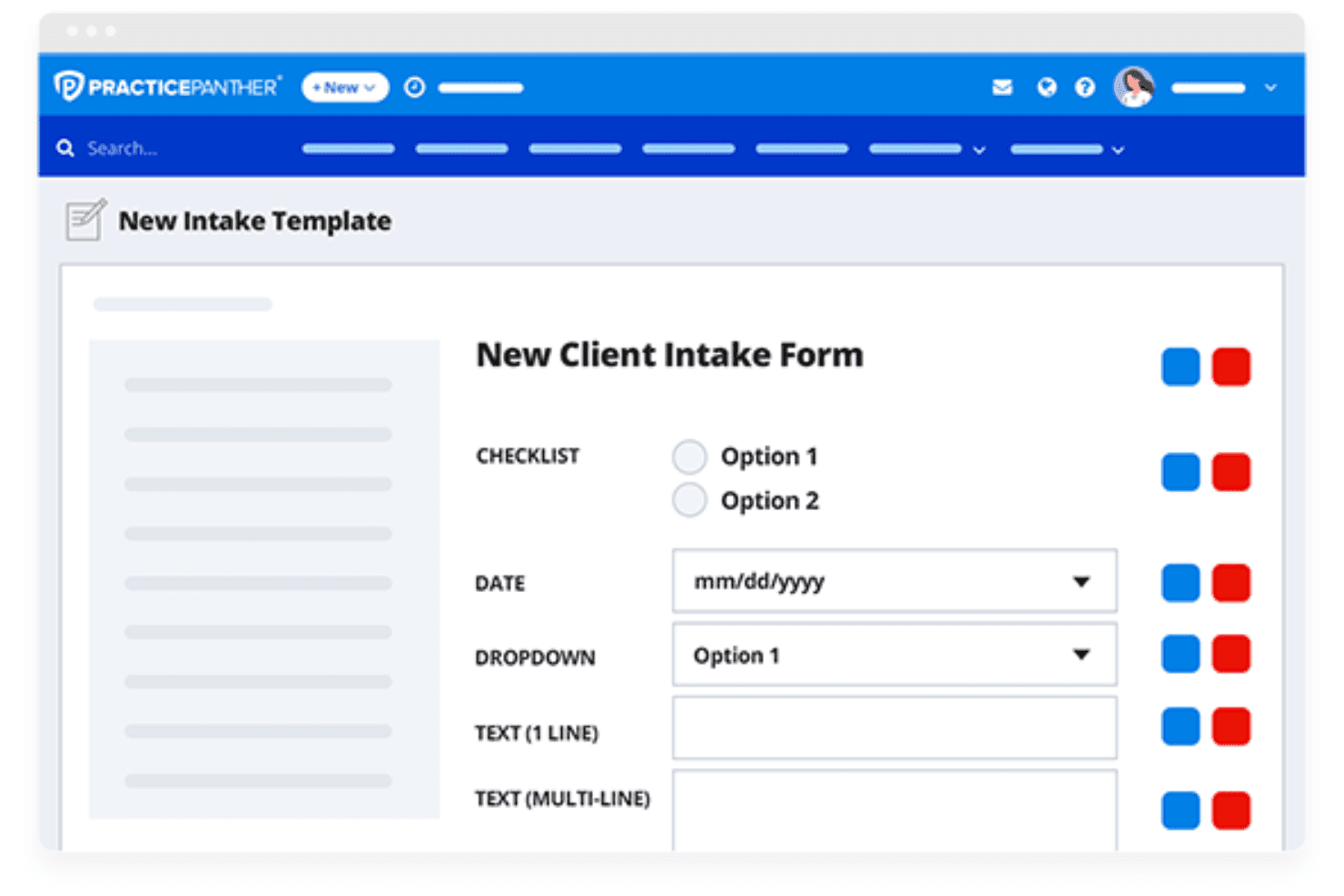
PracticePanther lets users build custom client intake forms with flexible field types. PracticePanther is a cloud-based legal practice management platform that combines matter and contact management, document templates, client intake forms, billing, and native eSignature into a single system for law firms.
Who Is PracticePanther Best For?
PracticePanther suits small firm partners who want billing, intake, and matter management handled in one place before adding dedicated document assembly tools.
Why I Picked PracticePanther
I've included PracticePanther in my top picks because it's the strongest option for small firms that want billing, intake, and matter management handled before layering in document tools. I especially like how intake forms automatically create or update contact and matter records, so the data your client submits feeds directly into the merge fields you use in Word document templates. Native eSignature with signer roles and signing order is included on the Business plan, so you can go from intake to signed document without leaving the platform.
PracticePanther Key Features
- Document templates: Build or upload reusable
.docxtemplates that auto-populate with stored contact and matter merge fields when applied to a case. - Bulk matter application: Select multiple matters from the Matters grid and apply an existing document template or workflow to all of them in one action.
- Custom fields: Create firm-specific fields for client, matter, and intake data that map directly into document merge codes.
- Role-based access permissions: Configure create, view, edit, and delete access by role and by feature to control who can work with documents and matter records.
PracticePanther Integrations
PracticePanther has documented integrations with Docketwise, LawToolBox, QuickBooks, Google Drive, OneDrive, Box, Dropbox, Gmail, and Microsoft Exchange. It also supports Zapier and offers an API for custom integrations.
Pros and Cons
Pros:
- Intake submissions create or update client records
- Built-in signing supports document completion
- Matter data populates reusable Word templates
Cons:
- No jurisdiction-specific legal-form library
- No guided or branching document assembly
Learn more about PracticePanther: Best for IP docketing and intuitive legal task management
- Free trial available
- From $60/month
Visit WebsiteCustomer Rating:4.9/5
Here's Alt Legal's task management feature, which is robust in IP docketing capability. Alt Legal is a top-tier software renowned for its specialized IP docketing services. The platform excels in streamlining and automating legal tasks, particularly in the realm of Intellectual Property, justifying its stature as the best for IP docketing and intuitive legal task management.
Why I Picked Alt Legal: I chose Alt Legal due to its impressive focus on IP docketing, a niche area that many general legal form software often overlook. Its unique ability to automate IP docketing and ease task management sets it apart, making it the preferred choice for businesses dealing with IP matters. It truly stands as the best for IP docketing and intuitive legal task management, with its targeted features enhancing efficiency and precision in this area.
Standout Features & Integrations:
Alt Legal offers automatic IP docketing, deadline calculations, time-tracking, and a robust task management system. The platform also provides IP-specific reporting and analytics to empower data-driven decision-making. For integrations, Alt Legal connects seamlessly with essential applications like Google Calendar, Outlook, and leading law firm management software to ensure the synchrony of tasks and deadlines.
Pros and Cons
Pros:
- Extensive integrations with key business applications
- Comprehensive task management system
- Specialized in IP docketing
Cons:
- Learning curve due to IP-specific features
- Pricing could be on the higher side for small firms
- Might be over-specialized for businesses not dealing with IP
Learn more about Alt Legal: Best for dynamic and collaborative law practice management
- Free demo available
- Pricing upon request
Visit WebsiteCustomer Rating:4.4/5
Here's CARET Legal's case and document management feature. CARET Legal is a legal practice management tool designed to foster collaboration and dynamic workflows. It facilitates not just case and document management but also enhances team collaboration within a law practice, thus making it a top choice for dynamic and collaborative law practice management.
Why I Picked CARET Legal: I chose CARET Legal for this list because of its excellent collaborative capabilities. The tool stands out for its emphasis on teamwork, featuring shared workspaces, collective task assignments, and group discussion options. This focus on collaborative workflows, combined with robust case and document management, is why I determined CARET Legal to be the best for dynamic and collaborative law practice management.
Standout Features & Integrations:
CARET Legal includes standout features like case and document management, shared workspaces, team calendars, and communication tools for internal discussions. It also has integrations with popular tools such as Office 365, Google Drive, and Dropbox, which enhance its collaborative capabilities by allowing users to sync their work across different platforms like Windows or Mac desktops.
Pros and Cons
Pros:
- Strong case and document management capabilities
- Integration with popular tools like Office 365, Google Drive, and Dropbox
- Robust collaborative features like shared workspaces and group discussions
Cons:
- Annual billing may not suit all budgeting preferences
- Pricing is higher compared to some other options
- The platform might be overwhelming for small teams or solo practitioners
Learn more about CARET Legal: Best for integrated law practice and legal accounting solution
- 10-day free trial
- From $49/user/month (billed annually)
Visit WebsiteCustomer Rating:4.3/5
The CosmoLex dashboard is simple and easy to use. CosmoLex sets the bar high with its all-in-one law practice management software and legal accounting solution, all housed in a single platform. Its unique feature set is designed to streamline and integrate every aspect of law practice management and accounting, establishing it as the best choice for law firms seeking a unified system.
Why I Picked CosmoLex: I chose CosmoLex because it fills the gap that exists in the legal form software market, integrating law practice and legal accounting within a single tool. It's distinctive in offering a solution that harmonizes both practice and accounting needs, a rare find in this space. As such, it's a clear choice as the best for law firms in need of this integrated approach.
Standout Features & Integrations:
CosmoLex boasts an integrated calendar and task system, complete matter management, and billing and accounting services within the same interface. Its feature set is rounded off with comprehensive reporting and analytic capabilities. In terms of integrations, CosmoLex pairs well with LawPay for credit card processing, and it offers seamless data migration from other popular practice management and accounting platforms.
Pros and Cons
Pros:
- Easy data migration from other platforms
- Comprehensive matter management system
- Integrates law practice and legal accounting
Cons:
- Learning curve due to its comprehensive nature
- May have more features than needed for specialized firms
- Can be more expensive for small firms
Learn more about CosmoLex: Best for extensive legal form library and automation
- No
- Pricing available upon request

A sneak peek of the template library feature in LexisNexis Automated Forms. LexisNexis Automated Forms is a web-based legal technology tool that provides a comprehensive library of legal forms and offers automation capabilities. It aims to simplify and accelerate the process of creating legal documents, making it an optimal choice for legal professionals seeking efficient form automation.
Why I Picked LexisNexis Automated Forms: I selected LexisNexis Automated Forms because of its extensive collection of forms and its robust automation capabilities. It stands apart due to its integration with the highly reputed LexisNexis legal research platform. I determined it to be the best tool for extensive legal form library and automation because it uniquely combines a vast form repository with efficient automation, streamlining document creation for legal professionals.
Standout features & integrations:
The standout features of LexisNexis Automated Forms include permission and access controls to thousands of forms across various practice areas and document automation software tools for efficient document creation. Its primary integration is with the LexisNexis legal research and NetDocuments platform, providing users with a comprehensive research and document creation solution.
Pros and Cons
Pros:
- Integration with LexisNexis legal research platform
- Robust automation capabilities
- Extensive library of legal forms
Cons:
- Limited integrations with other software compared to some competitors
- May have a learning curve for non-tech-savvy users
- Pricing information is not readily available
Learn more about LexisNexis Automated Forms: Best for providing an all-encompassing legal service hub
- Free discovery call available
- Starting price for a basic Last Will and Testament plan is at $89 (one-time fee).

A look at the document management feature in LegalZoom. LegalZoom is a comprehensive legal services platform that serves individuals and businesses alike. It offers a wide range of legal solutions, matching its statement of being the best for providing an all-encompassing legal service hub.
Why I Picked LegalZoom: I selected LegalZoom due to its versatility in handling diverse legal needs, from forming an LLC to crafting custom legal documents. Its unique selling point, providing an all-encompassing legal service hub, stems from its broad spectrum of services that simplify legal tasks for both individuals and businesses.
Standout Features & Integrations:
LegalZoom boasts an array of features, including personalized legal forms, trademark registration, and an extensive library of legal resources. These services are paired with options for attorney advice, ensuring that users have all they need within one platform. In terms of integrations, LegalZoom seamlessly connects with third-party services, such as business formation providers, enabling users to set up companies directly from the platform.
Pros and Cons
Pros:
- User-friendly platform
- Access to professional legal advice
- Wide range of legal services
Cons:
- Limited customization options for certain legal forms
- Services can be purchased only as bundled packages
- Higher pricing compared to some competitors
Learn more about LegalZoom: Best for a broad selection of free, user-friendly legal templates
- From $59.95/user/month

Here's the Legal Templates do-it-yourself feature in processing various legal documents. Legal Templates is an online legal document management software that provides a wide array of legal templates that users can fill out and download for free. It simplifies the process of creating various legal documents, making it a great resource for those who require straightforward, user-friendly templates.
Why I Picked Legal Templates: I selected Legal Templates because of its impressive library of free legal templates. Its standout feature is the ease of use: just fill out the required fields, and you have a legal document ready. The user-friendly nature and comprehensive template selection make it the best tool for those seeking accessible, varied legal templates.
Standout features & integrations:
Legal Templates' primary feature is its extensive library of customizable legal templates ranging from lease agreements to last will and testament documents. While it doesn't offer integrations in the traditional sense, the ability to download documents in various formats (including Word and PDF) does allow for compatibility with various word processors and document management systems.
Pros and Cons
Pros:
- User-friendly interface and straightforward document creation
- Free to use
- Extensive library of legal templates
Cons:
- Dependence on users' understanding to fill out templates correctly
- No traditional software integrations
- Lack of advanced features like AI-assistance or document management
Learn more about Legal Templates: Best for comprehensive case and matter management
- Not available
- Pricing upon request
Visit WebsiteCustomer Rating:3.3/5
The practice management feature in Legal Files makes it a top choice for comprehensive case management. Legal Files is a powerful tool designed to manage cases and matters in a holistic manner. It's intended for legal departments, law firms, universities, and government agencies seeking a comprehensive solution for all aspects of their legal practice, making it a top choice for comprehensive case and matter management.
Why I Picked Legal Files: In my comparison, I chose Legal Files due to its wide-ranging case and matter management capabilities. The software stands out because of its ability to handle a multitude of case-related details and tasks in one place, without the need for multiple systems. This comprehensive approach is what makes it the best choice for entities seeking to manage their legal cases and matters holistically.
Standout Features & Integrations:
Legal Files offers a range of standout features such as robust case management software, real-time firm document assembly and management, workflow automation, client portal, e-signature, and contact management. Its integrations with Outlook and Word make it easy for users to manage communication and documents without leaving the platform, contributing to its overall comprehensive nature.
Pros and Cons
Pros:
- Robust document assembly and management features
- Integration with widely used tools like Outlook and Word
- Comprehensive case and matter management
Cons:
- Lack of transparent pricing can make budgeting difficult
- May require a learning curve for those not familiar with comprehensive legal software
- Pricing information is not readily available
Learn more about Legal Files: 10Best for real estate conveyancing and case management
Hoowla
- Free demo available
- Pricing upon request
Visit WebsiteCustomer Rating:2.3/5
Here's Hoowla's case management feature for real estate transactions. Hoowla is a legal technology tool specialized in case management for real estate conveyancing. It enhances the efficiency and accuracy of real estate transactions, delivering a solid solution for solicitors and property professionals.
Why I Picked Hoowla: I chose Hoowla for this list because of its niche specialization in real estate conveyancing, a critical area of law that requires specific tools. What makes Hoowla stand out is its focus on simplifying the conveyancing process, providing tools that can generate quotes, manage cases, and even calculate tax. I picked it as the best tool for real estate conveyancing and case management based on its specific functionality and user-friendly design.
Standout features & integrations:
Hoowla offers notable features such as online case management, a conveyancing calculator, and a secure document and messaging system. It provides integrations with various search providers, Land Registry Services, and Companies House, delivering a connected and efficient platform for conveyancing professionals.
Pros and Cons
Pros:
- Secure document and messaging system
- Integration with Land Registry and Companies House
- Specialized in real estate conveyancing
Cons:
- Pricing may be high for small firms or solo practitioners
- Annual billing may not be flexible for some firms
- The niche focus may limit its use for other areas of law
Learn more about Hoowla:
Annen programvare for juridiske skjemaer
Nedenfor finner du en liste over ytterligere programmer for juridiske skjemaer som vi vurderte, men som ikke kom med blant de 10 beste. Det er absolutt verdt å ta en titt på dem.
- 11FormsPalBest for guided legal form creation and completion
- 12LegodeskBest for cloud-based legal practice management with AI-powered features
- 13Electronic Form SolutionBest for customizable e-form solutions
- 14Legal SuiteBest for legal department operations and corporate governance
- 15LEAPGood for solo and small law firms needing end-to-end practice management
- 16ClioGood for comprehensive law firm management with robust features
- 17PandaDocGood for creating, sending, and tracking legal documents digitally
- 18Legal TrackGood for Microsoft Office 365 users seeking integrated case management
- 19Thread LegalGood for collaboration and team management in legal practices
- 20FindLegalFormsGood for instant access to a wide range of legal forms
How I Evaluate Legal Form Software
I split my evaluation into baseline criteria—like form library depth and document automation—and differentiators that separate tools for solo practitioners from those built for legal ops teams.
Core Functionality (Table Stakes For This List)
When I'm selecting tools for my list, I rank each one on a scale from 0 (does not offer the functionality) to 5 (excels in this area) for each core functionality listed below. Then, I calculate the tool's total score into a percentage. Each tool needs to achieve a minimum total score of 65% to be considered for inclusion.
- Legal Form Library: I evaluate breadth and depth of pre-built forms across practice areas and jurisdictions—for example, whether a platform covers probate forms for multiple states or only offers a handful of generic contracts.
- Document Automation: The best tools let you map client and matter data into fields, apply conditional logic, and assemble multi-page documents without manual re-entry for each new filing.
- Template Customization: I check whether you can build and modify your own templates with firm-specific language—like adding custom engagement letter clauses or adjusting formatting for local court requirements.
- Jurisdictional Compliance Updates: Platforms like Smokeball and HotDocs handle form updates differently, so I look at how frequently forms are refreshed and whether users get notified when a form they've used has changed.
- E-Signature & Form Completion: I evaluate whether clients can digitally complete and sign forms—either natively or through integrations with tools like DocuSign or Adobe Sign—along with audit trail and multi-party signing support.
- Practice Management Integration: A legal form tool should connect with the platforms your firm already uses, so I look at native integrations with systems like Clio, MyCase, or PracticePanther for pulling in client and matter data.
Once I have a list of tools that meet this criteria, I consider what sets each platform apart.
Differentiating Factors (What Sets Vendors Apart)
Here's how I compare and contrast different vendors:
Standout Features
Client intake portals are a big differentiator—firms that handle high-volume matters like estate planning or family law benefit when clients fill out questionnaires that auto-populate forms before the first meeting. I also look for clause and content libraries, which let attorneys pull approved language into templates instead of copying from old files. Court filing integration is another feature I evaluate, since direct e-filing connections reduce rejection risk for firms that regularly submit to specific courts.
Beyond Features
Security and confidentiality compliance matter here because legal forms contain sensitive client data—I evaluate whether vendors hold SOC 2 Type II certification, offer role-based access controls, and maintain audit trails that satisfy bar ethics obligations. Pricing structure is another factor I consider closely, since some platforms charge per form while others bundle unlimited forms into a subscription. A solo practitioner's budget looks very different from a mid-size firm's, so I check whether tiered plans genuinely scale without locking key features behind premium add-ons.
Slik velger du programvare for juridiske skjemaer
Det er lett å gå seg vill i lange funksjonslister og komplekse prisstrukturer. For å hjelpe deg med å holde fokus mens du går gjennom den unike prosessen med å velge programvare, har vi laget en sjekkliste over faktorer du bør ha i mente:
| Faktor | Hva du bør vurdere |
|---|---|
| FaktorSkalerbarhet | Hva du bør vurdereVil programvaren vokse sammen med firmaet ditt? Vurder om den kan håndtere flere brukere og større datamengder. Se etter tydelige priser og funksjoner som støtter ekspansjon uten ekstra kostnader. |
| FaktorIntegrasjoner | Hva du bør vurdereKontroller om programvaren kobles til verktøyene du allerede bruker. Se etter API-er eller direkte integrasjoner med systemene dine for administrasjon av advokatvirksomheten, regnskap og dokumenthåndtering. |
| FaktorTilpasningsmuligheter | Hva du bør vurdereKan du tilpasse programvaren til arbeidsflytene dine? Sørg for at du kan justere maler, skjemaer og brukertillatelser slik at de passer til prosessene dine. Unngå verktøy som er for rigide for behovene dine. |
| FaktorBrukervennlighet | Hva du bør vurdereEr programvaren intuitiv for teamet ditt? Test brukergrensesnittet og navigasjonen. Se etter verktøy med kort opplæringstid for å redusere tiden som brukes på opplæring og øke bruken. |
| FaktorImplementering og innføring | Hva du bør vurdereHvor raskt kan du komme i gang? Vurder tilgjengeligheten av opplæringsressurser, som veiledninger og kundestøtte. Vurder hvor enkelt det er å migrere data og konfigurere brukere. |
| FaktorKostnad | Hva du bør vurderePasser programvaren inn i budsjettet ditt? Sammenlign prisplaner og se etter skjulte gebyrer. Vurder de totale eierkostnadene, inkludert eventuelle nødvendige tillegg eller oppgraderinger. |
| FaktorSikkerhetstiltak | Hva du bør vurdereEr dataene og dokumentene dine beskyttet? Se etter kryptering, regelmessige sikkerhetsrevisjoner og samsvar med juridiske bestemmelser som GDPR. Sørg for at leverandøren har en solid historikk når det gjelder sikkerhet. |
| FaktorSamsvarskrav | Hva du bør vurdereOppfyller programvaren juridiske standarder? Kontroller at den følger bransjeregelverk som er relevante for praksisområdet ditt, for eksempel HIPAA for helserett eller FINRA for finansielle tjenester. |
Hva er programvare for juridiske skjemaer?
Programvare for juridiske skjemaer er en digital plattform utviklet for å effektivisere oppretting, redigering og håndtering av juridiske skjemaer. Brukerne spenner fra solo-advokater og små advokatfirmaer til store juridiske avdelinger i selskaper og offentlige etater. Disse programvareløsningene er avgjørende for å forenkle komplekse juridiske prosesser, forbedre nøyaktigheten og øke produktiviteten og lønnsomheten.
De automatiserer rutineoppgaver, tilbyr ferdige maler og sørger for at skjemaene er i samsvar med lovverket. Programvare for juridiske skjemaer brukes derfor til ulike formål, blant annet oppretting av kontrakter, saksbehandling, håndtering av immaterielle rettigheter, juridiske undersøkelser og mye mer. Disse løsningene fungerer som et verdifullt verktøy som legger til rette for effektiv juridisk drift i en digital tidsalder.
Funksjoner
Når du velger programvare for juridiske skjemaer, bør du se etter følgende nøkkelfunksjoner:
- Automatisering av dokumenter: Generer juridiske dokumenter automatisk for å spare tid og redusere feil.
- Sikker deling: Del dokumenter sikkert med kolleger og klienter for å ivareta konfidensialiteten.
- Oppfølging av samsvar: Overvåk juridiske standarder og forskrifter for å opprettholde samsvar uten problemer.
- Tilpassbare maler: Tilpass dokumentmaler til dine spesifikke juridiske behov og prosesser.
- Integrasjon med elektroniske signaturer: Aktiver elektroniske signaturer for å fremskynde godkjenning og signering av dokumenter.
- Brukervennlig grensesnitt: Naviger enkelt i programvaren med et intuitivt design og kort opplæringstid.
- Integrasjonsmuligheter: Koble til andre juridiske verktøy og systemer for å effektivisere arbeidsflyten.
- Datakryptering: Beskytt sensitiv informasjon med robust kryptering for å sikre datasikkerheten.
- Flerspråklig støtte: Få tilgang til og opprett dokumenter på flere språk for å imøtekomme ulike klienter.
- Versjonskontroll: Spor endringer og revisjoner for å opprettholde en tydelig oversikt over dokumenthistorikken.
Fordeler
Implementering av programvare for juridiske skjemaer gir flere fordeler for teamet og virksomheten din. Her er noen av fordelene du kan se frem til:
- Tidsbesparelser: Automatiser opprettingen av dokumenter slik at du kan fokusere på viktigere oppgaver.
- Færre feil: Bruk maler og automatisering for å minimere feil i juridiske dokumenter.
- Bedre samarbeid: Del dokumenter sikkert og effektivt med kolleger og klienter.
- Sikret samsvar: Følg med på forskrifter for å sikre at alle dokumenter oppfyller juridiske standarder.
- Kostnadseffektivitet: Reduser behovet for manuell inntasting og papirbaserte prosesser for å spare penger.
- Bedre sikkerhet: Beskytt sensitiv informasjon med datakryptering og funksjoner for sikker deling.
- Større tilgjengelighet: Få tilgang til dokumenter når som helst og hvor som helst med skybaserte løsninger.
Kostnader og priser
Valg av programvare for juridiske skjemaer krever en forståelse av de ulike prismodellene og abonnementene som er tilgjengelige. Kostnadene varierer ut fra funksjoner, teamstørrelse, tillegg og mer. Tabellen nedenfor oppsummerer vanlige abonnementer, gjennomsnittsprisene deres og typiske funksjoner som inngår i programvareløsninger for juridiske skjemaer:
Sammenligningstabell for abonnementer for programvare for juridiske skjemaer
| Abonnementstype | Gjennomsnittspris | Vanlige funksjoner |
|---|---|---|
| AbonnementstypeGratisabonnement | Gjennomsnittspris$0 | Vanlige funksjonerGrunnleggende dokumentoppretting, begrenset lagring og grunnleggende kundestøtte. |
| AbonnementstypePersonlig abonnement | Gjennomsnittspris$5-$25/bruker/måned | Vanlige funksjonerAutomatisering av dokumenter, tilpassbare maler og kundestøtte på e-post. |
| AbonnementstypeBedriftsabonnement | Gjennomsnittspris$25-$50/bruker/måned | Vanlige funksjonerAvansert sikkerhet, integrasjonsmuligheter og prioritert kundestøtte. |
| AbonnementstypeVirksomhetsabonnement | Gjennomsnittspris$50+/bruker/måned | Vanlige funksjonerFull oppfølging av samsvar, dedikert kundeansvarlig og tilpassede integrasjoner. |
Vanlige spørsmål om programvare for juridiske skjemaer
Her er noen svar på vanlige spørsmål om programvare for juridiske skjemaer:
Er juridiske nettbaserte skjemaer gyldige?
Juridiske nettbaserte skjemaer kan være gyldige, men du må forsikre deg om at de er oppdaterte og korrekte. Sjekk om leverandøren har et godt omdømme og tilbyr skjemaer som samsvarer med gjeldende juridiske standarder. Det er lurt å rådføre seg med en juridisk fagperson for å bekrefte at skjemaet er gyldig for dine spesifikke behov.
Hva er forskjellen mellom innhold og juridisk form?
Innhold viser til det vesentlige innholdet i et juridisk dokument, mens form handler om den tekniske måten det presenteres på. Programvare for juridiske skjemaer fokuserer på å sikre at både innhold og form er korrekte, slik at du kan opprette dokumenter som både er juridisk holdbare og riktig formatert.
Hva er det beste nettstedet for gratis juridiske skjemaer?
LawHelp Interactive er en god ressurs for å opprette gratis juridiske dokumenter. Tjenesten hjelper deg med å generere skjemaer for ulike juridiske spørsmål, som bolig- og familierett. Få alltid gratis skjemaer gjennomgått av en juridisk ekspert for å sikre at de oppfyller dine spesifikke krav og juridiske standarder.
Kan programvare for juridiske skjemaer integreres med andre verktøy?
Ja, mange løsninger for programvare for juridiske skjemaer tilbyr integrasjonsmuligheter med andre juridiske verktøy og systemer. Dette lar deg effektivisere arbeidsflyten ved å koble til programvare for praksisadministrasjon, regnskap og dokumenthåndtering, slik at du får et mer helhetlig juridisk teknologimiljø.
Hvor sikker er programvare for juridiske skjemaer?
Sikkerheten varierer mellom leverandører, men de fleste anerkjente løsninger for programvare for juridiske skjemaer inkluderer datakryptering og regelmessige sikkerhetsrevisjoner. Kontroller alltid at programvaren overholder relevante juridiske regler, som GDPR, for å sikre at dokumentene og dataene dine er godt beskyttet mot uautorisert tilgang.