

Een sterk alternatief voor Casefleet biedt je een betrouwbare chronologie van zaken, feitenbeheer en naadloze koppeling van documenten—zonder in te leveren op gebruiksgemak. Als je op zoek bent naar alternatieven voor Casefleet, wil je waarschijnlijk tools die je helpen bewijs te organiseren, tijdlijnen in kaart te brengen en samen met je team aan complexe zaken te werken.
Het kiezen van het juiste platform kan je helpen om toenemende uitdagingen rond openbaarmaking het hoofd te bieden, sneller te werken en zaakdetails vol vertrouwen te beheren. Ik leid je langs betrouwbare alternatieven voor Casefleet, zodat je een oplossing kunt vinden die aansluit bij de behoeften van je juridische zaak, je werkproces en je technologieomgeving.
Wat is Casefleet?
Casefleet is een cloudgebaseerde tool voor juridisch zaakbeheer, gericht op chronologie van feiten, het koppelen van documenten en het organiseren van bewijs. Lees onze volledige beoordeling van Casefleet voor meer informatie. Juridische professionals gebruiken Casefleet om tijdlijnen op te bouwen, feiten aan ondersteunende documenten te koppelen en complexe procesdetails te beheren in één doorzoekbare werkruimte. De software is populair bij advocatenkantoren, juridische operationele teams en onderzoekers die elektronische bewijsvergaring, de voorbereiding van getuigenverhoren en gezamenlijke zaakanalyse willen stroomlijnen.
Vergelijkingstabel van de beste alternatieven voor Casefleet
Deze vergelijkingstabel geeft een overzicht van de prijsdetails van mijn selectie alternatieven voor Casefleet:
| Tool | Best For | Trial Info | Price | ||
|---|---|---|---|---|---|
| 1 | Het beste voor veilige cloudgebaseerde documentbeoordeling | Gratis demo beschikbaar | Prijs op aanvraag | Website | |
| 2 | Het beste voor aanpasbare juridische workflows | Gratis proefperiode + demo beschikbaar | Prijzen op aanvraag | Website | |
| 3 | Het meest geschikt voor grootschalig beheer van gegevens en bewijsmateriaal | Gratis demo beschikbaar | Prijs op aanvraag | Website | |
| 4 | Het beste voor visuele presentaties van juridische tijdlijnen | Gratis demo beschikbaar | Vanaf $59/gebruiker/maand | Website | |
| 5 | Het meest geschikt voor hulpmiddelen voor de voorbereiding van zittingen en verhoren | Gratis demo beschikbaar | Prijs op aanvraag | Website | |
| 6 | Beste voor eenvoudige gebeurtenisregistratie | Gratis demo beschikbaar | Prijs op aanvraag | Website | |
| 7 | Het beste voor door AI aangestuurde feitenorganisatie | Gratis proefversie beschikbaar | Prijs op aanvraag | Website | |
| 8 | Het beste voor alles-in-één praktijkbeheer | Gratis proefperiode van 10 dagen + gratis demo beschikbaar | Vanaf $60/gebruiker/maand | Website | |
| 9 | Ideaal voor robuuste integraties met derden | 7 dagen gratis proefperiode | Vanaf $49/gebruiker/maand | Website | |
| 10 | Ideaal voor geautomatiseerde documentcreatie | Gratis demo beschikbaar | Prijzen op aanvraag | Website |


Waarom u onze softwareaanbevelingen kunt vertrouwen
6,700+
Reviews
20
Industry experts
16+
Evaluation factors
14
Years
Ons team test en beoordeelt software sinds 2012. Als leiders van juridische praktijken weten we zelf hoe moeilijk — en belangrijk — het is om de juiste software te kiezen.
Voor deze gids hebben we tools geëvalueerd met behulp van praktijktests en onafhankelijk onderzoek, waarbij we tools beoordeelden aan de hand van onze selectiecriteria.
Onze reviews weerspiegelen ons menselijke redactionele oordeel, geen verkooppraatje.
Beoordelingen van de beste alternatieven voor Casefleet
Hieronder vind je mijn gedetailleerde samenvattingen van de beste alternatieven voor Casefleet die op mijn shortlist staan. Mijn beoordelingen bieden een gedetailleerd overzicht van de functies, beste gebruiksscenario’s en mogelijkheden van elk platform, zodat je het beste platform voor jou kunt vinden.
 Het beste voor veilige cloudgebaseerde documentbeoordeling
- Gratis demo beschikbaar
- Prijs op aanvraag
Visit WebsiteCustomer Rating:4.7/5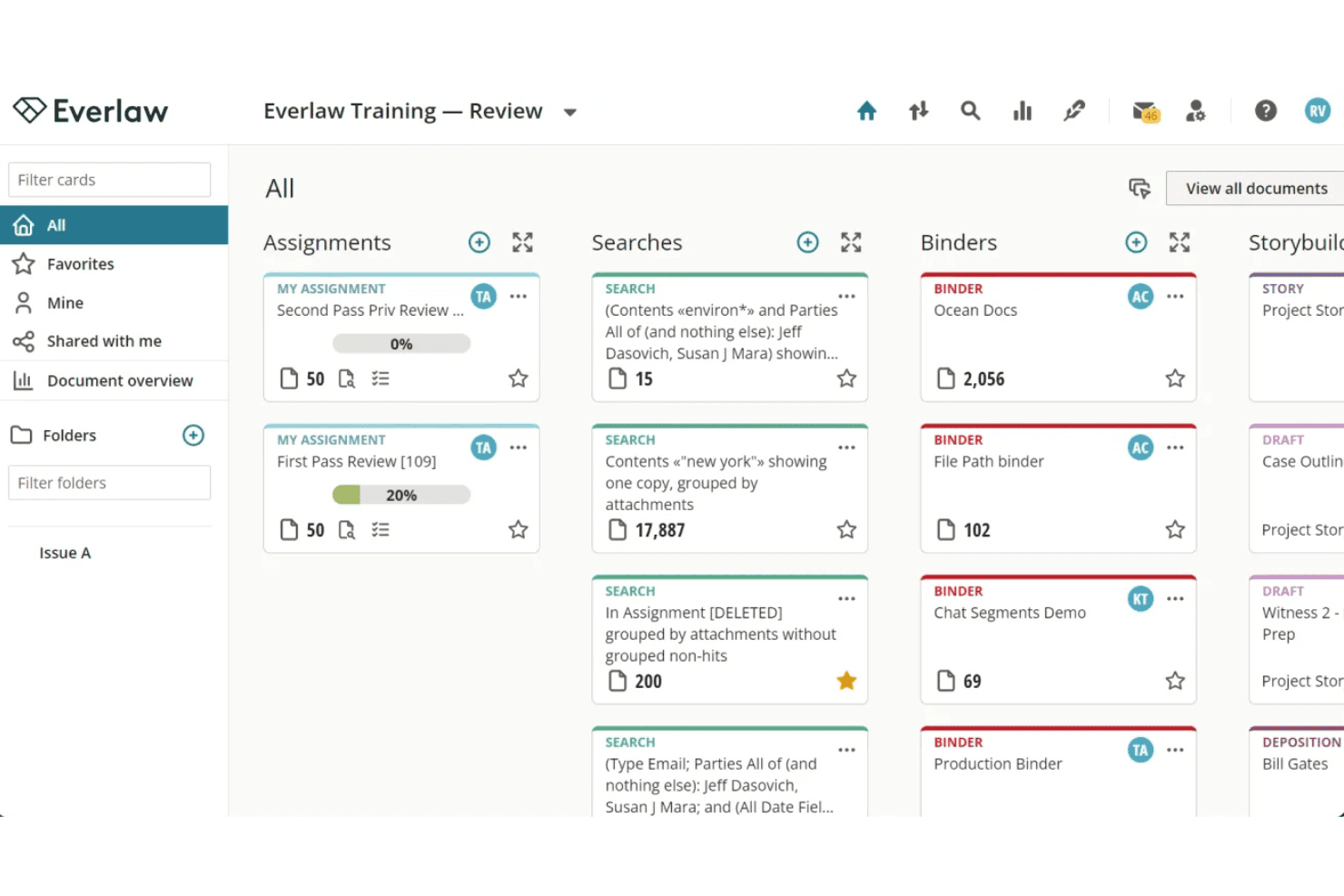
Everlaw ordent opdrachten, zoekopdrachten, mappen en StoryBuilder-kaarten in een visuele indeling op basis van kaarten. Everlaw is een cloudgebaseerd e-discoveryplatform voor procesvoeringsteams die grote documentverzamelingen moeten beheren, chronologieën van zaken moeten opstellen en procesverhalen vanuit één werkruimte moeten ontwikkelen.
Voor wie is Everlaw het meest geschikt?
Everlaw is zeer geschikt voor advocatenkantoren die zich richten op procesvoering en juridische bedrijfsteams die te maken hebben met e-discovery op grote schaal en complexe, documentintensieve onderzoeken.
Waarom Everlaw een goed alternatief voor Casefleet is
Ik heb Everlaw gekozen als een van de beste opties, omdat de functie StoryBuilder rechtstreeks aansluit bij waar Casefleet in uitblinkt: feiten in een gestructureerde chronologie aan bewijsmateriaal koppelen. Waar het verder gaat, is bij documentbeoordeling op grote schaal, met AI-aangedreven coderingssuggesties en Deep Dive, waarmee belangrijke inzichten in documentverzamelingen van 10 miljoen of meer documenten aan het licht worden gebracht. Het volledige platform draait in een beveiligde cloudomgeving waarvoor geen lokale infrastructuur nodig is, wat belangrijk is bij het verwerken van gevoelige procesgegevens.
Belangrijkste functies van Everlaw
- Beheer van juridische bewaarplichten: Verstuur, volg en controleer kennisgevingen over juridische bewaarplichten rechtstreeks vanuit het platform.
- Transcriptie van audio en video: Zet multimediabestanden om in doorzoekbare tekst voor beoordeling en analyse.
- Cloudkoppelingen: Importeer gegevens uit zakelijke tools zoals Microsoft 365, Slack en Zoom met integratie met één klik.
- Mogelijkheid tot grootschalig weglakken: Lak gevoelige informatie automatisch en in bulk weg in uitgebreide documentverzamelingen.
Integraties van Everlaw
Everlaw biedt native integraties met Microsoft 365, Google Workspace, Slack, Zoom en Okta, en levert een API voor aangepaste integraties.
Pros and Cons
Pros:
- AI-aangedreven documentcodering versnelt de beoordeling
- StoryBuilder koppelt feiten en bewijsmateriaal chronologisch
- Sterke beveiliging met beschikbare FedRAMP-autorisatie
Cons:
- Niet specifiek ontwikkeld voor feitenbeheer
- Hoge kosten voor kleine procespraktijken
Learn more about Everlaw: Het beste voor aanpasbare juridische workflows
- Gratis proefperiode + demo beschikbaar
- Prijzen op aanvraag
Visit WebsiteCustomer Rating:4.5/5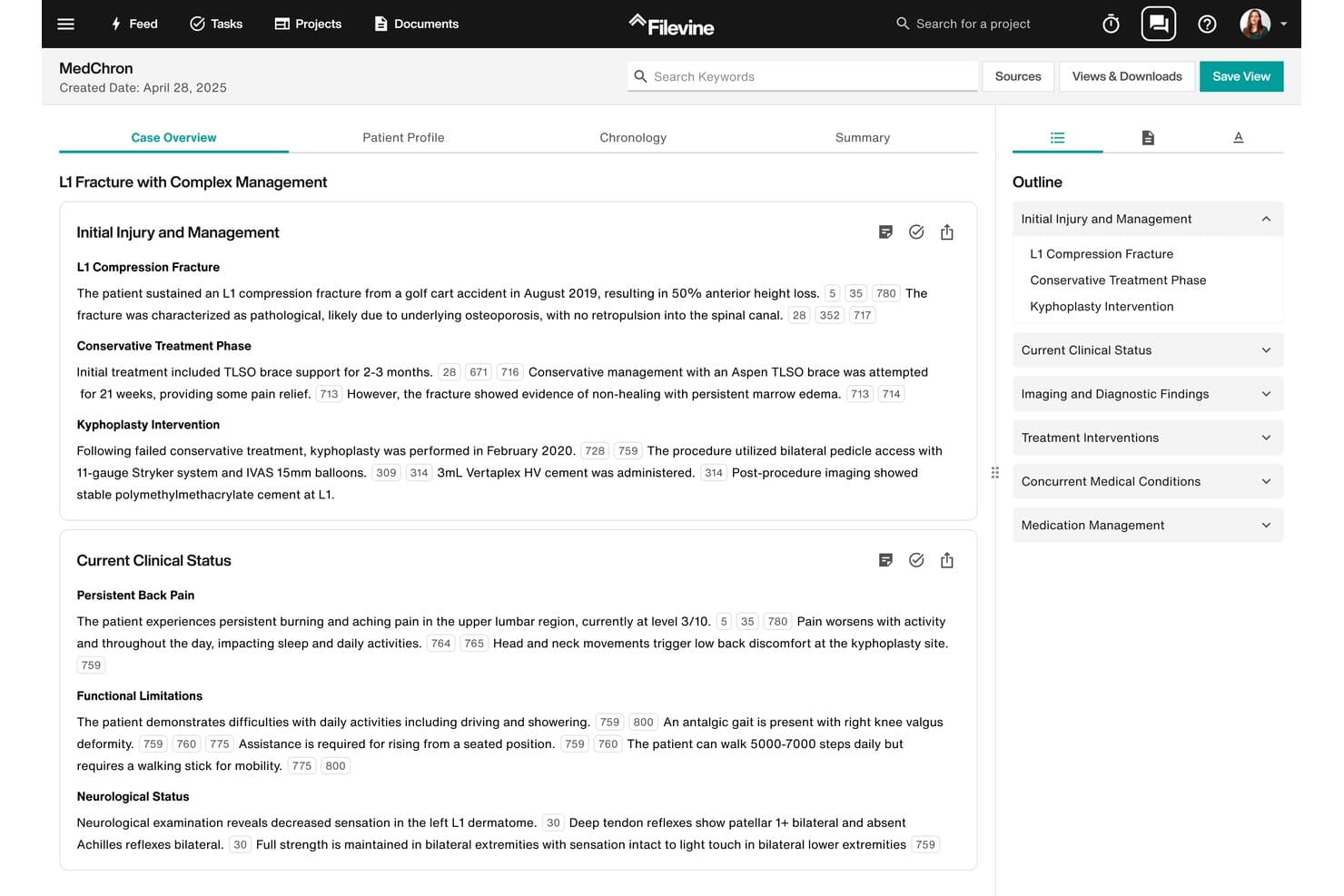
Filevine biedt MedChron, een AI-aangedreven tool voor medische chronologieën die letsels, behandelingen en klinische status van een zaak met bronverwijzingen organiseert in een gestructureerde tijdlijnweergave. Filevine is een juridisch bedrijfsplatform voor advocatenkantoren die meer nodig hebben dan alleen zaakchronologieën—van dossierbeheer, documentworkflows en cliëntintake tot getuigenverhoren en AI-ondersteund opstellen van documenten, allemaal in één configureerbaar systeem.
Voor wie is Filevine het meest geschikt?
Filevine is geschikt voor procesgerichte advocatenkantoren van elke omvang die grote aantallen zaken behandelen en configureerbare dossierstructuren voor verschillende praktijkgroepen nodig hebben.
Waarom Filevine een goed alternatief voor Casefleet is
Filevine staat op mijn shortlist omdat de aanpassingsmogelijkheden voor workflows veel verder gaan dan wat de meeste procesvoeringstools bieden. Ik kan afzonderlijke dossierstructuren opbouwen voor verschillende praktijkgroepen, elk met eigen aangepaste velden, taakreeksen en regels voor documentassemblage. MedChron genereert bovendien automatisch chronologische tijdlijnen op basis van medische dossiers, waardoor het handmatig invoeren van feiten overbodig wordt dat ik anders in een eenvoudiger tool zoals Casefleet zou moeten doen.
Belangrijkste functies van Filevine
- Assistent voor getuigenverhoren: Ondersteunt de planning van getuigenverhoren, AI-aangedreven transcriptie en het in realtime koppelen van documenten tijdens het verhoor van getuigen.
- Ingebouwde kalender voor gerechtelijke regels: Berekent jurisdictiespecifieke deadlines en vult afhankelijk daarvan andere datums automatisch in zodra gebeurtenissen die als trigger dienen, worden ingevoerd.
- Cliënt- en verwijzersportalen: Biedt veilige portalen met huisstijl voor het uitwisselen van documenten in twee richtingen, elektronische handtekeningen en statusupdates aan cliënten en partners.
- Naleving van regels voor derdengeldenadministratie: Houdt IOLTA-conforme grootboeken bij, ondersteunt drievoudige reconciliatie en genereert rapporten over derdengeldenadministratie die klaar zijn voor de staatsorde van advocaten.
Integraties van Filevine
Filevine beschikt over standaardintegraties met Microsoft 365, Google Workspace, Domo, QuickBooks, DocuSign, Dropbox, NetDocuments, iManage, LawPay en Zapier. Er is een API beschikbaar voor aangepaste integraties.
Pros and Cons
Pros:
- Aangepaste dossierstructuren voor meerdere rechtspraktijken
- AI-aangedreven generatie van medische chronologieën op basis van dossiers
- Ingebouwde kalender voor gerechtelijke deadlines per jurisdictie
Cons:
- Voor de installatie en configuratie is een aanzienlijke tijdsinvestering nodig
- Minder gedetailleerde koppeling van feiten dan bij gespecialiseerde procesvoeringstools
Learn more about Filevine: Het meest geschikt voor grootschalig beheer van gegevens en bewijsmateriaal
- Gratis demo beschikbaar
- Prijs op aanvraag
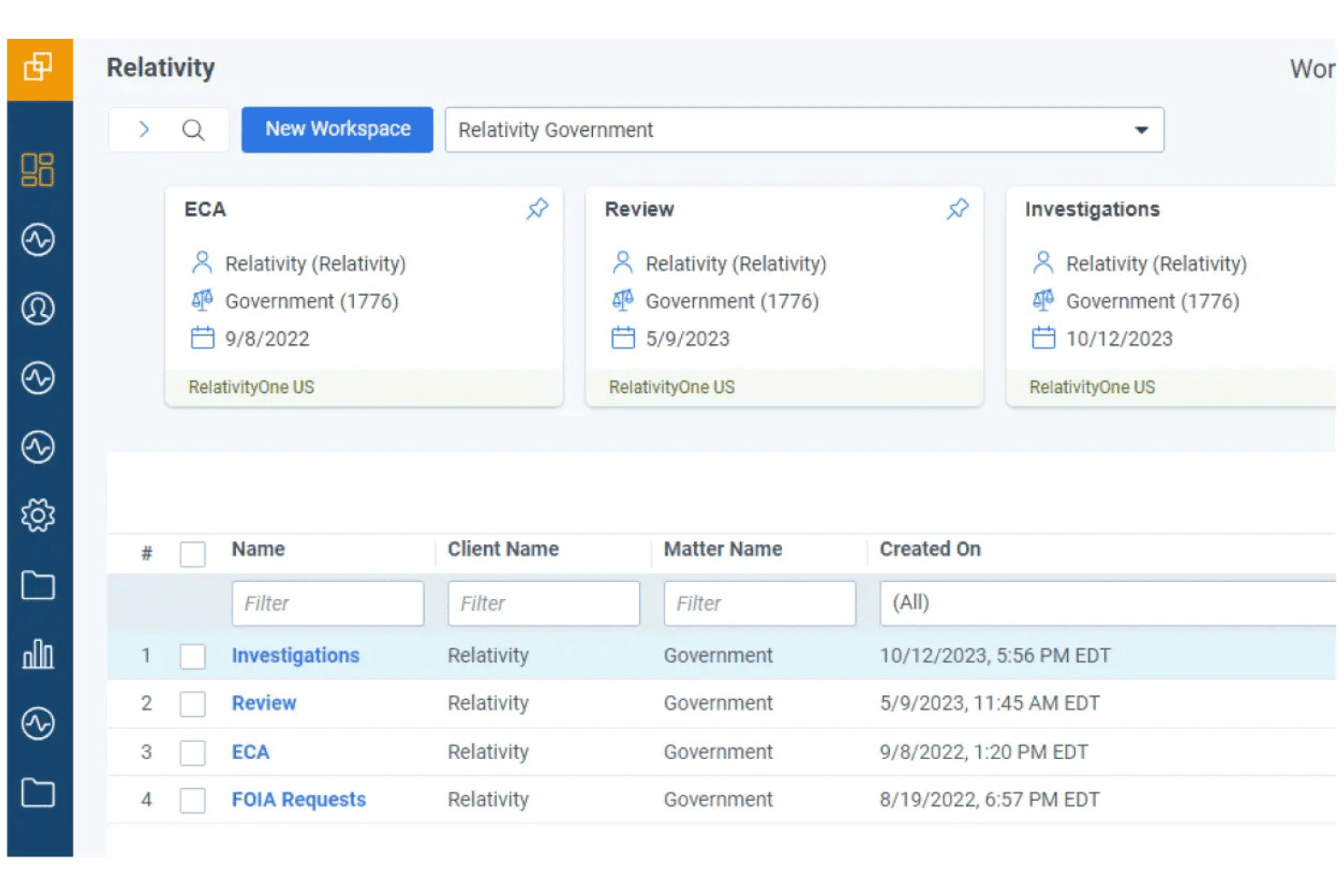
RelativityOne beheert grootschalige elektronische bewijsvergaring voor complexe rechtszaken en beoordelingen. RelativityOne is een platform voor elektronische bewijsvergaring voor grote advocatenkantoren en juridische bedrijfsteams die enorme hoeveelheden ESI moeten verzamelen, verwerken en beoordelen binnen complexe rechtszaken en onderzoeken.
Voor wie is Relativity het meest geschikt?
Relativity is zeer geschikt voor juridische bedrijfsteams en grote advocatenkantoren die regelmatig grootschalige elektronische bewijsvergaring beheren binnen rechtszaken met meerdere partijen, regelgevende onderzoeken of aanvullende informatieverzoeken.
Waarom Relativity een goed alternatief voor Casefleet is
Ik heb Relativity opgenomen in mijn topkeuzes omdat geen enkele andere tool op deze lijst zulke enorme gegevensvolumes aankan. Wanneer een zaak miljoenen documenten omvat uit Microsoft 365, Slack en zakelijke AI-platforms, houdt de eigen verzamelings- en verwerkingsengine van Relativity alles gecentraliseerd. Ik waardeer ook aiR for Review, dat AI gebruikt om het coderen van documenten te versnellen met aangehaald bewijsmateriaal, waardoor de beoordelingstijd bij grote, complexe producties aanzienlijk wordt verkort.
Belangrijkste functies van Relativity
- Geavanceerde documentanalyse: Visualiseert gegevensrelaties en communicatiepatronen binnen grote ESI-verzamelingen voor diepere inzichten in zaken.
- Meertalige transcriptie van audio en video: Zet multimediaal bewijsmateriaal om in doorzoekbare tekst in meer dan 100 talen.
- Geïntegreerd beheer van juridische bewaarplichten: Houdt juridische bewaarplichten bij en beheert deze binnen dezelfde werkruimte voor naadloze workflows voor elektronische bewijsvergaring.
- App Hub-marktplaats: Breidt de functionaliteit uit met een breed scala aan integraties van derden en aangepaste integraties.
Integraties van Relativity
Relativity biedt native integraties met Microsoft 365, Slack, Google Workspace, Box en Bloomberg, evenals een API voor aangepaste integraties. Aanvullende integraties zijn beschikbaar via de Relativity App Hub-marktplaats.
Pros and Cons
Pros:
- Verwerkt enorme ESI-volumes binnen complexe zaken
- AI-ondersteunde documentbeoordeling met aangehaalde onderbouwing
- Ingebouwde verzameling uit zakelijke gegevensbronnen
Cons:
- Steile leercurve voor nieuwe juridische teams
- Ontwikkeld voor elektronische bewijsvergaring, niet voor het beheer van zaken
Learn more about Relativity: Het beste voor visuele presentaties van juridische tijdlijnen
- Gratis demo beschikbaar
- Vanaf $59/gebruiker/maand
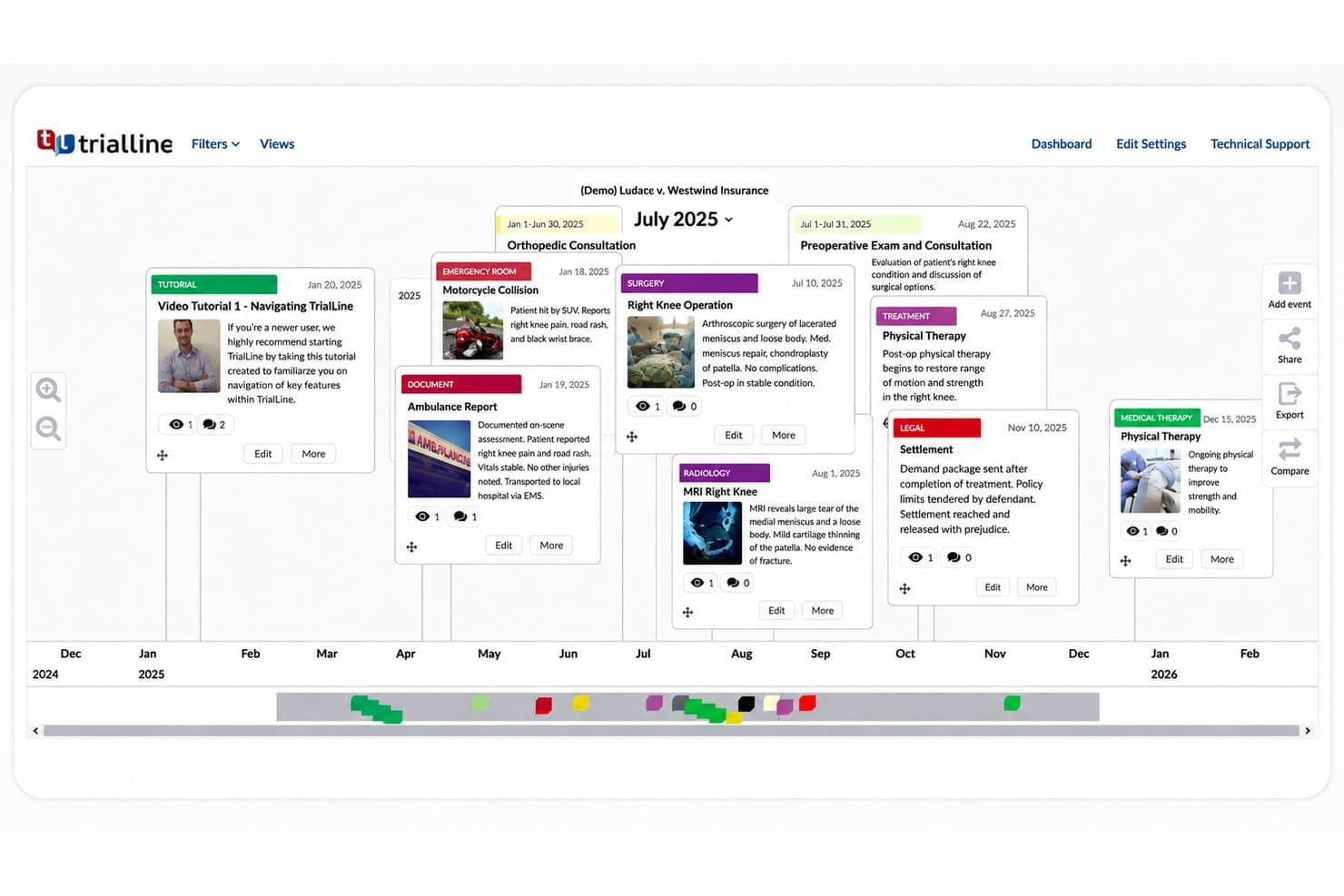
TrialLine presenteert zaakgebeurtenissen, medische behandelingen, documenten en juridische mijlpalen op een visuele tijdlijn voor eenvoudiger zaakbeoordeling en voorbereiding. TrialLine is een cloudgebaseerde juridische tijdlijn- en procespresentatietool, gebouwd voor procesadvocaten die zaakgebeurtenissen moeten organiseren, ondersteunend bewijs moeten toevoegen en verzorgde, voor het publiek geschikte tijdlijnen moeten delen met mederaadslieden, mediators en rechtbanken.
Voor wie is TrialLine het meest geschikt?
TrialLine is zeer geschikt voor kleine proceskantoren die regelmatig tijdens rechtszaken of mediation presenteren en behoefte hebben aan een speciale tool voor visuele vertelwijzen die geschikt zijn voor de rechtszaal.
Waarom TrialLine een goed alternatief voor Casefleet is
Ik heb TrialLine opgenomen in mijn topkeuzes omdat de drie afzonderlijke tijdlijnindelingen (Relatief, Carrousel en Piramide) procesrechtelijke teams veel flexibiliteit bieden in de manier waarop ze een zaakverhaal presenteren, zowel tijdens interne strategiebesprekingen als tijdens livepresentaties in de rechtszaal. Wat ik vooral waardeer, is de livebesturingsmodus voor rechtszaken: ik kan een tijdlijngebeurtenis openen, de eraan gekoppelde bewijsstukken of fragmenten uit getuigenverhoren in realtime tonen en inzoomen op bewijs zonder de voortgang van een zitting te onderbreken. Het delen dat is afgestemd op het publiek is ook een echte onderscheidende factor: ik kan één versie delen met mederaadslieden en een afzonderlijke, vereenvoudigde weergave met een mediator, allemaal vanuit dezelfde tijdlijn.
Belangrijkste functies van TrialLine
- Importeren uit spreadsheets: Upload feiten en zaakgebeurtenissen met XLSX-bestanden om snel tijdlijnen te vullen.
- Kleurcodering per categorie: Geef gebeurtenissen een kleur om feiten visueel te ordenen op type, vordering of kwestie.
- Delen met wachtwoordbeveiliging: Beperk de toegang en deel specifieke tijdlijnweergaven veilig met cliënten of externe partijen.
- Discussies met opmerkingen: Werk rechtstreeks met je team samen bij elke tijdlijngebeurtenis via discussies met conversatiethreads.
Integraties van TrialLine
Ingebouwde integraties zijn niet duidelijk gedocumenteerd. Er is een API beschikbaar voor aangepaste integraties.
Pros and Cons
Pros:
- Meerdere visuele indelingsopties voor verschillende presentatiecontexten
- Ondersteunt complexe, gegevensrijke zaken zoals medische wanpraktijken
- Bewijsstukken rechtstreeks gekoppeld aan afzonderlijke tijdlijngebeurtenissen
Cons:
- Beperkte ingebouwde AI-functies vergeleken met nieuwere procesrechtelijke tools
- Minder vooraf gebouwde procesrechtelijke sjablonen dan sommige concurrenten
Learn more about TrialLine: Het meest geschikt voor hulpmiddelen voor de voorbereiding van zittingen en verhoren
- Gratis demo beschikbaar
- Prijs op aanvraag
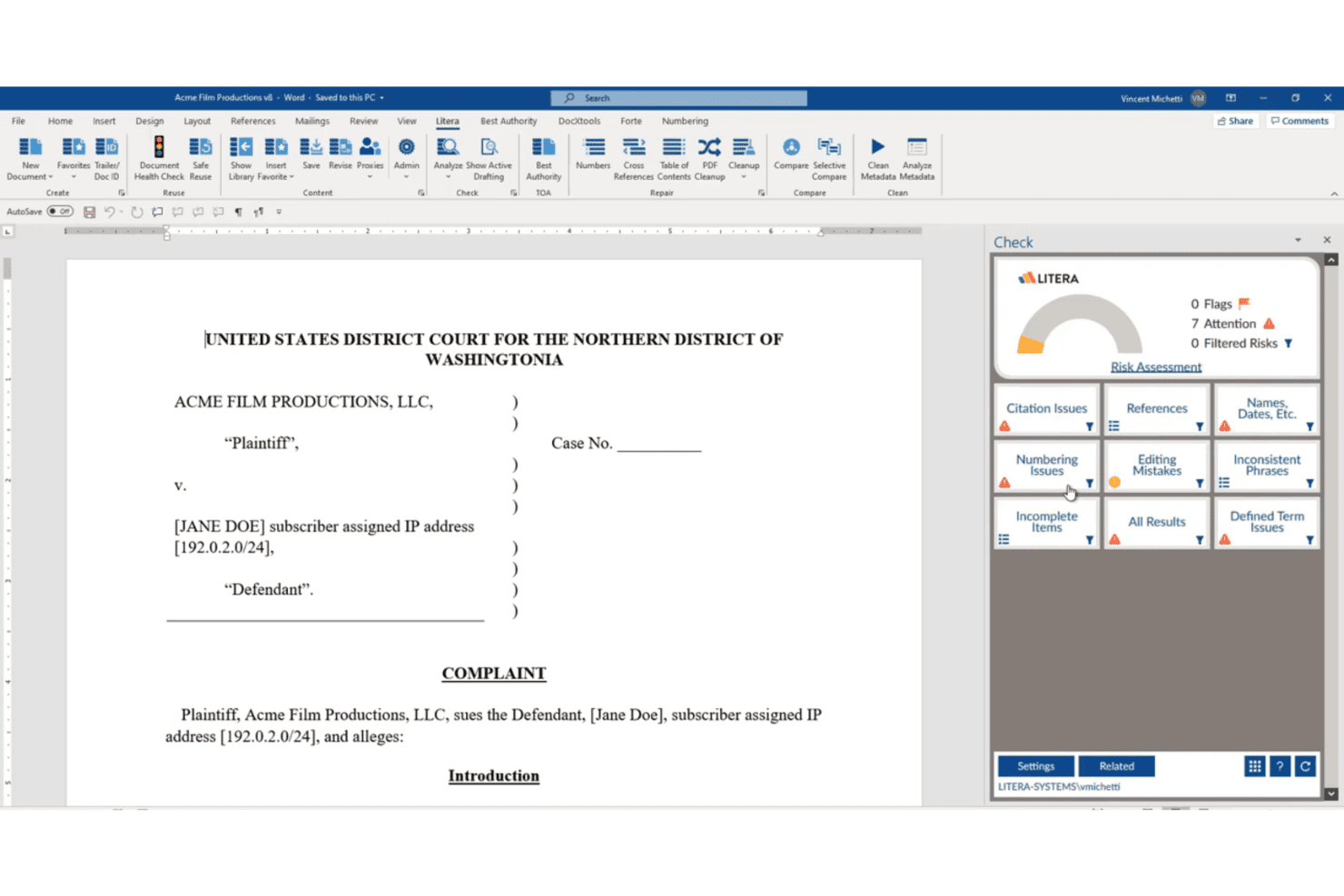
Litera controleert juridische documenten op problemen met citaten, nummering, verwijzingen en bewerking, waardoor procesteams een duidelijkere manier krijgen om processtukken vóór indiening te controleren. Litera Litigate was een cloudgebaseerd platform voor procesbeheer, gebouwd voor procesteams die getuigen, transcripties, bewijsstukken en procesfeiten in één verbonden werkruimte moesten organiseren.
Voor wie is Litera Litigate het meest geschikt?
Het was bijzonder geschikt voor procesteams bij middelgrote tot grote advocatenkantoren die complexe, documentintensieve zaken met meerdere getuigen en medeverdedigers behandelden.
Waarom Litera Litigate een goed alternatief voor Casefleet is
Ik koos Litera Litigate vanwege de mogelijkheden voor de voorbereiding van getuigen, waarbij transcripties van verhoren, beëdigde verklaringen en interviewnotities automatisch rechtstreeks aan individuele getuigenprofielen worden gekoppeld. Ik waardeer ook dat bestanden van rechtbankverslaggevers, inclusief video-opnamen, kunnen worden geïmporteerd en naast alle andere procesmaterialen op één plek kunnen worden geraadpleegd. Specifiek voor de voorbereiding van zittingen is het kunnen kruislings raadplegen van getuigen, transcripties en kwesties zonder tussen hulpmiddelen te hoeven wisselen waar dit product zich echt onderscheidt.
Belangrijkste functies van Litera Litigate
- Geïntegreerde dossierwerkruimte: Bewaar processtukken, moties, ontdekkingsdocumenten en materiaal voor de procesvoorbereiding samen in één gecentraliseerd online dossier.
- Dynamische elektronische mappen: Stel volledig digitale mappen samen, wijzig de volgorde ervan en exporteer ze voor verhoren, zittingen of procesvoorbereiding.
- Op rollen gebaseerde machtigingen: Wijs gedetailleerde toegangs- en bewerkingsrechten toe aan advocaten, paralegals en deskundigen binnen elke zaak.
- Samenwerking en notities in realtime: Geef procesteams de mogelijkheid om contextuele notities te maken, te delen en te markeren in elk bestand, transcript of document.
Integraties van Litera Litigate
Ingebouwde integraties zijn niet duidelijk gedocumenteerd. Er is een API beschikbaar voor aangepaste integraties.
Pros and Cons
Pros:
- Speciale hulpmiddelen voor mappen voor zittingen en verhoren
- Video en transcript importeren op één plek
- Getuigenprofielen gekoppeld aan procesdocumenten
Cons:
- Het product heeft het einde van zijn levensduur bereikt
- Mist zelfstandige functies voor het taggen van feiten en het koppelen van kwesties
Learn more about Litera Litigate: Beste voor eenvoudige gebeurtenisregistratie
- Gratis demo beschikbaar
- Prijs op aanvraag
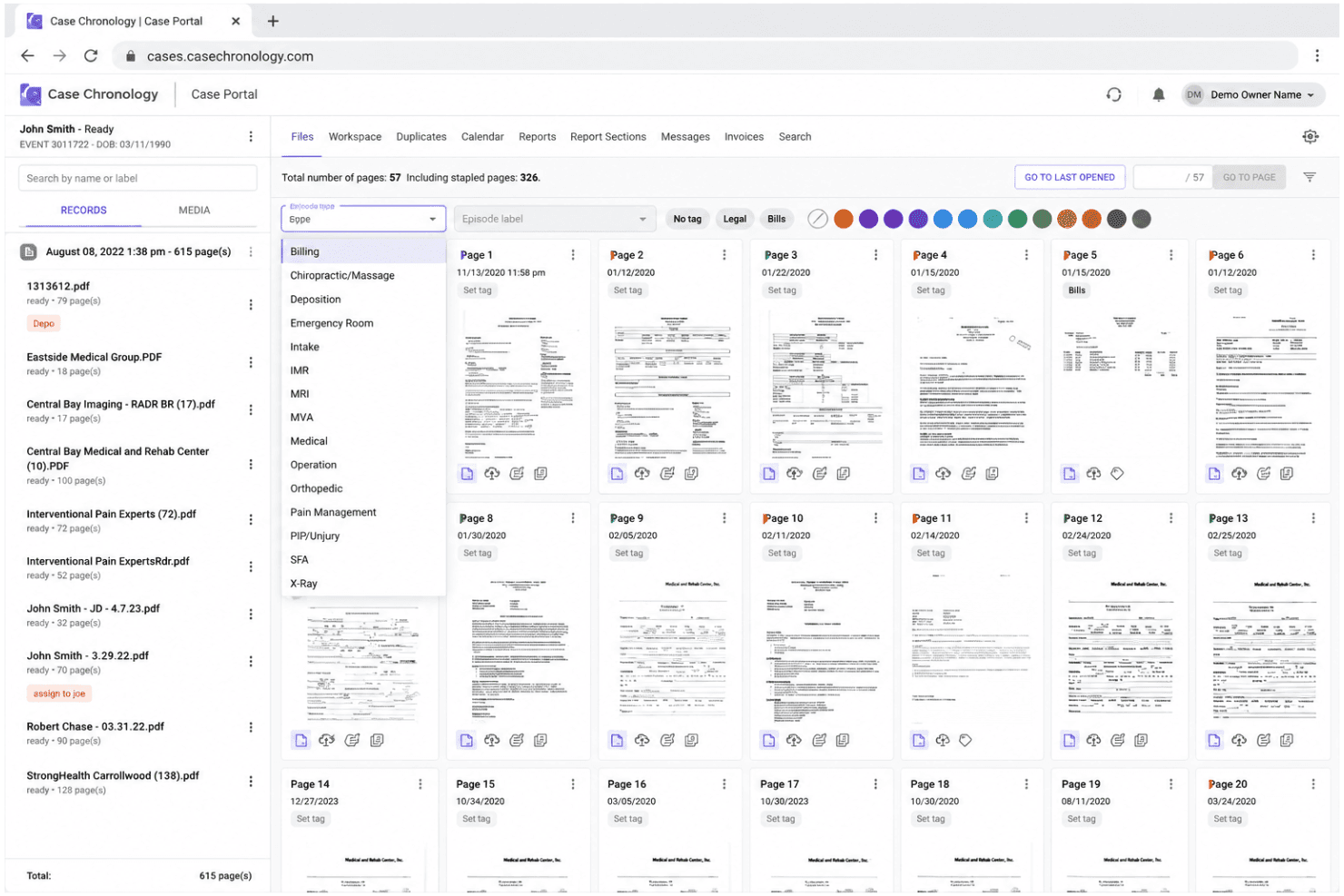
Case Chronology centraliseert medische dossiers en zaakdocumenten voor letselschadeteams. Case Chronology is een op procesvoering gericht platform voor advocaten, schadebehandelaars en deskundige getuigen die verspreide zaakdocumenten willen omzetten in gestructureerde, door AI ondersteunde chronologieën en interactieve tijdlijnen.
Voor wie is Case Chronology het meest geschikt?
Het is bijzonder geschikt voor procesvoeringsteams die omvangrijke letselschade-, medische aansprakelijkheids- of verzekeringsclaims behandelen, waarbij medische dossiers en zaakchronologieën centraal staan.
Waarom Case Chronology een goed alternatief voor Casefleet is
Ik heb Case Chronology geselecteerd als een van de beste opties op mijn shortlist, omdat de gepatenteerde dynamische tijdlijn automatisch wordt opgebouwd uit geüploade documenten, waarbij elke gebeurtenis via een hyperlink naar de bron verwijst. In tegenstelling tot Casefleet, waar chronologie slechts een van de vele functies is, behandelt Case Chronology het in kaart brengen van gebeurtenissen als de volledige basis van het platform. Ik waardeer ook de filters voor werkruimten, waarmee ik dezelfde tijdlijn op datum, documenttype of aangepast label kan filteren zonder iets opnieuw te hoeven opbouwen.
Belangrijkste functies van Case Chronology
- AI-chat en promptcentrum: Analyseer documenten en tijdlijnen met aangepaste of vooraf gedefinieerde AI-prompts rechtstreeks in het platform.
- Directe berichten binnen zaken: Communiceer veilig met teamleden binnen elke werkruimte van een zaak.
- Beveiligde cliënten- en patiëntenportalen: Stel cliënten of patiënten in staat documenten te uploaden en dossiers te openen via speciale, HIPAA-conforme portalen.
- Documenten naast elkaar vergelijken: Bekijk twee of meer documenten naast elkaar voor gedetailleerde kruisverwijzing en analyse.
Integraties van Case Chronology
Ingebouwde integraties zijn niet duidelijk gedocumenteerd. Er is een API beschikbaar voor aangepaste integraties.
Pros and Cons
Pros:
- Meerdere opties voor tijdlijn-, tabel- en kalenderweergave
- Verwerkt grote documentverzamelingen en gekoppeld bewijsmateriaal
- Gepatenteerde dynamische tijdlijn die automatisch uit geüploade documenten wordt opgebouwd
Cons:
- Geen mobiele app beschikbaar
- Kan te ingewikkeld aanvoelen voor kleinere, eenvoudigere zaken
Learn more about Case Chronology: Het beste voor door AI aangestuurde feitenorganisatie
- Gratis proefversie beschikbaar
- Prijs op aanvraag
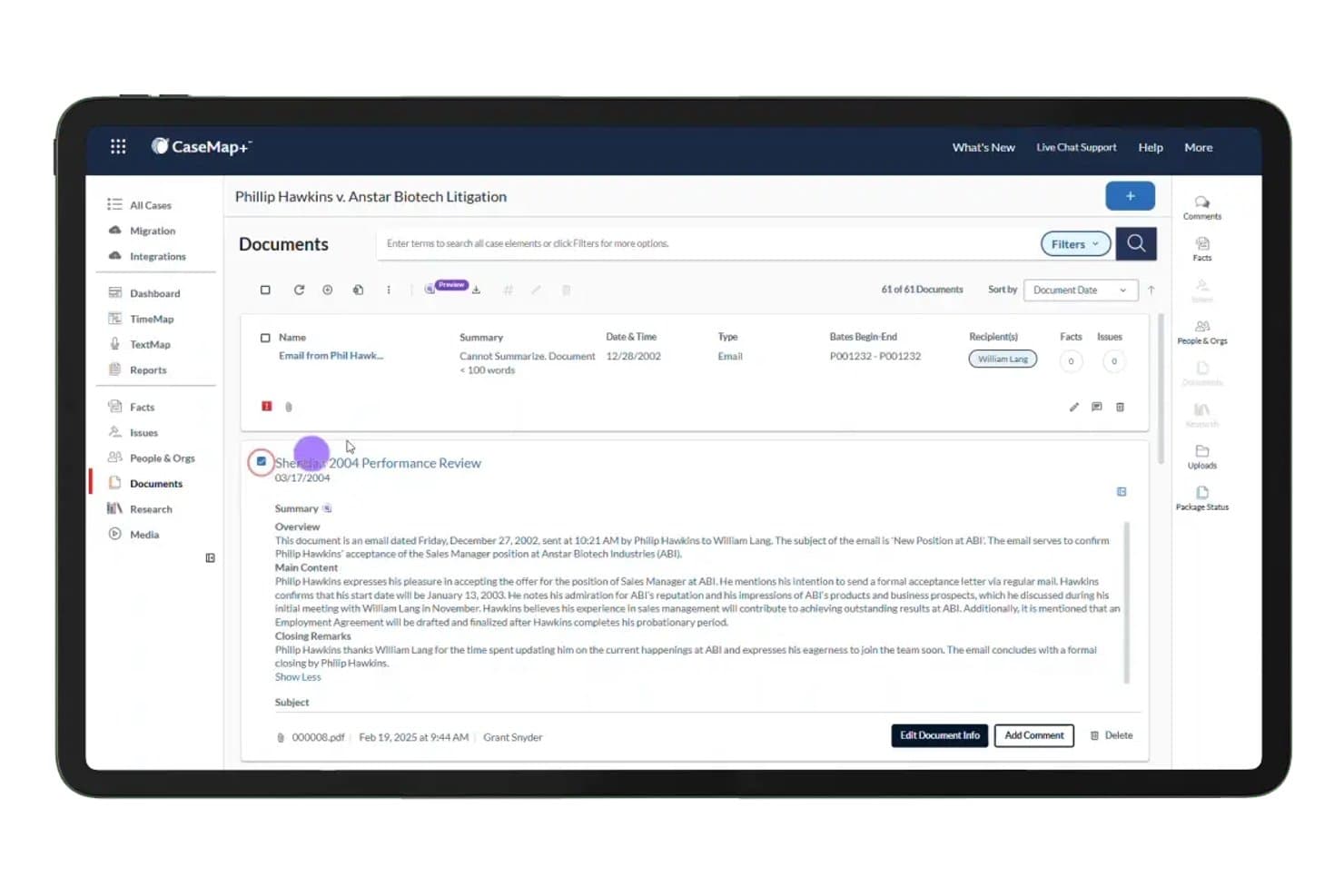
CaseMap+ AI biedt een door AI aangestuurd paneel voor documentsamenvattingen dat automatisch overzichten, uitsplitsingen van de hoofdinhoud en afsluitende opmerkingen voor zaakdocumenten genereert. CaseMap+ AI is een LexisNexis-platform voor procesvoering dat advocaten en juridische teams helpt om feiten in zaken te organiseren, bewijs aan juridische kwesties te koppelen en door AI gegenereerde chronologieën op te stellen voor complexe zaken met veel documenten.
Voor wie is CaseMap+ AI het meest geschikt?
Het is zeer geschikt voor procesvoeringsteams bij middelgrote tot grote advocatenkantoren die al binnen het LexisNexis-ecosysteem werken.
Waarom CaseMap+ AI een goed alternatief voor Casefleet is
Ik heb CaseMap+ AI gekozen omdat de AI rechtstreeks in de feitendatabase werkt en niet als een afzonderlijke laag. Wanneer ik een transcript van een getuigenverhoor upload, vat de tool dit per onderwerp samen en kan ik die samenvattingen in één stap omzetten in gekoppelde feiten over de zaak. Het samenvatten van documenten vult ook automatisch samenvattingsvelden in voor geüploade bestanden, zodat het feitenrecord tijdens mijn beoordeling wordt opgebouwd in plaats van achteraf.
Belangrijkste functies van CaseMap+ AI
- Gecentraliseerde werkruimte voor zaken: Slaat alle feiten, documenten, entiteiten en juridische kwesties van een zaak op in één uniform overzicht.
- Opbouw van een hiërarchie van kwesties: Hiermee kunt u vorderingen, tegenvorderingen en juridische argumenten in kaart brengen en deze rechtstreeks koppelen aan ondersteunende feiten en bronnen.
- Geavanceerd zoeken in documenten: Ondersteunt OCR, het toevoegen van labels en zoeken in volledige tekst in 98 verschillende bestandsindelingen.
- Samenwerkingstools: Hiermee kunnen meerdere teamleden tegelijkertijd toegang krijgen tot zaakgegevens, deze bewerken en de voortgang volgen.
Integraties van CaseMap+ AI
Ingebouwde integraties zijn niet duidelijk gedocumenteerd. Er is een API beschikbaar voor aangepaste integraties.
Pros and Cons
Pros:
- AI haalt automatisch feiten uit transcripten van getuigenverhoren
- Koppelt feiten aan bewijs en juridische kwesties
- Genereert automatisch chronologieën uit de feitendatabase
Cons:
- Gebonden aan het bredere LexisNexis-platform
- Geen ingebouwde facturering of beheer van derdengelden
Learn more about CaseMap+ AI: Het beste voor alles-in-één praktijkbeheer
- Gratis proefperiode van 10 dagen + gratis demo beschikbaar
- Vanaf $60/gebruiker/maand
Visit WebsiteCustomer Rating:4.6/5
 9Ideaal voor robuuste integraties met derden
Clio
- 7 dagen gratis proefperiode
- Vanaf $49/gebruiker/maand
Visit WebsiteCustomer Rating:4.5/5Learn more about Clio: Ideaal voor geautomatiseerde documentcreatie
- Gratis demo beschikbaar
- Prijzen op aanvraag
Visit WebsiteCustomer Rating:4.8/5Learn more about Smokeball:
Andere alternatieven voor Casefleet
Hier zijn enkele aanvullende alternatieven voor Casefleet die mijn shortlist niet hebben gehaald, maar die toch het bekijken waard zijn:
- 11DISCOHet beste voor geavanceerde tijdlijnen van rechtszaken
- 12LexbeHet meest geschikt voor cloudgebaseerde documentbeoordeling in rechtszaken
- 13Thomson Reuters Case NotebookHet beste voor analyse van gekoppelde feiten en transcripties
How I Evaluate Casefleet Alternatives
I split my evaluation into two layers: core functionality every Casefleet alternative must offer, and differentiators that set tools apart. I look for fact linking, chronology building, and document management as the baseline.
Core Functionality (Table Stakes For This List)
When I'm selecting tools for my list, I rank each one on a scale from 0 (does not offer the functionality) to 5 (excels in this area) for each core functionality listed below. Then, I calculate the tool's total score into a percentage. Each tool needs to achieve a minimum total score of 65% to be considered for inclusion.
- Case Management: I look for structured matter records with custom fields, status tracking, and role assignments that keep multi-party litigation organized.
- Fact & Evidence Management: Each tool should let you tag facts, link them to source documents, and flag disputed vs. undisputed items across a case.
- Chronology Building: I evaluate whether timelines are interactive, filterable, and exportable for use in depositions or court presentations.
- Document Management: Tools should support full-text search, OCR, tagging, and the ability to deep-link documents directly to specific case facts.
- Contacts & Witness Tracking: I check whether contacts can be linked to specific facts, evidence, and cases rather than stored in a standalone list.
- Task & Deadline Management: Assignable tasks with due dates, reminders, and calendar sync help teams stay on top of filing deadlines and discovery cutoffs.
Once I have a list of tools that meet the criteria, I consider what sets each platform apart.
Differentiating Factors (What Sets Vendors Apart)
Here's how I compare and contrast different vendors:
Standout Features
Automated medical chronologies are a major differentiator for personal injury and mass tort teams who'd otherwise spend hours manually organizing records into timelines. I also look for built-in court rules calendaring, where the platform auto-calculates dependent deadlines when a triggering event shifts. Native document assembly is another feature worth evaluating—it lets you generate pleadings and discovery requests from templates pre-populated with matter and contact data.
Beyond Features
Practice area fit matters a lot here. Litigation-heavy firms need deep fact and evidence linking, while transactional practices may care more about document automation and billing. I also evaluate migration support—moving fact chronologies, linked evidence, and issue tags out of Casefleet is complex, so vendor-led migration services are worth confirming. Security posture is another key factor; I check for SOC 2 Type II certification, encryption standards, and clear data ownership terms.
Waarom zoeken naar een alternatief voor Casefleet?
Hoewel Casefleet een goede keuze is als alternatief voor Casefleet, zijn er verschillende redenen waarom sommige gebruikers op zoek gaan naar andere oplossingen. Misschien ben je op zoek naar een alternatief voor Casefleet omdat je…
- Geavanceerde tools voor documentautomatisering nodig hebt
- Meer integraties wilt met platforms voor elektronische bewijsvergaring en juridisch onderzoek
- De mogelijkheden van Casefleet voor samenwerking of gebruikersrechten ontgroeit
- Lokale ondersteuning of compliance voor internationale zaken zoekt
- De voorkeur geeft aan een systeem dat boekhouding en beheer van derdengelden ondersteunt
- Overstapt naar een alles-in-éénplatform voor zowel procesvoering als transactioneel werk
Als een van deze punten herkenbaar klinkt, ben je hier aan het juiste adres. Mijn lijst bevat verschillende alternatieven voor Casefleet die beter geschikt zijn voor teams die met deze uitdagingen rond Casefleet te maken hebben en op zoek zijn naar andere oplossingen.
Belangrijkste functies van Casefleet
Hier zijn enkele van de belangrijkste functies van Casefleet, zodat je kunt vergelijken wat alternatieve oplossingen bieden:
- Chronologie van feiten: Stel sorteerbare, doorzoekbare tijdlijnen samen die feiten aan ondersteunende documenten koppelen voor een snelle analyse van zaken.
- Koppeling van bewijsmateriaal: Koppel bewijsmateriaal, zoals correspondentie of processtukken, rechtstreeks aan feiten en juridische kwesties, zodat elk detail verbonden blijft.
- Documenten zoeken in volledige tekst: Vind onmiddellijk trefwoorden in geüploade pdf's en zaakdossiers, zodat je team snel cruciale informatie kan vinden.
- Aangepaste kwestie-etiketten: Categoriseer feiten en bewijsmateriaal met kwestie-etiketten voor een duidelijke ordening en krachtige filtermogelijkheden tijdens de voorbereiding van een zaak.
- Op rollen gebaseerd toegangsbeheer: Wijs rollen en machtigingen toe, zodat advocaten, juridisch medewerkers en medepleiters alleen zien wat voor hen relevant is.
- Beheer van contacten en getuigen: Houd alle partijen, getuigen en verbonden professionals bij en koppel hen aan specifieke feiten of documenten.
- Taak- en deadlinebeheer: Wijs taken toe, bewaak de voortgang en houd procesdeadlines bij vanuit één centraal dashboard.
- Gedeelde werkomgeving: Werk met je team in één geïntegreerde omgeving en deel notities, tijdlijnen en updates veilig.
- Gekoppelde documentopslag: Sla documenten op, orden ze en voorzie ze van labels op één plek, zodat koppelingen met feiten intact blijven.
- Rapportages en exports: Genereer aangepaste rapporten of exporteer tijdlijnen en feitenoverzichten voor verhoren, mediation of een proces.