

SmartAdvocate oferă instrumente pentru gestionarea dosarelor firmelor specializate în vătămări corporale, însă fluxurile sale de lucru, funcțiile de contabilitate sau opțiunile de personalizare s-ar putea să nu corespundă modului în care operează fiecare echipă juridică. Unele alternative oferă un control mai mare asupra preluării clienților, etapelor dosarelor și termenelor-limită, în timp ce altele se concentrează pe automatizarea documentelor, facturare și raportare financiară.
Am comparat aceste platforme pe baza funcțiilor practice, a cerințelor de implementare și a capacității lor de a sprijini diferite domenii de practică juridică.
Ce este SmartAdvocate?
SmartAdvocate este o platformă de gestionare a dosarelor juridice pentru firme de avocatură și echipe de litigii. Aceasta oferă funcții pentru preluarea clienților, urmărirea dosarelor, generarea documentelor, gestionarea termenelor-limită, raportare și proceduri automate pentru dosare. Firmele pot alege accesul bazat pe cloud sau pe server, cu funcții pentru vătămări corporale și alte domenii de practică juridică. Instrumentele sale includ rezumate ale dosarelor medicale, portaluri pentru clienți, semnături electronice și integrări cu servicii externe.
Tabel comparativ: alternative la SmartAdvocate
Compară prețurile și specificațiile, unul lângă altul, pentru alternativele la SmartAdvocate care au ajuns pe lista mea scurtă.
Score legend (out of 5)
- Excellent4.5–5
- Good4–4.4
- Average3–3.9
- Below average2–2.9
- Poor1–1.9
Sorted by: Default
| Tool | Starting Price | Website | |||||||
|---|---|---|---|---|---|---|---|---|---|
Best for PI medicals and settlement tracking | 3.3 out of 5 | 4 | 4 | 3 | 3 | 3 | 3 | Pricing upon request Free trial available | Website |
Best for matter-linked legal accounting | 3.7 out of 5 | 4 | 4 | 2 | 3 | 5 | 4 | $49/user/month Free demo + 7-day free trial available | Website |
Best for linking intake and case workflows | 3.7 out of 5 | 3 | 4 | 4 | 4 | 4 | 3 | $49/user/month 14-day free trial | Website |
Best for personal injury litigation workflows | 3.5 out of 5 | 3 | 4 | 4 | 4 | 2 | 4 | Pricing upon request Free demo available | Website |
Best for firms building phase-based workflows | 3.3 out of 5 | 4 | 4 | 2 | 4 | 3 | 3 | Pricing upon request Free demo available | Website |
Best for firms managing trust accounting | 3.8 out of 5 | 4 | 4 | 3 | 4 | 5 | 3 | $49/user/month 10-day free trial + free demo available | Website |
Best for law-firm accounting beyond billing | 3.8 out of 5 | 4 | 4 | 3 | 4 | 5 | 3 | $59/user/month 10-day free trial + free demo available | Website |
Best for customizable matter management workflows | 3.7 out of 5 | 4 | 4 | 3 | 4 | 4 | 3 | Pricing upon request Free demo available | Website |
Best for Salesforce-based legal operations | 3.5 out of 5 | 4 | 4 | 4 | 3 | 3 | 3 | Pricing upon request Free demo available | Website |
Best for rule-based linked court deadlines | 3.7 out of 5 | 4 | 4 | 2 | 5 | 3 | 4 | Pricing upon request Free demo available | Website |


Why Trust Our Software Recommendations
6,700+
Reviews
20
Industry experts
16+
Evaluation factors
14
Years
Our team has been testing and reviewing software since 2012. As legal practice leaders ourselves, we know how difficult—and important—it is to choose the right software.
For this guide, we evaluated tools using hands-on testing and independent research, scoring tools using our selection criteria.
Our reviews reflect our human editorial judgment, not a sales pitch.
Recenzii ale alternativelor la SmartAdvocate
Mai jos sunt recenziile mele despre cele mai bune alternative la SmartAdvocate de pe lista mea scurtă. Acestea acoperă funcțiile, prețurile și compatibilitatea fluxurilor de lucru ale fiecărei platforme de gestionare a dosarelor juridice, pentru a te ajuta să găsești opțiunea potrivită.
 Best for PI medicals and settlement tracking
- Free trial available
- Pricing upon request
Visit WebsiteCustomer Rating:4.8/5
Smokeball tracks personal injury matters, client intake, billing, and settlements. Smokeball is a legal practice management platform built for law firms that need to manage matters, documents, billing, and client intake in one place—with dedicated tooling for personal injury practices.
Who Is Smokeball Best For?
Smokeball is a strong fit for personal injury law firms that need dedicated tools for tracking medical providers, managing liens, and recording settlement details alongside everyday matter and document management.
Why I Picked Smokeball
I picked Smokeball as one of the best because its Medicals & Settlement Details tab gives PI firms a genuinely purpose-built place to log providers, track document requests, record liens, and capture settlement figures, all inside the matter file. I especially like that medical providers entered there automatically populate as potential lienholders, cutting out duplicate data entry at settlement time. Pair that with TemplateLab's 20,000-plus court forms auto-populated from matter data, and you have a tight loop from records tracking to document generation.
Smokeball Key Features
- Lead-to-matter conversion: Tracks leads from first contact through retention, then converts them directly into open matters with a single action.
- AutoTime activity capture: Automatically records time spent in Smokeball, Word, and Outlook against the relevant matter and converts it into billable entries.
- TemplateLab document automation: Auto-populates court forms and legal documents from matter data using a library of more than 20,000 templates across 250-plus matter types.
- Archie AI document review: Compares documents for inconsistencies, produces event chronologies, and reviews documents against firm-defined criteria directly within the matter file.
Smokeball Integrations
Smokeball offers native integrations across Microsoft 365, including Word and Outlook, plus integrations with QuickBooks Online and InfoTrack for eSignatures. Its Archie marketplace includes CaseMark, Novo AI, and Supio, while a REST API supports custom integrations.
Pros and Cons
Pros:
- Court forms auto-populate from matter data
- Matter-linked workflows help organize pre-suit cases
- PI medical and settlement tracking
Cons:
- Settlement lien amounts require manual entry
- Medical records requests aren't sent automatically
Learn more about Smokeball: Best for matter-linked legal accounting
- Free demo + 7-day free trial available
- From $49/user/month
Visit WebsiteCustomer Rating:4.7/5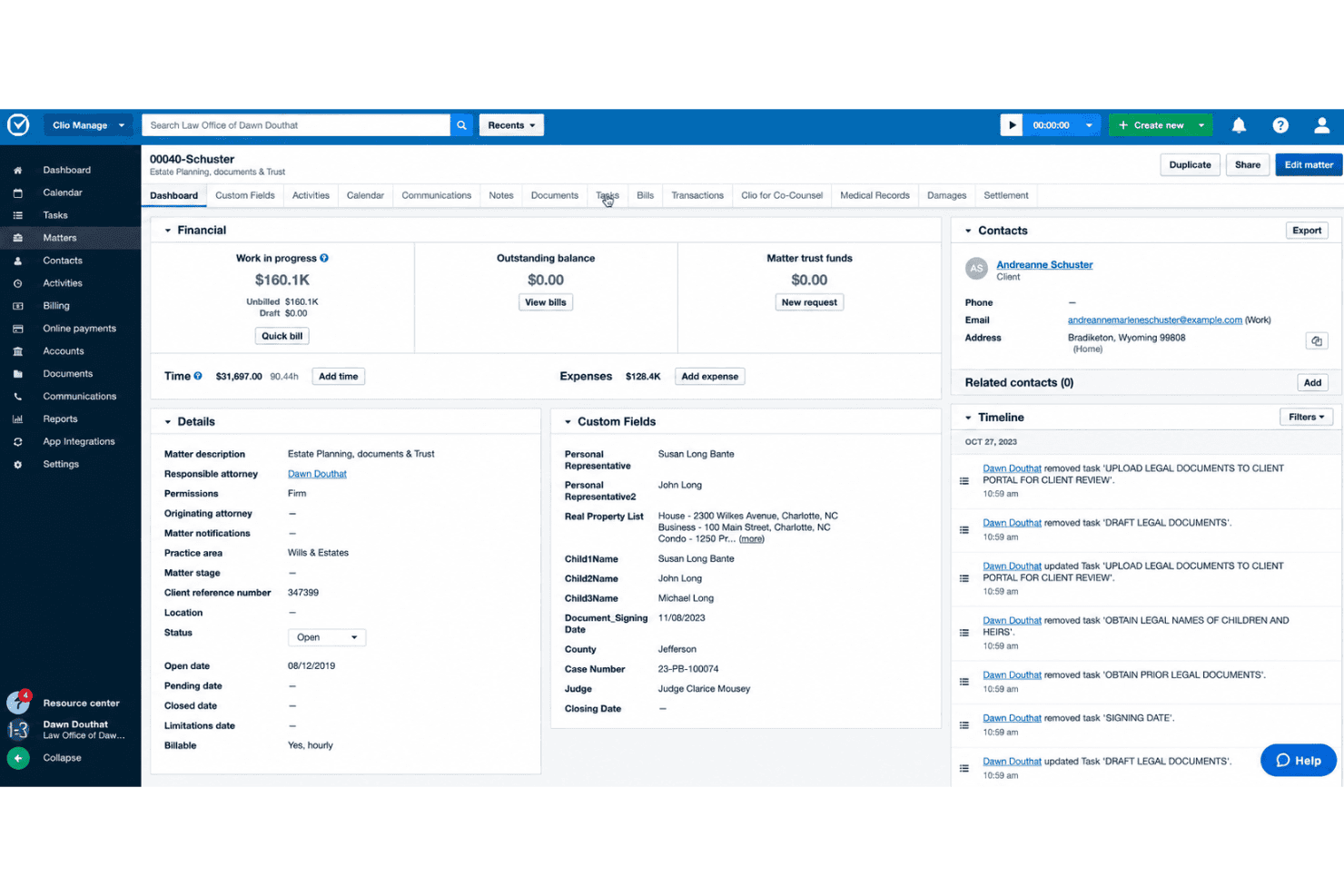
Clio Manage connects legal matters, billing, trust accounting, and client communications. Clio Manage is a cloud-based legal practice management platform that centralizes matters, billing, trust accounting, documents, and client communications—making it a strong fit for law firms that want case and financial data tightly connected in one place.
Who Is Clio Manage Best For?
Clio Manage is a strong fit for law firms that need billing, trust accounting, and case management tightly linked in a single matter record.
Why I Picked Clio Manage
I've included Clio Manage in my top picks because trust accounting and matter management living in the same record is genuinely rare. When a client payment comes in, it hits the trust ledger and links directly to the matter, so reconciliation isn't a separate chore. I also appreciate that billing runs on the same matter record, meaning time entries, invoices, and trust-balance notifications are all connected without any manual bridging between systems.
Clio Manage Key Features
- Matter stages and kanban boards: Track case progress through customizable stages displayed in a kanban-style board view.
- Court calendaring rules: Automatically populate your calendar with court deadlines using local, state, and federal court procedure rules.
- Automated workflows: Trigger task assignments, document generation, and matter updates as cases move through defined stages.
- Custom reporting with scheduled delivery: Build tailored reports using flexible filters and datasets, then schedule them for automatic delivery.
Clio Manage Integrations
Clio Manage lists 300+ integrations, including native integrations with Gmail, Microsoft Outlook, Google Calendar, QuickBooks, and Xero, plus marketplace integrations with OneDrive, Google Drive, Dropbox, Box, and NetDocuments. It also offers an API with OAuth 2.0 and webhooks.
Pros and Cons
Pros:
- Personal injury add-on tracks records and settlements
- Matter stages connect deadlines, documents, and billing
- Trust ledgers reconcile within matter records
Cons:
- Grow-to-Manage sync can require correction
- Personal injury workflows trail specialized platforms
Learn more about Clio Manage: Best for linking intake and case workflows
- 14-day free trial
- From $49/user/month
Visit WebsiteCustomer Rating:4.8/5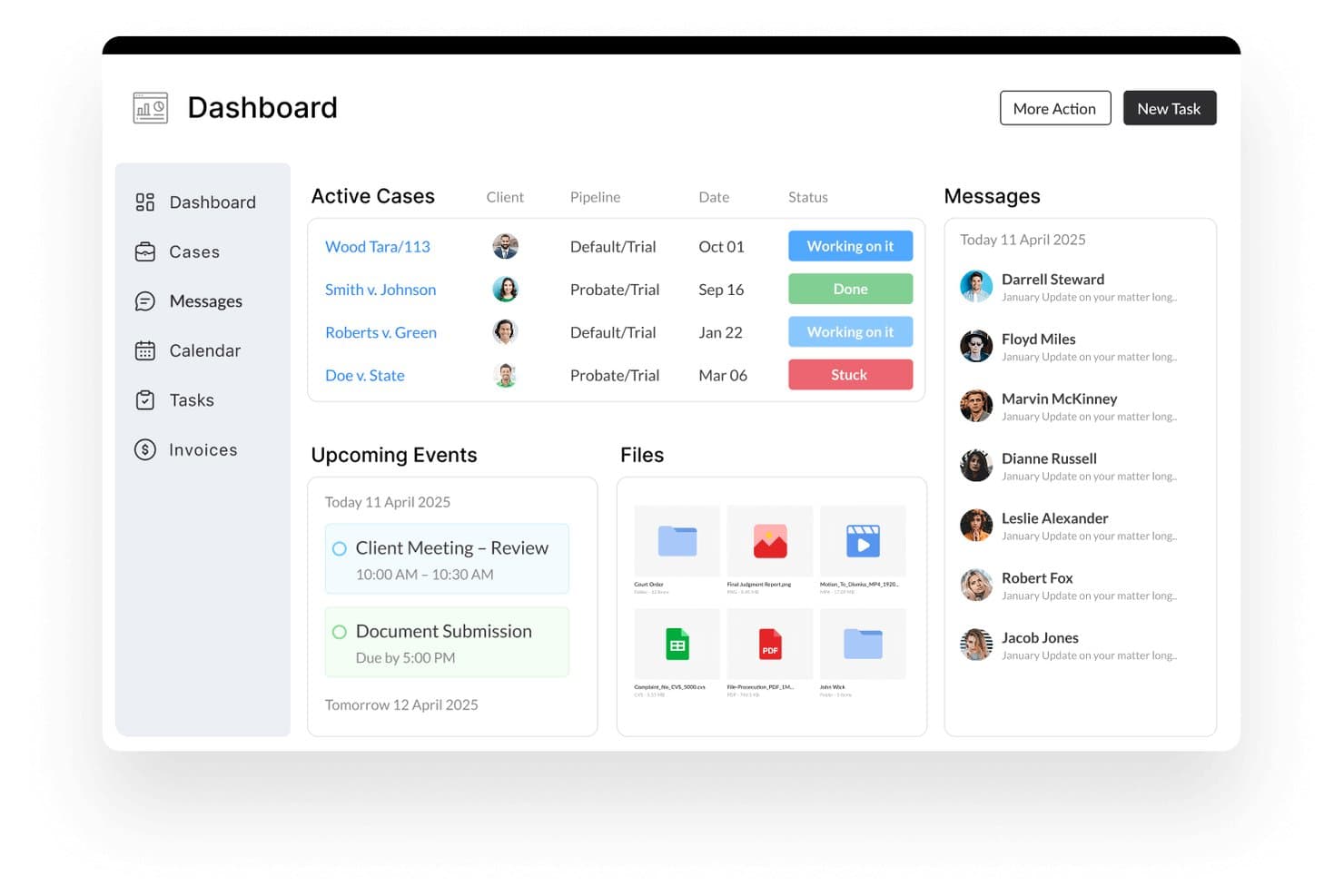
Lawcus centralizes cases, messages, files, and events in one dashboard. Lawcus is a cloud-based legal practice management platform that unifies client intake, matter tracking, billing, document automation, and workflow automation in one place—making it a strong fit for solo attorneys and small firms that want to run their full practice without juggling multiple tools.
Who Is Lawcus Best For?
Lawcus is a strong fit for solo attorneys and small firms that want intake, matter tracking, billing, and automation in one platform without managing multiple tools.
Why I Picked Lawcus
I picked Lawcus as one of the best because it's one of the few platforms that genuinely connects the intake pipeline to active case management without treating them as separate systems. When a lead submits an intake form, I can convert that record directly into a matter, carrying over the lead source, referral details, and any notes collected during intake. From there, Elite-tier workflow automation triggers tasks, documents, and calendar events based on matter stage changes, keeping cases moving without manual follow-up at every step.
Lawcus Key Features
- Nova AI writing assistant: Generate drafts for emails, text messages, notes, matter descriptions, and task descriptions directly within the platform.
- Trust accounting: Create and manage multiple trust accounts, add and transfer funds, and pay invoices using trust or credit balances.
- Kanban-style matter pipelines: Track matters across configurable stages on visual boards, with filters, grouping, sorting, and aggregation options.
- LEDES UTBMS billing codes: Bill corporate clients using industry-standard legal billing formats built into the invoicing workflow.
Lawcus Integrations
Lawcus offers integrations with QuickBooks, Xero, Google Drive, Box, Dropbox, Gmail, Microsoft Outlook, Microsoft 365, and Zapier. It also provides an API for custom integrations; no total integration count is stated.
Pros and Cons
Pros:
- Trust accounting sits within matter workflows
- Configurable pipelines track matter stages visually
- Converts intake leads directly into matters
Cons:
- No prebuilt personal injury litigation workflows
- No dedicated medical records or provider tracking
Learn more about Lawcus: Best for personal injury litigation workflows
- Free demo available
- Pricing upon request
Visit WebsiteCustomer Rating:4.8/5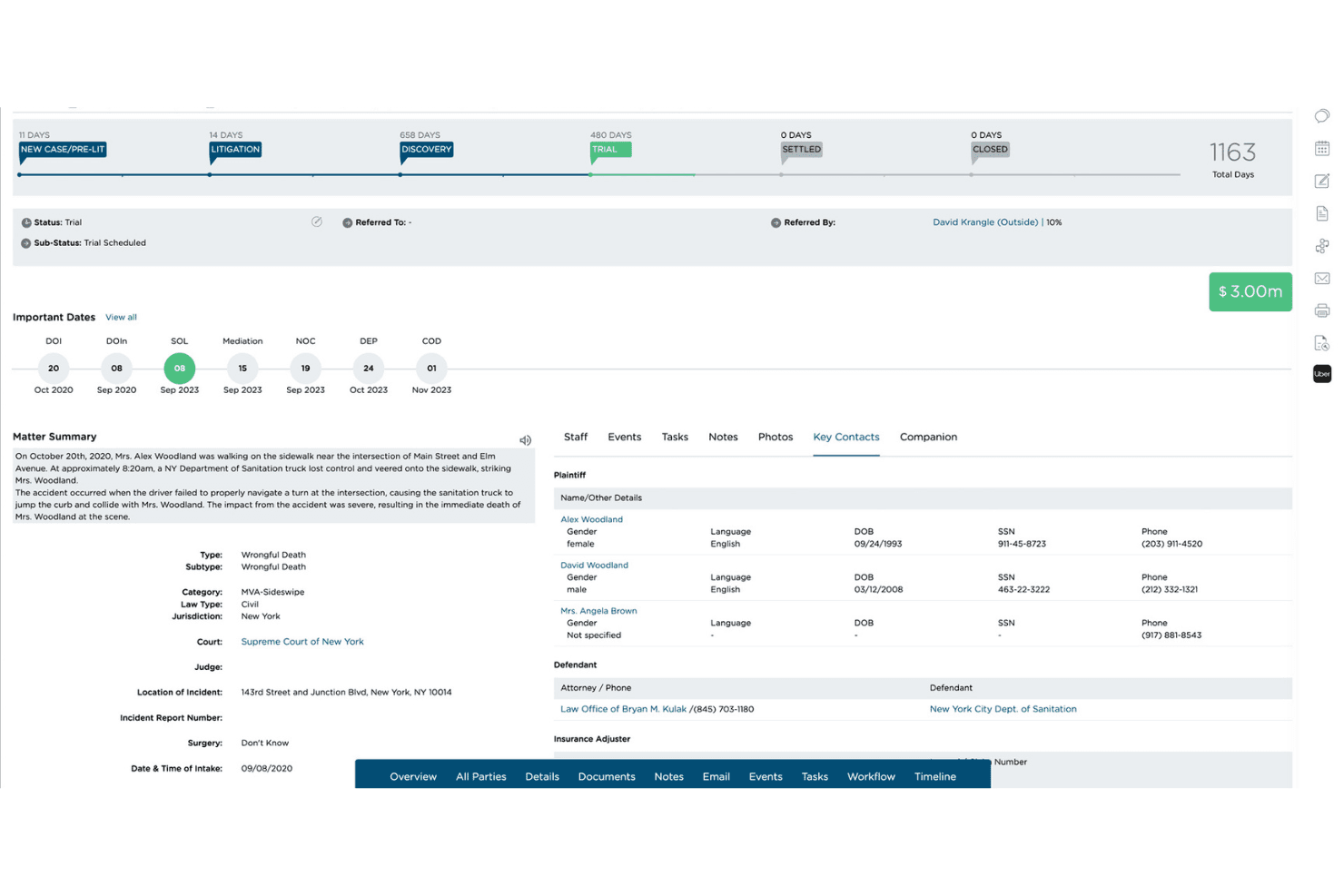
CloudLex provides cloud-based, end-to-end personal injury case management for handling matters, documents, workflows, and client information in one platform. CloudLex is a practice management platform built exclusively for plaintiff personal injury firms, connecting intake, case tracking, medical records, client communication, and settlement workflows in one place.
Who Is CloudLex Best For?
CloudLex is built for plaintiff personal injury firms—from solo practitioners to growing practices—that need a single platform to manage intake, litigation, and settlement workflows.
Why I Picked CloudLex
CloudLex earns its spot on my shortlist because it's built exclusively for plaintiff personal injury firms, which makes it a tighter fit than a general-purpose platform like SmartAdvocate for PI-focused practices. I particularly like how litigation workflow automation triggers tasks and reminders based on matter status, so when a demand is sent, the next set of assignments fires automatically. I also appreciate Lexee AI's medical summary workflow, which tracks records through Requested, In Progress, and Ready for Review stages before attaching a paralegal-reviewed chronology directly to the matter.
CloudLex Key Features
- Settlement negotiation tracking: Record demands, counteroffers, and negotiation history directly on the matter, alongside attorney fees, liens, and client recovery calculations.
- Two-way client texting: Send and receive client texts and MMS through a firm-dedicated number, with messages linked to cases and built-in consent capture and opt-out handling.
- Role-based access controls: Define security levels and permissions for each team member to control who can view or edit specific case information.
- Referral Engine: Send and receive case referrals with other PI firms, track fee agreements, share case documents, and monitor referred-matter updates within CloudLex.
CloudLex Integrations
CloudLex offers native integrations with Microsoft 365, QuickBooks Online, Gmail, and Outlook, plus partner integrations with Adobe Sign and DocuSign. It also supports Google Calendar, iCal, RingCentral, and website forms API integrations.
Pros and Cons
Pros:
- Reviewed medical chronologies surface treatment timelines
- Matter-triggered deadlines reduce routine follow-up
- PI-specific intake through settlement workflows
Cons:
- Notes lack pinning and categories
- PDF OCR requires manual processing
Learn more about CloudLex: Best for firms building phase-based workflows
- Free demo available
- Pricing upon request
Visit WebsiteCustomer Rating:4.5/5
Filevine automates case workflows, role-based task assignments, and court deadlines. Filevine is a cloud-based legal case management platform built for law firms that need to organize matters, documents, deadlines, and client communications in one configurable workspace—particularly well-suited to personal injury and solo or small-firm practices.
Who Is Filevine Best For?
Filevine is a strong fit for personal injury and small-to-midsize law firms that need a highly configurable case management system built around phase-based workflows.
Why I Picked Filevine
I picked Filevine as one of the best because of how its phase-based case workflows translate directly into automated task assignment. When a personal injury case moves from intake to litigation, taskflows trigger role-assigned tasks automatically, so nothing slips through. I also like that rules-based calendaring calculates court deadlines from phase changes, keeping critical dates tied to where the case actually stands.
Filevine Key Features
- Document generation: Auto-populate templates with matter data to produce client-ready documents directly from a case file.
- Client portal: Give clients 24/7 access to case timelines, shared documents, secure messaging, and online payment tools.
- Custom reporting and dashboards: Build reports from case notes, tasks, fields, and calendar events, then export or share them with team members.
- QuickBooks integration: Sync client and matter information, invoices, payments, time entries, and expenses between Filevine and QuickBooks.
Filevine Integrations
Filevine lists over 2,000 potential integrations, including QuickBooks, Google Calendar, Outlook, YoCierge, ChartSquad, and RecordsOnTime. It also offers an API and lists Zapier.
Pros and Cons
Pros:
- Personal injury workflows support medical-record handling
- Case-linked documents and templates earn praise
- Phase changes trigger role-assigned tasks
Cons:
- Calendar search reaches back only 14 days
- Setup and staff training can take months
Learn more about Filevine: Best for firms managing trust accounting
- 10-day free trial + free demo available
- From $49/user/month (billed annually)
Visit WebsiteCustomer Rating:4.3/5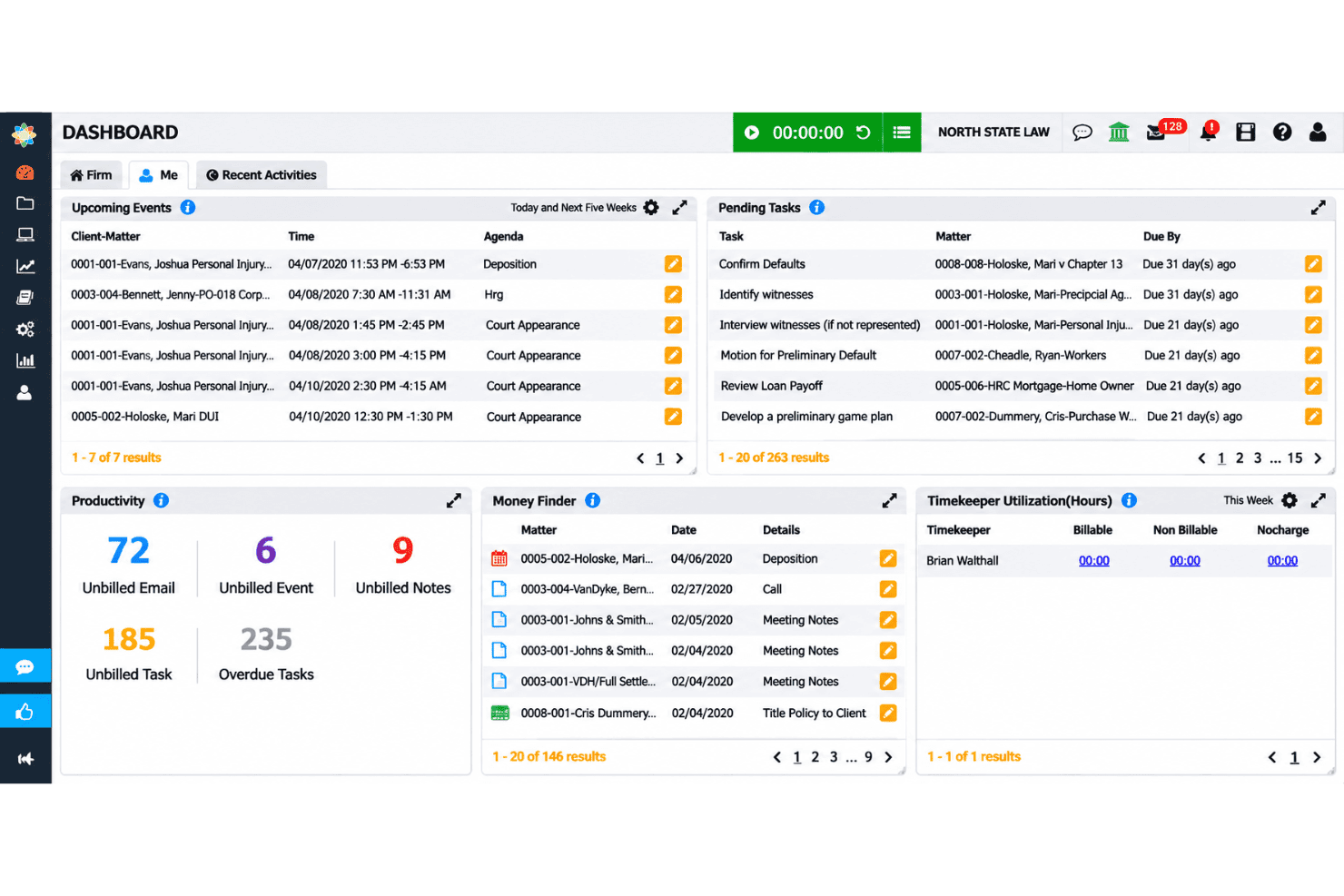
CosmoLex organizes matter tasks, events, deadlines, and trust accounting records. CosmoLex is a cloud-based legal practice management platform that ties matter tracking, billing, and full law firm accounting into one system—making it a practical fit for solo attorneys and small firms that want to avoid managing separate tools for cases and books.
Who Is CosmoLex Best For?
CosmoLex is a strong fit for solo attorneys and small firms that need matter management, billing, and trust accounting in one place without stitching together separate tools.
Why I Picked CosmoLex
I picked CosmoLex as one of the best because it's the only tool on this list that bakes full law firm accounting directly into the practice management layer. Where SmartAdvocate leans on external accounting tools, CosmoLex handles trust accounting natively, including three-way reconciliation and safeguards that prevent ledger overdrafts and commingling. I especially like that trust activity ties directly to individual matter records, so I can see a matter's full financial picture without jumping between systems.
CosmoLex Key Features
- Matter status boards: View and track the status of active matters in a board layout, with matter budgets tied directly to each record.
- Custom intake forms: Build logic-based intake forms that capture lead information and convert submissions into matters, with field data populating contact and matter records.
- Workflow-driven task automation: Create matter workflows that assign tasks, set due dates relative to a workflow start date, and make tasks contingent on the completion of prior tasks.
- AI document summaries: Upload documents to a matter and extract key terms, obligations, deadlines, and action items automatically, with data isolated by matter.
CosmoLex Integrations
CosmoLex integrates with Microsoft 365, Outlook, Google Calendar, QuickBooks Online, OneDrive, Google Drive, NetDocuments, Dropbox, Box, and LawPay. It also supports Zapier and a REST API for custom integrations.
Pros and Cons
Pros:
- Matter workflows assign dependent tasks and deadlines
- Personal-injury fields capture records and settlements
- Reviewers praise three-way trust reconciliation
Cons:
- Users report friction in client document sharing
- Reviewers report clunky screens and extra clicks
Learn more about CosmoLex: Best for law-firm accounting beyond billing
- 10-day free trial + free demo available
- From $59/user/month (billed annually)
Visit WebsiteCustomer Rating:4.4/5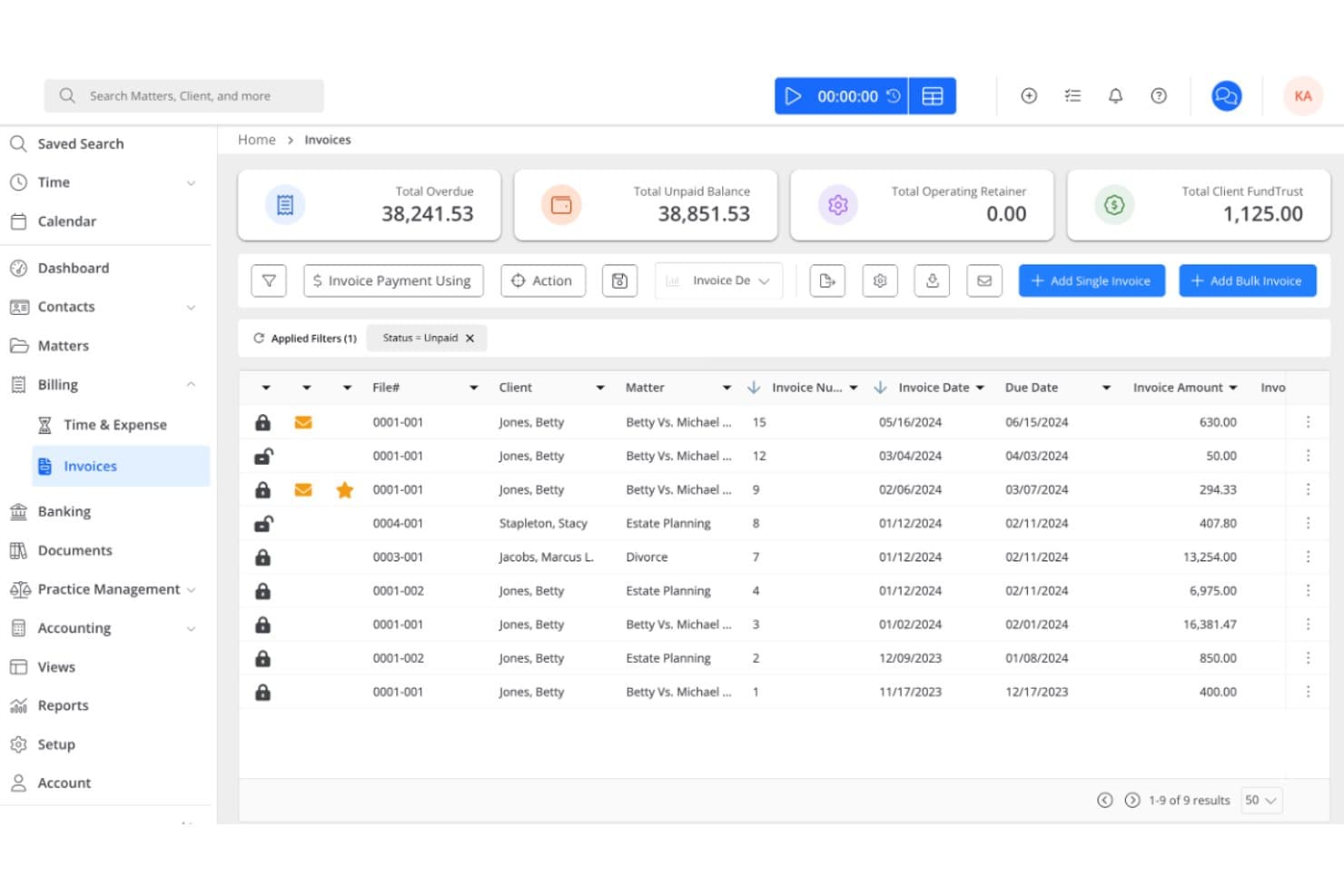
Rocket Matter tracks legal matters, automates billing, and manages trust accounting. Rocket Matter is a cloud-based legal practice management platform for solo attorneys and small firms who need to manage matters, automate billing workflows, and handle trust accounting in one place.
Who Is Rocket Matter Best For?
Rocket Matter is a strong fit for solo attorneys and small firm lawyers who need time tracking, billing, and trust accounting managed in one place.
Why I Picked Rocket Matter
I've included Rocket Matter in my top picks because its accounting depth goes well beyond what most legal practice management tools offer. The Elite plan includes a legal-specific chart of accounts, full account reconciliation across operating, trust, and credit card accounts, and accounts payable tracking with an automatic bank data feed. I especially appreciate how trust accounting is woven into the matter dashboard itself, so deposits, disbursements, and balances are visible right alongside case tasks and billing activity.
Rocket Matter Key Features
- Matter status boards: Track matter progress visually across active cases using configurable status boards tied to each matter.
- Statute-of-limitations calculation: Calculate statutes of limitations directly from the calendar tools within matter records.
- Document assembly: Generate routine legal documents from reusable templates with custom fields that pull matter data automatically.
- Conflict checking: Search matters, contacts, clients, and activities to surface potential conflicts before taking on new work.
Rocket Matter Integrations
Rocket Matter offers native integrations with Microsoft Outlook/Office 365, Google Calendar, QuickBooks Online, OneDrive, NetDocuments, Dropbox, Box, WebCal, and iCalendar. It also lists Zapier and provides a JSON API for custom integrations.
Pros and Cons
Pros:
- Reviewers praise document assembly and time capture
- Matter dashboards pair tasks, deadlines, and billing
- Trust accounting handles matter-level transactions
Cons:
- Stage-triggered task automation remains limited
- No dedicated medical-records tracking for PI cases
Learn more about Rocket Matter: Best for customizable matter management workflows
- Free demo available
- Pricing upon request
Visit WebsiteCustomer Rating:4.2/5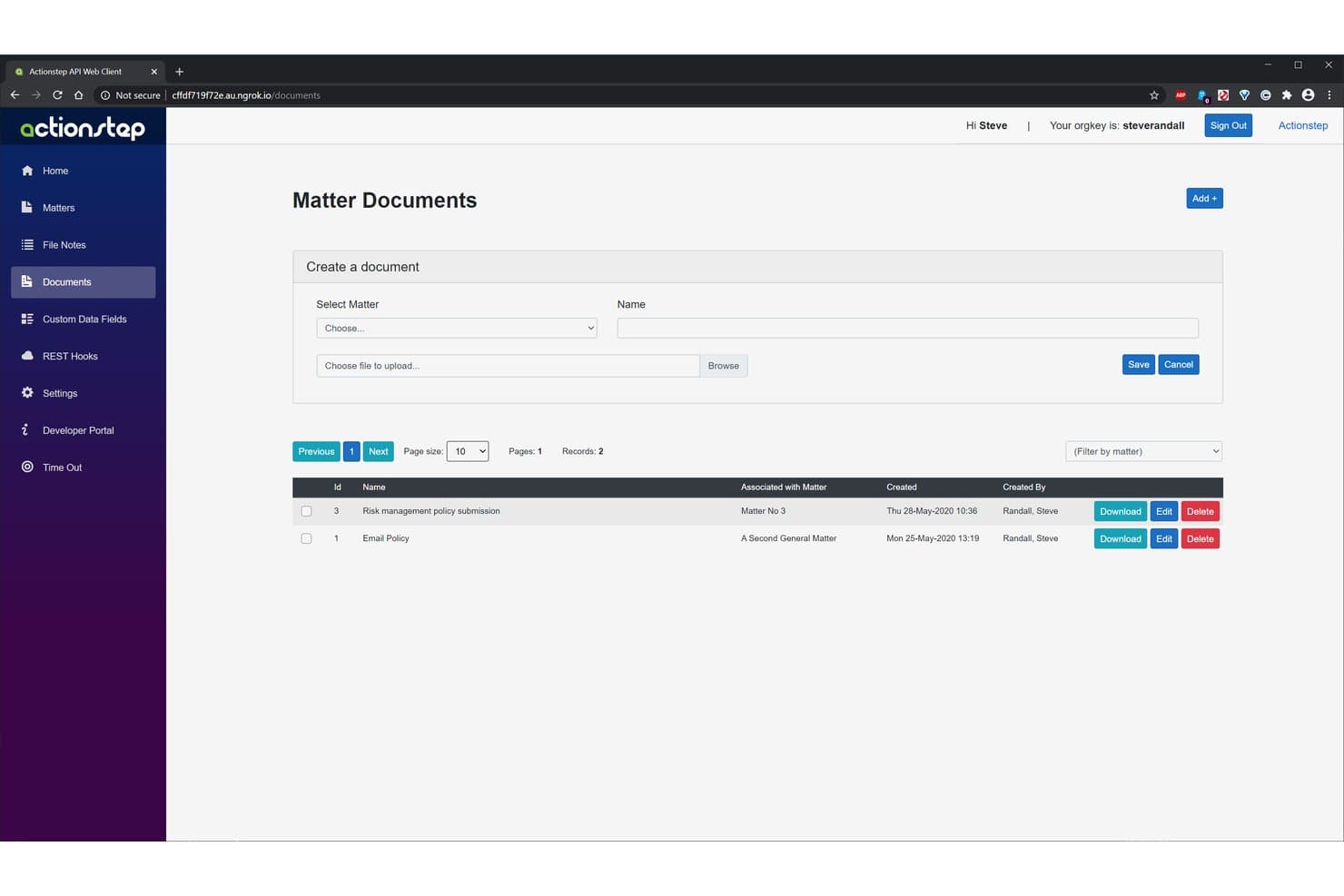
Actionstep offers a Matter Documents interface allowing users to create, upload, and manage documents associated with specific legal matters. Actionstep is a cloud-based legal practice management platform built for law firms that want to centralize matter tracking, document management, billing, and client intake in one configurable system.
Who Is Actionstep Best For?
Actionstep is a strong fit for law firms that need to tailor their matter management workflows to match how their practice actually runs.
Why I Picked Actionstep
I picked Actionstep as one of the best because it lets firms build matter workflows that mirror exactly how their practice operates, rather than forcing teams to adapt to a fixed process. I particularly like how you can configure matter types for personal injury work to capture claim numbers, incident details, and associated parties, then automate task assignments and status updates as a case moves forward. The document template library extends this further, letting my team generate complaints, incident reports, and discovery documents directly from matter data.
Actionstep Key Features
- Client portal: Lets firms share matter updates, documents, and billing information with clients through a secure, dedicated portal.
- Conflict check: Flags potential conflicts of interest before a new matter is opened or a client is onboarded.
- Trace – AI Time Capture: Passively records activity across Outlook, Word, and desktop tools, then maps that activity to matters and drafts billing narratives.
- Acumen – Embedded Analytics: Provides pre-built dashboards and role-based reporting with AI-powered insights drawn directly from your Actionstep data.
Actionstep Integrations
Actionstep offers documented integrations with Xero, Microsoft Office 365 through its Outlook add-in, Google Docs, Dropbox, Box, Google Drive, and Zapier. Its REST API and webhooks support custom integrations.
Pros and Cons
Pros:
- Document templates support complaints and discovery
- Centralized matter records clarify case progress
- Configurable workflows fit personal injury case processes
Cons:
- Saved-email search and document retrieval frustrate users
- Workflow setup demands substantial planning
Learn more about Actionstep: Best for Salesforce-based legal operations
- Free demo available
- Pricing upon request
Visit WebsiteCustomer Rating:4.2/5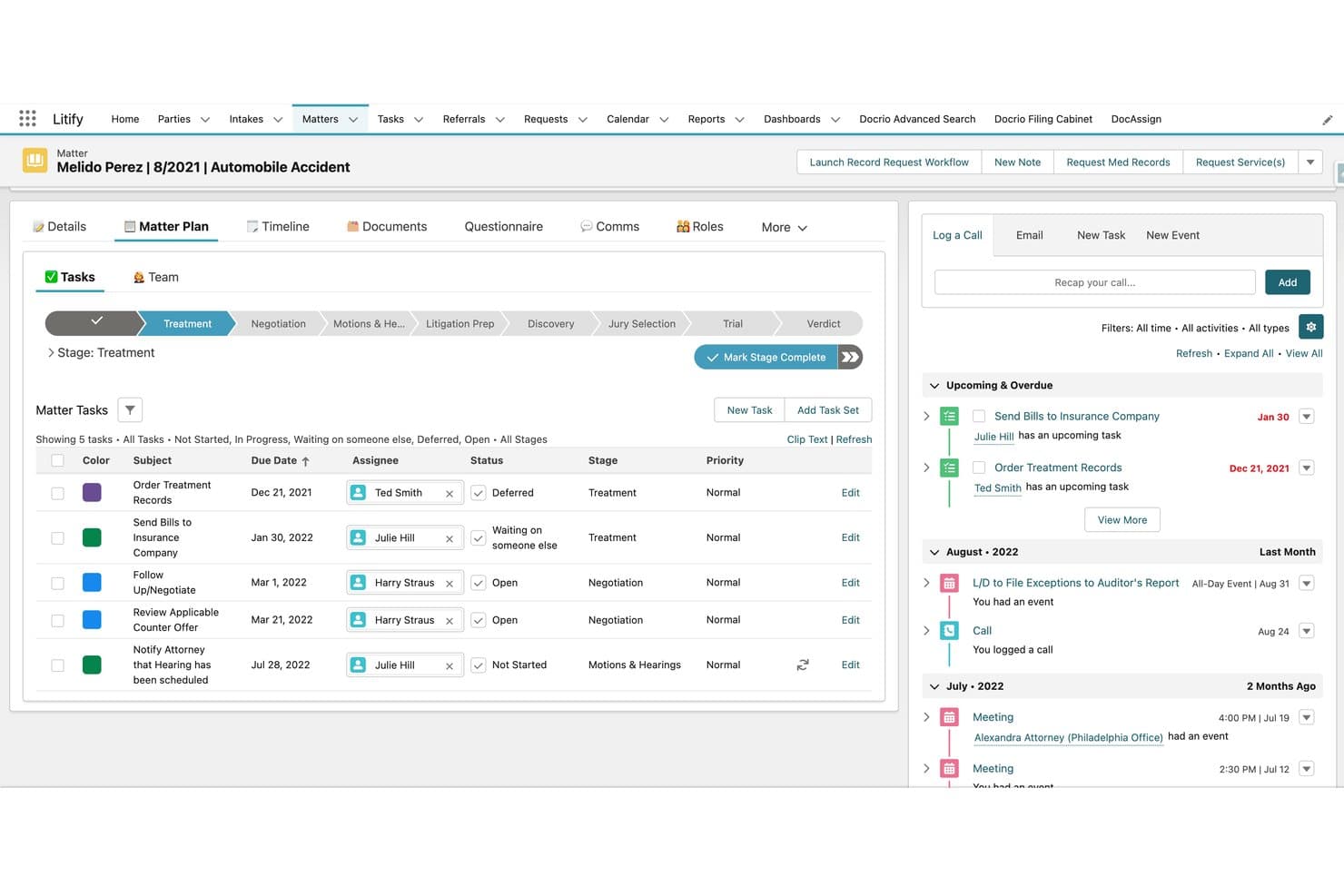
Litify manages personal injury cases, client intake, billing, and AI-powered workflows. Litify is a Salesforce-native legal platform built for law firms and legal departments that need to manage matters, client intake, documents, billing, and reporting in one place—with a strong focus on personal injury practice and AI-powered workflows.
Who Is Litify Best For?
Litify is a strong fit for personal injury law firms and legal departments that are already on Salesforce or want to build their legal operations on top of it.
Why I Picked Litify
I picked Litify as one of the best because it's the only legal case management platform built natively on Salesforce, which means your matter data, workflows, and reporting all live inside an enterprise-grade cloud infrastructure rather than a standalone system. I love how the ACE AI agents handle real litigation work, like drafting demand letters when damages approach policy limits or generating medical chronologies from encounter records, without leaving the platform.
Litify Key Features
- LitifyAI Call Intelligence: AI transcribes calls and voicemails, scores leads, and populates intake questionnaires with caller-linked answers saved directly to Litify records.
- Case Activity Timeline: A chronological matter history organizes files, emails, and calendar events, with filtering by activity type across the full matter lifecycle.
- Legal spend management: AI reviews invoices line by line against preset billing rules and budgets, flags inconsistencies, and applies automatic discounts to late invoices.
- No-code workflow configuration: Users can build and modify matter workflows, automation rules, and reporting dashboards without writing any code.
Litify Integrations
Litify is built on Salesforce and has documented integrations with Outlook, QuickBooks, Accounting Seed, DocuSign, AssureSign, Ironclad, NetDocuments, iManage, Case Status, and CalendarRules. An API is available for custom integrations.
Pros and Cons
Pros:
- AI builds source-linked medical chronologies
- Searchable documents retain version history
- Configurable matter stages surface case progress
Cons:
- Migration and customization can burden smaller teams
- Busy screens complicate matter navigation
Learn more about Litify: Best for rule-based linked court deadlines
- Free demo available
- Pricing upon request
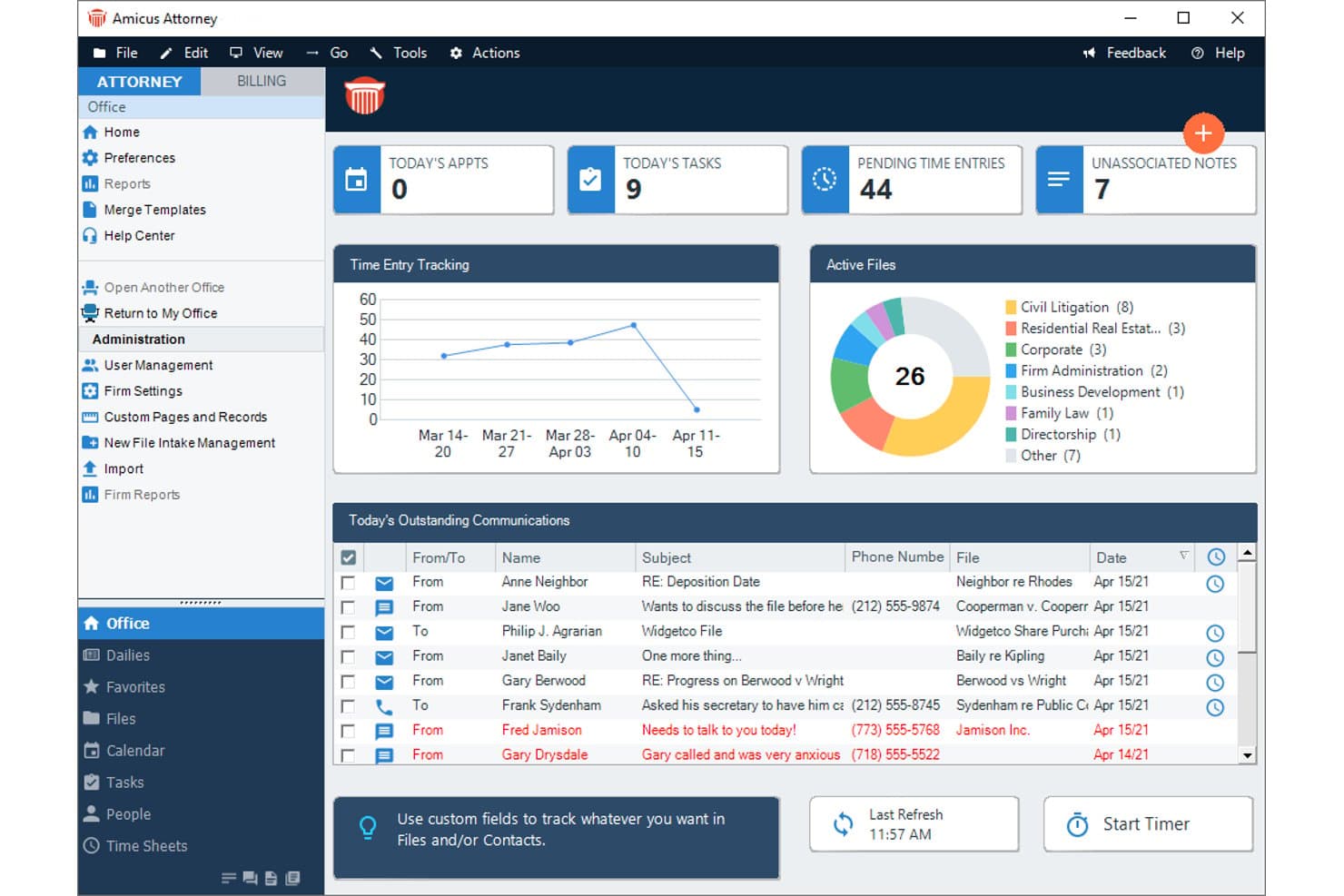
Amicus Attorney displays tasks, files, communications, and deadlines. Amicus Attorney is a legal practice management platform from CARET that brings case files, calendaring, document automation, and billing tools together for law firms that need tight control over deadlines and client communications.
Who Is Amicus Attorney Best For?
Amicus Attorney is a good fit for law firms that handle deadline-heavy litigation and need calendaring rules tied directly to federal, state, and local court rule sets.
Why I Picked Amicus Attorney
I picked Amicus Attorney because its rules-based calendaring engine is genuinely one of the most detailed I've seen in legal practice management. When I add a court date to a matter, the system automatically calculates every linked deadline using the applicable federal, state, or local court rules, and if I change that anchor date, all connected deadlines update with it. The coverage spans federal civil procedure rules plus state rule sets across more than 20 jurisdictions, with California drilling down to individual county superior court rules.
Amicus Attorney Key Features
- Document automation: Pulls data from client matter files to populate and generate legal documents using firm-defined templates.
- Client portal: Lets clients view selected file information, upload documents, and add notes directly to their matter file.
- Background time tracking: Monitors billable activity as you work and flags tasks without a recorded time entry for billing review.
- Communication logging: Records incoming and outgoing email, phone calls, and messages tied to contact cards and matter files.
Amicus Attorney Integrations
Amicus Attorney has native integrations with QuickBooks Desktop, Microsoft Office 365, Outlook, Exchange, Google Contacts & Calendar, and APX PayNow. QuickBooks Online isn’t supported, and Office integrations require 32-bit applications.
Pros and Cons
Pros:
- Matter data feeds template-based document generation
- Reviewers praise calendaring, reminders, and shared updates
- Court-rule deadlines recalculate when anchor dates change
Cons:
- Reviewers report document organization gaps
- No documented medical-record request tracking
Learn more about Amicus Attorney:
Alte alternative la SmartAdvocate
Iată câteva opțiuni suplimentare care nu au ajuns pe lista mea scurtă, dar merită totuși analizate:
- 11MyCaseBest for AI-powered matter summaries
- 12PracticePantherBest for matter-linked trust accounting
- 13CARET LegalBest for guided legacy-system migration
- 14CasePeerBest for PI treatment and lien tracking
- 15Tabs3Best for firms already using Tabs3 billing
- 16NeosBest for cited medical chronologies and demands
- 17DocketWiseBest for immigration firms tracking USCIS cases
- 18LexzurBest for firms needing on-server hosting
- 19MerusCaseBest for firms replacing legacy case systems
- 20SimpleLawBest for finding paralegals and co-counsel
Related Reviews
How I Evaluate SmartAdvocate Alternatives
I split my evaluation into three parts. First, core functionality: alternatives must organize the full matter lifecycle and store and generate case-linked documents—these carry the most weight. Second, I look for standout features like litigation workflow automation and medical records tracking. Third, I consider onboarding depth and pricing transparency.
Core Functionality (Table Stakes For This List)
When I'm selecting tools for my list, I score each one on a scale from 0 (does not offer the functionality) to 5 (excels in this area) for each core functionality listed below. I then convert the total into a percentage to help assess each tool's overall fit, with extra weight on any functionalities I’ve deemed essential.
- Matter Tracking (Essential): I look for clear case stages, timelines, and key dates, so staff can see what needs attention across a growing caseload.
- Document Management (Essential): I assess whether teams can organize case files, find records, and generate routine documents from matter details and templates.
- Tasks & Deadlines: I check for matter-linked reminders, assigned tasks, and rule-based deadlines that help staff manage filing dates and follow-ups.
- Contacts & Communications: I look for client and third-party records linked to matters, with searchable communication histories for handoffs and status checks.
- Intake & Leads: I evaluate how forms, referrals, and follow-ups move a prospective client from first contact into an active matter.
- Billing & Finances: I check for matter-linked time, expenses, invoices, and trust accounting that support routine financial reviews.
Once I have a list of tools that meet the criteria, I consider what sets each platform apart.
Differentiating Factors (What Sets Vendors Apart)
Here's how I compare and contrast different vendors:
Standout Features
I look for litigation workflow automation that triggers tasks based on case milestones—like sending a demand letter once treatment ends—since manual tracking breaks down as caseloads grow. Medical provider and records tracking matters just as much; I evaluate whether a platform has dedicated modules for treatment histories and damages, not just generic notes fields. I also check for referral and co-counsel tracking, which firms with active referral networks need to manage fee splits accurately.
Beyond Features
I evaluate how each platform handles data migration, since moving years of case histories and documents from a legacy system can stall a rollout if the vendor only offers self-service imports. Pricing structure matters too—per-user fees hit small firms differently than flat-rate plans, and hidden costs for modules like AI or document generation can shift the total well beyond the listed price. I also check whether a tool integrates with accounting platforms like QuickBooks and court e-filing services, because gaps there force staff into manual data entry between systems.
De ce să cauți alternative la SmartAdvocate?
Deși SmartAdvocate este o alegere bună de software pentru gestionarea dosarelor juridice, unele echipe caută alte opțiuni atunci când configurarea sau procesul de achiziție nu corespund nevoilor lor. Este posibil să cauți o alternativă la SmartAdvocate deoarece:
- Vrei prețuri publicate, pentru a compara costurile înainte de a programa o demonstrație.
- Ai nevoie de fluxuri de lucru specifice domeniului de practică, care să corespundă spețelor gestionate de echipa ta.
- Preferi accesul exclusiv prin cloud, fără o opțiune de implementare pe server.
- Ai nevoie de mai multe informații despre integrările disponibile înainte de a te angaja față de o platformă.
Dacă te regăsești în oricare dintre aceste situații, ai ajuns în locul potrivit. Lista mea conține mai multe opțiuni de software pentru gestionarea dosarelor juridice, mai potrivite pentru echipele care se confruntă cu aceste provocări în cazul SmartAdvocate și caută soluții alternative.
Funcțiile principale ale SmartAdvocate
Iată funcțiile principale ale SmartAdvocate, pentru a te ajuta să îl compari cu opțiunile alternative:
- Preluarea clienților: SmartAdvocate acceptă fluxuri de lucru pentru preluarea clienților potențiali și a spețelor acestora în sistem. Astfel, echipele au un loc în care pot gestiona preluarea clienților împreună cu informațiile despre dosare.
- Urmărirea dosarelor: Platforma organizează informațiile despre dosare și urmărește spețele pe parcursul litigiilor. Echipele o pot utiliza pentru a verifica evoluția dosarelor și pentru a păstra împreună detaliile spețelor.
- Generarea documentelor: SmartAdvocate poate genera documente folosind informațiile despre dosare. Acest lucru sprijină pregătirea documentelor de rutină fără ca personalul să fie nevoit să introducă de fiecare dată de la zero detaliile speței.
- Gestionarea termenelor-limită: Platforma include instrumente pentru gestionarea termenelor-limită ale dosarelor. Echipele le pot utiliza pentru a monitoriza datele importante și pentru a menține vizibile obligațiile privind depunerile și acțiunile ulterioare.
- Proceduri automate pentru dosare: SmartAdvocate acceptă proceduri automate pentru dosare. Acestea pot ajuta echipele să gestioneze pașii recurenți din fluxul de lucru al unei spețe.
- Raportare: Instrumentele de raportare permit echipelor să verifice informațiile și activitatea dosarelor. Firmele pot utiliza rapoartele pentru a verifica spețele și pentru a supraveghea fluxurile de lucru interne.
- Rezumate ale dosarelor medicale: SmartAdvocate include instrumente pentru rezumarea dosarelor medicale. Acest lucru poate ajuta echipele specializate în vătămări corporale să verifice documentele ca parte a pregătirii dosarului.
- Portal pentru clienți: Portalul pentru clienți le oferă acestora o modalitate de a accesa informații legate de dosar. El le oferă firmelor un canal dedicat pentru interacțiunea cu clienții în cadrul platformei.
- Semnături electronice: SmartAdvocate include instrumente pentru semnarea electronică a documentelor. Echipele le pot utiliza pentru documentele care necesită semnătura clientului sau a unei alte părți.
- Acces prin cloud sau server: Firmele pot alege accesul bazat pe cloud sau pe server. Astfel, echipele au o opțiune de implementare care se poate potrivi configurației tehnologice existente.
Costurile și prețurile alternativelor la SmartAdvocate
Prețurile variază în funcție de funcționalități, dimensiunea echipei, suplimente și necesitățile de implementare. Iată intervalele de preț și funcționalitățile tipice la care vă puteți aștepta de la alternativele la SmartAdvocate:
Tabel comparativ al planurilor pentru alternativele la SmartAdvocate
| Tip de plan | Preț mediu | Funcționalități comune |
|---|---|---|
| Tip de planPlan gratuit | Preț mediu$0 | Funcționalități comunePerioade de testare gratuite, instrumente AI sau de preluare a datelor cu funcționalități limitate, acces de bază la cont și fără gestionarea completă a cazurilor. |
| Tip de planPlan personal | Preț mediu$40-$60/utilizator/lună | Funcționalități comuneGestionarea cazurilor și a contactelor, urmărirea calendarului și a sarcinilor, stocarea documentelor și înregistrarea timpului. |
| Tip de planPlan pentru companii | Preț mediu$60-$125/utilizator/lună | Funcționalități comuneFuncționalitățile planului personal, automatizarea fluxurilor de lucru, portaluri pentru clienți, generarea documentelor și raportare. |
| Tip de planPlan pentru întreprinderi | Preț mediu$100-$200/utilizator/lună | Funcționalități comuneFuncționalitățile planului pentru companii, permisiuni avansate, integrări personalizate, implementare inițială dedicată și asistență adaptată. |