

Înțelegerea și gestionarea peisajului juridic poate fi dificilă, mai ales atunci când trebuie să gestionezi mai multe cazuri. Programele de analiză a cazurilor îți pot ușura munca prin organizarea datelor și sprijinirea luării unor decizii informate.
Din experiența mea, găsirea instrumentului potrivit este esențială pentru succesul echipei tale. Mă concentrez pe testări și recenzii independente, astfel încât să poți avea încredere că informațiile mele sunt imparțiale și bine documentate.
Acest articol te va ghida prin alegerile mele principale, evidențiind funcțiile acestora și modul în care îți pot răspunde nevoilor specifice. Vei înțelege clar ce oferă fiecare program, ceea ce te va ajuta să alegi cea mai potrivită soluție pentru cabinetul sau firma ta.
Why Trust Our Software Recommendations
6,700+
Reviews
20
Industry experts
16+
Evaluation factors
14
Years
Our team has been testing and reviewing software since 2012. As legal practice leaders ourselves, we know how difficult—and important—it is to choose the right software.
For this guide, we evaluated tools using hands-on testing and independent research, scoring tools using our selection criteria.
Our reviews reflect our human editorial judgment, not a sales pitch.
Tabel comparativ al programelor de analiză a cazurilor
Acest tabel comparativ prezintă pe scurt detaliile de preț pentru principalele mele selecții de programe de analiză a cazurilor
Sorted by: Default
| Tool | Starting Price | Website | |
|---|---|---|---|
Best for small law firms | 4.8 out of 5 | Pricing upon request Free trial available | Website |
Best for cloud-based access | 4.7 out of 5 | $49/user/month 7-day free trial | Website |
Best for contract analysis | 4.7 out of 5 | Pricing upon request Free demo available | Website |
Best for no-code automation | 4.7 out of 5 | Pricing upon request Free trial available | Website |
Best for integrated billing | 4.3 out of 5 | $49/user/month 10-day free trial + free demo available | Website |
Best for document management | 4.3 out of 5 | Pricing upon request Free demo available | Website |
Best for data visualization | Not rated | $50/user/month Free demo available | Website |
Best for personal injury cases | Not rated | Pricing upon request Free demo available | Website |
Best for in-house legal teams | Not rated | $35/user/month Free demo available | Website |
Best with specialty-specific case workflows | 4.8 out of 5 | Pricing upon request Free trial available | Website |


Recenzii ale celor mai bune programe de analiză a cazurilor
Mai jos sunt prezentate rezumatele mele detaliate ale celor mai bune programe de analiză a cazurilor care au ajuns pe lista mea scurtă. Recenziile mele oferă o privire detaliată asupra funcțiilor principale, avantajelor și dezavantajelor, integrărilor și cazurilor ideale de utilizare pentru fiecare instrument, pentru a te ajuta să îl găsești pe cel mai potrivit pentru tine.


Smokeball Legal Case Analysis Software Interface Smokeball is a legal practice management software designed for small law firms. It assists in case management, billing, and client onboarding.
Why I picked Smokeball: Smokeball offers a user-friendly interface tailored for small law firms, making it easy for your team to manage cases efficiently. Its automatic time tracking and document automation are particularly beneficial for firms with limited resources. The platform's library of over 20,000 legal forms supports diverse legal needs, enhancing the value it provides to smaller practices. Additionally, its exceptional client support ensures your firm gets the help needed to maximize productivity.
Standout features & integrations:
Features include automatic time tracking, which captures every minute spent on a case without manual input. Document automation simplifies the creation of legal documents, saving you time and reducing errors. The library of over 20,000 legal forms ensures you have the right tools for any case.
Integrations include Microsoft Word, Outlook, LawPay, NetDocuments, Xero, QuickBooks Online, Dropbox, Google Calendar, and RingCentral.
Pros and Cons
Pros:
- Versatile for different practice areas
- Extensive legal form library
- Automatic time tracking
Cons:
- Learning curve for new users
- May not fit large firms
- Limited customization options
Learn more about Smokeball: 2Best for cloud-based access
Clio
- 7-day free trial
- From $49/user/month
Visit WebsiteCustomer Rating:4.7/5
Clio Legal Case Analysis Software Interface Clio is a cloud-based legal practice management software aimed at legal professionals. It supports case management, billing, and client interactions.
Why I picked Clio: Clio offers cloud-based access, allowing your team to work from anywhere, which is perfect for remote or hybrid work environments. Its comprehensive case management features ensure that all case-related information is easily accessible. The billing and time-tracking functionalities are integrated, making it simple for your team to manage finances without hassle. The platform's focus on accessibility and efficiency makes it ideal for firms looking to modernize their operations.
Standout features & integrations:
Features include intuitive time tracking, which helps you keep accurate records of billable hours. Document management is straightforward, allowing you to store and organize files efficiently. The client portal feature enables secure communication with clients, enhancing collaboration.
Integrations include Microsoft Office 365, Google Workspace, QuickBooks Online, Xero, Dropbox, NetDocuments, LawPay, Zapier, Box, and Zoom.
Pros and Cons
Pros:
- Integrated billing and time tracking
- Ideal for remote work
- Comprehensive case management tools
Cons:
- Some features need customization
- May require frequent updates
- Steep learning curve
Learn more about Clio:

Linksquares Legal Case Analysis Software Interface LinkSquares is a contract management software designed for legal teams and businesses. It specializes in contract analysis and lifecycle management.
Why I picked LinkSquares: LinkSquares excels in contract analysis, providing your team with the tools to quickly search and review contracts. Its AI-driven insights help identify key terms and obligations, reducing the time spent on manual reviews. The platform's reporting features give your team a clear overview of contract statuses and deadlines. In my experience, its focus on contract efficiency and accuracy makes it a valuable tool for businesses handling numerous agreements.
Standout features & integrations:
Features include AI-driven insights, which help your team understand and manage contract obligations. The reporting tools offer a comprehensive view of your contracts, ensuring deadlines are never missed. Automated alerts keep you updated on contract renewals and expirations.
Integrations include Salesforce, DocuSign, NetDocuments, Box, Dropbox, Microsoft OneDrive, Google Drive, Adobe Sign, Slack, and Okta.
Pros and Cons
Pros:
- Automated alerts for deadlines
- Comprehensive reporting tools
- AI-driven contract insights
Cons:
- Initial setup complexity
- Occasional data sync issues
- No clear pricing information available upfront
Learn more about LinkSquares: Best for no-code automation
- Free trial available
- Pricing upon request
Visit WebsiteCustomer Rating:4.7/5
Bryter Legal Case Analysis Software Interface BRYTER is a no-code automation platform designed for legal professionals and businesses looking to automate processes without technical expertise. It enables users to create applications that streamline workflows and enhance operational efficiency.
Why I picked BRYTER: BRYTER allows your team to automate complex workflows without needing coding skills, making it accessible for legal teams. Its drag-and-drop interface simplifies application building, enabling quick deployment of automated processes. You can create decision trees and automate routine tasks, freeing up your team to focus on more strategic work. In my experience, its no-code approach empowers legal teams to innovate without relying on IT departments.
Standout features & integrations:
Features include a drag-and-drop interface that simplifies the creation of automated workflows. Decision tree capabilities help your team map out processes clearly and efficiently. The platform also supports the quick deployment of applications, making it easier for your team to adapt to changing needs.
Integrations include Microsoft Teams, Slack, Salesforce, DocuSign, Office 365, Google Workspace, SAP, ServiceNow, SharePoint, and Workday.
Pros and Cons
Pros:
- Empowers legal teams to innovate
- Quick application deployment
- Allows for the creation of complex, logic-based applications
Cons:
- Limited to specific use cases
- May require user training
- Occasional performance issues
Learn more about BRYTER: Best for integrated billing
- 10-day free trial + free demo available
- From $49/user/month (billed annually)
Visit WebsiteCustomer Rating:4.3/5
CosmoLex Legal Case Analysis Software Interface CosmoLex is a legal practice management software tailored for small to mid-sized law firms. It handles case management, billing, and trust accounting in one platform.
Why I picked CosmoLex: CosmoLex excels in integrated billing, which simplifies your firm's financial operations by combining billing with practice management. It offers features like time tracking and billing compliance, ensuring accuracy in invoicing. The trust accounting feature helps you manage client funds without needing separate software. In my experience, its all-in-one approach reduces the need for additional tools, saving your team time and effort.
Standout features & integrations:
Features include trust accounting, which allows you to manage client funds effectively. The compliance tracking feature ensures your firm stays aligned with industry standards. Automated billing processes help your team generate invoices quickly and accurately.
Integrations include QuickBooks Online, LawPay, NetDocuments, Dropbox, Box, Google Calendar, Microsoft Outlook, Stripe, PayPal, and Xero.
Pros and Cons
Pros:
- Compliance tracking included
- Comprehensive trust accounting
- Integrated billing feature
Cons:
- Limited mobile app features
- Some users find interface dated
- Not ideal for large firms
Learn more about CosmoLex: 6Best for document management
LEAP
- Free demo available
- Pricing upon request
Visit WebsiteCustomer Rating:4.3/5
Leap Legal Case Analysis Software Interface LEAP is a legal practice management software aimed at law firms of all sizes, focusing on document management and case handling. It offers a comprehensive suite of tools for managing legal documents, billing, and client communication.
Why I picked LEAP: LEAP excels in document management, providing your team with the tools to efficiently store, organize, and access legal documents. Its cloud-based system ensures that your documents are available anytime and anywhere. The software's automated workflows help reduce the manual handling of documents, saving time. In my experience, its strong document management capabilities make it a valuable asset for any law firm.
Standout features & integrations:
Features include automated workflows, which simplify the management of repetitive tasks. The time tracking feature integrates seamlessly with billing, ensuring accurate invoicing. Document automation helps your team create and manage documents quickly and efficiently.
Integrations include Microsoft Office 365, QuickBooks Online, LawPay, Xero, Dropbox, Google Workspace, NetDocuments, InfoTrack, DocuSign, and Adobe Acrobat.
Pros and Cons
Pros:
- Seamless time tracking and billing
- Automated workflows simplify tasks
- Strong document management capabilities
Cons:
- Limited customization options
- Some features need updates
- Occasional performance issues
Learn more about LEAP: Best for data visualization
- Free demo available
- From $50/user/month (billed annually)

LexisNexis Legal Case Analysis Software Interface LexisNexis CaseMap is a case analysis tool designed for legal professionals who need to manage and analyze case facts. It aids in organizing case information and visualizing data to support legal strategies.
Why I picked LexisNexis CaseMap: Its data visualization capabilities help your team map out case details clearly and effectively. You can link facts, issues, and evidence, making it easier to spot connections and build strong arguments. The tool's ability to create timelines and reports enhances your team's ability to communicate case strategies. In my experience, its focus on visual data representation makes it particularly useful for complex cases.
Standout features & integrations:
Features include the ability to create detailed timelines that help your team track case events. The reporting tools offer insights into case progress, aiding in effective case management. You can also link evidence directly to facts, providing a comprehensive view of your case.
Integrations include Microsoft Word, Microsoft Excel, Adobe Acrobat, Concordance, TextMap, TimeMap, Sanction, and Case Notebook.
Pros and Cons
Pros:
- Timelines enhance case tracking
- Links facts and evidence
- Effective data visualization tools
Cons:
- May require detailed setup
- Limited customization options
- Some features need updates
Learn more about LexisNexis CaseMap:

Prevail Legal Case Analysis Software Interface Prevail is a case management software designed specifically for legal professionals handling personal injury cases. It helps manage client information, track case progress, and handle billing and documentation.
Why I picked Prevail: Prevail is tailored for personal injury cases, offering specialized features that cater to this legal area. It includes tools for managing medical records and settlement tracking, which are crucial for personal injury work. The software's case tracking capabilities ensure you stay on top of every detail. In my experience, its focus on personal injury makes it a strong choice for firms specializing in this field.
Standout features & integrations:
Features include detailed medical records management, which helps your team keep track of essential client information. The settlement tracking feature ensures you manage and monitor settlements efficiently. Case tracking provides a comprehensive view of each case's progress, helping you keep everything organized.
Integrations include Microsoft Outlook, QuickBooks, Microsoft Word, Adobe Acrobat, Excel, Westlaw, LexisNexis, PCLaw, Tabs3, and Time Matters.
Pros and Cons
Pros:
- Comprehensive settlement tracking
- Efficient medical records management
- Specialized for personal injury cases
Cons:
- May require training for new users
- Occasional performance lags
- Limited customization options
Learn more about Prevail: Best for in-house legal teams
- Free demo available
- From $35/user/month (billed annually)

Ontra Legal Case Analysis Software Interface Ontra is a contract automation and management platform tailored for in-house legal teams. It focuses on automating routine contract tasks and managing legal workflows.
Why I picked Ontra: Ontra provides in-house legal teams with tools to manage and automate contract workflows efficiently. Its platform supports automated contract creation, reducing the manual workload for your team. The contract tracking feature ensures that you can monitor the status and progress of each contract easily. In my experience, its focus on automation helps legal teams improve productivity and manage contracts with greater accuracy.
Standout features & integrations:
Features include automated contract creation, which simplifies the process of drafting and managing contracts. The platform also offers contract tracking, allowing you to keep tabs on contract progress and deadlines. Its reporting tools give you insights into contract performance and team efficiency.
Integrations include Salesforce, DocuSign, Box, Dropbox, Google Drive, Microsoft OneDrive, Slack, Adobe Sign, Microsoft Teams, and SAP.
Pros and Cons
Pros:
- Provides insightful reporting tools
- Comprehensive contract tracking and automation
- Tailored for in-house legal teams
Cons:
- Pricing might be higher compared to other basic legal software tools
- The learning curve for leveraging AI features
- Might be overkill for smaller law firms or solo practitioners
Learn more about Ontra: 10Best with specialty-specific case workflows
8am
- Free trial available
- Pricing upon request
Visit WebsiteCustomer Rating:4.8/5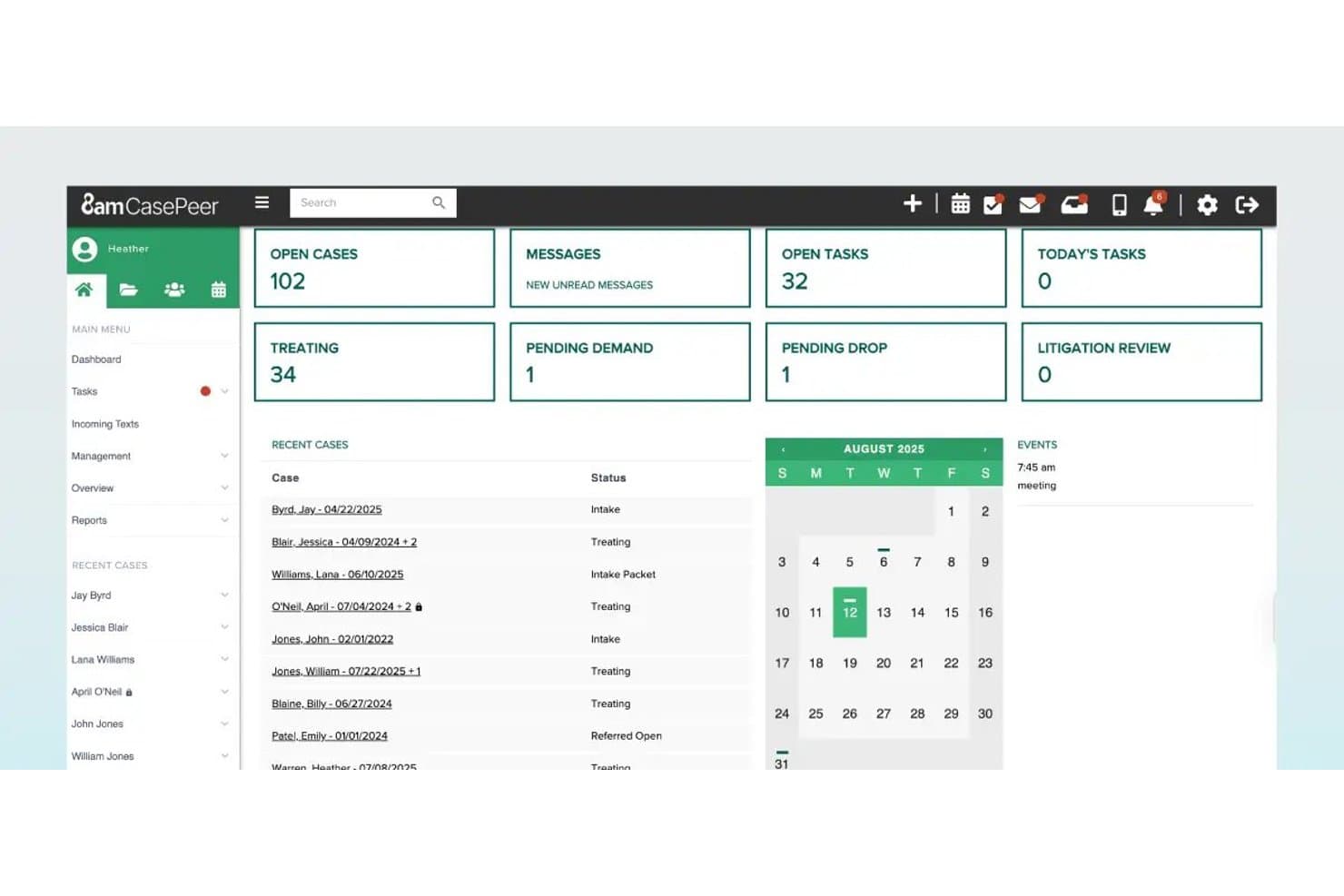
8am offers a comprehensive case management dashboard displaying open cases, tasks, treating status, and a calendar with recent case activity for law practices. 8am is a legal case analysis and management platform designed for modern law practices, offering robust tools for organizing facts, managing evidence, building timelines, mapping issues, and supporting collaboration across litigation teams.
Who Is 8am Best For?
Litigation attorneys and legal teams in small to midsize firms seeking tailored workflows for practice areas like personal injury, immigration, or family law.
Why I Picked 8am
I picked 8am because my team gets access to practice-area workflows for litigation, personal injury, and immigration. I like that we can track facts and evidence by issue or role, then pull timelines unique to each case type. The specialty-specific case workflows set 8am apart.
8am Key Features
- Document management: Upload, organize, and search documents linked to each case file.
- Role-based access control: Assign user permissions by role for secure case collaboration.
- Integrated e-signature: Capture legally binding signatures directly within the platform.
- Custom reporting tools: Generate and export case status, evidence logs, and court-ready documents.
8am Integrations
8am offers native integrations with LawPay, DocketWise, CPACharge, QuickBooks, DocuSign, Microsoft 365, and Google Workspace. An API is available for custom integrations.
Pros and Cons
Pros:
- Role-based evidence and fact tracking
- Timeline tools tailored for litigation use
- Specialty workflows for multiple practice areas
Cons:
- Complex for firms with high-volume imports
- Limited advanced fact dispute labeling
Learn more about 8am:
Alte programe de analiză a cazurilor juridice
Iată câteva opțiuni suplimentare de programe de analiză a cazurilor care nu au ajuns pe lista mea scurtă, dar care merită totuși analizate:
- 11CasePeerBest for advanced case analytics
- 12FilevineBest for case collaboration
- 13Rocket MatterBest for cloud-based billing
- 14Thomson Reuters WestlawBest for legal research
How I Evaluate Case Analysis Software
I break down case analysis tools in two layers: the non-negotiables—like fact-to-evidence linking and timeline construction—and the differentiators that separate strong options.
Core Functionality (Table Stakes For This List)
When I'm selecting tools for my list, I rank each one on a scale from 0 (does not offer the functionality) to 5 (excels in this area) for each core functionality listed below. Then, I calculate the tool's total score into a percentage. Each tool needs to achieve a minimum total score of 65% to be considered for inclusion.
- Fact Management & Organization: I look for tools that let you tag, categorize, and link individual facts to sources—like connecting a witness statement to a disputed event or tying a contract clause to a breach allegation.
- Timeline Construction: A good case analysis tool should generate visual, filterable timelines from dated entries, which is especially useful when you're mapping out months of communications in a contract dispute.
- Evidence & Document Linking: I evaluate how each tool connects documents to facts and issues, checking whether you can link a specific exhibit page to a fact entry rather than just attaching a file to the case.
- Issue & Claim Mapping: Each tool should let you organize claims and legal elements in a structured way, such as mapping each element of a negligence cause of action to its supporting facts and evidence.
- Case Collaboration: I check whether teams can work on the same case file with role-based permissions—for example, giving a paralegal editing access to the fact database while limiting associate access to read-only on strategy notes.
- Reporting & Analysis Output: The platform should produce exportable reports and summaries, like a fact-by-issue matrix or a chronological evidence summary you can hand to trial counsel or attach to a motion.
Once I have a list of tools that meet this criteria, I consider what sets each platform apart.
Differentiating Factors (What Sets Vendors Apart)
Here's how I compare and contrast different vendors:
Standout Features
Visual relationship mapping is a major differentiator—being able to diagram how witnesses, entities, and evidence connect in a multi-party dispute saves hours of manual charting. I also evaluate whether a tool offers deposition and transcript analysis, since linking testimony to case facts at the citation level changes how you prep for cross-examination. AI-powered pattern detection is worth watching too, especially for surfacing overlooked connections across large fact sets.
Beyond Features
Security matters here more than in most software categories—case files contain privileged communications and confidential client data. I check for end-to-end encryption and role-based access that aligns with professional conduct obligations. Integration with your existing stack is another key consideration, particularly whether the tool connects to your practice management platform or document management system. I also evaluate how well each tool handles scale, since a platform that works fine for a two-party contract claim may struggle with a mass tort involving thousands of linked facts.
Cum alegi un program de analiză a cazurilor juridice
Este ușor să te pierzi în liste lungi de funcții și structuri complexe de prețuri. Pentru a te ajuta să rămâi concentrat în timp ce parcurgi procesul unic de selectare a programului, iată o listă de verificare cu factorii de care trebuie să ții cont:
| Factor | Ce trebuie să iei în considerare |
|---|---|
| FactorScalabilitate | Ce trebuie să iei în considerareProgramul se dezvoltă odată cu firma ta? Verifică dacă poate gestiona o creștere a numărului de cazuri sau de utilizatori fără creșteri semnificative ale costurilor sau probleme de performanță. |
| FactorIntegrări | Ce trebuie să iei în considerareVerifică dacă programul funcționează cu instrumentele existente, precum sistemele de gestionare a documentelor sau de facturare. Lipsa integrării poate duce la silozuri de date și ineficiență. |
| FactorPosibilități de personalizare | Ce trebuie să iei în considerareEvaluează dacă poți adapta programul pentru a se potrivi fluxurilor tale de lucru. Caută tablouri de bord configurabile sau șabloane de rapoarte potrivite nevoilor firmei tale. |
| FactorUșurință în utilizare | Ce trebuie să iei în considerareEvaluează curba de învățare pentru echipa ta. O interfață complexă poate încetini adoptarea. Caută o navigare intuitivă și instrucțiuni clare. |
| FactorImplementare și integrare inițială | Ce trebuie să iei în considerareCât de repede poți începe să folosești programul? Ține cont de disponibilitatea resurselor de instruire și a asistenței în etapa inițială de configurare. |
| FactorCost | Ce trebuie să iei în considerareAnalizează costul total de deținere, inclusiv taxele ascunse sau costurile pentru funcții suplimentare. Asigură-te că prețul se încadrează în bugetul tău și oferă un raport bun între valoare și cost. |
| FactorMăsuri de securitate | Ce trebuie să iei în considerareVerifică dacă programul îndeplinește standardele tale de securitate. Asigură-te că oferă criptarea datelor, copii de siguranță regulate și respectă reglementările relevante privind protecția datelor. |
| FactorDisponibilitatea asistenței | Ce trebuie să iei în considerareȚine cont de nivelul de asistență oferit. Este disponibilă asistență non-stop? Verifică dacă există mai multe canale, precum telefonul, e-mailul sau chatul, și evaluează promptitudinea și eficiența echipei de asistență. |
Ce este un program de analiză a cazurilor juridice?
Programele de analiză a cazurilor juridice sunt instrumente tehnologice pentru firmele de avocatură, care îi ajută pe avocați și pe echipele juridice să cerceteze jurisprudența, să organizeze probele și să dezvolte strategii juridice mai solide. Aceste platforme utilizează adesea inteligența artificială, funcții analitice și funcții de gestionare a documentelor pentru a simplifica cercetarea juridică, a anticipa rezultatele cazurilor și a reduce timpul alocat verificării manuale.
Transformând datele complexe în informații utile, programele de analiză a cazurilor juridice îmbunătățesc precizia, cresc eficiența și sprijină luarea unor decizii mai eficiente în litigii și în activitatea de consultanță.
Funcții
Atunci când alegi un program de analiză a cazurilor juridice, urmărește următoarele funcții esențiale:
- Gestionarea documentelor: Organizează și stochează documentele juridice în siguranță, făcându-le ușor accesibile pentru analiza cazurilor și colaborare.
- Urmărirea cronologiei: Ajută la urmărirea evenimentelor și termenelor-limită ale cazurilor, asigurându-se că echipa dumneavoastră nu pierde din vedere datele și etapele importante.
- Comunicarea cu clienții: Facilitează comunicarea sigură și eficientă cu clienții, îmbunătățind colaborarea și satisfacția acestora.
- Fluxuri de lucru automatizate: Reduce sarcinile manuale prin automatizarea proceselor de rutină, economisind timp și reducând erorile.
- Capacități de integrare: Se conectează la instrumentele și sistemele existente, asigurând un flux fluid al datelor și reducând izolarea acestora.
- Panouri de control personalizabile: Vă permite să adaptați interfața pentru a afișa informații relevante, îmbunătățind eficiența fluxului de lucru.
- Urmărirea timpului: Înregistrează cu exactitate orele facturabile, ajutând la facturare și la gestionarea financiară.
- Măsuri de securitate: Oferă criptarea datelor și conformitatea cu reglementările privind protecția datelor pentru a menține în siguranță informațiile sensibile.
- Instrumente de raportare: Oferă informații despre progresul cazurilor și performanța echipei, sprijinind luarea deciziilor strategice.
- Perspective bazate pe AI: Analizează datele pentru a oferi informații utile, ajutând echipele juridice să ia decizii bine fundamentate.
Beneficii
Implementarea unui software pentru analiza cazurilor juridice oferă mai multe beneficii pentru echipa și compania dumneavoastră. Iată câteva dintre acestea:
- Organizare îmbunătățită: Păstrează documentele și informațiile despre cazuri organizate, facilitând accesul echipei dumneavoastră la date și gestionarea acestora.
- Eficiență sporită: Automatizează sarcinile și fluxurile de lucru de rutină, economisind timp și reducând riscul de erori.
- Comunicare îmbunătățită: Facilitează interacțiunea sigură cu clienții, ajutând la menținerea unor relații solide și asigurând o comunicare clară.
- Facturare precisă: Urmărește cu exactitate orele facturabile, simplificând facturarea și gestionarea financiară.
- Luarea unor decizii mai bune: Oferă informații și analize, ajutând echipa dumneavoastră să ia decizii bine fundamentate pe baza datelor în timp real.
- Asigurarea conformității: Se asigură că firma dumneavoastră respectă reglementările privind protecția datelor, menținând informațiile sensibile în siguranță și conforme.
- Scalabilitate: Se dezvoltă odată cu firma dumneavoastră, permițând gestionarea unui număr mai mare de cazuri și utilizatori pe măsură ce compania se extinde.
Costuri și prețuri
Selectarea unui software pentru analiza cazurilor juridice necesită înțelegerea diferitelor modele și planuri de preț disponibile. Costurile variază în funcție de caracteristici, dimensiunea echipei, suplimente și alți factori. Tabelul de mai jos prezintă un rezumat al planurilor comune, al prețurilor medii și al caracteristicilor incluse de obicei în soluțiile software pentru analiza cazurilor juridice:
Tabel comparativ al planurilor pentru software-ul de analiză a cazurilor juridice
| Tipul planului | Preț mediu | Caracteristici comune |
|---|---|---|
| Tipul planuluiPlan gratuit | Preț mediu$0 | Caracteristici comuneGestionarea de bază a documentelor, asistență limitată și raportare de bază. |
| Tipul planuluiPlan personal | Preț mediu$10-$30/utilizator/lună | Caracteristici comuneGestionarea documentelor, urmărirea de bază a timpului, asistență prin e-mail și instrumente de comunicare cu clienții. |
| Tipul planuluiPlan pentru companii | Preț mediu$50-$100/utilizator/lună | Caracteristici comuneGestionarea avansată a documentelor, fluxuri de lucru automatizate, raportare detaliată și integrări. |
| Tipul planuluiPlan pentru întreprinderi | Preț mediu$150-$300/utilizator/lună | Caracteristici comuneCaracteristici personalizabile, măsuri avansate de securitate, asistență prioritară și analize complete. |
Întrebări frecvente despre software-ul de analiză a cazurilor
Iată câteva răspunsuri la întrebările frecvente despre software-ul de analiză a cazurilor:
Se poate integra software-ul de analiză a cazurilor cu sistemele mele existente?
Da, multe soluții software pentru analiza cazurilor se pot integra cu alte sisteme, precum software-ul de gestionare a documentelor sau de facturare. Verificați capacitățile de integrare ale software-ului înainte de achiziție. Unele platforme oferă API-uri pentru integrări personalizate, în timp ce altele dispun de conectori preconfigurați. Asigurați-vă că procesul de integrare este simplu și nu necesită cunoștințe tehnice extinse.
Ce tip de instruire este disponibil pentru utilizatorii noi?
Majoritatea furnizorilor de software pentru analiza cazurilor oferă diverse opțiuni de instruire, precum tutoriale video, seminare online și ghiduri pentru utilizatori. Unele platforme includ tururi interactive ale produsului și asistență la integrare pentru a vă ajuta să începeți. Dacă preferați învățarea practică, căutați un software cu sesiuni de instruire live sau ateliere. Verificați dacă este disponibilă asistență continuă pentru a vă asigura că echipa poate utiliza eficient software-ul.
Este disponibilă asistența pentru clienți non-stop?
Nu toți furnizorii de software oferă asistență non-stop, așa că este esențial să verificați acest aspect înainte de achiziție. Unii oferă asistență permanentă prin chat sau e-mail, în timp ce alții pot avea un program limitat. Dacă echipa dumneavoastră lucrează în fusuri orare diferite, asistența non-stop poate fi esențială. Luați în considerare canalele de asistență disponibile, precum telefonul, chatul sau e-mailul, și asigurați-vă că acestea corespund nevoilor dumneavoastră.