

Efter 20 år av granskning av juridisk teknik har jag praktiskt gått igenom 18 ledande alternativ till iManage. Om din verksamhet behöver tätare integration med Microsoft 365 eller mer flexibel automatisering av arbetsflöden än iManage, bör du här leta efter stark dokumentsäkerhet och effektiv klientkommunikation.
De bästa alternativen till iManage erbjuder säker, ärendeorienterad dokumenthantering, sömlös integration med Microsoft 365 och verktyg som stöder moderna juridiska arbetsflöden. Om du letar efter alternativ till iManage söker du sannolikt efter en lösning som passar ditt företags arbetssätt bättre, stöder distans- eller hybridteam eller ger större kontroll över automatisering och klientkommunikation. Den här guiden hjälper dig att snabbt jämföra ledande alternativ till iManage ur ett perspektiv för juridisk verksamhetsdrift, så att du kan identifiera det alternativ som motsvarar din verksamhets behov och mål.
Vad är iManage?
iManage är en plattform för juridisk dokument- och e-posthantering som är utvecklad för advokatbyråer och juridiska företagsavdelningar. Den centraliserar ärendefiler, e-postmeddelanden och känsliga dokument och erbjuder samtidigt avancerad sökning, versionskontroll och behörigheter. iManage utmärker sig genom sina säkerhetsfunktioner, samarbetsverktyg och djupa integration med Microsoft 365. Juridiska yrkesverksamma använder iManage för att effektivt organisera, skydda och komma åt klientrelaterat arbetsmaterial var de än befinner sig, vilket stöder både krav på efterlevnad och produktivitetsstandarder.
Jämförelsetabell över alternativ till iManage
Den här jämförelsetabellen sammanfattar prisuppgifterna för mina utvalda alternativ till iManage.
| Tool | Best For | Trial Info | Price | ||
|---|---|---|---|---|---|
| 1 | Bäst för automatisk tids- och aktivitetsregistrering | Gratis demo tillgänglig | Pris på begäran | Website | |
| 2 | Bäst för verktyg för klientportal och klientkommunikation | 10 dagars kostnadsfri provperiod | Från $50/användare/månad (faktureras årligen) | Website | |
| 3 | Bäst för integration med hantering av juridisk verksamhet | 7 dagars kostnadsfri provperiod | Från $49/användare/månad | Website | |
| 4 | Bäst för användare på mindre byråer som använder Microsoft 365 | Gratis demonstration tillgänglig | Från $210/månad (faktureras årsvis) | Website | |
| 5 | Bäst för smidig dokumentarkivering från Outlook | Gratis demonstration tillgänglig | Prisuppgift på begäran | Website | |
| 6 | Bäst för integrering med arbetsflöden i Microsoft 365 | 30 dagars kostnadsfri provperiod | Från $5.00/användare/månad (faktureras årsvis) | Website | |
| 7 | Bäst för ärendeorienterade säkerhetskontroller | Gratis demo tillgänglig | Pris på begäran | Website | |
| 8 | Bäst för AI-driven automatisering av avtal | Kostnadsfri demo tillgänglig | Pris på begäran | Website | |
| 9 | Bäst för lokal lagring av juridiska dokument | Kostnadsfri demonstration tillgänglig | Pris på begäran | Website | |
| 10 | Bäst för inbyggd e-posthantering i Outlook | 7 dagars kostnadsfri provperiod | Från $395/månad | Website |


Varför du kan lita på våra programvarurekommendationer
6,700+
Reviews
20
Industry experts
16+
Evaluation factors
14
Years
Vårt team har testat och recenserat programvara sedan 2012. Vi leder själva advokatbyråer, så vi vet hur svårt och hur viktigt det är att välja rätt programvara.
I den här guiden har vi utvärderat verktygen genom praktiska tester och oberoende research och poängsatt dem utifrån våra urvalskriterier.
Våra recensioner bygger på vår egen redaktionella bedömning. De är inte ett säljargument.
 Best for automatic time and activity tracking
- Not available
- Pricing upon request
Visit WebsiteCustomer Rating:4.8/5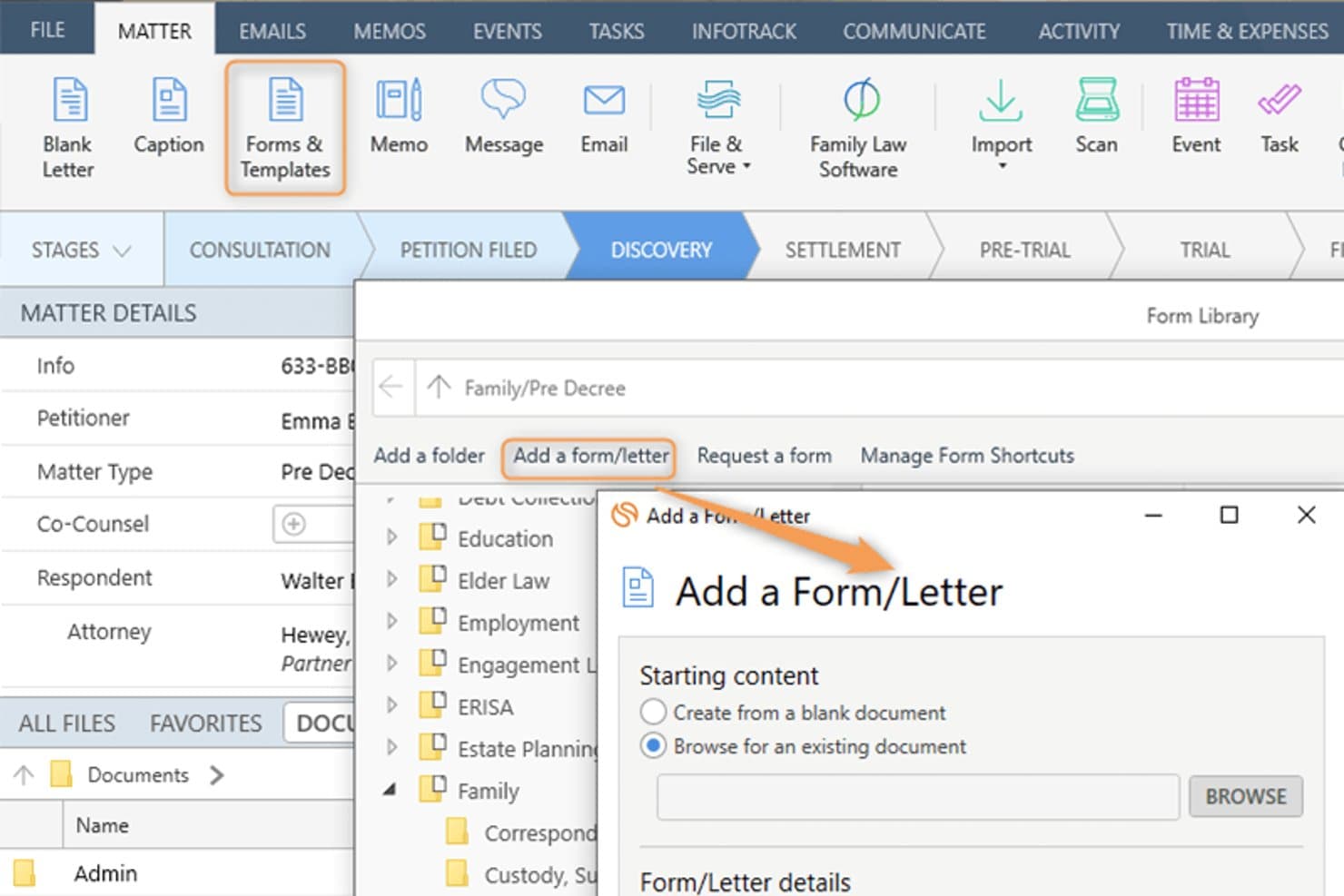
Smokeball lets users add custom forms and letters to a legal matter. Smokeball is an all-in-one legal practice management platform built for solo, small, and mid-size law firms that need matter-centric document management, email filing, billing, and Microsoft 365 integration consolidated into a single system.
Who Is Smokeball Best For?
Smokeball is a strong fit for managing partners at small private-practice law firms who handle high document volumes across multiple practice areas.
Why Smokeball Is a Good iManage Alternative
I've included Smokeball in my top picks because AutoTime is genuinely unlike anything iManage offers. It automatically captures time spent on emails, documents, calls, and tasks inside the platform, so nothing goes unbilled. I also like that matter-centric email filing works natively inside Outlook, meaning I can link emails directly to matters without ever leaving my inbox.
Smokeball Key Features
- Matter-centric document management: Store and organize legal files, templates, and forms by matter for easy retrieval.
- Custom practice area templates: Access 200+ built-in, configurable matter and document templates tailored to different legal areas.
- Native Microsoft 365 integration: Link Outlook emails and Word documents directly to matters without leaving those applications.
- Firm insights reporting: Track productivity, case progress, staff activity, and profitability with built-in dashboards and metrics.
Smokeball Integrations
Smokeball has native integrations across the Microsoft ecosystem, including Microsoft 365 and Outlook. An API is available for custom integrations.
Pros and Cons
Pros:
- Native email filing within Microsoft Outlook
- Matter-centric file organization built in
- AutoTime captures billable hours automatically
Cons:
- Better suited to smaller law firms
- Search lacks advanced metadata filtering
Learn more about Smokeball: Best for client portal communication tools
- 10-day free trial
- From $50/user/month (billed annually)
Visit WebsiteCustomer Rating:4.6/5
MyCase auto-generates task lists and deadlines directly from court rules. MyCase is a cloud-based practice management platform for small and mid-sized law firms that centralizes case management, billing, and client communication in one place.
Who Is MyCase Best For?
MyCase suits solo practitioners and small firm managing partners who handle their own billing, client intake, and day-to-day case administration.
Why MyCase Is a Good iManage Alternative
I've included MyCase in my top picks because its client portal is genuinely best-in-class for secure client communication. Clients can view case documents, send messages, and pay invoices directly through the portal, without calling or emailing the firm. The 2-way texting feature with a dedicated firm number keeps every client conversation logged and searchable inside the case record.
MyCase Key Features
- Matter-centric document storage: Organize documents within specific case folders for easy retrieval and management.
- Integrated time and expense tracking: Log billable hours and expenses directly to each matter with Smart Time Finder.
- Automated billing and invoicing: Generate and send invoices automatically based on tracked time and case activities.
- Customizable financial reporting: Access real-time analytics on payments, AR, and case profitability through built-in report tools.
MyCase Integrations
MyCase offers native integrations with QuickBooks Online, LawPay, Google Calendar, Google Drive, Dropbox, Outlook, Gmail, and CalendarRules, and provides an API for custom integrations.
Pros and Cons
Pros:
- Built-in invoicing tied directly to matters
- Two-way texting logged within case records
- Dedicated client-facing portal for secure messaging
Cons:
- No ethical wall or matter-level access controls
- Limited document version control and check-in/out
 3Best for legal practice management integration
Clio
- 7-day free trial + free demo available
- From $49/user/month
Visit WebsiteCustomer Rating:4.5/5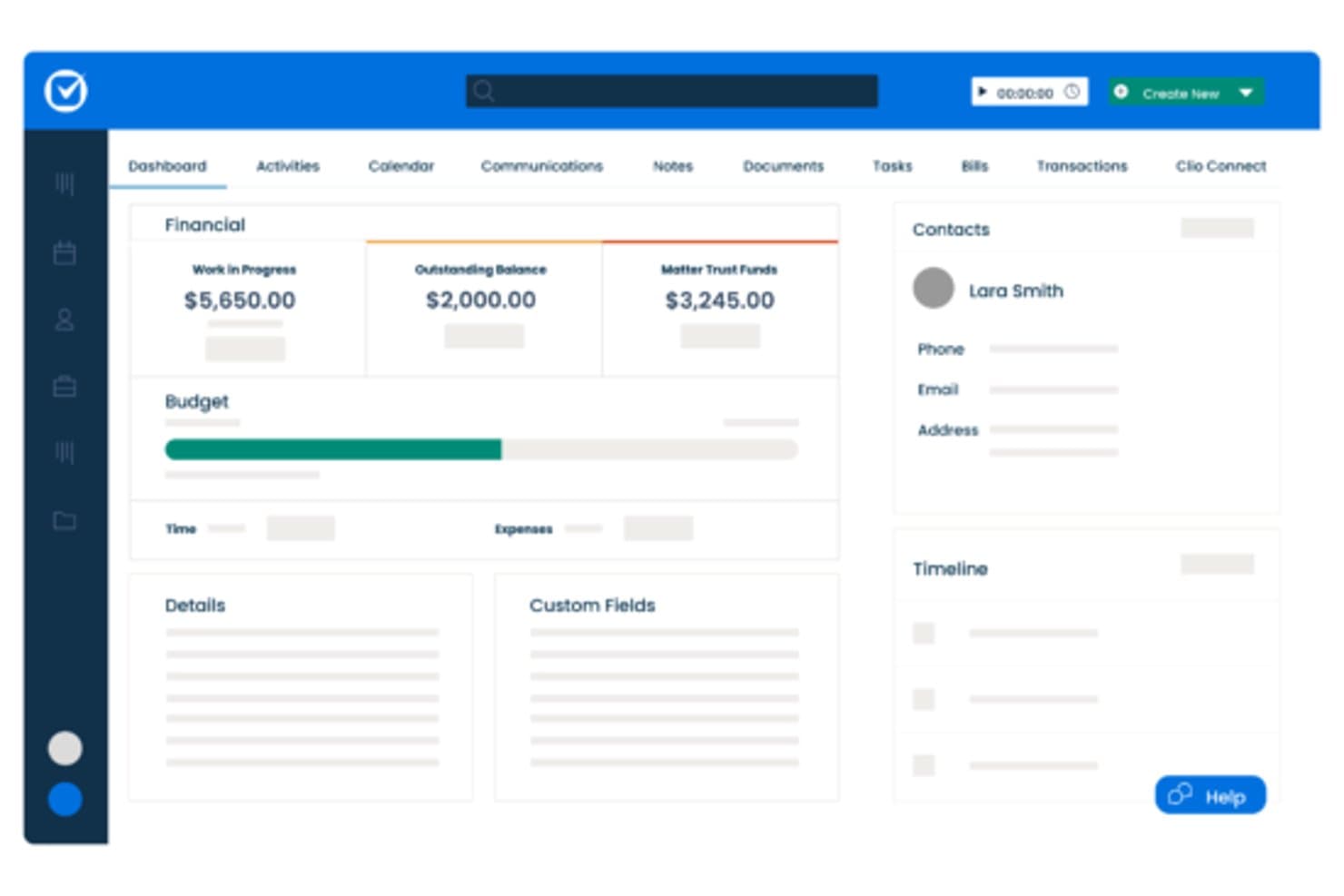
Clio centralizes matter financials, contacts, and timelines in one dashboard. Clio Manage is a cloud-based legal practice management platform built for small-to-mid-size law firms that need matter organization, billing, document storage, and client communication in one place—without the complexity of enterprise DMS tools like iManage.
Who Is Clio Best For?
Clio Manage is a natural fit for solo attorneys and small-to-mid-size law firms that want a single platform to manage matters, billing, and client files.
Why Clio Is a Good iManage Alternative
I've included Clio Manage in my top picks because it connects matter management, billing, and document storage in a single workspace that actually reflects how law firms operate day to day. I particularly like that Clio's AI can convert court documents into calendar events and turn tracked time entries into draft invoices automatically. That tight loop between case activity and billing is something iManage, as a document-only platform, simply doesn't offer.
Clio Key Features
- Matter-centric document storage: Store and organize all case files in structured, searchable matter folders.
- Integrated time and expense tracking: Track billable hours and expenses directly within each matter for accurate billing.
- Client portal for secure communication: Exchange documents and updates with clients through a dedicated, secure portal.
- Role-based access permissions: Control who can view, edit, or manage specific matters and documents throughout your firm.
Clio Integrations
Clio Manage offers native integrations with Microsoft 365, Google Workspace, DocuSign, QuickBooks Online, Dropbox, NetDocuments, Xero, Zoom, LawPay, and CalendarRules. An API is available for custom integrations.
Pros and Cons
Pros:
- AI converts court documents into calendar events
- Built-in client portal for secure file sharing
- Connects billing directly to matter activity
Cons:
- Limited version control for document-heavy workflows
- Document management less robust than iManage
Learn more about Clio: Best for small firm Microsoft 365 users
- Free demo available
- From $210/month (billed annually)
Visit WebsiteCustomer Rating:4.6/5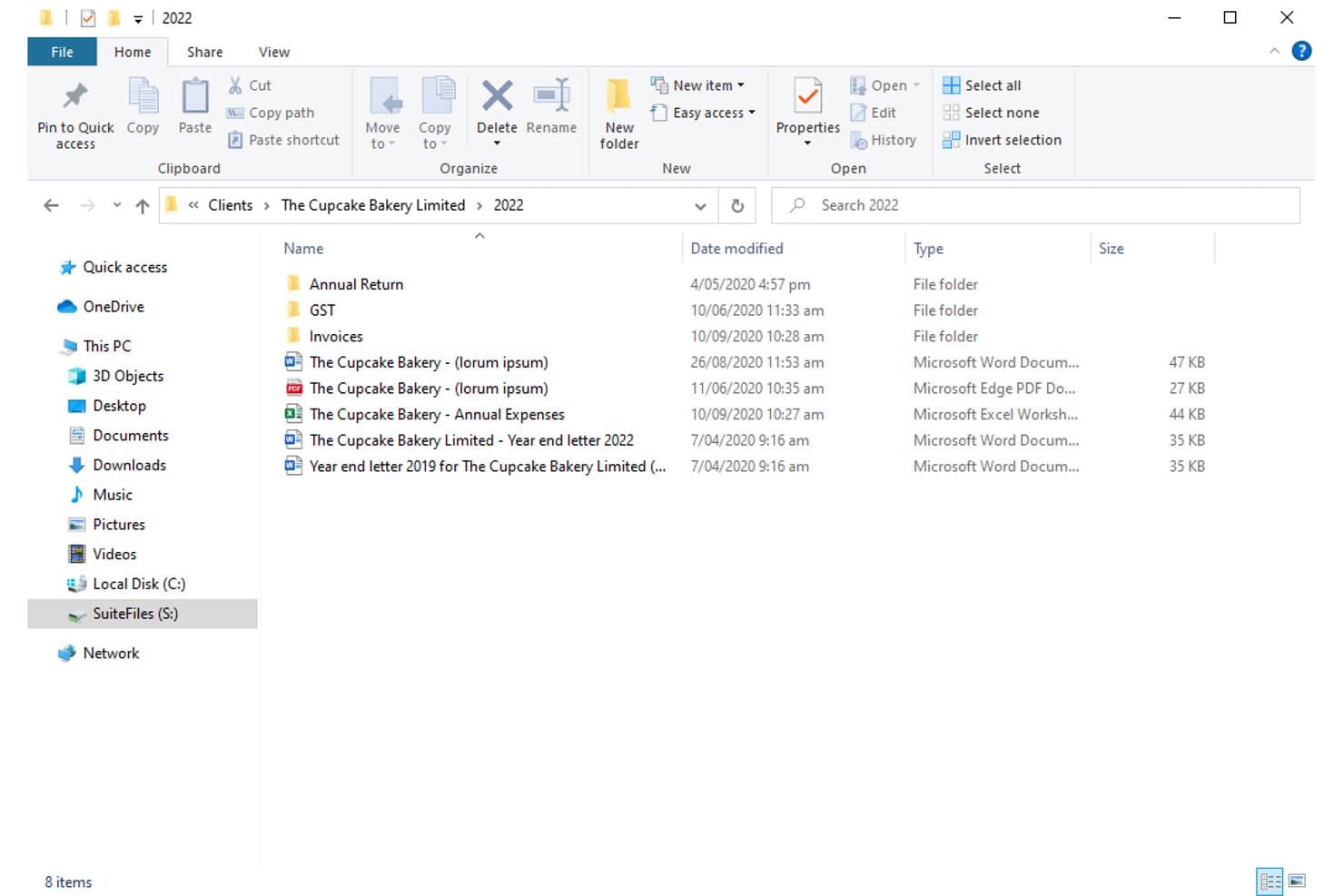
SuiteFiles organizes client documents in structured folders by year. For small law firms already deep in the Microsoft 365 ecosystem, SuiteFiles offers an all-in-one document management workspace that combines email filing, unlimited e-signing, and a secure client portal without needing separate tools.
Who Is SuiteFiles Best For?
SuiteFiles is a strong fit for small law firms that run on Microsoft 365 and want a single platform for document, email, and client file management.
Why SuiteFiles Is a Good iManage Alternative
I've included SuiteFiles in my top picks because its Microsoft 365 integration isn't an add-on, it's the foundation the whole product is built on. I can file emails directly from Outlook into client folders, co-author documents live in Word, and share finalized files through the SuiteFiles Connect portal without switching to a separate tool. Small firm teams that already run on M365 don't need to retrain staff or rebuild workflows to use it.
SuiteFiles Key Features
- Client portal (SuiteFiles Connect): Share documents securely with clients and collaborate without relying on unencrypted email.
- Task management: Assign tasks to team members and track progress alongside your documents and emails.
- PDF annotation tools: Annotate, merge, and organize PDFs directly within the SuiteFiles workspace.
- Template-driven document creation: Use customizable templates for automated client letters, proposals, and agreements.
SuiteFiles Integrations
SuiteFiles has native integrations across the Microsoft ecosystem, including Microsoft 365 and Azure. It also offers native integrations with Xero, QuickBooks Online, and Karbon, and provides an API for custom integrations.
Pros and Cons
Pros:
- SharePoint used as the underlying file storage
- Email filing directly from Outlook into matters
- Built-in e-signing without a third-party tool
Cons:
- Not suited for large or enterprise firms
- Limited advanced search versus enterprise DMS platforms
Learn more about SuiteFiles: Best for seamless Outlook document filing
- Free demo available
- Pricing upon request
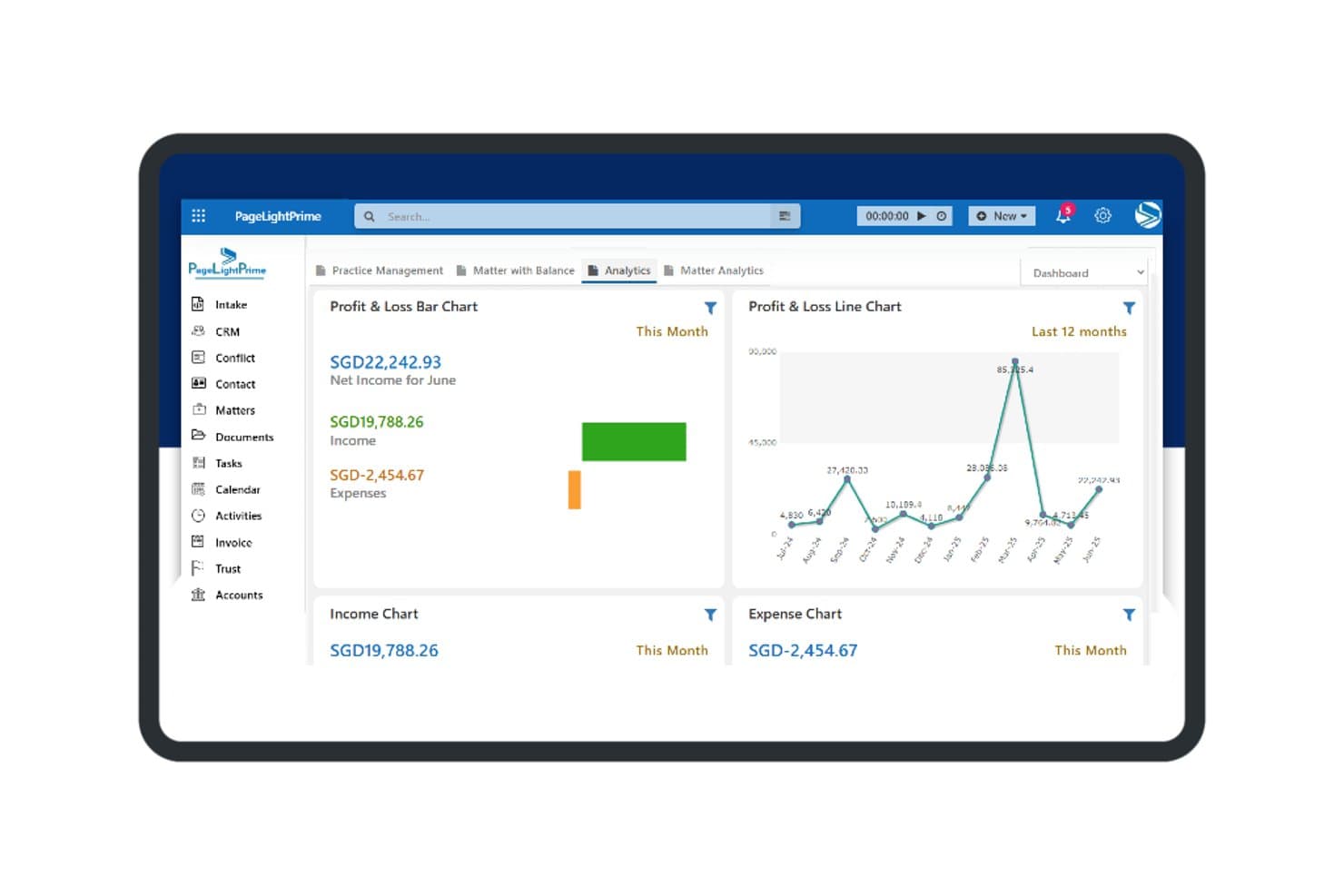
PageLightPrime offers a financial analytics dashboard with profit and loss charts, income tracking, and expense summaries for law firm management. PageLightPrime is a Microsoft 365-native legal practice management platform built for law firms that want to consolidate document management, matter tracking, and billing without stepping outside their existing Microsoft environment.
Who Is PageLightPrime Best For?
It's a strong fit for small to mid-sized law firms already running Microsoft 365 that want to replace iManage or a legacy DMS without adopting an entirely new technology stack.
Why PageLightPrime Is a Good iManage Alternative
I've included PageLightPrime in my top picks because of how it handles email filing from Outlook directly into matter workspaces. When a new matter is created, the platform auto-provisions a SharePoint folder structure with metadata already applied, so emails filed from Outlook land in the right place without manual sorting. I also appreciate that version control and audit trails run automatically alongside this, so every filed document has a tracked history from day one.
PageLightPrime Key Features
- Matter-centric SharePoint structure: Auto-generates folders and metadata for each new client and matter.
- Integrated law firm accounting: Handles billing, trust accounting, and multi-currency management within the platform.
- Client portal: Allows clients to securely access shared documents, billing information, and case updates online.
- Legal CRM and intake forms: Captures leads through web intake and links client interactions directly to matters.
PageLightPrime Integrations
PageLightPrime has native integrations across the Microsoft ecosystem, including Microsoft 365 and Azure. An API is available for custom integrations.
Pros and Cons
Pros:
- Single platform covers intake, billing, and document management
- Built-in trust accounting with IOLTA compliance support
- Runs entirely within Microsoft 365 and SharePoint
Cons:
- Smaller vendor with less established enterprise credibility
- Limited third-party ecosystem beyond Microsoft tools
Learn more about PageLightPrime: Best for Microsoft 365 workflow integration
- 30-day free trial
- From $5.00/user/month (billed annually)
Visit WebsiteCustomer Rating:4.4/5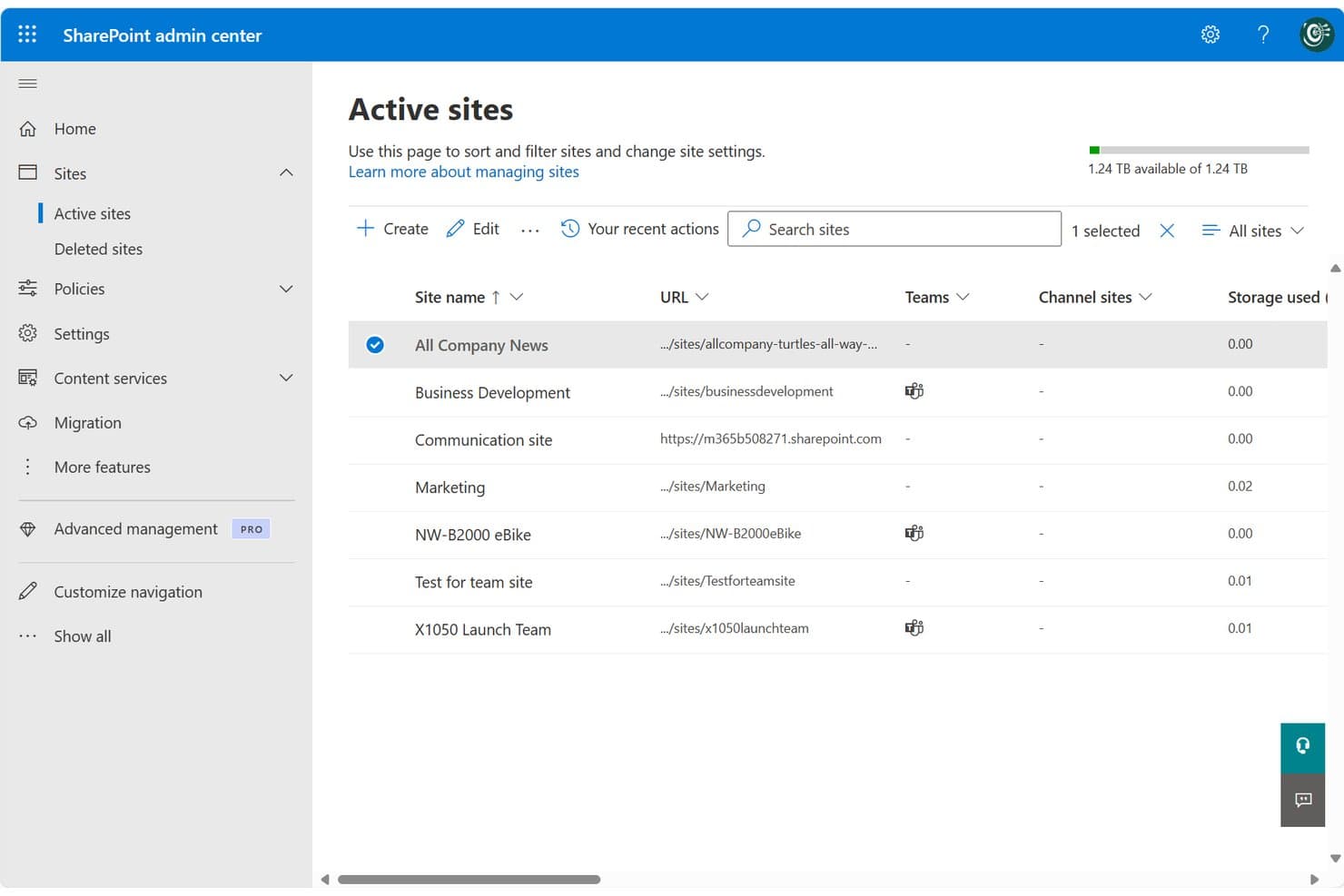
SharePoint centralizes site management across teams and projects in one admin view. SharePoint is Microsoft's cloud-based collaboration and document management platform, well-suited for legal teams and law firms already running on Microsoft 365 who want centralized file storage, version control, and access management without adopting a separate DMS.
Who Is SharePoint Best For?
SharePoint fits small-to-mid-sized law firms and in-house corporate legal teams that are already standardized on Microsoft 365 and want to avoid managing a separate DMS.
Why SharePoint Is a Good iManage Alternative
I've included SharePoint in my top picks because it's the only iManage alternative here that's natively embedded in Microsoft 365. Your legal team can co-author Word documents, manage matter libraries, and file directly from Outlook without switching tools. I particularly appreciate the check-in/check-out versioning system, which locks documents during active review and keeps a clean, restorable version history across matters.
SharePoint Key Features
- Matter library templates: Prebuilt site and folder structures you can use to organize documents by matter, client, or team.
- Granular permissions controls: Assign access based on matter, team, or document type to help protect privileged information.
- Full-text and metadata search: Search for documents or emails using keywords, tags, or custom filters to quickly find files.
- Audit trails and activity logs: Track all document views, edits, downloads, and sharing actions across your SharePoint environment.
SharePoint Integrations
SharePoint has native integrations across the Microsoft ecosystem, including Microsoft 365 and Azure. An API is available for custom integrations.
Pros and Cons
Pros:
- Matter-level permissions configurable without extra modules
- Built-in version history with document restore
- Native Microsoft 365 co-authoring without switching apps
Cons:
- Email filing requires manual setup and configuration
- No dedicated legal matter workspace out-of-the-box
Learn more about SharePoint: Best for matter-centric security controls
- Free demo available
- Pricing upon request
Visit WebsiteCustomer Rating:4.1/5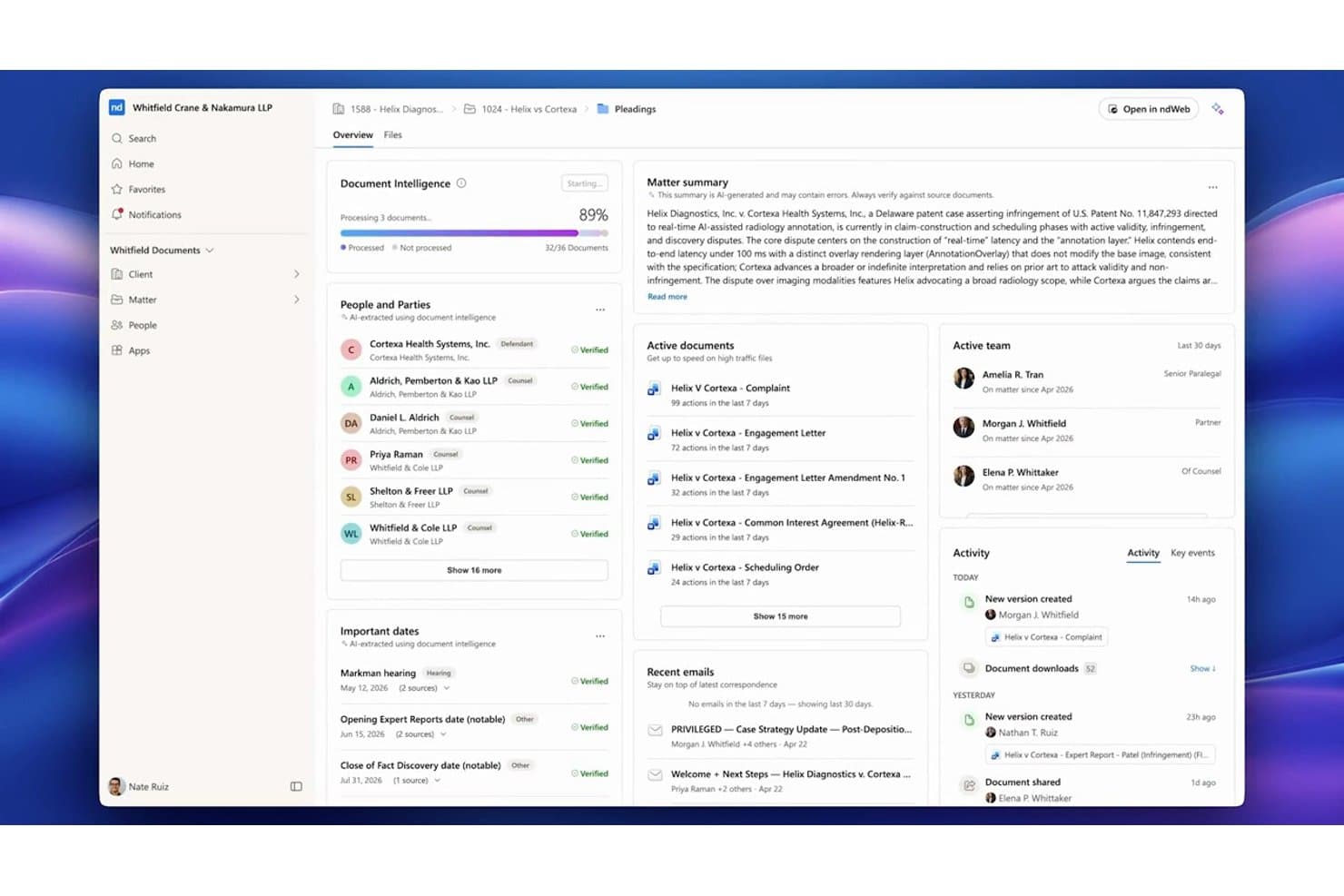
NetDocuments centralizes matter documents, parties, and key dates in one dashboard. NetDocuments is a cloud-native document management system built for law firms and corporate legal teams that need a fully hosted alternative to on-premises platforms like iManage, with matter-centric organization, AI-powered search, and enterprise-grade security controls.
Who Is NetDocuments Best For?
NetDocuments is a strong fit for mid-to-large law firms and enterprise legal departments whose IT and legal operations teams are ready to move away from on-premises infrastructure.
Why NetDocuments Is a Good iManage Alternative
NetDocuments earns its spot on my shortlist because of how precisely it handles matter-level security. I particularly like the granular ethical wall controls, which let you restrict access at the user, document, or workspace level independently. On top of that, customer-managed encryption keys and geo-aware content storage give legal teams direct control over where their data lives and who can decrypt it, which is something iManage's on-prem setup handles very differently.
NetDocuments Key Features
- AI-powered document search: Search documents and emails using natural language queries and receive answers with citations.
- Unified matter workspace: View, manage, and collaborate on all matter documents, emails, and notes from one interface.
- Built-in document bundling: Assemble and organize closing sets or litigation binders directly within the platform.
- Native Microsoft Teams integration: Access, preview, and collaborate on NetDocuments content right inside Microsoft Teams.
NetDocuments Integrations
NetDocuments offers native integrations across the Microsoft ecosystem, including Microsoft 365 and Azure, and connects directly with Clio, DocuSign, Litera, LexisNexis, Thomson Reuters, and iManage. An API is available for custom integrations.
Pros and Cons
Pros:
- AI search surfaces relevant documents without manual filtering
- Granular ethical walls built into the platform
- Strong cloud-native security for legal matter files
Cons:
- Admin configuration requires significant initial setup time
- Mobile app experience lags behind the desktop
Learn more about NetDocuments: Best for AI-powered contract automation
- Free demo available
- Pricing upon request
Visit WebsiteCustomer Rating:4.3/5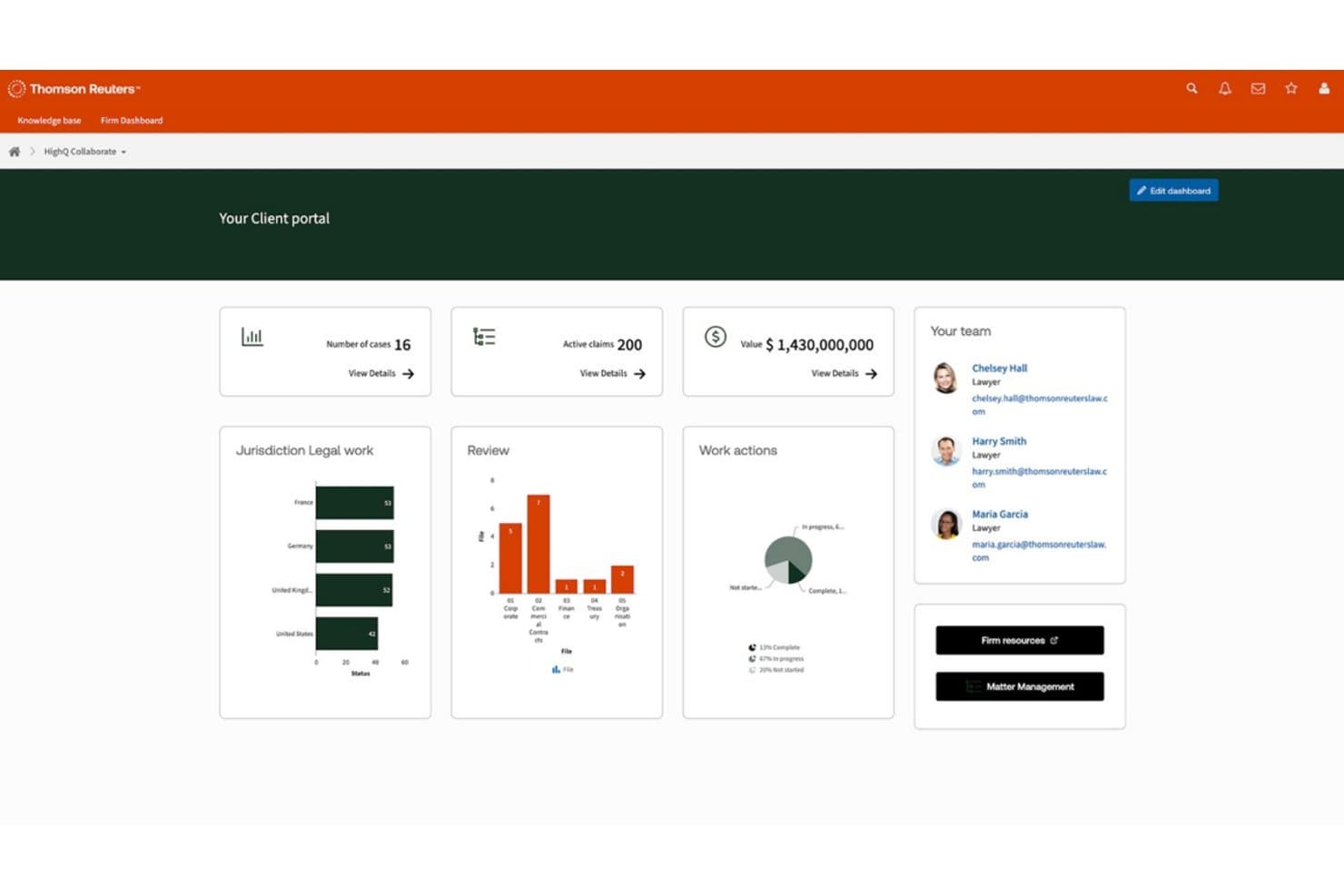
HighQ centralizes case data, team contacts, and legal workflows in one portal. HighQ is a Thomson Reuters cloud platform built for law firms and corporate legal teams that need secure document collaboration, workflow automation, and AI-powered contract tools in a single, client-facing workspace.
Who Is HighQ Best For?
HighQ is a strong fit for large law firms and enterprise legal departments managing high volumes of transactions, due diligence, or complex client matters.
Why HighQ Is a Good iManage Alternative
I picked HighQ as one of the best because its CoCounsel-powered Document Insights goes well beyond basic document storage. It automatically extracts risks, summarizes contract terms, and populates iSheets with AI-generated data during due diligence. I also like that HighQ supports the Model Context Protocol, letting AI tools like Claude and ChatGPT work securely inside your legal workspaces without manual data transfer.
HighQ Key Features
- Matter-centric workspaces: Organize documents, tasks, and discussions by matter for easy cross-team access.
- Granular access controls: Set permissions and ethical walls at the matter, folder, or document level to protect sensitive data.
- Workflow automation designer: Build multi-step legal processes using visual tools for intake, approvals, or project management.
- Microsoft 365 integration: Edit documents collaboratively in Word, Excel, and PowerPoint directly within HighQ’s secure environment.
HighQ Integrations
HighQ offers native integrations across the Microsoft ecosystem, including Microsoft 365 and Azure, as well as with DocuSign, Adobe Sign, and Legal Tracker. An API is available for custom integrations.
Pros and Cons
Pros:
- iSheets auto-populate from AI document extraction
- Client portals included out of the box
- AI-powered contract review built in natively
Cons:
- Email filing lags behind iManage's capabilities
- Less mature as a dedicated DMS
Learn more about HighQ: Best for on-premises legal document storage
- Free demo available
- Pricing upon request
Visit WebsiteCustomer Rating:4/5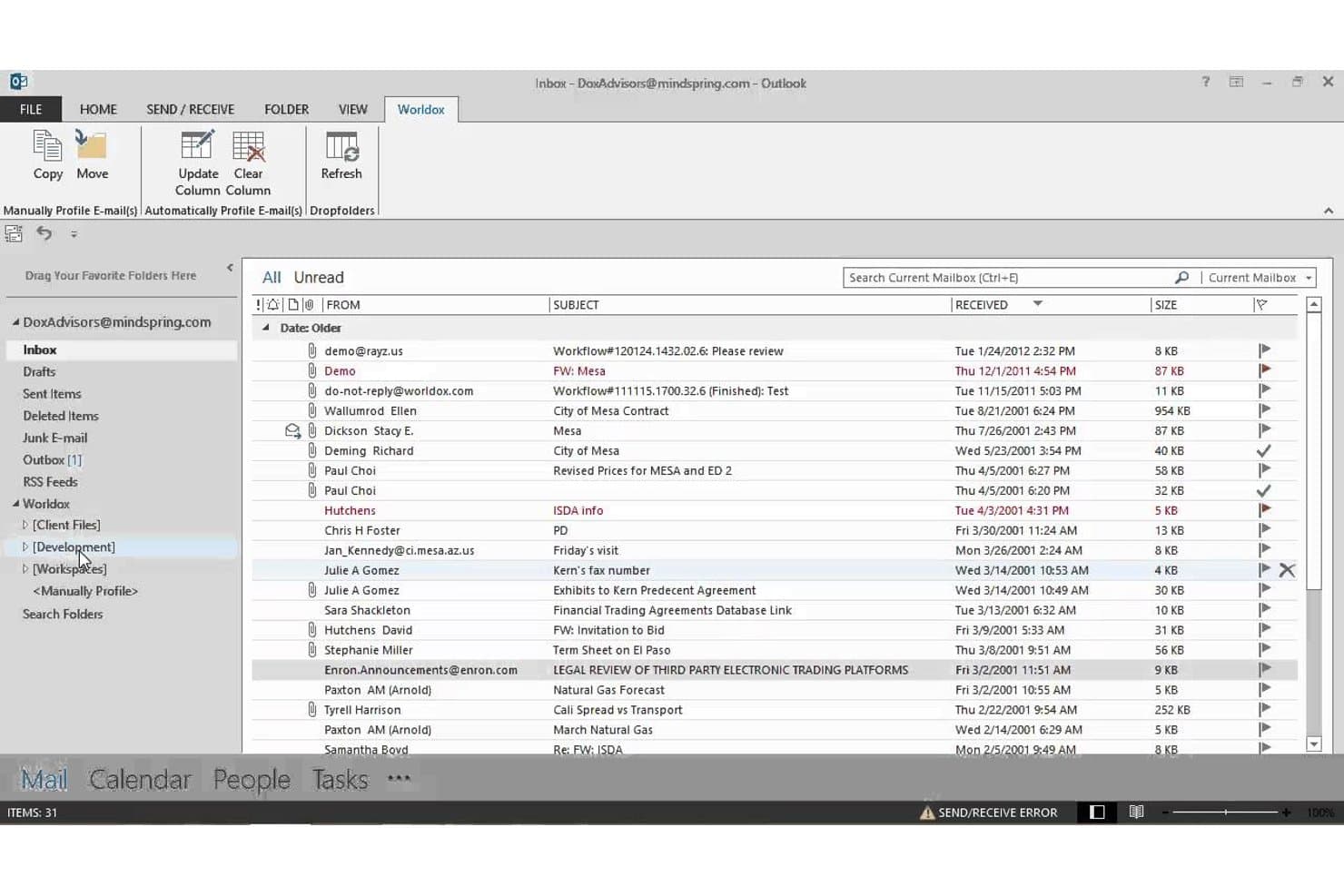
Worldox integrates directly into Outlook for seamless email filing. Worldox is a long-standing legal document management system built for law firms and corporate legal departments that need matter-centric document organization, advanced search, and email filing without moving to a cloud-based infrastructure.
Who Is Worldox Best For?
It's a strong fit for small-to-midsize law firms running Windows-based infrastructure that prefer on-premises document control over cloud-hosted alternatives.
Why Worldox Is a Good iManage Alternative
I've included Worldox in my top picks because it gives firms complete control over where their data lives. Unlike iManage, which has shifted heavily toward cloud-hosted deployments, Worldox keeps documents on your own servers, which matters when compliance obligations make cloud storage a non-starter. I particularly like the matter-centric profiling system, where every document is tagged with client, matter, and document type metadata at the point of filing, making retrieval fast and consistent across the firm.
Worldox Key Features
- Customizable metadata fields: Tag documents by client, matter, and document type for granular organization.
- Full-text and metadata search: Locate documents and emails using powerful filters tailored for legal workflows.
- Audit trail reporting: Track document access and activity for security, compliance, and accountability needs.
- Office suite integration: Work with Microsoft Word, Excel, and Outlook directly from your document management interface.
Worldox Integrations
Worldox has native integrations across the Microsoft ecosystem, including Microsoft 365 and Outlook. It also offers integrations with Tabs3 and PracticeMaster. An API is available for custom integrations.
Pros and Cons
Pros:
- Strong compatibility with Windows-based firm infrastructure
- Matter-centric profiling built for legal workflows
- True on-premises deployment for data sovereignty
Cons:
- Dated interface compared to cloud-first competitors
- No mobile app for remote document access
Learn more about Worldox: Best for native email management in Outlook
- 7-day free trial
- From $395/month
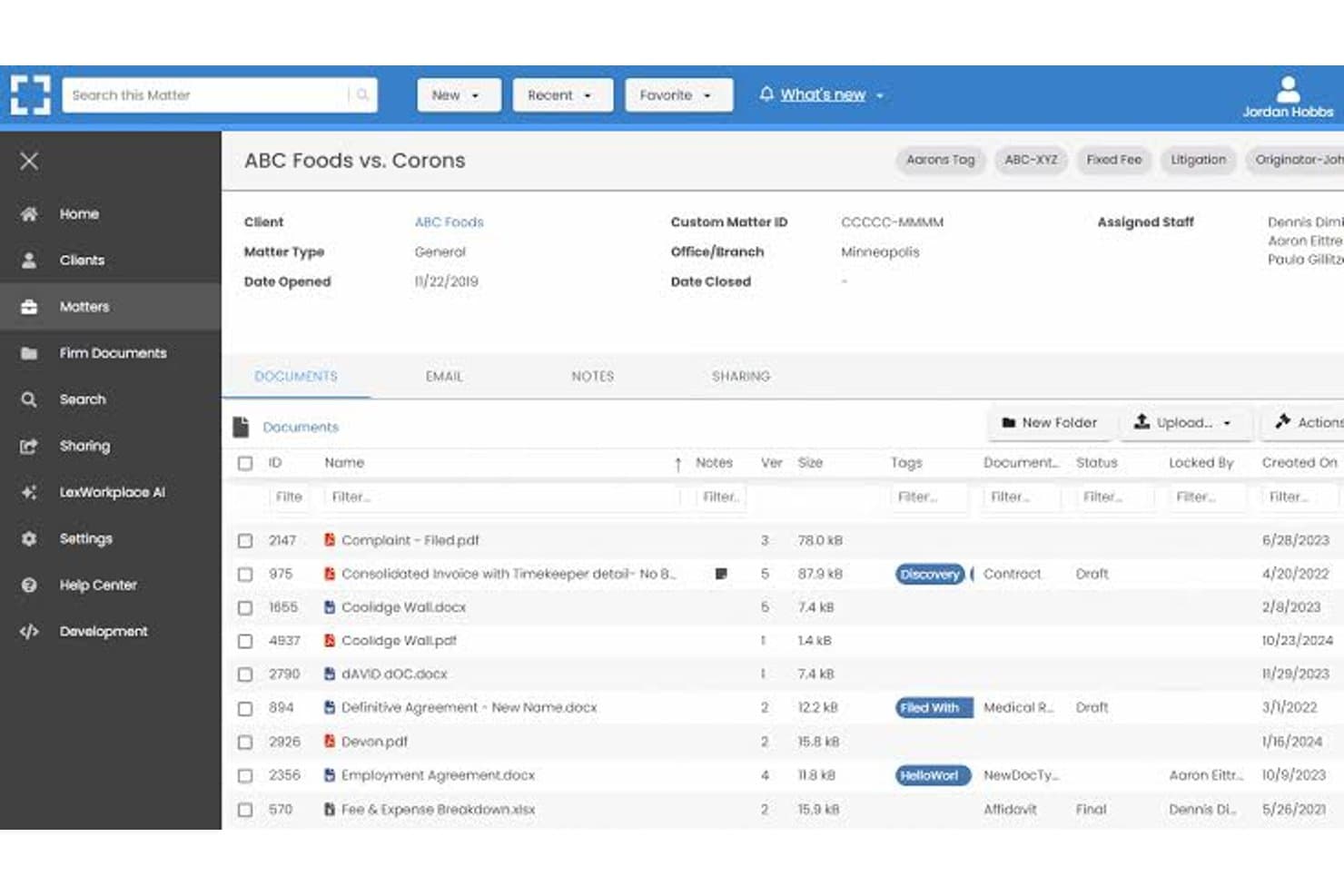
LexWorkplace dashboard for managing legal matters, documents, email, and file sharing. LexWorkplace is a cloud-based document and email management system built for small-to-midsize law firms that want matter-centric organization, full-text search, and secure cloud storage without the enterprise complexity of iManage.
Who Is LexWorkplace Best For?
LexWorkplace is a natural fit for law firms with 5–50 users that need a structured legal DMS without dedicating IT resources to deployment and maintenance.
Why LexWorkplace Is a Good iManage Alternative
I've included LexWorkplace in my top picks because its Outlook email management is genuinely best-in-class for small law firms. Smart File suggests the correct matter automatically when you're filing an email, and Multi Select lets you bulk-file entire threads in one action. Both features matter most during active litigation or transactions, where email volume spikes and misfiled messages create real compliance exposure.
LexWorkplace Key Features
- Matter-centric document management: Organize files, notes, and correspondence by client and legal matter in secure cloud workspaces.
- Integrated document versioning: Track, compare, and restore previous versions of documents, with full audit trails for all changes.
- Document AI assistant: Use built-in AI to summarize, query, and extract information from legal documents without leaving the platform.
- Full-text and metadata search: Find documents and emails instantly with full-text OCR, advanced filters, and matter-based search options.
LexWorkplace Integrations
LexWorkplace offers native integrations with Microsoft 365, including Outlook and Word, as well as Clio Manage. An API is available for custom integrations.
Pros and Cons
Pros:
- Full-text OCR search across all matter files
- Matter-centric workspaces designed for law firms
- Smart email filing natively within Outlook
Cons:
- Smaller user community than enterprise-grade alternatives
- No ethical wall automation for practice groups
Learn more about LexWorkplace:
Andra alternativ till iManage
Här är några ytterligare alternativ till iManage som inte kom med på min kortlista, men som ändå är värda att titta närmare på:
- 11Epona DMSBäst för avancerad metadatadriven arkivering
- 12PracticePantherBäst för anpassning av automatisering av arbetsflöden
- 13LEAPBäst för integrerad automatisering av juridiska formulär
- 14CosmoLexBäst för inbyggd efterlevnad av regler för klientmedelsredovisning
- 15FilevineBäst för anpassningsbara dokumentarbetsflöden
- 16Rocket MatterBäst för ärendebaserad dokumenttidsregistrering
- 17CenterbaseBäst för mallbaserad dokumentsammanställning
- 18DocsvaultBäst för hybridmoln och lokal driftsättning
Så utvärderar jag alternativ till iManage
Jag tittar på två nivåer: vad alla DMS-lösningar som kan jämföras med iManage måste erbjuda – ärendebaserad arkivering, e-posthantering och versionskontroll – och vad som skiljer verktygen åt. Skillnader som etiska spärrar, AI-baserad dokumentutformning och distributionsalternativ vägleder mina val.
Kärnfunktionalitet (grundkrav för den här listan)
När jag väljer verktyg till min lista bedömer jag varje verktyg på en skala från 0 (erbjuder inte funktionen) till 5 (utmärker sig inom området) för varje kärnfunktion som anges nedan. Därefter omvandlar jag verktygets totalpoäng till en procentsats, med 65% som riktmärke för att bedöma hur väl det passar för listan.
- Dokumenthantering: Jag utvärderar hur varje verktyg organiserar filer kring ärenden och kontrollerar om det finns konfigurerbara mappstrukturer, profilkort och arbetsytemallar som återspeglar hur jurister faktiskt öppnar och hanterar klientuppdrag.
- Versionskontroll: Varje verktygs metod för att spåra utkast är viktig – jag letar efter in- och utcheckning, versionsjämförelse och återställning så att jurister kan samarbeta kring inlagor utan att skriva över varandras redigeringar.
- E-posthantering: Jag kontrollerar om plattformen arkiverar e-postmeddelanden och bilagor från Outlook direkt i ärendearbetsytor, inklusive funktioner som förslag på automatisk arkivering och deduplicering av trådar som minskar behovet av manuell sortering.
- Avancerad sökning: Att hitta ett PM som är begravt bland tusentals ärenden är en del av vardagen, så jag utvärderar fulltextsökning och metadatasökning med ärendespecifika filter som snabbt ger relevanta resultat.
- Säkerhet & åtkomstkontroller: Jag letar efter behörigheter på ärendenivå, tillämpning av etiska spärrar, kryptering och granskningsloggar – särskilt viktigt när en byrå hanterar ärenden för motparter samtidigt.
- Microsoft 365-integration: De flesta jurister arbetar i Word, Outlook och Teams, så jag utvärderar hur djupt varje verktyg integreras med Microsoft 365 för gemensam dokumentredigering, e-postarkivering och mobil åtkomst.
När jag har en lista över verktyg som uppfyller kriterierna överväger jag vad som skiljer varje plattform från de andra.
Särskiljande faktorer (vad som skiljer leverantörerna åt)
Så här jämför jag olika leverantörer:
Utmärkande funktioner
AI-baserad dokumentutformning är en viktig särskiljande faktor – jag letar efter plattformar där jurister kan sammanfatta eller jämföra klausuler direkt i DMS-lösningen utan att byta till ett verktyg från tredje part. Enhetliga ärendearbetsytor väger också tungt, eftersom det sparar mycket tid inför en förhandling eller ett klientsamtal att samla dokument, e-postmeddelanden och anteckningar i en och samma vy. Inbyggd redigering med ändringsmarkeringar och versionsjämförelse gör det möjligt för jurister att kommentera utkast utan att exportera dem till Word, vilket jag granskar noggrant i dokumentintensiva verksamheter.
Mer än funktioner
Flexibilitet vid distribution är mycket viktigt när byråer migrerar från iManage – jag kontrollerar om en leverantör stöder lokala installationer, privata moln eller hybridmodeller så att pågående ärenden inte störs mitt under övergången. Efterlevnadscertifieringar som SOC 2 Type II och ISO 27001 visar om en plattform kan hantera skyddade klientuppgifter med den noggrannhet som byråer förväntar sig. Jag utvärderar också migrationsstödet, bland annat om leverantören bevarar metadata när filer flyttas från äldre system eller delade enheter.
Varför leta efter alternativ till iManage?
Även om iManage är ett bra val bland alternativ för programvara för juridisk dokumenthantering finns det flera skäl till att vissa användare söker alternativa lösningar. Du kanske letar efter alternativ till iManage eftersom …
- Behöver stöd för hybrid- eller lokala installationer
- Vill ha mer transparent eller flexibel prissättning
- Föredrar djupare integration med Microsoft 365 eller Teams
- Kräver detaljerade kontroller för informationsbarriärer eller klientsekretess
- Söker plattformar med enklare migrering och förändringshantering
- Behöver mer lyhörd kundsupport i olika regioner
Om något av detta stämmer in på dig har du kommit rätt. Min lista innehåller flera alternativ till iManage som passar bättre för team som står inför dessa utmaningar med iManage och söker alternativa lösningar.
Viktiga funktioner i iManage
Här är några av de viktigaste funktionerna i iManage, så att du kan ställa dem mot och jämföra vad alternativa lösningar erbjuder:
- Ärendeorienterad organisation: Lagra, organisera och få åtkomst till dokument och e-post kring juridiska ärenden, vilket gör det enklare för team att hålla allt kopplat till rätt fall eller projekt.
- Automatisk versionshantering: Spåra dokumentändringar genom att automatiskt spara och märka varje version, med stöd för incheckning/utcheckning, jämförelse och återställning för att minska fel på grund av oavsiktlig överskrivning.
- Hantering av Outlook-e-post: Arkivera, tagga och organisera e-postmeddelanden och bilagor direkt från Microsoft Outlook i rätt ärendearbetsyta, vilket effektiviserar hanteringen av register och korrespondens.
- Avancerad sökning och filtrering: Sök efter dokument, e-postmeddelanden och metadata med hjälp av juridikspecifika filter och fulltextsökning, så att användare snabbt kan hitta de filer de behöver i omfattande arkiv.
- Detaljerad säkerhet och etiska brandväggar: Tillämpa behörigheter på ärendenivå, klientsekretess och policyer för etiska brandväggar för att kontrollera dokumentåtkomst och uppfylla efterlevnadskrav, även för geografiskt utspridda team.
- Integration med Microsoft 365: Arbeta direkt i Word, Outlook, Excel och Teams med integrerade funktioner som gör det möjligt för användare att skapa, redigera och samskriva dokument i iManages säkra miljö.
- Granskningsspår och aktivitetsloggar: Spåra dokumentåtkomst och åtgärder med detaljerade loggar som uppfyller juridiska krav och klienters granskningskrav, vilket främjar transparens och ansvarsskyldighet.
- Mobil åtkomst: Granska, redigera och dela dokument säkert från smarttelefoner och surfplattor, vilket gör det enklare för jurister att arbeta på distans eller under resor.
- Samarbetsverktyg: Dela dokument och paketera filer med interna och externa parter, inklusive funktioner för säker delning via länkar och anteckningar i realtid.
- Automatiserade lagringspolicyer: Tillämpa regler för att behålla, arkivera eller förstöra dokument baserat på klienters eller myndigheters krav, vilket stöder metoder för informationsstyrning.