

Legal case management software for government tracks matters, deadlines, records, and responsibilities across public-sector legal offices and justice teams. The right system depends on your office’s role, case types, access requirements, and connections to courts or partner agencies.
This guide compares options for prosecution, public defense, courts, municipal law, and related work so you can narrow your choices to tools that fit your workflows.
Why Trust Our Software Recommendations
6,700+
Reviews
20
Industry experts
16+
Evaluation factors
14
Years
Our team has been testing and reviewing software since 2012. As legal practice leaders ourselves, we know how difficult—and important—it is to choose the right software.
For this guide, we evaluated tools using hands-on testing and independent research, scoring tools using our selection criteria.
Our reviews reflect our human editorial judgment, not a sales pitch.
Comparison Table for the Best Legal Case Management Software for Government
Compare pricing and specs side by side for the legal case management software for government that made it onto my shortlist.
Score legend (out of 5)
- Excellent4.5–5
- Good4–4.4
- Average3–3.9
- Below average2–2.9
- Poor1–1.9
Sorted by: Default
| Tool | Starting Price | Website | |||||||
|---|---|---|---|---|---|---|---|---|---|
Best for cross-division agency casework | 3.3 out of 5 | 4 | 2 | 3 | 4 | 3 | 4 | Pricing upon request Free demo available | Website |
Best for agency cooperative purchasing | 3.0 out of 5 | 3 | 2 | 3 | 4 | 3 | 3 | £79/user/month 7-day free trial + free demo available | Website |
Best for government legal billing and case tracking | 2.3 out of 5 | 2 | 1 | 3 | 3 | 3 | 2 | $45/user/month Free plan + free demo available | Website |
Best for public defenders unifying case data | 3.2 out of 5 | 4 | 2 | 3 | 2 | 4 | 4 | Pricing upon request Free trial + free demo available | Website |
Best for court and attorney office coordination | 3.0 out of 5 | 4 | 3 | 3 | 2 | 4 | 2 | Pricing upon request Not available | Website |
Best for law firms linking matters and billing | Not rated | 3 | Not rated | 2 | 2 | 2 | Not rated | Pricing upon request Not available | Website |
Best for prosecutor-led law-enforcement intake | 3.0 out of 5 | 4 | 2 | 3 | 2 | 3 | 4 | Pricing upon request Free demo available | Website |
Best for managing appointed counsel and experts | 3.3 out of 5 | 4 | 3 | 3 | 3 | 3 | 4 | Pricing upon request Free demo available | Website |
Best for defense teams coordinating client care | 3.0 out of 5 | 4 | 3 | 3 | 2 | 3 | 3 | Pricing upon request Free demo available | Website |
Best for courts linking hearings and finances | 3.0 out of 5 | 4 | 3 | 3 | 2 | 3 | 3 | Pricing upon request Not available | Website |


Legal Case Management Software for Government Reviews
Below are my summaries of the best legal case management software for government that made it onto my shortlist. My reviews cover the features, use cases, and capabilities of each platform to help you find the right fit.
 Best for cross-division agency casework
- Free demo available
- Pricing upon request
Visit WebsiteCustomer Rating:4.5/5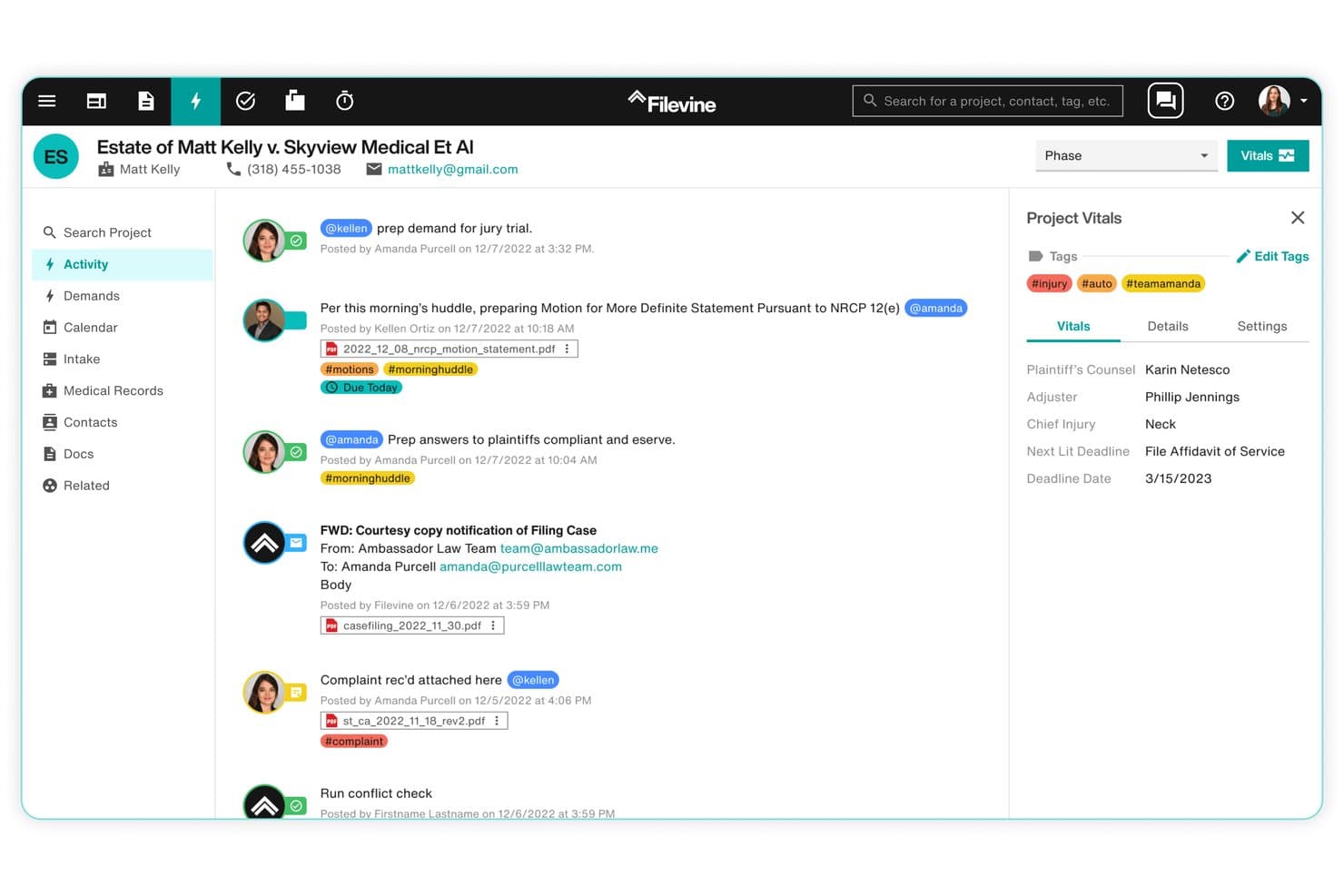
Filevine connects legal case workflows, documents, and tasks across teams. Filevine is a cloud-based legal case management platform built for government agencies, law firms, and in-house legal teams, covering matter tracking, document management, deadline automation, and cross-division workflow configuration.
Who Is Filevine Best For?
Filevine is a strong fit for state and municipal legal teams managing caseloads across multiple divisions or agencies from a single platform.
Why I Picked Filevine
I've included Filevine in my top picks because it's one of the few platforms I've seen handle multi-division government caseloads without forcing every team into the same rigid workflow. I particularly like how deadline chains calculate task due dates from a single case-initiation date, keeping six divisions moving in sync. The configurable, no-code workflow builder also lets each agency unit define its own project types, fields, and permission sets independently.
Filevine Key Features
- OCR document search: Search the full text of PDFs and images stored in a case file to locate specific words or phrases across your document library.
- Conflict check section: Search contacts across projects and your organization's contact list for potential conflicts, then record an undecided, conflict, or no-conflict status directly in the matter.
- Role-based access control: Set user permissions at the project level to control who can view, edit, or be assigned to sensitive case information.
- Audit reports: Pull activity logs filtered by user, action type, affected project or document, and time range, then export or schedule them for recurring review.
Filevine Integrations
Filevine lists over 2,000 potential integrations, including Outlook, Office 365, Google Calendar, Microsoft Teams, InfoTrack, and Snowflake through DataBridge. It also offers APIs and webhooks for custom connections, plus Zapier.
Pros and Cons
Pros:
- Centralized case files keep matter documents together
- Deadline chains coordinate tasks across agency divisions
- Configurable workflows suit cross-division agency caseloads
Cons:
- Extensive setup can strain agency implementation teams
- Complex reports complicate public-sector audit preparation
Learn more about Filevine: 2Best for agency cooperative purchasing
Clio
- 7-day free trial + free demo available
- From £79/user/month
Visit WebsiteCustomer Rating:4.5/5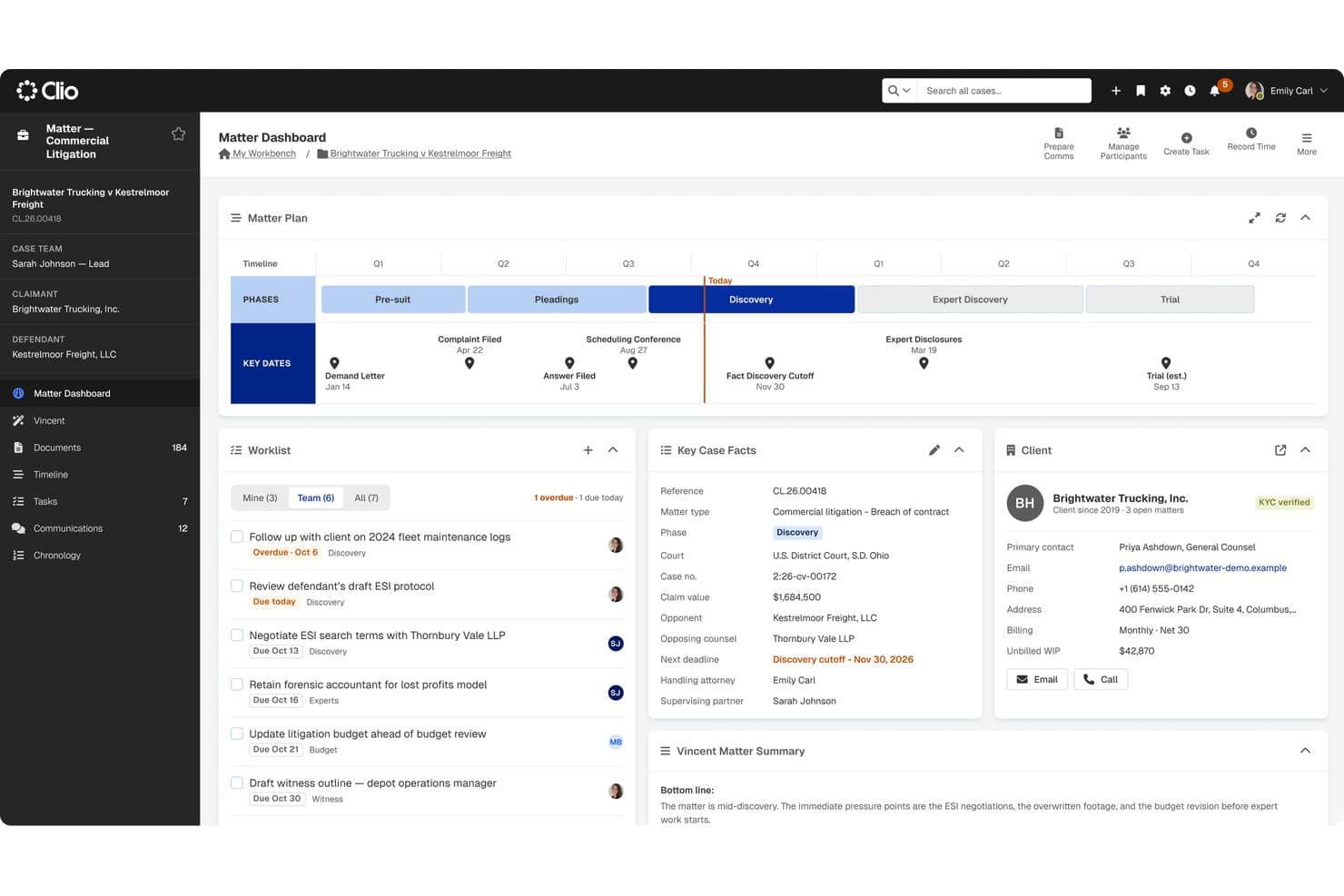
Clio centralizes case timelines, tasks, and client facts for legal teams. Clio is a cloud-based legal practice management platform that centralizes matter tracking, document management, court deadline automation, calendaring, and secure client communication for government legal teams including public defenders and agency counsel.
Who Is Clio Best For?
Clio Manage is a strong fit for public defender offices and government agency counsel that need a proven practice management platform and want to simplify procurement through cooperative purchasing contracts.
Why I Picked Clio
I picked Clio as one of the best because its availability through named cooperative purchasing contracts, including NASPO ValuePoint, TIPS, and OMNIA Partners, lets government legal offices skip a full RFP process and move straight to procurement. I also like that Clio's Court Rules engine covers 50 US states and 2,200 jurisdictions, automatically generating deadline calendars from a trigger date, which matters a lot for public defenders managing high-volume dockets. Matter reassignment keeps every document, note, and deadline attached when caseloads shift between staff.
Clio Key Features
- Conflict checking: Search existing contacts and matters by name, company, or keyword to identify potential conflicts before opening a new matter.
- Secure client portal: Let clients message your office, share documents, view appointments, and make payments through Clio for Clients.
- Court docket monitoring: Link court cases to matters and receive alerts about new filings, orders, and schedule changes.
- Role-based permissions: Restrict matter visibility to selected users or groups, with bulk permission edits covering up to 200 matters at once.
Clio Integrations
Clio lists 300+ apps in its marketplace, including Microsoft 365, Google Workspace, Gmail, Outlook, OneDrive, Google Drive, Dropbox, Box, and NetDocuments. Clio also offers a REST API and webhooks, plus Zapier.
Pros and Cons
Pros:
- Reviewers praise matter-organized files and calendars
- Court Rules cover 2,200 US jurisdictions
- Cooperative contracts can ease agency procurement
Cons:
- No structured inter-agency case exchange
- No CJIS or FedRAMP documentation
Learn more about Clio: Best for government legal billing and case tracking
- Free plan + free demo available
- From $45/user/month
Visit WebsiteCustomer Rating:4.4/5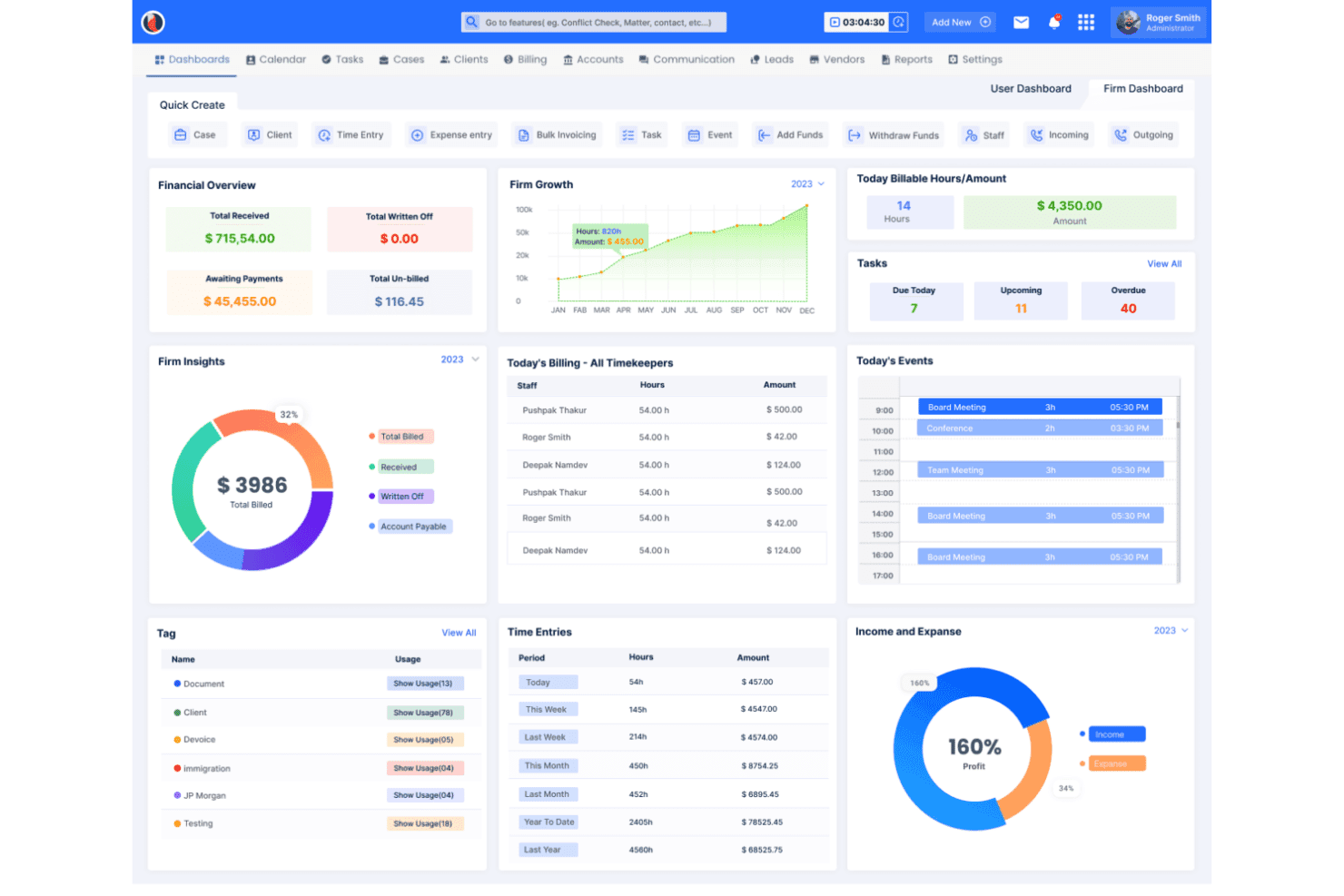
CaseFox supports LEDES billing, UTBMS coding, trust accounting, and court deadlines. CaseFox is a cloud-based legal case management and billing platform that centralizes case records, document storage, time tracking, calendaring, and invoicing for legal teams working across government and private practice.
Who Is CaseFox Best For?
CaseFox suits small government legal teams and solo attorneys who need affordable billing, time tracking, and basic case organization without enterprise complexity.
Why I Picked CaseFox
I picked CaseFox as one of the best because it handles the billing side of government legal work with real precision—LEDES invoicing, UTBMS coding, and trust accounting are all built in, which matters when you're billing against government contracts or public agency budgets. I also like that rule-based calendaring automatically generates court filing and trial deadline entries from trigger dates, keeping government caseloads organized without manual setup. The custom case fields let you tag and track agency-specific information across matters.
CaseFox Key Features
- Role-based access controls: Restrict case visibility and data access by user role, so staff only see the cases and information assigned to them.
- Client portal: Give clients secure access to invoices, payment history, case updates, and shared documents from a dedicated portal.
- AI document drafting: Generate contracts, legal templates, and other documents using AI-assisted prompts directly within the platform.
- Conflict check tool: Search across clients, cases, and contacts by keyword to surface potential conflicts before onboarding new matters.
CaseFox Integrations
CaseFox offers documented integrations with Google Drive, OneDrive, Box, Dropbox, Google Calendar, Microsoft 365, QuickBooks, Xero, LawPay, and PayPal. A Web API is available selectively for custom integrations.
Pros and Cons
Pros:
- Rule-based reminders flag upcoming deadlines
- LEDES billing handles coded legal invoices
- Reviewers praise straightforward matter setup
Cons:
- Reviewers report limited advanced report customization
- No documented CJIS or FedRAMP assurance
Learn more about CaseFox: Best for public defenders unifying case data
- Free trial + free demo available
- Pricing upon request
Visit WebsiteCustomer Rating:4.3/5
Salesforce Missionforce tracks case evidence, proceeding records, and legal documents. Salesforce Missionforce is a public sector case management platform that centralizes case data, evidence tracking, proceeding records, and document management within a government-grade secure cloud environment.
Who Is Salesforce Missionforce Best For?
Public defender offices managing high-volume caseloads will get the most value from Salesforce Missionforce, particularly those with the resources to support a customized deployment.
Why I Picked Salesforce Missionforce
I picked Salesforce Missionforce because it's one of the few platforms with a documented, real-world public defender deployment: Los Angeles County consolidated 160 million records from a 26-part legacy system into a single case view covering charges, digital evidence, and dispositions from pretrial through trial. The Investigative Case Management data model structures custody items with chain-of-custody entries, evidence types, and role-based access controls that limit who can view case files based on job responsibilities.
Salesforce Missionforce Key Features
- 360-degree case view: Centralizes case history, interactions, and real-time collaboration in a single searchable record for each case.
- Case proceeding model: Records proceeding type, filing date, status, participants, and related proceedings, including hearing scheduling and outcome tracking.
- Role-based access controls: Limits staff access to records, reports, and case files based on job responsibilities and reporting hierarchy.
- Case analytics: Surfaces trends in caseload distribution and processing times to support resource planning decisions.
Salesforce Missionforce Integrations
Salesforce Missionforce supports connectivity with MuleSoft for data exchange, Slack for team collaboration, and Tableau for analytics and reporting. It also draws on Salesforce's OmniStudio tools for guided workflows and AgentExchange marketplace for third-party applications and AI agents.
Pros and Cons
Pros:
- Case and evidence records support lifecycle tracking
- Customizable workflows support tailored case models
- Government cloud security earns reviewer praise
Cons:
- Search and navigation frustrate some reviewers
- Statutory deadline calculations aren’t documented
Learn more about Salesforce Missionforce: Best for court and attorney office coordination
- Not available
- Pricing upon request
Visit WebsiteCustomer Rating:4/5
Enterprise Justice centralizes case summaries, tasks, and hearings. Enterprise Justice is Tyler Technologies' court case management suite that connects courts, prosecutors, public defenders, and filing communities through integrated tools for case tracking, document management, e-filing, and inter-agency data sharing.
Who Is Enterprise Justice Best For?
Enterprise Justice is a strong fit for court systems and attorney offices—prosecutors and public defenders alike—that need a single platform connecting case management, e-filing, and inter-agency data sharing across the justice sector.
Why I Picked Enterprise Justice
Enterprise Justice earns its spot on my shortlist because it's one of the few platforms built specifically to connect courts, prosecutors, and public defenders through shared case data rather than siloed systems. I particularly like how Enterprise Attorney Manager lets both prosecuting and public defender offices pull case statuses, evidence, witness details, and upcoming hearings from a single organized view, reducing the back-and-forth between offices that slows down case prep. The court e-filing integration through eFile & Serve also centralizes filed documents and electronic service history in one place, which I find genuinely useful when coordinating across multiple court levels.
Enterprise Justice Key Features
- Judge Edition bench access: Judges can view case documents, charges, demographic information, and mug shots from a touch screen at the bench.
- Clerk Edition batch processing: Clerks can process groups of defendants, cases, or charges in batches and enter separate actions for individual counts in a side-by-side view.
- Financial Management reconciliation: Courts can manage bank transactions, reconciliation, balancing, check printing, and individual or batch disbursements from a centralized financial module.
- Configurable statistical reporting: Attorney Manager lets offices build case statistics using yes/no and multi-valued selections that can be configured to match grant reporting requirements.
Enterprise Justice Integrations
Enterprise Justice integrates with Tyler Technologies’ eFile & Serve and connects with other Tyler products through an integration portal offering hundreds of APIs and message resources. Specific third-party integrations and API protocols aren’t documented.
Pros and Cons
Pros:
- Electronic filing can feel straightforward
- Integrated court, attorney, and financial workflows
- Remote filing earns reviewer praise
Cons:
- Filing glitches cloud acceptance confirmation
- County-specific filing steps complicate access
Learn more about Enterprise Justice: Best for law firms linking matters and billing
- Not available
- Pricing upon request
Visit WebsiteCustomer Rating:3.2/5
ProLaw tracks legal matters, documents, billable time, and accounting records. ProLaw by Thomson Reuters is a law practice management solution that combines matter lifecycle tracking, document management, time entry, billing, and accounting in a single system.
Who Is ProLaw Best For?
ProLaw suits government legal departments that need to manage legal matters, organize documents, track attorney time, and oversee billing and expenses in one system.
Why I Picked ProLaw by Thomson Reuters
I've included ProLaw in my top picks because it keeps matter management, billing, and accounting in one place, which matters when you need a clear link between case activity and financial records. I like how it tracks the full matter lifecycle alongside time entry, so nothing slips between case work and invoicing. Its docketing and deadline-calculator tools also give firms a reliable way to manage court dates without juggling separate systems.
ProLaw by Thomson Reuters Key Features
- Matter lifecycle tracking: Tracks a matter from open to close, capturing notes, tasks, time, and related activity in one place.
- Business intelligence reporting: Delivers real-time firm health data through built-in reporting tools you can query or customize.
- Integrated accounting: Handles general ledger and financial operations alongside case and billing data in a single system.
- Document management: Stores and organizes digital matter files directly within the case record, reducing reliance on paper files.
ProLaw Integrations
ProLaw connects with Microsoft Outlook, Word, Excel, Adobe Acrobat Pro, and Westlaw for email management, document preparation, legal research, and matter-related workflows. Its Outlook integration allows users to save emails and attachments directly to case records and capture time without leaving their inbox.
Pros and Cons
Pros:
- Digital matter files pair with case management
- Docketing tools help teams monitor court deadlines
- Matter tracking links notes, tasks, and time
Cons:
- No documented inter-agency case-sharing capability
- No documented government security or compliance controls
Learn more about ProLaw by Thomson Reuters: Best for prosecutor-led law-enforcement intake
- Free demo available
- Pricing upon request
Visit WebsiteCustomer Rating:4.4/5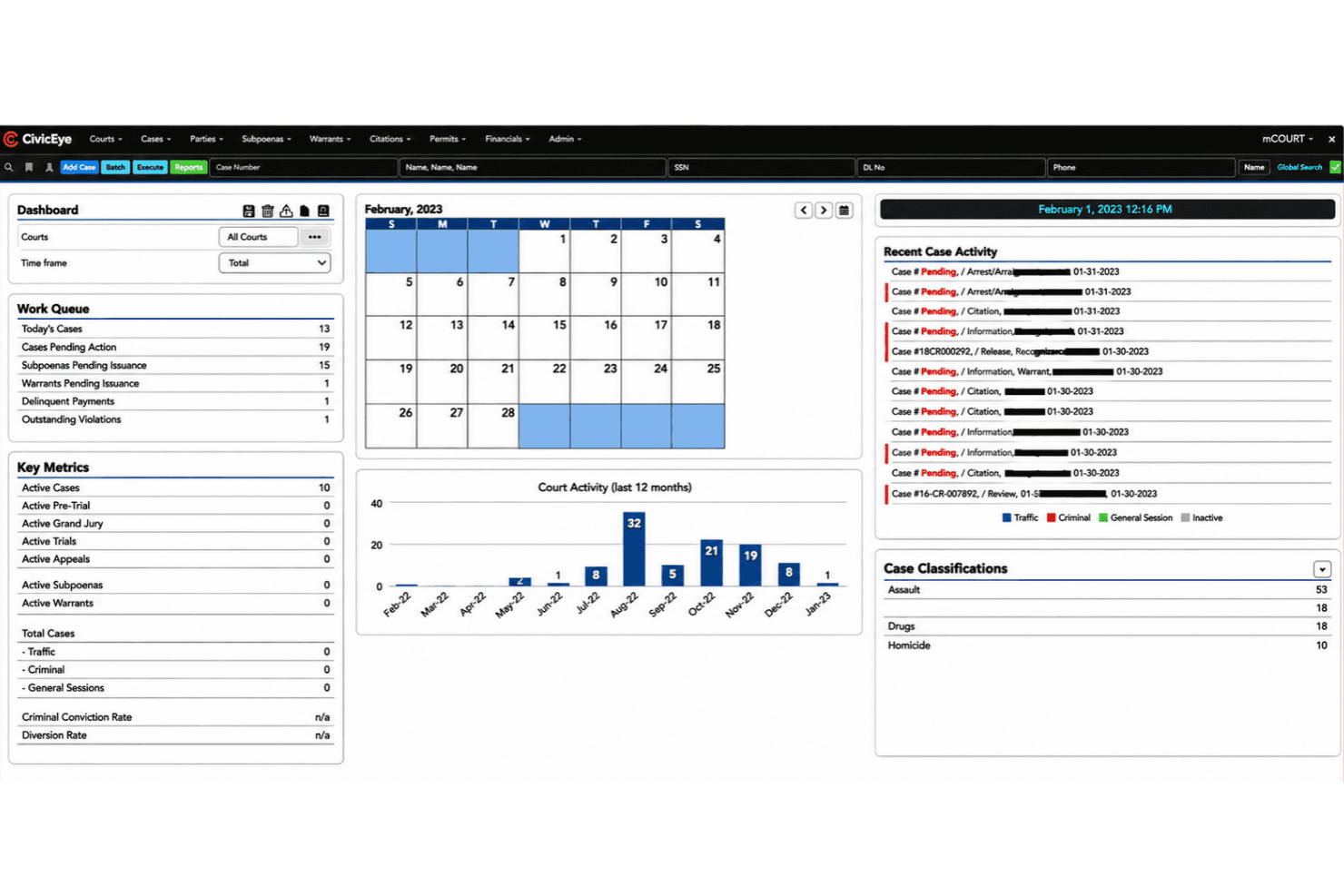
CivicEye organizes prosecution cases, evidence sharing, and law-enforcement intake. CivicEye is a prosecutor-focused case management platform that centralizes case inventory, party management, document drafting, evidence sharing, and law enforcement intake within a CJIS-compliant cloud environment.
Who Is CivicEye Best For?
CivicEye is purpose-built for prosecutor offices, with workflows designed around district attorneys, assistant DAs, and their support staff.
Why I Picked CivicEye
I picked CivicEye as one of the best because its law enforcement intake portal is designed around how prosecutor offices receive cases. Prosecutors or clerks can configure required submission fields, so law enforcement partners can't skip important information before a case enters the queue. I also like that its case party management provides defense attorneys, victim advocates, and witnesses with role-based access, keeping information restricted to what each user is authorized to view.
CivicEye Key Features
- Document drafting: Work from templates or build custom documents with pre-populated case data, and edit collaboratively with multiple users in real time.
- Reporting and case analytics: Dashboards surface active cases, trials, appeals, assignments, case duration, case-type breakdowns, and financial summaries.
- Victim services management: Create detailed victim profiles linked to cases and defendants, set notification preferences, and generate victim-services reports for state or grant reporting.
- CJIS-compliant cloud hosting: Case data is stored on CJIS-compliant infrastructure with support for off-site backups, disaster recovery configurations, and multiple server setups.
CivicEye Integrations
CivicEye supports third-party software connections and data sharing with law enforcement agencies through its API capabilities. It also lists Amazon Web Services, Zetron CAD, Frontline Public Safety Solutions, and BluHorse Jail Management System as technology partners.
Pros and Cons
Pros:
- Caseload, party, and evidence tracking
- CJIS hosting with disaster-recovery options
- Prosecutor-configured law-enforcement intake fields
Cons:
- Inter-agency connections remain unspecified
- No documented statutory deadline engine
Learn more about CivicEye: Best for managing appointed counsel and experts
- Free demo available
- Pricing upon request
Visit WebsiteCustomer Rating:4.2/5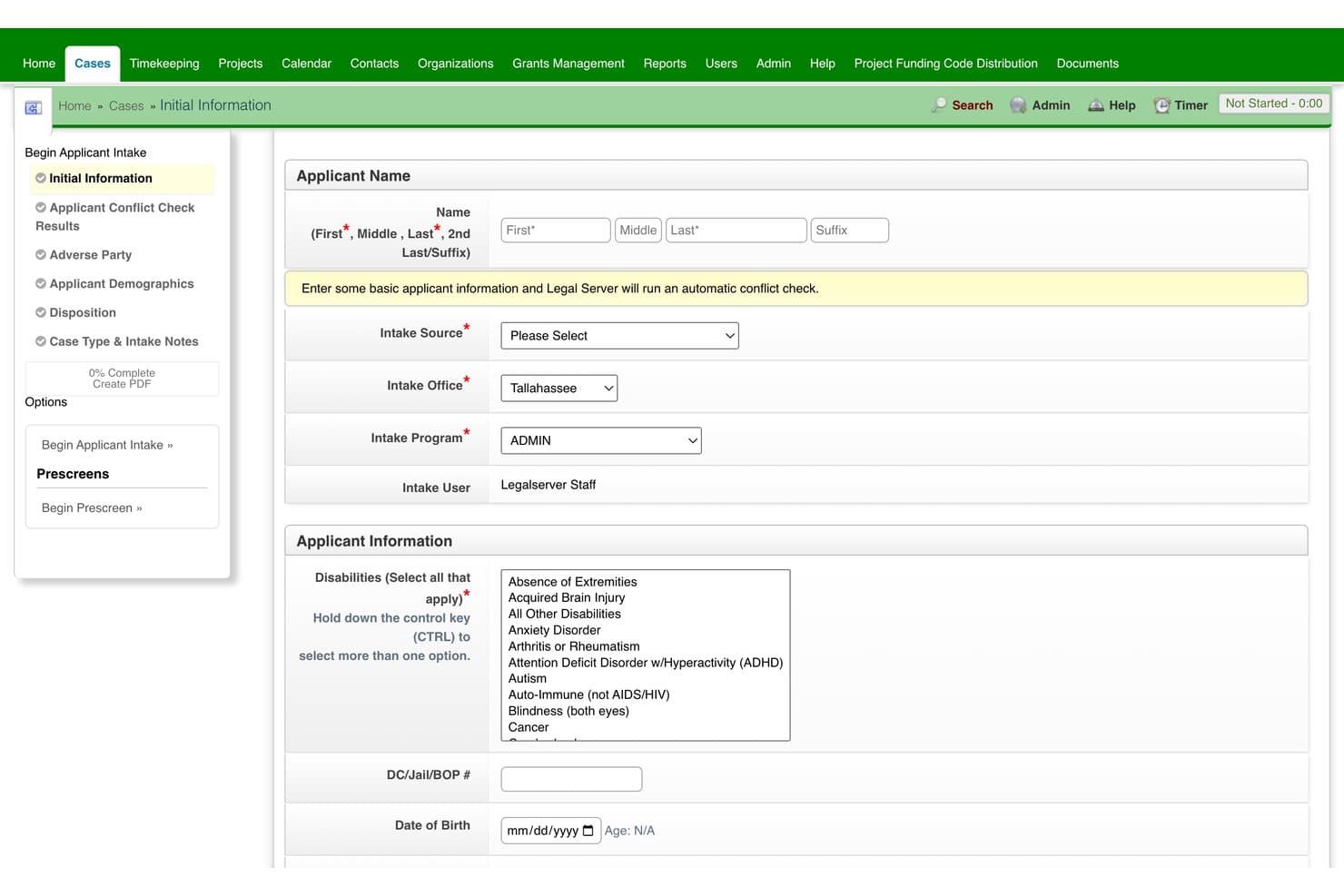
LegalServer tracks public defense intake, cases, activity logs, documents, and discovery. LegalServer is a web-based case management platform built for public defenders and government law offices, with configurable intake, case tracking, document management, discovery, timekeeping, and reporting tools.
Who Is LegalServer Best For?
LegalServer is a strong fit for public defenders and city or county attorneys who need configurable, government-grade case management with built-in document handling and reporting.
Why I Picked LegalServer
I picked LegalServer as one of the best because of how it handles appointed counsel and expert management in a single system. The contract attorney module lets you create work orders, define fee structures, track time and billing, and give outside counsel role-based access to only their assigned cases. I also like that discovery can flow directly from a district attorney's case management system into a case file, keeping appointed counsel current without manual handoffs.
LegalServer Key Features
- Configurable intake: Customize intake forms, fields, and workflows to match your office's data-entry and case-creation requirements.
- Document and discovery storage: Store, search, and retrieve PDFs, audio, video, and email attachments in a centrally managed, permission-controlled case repository.
- Report builder: Build, filter, and export reports to Excel without database expertise, and schedule select reports to run and deliver automatically.
- Conflict search: Run centralized conflict checks during intake to identify potential conflicts across people, cases, and related records.
LegalServer Integrations
LegalServer offers native integrations with SharePoint and Twilio, plus API integrations with Salesforce and Microsoft Power BI. It also supports Microsoft Power Automate, Make, and Zapier, with APIs available for custom integrations.
Pros and Cons
Pros:
- Configurable workflows support government case processes
- Keeps discovery and case documents together
- Manages appointed counsel, experts, and billing
Cons:
- Reviewers describe a dated, clunky interface
- No prosecutor-specific charge tracking
Learn more about LegalServer: Best for defense teams coordinating client care
- Free demo available
- Pricing upon request
Visit WebsiteCustomer Rating:4/5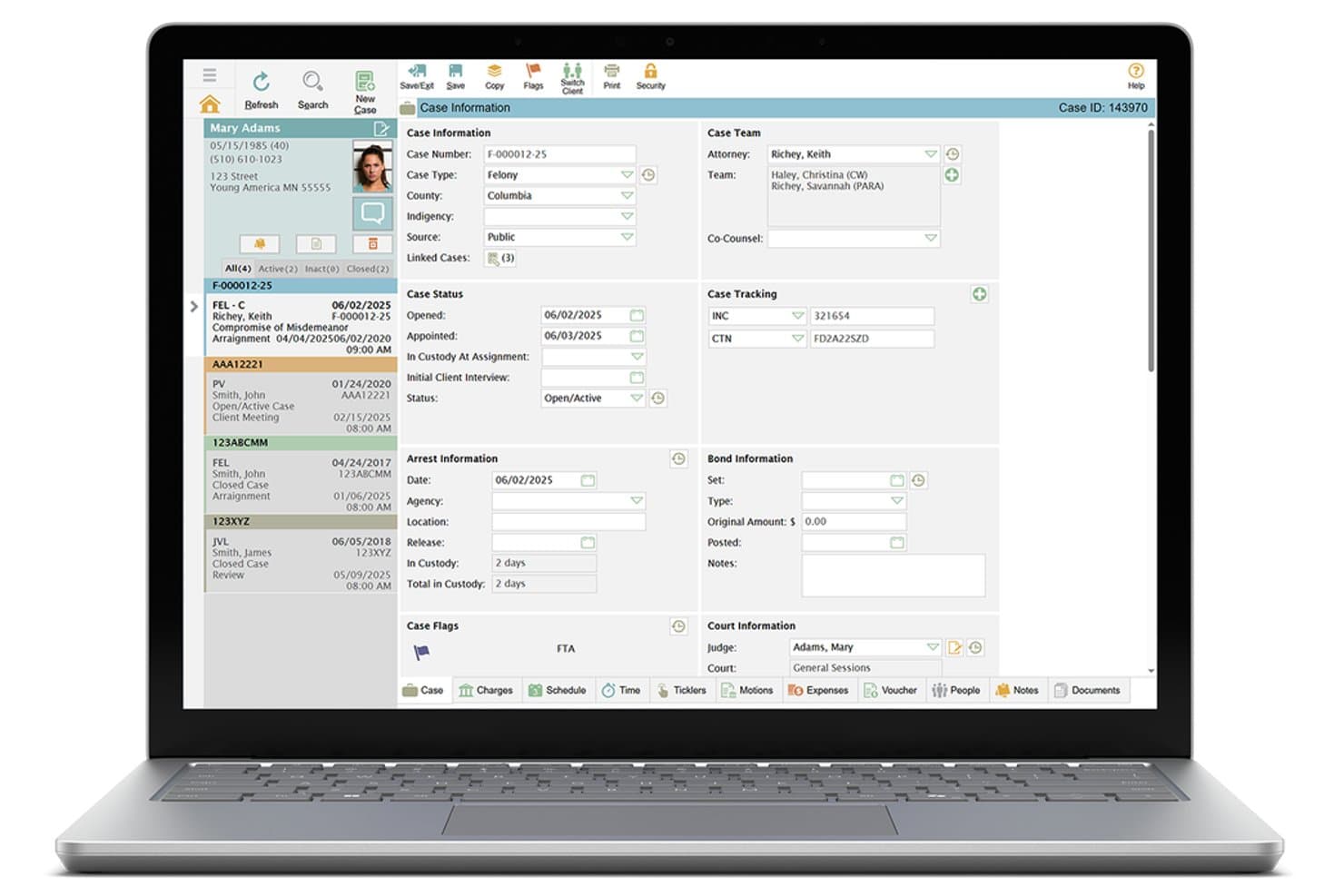
defenderDATA centralizes case details, team, and court info in one view. defenderDATA is a case management platform built specifically for public defender offices, centralizing case records, client information, discovery, documents, calendaring, and inter-agency data exchange in one system.
Who Is defenderDATA Best For?
defenderDATA is purpose-built for public defender offices that need to manage high-volume caseloads across attorney teams, support staff, and client service coordinators in one place.
Why I Picked defenderDATA
I picked defenderDATA as one of the best because it's the only tool on this list built from the ground up for public defender offices to coordinate legal and client-care workflows in one place. I love how client profiles hold referrals, service providers, case plans, and assessments right alongside case records, so a defender managing 500-plus cases can track a client's housing or mental-health services without leaving the system. The conflict-check tool searches across aliases and name variations, flagging potential conflicts before they become ethical problems.
defenderDATA Key Features
- Voucher processing: Submit, review, and approve assigned-counsel billing and expenses, with configurable approval routes and audit trails.
- Two-way SMS communication: Send court-date reminders to clients and receive replies directly within the platform.
- Inter-agency data exchange: Pull in charges, court dates, warrants, discovery, and citations from courts, prosecutors, and law enforcement via configurable integrations.
- Custom report scheduling: Set reports to run daily, weekly, or monthly, with automated delivery by email or system alert.
defenderDATA Integrations
defenderDATA connects with Google Calendar, Microsoft Outlook, Apple Calendar, and Axon Evidence.com for scheduling and digital evidence management. It also supports Microsoft Power BI, Tableau, and Crystal Reports through external reporting capabilities, with OData enabling custom data connections.
Pros and Cons
Pros:
- Client-service plans sit beside case records
- Calendar events support hearing preparation
- Organizes discovery across 500-plus cases
Cons:
- Statutory deadlines require manual entry
- Large-file and batch uploads can fail
Learn more about defenderDATA:
eCourt tracks court cases, hearings, documents, and financial transactions. eCourt is a court case management system by Journal Technologies that handles case lifecycle tracking, hearing scheduling, document management, financial processing, and justice partner access across court divisions.
Who Is eCourt Best For?
eCourt is a strong fit for court administrators managing multi-division dockets across municipal, county, or statewide court systems.
Why I Picked eCourt
I picked eCourt as one of the best because it's the only tool on my list that directly connects hearing scheduling with financial processing in a single case record. The Assessment Engine calculates court-defined fines and fees, ties them to specific case events, and routes payments through reconciliation, all without leaving the case file. I also like that justice partners, attorneys, and litigants access that same live case data through role-based portals, so everyone sees one consistent record from first filing through disposition.
eCourt Key Features
- Multi-division dashboards: Configurable dashboards display caseload trends, workloads, and performance indicators across court divisions in a single view.
- Courtroom annotation and signing tools: Judges and staff can annotate documents, capture notes, issue orders, and apply digital stamps and electronic signatures directly within the case file.
- Justice partner portals: Role-based online portals give attorneys, litigants, and justice partners real-time access to authorized case information, documents, and filing options.
- Document workflow routing: Configurable review and acceptance workflows move documents through intake, indexing, versioning, and auditability steps tied to each case record.
eCourt Integrations
eCourt connects with Journal Technologies' ePay-it for online payments and eFile-it for electronic filing.
Pros and Cons
Pros:
- Shows caseload metrics across court divisions
- Links hearings with fines and payments
- Tracks upcoming appearance and motion dates
Cons:
- Statutory-deadline calculations aren’t documented
- Case dates can update slowly
Learn more about eCourt:
Other Legal Case Management Software for Government
Here are a few additional options that didn’t make my shortlist but are still worth checking out:
- 11LegalEdgeBest for defense, prosecution and municipal law
- 12CaseWorthyBest for cross-program service coordination
- 13Mitratech TeamConnectBest for configurable litigation deadlines
- 14EquivantBest for courts sharing data across agencies
- 15CasepointBest for federal defenders’ eDiscovery
- 16CerebraBest for public records and legal workflows
- 17CivicaBest for varied public-sector legal workflows
- 18Thomson Reuters C-TrackBest for courts changing rules on their own
- 19GovGridsBest for municipal legal and records intake
- 20LawBaseBest for matter-triggered follow-up
How I Evaluate Legal Case Management Software for Government
I split my evaluation into three parts. First, core functionality: tools must track full case lifecycles and meet government security standards like CJIS or FedRAMP—this carries the most weight. Second, standout features like victim notification automation. Third, procurement fit and implementation support.
Core Functionality (Table Stakes for This List)
When I'm selecting tools for my list, I score each one on a scale from 0 (does not offer the functionality) to 5 (excels in this area) for each core functionality listed below. I then convert the total into a percentage to help assess each tool's overall fit, with extra weight on any functionalities I've deemed essential.
- Case & Docket Tracking (Essential): I check whether the tool tracks charges, parties, case status, and history across the full lifecycle, including cross-referencing linked matters.
- Government Security & Compliance (Essential): I look for verified compliance with standards like CJIS or FedRAMP, plus audit trails and role-based access controls.
- Deadline & Calendar Automation: Statutory deadline calculation matters here. I evaluate whether the system auto-generates deadlines by case type and jurisdiction.
- Document & Evidence Management: I look at how evidence and documents are stored, versioned, and shared, including chain-of-custody controls for discovery exchange.
- Inter-Agency Data Sharing: Tools like Odyssey and Enterprise Justice connect courts and attorney offices. I evaluate each product's integrations with external agencies.
- Reporting & Public Records: I check for customizable case reporting and whether the tool supports public records request fulfillment or performance audit exports.
Once I have a list of tools that meet the criteria, I consider what sets each platform apart.
Differentiating Factors (What Sets Vendors Apart)
Here's how I compare and contrast different vendors:
Standout Features
Victim and witness notification is a major differentiator. I check whether a tool auto-sends alerts for court dates, dispositions, and status changes in line with victims' rights statutes—manually tracking those obligations across a full caseload is a recipe for missed notices. Conflict of interest checking also matters: I look for automated scans across all parties, defendants, and attorneys, since a single missed conflict can derail a case. Redaction and sealing tools round out my evaluation, especially for offices handling public records requests or expungements where built-in redaction saves hours of manual work.
Beyond Features
I check whether a vendor has actual deployment history in comparable offices—a DA's office running thousands of felony cases needs different validation than a small municipal legal department. Jurisdiction-specific configurability also matters: vendors like Tyler Technologies and Karpel ship preconfigured charge code libraries and deadline rules for specific states, which cuts months off implementation. I evaluate licensing models against government budget realities, since site licenses often fit fluctuating public-sector staffing better than per-seat pricing tied to grant funding cycles.
How to Choose Legal Case Management Software for Government
Choose a system by testing it against your office’s deadlines, access rules, evidence handoffs, and reporting obligations before you commit.
| If your priority is… | Look for… |
|---|---|
| If your priority is…Deadline accuracy | Look for…A test using your jurisdiction’s rules and sample case dates |
| If your priority is…Sensitive-record control | Look for…A role-and-access matrix covering sealed, restricted, and public records |
| If your priority is…Evidence handoffs | Look for…A documented process for recording transfers and preserving chain of custody |
| If your priority is…Audit and public-records work | Look for…Sample exports showing redactions, case history, and request tracking |
How to Vet Your Shortlist
- Test deadline calculations: Give each vendor the same three case scenarios, with filing dates and jurisdiction, and compare results against your office’s approved calendar.
- Request security artifacts: Before a demonstration, request the security documentation and an audit-log sample; confirm how access changes and record views appear.
- Run an exchange scenario: In a 30-minute trial, transfer a sample evidence record between authorized roles, then inspect its history and permissions.
- Validate reporting: Ask for a sample report or export using a mock public-records request, including a redacted document and its case reference.
- Choose your tradeoff: Use a procurement worksheet to rank jurisdiction-specific legal workflows against cross-agency data exchange; decide which gap your team can manage with documented procedures.
What Is Legal Case Management Software for Government?
Legal case management software for government organizes matters, records, deadlines, and work across public-sector legal offices. It can support prosecution, public defense, courts, and municipal legal teams.
Features such as role-based access, audit trails, evidence tracking, and agency data exchange help teams manage sensitive records and coordinate casework. The right fit depends on your office’s responsibilities, jurisdiction-specific rules, and reporting needs.
Features of Legal Case Management Software for Government
Here are the core features to look for in legal case management software for government:
- Case and docket tracking: Records parties, charges, case status, and activity history across a matter’s lifecycle. Linking related matters helps staff follow connected cases without losing their separate records.
- Deadline and calendar automation: Calculates or suggests dates based on case type, jurisdiction, and key events. Your team should verify rules against approved calendars, especially when statutory deadlines are involved.
- Document and evidence management: Stores case files and evidence with version history and controlled access. Chain-of-custody records can document who handled an item and when, supporting evidence handoffs and discovery work.
- Role-based access and audit trails: Limits access according to a user’s role and records actions such as viewing or changing case information. These controls help teams manage sensitive, sealed, or restricted records and review activity.
- Inter-agency data exchange: Shares authorized case information with courts, prosecution, defense, or partner agencies through supported connections. Confirm which systems and data types the product supports before relying on an exchange workflow.
- Reporting and public-records support: Produces case reports and exports for oversight, audits, and records requests. Check whether reports can filter by relevant fields and preserve the case reference and request history.
- Victim and witness notifications: Sends alerts about events such as court dates or case status changes when configured for the office’s requirements. Confirm which events, recipients, and delivery methods the system supports.
- Conflict-of-interest checks: Searches parties, defendants, and attorneys for potential conflicts before assignment or further case action. Staff should review possible matches, since name similarities can require manual verification.
- Redaction and sealing controls: Helps authorized users restrict or redact sensitive information in records prepared for disclosure. Confirm how the system handles sealed materials, redacted copies, and the original record.
Benefits of Legal Case Management Software for Government
Here are a few common benefits of legal case management software for government:
- Case tracking: Linked matter records help your team follow parties, charges, status, and activity throughout a case’s lifecycle.
- Deadline control: Calendar automation can calculate or suggest dates based on case type, jurisdiction, and key events for staff to verify.
- Record protection: Role-based access, audit trails, and sealing controls help manage sensitive, restricted, and public records.
- Evidence accountability: Document histories and chain-of-custody records show who handled evidence and when.
- Agency coordination: Supported data exchanges can share authorized case information with courts, attorneys, and partner agencies.
- Reporting support: Custom reports and exports help staff respond to oversight, audits, and public-records requests.
- Timely notifications: Configured alerts can notify victims and witnesses about court dates, dispositions, and case status changes.
Costs and Pricing of Legal Case Management Software for Government
Pricing varies by features, team size, add-ons, and procurement requirements. Published rates are uncommon for government-focused systems, so treat these ranges as general estimates.
Plan Comparison Table for Legal Case Management Software for Government
| Plan Type | Average Price | Common Features |
|---|---|---|
| Plan TypePersonal Plan | Average Price$25–$75/user/month | Common FeaturesCase and docket tracking, document storage, deadline reminders, and basic reporting. |
| Plan TypeBusiness Plan | Average Price$75–$150/user/month | Common FeaturesAdvanced case workflows, role-based access, audit trails, and configurable reports. |
| Plan TypeEnterprise Plan | Average Price$150–$300/user/month | Common FeaturesJurisdiction-specific configuration, inter-agency data exchange, evidence management, and dedicated implementation support. |
FAQs
Some answers to common questions about legal case management software for government:
What should our office plan before implementation?
Start by assigning an executive sponsor and a day-to-day project owner. Map existing matter types, records, deadlines, permissions, and handoffs before configuration begins. Agree which system owns each data field and who approves changes. Pilot representative workflows with attorneys, clerks, records staff, and IT. Set acceptance criteria for search, access, reporting, and exports. Schedule role-based training before launch, and plan a period for issue reporting. Keep legacy access available until your team verifies migrated records and daily work.
How long does implementation take?
There isn’t one standard implementation timeline; it depends on your office’s requirements and the vendor’s work plan. Procurement approvals, data cleanup, custom workflows, integrations, security reviews, and user testing can all affect the schedule. Ask the vendor to break the project into phases, with named owners and decision dates. Confirm what your team must provide, such as data dictionaries or rule approvals. Build in time to test real scenarios before launch rather than setting a go-live date based only on software installation.
How should we prepare case data for migration?
Inventory the records you need to move, including linked matters, documents, notes, and historical activity. Decide what to migrate, what to retain in a legacy archive, and what your retention rules require. Ask the vendor to map source fields to destination fields and identify records that won’t transfer cleanly. Run a test migration, then compare record counts and inspect attachments, relationships, permissions, and search results. Have designated staff approve the results before go-live, and document how users will retrieve any records left in the old system.
Does government legal case management software need CJIS or FedRAMP compliance?
It depends on your office’s data, hosting model, and procurement requirements. CJIS or FedRAMP may apply in some environments, but neither should be assumed to cover every deployment or data type. Ask which service, hosting environment, and controls a vendor’s documentation applies to. Have your security and procurement teams compare that scope with agency policy and contract requirements. Also clarify how the vendor handles access logs, incident reporting, subcontractors, and data return or deletion when the contract ends.
Can legal case management software replace a court case management system?
Sometimes, but don’t assume the products serve the same role. A court system may remain the official source for docket events, while a legal office system manages internal work and records. Before planning a replacement, confirm who owns each record and whether the products exchange updates, documents, or status changes. Ask how the connection handles corrections, duplicate records, and delays. If both systems remain in use, document which one staff should consult for each task and how they’ll resolve conflicting information.