

PDF remediation software fixes inaccessible PDFs so they meet legal and accessibility standards for courts, clients, and regulators. If you’re searching for the best PDF remediation tools, you’re likely juggling compliance pressures, tight workflows, and a backlog of legal documents that need to be made accessible on deadline. I’ve spent decades untangling these challenges with law firms and legal ops teams, so I know the right software can mean the difference between audit-ready compliance and unnecessary risk. I’ll walk you through the top solutions I trust for batch processing, audit-grade reporting, and smooth legal workflow integration—so you can pick a tool that meets the real demands of practice.
Why Trust Our Software Recommendations
6,700+
Reviews
20
Industry experts
16+
Evaluation factors
14
Years
Our team has been testing and reviewing software since 2012. As legal practice leaders ourselves, we know how difficult—and important—it is to choose the right software.
For this guide, we evaluated tools using hands-on testing and independent research, scoring tools using our selection criteria.
Our reviews reflect our human editorial judgment, not a sales pitch.
PDF Remediation Software Comparison Table
This comparison table highlights pricing details for my top PDF remediation software for family law.
| Tool | Best For | Trial Info | Price | ||
|---|---|---|---|---|---|
| 1 | Best for developer-built PDF/UA compliance pipelines | 30-day free trial | Pricing upon request | Website | |
| 2 | Best for on-prem PDF accessibility compliance | Free demo available | Pricing upon request | Website | |
| 3 | Best for scaling PDF/UA compliance via API | 14-day free trial | Pricing upon request | Website | |
| 4 | Best for high-volume compliance across regulated docs | Not available | Pricing upon request | Website | |
| 5 | Best for audit-ready batch compliance certificates | Free trial available (100 pages) | From $0.30/page | Website | |
| 6 | Best for legal PDF batch compliance at scale | 7-day free trial | From $19.99/user/month (billed annually) | Website | |
| 7 | Best for compliance-grade multi-standard auditing | Free trial available | Pricing upon request | Website | |
| 8 | Best for on-premises government-scale remediation | Free plan available | From $599/user/year | Website | |
| 9 | Best for multi-standard compliance at scale | Free demo available | Pricing upon request | Website | |
| 10 | Best for high-volume, standards-driven PDF compliance | 7-day free trial + free demo available | Pricing upon request | Website |


PDF Remediation Software Reviews
Below are my detailed summaries of the best pdf remediation software that made it onto my shortlist. My reviews offer a detailed look at the features, best use cases, and capabilities of each software to help you find the best one for you.
 Best for developer-built PDF/UA compliance pipelines
- 30-day free trial
- Pricing upon request
Visit WebsiteCustomer Rating:4.2/5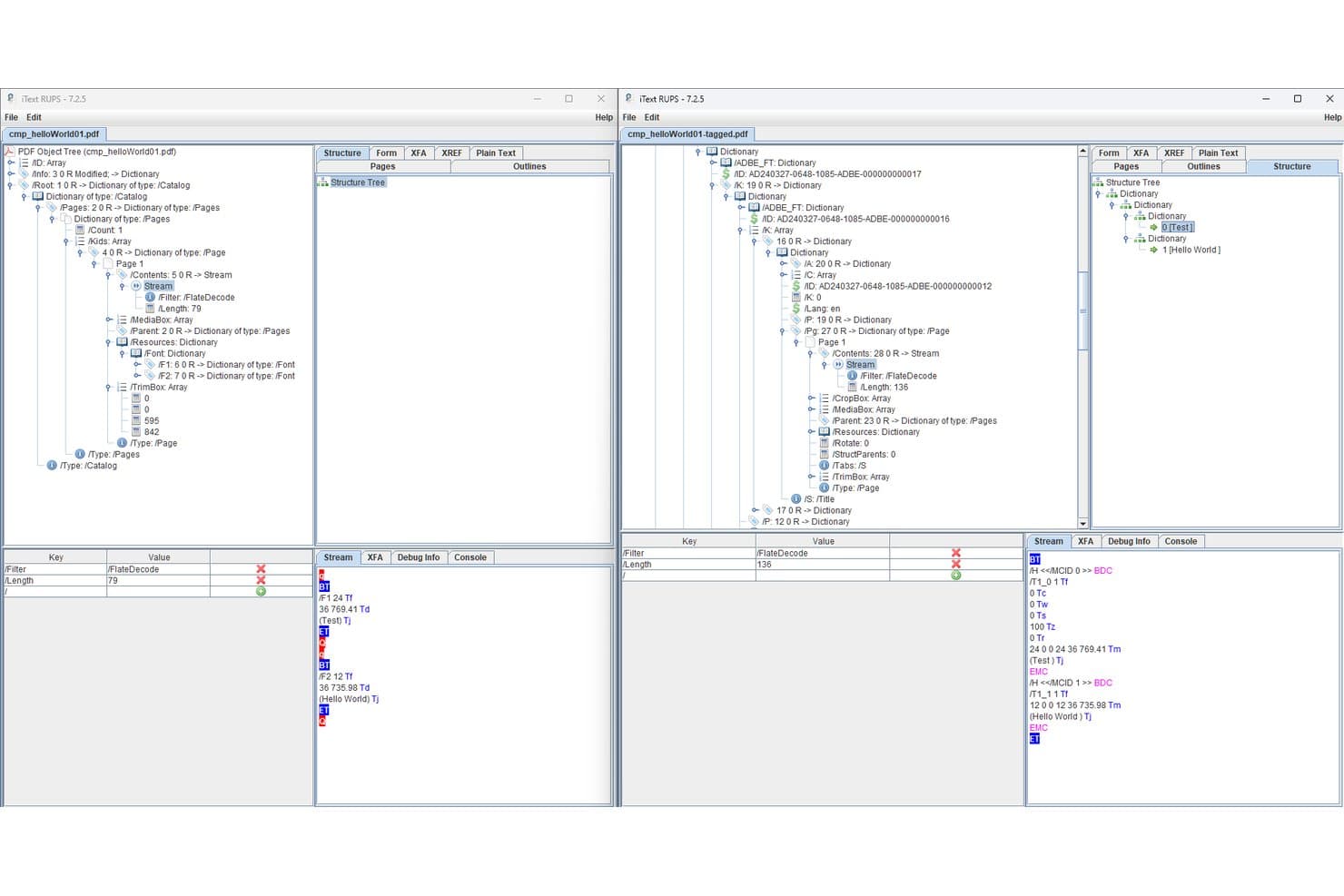
iText lets users compare tagged and untagged PDF structures side by side. iText is a PDF SDK that lets developers programmatically generate, tag, and validate accessible PDFs against PDF/UA-1, PDF/UA-2, Section 508, and ADA standards, with add-ons for OCR, redaction, and XFA form flattening.
Who Is iText Best For?
iText is the right fit for law firm IT teams and developers who need to build custom, high-volume PDF/UA compliance pipelines with full on-premise data control.
Why I Picked iText
I picked iText as one of the best because it's the only PDF SDK I know of that supports both PDF/UA-1 and the newest PDF/UA-2 (ISO 14289-2:2024) standard, with automatic Matterhorn Protocol validation built directly into the document generation process. Law firm IT teams can script fully automated remediation pipelines in Java or .NET that process multi-gigabyte document volumes without routing files through third-party servers, which matters when you're handling privileged material.
iText Key Features
- pdfSweep redaction: Permanently removes text, images, and drawing regions from PDFs using regex pattern matching or coordinate-defined areas.
- pdfOCR text recognition: Converts scanned PDFs and images into searchable, structured PDF/A-3u files using ONNX AI or Tesseract 4 engines.
- Dual PDF/A and PDF/UA conformance: Generates PDFs that simultaneously meet both archival (PDF/A) and accessibility (PDF/UA) standards in a single document output.
- pdfXFA form flattening: Converts dynamic XFA forms embedded in PDFs into static, accessible AcroForm-compatible documents.
iText Integrations
iText supports custom integrations through Java/.NET APIs and a REST API deployment available through AWS Marketplace. Its documented connectivity includes HTML/CSS through pdfHTML and Microsoft Office through pdfOffice; native legal DMS connectors aren't documented.
Pros and Cons
Pros:
- Enables on-premise, privacy-focused deployments
- Fully automates high-volume remediation pipelines
- Deepest standards compliance supports PDF/UA-2
Cons:
- Oriented toward creating, not remediating PDFs
- No GUI or visual tag tree editor
Learn more about iText: Best for on-prem PDF accessibility compliance
- Free demo available
- Pricing upon request
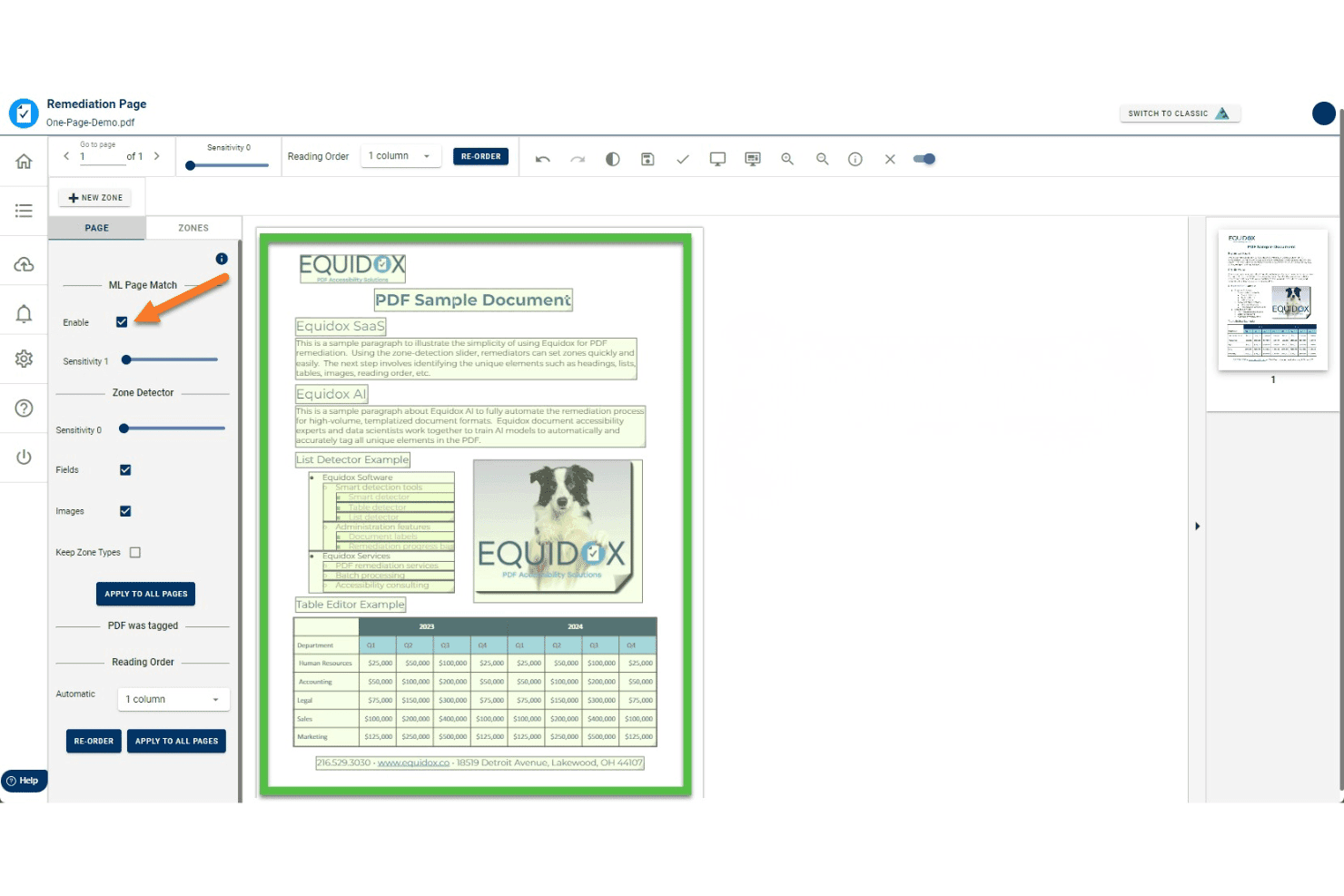
Equidox uses ML Page Match to auto-detect zones for PDF remediation. Equidox is a PDF accessibility remediation platform that uses a zone-based tagging interface, AI-assisted structure detection, and built-in OCR to tag, structure, and validate PDFs against standards like WCAG, Section 508, ADA, and PDF/UA.
Who Is Equidox Best For?
Equidox is a strong fit for compliance and accessibility officers in government, healthcare, and financial services who need on-premise PDF remediation to meet WCAG, Section 508, or ADA requirements without sending sensitive documents to the cloud.
Why I Picked Equidox
I've included Equidox in my top picks because it's the only tool on this list built to run entirely on your organization's own infrastructure, which matters when the documents you're remediating can't leave your network. Its zone-based tagging interface pairs with a Smart Table Detector that auto-identifies merged cells and multi-level headers, and on-prem deployment means remediated files never touch a third-party server. That combination is hard to replicate across WCAG 2.1, Section 508, and PDF/UA in a single on-premise package.
Equidox Key Features
- Built-in OCR: Converts scanned or image-only PDFs into editable, taggable content with a custom text-correction tool for fixing OCR errors.
- Alt text pane: A centralized pane lets you add or edit alt text for every image in the document from a single location, with options to mark decorative images as artifacts.
- Zone Transfer: Copies a validated zone and tag structure from one PDF to another, speeding up remediation for recurring documents with identical layouts.
- Export output warnings: At export, Equidox automatically flags missing alt text, broken URLs, heading errors, and missing form tooltips before the file leaves your workflow.
Equidox Integrations
Equidox supports REST API integrations with SharePoint and Canvas, plus Microsoft and Google organizational sign-in. Its API also supports custom connections to document workflows.
Pros and Cons
Pros:
- Zone-based tagging speeds manual remediation
- Smart table detector manages complex structures
- Runs fully on-premises for data security
Cons:
- Fully automated AI limited to templates only
- No legal-document-specific tagging features
Learn more about Equidox: Best for scaling PDF/UA compliance via API
- 14-day free trial
- Pricing upon request
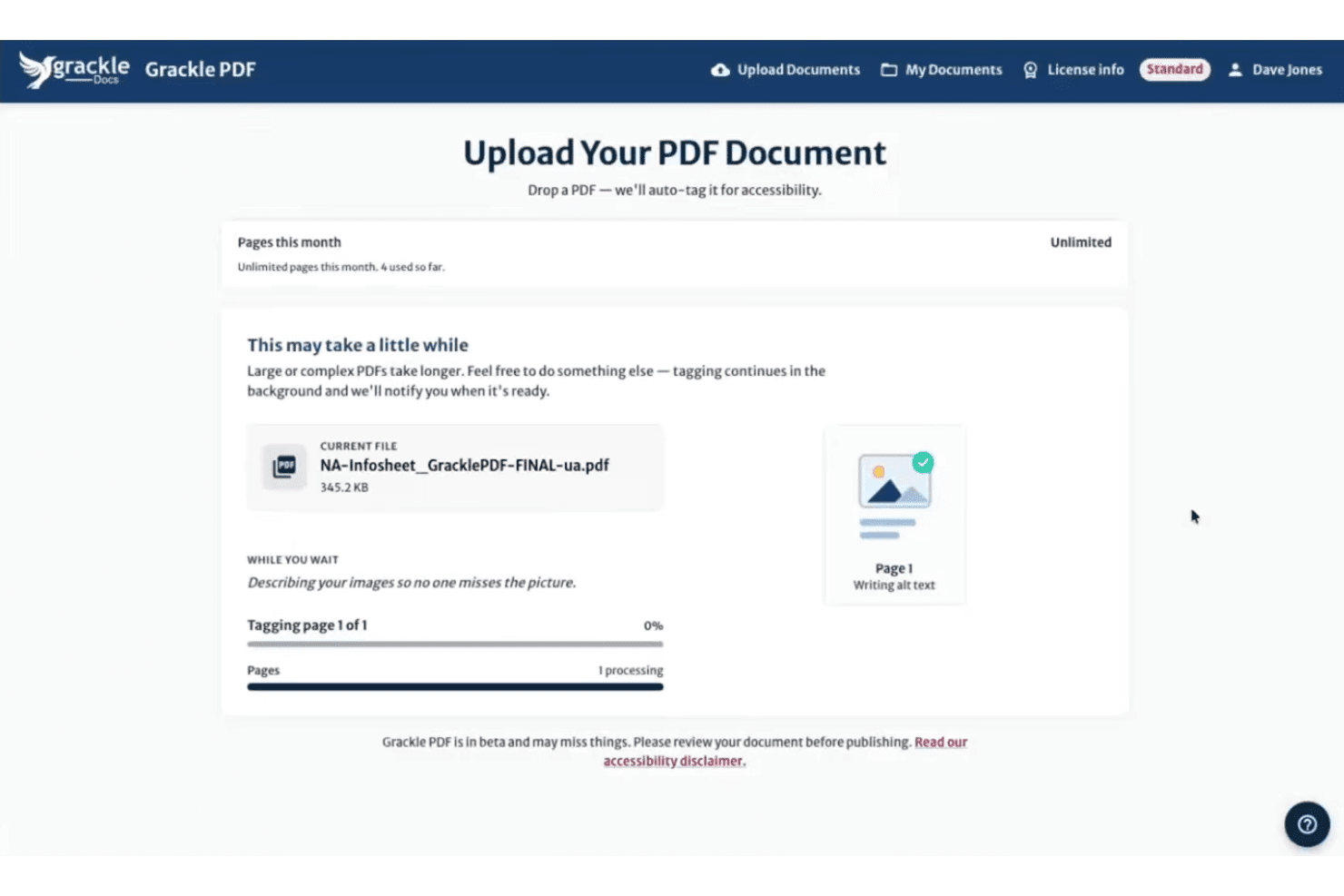
Grackle PDF auto-tags uploaded PDFs for accessibility, including alt text. GrackleDocs is a purpose-built PDF accessibility remediation platform that combines AI-powered auto-tagging, multi-standard compliance validation, reading order editing, and high-volume automated processing via its Grackle Stream API.
Who Is GrackleDocs Best For?
GrackleDocs is a strong fit for compliance and accessibility officers at enterprise or government organizations that need to process high volumes of PDFs to PDF/UA and WCAG standards at scale.
Why I Picked GrackleDocs
GrackleDocs earns its spot on my shortlist because of Grackle Stream, its API-driven batch processing service that handles unlimited pages per day with a 100% PDF/UA compliance guarantee. I've worked with organizations that need to push hundreds of documents through remediation pipelines without manual touchpoints, and Grackle Stream plugs directly into existing infrastructure. The March 2025 AI Layout Detection and Auto Tagging update adds another layer, cutting manual tagging time by up to 90–95% before documents even reach human review.
GrackleDocs Key Features
- AI-suggested alt text: The AI generates contextual alt text for images and figures that you can review and edit before finalizing.
- GrackleScan compliance monitoring: Produces ongoing monthly grading reports so you can track your document estate's accessibility status over time.
- Table Wizard: A guided, step-by-step interface for remediating complex tables, including row and column header identification.
- Grackle GO validator: A free, no-login tool that checks documents against PDF/UA and WCAG standards and generates a printable compliance report in under 10 seconds.
GrackleDocs Integrations
GrackleDocs has a native Google Workspace integration for Google Docs, Sheets, and Slides. Grackle PDF and Grackle Stream also provide API access for custom document-processing workflows, while Grackle Gateway supports SSO.
Pros and Cons
Pros:
- Built-in validator covers multiple accessibility standards
- API supports unlimited batch processing workflows
- AI auto-tagging dramatically speeds up remediation
Cons:
- No pricing published on the company website
- No legal workflow templates or DMS connectors
Learn more about GrackleDocs: Best for high-volume compliance across regulated docs
- Not available
- Pricing upon request
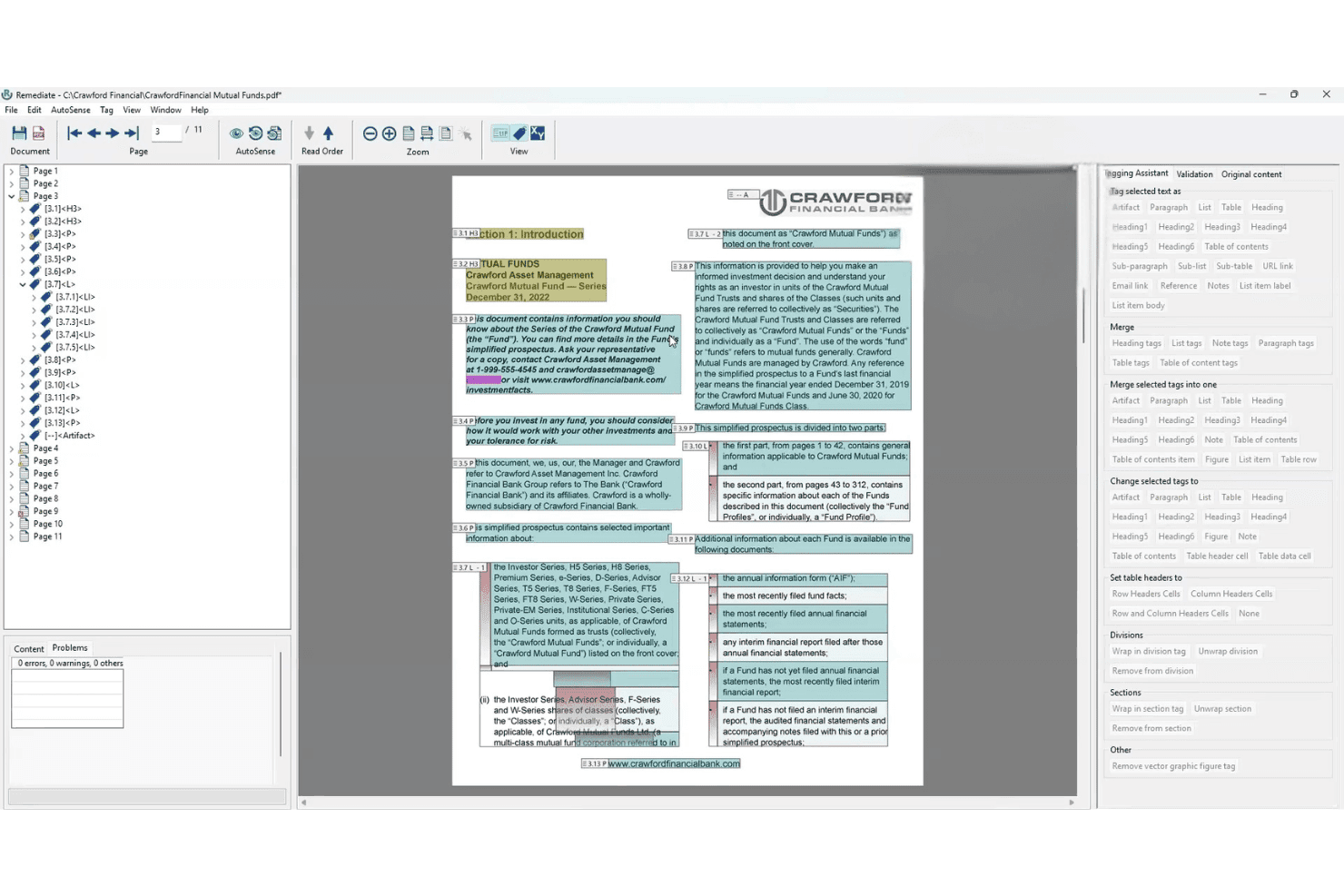
AccessibilityNow Remediate lets users tag and fix PDF accessibility issues visually. AccessibilityNow Remediate is a Windows-based PDF remediation tool from Crawford Technologies that combines AI-assisted tagging via its AutoSense engine with manual tag finishing for reading order, headings, tables, and lists across static and transactional documents.
Who Is AccessibilityNow Remediate Best For?
It's a strong fit for compliance and accessibility officers in regulated industries who need to process large volumes of PDFs against WCAG, Section 508, and PDF/UA standards.
Why I Picked AccessibilityNow Remediate
I picked AccessibilityNow Remediate because its AutoSense AI engine does something I genuinely value: it scans a PDF and flags complex tables, nested lists, and multi-column reading order issues before you touch a single tag. That's a real advantage when you're processing high volumes of regulated documents against WCAG 2.1/2.2, PDF/UA, and Section 508 standards. The companion Validator module then runs batch compliance checks with detailed reporting, so you're not guessing whether a document passes.
AccessibilityNow Remediate Key Features
- Standalone Windows desktop application: Runs without requiring Adobe Acrobat, giving you a dedicated tagging environment independent of third-party software licenses.
- Complex and nested table tagging: Handles multi-level table structures within PDFs, including nested tables that most tools struggle to tag correctly.
- AccessibilityNow Validator integration: Pairs with a companion compliance module that batch-scans documents against WCAG 2.1/2.2, PDF/UA, Section 508, and ADA standards and generates detailed reports.
- Multi-deployment platform ecosystem: Connects to broader AccessibilityNow modules—Publisher, Gateway, and Transactional—supporting cloud, on-premises, hybrid, and SaaS deployment for enterprise-scale workflows.
AccessibilityNow Remediate Integrations
The broader AccessibilityNow platform connects with SharePoint, Alfresco, and Nuxeo through CCM Gateway, plus OpenText and document repositories through Gateway workflows. REST APIs, web services, APIs, command-line tools, scripts, watch folders, and custom SDK integrations support additional connections.
Pros and Cons
Pros:
- Compliance coverage spans global accessibility laws
- Handles nested lists and detailed reading order
- AI flags complex tables and multi-columns
Cons:
- No templates for court filings or Bates numbering
- Manual tool lacks built-in batch processing
Learn more about AccessibilityNow Remediate: Best for audit-ready batch compliance certificates
- Free trial available (100 pages)
- From $0.30/page
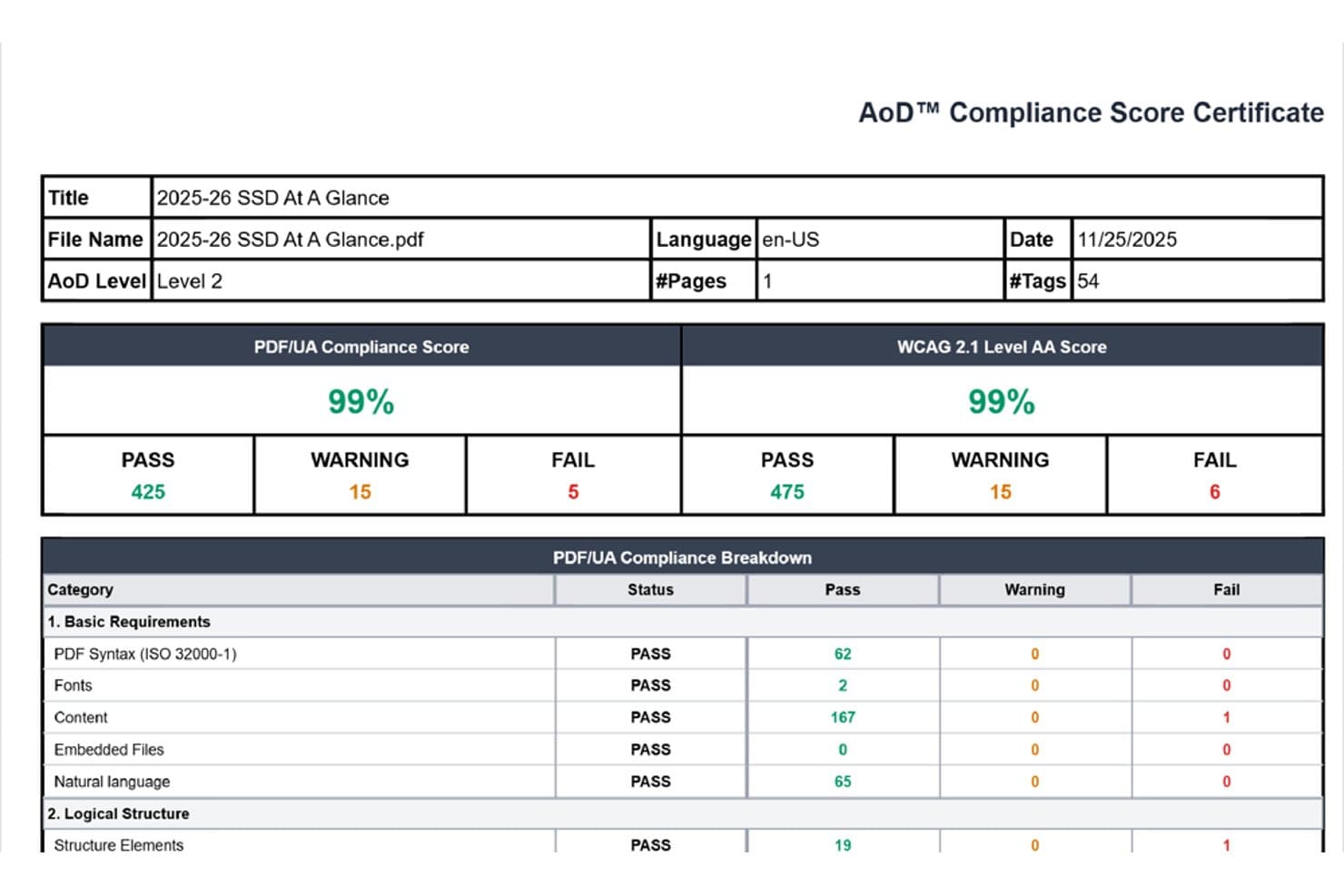
Accessibility On Demand reports PDF compliance scores with pass/fail breakdowns. Accessibility On Demand is an AI-powered PDF remediation service that handles automated tagging, reading order correction, alt text generation, and multi-standard compliance validation across WCAG 2.1/2.2 AA, PDF/UA, Section 508, and ADA Title II/III.
Who Is Accessibility On Demand Best For?
Accessibility On Demand is a strong fit for compliance and accessibility officers who need to process large document backlogs and produce independently validated, audit-ready remediation certificates at scale.
Why I Picked Accessibility On Demand
I've included Accessibility On Demand in my top picks because it's built specifically around producing audit-ready output at scale, not just compliant output. Every remediated PDF gets an independently validated Compliance Score Certificate from PAC by Axes4, a third-party checker, which is the kind of documented proof that holds up in an audit. I also like that the Enhanced tier carries a 95%+ compliance guarantee (with no charge if it falls short), and the Expert Review tier backs that up with a 100% guarantee and human sign-off for complex or legally sensitive documents.
Accessibility On Demand Key Features
- Multi-standard compliance validation: Every remediated PDF is checked against WCAG 2.1/2.2 AA, PDF/UA, Section 508, ADA Title II/III, and Section 504 in a single workflow.
- In-platform tag tree editing: After automated processing, you can manually review and adjust the tag tree, reading order, and OCR text directly in the platform's editing interface.
- Enterprise API for batch pipelines: A dedicated API lets you embed AoD into existing intelligent document processing workflows for fully automated, high-volume remediation at scale.
- Multi-language remediation support: The platform supports PDF remediation in six languages—English, Spanish, French, German, Italian, and Portuguese—with roughly 100 languages planned.
Accessibility On Demand Integrations
Native integrations are not clearly documented. Accessibility On Demand supports custom integrations through an enterprise API and offers a drag-and-drop self-service portal for direct uploads.
Pros and Cons
Pros:
- Multi-standard remediation covers legal requirements
- Batch processing handles large document backlogs
- PAC-validated compliance certificates for every document
Cons:
- No native integration with legal document management systems
- No legal-specific features like Bates preservation
Learn more about Accessibility On Demand: Best for legal PDF batch compliance at scale
- 7-day free trial
- From $19.99/user/month (billed annually)
Visit WebsiteCustomer Rating:4.5/5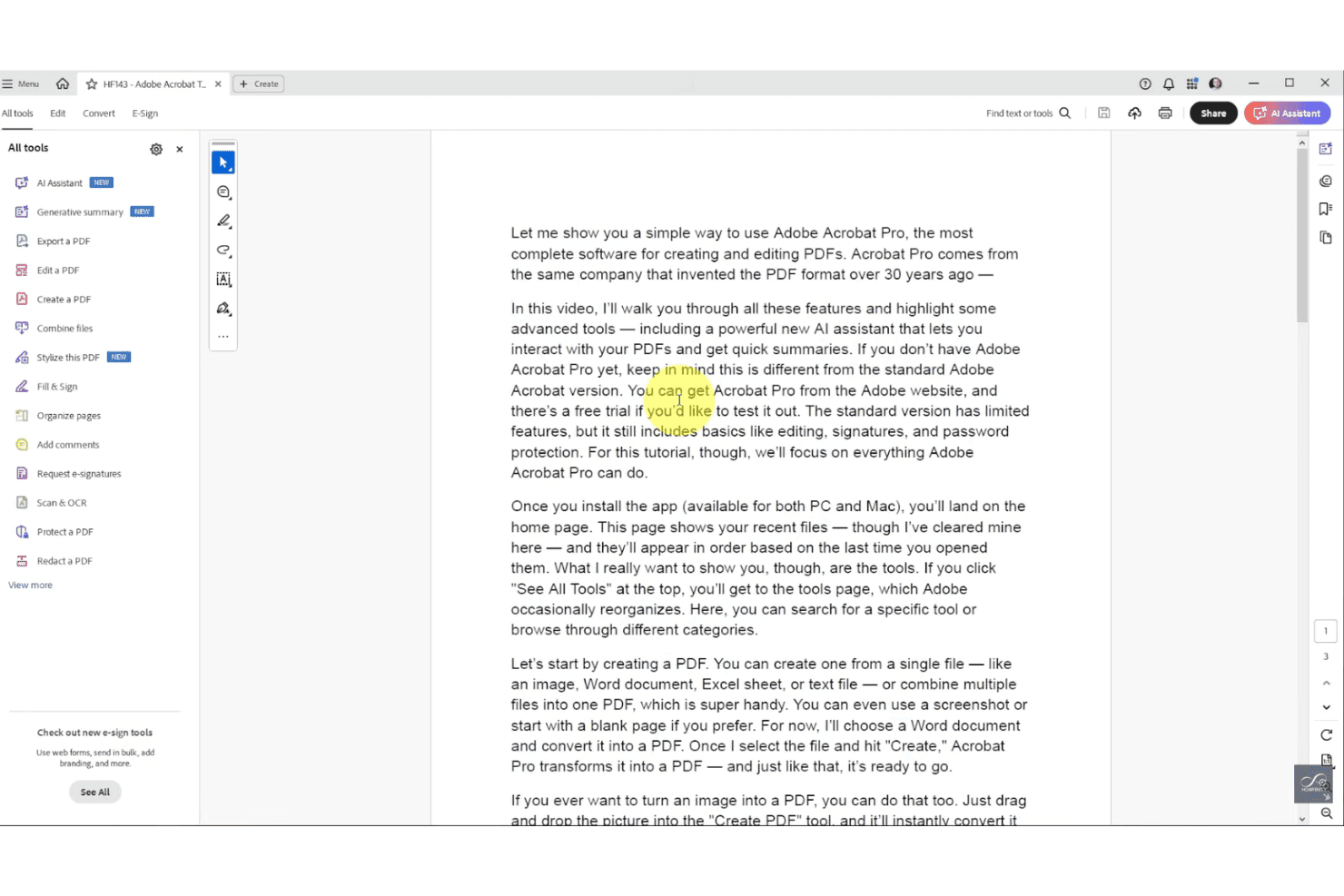
Adobe Acrobat Pro covers a full suite of PDF tools in one workspace. Adobe Acrobat is a PDF editor and remediation platform that includes AI-powered auto-tagging, full tag tree editing, accessibility compliance checking against WCAG and PDF/UA, batch processing via Action Wizard, OCR, redaction, and Bates numbering.
Who Is Adobe Acrobat Best For?
Adobe Acrobat is a strong fit for legal operations teams and law firms that need to process large volumes of PDFs for accessibility compliance across departments or client portfolios.
Why I Picked Adobe Acrobat
Adobe Acrobat earns its spot on my shortlist because no other tool matches its batch processing depth for legal teams running high-volume compliance workflows. The Action Wizard lets you apply a full "Make Accessible" remediation sequence across entire document folders in one pass, and the PDF Accessibility Auto-Tag API has handled real-world workloads as large as 8 million WCAG 2.1 AA compliant documents per year for a U.S. state court system. I also rely on the built-in Bates numbering tool, which applies sequential identifiers across batched PDFs without breaking your remediation workflow.
Adobe Acrobat Key Features
- AI-powered auto-tagging: Uses Adobe Sensei AI to automatically assign structural tags—including headings, tables, and lists—to untagged or partially tagged PDFs.
- Accessibility checker: Validates PDFs against WCAG 2.1/2.2, PDF/UA, and Section 508, and flags issues with suggested one-click fixes directly in the checker panel.
- OCR conversion: Converts scanned or image-only PDFs into searchable, editable, tag-ready text before remediation begins.
- Redaction tool: Permanently removes sensitive text and images from PDFs, with redacted content markable as artifacts within the accessibility tag structure.
Adobe Acrobat Integrations
Adobe Acrobat has native integrations across the Microsoft ecosystem, including Microsoft 365, Microsoft Information Protection, and Power Automate, plus Google Drive, Dropbox, Box, and Adobe Experience Manager. Acrobat Services APIs support custom integrations; native iManage, NetDocuments, and Worldox connectors aren’t documented.
Pros and Cons
Pros:
- Full manual and automated PDF tagging workflow
- Industry-standard Bates numbering with batch support
- AI-powered batch auto-tagging for high volumes
Cons:
- No native iManage or NetDocuments connector
- Accessibility checker catches limited real issues
Learn more about Adobe Acrobat: Best for compliance-grade multi-standard auditing
- Free trial available
- Pricing upon request
Visit WebsiteCustomer Rating:4.6/5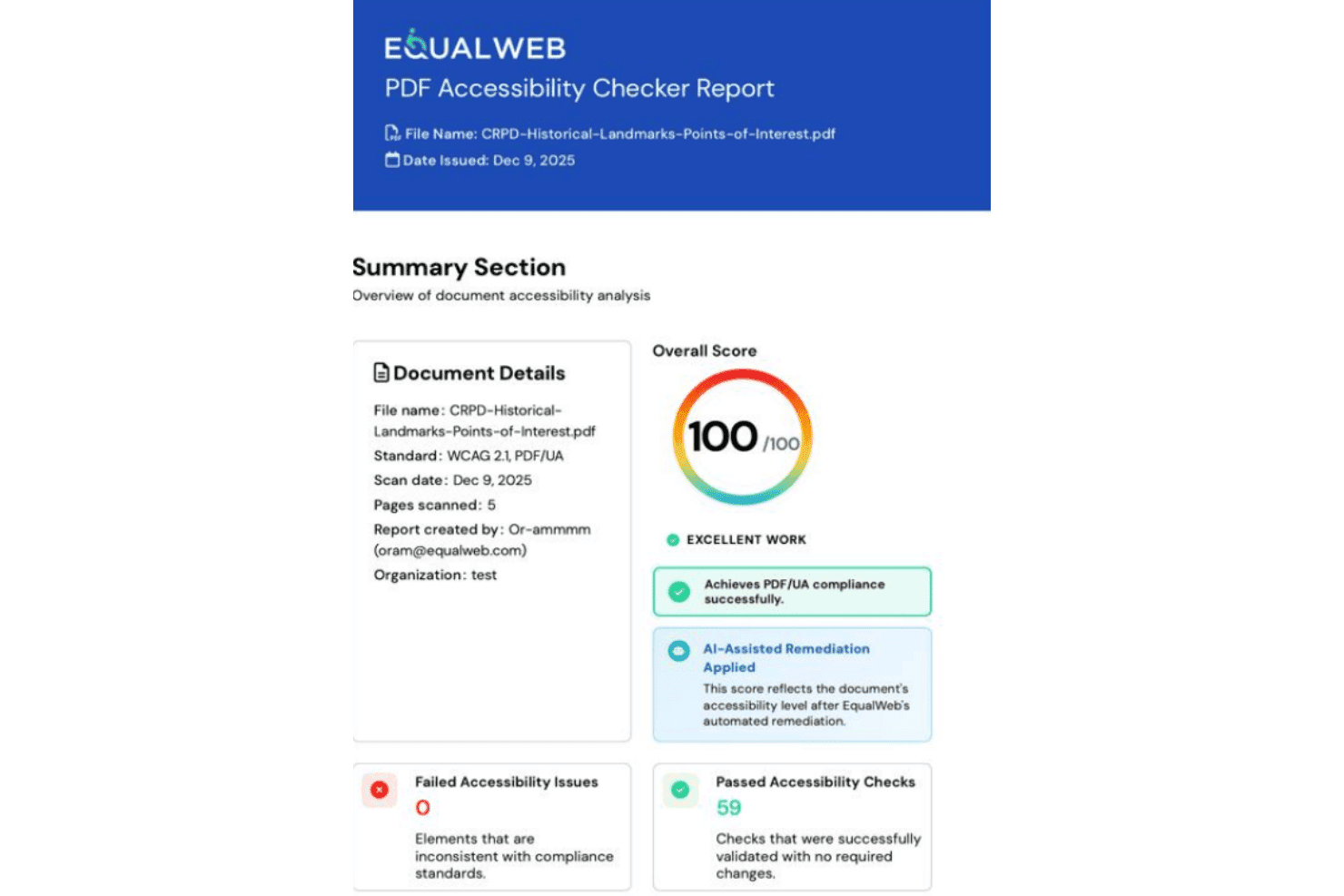
EqualWeb scores PDFs for accessibility compliance across multiple standards. EqualWeb PDF Accessibility is a cloud-based PDF remediation platform that combines AI auto-remediation, OCR for scanned documents, and IAAP/CPWA-certified expert manual remediation across a multi-standard compliance framework covering WCAG, PDF/UA, Section 508, ADA, and EN 301 549.
Who Is EqualWeb PDF Accessibility Best For?
EqualWeb PDF Accessibility is a strong fit for compliance and accessibility officers who need to audit documents against multiple standards simultaneously.
Why I Picked EqualWeb PDF Accessibility
EqualWeb PDF Accessibility earns its spot on my shortlist because no other tool I've tested audits against as many standards simultaneously, covering WCAG 2.1 and 2.2, PDF/UA-1, PDF/UA-2, Section 508, ADA, and EN 301 549 in a single pass. I particularly like the post-remediation re-audit, which runs the same 80+ checks on every output file and generates a shareable pass/fail report you can hand directly to an auditor. The conformance records issued for manually remediated documents add another layer of defensibility that matters when a client or regulator asks for proof.
EqualWeb PDF Accessibility Key Features
- AI auto-remediation engine: Automatically builds a full tag tree from scratch, covering headings, lists, tables, reading order, language attribution, and metadata in a single pass.
- Human approval gate for alt text: AI-generated alt text is displayed alongside screenshots of the relevant image regions, requiring human review and approval before being applied.
- Cloud Connect integration: Connects to SharePoint, Google Drive, OneDrive, Dropbox, Box, and S3-compatible storage, enabling automated in-place remediation without manual file uploads.
- OCR for scanned documents: Converts scanned, image-only PDFs of up to 400 pages into searchable, tagged, accessible text before applying full AI remediation.
EqualWeb PDF Accessibility Integrations
Native integrations span Microsoft 365, Google Drive, OneDrive, Dropbox, Box, AWS S3, Cloudflare R2, WordPress, Drupal, and Moodle. It also supports Shopify, Canvas LMS, other cloud storage, and REST API custom integrations.
Pros and Cons
Pros:
- Human approval required for all AI alt text
- Hybrid AI and certified expert remediation
- Audits against the most compliance standards
Cons:
- No redaction-aware or Bates-number handling
- No legal DMS platform integrations
Learn more about EqualWeb PDF Accessibility: Best for on-premises government-scale remediation
- Free plan available
- From $599/user/year
Visit WebsiteCustomer Rating:5/5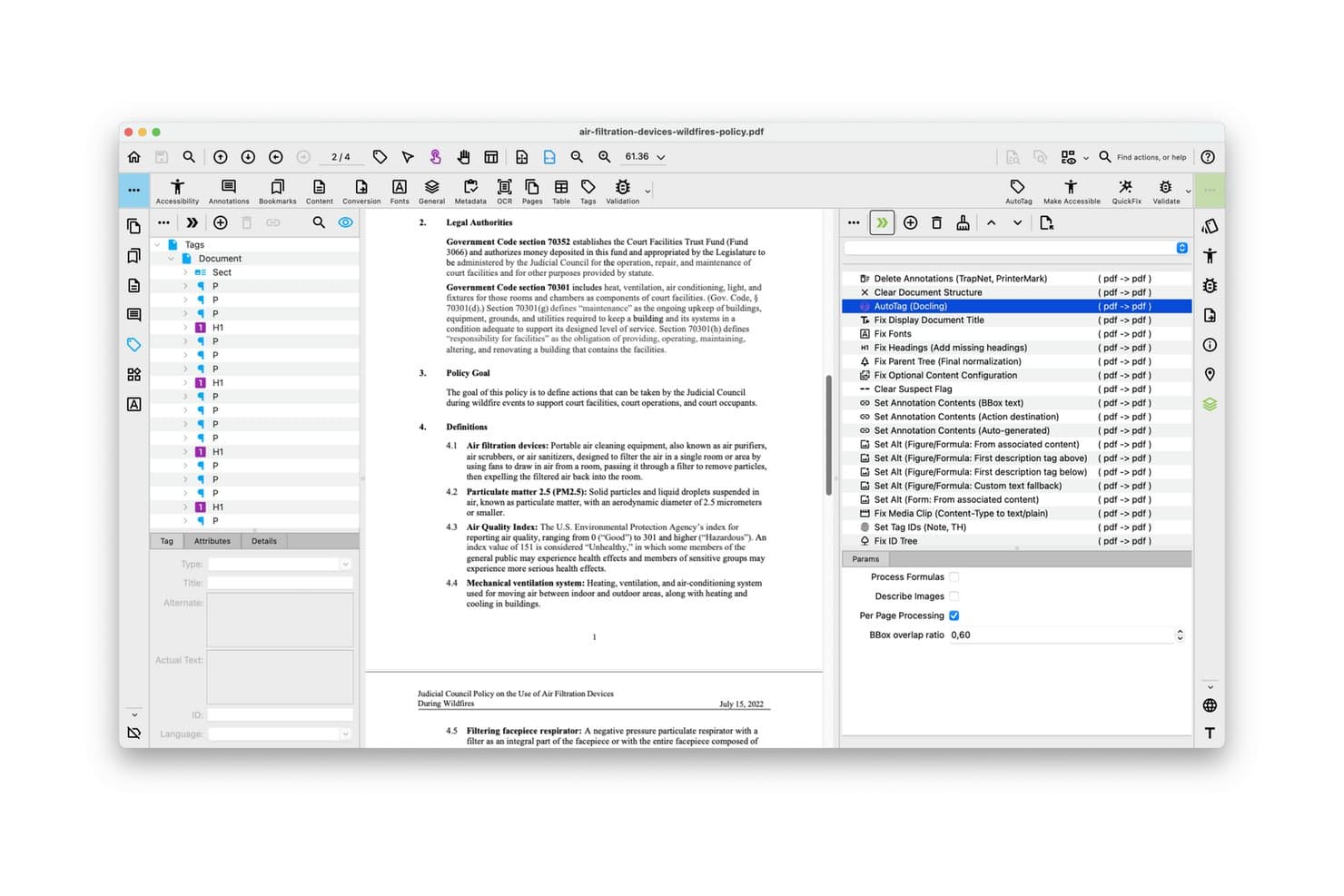
PDFix lets users auto-tag and remediate PDF accessibility issues visually. PDFix is a PDF remediation tool that combines AI-powered auto-tagging, multi-standard compliance validation (PDF/UA, WCAG, Section 508, ADA Title II), batch processing, and on-premises deployment across Windows, macOS, and Linux.
Who Is PDFix Best For?
PDFix is a strong fit for IT administrators and compliance officers in government agencies, courts, and regulated institutions that process high volumes of PDFs on-premises.
Why I Picked PDFix
I picked PDFix as one of the best because its on-premises deployment is genuinely built for institutions that can't send sensitive documents to an external server. The California Judicial Council uses it to process 4.8 million cases annually across 58 courts, which tells you exactly what scale it's designed for. I also love that reusable JSON layout templates let you define remediation rules once and apply them across thousands of identical court forms automatically.
PDFix Key Features
- Multi-standard compliance validation: The embedded veraPDF engine checks documents against PDF/UA-1, PDF/UA-2, WCAG 2.1, WCAG 2.2, Section 508, ADA Title II, and the European Accessibility Act in a single workflow.
- AI alt text generation: Generate alt text for images using a local offline BLIP model or OpenAI's API, with bulk editing supported through JSON layout templates.
- Cross-platform native support: PDFix runs natively on Windows, macOS, and Linux, making it usable across mixed-OS environments without virtualization.
- Exportable audit reports: Validation results export as HTML, XML, or JSON, giving compliance officers documentation-ready reports for accessibility audits.
PDFix Integrations
PDFix offers marketplace integrations through Enfocus Switch, including PDFix Validation and PDFix Make Accessible. Its SDK supports custom integrations through REST-compatible interfaces, Python, C#, Java, C++, and Node.js, plus Docker, Kubernetes, and GitHub Actions workflows.
Pros and Cons
Pros:
- Customizable AI models for tagging and alt text
- Native support for Windows, macOS, and Linux
- Runs entirely on-premises with no data loss
Cons:
- Advanced automation requires technical template setup
- No built-in legal DMS connectors
Learn more about PDFix: 9Best for multi-standard compliance at scale
PREP
- Free demo available
- Pricing upon request
Visit WebsiteCustomer Rating:5/5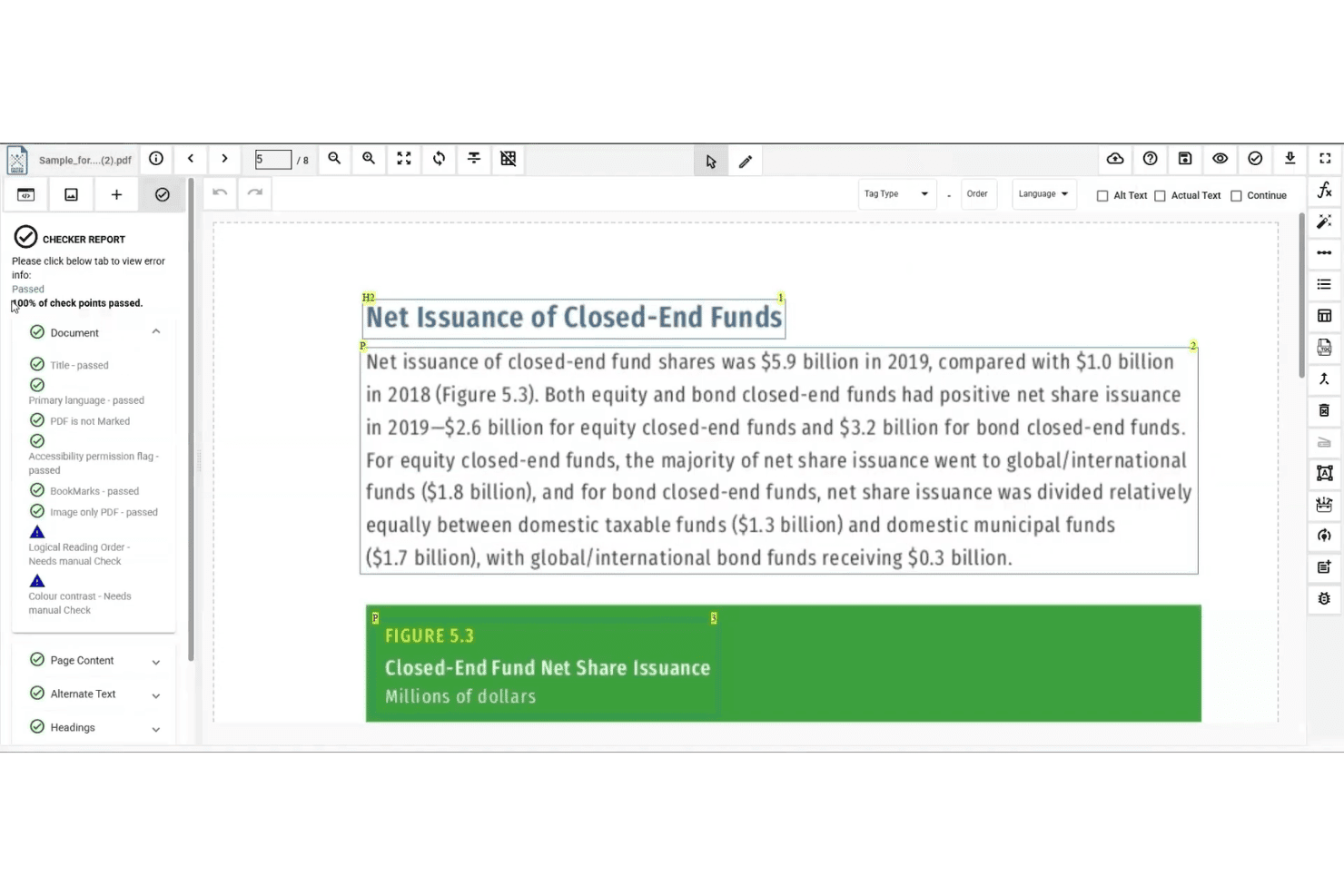
PREP checks PDF accessibility and flags issues needing manual review. PREP is a PDF remediation platform by Continual Engine that uses AI-assisted auto-tagging, batch processing, built-in compliance checking across multiple accessibility standards, and a REST API suite to handle large-scale document remediation workflows.
Who Is PREP Best For?
PREP is a strong fit for compliance and accessibility officers at enterprise organizations managing high volumes of documents across multiple regulatory standards.
Why I Picked PREP
I picked PREP as one of the best because no other tool I've evaluated covers this many accessibility standards in a single platform. WCAG 2.2 AA, PDF/UA, Section 508, ADA Title II, AODA, and the European Accessibility Act are all built into the compliance checker, which means one batch run surfaces violations across every standard at once. The template tagging feature is what makes this scalable: once you configure a tagging profile for a recurring document structure, PREP applies it automatically across future uploads without manual review.
PREP Key Features
- Real-time screen reader preview: Lets you verify how tagged content will be read aloud before exporting the final document.
- AI-enhanced OCR: Processes scanned and image-only PDFs, including multilingual and right-to-left language content, in batch.
- Multi-user workflow management: Supports document assignment, progress tracking, and usage reporting by team or department.
- PREP+ REST API suite: Enables automated remediation pipelines via Auto Tag, Accessibility Checker, and Audit APIs for integration into existing systems.
PREP Integrations
PREP has documented integrations with Canvas, D2L Brightspace, LTI, CivicPlus, Wagtail, and Okta. Its REST API supports custom connections, but native integrations with iManage Work, NetDocuments, and Worldox aren’t documented.
Pros and Cons
Pros:
- Real-time screen reader preview for QC
- AI tags most PDF elements automatically
- Covers six accessibility standards in one check
Cons:
- Lacks native legal document management connectors
- No legal-industry-specific features available
Learn more about PREP: Best for high-volume, standards-driven PDF compliance
- 7-day free trial + free demo available
- Pricing upon request
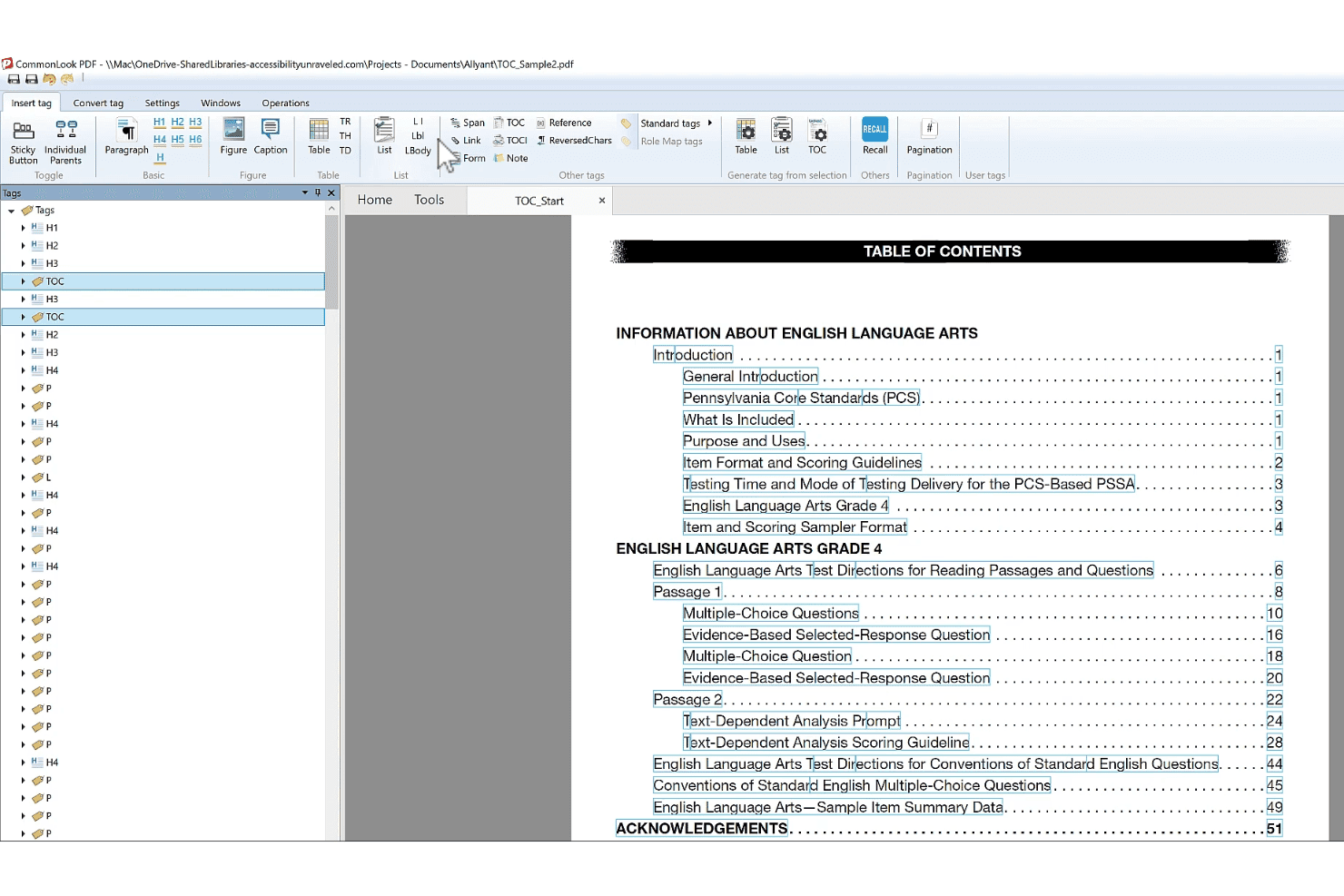
CommonLook Dynamic helps users tag and remediate PDF accessibility structures. CommonLook Dynamic is an enterprise PDF remediation and accessibility platform that handles high-volume, data-driven document production with multi-standard compliance validation across WCAG, PDF/UA, Section 508, ADA Title II, and the European Accessibility Act.
Who Is CommonLook Dynamic Best For?
CommonLook Dynamic is a strong fit for compliance officers and legal operations teams managing high-volume, templated document workflows that must meet multiple accessibility standards simultaneously.
Why I Picked CommonLook Dynamic
CommonLook Dynamic earns its spot on my shortlist because it's purpose-built for exactly the scenario most remediation tools struggle with: generating accessible, compliant PDFs at enterprise scale from structured data sources like databases and spreadsheets. I picked it specifically for teams running templated, high-volume document workflows where multi-standard compliance isn't optional. The suite validates against WCAG 2.0/2.1/2.2, PDF/UA, Section 508, and ADA Title II simultaneously, and every processed document ships with a paired Validation Report you can use as an audit trail.
CommonLook Dynamic Key Features
- Fix Wizard: A step-by-step guided tool that walks users through identifying and correcting accessibility and structural issues in a PDF without requiring deep specialist knowledge.
- System of Record: Tracks remediation history and stores each processed PDF paired with its Validation Report, creating a retrievable audit trail for compliance documentation.
- CommonLook PDF Validator: A free Adobe Acrobat Pro plugin that tests individual PDFs against accessibility standards and generates certification reports covering tagging, alt text, metadata, and links.
- CommonLook Clarity: Continuously scans document repositories and websites to flag newly added inaccessible PDFs, giving teams a live view of their compliance exposure across large document libraries.
CommonLook Dynamic Integrations
CommonLook’s documented integrations include Adobe Acrobat Pro DC, Microsoft Word and PowerPoint through CommonLook Office, Monsido, and the Allyant HUB. CommonLook Dynamic also connects to databases and spreadsheets as data sources.
Pros and Cons
Pros:
- AI auto-tagging for tables, forms, lists
- Compliance audit reports paired with each PDF
- Multi-standard compliance validation in every workflow
Cons:
- No Bates numbering or redaction-aware tagging
- No native legal DMS integrations available
Learn more about CommonLook Dynamic:
Other PDF Remediation Software
Here are some additional PDF remediation software options that didn’t make it onto my shortlist, but are still worth checking out:
- 11RemeDocsBest for automated compliance cert generation
- 12DocAccessBest for public-sector PDF accessibility at scale
- 13OpenTextBest for AI-assisted PDF accessibility in large orgs
- 14Recite MeBest for website-wide PDF accessibility monitoring
- 15Foxit PDF EditorBest for PDF remediation inside legal DMS workflows
- 16Tungsten AutomationBest for legal PDF workflows with DMS integration
- 17MadeToTagBest for InDesign-to-PDF/UA accessibility output
- 18CommonLook PDFBest for compliance-grade table and tag remediation
- 19AppligentBest for expert-led Section 508 certification
- 20SensusAccessBest for accessible alt text in batch PDF workflows
How I Evaluate PDF Remediation Software
I split my evaluation into baseline capabilities every tool must meet and the differentiators—like DMS integration, audit-grade reporting, and redaction-aware tagging—that separate tools built for legal workflows from general-purpose options.
Core Functionality (Table Stakes For This List)
When I'm selecting tools for my list, I rank each one on a scale from 0 (does not offer the functionality) to 5 (excels in this area) for each core functionality listed below. I then calculate the tool's total score into a percentage, using 65% as a benchmark to help assess its overall fit for the list.
- PDF Tagging & Structure: I check whether a tool offers full tag tree editing with role mapping, not just auto-tagging that leaves you cleaning up messy heading hierarchies in a 200-page brief.
- Compliance Checks: Each tool should audit against WCAG, PDF/UA, and Section 508 with clear pass/fail reporting, since court filings and client documents often need to satisfy multiple standards at once.
- Alt Text & Image Handling: I look for bulk alt text editing, decorative image detection, and figure tagging—features that matter when you're remediating exhibit-heavy case documents with dozens of embedded images.
- Table & Form Remediation: Complex tables in contracts and financial disclosures break screen readers fast, so I evaluate how well each tool handles nested table headers, form field labeling, and tab order.
- Batch Processing & Automation: High-volume legal workflows demand more than single-file remediation. I look for API access, rules-based batch processing, and template support that can handle hundreds of documents in a single run.
- Reading Order & Language Controls: A misordered reading sequence can make a court filing incomprehensible to a screen reader user. I evaluate whether tools let you visually adjust reading order and tag per-element language attributes for multilingual documents.
Once I have a list of tools that meet the criteria, I consider what sets each platform apart.
Differentiating Factors (What Sets Vendors Apart)
Here's how I compare and contrast different vendors:
Standout Features
Redaction-aware tagging is non-negotiable for legal work. I check whether a tool correctly flags redacted content as artifacts so screen readers never expose privileged or sealed information. DMS integration matters just as much. I evaluate whether tools connect to iManage, NetDocuments, or Worldox and preserve metadata when documents move through remediation. Audit trail and certification capabilities round out my assessment—I look for timestamped remediation logs and PDF/UA conformance certificates that hold up during ADA compliance audits.
Beyond Features
Data security matters when privileged or sealed filings pass through remediation. I check whether a vendor offers on-premise or private-cloud deployment and holds SOC 2 Type II certification, since many firms' outside counsel guidelines require both. DMS integration is equally important—I evaluate whether tools connect to iManage, NetDocuments, or Worldox and preserve metadata and version history during remediation. I also look at licensing models, especially whether pricing scales by volume or per seat, because case-driven document loads fluctuate and a rigid structure can inflate costs fast.
How to Choose a PDF Remediation Software
The right PDF remediation software comes down to how well it fits your volume, workflow, and compliance pressures—so ask yourself: what’s the single biggest accessibility bottleneck your team faces right now?
| If your priority is... | Look for... |
|---|---|
| If your priority is...Batch-remediating large legal volumes | Look for...Bulk processing with API or automated workflows |
| If your priority is...Defensible audit trails | Look for...Certificate generation and exportable reports |
| If your priority is...Document management | Look for...Integration with your existing DMS platforms |
| If your priority is...Reliable redaction handling | Look for...Redaction-aware tagging and artifact controls |
| If your priority is...Government or public-sector work | Look for...PDF/UA and Section 508 multi-standard checks |
How to Vet Your Shortlist
- Request an audit report sample: Ask each vendor for a real (redacted) PDF/UA or Section 508 compliance certificate generated by their platform.
- Run a batch trial: Process 10+ sample legal PDFs through a trial to test bulk processing speed and accuracy against your standards.
- Test DMS integration: Have the vendor demonstrate saving a remediated document to your DMS setup (iManage, NetDocuments, etc.) in a live session.
- Confirm redaction workflow: Submit a redacted file for remediation and confirm that sensitive blocks are correctly tagged as artifacts.
- Decision filter—volume vs. integration: Prioritize high-volume automation tools when compliance at scale matters most; choose workflow-native tools for deep records management integration.
What Is PDF Remediation Software?
PDF remediation software is a type of tool that identifies and corrects accessibility issues in PDF documents, making them compliant with legal and accessibility standards such as WCAG, PDF/UA, and Section 508. These tools add tags, reading order, alternate text, and other accessibility features so screen readers and assistive technologies can interpret the content accurately for all users. This is essential for legal, regulatory, and public-sector compliance.
Features of PDF Remediation Software
When selecting PDF remediation software, keep an eye out for the following key features:
- PDF tagging and structure editing: Allows you to add, modify, or repair the tag tree and structure of documents, ensuring every heading, paragraph, and element is screen reader-friendly and accessibility compliant.
- Compliance checks and reporting: Automatically audits PDFs against WCAG, PDF/UA, and Section 508 standards, providing clear pass/fail feedback and detailed reports for audits or regulatory submissions.
- Alt text and image remediation: Lets you add, edit, or batch-apply alt text to images and flag decorative images as artifacts, which is essential for legal exhibits, charts, and graphic-heavy documents.
- Table and form field remediation: Supports fixing complex tables, nested headers, and labeling for form fields, ensuring that tab order and data relationships are clear to assistive technologies.
- Batch processing and automation: Enables you to process multiple documents at once, whether through API integrations or built-in batch tools, which is critical for high-volume legal workflows and tight deadlines.
- Reading order and language controls: Lets you visualize, adjust, and set the logical reading order and per-element language tags so screen readers interpret content in the correct sequence and language.
- Redaction-aware artifact tagging: Flags redacted or privileged content as artifacts within the tag structure, preventing screen readers from revealing sealed or sensitive information in court filings or client documents.
- Document management system (DMS) integration: Connects with your existing DMS platforms like iManage, NetDocuments, or Worldox for direct import, export, and metadata preservation during remediation workflows.
- Audit trail and certification export: Creates timestamped logs and generates PDF/UA or Section 508 certificates to demonstrate compliance—vital for responding to client, court, or regulator requests.
- Deployment and security options: Offers choices such as on-premise, private cloud, or secure SaaS deployment with credentials management and compliance certifications, so you can safely handle confidential or privileged documents.
Common PDF Remediation Software AI Features
Beyond the standard PDF remediation software features listed above, many of these solutions are incorporating AI with features like:
- AI-driven auto-tagging: Uses machine learning to analyze document structure and automatically generate accurate tag trees, reducing manual tagging time and improving consistency across large batches of PDFs.
- AI-powered alt text generation: Automatically creates descriptive alt text for images, charts, and graphics by interpreting visual content, which helps ensure accessibility even when source descriptions are missing.
- AI-based table structure recognition: Detects and reconstructs complex tables, including merged cells and nested headers, making it easier to remediate financial statements and legal exhibits without manual intervention.
- AI-assisted reading order correction: Analyzes document layout and content flow to suggest or apply logical reading orders, minimizing errors that can confuse screen readers and disrupt document comprehension.
- AI-enabled language detection: Identifies and tags different languages within a single document, supporting accurate screen reader output for multilingual filings and international legal documents.
Benefits of PDF Remediation Software
Implementing PDF remediation software provides several benefits for your team and your business. Here are a few you can look forward to:
- Consistent legal and regulatory compliance: Automated compliance checks and audit-grade reporting help you meet WCAG, PDF/UA, and Section 508 standards for court, client, and government requirements.
- Accurate document accessibility: Tagging, structure editing, and AI-driven auto-tagging ensure PDFs are screen reader–friendly so everyone can access critical legal content.
- Protected privileged and redacted information: Redaction-aware tagging flags sealed or sensitive sections as artifacts, preventing assistive tech from exposing confidential information.
- Streamlined large-batch processing: Bulk remediation, batch automation, and API integrations let you remediate high volumes of documents without slowing your workflow.
- Reliable document management integration: DMS integrations allow you to move, save, and preserve metadata within systems like iManage, NetDocuments, or Worldox during remediation.
- Efficient image and table handling: Features like bulk alt text editing, AI-powered table recognition, and form field remediation help your team handle complex exhibits and legal forms accurately.
- Defensible audit trails and certification: Timestamped remediation logs and exportable PDF/UA or Section 508 certificates provide documentation to satisfy client audits or regulator requests.
Costs and Pricing of PDF Remediation Software
Selecting PDF remediation software requires an understanding of the various pricing models and plans available. Costs vary based on features, team size, add-ons, and more. The table below summarizes common plans, their average prices, and typical features included in PDF remediation software solutions:
Plan Comparison Table for PDF Remediation Software
| Plan Type | Average Price | Common Features |
|---|---|---|
| Plan TypeFree Plan | Average Price$0 | Common FeaturesBasic compliance checks, limited page count, restricted exporting, and minimal support. |
| Plan TypePersonal Plan | Average Price$30–$75/user/month | Common FeaturesSingle user license, standard PDF tagging tools, simple compliance auditing, and email support. |
| Plan TypeBusiness Plan | Average Price$100–$400/user/month | Common FeaturesMulti-user seats, batch processing, advanced tagging, PDF/UA and Section 508 reporting, and support. |
| Plan TypeEnterprise Plan | Average Price$500–$2,500/month (custom) | Common FeaturesUnlimited seats, API integration, DMS connectors, on-premise deployment, audit trails, and SOC 2 compliance. |
PDF Remediation Software FAQs
Here are some answers to common questions about PDF remediation software:
What integrations should I look for in PDF remediation software?
Look for integrations with major document management systems like iManage, NetDocuments, and Worldox. These make it much easier to save and manage remediated documents without breaking existing workflows. API access is also valuable if you need to automate high-volume processing or connect with custom systems.
How does PDF remediation software handle redacted content?
Good PDF remediation software flags redacted blocks as artifacts during the tagging process. This ensures screen readers and assistive technologies won’t expose sealed, privileged, or confidential text. Always test a redacted file before rollout to confirm the tool applies redaction-aware tagging consistently.
Is on-premise deployment important for legal teams?
Yes, on-premise or private cloud deployment is important if your law firm or legal department handles privileged or sensitive filings. Many outside counsel guidelines require on-premise solutions or SOC 2 Type II certification for compliance, so always confirm deployment options with the vendor.
How can I assess batch processing capabilities?
Ask the vendor to demo processing 10 or more legal PDFs in a single batch. Look for features like rules-based templates, queue monitoring, and clear reporting about errors or remediation status. Teams managing large litigation or regulatory loads will benefit most from strong batch processing.
Do these tools generate compliance certificates?
Yes, leading solutions can generate PDF/UA or Section 508 conformance certificates and timestamped audit reports. These are important for ADA compliance audits, regulatory reviews, or when responding to client requests for proof of remediation. Always request a sample certificate as part of your vetting process.
How should I evaluate DMS integration during a trial?
During a trial, make the vendor demonstrate saving and retrieving a remediated PDF from the same DMS platform your team uses, such as iManage or NetDocuments. Confirm that metadata and version history are preserved in the process, as this supports defensible records management.
Can AI features replace manual remediation?
No, AI accelerates tasks like auto-tagging and alt text generation, but you still need manual review—especially for complex legal documents. Use AI to handle repetitive tasks, then check tag structure, reading order, and sensitive content by hand to ensure compliance.