

Mit 20 Jahren Erfahrung in der Bewertung von Rechtstechnologie habe ich 18 führende iManage-Alternativen selbst gründlich geprüft. Wenn Ihre Kanzlei eine engere Integration mit Microsoft 365 oder eine flexiblere Workflow-Automatisierung als bei iManage benötigt, sollten Sie hier nach starker Dokumentensicherheit und effizienter Mandantenkommunikation suchen.
Die besten iManage-Alternativen bieten eine sichere, mandatsorientierte Dokumentenverwaltung, nahtlose Integration mit Microsoft 365 und Tools zur Unterstützung moderner juristischer Arbeitsabläufe. Wenn Sie nach Alternativen zu iManage suchen, wünschen Sie sich wahrscheinlich eine Lösung, die besser zur Arbeitsweise Ihrer Kanzlei passt, remote oder hybrid arbeitende Teams unterstützt oder Ihnen mehr Kontrolle über Automatisierung und Mandantenkommunikation gibt. Dieser Leitfaden hilft Ihnen, führende iManage-Alternativen schnell aus der Perspektive des Legal Operations zu vergleichen, damit Sie die Option finden, die den Anforderungen und Zielen Ihrer Kanzlei entspricht.
Was ist iManage?
iManage ist eine Plattform zur Verwaltung von Rechtsdokumenten und E-Mails, die für Kanzleien und Rechtsabteilungen von Unternehmen entwickelt wurde. Sie zentralisiert Mandatsakten, E-Mails und vertrauliche Dokumente und bietet gleichzeitig erweiterte Suchfunktionen, Versionskontrolle und Berechtigungsverwaltung. iManage zeichnet sich durch Sicherheitsfunktionen, Kollaborationstools und eine umfassende Integration mit Microsoft 365 aus. Juristische Fachkräfte nutzen iManage, um Arbeitsprodukte für Mandanten effizient zu organisieren, zu schützen und von überall aus darauf zuzugreifen und dabei sowohl Compliance- als auch Produktivitätsstandards zu unterstützen.
Vergleichstabelle der iManage-Alternativen
Diese Vergleichstabelle fasst die Preisinformationen für meine ausgewählten iManage-Alternativen zusammen.
| Tool | Best For | Trial Info | Price | ||
|---|---|---|---|---|---|
| 1 | Am besten für die automatische Erfassung von Zeit und Aktivitäten geeignet | Kostenlose Demo verfügbar | Preise auf Anfrage | Website | |
| 2 | Am besten für Tools zur Mandantenkommunikation über ein Portal geeignet | 10-tägige kostenlose Testversion | Ab $50/Benutzer/Monat (jährlich abgerechnet) | Website | |
| 3 | Am besten geeignet für die Integration in die Kanzleiverwaltung | 7-tägige kostenlose Testversion | Ab $49/Benutzer/Monat | Website | |
| 4 | Am besten für Microsoft-365-Nutzer kleiner Kanzleien geeignet | Kostenlose Demo verfügbar | Ab $210/Monat (jährlich abgerechnet) | Website | |
| 5 | Am besten für nahtlose Dokumentenablage aus Outlook geeignet | Kostenlose Demo verfügbar | Preise auf Anfrage | Website | |
| 6 | Am besten für die Integration in Microsoft 365-Workflows | 30-tägige kostenlose Testversion | Ab $5.00 pro Benutzer/Monat (jährlich abgerechnet) | Website | |
| 7 | Am besten für fallzentrierte Sicherheitskontrollen geeignet | Kostenlose Demo verfügbar | Preis auf Anfrage | Website | |
| 8 | Am besten für KI-gestützte Vertragsautomatisierung geeignet | Kostenlose Demo verfügbar | Preis auf Anfrage | Website | |
| 9 | Am besten für die lokale Speicherung juristischer Dokumente geeignet | Kostenlose Demo verfügbar | Preis auf Anfrage | Website | |
| 10 | Am besten für die native E-Mail-Verwaltung in Outlook geeignet | 7-tägige kostenlose Testversion | Ab $395/Monat | Website |


Warum Sie unseren Software-Empfehlungen vertrauen können
6,700+
Reviews
20
Industry experts
16+
Evaluation factors
14
Years
Unser Team testet und bewertet Software seit 2012. Als Führungskräfte in der Rechtsbranche wissen wir selbst, wie schwierig – und wichtig – es ist, die richtige Software auszuwählen.
Für diesen Leitfaden haben wir Tools mithilfe von praktischen Tests und unabhängiger Recherche bewertet und dabei unsere Bewertungskriterien angewendet.
Unsere Bewertungen spiegeln unser menschliches redaktionelles Urteilsvermögen wider, keine Verkaufsstrategie.
 Best for automatic time and activity tracking
- Not available
- Pricing upon request
Visit WebsiteCustomer Rating:4.8/5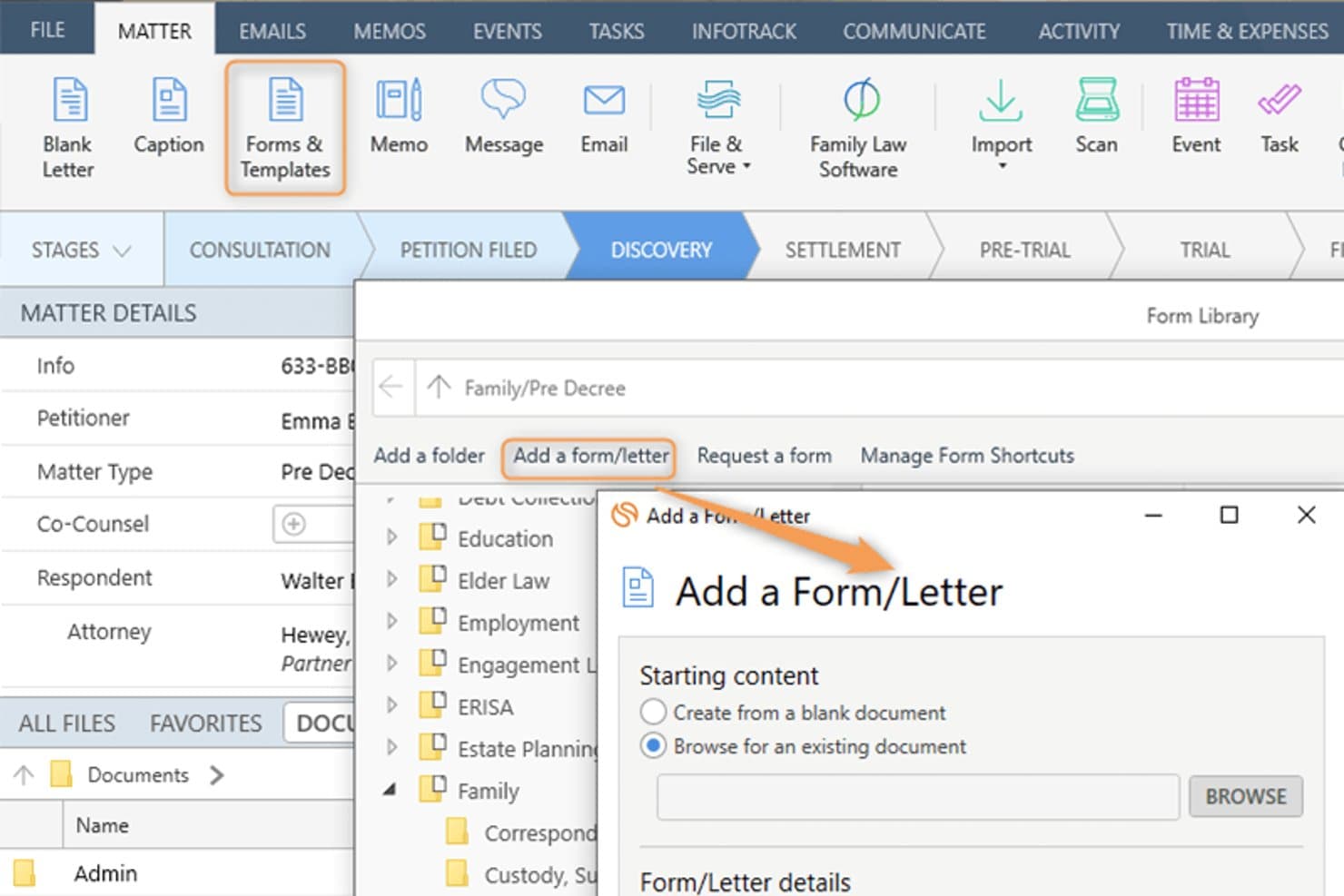
Smokeball lets users add custom forms and letters to a legal matter. Smokeball is an all-in-one legal practice management platform built for solo, small, and mid-size law firms that need matter-centric document management, email filing, billing, and Microsoft 365 integration consolidated into a single system.
Who Is Smokeball Best For?
Smokeball is a strong fit for managing partners at small private-practice law firms who handle high document volumes across multiple practice areas.
Why Smokeball Is a Good iManage Alternative
I've included Smokeball in my top picks because AutoTime is genuinely unlike anything iManage offers. It automatically captures time spent on emails, documents, calls, and tasks inside the platform, so nothing goes unbilled. I also like that matter-centric email filing works natively inside Outlook, meaning I can link emails directly to matters without ever leaving my inbox.
Smokeball Key Features
- Matter-centric document management: Store and organize legal files, templates, and forms by matter for easy retrieval.
- Custom practice area templates: Access 200+ built-in, configurable matter and document templates tailored to different legal areas.
- Native Microsoft 365 integration: Link Outlook emails and Word documents directly to matters without leaving those applications.
- Firm insights reporting: Track productivity, case progress, staff activity, and profitability with built-in dashboards and metrics.
Smokeball Integrations
Smokeball has native integrations across the Microsoft ecosystem, including Microsoft 365 and Outlook. An API is available for custom integrations.
Pros and Cons
Pros:
- Native email filing within Microsoft Outlook
- Matter-centric file organization built in
- AutoTime captures billable hours automatically
Cons:
- Better suited to smaller law firms
- Search lacks advanced metadata filtering
Learn more about Smokeball: Best for client portal communication tools
- 10-day free trial
- From $50/user/month (billed annually)
Visit WebsiteCustomer Rating:4.6/5
MyCase auto-generates task lists and deadlines directly from court rules. MyCase is a cloud-based practice management platform for small and mid-sized law firms that centralizes case management, billing, and client communication in one place.
Who Is MyCase Best For?
MyCase suits solo practitioners and small firm managing partners who handle their own billing, client intake, and day-to-day case administration.
Why MyCase Is a Good iManage Alternative
I've included MyCase in my top picks because its client portal is genuinely best-in-class for secure client communication. Clients can view case documents, send messages, and pay invoices directly through the portal, without calling or emailing the firm. The 2-way texting feature with a dedicated firm number keeps every client conversation logged and searchable inside the case record.
MyCase Key Features
- Matter-centric document storage: Organize documents within specific case folders for easy retrieval and management.
- Integrated time and expense tracking: Log billable hours and expenses directly to each matter with Smart Time Finder.
- Automated billing and invoicing: Generate and send invoices automatically based on tracked time and case activities.
- Customizable financial reporting: Access real-time analytics on payments, AR, and case profitability through built-in report tools.
MyCase Integrations
MyCase offers native integrations with QuickBooks Online, LawPay, Google Calendar, Google Drive, Dropbox, Outlook, Gmail, and CalendarRules, and provides an API for custom integrations.
Pros and Cons
Pros:
- Built-in invoicing tied directly to matters
- Two-way texting logged within case records
- Dedicated client-facing portal for secure messaging
Cons:
- No ethical wall or matter-level access controls
- Limited document version control and check-in/out
 3Best for legal practice management integration
Clio
- 7-day free trial + free demo available
- From $49/user/month
Visit WebsiteCustomer Rating:4.5/5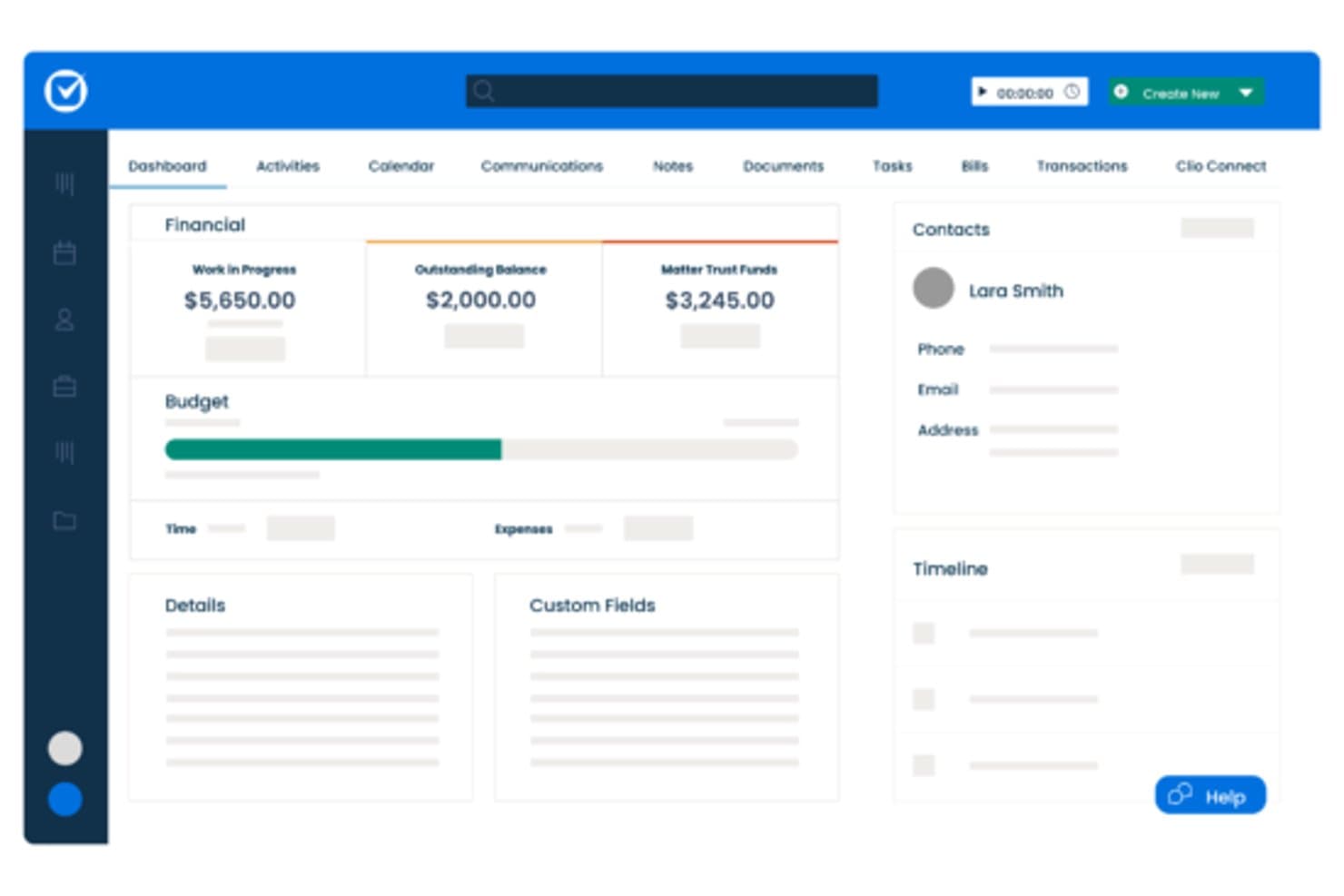
Clio centralizes matter financials, contacts, and timelines in one dashboard. Clio Manage is a cloud-based legal practice management platform built for small-to-mid-size law firms that need matter organization, billing, document storage, and client communication in one place—without the complexity of enterprise DMS tools like iManage.
Who Is Clio Best For?
Clio Manage is a natural fit for solo attorneys and small-to-mid-size law firms that want a single platform to manage matters, billing, and client files.
Why Clio Is a Good iManage Alternative
I've included Clio Manage in my top picks because it connects matter management, billing, and document storage in a single workspace that actually reflects how law firms operate day to day. I particularly like that Clio's AI can convert court documents into calendar events and turn tracked time entries into draft invoices automatically. That tight loop between case activity and billing is something iManage, as a document-only platform, simply doesn't offer.
Clio Key Features
- Matter-centric document storage: Store and organize all case files in structured, searchable matter folders.
- Integrated time and expense tracking: Track billable hours and expenses directly within each matter for accurate billing.
- Client portal for secure communication: Exchange documents and updates with clients through a dedicated, secure portal.
- Role-based access permissions: Control who can view, edit, or manage specific matters and documents throughout your firm.
Clio Integrations
Clio Manage offers native integrations with Microsoft 365, Google Workspace, DocuSign, QuickBooks Online, Dropbox, NetDocuments, Xero, Zoom, LawPay, and CalendarRules. An API is available for custom integrations.
Pros and Cons
Pros:
- AI converts court documents into calendar events
- Built-in client portal for secure file sharing
- Connects billing directly to matter activity
Cons:
- Limited version control for document-heavy workflows
- Document management less robust than iManage
Learn more about Clio: Best for small firm Microsoft 365 users
- Free demo available
- From $210/month (billed annually)
Visit WebsiteCustomer Rating:4.6/5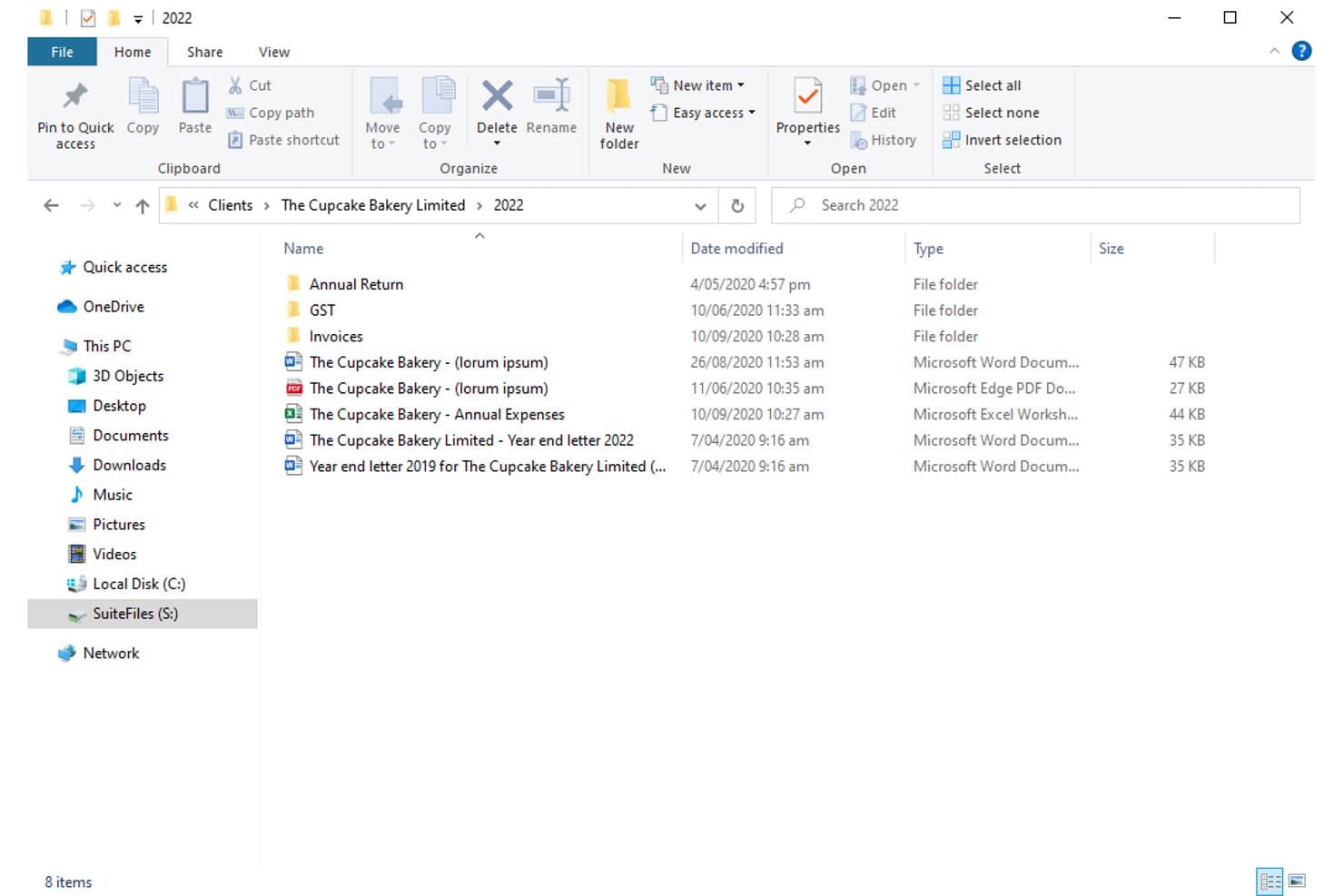
SuiteFiles organizes client documents in structured folders by year. For small law firms already deep in the Microsoft 365 ecosystem, SuiteFiles offers an all-in-one document management workspace that combines email filing, unlimited e-signing, and a secure client portal without needing separate tools.
Who Is SuiteFiles Best For?
SuiteFiles is a strong fit for small law firms that run on Microsoft 365 and want a single platform for document, email, and client file management.
Why SuiteFiles Is a Good iManage Alternative
I've included SuiteFiles in my top picks because its Microsoft 365 integration isn't an add-on, it's the foundation the whole product is built on. I can file emails directly from Outlook into client folders, co-author documents live in Word, and share finalized files through the SuiteFiles Connect portal without switching to a separate tool. Small firm teams that already run on M365 don't need to retrain staff or rebuild workflows to use it.
SuiteFiles Key Features
- Client portal (SuiteFiles Connect): Share documents securely with clients and collaborate without relying on unencrypted email.
- Task management: Assign tasks to team members and track progress alongside your documents and emails.
- PDF annotation tools: Annotate, merge, and organize PDFs directly within the SuiteFiles workspace.
- Template-driven document creation: Use customizable templates for automated client letters, proposals, and agreements.
SuiteFiles Integrations
SuiteFiles has native integrations across the Microsoft ecosystem, including Microsoft 365 and Azure. It also offers native integrations with Xero, QuickBooks Online, and Karbon, and provides an API for custom integrations.
Pros and Cons
Pros:
- SharePoint used as the underlying file storage
- Email filing directly from Outlook into matters
- Built-in e-signing without a third-party tool
Cons:
- Not suited for large or enterprise firms
- Limited advanced search versus enterprise DMS platforms
Learn more about SuiteFiles: Best for seamless Outlook document filing
- Free demo available
- Pricing upon request
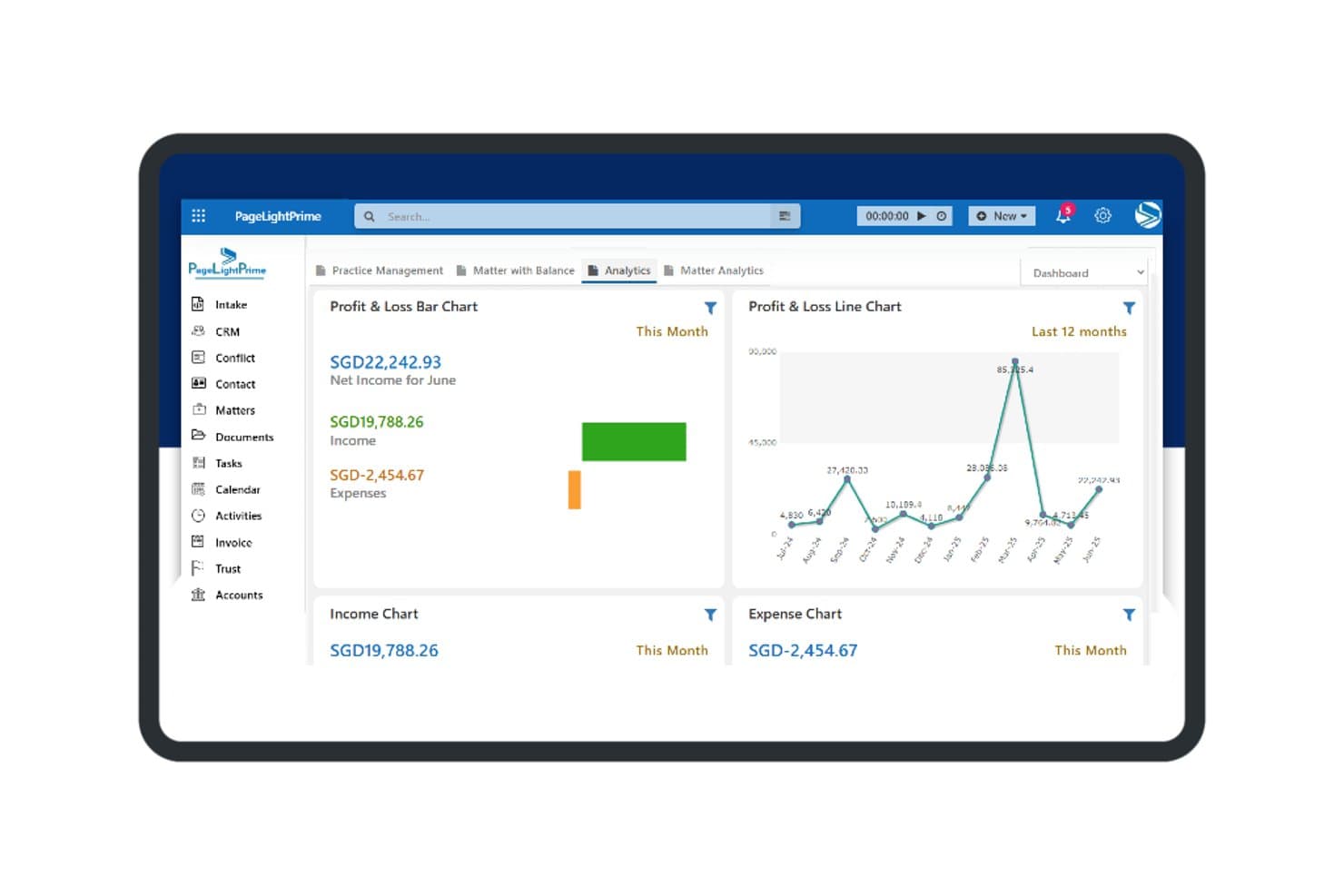
PageLightPrime offers a financial analytics dashboard with profit and loss charts, income tracking, and expense summaries for law firm management. PageLightPrime is a Microsoft 365-native legal practice management platform built for law firms that want to consolidate document management, matter tracking, and billing without stepping outside their existing Microsoft environment.
Who Is PageLightPrime Best For?
It's a strong fit for small to mid-sized law firms already running Microsoft 365 that want to replace iManage or a legacy DMS without adopting an entirely new technology stack.
Why PageLightPrime Is a Good iManage Alternative
I've included PageLightPrime in my top picks because of how it handles email filing from Outlook directly into matter workspaces. When a new matter is created, the platform auto-provisions a SharePoint folder structure with metadata already applied, so emails filed from Outlook land in the right place without manual sorting. I also appreciate that version control and audit trails run automatically alongside this, so every filed document has a tracked history from day one.
PageLightPrime Key Features
- Matter-centric SharePoint structure: Auto-generates folders and metadata for each new client and matter.
- Integrated law firm accounting: Handles billing, trust accounting, and multi-currency management within the platform.
- Client portal: Allows clients to securely access shared documents, billing information, and case updates online.
- Legal CRM and intake forms: Captures leads through web intake and links client interactions directly to matters.
PageLightPrime Integrations
PageLightPrime has native integrations across the Microsoft ecosystem, including Microsoft 365 and Azure. An API is available for custom integrations.
Pros and Cons
Pros:
- Single platform covers intake, billing, and document management
- Built-in trust accounting with IOLTA compliance support
- Runs entirely within Microsoft 365 and SharePoint
Cons:
- Smaller vendor with less established enterprise credibility
- Limited third-party ecosystem beyond Microsoft tools
Learn more about PageLightPrime: Best for Microsoft 365 workflow integration
- 30-day free trial
- From $5.00/user/month (billed annually)
Visit WebsiteCustomer Rating:4.4/5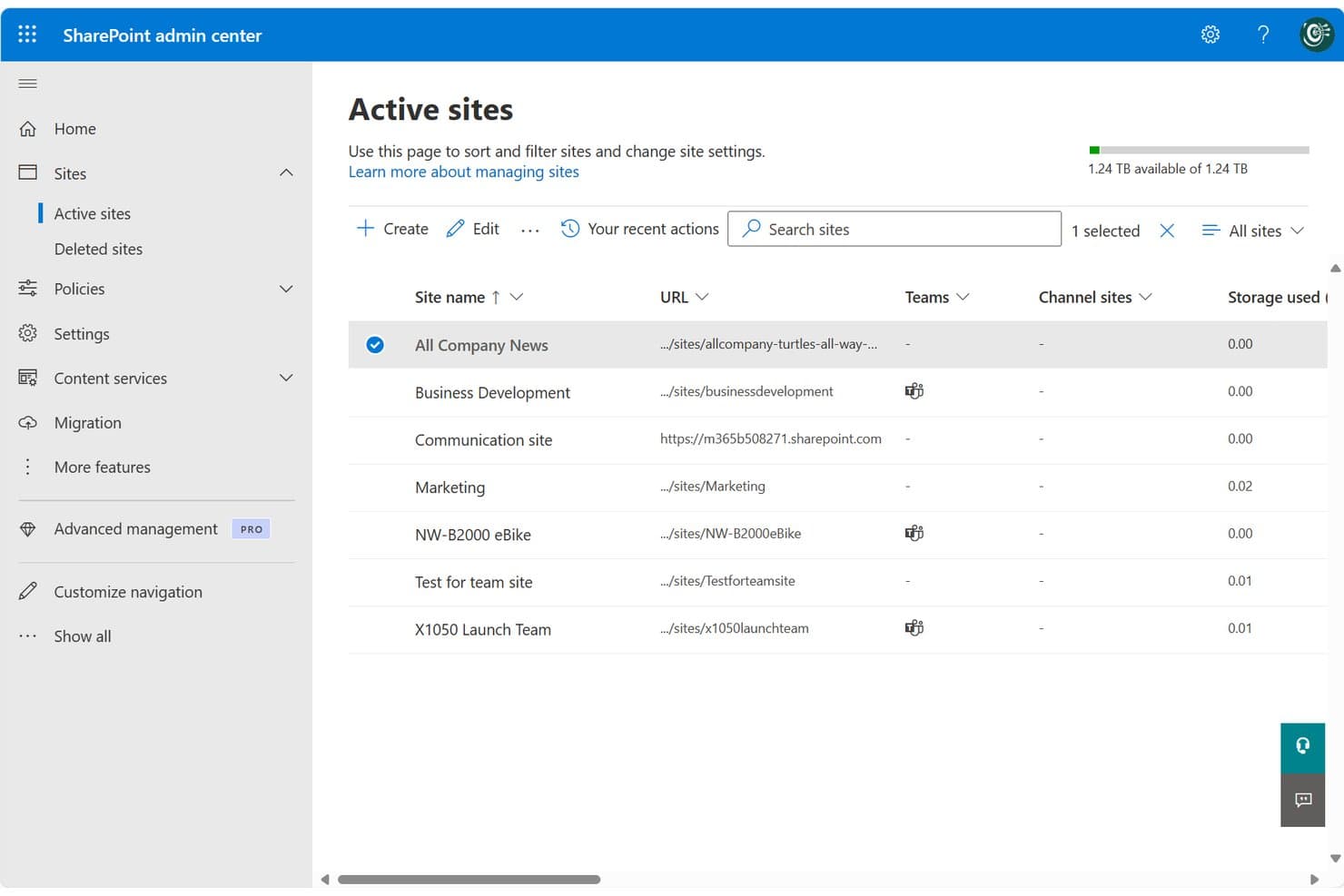
SharePoint centralizes site management across teams and projects in one admin view. SharePoint is Microsoft's cloud-based collaboration and document management platform, well-suited for legal teams and law firms already running on Microsoft 365 who want centralized file storage, version control, and access management without adopting a separate DMS.
Who Is SharePoint Best For?
SharePoint fits small-to-mid-sized law firms and in-house corporate legal teams that are already standardized on Microsoft 365 and want to avoid managing a separate DMS.
Why SharePoint Is a Good iManage Alternative
I've included SharePoint in my top picks because it's the only iManage alternative here that's natively embedded in Microsoft 365. Your legal team can co-author Word documents, manage matter libraries, and file directly from Outlook without switching tools. I particularly appreciate the check-in/check-out versioning system, which locks documents during active review and keeps a clean, restorable version history across matters.
SharePoint Key Features
- Matter library templates: Prebuilt site and folder structures you can use to organize documents by matter, client, or team.
- Granular permissions controls: Assign access based on matter, team, or document type to help protect privileged information.
- Full-text and metadata search: Search for documents or emails using keywords, tags, or custom filters to quickly find files.
- Audit trails and activity logs: Track all document views, edits, downloads, and sharing actions across your SharePoint environment.
SharePoint Integrations
SharePoint has native integrations across the Microsoft ecosystem, including Microsoft 365 and Azure. An API is available for custom integrations.
Pros and Cons
Pros:
- Matter-level permissions configurable without extra modules
- Built-in version history with document restore
- Native Microsoft 365 co-authoring without switching apps
Cons:
- Email filing requires manual setup and configuration
- No dedicated legal matter workspace out-of-the-box
Learn more about SharePoint: Best for matter-centric security controls
- Free demo available
- Pricing upon request
Visit WebsiteCustomer Rating:4.1/5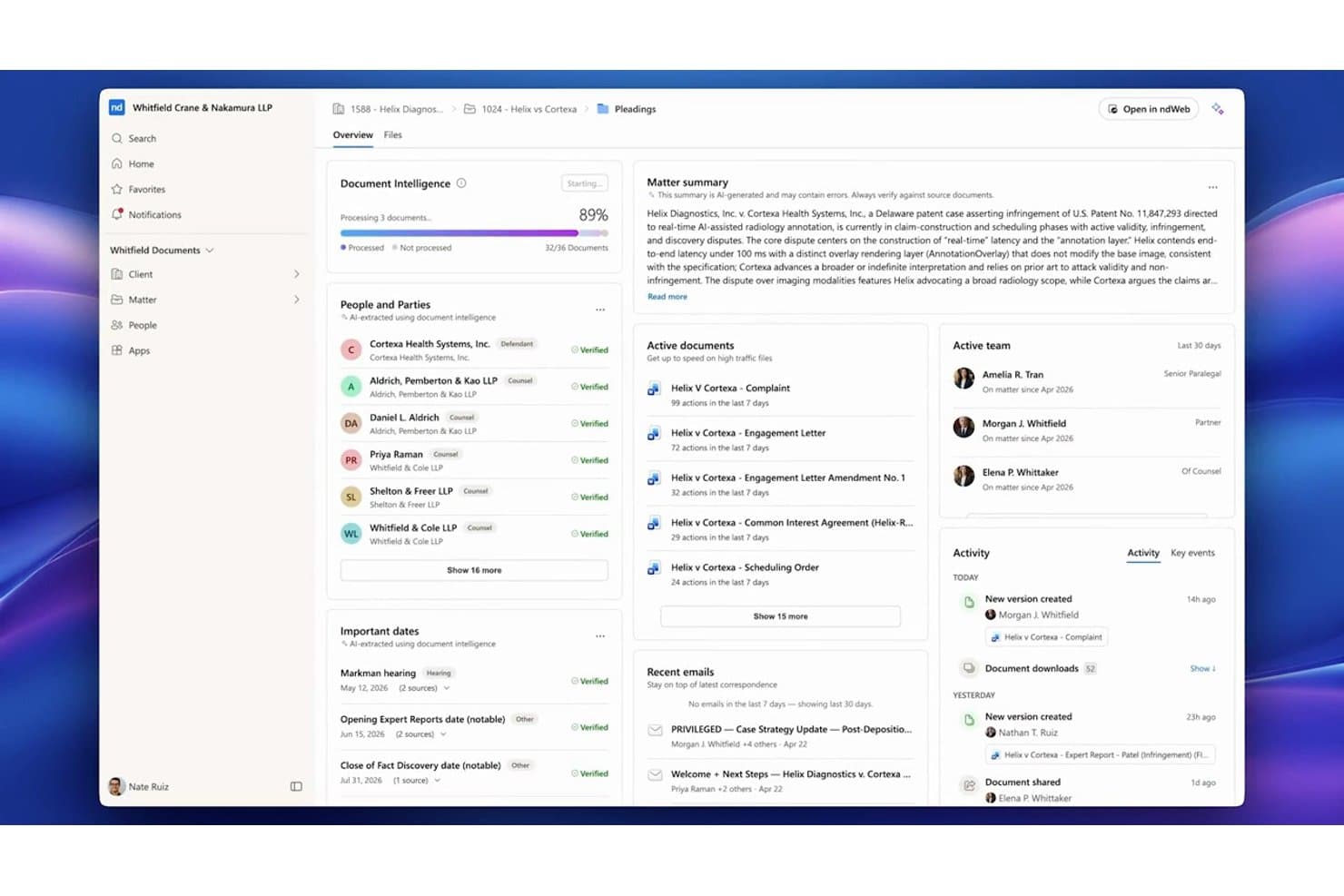
NetDocuments centralizes matter documents, parties, and key dates in one dashboard. NetDocuments is a cloud-native document management system built for law firms and corporate legal teams that need a fully hosted alternative to on-premises platforms like iManage, with matter-centric organization, AI-powered search, and enterprise-grade security controls.
Who Is NetDocuments Best For?
NetDocuments is a strong fit for mid-to-large law firms and enterprise legal departments whose IT and legal operations teams are ready to move away from on-premises infrastructure.
Why NetDocuments Is a Good iManage Alternative
NetDocuments earns its spot on my shortlist because of how precisely it handles matter-level security. I particularly like the granular ethical wall controls, which let you restrict access at the user, document, or workspace level independently. On top of that, customer-managed encryption keys and geo-aware content storage give legal teams direct control over where their data lives and who can decrypt it, which is something iManage's on-prem setup handles very differently.
NetDocuments Key Features
- AI-powered document search: Search documents and emails using natural language queries and receive answers with citations.
- Unified matter workspace: View, manage, and collaborate on all matter documents, emails, and notes from one interface.
- Built-in document bundling: Assemble and organize closing sets or litigation binders directly within the platform.
- Native Microsoft Teams integration: Access, preview, and collaborate on NetDocuments content right inside Microsoft Teams.
NetDocuments Integrations
NetDocuments offers native integrations across the Microsoft ecosystem, including Microsoft 365 and Azure, and connects directly with Clio, DocuSign, Litera, LexisNexis, Thomson Reuters, and iManage. An API is available for custom integrations.
Pros and Cons
Pros:
- AI search surfaces relevant documents without manual filtering
- Granular ethical walls built into the platform
- Strong cloud-native security for legal matter files
Cons:
- Admin configuration requires significant initial setup time
- Mobile app experience lags behind the desktop
Learn more about NetDocuments: Best for AI-powered contract automation
- Free demo available
- Pricing upon request
Visit WebsiteCustomer Rating:4.3/5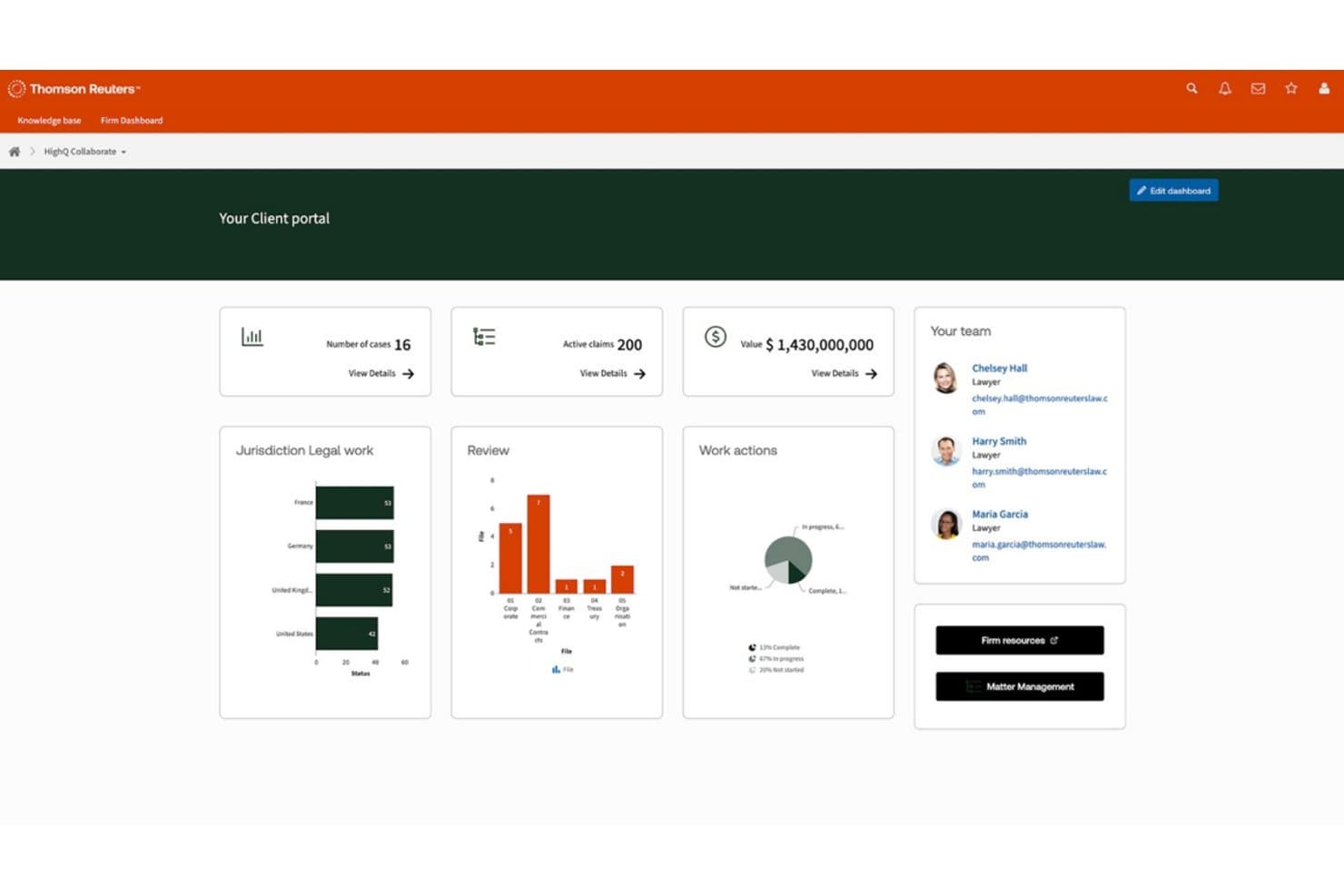
HighQ centralizes case data, team contacts, and legal workflows in one portal. HighQ is a Thomson Reuters cloud platform built for law firms and corporate legal teams that need secure document collaboration, workflow automation, and AI-powered contract tools in a single, client-facing workspace.
Who Is HighQ Best For?
HighQ is a strong fit for large law firms and enterprise legal departments managing high volumes of transactions, due diligence, or complex client matters.
Why HighQ Is a Good iManage Alternative
I picked HighQ as one of the best because its CoCounsel-powered Document Insights goes well beyond basic document storage. It automatically extracts risks, summarizes contract terms, and populates iSheets with AI-generated data during due diligence. I also like that HighQ supports the Model Context Protocol, letting AI tools like Claude and ChatGPT work securely inside your legal workspaces without manual data transfer.
HighQ Key Features
- Matter-centric workspaces: Organize documents, tasks, and discussions by matter for easy cross-team access.
- Granular access controls: Set permissions and ethical walls at the matter, folder, or document level to protect sensitive data.
- Workflow automation designer: Build multi-step legal processes using visual tools for intake, approvals, or project management.
- Microsoft 365 integration: Edit documents collaboratively in Word, Excel, and PowerPoint directly within HighQ’s secure environment.
HighQ Integrations
HighQ offers native integrations across the Microsoft ecosystem, including Microsoft 365 and Azure, as well as with DocuSign, Adobe Sign, and Legal Tracker. An API is available for custom integrations.
Pros and Cons
Pros:
- iSheets auto-populate from AI document extraction
- Client portals included out of the box
- AI-powered contract review built in natively
Cons:
- Email filing lags behind iManage's capabilities
- Less mature as a dedicated DMS
Learn more about HighQ: Best for on-premises legal document storage
- Free demo available
- Pricing upon request
Visit WebsiteCustomer Rating:4/5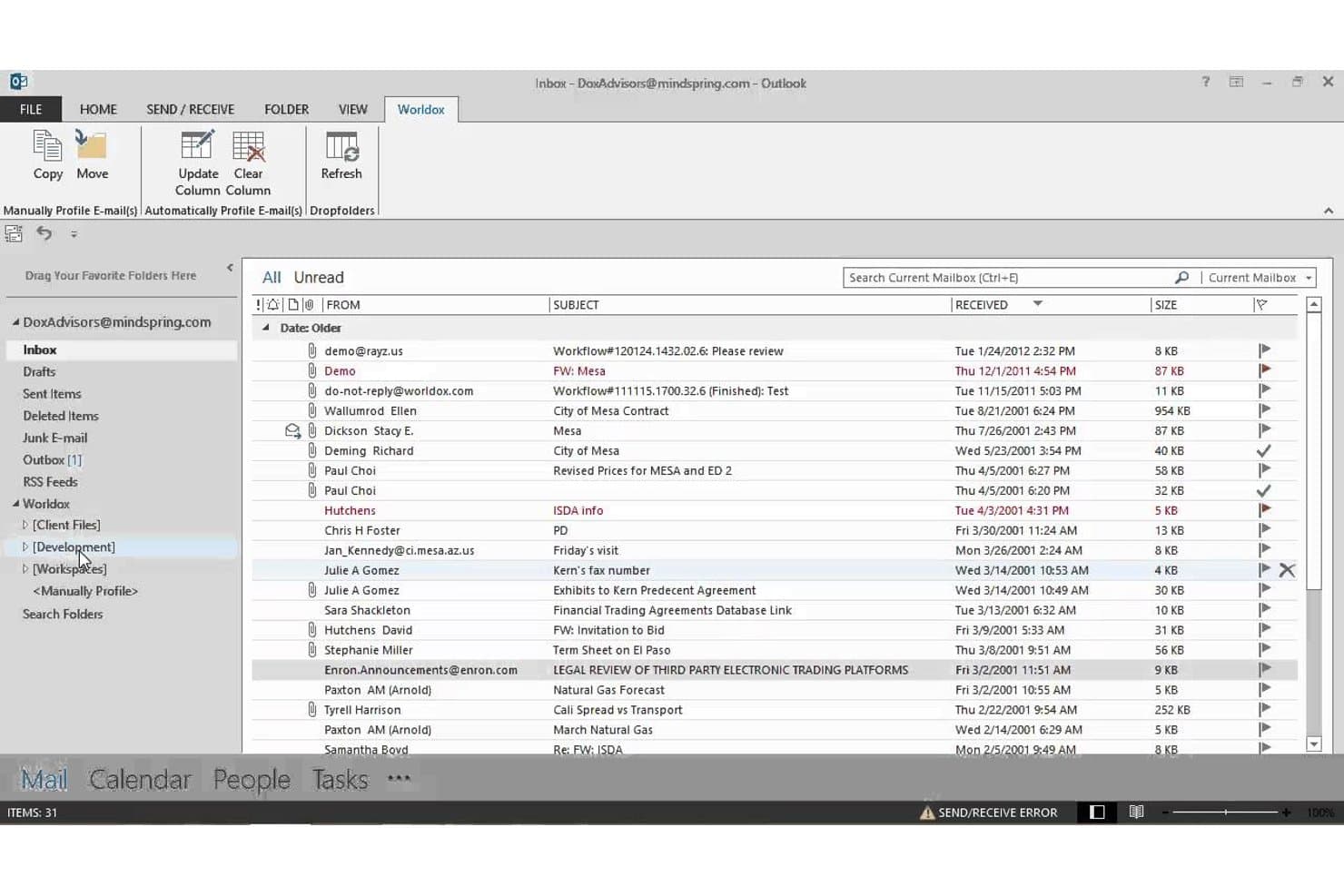
Worldox integrates directly into Outlook for seamless email filing. Worldox is a long-standing legal document management system built for law firms and corporate legal departments that need matter-centric document organization, advanced search, and email filing without moving to a cloud-based infrastructure.
Who Is Worldox Best For?
It's a strong fit for small-to-midsize law firms running Windows-based infrastructure that prefer on-premises document control over cloud-hosted alternatives.
Why Worldox Is a Good iManage Alternative
I've included Worldox in my top picks because it gives firms complete control over where their data lives. Unlike iManage, which has shifted heavily toward cloud-hosted deployments, Worldox keeps documents on your own servers, which matters when compliance obligations make cloud storage a non-starter. I particularly like the matter-centric profiling system, where every document is tagged with client, matter, and document type metadata at the point of filing, making retrieval fast and consistent across the firm.
Worldox Key Features
- Customizable metadata fields: Tag documents by client, matter, and document type for granular organization.
- Full-text and metadata search: Locate documents and emails using powerful filters tailored for legal workflows.
- Audit trail reporting: Track document access and activity for security, compliance, and accountability needs.
- Office suite integration: Work with Microsoft Word, Excel, and Outlook directly from your document management interface.
Worldox Integrations
Worldox has native integrations across the Microsoft ecosystem, including Microsoft 365 and Outlook. It also offers integrations with Tabs3 and PracticeMaster. An API is available for custom integrations.
Pros and Cons
Pros:
- Strong compatibility with Windows-based firm infrastructure
- Matter-centric profiling built for legal workflows
- True on-premises deployment for data sovereignty
Cons:
- Dated interface compared to cloud-first competitors
- No mobile app for remote document access
Learn more about Worldox: Best for native email management in Outlook
- 7-day free trial
- From $395/month
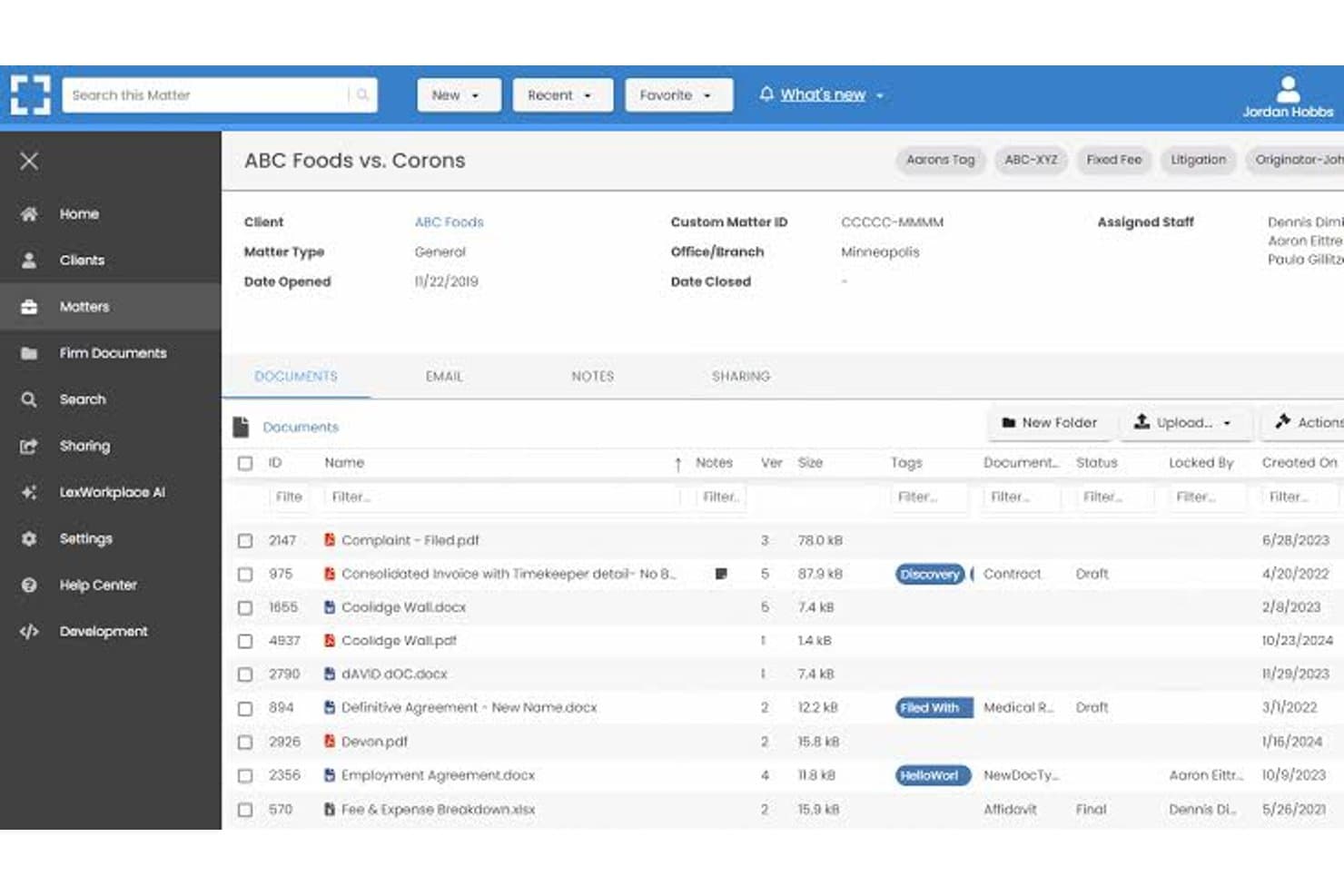
LexWorkplace dashboard for managing legal matters, documents, email, and file sharing. LexWorkplace is a cloud-based document and email management system built for small-to-midsize law firms that want matter-centric organization, full-text search, and secure cloud storage without the enterprise complexity of iManage.
Who Is LexWorkplace Best For?
LexWorkplace is a natural fit for law firms with 5–50 users that need a structured legal DMS without dedicating IT resources to deployment and maintenance.
Why LexWorkplace Is a Good iManage Alternative
I've included LexWorkplace in my top picks because its Outlook email management is genuinely best-in-class for small law firms. Smart File suggests the correct matter automatically when you're filing an email, and Multi Select lets you bulk-file entire threads in one action. Both features matter most during active litigation or transactions, where email volume spikes and misfiled messages create real compliance exposure.
LexWorkplace Key Features
- Matter-centric document management: Organize files, notes, and correspondence by client and legal matter in secure cloud workspaces.
- Integrated document versioning: Track, compare, and restore previous versions of documents, with full audit trails for all changes.
- Document AI assistant: Use built-in AI to summarize, query, and extract information from legal documents without leaving the platform.
- Full-text and metadata search: Find documents and emails instantly with full-text OCR, advanced filters, and matter-based search options.
LexWorkplace Integrations
LexWorkplace offers native integrations with Microsoft 365, including Outlook and Word, as well as Clio Manage. An API is available for custom integrations.
Pros and Cons
Pros:
- Full-text OCR search across all matter files
- Matter-centric workspaces designed for law firms
- Smart email filing natively within Outlook
Cons:
- Smaller user community than enterprise-grade alternatives
- No ethical wall automation for practice groups
Learn more about LexWorkplace:
Weitere iManage-Alternativen
Hier finden Sie einige zusätzliche Optionen für iManage-Alternativen, die es nicht auf meine Auswahlliste geschafft haben, aber dennoch einen Blick wert sind:
- 11Epona DMSAm besten für eine fortschrittliche metadatengesteuerte Ablage geeignet
- 12PracticePantherAm besten geeignet für die Anpassung der Automatisierung von Arbeitsabläufen
- 13LEAPAm besten für die integrierte Automatisierung juristischer Formulare
- 14CosmoLexAm besten für integrierte Compliance bei der Treuhandbuchhaltung
- 15FilevineIdeal für anpassbare Dokumentenabläufe
- 16Rocket MatterAm besten für sachbezogene Dokumentenzeiterfassung
- 17CenterbaseIdeal für die Zusammenstellung von Dokumenten auf Vorlagenbasis
- 18DocsvaultAm besten für hybride Cloud- und On-Premises-Bereitstellungen geeignet
Wie ich iManage-Alternativen bewerte
Ich betrachte zwei Ebenen: Was jedes mit iManage vergleichbare DMS bieten muss – mandatszentrierte Ablage, E-Mail-Verwaltung und Versionskontrolle – und was die Tools voneinander unterscheidet. Unterscheidungsmerkmale wie ethische Barrieren, KI-gestützte Texterstellung und Bereitstellungsoptionen bestimmen meine Auswahl.
Kernfunktionen (Grundvoraussetzungen für diese Liste)
Bei der Auswahl der Tools für meine Liste bewerte ich jedes einzelne auf einer Skala von 0 (bietet die Funktionalität nicht) bis 5 (zeichnet sich in diesem Bereich aus) für jede der unten aufgeführten Kernfunktionen. Anschließend rechne ich die Gesamtpunktzahl des Tools in einen Prozentsatz um und verwende 65 % als Referenzwert, um die allgemeine Eignung für die Liste zu beurteilen.
- Dokumentenverwaltung: Ich bewerte, wie jedes Tool Dateien nach Mandaten organisiert, und prüfe konfigurierbare Ordnerstrukturen, Profilkarten und Arbeitsbereichsvorlagen, die der tatsächlichen Eröffnung und Verwaltung von Mandaten durch Anwälte entsprechen.
- Versionskontrolle: Der Ansatz jedes Tools zur Nachverfolgung von Entwürfen ist wichtig – ich achte auf das Ein- und Auschecken, den Versionsvergleich und das Zurücksetzen auf frühere Versionen, damit Anwälte gemeinsam an Schriftsätzen arbeiten können, ohne die Änderungen der jeweils anderen zu überschreiben.
- E-Mail-Verwaltung: Ich prüfe, ob die Plattform E-Mails und Anhänge direkt aus Outlook in Mandatsarbeitsbereiche ablegt, einschließlich Funktionen wie Vorschlägen zur automatischen Ablage und der Entfernung doppelter Nachrichten in Threads, die die manuelle Sortierung reduzieren.
- Erweiterte Suche: Das Auffinden eines in Tausenden von Mandaten verborgenen Memos gehört zum Alltag. Daher bewerte ich die Volltext- und Metadatensuche mit mandatsbezogenen Filtern, die schnell relevante Ergebnisse liefern.
- Sicherheits- & Zugriffskontrollen: Ich achte auf Berechtigungen auf Mandatsebene, die Durchsetzung ethischer Barrieren, Verschlüsselung und Prüfprotokolle – besonders wichtig, wenn eine Kanzlei gleichzeitig Mandate gegnerischer Parteien bearbeitet.
- Microsoft-365-Integration: Die meisten Anwälte arbeiten in Word, Outlook und Teams. Daher bewerte ich, wie tief jedes Tool mit Microsoft 365 verbunden ist, um die gemeinsame Dokumentbearbeitung, die E-Mail-Ablage und den mobilen Zugriff zu ermöglichen.
Sobald ich eine Liste von Tools zusammengestellt habe, die die Kriterien erfüllen, prüfe ich, wodurch sich die einzelnen Plattformen voneinander abheben.
Unterscheidungsmerkmale (Wodurch sich Anbieter voneinander abheben)
So vergleiche ich verschiedene Anbieter miteinander:
Herausragende Funktionen
Die KI-gestützte Erstellung von Dokumenten ist ein wichtiges Unterscheidungsmerkmal – ich suche nach Plattformen, auf denen Anwälte Klauseln direkt im DMS zusammenfassen oder vergleichen können, ohne zu einem Drittanbieter-Tool wechseln zu müssen. Einheitliche Mandatsarbeitsbereiche spielen ebenfalls eine wichtige Rolle, denn die Zusammenführung von Dokumenten, E-Mails und Notizen in einer Ansicht spart bei der Vorbereitung einer Anhörung oder eines Mandantengesprächs viel Zeit. Integrierte Funktionen zum Nachverfolgen von Änderungen und zum Versionsvergleich ermöglichen es Anwälten, Entwürfe zu bearbeiten, ohne sie in Word zu exportieren. Dies bewerte ich bei dokumentenintensiven Tätigkeiten besonders genau.
Über die Funktionen hinaus
Die Flexibilität bei der Bereitstellung ist für Kanzleien, die von iManage migrieren, besonders wichtig. Ich prüfe, ob ein Anbieter lokale, private Cloud- oder hybride Modelle unterstützt, damit laufende Mandate während des Übergangs nicht unterbrochen werden. Compliance-Zertifizierungen wie SOC 2 Type II und ISO 27001 zeigen mir, ob eine Plattform vertrauliche Mandantendaten mit der von Kanzleien erwarteten Sorgfalt verarbeiten kann. Außerdem bewerte ich die Unterstützung bei der Migration, einschließlich der Frage, ob der Anbieter beim Verschieben von Dateien aus Altsystemen oder gemeinsam genutzten Laufwerken die Metadaten erhält.
Warum nach iManage-Alternativen suchen?
Obwohl iManage eine gute Wahl unter den Alternativen für Software zur Verwaltung von Rechtsdokumenten ist, gibt es mehrere Gründe, warum manche Nutzer nach alternativen Lösungen suchen. Vielleicht suchen Sie nach iManage-Alternativen, weil Sie …
- Unterstützung für hybride oder lokale Bereitstellungen benötigen
- Transparentere oder flexiblere Preise wünschen
- Eine umfassendere Integration mit Microsoft 365 oder Teams bevorzugen
- Detaillierte Regelungen zu ethischen Schutzwällen oder zur Vertraulichkeit von Mandanten benötigen
- Plattformen mit einer einfacheren Migration und einem leichteren Änderungsmanagement suchen
- Einen reaktionsschnelleren Kundensupport in verschiedenen Regionen benötigen
Wenn Sie sich in einem dieser Punkte wiedererkennen, sind Sie hier richtig. Meine Liste enthält mehrere Optionen für iManage-Alternativen, die besser für Teams geeignet sind, die mit diesen Herausforderungen bei iManage konfrontiert sind und nach alternativen Lösungen suchen.
Die wichtigsten Funktionen von iManage
Hier finden Sie einige der wichtigsten Funktionen von iManage, damit Sie die Angebote alternativer Lösungen gegenüberstellen und vergleichen können:
- Fallorientierte Organisation: Dokumente und E-Mails rund um rechtliche Angelegenheiten speichern, organisieren und darauf zugreifen, sodass Teams alles leichter dem richtigen Fall oder Projekt zuordnen können.
- Automatische Versionskontrolle: Änderungen an Dokumenten nachverfolgen, indem jede Version automatisch gespeichert und gekennzeichnet wird, mit Unterstützung für Einchecken/Auschecken, Vergleiche und das Zurücksetzen auf frühere Versionen, um Fehler durch versehentliches Überschreiben zu reduzieren.
- Verwaltung von Outlook-E-Mails: E-Mails und Anhänge direkt aus Microsoft Outlook im richtigen Arbeitsbereich für die jeweilige Angelegenheit ablegen, mit Tags versehen und organisieren, um die Verwaltung von Aufzeichnungen und Korrespondenz zu optimieren.
- Erweiterte Suche und Filter: Dokumente, E-Mails und Metadaten mithilfe rechtsspezifischer Filter und einer Volltextsuche durchsuchen, damit Benutzer die benötigten Dateien in umfangreichen Repositorien schnell finden.
- Detaillierte Sicherheitskontrollen und ethische Trennwände: Berechtigungen auf Ebene der jeweiligen Angelegenheit, die Vertraulichkeit von Mandanten und Richtlinien für ethische Trennwände durchsetzen, um den Dokumentzugriff zu kontrollieren und Compliance-Anforderungen zu erfüllen, selbst bei räumlich verteilten Teams.
- Integration mit Microsoft 365: Direkt in Word, Outlook, Excel und Teams mit nativen Integrationen arbeiten, sodass Benutzer Dokumente innerhalb der sicheren iManage-Umgebung erstellen, bearbeiten und gemeinsam bearbeiten können.
- Prüfpfade und Aktivitätsprotokolle: Den Zugriff auf Dokumente und daran vorgenommene Aktionen mit detaillierten Protokollen nachverfolgen, die rechtlichen Prüfungsanforderungen und den Anforderungen von Mandanten entsprechen und Transparenz sowie Verantwortlichkeit unterstützen.
- Mobiler Zugriff: Dokumente sicher von Smartphones und Tablets aus prüfen, bearbeiten und teilen, sodass Anwälte leichter aus der Ferne oder unterwegs arbeiten können.
- Werkzeuge für die Zusammenarbeit: Dokumente teilen und Dateien mit internen und externen Beteiligten bündeln, einschließlich Funktionen für das sichere Teilen von Links und Anmerkungen in Echtzeit.
- Automatisierte Aufbewahrungsrichtlinien: Regeln zur Aufbewahrung, Archivierung oder Vernichtung von Dokumenten auf Grundlage von Anforderungen der Mandanten oder gesetzlicher Vorgaben anwenden und damit Praktiken für die Informationsverwaltung unterstützen.