

El software de gestión de casos de lesiones personales te ayuda a organizar casos, realizar un seguimiento de los plazos, gestionar la información de los clientes y almacenar documentos importantes, todo en un mismo lugar. La herramienta adecuada te ahorra tiempo, aumenta tu productividad y facilita ofrecer una mejor experiencia a tus clientes.
He puesto estas soluciones a prueba para que puedas evitar la confusión y encontrar un software que resuelva los desafíos reales del derecho de lesiones personales, como realizar un seguimiento de los historiales médicos, calcular los daños y mantener todo funcionando sin problemas.
Por qué confiar en nuestras recomendaciones de software
6,700+
Reviews
20
Industry experts
16+
Evaluation factors
14
Years
Nuestro equipo lleva probando y evaluando software desde 2012. Como líderes de despachos jurídicos, sabemos lo difícil —y lo importante— que es elegir el software adecuado.
Para esta guía, evaluamos las herramientas mediante pruebas prácticas e investigación independiente, puntuando las herramientas según nuestros criterios de selección.
Nuestras reseñas reflejan nuestro criterio editorial humano, no un discurso de ventas.
Tabla comparativa de software de gestión de casos de lesiones personales
Esta tabla comparativa resume los detalles de precios de mi software de gestión de casos de lesiones personales:
| Tool | Best For | Trial Info | Price | ||
|---|---|---|---|---|---|
| 1 | Mejor para el seguimiento automatizado de tareas en casos de lesiones personales | Demostración gratuita disponible | Precios bajo solicitud | Website | |
| 2 | Ideal para integraciones sólidas y funciones de facturación | Prueba gratuita de 7 días | $39/user/month | Website | |
| 3 | Ideal para la rápida incorporación de firmas de lesiones personales | Demostración gratuita disponible | $65/usuario/mes | Website | |
| 4 | Mejor para gestión de casos integral y en la nube | Demo gratuita disponible | $85/usuario/mes | Website | |
| 5 | Mejor para flujos de trabajo de gestión de casos personalizables | Demostración gratuita disponible | $89/usuario/mes | Website | |
| 6 | Ideal para contabilidad y cumplimiento integrados | prueba gratuita de 10 días | $79/usuario/mes | Website | |
| 7 | Ideal para controles de acceso basados en roles | Demostración gratuita disponible | Precio a consultar | Website | |
| 8 | Mejor para gestión integral de casos | Demostración gratuita disponible | Precios según solicitud | Website | |
| 9 | Mejor para optimizar el flujo de trabajo y la colaboración | Demostración gratuita disponible | Precio a consultar | Website | |
| 10 | Ideal para la generación integrada de documentos | Demo gratuita disponible | Precios a consultar | Website |


Reseñas de las mejores soluciones de gestión de casos de lesiones personales
A continuación encontrarás mis resúmenes detallados de las mejores soluciones de gestión de casos de lesiones personales que llegaron a mi lista de selección. Mis reseñas ofrecen un análisis detallado de las funciones, integraciones y mejores casos de uso de cada software para ayudarte a encontrar el más adecuado para ti.
 Mejor para el seguimiento automatizado de tareas en casos de lesiones personales
- Demostración gratuita disponible
- Precios bajo solicitud
Visit WebsiteCustomer Rating:4.8/5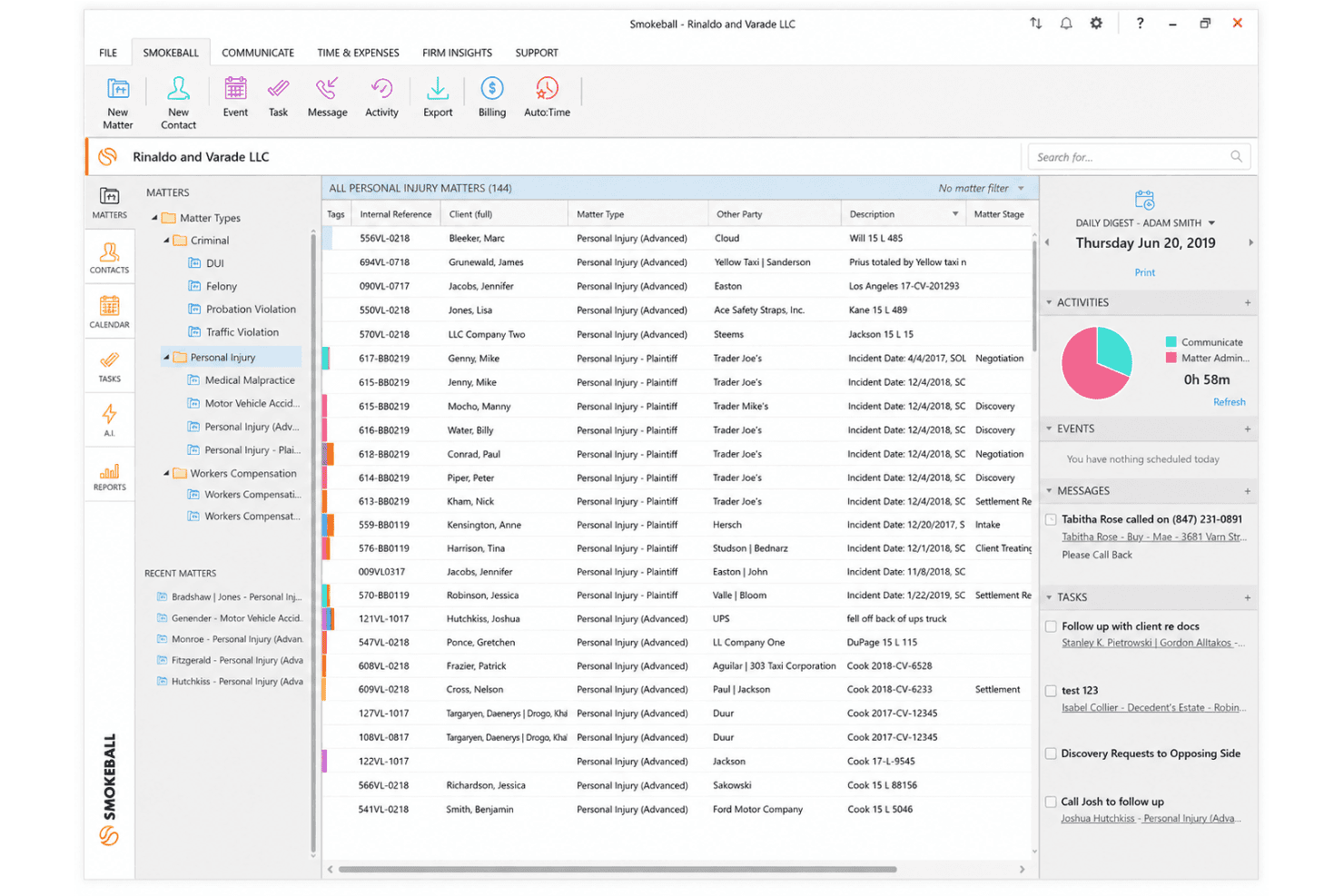
Smokeball organiza asuntos de lesiones personales con gestión de archivos, etiquetas de asuntos y una barra lateral de Resumen Diario para seguimiento de tareas y actividades. Smokeball es una plataforma de gestión de despachos jurídicos diseñada para pequeñas y medianas firmas legales, que combina flujos de trabajo específicos para lesiones personales, seguimiento automatizado del tiempo, automatización de documentos, admisión de clientes, contabilidad fiduciaria y facturación en un solo sistema.
¿Para quién es mejor Smokeball?
Smokeball es ideal para firmas de lesiones personales del lado demandante con equipos pequeños o medianos que gestionan un alto volumen de casos sin necesidad de aumentar personal.
Por qué elegí Smokeball
Elegí Smokeball como uno de los mejores porque sus flujos de trabajo para lesiones personales crean y asignan tareas automáticamente a medida que un caso avanza por cada etapa, activando borradores de documentos como solicitudes de expedientes médicos y cartas de demanda sin intervención manual. AutoTime funciona en segundo plano, registrando cada minuto trabajado y relacionándolo automáticamente con el asunto correcto. También confío en Archie AI para generar cartas de demanda y resúmenes de casos directamente a partir de los datos existentes.
Características clave de Smokeball
- Portal para clientes: Comparte de forma segura documentos, actualizaciones de casos y mensajes con clientes de lesiones personales mediante un portal basado en navegador con autenticación de dos factores.
- Biblioteca de documentos TemplateLab: Acceso a una biblioteca de formularios judiciales y plantillas específicas de lesiones personales que se rellenan automáticamente con los datos del asunto para una producción eficiente de documentos.
- Integración con QuickBooks Online: Sincroniza la facturación y las transacciones fiduciarias de manera fluida con QuickBooks para mantener la contabilidad conforme a las regulaciones de las firmas de lesiones personales.
- Formularios de admisión de lesiones personales: Recaba datos detallados de lesiones, historial de tratamientos, información de seguros y realiza el seguimiento del completado de formularios con flujos de trabajo de admisión personalizables en línea.
Integraciones de Smokeball
Smokeball ofrece integraciones nativas con Microsoft 365, Outlook, QuickBooks Online, InfoTrack, LawPay, y ofrece integraciones de mercado con servicios de expedientes médicos como YoCierge, AcroDocz, Tavrn y Arctrieval. Hay una API disponible para integraciones personalizadas.
Pros and Cons
Pros:
- AutoTime captura el tiempo facturable automáticamente en segundo plano
- Los flujos de trabajo de lesiones personales activan documentos automáticamente en cada etapa
- El SMS integrado mantiene informados a los clientes de lesiones personales al instante
Cons:
- La aplicación de escritorio para Windows limita a los usuarios de Mac
- Los paneles de informes carecen de opciones de personalización avanzada
Learn more about Smokeball: 2Ideal para integraciones sólidas y funciones de facturación
Clio
- Prueba gratuita de 7 días
- $39/user/month
Visit WebsiteCustomer Rating:4.7/5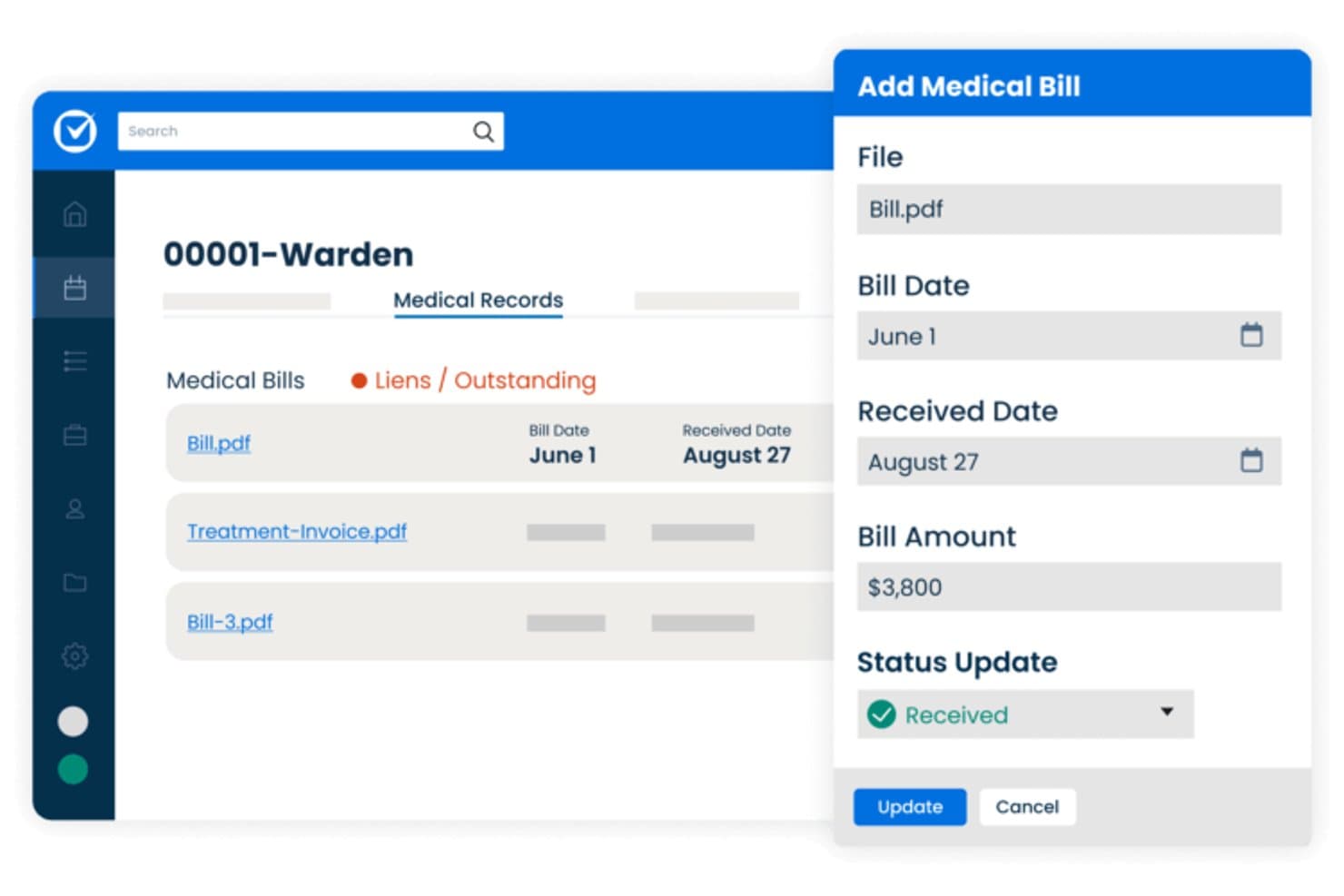
Clio ofrece una interfaz de gestión de facturación médica que permite a los despachos de lesiones personales hacer seguimiento de las fechas de facturas, fechas de recepción, importes y estado de gravámenes para cada caso de cliente. Clio es una plataforma de gestión de despachos jurídicos que abarca la gestión de casos, el seguimiento de tiempo y gastos, la facturación por honorarios contingentes, la automatización de documentos, la admisión de clientes y la contabilidad fiduciaria para despachos de lesiones personales.
¿Para quién es mejor Clio?
Clio es ideal para despachos de lesiones personales individuales y pequeños que buscan una plataforma todo en uno con facturación, admisión de clientes y gestión de casos en un solo sistema.
Por qué elegí Clio
Clio se gana su lugar entre los mejores de mi lista porque su conjunto de herramientas de facturación está realmente diseñado para despachos de PI con honorarios contingentes. Me encanta que gestiona la contabilidad fiduciaria compatible con IOLTA, la conciliación triple y la facturación de honorarios contingentes de forma nativa, sin necesidad de una herramienta contable aparte. Clio Accounting se conecta directamente a los registros de los casos, por lo que el seguimiento de los costos permanece vinculado al expediente correcto desde el primer día.
Funciones clave de Clio
- Automatización de programación con IA: Lee notificaciones judiciales y genera eventos de calendario con fechas extraídas y contexto de origen.
- Plantillas de documentos para lesiones personales: Incluye plantillas específicas de PI para cartas de demanda, autorizaciones HIPAA y acuerdos de retención con autocompletado.
- Gestión de expedientes médicos: Almacena documentos médicos confidenciales y vincula registros relacionados a asuntos individuales dentro de la plataforma.
- Portal seguro de comunicación con clientes: Permite a los clientes enviar mensajes, subir documentos y revisar el estado de su caso de forma segura en línea.
Integraciones de Clio
Clio ofrece más de 300 integraciones nativas, incluidas Xero, QuickBooks Online, Dropbox, Google Drive, Microsoft 365, DocuSign, Zoom, Outlook, RingCentral y NetDocuments. Hay disponible una API para integraciones personalizadas.
Pros and Cons
Pros:
- Contabilidad fiduciaria sólida compatible con IOLTA integrada
- El portal de clientes admite firma electrónica y mensajería
- Automatización robusta de documentos para plantillas específicas de PI
Cons:
- Sin funciones dedicadas de seguimiento de gravámenes médicos
- Herramientas limitadas para desembolsos específicos de acuerdos de PI
Learn more about Clio: Ideal para la rápida incorporación de firmas de lesiones personales
- Demostración gratuita disponible
- $65/usuario/mes
Visit WebsiteCustomer Rating:4.8/5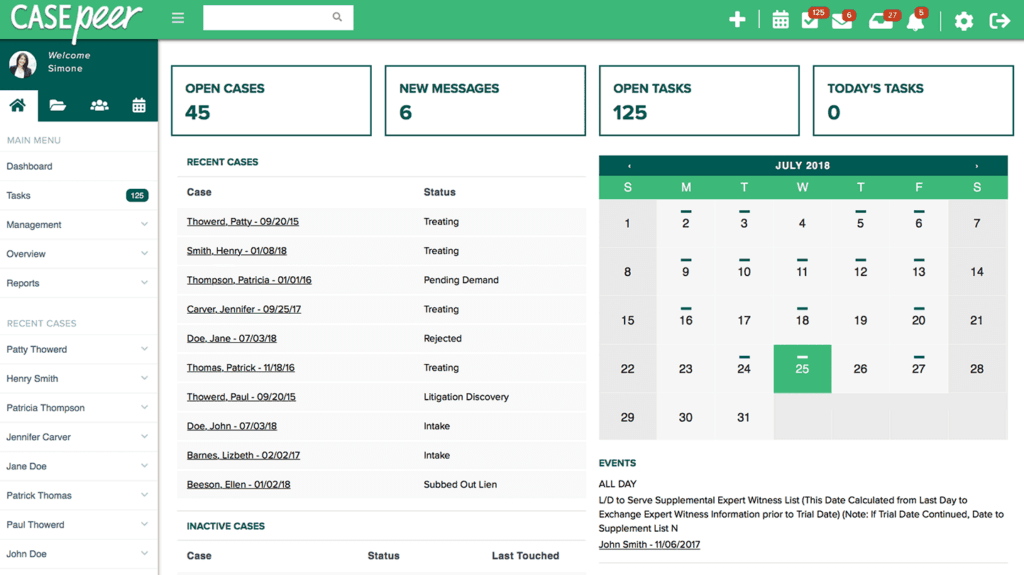
Interfaz del software de gestión de casos de lesiones personales Casepeer CasePeer es una plataforma de gestión de casos de lesiones personales basada en la nube, creada exclusivamente para firmas de demandantes, que combina gestión de admisiones, seguimiento de tratamientos médicos, administración de gravámenes, cálculo de acuerdos, automatización de documentos e informes de casos en un solo sistema.
¿Para quién es mejor CasePeer?
CasePeer es ideal para firmas de lesiones personales del lado de los demandantes pequeñas y medianas que buscan gestionar un alto volumen de casos sin configurar una plataforma de uso general.
Por qué elegí CasePeer
CasePeer se gana su lugar en mi lista corta por la visibilidad real que proporciona sobre el desempeño de los casos en toda la firma. Valoro especialmente el informe de Casos de Alto Valor y el informe de Productividad de la Firma, que me permiten ver rápidamente qué casos requieren atención inmediata y en qué emplea el tiempo el personal. En el plan Avanzado, la sincronización de datos y el paquete de informes Multi-Sucursal me permiten monitorear el desempeño en varias ubicaciones sin tener que exportar datos por separado ni conciliar hojas de cálculo.
Características clave de CasePeer
- Portal de comunicación con clientes: Los clientes pueden enviar mensajes a su equipo, cargar documentos y consultar el estado de su caso en tiempo real.
- Seguimiento de tratamiento médico: Realice un seguimiento de citas médicas, proveedores, y gestione registros de facturas y gravámenes médicos por caso.
- Automatización de documentos y plantillas para lesiones personales: Genere cartas de demanda, formularios HIPAA y contratos de retención con plantillas específicas para lesiones personales llenadas automáticamente a partir de los datos del caso.
- Herramientas nativas de mensajería de texto y firma electrónica: Envíe mensajes SMS bidireccionales, solicite firmas electrónicas y comparta documentos con clientes directamente desde la plataforma.
Integraciones de CasePeer
CasePeer ofrece integraciones nativas con LawPay, QuickBooks Online, Lead Docket, MoveDocs, Multus Medical, Records On Time, Captorra, Apex Chat, Client Chat Live, Ngage y EvenUp. Hay una API disponible para integraciones personalizadas.
Pros and Cons
Pros:
- Paneles específicos para lesiones personales integrados en la plataforma
- Realiza seguimiento de tratamiento médico, facturación y gravámenes en conjunto
- SMS y firma electrónica nativos sin herramientas de terceros
Cons:
- Diseñado exclusivamente para firmas de lesiones personales del lado demandante
- Las funciones avanzadas de informes requieren el plan de nivel superior
 Mejor para gestión de casos integral y en la nube
- Demo gratuita disponible
- $85/usuario/mes
Visit WebsiteCustomer Rating:4.8/5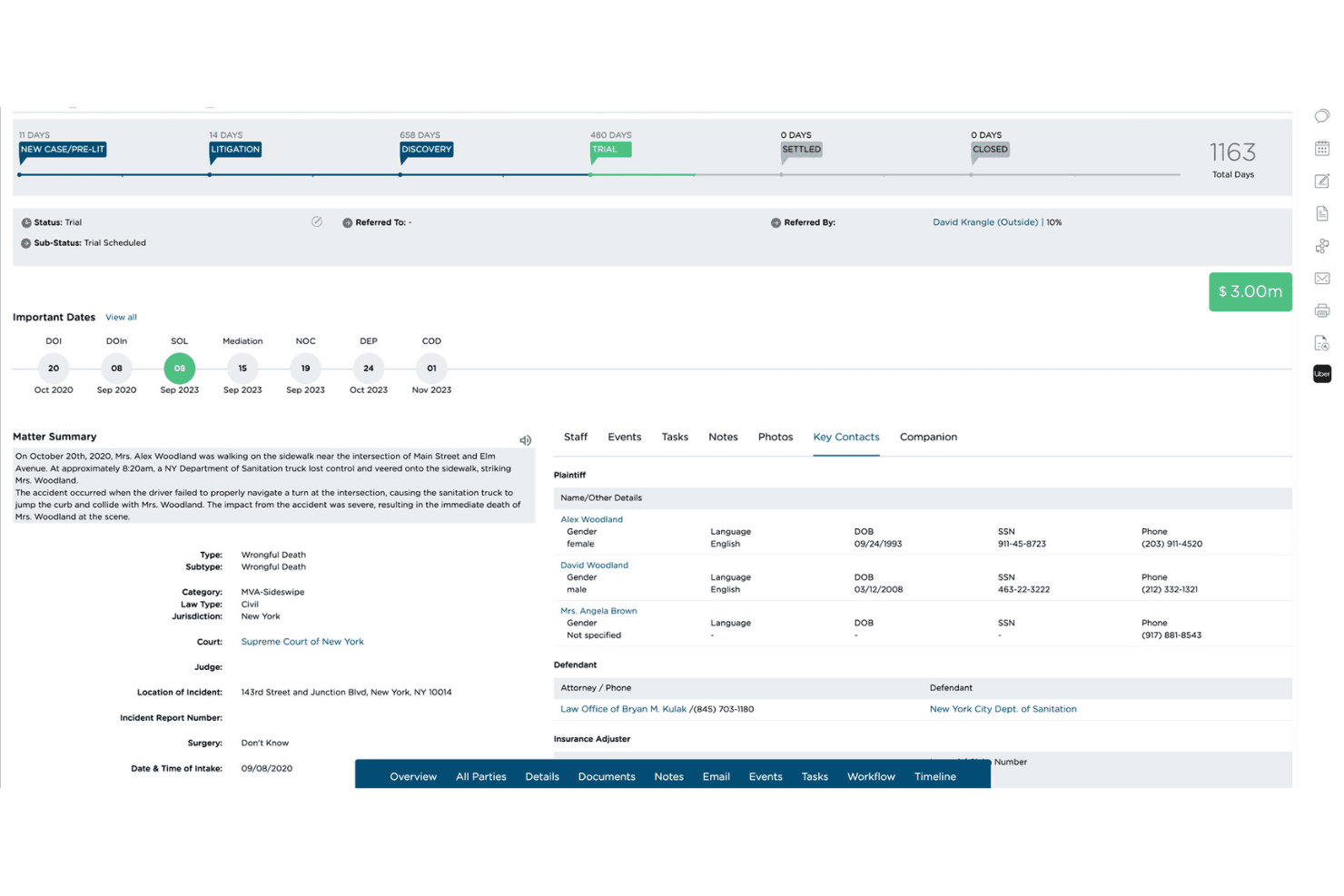
CloudLex ofrece gestión de casos de lesiones personales de extremo a extremo basada en la nube para manejar asuntos, documentos, flujos de trabajo e información de clientes en una sola plataforma. CloudLex es una plataforma de gestión de casos de lesiones personales creada exclusivamente para bufetes de abogados demandantes, que abarca desde la admisión del caso, el seguimiento de registros médicos, la gestión de gravámenes, los flujos de trabajo de acuerdos, la automatización de documentos y la comunicación con el cliente, todo en un sistema basado en la nube.
¿Para quién es mejor CloudLex?
CloudLex es ideal para pequeños y medianos bufetes de abogados dedicados a lesiones personales que manejan un alto volumen de casos y necesitan un sistema especializado diseñado en torno a los flujos de trabajo de lesiones personales en lugar de una herramienta legal de propósito general.
Por qué elegí CloudLex
CloudLex gana su lugar en mi lista porque es la única plataforma de lesiones personales donde todo el ciclo de vida del caso, desde la admisión hasta el acuerdo, está en un solo sistema basado en la nube. Me gusta especialmente que Lexee AI esté integrado directamente en el expediente del caso, por lo que los borradores de paquetes de demanda y los resúmenes médicos están vinculados al asunto en lugar de ser generados en otro lugar y subidos manualmente. También cabe destacar el servicio incorporado de recuperación de registros médicos: los registros recuperados llegan directamente al expediente del caso y no a un portal aparte.
Características clave de CloudLex
- Mensajería para clientes: La mensajería segura bidireccional permite que clientes y equipos legales se comuniquen directamente a través de la plataforma.
- Motor de referidos: Gestione, envíe y rastree referidos de casos y repartos de honorarios con otros bufetes completamente dentro de CloudLex.
- Calendario y eventos: Sincronice fechas judiciales, prescripciones y todos los plazos con los calendarios de Google y Outlook.
- Informes y analítica: Paneles visuales muestran información sobre tasas de acuerdos, retorno de la inversión en marketing, actividad del personal y rendimiento del despacho.
Integraciones de CloudLex
CloudLex ofrece integraciones nativas con QuickBooks Online, DocuSign, Adobe Sign, Google Workspace y Microsoft Outlook. Hay una API disponible para integraciones personalizadas.
Pros and Cons
Pros:
- Diseñado exclusivamente para despachos de lesiones personales demandantes
- Mensajería nativa y firma electrónica incluidas
- La IA redacta cartas de demanda automáticamente
Cons:
- La personalización de informes es algo limitada
- La aplicación móvil es menos funcional que la versión de escritorio
Learn more about CloudLex: Mejor para flujos de trabajo de gestión de casos personalizables
- Demostración gratuita disponible
- $89/usuario/mes
Visit WebsiteCustomer Rating:4.5/5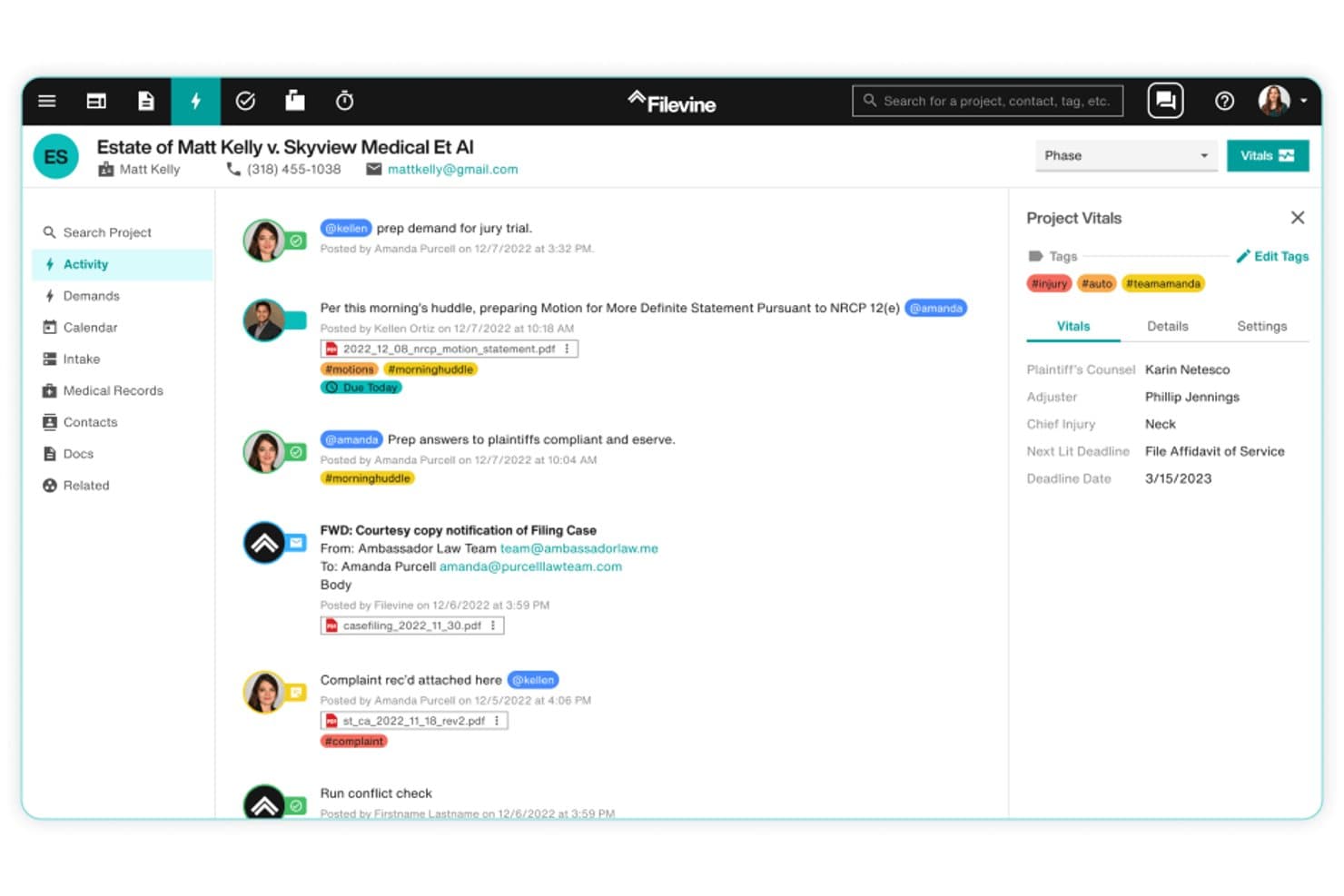
Filevine ofrece un feed de actividad en tiempo real con notas de casos, documentos adjuntos, etiquetas y datos esenciales de proyectos para la gestión de casos de lesiones personales. Filevine es una plataforma de gestión de casos de lesiones personales diseñada en torno a flujos de trabajo personalizables, con herramientas para la admisión de clientes, seguimiento de registros médicos, automatización de documentos, gestión de plazos y procesamiento de acuerdos.
¿Para Quién es Mejor Filevine?
Filevine es ideal para bufetes de lesiones personales del lado del demandante que necesitan adaptar sus flujos de trabajo de casos, procesos de admisión y gestión documental a la forma específica en que realmente opera su práctica.
Por Qué Elegí Filevine
Filevine merece su lugar en mi lista porque ninguna otra plataforma de lesiones personales te da este nivel de control sobre cómo avanza un caso en tu despacho. Me encanta que puedes construir flujos de trabajo personalizados por fases que desencadenan tareas específicas (como solicitar historiales médicos o enviar autorizaciones HIPAA) automáticamente cuando un caso avanza. MedChron AI luego extrae las líneas de tratamiento, códigos CPT y códigos de diagnóstico directamente en los paquetes de demanda, reduciendo lo que solía tomar de 4 a 8 horas a menos de una.
Características Clave de Filevine
- Portal de comunicación con el cliente: Permite a los clientes enviar mensajes a su equipo legal, subir documentos y firmar formularios electrónicamente en un portal seguro en línea.
- Seguimiento de referidos y co-asesores: Realiza el seguimiento de las fuentes de referidos, acuerdos de co-asesoría y gestiona la división de honorarios entre despachos.
- Informes y analítica de acuerdos: Ofrece paneles con valores de acuerdos, estados de casos y métricas de productividad para abogados o asistentes legales.
- Mensajería bidireccional y firma electrónica Vinesign: Permite mensajería nativa por SMS y firma digital de contratos sin plugins de terceros.
Integraciones de Filevine
Filevine ofrece integraciones nativas con Lead Docket, MoveDocs, Vinesign, Lawmatics, Hona, QuickBooks, DocuSign y Microsoft 365. Hay una API disponible para integraciones personalizadas.
Pros and Cons
Pros:
- Flujos de trabajo de casos altamente personalizables basados en fases
- Resumido de historial médico potenciado por IA integrado
- Mensajería bidireccional nativa y firma electrónica incluidas
Cons:
- Curva de aprendizaje pronunciada para la configuración de flujos de trabajo complejos
- La personalización de informes requiere un tiempo significativo de configuración
Learn more about Filevine: Ideal para contabilidad y cumplimiento integrados
- prueba gratuita de 10 días
- $79/usuario/mes
Visit WebsiteCustomer Rating:4.4/5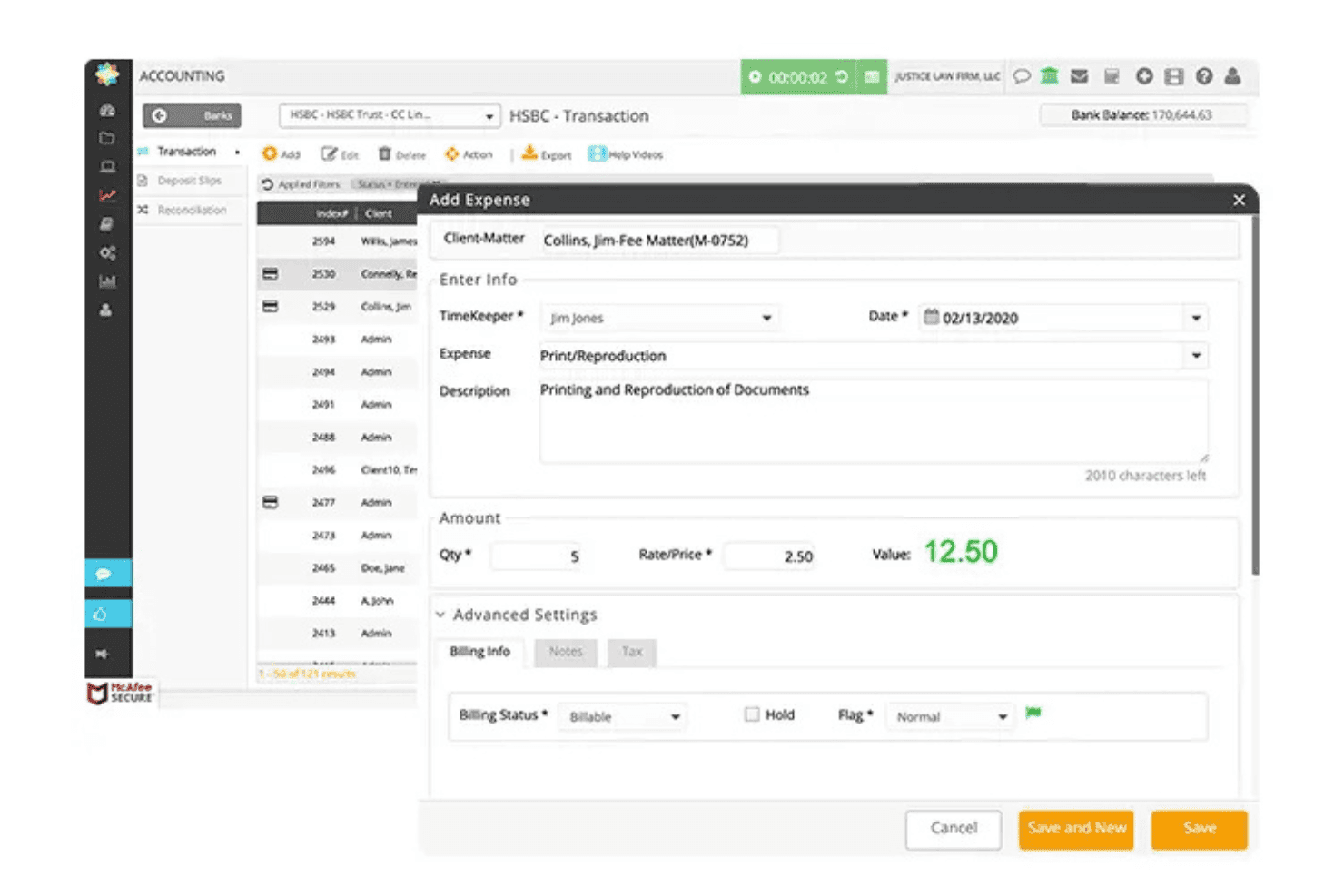
CosmoLex gestiona casos, facturación, documentos y contabilidad fiduciaria en un único sistema. CosmoLex es una plataforma de gestión de despachos jurídicos basada en la nube que combina la gestión de asuntos, la contabilidad fiduciaria y empresarial, el registro de horas, la facturación y la gestión documental en un único sistema diseñado específicamente para bufetes de abogados.
¿Para quién es más adecuado CosmoLex?
CosmoLex es una opción muy adecuada para bufetes pequeños y medianos especializados en lesiones personales que necesitan contabilidad fiduciaria conforme a IOLTA y desembolso de acuerdos integrados en su plataforma de gestión de despachos jurídicos.
Por qué elegí CosmoLex
CosmoLex ocupa un lugar entre las mejores opciones de mi lista porque integra directamente la contabilidad fiduciaria completa y el desembolso de acuerdos en la plataforma de gestión de despachos jurídicos. Me gusta que los bufetes de lesiones personales puedan pagar gravámenes médicos y facturas de proveedores de forma individual o masiva desde la cuenta de acuerdos del asunto, con cada desembolso registrado junto con memorandos y detalles de la cuenta fiduciaria. Esta conciliación fiduciaria integrada de tres vías significa que no tengo que gestionar una cuenta separada de QuickBooks junto a cada expediente.
Características principales de CosmoLex
- Comprobación de conflictos: Ejecuta al instante una búsqueda en los asuntos activos y archivados para ayudar a identificar posibles conflictos antes de aceptar un caso.
- Plantillas de campos personalizados: Permite adaptar los registros de asuntos con campos de datos relevantes para lesiones personales, como detalles del incidente, información médica y reclamaciones anteriores.
- Portal seguro para clientes: El portal integrado permite a los clientes intercambiar documentos, enviar mensajes al bufete y consultar información importante del caso.
- Permisos basados en roles: Asigna derechos de acceso detallados a abogados, asistentes jurídicos y personal administrativo en distintos módulos y flujos de trabajo.
Integraciones de CosmoLex
CosmoLex ofrece integraciones nativas con LawPay (CosmoLexPay), Microsoft 365, Google Workspace, Dropbox y NetDocuments. También dispone de una API para integraciones personalizadas.
Pros and Cons
Pros:
- Contabilidad fiduciaria IOLTA integrada, sin complementos
- Conciliación fiduciaria de tres vías incluida de forma nativa
- Gestiona los desembolsos de acuerdos desde el propio asunto
Cons:
- La automatización de la admisión de casos de lesiones personales está menos desarrollada que la de la competencia
- Los paneles de informes carecen de análisis de casos específicos para lesiones personales
Learn more about CosmoLex: Ideal para controles de acceso basados en roles
- Demostración gratuita disponible
- Precio a consultar
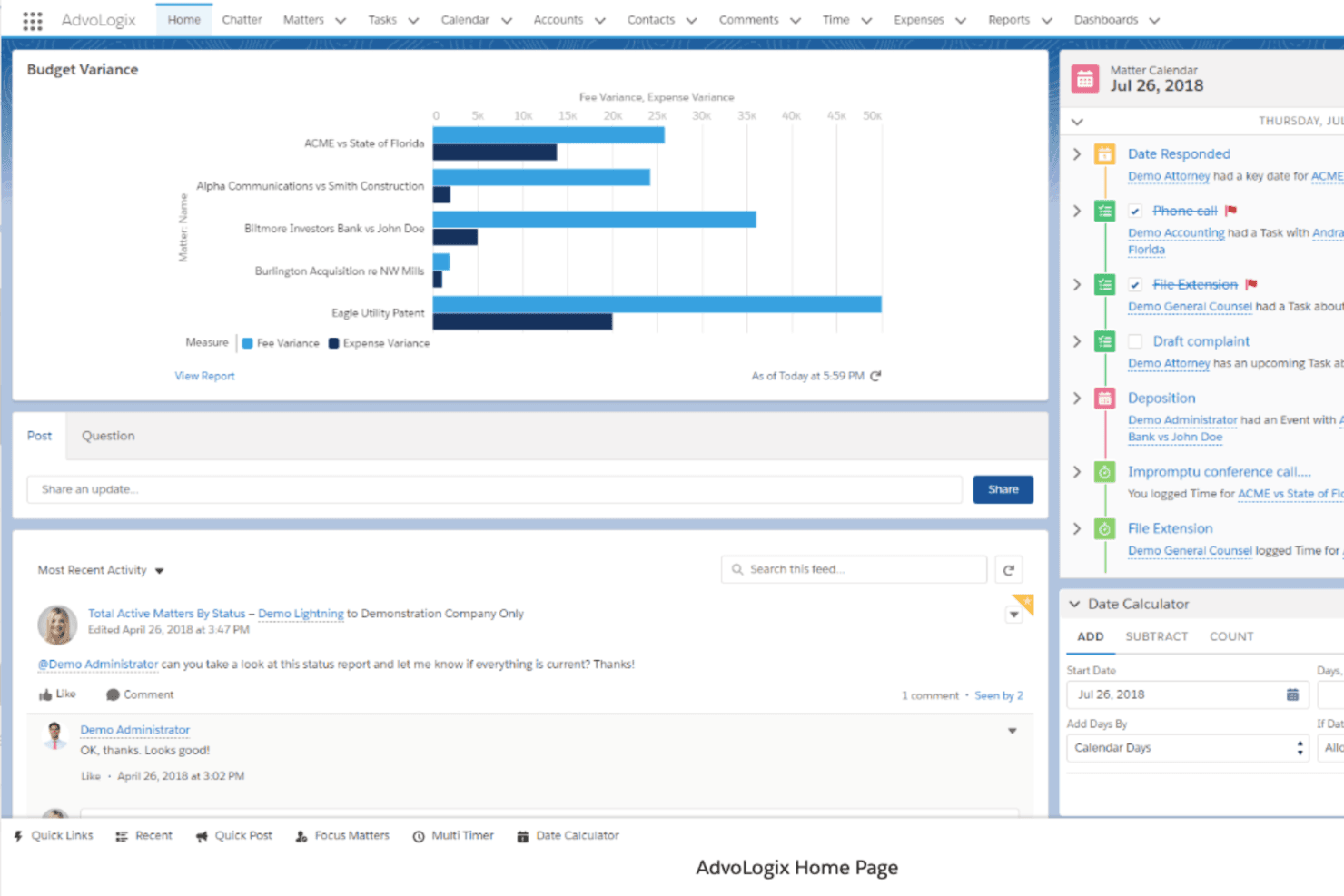
Panel de Mitratech CaseCloud mostrando información sobre la gestión de asuntos, informes de variación presupuestaria y seguimiento de actividades en un espacio centralizado para operaciones legales. Mitratech CaseCloud es una plataforma nativa de Salesforce para la gestión de expedientes y asuntos en despachos jurídicos que centraliza la admisión de nuevos casos, la gestión documental, la automatización de flujos de trabajo y el seguimiento de gastos legales en las distintas áreas de práctica.
¿Para quién es mejor Mitratech CaseCloud?
Despachos jurídicos medianos y grandes que requieren seguridad a nivel empresarial, flujos de trabajo configurables y supervisión centralizada de asuntos en varias áreas de práctica.
Por qué elegí Mitratech CaseCloud
He incluido Mitratech CaseCloud entre mis mejores opciones porque sus controles de acceso basados en roles están integrados directamente en la arquitectura de seguridad de Salesforce, proporcionando a los bufetes permisos a nivel de campo y registros completos de auditoría sin herramientas de cumplimiento adicionales. En la práctica, eso significa que un asistente legal solo ve los casos que tiene asignados, mientras que un socio obtiene visibilidad de asuntos y finanzas en todo el despacho. También me gusta que los paneles específicos para cada área de práctica permiten configurar exactamente qué ve cada rol sobre los asuntos en curso.
Principales características de Mitratech CaseCloud
- Flujos de admisión configurables: Crea formularios personalizados para la admisión de nuevos asuntos, automatiza la asignación y define aprobaciones específicas para nuevos casos de lesiones personales.
- Seguimiento financiero a nivel de asunto: Monitorea presupuestos, gastos y datos de facturación de cada caso desde la admisión hasta su resolución dentro de la plataforma.
- Gestión documental integrada: Almacena, busca y gestiona versiones de documentos legales de forma segura con controles de acceso desde la propia plataforma.
- Generación automática de tareas: Configura la creación automática de asignaciones, recordatorios y fechas límite según el tipo de caso y las reglas de flujo de trabajo.
Integraciones de Mitratech CaseCloud
Las integraciones nativas incluyen Salesforce, iManage, SharePoint, NetDocuments y Blackthorn SMS. Hay una API disponible para integraciones personalizadas.
Pros and Cons
Pros:
- Permisos granulares basados en roles para cada usuario
- Desarrollado sobre la infraestructura de seguridad empresarial de Salesforce
- Flujos de trabajo configurables que se adaptan a las etapas de casos de lesiones personales
Cons:
- No está desarrollado exclusivamente para firmas de lesiones personales
- La configuración requiere una significativa participación del área de TI
Learn more about Mitratech Casecloud: Mejor para gestión integral de casos
- Demostración gratuita disponible
- Precios según solicitud
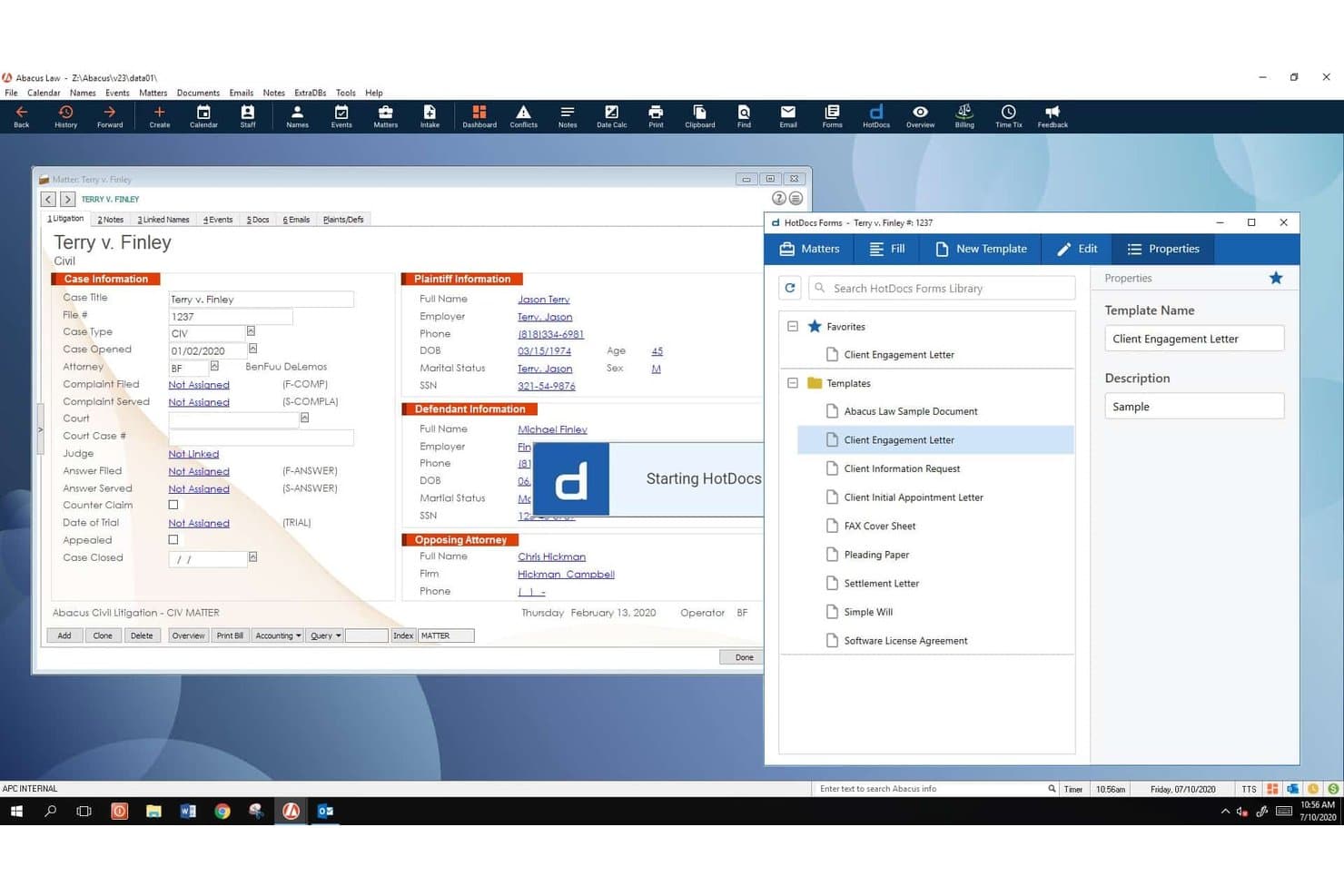
La Suite de Software de Lesiones Personales de AbacusNext ofrece generación de documentos integrada con HotDocs Forms junto con gestión detallada de información de casos y demandante/demandado. AbacusNext, que ahora opera bajo su marca matriz CARET, es una plataforma de gestión para despachos de lesiones personales que combina la administración de acuerdos, el seguimiento de plazos basado en reglas, el control de costos directos e indirectos, la automatización de documentos y la facturación por contingencia en un solo sistema.
¿Para quién es mejor la Suite de Software de Lesiones Personales de AbacusNext?
Es especialmente adecuada para despachos pequeños y medianos de lesiones personales que desean una solución de gestión en las instalaciones o en la nube privada dentro de un entorno Windows y Microsoft 365.
Por qué elegí la Suite de Software de Lesiones Personales de AbacusNext
La Suite de Software de Lesiones Personales de AbacusNext se gana su lugar porque cubre todo el ciclo de vida de un caso de lesiones personales sin necesidad de que los despachos tengan que juntar herramientas separadas. Me gusta especialmente el módulo de Gestión Inteligente de Acuerdos, que genera memorandos de acuerdo detallados para todas las partes e incorpora automáticamente cada gasto registrado. La integración de Abacus Court Rules mantiene actualizados los plazos federales, estatales y locales específicos de cada jurisdicción, por lo que los estatutos de limitaciones permanecen en regla sin supervisión manual.
Características clave de la Suite de Software de Lesiones Personales de AbacusNext
- Formularios de admisión personalizables: Adapta los campos de captura de clientes para calificar casos de lesiones personales y hacer seguimiento de fuentes de referencia.
- Portal de comunicación con clientes: Portal seguro para que los clientes suban documentos, envíen mensajes y consulten el estado de su caso.
- Calendario legal basado en reglas: Aplica automáticamente las reglas de los tribunales federales, estatales y locales a las fechas y plazos clave.
- Facturación por honorarios de contingencia: Herramientas integradas para el cálculo de honorarios por contingencia y la creación consolidada de facturas para asuntos de lesiones personales.
Integraciones de la Suite de Software de Lesiones Personales de AbacusNext
La Suite de Software de Lesiones Personales de AbacusNext ofrece integraciones nativas con Microsoft 365, QuickBooks y HotDocs, y proporciona una API para integraciones personalizadas.
Pros and Cons
Pros:
- Seguimiento de plazos basado en reglas para asuntos de lesiones personales
- Gestión dedicada de acuerdos con memorandos de desembolso
- Opciones de implementación en las instalaciones y en la nube privada
Cons:
- Interfaz anticuada en comparación con competidores nativos en la nube
- Accesibilidad móvil limitada para trabajo de campo
Learn more about AbacusNext Personal Injury Software Suite: Mejor para optimizar el flujo de trabajo y la colaboración
- Demostración gratuita disponible
- Precio a consultar
Visit WebsiteCustomer Rating:4/5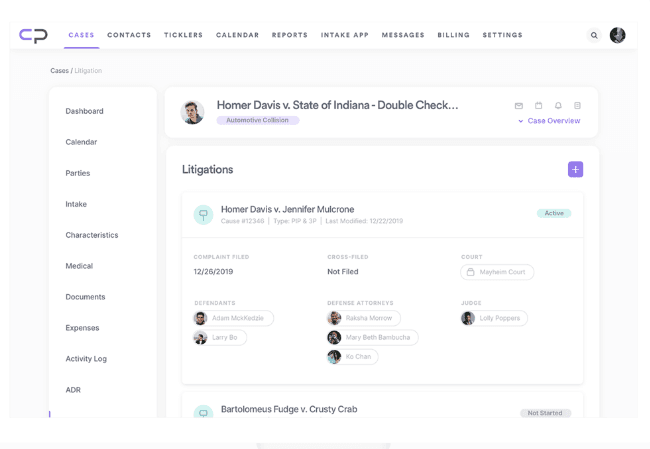
Interfaz del software de gestión de casos de lesiones personales de CasePacer CasePacer es una plataforma de gestión de casos de lesiones personales basada en la nube, creada específicamente para bufetes de abogados de demandantes, que combina seguimiento de casos, gestión de documentos, comunicación con clientes, automatización de flujos de trabajo de tareas e informes en un solo sistema.
¿Para quién es mejor CasePacer?
CasePacer es ideal para bufetes de abogados de lesiones personales y litigios masivos del lado del demandante que gestionan una alta carga de casos con equipos reducidos.
Por qué elegí CasePacer
Elegí CasePacer como uno de los mejores porque su sistema patentado de flujo de trabajo de tareas mantiene cada caso avanzando sin necesidad de seguimiento manual. Mi equipo puede asignar secuencias de tareas específicas para cada rol que se activan automáticamente a medida que los casos progresan. CP Direct añade una verdadera capa de colaboración, permitiendo que los clientes suban documentos y se comuniquen con el bufete directamente desde sus teléfonos, lo que reduce el ida y vuelta que normalmente enlentece a las prácticas de gran volumen del lado del demandante.
Funciones clave de CasePacer
- Analíticas CP Vantage: Genera informes personalizados y tableros para seguir el desempeño de los casos, fechas límite y productividad del equipo.
- Gestión documental CP Hub: Conecta los sistemas de escritorio con almacenamiento en la nube para acceder de forma segura y centralizada a documentos legales.
- Roles de usuario configurables: Define permisos detallados y niveles de acceso por rol o equipo para seguridad y segmentación de flujos de trabajo.
- Opciones de despliegue en la nube: Elige entre una solución en la nube gestionada o implementación local según las necesidades de tu bufete.
Integraciones de CasePacer
CasePacer ofrece integraciones nativas con Microsoft Outlook y Kenect, y proporciona una API para integraciones personalizadas.
Pros and Cons
Pros:
- SMS integrado para recordatorios de citas a clientes
- Las plantillas de cartas de demanda específicas para lesiones personales se rellenan automáticamente con datos del caso
- Realiza seguimiento de fuentes de referidos y división de honorarios con co-abogados
Cons:
- La interfaz puede parecer anticuada para usuarios más nuevos
- La contabilidad fiduciaria es menos avanzada que en softwares dedicados
Learn more about CasePacer: 10Ideal para la generación integrada de documentos
8am
- Demo gratuita disponible
- Precios a consultar
Visit WebsiteCustomer Rating:4.6/5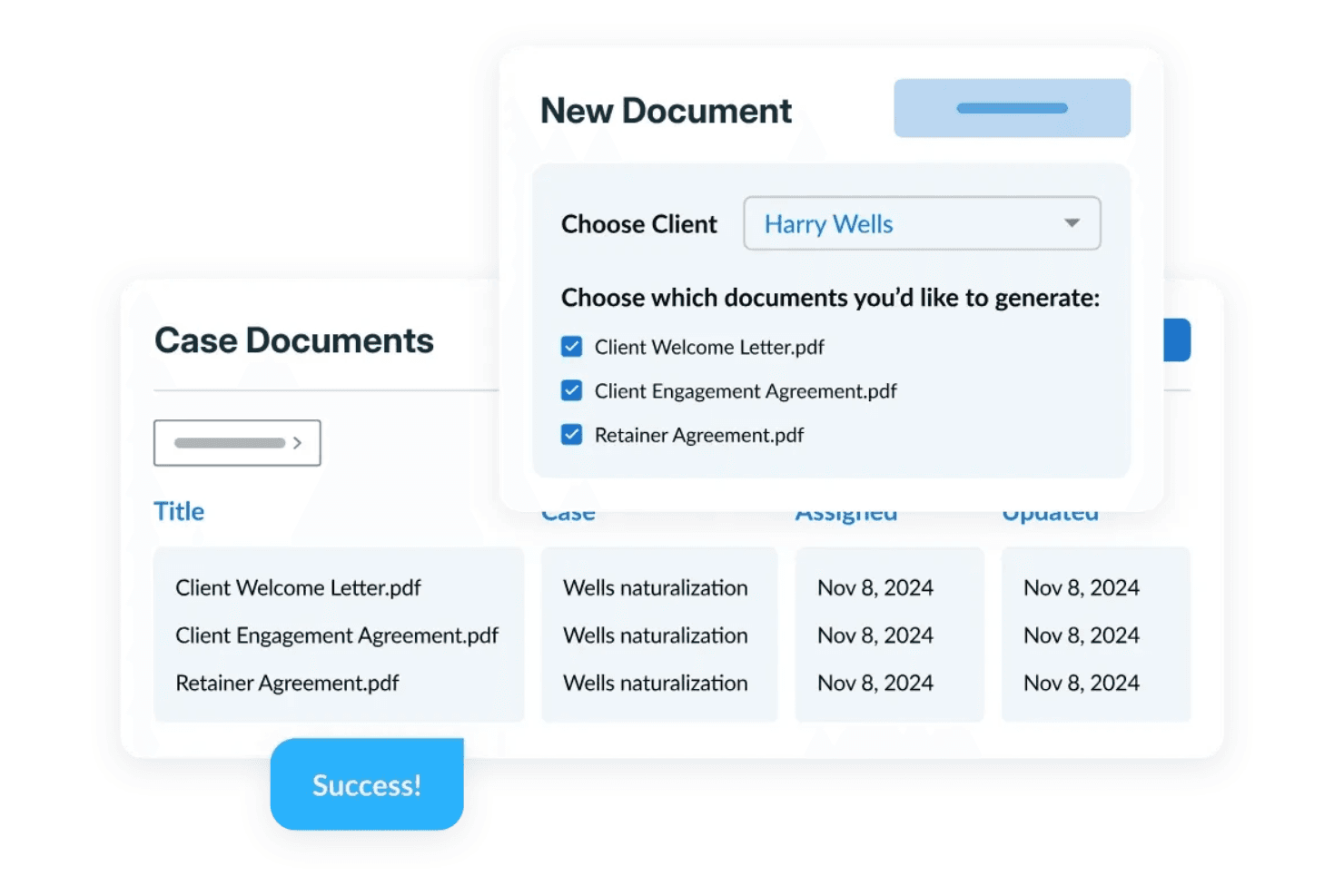
8am crea múltiples documentos para clientes a partir de plantillas personalizables y mantiene los expedientes organizados en un sistema centralizado de gestión documental. 8am es una plataforma de gestión de casos de lesiones personales diseñada específicamente para despachos de abogados de PI, con flujos de trabajo configurados para PI, seguimiento de tratamientos médicos, gestión de gravámenes y cartas de protección (LOP), calculadoras de acuerdos, automatización de documentos y herramientas de comunicación integradas con el cliente.
¿Para Quién es 8am Más Adecuado?
8am es una excelente opción para firmas legales de lesiones personales de cualquier tamaño que buscan una plataforma creada específicamente para este propósito en vez de una herramienta de gestión de práctica legal general adaptada para trabajo de PI.
Por Qué Elegí 8am
8am ocupa un lugar en mi lista corta por lo bien que sus herramientas de generación de documentos se adaptan al ritmo real de una práctica de PI. Me gusta especialmente la función de automatización de documentos, que permite a mi equipo generar cartas de demanda, acuerdos de honorarios condicionales y liberaciones de acuerdos directamente a partir de los datos del caso ya ingresados en el sistema. El Asistente de Redacción IQ de 8am va más allá, permitiéndome ajustar el tono (profesional, empático o asertivo) y traducir documentos entre inglés, español y árabe, sin salir de la plataforma.
Funciones Clave de 8am
- Seguimiento de tratamiento médico: Registra y monitoriza los proveedores médicos de un cliente, historial de visitas y estado de tratamiento directamente dentro de cada expediente.
- Seguimiento de gravámenes y cartas de protección (LOP): Registra y gestiona gravámenes médicos y cartas de protección asociados a casos y proveedores individuales.
- Calculadora de acuerdos: Realiza cálculos de distribución de acuerdos dentro de la plataforma, considerando gravámenes, honorarios y gastos para producir cifras finales de desembolso.
- alertas de plazos de prescripción: Establece alertas automáticas de plazos para que tu equipo reciba notificaciones antes de fechas críticas de presentación.
Integraciones de 8am
El producto CasePeer de 8am ofrece más de 36 integraciones, incluyendo LawPay, QuickBooks, Dropbox, OneDrive, Microsoft 365, Microsoft Outlook, Google Calendar, Mailchimp, RingCentral y EvenUp. También se conecta con Zapier y proporciona una API para integraciones personalizadas.
Pros and Cons
Pros:
- Herramientas integradas de seguimiento de acuerdos y demandas
- Los documentos se organizan automáticamente en torno a las etapas del caso
- El calendario legal calcula plazos específicos según la jurisdicción
Cons:
- Las funciones de IA están por detrás de otras plataformas competidoras
- La experiencia móvil es menos pulida que la de escritorio
Learn more about 8am:
Otras soluciones de gestión de casos de lesiones personales
A continuación encontrarás una lista de opciones adicionales de software de gestión de casos de lesiones personales que preseleccionamos, pero que no llegaron a estar entre las 10 mejores. Sin duda, merece la pena echarles un vistazo.
- 11WrikeIdeal para la gestión colaborativa de casos y la automatización de flujos de trabajo
- 12LEAPMejor para IA legal y automatización de documentos
- 13App4LegalMejor para una gestión integral de la práctica legal
- 14SmartAdvocateMejor con resúmenes de historias clínicas mediante IA incorporada
- 15PracticePantherIdeal para admisión de clientes y formularios personalizados
- 16NeosMejor para flujos de trabajo dedicados a lesiones personales
- 17TimeSolvIdeal para contabilidad fiduciaria y facturación
- 18LitifyMejor para flujos de trabajo de IA en firmas de PI de alto volumen
- 19BQE CORE SuiteBueno para la gestión integrada de proyectos y contabilidad
Cómo evalúo el software de gestión de casos de lesiones personales
Divido mi evaluación en dos niveles: las funciones básicas que una herramienta de PI debe tener—como calculadoras de acuerdos y seguimiento de gravámenes—y los diferenciadores que separan las mejores opciones del resto.
Funcionalidad principal (Requisitos básicos para esta lista)
Cuando selecciono herramientas para mi lista, califico cada una en una escala del 0 (no ofrece la funcionalidad) al 5 (destaca en este ámbito) para cada funcionalidad principal mencionada a continuación. Luego, calculo la puntuación total de la herramienta para obtener un porcentaje. Cada herramienta debe alcanzar una puntuación total mínima del 65% para ser considerada para su inclusión.
- Gestión de admisiones y prospectos: Verifico si cada herramienta permite capturar nuevos clientes potenciales de lesiones, realizar verificaciones de conflictos y seguir las fuentes de referencia desde el primer contacto hasta la firma del contrato.
- Seguimiento de expedientes médicos y proveedores: Organizar cronologías de tratamientos, registrar facturas de proveedores y rastrear solicitudes de registros es fundamental para construir una demanda—por lo que evalúo cómo maneja esto cada herramienta.
- Gestión de acuerdos y gravámenes: Busco calculadoras de acuerdos integradas que consideren gravámenes médicos, subrogaciones, honorarios de abogados y el neto para el cliente, para que tu equipo pueda generar hojas de desembolso precisas.
- Automatización de casos y plazos: Omitir un estatuto de limitaciones puede arruinar una carrera. Evalúo si las herramientas calculan automáticamente las fechas de prescripción, activan cascadas de tareas y envían alertas para fechas clave.
- Automatización de documentos y demandas: Cada plataforma debe ofrecer plantillas específicas para PI—cartas de demanda, autorizaciones HIPAA, contratos de retención—que se autocompleten con los datos del caso y del cliente.
- Contabilidad fiduciaria y facturación: Las estructuras de honorarios contingentes y el cumplimiento con IOLTA son requisitos mínimos. Analizo cómo cada herramienta gestiona libros fiduciarios, el seguimiento de costos y la conciliación triple.
Una vez que tengo una lista de herramientas que cumplen con estos criterios, considero qué es lo que distingue a cada plataforma.
Factores diferenciadores (Qué distingue a los proveedores)
Así es como comparo y contrasto a diferentes proveedores:
Funciones destacadas
Los resúmenes médicos asistidos por IA son un diferenciador importante. Busco herramientas que extraigan diagnósticos, cronologías de tratamiento y totales de facturación de los registros cargados, lo que ahorra horas al crear demandas. También es clave un portal de comunicación para clientes—los clientes de PI esperan actualizaciones de estado en tiempo real sin tener que llamar a la oficina. También evalúo los paneles de análisis de casos, especialmente los que rastrean métricas como el tiempo hasta el acuerdo y el valor de los casos por tipo de lesión, brindando a los socios de la firma los datos necesarios para detectar cuellos de botella.
Más allá de las funciones
El cumplimiento con HIPAA es esencial cuando la plataforma almacena expedientes médicos y comunicaciones con proveedores, por lo que reviso si cada proveedor posee certificaciones relevantes como SOC 2 Tipo II. La profundidad de integración también es importante—las firmas de PI necesitan que su herramienta de gestión de casos se sincronice con QuickBooks para la contabilidad fiduciaria y que conecte con servicios de recuperación de expedientes médicos. También evalúo cómo cada plataforma gestiona la migración de datos, ya que la mayoría de firmas migran desde herramientas antiguas como Needles o hojas de cálculo y necesitan una transición fluida con asistencia dedicada en la incorporación.
Cómo elegir un software de gestión de casos de lesiones personales
Es fácil perderse entre largas listas de funciones y estructuras de precios complejas. Para ayudarte a mantenerte centrado mientras avanzas en tu proceso único de selección de software, aquí tienes una lista de factores que debes tener en cuenta:
| Factor | Qué debes considerar |
|---|---|
| FactorEscalabilidad | Qué debes considerar¿Puede el software crecer junto con tu despacho? Busca planes flexibles y considera si la herramienta puede gestionar un aumento de clientes o miembros adicionales del equipo. |
| FactorIntegraciones | Qué debes considerar¿Funciona con tus herramientas actuales? Comprueba la compatibilidad con tu correo electrónico, calendario y sistemas de gestión documental. |
| FactorPersonalización | Qué debes considerar¿Puedes adaptar el software a tus flujos de trabajo? Asegúrate de que te permita ajustar formularios, campos e informes para que se adapten a tus procesos. |
| FactorFacilidad de uso | Qué debes considerar¿La interfaz es intuitiva para tu equipo? Un diseño sencillo puede reducir el tiempo de formación y mejorar la eficiencia diaria. |
| FactorImplementación e incorporación | Qué debes considerar¿Cuánto tardarás en empezar? Busca asistencia durante la incorporación, como tutoriales y servicio de atención al cliente, para facilitar la transición. |
| FactorCoste | Qué debes considerar¿Se ajusta a tu presupuesto? Compara los modelos de precios, presta atención a las tarifas ocultas y considera el valor de las funciones incluidas. |
| FactorMedidas de seguridad | Qué debes considerar¿Cómo protege el software los datos de los clientes? Asegúrate de que incluya cifrado, copias de seguridad periódicas y cumpla la normativa de protección de datos. |
| FactorRequisitos de cumplimiento | Qué debes considerar¿La herramienta cumple las normas del sector? Comprueba el cumplimiento de normativas legales como HIPAA o RGPD, si corresponde. |
¿Qué es un software de gestión de casos de lesiones personales?
El software de gestión de casos de lesiones personales es una herramienta diseñada para ayudar a los bufetes de abogados a gestionar los casos de sus clientes de forma más eficiente. Los profesionales del derecho, como abogados y asistentes legales, suelen utilizar estas herramientas para organizar los detalles de los casos, gestionar los plazos y mejorar la comunicación con los clientes.
Las funciones de gestión de documentos, programación de citas y seguimiento de clientes ayudan a mantener la organización y garantizar el progreso puntual de los casos. En general, estas herramientas simplifican la gestión de los complejos flujos de trabajo relacionados con los casos de lesiones personales.
Funciones
Al seleccionar un software de gestión de casos de lesiones personales, presta atención a las siguientes funciones clave:
- Gestión de clientes: Organiza y almacena la información de los clientes, lo que facilita el acceso y la actualización de los detalles de los casos.
- Automatización de documentos: Genera documentos legales rápidamente, ahorrando tiempo y reduciendo los errores manuales.
- Calendario y programación: Realiza un seguimiento de las fechas y los plazos importantes, ayudando a evitar citas y comparecencias judiciales perdidas.
- Gestión de tareas: Asigna y supervisa tareas dentro del equipo para garantizar que todas las actividades relacionadas con los casos se completen a tiempo.
- Informes y análisis: Proporciona información sobre el progreso y el rendimiento de los casos, ayudando a los bufetes a tomar decisiones fundamentadas.
- Capacidades de integración: Se conecta con otras herramientas, como el correo electrónico y los sistemas de gestión de documentos, mejorando la eficiencia del flujo de trabajo.
- Almacenamiento seguro de datos: Protege la información confidencial de los clientes mediante cifrado y copias de seguridad periódicas para mantener la confidencialidad.
- Portal de comunicación con clientes: Facilita la comunicación directa con los clientes, mejorando la transparencia y la gestión de las relaciones.
- Flujos de trabajo personalizables: Permite a los bufetes adaptar los procesos para satisfacer sus necesidades específicas, mejorando la eficiencia operativa.
- Acceso móvil: Permite a los usuarios gestionar los casos desde cualquier lugar, ofreciendo flexibilidad y comodidad.
Beneficios
La implementación de un software de gestión de casos de lesiones personales ofrece varias ventajas para tu equipo y tu negocio. Estas son algunas de las que puedes esperar:
- Mejor organización: Centraliza la información de los clientes y los casos, facilitando el acceso y la gestión de todos los detalles necesarios.
- Ahorro de tiempo: Automatiza tareas rutinarias, como la generación de documentos y la programación, permitiendo que tu equipo se centre en trabajos de mayor valor.
- Comunicación mejorada: Facilita una mejor comunicación con los clientes a través de portales, garantizando la transparencia y las actualizaciones puntuales.
- Mayor eficiencia: Los flujos de trabajo personalizables y las funciones de gestión de tareas ayudan a agilizar las operaciones y reducir los cuellos de botella.
- Seguridad de los datos: Protege la información confidencial de los clientes mediante un almacenamiento seguro y el cumplimiento de la normativa sobre datos.
- Mejor toma de decisiones: Los informes y análisis proporcionan información sobre el progreso de los casos y el rendimiento del equipo, lo que ayuda a la planificación estratégica.
- Flexibilidad: El acceso móvil permite a los miembros del equipo gestionar los casos desde cualquier lugar, ofreciendo mayor comodidad y adaptabilidad.
Costes y precios
La selección de un software de gestión de casos de lesiones personales requiere comprender los distintos modelos de precios y planes disponibles. Los costes varían en función de las funciones, el tamaño del equipo, los complementos y otros factores. La tabla siguiente resume los planes habituales, sus precios medios y las funciones que suelen incluir las soluciones de software de gestión de casos de lesiones personales:
Tabla comparativa de planes de software de gestión de casos de lesiones personales
| Tipo de plan | Precio medio | Funciones habituales |
|---|---|---|
| Tipo de planPlan gratuito | Precio medio$0 | Funciones habitualesGestión básica de clientes, almacenamiento limitado de documentos y programación esencial. |
| Tipo de planPlan personal | Precio medio$20-$50/user/month | Funciones habitualesAutomatización avanzada de documentos, gestión de tareas e informes y análisis básicos. |
| Tipo de planPlan empresarial | Precio medio$60-$120/user/month | Funciones habitualesPortal completo de comunicación con clientes, flujos de trabajo personalizables y capacidades de integración. |
| Tipo de planPlan corporativo | Precio medio$150+/user/month | Funciones habitualesMedidas de seguridad integrales, asistencia específica y acceso móvil completo y análisis avanzados. |
Preguntas frecuentes sobre el software de gestión de casos de lesiones personales
Estas son algunas respuestas a preguntas frecuentes sobre el software de gestión de casos de lesiones personales:
¿Cómo gestionan la mayoría de las plataformas el control de versiones de los documentos?
El control de versiones suele gestionarse guardando cada actualización como una nueva instancia dentro del expediente. Las versiones anteriores siguen estando disponibles para su revisión o restauración. Algunas herramientas muestran marcas de tiempo o el historial de usuarios de cada versión guardada.
¿Admiten estas herramientas campos de datos personalizados para la admisión o los registros de casos?
Sí, la mayoría de los sistemas permiten a los despachos añadir campos personalizados para adaptarse a sus flujos de trabajo específicos. Estos campos pueden utilizarse durante la admisión de clientes, la configuración del caso o la recopilación continua de datos. Los tipos de campo suelen incluir texto, menús desplegables, casillas de verificación y selectores de fecha.
¿Cómo gestionan las plataformas las acciones masivas en varios casos?
Las acciones masivas suelen gestionarse mediante herramientas de procesamiento por lotes dentro de la interfaz. Los usuarios pueden seleccionar varios casos para aplicar actualizaciones, como cambios de estado, asignaciones de tareas o cargas de documentos. El acceso a las acciones masivas puede depender de los permisos del usuario.
¿Se pueden filtrar o buscar por palabra clave los registros de comunicaciones en estos programas?
La mayoría de los sistemas incluyen herramientas de búsqueda o filtrado para navegar por el historial de comunicaciones. Los usuarios pueden buscar por fecha, nombre del contacto, asunto o palabras clave específicas. Esto ayuda a localizar rápidamente interacciones anteriores sin tener que revisar manualmente historiales completos de casos.
¿Es posible generar documentos con plantillas dentro de la plataforma?
La mayoría de las herramientas admiten la automatización de documentos mediante plantillas precargadas. Estas plantillas pueden completarse con datos del cliente o del caso extraídos directamente del sistema. Entre los usos habituales se incluyen las cartas de reclamación, los formularios de admisión o los contratos de prestación de servicios.