

Fort de 20 ans d’expérience dans l’évaluation des technologies juridiques, j’ai testé en profondeur 18 des meilleures alternatives à iManage. Si votre cabinet a besoin d’une intégration plus étroite avec Microsoft 365 ou d’une automatisation des flux de travail plus flexible qu’avec iManage, recherchez ici une sécurité documentaire solide et une communication efficace avec les clients.
Les meilleures alternatives à iManage offrent une gestion sécurisée des documents centrée sur les dossiers, une intégration fluide avec Microsoft 365 et des outils adaptés aux flux de travail juridiques modernes. Si vous recherchez des alternatives à iManage, vous cherchez probablement une solution qui corresponde mieux au mode de fonctionnement de votre cabinet, qui accompagne les équipes à distance ou hybrides, ou qui vous donne davantage de contrôle sur l’automatisation et la communication avec les clients. Ce guide vous aidera à comparer rapidement les principales alternatives à iManage du point de vue des opérations juridiques, afin d’identifier l’option qui répond aux besoins et aux objectifs de votre cabinet.
Qu’est-ce que iManage ?
iManage est une plateforme de gestion des documents et des e-mails juridiques conçue pour les cabinets d’avocats et les équipes juridiques internes. Elle centralise les fichiers liés aux dossiers, les e-mails et les documents sensibles, tout en proposant une recherche avancée, un contrôle des versions et une gestion des autorisations. iManage se distingue par ses fonctionnalités de sécurité, ses outils de collaboration et son intégration poussée avec Microsoft 365. Les professionnels du droit utilisent iManage pour organiser, protéger et consulter efficacement les documents produits pour les clients depuis n’importe où, tout en respectant les exigences de conformité et de productivité.
Tableau comparatif des alternatives à iManage
Ce tableau comparatif récapitule les informations tarifaires relatives aux alternatives à iManage que j’ai sélectionnées.
| Tool | Best For | Trial Info | Price | ||
|---|---|---|---|---|---|
| 1 | Idéal pour le suivi automatique du temps et de l'activité | Démonstration gratuite disponible | Tarification sur demande | Website | |
| 2 | Idéal pour les outils de communication du portail client | Essai gratuit de 10 jours | À partir de 50 $/utilisateur/mois (facturé annuellement) | Website | |
| 3 | Idéal pour l'intégration de la gestion de cabinet juridique | Essai gratuit de 7 jours | À partir de $49/utilisateur/mois | Website | |
| 4 | Idéal pour les utilisateurs de Microsoft 365 dans les petits cabinets | Démo gratuite disponible | À partir de $210/mois (facturé annuellement) | Website | |
| 5 | Idéal pour le classement fluide des documents depuis Outlook | Démonstration gratuite disponible | Tarification sur demande | Website | |
| 6 | Idéal pour l'intégration aux flux de travail Microsoft 365 | Essai gratuit de 30 jours | À partir de $5.00/utilisateur/mois (facturé annuellement) | Website | |
| 7 | Idéal pour les contrôles de sécurité centrés sur les dossiers | Démo gratuite disponible | Tarification sur demande | Website | |
| 8 | Idéal pour l’automatisation contractuelle alimentée par l’IA | Démonstration gratuite disponible | Tarifs sur demande | Website | |
| 9 | Idéal pour le stockage de documents juridiques sur site | Démo gratuite disponible | Tarification sur demande | Website | |
| 10 | Idéal pour la gestion native des e-mails dans Outlook | Essai gratuit de 7 jours | À partir de 395\u0024/mois | Website |


Pourquoi faire confiance à nos recommandations de logiciels
6,700+
Reviews
20
Industry experts
16+
Evaluation factors
14
Years
Notre équipe teste et évalue des logiciels depuis 2012. En tant que dirigeants de cabinets juridiques nous-mêmes, nous savons à quel point il est difficile — et important — de choisir le bon logiciel.
Pour ce guide, nous avons évalué les outils grâce à des tests pratiques et une recherche indépendante, en notant les outils selon nos critères de sélection.
Nos avis reflètent notre jugement éditorial humain, et non un argumentaire de vente.
 Best for automatic time and activity tracking
- Not available
- Pricing upon request
Visit WebsiteCustomer Rating:4.8/5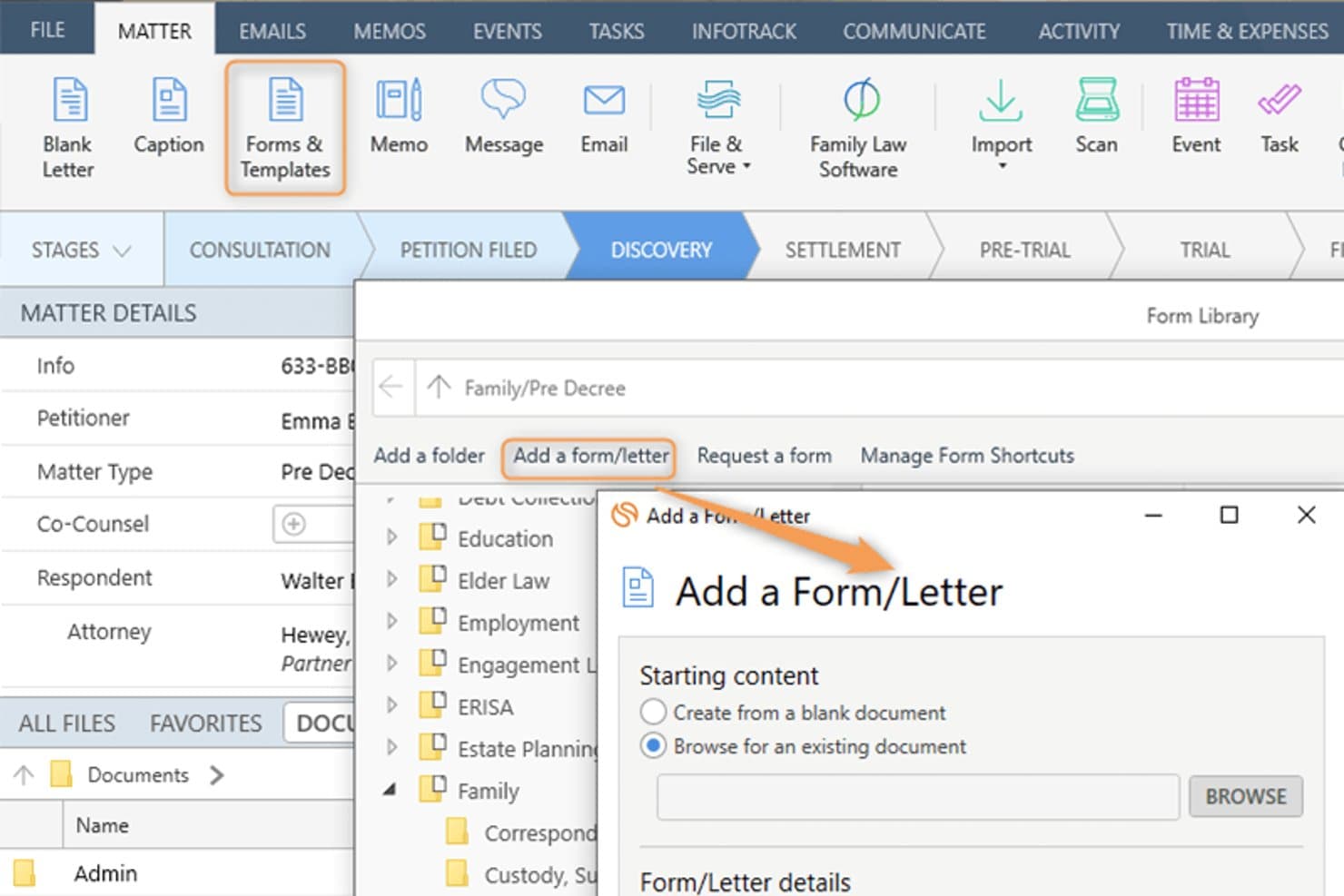
Smokeball lets users add custom forms and letters to a legal matter. Smokeball is an all-in-one legal practice management platform built for solo, small, and mid-size law firms that need matter-centric document management, email filing, billing, and Microsoft 365 integration consolidated into a single system.
Who Is Smokeball Best For?
Smokeball is a strong fit for managing partners at small private-practice law firms who handle high document volumes across multiple practice areas.
Why Smokeball Is a Good iManage Alternative
I've included Smokeball in my top picks because AutoTime is genuinely unlike anything iManage offers. It automatically captures time spent on emails, documents, calls, and tasks inside the platform, so nothing goes unbilled. I also like that matter-centric email filing works natively inside Outlook, meaning I can link emails directly to matters without ever leaving my inbox.
Smokeball Key Features
- Matter-centric document management: Store and organize legal files, templates, and forms by matter for easy retrieval.
- Custom practice area templates: Access 200+ built-in, configurable matter and document templates tailored to different legal areas.
- Native Microsoft 365 integration: Link Outlook emails and Word documents directly to matters without leaving those applications.
- Firm insights reporting: Track productivity, case progress, staff activity, and profitability with built-in dashboards and metrics.
Smokeball Integrations
Smokeball has native integrations across the Microsoft ecosystem, including Microsoft 365 and Outlook. An API is available for custom integrations.
Pros and Cons
Pros:
- Native email filing within Microsoft Outlook
- Matter-centric file organization built in
- AutoTime captures billable hours automatically
Cons:
- Better suited to smaller law firms
- Search lacks advanced metadata filtering
Learn more about Smokeball: Best for client portal communication tools
- 10-day free trial
- From $50/user/month (billed annually)
Visit WebsiteCustomer Rating:4.6/5
MyCase auto-generates task lists and deadlines directly from court rules. MyCase is a cloud-based practice management platform for small and mid-sized law firms that centralizes case management, billing, and client communication in one place.
Who Is MyCase Best For?
MyCase suits solo practitioners and small firm managing partners who handle their own billing, client intake, and day-to-day case administration.
Why MyCase Is a Good iManage Alternative
I've included MyCase in my top picks because its client portal is genuinely best-in-class for secure client communication. Clients can view case documents, send messages, and pay invoices directly through the portal, without calling or emailing the firm. The 2-way texting feature with a dedicated firm number keeps every client conversation logged and searchable inside the case record.
MyCase Key Features
- Matter-centric document storage: Organize documents within specific case folders for easy retrieval and management.
- Integrated time and expense tracking: Log billable hours and expenses directly to each matter with Smart Time Finder.
- Automated billing and invoicing: Generate and send invoices automatically based on tracked time and case activities.
- Customizable financial reporting: Access real-time analytics on payments, AR, and case profitability through built-in report tools.
MyCase Integrations
MyCase offers native integrations with QuickBooks Online, LawPay, Google Calendar, Google Drive, Dropbox, Outlook, Gmail, and CalendarRules, and provides an API for custom integrations.
Pros and Cons
Pros:
- Built-in invoicing tied directly to matters
- Two-way texting logged within case records
- Dedicated client-facing portal for secure messaging
Cons:
- No ethical wall or matter-level access controls
- Limited document version control and check-in/out
 3Best for legal practice management integration
Clio
- 7-day free trial + free demo available
- From $49/user/month
Visit WebsiteCustomer Rating:4.5/5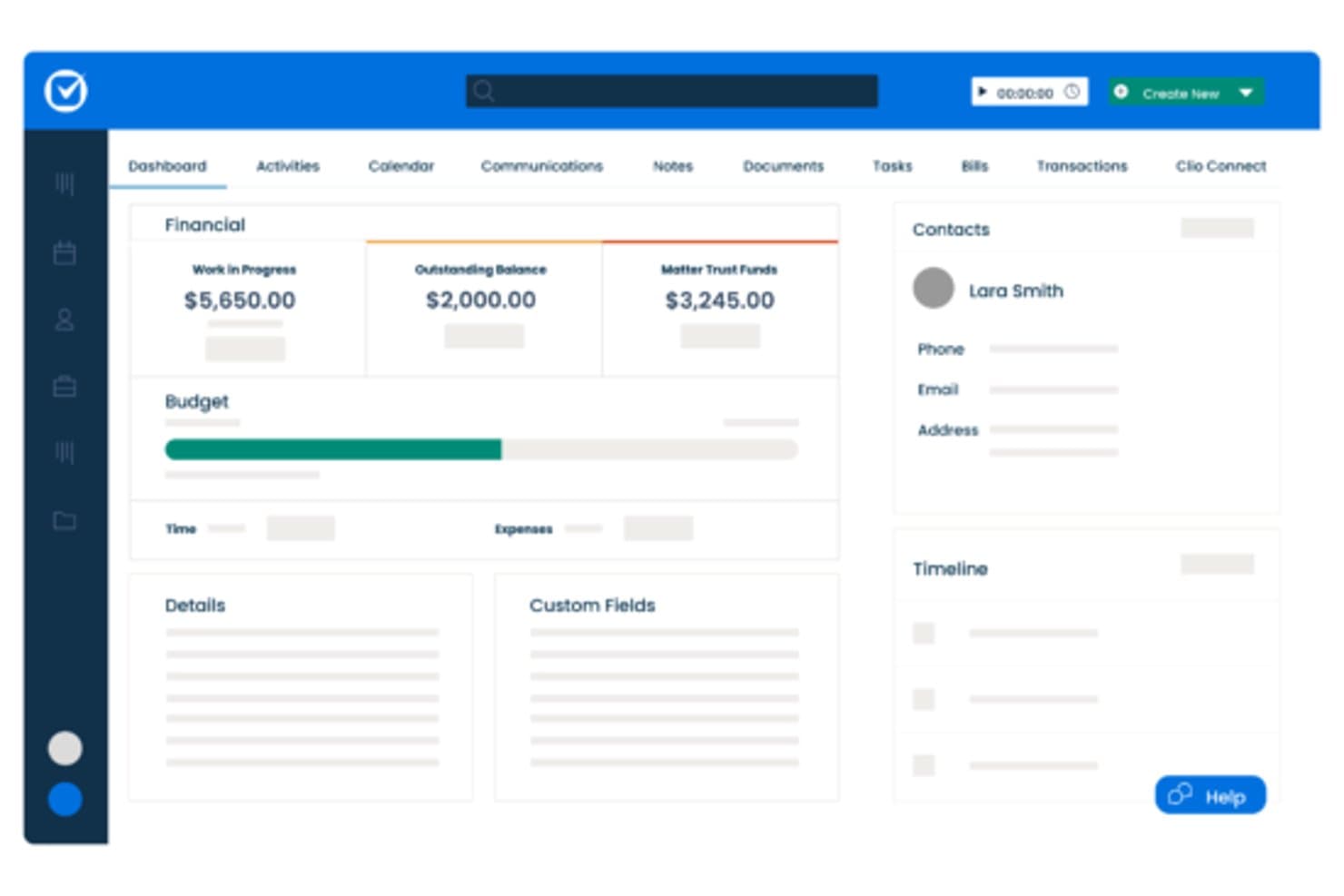
Clio centralizes matter financials, contacts, and timelines in one dashboard. Clio Manage is a cloud-based legal practice management platform built for small-to-mid-size law firms that need matter organization, billing, document storage, and client communication in one place—without the complexity of enterprise DMS tools like iManage.
Who Is Clio Best For?
Clio Manage is a natural fit for solo attorneys and small-to-mid-size law firms that want a single platform to manage matters, billing, and client files.
Why Clio Is a Good iManage Alternative
I've included Clio Manage in my top picks because it connects matter management, billing, and document storage in a single workspace that actually reflects how law firms operate day to day. I particularly like that Clio's AI can convert court documents into calendar events and turn tracked time entries into draft invoices automatically. That tight loop between case activity and billing is something iManage, as a document-only platform, simply doesn't offer.
Clio Key Features
- Matter-centric document storage: Store and organize all case files in structured, searchable matter folders.
- Integrated time and expense tracking: Track billable hours and expenses directly within each matter for accurate billing.
- Client portal for secure communication: Exchange documents and updates with clients through a dedicated, secure portal.
- Role-based access permissions: Control who can view, edit, or manage specific matters and documents throughout your firm.
Clio Integrations
Clio Manage offers native integrations with Microsoft 365, Google Workspace, DocuSign, QuickBooks Online, Dropbox, NetDocuments, Xero, Zoom, LawPay, and CalendarRules. An API is available for custom integrations.
Pros and Cons
Pros:
- AI converts court documents into calendar events
- Built-in client portal for secure file sharing
- Connects billing directly to matter activity
Cons:
- Limited version control for document-heavy workflows
- Document management less robust than iManage
Learn more about Clio: Best for small firm Microsoft 365 users
- Free demo available
- From $210/month (billed annually)
Visit WebsiteCustomer Rating:4.6/5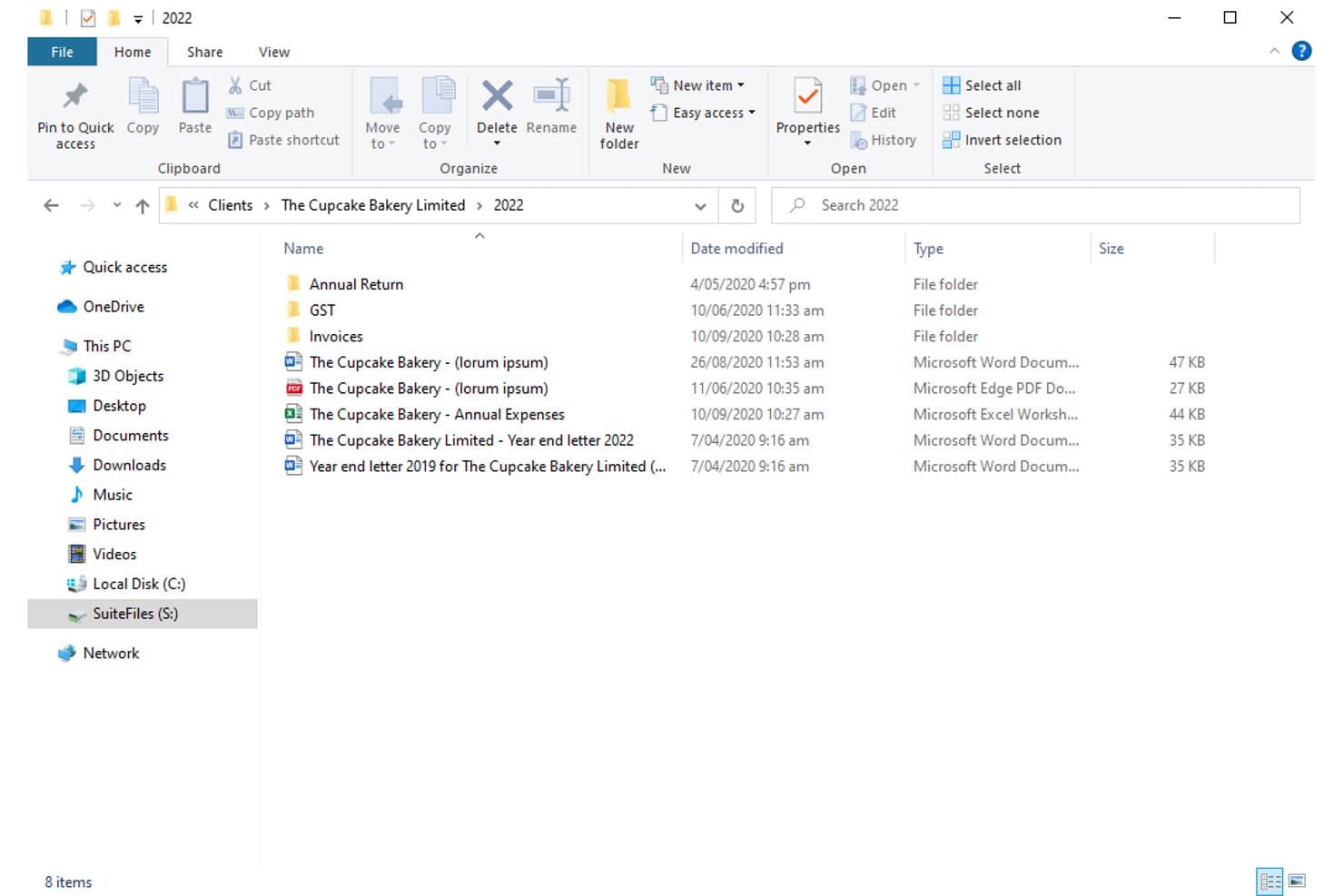
SuiteFiles organizes client documents in structured folders by year. For small law firms already deep in the Microsoft 365 ecosystem, SuiteFiles offers an all-in-one document management workspace that combines email filing, unlimited e-signing, and a secure client portal without needing separate tools.
Who Is SuiteFiles Best For?
SuiteFiles is a strong fit for small law firms that run on Microsoft 365 and want a single platform for document, email, and client file management.
Why SuiteFiles Is a Good iManage Alternative
I've included SuiteFiles in my top picks because its Microsoft 365 integration isn't an add-on, it's the foundation the whole product is built on. I can file emails directly from Outlook into client folders, co-author documents live in Word, and share finalized files through the SuiteFiles Connect portal without switching to a separate tool. Small firm teams that already run on M365 don't need to retrain staff or rebuild workflows to use it.
SuiteFiles Key Features
- Client portal (SuiteFiles Connect): Share documents securely with clients and collaborate without relying on unencrypted email.
- Task management: Assign tasks to team members and track progress alongside your documents and emails.
- PDF annotation tools: Annotate, merge, and organize PDFs directly within the SuiteFiles workspace.
- Template-driven document creation: Use customizable templates for automated client letters, proposals, and agreements.
SuiteFiles Integrations
SuiteFiles has native integrations across the Microsoft ecosystem, including Microsoft 365 and Azure. It also offers native integrations with Xero, QuickBooks Online, and Karbon, and provides an API for custom integrations.
Pros and Cons
Pros:
- SharePoint used as the underlying file storage
- Email filing directly from Outlook into matters
- Built-in e-signing without a third-party tool
Cons:
- Not suited for large or enterprise firms
- Limited advanced search versus enterprise DMS platforms
Learn more about SuiteFiles: Best for seamless Outlook document filing
- Free demo available
- Pricing upon request
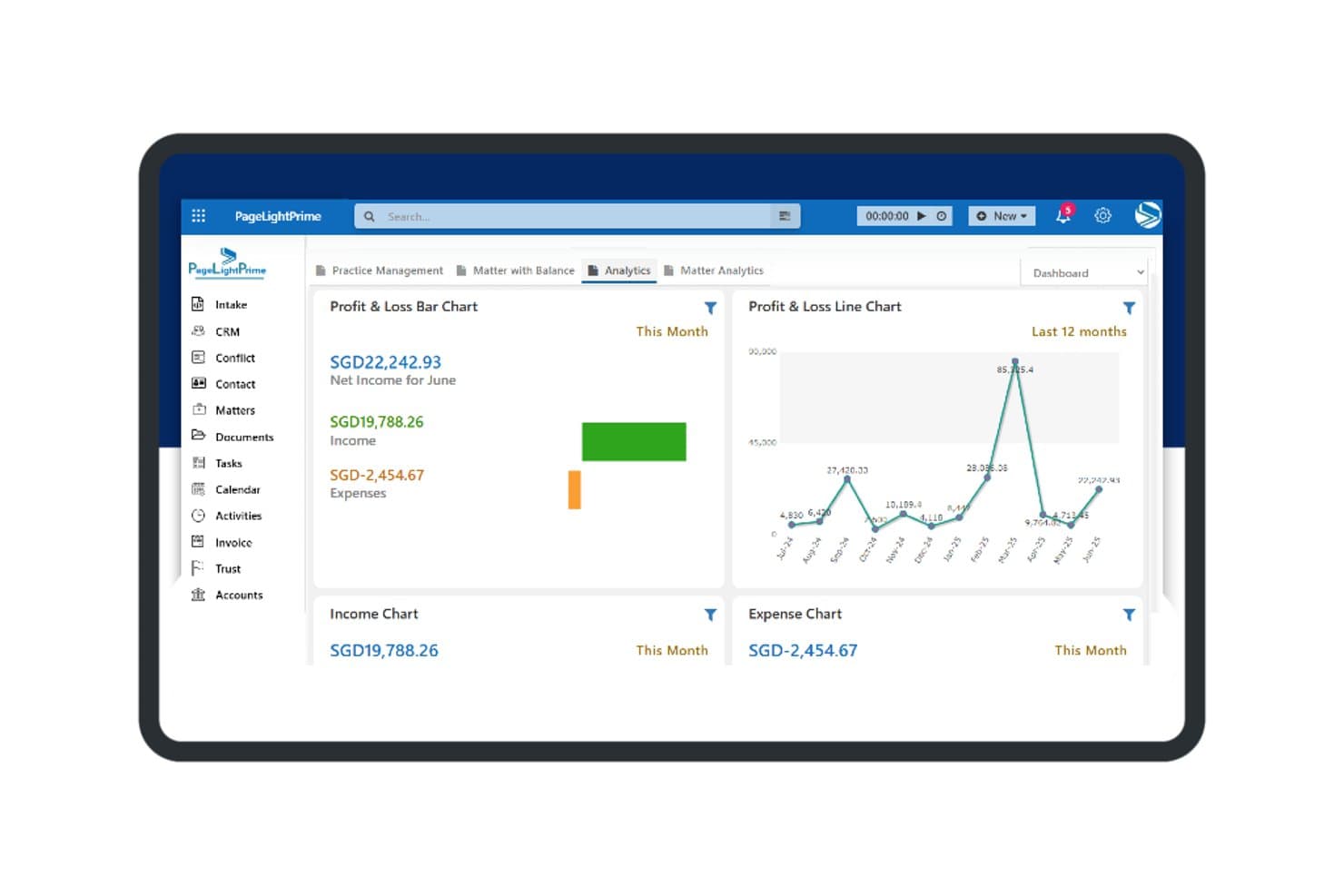
PageLightPrime offers a financial analytics dashboard with profit and loss charts, income tracking, and expense summaries for law firm management. PageLightPrime is a Microsoft 365-native legal practice management platform built for law firms that want to consolidate document management, matter tracking, and billing without stepping outside their existing Microsoft environment.
Who Is PageLightPrime Best For?
It's a strong fit for small to mid-sized law firms already running Microsoft 365 that want to replace iManage or a legacy DMS without adopting an entirely new technology stack.
Why PageLightPrime Is a Good iManage Alternative
I've included PageLightPrime in my top picks because of how it handles email filing from Outlook directly into matter workspaces. When a new matter is created, the platform auto-provisions a SharePoint folder structure with metadata already applied, so emails filed from Outlook land in the right place without manual sorting. I also appreciate that version control and audit trails run automatically alongside this, so every filed document has a tracked history from day one.
PageLightPrime Key Features
- Matter-centric SharePoint structure: Auto-generates folders and metadata for each new client and matter.
- Integrated law firm accounting: Handles billing, trust accounting, and multi-currency management within the platform.
- Client portal: Allows clients to securely access shared documents, billing information, and case updates online.
- Legal CRM and intake forms: Captures leads through web intake and links client interactions directly to matters.
PageLightPrime Integrations
PageLightPrime has native integrations across the Microsoft ecosystem, including Microsoft 365 and Azure. An API is available for custom integrations.
Pros and Cons
Pros:
- Single platform covers intake, billing, and document management
- Built-in trust accounting with IOLTA compliance support
- Runs entirely within Microsoft 365 and SharePoint
Cons:
- Smaller vendor with less established enterprise credibility
- Limited third-party ecosystem beyond Microsoft tools
Learn more about PageLightPrime: Best for Microsoft 365 workflow integration
- 30-day free trial
- From $5.00/user/month (billed annually)
Visit WebsiteCustomer Rating:4.4/5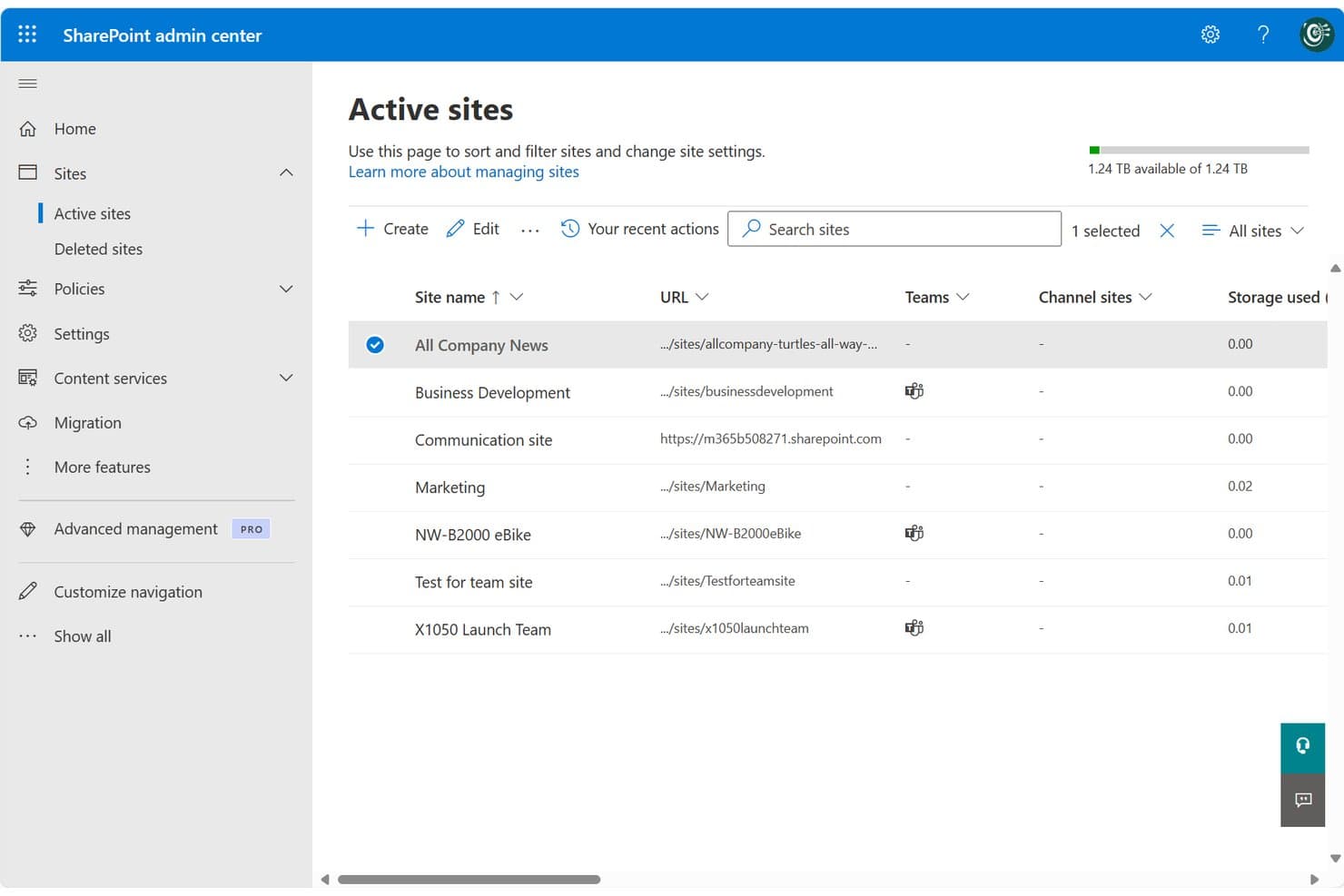
SharePoint centralizes site management across teams and projects in one admin view. SharePoint is Microsoft's cloud-based collaboration and document management platform, well-suited for legal teams and law firms already running on Microsoft 365 who want centralized file storage, version control, and access management without adopting a separate DMS.
Who Is SharePoint Best For?
SharePoint fits small-to-mid-sized law firms and in-house corporate legal teams that are already standardized on Microsoft 365 and want to avoid managing a separate DMS.
Why SharePoint Is a Good iManage Alternative
I've included SharePoint in my top picks because it's the only iManage alternative here that's natively embedded in Microsoft 365. Your legal team can co-author Word documents, manage matter libraries, and file directly from Outlook without switching tools. I particularly appreciate the check-in/check-out versioning system, which locks documents during active review and keeps a clean, restorable version history across matters.
SharePoint Key Features
- Matter library templates: Prebuilt site and folder structures you can use to organize documents by matter, client, or team.
- Granular permissions controls: Assign access based on matter, team, or document type to help protect privileged information.
- Full-text and metadata search: Search for documents or emails using keywords, tags, or custom filters to quickly find files.
- Audit trails and activity logs: Track all document views, edits, downloads, and sharing actions across your SharePoint environment.
SharePoint Integrations
SharePoint has native integrations across the Microsoft ecosystem, including Microsoft 365 and Azure. An API is available for custom integrations.
Pros and Cons
Pros:
- Matter-level permissions configurable without extra modules
- Built-in version history with document restore
- Native Microsoft 365 co-authoring without switching apps
Cons:
- Email filing requires manual setup and configuration
- No dedicated legal matter workspace out-of-the-box
Learn more about SharePoint: Best for matter-centric security controls
- Free demo available
- Pricing upon request
Visit WebsiteCustomer Rating:4.1/5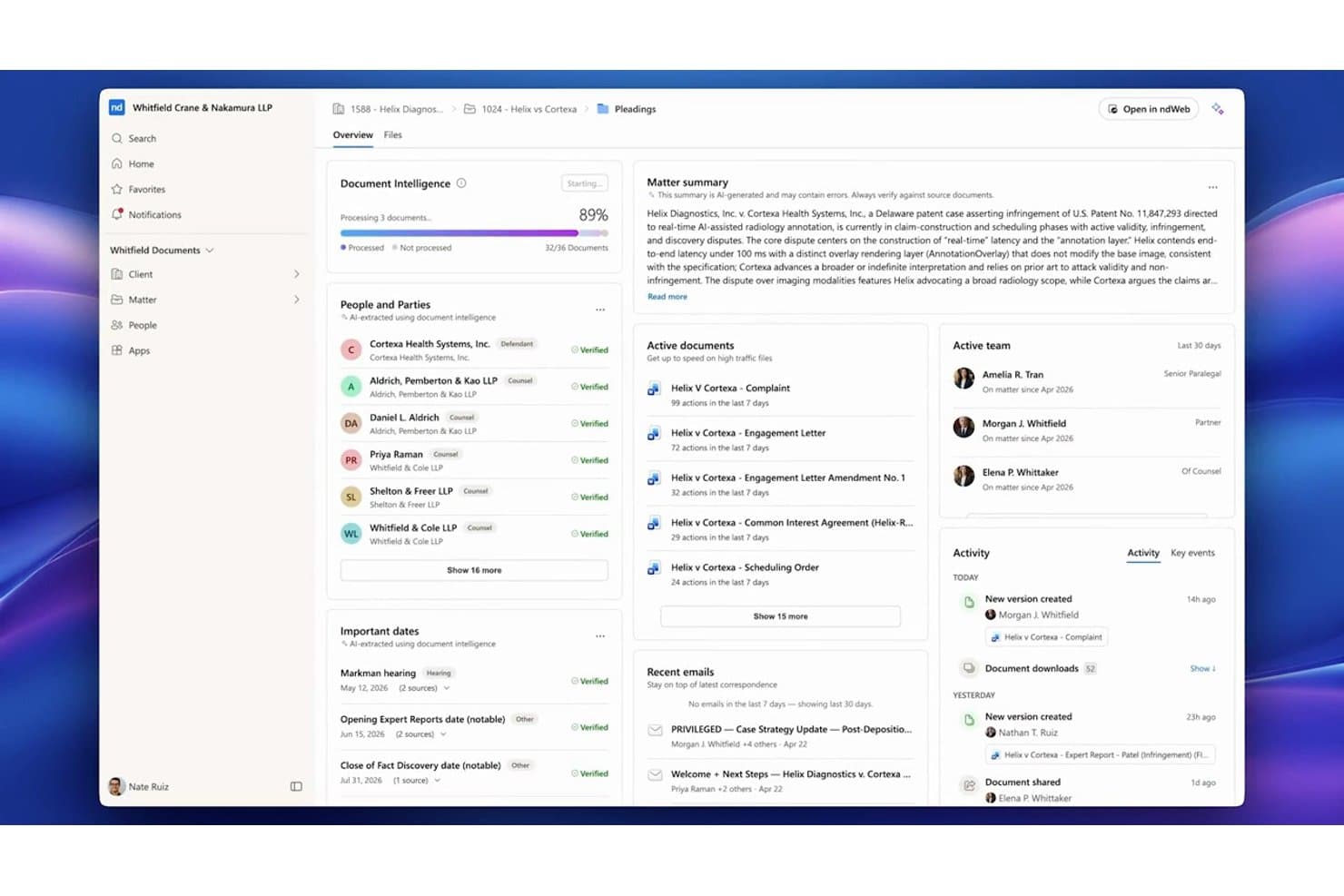
NetDocuments centralizes matter documents, parties, and key dates in one dashboard. NetDocuments is a cloud-native document management system built for law firms and corporate legal teams that need a fully hosted alternative to on-premises platforms like iManage, with matter-centric organization, AI-powered search, and enterprise-grade security controls.
Who Is NetDocuments Best For?
NetDocuments is a strong fit for mid-to-large law firms and enterprise legal departments whose IT and legal operations teams are ready to move away from on-premises infrastructure.
Why NetDocuments Is a Good iManage Alternative
NetDocuments earns its spot on my shortlist because of how precisely it handles matter-level security. I particularly like the granular ethical wall controls, which let you restrict access at the user, document, or workspace level independently. On top of that, customer-managed encryption keys and geo-aware content storage give legal teams direct control over where their data lives and who can decrypt it, which is something iManage's on-prem setup handles very differently.
NetDocuments Key Features
- AI-powered document search: Search documents and emails using natural language queries and receive answers with citations.
- Unified matter workspace: View, manage, and collaborate on all matter documents, emails, and notes from one interface.
- Built-in document bundling: Assemble and organize closing sets or litigation binders directly within the platform.
- Native Microsoft Teams integration: Access, preview, and collaborate on NetDocuments content right inside Microsoft Teams.
NetDocuments Integrations
NetDocuments offers native integrations across the Microsoft ecosystem, including Microsoft 365 and Azure, and connects directly with Clio, DocuSign, Litera, LexisNexis, Thomson Reuters, and iManage. An API is available for custom integrations.
Pros and Cons
Pros:
- AI search surfaces relevant documents without manual filtering
- Granular ethical walls built into the platform
- Strong cloud-native security for legal matter files
Cons:
- Admin configuration requires significant initial setup time
- Mobile app experience lags behind the desktop
Learn more about NetDocuments: Best for AI-powered contract automation
- Free demo available
- Pricing upon request
Visit WebsiteCustomer Rating:4.3/5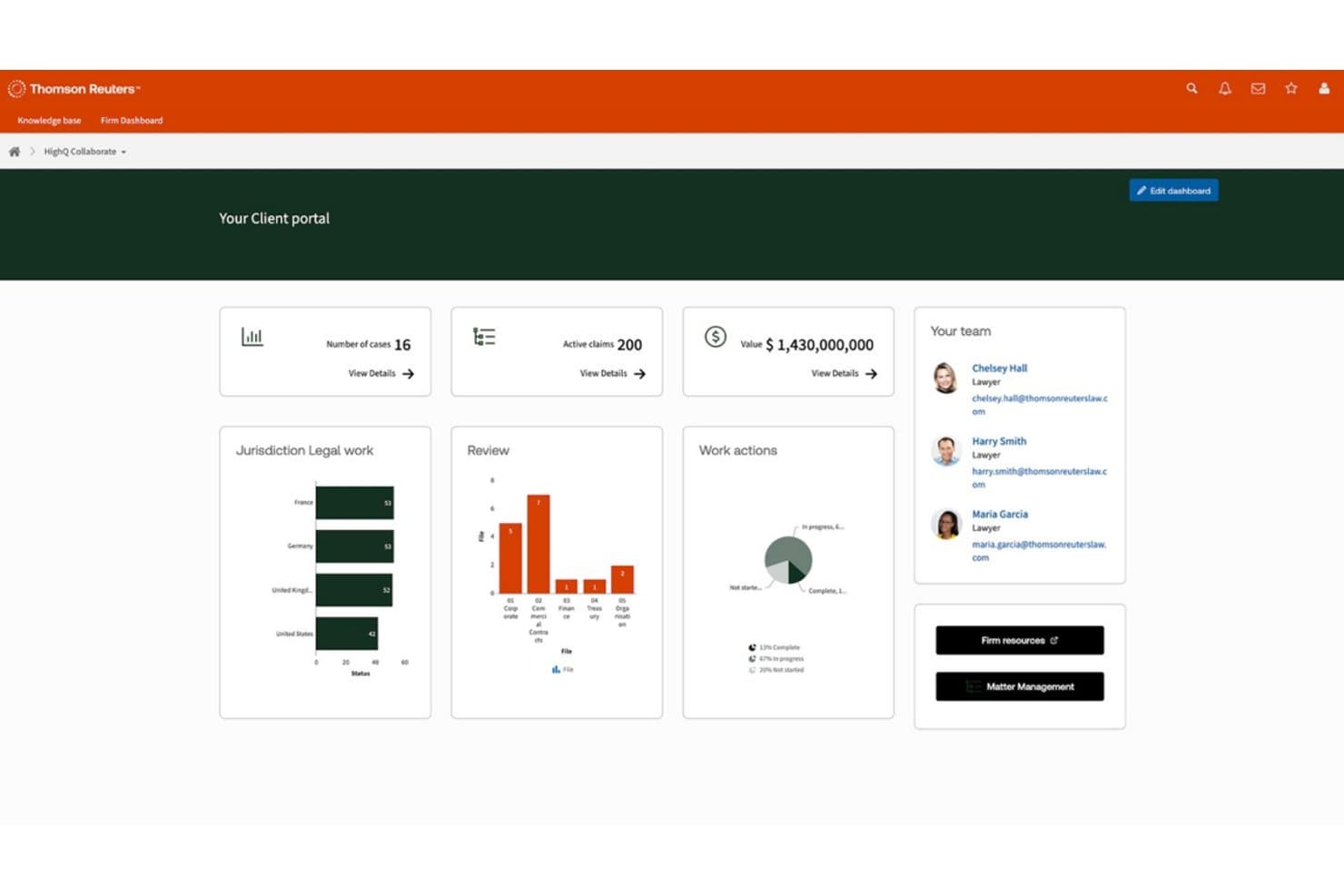
HighQ centralizes case data, team contacts, and legal workflows in one portal. HighQ is a Thomson Reuters cloud platform built for law firms and corporate legal teams that need secure document collaboration, workflow automation, and AI-powered contract tools in a single, client-facing workspace.
Who Is HighQ Best For?
HighQ is a strong fit for large law firms and enterprise legal departments managing high volumes of transactions, due diligence, or complex client matters.
Why HighQ Is a Good iManage Alternative
I picked HighQ as one of the best because its CoCounsel-powered Document Insights goes well beyond basic document storage. It automatically extracts risks, summarizes contract terms, and populates iSheets with AI-generated data during due diligence. I also like that HighQ supports the Model Context Protocol, letting AI tools like Claude and ChatGPT work securely inside your legal workspaces without manual data transfer.
HighQ Key Features
- Matter-centric workspaces: Organize documents, tasks, and discussions by matter for easy cross-team access.
- Granular access controls: Set permissions and ethical walls at the matter, folder, or document level to protect sensitive data.
- Workflow automation designer: Build multi-step legal processes using visual tools for intake, approvals, or project management.
- Microsoft 365 integration: Edit documents collaboratively in Word, Excel, and PowerPoint directly within HighQ’s secure environment.
HighQ Integrations
HighQ offers native integrations across the Microsoft ecosystem, including Microsoft 365 and Azure, as well as with DocuSign, Adobe Sign, and Legal Tracker. An API is available for custom integrations.
Pros and Cons
Pros:
- iSheets auto-populate from AI document extraction
- Client portals included out of the box
- AI-powered contract review built in natively
Cons:
- Email filing lags behind iManage's capabilities
- Less mature as a dedicated DMS
Learn more about HighQ: Best for on-premises legal document storage
- Free demo available
- Pricing upon request
Visit WebsiteCustomer Rating:4/5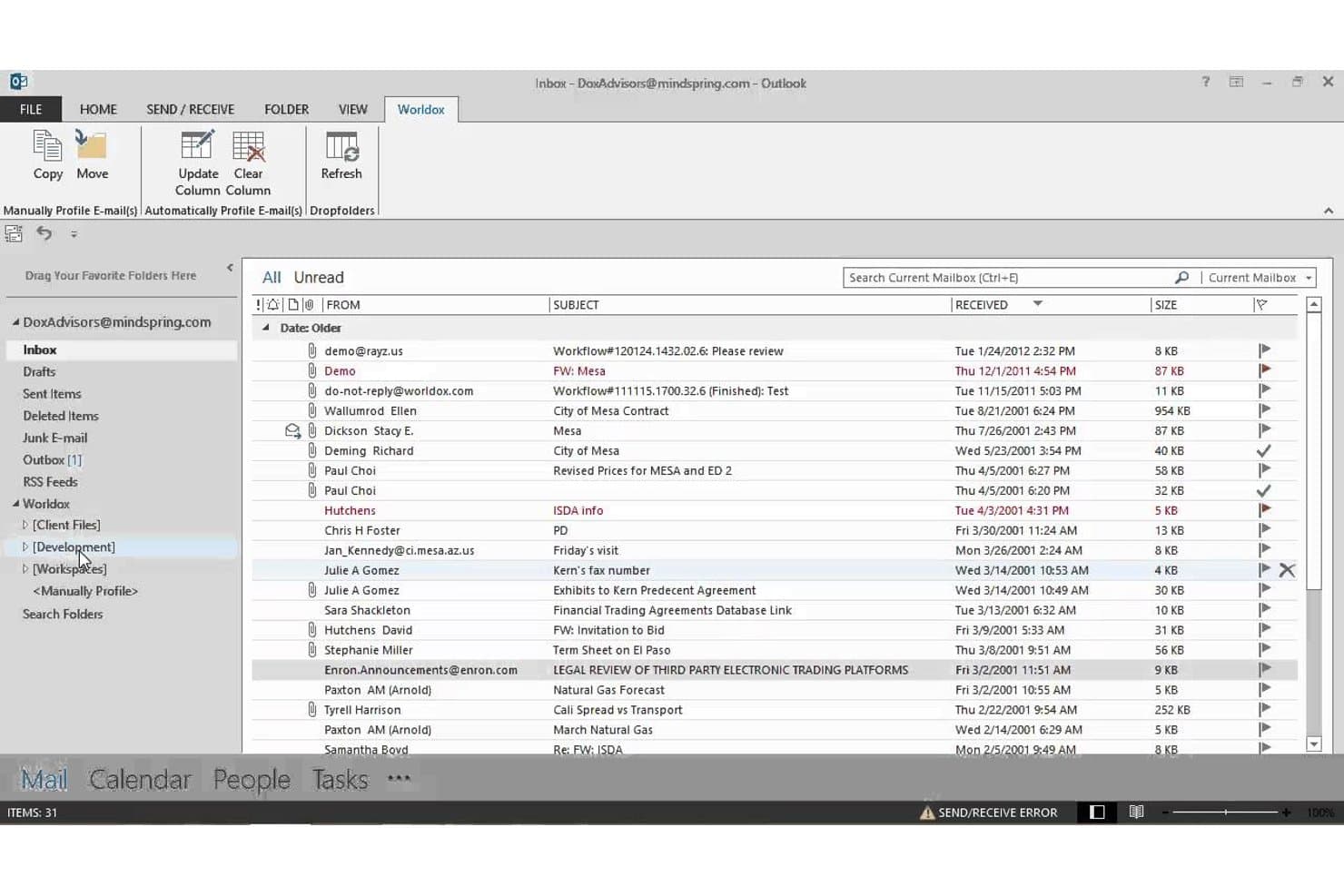
Worldox integrates directly into Outlook for seamless email filing. Worldox is a long-standing legal document management system built for law firms and corporate legal departments that need matter-centric document organization, advanced search, and email filing without moving to a cloud-based infrastructure.
Who Is Worldox Best For?
It's a strong fit for small-to-midsize law firms running Windows-based infrastructure that prefer on-premises document control over cloud-hosted alternatives.
Why Worldox Is a Good iManage Alternative
I've included Worldox in my top picks because it gives firms complete control over where their data lives. Unlike iManage, which has shifted heavily toward cloud-hosted deployments, Worldox keeps documents on your own servers, which matters when compliance obligations make cloud storage a non-starter. I particularly like the matter-centric profiling system, where every document is tagged with client, matter, and document type metadata at the point of filing, making retrieval fast and consistent across the firm.
Worldox Key Features
- Customizable metadata fields: Tag documents by client, matter, and document type for granular organization.
- Full-text and metadata search: Locate documents and emails using powerful filters tailored for legal workflows.
- Audit trail reporting: Track document access and activity for security, compliance, and accountability needs.
- Office suite integration: Work with Microsoft Word, Excel, and Outlook directly from your document management interface.
Worldox Integrations
Worldox has native integrations across the Microsoft ecosystem, including Microsoft 365 and Outlook. It also offers integrations with Tabs3 and PracticeMaster. An API is available for custom integrations.
Pros and Cons
Pros:
- Strong compatibility with Windows-based firm infrastructure
- Matter-centric profiling built for legal workflows
- True on-premises deployment for data sovereignty
Cons:
- Dated interface compared to cloud-first competitors
- No mobile app for remote document access
Learn more about Worldox: Best for native email management in Outlook
- 7-day free trial
- From $395/month
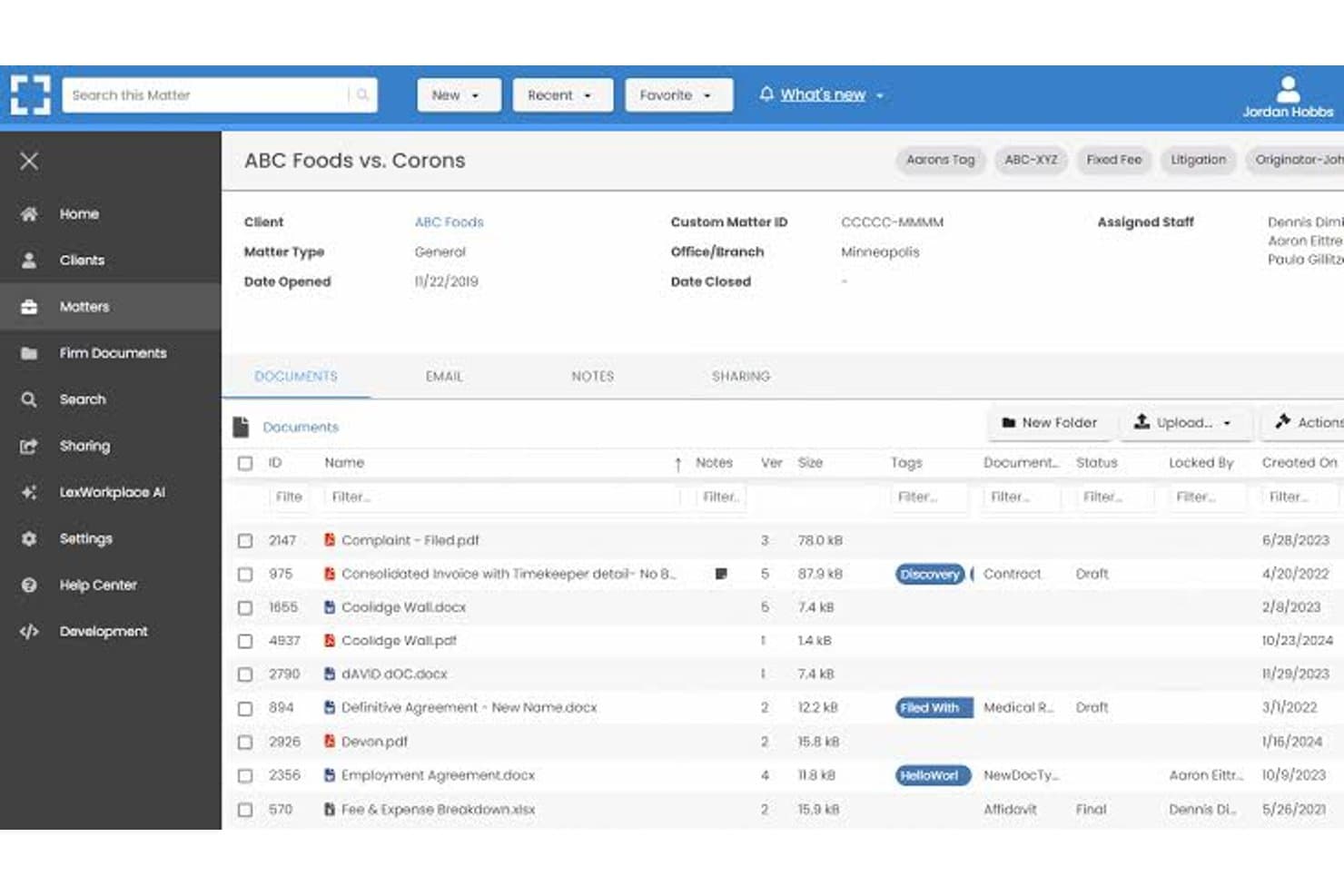
LexWorkplace dashboard for managing legal matters, documents, email, and file sharing. LexWorkplace is a cloud-based document and email management system built for small-to-midsize law firms that want matter-centric organization, full-text search, and secure cloud storage without the enterprise complexity of iManage.
Who Is LexWorkplace Best For?
LexWorkplace is a natural fit for law firms with 5–50 users that need a structured legal DMS without dedicating IT resources to deployment and maintenance.
Why LexWorkplace Is a Good iManage Alternative
I've included LexWorkplace in my top picks because its Outlook email management is genuinely best-in-class for small law firms. Smart File suggests the correct matter automatically when you're filing an email, and Multi Select lets you bulk-file entire threads in one action. Both features matter most during active litigation or transactions, where email volume spikes and misfiled messages create real compliance exposure.
LexWorkplace Key Features
- Matter-centric document management: Organize files, notes, and correspondence by client and legal matter in secure cloud workspaces.
- Integrated document versioning: Track, compare, and restore previous versions of documents, with full audit trails for all changes.
- Document AI assistant: Use built-in AI to summarize, query, and extract information from legal documents without leaving the platform.
- Full-text and metadata search: Find documents and emails instantly with full-text OCR, advanced filters, and matter-based search options.
LexWorkplace Integrations
LexWorkplace offers native integrations with Microsoft 365, including Outlook and Word, as well as Clio Manage. An API is available for custom integrations.
Pros and Cons
Pros:
- Full-text OCR search across all matter files
- Matter-centric workspaces designed for law firms
- Smart email filing natively within Outlook
Cons:
- Smaller user community than enterprise-grade alternatives
- No ethical wall automation for practice groups
Learn more about LexWorkplace:
Autres alternatives à iManage
Voici quelques alternatives supplémentaires à iManage qui n’ont pas été retenues dans ma sélection, mais qui méritent tout de même d’être examinées :
- 11Epona DMSIdéal pour le classement avancé piloté par les métadonnées
- 12PracticePantherIdéal pour personnaliser l'automatisation des flux de travail
- 13LEAPIdéal pour l’automatisation intégrée des formulaires juridiques
- 14FilevineIdéal pour les flux de travail documentaires personnalisables
- 15Rocket MatterIdéal pour les minuteurs de documents basés sur des dossiers
- 16CosmoLexIdéal pour la conformité intégrée de la comptabilité fiduciaire
- 17CenterbaseIdéal pour l’assemblage de documents basé sur des modèles
- 18DocsvaultIdéal pour les déploiements hybrides dans le cloud et sur site
Comment j’évalue les alternatives à iManage
J’examine deux niveaux : ce que tout système de gestion documentaire comparable à iManage doit offrir — classement axé sur les dossiers, gestion des e-mails et contrôle des versions — et ce qui distingue les outils. Des éléments différenciateurs comme les barrières éthiques, la rédaction assistée par l’IA et les options de déploiement orientent mes choix.
Fonctionnalités essentielles (indispensables pour cette liste)
Lorsque je sélectionne les outils de ma liste, j’évalue chacun d’entre eux sur une échelle de 0 (ne propose pas la fonctionnalité) à 5 (excelle dans ce domaine) pour chacune des fonctionnalités essentielles indiquées ci-dessous. Je calcule ensuite le score total de l’outil sous forme de pourcentage, en utilisant 65 % comme référence pour aider à évaluer son adéquation globale à la liste.
- Gestion documentaire : j’évalue la manière dont chaque outil organise les fichiers autour des dossiers, en vérifiant la présence de structures de dossiers configurables, de fiches de profil et de modèles d’espaces de travail qui reproduisent la façon dont les avocats ouvrent et gèrent réellement les dossiers clients.
- Contrôle des versions : la façon dont chaque outil suit les brouillons est importante — je recherche des fonctions d’archivage et d’extraction, de comparaison des versions et de restauration afin que les avocats puissent collaborer sur des mémoires sans écraser les modifications des uns et des autres.
- Gestion des e-mails : je vérifie si la plateforme classe directement les e-mails et les pièces jointes depuis Outlook dans les espaces de travail des dossiers, notamment grâce à des fonctionnalités comme les suggestions de classement automatique et la déduplication des fils de discussion, qui réduisent le tri manuel.
- Recherche avancée : retrouver une note enfouie parmi des milliers de dossiers fait partie du quotidien ; j’évalue donc la recherche en texte intégral et dans les métadonnées, avec des filtres propres aux dossiers qui renvoient rapidement des résultats pertinents.
- Sécurité et contrôles d’accès : je recherche des autorisations au niveau des dossiers, l’application de barrières éthiques, le chiffrement et des pistes d’audit — des éléments particulièrement importants lorsqu’un cabinet traite simultanément des dossiers concernant des parties adverses.
- Intégration à Microsoft 365 : la plupart des avocats travaillent dans Word, Outlook et Teams ; j’évalue donc la profondeur de la connexion de chaque outil à Microsoft 365 pour la coédition de documents, le classement des e-mails et l’accès mobile.
Une fois que j’ai établi une liste d’outils répondant aux critères, j’examine ce qui distingue chaque plateforme.
Facteurs différenciateurs (ce qui distingue les fournisseurs)
Voici comment je compare les différents fournisseurs :
Fonctionnalités remarquables
La rédaction de documents assistée par l’IA est un facteur différenciateur essentiel — je recherche des plateformes permettant aux avocats de résumer ou de comparer des clauses directement dans le système de gestion documentaire, sans devoir passer par un outil tiers. Les espaces de travail unifiés dédiés aux dossiers ont également du poids, car regrouper les documents, les e-mails et les notes dans une seule vue permet de gagner un temps précieux lors de la préparation d’une audience ou d’un appel client. Les fonctions intégrées de suivi des modifications et de comparaison des versions permettent aux avocats d’annoter les brouillons sans les exporter vers Word ; je les évalue donc attentivement dans les pratiques où les documents sont nombreux.
Au-delà des fonctionnalités
La flexibilité du déploiement est très importante lorsque les cabinets quittent iManage — je vérifie si un fournisseur prend en charge les modèles sur site, dans un cloud privé ou hybrides afin que les dossiers actifs ne soient pas perturbés en cours de transition. Les certifications de conformité comme SOC 2 Type II et ISO 27001 m’indiquent si une plateforme peut traiter les données client protégées avec la rigueur attendue par les cabinets. J’évalue également l’assistance à la migration, notamment la capacité du fournisseur à préserver les métadonnées lors du transfert de fichiers depuis des systèmes existants ou des lecteurs partagés.
Pourquoi rechercher des alternatives à iManage ?
Bien qu’iManage soit un bon choix parmi les solutions alternatives de gestion des documents juridiques, plusieurs raisons peuvent pousser certains utilisateurs à rechercher d’autres solutions. Vous cherchez peut-être des alternatives à iManage parce que…
- Vous avez besoin de prendre en charge des déploiements hybrides ou sur site
- Vous souhaitez une tarification plus transparente ou plus flexible
- Vous préférez une intégration plus poussée avec Microsoft 365 ou Teams
- Vous avez besoin de contrôles précis concernant les barrières éthiques ou la confidentialité des clients
- Vous recherchez des plateformes facilitant la migration et la gestion du changement
- Vous avez besoin d’un service client plus réactif dans toutes les régions
Si l’une de ces situations vous correspond, vous êtes au bon endroit. Ma liste contient plusieurs alternatives à iManage mieux adaptées aux équipes confrontées à ces difficultés avec iManage et à la recherche de solutions alternatives.
Fonctionnalités clés d’iManage
Voici quelques-unes des principales fonctionnalités d’iManage, pour vous aider à mettre en contraste et à comparer les offres des solutions alternatives :
- Organisation centrée sur les dossiers : Stockez, organisez et consultez les documents et les e-mails autour des dossiers juridiques, afin que les équipes puissent plus facilement conserver tous les éléments associés au bon dossier ou projet.
- Contrôle automatique des versions : Suivez les modifications apportées aux documents en enregistrant et en étiquetant automatiquement chaque version, avec prise en charge de l’archivage, de la récupération, de la comparaison et de la restauration afin de réduire les erreurs dues aux écrasements accidentels.
- Gestion des e-mails Outlook : Classez, étiquetez et organisez les e-mails et les pièces jointes directement depuis Microsoft Outlook dans l’espace de travail du dossier approprié, afin de rationaliser la gestion des enregistrements et de la correspondance.
- Recherche et filtres avancés : Recherchez des documents, des e-mails et des métadonnées à l’aide de filtres spécifiques au domaine juridique et de la recherche en texte intégral, afin d’aider les utilisateurs à trouver rapidement les fichiers dont ils ont besoin dans de vastes référentiels.
- Sécurité granulaire et barrières éthiques : Appliquez des autorisations au niveau du dossier, la confidentialité des clients et des politiques de barrière éthique pour contrôler l’accès aux documents et répondre aux exigences de conformité, même au sein d’équipes dispersées.
- Intégration à Microsoft 365 : Travaillez directement dans Word, Outlook, Excel et Teams grâce à des intégrations natives, permettant aux utilisateurs de créer, modifier et corédiger des documents au sein de l’environnement sécurisé d’iManage.
- Journaux d’audit et d’activité : Suivez l’accès aux documents et les actions effectuées grâce à des journaux détaillés qui répondent aux exigences d’audit juridique et client, en favorisant la transparence et la responsabilité.
- Accès mobile : Consultez, modifiez et partagez des documents en toute sécurité depuis des smartphones et des tablettes, afin de permettre plus facilement aux avocats de travailler à distance ou en déplacement.
- Outils de collaboration : Partagez des documents et regroupez des fichiers avec des parties internes et externes, notamment grâce à des fonctionnalités de partage sécurisé de liens et d’annotation en temps réel.
- Politiques de conservation automatisées : Appliquez des règles pour conserver, archiver ou détruire les documents en fonction des exigences des clients ou de la réglementation, afin de soutenir les pratiques de gouvernance de l’information.