

Et godt MyCase-alternativ tilbyr programvare for juridisk saksbehandling med fleksibel saksoppfølging, fakturering, kommunikasjon og dokumenthåndtering – uten begrensningene du møter i MyCase. Hvis du leter etter et MyCase-alternativ, trenger du sannsynligvis bedre funksjoner, en annen prismodell eller forbedrede arbeidsflyter som passer måten teamet ditt arbeider på. Jeg går gjennom de beste alternativene i 2026, slik at du raskt kan sammenligne plattformene og finne det som passer best for firmaet ditt.
Hva er MyCase?
MyCase er en skybasert programvare for juridisk saksbehandling som hjelper advokatfirmaer med å organisere saker, fakturering, dokumenter og klientkommunikasjon på ett sted. Den er utviklet for å effektivisere daglige juridiske arbeidsflyter og gjøre saksdetaljer tilgjengelige for hele teamet. MyCase omfatter funksjoner som kalender, tidsregistrering og nettbetalinger, noe som gjør plattformen populær blant juridiske virksomheter som ønsker å samle saks- og klientadministrasjonen på ett sted.
Sammenligningstabell: MyCase-alternativer
Denne sammenligningstabellen oppsummerer prisdetaljer for mine utvalgte MyCase-alternativer.
| Tool | Best For | Trial Info | Price | ||
|---|---|---|---|---|---|
| 1 | Best for personal injury case management | Free demo available | From $90/user/month | Website | |
| 2 | Best for document-heavy legal practices | Free demo available | Pricing upon request | Website | |
| 3 | Best for legal billing and productivity | 10-day free trial | From $59/user/month (billed annually) | Website | |
| 4 | Best for workflow-driven law firms | Free demo available | Pricing upon request | Website | |
| 5 | Best for established legal practices | Free demo available | Pricing upon request | Website | |
| 6 | Best for automated case workflows | Not available | Pricing upon request | Website | |
| 7 | Best for customizable case management | Free trial + free demo available | Pricing upon request | Website | |
| 8 | Best for all-in-one legal practice management | 7-day free trial + free demo available | From $49/user/month | Website | |
| 9 | Best for built-in legal accounting | 10-day free trial | From $49/user/month (billed annually) | Website | |
| 10 | Best for intuitive case and billing workflows | Free trial available | From $49/user/month (billed annually) | Website |


Hvorfor du kan stole på våre programvareanbefalinger
6,700+
Reviews
20
Industry experts
16+
Evaluation factors
14
Years
Teamet vårt har testet og anmeldt programvare siden 2012. Vi leder selv advokatfirmaer, så vi vet hvor vanskelig og hvor viktig det er å velge riktig programvare.
I denne guiden har vi vurdert verktøyene gjennom praktisk testing og uavhengig research og gitt dem poeng ut fra våre utvelgelseskriterier.
Anmeldelsene våre bygger på vår egen redaksjonelle vurdering. De er ikke et salgsargument.
Anmeldelser av de beste MyCase-alternativene
\u003cspan style=\u0022font-weight: 400\u0022\u003eNedenfor finner du mine detaljerte sammendrag av de beste MyCase-alternativene som kom med på kortlisten min. Anmeldelsene mine gir en detaljert gjennomgang av funksjonene, prisene og de beste bruksområdene for hver plattform for juridisk saksbehandling, slik at du kan finne det beste alternativet for deg.\u003c/span\u003e
 Best for personal injury case management
- Free demo available
- From $90/user/month
Visit WebsiteCustomer Rating:4.8/5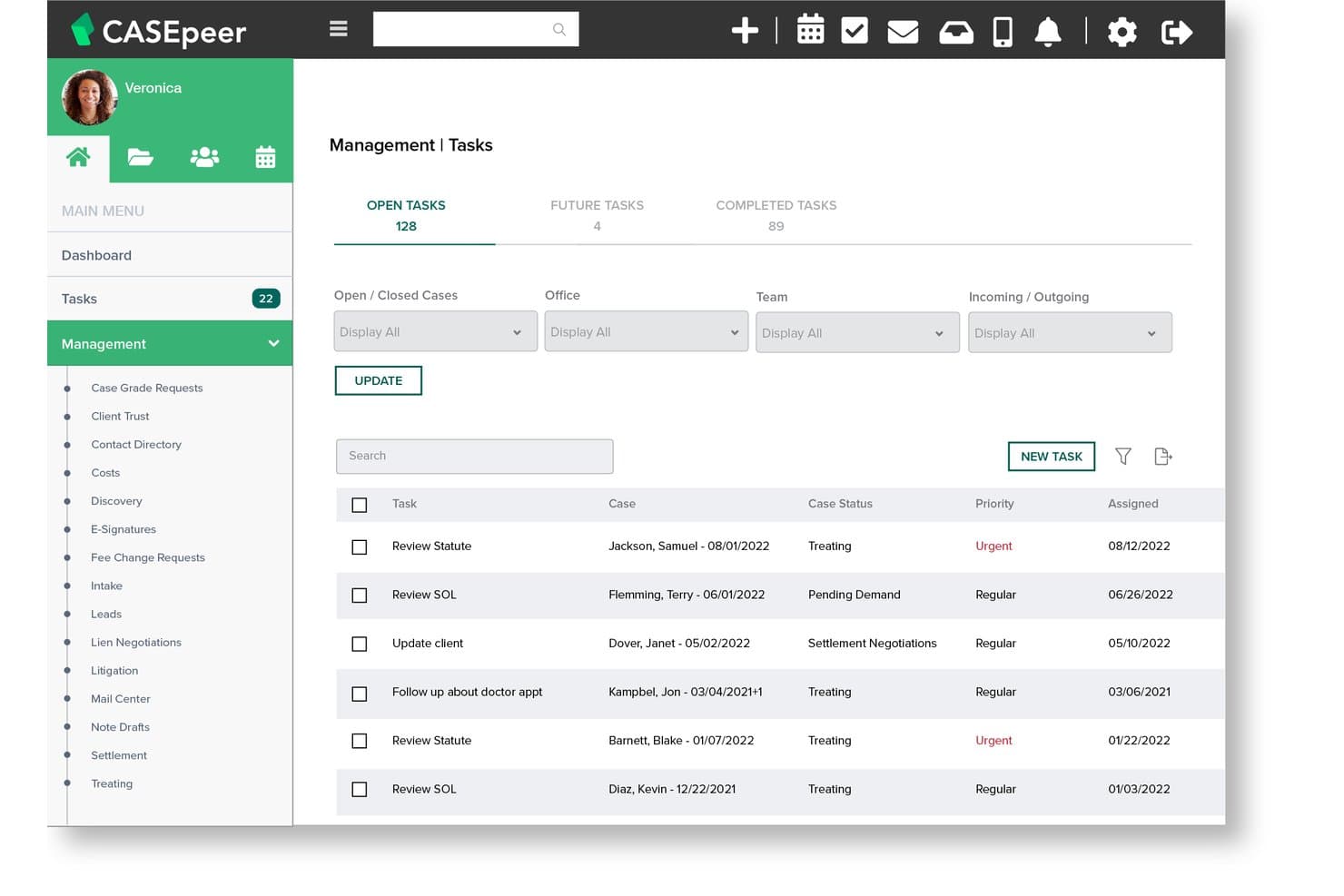
CasePeer offers a Management Tasks dashboard that displays open, future, and completed tasks with priority levels, case status, and assignment dates. CasePeer is a cloud-based practice management platform built exclusively for personal injury law firms, covering case tracking, medical treatment records, settlement negotiations, and automated statute alerts in one purpose-built system.
Who Is CasePeer Best For?
CasePeer is a strong fit for personal injury law firms of any size that want a purpose-built system rather than a general-purpose tool they'd need to adapt.
Why CasePeer Is a Good MyCase Alternative
I picked CasePeer as one of the best because it's the only tool on this list built from the ground up for personal injury. Where MyCase requires configuration to handle PI workflows, CasePeer ships with settlement calculators, demand trackers, and automated statute alerts already built in. I particularly like the medical treatment tracking, which lets your team log provider visits, monitor lien balances, and flag treatment gaps without any custom setup.
CasePeer Key Features
- AI legal writer: Generate and edit correspondence, demand packages, and summaries directly within your case files.
- Two-way texting with images: Communicate with clients using integrated, trackable SMS messaging that supports attachments.
- LawPay payments integration: Accept client payments and manage IOLTA-compliant trust deposits from within the platform.
- CalendarRules integration: Calculate and apply court deadlines based on jurisdiction-specific rules and trigger dates.
CasePeer Integrations
CasePeer offers native integrations with QuickBooks Online, Dropbox, Microsoft 365, CalendarRules, LawPay, EvenUp, and Case Status. An API is available for custom integrations.
Pros and Cons
Pros:
- Responsive customer support team with live chat
- Intake-to-settlement lifecycle tracked in one place
- PI-specific settlement tab centralizes all financials
Cons:
- Document storage limits can block large demand packets
- Customization options are limited for non-standard workflows
 Best for document-heavy legal practices
- Free demo available
- Pricing upon request
Visit WebsiteCustomer Rating:4.4/5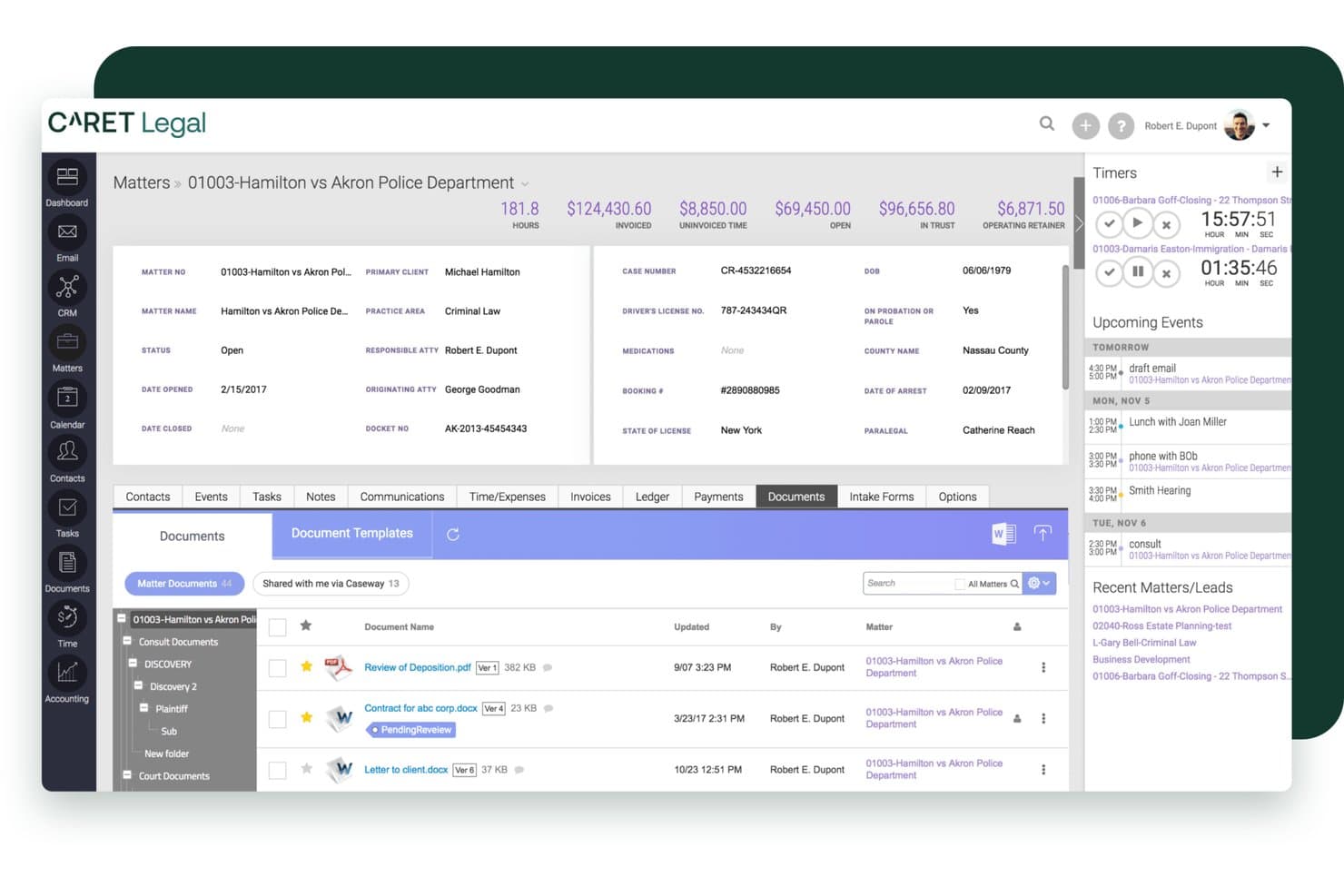
CARET Legal offers a comprehensive matter management interface with document tracking, billing summaries, timers, and upcoming events in a single dashboard view. CARET Legal is a cloud-based legal practice management platform built for small to midsize law firms that need tightly integrated case management, trust accounting, and document management without stitching together multiple tools.
Who Is CARET Legal Best For?
CARET Legal suits managing partners and legal administrators at small to midsize firms handling high document volumes across complex, multi-party matters.
Why CARET Legal Is a Good MyCase Alternative
I picked CARET Legal because its document management goes well beyond what MyCase offers. Every file uploaded is immediately indexed for in-document search, so locating a specific clause across hundreds of matter documents takes seconds. The AI-enabled OCR extracts text from handwritten notes and data tables, and the AI Quick Summary condenses lengthy contracts into digestible previews without ever leaving the platform.
CARET Legal Key Features
- Integrated client portal: Let clients securely send messages, share documents, and make online payments all in one place.
- IOLTA-compliant trust accounting: Maintain compliant, segregated client ledgers with built-in three-way reconciliation and audit logging.
- Court rules calendaring integration: Automatically apply deadline rules for select jurisdictions using built-in LawToolBox connectivity.
- Custom workflows and permissions: Build multi-step automations for recurring processes and set user-specific access rights across your firm.
CARET Legal Integrations
CARET Legal offers native integrations with NetDocuments, Worldox, HotDocs, LawToolBox, RPost, LawPay, and Microsoft 365. An API is available for custom integrations.
Pros and Cons
Pros:
- AI tools draft, summarize, and extract from uploaded documents
- Built-in legal and trust accounting in one platform
- Native email integration tags correspondence to matters automatically
Cons:
- Support response times are inconsistent after ticket escalation
- Custom reports require vendor assistance to build
Learn more about CARET Legal: Best for legal billing and productivity
- 10-day free trial
- From $59/user/month (billed annually)
Visit WebsiteCustomer Rating:4.4/5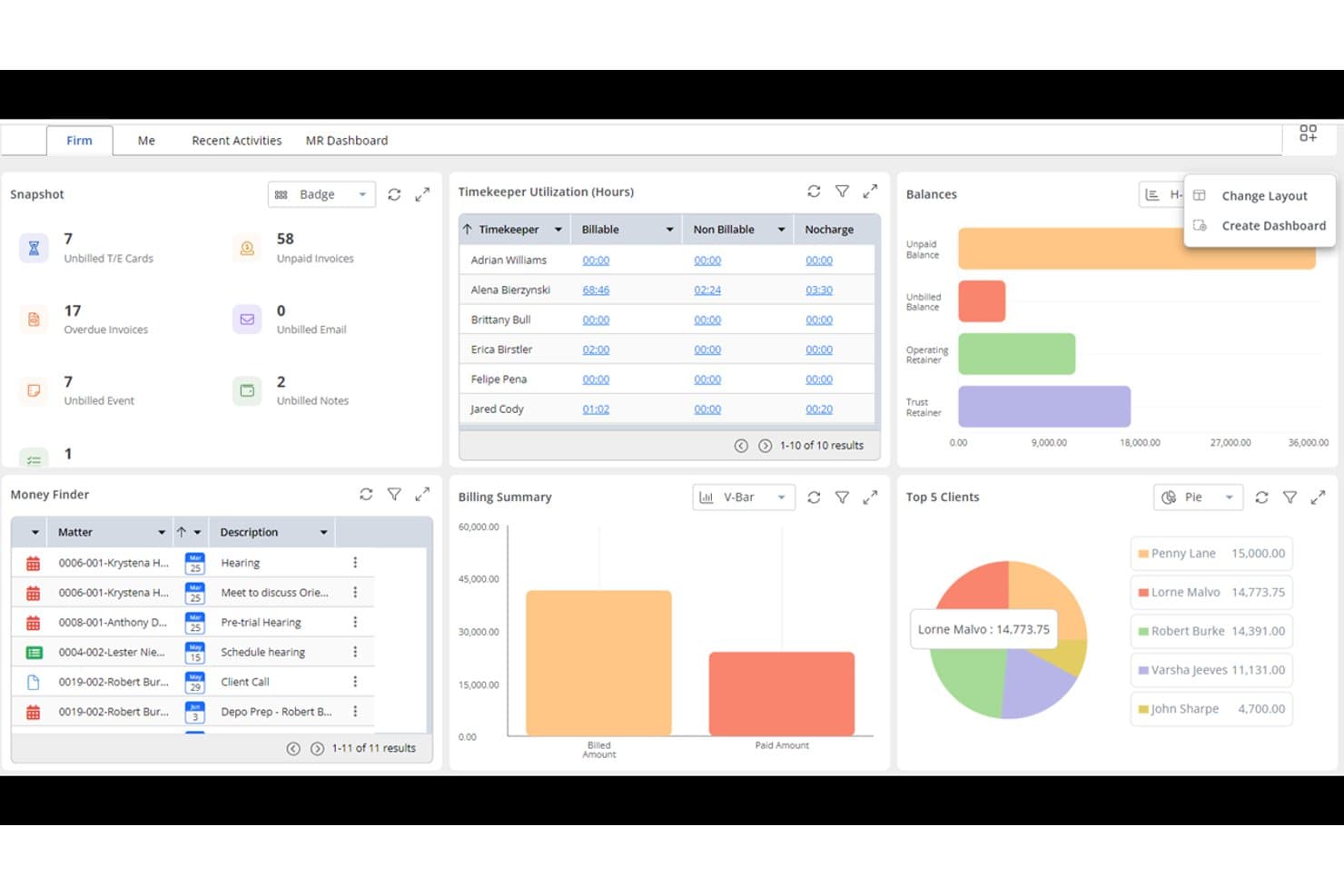
Rocket Matter offers a comprehensive dashboard with timekeeper utilization, billing summary, top 5 clients, balances, and a money finder panel for efficient law firm management. Rocket Matter is a cloud-based legal practice management platform built around time tracking, billing, and trust accounting—making it a natural fit for solo attorneys and small firms that want tighter control over their financial operations than MyCase offers.
Who Is Rocket Matter Best For?
Rocket Matter is a strong fit for small to mid-size law firms where billing accuracy and trust accounting compliance are the top operational priorities.
Why Rocket Matter Is a Good MyCase Alternative
I picked Rocket Matter as one of the best MyCase alternatives because its billing depth is genuinely hard to replicate. It supports LEDES billing, split billing across multiple parties, and batch invoicing with bulk editing in a single workflow. The Elite tier goes further, replacing QuickBooks with built-in legal accounting, including a legal-specific chart of accounts and automatic bank data feeds for trust reconciliation.
Rocket Matter Key Features
- Matter templates: Set up new cases with pre-built workflows, task lists, and custom fields in seconds.
- Kanban-style project management: Visualize matter progress and manage tasks using a drag-and-drop interface.
- Native document automation: Generate legal documents from templates and merge fields directly within the platform.
- Two-way calendar sync: Sync all firm deadlines and events with Google Calendar and Office 365 for consistent scheduling.
Rocket Matter Integrations
Rocket Matter offers native integrations with LawPay, NetDocuments, OneDrive, Dropbox, Box, QuickBooks Online, Office 365, and Google Workspace. An API is available for custom integrations.
Pros and Cons
Pros:
- Detailed time tracking with multiple rate types
- Built-in legal accounting at higher tiers
- Strong LEDES and batch invoicing support
Cons:
- Mobile app has limited functionality on-the-go
- Document management is less developed than billing
Learn more about Rocket Matter: Best for workflow-driven law firms
- Free demo available
- Pricing upon request
Visit WebsiteCustomer Rating:4.2/5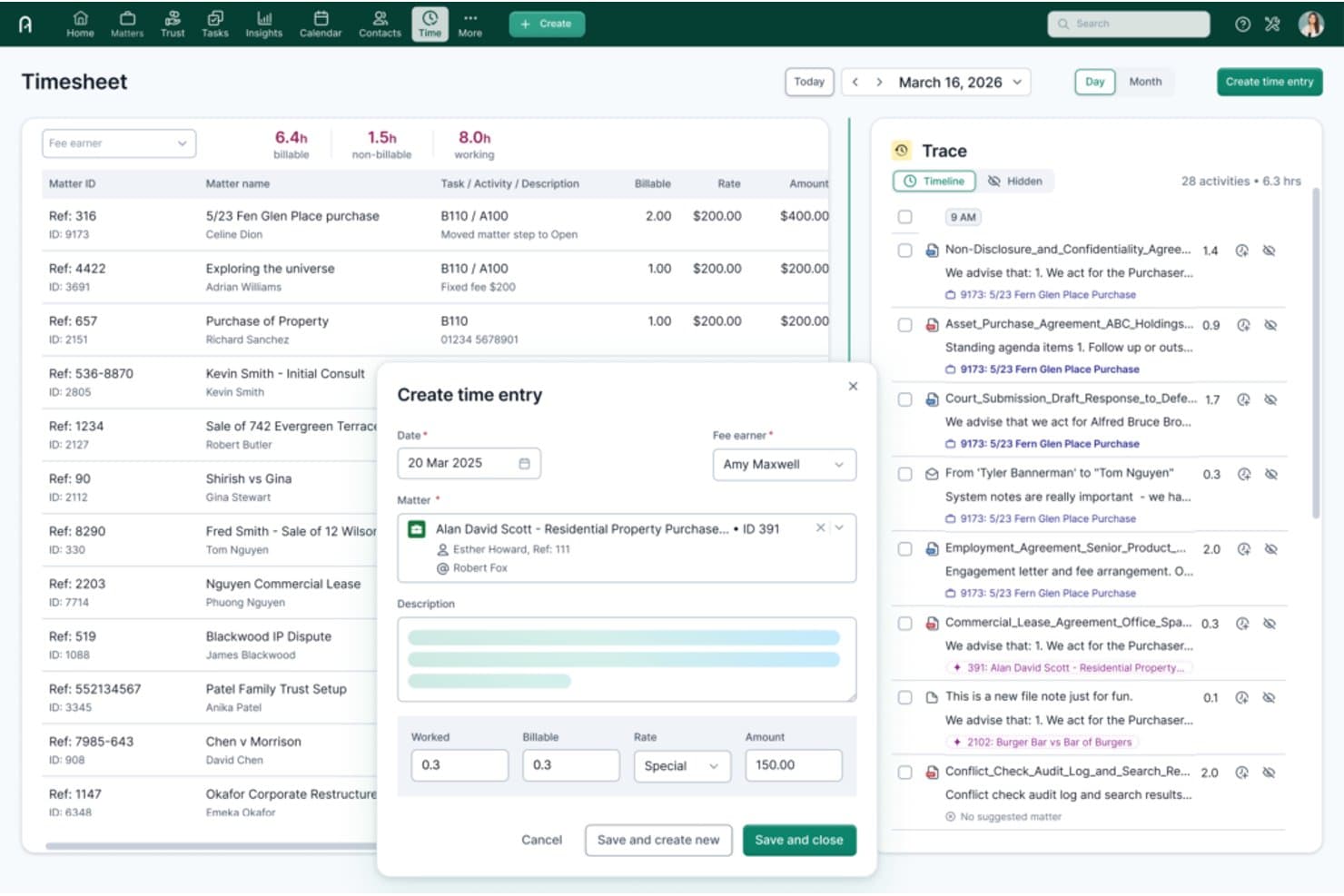
Actionstep offers an AI-powered Trace timeline and a Create Time Entry modal with matter linking, billable hours, and rate fields for streamlined time tracking. Actionstep is a cloud-based law firm management platform built for small to midsize firms that want to run every stage of a matter—from intake to invoicing—inside a single, workflow-driven system.
Who Is Actionstep Best For?
Actionstep suits process-mature law firms that handle high-volume, multi-step matters and need configurable workflows rather than a fixed, out-of-the-box system.
Why Actionstep Is a Good MyCase Alternative
I've included Actionstep in my top picks because its matter workflow engine goes well beyond what MyCase offers. I can build stage-by-stage workflows that auto-assign tasks, trigger deadlines, and generate documents as a matter progresses. The Builder add-on layers in dynamic document automation, pulling matter data directly into Word templates with conditional logic applied at each step.
Actionstep Key Features
- Client portal: Lets clients securely view documents, messages, and case updates in one branded online hub.
- Trust accounting: Delivers IOLTA-compliant trust accounting with automatic three-way reconciliation and audit reporting.
- In-app document versioning: Tracks history and edits of all documents so teams can roll back or compare changes.
- Advanced calendaring: Syncs with Microsoft and Google calendars and supports reminders and complex legal deadline management.
Actionstep Integrations
Actionstep offers native integrations with Xero, QuickBooks Online, NetDocuments, InfoTrack, Microsoft 365, and LawPay. An API is available for custom integrations.
Pros and Cons
Pros:
- Supports multi-step document automation natively
- Strong trust accounting with three-way reconciliation
- Highly configurable matter workflow engine
Cons:
- Reporting tools feel dated compared to rivals
- Setup requires significant configuration time
Learn more about Actionstep: Best for established legal practices
- Free demo available
- Pricing upon request
Visit WebsiteCustomer Rating:4/5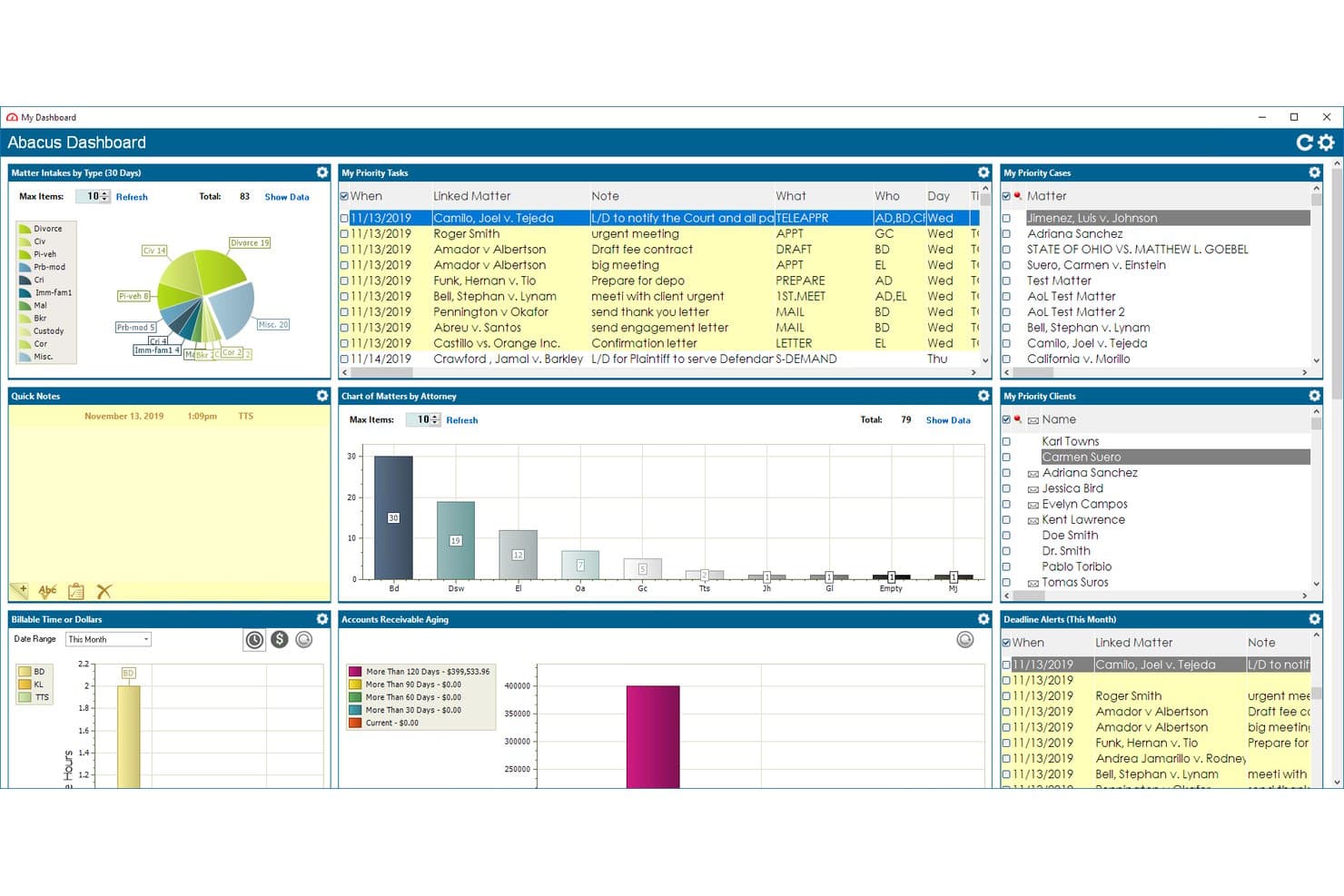
AbacusLaw offers a comprehensive dashboard with priority tasks, case charts, billing, and accounts receivable panels for law firm management. AbacusLaw is a hybrid legal practice management platform built for small and established law firms that need rules-based court calendaring, trust accounting, and matter management in a single, customizable system.
Who Is AbacusLaw Best For?
AbacusLaw is a strong fit for small law firms running high-volume litigation, family law, or personal injury practices that need deep practice-area customization.
Why AbacusLaw Is a Good MyCase Alternative
AbacusLaw earns its spot on my shortlist because of its rules-based calendaring engine, which automatically generates deadline chains from court rules rather than requiring manual entry. I also appreciate the Practice Area Essentials, which ships pre-built intake forms, automation rules, and terminology for practice areas like family law and personal injury. Unlike MyCase's cloud-only model, AbacusLaw supports private cloud deployment for firms with strict data governance requirements.
AbacusLaw Key Features
- Customizable matter workspace: Personalize databases, forms, and input screens for each case type or workflow.
- Integrated document management: Organize, store, and version documents directly within each matter file.
- Built-in conflict checking: Instantly verify any potential conflicts of interest across all contacts and matters.
- Private cloud or self-hosted deployment: Choose between secure private cloud hosting or on-premise server installation for maximum control.
AbacusLaw Integrations
AbacusLaw offers native integrations with Microsoft Outlook, Microsoft 365, QuickBooks Online, DocuSign, and HotDocs. An API is available for custom integrations.
Pros and Cons
Pros:
- Pre-built templates for multiple practice areas
- Private cloud and on-premise hosting available
- Rules-based calendaring generates deadlines automatically
Cons:
- Limited mobile app compared to competitors
- Interface feels dated versus modern alternatives
Learn more about AbacusLaw: Best for automated case workflows
- Not available
- Pricing upon request
Visit WebsiteCustomer Rating:4.8/5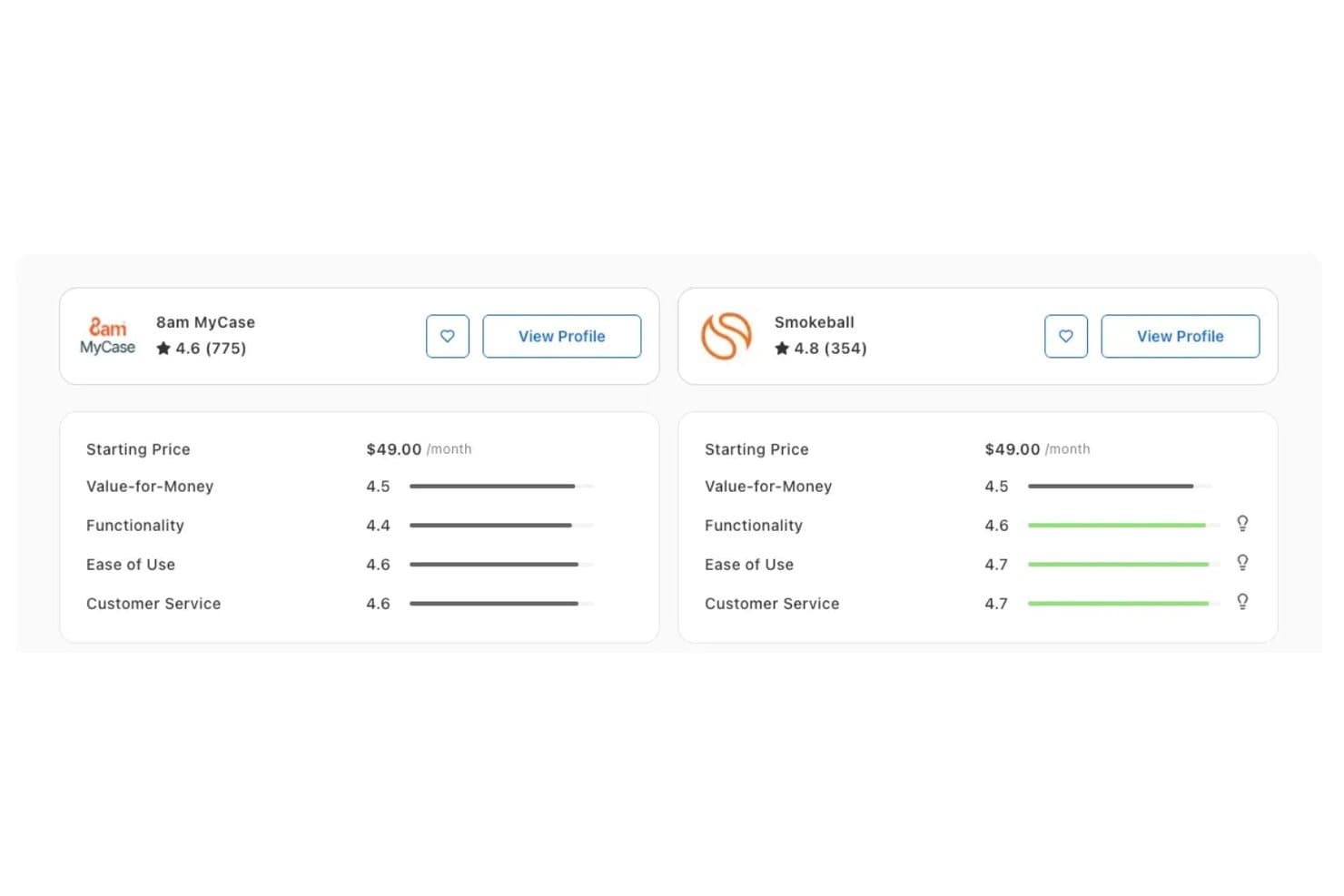
Smokeball outperforms 8am MyCase on Functionality (4.6 vs 4.4), Ease of Use (4.7 vs 4.6), and Customer Service (4.7 vs 4.6) according to Capterra ratings. Smokeball is a cloud-based practice management platform built for solo attorneys and small law firms that want to replace manual workflows with automatic time tracking, document automation, and built-in trust accounting.
Who Is Smokeball Best For?
Smokeball is a strong fit for small law firms and solo practitioners who handle high volumes of repeatable work across defined practice areas like family law, real estate, or personal injury.
Why Smokeball Is a Good MyCase Alternative
I picked Smokeball as one of the best because its AutoTime feature captures billable time passively in the background, mapping activity across Word, Outlook, and case files to the correct matter without any manual input. That's a meaningful step beyond MyCase's manual timers. I also appreciate the document automation layer: TemplateLab uses conditional logic to generate matter-specific documents from a library of 20,000+ jurisdictional forms, which cuts drafting time significantly on high-volume, repeatable work.
Smokeball Key Features
- Firm insights reporting: Track matter profitability and staff activity with built-in analytics dashboards.
- Practice-area templates: Use pre-built and customizable templates designed for common legal fields like family law and real estate.
- Branded client portal: Provide secure, firm-branded messaging, file sharing, and payment options to clients.
- IOLTA-compliant trust accounting: Manage segregated trust ledgers and perform three-way reconciliation for compliance.
Smokeball Integrations
Smokeball offers native integrations with Microsoft 365, LawPay, Xero, InfoTrack, CalendarRules, QuickBooks, and DocuSign. An API is available for custom integrations.
Pros and Cons
Pros:
- Court rules-based deadline chains auto-calculate
- Branded client portal with built-in payments
- IOLTA trust accounting built into the platform
Cons:
- Mobile app has limited full-platform functionality
- Windows-focused design limits cross-platform flexibility
Learn more about Smokeball: Best for customizable case management
- Free trial + free demo available
- Pricing upon request
Visit WebsiteCustomer Rating:4.5/5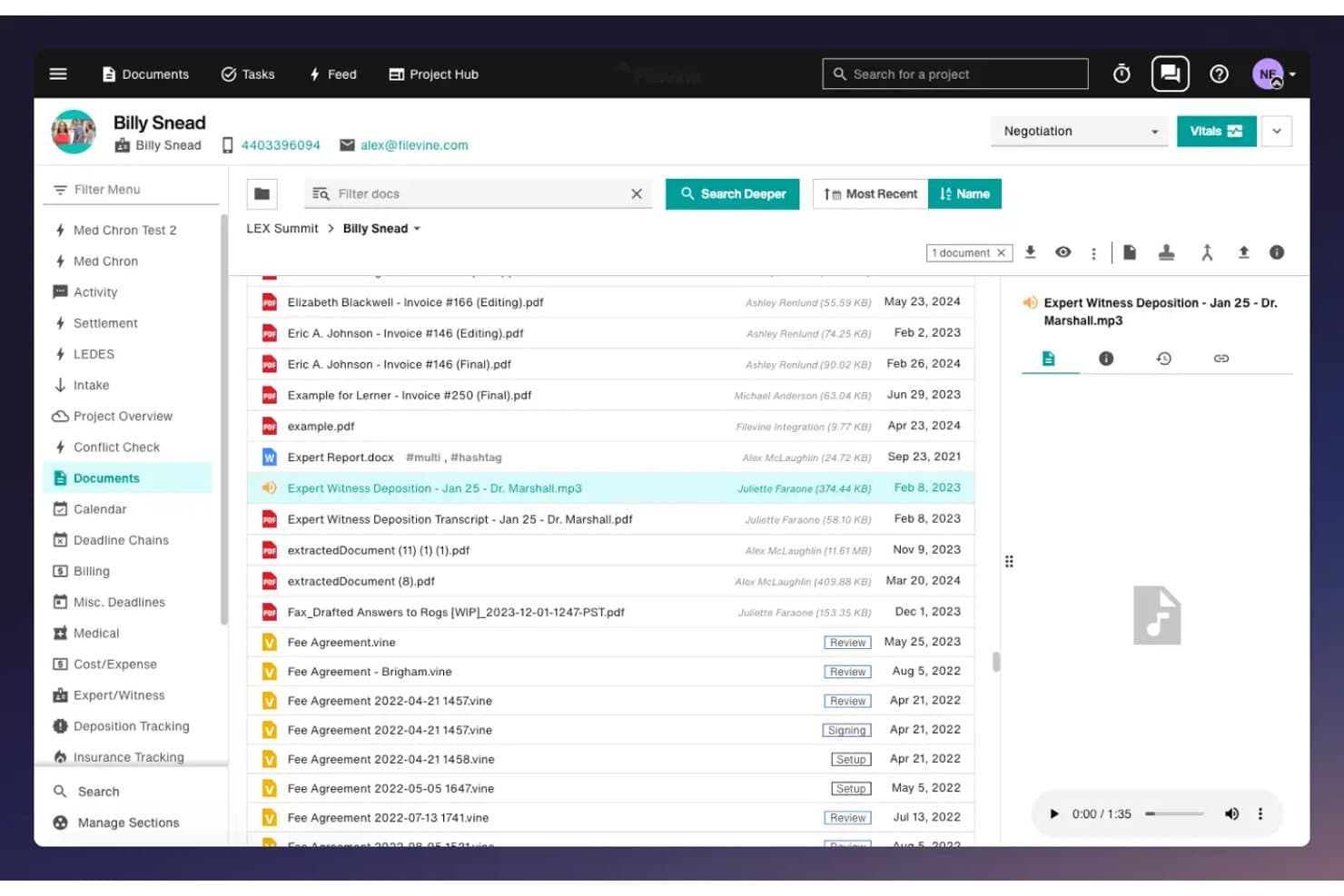
Filevine offers a document management interface with file previews, audio playback, and organized case folders for legal case tracking. Filevine is an AI-powered legal operating system built for litigation-heavy firms that need deeply customizable matter management, automated document assembly, and client intake workflows in a single platform.
Who Is Filevine Best For?
Filevine suits small to mid-size litigation firms—particularly personal injury and civil litigation practices—that need workflows tailored to their specific case types.
Why Filevine Is a Good MyCase Alternative
I picked Filevine as one of the best because its customization depth genuinely sets it apart. Where MyCase gives you a fixed structure, Filevine lets you build custom fields, custom workflows, and deadline chains that match how your practice actually runs. I especially like AIBlocks, which handles automated document assembly using your own templates and merge fields, and Lead Docket, which turns client intake into a fully automated pipeline with referral tracking built in.
Filevine Key Features
- Periscope analytics dashboard: Generate real-time reports and visualize key metrics directly within your Filevine workspace.
- Vinesign e-signature integration: Collect electronic signatures on documents using a native signature tool with text and email delivery.
- Two-way client texting: Communicate with clients via text messages sent and received directly inside each case file.
- Outlook email sync: Store emails as part of the matter record through seamless integration with Microsoft Outlook.
Filevine Integrations
Filevine offers native integrations with Vinesign, Lead Docket, Microsoft Outlook, Google Calendar, and QuickBooks Online. An API is available for custom integrations.
Pros and Cons
Pros:
- Automated client intake with referral tracking
- Native AI for document drafting and summaries
- Deeply customizable matter fields and workflows
Cons:
- Reporting features lag behind case management tools
- Setup requires significant configuration time upfront
Learn more about Filevine: 8Best for all-in-one legal practice management
Clio
- 7-day free trial + free demo available
- From $49/user/month
Visit WebsiteCustomer Rating:4.5/5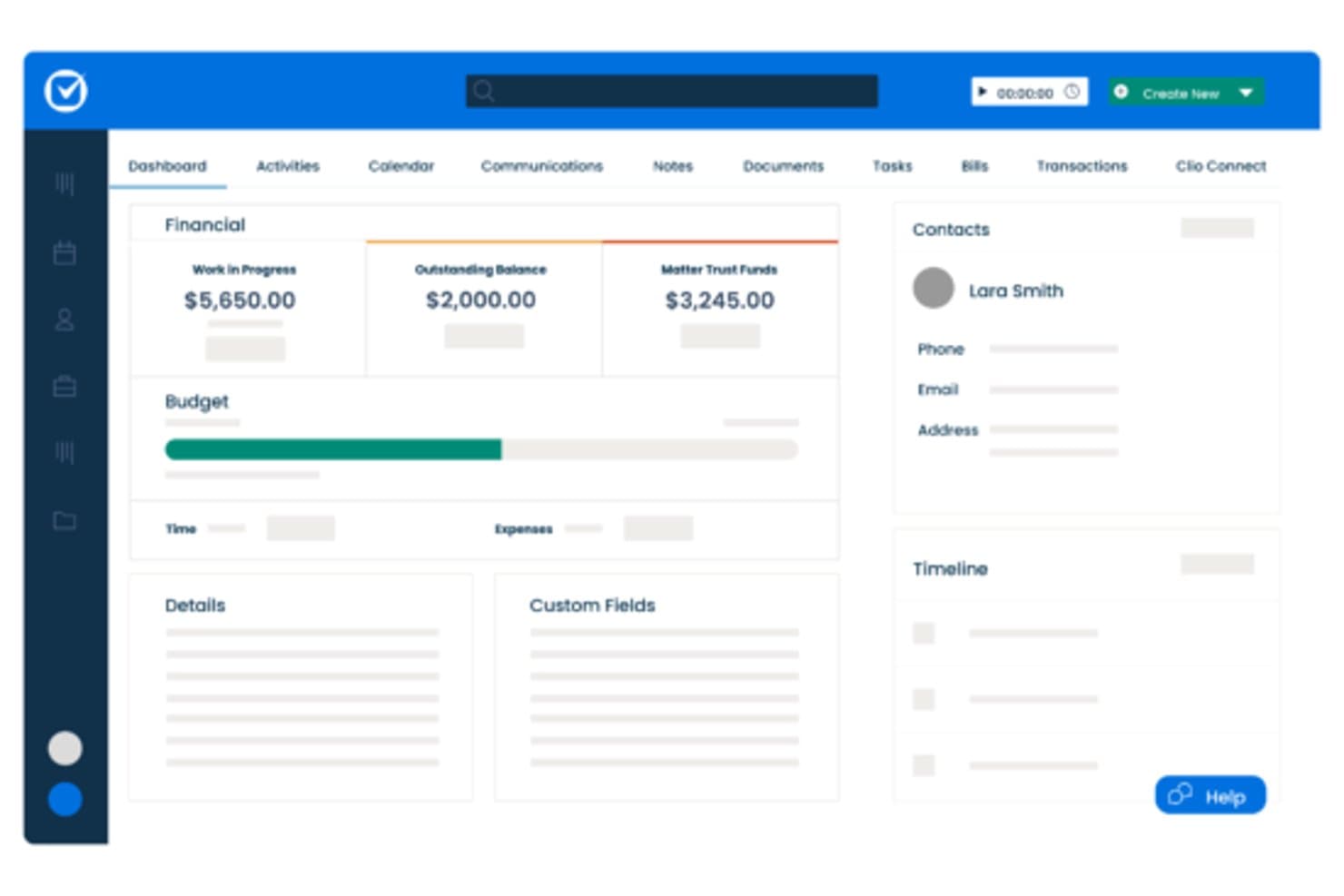
Clio offers a matter dashboard with financial summaries, budget tracking, contact details, and timeline views for case management. Clio is a cloud-based legal practice management platform for solo attorneys and small-to-mid-sized law firms, combining matter management, LEDES billing, trust accounting, document automation, and a client portal with over 300 third-party integrations.
Who Is Clio Best For?
Clio suits growing law firms that need a single platform to handle billing, compliance, and client communication without stitching together multiple tools.
Why Clio Is a Good MyCase Alternative
Clio earns its spot on my shortlist because the all-in-one depth goes further than MyCase. I appreciate that LEDES/UTBMS billing and three-way trust reconciliation are both available on the entry-level Starter plan. In practice, my team generates court-compliant billing narratives and reconciles trust ledgers from one dashboard. AI-drafted bill generation on Core and above also removes a significant share of billing narrative work from my team's plate.
Clio Key Features
- AI-drafted client updates: Automatically generates client-ready status updates using context from case files.
- Client intake automation: Configurable online forms capture lead data, trigger follow-ups, and kick off matter creation.
- Document template builder: Create and reuse custom legal document templates directly within the platform.
- Court e-filing integration: Submit documents to courts electronically through built-in, pay-per-filing partner connections.
Clio Integrations
Clio offers 300+ native integrations, including QuickBooks Online, Xero, Microsoft 365, Google Workspace, NetDocuments, Dropbox, Box, LawPay, Zoom, and CalendarRules. An API is available for custom integrations.
Pros and Cons
Pros:
- 300+ verified third-party integrations available
- Matters, billing, and trust share one dashboard
- Native e-signature on all paid plans
Cons:
- Document content search returns inconsistent results
- Clio Grow intake is sold as a separate add-on
Learn more about Clio: Best for built-in legal accounting
- 10-day free trial
- From $49/user/month (billed annually)
Visit WebsiteCustomer Rating:4.4/5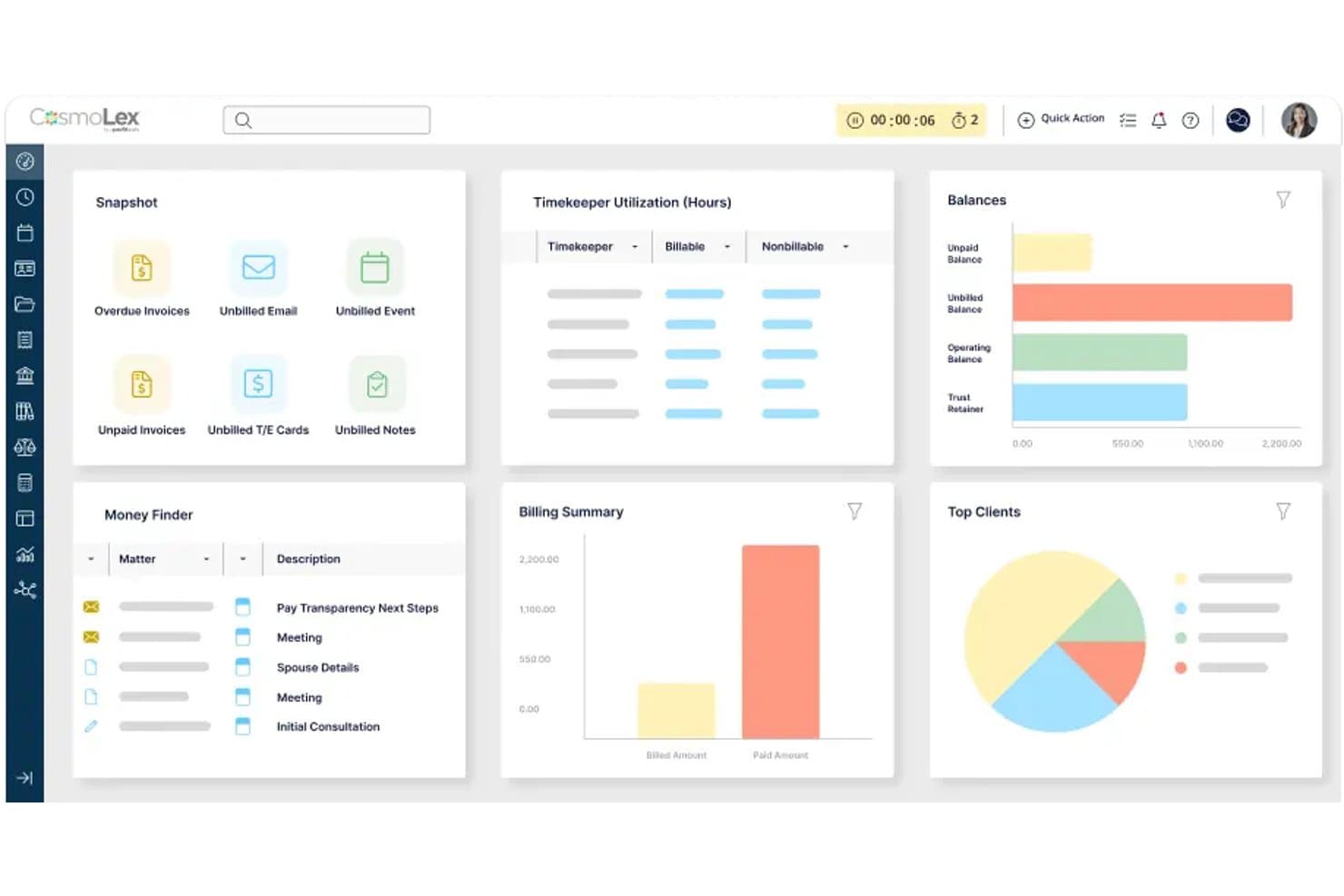
CosmoLex offers a comprehensive dashboard with billing summaries, timekeeper utilization, client balances, and matter tracking as a MyCasealternative. CosmoLex is a cloud-based legal practice management platform built for solo and small law firms that combines case management, billing, and full legal accounting in a single system — eliminating the need for separate accounting software like QuickBooks.
Who Is CosmoLex Best For?
Solo attorneys and small firm managing partners who want practice management and legal accounting handled in one place, without stitching together separate tools.
Why CosmoLex Is a Good MyCase Alternative
I picked CosmoLex for this list because its trust accounting lives inside the same system as billing and case management. That means three-way reconciliation, per-client trust ledgers, and trust-to-operating transfers all happen without switching tools or syncing data across platforms. MyCase requires QuickBooks for full accounting functionality, which creates reconciliation gaps that CosmoLex avoids entirely by design.
CosmoLex Key Features
- Document management: Store, organize, and share documents with built-in e-signature and secure client portal access.
- Matter workflows: Automate tasks and status updates using customizable workflows for each case type.
- Custom reporting: Generate over 100 financial and productivity reports for full visibility across cases and billing.
- Integrated calendar sync: Connect with Outlook, Google Calendar, and iCal for syncing firm-wide deadlines and appointments.
CosmoLex Integrations
CosmoLex offers native integrations with NetDocuments, OneDrive, Google Drive, Dropbox, Box, and QuickBooks Online, plus calendar sync with Outlook, Office 365, Google Calendar, and iCal. An API is available for custom integrations.
Pros and Cons
Pros:
- No separate accounting software needed
- Three-way trust reconciliation meets state bar requirements
- Full legal accounting built into the platform
Cons:
- Document automation tools are less advanced
- Mobile app functionality lags behind competitors
Learn more about CosmoLex: Best for intuitive case and billing workflows
- Free trial available
- From $49/user/month (billed annually)
Visit WebsiteCustomer Rating:4.3/5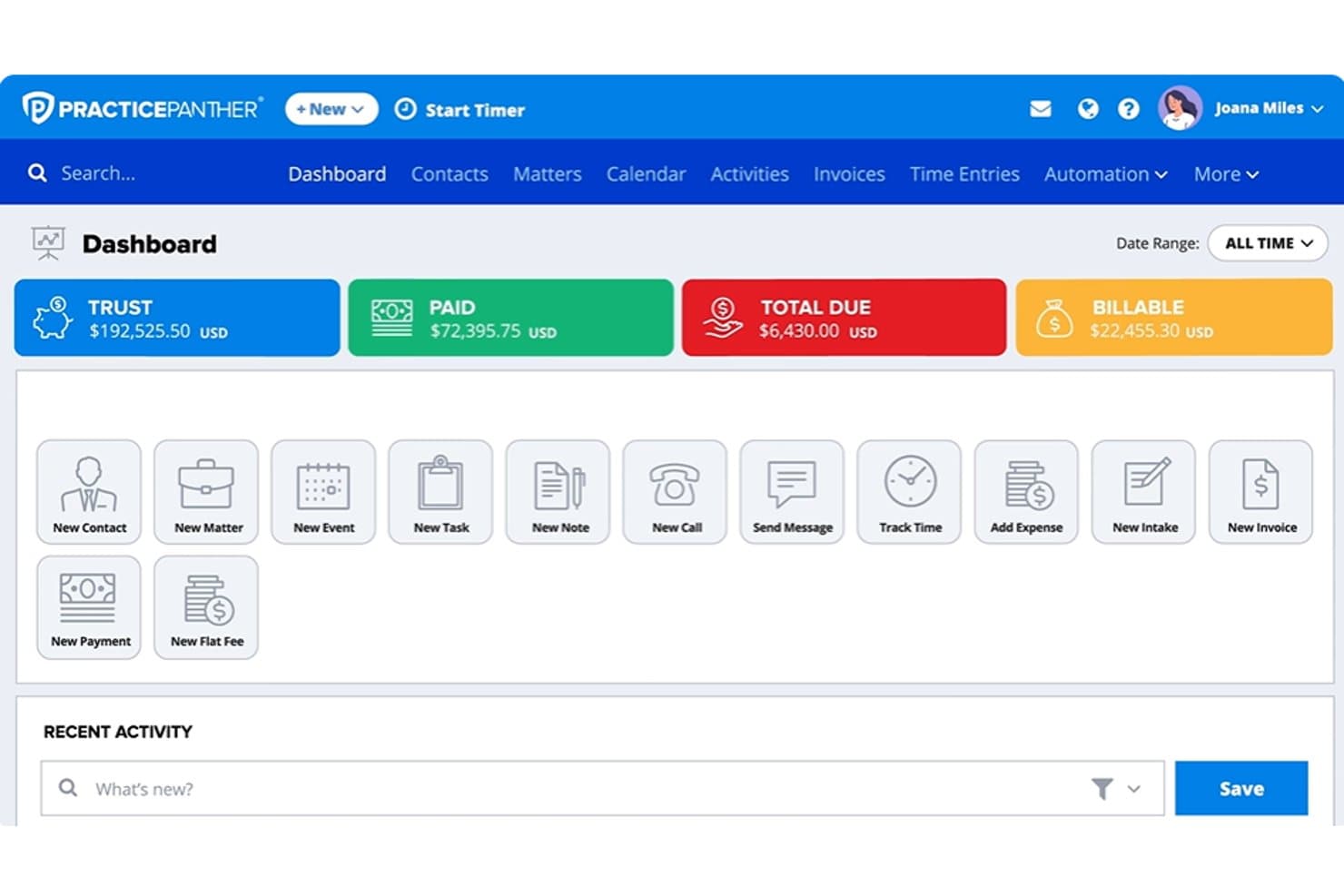
PracticePanther dashboard showing trust balances, payments, billable amounts, matters, and legal billing tools PracticePanther is a cloud-based legal practice management platform built for solo attorneys and small law firms that need native billing, trust accounting, client intake, and case management without patching together third-party tools.
Who Is PracticePanther Best For?
PracticePanther suits growing law firms with two to fifteen attorneys that want a single platform to handle intake, billing, and trust accounting without heavy IT setup.
Why PracticePanther Is a Good MyCase Alternative
I picked PracticePanther as one of the best because its billing workflow is genuinely built in, not bolted on. Where MyCase routes payments through LawPay (a separate subscription), PracticePanther's native PantherPayments handles credit card, ACH, and eCheck billing directly inside the platform. I also appreciate the conditional task and event workflows that auto-trigger follow-up steps when a matter status changes, keeping case progress moving without manual nudging.
PracticePanther Key Features
- Unlimited custom intake forms: Build dynamic intake forms with conditional logic to automate client onboarding and lead qualification.
- Native two-way texting: Communicate securely with clients through the platform using a dedicated business phone number.
- Full trust accounting: Manage IOLTA-compliant trust ledgers with three-way reconciliation and detailed audit trails.
- Court rules calendaring with LawToolBox: Auto-calculate deadlines and sync court calendars by jurisdiction for complete deadline management.
PracticePanther Integrations
PracticePanther offers native integrations with LawToolBox, QuickBooks Online, Google Workspace, Microsoft 365, Dropbox, Box, and OneDrive. Zapier and an API are also available for custom integrations.
Pros and Cons
Pros:
- Workflows auto-trigger when matter status changes
- Built-in e-signature for client engagement letters
- Native trust accounting meets IOLTA compliance requirements
Cons:
- Document assembly less advanced than competitors
- Reporting tools lack depth and flexibility
Learn more about PracticePanther:
Andre MyCase-alternativer
\u003cspan style=\u0022font-weight: 400\u0022\u003eHer er noen flere MyCase-alternativer som ikke kom med på kortlisten min, men som likevel er verdt å undersøke:\u003c/span\u003e
- 11CenterbaseBest for midsize law firm operations
- 12Bill4timeBest for legal time tracking and billing
- 13LEAPBest for legal documents and case management
- 14SmartAdvocateBest for litigation case management
- 15Tabs3Best for legal billing and accounting
- 16NeosBest for cloud-based legal case management
- 17MerusCaseBest for automated legal workflows
- 18PCLaw®Best for legal accounting and billing
How I Evaluate MyCase Alternatives
I first check whether a platform covers what MyCase already handles—tracking matters, billing clients, managing trust ledgers, and sharing documents through a portal. Then I look at the differentiators that separate one tool from another.
Core Functionality (Table Stakes For This List)
When I'm selecting tools for my list, I rank each one on a scale from 0 (does not offer the functionality) to 5 (excels in this area) for each core functionality listed below. Then, I calculate the tool's total score into a percentage. Each tool needs to achieve a minimum total score of 75% to be considered for inclusion.
- Case Management: I look for structured matter records with custom fields, linked contacts, and deadline tracking—so nothing falls through during active litigation.
- Document Management: Template libraries with merge fields matter here, especially for firms generating high volumes of engagement letters or pleadings.
- Time & Billing: I evaluate time entry flexibility, invoicing options, and support for different fee arrangements like flat-fee, contingency, and hourly billing.
- Client Portal: Secure portals where clients can view case updates, share documents, and message their attorney reduce back-and-forth email threads.
- Trust Accounting: I check for IOLTA-compliant ledgers with per-client tracking and reconciliation reporting that satisfies bar association audit requirements.
- Calendar & Deadlines: Court rules-based calendaring is key—platforms like Clio and Smokeball offer deadline chains that auto-adjust when a hearing date moves.
Once I have a list of tools that meet the criteria, I consider what sets each platform apart.
Differentiating Factors (What Sets Vendors Apart)
Here's how I compare and contrast different vendors:
Standout Features
Native e-signature workflows save your firm from juggling a separate DocuSign or Adobe Sign subscription for engagement letters and retainers. I also evaluate whether a platform includes legal-specific AI tools—summarizing case documents or drafting correspondence inside the matter file is a real time-saver. Client intake automation is another area I look at closely, especially forms with conditional logic and conflict checking that move a lead from first contact to signed client without manual follow-up.
Beyond Features
Data migration matters when you're leaving MyCase—I check whether vendors offer migration services that cover matters, contacts, documents, and billing history. Compliance is another factor I weigh carefully, including SOC 2 Type II certification, encryption, and audit logs that support your duties under ABA Model Rule 1.6. Total cost of ownership also plays a role, since add-on fees for payments, e-signatures, or client portals can quietly push a platform well past its advertised per-user price.
Hvorfor se etter et MyCase-alternativ?
Selv om MyCase er et godt valg av programvare for juridisk saksbehandling, finnes det flere grunner til at enkelte brukere ser etter alternative løsninger. Det kan hende du leter etter et MyCase-alternativ fordi …
- Du trenger mer avansert automatisering av dokumenter
- Du ønsker full IOLTA-klientmiddelhåndtering med avstemming i tre ledd
- Du trenger dypere integrasjoner med eksisterende e-post- eller regnskapsverktøy
- Du opplever at prisene for MyCase ikke passer budsjettet eller størrelsen på firmaet ditt
- Du arbeider innenfor et praksisområde som trenger mer spesialiserte arbeidsflyter
- Du trenger bedre funksjoner for klientinntak eller kundeemnehåndtering
Hvis noe av dette høres kjent ut, har du kommet til rett sted. Listen min inneholder flere alternativer for juridisk saksbehandling som passer bedre for team som møter disse utfordringene med MyCase og ser etter alternative løsninger.
Viktige funksjoner i MyCase
Her er noen av de viktigste funksjonene i MyCase, slik at du kan sammenligne hva alternative løsninger tilbyr:
- Saksbehandling: Sentraliserer alle saksdetaljer, kontakter, notater og frister for enkel tilgang og oppfølging, slik at teamet alltid holder oversikt over fremdriften i hver sak.
- Dokumenthåndtering: Lar deg lagre, organisere, redigere og dele juridiske dokumenter på en sikker måte med versjonskontroll, slik at ingenting viktig går tapt eller overskrives.
- Tidsregistrering: Gjør det mulig å registrere fakturerbare timer direkte i hver sak, slik at du får med hvert arbeidsminutt og øker nøyaktigheten i faktureringen.
- Fakturering og fakturaer: Genererer og sender fakturaer automatisk, støtter ulike pristyper og integreres med nettbaserte betalingsløsninger for enklere innkreving.
- Klientportal: Tilbyr en sikker, profilert portal der klienter kan se dokumenter, meldinger og fakturaer, noe som gjør kommunikasjon og informasjonsdeling enkelt.
- Håndtering av klientmidler: Tilbyr IOLTA-kompatibel håndtering av klientmidler, skiller automatisk klientmidler fra andre midler og sporer saldoer for å sikre etterlevelse og revisjonsberedskap.
- Kalender og frister: Har kalenderføring og fristoppfølging basert på rettsregler, slik at teamet holder oversikt over viktige datoer og oppgaver.
- Klientinntak: Lar deg opprette tilpassede inntaksskjemaer, automatisere oppfølging og administrere nye klienthenvendelser på ett sted for en mer effektiv oppstartsprosess.
- Arbeidsflyter for elektroniske signaturer: Forenkler signeringen av oppdragsbekreftelser, forskuddsbetalingsavtaler og andre dokumenter direkte i plattformen, uten verktøy fra tredjeparter.
- Rapportering og analyse: Lar deg følge med på virksomhetens resultater, fakturerbare timer, innbetalinger og åpne saker, slik at du kan ta velinformerte forretningsbeslutninger.