

Programvare for juridisk friststyring hjelper deg med å holde oversikt over rettsdatoer, innleveringsfrister og krav til etterlevelse, slik at du aldri går glipp av en kritisk frist eller setter saken din i fare. Det riktige verktøyet effektiviserer kalenderen din ved å automatisere påminnelser og håndtere frister – noe som betyr at du kan konsentrere deg om jussen, ikke papirarbeidet.
Etter å ha testet en rekke alternativer skal jeg gå gjennom den beste programvaren for juridisk friststyring, slik at du kan finne den som passer best for firmaet ditt, enten du jobber alene eller er del av et større team.
Hvorfor du kan stole på våre programvareanbefalinger
6,700+
Reviews
20
Industry experts
16+
Evaluation factors
14
Years
Teamet vårt har testet og anmeldt programvare siden 2012. Vi leder selv advokatfirmaer, så vi vet hvor vanskelig og hvor viktig det er å velge riktig programvare.
I denne guiden har vi vurdert verktøyene gjennom praktisk testing og uavhengig research og gitt dem poeng ut fra våre utvelgelseskriterier.
Anmeldelsene våre bygger på vår egen redaksjonelle vurdering. De er ikke et salgsargument.
Sammenligningstabell for programvare for juridisk friststyring
Denne sammenligningstabellen oppsummerer prisdetaljene for mine beste utvalgte programmer for juridisk friststyring:
| Tool | Best For | Trial Info | Price | ||
|---|---|---|---|---|---|
| 1 | Best for simple case and billing management | Free trial available | From $49/user/month (billed annually) | Website | |
| 2 | Best for effortless task and project tracking | Free trial available | Pricing upon request | Website | |
| 3 | Best for all-inclusive legal practice management | Free trial available | From £79/user/month | Website | |
| 4 | Best for managing intellectual property cases | Free trial available | From $60/month | Website | |
| 5 | Best for real-time court case updates | 3-day free trial | From $39.99/month | Website | |
| 6 | Best for easy tracking of dockets and deadlines | Free trial available | From $125/month | Website | |
| 7 | Best for legal workflows and report generation | Free demo available | Pricing upon request | Website | |
| 8 | Best for integrating case and matter management | Not available | Pricing upon request | Website | |
| 9 | Best for trademark docketing and IP tracking | Not available | Pricing upon request | Website | |
| 10 | Best for clean, complete case management | Free demo available | Pricing upon request | Website |


Anmeldelser av den beste programvaren for juridisk friststyring
Nedenfor finner du mine detaljerte sammendrag av den beste programvaren for juridisk friststyring som kom med på kortlisten min. Anmeldelsene mine gir en detaljert gjennomgang av de viktigste funksjonene, fordelene & ulempene, integrasjonene og ideelle bruksområdene for hvert verktøy, slik at du kan finne det beste alternativet for deg.
 Best for simple case and billing management
- Free trial available
- From $49/user/month (billed annually)
Visit WebsiteCustomer Rating:4.3/5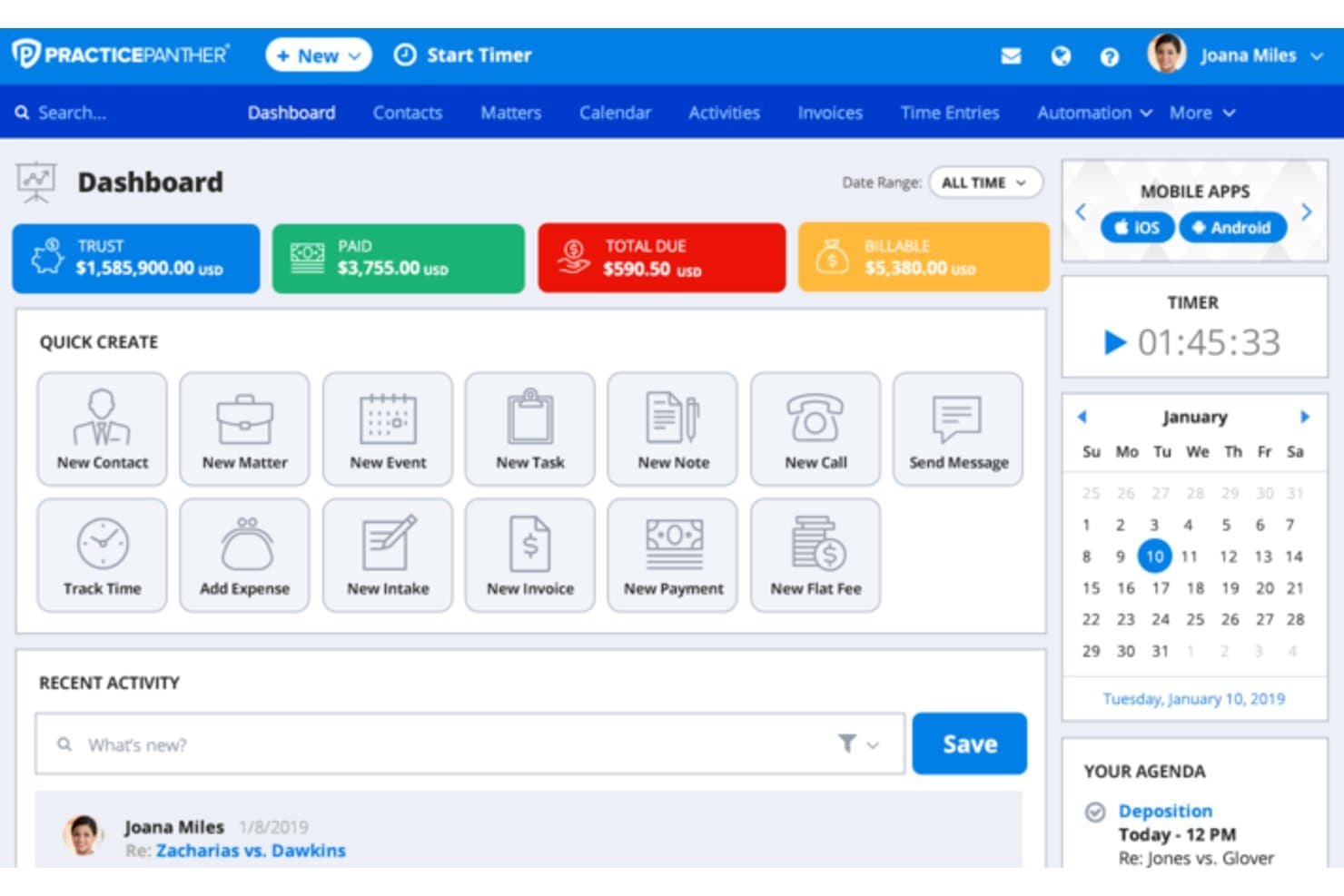
PracticePanther manages cases, court calendars, billing, trusts, and documents. PracticePanther is a cloud-based legal practice management platform that combines case management, calendaring with court-rules integration, billing, trust accounting, and document management for solo and small-to-mid-sized law firms.
Who Is PracticePanther Best For?
PracticePanther suits solo practitioners and small-to-mid-sized law firms that want basic docketing alongside case management and billing in one platform.
Why I Picked PracticePanther
PracticePanther earns its spot on my shortlist because it bundles court-rules-based deadline tracking directly into the same matter where you log billable time and generate invoices. I like that the LawToolBox integration auto-populates case deadlines by jurisdiction, so I'm not toggling between systems. The native trust accounting also ties billing records to specific matters, keeping financial and docket data aligned without extra data entry.
PracticePanther Key Features
- Color-coded matter calendar: Filter tasks, events, and court deadlines by color using custom tags for faster review and prioritization.
- Two-way calendar sync: Seamlessly integrates with Google, Outlook, Exchange, and Apple calendars to push and pull docket entries.
- Native mobile apps: Allows attorneys and staff to view matters, deadlines, and appointments via dedicated iOS and Android apps.
- Secure document management: Upload, organize, and share legal documents directly linked to specific cases and matters.
PracticePanther Integrations
PracticePanther offers native integrations with LawToolBox, QuickBooks Online, Google Drive, Dropbox, Box, OneDrive, Docketwise, and Microsoft 365. It also connects with Zapier and provides an API for custom integrations.
Pros and Cons
Pros:
- Mobile app surfaces deadlines and case events
- Billing and docket data linked per matter
- LawToolBox integration automates jurisdiction-based deadline calculation
Cons:
- Docket reporting lacks compliance-grade audit trails
- Court deadlines require the LawToolBox add-on
Learn more about PracticePanther: 2Best for effortless task and project tracking
8am
- Free trial available
- Pricing upon request
Visit WebsiteCustomer Rating:4.6/5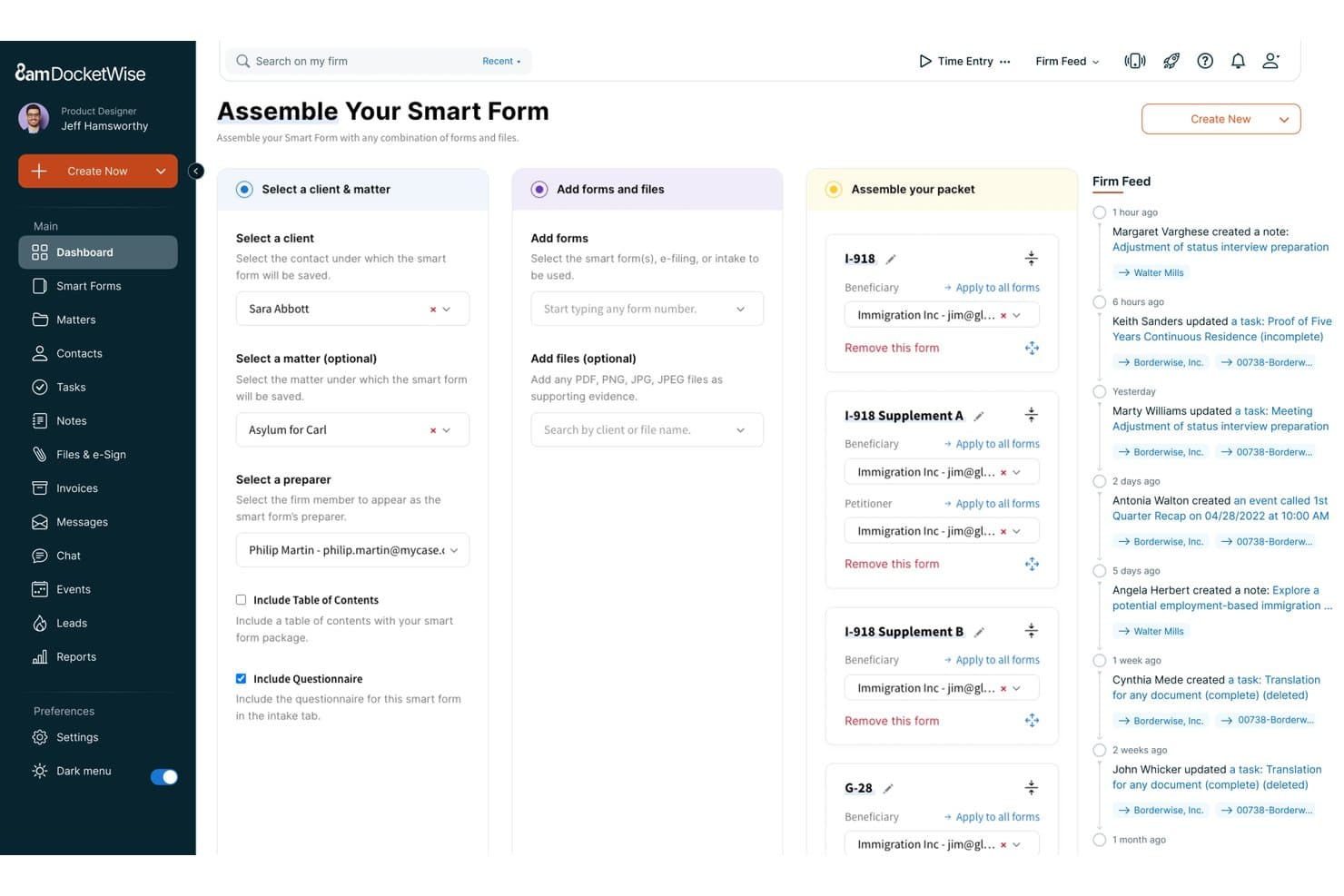
8am DocketWise offers a Smart Form assembly workflow that lets legal teams select clients, add immigration forms, and organize packet components in a structured three-step interface. 8am is a legal practice management ecosystem that unifies case tracking, deadline management, client communications, and billing across a suite of specialized tools—including MyCase, DocketWise, and CasePeer—built for law firms of all sizes.
Who Is 8am Best For?
8am suits solo practitioners and small to mid-size law firms—particularly immigration practices—that want case management, deadline tracking, and billing in one connected platform.
Why I Picked 8am
I picked 8am because its MyCase platform turns what's usually a fragmented, error-prone process into something genuinely manageable. I like how task assignments live directly inside a case record, keeping deadlines and to-dos tied to the right matter without extra admin overhead. DocketWise takes this further for immigration practices, auto-populating USCIS forms from client questionnaires and surfacing priority dates as trackable case tasks.
8am Key Features
- Integrated calendar sync: Two-way integration with Google Calendar and Microsoft Outlook keeps case dates current across platforms.
- Jurisdiction-based deadline tracking: Tracks critical deadlines and events with options to configure jurisdiction-specific entries.
- Client portal: Provides a secure portal for clients to view documents, calendar events, and status updates.
- Document automation: Generates, stores, and manages templates and case-related documents within a centralized dashboard.
8am Integrations
8am offers native integrations with Google Calendar, Microsoft Outlook, LawPay, QuickBooks, NetDocuments, Dropbox, and Microsoft 365. An API is available for custom integrations.
Pros and Cons
Pros:
- Built-in client portal for secure communications
- Immigration form auto-population through DocketWise
- Tasks tied directly to individual matter records
Cons:
- Not designed for multi-jurisdiction deadline automation
- Limited court rules engine for litigation
Learn more about 8am: 3Best for all-inclusive legal practice management
Clio
- Free trial available
- From £79/user/month
Visit WebsiteCustomer Rating:4.7/5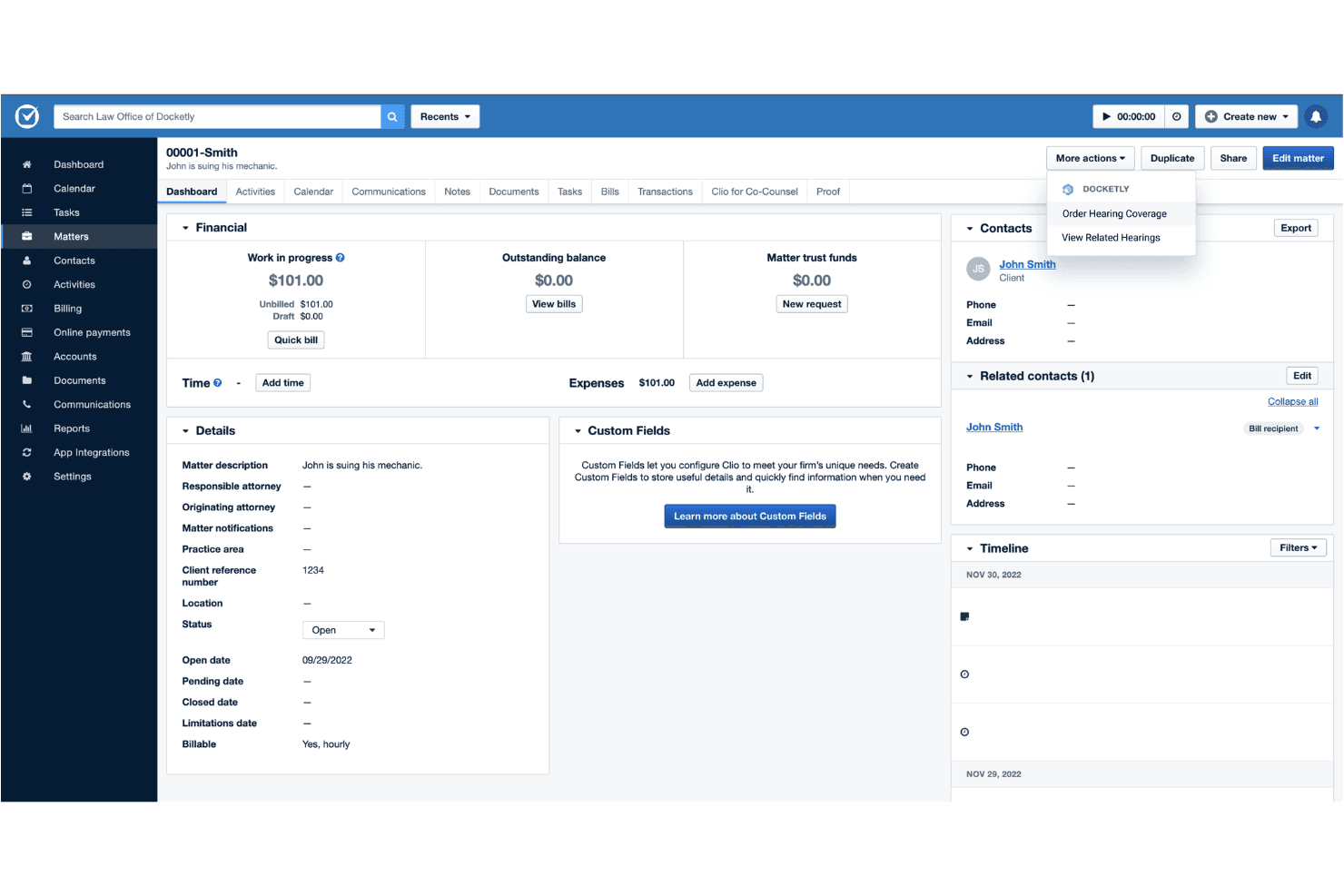
Clio manages court deadlines, matters, documents, time tracking, and billing. Clio is a legal practice management platform that combines court rules-based deadline calendaring, matter and document management, time tracking, billing, and AI-driven docketing tools into a single connected system.
Who Is Clio Best For?
Clio suits small to mid-sized law firms that want docketing, case management, billing, and client intake managed within one platform rather than across separate tools.
Why I Picked Clio
Clio earns its spot on my shortlist because it folds docketing directly into every other layer of firm operations, which no other tool on this list does quite as completely. I rely on the Court Rules engine to auto-calculate deadlines across hundreds of U.S. courts without any manual setup. Manage AI goes a step further, reading uploaded court documents, extracting key dates, and generating verified calendar events automatically.
Clio Key Features
- Native calendar integration: Syncs matter deadlines with Microsoft 365 and Google Calendar, including two-way updates for attorneys and staff.
- Document automation tools: Converts Word documents into online templates and auto-fills court forms directly within Clio Draft.
- Alt Legal integration: Connects IP docketing, contact management, and invoicing for patent and trademark prosecution.
- Role-based user permissions: Allows granular access control for confidential matters and task assignments across teams.
Clio Integrations
Clio offers 300+ native integrations, including Microsoft 365, Google Workspace, DocuSign, Xero, QuickBooks Online, Zoom, Alt Legal, Dropbox, and NetDocuments. An open API is available for custom integrations.
Pros and Cons
Pros:
- Full firm management beyond docketing alone
- Manage AI extracts key dates from documents
- Court Rules engine auto-calculates jurisdiction-specific deadlines
Cons:
- Narrower court coverage than dedicated docketing platforms
- Docketing features thinner than dedicated specialist tools
Learn more about Clio: Best for managing intellectual property cases
- Free trial available
- From $60/month
Visit WebsiteCustomer Rating:4.9/5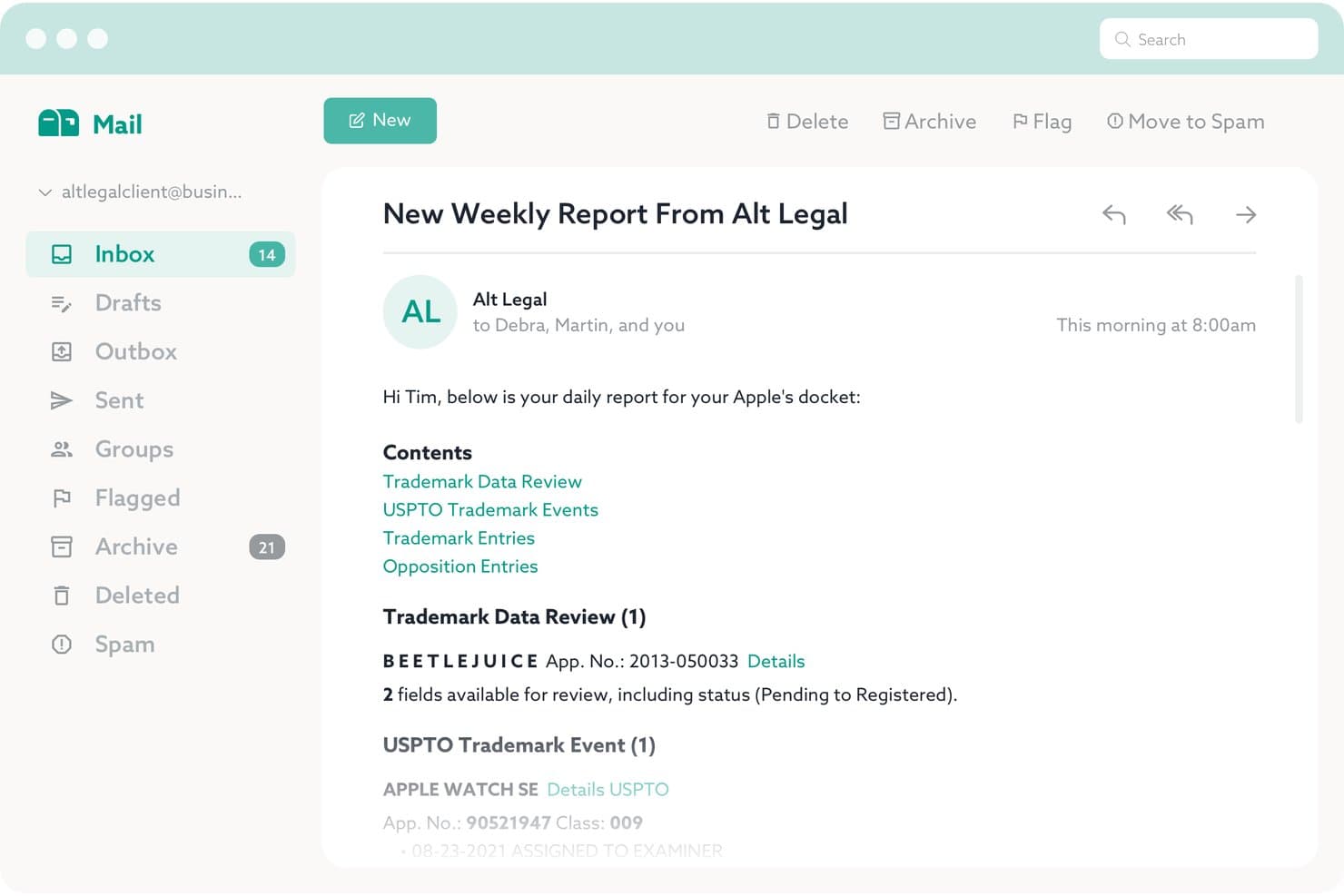
Alt Legal offers automated weekly report emails that summarize trademark data reviews, USPTO trademark events, trademark entries, and opposition entries for a client's docket. Alt Legal is an IP docketing platform that automates deadline tracking and matter management for trademark, patent, and copyright prosecution across USPTO, CIPO, and 180+ global IP offices.
Who Is Alt Legal Best For?
Alt Legal is a strong fit for IP boutiques and trademark-heavy law firms that need reliable prosecution docketing without the overhead of a legacy system.
Why I Picked Alt Legal
Alt Legal earns its spot on my shortlist because it's the only docketing tool I've found that's built entirely around IP prosecution workflows. I like how the platform auto-calculates USPTO and CIPO deadlines the moment a matter is docketed, with no manual setup required. The Goods & Services Composer is particularly useful, as it drafts USPTO ID Manual-compliant descriptions while calculating class fees in real time.
Alt Legal Key Features
- Daily email updates: Sends automated daily summaries of upcoming deadlines and docket changes.
- Personalized deadline reports: Allows users to generate and customize dynamic reports for specific matters or portfolios.
- Unlimited third-party docket access: Lets clients and foreign associates view designated docket data at no additional cost.
- Custom matter types: Supports tracking and customizing fields for non-trademark IP matters and internal legal processes.
Alt Legal Integrations
Alt Legal offers native integrations with Clio, Outlook, Google Calendar, and Apple Calendar, and provides an API for custom integrations.
Pros and Cons
Pros:
- Covers trademark deadlines across 180+ global offices
- Built exclusively for IP prosecution workflows
- Auto-calculates USPTO and CIPO deadlines instantly
Cons:
- No court rules engine for non-IP matters
- Not suited for litigation docketing needs
Learn more about Alt Legal: Best for real-time court case updates
- 3-day free trial
- From $39.99/month
Visit WebsiteCustomer Rating:4.5/5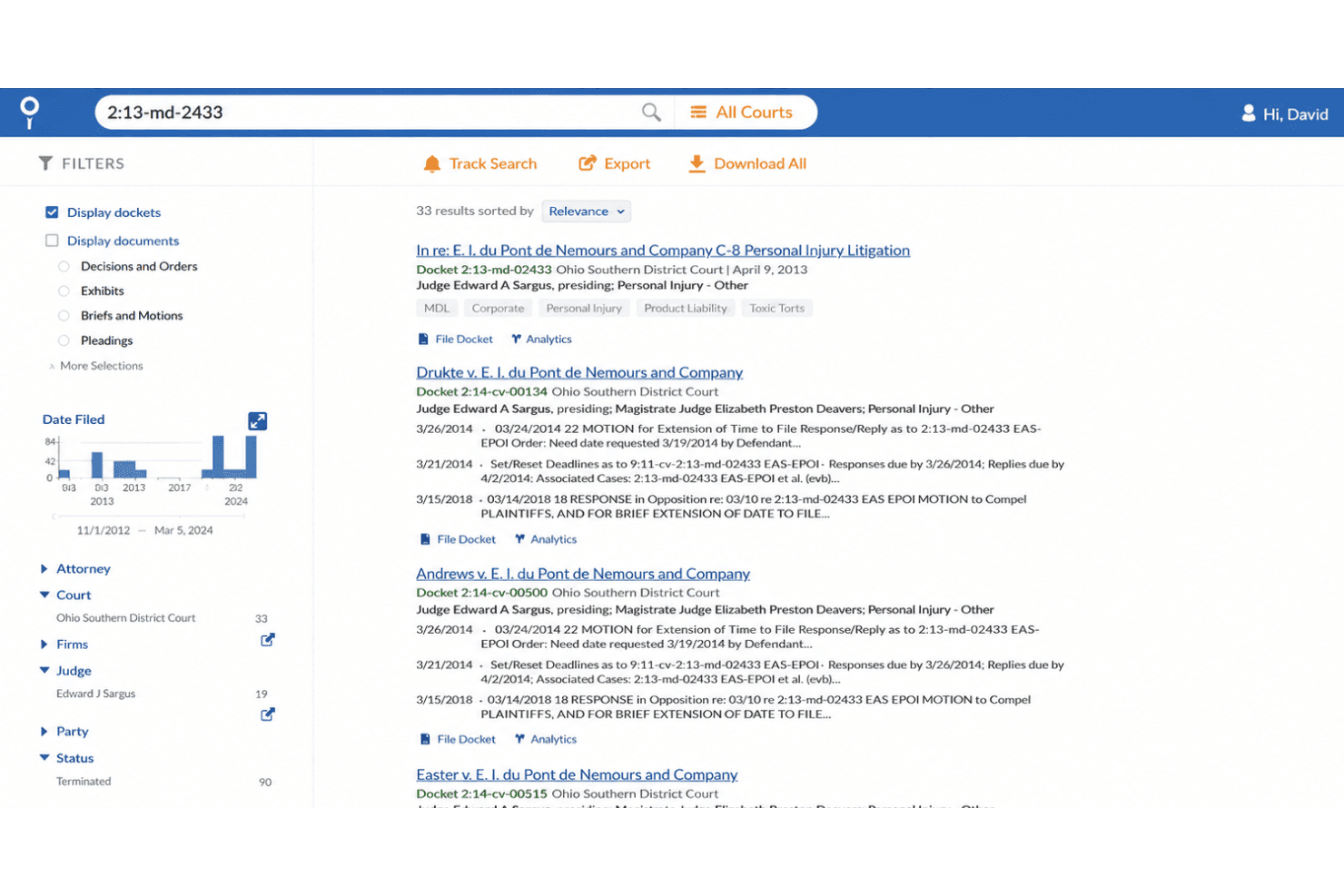
Docket Alarm offers a searchable docket database with filters for court, judge, party, and date, displaying case results with citation and analysis options. Docket Alarm is a legal docketing platform that combines real-time court case tracking, rules-based deadline calculation, full-text search across federal and state courts, and litigation analytics covering judicial profiles, motion outcomes, and PTAB/TTAB filings.
Who Is Docket Alarm Best For?
Docket Alarm suits litigation teams and IP specialists at law firms that need broad court coverage and real-time docket monitoring across federal, state, and patent tribunal proceedings.
Why I Picked Docket Alarm
I picked Docket Alarm as one of the best because its alert engine operates at a scale few docketing tools match. I can track any case, party, judge, or keyword across all federal courts and 43+ states, with notifications arriving the moment a new filing hits the docket. The Talk to Docket AI feature lets me query the full case record in plain English, with answers tied directly to specific docket entries.
Docket Alarm Key Features
- Rules-based deadline calculation: Calculates deadlines based on federal, state, and local court rules within the docketing workflow.
- Bulk document downloads: Lets users download all filings for a matter in just a few clicks, saving time on case document retrieval.
- REST API with webhook support: Offers an open API to search cases, retrieve dockets, and set up automated, real-time integration with other legal systems.
- Litigation analytics workbench: Provides granular reporting and research tools to analyze motion trends, party data, and judicial profiles across jurisdictions.
Docket Alarm Integrations
Docket Alarm offers native integrations with Clio, Microsoft Outlook, Google Calendar, and Zapier. An open REST API is available for custom integrations.
Pros and Cons
Pros:
- Litigation analytics cover judicial and motion trends
- Full-text search across all PACER filings
- Real-time alerts across 43+ state courts
Cons:
- Some state court coverage remains inconsistent
- No dedicated rules-based deadline calendaring engine
Learn more about Docket Alarm: Best for easy tracking of dockets and deadlines
- Free trial available
- From $125/month
Visit WebsiteCustomer Rating:4.9/5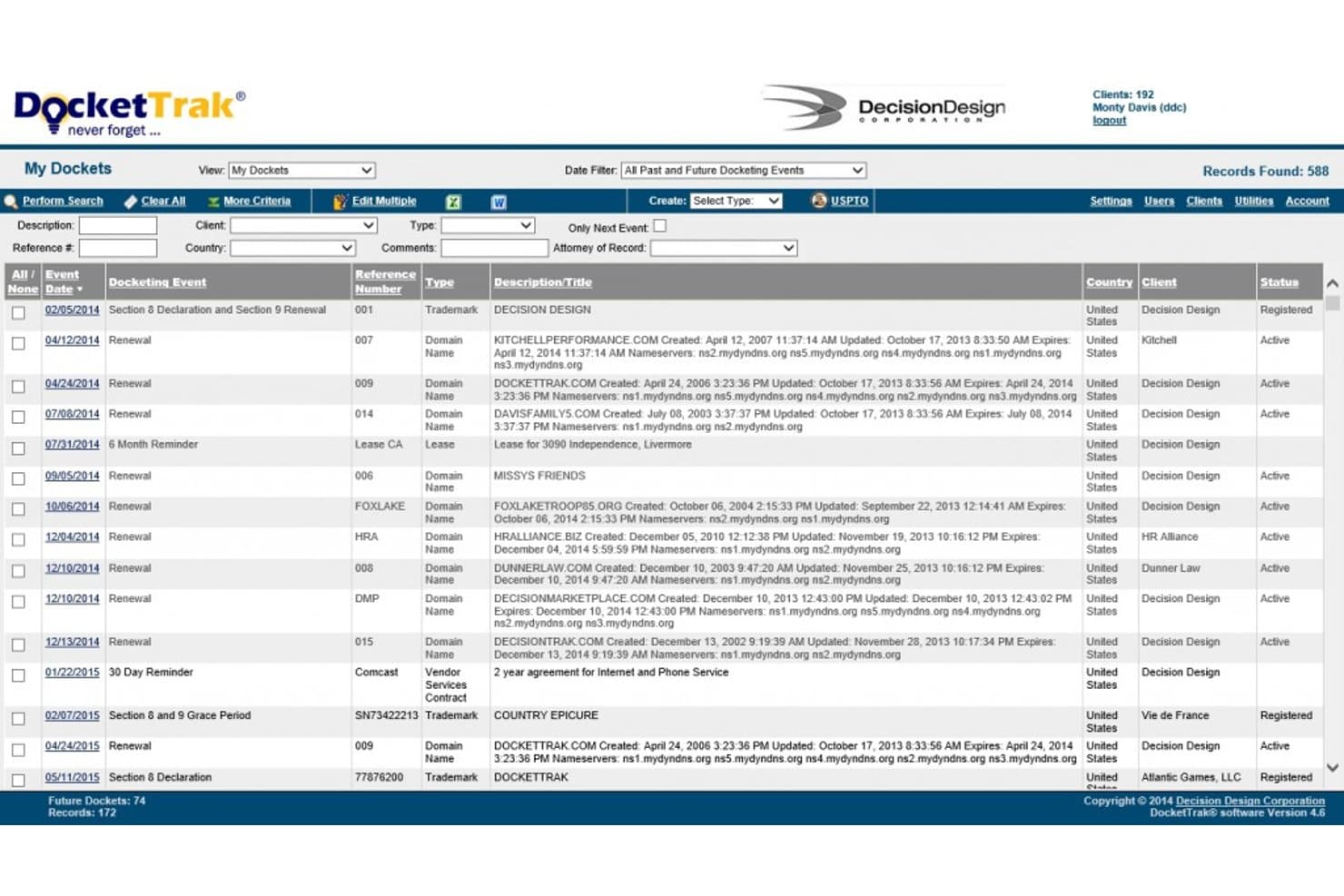
DocketTrak offers a My Dockets dashboard that displays trademark and domain name renewal events, client assignments, statuses, and filtering options for legal docket management. DocketTrak is a cloud-based IP docketing platform that tracks patents, trademarks, copyrights, and domain names, with auto-docketing directly from USPTO, CIPO, EUIPO, and other global IP offices.
Who Is DocketTrak Best For?
DocketTrak suits small to mid-sized law firms and corporate IP departments where paralegals and prosecution specialists manage patent and trademark portfolios directly.
Why I Picked DocketTrak
DocketTrak earns its spot on my shortlist because of how directly it connects deadline tracking to the source. I like that its E-Office Action Email Process automatically captures USPTO office action emails and drops the required response dates straight into the patent record, cutting out the manual entry step entirely. On top of that, daily reminder emails sort every open deadline by color-coded priority, so nothing gets buried in a long list.
DocketTrak Key Features
- Built-in rules for global patent and trademark deadlines: Manages jurisdiction-specific post-registration renewal calculations for US, Canada, EU, Australia, and other IP offices.
- Unlimited client user view access: Lets law firm clients securely view docket data with no extra user fees.
- Bulk import of IP records: Supports fast onboarding by importing large trademark and patent lists from other systems.
- Custom DocketForm document automation: Generates Word or email templates populated with case data for standardized communications.
DocketTrak Integrations
DocketTrak offers native integrations with Clio, Outlook, and Google Calendar. An API is available for custom integrations.
Pros and Cons
Pros:
- Covers post-registration renewal rules globally
- Color-coded deadline priority views built in
- Auto-dockets from USPTO and global IP offices
Cons:
- Limited reporting and analytics dashboards
- Focused on IP, not litigation docketing
Learn more about DocketTrak: Best for legal workflows and report generation
- Free demo available
- Pricing upon request
Visit WebsiteCustomer Rating:4/5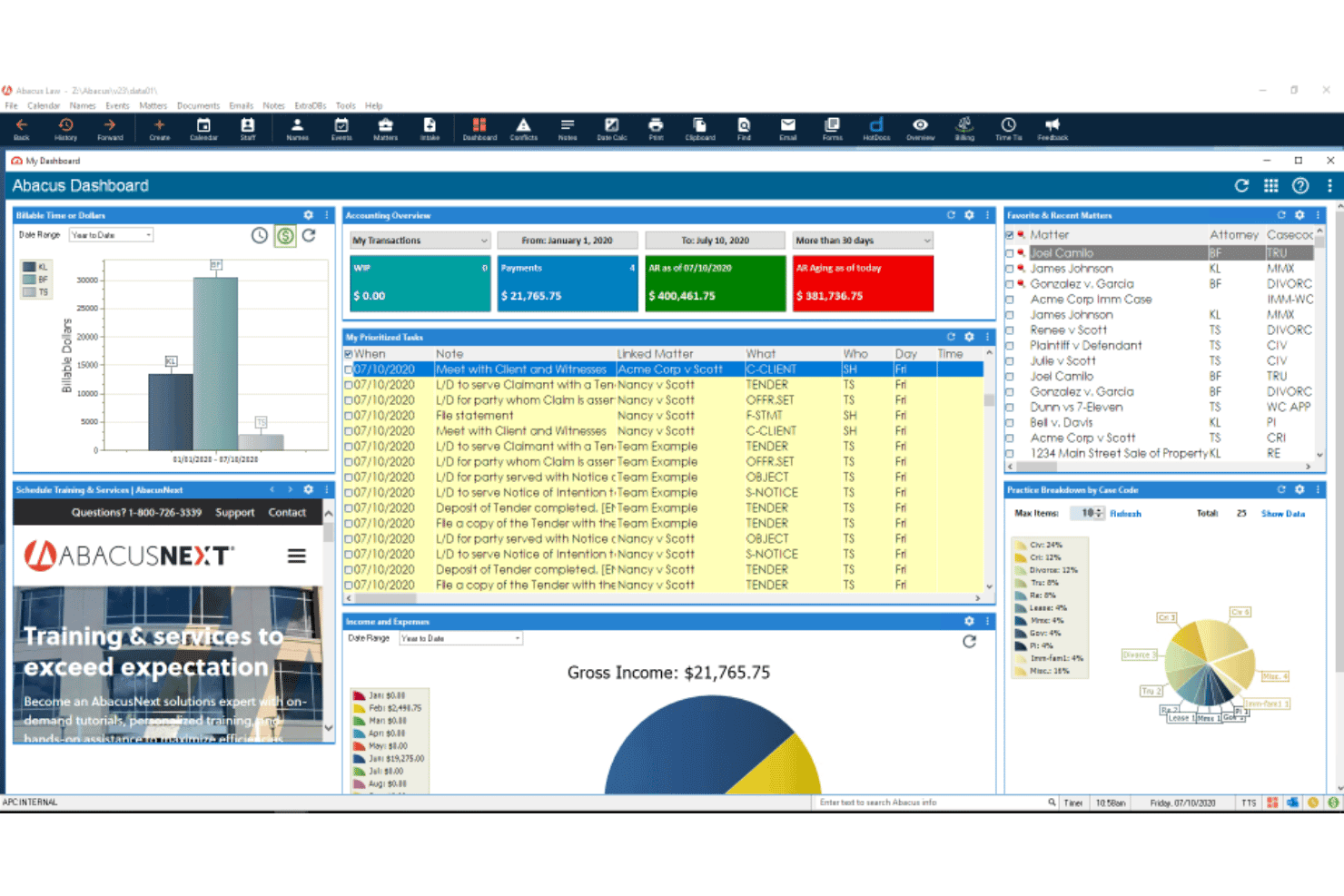
AbacusLaw offers a centralized dashboard displaying accounting overviews, docketing, prioritized tasks, income tracking, and recent matters for legal case management. AbacusLaw is a legal practice management platform that combines rules-based docketing, court deadline calendaring, matter management, document automation, time tracking, and integrated trust accounting in a single system.
Who Is AbacusLaw Best For?
AbacusLaw suits small-to-midsize litigation firms that need docketing, billing, and accounting managed in one platform rather than across separate tools.
Why I Picked AbacusLaw
AbacusLaw earns its spot on my shortlist because its rules-based calendaring engine chains a full sequence of court deadlines from a single triggering event. I also like the configurable alert reports and chronology views, which let docketing clerks pull deadline status across active matters without manual effort. The workflow automation extends to custom input screens and practice-area templates, so your reports reflect how your firm actually structures and tracks cases.
AbacusLaw Key Features
- Legal calendaring with court rules: Create, assign, and share calendar events linked to court-specific deadlines for multiple jurisdictions.
- Integrated document automation: Generate, store, and manage documents using templates and automated form population tools.
- Built-in trust accounting: Manage client funds with compliance-focused trust accounting directly within the platform.
- Conflict checking module: Detect conflicts of interest using matter and contact cross-check capabilities built into each case file.
AbacusLaw Integrations
AbacusLaw offers native integrations with Microsoft 365, Outlook, QuickBooks Online, DocuSign, Salesforce, HotDocs, Nextiva, and Case Status. An API is available for custom integrations.
Pros and Cons
Pros:
- Combines docketing, billing, and accounting in one
- Built-in reporting across matters and workflows
- Rules-based calendaring automates multi-step deadline chains
Cons:
- Mobile access is limited for on-the-go docketing
- Outdated interface compared to newer competitors
Learn more about AbacusLaw: Best for integrating case and matter management
- Not available
- Pricing upon request
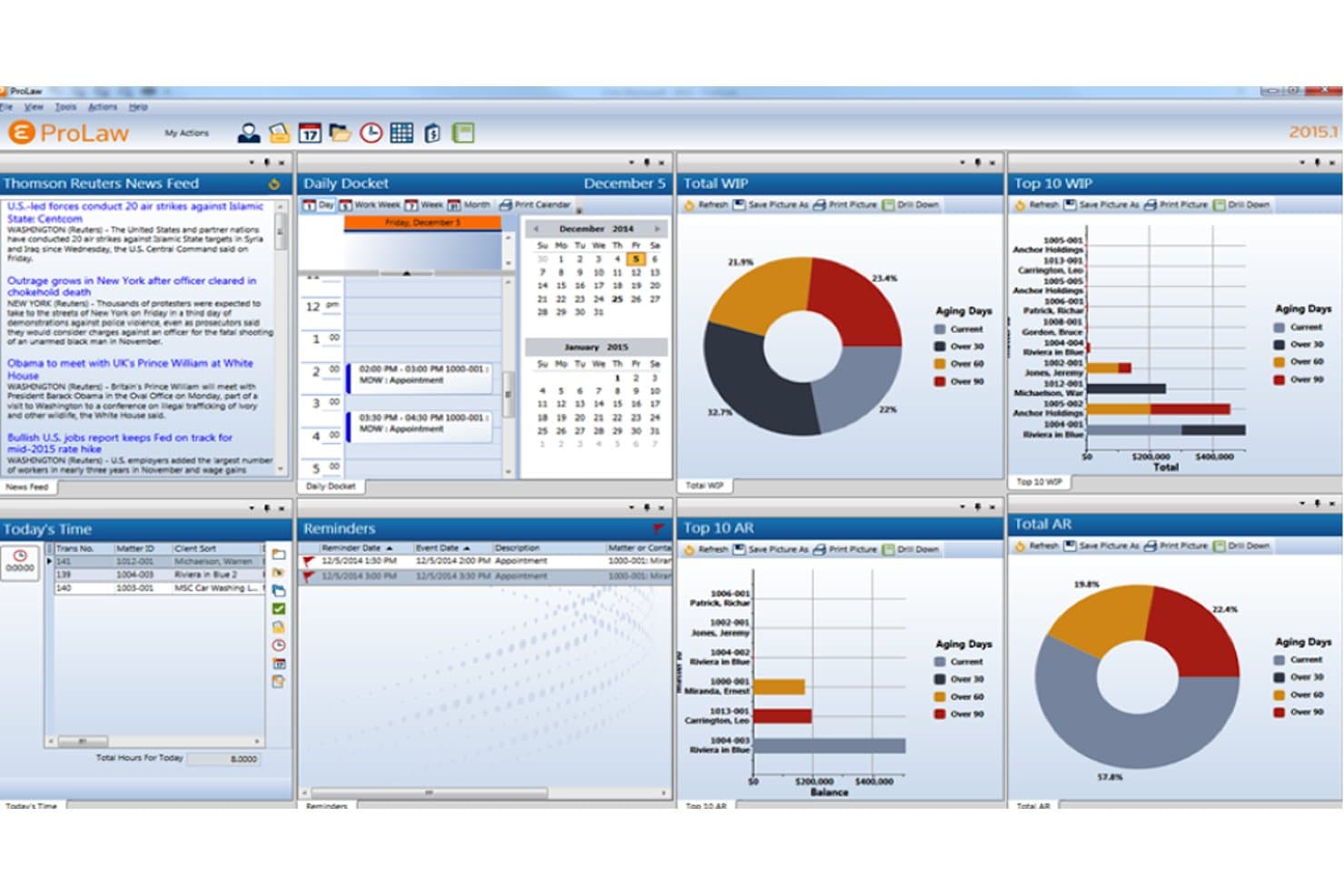
ProLaw by Thomson Reuters offers a comprehensive legal management dashboard featuring docketing, WIP tracking, AR charts, daily calendar, reminders, and news feed in one view. ProLaw is a legal practice management platform that unifies rules-based docketing, matter management, calendaring, time and expense tracking, billing, and document management in a single system.
Who Is ProLaw Best For?
ProLaw is a strong fit for mid-size to large law firms that need a single platform to manage docketing, matters, and financials together.
Why I Picked ProLaw
ProLaw earns its spot on my shortlist because the docketing module is wired directly into the matter record, not bolted on as a separate tool. I like that when a deadline is calculated using ProLaw's rules engine, covering all 50 states, federal courts, and per-judge rules, it surfaces alongside the case's documents, contacts, and billing data. That context is what I find most valuable when my team is tracking deadlines across multiple active matters.
ProLaw Key Features
- Rules-based docketing engine: Calculates deadlines automatically using current federal, state, and local court rules for each matter.
- Outlook calendar sync: Pushes case deadlines and reminders directly to attorneys’ Microsoft Outlook calendars with two-way integration.
- Centralized document management: Organizes pleadings, filings, and supporting files in one searchable repository linked to case records.
- Audit trail and reporting: Tracks every change to docket entries and generates detailed compliance and activity reports.
ProLaw Integrations
ProLaw offers native integrations across the Microsoft ecosystem, including Microsoft Outlook, Microsoft 365, and Microsoft SQL Server. An API is available for custom integrations.
Pros and Cons
Pros:
- Unifies matters, billing, and docket tracking
- Court rules span all 50 states
- Docketing linked natively to case financials
Cons:
- Implementation requires significant time and resources
- Dated interface relative to newer competitors
Learn more about ProLaw by Thomson Reuters: Best for trademark docketing and IP tracking
- Not available
- Pricing upon request
Visit WebsiteCustomer Rating:4.5/5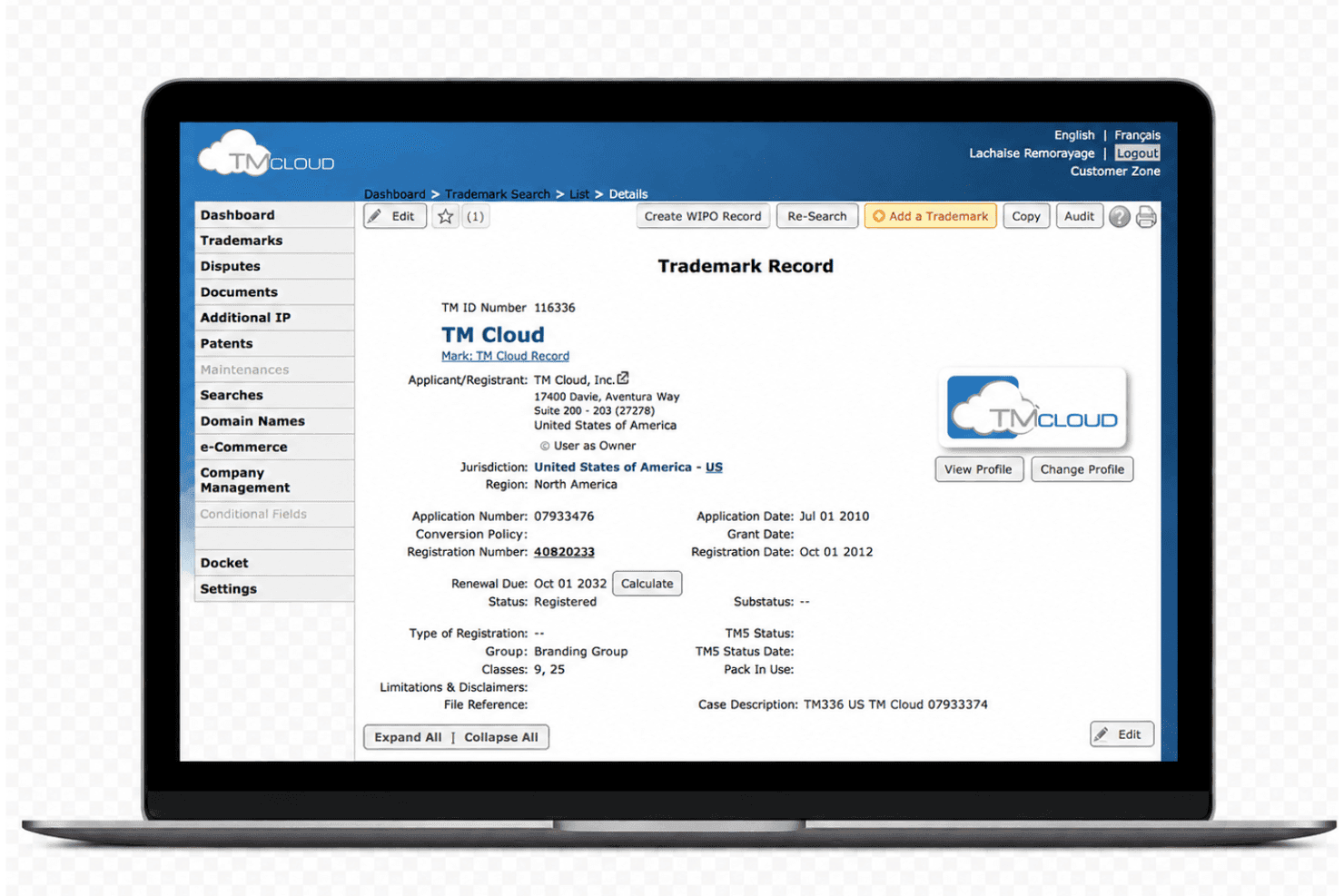
TM Cloud offers a detailed Trademark Record view with docketing fields including application number, registration number, renewal due dates, and status tracking. TM Cloud is a trademark docketing and IP management platform that covers trademark tracking, deadline calculation, document storage, and multi-jurisdiction IP record-keeping for law firms and corporate IP departments.
Who Is TM Cloud Best For?
TM Cloud suits trademark paralegals and IP specialists at law firms or corporate legal departments managing multi-jurisdictional trademark portfolios.
Why I Picked TM Cloud
TM Cloud earns its spot on my shortlist because of how purpose-built it is for trademark deadline automation. I like that it auto-populates docketing data and calculates deadlines directly from USPTO and CIPO status updates across 180+ trademark jurisdictions. The one-page IP record view keeps an entire portfolio visible at a glance, and daily automated deadline emails mean critical renewal dates don't get buried in a crowded inbox.
TM Cloud Key Features
- Integrated document management: Store, organize, and retrieve IP-related documents within each matter’s record.
- Role-based access controls: Set tailored permissions for attorneys, paralegals, and clients on individual trademark records.
- Multi-jurisdiction trademark support: Enter, track, and manage trademarks filed in over 175 countries from a single dashboard.
- Full audit trail: Automatically log all actions, changes, and historical data for every trademark matter and docket entry.
TM Cloud Integrations
Native integrations are not clearly documented. TM Cloud provides an API for custom integrations.
Pros and Cons
Pros:
- Automated renewal reminder emails sent on schedule
- Modules cover disputes, patents, and domain names
- Direct USPTO and CIPO data import into records
Cons:
- Docketing defaults skew heavily toward US practice
- Custom report builder is confusing and time-consuming
Learn more about TM Cloud: Best for clean, complete case management
- Free demo available
- Pricing upon request
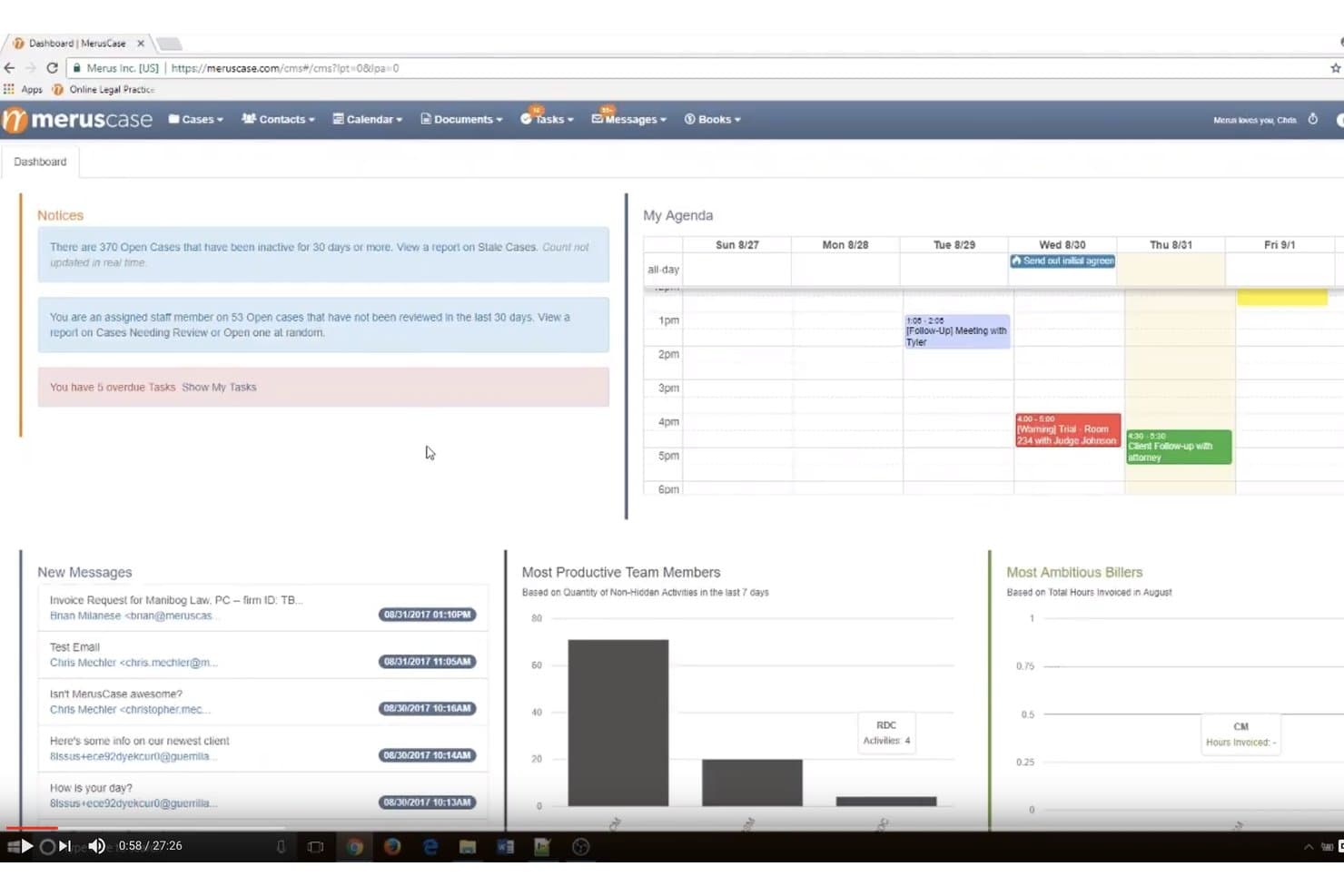
MerusCase offers a centralized dashboard with notices, agenda calendar, new messages, and team productivity charts for legal case management. MerusCase is a cloud-based legal practice management platform that combines rules-based court deadline calendaring, document automation, case tracking, time tracking, and billing in a single integrated system.
Who Is MerusCase Best For?
MerusCase is a strong fit for small to midsize litigation firms practicing in workers' compensation, personal injury, employment, or immigration law.
Why I Picked MerusCase
I picked MerusCase as one of the best because its CalendarRules integration handles something most platforms skip: filtering court rules by type before calculating deadlines. When I select a trigger event, like an answer served, MerusCase calculates dates automatically and nests parent/child events so dependent deadlines chain together. That connected, case-level docketing is what gives MerusCase its edge as a genuinely complete case management system.
MerusCase Key Features
- Batch document scanning: Scan and upload documents directly into related cases with automated file association.
- Form auto-population: Instantly merge case data into standard court forms and templates for rapid filing.
- Customizable reporting: Generate detailed reports on docket activity, deadlines, and matter updates within the platform.
- Role-based calendars: Create and manage separate calendars for firm, office, or individual users, color-coded and tied to each matter.
MerusCase Integrations
MerusCase offers native integrations with CalendarRules and Microsoft Outlook. An API is available for custom integrations.
Pros and Cons
Pros:
- CalendarRules keeps jurisdiction-specific deadlines current
- Built-in court forms auto-populate from case data
- Rules-based deadline chaining across parent/child events
Cons:
- Fewer jurisdictions covered than dedicated docketing platforms
- Better suited to smaller litigation-focused firms
Learn more about MerusCase:
Annen programvare for juridisk friststyring
Her er noen flere alternativer for programvare for juridisk friststyring som ikke kom med på kortlisten min, men som likevel er verdt å se nærmere på:
- 11Bill4TimeBest for accurate time tracking and invoicing
- 12uLawPracticeGood for an all-in-one legal automation software
- 13LitifyGood for a complete legal practice management solution
- 14LawToolBoxGood for deadline management for Microsoft 365 users
- 15LSSe64Good for extensive legal office management needs
- 16FlexTracGood for customizable case management
- 17MinuetGood for technology and intellectual property management
- 18Lexis CourtLinkGood for extensive court records access
- 19BEC LegalGood for comprehensive legal calendaring
- 20LawBaseGood for adaptable case and matter management
How I Evaluate Legal Docketing Software
I split my evaluation into baseline requirements—like rules-based deadline calculation and multi-jurisdiction court coverage—and the differentiators that set one vendor apart from another.
Core Functionality (Table Stakes For This List)
When I'm selecting tools for my list, I rank each one on a scale from 0 (does not offer the functionality) to 5 (excels in this area) for each core functionality listed below. Then, I calculate the tool's total score into a percentage. Each tool needs to achieve a minimum total score of 65% to be considered for inclusion.
- Court Rules Engine: I check whether the platform computes deadlines from triggering events using jurisdiction-specific procedural rules rather than relying on manual date entry.
- Multi-Jurisdiction Coverage: The breadth of supported courts matters—I evaluate how many federal, state, local, and specialty jurisdictions a tool covers out of the box.
- Deadline & Event Tracking: I look for configurable alerts, role-based assignment, and escalation paths so a missed hearing date or filing window gets flagged before it's too late.
- Calendar Integration: Syncing docketed events to Outlook or Google Calendar should be bi-directional, so updates made in either system reflect everywhere attorneys check their schedules.
- Case Management Integration: I evaluate how each tool connects with practice management and document management platforms to keep docket data unified with case files.
- Automated Court Updates: Court rules change regularly, so I look for vendors that push rule updates proactively instead of waiting for users to catch the discrepancy themselves.
Once I have a list of tools that meet this criteria, I consider what sets each platform apart.
Differentiating Factors (What Sets Vendors Apart)
Here's how I compare and contrast different vendors:
Standout Features
Chain reaction deadlines matter a lot—when a motion is filed, I want downstream response and hearing dates to auto-populate without manual recalculation. E-filing integration is another factor I weigh, because tools that pull directly from court filing systems eliminate the risk of a missed docket entry. I also look at audit trail depth, since a detailed log of every change helps firms document due diligence if a deadline dispute ever arises.
Beyond Features
Malpractice risk mitigation is something I evaluate closely—vendors that back their rule calculations with attorney-verified accuracy guarantees give firms a real layer of protection. Practice area fit also shapes my assessment, since a litigation-heavy firm needs different rule sets than an IP prosecution team handling patent deadlines. I check implementation support too, because migrating years of docket data from spreadsheets or legacy systems without a dedicated onboarding consultant can introduce the very errors the software is supposed to prevent.
Slik velger du programvare for juridisk friststyring
Det er lett å gå seg vill i lange funksjonslister og komplekse prismodeller. For å hjelpe deg med å holde fokus mens du går gjennom den unike prosessen med å velge programvare, får du her en sjekkliste over faktorer du bør ha i mente:
| Faktor | Hva du bør vurdere |
|---|---|
| FaktorSkalerbarhet | Hva du bør vurdereVil programvaren vokse sammen med firmaet ditt? Sjekk om den kan håndtere et økt antall saker og brukere uten problemer. |
| FaktorIntegrasjoner | Hva du bør vurdereFungerer den med verktøyene du allerede bruker? Sørg for at den er kompatibel med eksisterende systemer, for eksempel faktureringsprogramvare eller plattformer for dokumenthåndtering. |
| FaktorTilpasningsmuligheter | Hva du bør vurdereKan du tilpasse den etter behovene dine? Se etter muligheter for å justere arbeidsflyter og dashbord slik at de passer til praksisens prosesser. |
| FaktorBrukervennlighet | Hva du bør vurdereEr den enkel å bruke? Vurder læringskurven for teamet ditt og om opplæring vil være nødvendig. |
| FaktorImplementering og oppstart | Hva du bør vurdereHvor raskt kan du komme i gang? Vurder tiden og ressursene som kreves for en smidig overgang fra det nåværende systemet ditt. |
| FaktorKostnad | Hva du bør vurderePasser den inn i budsjettet ditt? Sammenlign prismodeller og vurder de totale kostnadene, inkludert opplæring og kundestøtte. |
| FaktorSikkerhetstiltak | Hva du bør vurdereHvor sikre er dataene dine? Kontroller at løsningen oppfyller juridiske standarder for databeskyttelse, og se etter funksjoner som kryptering og regelmessige sikkerhetsoppdateringer. |
| FaktorTilgjengelig kundestøtte | Hva du bør vurdereHvilken hjelp er tilgjengelig? Se gjennom alternativer som chat, telefon eller e-post, og sørg for at de samsvarer med teamets behov og arbeidstid. |
Hva er programvare for juridisk friststyring?
Programvare for juridisk friststyring er et verktøy som holder oversikt over rettsdatoer, saksfrister og viktige juridiske dokumenter. Advokater, advokatfullmektiger og juridiske assistenter bruker det for å holde orden, unngå oversittede frister og samle alle viktige saksdetaljer på ett sted. Det er nyttig for å redusere feil, håndtere påminnelser og gjøre juridisk arbeid mindre stressende.
Funksjoner
Når du velger programvare for juridisk friststyring, bør du se etter følgende viktige funksjoner:
- Automatiske påminnelser: Sender varsler om kommende frister og rettsdatoer for å forhindre uteblitte avtaler.
- Dokumenthåndtering: Organiserer og lagrer juridiske dokumenter på en sikker måte, slik at de er lett tilgjengelige for teamet ditt.
- Planleggingsverktøy: Gjør det enklere å planlegge og følge opp avtaler, slik at tiden kan utnyttes effektivt.
- Tilpassbare arbeidsflyter: Lar brukerne tilpasse prosessene etter behovene i den spesifikke juridiske virksomheten, noe som forbedrer effektiviteten.
- Integrasjonsmuligheter: Kobler sammen andre verktøy, som faktureringsprogramvare og dokumenthåndteringssystemer, for en helhetlig arbeidsflyt.
- Klientkommunikasjon: Tilbyr portaler eller meldingsfunksjoner for å opprettholde tydelig kommunikasjon med klientene.
- Rapporteringsverktøy: Gir innsikt i fremdriften i saker og virksomhetens resultater gjennom detaljerte rapporter.
- Sikkerhetstiltak: Sikrer databeskyttelse og samsvar med juridiske standarder gjennom kryptering og regelmessige oppdateringer.
- Mobil tilgang: Gjør det mulig for brukerne å administrere oppgaver og få tilgang til informasjon på farten via mobile enheter.
- Opplæringsressurser: Tilbyr veiledninger og guider som hjelper brukerne med å lære og bruke programvaren effektivt på kort tid.
Fordeler
Implementering av programvare for juridisk friststyring gir flere fordeler for teamet og virksomheten din. Her er noen av fordelene du kan se frem til:
- Bedre nøyaktighet: Automatiske påminnelser bidrar til å forhindre oversette frister og reduserer menneskelige feil.
- Bedre organisering: Funksjoner for dokumenthåndtering holder de juridiske filene dine ryddige og lett tilgjengelige.
- Effektiv planlegging: Planleggingsverktøy gir bedre tidsstyring og koordinering i teamet ditt.
- Tilpassede løsninger: Tilpassbare arbeidsflyter lar deg tilpasse programvaren etter behovene i den spesifikke virksomheten din.
- Bedre klientkommunikasjon: Verktøy for klientkommunikasjon sikrer tydelig dialog og holder klientene informert.
- Økt produktivitet: Rapporteringsverktøy gir innsikt i resultater og hjelper deg med å ta informerte beslutninger.
- Sikker datahåndtering: Sikkerhetstiltak beskytter sensitiv informasjon og sikrer samsvar med juridiske standarder.
Kostnader & priser
Når du velger programvare for juridisk friststyring, må du forstå de ulike prismodellene og abonnementene som er tilgjengelige. Kostnadene varierer basert på funksjoner, teamets størrelse, tilleggstjenester og mer. Tabellen nedenfor oppsummerer vanlige abonnementer, gjennomsnittsprisene deres og typiske funksjoner som inngår i løsninger for juridisk friststyring:
Sammenligningstabell for programvare for juridisk friststyring
| Abonnementstype | Gjennomsnittspris | Vanlige funksjoner |
|---|---|---|
| AbonnementstypeGratisabonnement | Gjennomsnittspris$0 | Vanlige funksjonerGrunnleggende planlegging, dokumenthåndtering og begrenset lagringsplass. |
| AbonnementstypePersonlig abonnement | Gjennomsnittspris$20-$40/user/month | Vanlige funksjonerAutomatiske påminnelser, forbedret dokumenthåndtering og kundestøtte via e-post. |
| AbonnementstypeBedriftsabonnement | Gjennomsnittspris$50-$80/user/month | Vanlige funksjonerAvanserte planleggingsverktøy, portaler for klientkommunikasjon og integrasjonsmuligheter. |
| AbonnementstypeVirksomhetsabonnement | Gjennomsnittspris$100-$150/user/month | Vanlige funksjonerTilpassbare arbeidsflyter, prioritert kundestøtte, avanserte sikkerhetstiltak og omfattende rapportering. |