

Programvare for juridisk saksbehandling gir deg ett system for å organisere saker, frister, dokumenter, tid, fakturering og kommunikasjon for advokatfirmaet eller juridiske avdelingen din. Hvis du leter etter den beste programvaren for juridisk saksbehandling, er det sannsynligvis fordi du ønsker verktøy som sparer tid, reduserer manuelt arbeid og hjelper deg med å håndtere en voksende saksmengde med nøyaktighet og kontroll. I denne listen får du en sammenligning av ledende verktøy, hva som skiller dem fra hverandre, og viktige detaljer som kan hjelpe deg med å avgjøre hvilket system som passer best til arbeidsflyten, praksisområdet og virksomhetens behov.
Hvorfor du kan stole på våre programvareanbefalinger
6,700+
Reviews
20
Industry experts
16+
Evaluation factors
14
Years
Teamet vårt har testet og anmeldt programvare siden 2012. Vi leder selv advokatfirmaer, så vi vet hvor vanskelig og hvor viktig det er å velge riktig programvare.
I denne guiden har vi vurdert verktøyene gjennom praktisk testing og uavhengig research og gitt dem poeng ut fra våre utvelgelseskriterier.
Anmeldelsene våre bygger på vår egen redaksjonelle vurdering. De er ikke et salgsargument.
Beste programvare for juridisk saksbehandling
| Tool | Best For | Trial Info | Price | ||
|---|---|---|---|---|---|
| 1 | Best for customizable matter automation | Free demo available | Pricing upon request | Website | |
| 2 | Best for legal graph-powered AI | Free trial + free demo available | Pricing upon request | Website | |
| 3 | Best for integrated billing and accounting | 10-day free trial | From $69/user/month | Website | |
| 4 | Best for personal injury case workflow | Not available | From $109/user/month (billed annually) | Website | |
| 5 | Best for unified legal and business management | Free demo available | Pricing upon request | Website | |
| 6 | Best for automatic time tracking | Not available | Pricing upon request | Website | |
| 7 | Best for broad practice area flexibility | 7-day free trial | From $49/user/month | Website | |
| 8 | Best for integrated client communication | 10-day free trial | From $50/user/month (billed annually) | Website | |
| 9 | Best for end-to-end legal workflow automation | Free trial available | From $49/user/month (billed annually) | Website | |
| 10 | Best for built-in trust accounting | 10-day free trial | From $49/user/month (billed annually) | Website |


Anmeldelser av den beste programvaren for juridisk saksbehandling
Nedenfor finner du mine detaljerte oppsummeringer av den beste programvaren for juridisk saksbehandling som kom med på kortlisten min. Anmeldelsene mine gir et detaljert innblikk i funksjonene, de beste bruksområdene og integrasjonene til hver programvare, slik at du kan finne den beste løsningen for deg.
 Best for customizable matter automation
- Free demo available
- Pricing upon request
Visit WebsiteCustomer Rating:4.7/5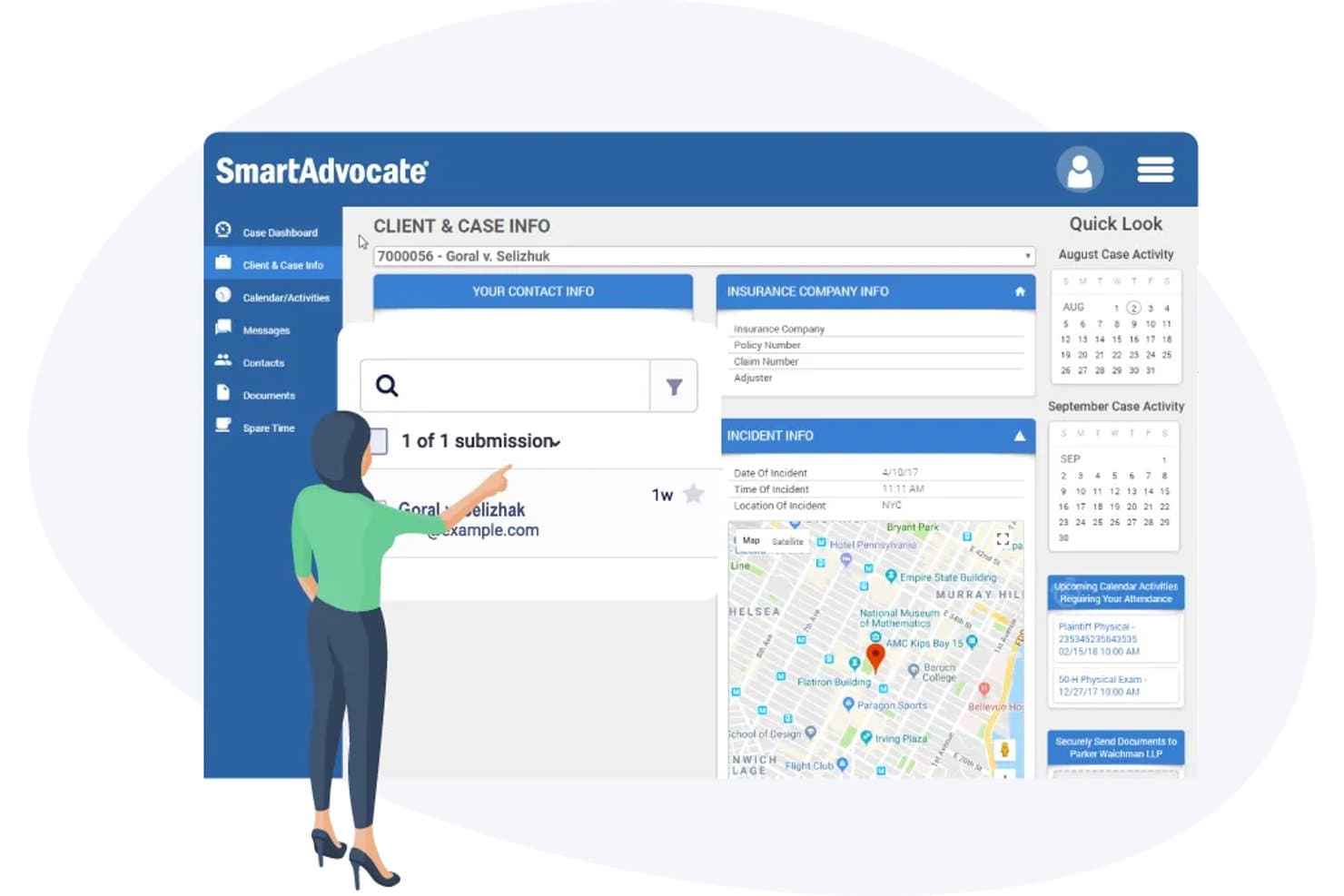
SmartAdvocate offers a comprehensive Client & Case Info dashboard with incident details, insurance company info, map view, and calendar activity tracking. SmartAdvocate is a legal case management platform built for plaintiff litigation practices, combining matter management, document automation, customizable workflows, client intake, and AI-powered case tools.
Who Is SmartAdvocate Best For?
Small to mid-size personal injury and mass tort firms where paralegals and intake staff handle high case volumes will find SmartAdvocate a natural fit.
Why I Picked SmartAdvocate
SmartAdvocate earns its spot on my shortlist because of how deeply you can automate matter workflows without relying on a developer. I use WorkPlans to build automated procedure chains that trigger tasks, send client texts, and generate documents the moment a case hits a specific stage. On top of that, the 4,000+ merge codes make templated document generation genuinely granular, so no two practice areas have to follow the same process.
SmartAdvocate Key Features
- AI Case Chat: Query and summarize case data, briefs, or medical records using built-in artificial intelligence tools.
- Court rules-based calendaring: Automatically calculates deadlines and court dates based on jurisdiction-specific rules.
- Unlimited document storage: Store, organize, and search thousands of matter documents with barcode-based batch scanning.
- Client portal integration: Share case updates, transmit documents, and securely message clients through connected portal solutions.
SmartAdvocate Integrations
SmartAdvocate offers native integrations with DocuSign, QuickBooks, Microsoft 365, LawToolBox, RingCentral, and Docubee. An API is available for custom integrations.
Pros and Cons
Pros:
- Purpose-built for high-volume plaintiff litigation
- AI tools built directly into case records
- Highly configurable WorkPlan automation per practice area
Cons:
- Not suited for transactional or non-litigation matters
- Steep setup time for new workflow configurations
Learn more about SmartAdvocate: Best for legal graph-powered AI
- Free trial + free demo available
- Pricing upon request
Visit WebsiteCustomer Rating:4.5/5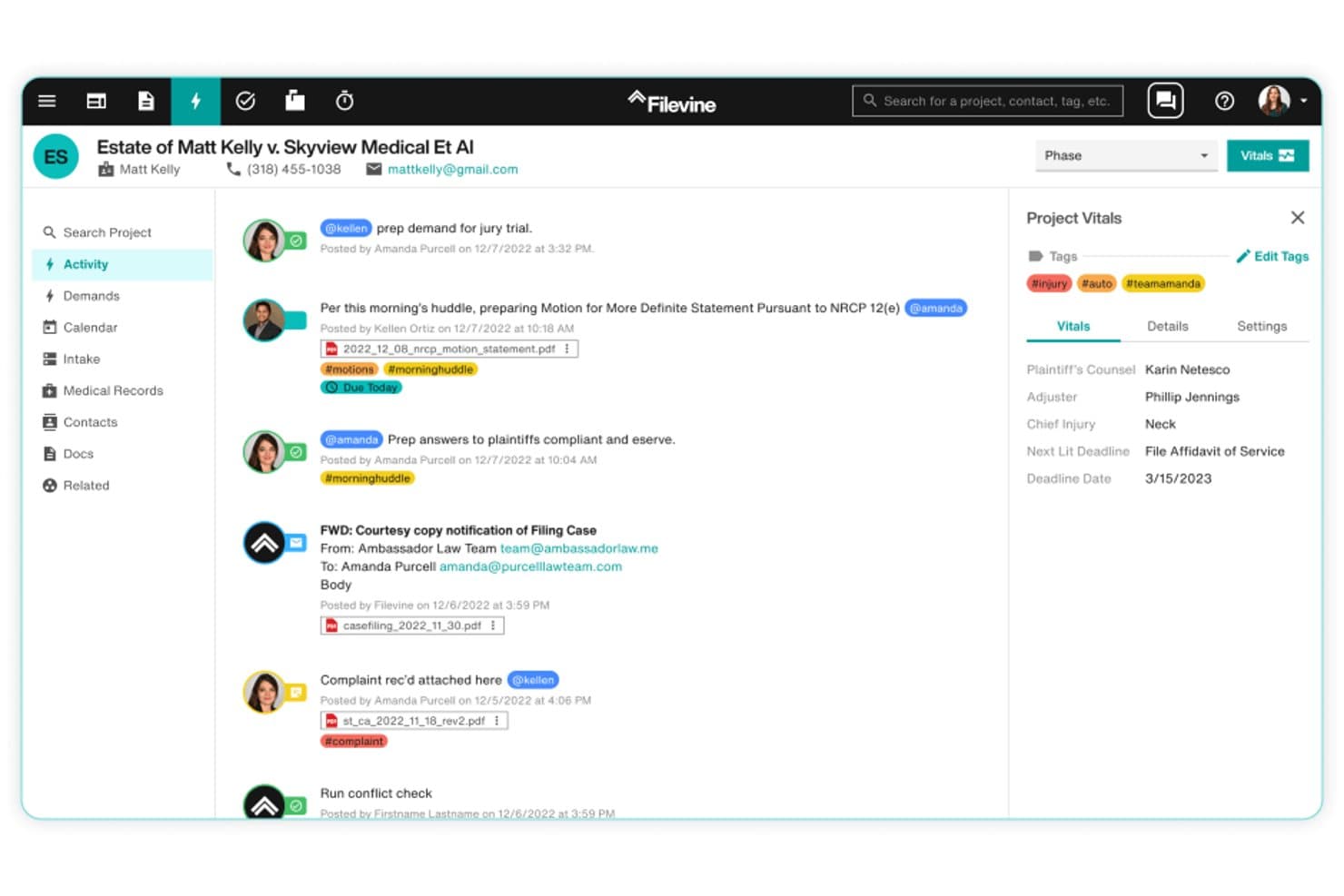
Filevine offers a real-time activity feed that centralizes case communications, tagged updates, document attachments, and project vitals in one unified legal case management view. Filevine is a cloud-based legal case management platform that combines matter management, AI-assisted document drafting, rules-based court deadline tracking, and end-to-end client intake in one system.
Who Is Filevine Best For?
Filevine is a strong fit for small to mid-size law firms running high-volume practice areas like personal injury, mass tort, or family law.
Why I Picked Filevine
I picked Filevine as one of the best because its AI layer, LOIS, is built on a legal graph trained on over 40 million matters. Unlike AI tools that summarize a single document on request, LOIS runs across every active matter in the firm simultaneously, setting tasks, adjusting deadlines, and generating documents without manual triggers. Ask LOIS lets me query case data in plain language and get source-linked answers I can trace directly back to the underlying record.
Filevine Key Features
- Project Hub: Offers a unified dashboard to see all matters, team activity, and deadlines in one place.
- Automated court calendaring: Generates jurisdiction-specific litigation deadlines for all 50 US states directly within the platform.
- Integrated e-signature (Vinesign): Enables clients and team members to sign documents securely through native digital signature functionality.
- Lead Docket intake management: Captures and automates new client intake, referral tracking, and lead conversion workflows.
Filevine Integrations
Filevine offers native integrations with QuickBooks Online, Microsoft 365, Google Workspace, Vinesign, Outlook, and Lead Docket. An API is also available for custom integrations.
Pros and Cons
Pros:
- Highly configurable per practice area type
- Automated court deadlines calculated by jurisdiction
- LOIS AI spans all active matters simultaneously
Cons:
- Built-in reporting lacks deep financial analytics
- Initial setup demands significant configuration time
Learn more about Filevine: Best for integrated billing and accounting
- 10-day free trial
- From $69/user/month
Visit WebsiteCustomer Rating:4.5/5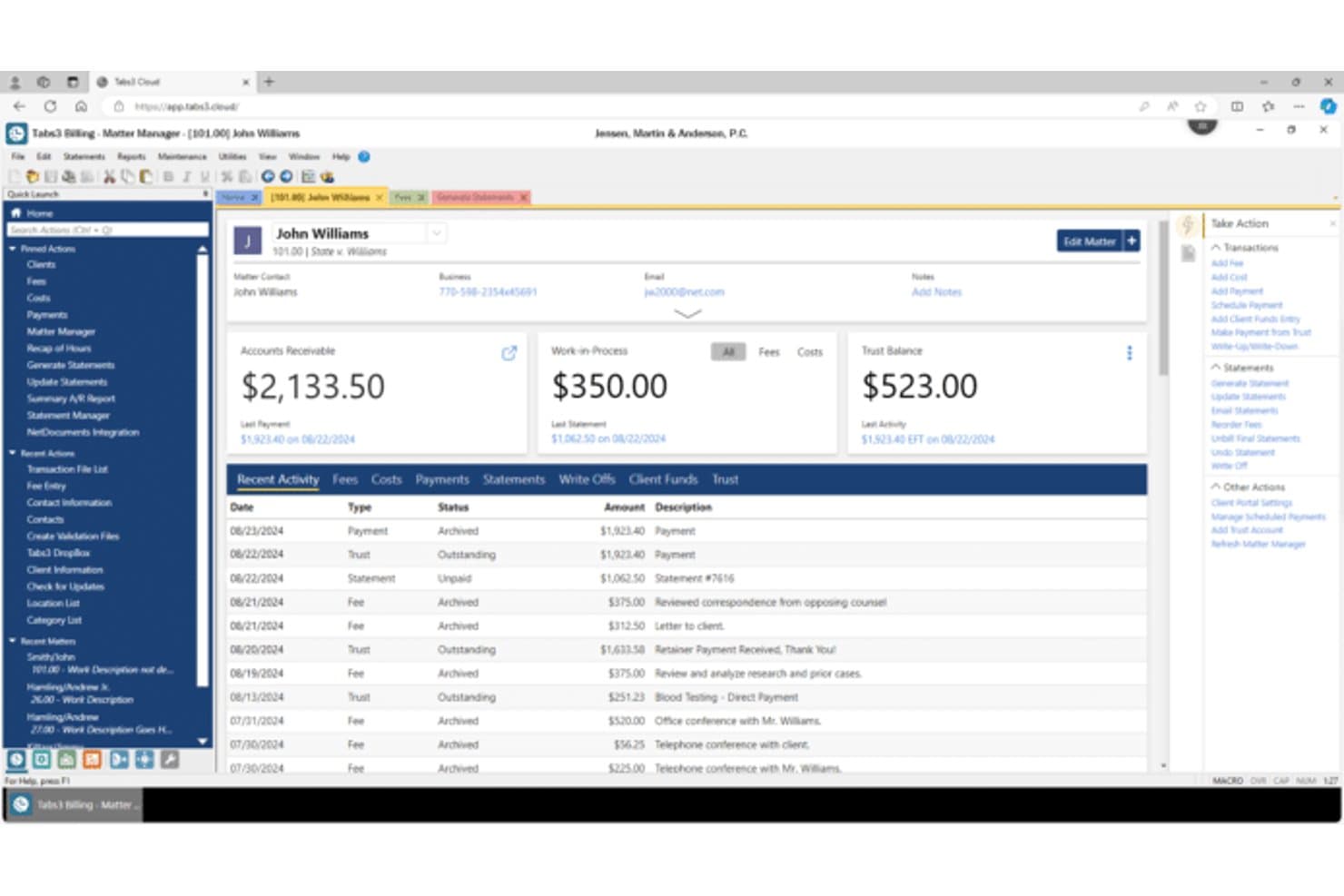
Tabs3 offers a detailed Matter Manager view displaying client accounts receivable, work-in-process, trust balance, and recent billing activity. Tabs3 is a legal practice management platform built around billing, trust accounting, and matter management, with modules covering time tracking, document assembly, calendaring, and firm-wide financial reporting.
Who Is Tabs3 Best For?
Tabs3 is a strong fit for small to midsize law firms where billing accuracy, trust accounting compliance, and financial oversight are the top priorities.
Why I Picked Tabs3
Tabs3 earns its spot on my shortlist because its billing and trust accounting go deeper than most legal platforms I've used. I particularly like the billing rate flexibility: you can set custom rate tables per client, run split billing across multiple responsible attorneys, and adjust flat fees without rebuilding an invoice from scratch. The trust accounting module handles three-way reconciliation and full IOLTA compliance, which I find gives firms real confidence going into a bar audit.
Tabs3 Key Features
- PracticeMaster matter management: Organize all client contacts, matter details, communications, and notes in one location for each case.
- CalendarRules integration: Automatically generate deadlines and reminders using state, federal, and local court rules for legal matters.
- Document assembly and automation: Create templates that auto-populate common pleadings and documents with matter and contact data.
- Conflict-of-interest search: Search for potential conflicts by partial word, phonetic similarity, or related party across all firm records.
Tabs3 Integrations
Tabs3 offers native integrations with Microsoft 365 (including Outlook and Word), CalendarRules for court deadline automation, HotDocs, and LexShare for file sharing and e-signature. An API is available for custom integrations.
Pros and Cons
Pros:
- Long-standing platform with proven financial reporting
- Granular billing rate controls per client and matter
- Deep IOLTA trust accounting compliance built in
Cons:
- Client portal capabilities lag behind newer platforms
- Interface feels dated compared to cloud-native competitors
Learn more about Tabs3: 4Best for personal injury case workflow
Neos
- Not available
- From $109/user/month (billed annually)
Visit WebsiteCustomer Rating:4.4/5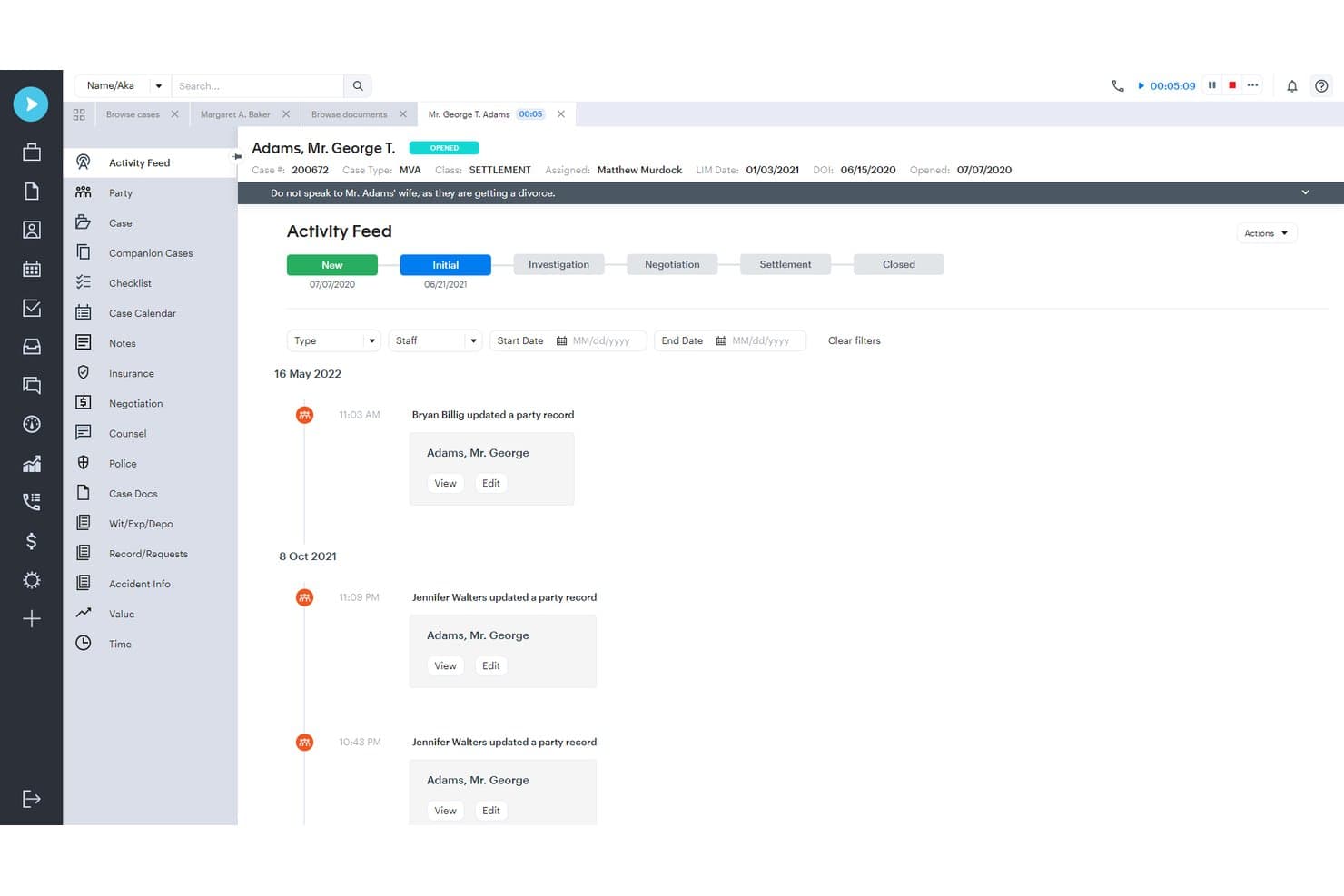
Neos offers a detailed Activity Feed that tracks case updates, staff actions, and key case information such as LIM dates, DOI, and case class in a chronological timeline. Neos is a cloud-based legal case management platform built for personal injury and plaintiff firms, combining matter management, document automation, client intake, AI-powered drafting, and case reporting in a single system.
Who Is Neos Best For?
Neos is a strong fit for small to mid-size personal injury and plaintiff firms with three or more staff managing high case volumes across auto accident, mass tort, and workers' comp practices.
Why I Picked Neos
I picked Neos as one of the best because it builds PI-specific workflows, like lien tracking, statute calculators, and settlement demand stages, directly into the case record rather than leaving firms to configure them from scratch. With NeosAI, I can generate demand letters and medical chronologies cited to the actual source PDFs already stored in the file. In practice, my team tracks case costs, manages medical liens, and triggers demand workflows all within the same case record.
Neos Key Features
- Custom dashboard reporting: Build real-time dashboards to monitor attorney outcomes, settlement trends, and case workflow metrics.
- Integrated email and calendar sync: Sync with Microsoft Outlook for central scheduling, calendaring, and case-related email management.
- SharePoint document integration: Use DocuFiler to bulk-scan, import, and manage files from SharePoint while preserving metadata.
- Role-based task assignment: Assign tasks to attorneys, paralegals, or teams with status tracking and time-stamped activity feeds.
Neos Integrations
Neos offers native integrations with Microsoft Outlook, QuickBooks, DocuSign, SharePoint, Case Status, and LawPay, and provides an API for custom integrations.
Pros and Cons
Pros:
- Highly configurable workflows per matter type
- NeosAI drafts demand letters from case files
- Built-in PI-specific lien and cost tracking
Cons:
- Mobile app has limited full-platform functionality
- Reporting customization requires admin-level setup
Learn more about Neos: Best for unified legal and business management
- Free demo available
- Pricing upon request
Visit WebsiteCustomer Rating:4.4/5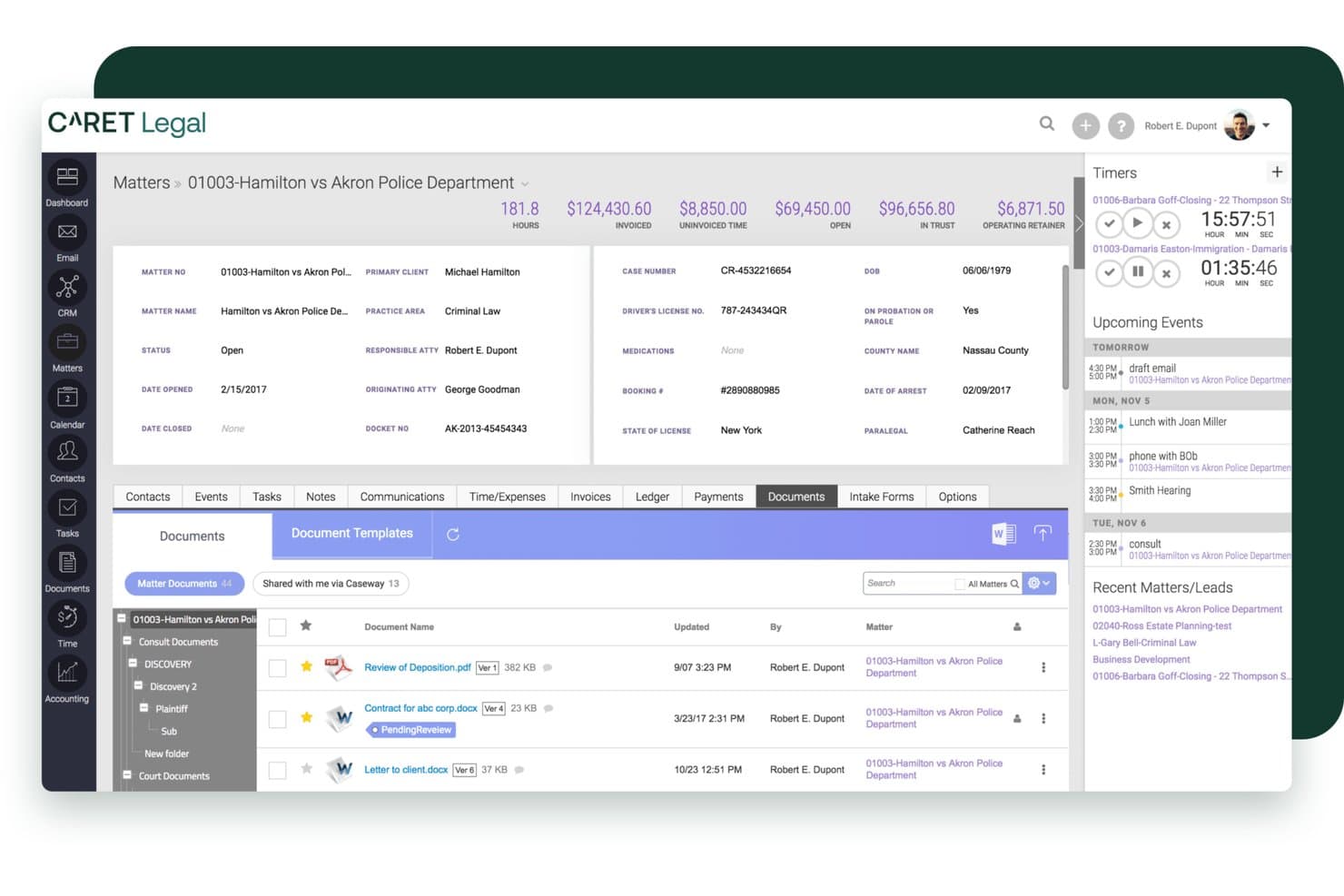
CARET Legal offers a comprehensive matter management interface with document tracking, billing summaries, timers, and upcoming events in a single dashboard view. CARET Legal is a cloud-based legal practice management platform that combines matter management, native email, document management, IOLTA-compliant trust accounting, and billing in a single system for law firms.
Who Is CARET Legal Best For?
CARET Legal is a strong fit for small-to-midsize law firms that want to replace disconnected tools with one system covering cases, billing, and accounting.
Why I Picked CARET Legal
I picked CARET Legal as one of the best because it's one of the few platforms where trust accounting and matter management genuinely share the same data layer. When a client pays through CARET Pay, the invoice automatically updates as paid, eliminating any manual reconciliation step. I also like CARET Workflows, which lets my team automate multi-step processes like setting up a deposition or drafting settlement negotiations, with role-based task visibility so each person only sees what's relevant to them.
CARET Legal Key Features
- Native email client: Manage and associate emails with matters directly through Microsoft 365, Google Workspace, or IMAP accounts.
- Integrated legal calendaring: Access advanced shared calendars with deadline calculation and bi-directional sync to Microsoft and Google.
- Document assembly templates: Generate standard legal documents using merge fields from matter data for consistent drafting.
- Conditional matter workflows: Set up automated task sequences based on specific practice area requirements within the platform.
CARET Legal Integrations
CARET Legal offers native integrations with Microsoft 365, Google Workspace, NetDocuments, LawToolBox, and Lawmatics, and provides an API for custom integrations.
Pros and Cons
Pros:
- Automated workflow sequences by practice area
- Trust accounting and billing share one data layer
- Native email client built into matter records
Cons:
- Mobile app functionality lags behind desktop
- Reporting customization options are limited
Learn more about CARET Legal:
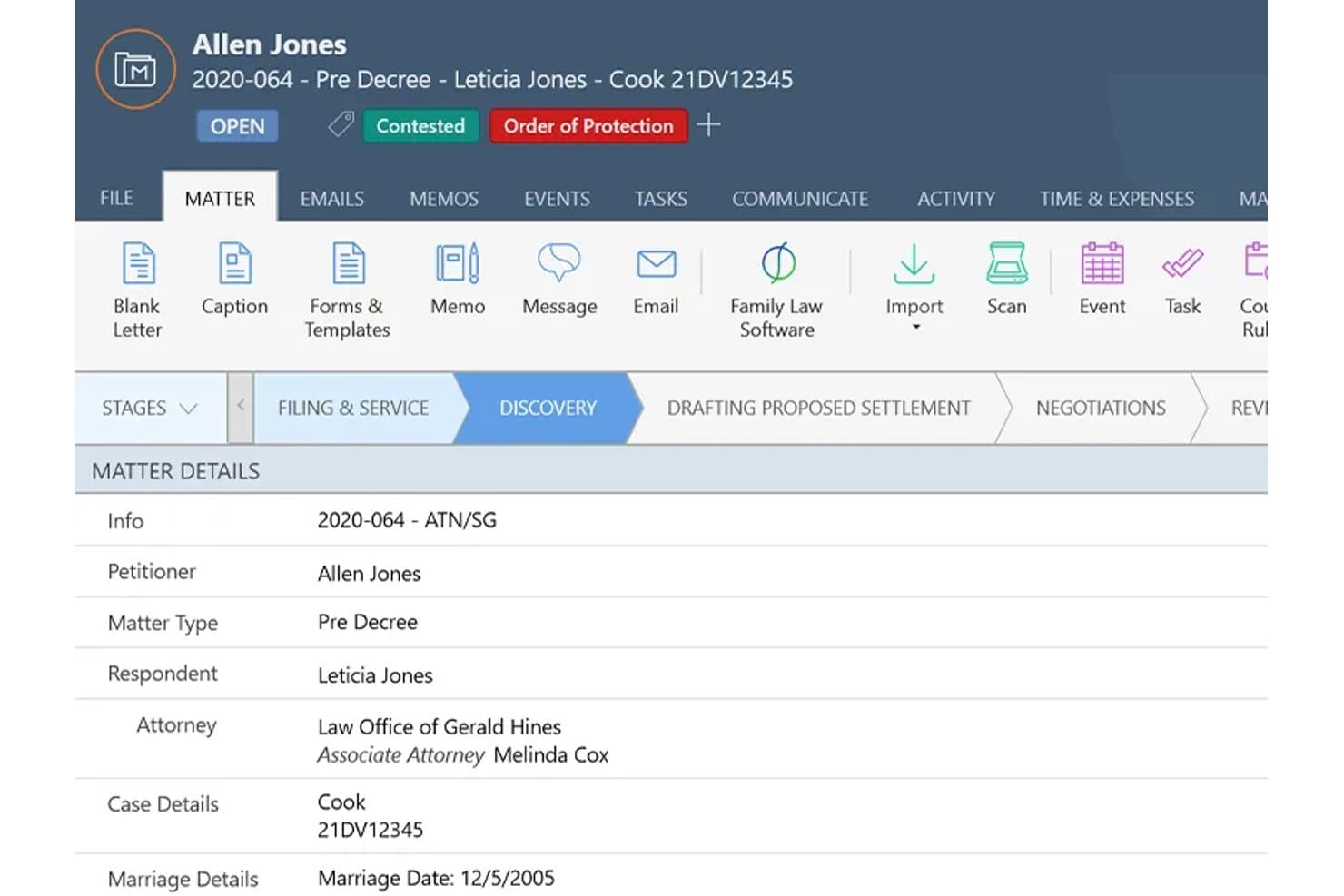
Smokeball offers a detailed matter management view displaying case stages, client details, attorney assignments, and case status in one centralized interface. Smokeball is a cloud-based legal practice management platform built for small and solo law firms, combining matter management, document automation, time tracking, billing, and trust accounting in one system.
Who Is Smokeball Best For?
Smokeball suits solo attorneys and small firm lawyers who handle high-volume practice areas like family law, real estate, or personal injury and need tight matter and billing control.
Why I Picked Smokeball
Smokeball earns its spot on my shortlist because AutoTime captures billable time automatically as I work, recording activity across Word documents, Outlook emails, and matter-related tasks without me ever starting a timer. That means I'm not reconstructing my day at 5pm trying to remember what I worked on. Paired with Firm Insights Reporting, I can see exactly where time is going across matters and staff, which makes profitability visible in a way manual tracking never could.
Smokeball Key Features
- Matter management templates: Choose from over 200 pre-built matter types for specific practice areas.
- Practice area calculators: Access calculators tailored to family law, real estate, and other legal specialties.
- Client portal: Share documents and updates securely with clients through an integrated portal.
- Document automation: Generate court forms, letters, and pleadings with merge fields and automated templates.
Smokeball Integrations
Smokeball offers native integrations with Microsoft Word, Microsoft Outlook, LawPay, and QuickBooks Online. An API is available for custom integrations.
Pros and Cons
Pros:
- Built-in IOLTA trust accounting with reconciliation tools
- 200+ matter templates organized by practice area
- AutoTime captures billable hours without manual input
Cons:
- Limited availability outside US and Australian markets
- Windows desktop app required for full functionality
Learn more about Smokeball: Best for broad practice area flexibility
- 7-day free trial
- From $49/user/month
Visit WebsiteCustomer Rating:4.7/5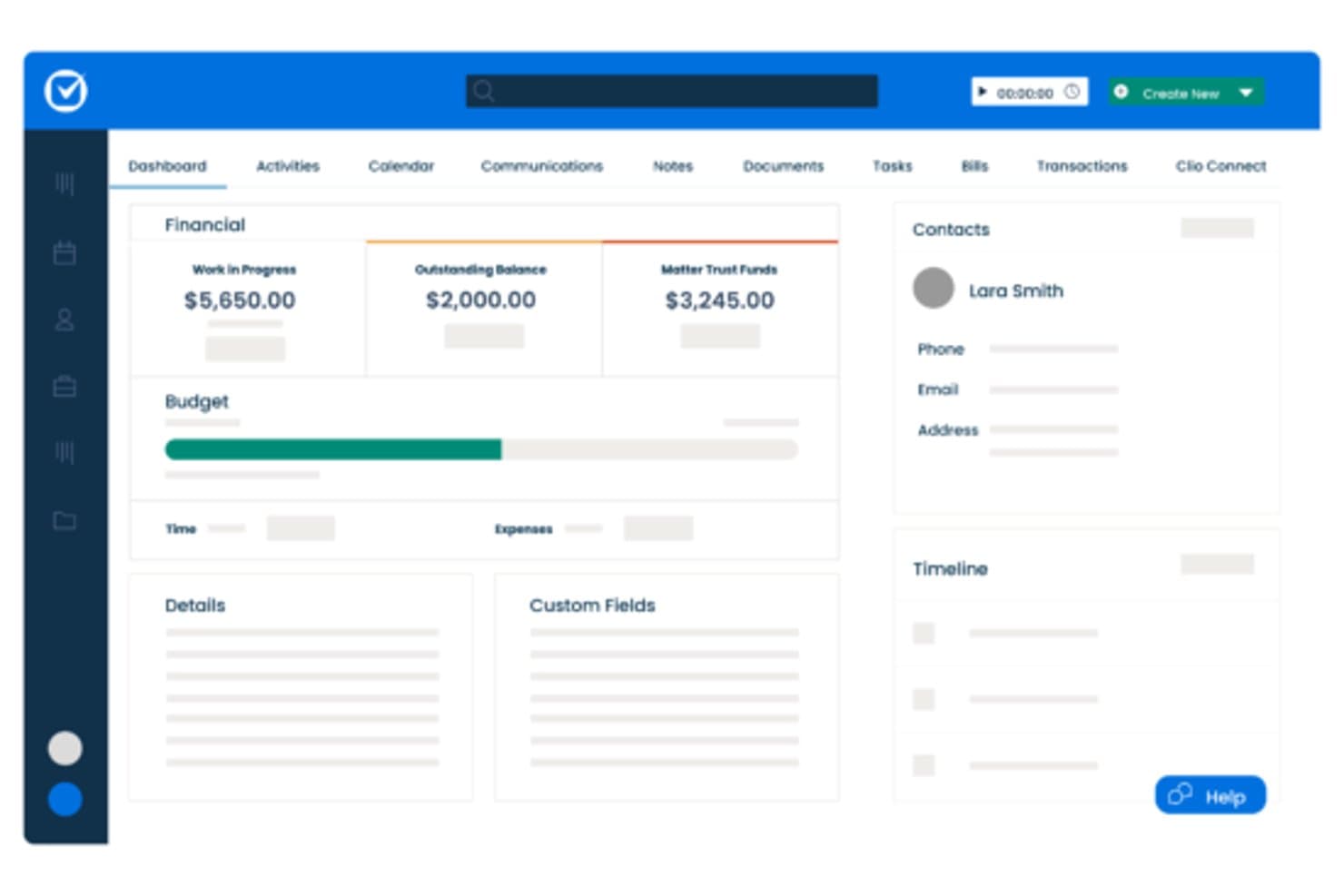
Clio Manage offers a matter dashboard displaying financial summaries, budget tracking, contacts, and custom fields for legal case management. Clio Manage is a cloud-based legal case management platform that covers matter management, time and billing, trust accounting, document storage, client communication, and calendaring across 17+ practice areas.
Who Is Clio Manage Best For?
Clio Manage is a strong fit for solo practitioners and small to mid-size law firms that need a single platform to handle both case management and billing.
Why I Picked Clio Manage
I've included Clio Manage in my top picks because it covers 17+ practice areas from one platform. I particularly like the configurable matter workflows, which let a criminal defense team and an estate planning group work side by side without compromising how each tracks its cases. The AI-powered feature that converts court documents into calendar events is something I find genuinely useful when juggling multiple practice areas at once.
Clio Manage Key Features
- AI-powered billing workflows: Draft invoices automatically from tracked time and expenses for faster billing cycles.
- Integrated trust accounting: Manage IOLTA-compliant trust accounts with three-way reconciliation and automatic ledger updates.
- Matter-centric document storage: Organize, search, and version documents directly within each case file for easy retrieval.
- Client portal and two-way messaging: Secure portal provides document sharing, online payments, and real-time chat with clients.
Clio Manage Integrations
Clio Manage offers native integrations with QuickBooks Online, Xero, Dropbox, Google Drive, Microsoft 365, DocuSign, LawPay, NetDocuments, Fastcase, and CalendarRules. An API is available for custom integrations.
Pros and Cons
Pros:
- IOLTA-compliant trust accounting built in
- Court rules-based docketing by jurisdiction
- Supports 17+ practice area workflows natively
Cons:
- Advanced reporting locked to higher-tier plans
- Mobile app lacks full desktop functionality
Learn more about Clio Manage: Best for integrated client communication
- 10-day free trial
- From $50/user/month (billed annually)
Visit WebsiteCustomer Rating:4.6/5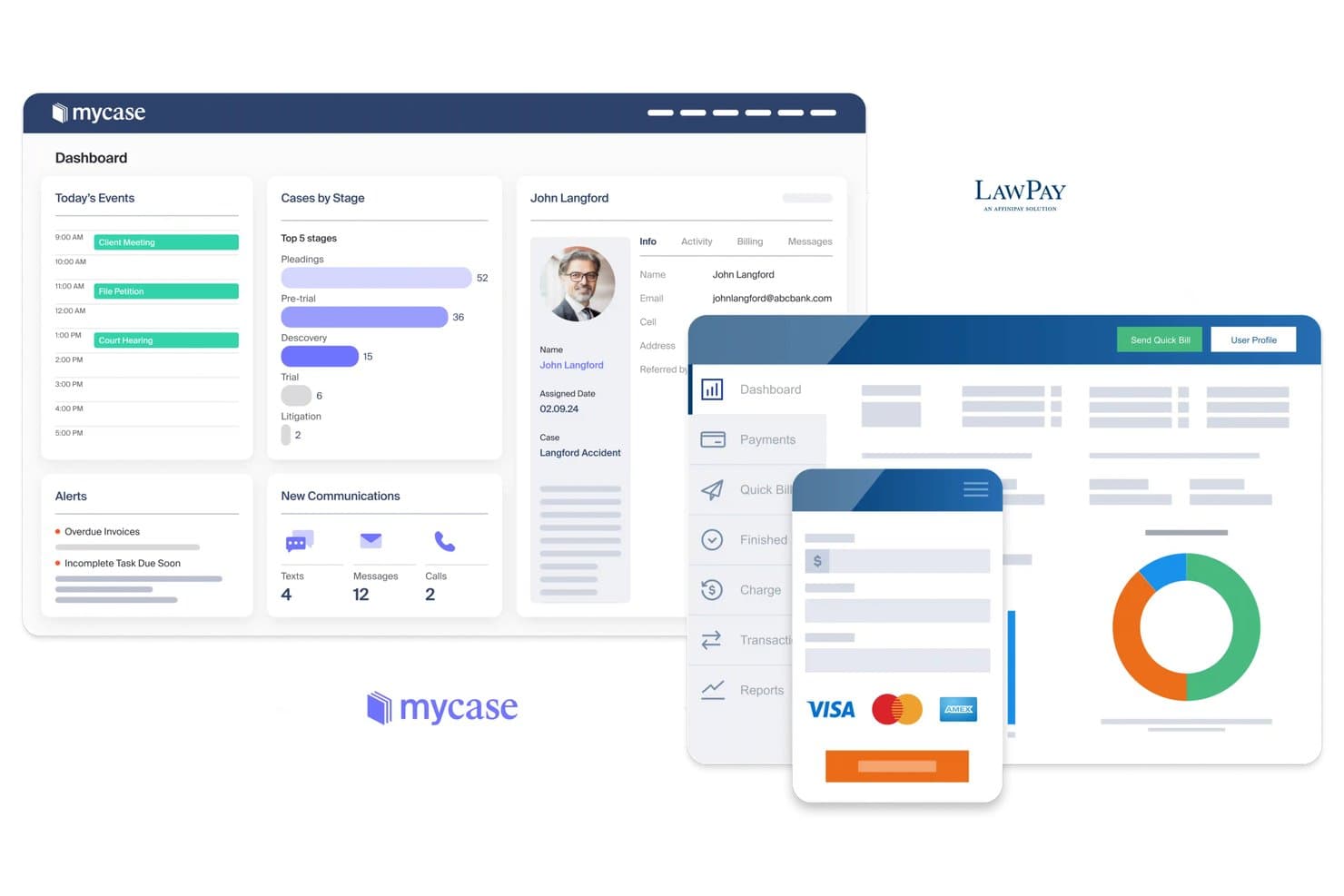
MyCase offers an integrated legal case management dashboard with client profiles, case tracking by stage, billing, and LawPay payment processing. MyCase is a cloud-based legal practice management platform that covers matter management, document storage, time tracking, billing, trust accounting, and client intake across the full case lifecycle.
Who Is MyCase Best For?
MyCase is a strong fit for solo practitioners and small-to-mid-sized law firms that need a single system to manage cases, clients, and billing.
Why I Picked MyCase
I've included MyCase in my top picks because of how it handles client communication at the matter level. I love that every case comes with a built-in client portal where clients can view updates, sign documents, and share files securely, without me chasing them by email. The dedicated 2-way texting number keeps all client messages logged directly inside the matter record, so nothing gets lost across personal phones or inboxes.
MyCase Key Features
- Court rules-based calendaring: Automates deadlines using jurisdiction-specific court rules for accurate date tracking.
- Three-way trust reconciliation: Complies with IOLTA requirements by reconciling client trust ledgers, bank statements, and trust balance reports.
- Document automation templates: Populates legal documents with matter data using merge fields and configurable templates.
- Advanced conflict check: Searches across matters, contacts, and related parties to support compliance and reduce risk.
MyCase Integrations
MyCase offers native integrations with LawPay, QuickBooks Online, NetDocuments, Dropbox, Google Workspace, Microsoft 365, Outlook, Gmail, and LawToolBox. An API is available for custom integrations.
Pros and Cons
Pros:
- IOLTA trust accounting with three-way reconciliation
- 2-way texting keeps client messages matter-linked
- Built-in client portal with secure document sharing
Cons:
- Mobile app lacks full desktop feature parity
- Reporting tools offer limited customization options
 Best for end-to-end legal workflow automation
- Free trial available
- From $49/user/month (billed annually)
Visit WebsiteCustomer Rating:4.3/5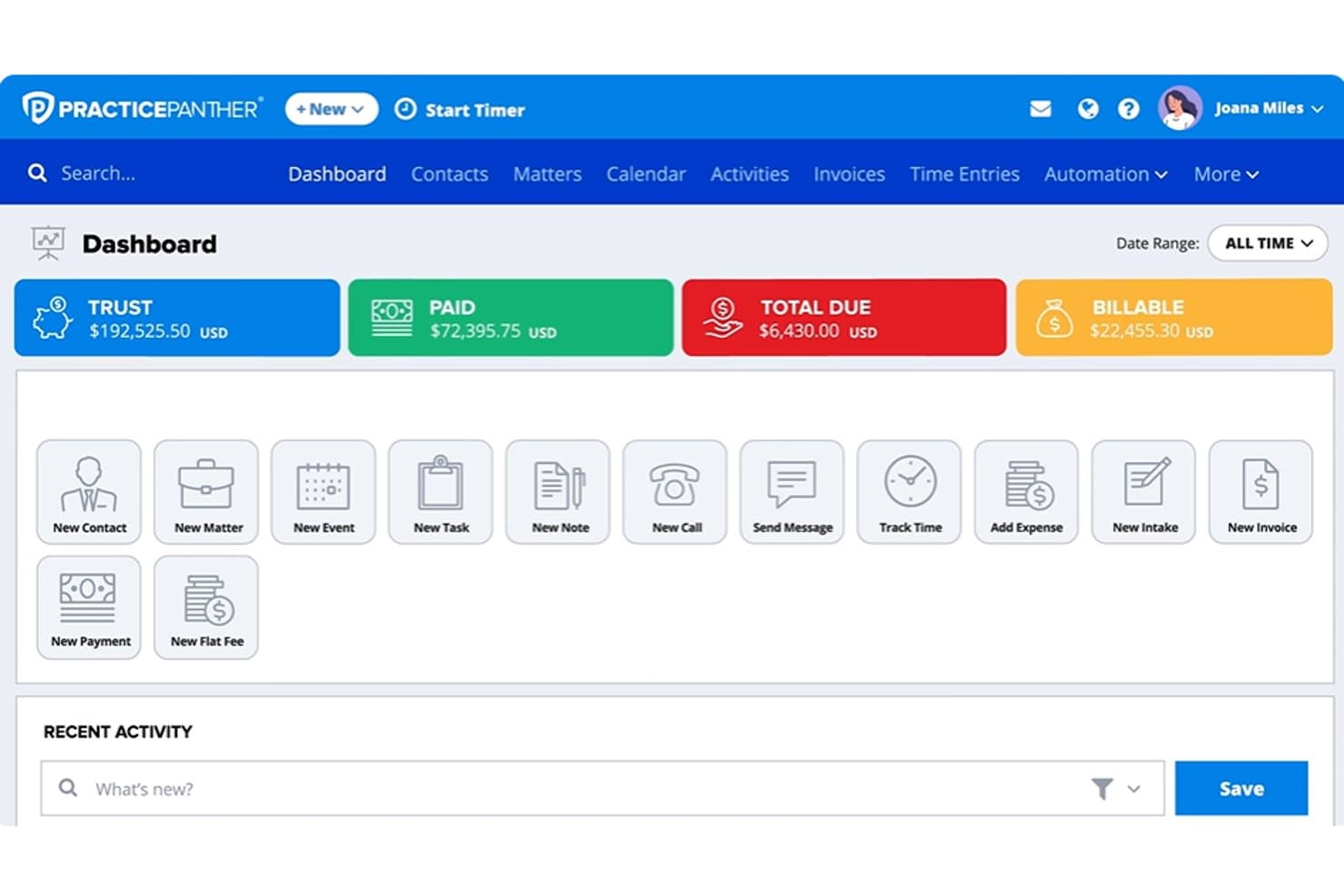
PracticePanther dashboard showing trust balances, payments, billable amounts, matters, and legal billing tools PracticePanther is a legal practice management platform that covers matter management, client intake, document automation, time tracking, billing, trust accounting, and client communication in a single system.
Who Is PracticePanther Best For?
Solo practitioners and small to mid-size firms that want intake, billing, trust accounting, and client communication running from a single platform without stitching together multiple tools.
Why I Picked PracticePanther
I've included PracticePanther in my top picks because it connects intake, billing, trust accounting, and client communication in a single system without requiring you to stitch together separate tools. I particularly like how conditional workflows can trigger tasks, checklists, and follow-up reminders the moment a client submits an intake form, which removes a lot of manual handoff between onboarding and active case management. The built-in trust reconciliation with three-way matching and low-balance alerts also covers a workflow that many platforms leave to a separate accounting add-on.
PracticePanther Key Features
- Full-text conflict check: Searches the entire system—including notes, tasks, emails, and custom fields—for a name or keyword to surface potential conflicts.
- MoneyFinder: Identifies activities that have been logged but not yet billed, so billable time doesn't slip through the cracks.
- Secure client portal: Gives clients access to shared documents, invoice balances, encrypted messages, and online payments from a branded portal.
- Custom security roles: Lets you restrict user access to specific areas of the software, including financial reports and trust account data.
PracticePanther Integrations
PracticePanther offers marketplace integrations with QuickBooks, Google Calendar, Microsoft Exchange, Google Drive, OneDrive, Dropbox, Box, and LawToolBox. It also provides an API and supports Zapier.
Pros and Cons
Pros:
- Three-way trust reconciliation supports ledger oversight
- Matter-linked time capture reduces missed billing
- Intake submissions trigger matter follow-ups
Cons:
- Reviewers report billing and retainer inaccuracies
- Court-rule deadline automation requires separate service
Learn more about PracticePanther: 10Best for built-in trust accounting
CosmoLex
- 10-day free trial
- From $49/user/month (billed annually)
Visit WebsiteCustomer Rating:4.3/5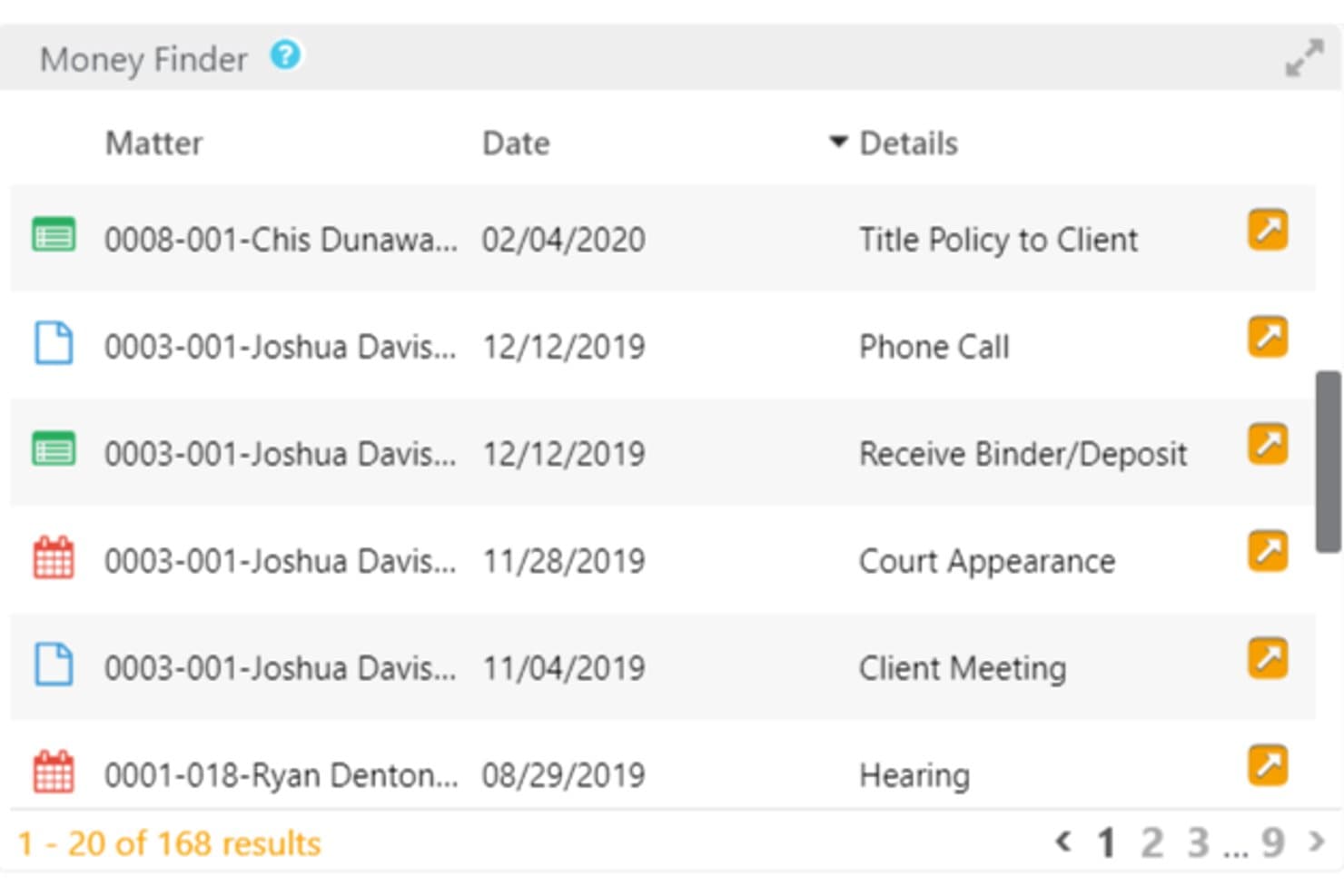
CosmoLex offers a Money Finder widget that surfaces unbilled or missed billable activities across client matters with dates and details. CosmoLex is a cloud-based legal practice management platform that combines matter management, time and billing, document management, client intake, and native trust and business accounting in a single system.
Who Is CosmoLex Best For?
CosmoLex is a strong fit for solo practitioners and small to mid-sized firms that want to manage matters and accounting without running separate software.
Why I Picked CosmoLex
CosmoLex earns its spot on my shortlist because trust accounting isn't bolted on as an add-on, it's native to the platform. I can run three-way reconciliation and set auto trust transfers without switching to a separate tool. What I appreciate most is that trust holds connect directly into the billing workflow, so payments are allocated correctly from the moment they hit the ledger.
CosmoLex Key Features
- Matter status board: Track the progress of each case with a visual status board that updates in real time.
- Automated workflows: Build custom workflows with task dependencies and trigger-based automation for repetitive case tasks.
- Integrated document management: Store, organize, and retrieve files within each matter, with built-in version tracking and permissions.
- Conflict check: Run automated conflict of interest checks across all clients and matters directly from the platform.
CosmoLex Integrations
CosmoLex offers native integrations with NetDocuments, OneDrive, Dropbox, Office 365, Google Workspace, LawPay, and QuickBooks Online. An API is available for custom integrations.
Pros and Cons
Pros:
- Supports IOLTA compliance across multiple jurisdictions
- Billing and matter data stay fully synced
- Native trust accounting requires no third-party software
Cons:
- Document management less advanced than dedicated DMS tools
- Reporting tools offer limited customization options
Learn more about CosmoLex:
Annen programvare for juridisk saksbehandling
Her er noen flere alternativer for programvare for juridisk saksbehandling som ikke kom med på kortlisten min, men som likevel er verdt å undersøke:
- 11Rocket MatterBest for QuickBooks financial integration
- 12AbacusLawBest for rules-based court calendaring
- 13CasePeerBest for personal injury case intake workflows
- 14CloudLexBest for integrated paralegal services
- 15ActionstepBest for firm-wide process automation
- 16LawmaticsBest for client intake and marketing automation
- 17LitifyBest for enterprise-grade analytics
- 18CenterbaseBest for AI-driven business intelligence
How I Evaluate Legal Case Management Software
I split my evaluation into what a tool must do to make the list—matter management, trust accounting, docketing—and what makes one platform worth choosing over another.
Core Functionality (Table Stakes For This List)
When I'm selecting tools for my list, I rank each one on a scale from 0 (does not offer the functionality) to 5 (excels in this area) for each core functionality listed below. Then, I calculate the tool's total score into a percentage. Each tool needs to achieve a minimum total score of 65% to be considered for inclusion.
- Matter Management: I look for matter records that link contacts, notes, and documents, with custom fields that flex across practice areas like immigration or estate planning.
- Document Management: Each tool should offer matter-organized folders, version tracking, and merge-field templates for auto-populating pleadings or engagement letters.
- Calendaring & Docketing: I evaluate whether deadline chains auto-calculate from court rules, since one missed statute of limitations can mean a malpractice claim.
- Time & Billing: Built-in timers, multiple billing rates, and LEDES-compatible invoicing should tie hours and expenses directly to each matter and client.
- Trust Accounting: Three-way reconciliation and IOLTA ledger support are what I check first, along with audit trails that hold up during bar compliance reviews.
- Client Intake & Communication: Intake forms, conflict checking, and secure portals where clients can view case updates, share documents, and sign retainer agreements matter most.
Once I have a list of tools that meet the criteria, I consider what sets each platform apart.
Differentiating Factors (What Sets Vendors Apart)
Here's how I compare and contrast different vendors:
Standout Features
Client intake automation is a big differentiator. I look for tools that convert web leads into matter records with conflict checks and e-signatures built into the flow, not bolted on. Document automation templates also vary widely; the best let you auto-populate pleadings and retainer agreements from matter data using merge fields. I also evaluate client portals where clients can check case status, upload documents, and pay invoices without sending unencrypted emails.
Beyond Features
Practice area fit matters a lot. A personal injury firm needs pre-built workflows for demand packages and settlement tracking, while a general practice firm needs flexibility across matter types. I also evaluate security posture—SOC 2 Type II certification, encryption, and access controls that protect attorney-client privilege. Implementation support is another key factor, especially data migration from legacy systems like PCLaw or Time Matters, where poor planning can stall adoption for months.
Slik velger du programvare for juridisk saksbehandling
Det er lett å gå seg vill i lange funksjonslister og kompliserte prismodeller. For å hjelpe deg med å holde fokus mens du går gjennom den unike prosessen med å velge programvare, har vi laget en sjekkliste over faktorer du bør ha i tankene:
| Faktor | Hva du bør vurdere |
| Skalerbarhet | Vil programvaren støtte veksten din – nye brukere, lokasjoner eller praksisområder – uten omfattende rekonfigurering eller kraftige kostnadsøkninger? |
| Integrasjoner | Kan den kobles til regnskaps-, e-post-, e-signatur- og dokumentverktøyene dine, slik at du unngår dobbeltregistrering eller datasiloer? |
| Tilpasningsmuligheter | Kan du tilpasse felt, arbeidsflyter og maler til firmaets spesifikke prosesser eller samsvarsbehov, eller er du bundet til rigide standardinnstillinger? |
| Brukervennlighet | Vil advokater og ansatte faktisk ta i bruk verktøyet, eller vil navigasjon, opplæring eller klønete grensesnitt gjøre alle mindre effektive? |
| Implementering og innføring | Hvordan ser migreringen ut – særlig fra eldre saksbehandlingssystemer, regneark eller papirarkiver? Er opplæringsressursene og kundestøtten tilstrekkelige? |
| Kostnad | Vær oppmerksom på kostnader som datamigrering, lagring eller avanserte funksjoner i høyere prisnivåer, i tillegg til brukeravgifter, før du signerer en avtale. |
| Sikkerhetstiltak | Er klientdata kryptert både under lagring og overføring? Finnes det avanserte tillatelser og revisjonsspor som oppfyller advokatregler og interne retningslinjer? |
| Samsvarskrav | Støtter plattformen kravene til klientmiddelhåndtering, oppbevaring av dokumentasjon og rapportering som gjelder i jurisdiksjonen firmaet ditt må følge? |
Hva er programvare for juridisk saksbehandling?
Programvare for juridisk saksbehandling er én av flere kategorier av juridisk programvare som hjelper advokatfirmaer og juridiske team med å organisere, følge opp og administrere saksmapper, frister, fakturering, dokumenter og klientkommunikasjon. Den samler saksopplysninger på ett sted, automatiserer rutineprosesser og støtter overholdelse av juridiske og etiske forpliktelser. Dette gjør det enklere for juridiske fagpersoner å håndtere et økende antall saker og opprettholde nøyaktighet gjennom alle stadier av sakens livssyklus.
Funksjoner i programvare for juridisk saksbehandling
Når du velger programvare for juridisk saksbehandling, bør du se etter følgende viktige funksjoner:
- Saksadministrasjon: Samler alle saksmapper, kontakter, notater og aktiviteter på ett sted, slik at du enkelt kan følge sakens fremdrift og tilhørende informasjon fra start til slutt.
- Dokumenthåndtering: Lagrer, organiserer og versjonshåndterer juridiske dokumenter, gir rask gjenfinning og gjør det mulig å bruke dokumentsmaler for den enkelte sak eller hele firmaet.
- Kalender- og friststyring: Følger opp frister, foreldelsesfrister, rettsdatoer og oppgaver med automatiske påminnelser og regelbaserte datoberegninger for å unngå at innleveringsfrister oversittes.
- Tidsregistrering og fakturering: Registrerer fakturerbare timer, oppretter fakturaer, håndterer flere fakturasatser og knytter all tidsbruk og alle utgifter til bestemte saker og klienter.
- Klientmiddelhåndtering: Håndterer klienters innbetalinger og utbetalinger fra klientmiddelkonti i samsvar med IOLTA, inkludert treveisavstemming, revisjonsspor og jurisdiksjonsspesifikke krav.
- Klientinntak: Automatiserer registreringen av nye klienter med tilpassbare inntaksskjemaer, kontroll av interessekonflikter og sømløs konvertering av potensielle klienter til aktive saker.
- Sikker klientportal: Gjør det mulig for klienter å se saksstatus, utveksle dokumenter på en sikker måte, signere skjemaer og betale fakturaer på nett – alt på ett sted.
- Oppgavehåndtering: Tildeler, følger opp og oppdaterer teamoppgaver i sakene for å sikre ansvarlighet og effektivt samarbeid mellom advokater, advokatfullmektiger og øvrige ansatte.
- Rapportering og analyse: Gir innsikt i saksfremdrift, fakturerbare timer, arbeidsflyter og økonomiske resultater ved hjelp av tilpassbare oversikter og nedlastbare rapporter.
- Rollebaserte tillatelser: Styrer hvem som kan se, redigere eller få tilgang til sensitiv saksinformasjon, og støtter solid databeskyttelse og advokat-klient-fortrolighet.
Vanlige KI-funksjoner i programvare for juridisk saksbehandling
I tillegg til standardfunksjonene i programvare for juridisk saksbehandling som er nevnt ovenfor, integrerer mange av disse løsningene KI-funksjoner som:
- Automatisert dokumentgjennomgang: Bruker kunstig intelligens til å skanne, analysere og flagge problemer eller manglende informasjon i kontrakter, prosesskriv og dokumenter fra bevisoppdagelsen, slik at tiden brukt på manuell gjennomgang reduseres.
- Prediktiv friststyring: Kunstig intelligens analyserer saksdata og rettsregler for å forutse mulige fristkonflikter eller risikoer, og varsler teamene før problemer oppstår.
- Smart konfliktsjekk: Utnytter kunstig intelligens til å kryssreferere nye saker og kontakter mot firmaets databaser, slik at mulige interessekonflikter identifiseres mer nøyaktig og raskere.
- Juridisk forskning med kunstig intelligens: Integreres med forskningsdatabaser for å foreslå relevant rettspraksis, lovbestemmelser eller presedenser basert på faktaene og konteksten i hver sak.
- Intelligent tidsregistrering: Bruker kunstig intelligens til å oppdage fakturerbare aktiviteter i e-poster, kalenderhendelser og dokumentredigeringer, og foreslår automatisk tidsregistreringer for gjennomgang.
- Automatisert klientkommunikasjon: Kunstig intelligens utarbeider utkast til rutinemessige klientoppdateringer, påminnelser eller oppfølginger basert på sakens status og nylige aktiviteter, slik at den administrative arbeidsmengden reduseres.
Fordeler med programvare for juridisk saksbehandling
Implementering av programvare for juridisk saksbehandling gir flere fordeler for teamet og virksomheten din. Her er noen av fordelene du kan se frem til:
- Bedre organisering av saker: Hold alle filer, kontakter, frister og notater samlet i ett sikkert og søkbart arbeidsområde, slik at tap av informasjon og forvirring unngås.
- Forbedret klientkommunikasjon: Klientportaler og sikker meldingsutveksling gjør det enkelt å dele saksoppdateringer og dokumenter, samtidig som konfidensialitet og profesjonalitet ivaretas.
- Redusert administrativ arbeidsmengde: Automatiser oppstart av saker, dokumentgenerering, fakturering og oppgaver knyttet til etterlevelse, slik at teamet kan fokusere på juridisk arbeid i stedet for manuelle prosesser.
- Bedre kontroll med etterlevelse: Klient- og sakshåndtering, revisjonsspor og detaljerte brukertillatelser hjelper deg med å oppfylle regler fra advokatforeningen, klientkrav og personvernforpliktelser.
- Forbedret samarbeid: Delte kalendere, oppgavetildelinger og sentraliserte saksdata gir bedre oversikt og ansvarlighet i teamet på tvers av alle saker.
- Raskere fakturering og innkreving: Tidtakere, LEDES-fakturering og verktøy for nettbetaling hjelper deg med å fakturere raskt og gir klientene fleksible betalingsalternativer.
- Datadrevet beslutningstaking: Rapporterings- og analyseverktøy avdekker innsikt om arbeidsmengde, inntekter og saksfremdrift, slik at du kan styre virksomheten strategisk.
Kostnader og priser for programvare for juridisk saksbehandling
Valg av programvare for juridisk saksbehandling krever en forståelse av de ulike prismodellene og abonnementene som er tilgjengelige. Disse kan variere fra gratis programvare for juridisk saksbehandling til mer avanserte betalte abonnementer, der kostnadene varierer basert på funksjoner, teamstørrelse, tillegg og mer. Tabellen nedenfor oppsummerer vanlige abonnementer, gjennomsnittsprisene deres og typiske funksjoner som inngår i løsninger for juridisk saksbehandling:
Sammenligningstabell for abonnementer på programvare for juridisk saksbehandling
| Abonnementstype | Gjennomsnittspris | Vanlige funksjoner |
| Gratisabonnement | $0 | Grunnleggende sakssporing, begrenset dokumentlagring og enkel kalenderfunksjonalitet. |
| Personlig abonnement | $20-$40/bruker/måned | Fullstendig saksbehandling, grunnleggende dokumenthåndtering, enkle faktureringsverktøy og brukerstøtte via e-post. |
| Bedriftsabonnement | $40-$80/bruker/måned | Avansert dokumentautomatisering, integrert tidsregistrering og fakturering, klientportal, klient- og sakshåndtering og oppgavestyring. |
| Virksomhetsabonnement | $80-$150/bruker/måned | Tilpassede arbeidsflyter, rollebaserte tillatelser, åpent API, prioritert brukerstøtte, verktøy for etterlevelse og avansert rapportering. |
Vanlige spørsmål om programvare for juridisk saksbehandling
Her er noen svar på vanlige spørsmål om programvare for juridisk saksbehandling:
Kan programvare for juridisk saksbehandling bidra til etterlevelse og regnskapsføring av klientmidler?
Ja, mange plattformer tilbyr funksjoner som IOLTA-håndtering, treveisavstemming, revisjonsspor og tilpassbare rapporter for etterlevelse. Disse verktøyene hjelper advokatfirmaer med å oppfylle etikkrav som gjelder i den aktuelle jurisdiksjonen, og forebygger kostbare feil i arbeidet med etterlevelse.
Hvor sikker er programvare for juridisk saksbehandling?
Sikkerhetstiltakene varierer, men de beste løsningene bruker kryptering, rollebaserte tillatelser, MFA og SOC 2 Type II-sertifisering. Du bør gjennomgå hver leverandørs sikkerhetsdokumentasjon og retningslinjer for datastyring for å sikre at de oppfyller firmaets krav til personvern og regelverksetterlevelse.
Kan denne programvaren integreres med verktøyene jeg allerede bruker?
Ja, de fleste alternativene tilbyr integrasjoner med verktøy som QuickBooks, Microsoft 365, Google Workspace og plattformer for elektroniske signaturer. Sjekk om programvaren har innebygde integrasjoner eller et API hvis firmaet ditt er avhengig av spesialtilpassede applikasjoner eller trenger bestemte tilkoblinger til tredjeparter.
Hva innebærer det å migrere fra et eldre system?
Migrering omfatter vanligvis datakartlegging, overføring av kontakter, saker og faktureringsoppføringer, samt verifisering og opprydding. Se etter leverandører med innføring tilpasset juridisk virksomhet og dedikert migreringsstøtte for å minimere nedetid og gjøre overgangen enklere for teamet ditt.
Finnes det opplæring for ansatte?
Ja, de fleste leverandører tilbyr innføringsøkter, ressurser i hjelpesenteret, webinarer og direktestøtte. Noen tilbyr også videobiblioteker på forespørsel og sertifiseringsprogrammer for å hjelpe både nye og erfarne ansatte med å komme raskt i gang og få størst mulig utbytte av programvaren.