

Programvare for juridisk saksbehandling for små firmaer hjelper deg med å organisere saker, administrere dokumenter, føre oversikt over tid og effektivisere kommunikasjonen—all fra ett sted. Hvis du ser etter de beste verktøyene for å forenkle praksisadministrasjonen, holde oversikt over saksmengden og frigjøre tid til klientarbeid, har du kommet til rett sted. Nedenfor finner du en tydelig oversikt over de beste tilgjengelige alternativene i 2026—slik at du kan sammenligne funksjoner og velge det som passer best for firmaets størrelse, arbeidsflyt og mål.
Why Trust Our Software Recommendations
6,700+
Reviews
20
Industry experts
16+
Evaluation factors
14
Years
Our team has been testing and reviewing software since 2012. As legal practice leaders ourselves, we know how difficult—and important—it is to choose the right software.
For this guide, we evaluated tools using hands-on testing and independent research, scoring tools using our selection criteria.
Our reviews reflect our human editorial judgment, not a sales pitch.
Sammenligningstabell for juridisk saksbehandlingsprogramvare
| Tool | Best For | Trial Info | Price | ||
|---|---|---|---|---|---|
| 1 | Best for legal billing and accounting | 10-day free trial | From $69/user/month | Website | |
| 2 | Best for time tracking and invoicing | Free demo + 10-day free trial available | From $43/user/month (billed annually) | Website | |
| 3 | Best for document-heavy legal practices | Free demo available | Pricing upon request | Website | |
| 4 | Best for billing and productivity management | 10-day free trial | From $59/user/month (billed annually) | Website | |
| 5 | Best for customizable legal workflows | Free demo available | Pricing upon request | Website | |
| 6 | Best for document and workflow automation | Not available | Pricing upon request | Website | |
| 7 | Best for all-in-one small firm management | 7-day free trial | From $49/user/month | Website | |
| 8 | Best for client communication and case tracking | 10-day free trial | From $50/user/month (billed annually) | Website | |
| 9 | Best for built-in legal accounting | 10-day free trial | From $49/user/month (billed annually) | Website | |
| 10 | Best for intuitive case and billing workflows | 7-day free trial | From $59/user/month | Website |


Anmeldelser av den beste juridiske saksbehandlingsprogramvaren for små firmaer
Nedenfor finner du mine detaljerte sammendrag av den beste juridiske saksbehandlingsprogramvaren for små firmaer som kom med på kortlisten min. Anmeldelsene mine gir en detaljert gjennomgang av funksjonene, de beste bruksområdene og integrasjonene til hver programvare, slik at du kan finne den beste for deg.
 Best for legal billing and accounting
- 10-day free trial
- From $69/user/month
Visit WebsiteCustomer Rating:4.5/5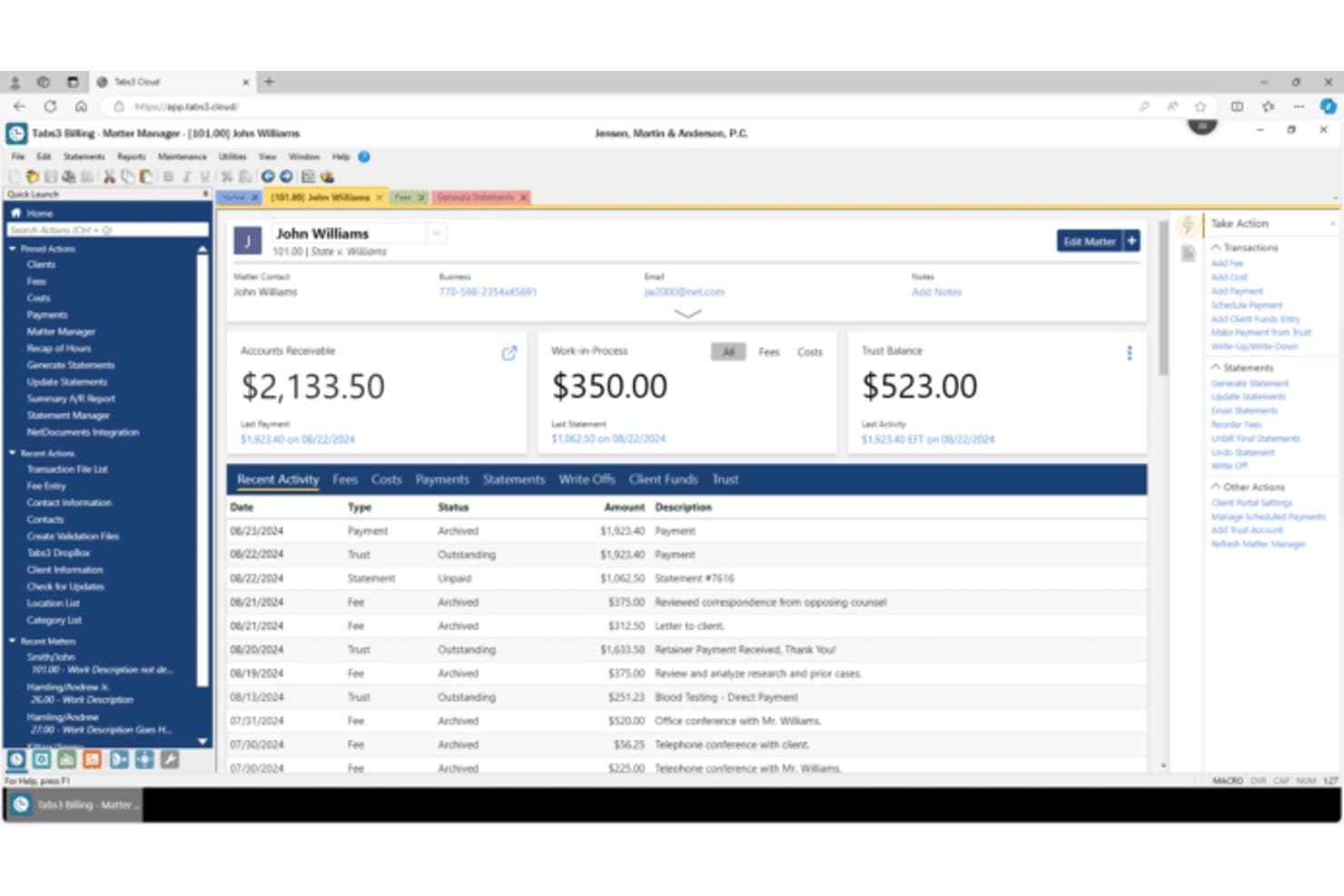
Tabs3 offers a detailed Matter Manager interface displaying client billing, accounts receivable, work-in-process, and recent activity for small law firms. Tabs3 is a legal practice management platform that combines matter management, time tracking, billing, trust accounting, and client intake tools built specifically for solo practitioners and small to midsize law firms.
Who Is Tabs3 Best For?
Tabs3 is a natural fit for small law firms where billing accuracy and trust accounting compliance are central to daily operations.
Why I Picked Tabs3
I picked Tabs3 as one of the best because its billing and trust accounting tools are genuinely built around how law firms actually work. I can set up multiple billing rate structures per matter, run batch invoicing across clients, and accept ACH payments through Tabs3Pay without leaving the platform. The trust accounting module handles three-way reconciliation and generates compliance-ready reports, which I find invaluable when bar audits come up.
Tabs3 Key Features
- Matter-centric dashboard: View all matter details, key contacts, events, and documents from a single, organized screen.
- PracticeMaster cloud access: Manage cases, contacts, calendars, and intake securely from any location via browser-based access.
- Conflict of interest checking: Search across contacts, matters, and notes to identify potential conflicts before intake.
- Custom workflow automation: Set up automated tasks, reminders, or document generation triggered by matter status changes.
Tabs3 Integrations
Tabs3 offers native integrations with NetDocuments, HotDocs, WORLDOX, QuickBooks Online, and LawPay. An API is available for custom integrations.
Pros and Cons
Pros:
- Detailed billing rate customization per matter
- Batch invoicing across multiple client matters
- Strong trust accounting with three-way reconciliation
Cons:
- Setup requires significant technical configuration time
- Desktop-first design limits mobile access
Learn more about Tabs3: Best for time tracking and invoicing
- Free demo + 10-day free trial available
- From $43/user/month (billed annually)
Visit WebsiteCustomer Rating:4.5/5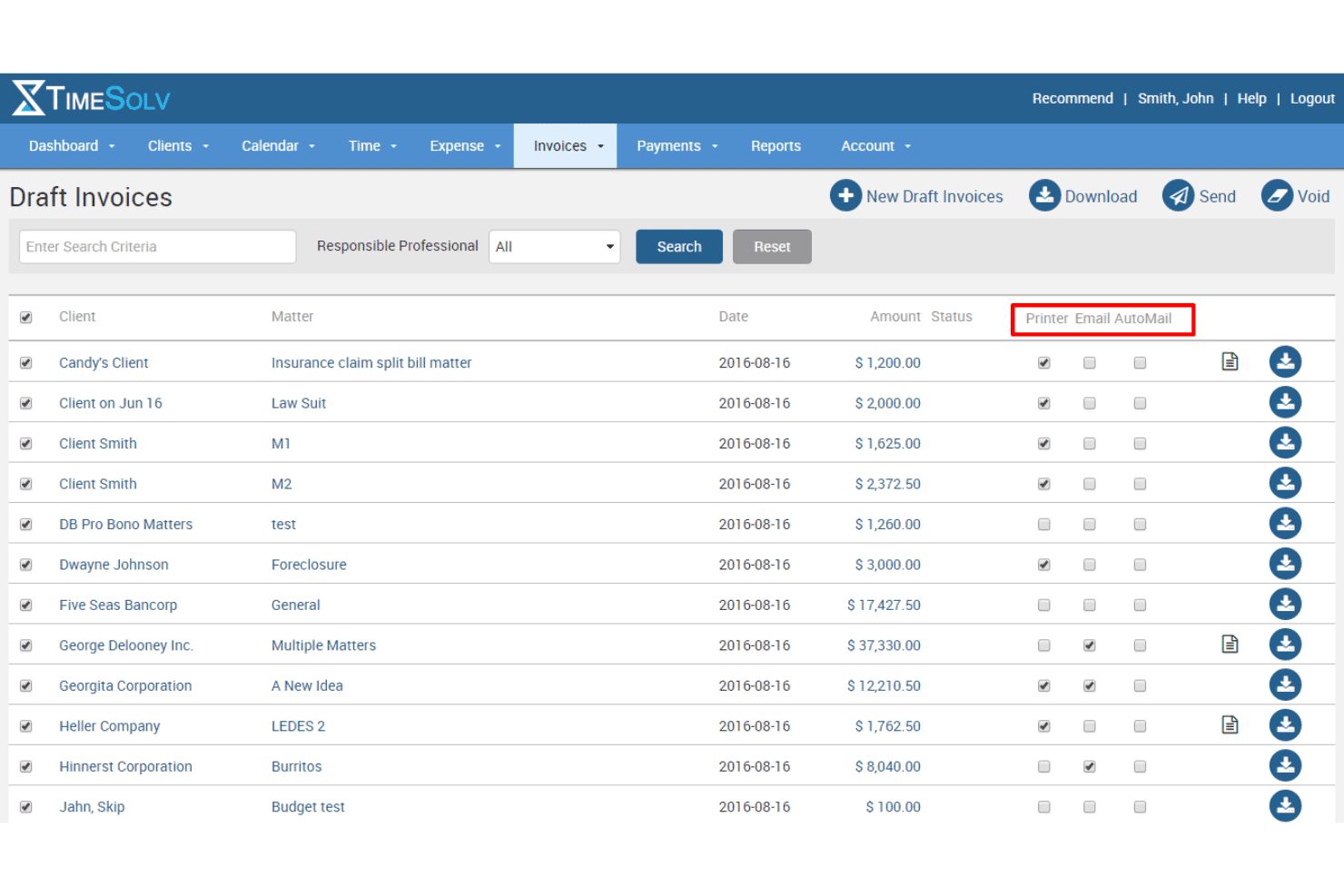
TimeSolv creates invoices with flexible billing templates. TimeSolv is a cloud-based legal billing platform for law firms that combines time tracking, matter management, trust accounting, invoicing, and document management in a single system.
Who Is TimeSolv Best For?
TimeSolv is a strong fit for solo practitioners and small law firms where billing accuracy and trust accounting compliance are the top priorities.
Why I Picked TimeSolv
TimeSolv earns its spot on my shortlist because its time tracking setup is genuinely built for the rhythm of legal work. I love that running multiple simultaneous timers is standard, so switching from drafting a motion to taking a client call doesn't mean losing captured time. Batch invoicing then lets me process an entire month of matters in one pass, and LEDES billing is built into the Legal tier for firms that bill insurers or corporate clients.
TimeSolv Key Features
- Matter management dashboard: Organize case details, client information, deadlines, and contacts by matter in a unified view.
- Trust accounting tools: Perform three-way reconciliation, manage IOLTA ledgers, and run dedicated trust reports to meet bar standards.
- Document management integration: Store and share documents with NetDocuments, Dropbox, and OneDrive from within each matter.
- Client portal: Offer clients access to invoices, payment history, and secure document sharing from a web-based portal.
TimeSolv Integrations
TimeSolv offers native integrations with NetDocuments, Dropbox, OneDrive, QuickBooks Online, Xero, and LawPay. An API is available for custom integrations.
Pros and Cons
Pros:
- Batch invoicing processes all matters at once
- LEDES billing included for corporate clients
- Multiple simultaneous timers run at once
Cons:
- No built-in document automation or templating
- Basic matter management for case-heavy firms
 Best for document-heavy legal practices
- Free demo available
- Pricing upon request
Visit WebsiteCustomer Rating:4.4/5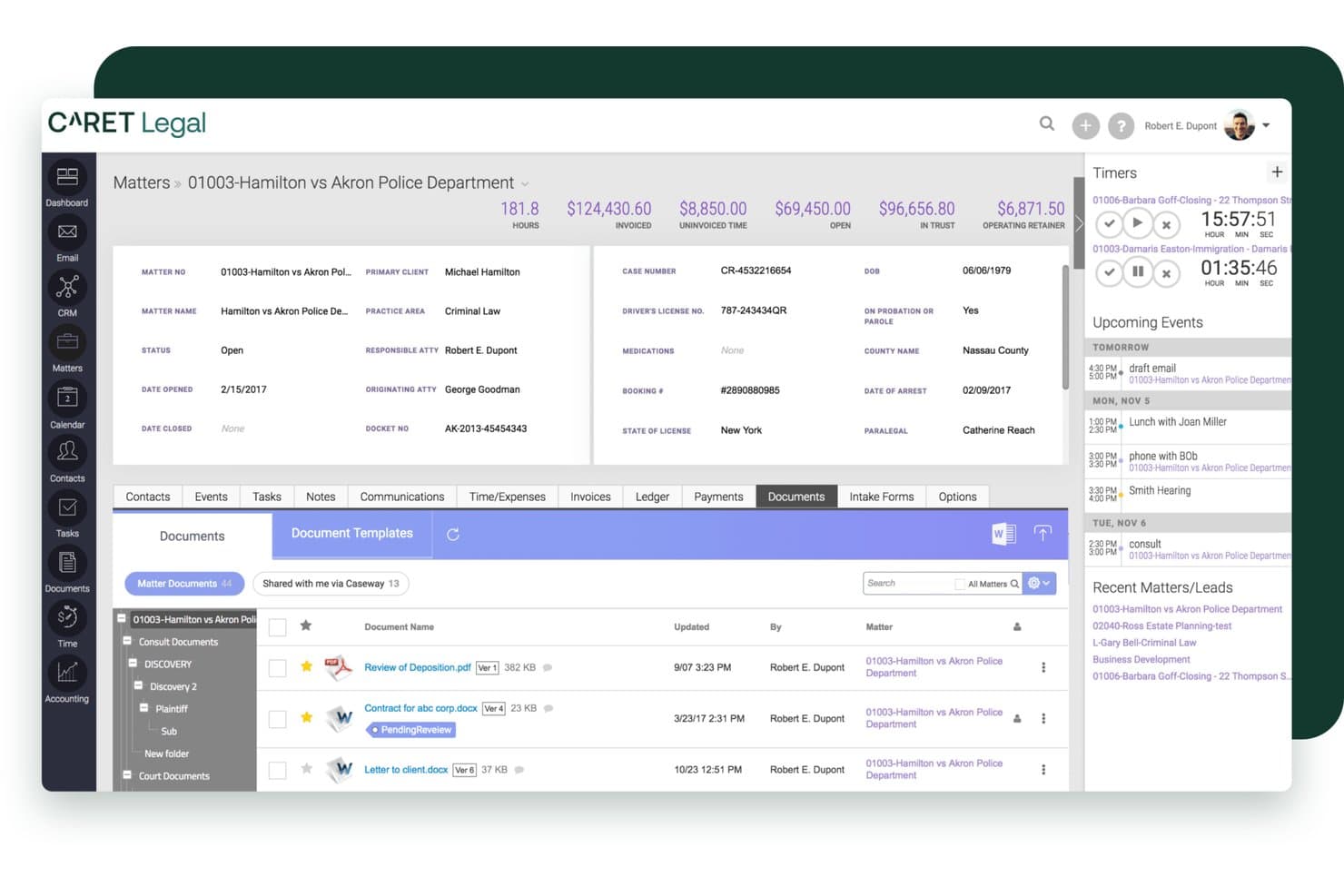
CARET Legal offers a comprehensive matter management interface with document tracking, billing summaries, timers, and upcoming events in a single dashboard view. CARET Legal is a cloud-based legal practice management platform that combines matter management, native trust and business accounting, time tracking, billing, document management, and client portal tools in a single system.
Who Is CARET Legal Best For?
Small to mid-sized law firms that want practice management and full accounting in one platform, without relying on QuickBooks or other third-party financial tools.
Why I Picked CARET Legal
CARET Legal earns its spot on my shortlist because of how it handles document-heavy workflows natively. Document templates with matter merge fields are built directly into the platform, so generating a motion or client agreement pulls live matter data without any copy-paste work. On the Enterprise Plus tier, native document editing and AI-generated document summaries let me draft, review, and finalize files inside the same system where the matter lives.
CARET Legal Key Features
- Native trust accounting: Handles IOLTA-compliant ledgers, three-way reconciliation, and bar association safeguards.
- Automated intake workflows: Connects with Lawmatics to drive online client intake directly into matter creation.
- Rules-based calendaring: Calculates legal deadlines using court rules integration and syncs with Google or Microsoft 365 calendars.
- Integrated client portal: Enables secure message exchange, document sharing, and invoice delivery between clients and firm.
CARET Legal Integrations
CARET Legal offers native integrations with LawToolBox, Lawmatics, NetDocuments, iManage, HotDocs, LawPay, QuickBooks Online, Microsoft 365, and Google Workspace. An API is available for custom integrations.
Pros and Cons
Pros:
- Onboarding and data migration support is consistently praised
- Billing depth rivals standalone legal accounting tools
- Full accounting built in, no QuickBooks required
Cons:
- Reporting customization is limited without higher-tier plans
- Initial setup takes significant time and configuration
Learn more about CARET Legal: Best for billing and productivity management
- 10-day free trial
- From $59/user/month (billed annually)
Visit WebsiteCustomer Rating:4.4/5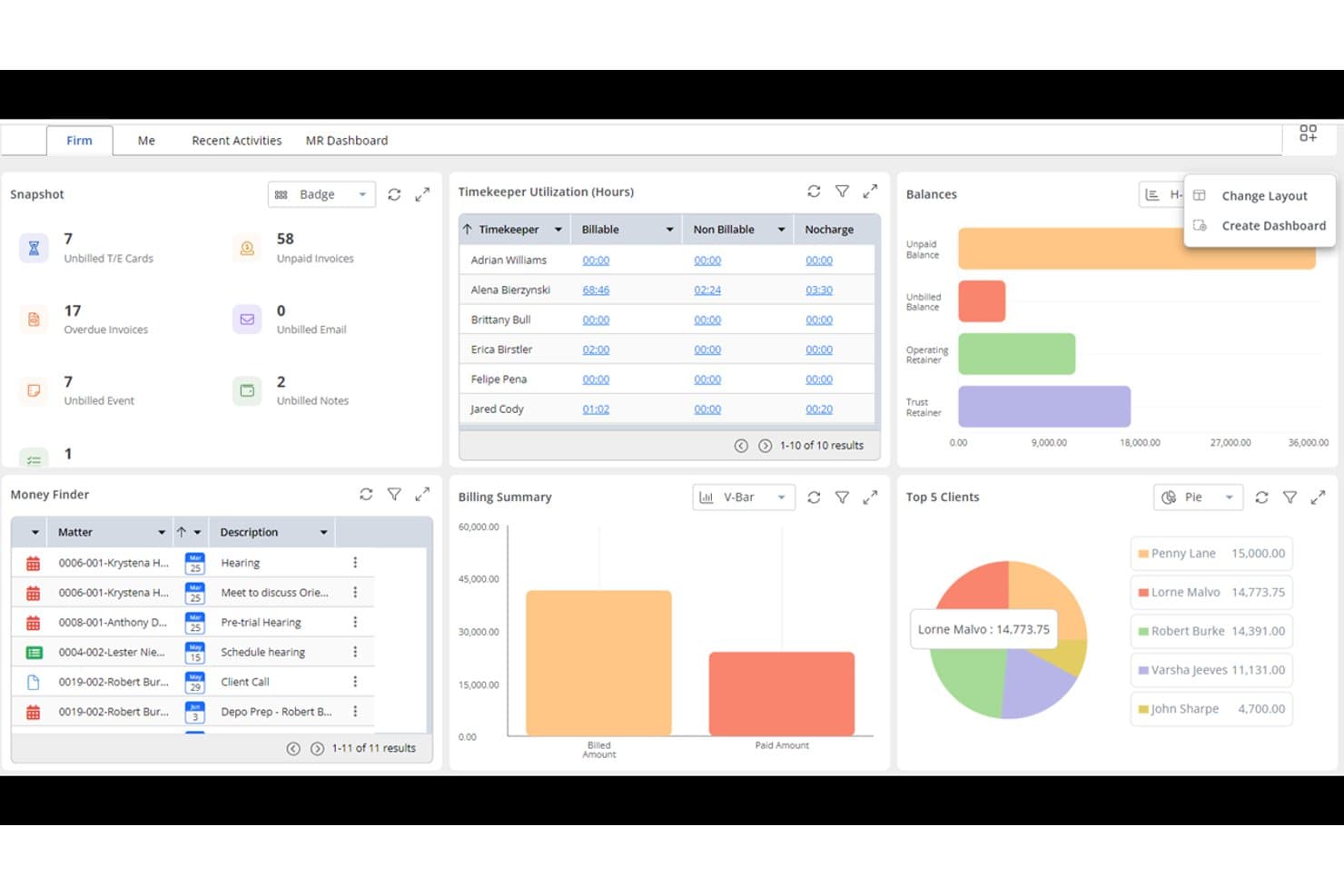
Rocket Matter offers a comprehensive dashboard with timekeeper utilization, billing summary, top 5 clients, balances, and a money finder panel for efficient law firm management. Rocket Matter is a cloud-based legal practice management platform for small firms and solo practitioners, covering matter management, time tracking, billing, trust accounting, document assembly, and client intake.
Who Is Rocket Matter Best For?
Rocket Matter is a strong fit for solo practitioners and small law firms that need a full-featured billing and matter management system without a complex setup.
Why I Picked Rocket Matter
I picked Rocket Matter as one of the best because its billing engine goes well beyond basic invoicing. I can run batch billing across all active matters in one pass, apply custom rate structures per timekeeper, and produce LEDES-formatted e-bills for insurance carriers without leaving the platform. The auto time card captures billable time in the background, so I'm not reconstructing my day at the end of the week.
Rocket Matter Key Features
- Matter templates: Create reusable templates for standardizing matter setup by practice area or workflow.
- Document assembly: Automatically generate documents using templates with merge fields populated from matter data.
- Client portal: Share documents, invoices, and messages securely with clients through a web-based portal.
- Integrated trust accounting: Track client funds separately with compliance features like three-way reconciliation and audit trails.
Rocket Matter Integrations
Rocket Matter offers native integrations with QuickBooks Online, Microsoft 365, Google Workspace, Dropbox, Box, and LawToolBox. An API is available for custom integrations.
Pros and Cons
Pros:
- Trust accounting reconciliation flags compliance issues automatically
- LEDES invoicing built in, no add-on needed
- Batch billing cuts time across multiple matters
Cons:
- Performance slows noticeably with large, document-heavy matters
- Task automation lacks dependency-based workflow logic
Learn more about Rocket Matter: Best for customizable legal workflows
- Free demo available
- Pricing upon request
Visit WebsiteCustomer Rating:4.2/5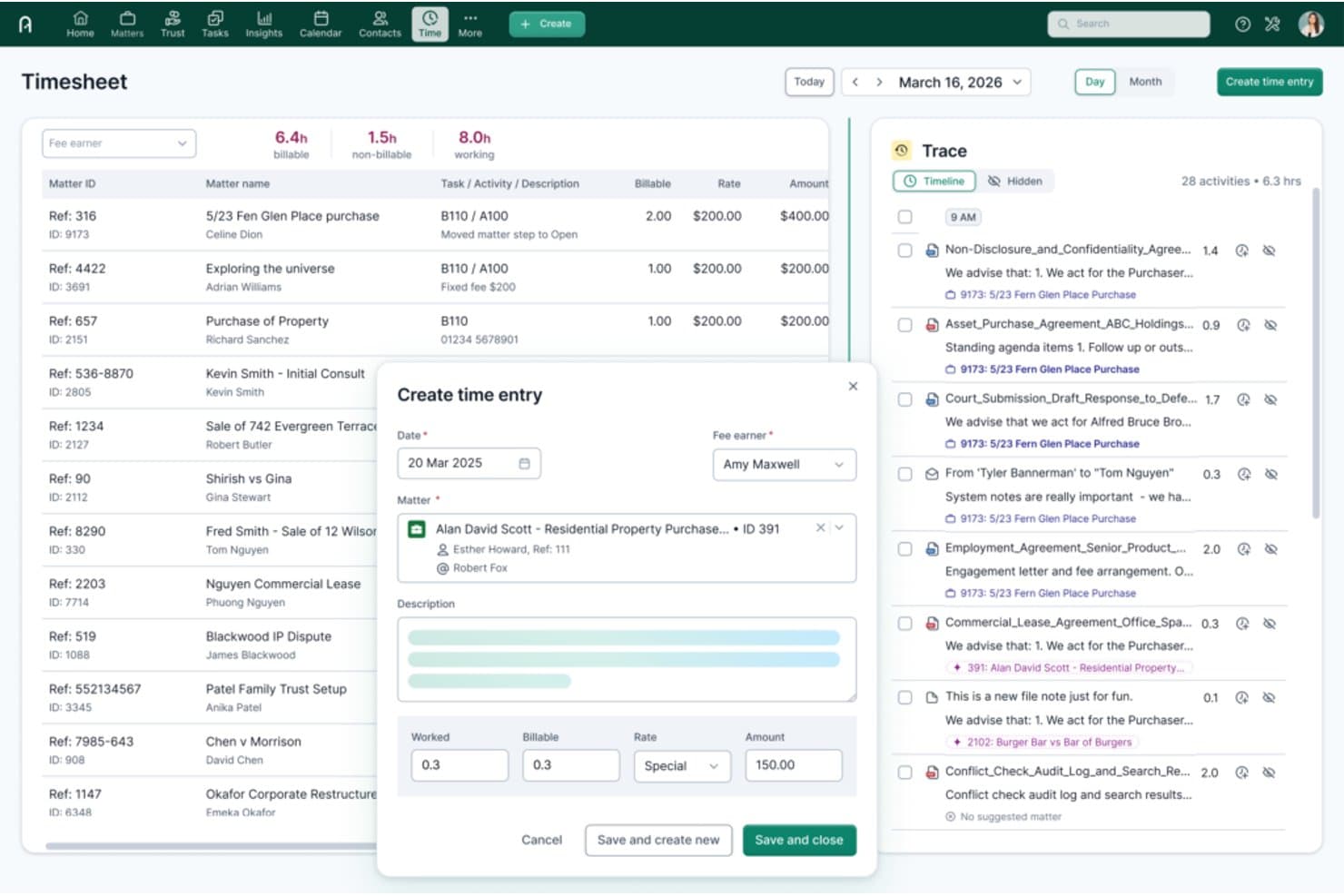
Actionstep offers a detailed timesheet and time entry interface with matter tracking, billable hours, and an AI-powered Trace activity timeline for small law firms. Actionstep is a cloud-based law firm management platform that combines matter management, legal accounting, document automation, client intake, and workflow automation in a single configurable system.
Who Is Actionstep Best For?
Actionstep is a strong fit for small to mid-sized law firms that need a highly configurable platform to match their specific practice workflows.
Why I Picked Actionstep
Actionstep earns its spot on my shortlist because its workflow automation goes deeper than most legal platforms I've used. I can build matter templates by practice area, each with its own automated task sequences, deadline triggers, and document generation steps. The Builder add-on extends this with document automation and dynamic logic tied directly to matter data. I've also used the Trace AI module to passively log billable time across Outlook and Word, removing manual time entry entirely.
Actionstep Key Features
- Full trust accounting: Track trust transactions and segregated client funds with compliance safeguards.
- Advanced document management: Store, version, and organize documents with templates and merge fields tied to matters.
- Client intake forms: Build customizable web-based intake forms to capture new matter data and trigger workflow steps.
- Comprehensive reporting: Generate detailed business, financial, and compliance reports from integrated matter and billing data.
Actionstep Integrations
Actionstep offers native integrations with Microsoft 365, Xero, QuickBooks Online, DocuSign, LawPay, and InfoTrack. An API is available for custom integrations.
Pros and Cons
Pros:
- Passive time capture across Outlook and Word
- Practice-specific templates available out of the box
- Highly configurable matter workflows by practice area
Cons:
- Pricing has increased sharply for solo practitioners
- Initial setup requires significant time investment
Learn more about Actionstep: Best for document and workflow automation
- Not available
- Pricing upon request
Visit WebsiteCustomer Rating:4.8/5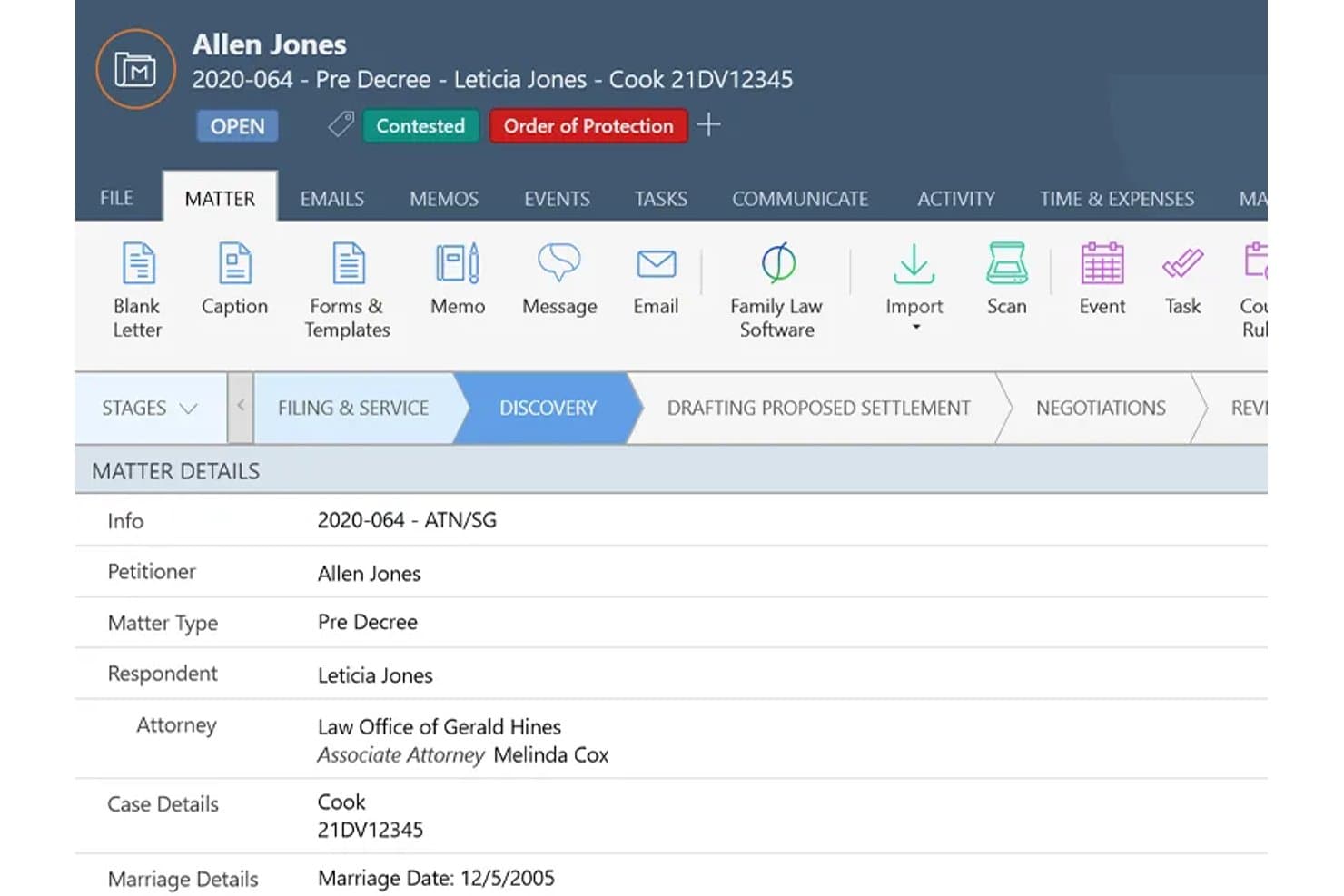
Smokeball offers a detailed matter management view with case stages, client details, attorney assignments, and quick-action toolbar for small law firms. Smokeball is a Windows-based legal practice management platform for small and solo firms that combines matter management, document automation, time tracking, trust accounting, and client intake in one system.
Who Is Smokeball Best For?
Smokeball is a good fit for small law firms with two to ten staff who work across defined practice areas like family law, real estate, or personal injury.
Why I Picked Smokeball
I picked Smokeball as one of the best because its document automation is genuinely unmatched at this firm size. With 20,000+ prebuilt legal forms across 250+ matter types, my team can generate court-ready documents by pulling matter data directly into templates, skipping manual drafting entirely. The AutoTime feature passively logs billable time in the background, so nothing slips through on busy filing days.
Smokeball Key Features
- Customizable matter templates: Create and use tailored templates for over 250 practice areas, helping you quickly set up new cases.
- Three-way trust reconciliation: Manage IOLTA accounts with built-in safeguards and compliance reporting directly from the platform.
- Client portal: Share documents, invoices, and status updates securely with clients using the encrypted web portal.
- Court rules calendaring integration: Sync jurisdiction-specific court deadlines into your calendar with LawToolBox integration.
Smokeball Integrations
Smokeball offers native integrations with Microsoft 365, LawToolBox, QuickBooks Online, InfoTrack, LawPay, and Xero. An API is available for custom integrations.
Pros and Cons
Pros:
- Matter-linked document search across all files
- Prebuilt forms auto-update when laws change
- Passive time capture via background AutoTime logging
Cons:
- Client portal navigation confuses some end clients
- Per-seat pricing becomes costly beyond solo use
Learn more about Smokeball: Best for all-in-one small firm management
- 7-day free trial
- From $49/user/month
Visit WebsiteCustomer Rating:4.7/5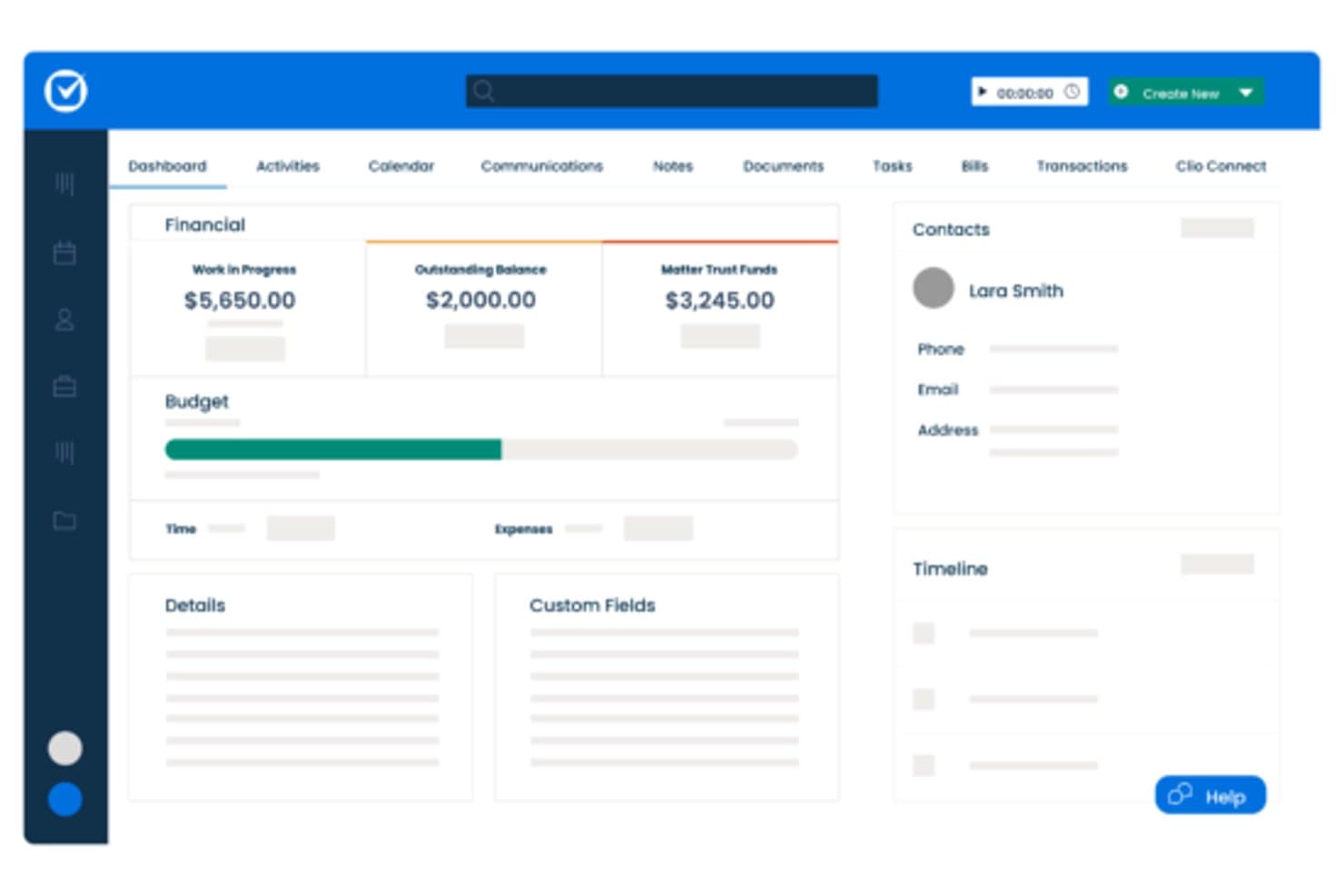
Clio Manage offers a matter dashboard displaying financial summaries, budget tracking, contacts, and custom fields for small firm case management. Clio Manage is a cloud-based legal practice management platform that combines matter management, time tracking, billing, trust accounting, document storage, legal calendaring, and client communication in a single system.
Who Is Clio Manage Best For?
Clio Manage is a strong fit for solo practitioners and small law firms that need to replace a patchwork of disconnected tools with one system.
Why I Picked Clio Manage
I've included Clio Manage in my top picks because it's one of the few platforms where trust accounting, court rules-based calendaring, and matter management genuinely share one roof. I use the court calendaring feature to automatically calculate deadline chains from a single trigger date, which small firms previously needed a separate docketing tool to handle. The built-in IOLTA trust ledger includes three-way reconciliation, so I'm not running a separate accounting system alongside case management.
Clio Manage Key Features
- Document automation: Generate pleadings and contracts using templates with merge fields tied to matter data.
- Integrated payment processing: Accept credit card, ACH, and eCheck payments directly through the system.
- Custom matter templates: Configure practice-specific templates and fields for different case types.
- Secure client portal: Share documents and messages with clients through an encrypted web and mobile portal.
Clio Manage Integrations
Clio Manage offers native integrations with QuickBooks Online, Xero, Microsoft 365, Google Workspace, Dropbox, NetDocuments, DocuSign, LawPay, Zoom, and Zapier. An API is also available for custom integrations.
Pros and Cons
Pros:
- Intake forms auto-populate new matter records
- Court rules-based deadline chains across jurisdictions
- Built-in three-way IOLTA trust reconciliation
Cons:
- Mobile app missing some desktop matter features
- Reporting dashboards have limited filter options
Learn more about Clio Manage: Best for client communication and case tracking
- 10-day free trial
- From $50/user/month (billed annually)
Visit WebsiteCustomer Rating:4.6/5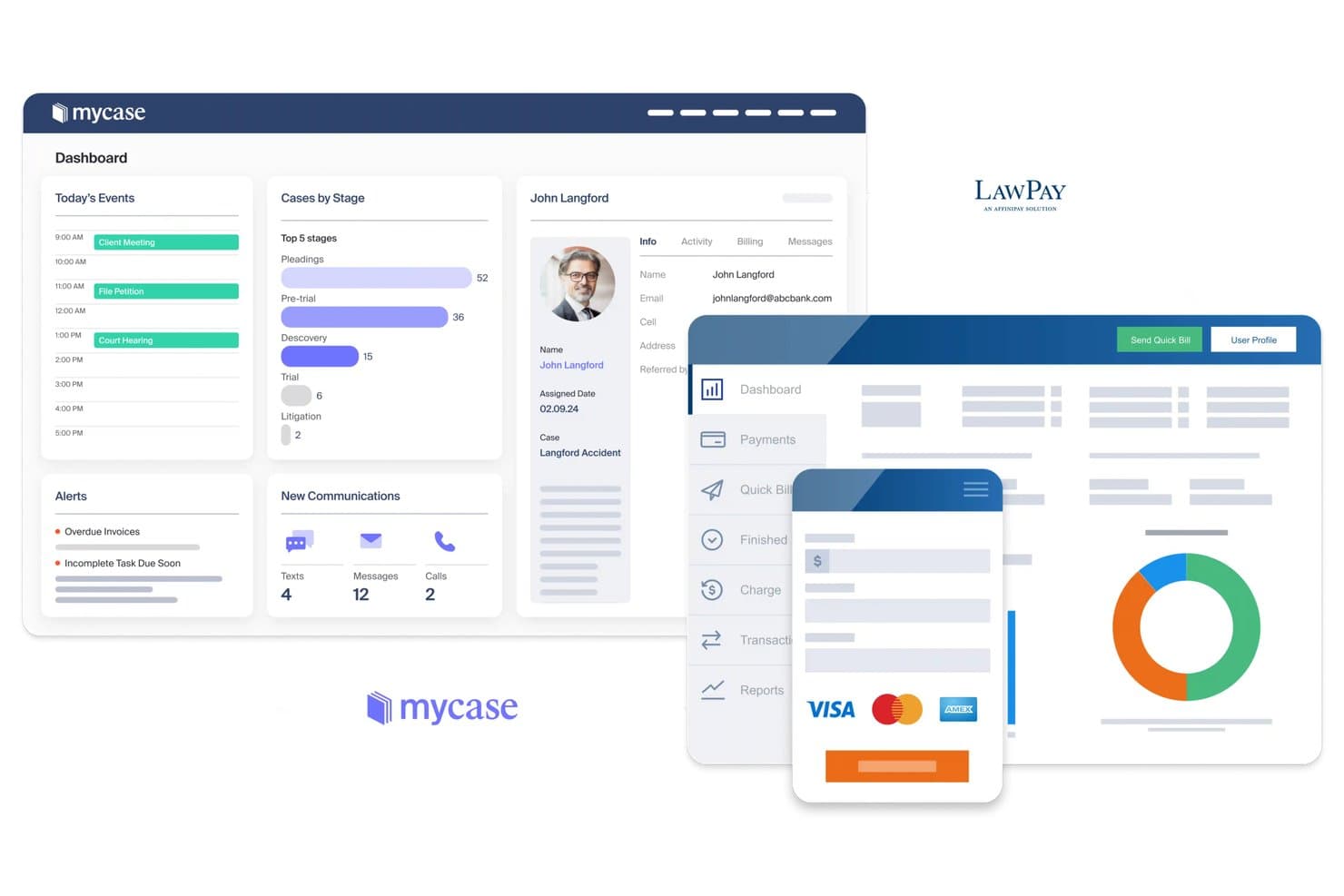
MyCase offers an integrated dashboard combining case management, client profiles, scheduling, and LawPay payment processing tailored for small law firms. MyCase is a legal case management platform for small firms that combines matter management, time tracking, invoicing, trust accounting, document generation, and client communication in a single system.
Who Is MyCase Best For?
Solo attorneys and small firm lawyers in practice areas like family law, personal injury, and criminal defense will find MyCase fits naturally into how they work.
Why I Picked MyCase
I've included MyCase in my top picks because of how it handles client communication alongside case tracking in one place. The secure client portal gives clients 24/7 access to their case documents and updates. Two-way texting with automated reminders keeps things moving without phone tag. The 8am IQ Case Assistant also lets you query your case data in plain language to surface facts and timelines fast.
MyCase Key Features
- Matter templates: Create and customize matter templates for different practice areas to streamline case setup.
- Three-way trust reconciliation: Ensure compliance with IOLTA requirements using built-in reconciliation and audit reports.
- Automated document generation: Merge client and case data into formatted legal documents using templates.
- Integrated calendar with court rules: Link events to deadlines and statutes using optional court rules integrations.
MyCase Integrations
MyCase offers native integrations with QuickBooks Online, LawPay, Google Calendar, Microsoft Outlook, NetDocuments, Dropbox, and LawToolBox. An API is available for custom integrations.
Pros and Cons
Pros:
- Built-in time tracking tied directly to matter records
- Client portal supports document sharing and e-signatures
- Billing visibility shows if clients reviewed invoices
Cons:
- Contingency fee workflows lack dedicated built-in functionality
- Document manipulation within the platform is cumbersome
 Best for built-in legal accounting
- 10-day free trial
- From $49/user/month (billed annually)
Visit WebsiteCustomer Rating:4.4/5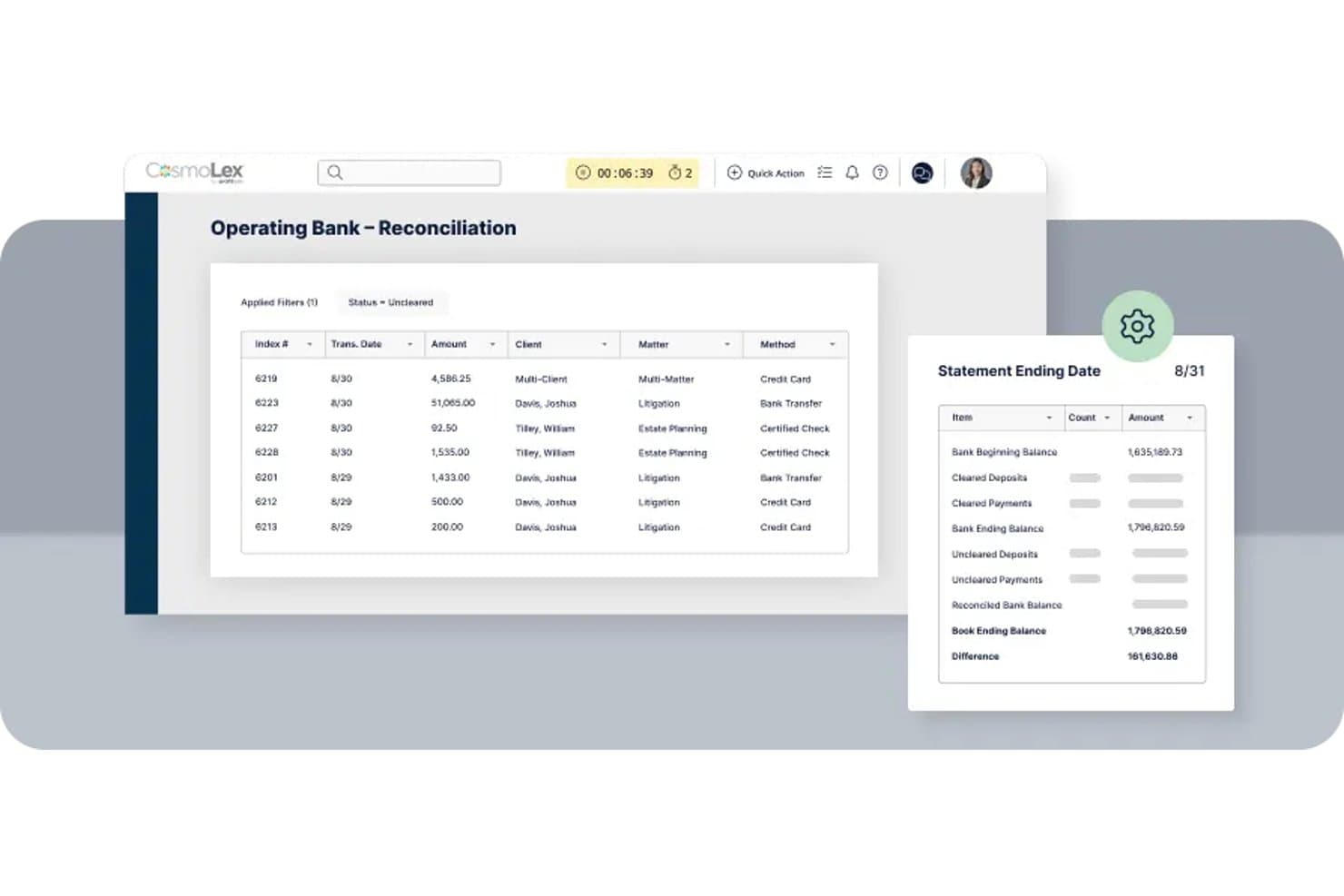
CosmoLex offers a bank reconciliation interface that displays transaction history alongside a statement summary panel with ending balances and differences. CosmoLex is a cloud-based legal practice management platform for small firms that combines matter management, time tracking, billing, document management, client intake, and fully native law firm accounting in a single system.
Who Is CosmoLex Best For?
Solo practitioners and small firm managing partners who want to consolidate practice management and accounting into one platform will find CosmoLex a natural fit.
Why I Picked CosmoLex
CosmoLex earns its spot on my shortlist because it's the only platform where trust accounting isn't an afterthought. The built-in three-way trust reconciliation runs natively alongside matter management, so I can pull a per-client trust ledger or generate bar compliance reports without leaving the platform. My firm doesn't need a separate QuickBooks subscription. CosmoLex handles both operating and trust accounts with full double-entry accounting built in.
CosmoLex Key Features
- Customizable matter templates: Set up matter types with fields and checklists tailored for your firm’s specific workflows.
- Document automation tools: Auto-generate pleadings, forms, and letters using merge fields from matter and contact data.
- Role-based access controls: Assign granular user permissions for viewing, editing, and managing sensitive firm or client information.
- Secure client portal: Share files, invoices, and updates securely with clients, supporting document exchange and electronic signatures.
CosmoLex Integrations
CosmoLex offers native integrations with NetDocuments, Office 365, Google Workspace, QuickBooks Online, LawPay, and Xero. An API is available for custom integrations.
Pros and Cons
Pros:
- Unlimited support included with every plan
- Eliminates the need for a separate QuickBooks subscription
- Native trust accounting with three-way reconciliation built in
Cons:
- Fewer integrations than most competing platforms
- Interface feels dated compared to competitors like Clio
Learn more about CosmoLex: Best for intuitive case and billing workflows
- 7-day free trial
- From $59/user/month
Visit WebsiteCustomer Rating:4.3/5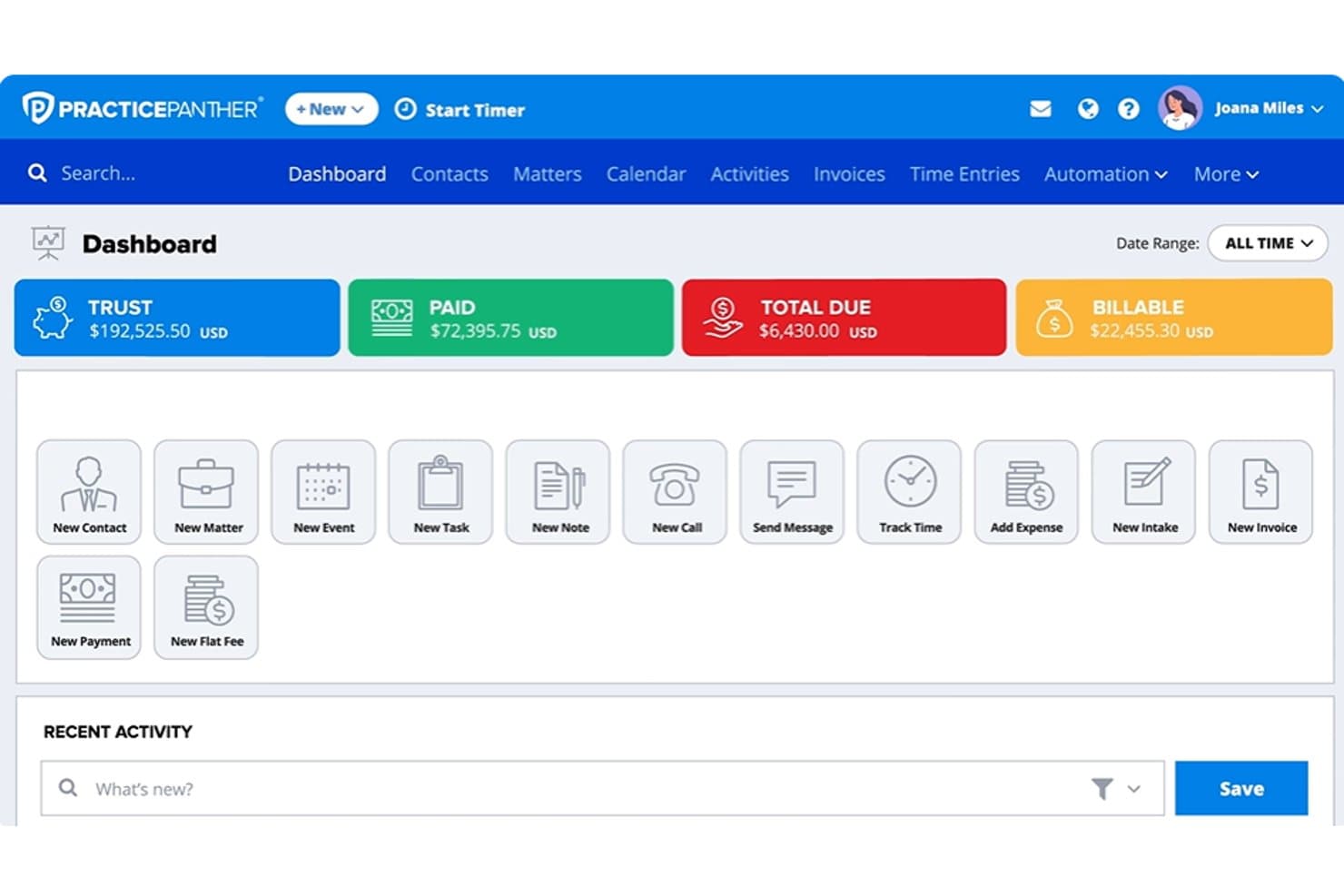
PracticePanther dashboard showing trust balances, payments, billable amounts, matters, and legal billing tools PracticePanther is a cloud-based legal practice management platform built for solo attorneys and small firms, combining matter management, time tracking, billing, trust accounting, client intake, and document management in one system.
Who Is PracticePanther Best For?
PracticePanther is a strong fit for solo attorneys and small law firms that need a single platform to handle cases, billing, and client communication without a steep learning curve.
Why I Picked PracticePanther
PracticePanther earns its spot on my shortlist because of how tightly the case and billing workflows connect. I particularly like the calendar-to-time-entry conversion, where a court appearance automatically becomes a billable time entry without any manual logging. Batch invoicing then lets me process multiple client bills at once rather than one at a time. Task and event workflows also trigger automatically when a matter status changes, keeping casework moving without manual nudges.
PracticePanther Key Features
- Custom matter fields: Add tailored data fields to matters for different practice areas or client needs.
- Three-way trust reconciliation: Complete trust accounting with compliance safeguards for bar association standards.
- Secure client portal: Share documents, updates, and messages with clients through an encrypted platform.
- Document assembly templates: Generate pleadings and letters using templates that auto-populate with matter data.
PracticePanther Integrations
PracticePanther offers native integrations with QuickBooks Online, Xero, Google Workspace, Microsoft 365, LawPay, Dropbox, OneDrive, Box, and specialty tools like LawToolBox and DocuSign. An API is available for custom integrations.
Pros and Cons
Pros:
- Client intake forms auto-populate matter records
- Trust accounting meets bar compliance standards
- Billing and time tracking are tightly integrated
Cons:
- Mobile app has limited functionality
- Reporting features lack depth for complex analysis
Learn more about PracticePanther:
Annen juridisk saksbehandlingsprogramvare for små firmaer
Her er noen ekstra alternativer for juridisk saksbehandlingsprogramvare for små firmaer som ikke kom med på kortlisten min, men som likevel er verdt å undersøke:
- 11LEAPBest for legal documents and case management
- 12AbacusLawBest for established small law firms
- 13CasePeerBest for personal injury firms
- 14FilevineBest for customizable matter management
- 15SmartAdvocateBest for litigation case management
- 16CaseFoxBest for affordable legal billing
- 17LawcusBest for legal CRM and workflow automation
- 18NeosBest for cloud-based case management
- 19Bill4timeBest for legal time and expense tracking
- 20Amicus AttorneyBest for traditional law firm workflows
How I Evaluate Legal Case Management Software For Small Firms
I split my evaluation into core requirements—matter management, trust accounting, and billing—and differentiators that tell you which tool actually fits a small firm.
Core Functionality (Table Stakes for This List)
When I'm selecting tools for my list, I rank each one on a scale from 0 (does not offer the functionality) to 5 (excels in this area) for each core functionality listed below. Then, I calculate the tool's total score into a percentage. Each tool needs to achieve a minimum total score of 65% to be considered for inclusion.
- Matter Management: I look for a centralized hub where you can tie contacts, notes, deadlines, and documents to each case—so nothing gets buried in email threads or shared drives.
- Time & Billing: Each tool should handle time tracking, expense capture, and invoicing with support for trust-compliant billing and formats like LEDES that larger clients often require.
- Legal Calendaring: I evaluate whether the calendar links to court rules and auto-calculates deadlines, like response windows after a motion is filed, rather than relying on manual date entry.
- Document Management: The tool should offer version control, templates, and merge fields that pull client or matter data directly into pleadings, engagement letters, or correspondence.
- Trust Accounting: I check for IOLTA-compliant ledgers, three-way reconciliation, and safeguards that help you stay on the right side of bar association audits without needing a separate accounting tool.
- Client Intake & Portal: A good intake workflow feeds form responses into new matter records automatically, and a secure portal lets clients upload documents, view invoices, and sign forms in one place.
Once I have a list of tools that meet the criteria, I consider what sets each platform apart.
Differentiating Factors (What Sets Vendors Apart)
Here's how I compare and contrast different vendors:
Standout Features
Court rules integration is a big differentiator. Some tools auto-calculate cascading deadlines when a triggering event shifts—like a trial date change rippling through discovery cutoffs—while others just offer a shared calendar. I also evaluate document automation depth: the best setups let you merge matter data into pleadings or engagement letters in a few clicks rather than manual copy-paste. Client intake automation matters too, especially for firms handling high-volume consultations where intake forms that auto-create matter records save hours each week.
Beyond Features
Pricing structure matters a lot for small firms. I check whether trust accounting and document storage are included in base plans or locked behind add-ons that inflate costs. Practice area fit is another factor—a family law firm needs different templates, intake fields, and workflows than a criminal defense practice, so I look at how configurable each tool is for mixed caseloads. I also evaluate ecosystem integrations, especially native connections to payment processors like LawPay, accounting tools like QuickBooks Online, and productivity suites like Microsoft 365.
Slik velger du juridisk saksbehandlingsprogramvare for små firmaer
Det er lett å gå seg vill i lange lister over funksjoner og komplekse prismodeller. For å hjelpe deg med å holde fokus mens du arbeider deg gjennom den unike prosessen med å velge programvare, har vi laget en sjekkliste over faktorer du bør ha i tankene:
| Faktor | Hva du bør vurdere |
| Skalerbarhet | Vil programvaren kunne håndtere vekst hvis du ansetter flere advokater eller utvider praksisområdene? Sjekk brukerbegrensninger, prisendringer og muligheter for å oppgradere abonnementet. |
| Integrasjoner | Vurder hvilke verktøy (regnskap, e-post, elektronisk signering, betalingsformidlere) du trenger å koble til, og om integrasjonene er direkte eller krever ekstra oppsett. |
| Tilpasningsmuligheter | Kan du tilpasse maler, felt, arbeidsflyter og automatiseringer til firmaets faktiske praksisområder og prosesser, eller er du begrenset til en løsning som passer alle? |
| Brukervennlighet | Vil nye brukere kunne komme raskt i gang? Se etter oversiktlig navigasjon og intuitive arbeidsflyter for saker, fakturering og dokumenter. |
| Implementering og oppstart | Hvilken støtte tilbys for datamigrering, oppsett og opplæring? Spør om det finnes veiledet oppstart, opplæringsmateriell eller egne spesialister for små firmaer. |
| Kostnad | Vurder ikke bare månedlige kostnader per bruker, men også om fakturering, klientmiddelregnskap og lagring er inkludert eller krever tillegg som øker utgiftene. |
| Sikkerhetstiltak | Bruker plattformen kryptering, tilbyr rollebaserte tillatelser og overholder kravene til personvern for juridiske data? Spør om revisjonslogger og sertifiseringer. |
| Etterlevelseskrav | Kan programvaren støtte IOLTA-regnskap, jurisdiksjonsspesifikke regler og andre arbeidsflyter som kreves av etiske regler eller advokatforeningen i ditt område? |
Hva er programvare for juridisk saksbehandling for små firmaer?
Programvare for juridisk saksbehandling for små firmaer er en spesialisert plattform som bidrar til å organisere saker, følge opp frister, håndtere dokumenter og samle klientkommunikasjonen på ett sted. Disse verktøyene er utviklet for advokater som arbeider alene og små advokatkontorer, og tilbyr grunnleggende funksjoner som sakshåndtering, fakturering, kalender og klientmiddelregnskap – alt tilpasset mindre team og begrensede ressurser.
Funksjoner i programvare for juridisk saksbehandling for små firmaer
Når du velger programvare for juridisk saksbehandling for små firmaer, bør du se etter følgende viktige funksjoner:
- Sakshåndtering: Organiser alle saksmapper, kontakter, frister og notater i et sentralisert område for hver klient eller sak, slik at det blir enkelt å finne kritisk informasjon raskt.
- Tidsregistrering og fakturering: Registrer fakturerbare timer og utgifter, og generer profesjonelle fakturaer med støtte for juridiske faktureringsformater og verktøy for nøyaktig tidsregistrering.
- Juridisk kalender: Automatiser beregningen av rettslige frister, angi påminnelser om foreldelsesfrister og håndter saksspesifikke hendelser i delte eller individuelle kalendere.
- Dokumenthåndtering: Lagre, versjonshåndter og opprett juridiske dokumenter ved hjelp av maler og saksdata, samtidig som filene holdes sikre og lett tilgjengelige.
- Klientmiddelregnskap: Håndter klientmidler med IOLTA-kompatible hovedbøker, treveisavstemming og kontrolltiltak for revisjon, slik at etiske krav og myndighetskrav overholdes.
- Klientinntak og portal: La klienter fylle ut digitale inntaksskjemaer som overføres direkte til nye saksregistre, og tilby en sikker portal for oppdateringer, elektronisk signering og deling av dokumenter.
- Oppgave- og arbeidsflytautomatisering: Tildel, følg opp og automatiser oppgaver på tvers av saker, håndter milepæler og effektiviser vanlige juridiske prosesser for å redusere den administrative belastningen.
- Integrasjon for elektronisk signering: Gjør det mulig for klienter og advokater å signere dokumenter elektronisk, slik at avtaler, innleveringer eller oppdragsbrev kan ferdigstilles raskere uten papirarbeid.
- Rapportering og analyse: Generer rapporter om fakturerbare timer, innbetalinger, saksmengde eller klientmiddelbalanser, slik at firmaet kan oppdage trender og ta datadrevne beslutninger.
- Etterlevelsesstyring: Oppretthold revisjonsspor, håndhev personvern og sørg for at arbeidsflytene oppfyller krav fra domstoler, lokale jurisdiksjoner og advokatforeninger.
Fordeler med programvare for juridisk saksbehandling for små firmaer
Å ta i bruk programvare for juridisk saksbehandling for små firmaer gir flere fordeler for teamet og virksomheten din. Her er noen av fordelene du kan se frem til:
- Sentralisert informasjon: Hold alle saksmapper, dokumenter og kontakter organisert på ett sted, slik at du reduserer tap av informasjon og tiden du bruker på å lete etter data.
- Større trygghet for etterlevelse: Innebygd regnskapsføring av klientmidler, revisjonslogger og fristoppfølging hjelper firmaet ditt med å oppfylle kravene fra advokatforeningen og gjeldende jurisdiksjoner.
- Redusert administrativ arbeidsbelastning: Automatisering av klientinntak, oppgavehåndtering og faktureringsverktøy minimerer gjentatt dataregistrering og manuelle prosesser.
- Forbedret samarbeid: Delte kalendere, oppgavetildelinger og versjonskontroll for dokumenter gjør det enkelt for små team å holde seg samkjørte i alle saker.
- Raskere klientservice: Sikre klientportaler og automatiserte oppdateringer lar klientene sjekke saksstatus, dele filer og kommunisere uten endeløse e-postutvekslinger.
- Mer nøyaktig fakturering: Integrerte tidtakere og registrering av utgifter sørger for at du registrerer hvert fakturerbare minutt og hver utgift, noe som fører til høyere inntektsrealisering og færre fakturatvister.
- Enklere oppstart og overgang: Veiledet datamigrering og innebygde maler gjør det enklere å gå over fra papirbaserte saksmapper eller eldre systemer med mindre forstyrrelser.
Kostnader og priser for programvare for juridisk saksbehandling for små firmaer
Valg av programvare for juridisk saksbehandling for små firmaer krever en forståelse av de ulike prismodellene og abonnementene som er tilgjengelige. Kostnadene varierer basert på funksjoner, teamstørrelse, tillegg og mer. Tabellen nedenfor oppsummerer vanlige abonnementer, gjennomsnittsprisene deres og typiske funksjoner som er inkludert i løsninger med programvare for juridisk saksbehandling for små firmaer:
Sammenligningstabell for programvare for juridisk saksbehandling for små firmaer
| Abonnementstype | Gjennomsnittspris | Vanlige funksjoner |
| Gratisplan | $0 | Grunnleggende saksoppfølging, kontaktadministrasjon, begrenset dokumentlagring og støtte via e-post. |
| Personlig plan | $20-$40/bruker/måned | Sakshåndtering, tidsregistrering, fakturering, dokumentmaler og begrensede skjemaer for klientinntak. |
| Virksomhetsplan | $50-$70/bruker/måned | Avansert kalenderstyring, regnskapsføring av klientmidler, sikker klientportal, dokumentautomatisering og tilpasninger for praksisområder. |
| Foretaksplan | $80-$120/bruker/måned | Tilpassede arbeidsflyter, omfattende rapportering, avanserte integrasjoner, prioritert støtte og forbedrede sikkerhetskontroller. |
Programvare for juridisk saksbehandling for små advokatfirmaer – vanlige spørsmål
Her er noen svar på vanlige spørsmål om programvare for juridisk saksbehandling for små advokatfirmaer:
Hvordan drar små advokatfirmaer nytte av dedikert programvare for juridisk saksbehandling?
Små advokatfirmaer får bedre organisering, bedre håndtering av frister og enklere overholdelse av regler for klientmidler og fakturering. Disse verktøyene sparer også administrativ tid ved å automatisere klientinntak, kalenderføring og dokumentarbeidsflyter som er utformet for små team.
Kan programvare for juridisk saksbehandling integreres med regnskaps- eller e-postplattformer?
Ja, de fleste løsninger tilbyr integrasjoner med regnskapsverktøy som QuickBooks Online og produktivitetspakker som Microsoft 365 eller Google Workspace. Dette gjør det mulig for firmaet å synkronisere kontakter, automatisere faktureringer og effektivisere dokumentdeling på tvers av plattformer.
Hva bør jeg se etter når det gjelder implementering og brukerstøtte?
Se etter veiledet datamigrering, opplæring direkte eller ved behov og rask brukerstøtte som passer firmaets åpningstider. Hjelp med implementeringen er spesielt viktig for firmaer som går over fra regneark eller eldre programvare.
Er programvare for juridisk saksbehandling sikker nok for klientdata?
Ja, anerkjente plattformer bruker kryptering, rollebaserte tillatelser og regelmessige revisjoner for å beskytte sensitive data. Bekreft alltid at programvaren oppfyller personvern- og sikkerhetskravene i din jurisdiksjon.
Hvor tilpassbare er disse løsningene for ulike rettsområder?
Med de fleste programvareløsninger kan du tilpasse sakstyper, arbeidsflyter og maler slik at de passer til praksisen din – enten du arbeider med familierett, arveplanlegging eller en blandet portefølje av saker. Tilpasning er avgjørende for å tilpasse programvaren til firmaets daglige rutiner.