

Programvare for klientinntak i juridisk praksis automatiserer hvordan advokatfirmaer registrerer, kvalifiserer og tar imot potensielle klienter. Hvis du leter etter den beste programvaren for klientinntak i juridisk praksis, vet du allerede at førsteinntrykk kan være avgjørende for en sak – manglende oppfølging, uorganiserte skjemaer og gap mellom klientinntak og saksbehandling kan koste firmaet både klienter og inntekter. I denne veiledningen går jeg gjennom de ledende alternativene som gir juridiske virksomheter tilpassbare arbeidsflyter, sporing av markedsføringsavkastning, elektroniske signaturer, konfliktsjekker og direkte integrasjon med verktøyene for saksbehandling. Du får praktisk innsikt som hjelper deg med å velge den løsningen som passer best, slik at du får en smidigere introduksjon og varige klientforhold.
Why Trust Our Software Recommendations
6,700+
Reviews
20
Industry experts
16+
Evaluation factors
14
Years
Our team has been testing and reviewing software since 2012. As legal practice leaders ourselves, we know how difficult—and important—it is to choose the right software.
For this guide, we evaluated tools using hands-on testing and independent research, scoring tools using our selection criteria.
Our reviews reflect our human editorial judgment, not a sales pitch.
Sammenligningstabell for programvare for klientinntak i juridisk praksis
Denne sammenligningstabellen oppsummerer prisdetaljene for mine beste utvalgte programmer for klientinntak i juridisk praksis:
| Tool | Best For | Trial Info | Price | ||
|---|---|---|---|---|---|
| 1 | Best for intake-to-matter sync within Clio | 7-day free trial | From $49/user/month (billed annually) | Website | |
| 2 | Best for AI-driven lead intake and follow-up | 14-day free trial | From $39/user/month (billed annually) | Website | |
| 3 | Best for AI-driven intake and marketing ROI | Free plan available; Free demo available | Pricing upon request | Website | |
| 4 | Best for intake built into trust accounting | 10-day free trial | From $49/user/month (billed annually) | Website | |
| 5 | Best for conflict checks in mid-to-large firm intake | Free demo available | Pricing upon request | Website | |
| 6 | Best for intake-to-matter flow in one platform | Not available | Pricing upon request | Website | |
| 7 | Best for all-in-one intake within your case files | 10-day free trial | From $50/user/month (billed annually) | Website | |
| 8 | Best for CRM-grade intake and marketing ROI tracking | Free demo available | Pricing upon request | Website | |
| 9 | Best for mid-size firm intake and conflict checks | Free demo available | Pricing upon request | Website | |
| 10 | Best for e-signature via SMS at intake | Free demo available | Pricing upon request | Website |


Anmeldelser av programvare for klientinntak i juridisk praksis
Nedenfor finner du mine detaljerte sammendrag av de beste programmene for klientinntak i juridisk praksis som kom med på kortlisten. Anmeldelsene mine gir et detaljert innblikk i funksjonene, de beste bruksområdene og integrasjonene til hver plattform, slik at du kan finne den som passer best for deg.
 Best for intake-to-matter sync within Clio
- 7-day free trial
- From $49/user/month (billed annually)
Visit WebsiteCustomer Rating:4.7/5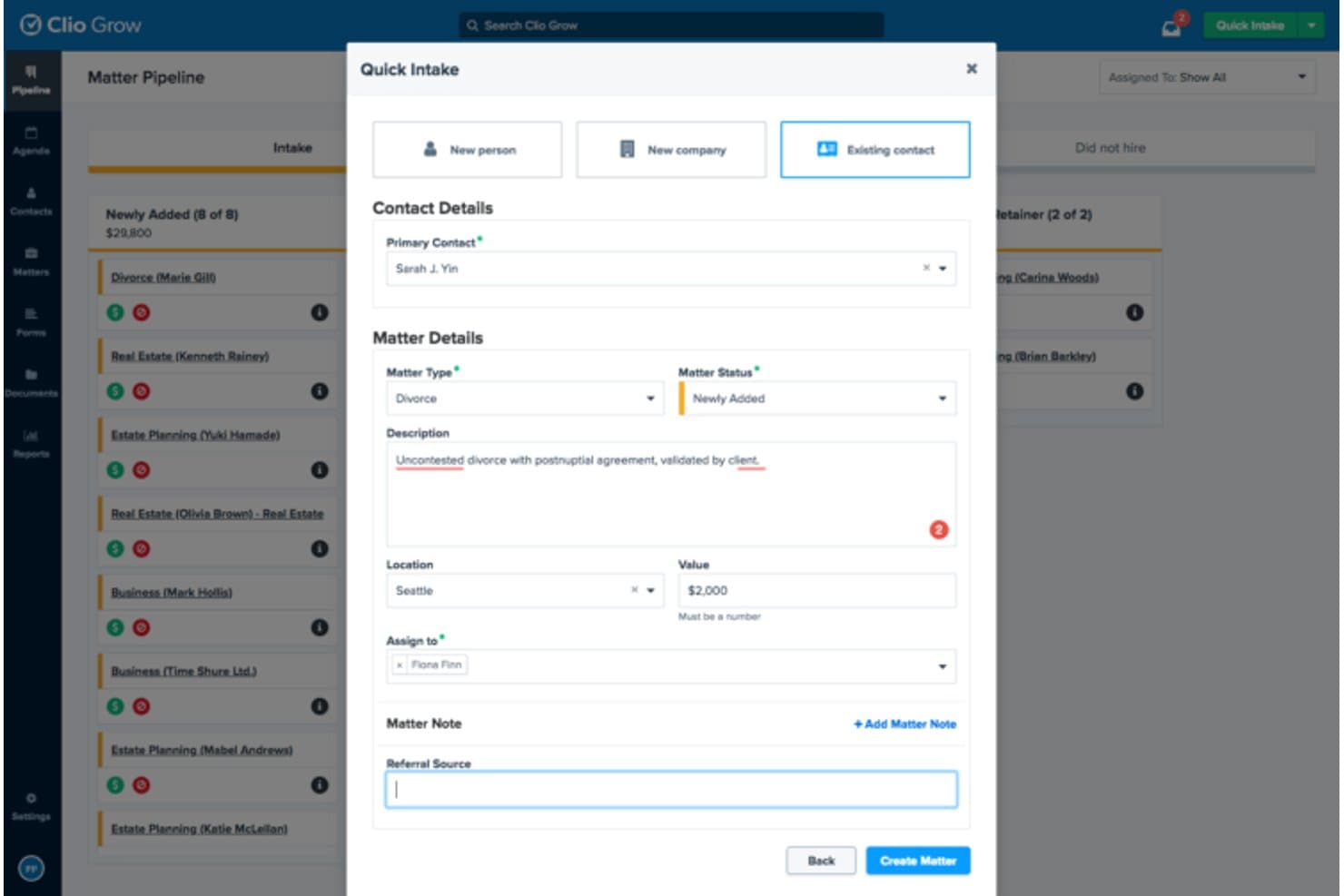
Clio Grow streamlines client intake with a quick matter creation form. Clio Grow is a cloud-based legal client intake platform that covers online intake forms, lead pipeline tracking, e-signatures, automated task generation, and direct data sync into Clio Manage.
Who Is Clio Grow Best For?
Clio Grow is a natural fit for law firms already running Clio Manage who want client intake and matter management to live in one connected system.
Why I Picked Clio Grow
I picked Clio Grow as one of the best because no other intake tool on this list converts a completed intake form directly into a matter in Clio Manage without any manual re-entry. When a prospect fills out your form, their contact details, matter information, and uploaded documents flow straight into your practice management system. I also like the pipeline view, which lets you track every lead from first inquiry through signed retainer, with automated task lists and e-signatures built into the same workflow.
Clio Grow Key Features
- Customizable intake forms: Build practice area-specific forms with custom fields to capture the exact client and matter details your firm needs.
- Lead inbox: Centralize all incoming potential client inquiries from your website, referrals, and marketing channels in one place.
- Conflict checks: Run firm-wide searches for conflicts of interest or duplicate records directly within the Clio platform.
- Appointment scheduling: Let prospective clients book consultations online, cutting out the back-and-forth of manual scheduling.
Clio Grow Integrations
Clio Grow taps into Clio's app directory of 250+ integrations, including Clio Manage, QuickBooks, Xero, Google Drive, Dropbox, Microsoft 365, Outlook, Google Calendar, Gmail, and Zapier. An API is also available for custom integrations.
Pros and Cons
Pros:
- Offers firm-wide conflict checks
- Tracks leads from inquiry to signed retainer
- Converts intake forms directly to matters
Cons:
- Reporting options can feel inflexible
- Intake automation limited outside Clio ecosystem
Learn more about Clio Grow: Best for AI-driven lead intake and follow-up
- 14-day free trial
- From $39/user/month (billed annually)
Visit WebsiteCustomer Rating:4.8/5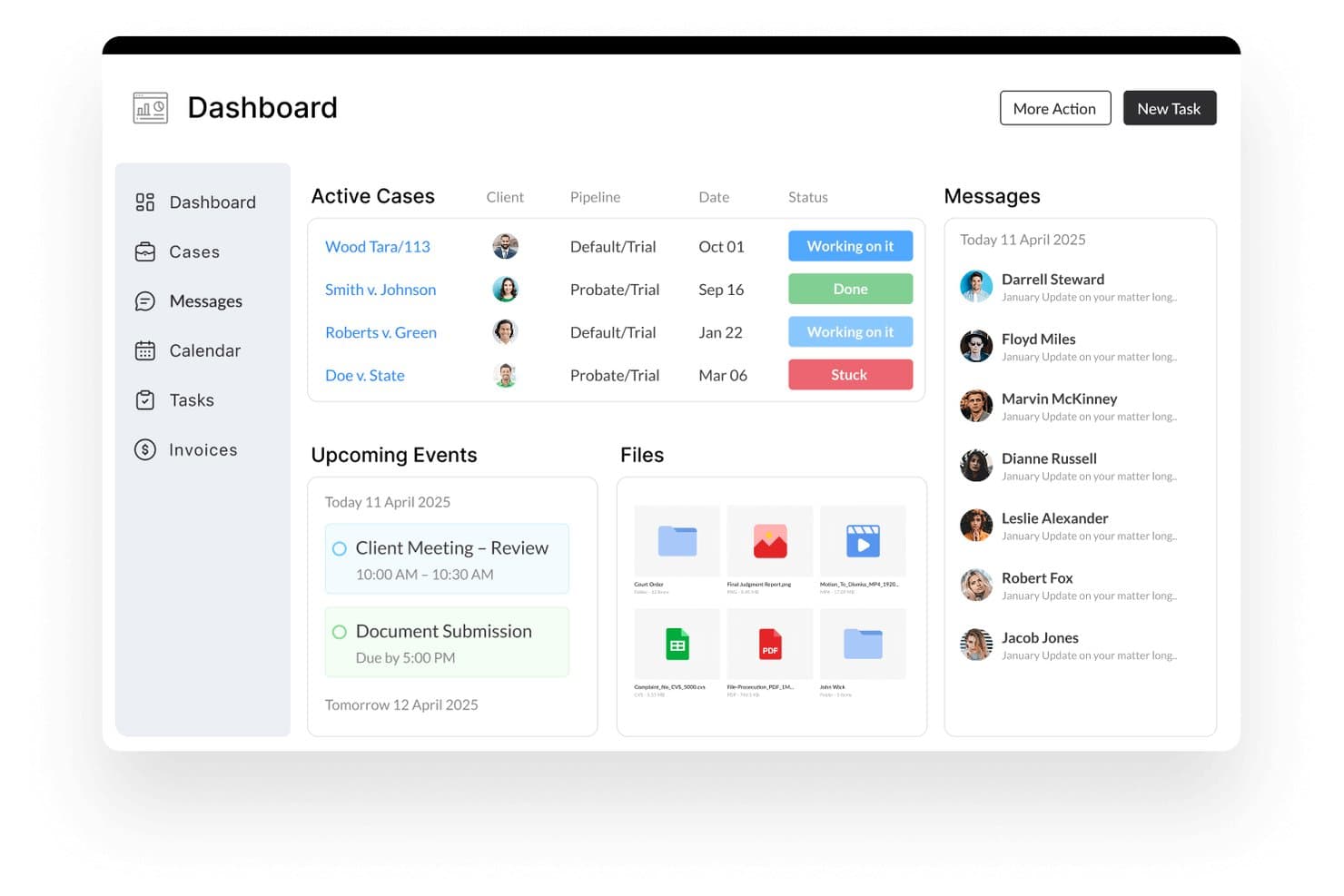
Lawcus centralizes cases, messages, and tasks in one dashboard. Lawcus is a legal practice management platform that combines client intake, CRM, matter management, billing, and AI-powered lead follow-up within a single system built for law firms.
Who Is Lawcus Best For?
Lawcus works well for small to mid-sized law firms that want AI-powered lead follow-up and client intake built into the same platform they use to manage matters, billing, and workflows.
Why I Picked Lawcus
Lawcus earns its spot as one of the best on my shortlist because of Lead Autopilot, its AI intake engine that handles full intake cycles, from call routing and lead qualification to automated questionnaire distribution, all synced directly into the Lawcus CRM. Nova AI then generates personalized follow-up emails and messages, so leads that don't convert immediately don't go cold. I like that both tools operate inside the same platform your team uses for matters, billing, and task management.
Lawcus Key Features
- Legal e-signature: Send engagement agreements for electronic signature directly from within Lawcus, letting clients sign from any device without leaving the platform.
- Two-way SMS messaging: Send and receive client text conversations through a system-generated phone number, with all messages stored in one place.
- Appointment scheduling: Book and manage consultations from within the CRM, keeping intake and scheduling connected to the same client record.
- Kanban board for matter tracking: Visualize matters and lead stages across a drag-and-drop board so your team can see the status of every active file at a glance.
Lawcus Integrations
Lawcus offers native integrations with Gmail, Microsoft 365, Microsoft Outlook, Google Drive, Dropbox, QuickBooks, Xero, LawPay, Calendly, and Mailchimp, and it connects with Zapier. An API is available for custom integrations, and Lawcus also connects with legal-specific tools like Smith.ai, LexReception, and Decision Vault for intake and reception workflows.
Pros and Cons
Pros:
- Two-way SMS keeps intake and communication connected
- Follow-up messaging personalized by built-in AI
- AI-driven intake automates lead qualification
Cons:
- Limited customization for intake workflows
- No public pricing transparency
Learn more about Lawcus: Best for AI-driven intake and marketing ROI
- Free plan available; Free demo available
- Pricing upon request
Visit WebsiteCustomer Rating:4.5/5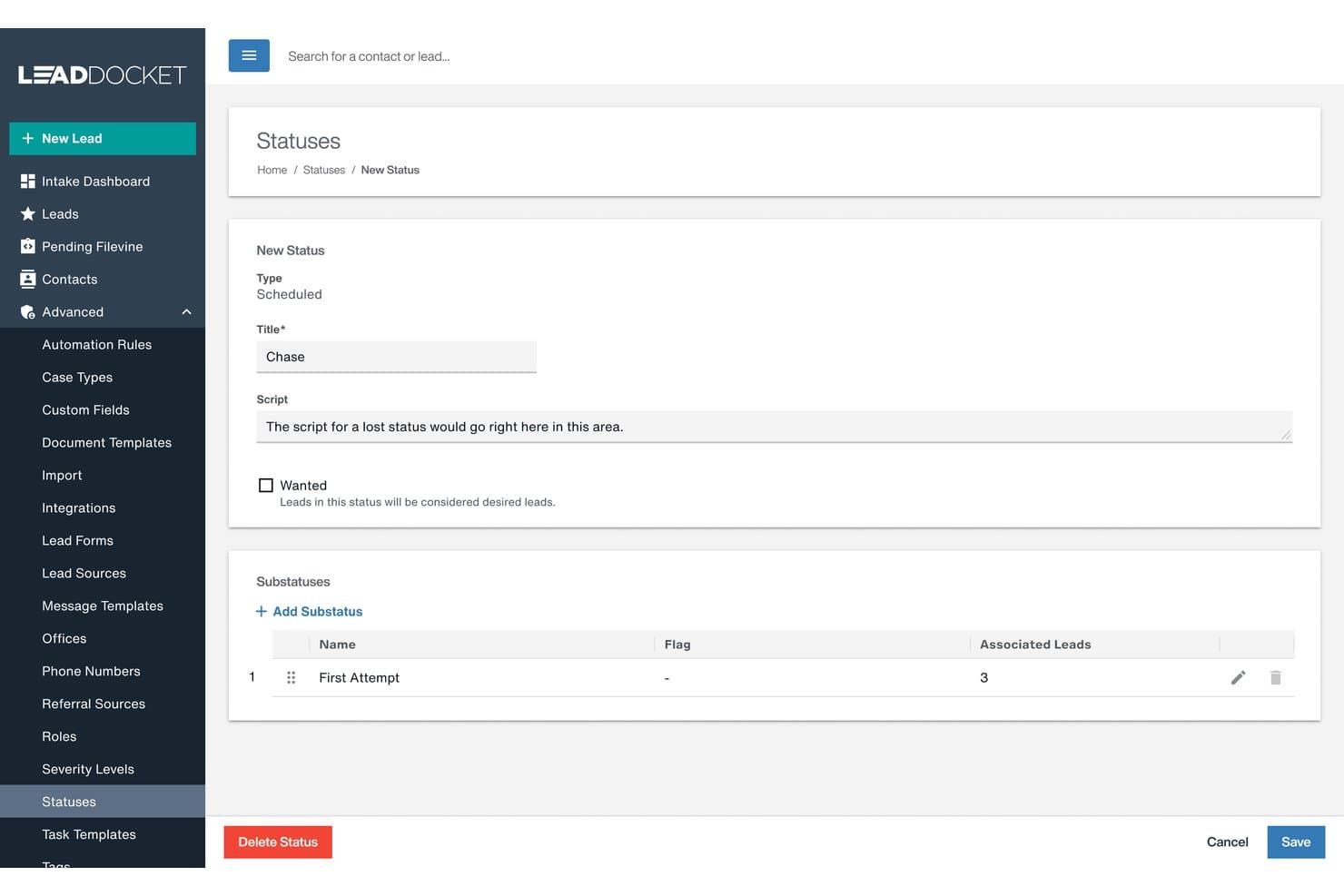
Filevine lets users customize lead statuses and substatuses for intake tracking. Filevine is an AI-powered legal practice management platform covering client intake, matter management, document automation, deadline tracking, and payment processing—with AI agents built on a purpose-built legal data foundation spanning 40M+ matters.
Who Is Filevine Best For?
Filevine is a strong fit for plaintiff-side law firms and high-volume legal practices that need to connect client intake directly to marketing attribution and matter management in one platform.
Why I Picked Filevine
I picked Filevine as one of the best because its LeadsAI tool does something most intake platforms don't: it uses AI to generate instant lead summaries and predictive case analysis, so your intake team can decide whether to accept, refer, or reject a lead without sifting through pages of intake forms. What really sets it apart is the marketing attribution layer built into Lead Docket, which connects every lead source directly to final settlement value so you can see exactly which ad campaigns are generating revenue, not just clicks.
Filevine Key Features
- Text-to-Case-File messaging: Send and receive client text messages directly within a case file, with an SMS pending response list to flag unanswered texts.
- Client portal: Give clients 24/7 access to case status, deadlines, and secure document uploads, with the option to invite outside parties like co-counsel or medical providers with restricted access.
- Vinesign e-signatures: Send forms via text or email and collect electronic signatures without leaving the platform.
- AI data mapping: Upload documents and let FilevineAI extract and map key data into designated fields automatically, cutting down manual data entry during intake.
Filevine Integrations
Filevine offers 40+ native and partner integrations, including QuickBooks, Microsoft 365, Outlook, Gmail, Google Calendar, Microsoft Teams, Slack, RingCentral, Dialpad, and Domo, and it connects with Zapier. An API is also available for custom integrations, and Workato is supported for building deeper workflow automations.
Pros and Cons
Pros:
- Connects intake directly to marketing attribution
- Predictive analysis helps qualify legal cases
- AI generates instant intake lead summaries
Cons:
- Intake tools may feel complex for small firms
- Advanced AI features require initial configuration
Learn more about Filevine: Best for intake built into trust accounting
- 10-day free trial
- From $49/user/month (billed annually)
Visit WebsiteCustomer Rating:4.4/5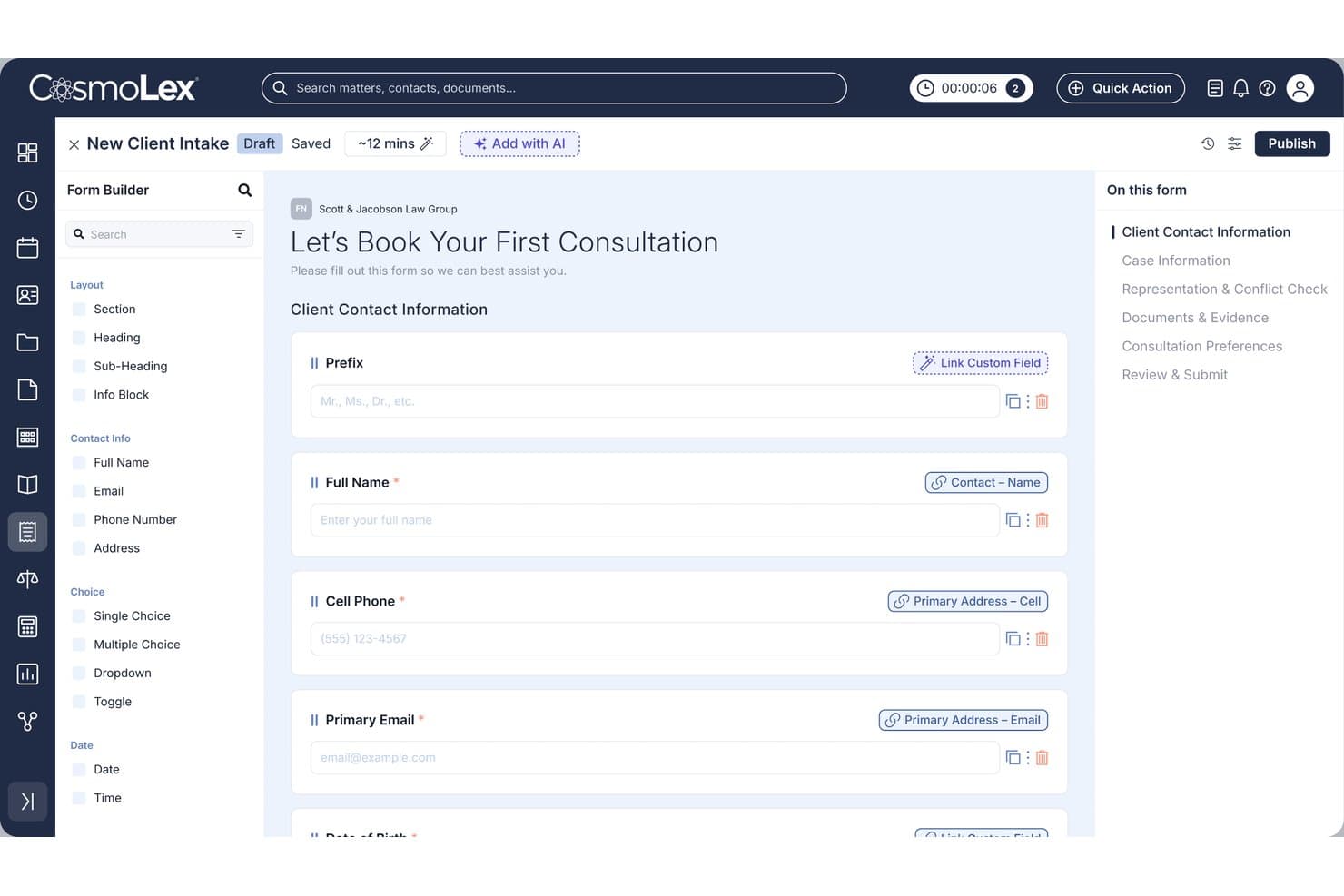
CosmoLex lets users build custom client intake forms with linked fields. CosmoLex is a cloud-based legal practice management platform that covers client intake, matter tracking, billing, and built-in trust accounting—all in one system designed for law firms.
Who Is CosmoLex Best For?
CosmoLex is a strong fit for small to mid-sized law firms that want to manage client intake and trust accounting in a single platform without juggling separate tools.
Why I Picked CosmoLex
I picked CosmoLex as one of the best because it's the only legal client intake tool I've found that connects intake directly to built-in trust accounting, not a third-party add-on. When a new client matter opens, funds collected at intake flow into a dedicated trust ledger with automatic real-time bookkeeping. I particularly like the one-click three-way reconciliation, which keeps your firm audit-ready and prevents commingling from day one of the client relationship.
CosmoLex Key Features
- AI intake form builder: Generate a custom intake form from a text prompt, or convert existing PDF and Word forms into editable digital versions.
- One-click eSignatures: Send and collect client engagement agreements directly within the platform during the intake process.
- Automated post-submission workflows: Once a client submits a form, consultations get scheduled and task assignments trigger automatically.
- Secure client portal: Clients submit documents and communicate with your firm through a branded portal that auto-files uploads to the correct matter.
CosmoLex Integrations
CosmoLex offers native integrations with Gmail, Outlook, Microsoft 365, Apple Mail, Yahoo Mail, Google Calendar, Google Drive, Dropbox, Box, OneDrive, NetDocuments, LexShare, Chrometa, LawPay, and CosmoLexPay, and it connects with Zapier for access to 4,000+ additional apps.
Pros and Cons
Pros:
- Secure portal auto-files client uploads
- Three-way reconciliation for audit readiness
- Intake connects directly to trust accounting
Cons:
- Custom field mapping limited in intake forms
- Reporting features require manual setup
Learn more about CosmoLex: Best for conflict checks in mid-to-large firm intake
- Free demo available
- Pricing upon request
Visit WebsiteCustomer Rating:4.4/5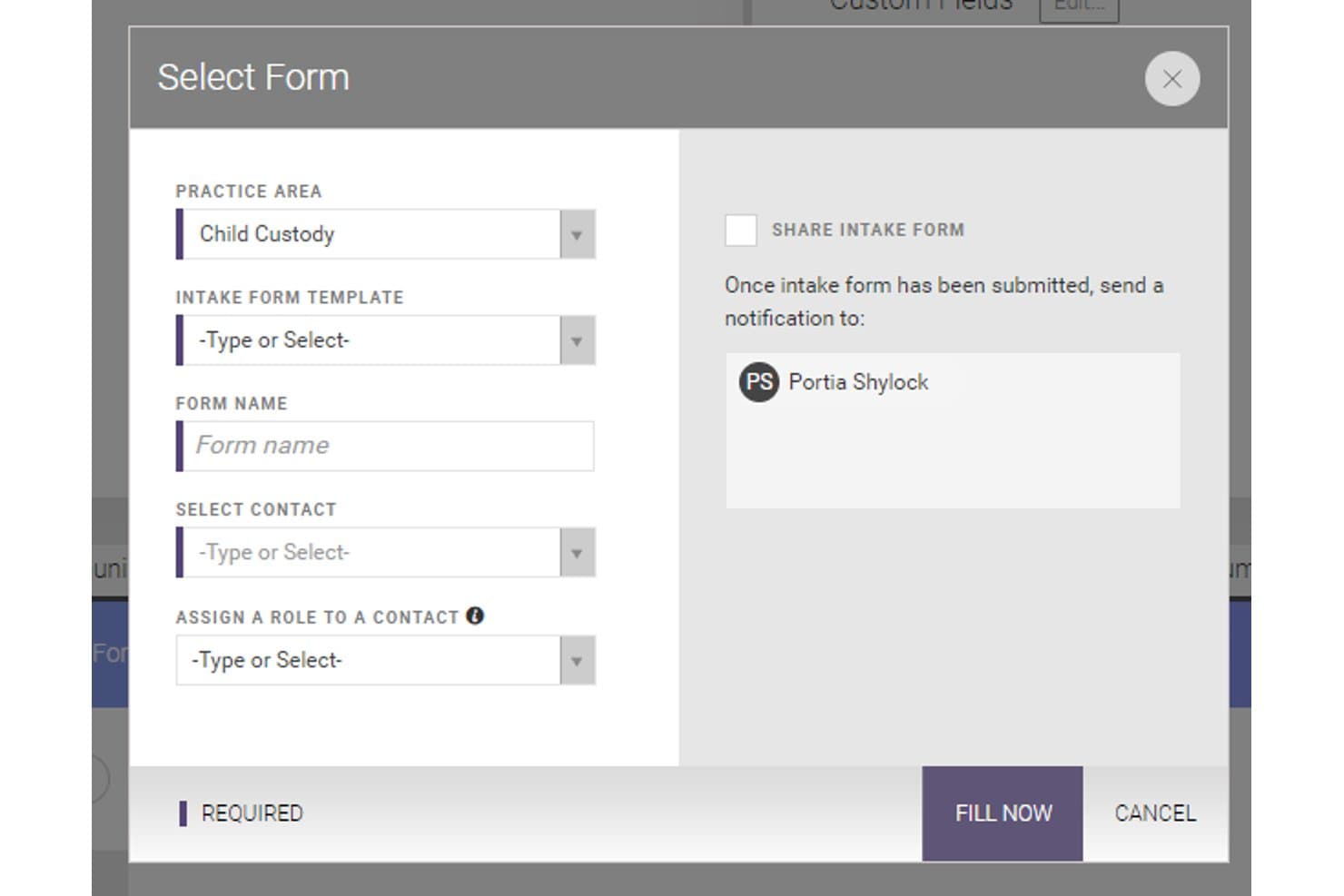
CARET Legal lets users build and send client intake forms by practice area. CARET Legal is a cloud-based legal practice management platform that covers client intake, conflict checking, matter management, billing, document management, and client communication in one system.
Who Is CARET Legal Best For?
CARET Legal is a strong fit for mid-to-large law firms that need structured conflict checking built directly into their client intake and matter management workflow.
Why I Picked CARET Legal
I picked CARET Legal as one of the best because its conflict checking is built directly into intake, not bolted on as an afterthought. When a new prospect enters the system, CARET Legal searches across active matters, archived cases, communication logs, and internal notes in one pass. That kind of reach into historical data matters most at mid-to-large firms, where manual checks across disconnected systems are where conflicts get missed. I also like that intake data automatically populates matter fields and triggers task assignments, cutting the duplicate entry that slows intake teams down.
CARET Legal Key Features
- Client portal: A built-in client portal lets clients access matter updates, exchange messages, and review documents without requiring a phone call or email thread.
- Two-way texting: Send and receive SMS messages with clients directly from within CARET Legal, keeping all communication logged against the relevant matter record.
- Document automation: Generate templated documents using matter data already in the system, reducing manual drafting time for routine client-facing paperwork.
- Time tracking and trust accounting: Log billable hours and manage trust accounts from within the same platform, with invoicing tied directly to matter records.
CARET Legal Integrations
CARET Legal offers native integrations with Microsoft 365, Google Workspace, Microsoft Outlook, Microsoft Word, OneDrive, NetDocuments, HotDocs, Lawmatics, LawToolBox, QuickBooks Online, RMail, and CARET Pay, plus IMAP support for other email accounts. Zapier support and a public API for custom integrations are not clearly documented.
Pros and Cons
Pros:
- Built-in portal supports secure client communication
- Intake populates matter records automatically
- Conflict checking scans all historical data
Cons:
- Intake workflow heavily structured for larger firms
- Public API support is not clearly documented
Learn more about CARET Legal: Best for intake-to-matter flow in one platform
- Not available
- Pricing upon request
Visit WebsiteCustomer Rating:4.8/5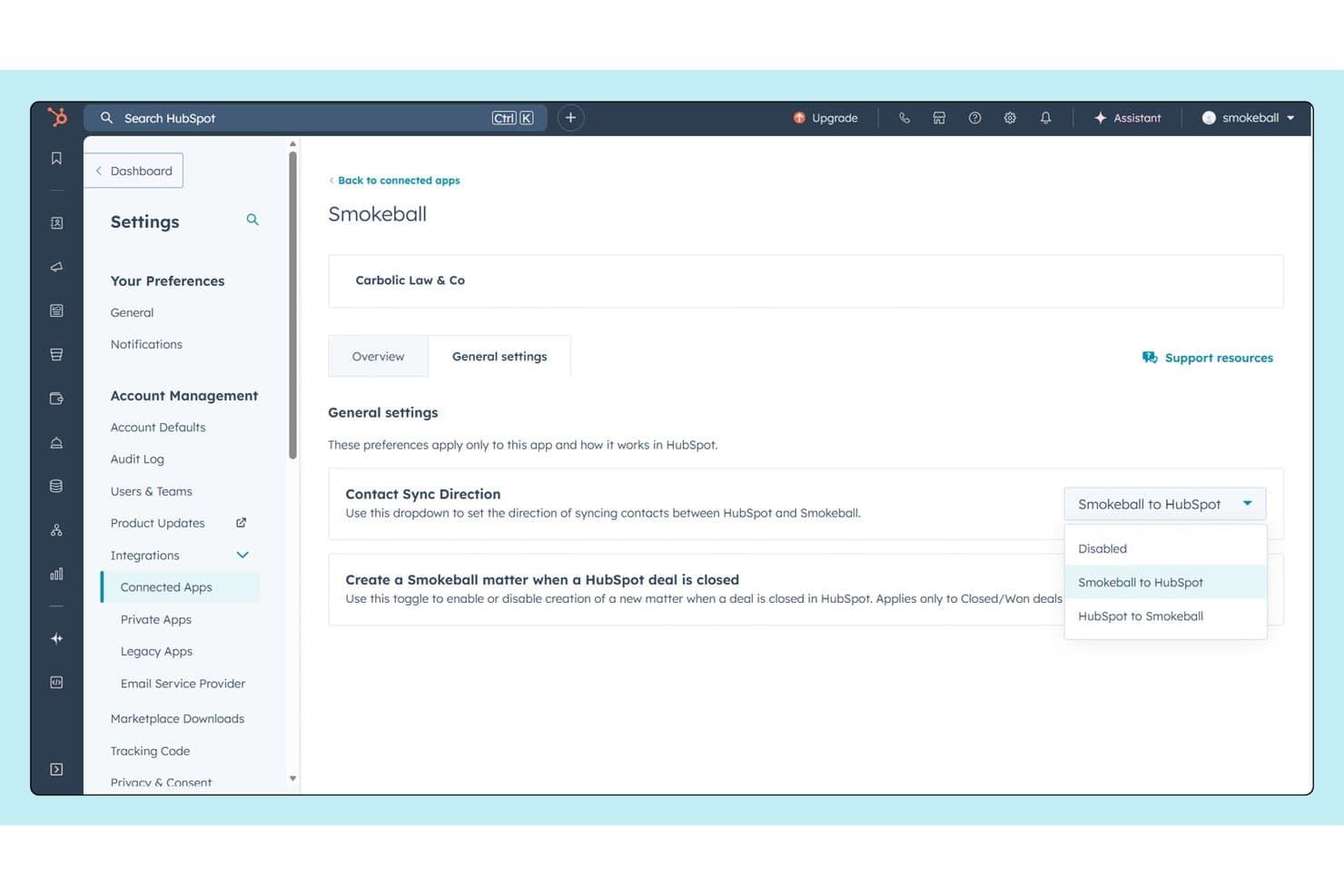
Smokeball syncs contacts bidirectionally with HubSpot for seamless CRM collaboration. Smokeball is a legal practice management platform for small and mid-sized law firms that combines client intake, matter management, document automation, automatic time tracking, and billing in one connected system.
Who Is Smokeball Best For?
Smokeball is a strong fit for small and mid-sized law firms that want client intake, matter management, and billing handled in a single connected platform rather than across multiple tools.
Why I Picked Smokeball
I picked Smokeball as one of the best because its lead management feature tracks a prospect from first contact all the way to an open matter, so nothing slips between intake and case setup. Once a matter opens, automated task workflows kick in and guide your team through the next steps without manual handoffs. I also like that AutoTime logs billable activity in the background throughout, so time captured during intake conversations isn't lost when the matter goes live.
Smokeball Key Features
- TemplateLab: Access 20,000+ automated document and form templates that pull in matter details to pre-populate fields.
- Client portal: Gives clients a dedicated space to view matter information and communicate directly with your firm.
- Email management: Automatically files client emails and attachments to the correct matter without manual sorting.
- Archie AI: An AI assistant embedded in matters that reads files, drafts documents, and surfaces next steps inside Microsoft Word and Outlook.
Smokeball Integrations
Smokeball offers 60+ native integrations through its Marketplace, including QuickBooks Online, Microsoft Outlook, Microsoft Word, Zoom, RingCentral, Smith.ai, Thomson Reuters CoCounsel, InfoTrack, EvenUp, and CiteLaw, and it connects with Zapier. A partner API is also available for custom integrations.
Pros and Cons
Pros:
- Auto-files client emails to correct matter
- Tracks billable time during intake process
- Turns intake into active matter automatically
Cons:
- No mobile intake form experience
- Intake forms require Smokeball support edits
Learn more about Smokeball: Best for all-in-one intake within your case files
- 10-day free trial
- From $50/user/month (billed annually)
Visit WebsiteCustomer Rating:4.6/5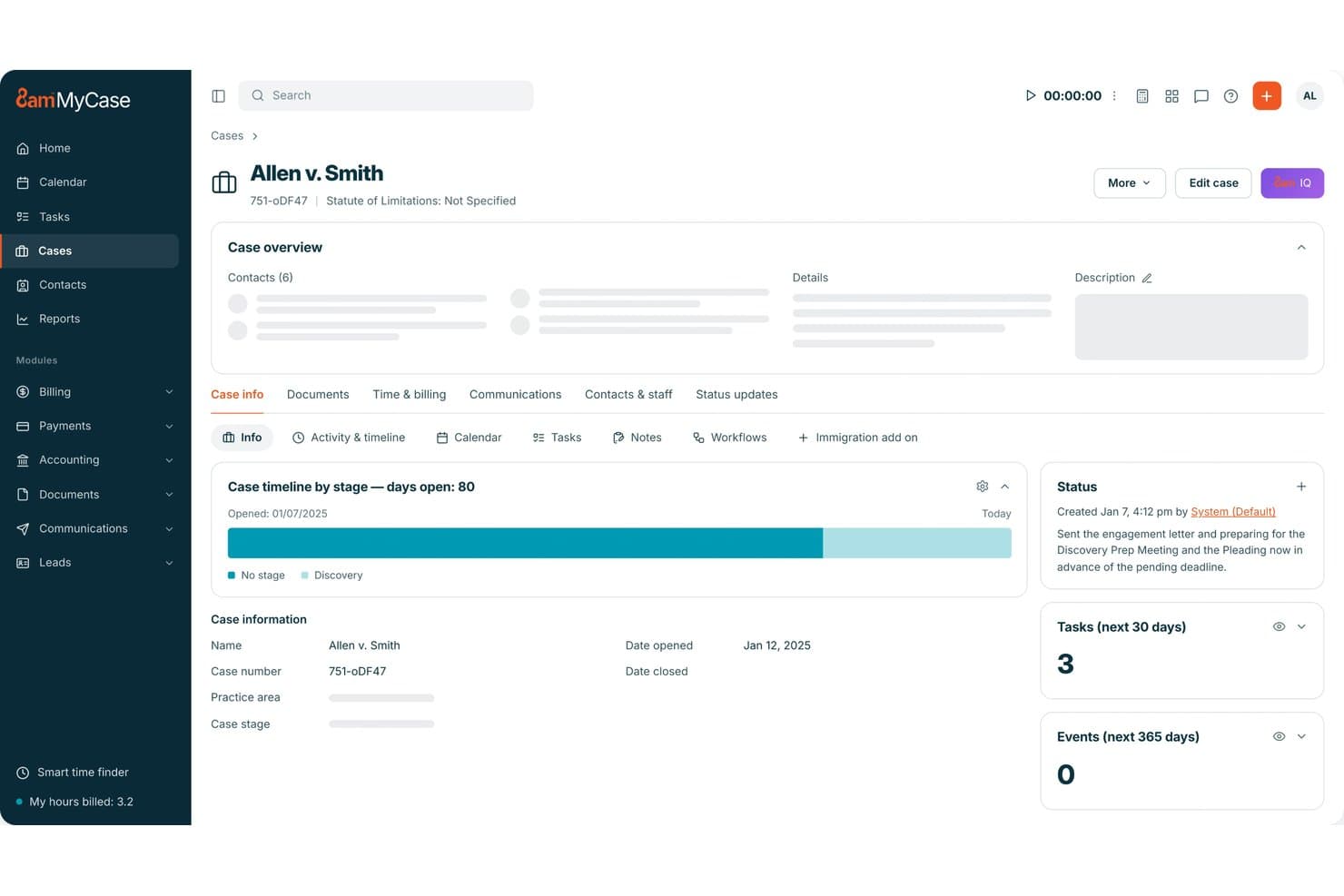
MyCase centralizes case details, tasks, and status updates in one view. MyCase is a legal practice management platform that combines customizable client intake forms, built-in CRM, case management, billing, and payment collection in one system.
Who Is MyCase Best For?
MyCase is a strong fit for small to mid-sized law firms that want intake forms, CRM, case management, billing, and payments all connected in one platform rather than spread across separate tools.
Why I Picked MyCase
I picked MyCase as one of the best because intake data flows directly into the client's case file the moment a form is submitted, which means no re-entering information across separate systems. I love that the forms use conditional logic, showing or hiding questions based on prior answers, so clients only see what's relevant to their matter. You can also collect consultation and retainer fees during intake, which keeps onboarding and payment in one step rather than two separate conversations.
MyCase Key Features
- Website embed for intake forms: Place intake forms directly on your firm's website so prospective clients can submit their information without any back-and-forth.
- eSignature: Clients can sign engagement letters and agreements from any device, with eSignature built into the platform at no extra cost.
- Built-in text messaging: Send and receive messages with clients and leads through integrated text messaging, with every conversation saved automatically to their case record.
- Workflow automation: Automatically trigger the creation of tasks, events, and documents when a new intake form is submitted, so your team's next steps are ready without manual setup.
MyCase Integrations
MyCase offers 60+ native integrations relevant to legal intake and case management, including Lawmatics, DecisionVault, Intaker, LawPay, QuickBooks, Gmail, Microsoft Outlook, Google Calendar, Dropbox, and NetDocuments. An API is available for custom integrations.
Pros and Cons
Pros:
- Collects consultation and retainer fees upfront
- Conditional logic tailors every intake form
- Intake data flows directly into case files
Cons:
- Lacks extensive granular intake reporting tools
- Limited intake form design customization options
 Best for CRM-grade intake and marketing ROI tracking
- Free demo available
- Pricing upon request
Visit WebsiteCustomer Rating:4.6/5
Lawmatics organizes client intake leads across pipeline stages visually. Lawmatics is a legal CRM and client intake platform that combines intake forms, automated follow-ups, e-signatures, conflict checking, and marketing analytics into a single system for law firms.
Who Is Lawmatics Best For?
Lawmatics is a strong fit for growth-focused law firms that want to track where clients come from and measure the return on their marketing spend alongside managing intake.
Why I Picked Lawmatics
I've included Lawmatics in my top picks because it treats intake as the front end of a full CRM pipeline, not just a form-capture tool. What sets it apart is the built-in marketing attribution tracking, which shows you exactly which campaigns, referral sources, or ad channels are generating signed clients. Pair that with automated follow-up sequences and conflict checking, and you get a system that closes the loop between marketing spend and intake conversion.
Lawmatics Key Features
- Custom intake form builder: Build intake forms tailored to specific practice areas and case types using customizable templates.
- Client self-scheduling: Let prospective clients book consultation appointments directly through calendar-synced availability links.
- Electronic signatures: Send, receive, and manage legally binding e-signatures on retainer agreements and intake documents without leaving the platform.
- Audience segmentation: Group contacts dynamically by matter type, lead status, or location to deliver targeted follow-up communications.
Lawmatics Integrations
Lawmatics offers native integrations with Clio, MyCase, PracticePanther, Rocket Matter, Smokeball, LawPay, QuickBooks, Google Ads, Microsoft Outlook, and Zoom, along with an integration marketplace covering case management, billing, reception, and communication tools. An API is available for custom integrations through the LawLink.ai universal connector.
Pros and Cons
Pros:
- Offers conflict checks within intake flow
- Automates personalized follow-up sequences
- Tracks marketing ROI linked to intake conversion
Cons:
- E-signature customization options feel limited
- Intake analytics require CRM pipeline setup
Learn more about Lawmatics: Best for mid-size firm intake and conflict checks
- Free demo available
- Pricing upon request
Visit WebsiteCustomer Rating:4.2/5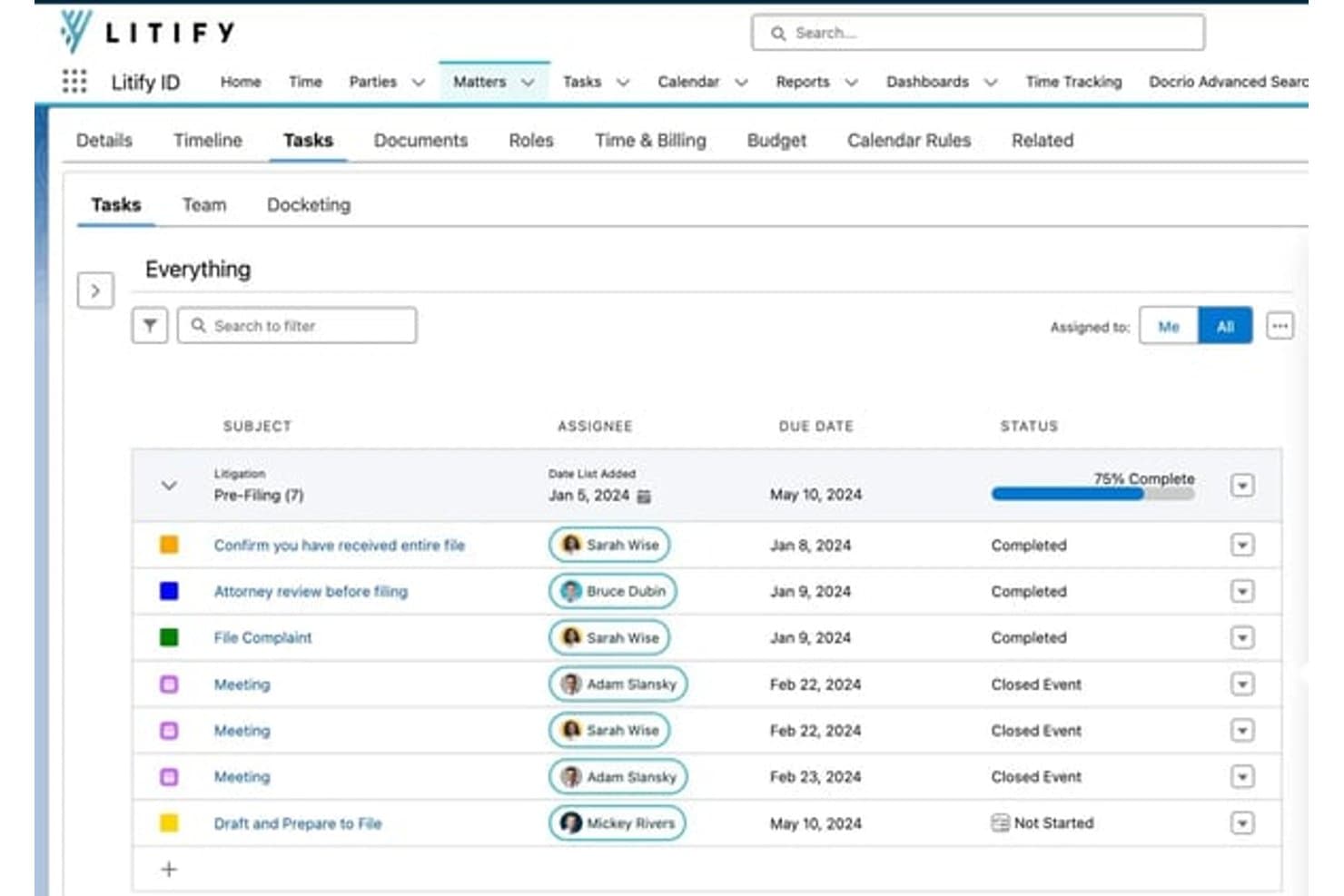
Litify organizes matter tasks with assignees, due dates, and status tracking. Litify is a Salesforce-based legal operations platform that covers client intake, matter management, document generation, time and billing, and AI-driven workflow automation across practice areas.
Who Is Litify Best For?
Litify works well for mid-size law firms that need to manage high intake volumes alongside conflict checks within a single Salesforce-native platform.
Why I Picked Litify
I picked Litify as one of the best because its Conflict Check Agent stands out for mid-size firms processing high intake volumes. It uses fuzzy matching to catch conflicts even when names or data are incomplete or inconsistent, which is exactly where manual checks tend to fail. Pair that with dynamic intake questionnaires that branch based on client responses, and your team can qualify matters faster without sacrificing accuracy.
Litify Key Features
- Matter plans: Automatically generate configurable task lists by practice area and case type when a new matter opens.
- Legal service request routing: Triage incoming requests and route contract, IP, or HR matters to the right specialist automatically.
- AI time capture: Track and recommend billing entries for activities like emails and coordination without manual input.
- No-code workflow configuration: Build and edit intake workflows, reports, and views without writing any code, directly within the Salesforce-native environment.
Litify Integrations
Litify is built natively on Salesforce and offers integrations with DocuSign, iManage, Microsoft Outlook, QuickBooks, Google Calendar, Epiq, Confido Legal, Workday, and SAP. An API is available for custom integrations, and Zapier support is not clearly documented.
Pros and Cons
Pros:
- No-code workflow tools reduce IT reliance
- Dynamic intake forms adapt to client responses
- Fuzzy matching for more accurate conflict checks
Cons:
- Customization can require advanced setup skills
- Heavy reliance on Salesforce environment
Learn more about Litify: Best for e-signature via SMS at intake
- Free demo available
- Pricing upon request
Visit WebsiteCustomer Rating:4.6/5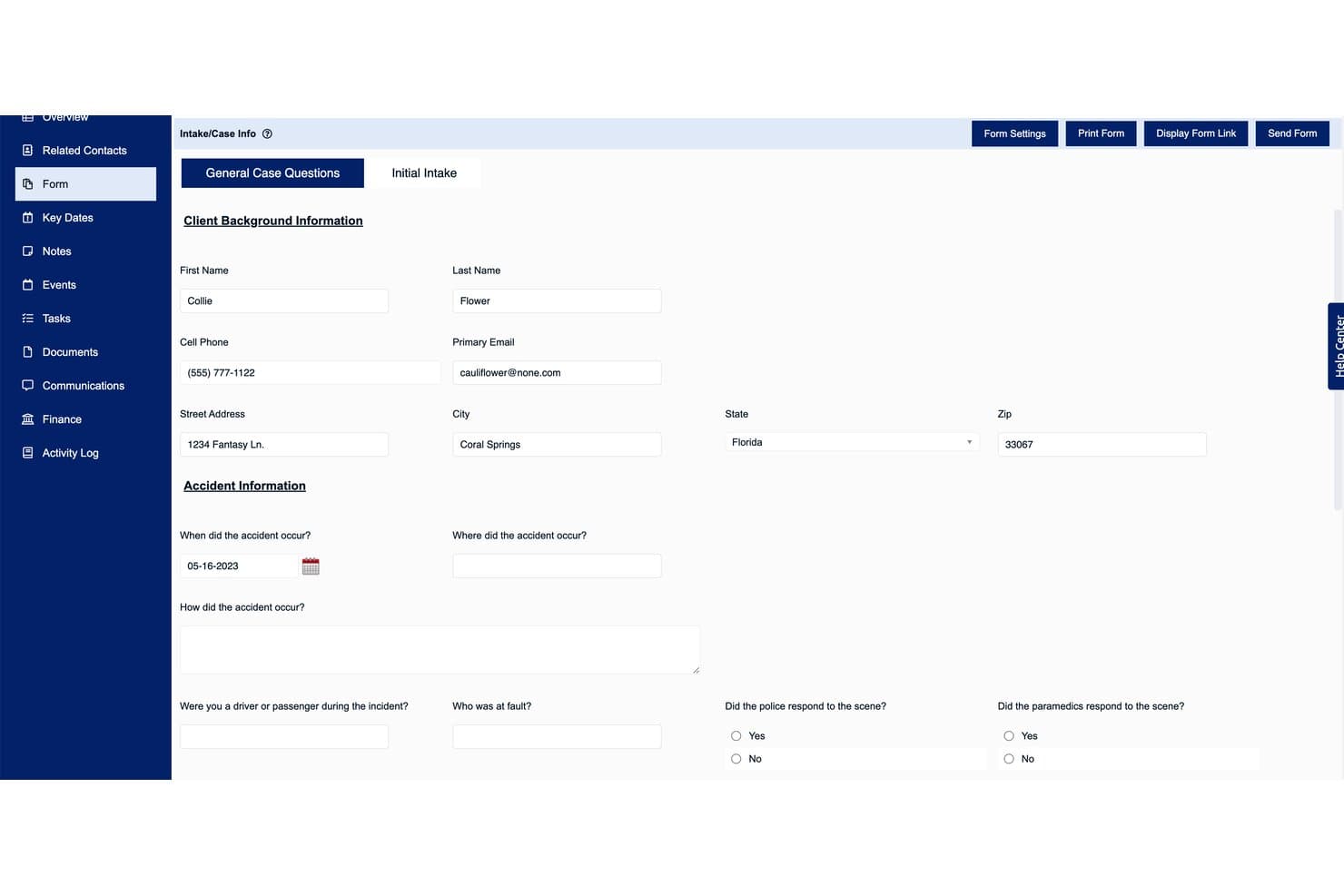
Law Ruler's intake form captures client and accident details efficiently. Law Ruler is a legal client intake platform for law firms that combines smart intake forms, lead management, automated document assembly, and e-signature collection via email or SMS.
Who Is Law Ruler Best For?
Law Ruler is a strong fit for plaintiff-side and high-volume law firms that need to capture e-signatures from prospective clients at the moment of first contact, before they walk away.
Why I Picked Law Ruler
I picked Law Ruler as one of the best because it's the only legal intake tool I've seen that lets firms send e-signature requests directly via SMS at the moment of first contact. That matters in high-volume plaintiff-side practices where a prospective client who doesn't sign right away often doesn't sign at all. Law Ruler pairs this with Smart Forms that adapt questions based on each lead's answers, so by the time the signature request lands in their text messages, the retainer is already pre-populated with their information.
Law Ruler Key Features
- Pipeline inbox: A visual dashboard that tracks each lead's status and movement through your intake-to-client conversion workflow.
- Automated appointment scheduling: Law Ruler sends email and text follow-ups to schedule consultations without manual coordination from your team.
- Lead qualification and pre-screening: The platform automatically flags and filters leads based on intake responses, so your team focuses only on cases that fit your practice.
- Automated document assembly: Client data from intake forms populates legal document templates, reducing the time spent preparing retainer agreements and other paperwork.
Law Ruler Integrations
Law Ruler offers native integrations with practice management and legal tools including TimeSolv, CosmoLex, Rocket Matter, HelloSign, Smith.AI, ApexChat, Twilio, Thomson Reuters, and Microsoft 365, and it connects with Zapier. An API is available for custom integrations at no additional fee.
Pros and Cons
Pros:
- Visual dashboard tracks lead status
- Smart intake forms adapt to client answers
- Sends e-signature requests instantly via SMS
Cons:
- Advanced automation setup can feel complex
- Intake customization requires platform support
Learn more about Law Ruler:
Annen programvare for klientinntak i juridisk praksis
Her er noen flere alternativer for programvare for klientinntak i juridisk praksis som ikke kom med på kortlisten, men som likevel er verdt å undersøke:
- 11Lead DocketBest for marketing ROI in high-volume PI intake
- 12ActionstepBest for conflict checks built into your intake flow
- 13CasePeerBest for personal injury firm intake pipelines
- 14Rocket MatterBest for intake within a practice management suite
- 15PracticePantherBest for solo firms taking intake through to billing
- 16NeosBest for PI firms scaling their intake pipeline
- 17DocketwiseBest for immigration law intake workflows
- 18RunSensibleBest for all-in-one intake and matter management
- 19IntakerBest for AI-driven lead capture across channels
How I Evaluate Legal Client Intake Software
I split my evaluation into baseline criteria every tool must meet and differentiating factors that separate good from great—from conflict check depth to how well intake data flows into matter management.
Core Functionality (Table Stakes For This List)
When I'm selecting tools for my list, I rank each one on a scale from 0 (does not offer the functionality) to 5 (excels in this area) for each core functionality listed below. I then calculate the tool's total score into a percentage, using 65% as a benchmark to help assess its overall fit for the list.
- Customizable Intake Forms: I check whether forms support conditional logic and practice-area templates, since a family law questionnaire needs very different fields than a PI intake.
- Lead & Contact Management: Pipeline stages, automated follow-ups, and activity history all factor in—I look for tools that move leads from inquiry to signed engagement without manual babysitting.
- Conflict Check Tools: I evaluate how deeply a tool searches across parties, aliases, and related matters, and whether it logs results with an audit trail your compliance team can reference later.
- E-Signature & Engagement Letters: The ability to send retainer agreements with merge fields and collect signatures natively matters here—tools like Lawmatics and Law Ruler handle this differently, so I compare workflow and delivery options.
- Practice Management Integration: I look at whether intake data syncs into your matter management system in real time, since re-keying client details from intake into platforms like Clio or Filevine defeats the purpose.
- Intake Analytics & Reporting: Tracking lead sources, conversion rates, and referral performance helps justify marketing spend, so I evaluate dashboard depth and whether reports can be filtered by campaign or practice area.
Once I have a list of tools that meet the criteria, I consider what sets each platform apart.
Differentiating Factors (What Sets Vendors Apart)
Here's how I compare and contrast different vendors:
Standout Features
I look for referral source and UTM tracking that ties marketing spend directly to signed matter revenue—not just lead counts. Tools like Lawmatics and Lead Docket handle attribution differently, so I check whether you can filter ROI by practice area or campaign. Payment collection at intake is another separator; I evaluate whether a platform supports IOLTA-compliant trust deposits at the point of signing, since collecting retainers during onboarding cuts days off your accounts receivable cycle. I also consider how well each tool handles automated client communication, from drip emails to SMS re-engagement of stalled leads.
Beyond Features
I evaluate how well each platform fits a firm's existing practice management stack. Bidirectional syncing with tools like Clio or Filevine should cover contacts, custom fields, and documents—not just names and emails. I also check onboarding support, since migrating a conflict database or building conditional intake templates without a dedicated success manager can stall adoption for weeks, especially at firms without in-house IT.
Slik velger du programvare for klientinntak i juridisk praksis
Når du velger programvare for klientinntak i juridisk praksis, bør du spørre deg selv: Hvilke deler av klientinntaket og overleveringen skaper fortsatt friksjon i firmaet, og hva er ufravikelige krav når det gjelder samsvar eller markedsføringsavkastning?
| Hvis prioriteten din er … | Se etter … |
| Å effektivisere klientinntaket frem til saksbehandlingen | Direkte integrasjon med plattformen for juridisk praksis eller saksbehandling |
| Å forebygge konflikter og risiko for manglende samsvar | Søkbare og loggførte funksjoner for konfliktsjekk |
| Å spore markedsføringsavkastning og kilder til potensielle klienter | Attribusjon av kampanjekilder og analyse av klientinntak |
| Å innhente signaturer og godkjenninger umiddelbart | Arbeidsflyter for klientinntak med elektronisk signatur og SMS |
| Å automatisere oppfølging av nye potensielle klienter | Innebygde dryppkampanjer samt SMS- og e-postpåminnelser i klientinntaksflyten |
Slik vurderer du kortlisten
- Test integrasjonsflyten: Opprett en prøveklient og bekreft at alle data fra klientinntaket synkroniseres med det nåværende saksbehandlingssystemet ditt innen 48 timer.
- Gjennomfør et ekte søk etter interessekonflikter: Legg inn navn eller parter fra en avsluttet sak, og be om det søkbare revisjonssporet som PDF før den tredje dagen.
- Bekreft attribusjon og rapportering: Importer 20 testpotensielle klienter med ulike svar på «Hvordan hørte du om oss?», og eksporter deretter en oversikt over kilder og kampanjer.
- Be om en arbeidsflyt for oppdragsbrev: Be leverandøren sende deg en prøveforespørsel om elektronisk signatur via både e-post og SMS, og signer ved hjelp av din egen enhet.
- Avveining – tilpasning kontra oppsett rett ut av boksen: Finn ut om du trenger svært skreddersydde arbeidsflyter, som krever lengre implementering, eller umiddelbar brukervennlighet med standardmaler.
Hva er programvare for klientinntak i advokatvirksomhet?
Programvare for klientinntak i advokatvirksomhet er et digitalt verktøy advokatfirmaer bruker til å registrere, kvalifisere og ta imot henvendelser fra nye klienter. Den automatiserer inntaksskjemaer, kommunikasjon, konfliktsjekker og prosesser for oppdragsbrev, slik at du kan føre klienter fra første kontakt til et aktivt oppdrag uten manuell dataregistrering eller unødvendige trinn. Ved å bruke slik programvare kan du sikre etterlevelse, redusere feil ved klientinnlemming og koble inntaksdata direkte til systemene for praksis- eller saksbehandling.
Funksjoner i programvare for klientinntak i advokatvirksomhet
Når du velger programvare for klientinntak i advokatvirksomhet, bør du se etter følgende viktige funksjoner:
- Tilpassbare inntaksskjemaer: Lag skjemaer som tilpasses ulike rettsområder og bruker betinget logikk, slik at du kan samle inn riktig informasjon for hver nye klient uten dobbeltarbeid.
- Håndtering av potensielle klienter og kontakter: Følg henvendelser fra første kontakt til signert oppdragsavtale med verktøy som automatisk logger kommunikasjon, håndterer stadier i salgstrakten og støtter oppfølging, slik at du ikke mister oversikten over potensielle klienter.
- Verktøy for konfliktsjekk: Søk i advokatfirmaets database etter mulige interessekonflikter ved å skanne parter, relaterte kontakter og saker, og opprett et revisjonsspor for etterlevelse.
- Elektroniske signaturer og oppdragsbrev: Opprett, send og innhent signaturer på oppdragsavtaler direkte i inntaksprosessen. Noen verktøy tillater levering både via e-post og SMS.
- Integrasjon med praksisadministrasjon: Synkroniser alle inntaksdata – inkludert dokumenter, kontakter og egendefinerte felt – direkte med systemet for saks- eller oppdragsbehandling for å unngå manuell dataregistrering.
- Analyse og rapportering av inntak: Følg med på viktige resultatmål som konverteringsrater, henvisningskilder og kampanjeeffektivitet gjennom dashbord og tilpassbare rapporter.
- Automatisert klientkommunikasjon: Send automatiserte e-postkampanjer, SMS-påminnelser og bekreftelser på oppdragstildelinger for å holde potensielle klienter engasjert og redusere tapte muligheter.
- Betalingsinnkreving ved inntak: Ta imot innledende forskuddsbetalinger, klientkontoinnskudd eller andre gebyrer på en sikker måte under klientinnlemmingen, slik at du kan starte arbeidet med betalte oppdrag umiddelbart.
- Dokumenthåndtering: Organiser, lagre og hent frem inntaksdokumenter, identifikasjon og støttende filer, slik at alt du trenger, følger klienten sømløst gjennom klientinnlemmingen.
- Automatisering av oppgaver og arbeidsflyt: Utløs bestemte handlinger – som å tildele oppgaver eller sende varsler – når et inntak når bestemte trinn, slik at ingenting faller mellom stolene under klientinnlemmingen.
Fordeler med programvare for klientinntak i advokatvirksomhet
Implementering av programvare for klientinntak i advokatvirksomhet gir flere fordeler for teamet og virksomheten din. Her er noen av fordelene du kan se frem til:
- Raskere klientinnlemming: Registrer og kvalifiser potensielle klienter automatisk ved hjelp av tilpassbare inntaksskjemaer, elektroniske signaturer og konfliktsjekkverktøy, slik at klientene raskt går fra henvendelse til signert oppdragsavtale.
- Færre mangler i etterlevelsen: Bruk søkbare og loggførte konfliktsjekker og revisjonsspor for å støtte trygg klientinnlemming og beskytte mot interessekonflikter.
- Bedre håndtering av potensielle klienter og kontakter: Samle all kommunikasjon, alle dokumenter og all aktivitetshistorikk på ett sted, slik at du aldri mister oversikten over en potensiell klient eller går glipp av en oppfølging.
- Sammenhengende arbeidsflyter for praksisadministrasjon: Synkroniser inntaksdata – inkludert egendefinerte felt og dokumenter – direkte med systemet for praksis- eller saksbehandling for å forhindre manuell dataregistrering og redusere feil.
- Datadrevet beslutningstaking: Få tilgang til analyser av inntak og rapporter om kampanjeattribusjon for å måle markedsføringens avkastning, følge konverteringsrater og optimalisere inntakstrakten.
- Effektivisert betalingsinnkreving: Ta imot oppdragsgebyrer og forskuddsbetalinger på en sikker måte under klientinnlemmingen for å redusere forsinkelser mellom inntak og betalt arbeid.
- Automatisert klientkommunikasjon: Planlegg automatiserte e-poster og SMS-påminnelser for å holde potensielle klienter engasjert gjennom hele inntaksprosessen uten ekstra manuelt arbeid.
Kostnader og priser for programvare for klientinntak i advokatvirksomhet
Å velge programvare for klientinntak i advokatvirksomhet krever en forståelse av de ulike prismodellene og abonnementene som er tilgjengelige. Kostnadene varierer basert på funksjoner, teamstørrelse, tillegg og mer. Tabellen nedenfor oppsummerer vanlige abonnementer, gjennomsnittsprisene deres og typiske funksjoner som er inkludert i løsninger for klientinntak i advokatvirksomhet:
Sammenligningstabell for abonnementer for programvare for klientinntak i advokatvirksomhet
| Plantype | Gjennomsnittlig pris | Vanlige funksjoner |
| Gratisabonnement | $0 | Grunnleggende tilpassbare inntaksskjemaer, begrenset administrasjon av potensielle kunder og kontakter, grunnleggende konfliktsjekk og brukerstøtte via e-post. |
| Personlig abonnement | $30–$50/user/month | Tilpassbare inntaksskjemaer, administrasjon av potensielle kunder, grunnleggende verktøy for elektronisk signatur, konfliktsjekk og begrenset integrasjon med praksisadministrasjon. |
| Forretningsabonnement | $60–$90/user/month | Avanserte inntaksskjemaer, utvidet kontaktadministrasjon, arbeidsflyter for elektronisk signatur og maler, grundigere konfliktsjekk, analyse og rapportering samt integrasjoner med systemer for praksisadministrasjon. |
| Virksomhetsabonnement | $100–$150/user/month | Alle funksjonene i forretningsabonnementet, i tillegg til avansert analyse, prioritert brukerstøtte, automatisering av arbeidsflyter, hjelp med onboarding, forbedret sikkerhet og tilpassede integrasjoner. |
Vanlige spørsmål om juridisk programvare for klientinntak
Her er noen svar på vanlige spørsmål om juridisk programvare for klientinntak:
Hvordan vet jeg om juridisk programvare for klientinntak passer med det eksisterende systemet mitt for praksisadministrasjon?
De fleste programmer for juridisk klientinntak kan integreres med populære plattformer for praksisadministrasjon, som Clio, Filevine eller MyCase. Før du velger et verktøy, bør du teste en prøveintegrasjon med det nåværende systemet ditt. Sørg for at alle relevante inntaksdata – som kontakter, egendefinerte felt og dokumenter – synkroniseres fullstendig og automatisk, ikke bare navn eller e-postadresser. Be leverandøren om en demonstrasjon med dine egne eksempeldata, slik at du kan se nøyaktig hvordan integrasjonen fungerer.
Er funksjonalitet for elektronisk signatur standard, eller må jeg betale ekstra?
Verktøy for elektronisk signatur er inkludert i mange mellomklasse- og forretningsabonnementer, men kan være begrenset i rimeligere alternativer. Hvis det er viktig å innhente oppdragsbekreftelser eller salæroverenskomster under inntaket, bør du bekrefte at abonnementet du vurderer, støtter innebygd elektronisk signatur, og at dokumenter kan sendes både via e-post og SMS. Noen leverandører tilbyr avanserte signaturverktøy bare som betalte tillegg.
Kan juridisk programvare for klientinntak bidra med konfliktsjekk og overholdelse av regelverk?
Ja, de fleste ledende plattformer for klientinntak har innebygde verktøy for konfliktsjekk. Med disse kan du søke etter kontakter, parter og relaterte saker for å finne mulige konflikter, og loggføre resultatene som et revisjonsspor for dokumentasjon av regelverksetterlevelse. Undersøk hvor grundig søket skanner databasen din, og om du kan eksportere en rapport som dokumenterer søket, til bruk for regelverksteamet ditt.
Hvordan bidrar inntaksprogramvare til å spore markedsføringens avkastning?
Verktøy for juridisk klientinntak tilbyr ofte attribusjon av kilder til potensielle kunder, kampanjesporing og inntaksanalyse. Du kan registrere hvordan potensielle klienter fant virksomheten din, tilordne UTM-koder og kjøre rapporter for å se hvilke markedsføringskanaler som genererer potensielle kunder med høy konverteringsgrad. Disse dataene hjelper deg med å ta bedre beslutninger om annonseutgifter og henvisningssamarbeid.
Hva skjer hvis jeg må tilpasse inntaksskjemaer for ulike rettsområder?
De fleste programmer for juridisk klientinntak lar deg lage egendefinerte skjemaer for hvert rettsområde, ofte med betinget logikk. Det betyr at du kan tilpasse spørsmålene basert på klientenes svar – for eksempel vise bestemte felt for familierett i stedet for personskade. Sjekk alltid om det finnes malbiblioteker, og om du kan ta i bruk nye skjemaer uten å skrive kode.
Hvor sikre er klientdata i juridisk programvare for klientinntak?
Sikkerhet er en høyeste prioritet i denne kategorien. De fleste anerkjente plattformer for juridisk klientinntak tilbyr funksjoner som datakryptering, tofaktorautentisering, revisjonslogging og tilgangskontroller. Bekreft alltid at programvaren oppfyller relevante standarder for juridisk sektor, og spør leverandøren om muligheter for tilpassede sikkerhetsinnstillinger eller regional lagring av data ved behov.
Kan jeg automatisere oppfølginger og påminnelser for nye potensielle kunder?
Ja, automatiserte oppfølginger er vanligvis innebygd. Mange inntaksverktøy lar deg sette opp e-postserier, SMS-påminnelser eller oppgavetildelinger basert på status eller milepæler i inntaksprosessen. Dette hjelper deg med å unngå manuell oppfølging og sikrer at ingen potensielle klienter går tapt. Se etter plattformer som tilbyr malbaserte arbeidsflyter eller enkel tilpasning for de vanligste klientforløpene dine.