

Samarbeidsprogramvare for advokatfirmaer gir teamet ditt alt-i-ett-verktøy for å administrere juridiske kalendere, dokumenter, frister og sikker klientkommunikasjon på ett sted. Hvis du leter etter løsninger som holder advokater, ansatte og klienter tilkoblet – samtidig som dere overholder rettsregler og personvernkrav – kan den riktige plattformen være avgjørende for arbeidsflyten din. I denne veiledningen finner du den beste samarbeidsprogramvaren for advokatfirmaer i 2026, der hvert alternativ er vurdert med en praktikers blikk på regelbasert kalenderføring, dokumentstyring og sikkerhet i klientportaler. Se hvilke verktøy som faktisk håndterer realitetene i juridisk praksis, slik at du kan velge det som passer best for firmaets behov.
Why Trust Our Software Recommendations
6,700+
Reviews
20
Industry experts
16+
Evaluation factors
14
Years
Our team has been testing and reviewing software since 2012. As legal practice leaders ourselves, we know how difficult—and important—it is to choose the right software.
For this guide, we evaluated tools using hands-on testing and independent research, scoring tools using our selection criteria.
Our reviews reflect our human editorial judgment, not a sales pitch.
Sammenligningstabell for samarbeidsprogramvare for advokatfirmaer
Denne sammenligningstabellen oppsummerer prisdetaljene for mine beste utvalg av samarbeidsprogramvare for advokatfirmaer:
| Tool | Best For | Trial Info | Price | ||
|---|---|---|---|---|---|
| 1 | Best for solo and small firm matter workflows | Not available | Pricing upon request | Website | |
| 2 | Best for white-labeled client portals | 10-day free trial | From $11/user/month | Website | |
| 3 | Best for court rules calendaring in litigation firms | Free trial + free demo available | Pricing upon request | Website | |
| 4 | Best for DMS-led matter governance at scale | Free demo available | Pricing upon request | Website | |
| 5 | Best for court rules deadline automation at scale | Free demo available | Pricing upon request | Website | |
| 6 | Best for court rules calendaring across matters | 7-day free trial | From $49/user/month | Website | |
| 7 | Best for solo and small firm court deadline management | 10-day free trial | From $50/user/month (billed annually) | Website | |
| 8 | Best for full-matter workflows with AI doc tools | Free demo available | Pricing upon request | Website | |
| 9 | Best for all-in-one matter and client portal workflows | Free demo available | Pricing upon request | Website | |
| 10 | Best for midsize firms on Microsoft 365 | Free demo available | Pricing upon request | Website |


Anmeldelser av samarbeidsprogramvare for advokatfirmaer
\u003cspan style=\u0022font-weight: 400\u0022\u003eNedenfor finner du mine detaljerte sammendrag av den beste samarbeidsprogramvaren for advokatfirmaer som kom med på kortlisten. Anmeldelsene mine gir en detaljert gjennomgang av funksjonene, de beste bruksområdene og integrasjonene for hver plattform, slik at du kan finne den beste løsningen for deg.\u003c/span\u003e
 Best for solo and small firm matter workflows
- Not available
- Pricing upon request
Visit WebsiteCustomer Rating:4.8/5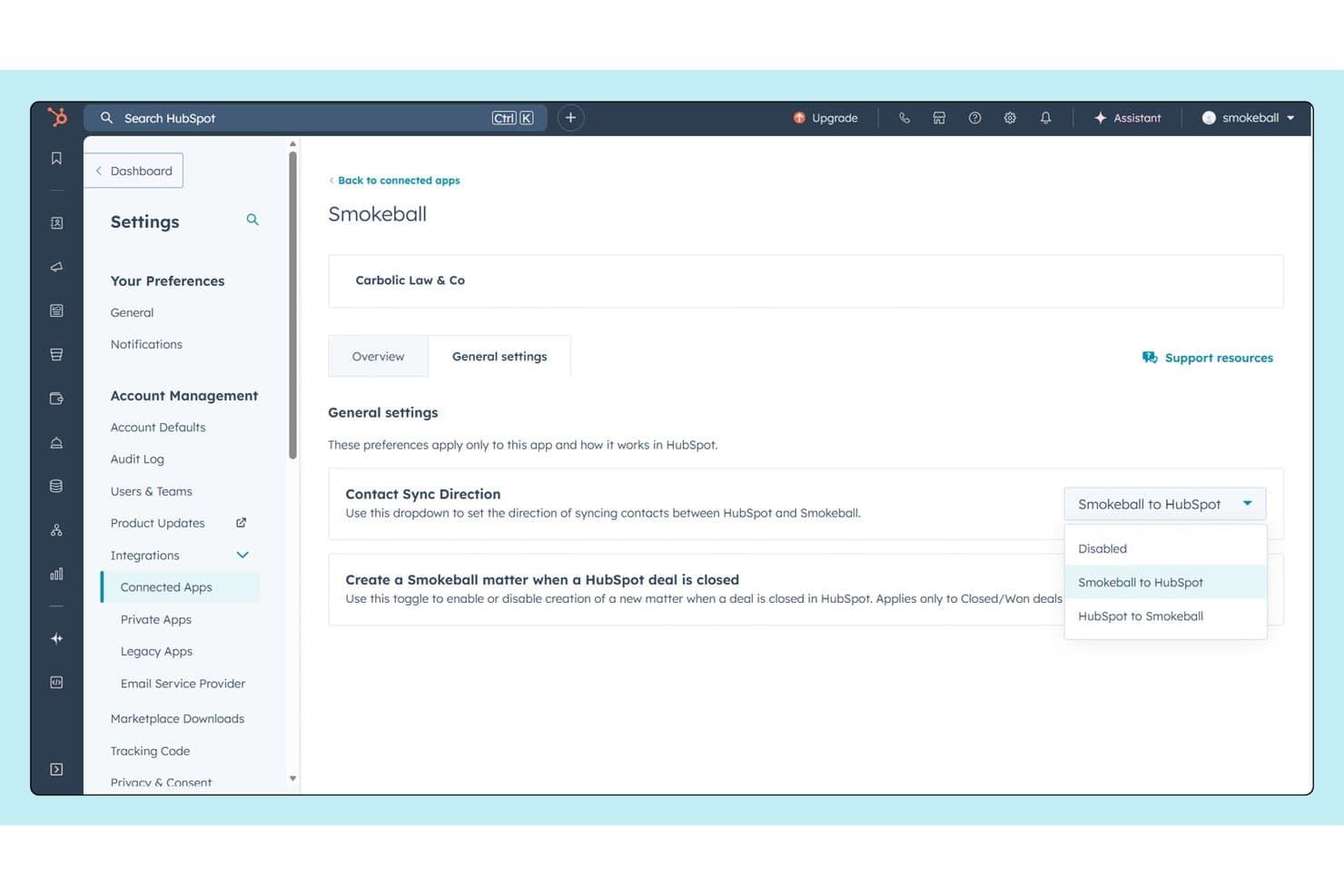
Smokeball syncs contacts bidirectionally with HubSpot for seamless CRM collaboration. Smokeball is a legal practice management platform built for solo lawyers and small firms, combining matter management, document automation, practice-area workflows, client intake, time tracking, and billing within a single system.
Who Is Smokeball Best For?
Smokeball is a strong fit for solo attorneys and small law firms that need practice-area-specific matter workflows built into their daily operations.
Why I Picked Smokeball
I picked Smokeball as one of the best because its practice-area-specific matter workflows are genuinely built into how you work each day, not bolted on as an add-on. What I find most valuable is the TemplateLab library, which gives you access to 20,000+ automated templates that pull directly from matter data, so you're not re-entering information across documents. Add AutoTime, which logs billable activity automatically inside Word and Outlook, and solo attorneys get a tightly connected system where matter management and time capture happen in the same place.
Smokeball Key Features
- Client portal: Share matter updates, documents, and messages with clients directly through a secure portal tied to each matter.
- Email management: Auto-files client emails and attachments to the correct matter inside Outlook, keeping your file organized without manual sorting.
- Archie AI: An AI assistant built into every matter that reads your files, drafts documents, and surfaces next steps using only your firm's own data.
- Firm Insights dashboards: Track profitability, productivity, and growth through built-in reports that pull data directly from your matters and billing activity.
Smokeball Integrations
Smokeball offers native integrations through its Marketplace, including Microsoft Outlook, Microsoft Word, QuickBooks Online, Zoom, RingCentral, Smith.ai, InfoTrack, Thomson Reuters CoCounsel, LawPay, and NetDocuments, and it connects with Zapier. A partner app and API are available for custom integrations.
Pros and Cons
Pros:
- Built-in client portal for matter updates
- Archie AI suggests next steps from files
- Automated document drafting with TemplateLab
Cons:
- Firm insights dashboards have limited customization
- Only supports Microsoft environment natively
Learn more about Smokeball: Best for white-labeled client portals
- 10-day free trial
- From $11/user/month
Visit WebsiteCustomer Rating:4.8/5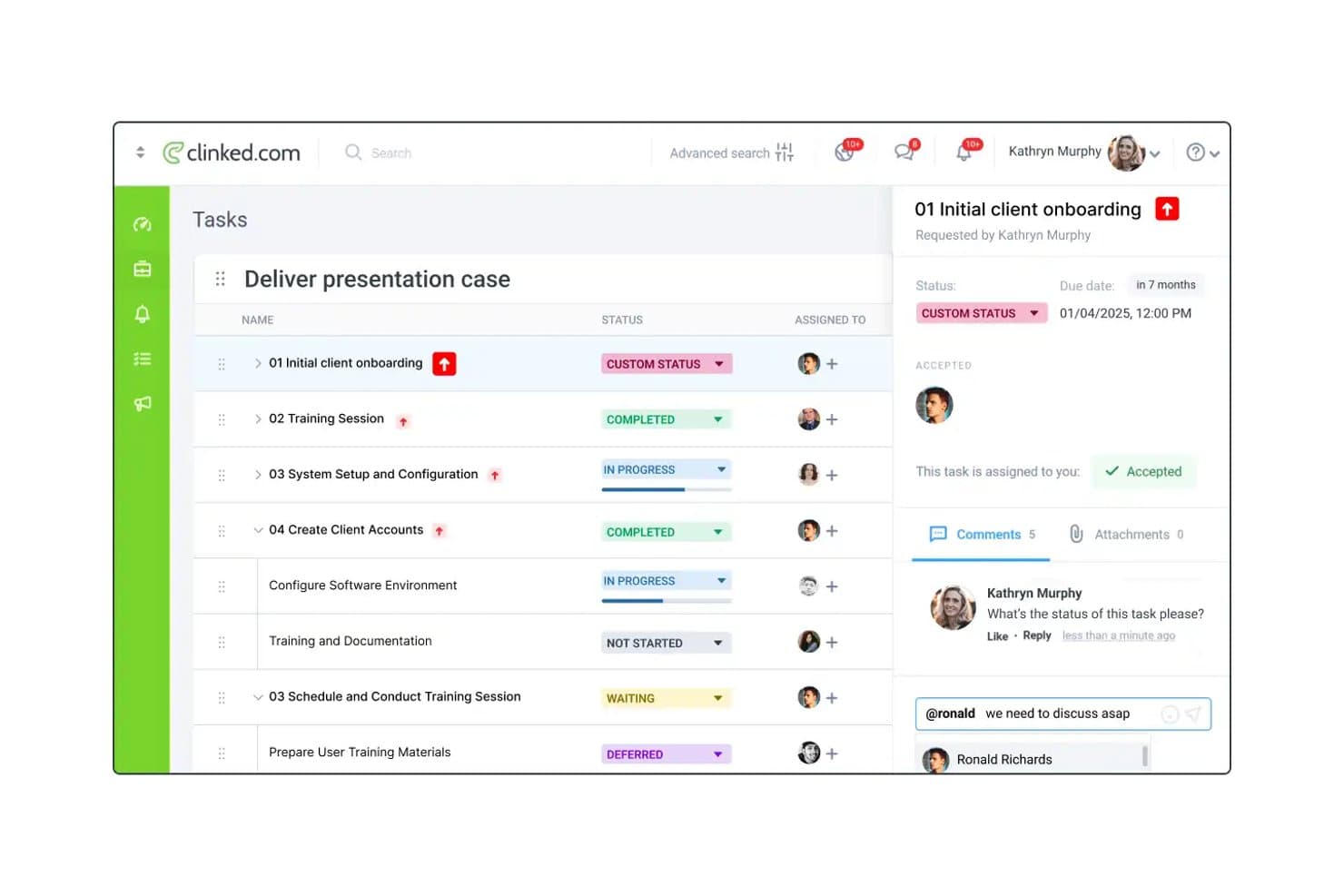
Clinked lets law firms track tasks, statuses, and client comments in one place. Clinked is a white-label client portal platform that brings together document management, file sharing, task tracking, approvals, and client communication tools in a single branded workspace.
Who Is Clinked Best For?
Clinked is a strong fit for law firms and legal teams that need to give clients a fully branded, secure portal for document sharing, approvals, and communication.
Why I Picked Clinked
Clinked earns its spot on my shortlist because of how well its white-label setup works for law firms managing multiple client relationships. Each client gets their own fully branded workspace, complete with your firm's logo, custom domain, and email notifications, so clients never see a generic third-party platform. I especially like the file approval workflows and document watermarking, which let you control exactly how sensitive legal documents move through review. The audit trail and granular access permissions add another layer of accountability that matters when you're handling confidential matter files.
Clinked Key Features
- Version control: Track changes across document iterations, so your team always knows which version of a file is current and can revert to earlier drafts when needed.
- DocuSign and Acrobat Sign integration: Send documents for e-signature directly within your client workspace without routing files through external email threads.
- In-built task management with kanban boards: Assign, track, and organize matter-related tasks inside the portal using a visual kanban board view.
- Two-factor authentication and SSO: Clients and team members log in with an extra layer of identity verification, reducing unauthorized access to sensitive matter files.
Clinked Integrations
Clinked offers native integrations with DocuSign, Adobe Acrobat Sign, Google Workspace, Microsoft OneDrive, Jotform, Power BI, Voiceflow, and IFrames for embedding external content, and it connects with Zapier. An API is also available for custom integrations.
Pros and Cons
Pros:
- Document watermarking for sensitive materials
- File approval workflows with audit trails
- Distinct white-label portal for each client
Cons:
- Mobile experience less polished than desktop
- Initial setup can be time-consuming
Learn more about Clinked: Best for court rules calendaring in litigation firms
- Free trial + free demo available
- Pricing upon request
Visit WebsiteCustomer Rating:4.5/5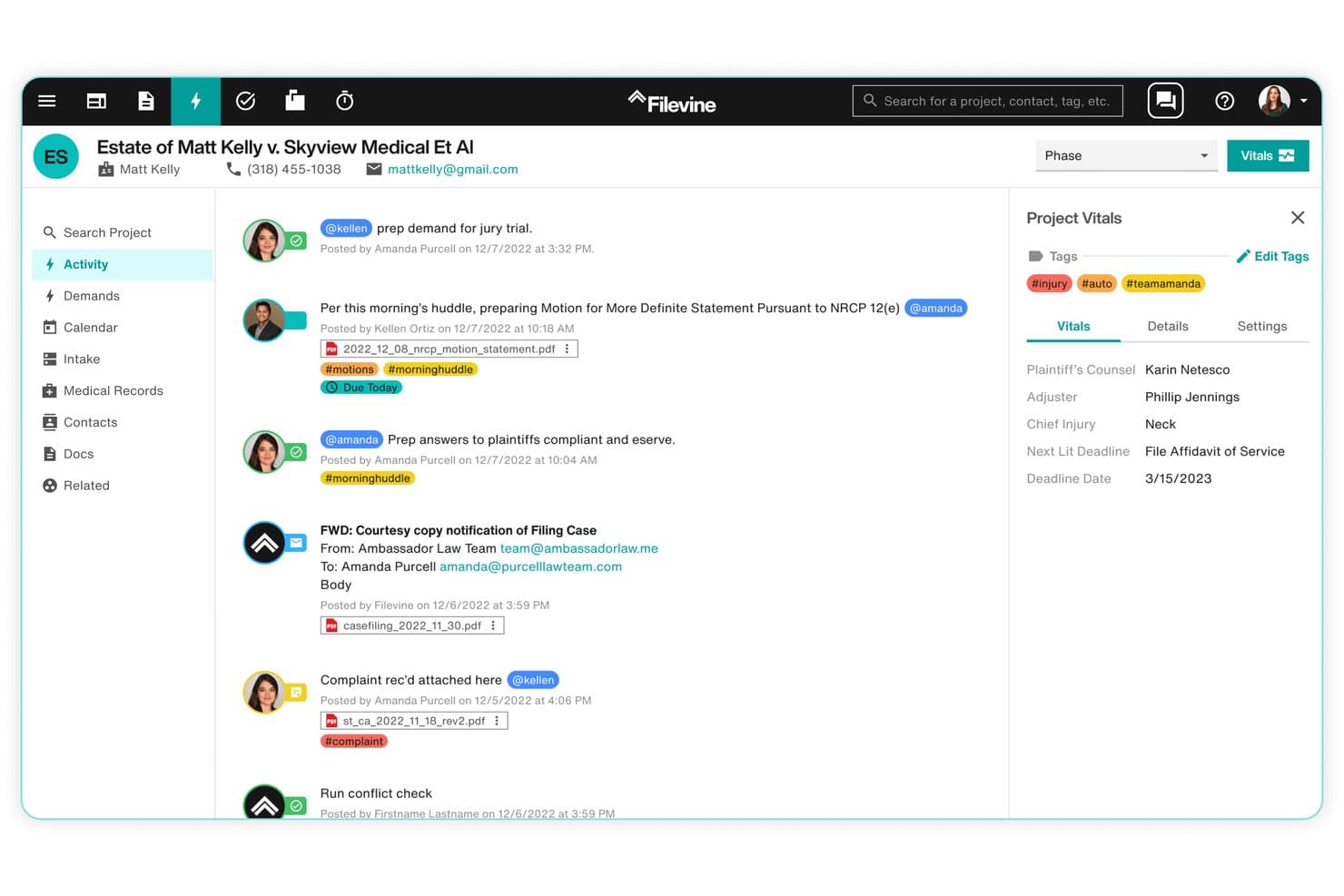
Filevine centralizes case activity, tags, and deadlines in one view. Filevine is a legal practice management platform built for law firms and legal teams, combining matter management, document management, AI-powered drafting, court timeline tracking, client intake, billing, and deposition management in one connected system.
Who Is Filevine Best For?
Filevine is a strong fit for litigation firms that need court deadline tracking and calendaring built directly into their matter management workflow.
Why I Picked Filevine
I picked Filevine as one of the best because its court rules calendaring is built directly into the matter management workflow rather than bolted on as an afterthought. Timely by Filevine auto-generates court deadlines across all 50 US states, eliminating the manual rule research that typically consumes paralegal and attorney time before a deadline even hits. ValidationAI layers on top of that by flagging missed steps and preventing incorrect phase transitions, so your team doesn't advance a matter while a critical deadline sits open.
Filevine Key Features
- Activity feed: A central project hub that consolidates notes, tasks, texts, emails, and reminders so your whole team stays aligned on every matter.
- AI data mapping: Filevine's AI pulls data from uploaded documents and maps it directly to designated fields, reducing manual data entry across your caseload.
- Deposition management: One-click scheduling, automatic video capture, real-time AI analysis, and a searchable deposition library to manage the full deposition lifecycle in one place.
- Medical chronologies: FilevineAI analyzes uploaded medical records to identify providers, treatment dates, and key clinical data, giving litigation teams a structured summary without manual review.
Filevine Integrations
Filevine offers 40+ integrations across native and partner categories, including Microsoft 365, Outlook, Gmail, Google Calendar, QuickBooks, Slack, Microsoft Teams, RingCentral, Dialpad, and InfoTrack, and it connects with Zapier. An API is also available for custom integrations, and Workato is supported for building additional workflow automations.
Pros and Cons
Pros:
- Activity feed centralizes matter collaboration
- AI flags missed litigation process steps
- Court rules calendaring built into workflow
Cons:
- Reporting tools less flexible for complex needs
- Customization for unique practice areas limited
Learn more about Filevine: Best for DMS-led matter governance at scale
- Free demo available
- Pricing upon request
Visit WebsiteCustomer Rating:4.3/5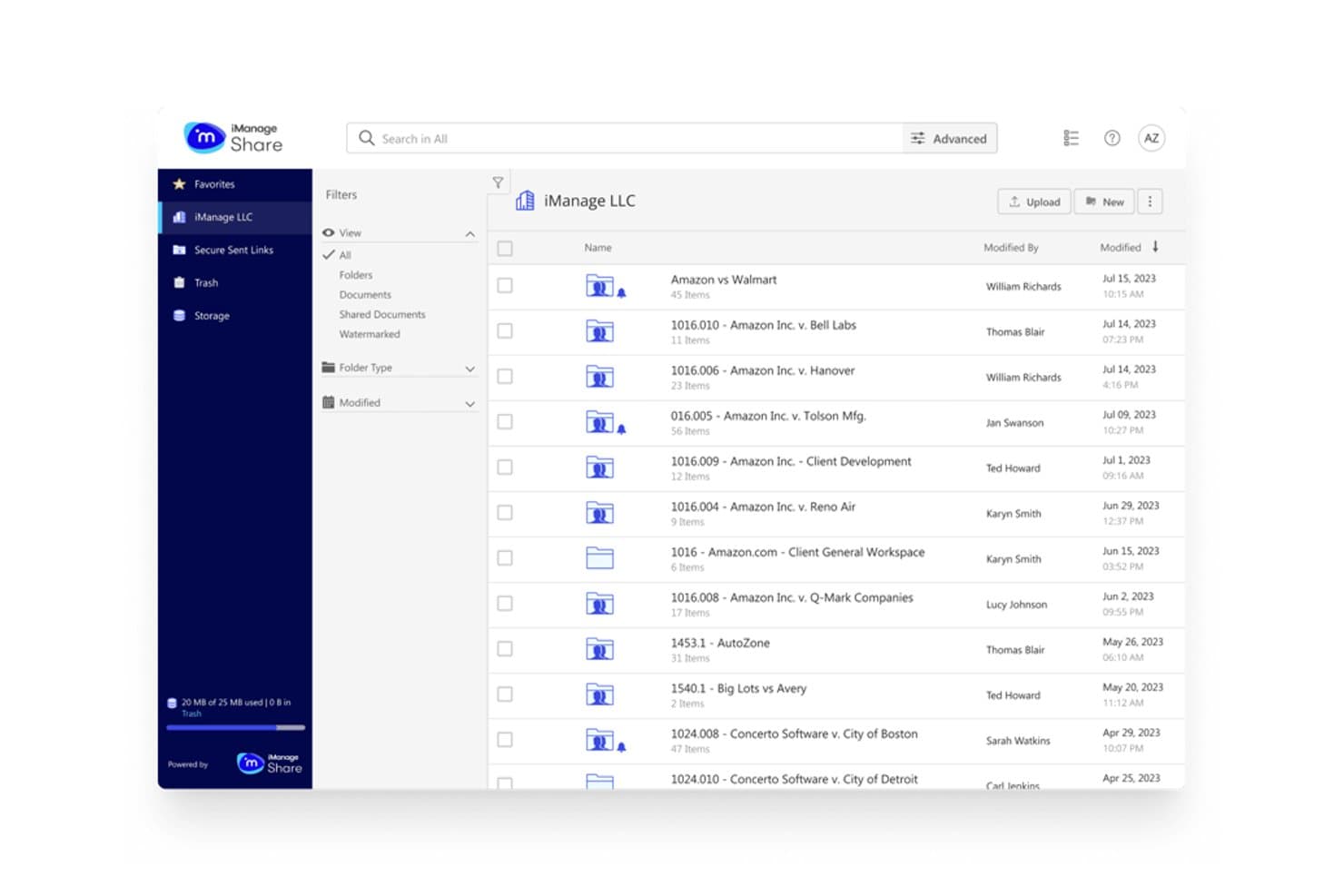
iManage organizes legal case folders for streamlined team collaboration. iManage is a document and email management platform built for law firms and legal teams, combining matter-centric document organization, email management, security and governance controls, task and workflow management, and legal transaction management in one system.
Who Is iManage Best For?
iManage is built for large law firms and enterprise legal teams that need a document management system at the center of their matter organization, security governance, and workflow.
Why I Picked iManage
iManage earns its spot on my shortlist because no other platform puts document management this squarely at the center of matter governance. I like that iManage Work organizes every document and email by matter from the start, so access controls, version history, and records retention all follow the matter automatically. The security and governance layer adds active threat detection and sophisticated permission controls that hold up at the scale of global firms. That's exactly why 80% of Global 100 law firms run on it.
iManage Key Features
- iManage Tracker: A task management tool that links tasks directly to active matter documents, eliminating manual re-keying between separate platforms.
- Closing Folders: A legal transaction management tool that digitizes closing checklists, organizes stakeholder signatures, and automates repetitive deal-closing steps.
- Insight+ knowledge search: A search engine native to the iManage platform that surfaces matter insights, past deal patterns, and curated firm knowledge in context.
- Microsoft 365 integration: Connects iManage directly to Microsoft 365 so documents and email move between both environments without dropping security or governance controls.
iManage Integrations
iManage offers native integrations with Microsoft 365, Microsoft Teams, Microsoft Copilot, Outlook, Salesforce, DocuSign, Adobe Sign, Thomson Reuters CoCounsel, HighQ, and NetDocuments, and it runs on Azure. An API is available for custom integrations.
Pros and Cons
Pros:
- Links tasks directly to active case files
- Active threat detection for document security
- Organizes documents and emails by matter
Cons:
- Complex permission settings can slow onboarding
- User interface feels dated to some users
Learn more about iManage: Best for court rules deadline automation at scale
- Free demo available
- Pricing upon request
Visit WebsiteCustomer Rating:4.2/5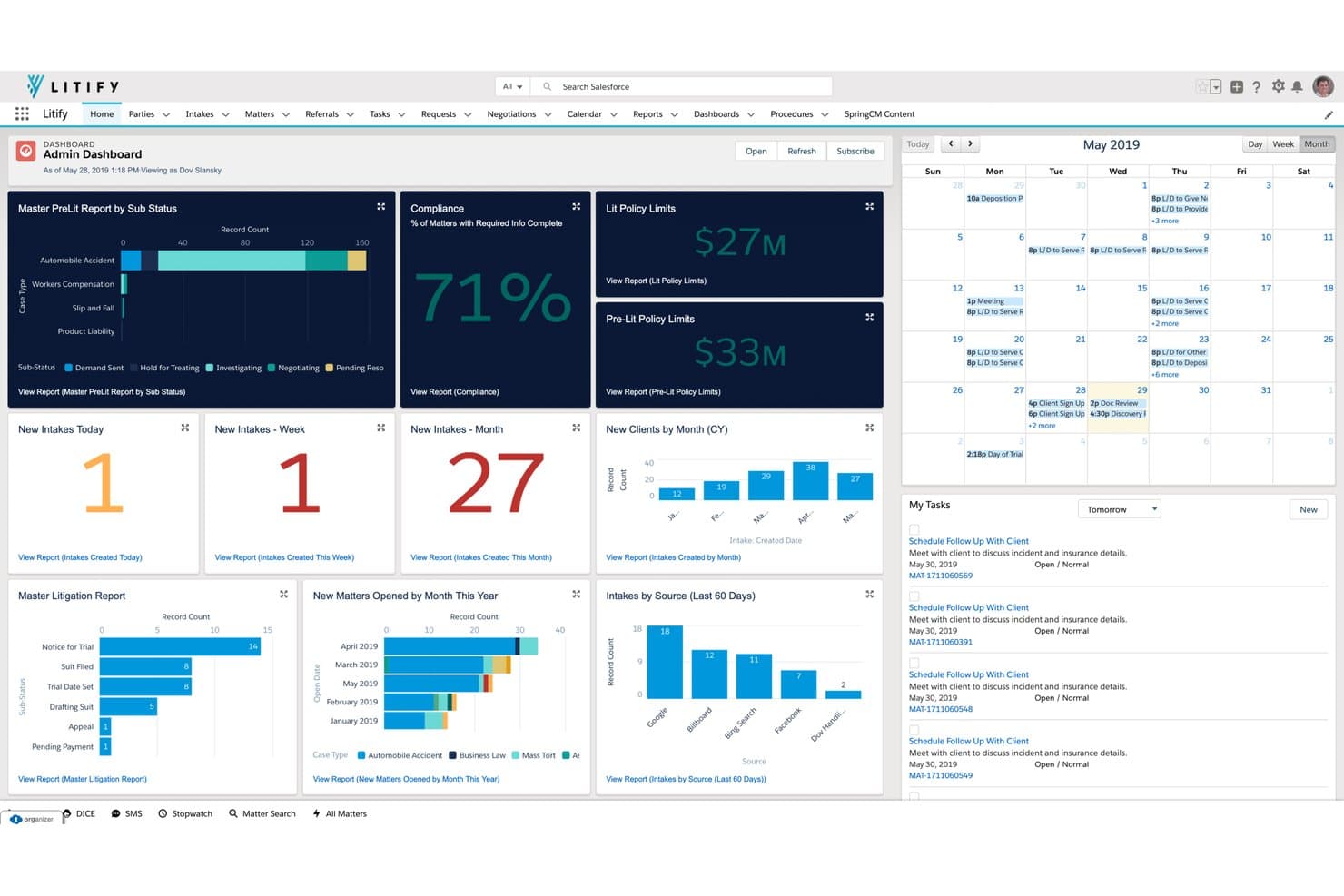
Litify centralizes case metrics, tasks, and calendars in one dashboard. Litify is a legal operations platform built on Salesforce that covers matter management, intake, document generation, time and billing, and AI-driven workflow automation for law firms and corporate legal departments.
Who Is Litify Best For?
Litify is a strong fit for high-volume law firms and large legal departments that need to manage complex caseloads across multiple practice areas on a single, enterprise-grade platform.
Why I Picked Litify
I picked Litify as one of the best because of how it handles court rules-based deadline scheduling at enterprise scale. When I set a trigger date on a matter, Litify's automated matter plans cascade every related task and deadline without anyone manually mapping them out. The Outlook calendar sync keeps those dates visible across the whole team, so nothing gets missed when you're running hundreds of active matters at once.
Litify Key Features
- AI-powered matter summaries: Litify generates summaries for each matter that surface current status, recent activity, and upcoming deadlines in one view.
- Document drafting and editing: LitifyAI Draft lets you interact with, draft, and edit documents directly inside the platform, including advanced PDF tools like redaction, reordering, and Bates stamping.
- Automated time capture: LitifyAI Time Capture tracks activity and recommends billable time entries, reducing gaps in time recording across your matters.
- Role-based analytics dashboards: Each team member gets a personalized 360° dashboard with configurable, no-code reports and real-time data on case types and performance.
Litify Integrations
Litify offers native integrations with DocuSign, AssureSign, Ironclad, Microsoft Outlook, Microsoft Word, QuickBooks, Accounting Seed, NetDocuments, iManage, CalendarRules, LawPay, Confido Legal, RingCentral, Workday, and SAP, and is built natively on Salesforce. An API toolkit is available for custom integrations.
Pros and Cons
Pros:
- Role-based dashboards show real-time workload
- Matter summaries surface key dates and activity
- Court rules deadlines automate across all matters
Cons:
- Reporting requires initial admin configuration
- Customization options depend on Salesforce setup
Learn more about Litify: Best for court rules calendaring across matters
- 7-day free trial
- From $49/user/month
Visit WebsiteCustomer Rating:4.7/5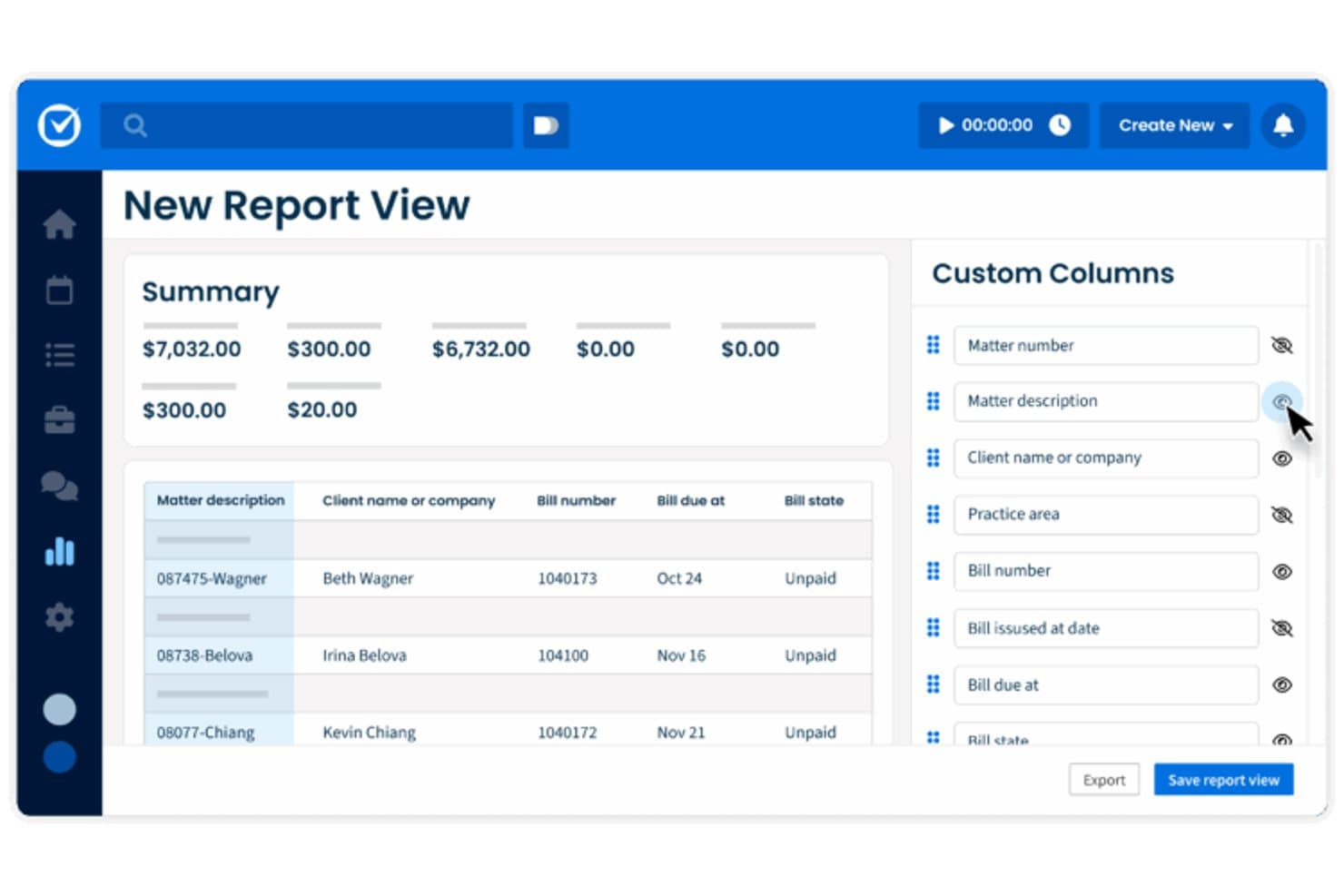
Clio Manage lets users build custom report views with flexible column controls. Clio Manage is a law practice management platform that brings case management, document handling, calendaring, time tracking, billing, and court e-filing together in one place.
Who Is Clio Manage Best For?
Clio Manage is a strong fit for law firms that manage high volumes of litigation matters and need automated court deadline tracking built into their daily workflow.
Why I Picked Clio Manage
I picked Clio Manage as one of the best because its Court Rules feature handles something most practice management tools ignore: automatic deadline generation tied directly to matter calendars. Select a trigger event, choose a jurisdiction, and Clio pulls related court dates from a library covering 50 US states and 2,200 jurisdictions, adding each one to your calendar automatically. You can bulk update associated events when a trigger date shifts, which keeps every downstream deadline accurate across the matter without manual re-entry.
Clio Manage Key Features
- Co-counsel task portal: Assign tasks to external counsel through a secure portal, with automated reminders and completion notifications returned to the assigning attorney.
- Kanban matter boards: Visualize matter progress through custom pipeline stages using a kanban board view built directly into each matter.
- Document management: Store, organize, and access matter documents in a centralized repository linked to individual client and case records.
- Time entry from tasks: Log billable time directly from within a task record, with visibility into which tasks are missing time entries.
Clio Manage Integrations
Clio Manage offers 250+ native integrations through its App Directory, including QuickBooks Online, Xero, Google Drive, Dropbox, Google Workspace, Microsoft 365, Microsoft Teams, Zoom, Ruby, and Clearbrief. It connects with Zapier and provides an API for custom integrations.
Pros and Cons
Pros:
- Co-counsel task portal supports external collaboration
- Bulk update deadlines across all linked matters
- Court rules calendaring automates litigation deadlines
Cons:
- Kanban matter boards lack advanced workflow logic
- Detailed court rules only for US jurisdictions
Learn more about Clio Manage: Best for solo and small firm court deadline management
- 10-day free trial
- From $50/user/month (billed annually)
Visit WebsiteCustomer Rating:4.6/5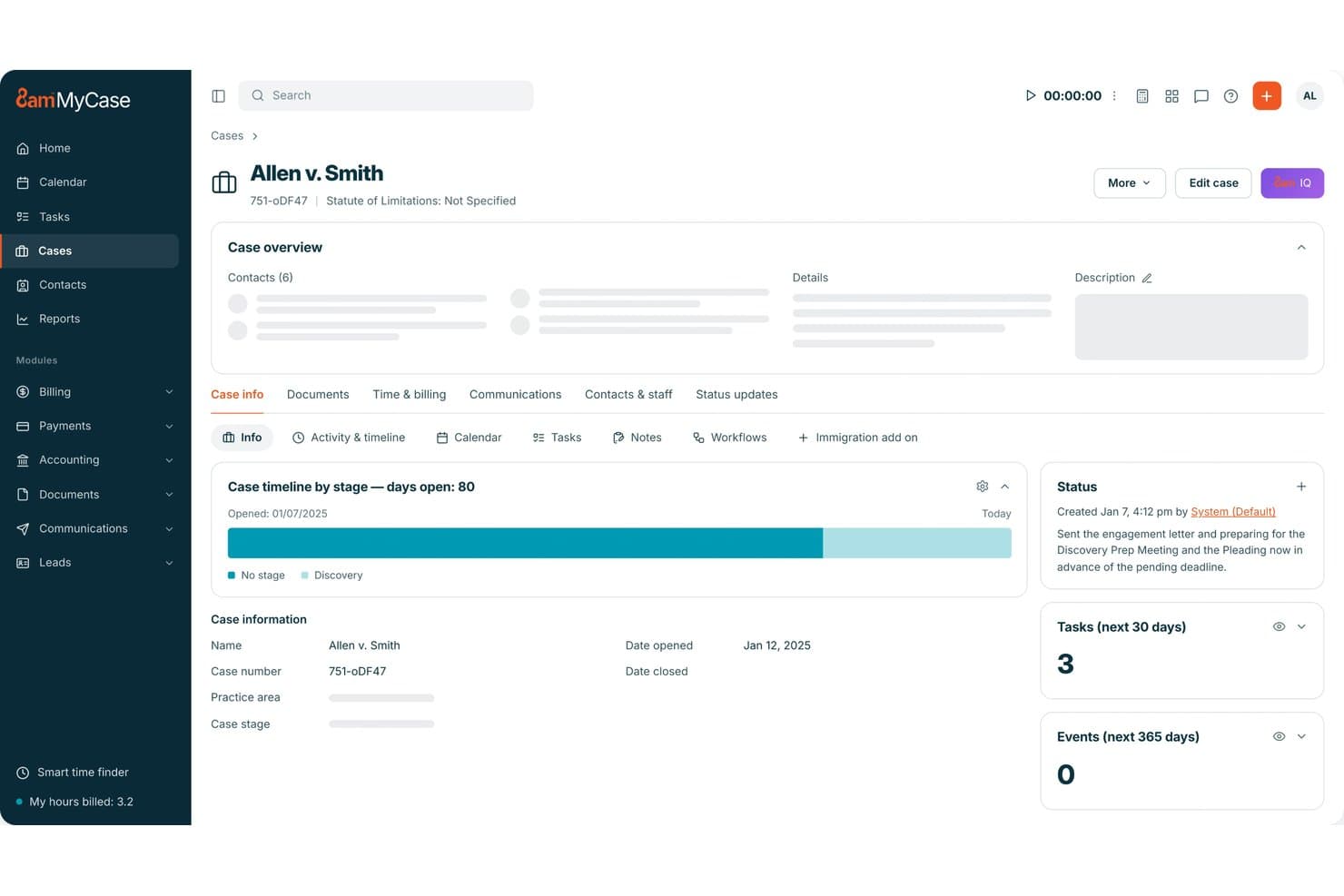
MyCase centralizes case details, tasks, and status updates in one view. MyCase is a legal practice management platform built for law firms, combining case management, client intake, document generation, calendaring, time tracking, billing, and a secure client portal.
Who Is MyCase Best For?
MyCase is a strong fit for solo attorneys and small law firms that need an all-in-one platform to manage cases, client communication, and court deadlines without a large administrative team.
Why I Picked MyCase
I picked MyCase as one of the best because its LawToolBox integration gives solo attorneys and small firms direct access to hundreds of court rule sets across all 50 states, automatically calculating deadlines instead of relying on manual docketing. I really like that the firm-wide calendar lets paralegals schedule reminders on behalf of attorneys, so nothing slips even when you're heads-down in a case. Missed court deadlines are a leading cause of malpractice claims, and MyCase's rules-based deadline engine directly addresses that risk.
MyCase Key Features
- Secure client portal: Share case updates, documents, invoices, and messages with clients through an encrypted portal that logs every communication automatically.
- Built-in text messaging: Send and receive SMS messages with clients and leads directly in the platform, with records saved to each case file.
- Workflow automation: Automatically trigger task, event, and document creation based on case activity so your team doesn't have to set these up manually.
- eSignature: Collect legally binding signatures on documents from any device without a third-party tool, included in every subscription.
MyCase Integrations
MyCase offers 50+ native integrations across intake, billing, court services, and drafting, including LawToolBox, QuickBooks, Gmail, Microsoft Outlook, Google Calendar, Dropbox, NetDocuments, LawPay, InfoTrack, and Lawmatics. An API is available for custom integrations, and Zapier support is not clearly documented.
Pros and Cons
Pros:
- Built-in text messaging with case-linked transcripts
- Secure client portal for document sharing
- Automatically calculates court rule-based deadlines
Cons:
- Workflow templates require manual customization
- No offline mode for remote collaboration
 Best for full-matter workflows with AI doc tools
- Free demo available
- Pricing upon request
Visit WebsiteCustomer Rating:4.4/5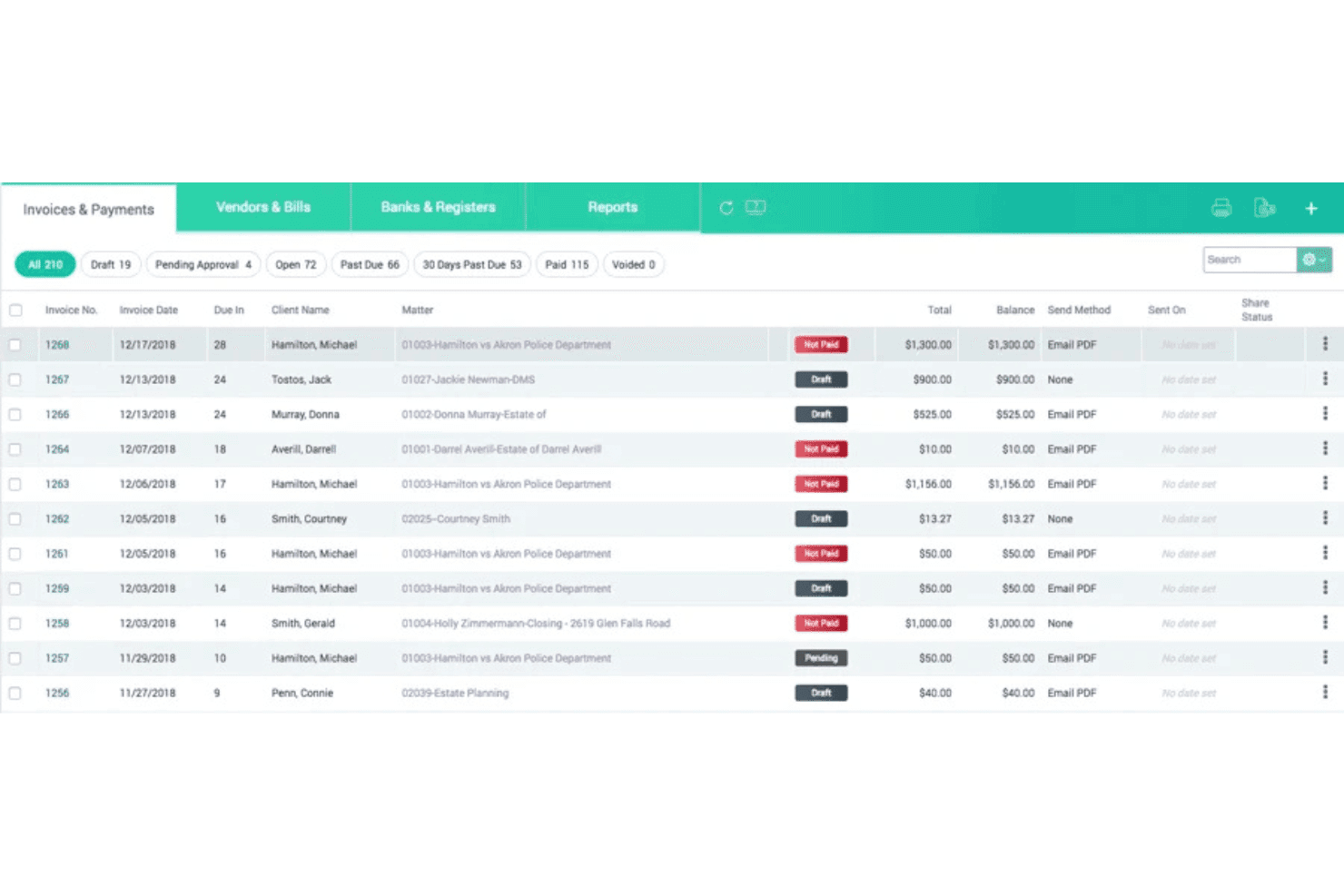
CARET Legal combines accounting, trust reconciliation, and LEDES billing tools. CARET Legal is a cloud-based legal practice management platform for law firms that covers the full matter lifecycle—from client intake and matter management to document handling, billing, accounting, and AI-assisted document tools.
Who Is CARET Legal Best For?
Small to mid-sized law firms with 1–30 attorneys who want a single platform covering intake, matter management, document automation, billing, and trust accounting.
Why I Picked CARET Legal
I picked CARET Legal because it covers every stage of a matter without requiring separate tools to fill the gaps. The AI-powered Quick Summary feature is what sets it apart for document-heavy work: it scans lengthy case files and condenses them into clear, actionable summaries, which cuts down significantly on review time. Pair that with built-in OCR and document automation, and your team can move from intake through billing without switching platforms.
CARET Legal Key Features
- Client portal: A dedicated portal lets clients access matter updates and communicate directly with your team without back-and-forth emails.
- Two-way texting: Send and receive text messages with clients from within the platform, keeping all communication tied to the matter record.
- Automated workflows: Set up task and calendar appointment sequences that trigger automatically when a new matter type is opened.
- Native email and calendaring: Manage email correspondence and schedule deadlines directly inside the platform, linked to each matter record.
CARET Legal Integrations
CARET Legal offers native integrations with Microsoft 365, Google Workspace, Microsoft Outlook, Microsoft Word, QuickBooks Online, NetDocuments, OneDrive, HotDocs, Lawmatics, LawToolBox, and RMail, plus IMAP email support. Zapier support and a public API for custom integrations are not clearly documented.
Pros and Cons
Pros:
- Client portal with two-way texting included
- AI summaries of large documents built-in
- Covers intake, matter, and billing workflows
Cons:
- Pricing details are not transparent
- No public API or Zapier support
Learn more about CARET Legal: 9Best for all-in-one matter and client portal workflows
LEAP
- Free demo available
- Pricing upon request
Visit WebsiteCustomer Rating:4.3/5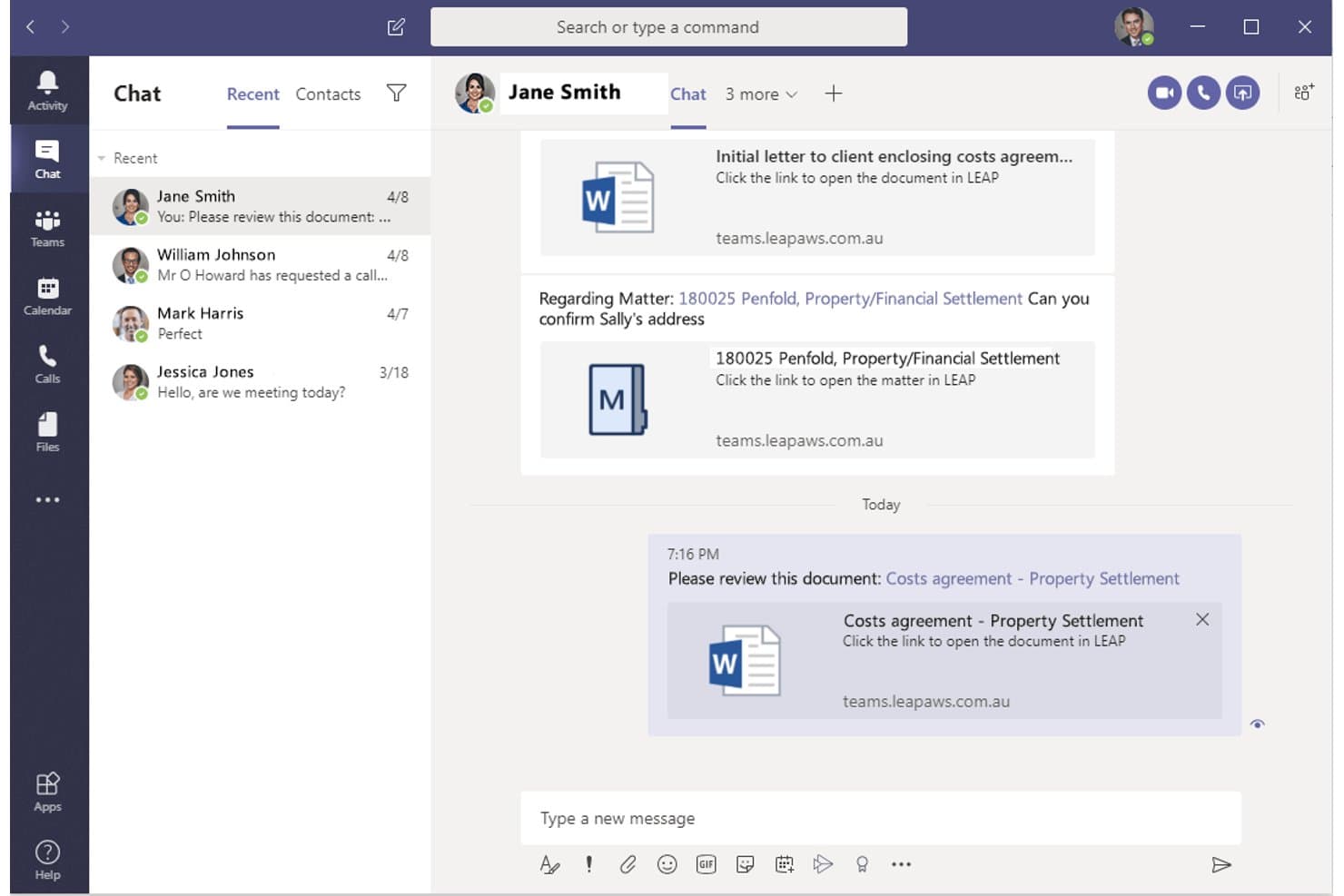
LEAP lets users share documents and matter links directly in Microsoft Teams. LEAP is a cloud-based legal practice management platform that brings matter management, document automation, time tracking, legal accounting, and client portals together in a single system built for law firms.
Who Is LEAP Best For?
LEAP is a strong fit for small to mid-sized law firms that want a single platform to handle matter management, client communication, document automation, and billing without stitching together multiple tools.
Why I Picked LEAP
LEAP earns its spot on my list because it handles matter management and client communication inside a single system, rather than requiring you to patch together separate tools. What I find most useful is LawConnect, the built-in client portal that lets clients review documents, leave comments, and make payments without ever needing to create an account. On the matter side, every document auto-populates with client data already stored in LEAP, which cuts down on manual entry across active cases.
LEAP Key Features
- Email management: Save and link emails directly to matters, keeping all case correspondence organized in one place.
- Timekeeping: Record billable hours automatically from any device, with time entries tied to the relevant matter.
- Mobile app: Access and update matters, log time, and manage documents from anywhere on iOS or Android.
- Legal AI: Analyze correspondence and documents to surface insights, with client data kept private throughout.
LEAP Integrations
LEAP offers native integrations with Microsoft 365, QuickBooks Online, Xero, LawConnect, LawToolBox, InfoTrack, WealthCounsel, Lawmatics, DecisionVault, and DeedNetwork, and it connects with Zapier for access to 8,000+ additional apps. Additional third-party apps are available through the LEAP Marketplace.
Pros and Cons
Pros:
- Mobile app supports remote access and updates
- Built-in client portal for document sharing
- Centralizes matters, billing, and documents together
Cons:
- Reporting options are less flexible than peers
- Document automation setup can be complex
Learn more about LEAP: Best for midsize firms on Microsoft 365
- Free demo available
- Pricing upon request
Visit WebsiteCustomer Rating:4.5/5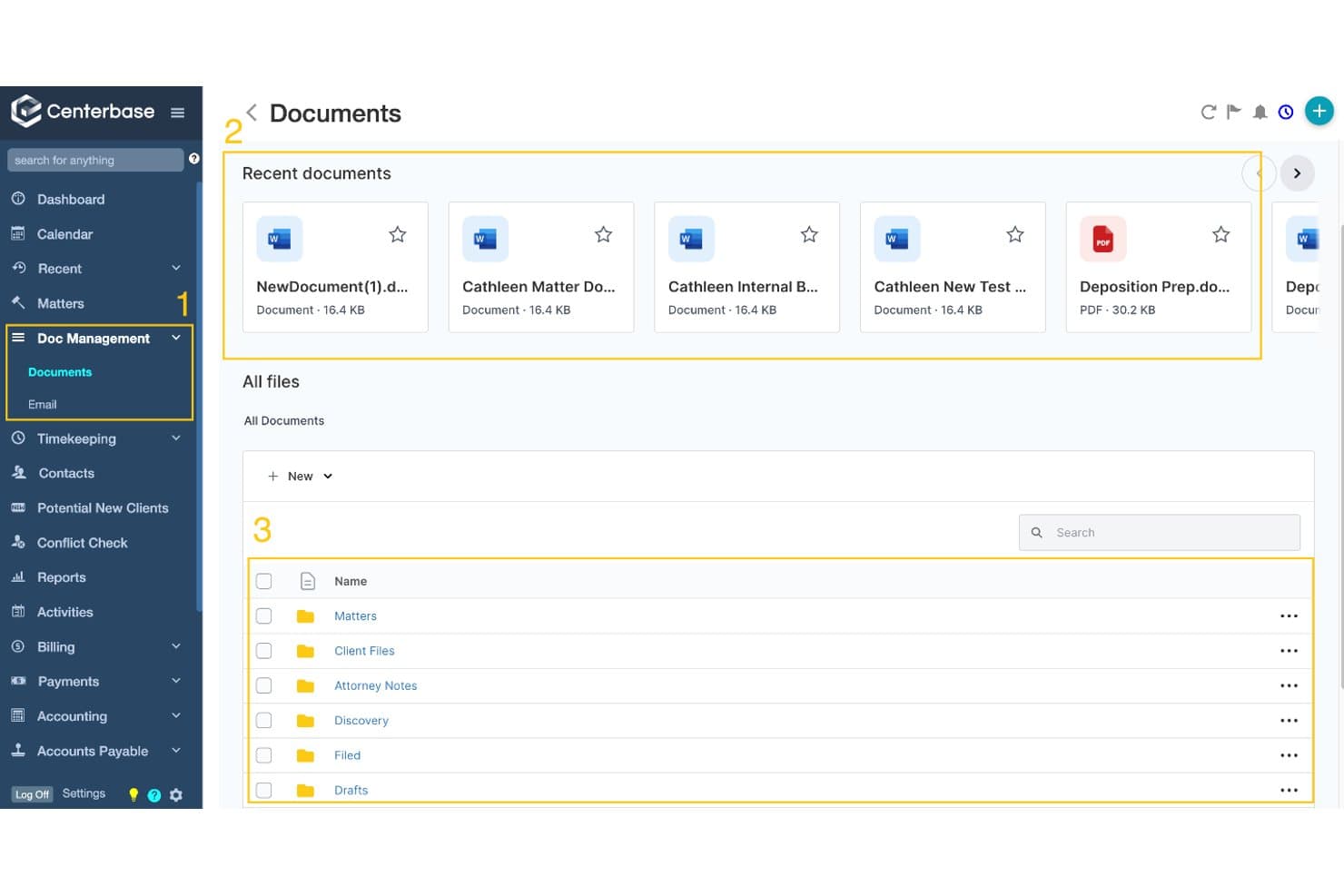
Centerbase offers a centralized document management hub with recent files, folder organization, and an all-documents file browser. Centerbase is a legal practice management platform for midsize law firms that brings together matter management, document management, time tracking, billing, and client communication in one connected system.
Who Is Centerbase Best For?
Centerbase is a strong fit for midsize law firms that are already running on Microsoft 365 and need a practice management platform built to match that environment.
Why I Picked Centerbase
I picked Centerbase as one of the best because it's built from the ground up around Microsoft 365, which means your team isn't learning a separate collaboration layer on top of the tools they already use daily. The automated time capture feature tracks billable time directly inside Outlook and Word, logging every email drafted and document reviewed without attorneys having to switch windows or manually enter anything. SharePoint document storage is also wired directly into the platform, so version history and access controls stay intact. For firms already running on Microsoft 365, this level of native connection is genuinely hard to replicate with a different stack.
Centerbase Key Features
- Client portal: Share matter updates, documents, and billing information with clients directly through a secure online portal, reducing back-and-forth communication.
- Task management: Assign, track, and manage tasks across matters so nothing falls through the cracks as work moves between attorneys and staff.
- Calendaring: View and compare schedules across your entire team in one filtered calendar to coordinate deadlines, hearings, and meetings.
- Centerbase IQ: Ask plain-language questions about your firm's data and get instant answers without needing to build custom reports manually.
Centerbase Integrations
Centerbase offers native integrations across the Microsoft ecosystem, including Microsoft 365, Outlook, Word, and SharePoint, along with QuickBooks Online, LawToolBox, NetDocuments (with ndMAX), iManage, LawPay, Plaid, and AvidXchange. Zapier support isn't clearly documented, but an API is available for custom integrations.
Pros and Cons
Pros:
- Centerbase IQ enables plain-language data queries
- Automated time capture directly in Outlook and Word
- Native Microsoft 365 integration throughout the platform
Cons:
- Interface feels dated compared to newer tools
- Some advanced features require custom setup
Learn more about Centerbase:
Annen samarbeidsprogramvare for advokatfirmaer
\u003cspan style=\u0022font-weight: 400\u0022\u003eHer er noen flere alternativer for samarbeidsprogramvare for advokatfirmaer som ikke kom med på kortlisten, men som likevel er verdt å undersøke:\u003c/span\u003e
- 11HighQBest for enterprise client portals and matter sites
- 12AderantBest for Am Law 200 court rules calendaring
- 13CosmoLexBest for solo firm trust accounting and collaboration
- 14ActionstepBest for configurable matter workspaces at scale
- 15NetDocumentsBest for AI-led document management at scale
- 16AbacusLawBest for litigation firm conflict checks
- 17Rocket MatterBest for billing-integrated matter workflows
- 18PracticePantherBest for small firm matter and billing workflows
- 19NeosBest for PI firm case and workflow collaboration
- 20Dashboard LegalBest for Bloomberg Law subscribers
How I Evaluate Law Firm Collaboration Software
I split my evaluation into two layers: the baseline capabilities a tool must cover—matter workspaces, document security, client portals—and the differentiators, like court rules calendaring and ethical walls, that separate genuinely legal-grade platforms from generic team tools.
Core Functionality (Table Stakes For This List)
When I'm selecting tools for my list, I rank each one on a scale from 0 (does not offer the functionality) to 5 (excels in this area) for each core functionality listed below. I then calculate the tool's total score into a percentage, using 65% as a benchmark to help assess its overall fit for the list.
- Matter-centric workspaces: I check whether each tool organizes files, tasks, notes, and communications around individual matters rather than generic folders or projects.
- Secure document sharing: Version control, permission-based access, and audit trails all factor into my evaluation—especially for privileged work product shared across attorneys and co-counsel.
- Client collaboration portal: Tools like Clio Manage and LEAP offer client-facing portals, so I look at branding options, document exchange, messaging, and whether clients can view matter updates without extra logins.
- Task and deadline management: Court rules-based deadline automation is what separates legal-grade tools from generic project apps. I evaluate calendar sync, reminder workflows, and the ability to link deadlines to specific matters.
- Internal team communication: I look for threaded discussions, @mentions, or chat tied directly to matters—not just a standalone messaging feature disconnected from case context.
- Legal-grade security and compliance: Encryption, ethical walls, SOC 2 certification, and audit logs are the benchmarks I evaluate. Firms handling sensitive client data need access controls that align with ABA guidelines and applicable privacy regulations.
Once I have a list of tools that meet the criteria, I consider what sets each platform apart.
Differentiating Factors (What Sets Vendors Apart)
Here's how I compare and contrast different vendors:
Standout Features
Court rules calendaring is the first thing I evaluate. I check whether a tool auto-calculates cascading deadlines when a triggering event shifts—say, a trial date moves and every upstream filing deadline adjusts with it. Tools like Clio Manage and Aderant handle this differently depending on firm size. I also look at conflict check and ethical wall capabilities, since a missed conflict can end a career. Built-in conflict search across all matters and contacts, paired with automatic access restrictions for screened attorneys, matters far more than a basic search bar. Finally, I evaluate legal-specific AI assistance—specifically whether document summarization and clause extraction preserve privilege protections rather than exposing work product to general-purpose models.
Beyond Features
I evaluate how well each tool fits a firm's size and practice area. A solo practitioner needs a turnkey platform with minimal IT overhead, while an Am Law firm needs granular governance and enterprise DMS integration. Licensing models matter just as much—I check whether client portals, document management, and guest access for co-counsel are bundled or sold as add-ons, since storage overages and SSO premiums can inflate costs over time. I also look at Microsoft 365 and Google Workspace integration depth, because attorneys live in Word and Outlook, and a tool that doesn't embed into those workflows won't get adopted.
Slik velger du samarbeidsprogramvare for advokatfirmaer
Valg av samarbeidsprogramvare for advokatfirmaer handler om hvilke utfordringer i arbeidsflyten du må løse først:
| Hvis prioriteten din er … | Se etter … |
| Å redusere risikoen for oversittede rettsfrister | Innebygd kalenderføring med rettsregler som er spesifikke for den aktuelle jurisdiksjonen |
| Å minimere feil ved dokumenttilgang | Detaljerte, saksbaserte tilgangskontroller og revisjonslogger |
| Å forbedre klientoppdateringer og åpenhet | Profilerte portaler rettet mot klienter, med detaljerte innstillinger for synlighet |
| Å administrere samarbeid på tvers av firmaets størrelse | Integrasjoner direkte i de sentrale plattformene dine (f.eks. Microsoft 365) |
| Å garantere personvern og samsvar for juridiske data | Verktøy med offentliggjorte SOC 2-rapporter og funksjoner for etiske skiller |
Slik vurderer du kortlisten
- Test integriteten til fristene: Sett opp en testsak og flytt en viktig rettsdato for å bekrefte automatisk omberegning av frister på under 30 minutter.
- Bekreft dokumentkontroller: Tildel en sensitiv fil til flere fiktive brukere, og kontroller tilgangsloggene for endringer i tillatelser over en periode på én time.
- Kontroller portalsikkerheten: Be om leverandørens gjeldende SOC 2-rapport, og se en demonstrasjon i appen av håndheving av informasjonssperrer.
- Valider integrasjonen: Kjør en direktetest ved å sende e-poster og dokumenter inn i arbeidsområdet fra Word eller Outlook, og registrer alle kontaktpunkter.
- Beslutningsfilter – dybde kontra fleksibilitet: Avgjør om du trenger detaljerte, juridisk spesifikke kontroller (rettsregler, informasjonssperrer) eller bredere samarbeid på tvers av fagområder, siden få plattformer utmerker seg på begge deler.
Hva er programvare for samarbeid i advokatfirmaer?
Programvare for samarbeid i advokatfirmaer er en digital plattform som samler juridiske kalendere, dokumenthåndtering, sikker klientkommunikasjon og arbeidsflyter for teamet i ett arbeidsområde. Denne programvaren gir advokatfirmaer verktøy for å administrere saksmapper, frister og klientoppdateringer, samtidig som den støtter etterlevelse av regler og personvern. Advokater, juridisk personale og klienter bruker den til å holde alle oppdatert, redusere risiko og sørge for at sensitiv informasjon forblir sikker gjennom hele den juridiske prosessen.
Funksjoner i programvare for samarbeid i advokatfirmaer
Når du velger programvare for samarbeid i advokatfirmaer, bør du se etter følgende viktige funksjoner:
- Saksorienterte arbeidsområder: Organiser alle dokumenter, oppgaver, notater og all kommunikasjon rundt individuelle saker, slik at teamet kan arbeide sak for sak med full kontekst, i stedet for med spredte prosjektmapper.
- Sikker dokumentdeling: Del filer med klienter, medadvokater eller ansatte ved hjelp av tillatelser, versjonskontroll og revisjonsspor som bidrar til å beskytte advokatarbeid underlagt taushetsplikt og sensitive data.
- Samarbeidsportal for klienter: Gi klientene en profilert, sikker nettportal for utveksling av dokumenter, sending av meldinger og mottak av saksoppdateringer, uten å være avhengig av e-post eller måtte håndtere flere pålogginger.
- Oppgave- og friststyring: Administrer gjøremål og automatiser fristberegninger, slik at rettsdatoer, interne oppgaver og innleveringer spores per sak og utløser påminnelser for å redusere risikoen for at viktige trinn overses.
- Integrasjon med kalender og rettsregler: Synkroniser juridiske kalendere med regler som gjelder for den aktuelle jurisdiksjonen, og automatiser avledede frister når datoer endres, slik at kalenderen forblir korrekt selv når tidsplaner forskyves.
- Intern teamkommunikasjon: Kommuniser og samarbeid direkte i sakene ved hjelp av chatter, kommentarer eller @omtaler, slik at alle diskusjoner er knyttet til bestemte saker og er enkle å finne igjen.
- Rollebasert tilgang og informasjonssperrer: Angi detaljerte, saksbaserte tilgangskontroller som begrenser informasjon til autoriserte teammedlemmer og støtter etterlevelse av regler for juridisk etikk.
- Integrasjon med dokumenthåndteringssystem (DMS): Koble samarbeidsarbeidsområdet til firmaets DMS, slik at du kan søke etter, forhåndsvise og administrere dokumenter med full sporbarhet og etterlevelse av regler.
- Revisjonslogger og rapportering: Spor all brukeraktivitet, dokumentendringer og oppdateringer av tillatelser på tvers av saker, slik at du får åpenhet og trygghet under revisjoner eller myndighetskontroller.
- Integrasjon med juridiske verktøy: Koble til fakturering, tidsregistrering og Microsoft 365 eller Google Workspace for å redusere manuell registrering og hjelpe teamet med å arbeide i apper de kjenner.
Vanlige AI-funksjoner i programvare for samarbeid i advokatfirmaer
I tillegg til standardfunksjonene i programvare for samarbeid i advokatfirmaer som er nevnt ovenfor, tar mange av disse løsningene i bruk AI med funksjoner som:
- AI-drevet dokumentsammendrag: Genererer automatisk korte sammendrag av omfattende juridiske dokumenter, slik at advokater og ansatte raskt kan forstå viktige punkter og forpliktelser uten å lese hver side.
- AI-drevet uttrekking av klausuler: Identifiserer og trekker ut bestemte klausuler eller bestemmelser fra kontrakter og innleveringer, noe som gjør det enklere å sammenligne formuleringer på tvers av saker eller flagge uvanlige vilkår for gjennomgang.
- Prediktiv justering av frister: Bruker AI til å forutse endringer i rettens tidsplaner eller saksforløp, foreslår omberegning av frister og varsler teamene før konflikter eller oversittede frister oppstår.
- Automatisert konfliktsjekk: Skanner alle saker, kontakter og tidligere oppdrag ved hjelp av AI for å oppdage potensielle interessekonflikter, også når navn eller enheter er registrert med variasjoner eller stavefeil.
- Smart identifisering av privilegert innhold: Flagger sensitivt eller privilegert innhold i dokumenter og kommunikasjon, noe som reduserer risikoen for utilsiktet utlevering og støtter etterlevelse av etiske forpliktelser.
Fordeler med samarbeidsprogramvare for advokatfirmaer
Implementering av samarbeidsprogramvare for advokatfirmaer gir flere fordeler for teamet og virksomheten din. Her er noen av fordelene du kan se frem til:
- Bedre saksbehandling: Organiser filer, frister, notater og kommunikasjon etter sak, slik at du alltid har full oversikt og reduserer risikoen for å overse detaljer.
- Sikker deling av dokumenter: Bruk tilgangskontroller, versjonsstyring og revisjonsspor for å beskytte konfidensiell informasjon når du deler filer med klienter, advokater eller medadvokater.
- Forbedret klientkommunikasjon: Gi klientene profilerte portaler for deling av dokumenter, meldinger eller visning av oppdateringer uten å måtte håndtere e-poster eller flere innlogginger.
- Bedre fristoppfølging: Automatiser beregning av frister og synkroniser kalendere med domstolsregler for å bidra til å forhindre oversittelse av frister når tidsplaner endres.
- Intern åpenhet og ansvarlighet: Spor endringer, overvåk brukeraktivitet og bruk rollebaserte tilgangskontroller og etiske skiller for å støtte revisjonsberedskap og etterlevelse.
- Bedre kontroll av interessekonflikter og taushetsbelagt informasjon: Benytt integrerte verktøy – ofte med KI-drevne funksjoner – for å identifisere interessekonflikter og merke sensitivt eller taushetsbelagt innhold før utilsiktede avsløringer oppstår.
- Smidigere integrasjon med juridiske verktøy: Koble samarbeidsområdet ditt til dokumenthåndteringssystemer, faktureringsprogramvare og Microsoft 365 eller Google Workspace, slik at du kan arbeide i kjente miljøer og unngå dobbeltregistrering av data.
Kostnader og priser for samarbeidsprogramvare for advokatfirmaer
Ved valg av samarbeidsprogramvare for advokatfirmaer er det nødvendig å forstå de ulike prismodellene og abonnementene som er tilgjengelige. Kostnadene varierer basert på funksjoner, teamstørrelse, tillegg og mer. Tabellen nedenfor oppsummerer vanlige abonnementer, gjennomsnittsprisene deres og typiske funksjoner som er inkludert i samarbeidsprogramvareløsninger for advokatfirmaer:
Sammenligningstabell for abonnementer på samarbeidsprogramvare for advokatfirmaer
| Abonnementstype | Gjennomsnittspris | Vanlige funksjoner |
| Gratisabonnement | $0 | Grunnleggende arbeidsområder for saker, begrenset dokumentdeling og grunnleggende oppgavehåndtering. |
| Personlig abonnement | $20-$40/bruker/måned | Grunnleggende saksbehandling, sikker dokumentdeling samt kalender- og fristverktøy. |
| Bedriftsabonnement | $40-$90/bruker/måned | Avanserte samarbeidsfunksjoner, klientportaler, detaljerte tilgangskontroller og revisjonslogger. |
| Foretaksabonnement | $100-$200/bruker/måned | Tilpassede integrasjoner, håndheving av etiske skiller, KI-drevne verktøy, førsteklasses brukerstøtte og rapportering av etterlevelse. |
Vanlige spørsmål om samarbeidsprogramvare for advokatfirmaer
\u003cspan style=\u0022font-weight: 400\u0022\u003eHer er noen svar på vanlige spørsmål om samarbeidsprogramvare for advokatfirmaer:\u003c/span\u003e
Hvordan sørger man for sikkerhet ved bruk av samarbeidsprogramvare for advokatfirmaer?
\u003cspan style=\u0022font-weight: 400\u0022\u003eDu bør se etter funksjoner som kryptering, rollebaserte tillatelser og revisjonslogger. Sørg for at programvaren følger standarder som SOC 2 og inkluderer verktøy som etiske skiller og tilgangskontroller. Kontroller alltid at leverandøren oppdaterer sikkerhetssertifiseringene regelmessig, og spør hvordan de håndterer privilegert informasjon eller sensitive klientdata.\u003c/span\u003e
Kan samarbeidsprogramvare for advokatfirmaer integreres med verktøy som Microsoft 365 og Google Workspace?
\u003cspan style=\u0022font-weight: 400\u0022\u003eJa, mange juridiske samarbeidsplattformer tilbyr direkte integrasjoner med Microsoft 365, Outlook og Google Workspace. Dette lar deg lagre e-poster, administrere dokumenter og arbeide i kjente apper. Test alltid integrasjonene før du bestemmer deg, siden en sømløs arbeidsflyt er viktig for bruk og for å redusere manuelle oppgaver.\u003c/span\u003e
Hva bør jeg teste før jeg velger en samarbeidsplattform for advokatfirmaer?
\u003cspan style=\u0022font-weight: 400\u0022\u003eStart med å teste om frister beregnes på nytt når rettsdatoer endres, tildele tilgangstillatelser til sensitive filer og gjennomføre integrasjonstester med Outlook eller DMS-et ditt. Be også om en demonstrasjon av klientportalen, og kontroller sikkerhetssertifiseringene selv. Denne praktiske tilnærmingen avdekker mangler som brosjyrer eller salgsrepresentanter kan overse.\u003c/span\u003e
Hvordan fungerer klientportaler i programvare for advokatfirmaer?
\u003cspan style=\u0022font-weight: 400\u0022\u003eKlientportaler gir klientene dine et sikkert og profilert sted der de kan få tilgang til oppdateringer om saken, utveksle dokumenter og sende meldinger. De beste verktøyene unngår ekstra innlogginger og lar deg styre nøyaktig hva hver klient kan se. Sørg for at portalen støtter detaljert synlighet, bruker sterk kryptering og sporer all aktivitet av hensyn til kravene til etterlevelse.\u003c/span\u003e
Hva er forskjellen mellom fristberegning etter domstolsregler og vanlige kalenderfunksjoner?
\u003cspan style=\u0022font-weight: 400\u0022\u003eFristberegning etter domstolsregler beregner automatisk alle frister for innlevering og oppmøte basert på reglene i den lokale jurisdiksjonen. Når en rettssaksdato endres, oppdateres alle relaterte frister umiddelbart. Vanlige kalendere angir bare statiske datoer. Juridiske verktøy med automatisering basert på domstolsregler hjelper deg med å unngå oversitte frister og redusere risiko – noe generiske kalenderapper ikke kan garantere.\u003c/span\u003e
Kan samarbeidsprogramvare for advokatfirmaer hjelpe med interessekonfliktsjekker og etiske skiller?
\u003cspan style=\u0022font-weight: 400\u0022\u003eJa, avanserte plattformer har innebygde funksjoner for konfliktsøk og etiske skiller. Disse lar deg kontrollere nye saker mot alle firmaets kontakter og begrense tilgangen når det foreligger en interessekonflikt. Test alltid hvor grundige og enkle disse kontrollene er, siden oversette konflikter kan medføre yrkesmessig risiko.\u003c/span\u003e
Trenger jeg bedriftsabonnement for funksjoner som AI-analyse av kontrakter eller håndheving av etiske skiller?
\u003cspan style=\u0022font-weight: 400\u0022\u003eVanligvis ja – de mest avanserte funksjonene, inkludert AI-basert dokumentanalyse eller egendefinerte kontroller for etiske skiller, inngår i bedrifts- eller premiumabonnementer. Gå nøye gjennom abonnementsdetaljene og sammenlign prisene, særlig hvis du trenger tilpassbare verktøy for etterlevelse i et større firma.\u003c/span\u003e