

Een sterk alternatief voor LawPay biedt uw kantoor veilige, conforme betalingsverwerking met naadloze factureringsfuncties en integraties die zijn ontwikkeld voor juridisch werk. Als u op zoek bent naar alternatieven voor LawPay, zoekt u waarschijnlijk naar betrouwbare manieren om betalingen te innen, derdenrekeningboekhouding te beheren en juridische facturering te automatiseren—zonder gedoe of onzekerheid.
Deze gids introduceert de beste alternatieve oplossingen voor LawPay die juridische professionals gebruiken om cliëntgelden veilig te houden, facturering te stroomlijnen en handmatige taken te verminderen. Hier vindt u opties die zijn afgestemd op de behoeften van advocatenkantoren, zodat u de juiste oplossing voor uw praktijk kunt kiezen.
Wat is LawPay?
LawPay is een platform voor betalingsverwerking voor de juridische sector, ontworpen om advocatenkantoren te helpen creditcard-, debetkaart- en ACH-betalingen te accepteren en tegelijkertijd te voldoen aan regelgeving binnen de sector. Het ondersteunt derdenrekeningboekhouding en het beheer van cliëntgelden om aan juridische en ethische verplichtingen te voldoen. LawPay integreert met software voor praktijkbeheer om facturering en afstemming te vereenvoudigen. Juridische professionals vertrouwen op LawPay voor het veilig en efficiënt innen van cliëntbetalingen, terwijl de bescherming van cliëntgelden wordt gewaarborgd.
Vergelijkingstabel van alternatieven voor LawPay
Deze vergelijkingstabel vat de prijsgegevens samen van mijn beste alternatieve keuzes voor LawPay:
| Tool | Best For | Trial Info | Price | ||
|---|---|---|---|---|---|
| 1 | Het meest geschikt voor automatische tijdregistratie en facturering | Gratis demo beschikbaar | Prijs op aanvraag | Website | |
| 2 | Beste voor tijdregistratie en facturering | Gratis proefperiode van 10 dagen | Prijs op aanvraag | Website | |
| 3 | Beste keuze voor geïntegreerde juridische betalingen | Gratis demo beschikbaar | Prijzen op aanvraag | Website | |
| 4 | Beste voor configureerbare factureringsworkflows | Gratis demo beschikbaar | Prijs op aanvraag | Website | |
| 5 | Het beste voor juridische tijdregistratie en facturering | 14 dagen gratis uitproberen | Vanaf $49/gebruiker/maand | Website | |
| 6 | Het beste voor betalingsplannen en facturering | Gratis proefperiode van 10 dagen + gratis demo beschikbaar | Vanaf $59/gebruiker/maand (jaarlijks gefactureerd) | Website | |
| 7 | Beste voor geautomatiseerde juridische facturering | Gratis proefperiode van 7 dagen | Vanaf $49/gebruiker/maand (jaarlijks gefactureerd) | Website | |
| 8 | Beste voor derdengeldenadministratie en betalingen | 10 dagen gratis proefperiode + gratis demo beschikbaar | Vanaf $99/gebruiker/maand (jaarlijks gefactureerd) | Website | |
| 9 | Het beste voor juridische facturering met QuickBooks | Gratis proefperiode van 14 dagen | Vanaf $55/gebruiker/maand | Website | |
| 10 | Beste voor juridische betalingen en debiteurenbeheer | Niet beschikbaar | Prijs op aanvraag | Website |


Waarom u onze softwareaanbevelingen kunt vertrouwen
6,700+
Reviews
20
Industry experts
16+
Evaluation factors
14
Years
Ons team test en beoordeelt software sinds 2012. Als leiders van juridische praktijken weten we zelf hoe moeilijk — en belangrijk — het is om de juiste software te kiezen.
Voor deze gids hebben we tools geëvalueerd met behulp van praktijktests en onafhankelijk onderzoek, waarbij we tools beoordeelden aan de hand van onze selectiecriteria.
Onze reviews weerspiegelen ons menselijke redactionele oordeel, geen verkooppraatje.
Beoordelingen van de beste alternatieven voor LawPay
Hieronder staan mijn uitgebreide samenvattingen van de beste alternatieven voor LawPay die in mijn selectie zijn opgenomen. Mijn beoordelingen geven een gedetailleerd overzicht van de functies, integraties en beste toepassingsmogelijkheden van elk platform, zodat u de beste optie voor u kunt vinden.
 Het meest geschikt voor automatische tijdregistratie en facturering
- Gratis demo beschikbaar
- Prijs op aanvraag
Visit WebsiteCustomer Rating:4.8/5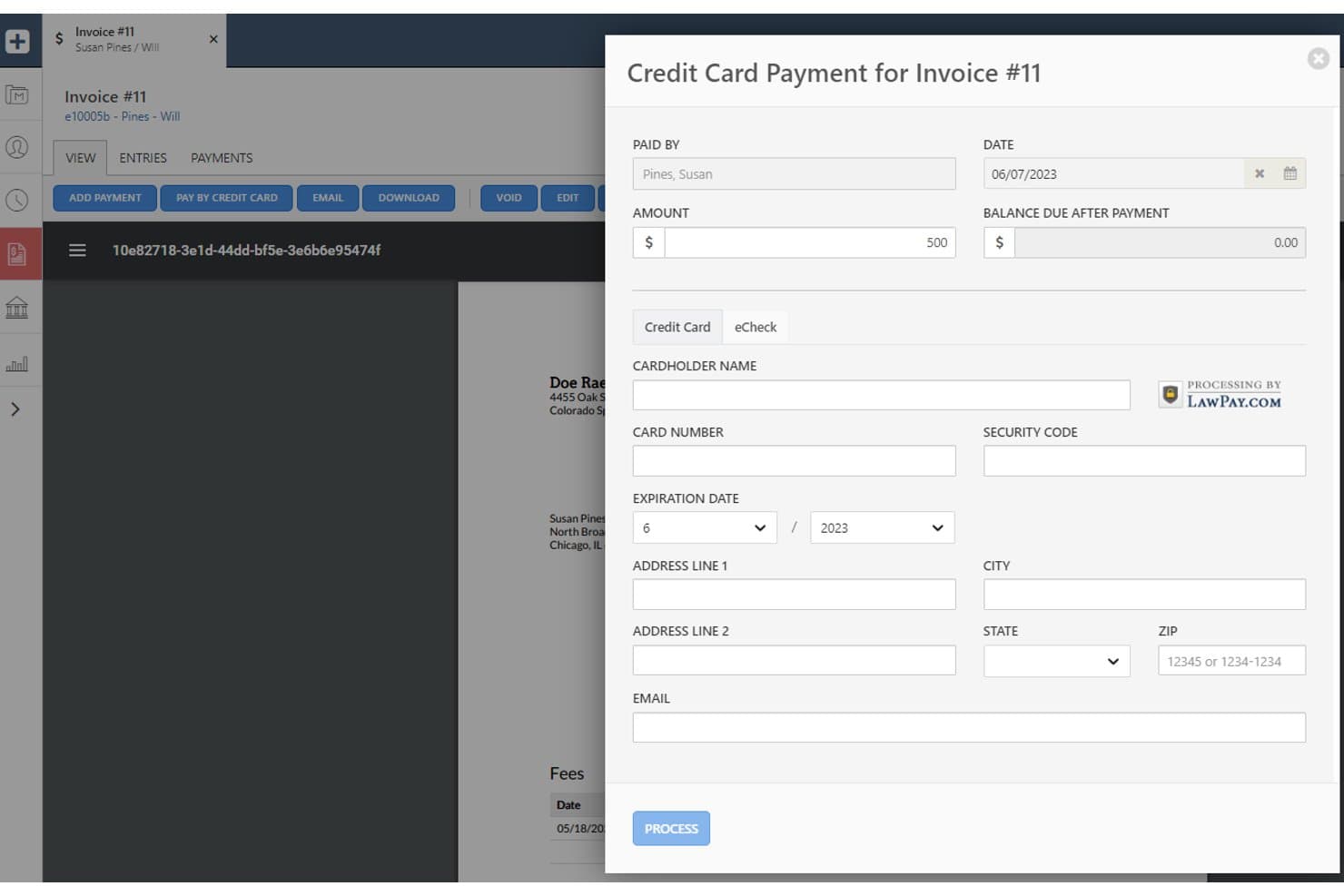
Smokeball biedt ingebouwde creditcardbetalingsverwerking via LawPay rechtstreeks in de factureringsinterface, zodat gebruikers kaartgegevens kunnen invoeren en betalingen kunnen verwerken zonder het platform te verlaten. Smokeball is een alles-in-éénplatform voor juridisch praktijkbeheer voor zelfstandig werkende advocaten en kleine kantoren dat trustboekhouding, facturering van cliënten en documentautomatisering in één systeem combineert.
Voor wie is Smokeball het meest geschikt?
Smokeball is zeer geschikt voor kleine en eenmanskantoren die grote hoeveelheden documenten verwerken binnen rechtsgebieden zoals vastgoedrecht, familierecht of nalatenschapsplanning.
Waarom is Smokeball een goed alternatief voor LawPay?
Ik heb Smokeball opgenomen in mijn topkeuzes omdat de AutoTime-functie factureerbaar werk automatisch registreert in e-mails, telefoongesprekken en documenten, zonder handmatige invoer. Wat ik vooral goed vind, is dat deze geregistreerde tijd rechtstreeks naar de factureringsmodule van Smokeball gaat, zodat facturen gebaseerd zijn op werkelijk verricht werk in plaats van op schattingen. Kantoren die het gebruiken, melden gemiddeld 34% meer winstgevendheid, wat duidelijk maakt hoeveel factureerbare tijd doorgaans niet wordt geregistreerd.
Belangrijkste functies van Smokeball
- Trustboekhouding met drievoudige afstemming: Beheer trust- en exploitatierekeningen, voorkom vermenging van gelden en zorg voor naleving van de IOLTA-vereisten.
- LEDES- en dossiergebaseerde facturering: Genereer facturen met de gestandaardiseerde factureringscodes die door veel cliënten en rechtbanken worden vereist.
- Ingebouwde integratie met QuickBooks en Xero: Synchroniseer betalingen en uitgaven rechtstreeks met populaire boekhoudsystemen om handmatige invoer te beperken.
- Cliëntenportaal voor veilige betalingen: Bied cliënten een privéportaal om facturen te bekijken en online betalingen te verrichten.
Integraties van Smokeball
Smokeball biedt ingebouwde integraties met LawPay, QuickBooks Online, Xero, Microsoft 365, Outlook, InfoTrack en DocuSign. Er is een API beschikbaar voor aangepaste integraties.
Pros and Cons
Pros:
- AutoTime registreert factureerbare uren zonder handmatige invoer
- Ingebouwde afstemming van IOLTA-trustrekeningen inbegrepen
- Dossiergebaseerde facturering ondersteunt LEDES-factureringscodes
Cons:
- Alleen beschikbaar in de VS en Australië
- Geen zelfstandige oplossing voor betalingsverwerking
Learn more about Smokeball: Beste voor tijdregistratie en facturering
- Gratis proefperiode van 10 dagen
- Prijs op aanvraag
Visit WebsiteCustomer Rating:4.5/5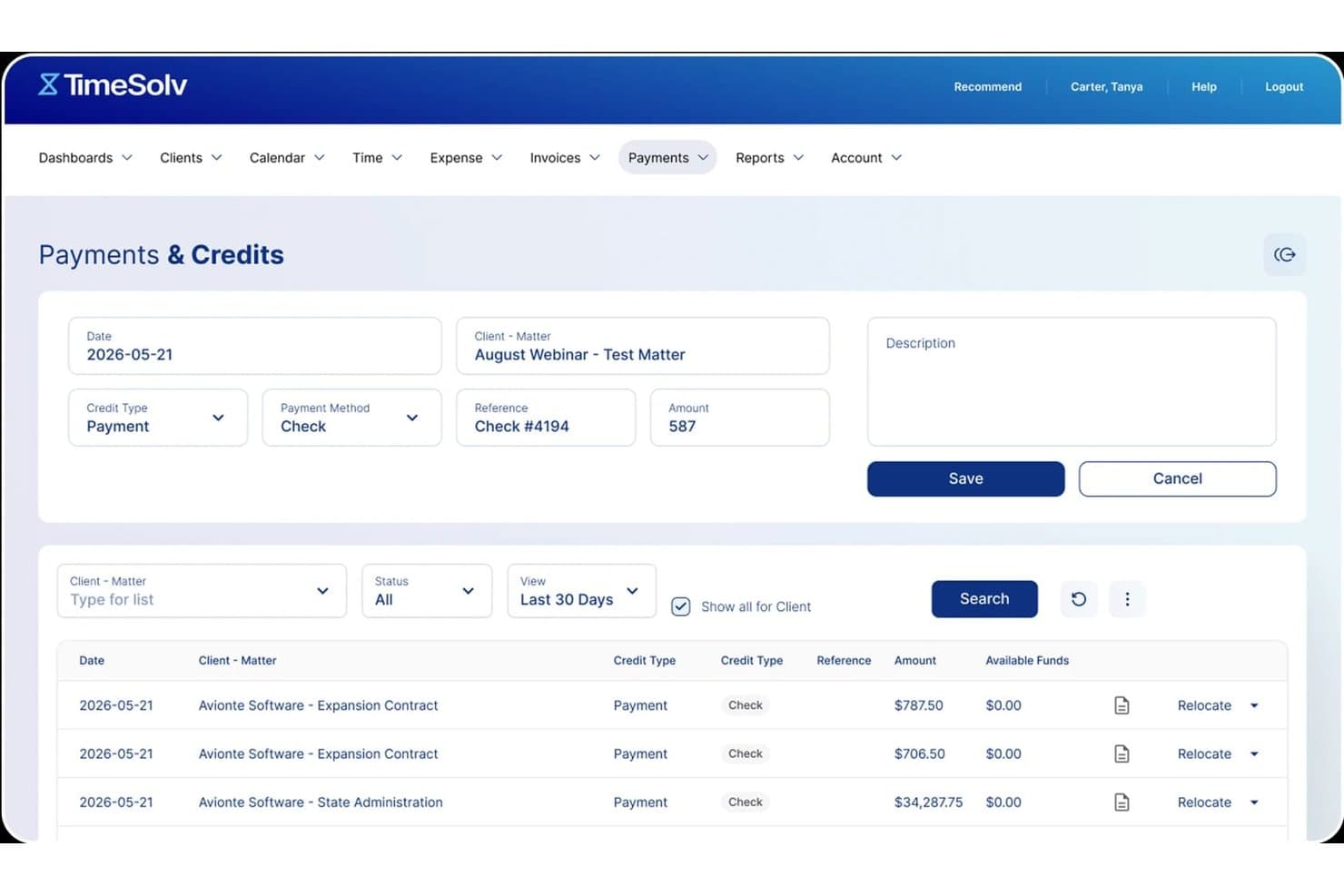
TimeSolv biedt een scherm voor Betalingen & tegoeden waarop gebruikers betalingen per cheque kunnen registreren, soorten tegoeden kunnen instellen en de recente betalingsgeschiedenis per cliënt en zaak kunnen bekijken. TimeSolv is een platform voor juridische facturering en tijdregistratie, ontwikkeld voor zelfstandig werkende advocaten en kleine advocatenkantoren die behoefte hebben aan IOLTA-conforme derdengeldenadministratie, ingebouwde betalingsverwerking en geautomatiseerde facturering in één tool.
Voor wie is TimeSolv het meest geschikt?
TimeSolv is zeer geschikt voor zelfstandig werkende advocaten en kleine advocatenkantoren die per uur factureren en betalingen die aan derdengeldenregels voldoen nodig hebben, zonder afzonderlijke tools aan elkaar te hoeven koppelen.
Waarom TimeSolv een goed alternatief voor LawPay is
Ik heb TimeSolv gekozen als een van de beste opties, omdat de op zaken gebaseerde tijdregistratie rechtstreeks doorwerkt in LEDES-conforme facturen, waardoor de kloof tussen het registreren van uren en het factureren van cliënten kleiner wordt. Vooral de functie voor batchfacturering spreekt mij aan, omdat ik hiermee in één keer facturen voor meerdere zaken kan genereren en verzenden. TimeSolvPay boekt geïnde bedragen vervolgens automatisch naar de juiste derdengelden- of bedrijfsrekening, waardoor handmatige toewijzing nadat een cliënt heeft betaald overbodig wordt.
Belangrijkste functies van TimeSolv
- Drievoudige afstemming van derdengeldenrekeningen: Maakt nauwkeurige IOLTA-naleving mogelijk met geautomatiseerde afstemmingsprocessen voor alle cliëntgelden.
- Veilig betalingsportaal voor cliënten: Biedt cliënten een online portaal in de huisstijl van het kantoor om facturen te bekijken, betalingen te doen en hun betalingsgeschiedenis in te zien.
- Aanpasbare intake en CRM-uitbreiding: Bevat configureerbare intakeformulieren en leadopvolging voor kantoren die het cliëntenintakeproces intern afhandelen.
- Hulpmiddelen voor het innen van bulkbetalingen: Maakt het mogelijk om betalingen van meerdere cliënten of voor meerdere zaken tegelijk te innen, waardoor facturering op grote schaal efficiënter verloopt.
Integraties van TimeSolv
TimeSolv biedt directe integraties met QuickBooks, Xero, NetDocuments, Microsoft 365, Dropbox, LexShare, LexSign, LawPay en AccountEdge. Er is een API beschikbaar voor aangepaste integraties.
Pros and Cons
Pros:
- Geautomatiseerde drievoudige afstemming van derdengeldenrekeningen inbegrepen
- LEDES-conforme facturering ingebouwd in het platform
- Batchfacturering voor meerdere zaken tegelijk
Cons:
- De mobiele app heeft beperkte offlinefunctionaliteit
- De mogelijkheden om rapportages aan te passen zijn vrij beperkt
 Beste keuze voor geïntegreerde juridische betalingen
- Gratis demo beschikbaar
- Prijzen op aanvraag
Visit WebsiteCustomer Rating:4.4/5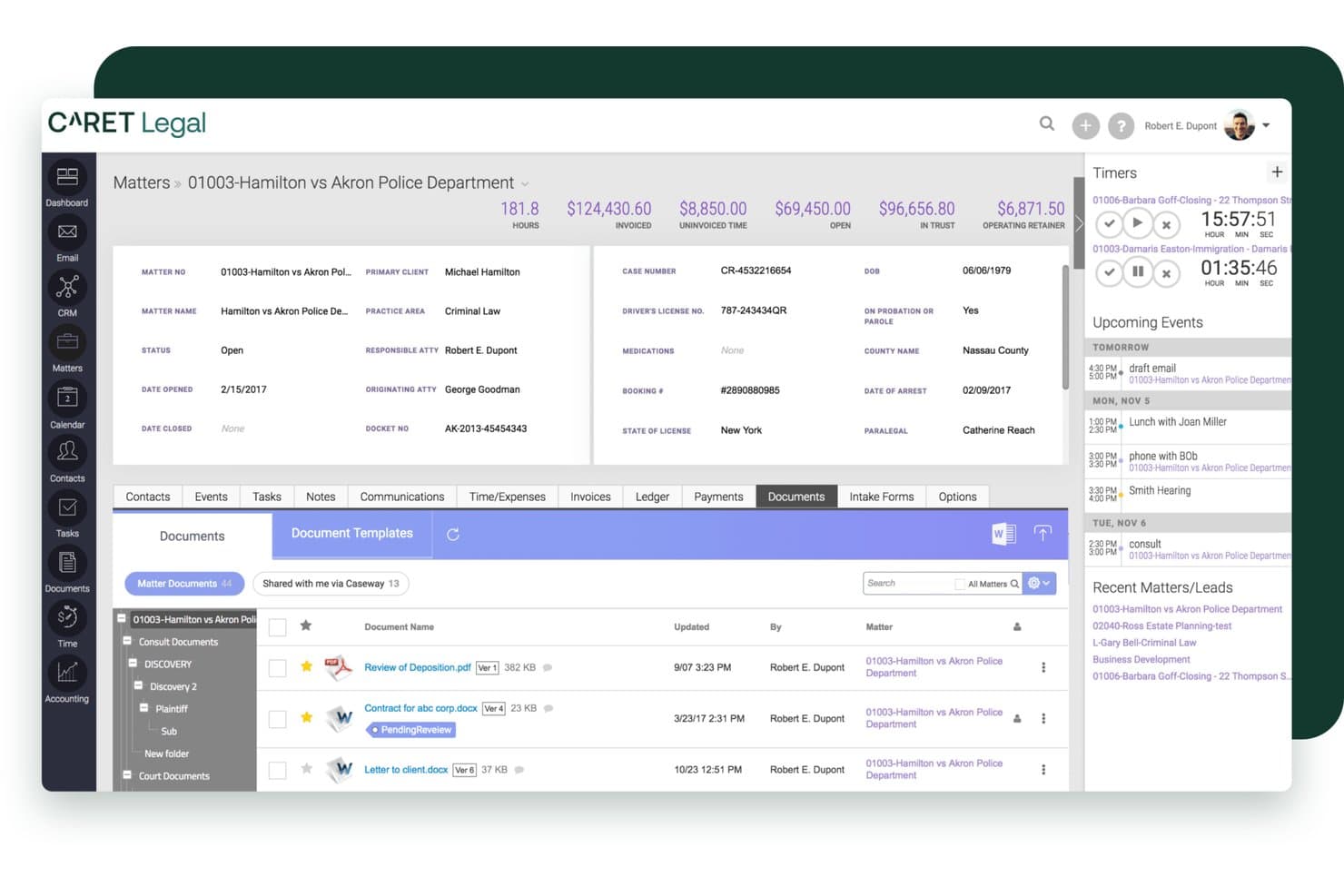
CARET Legal biedt een uitgebreide interface voor dossierbeheer met documenttracking, factureringsoverzichten, tijdregistratie en aankomende gebeurtenissen in één dashboardweergave. CARET Legal is een cloudgebaseerd platform voor het beheer van juridische praktijken, ontwikkeld voor kleine tot middelgrote advocatenkantoren die dossierbeheer, derdengeldenadministratie, LEDES-facturering en het verwerken van cliëntbetalingen op één plek nodig hebben.
Voor wie is CARET Legal het meest geschikt?
Het is zeer geschikt voor factureringsbeheerders van kleine en middelgrote advocatenkantoren die derdengeldenrekeningen, cliëntfacturering en het innen van betalingen binnen één platform beheren.
Waarom CARET Legal een goed alternatief voor LawPay is
Ik heb CARET Legal in mijn topkeuzes opgenomen omdat CARET Pay rechtstreeks in het platform voor praktijkbeheer is geïntegreerd en niet als afzonderlijke tool is toegevoegd. Wanneer een cliënt via het cliëntportaal in de eigen huisstijl een voorschot betaalt, wordt dit rechtstreeks in de derdengeldenadministratie verwerkt zonder handmatige afstemming. Ik vind het ook prettig dat creditcard-, ACH- en elektronischechequebetalingen van nature gekoppeld zijn aan dossierfacturering en LEDES-facturering, zodat betalingen en juridische financiële gegevens vanaf het begin met elkaar verbonden blijven.
Belangrijkste functies van CARET Legal
- Geïntegreerd documentbeheer: Sla documenten rechtstreeks binnen elk cliëntdossier op, orden ze en bewerk ze.
- Tweerichtingskalendersynchronisatie: Koppel je Microsoft 365- of Google Workspace-account voor realtime agenda-updates.
- Geautomatiseerde workflowsjablonen: Maak herhaalbare sjablonen voor juridische processen, zoals zaakintake, bewijsvergaring of deadlines voor documenten.
- Facturen genereren in LEDES-formaat: Maak facturen in LEDES-formaat om te voldoen aan de vereisten voor cliënt- en elektronische facturering.
Integraties van CARET Legal
CARET Legal biedt geïntegreerde koppelingen met QuickBooks Online, Microsoft 365, Google Workspace, NetDocuments, HotDocs, Lawmatics en LawToolBox. Er is een API beschikbaar voor aangepaste integraties.
Pros and Cons
Pros:
- Derdengeldenadministratie geïntegreerd in de factureringsworkflow
- Cliëntportaal in eigen huisstijl voor onlinebetalingen
- Ondersteunt LEDES-facturering voor naleving van vereisten voor elektronische facturering
Cons:
- Te uitgebreid voor kantoren die alleen betalingen nodig hebben
- De mobiele app heeft beperkte functionaliteit voor betalingen
Learn more about CARET Legal: Beste voor configureerbare factureringsworkflows
- Gratis demo beschikbaar
- Prijs op aanvraag
Visit WebsiteCustomer Rating:4.5/5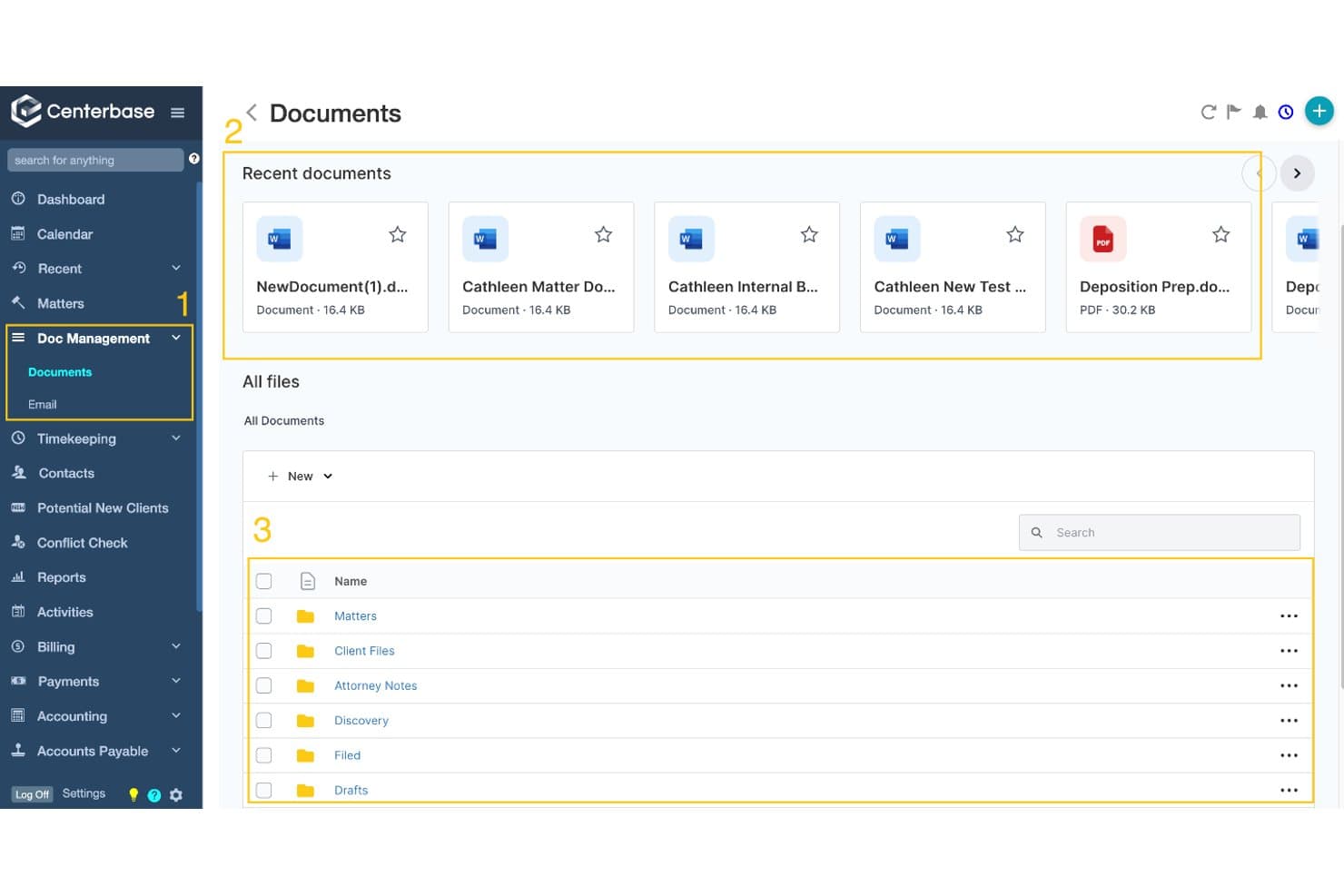
Centerbase biedt een gecentraliseerde hub voor documentbeheer met recente bestanden, mappenorganisatie en een bestandsbrowser voor alle documenten. Centerbase is een platform voor praktijkbeheer dat is ontwikkeld voor middelgrote advocatenkantoren die behoefte hebben aan ingebouwde trustboekhouding, configureerbare factureringsworkflows en geïntegreerde betalingsverwerking — zonder afzonderlijke tools aan elkaar te hoeven koppelen.
Voor wie is Centerbase het meest geschikt?
Centerbase is zeer geschikt voor middelgrote advocatenkantoren waarvan de factureringsbeheerders en kantoormanagers behoefte hebben aan zeer configureerbare facturering en trustboekhouding binnen één platform.
Waarom Centerbase een goed alternatief voor LawPay is
Ik heb Centerbase gekozen als een van de beste opties, omdat de configureerbaarheid van de factureringsworkflow verder gaat dan wat een zelfstandige betalingsverwerker kan bieden. Ik waardeer vooral de functie voor beoordeling van ePreBills, die voorlopige facturen elektronisch door een goedkeuringsketen stuurt voordat er iets bij de cliënt terechtkomt. Wat het platform echt onderscheidt: Centerbase is het enige factureringssysteem dat voorschotten en honorariumbetalingen in één creditcardtransactie verwerkt en de bedragen vervolgens automatisch toewijst aan de juiste trust- of exploitatierekening.
Belangrijkste functies van Centerbase
- Geautomatiseerde tijdregistratie: Houdt factureerbare uren automatisch bij in Outlook en Word, zonder handmatige invoer.
- Geïntegreerd documentbeheer: Hiermee kunt u cliëntdocumenten binnen hetzelfde cloudplatform beheren en opslaan.
- Ondersteuning voor facturen met meerdere betalers: Hiermee kunnen kantoren betalingen over meerdere verantwoordelijke partijen voor één zaak verdelen.
- Ingebouwde trustboekhouding: Verwerkt truststortingen, voorkomt vermenging van gelden en ondersteunt conforme afstemmingsworkflows.
Integraties van Centerbase
Centerbase biedt ingebouwde integraties met QuickBooks Online, NetDocuments, iManage, LawToolBox, Plaid en LawPay, en heeft integraties binnen het Microsoft-ecosysteem, waaronder Microsoft 365 en Outlook. Er is een API beschikbaar voor aangepaste integraties.
Pros and Cons
Pros:
- Eén transactie verwerkt voorschotten en honoraria
- Ingebouwde ePreBill-routering vóór verzending naar de cliënt
- Ingebouwde drieledige afstemming van trustrekeningen
Cons:
- Ontworpen voor middelgrote kantoren, niet voor solo-advocaten
- Aanzienlijke initiële configuratie voor het instellen van de facturering
Learn more about Centerbase: Het beste voor juridische tijdregistratie en facturering
- 14 dagen gratis uitproberen
- Vanaf $49/gebruiker/maand
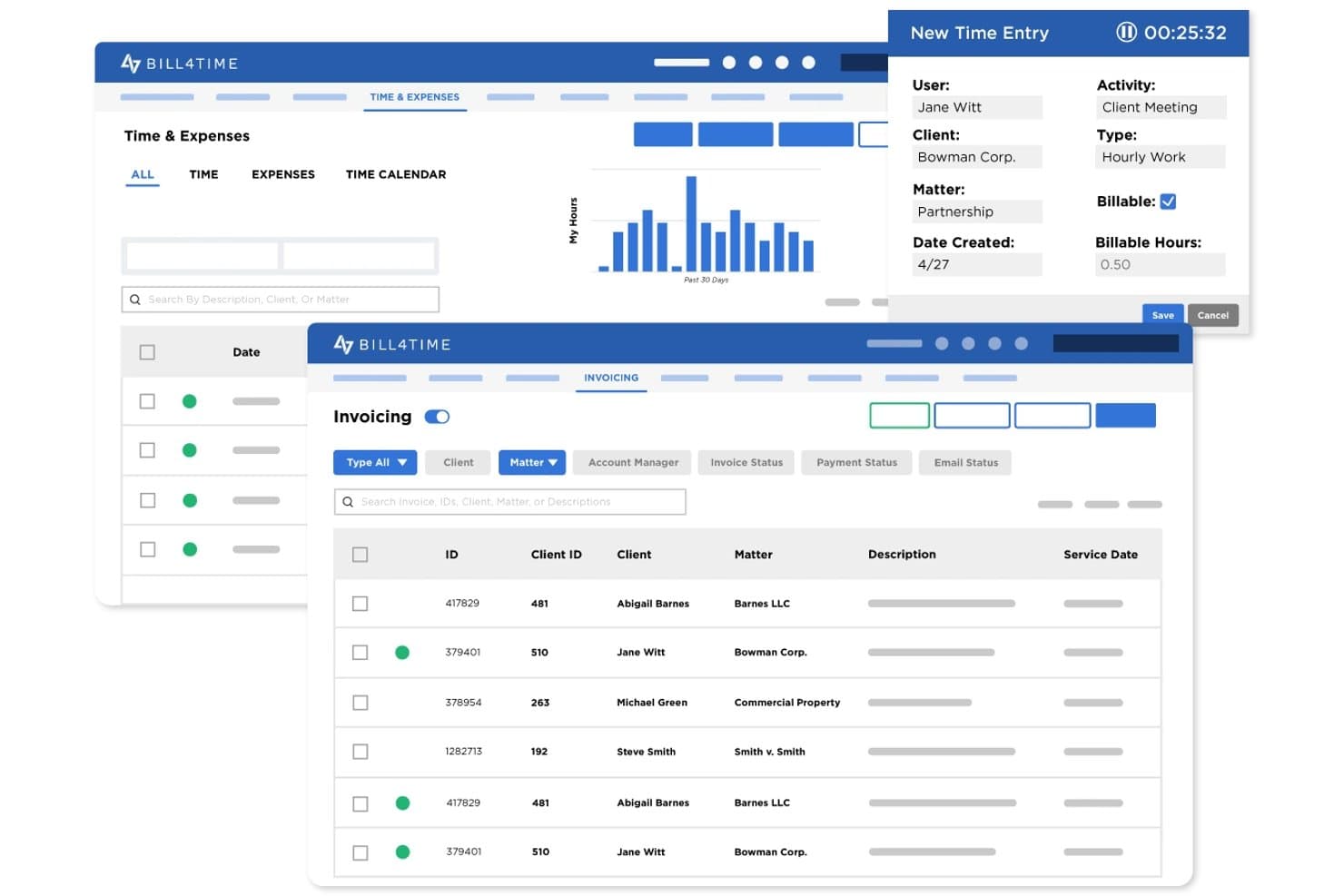
Bill4Time biedt tools voor tijdregistratie, het registreren van uitgaven en factuurbeheer, ontworpen voor juridische factureringsprocessen. Bill4Time is een cloudgebaseerd platform voor tijdregistratie, facturatie en betalingen, speciaal ontwikkeld voor advocatenkantoren die facturering, derdengeldenadministratie en het innen van klantbetalingen op één plek willen samenbrengen.
Voor wie is Bill4Time het meest geschikt?
Bill4Time is zeer geschikt voor zelfstandig werkende advocaten en kleine advocatenkantoren die behoefte hebben aan juridische facturering, derdengeldenadministratie en klantbetalingen zonder meerdere tools te hoeven combineren.
Waarom Bill4Time een goed alternatief voor LawPay is
Ik heb Bill4Time opgenomen in mijn topkeuzes omdat het de volledige factureringscyclus afhandelt die LawPay onbesproken laat. Ik vind het vooral prettig dat het uurtarief-, vasteprijs- en resultaatafhankelijke facturering binnen dezelfde zaak ondersteunt, wat zeldzaam is. De LEDES-export en de UTBMS-codeset zijn rechtstreeks ingebouwd in het Legal Pro-abonnement, waardoor het indienen van elektronische facturen bij verzekeraars of zakelijke klanten geen aparte omweg vereist.
Belangrijkste functies van Bill4Time
- Automatisering van de derdengeldenadministratie: Zorgt voor de scheiding tussen verdiende en onverdiende gelden en ondersteunt driewegreconciliatie.
- Klantenportaal: Klanten kunnen veilig facturen bekijken, documenten delen en online betalingen uitvoeren.
- Conflictcontrole: Ingebouwde tool om vóór de opdrachtverlening te controleren op conflicten tussen klanten en zaken.
- QuickBooks-integratie: Synchroniseert tijdregistraties, facturen en betalingsgegevens rechtstreeks met QuickBooks voor de boekhouding.
Integraties van Bill4Time
Bill4Time biedt rechtstreekse integraties met QuickBooks, NetDocuments, Box en Google Calendar. Er is een API beschikbaar voor aangepaste integraties.
Pros and Cons
Pros:
- Ingebouwde LEDES-facturering en UTBMS-codes
- Ingebouwde driewegreconciliatie van derdengeldenrekeningen
- Verwerkt de volledige factureringscyclus naast betalingen
Cons:
- De mobiele app biedt niet alle functionaliteit van de desktopversie
- Aanpassingsmogelijkheden voor rapportages zijn beperkt
Learn more about Bill4time: Het beste voor betalingsplannen en facturering
- Gratis proefperiode van 10 dagen + gratis demo beschikbaar
- Vanaf $59/gebruiker/maand (jaarlijks gefactureerd)
Visit WebsiteCustomer Rating:4.4/5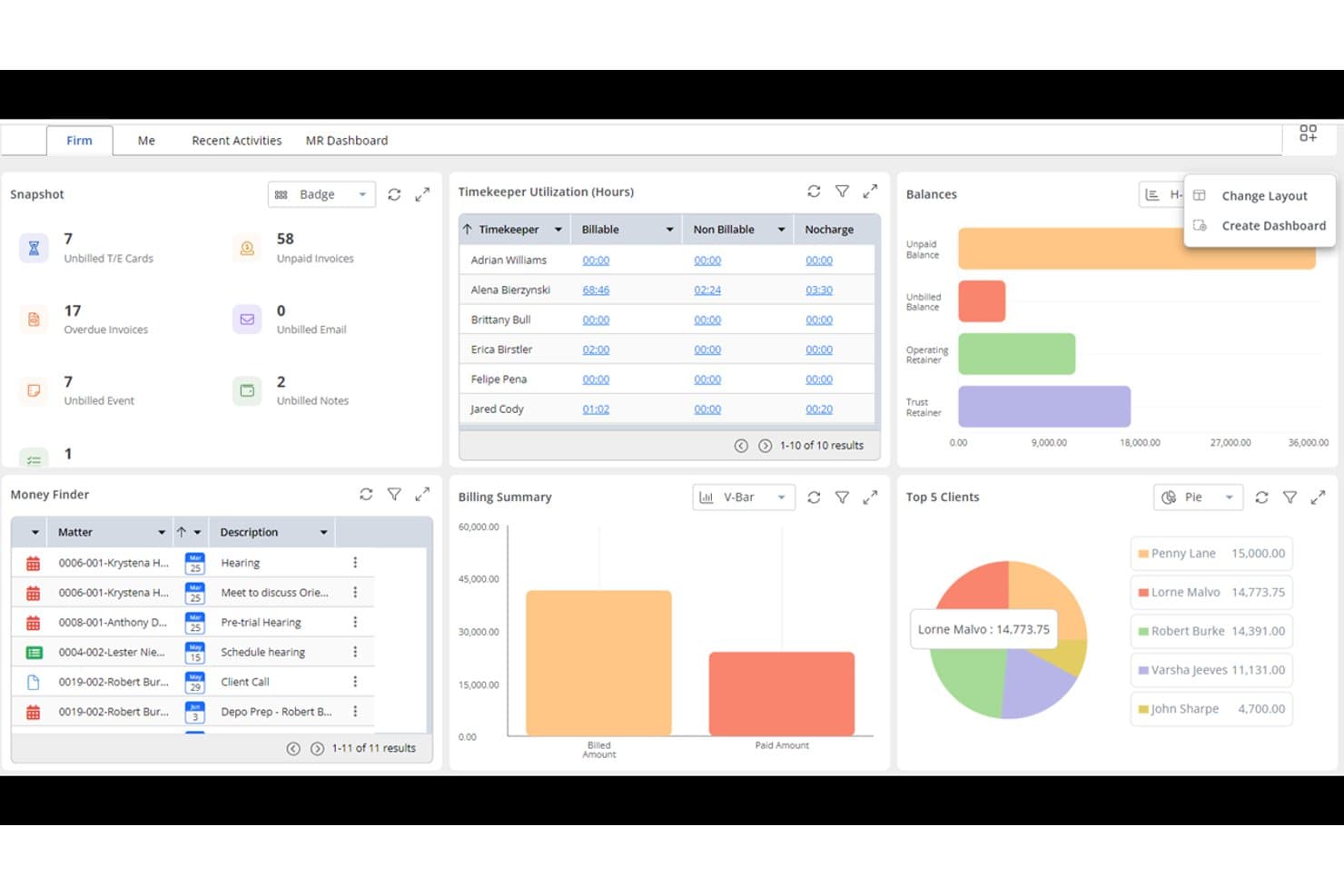
Rocket Matter biedt een uitgebreid overzicht met de benutting van tijdschrijvers, een factureringsoverzicht, de top 5-cliënten, saldi en een paneel voor het vinden van geld voor efficiënt beheer van een advocatenkantoor. Rocket Matter is een platform voor praktijkbeheer in de advocatuur met een ingebouwde betalingsverwerker, ontworpen als vervanging voor LawPay. Het verwerkt trustconforme facturering, facturen en cliëntbetalingen binnen één systeem dat voor advocatenkantoren is gebouwd.
Voor wie is Rocket Matter het meest geschikt?
Zelfstandige advocaten en kleine tot middelgrote advocatenkantoren die facturering, betalingen en zaken op één platform willen beheren in plaats van met afzonderlijke hulpmiddelen te werken.
Waarom Rocket Matter een goed alternatief voor LawPay is
Ik heb Rocket Matter geselecteerd voor mijn shortlist vanwege de manier waarop het specifiek geautomatiseerde betalingsplannen afhandelt. Sla de kaart van een cliënt op, stel het factureringsschema in en Rocket Matter brengt automatisch kosten in rekening zonder dat handmatige opvolging nodig is. Ook de functie voor doorlopende voorschotten waardeer ik: wanneer een voorschot onder een ingestelde drempel komt, vult het platform dit automatisch aan via de opgeslagen betaalmethode.
Belangrijkste functies van Rocket Matter
- Automatisering van trustboekhouding: Het platform scheidt cliëntgelden automatisch, houdt trusttransacties bij en voorkomt dat verwerkingskosten van trustrekeningen worden afgeschreven.
- LEDES- en gesplitste facturering: Genereer facturen met LEDES-codes en splits de facturering tussen meerdere partijen of financieringsbronnen.
- Documentbeheer en elektronische ondertekening: Sla juridische documenten veilig op, bewerk en deel ze, met ingebouwde elektronische ondertekening om opdrachtovereenkomsten af te ronden.
- Integratie met QuickBooks Online: Synchroniseer facturen, betalingen en cliëntgegevens met QuickBooks Online voor geïntegreerde boekhouding voor de advocatuur.
Integraties van Rocket Matter
Rocket Matter biedt ingebouwde integraties met QuickBooks Online, NetDocuments, Microsoft 365, Dropbox, Box, LawToolBox en Google Calendar. Er is ook een API beschikbaar voor aangepaste integraties.
Pros and Cons
Pros:
- Automatische aanvulling van voorschotten wanneer het saldo daalt
- IOLTA-trustboekhouding met drievoudige afstemming
- LEDES-factureringscodes ingebouwd in de facturering
Cons:
- Te uitgebreid voor kantoren die alleen betalingen nodig hebben
- Mobiele app heeft beperkte betalingsfunctionaliteit
Learn more about Rocket Matter: Beste voor geautomatiseerde juridische facturering
- Gratis proefperiode van 7 dagen
- Vanaf $49/gebruiker/maand (jaarlijks gefactureerd)
Visit WebsiteCustomer Rating:4.3/5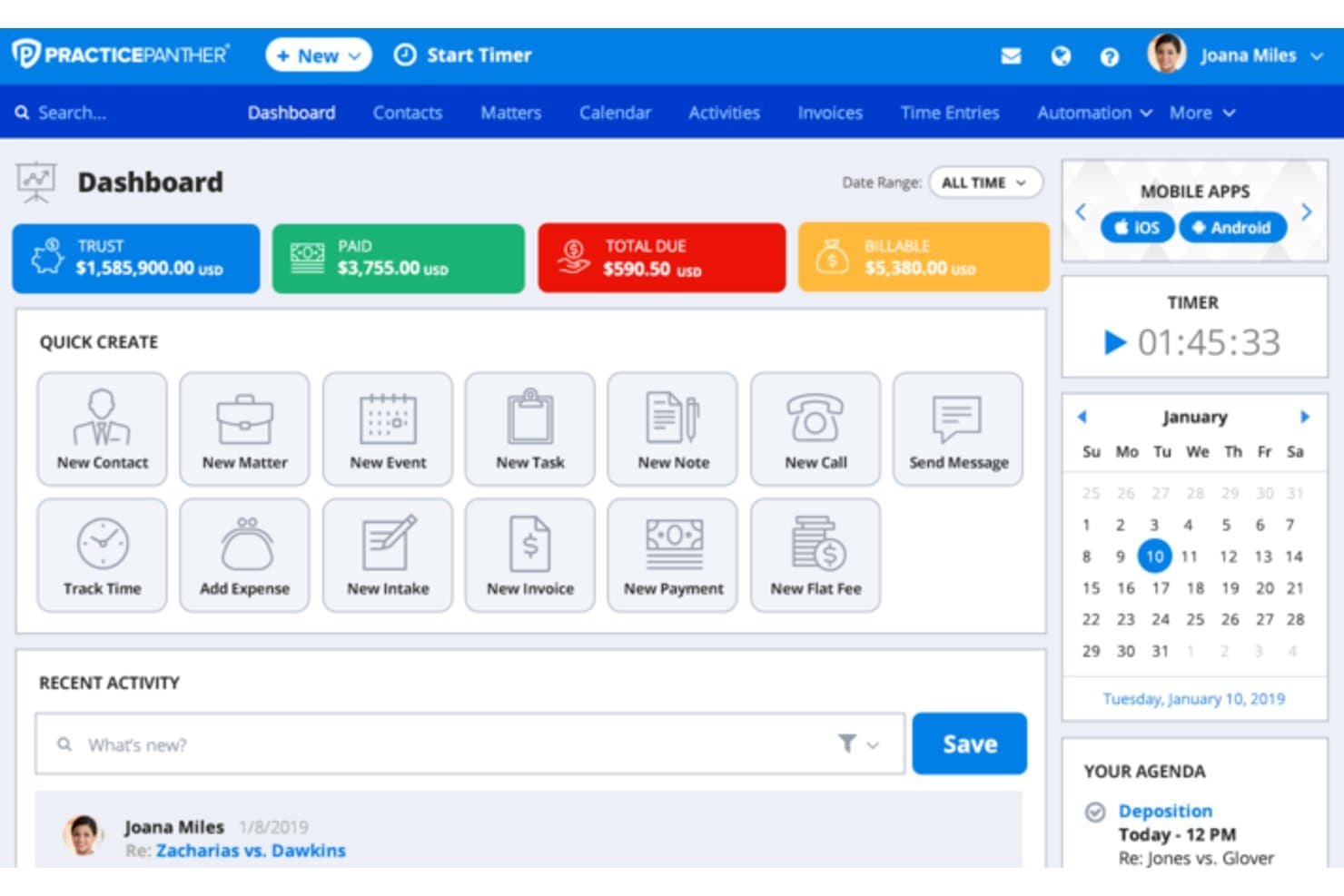
PracticePanther beheert zaken, gerechtelijke agenda's, facturering, derdengelden en documenten. PracticePanther is een cloudgebaseerd platform voor praktijkbeheer voor zelfstandig werkende advocaten en kleine kantoren, dat juridische facturering, beheer van derdengelden, cliëntintake en betalingsverwerking op één plek combineert.
Voor wie is PracticePanther het meest geschikt?
Het is een sterke keuze voor zelfstandig werkende advocaten en factureringsbeheerders van kleine kantoren die één platform nodig hebben voor tijdregistratie, facturering en beheer van derdengelden, zonder meerdere afzonderlijke tools te hoeven gebruiken.
Waarom PracticePanther een goed alternatief voor LawPay is
Ik heb PracticePanther gekozen vanwege de mate waarin het de volledige factureringscyclus van begin tot eind automatiseert. Vooral de geautomatiseerde betalingsherinneringen en terugkerende betalingsplannen spreken mij aan, omdat ze de handmatige opvolging wegnemen die zoveel kleine kantoren vertraagt. Daarnaast geven LEDES-facturering en meldingen over het lezen van facturen factureringsbeheerders echt inzicht in de status van elke factuur, zonder dat zij cliënten telkens hoeven na te jagen.
Belangrijkste functies van PracticePanther
- Dossiergerichte workflows: Pas juridische taken en agendastromen aan rond elke zaak, van begin tot eind.
- Geïntegreerde boekhouding voor derdengelden en bedrijfsvoering: Houd stortingen op derdengeldenrekeningen en verdiende vergoedingen gescheiden met ingebouwde boekhoudtools.
- Ingebouwde e-handtekening voor opdrachtbevestigingen: Verstuur, volg en bewaar ondertekende overeenkomsten rechtstreeks binnen het platform.
- Tweerichtingsberichten voor bedrijven: Communiceer veilig met cliënten en archiveer hun berichten vanaf een speciale zakelijke sms-lijn.
Integraties van PracticePanther
PracticePanther biedt rechtstreekse integraties met QuickBooks Online, Google Workspace, Microsoft 365, Dropbox, MailChimp, LawPay, Box en Zapier. Er is een API beschikbaar voor aangepaste integraties.
Pros and Cons
Pros:
- Automatiseert facturering, herinneringen en terugkerende betalingen
- Ingebouwde naleving voor IOLTA-beheer van derdengelden
- LEDES-factureringscodes standaard inbegrepen
Cons:
- De rapportage biedt onvoldoende diepgang voor grotere kantoren
- De mobiele app heeft beperkte factureringsfunctionaliteit
Learn more about PracticePanther: Beste voor derdengeldenadministratie en betalingen
- 10 dagen gratis proefperiode + gratis demo beschikbaar
- Vanaf $99/gebruiker/maand (jaarlijks gefactureerd)
Visit WebsiteCustomer Rating:4.4/5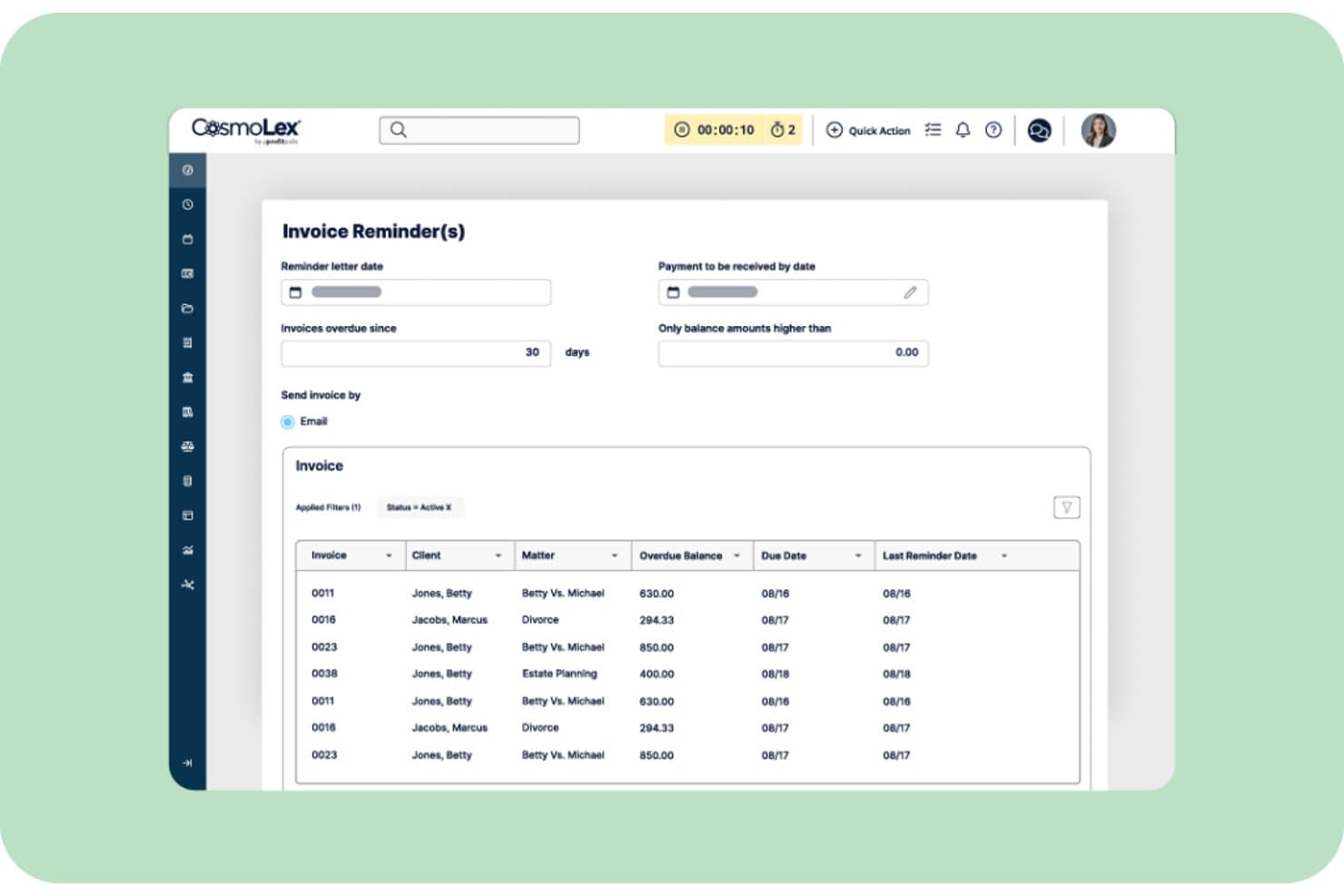
CosmoLex biedt een functie voor factuurherinneringen waarmee kantoren achterstallige facturen kunnen filteren op aantal dagen, drempelbedragen en betalingsherinneringen per e-mail kunnen versturen. CosmoLex is een cloudgebaseerd praktijkbeheerplatform voor solo- en kleine advocatenkantoren dat derdengeldenadministratie, facturering en cliëntbetalingen native afhandelt, zonder afhankelijk te zijn van een afzonderlijke betalingsverwerker.
Voor wie is CosmoLex het meest geschikt?
CosmoLex is zeer geschikt voor solo-advocaten en facturatiebeheerders van kleine kantoren die derdengeldenadministratie en cliëntbetalingen op één plek willen beheren zonder afzonderlijke boekhoudsoftware.
Waarom CosmoLex een goed alternatief voor LawPay is
Ik heb CosmoLex gekozen als een van de beste opties, omdat de module voor derdengeldenadministratie het platform echt onderscheidt. Elke cliënt krijgt een eigen derdengeldengrootboek en de drievoudige afstemming (bankafschrift, derdengeldengrootboek en afzonderlijke cliëntgrootboeken) verloopt automatisch. CosmoLexPay leidt betalingen rechtstreeks naar de juiste derdengelden- of exploitatierekening op het moment van inning, waardoor het nalevingsrisico dat ontstaat bij het achteraf handmatig splitsen van gelden wordt weggenomen.
Belangrijkste functies van CosmoLex
- Cliëntenportaal: Geef cliënten online veilige toegang tot facturen, documenten en betalingslinks.
- Geïntegreerd documentbeheer: Orden, bewaar en deel zaakgerelateerde bestanden binnen elke zaak.
- LEDES en gesplitste facturering: Genereer LEDES-conforme facturen en wijs kosten toe aan meerdere cliënten of betalers.
- Geautomatiseerde nalevingsrapportage: Genereer auditklare rapporten voor derdengeldenrekeningen en de financiën van het kantoor met vooraf ingestelde juridische sjablonen.
Integraties van CosmoLex
CosmoLex biedt native integraties met QuickBooks Online, Microsoft 365, NetDocuments, LawPay, Dropbox, Google Calendar en Zapier. Er is een API beschikbaar voor aangepaste integraties.
Pros and Cons
Pros:
- Volledig praktijkbeheer inbegrepen naast betalingen
- Ingebouwde e-handtekening voor opdrachtbevestigingen
- Opslag van kaartgegevens voor het aanvullen van voorschotten
Cons:
- Geen zelfstandige betalingsverwerker
- De opties voor mobiele toegang zijn beperkt
Learn more about CosmoLex: Het beste voor juridische facturering met QuickBooks
- Gratis proefperiode van 14 dagen
- Vanaf $55/gebruiker/maand
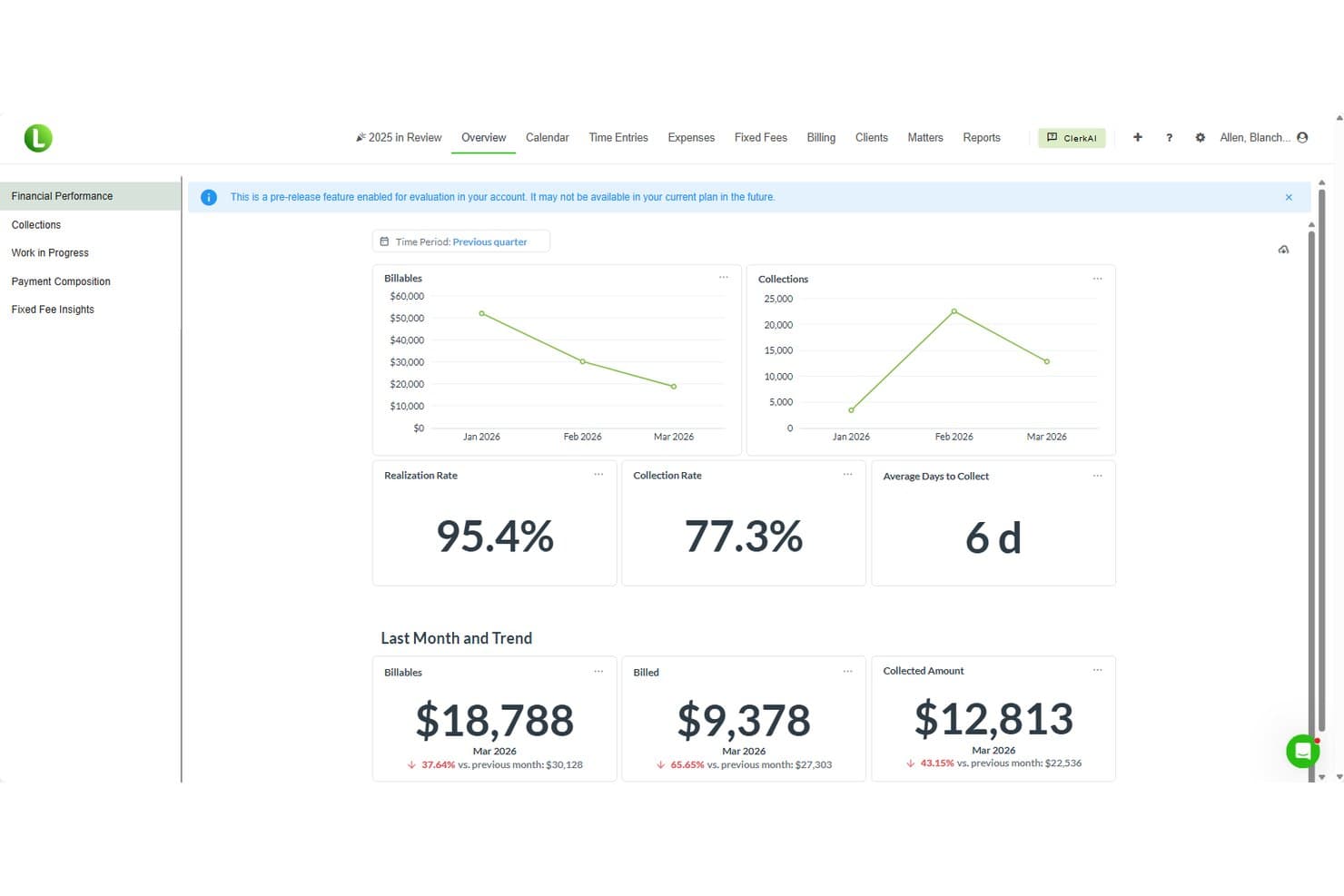
LeanLaw biedt een overzicht van financiële prestaties met statistieken over factureerbare bedragen, geïnde bedragen, realisatiepercentage, inningspercentage en het gemiddelde aantal dagen tot inning voor het vorige kwartaal. LeanLaw is een platform voor juridische facturering voor kleine en middelgrote advocatenkantoren dat tijdregistratie, IOLTA-vertrouwensboekhouding, facturering en elektronische betalingen combineert binnen een rechtstreekse QuickBooks Online-werkstroom — waardoor het niet meer nodig is om afzonderlijke betalingstools boven op uw factureringsstack te plaatsen.
Voor wie is LeanLaw het meest geschikt?
LeanLaw is zeer geschikt voor zelfstandige advocaten en kleine advocatenkantoren die al met QuickBooks Online werken en facturering en vertrouwensboekhouding op één plek willen beheren.
Waarom LeanLaw een goed alternatief voor LawPay is
Ik heb LeanLaw gekozen omdat de voortdurende tweerichtingssynchronisatie met QuickBooks Online het kernprobleem oplost dat LawPay onopgelost laat. Elke cliëntbetaling wordt automatisch geboekt op de juiste factuur en de juiste QBO-rekening, waarbij vertrouwensgelden standaard correct worden toegewezen. De ingebouwde IOLTA-afstemming houdt vervolgens voorschotten, stortingen op derdengeldenrekeningen en uitbetalingen bij zonder handmatige invoer buiten QuickBooks.
Belangrijkste functies van LeanLaw
- LEDES-e-facturering: Genereer facturen met LEDES- en ABA-taakcodes om te voldoen aan de vereisten van zakelijke en verzekeringscliënten.
- Tijdregistratie op desktop en mobiel: Registreer factureerbare tijd en kosten vanaf desktop- of mobiele apparaten met timers die met één tik kunnen worden gestart.
- Vergoedingentracking: Houd partner- en personeelsvergoedingen bij die rechtstreeks zijn gekoppeld aan prestatiegegevens per dossier.
- Afwikkelingswizard: Beheer de afwikkeling van dossiers op basis van een succesfee, uitbetalingen aan pandhouders en geautomatiseerde berekeningen van uitbetalingen binnen een speciale werkstroom.
Integraties van LeanLaw
LeanLaw biedt rechtstreekse integraties met QuickBooks Online, NetDocuments en Billables.ai. Er is een API beschikbaar voor aangepaste integraties.
Pros and Cons
Pros:
- Rechtstreekse tweerichtingssynchronisatie voor facturering met QuickBooks Online
- Ingebouwde drievoudige IOLTA-afstemming van derdengelden
- Op dossiers gebaseerde tijdregistratie op mobiel
Cons:
- Actief QuickBooks Online-abonnement vereist
- Geen zelfstandig cliëntenportaal voor betalingen
Learn more about LeanLaw:
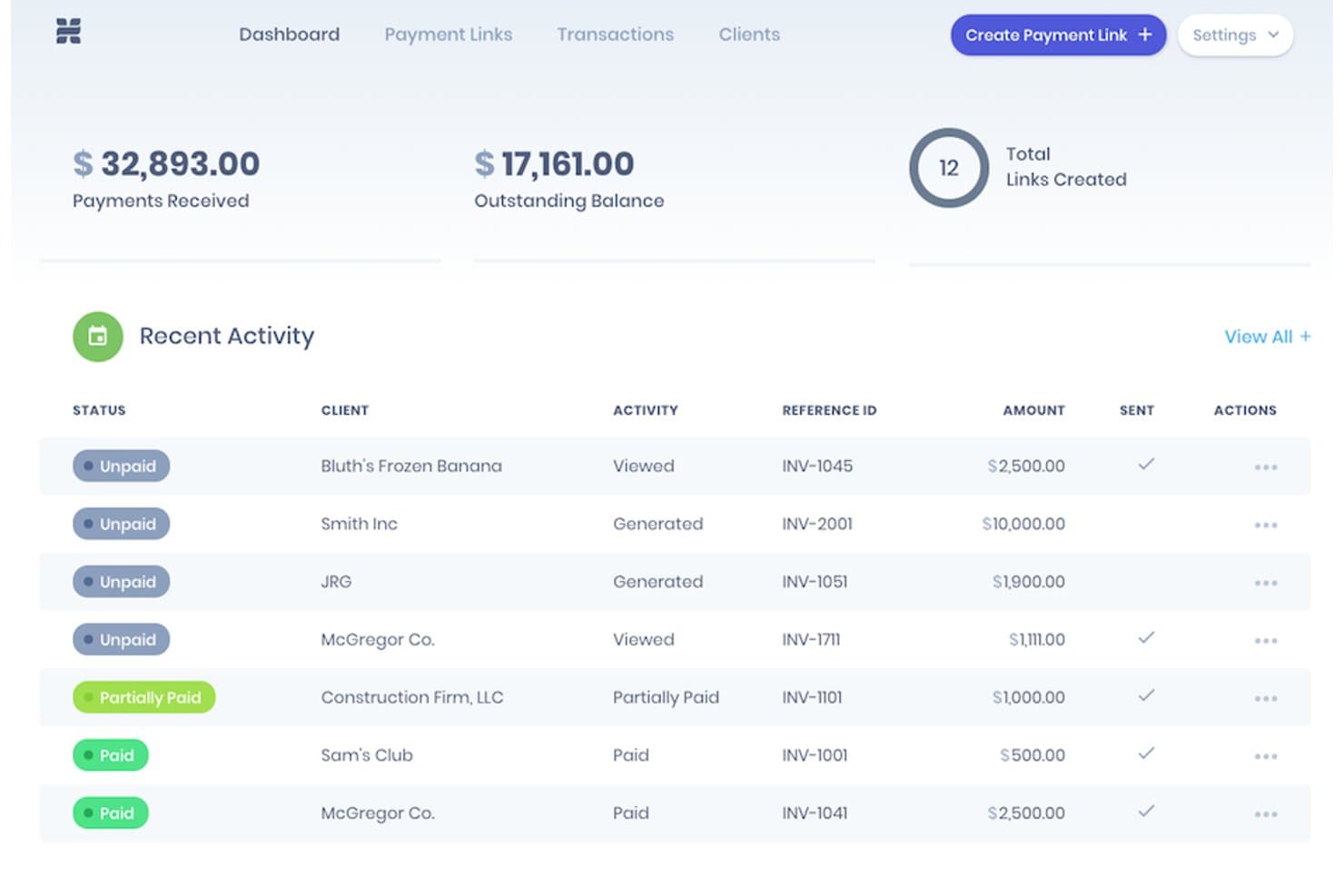
Headnote biedt een betalingsdashboard met ontvangen betalingen, openstaande saldi, het totale aantal aangemaakte betalingslinks en een recent activiteitenlogboek met de transactiestatus van cliënten. Headnote is een platform voor juridische betalingen, ontwikkeld voor zelfstandige advocaten en kleine advocatenkantoren die IOLTA-conforme creditcard- en elektronische-chequeverwerking nodig hebben, naast geautomatiseerd debiteurenbeheer en incasso.
Voor wie is Headnote het meest geschikt?
Headnote is geschikt voor kleine advocatenkantoren en zelfstandige advocaten die hun eigen facturatie beheren en een betalingsoplossing zonder contract en uitsluitend op basis van transactiekosten willen, met ingebouwde naleving van derdengeldenregels.
Waarom Headnote een goed alternatief voor LawPay is
Ik heb Headnote geselecteerd als een van de beste oplossingen, omdat de automatisering van het debiteurenbeheer verder gaat dan alleen basisbetalingsverwerking. Het realtime dashboard laat precies zien wanneer een cliënt een factuur heeft geopend, bekeken of betaald, en geautomatiseerde herinneringen worden op basis van betalingstermijnen verstuurd zonder handmatige opvolging. Ik waardeer ook de ingebouwde NPS-tracering, de eerste in zijn soort binnen juridische betalingen, waarmee ik gegevens over cliënttevredenheid direct naast incassoactiviteiten kan volgen.
Belangrijkste functies van Headnote
- Scheiding van derdengelden- en exploitatierekeningen: Koppel beide rekeningen direct in de app, met beveiligingen tegen het vermengen van kosten.
- Opdrachtbrieven met elektronische handtekening: Stel opdrachtbrieven op en verzamel beveiligde elektronische handtekeningen tijdens de cliëntintake.
- Compatibiliteit met betalingslinks: Voeg betalingslinks toe aan facturen of e-mailsjablonen vanuit tools zoals Clio, PracticePanther en QuickBooks.
- PCI-conforme beveiliging: Alle betalingsgegevens worden beschermd door 256-bits SSL-versleuteling en PCI-niveau 1-conforme beveiligingsmaatregelen.
Integraties van Headnote
Headnote biedt rechtstreekse integraties met Clio, Rocket Matter, CosmoLex en QuickBooks. Er is een API beschikbaar voor aangepaste integraties.
Pros and Cons
Pros:
- Ingebouwde NPS-tracering naast betalingsactiviteiten
- Geautomatiseerde opvolging van openstaande vorderingen zonder handmatige tussenkomst
- Geen maandelijkse kosten, alleen transactiekosten
Cons:
- Beperkte integraties met praktijkbeheersoftware in vergelijking met LawPay
- Geen ondersteuning voor LEDES-facturatie of ABA-taakcodes
Learn more about Headnote:
Andere alternatieven voor LawPay
\u003cspan style=\u0022font-weight: 400\u0022\u003eHier zijn enkele aanvullende alternatieven voor LawPay die mijn selectie niet hebben gehaald, maar die nog steeds de moeite waard zijn om te bekijken:\u003c/span\u003e
- 11EBizChargeIdeaal voor geïntegreerde kaart- en ACH-betalingen
- 12SolunoIdeaal voor juridische boekhouding en facturering
- 13PDCflowIdeaal voor workflows voor betalingsautorisatie
Hoe ik LawPay-alternatieven evalueer
Ik deel mijn evaluatie op in kernfunctionaliteit—wat elk LawPay-alternatief moet bieden, zoals IOLTA-conform beheer van derdengelden—en onderscheidende factoren waar ik daarnaast naar kijk. De kernfunctionaliteit bepaalt de basis; de onderscheidende factoren laten zien waarin platforms van elkaar verschillen.
Kernfunctionaliteit (basisvereisten voor deze lijst)
Bij het selecteren van tools voor mijn lijst geef ik elke tool voor elke hieronder vermelde kernfunctionaliteit een score op een schaal van 0 (biedt de functionaliteit niet) tot 5 (blink uit op dit gebied). Vervolgens zet ik de totaalscore van de tool om in een percentage. Elke tool moet een minimale totaalscore van 65% behalen om voor opname in aanmerking te komen.
- IOLTA-conformiteit voor derdengelden: Ik controleer of het platform derdengelden scheidt van verdiende honoraria en voorkomt dat verwerkingskosten ten laste komen van derdengeldrekeningen—een veelvoorkomende valkuil op het gebied van naleving.
- Betalingsverwerking voor de juridische sector: Elke tool moet creditcards, betaalpassen en ACH/eCheck-betalingen kunnen accepteren, met routering die is ingesteld voor zowel exploitatierekeningen als derdengeldrekeningen.
- Facturering & betaallinks: Ik zoek naar het genereren van facturen met deelbare betaallinks of gehoste pagina's, zodat cliënten rechtstreeks vanuit de factuur kunnen betalen zonder extra stappen.
- Integraties met praktijkbeheersoftware: Het platform moet verbinding kunnen maken met tools die kantoren al gebruiken, zoals Clio, MyCase, PracticePanther of QuickBooks, om facturen en dossiergegevens te synchroniseren.
- Toeslagen & verwerking van kosten: Ik beoordeel of de tool conforme toeslagen of gemakskosten ondersteunt, zodat kantoren flexibel kunnen omgaan met verwerkingskosten.
- Periodieke facturering & betalingsplannen: Kantoren die op voorschotbasis of in termijnen werken, hebben geplande afschrijvingen en gestructureerde betalingsplannen nodig. Daarom kijk ik naar de automatisering op dit gebied.
Zodra ik een lijst heb met tools die aan de criteria voldoen, kijk ik naar wat elk platform onderscheidt.
Onderscheidende factoren (wat leveranciers van elkaar onderscheidt)
Zo vergelijk ik verschillende leveranciers:
Opvallende functies
Automatisering van de boekhouding van derdengelden is een belangrijke onderscheidende factor. Ik zoek naar drievoudige afstemming en ingebouwde waarborgen tegen vermenging van gelden, omdat bij handmatig beheer van derdengelden de nalevingsrisico's zich opstapelen. Opties voor toeslagen en het absorberen van kosten zijn ook belangrijk—kantoren willen de flexibiliteit hebben om verwerkingskosten aan cliënten door te berekenen of deze zelf te dragen, afhankelijk van de regels van de balie. Ik beoordeel ook of een platform ingebouwde cliëntintake met elektronische handtekeningen biedt, waardoor er bij het aannemen van nieuwe dossiers geen afzonderlijke tools nodig zijn.
Meer dan functies alleen
Goedkeuringen door balies wegen zwaar mee—ik controleer of een platform gedocumenteerde goedkeuringen heeft voor het beheren van derdengelden, omdat dit wijst op de inzet van een leverancier voor naleving van ethische regels. De prijsstructuur is ook erg belangrijk. Sommige platforms gebruiken modellen met interchange-plus-prijzen, terwijl andere vaste tarieven bieden, en verborgen kosten zoals kosten voor vroegtijdige beëindiging kunnen snel oplopen. Ik beoordeel ook de geschiktheid voor de omvang en het rechtsgebied van een kantoor, omdat een zelfstandig werkende immigratieadvocaat en een middelgroot letselschadekantoor zeer verschillende behoeften hebben op het gebied van machtigingen, uitbetalingen van schikkingen en factureringsprocessen.
Waarom zoeken naar een alternatief voor LawPay?
Hoewel LawPay een goede keuze is onder de alternatieven voor LawPay, zijn er verschillende redenen waarom sommige gebruikers op zoek gaan naar alternatieve oplossingen. Misschien zoekt u een alternatief voor LawPay omdat u…
- lagere verwerkingskosten nodig hebt bij hoge transactievolumes
- meer ingebouwde integraties met platforms voor praktijkbeheer wilt
- geavanceerde automatiseringsfuncties voor derdenrekeningboekhouding nodig hebt
- op zoek bent naar flexibelere opties voor toeslagen en kostenafhandeling
- cliënten bedient buiten de regio's die door LawPay worden ondersteund
- betere klantenondersteuning zoekt die is afgestemd op advocatenkantoren
Als een van deze punten op u van toepassing is, bent u hier aan het juiste adres. Mijn lijst bevat verschillende alternatieven voor LawPay die beter geschikt zijn voor teams die met deze uitdagingen van LawPay worden geconfronteerd en op zoek zijn naar alternatieve oplossingen.
Belangrijkste functies van LawPay
Hier zijn enkele van de belangrijkste functies van LawPay, zodat u kunt vergelijken wat alternatieve oplossingen te bieden hebben:
- Naleving van IOLTA-vertrouwensrekeningen: Houdt gelden van cliënten en het kantoor gescheiden met waarborgen om aan de nalevingsvereisten voor derdengeldenrekeningen te voldoen.
- Juridische betalingsverwerking: Accepteert creditcard-, betaalkaart- en ACH-betalingen die zijn geconfigureerd voor facturering door advocatenkantoren en behoeften van derdengeldenrekeningen.
- Betalingslinks en gehoste pagina's: Hiermee kunt u veilige, deelbare betalingslinks of betalingspagina's in de huisstijl van uw kantoor genereren, zodat cliënten online kunnen betalen.
- Factuurintegratie: Maakt verbinding met software voor juridische facturering, zodat betalingen en afstemmingen automatisch met facturen worden gesynchroniseerd.
- Periodieke facturering en betalingsplannen: Ondersteunt geautomatiseerde periodieke afschrijvingen en betalingsregelingen in termijnen voor doorlopende zaken of zaken op basis van voorschotten.
- Toeslagen en gemakskosten: Hiermee kunnen kantoren creditcardverwerkingskosten doorberekenen aan cliënten, waar dit is toegestaan, of de kosten binnen de wettelijke richtlijnen zelf dragen.
- Beheer van cliëntaccounts: Biedt het bijhouden van cliëntbetalingen, betaalgeschiedenis en rapportages in één dashboard dat is ontwikkeld voor advocatenkantoren.
- Automatisering van naleving: Automatiseert audittrailregistratie, beschermt tegen vermenging van gelden en helpt bij het beheren van de regels van de ABA en staatsbalies voor de verwerking van kosten.
- Integraties met praktijkbeheersystemen: Werkt met toonaangevende oplossingen voor juridisch praktijkbeheer, zoals Clio, MyCase en PracticePanther, voor een naadloze gegevensstroom.
- PCI-conforme beveiliging: Zorgt ervoor dat transacties aan industrienormen voldoen door gevoelige betalingsgegevens te versleutelen en hulpmiddelen voor fraudebewaking aan te bieden.