

MyCase-beoordeling: voordelen, nadelen, functies & prijzen
MyCase houdt uw advocatenkantoor georganiseerd met een eenvoudige installatie, slimme tools en uitstekende ondersteuning, zodat u snel aan de slag kunt.

We review tools independently, and commissions help fund our testing. See our transparency policy, our methodology, or suggest a tool.
MyCase is a legal case management software built for small to mid-sized law firms that need to manage cases, documents, client communication, billing, and time tracking in one place. I'd consider it the better option if you want a more affordable alternative to Clio without giving up the core features most general practice and litigation firms rely on daily.
MyCase Evaluation Summary

4.6/5
- From $50/user/month (billed annually)
- 10-day free trial and free demo available
Waarom u onze softwareaanbevelingen kunt vertrouwen
6,700+
Reviews
20
Industry experts
16+
Evaluation factors
14
Years
Ons team test en beoordeelt software sinds 2012. Als leiders van juridische praktijken weten we zelf hoe moeilijk — en belangrijk — het is om de juiste software te kiezen.
Voor deze gids hebben we tools geëvalueerd met behulp van praktijktests en onafhankelijk onderzoek, waarbij we tools beoordeelden aan de hand van onze selectiecriteria.
Onze reviews weerspiegelen ons menselijke redactionele oordeel, geen verkooppraatje.
MyCase Overview
MyCase excels in client communication, offering user-friendly tools that make managing your legal practice straightforward and efficient.
Pros
- MyCase simplifies client communication, making it easy for your team to stay connected with clients.
- The document management feature helps you organize your legal documents efficiently.
- Customer support is highly responsive, ensuring you get help when you need it.
Cons
- Some users find the interface a bit dated compared to newer legal software.
- The mobile app lacks some functionalities available on the desktop version.
- Customization options are limited, which might not suit all your firm's needs.
Is MyCase Right For Your Needs?
Who Would be a Good Fit for MyCase?
MyCase is ideal for small to mid-sized law firms and solo practitioners who need efficient client communication and document management. If your practice focuses on family law, personal injury, or criminal defense, you’ll appreciate MyCase’s easy-to-use tools that keep everything organized and accessible. Its responsive customer support ensures you’re not left in the lurch, making it a dependable choice for firms that value reliable service.
- Small Law FirmsMyCase helps your small team manage cases and clients efficiently, keeping everything organized.
- Solo PractitionersWith MyCase, you can handle every aspect of your practice without feeling overwhelmed.
- Family LawMyCase’s communication tools keep you connected with clients during sensitive cases.
- Personal InjuryThe document management feature simplifies handling extensive paperwork for your cases.
- Criminal DefenseMyCase provides a structured way to manage complex criminal cases, ensuring nothing falls through the cracks.
- Legal Aid OrganizationsIts user-friendly interface allows your team to focus on helping clients rather than administrative tasks.
Who Would be a Bad Fit for MyCase?
Large law firms with complex needs and extensive customization requirements might find MyCase lacking. If your practice demands a high level of interface customization or advanced mobile functionalities, MyCase might not meet your expectations. Additionally, firms needing cutting-edge technology may find the interface a bit dated compared to newer, more sophisticated legal software options.
- Large Law FirmsYour extensive customization needs may not be fully supported by MyCase’s limited options.
- Tech-Savvy TeamsIf you seek cutting-edge technology, MyCase’s interface might feel outdated.
- Mobile-First PracticesThe mobile app lacks some functionalities, which could hinder your on-the-go work.
- Complex LitigationMyCase’s features might not cover all the intricate needs of complex litigation cases.
- Corporate Legal DepartmentsYour need for advanced integrations and custom solutions might not be satisfied.
- High-Volume PracticesIf you handle a high volume of cases, MyCase may not scale efficiently with your needs.
Core Features
Case Management
MyCase helps you track case details and deadlines, ensuring nothing slips through the cracks. You can easily access client information and case files in one place.
Client Communication
This feature lets you communicate with clients through a secure portal, keeping everything organized and professional. It helps you respond quickly and maintain strong client relationships.
Document Management
MyCase organizes your legal documents, making them easy to access and share with your team. You can store, edit, and manage documents efficiently.
Billing and Invoicing
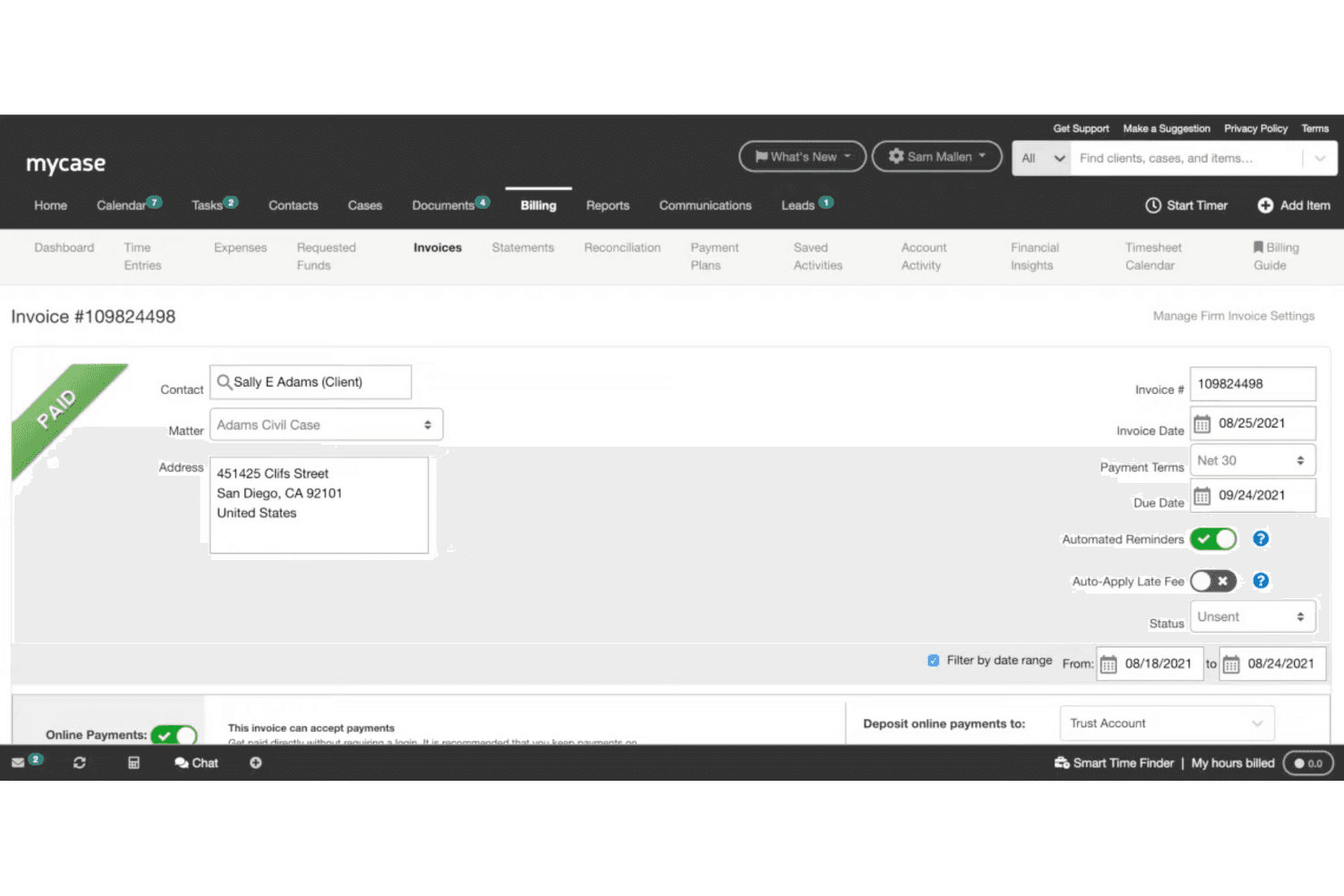
Generate invoices and track payments effortlessly with MyCase. This feature simplifies your billing process, saving you time and reducing errors.
Time Tracking
Track billable hours with MyCase’s time tracking tool to ensure accurate billing. You can easily log time entries and associate them with specific cases.
Calendar and Task Management
MyCase keeps your schedule organized with its calendar and task management tools. You can set deadlines, reminders, and appointments to stay on top of your workload.

Ease of Use
MyCase is user-friendly, making it easy for you and your team to navigate its features without a steep learning curve. The interface is straightforward, allowing you to manage cases and communicate with clients efficiently. While some users feel the design is a bit dated, it still provides the essential tools needed to keep your practice organized. The intuitive layout helps you quickly access information and complete tasks, enhancing your productivity.
Integrations
Integrations include LawPay, CASEpeer, Docketwise, Answering Legal, Attorney Share, Briefpoint, CallRail, Case Status, Clearbrief, Dropbox, Gmail, and Google Calendar.

MyCase Specs
- 2-Factor Authentication: Yes
- API: Yes
- Approval Workflows: No
- Audit Trail: Yes
- Calendar Management: Yes
- Compliance Tracking: Yes
- Contract Management: Yes
- Custom Reports: Yes
- Customer Management: Yes
- Data Export: Yes
- Data Import: Yes
- Document Management: Yes
- External Integrations: Yes
- Multi-User: Yes
- NDA Management: Yes
- Notifications: Yes
- Policy Management: Yes
- Scheduling: Yes
- Workflow Management: Yes
Alternatives to MyCase


MyCase FAQs
Wat nu?
Voor meer juridisch inzicht en bronnen kun je je abonneren op onze nieuwsbrief en je aansluiten bij een gemeenschap van innovatieve juridische professionals die de toekomst van het recht vormgeven.