

O software de gestão do conhecimento jurídico permite à sua equipa captar, organizar e aceder a conhecimentos institucionais, documentos, investigação e experiência — tudo num só lugar. Os profissionais do setor jurídico que procuram estas ferramentas precisam de uma forma fiável de ultrapassar os silos de informação, reduzir o trabalho repetido e preservar o conhecimento à medida que as equipas e os assuntos mudam. Nesta lista, encontrará plataformas de confiança que considero que vai querer explorar, cada uma selecionada pelo seu historial de apoio a equipas jurídicas ocupadas que precisam de partilhar conhecimento com confiança e controlo. Continue a ler para ver qual o software que melhor se adequa às necessidades do seu departamento jurídico ou escritório neste 2026.
Why Trust Our Software Recommendations
6,700+
Reviews
20
Industry experts
16+
Evaluation factors
14
Years
Our team has been testing and reviewing software since 2012. As legal practice leaders ourselves, we know how difficult—and important—it is to choose the right software.
For this guide, we evaluated tools using hands-on testing and independent research, scoring tools using our selection criteria.
Our reviews reflect our human editorial judgment, not a sales pitch.
Tabela de comparação de software de gestão do conhecimento jurídico
| Tool | Best For | Trial Info | Price | ||
|---|---|---|---|---|---|
| 1 | Best for enterprise content management | Free demo available | Pricing upon request | Website | |
| 2 | Best for AI-assisted legal knowledge work | Free demo available | Pricing upon request | Website | |
| 3 | Best for legal research knowledge | Free demo available | Pricing upon request | Website | |
| 4 | Best for research and legal intelligence | Free demo available | Pricing upon request | Website | |
| 5 | Best for document-based knowledge access | Free demo available | Pricing upon request | Website | |
| 6 | Best for secure legal knowledge search | Free demo available | Pricing upon request | Website | |
| 7 | Best for cloud legal knowledge management | Free demo available | Pricing upon request | Website | |
| 8 | Best for centralized knowledge sharing | Free demo available | Pricing upon request | Website | |
| 9 | Best for law firm knowledge workflows | Free demo available | Pricing upon request | Website | |
| 10 | Best for firm-wide experience intelligence | Free demo available | Pricing upon request | Website |


Análises do melhor software de gestão do conhecimento jurídico
Apresentamos abaixo os meus resumos detalhados do melhor software de gestão do conhecimento jurídico que integrou a minha lista final. As minhas análises oferecem uma visão detalhada das funcionalidades, dos melhores casos de utilização e das integrações de cada plataforma, para o ajudar a encontrar a opção mais adequada para si.
 Best for enterprise content management
- Free demo available
- Pricing upon request
Visit WebsiteCustomer Rating:4.2/5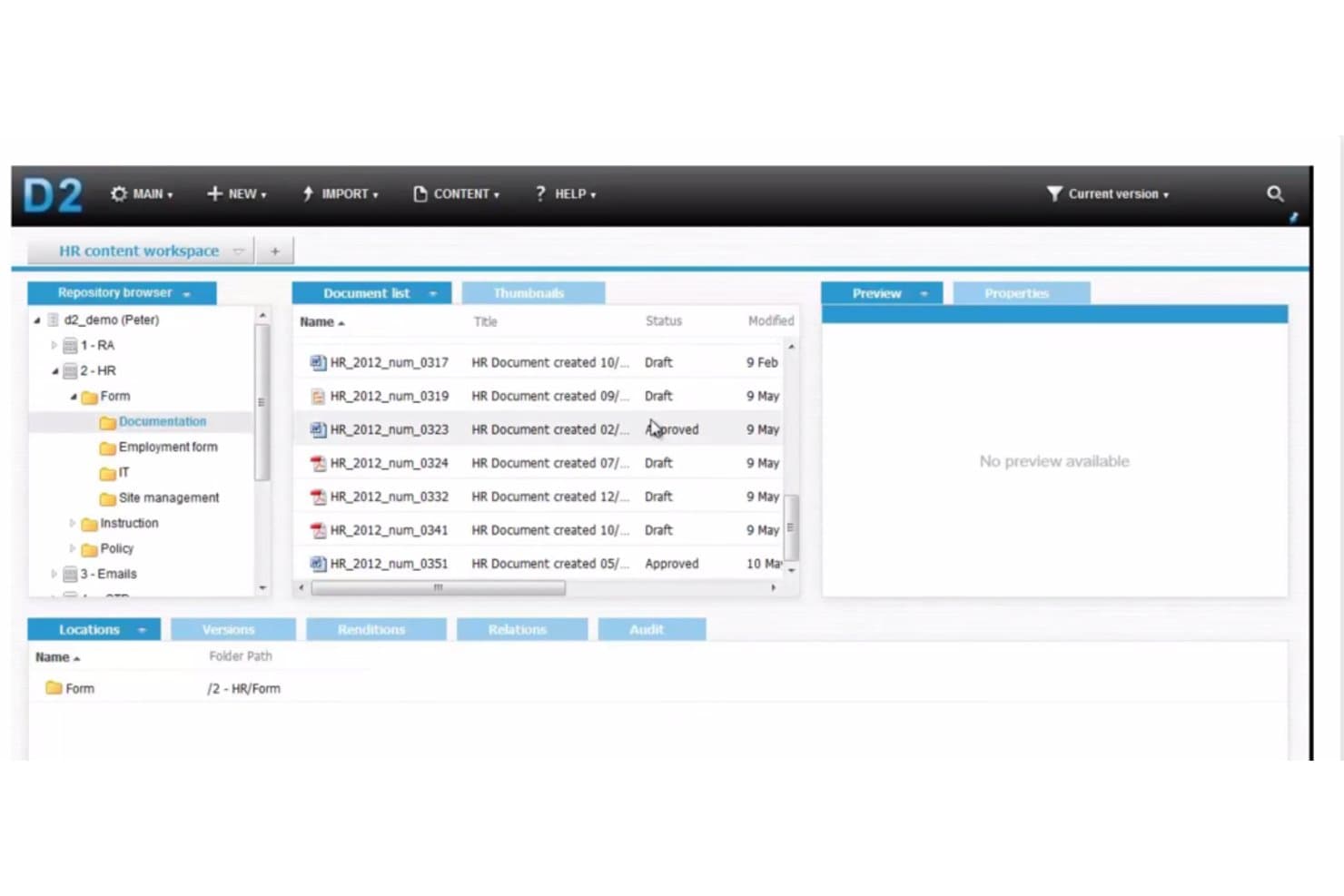
OpenText offers a document management workspace with a repository browser, document list, and approval status tracking for HR content. OpenText Legal Knowledge Management is an enterprise search and insights platform that uses AI-powered predictive search, automated document classification, and expertise location to surface legal work product across large, multi-system content environments.
Who Is OpenText Best For?
OpenText is a strong fit for large law firms and enterprise legal departments already running OpenText eDOCS or SharePoint as their primary document management infrastructure.
Why I Picked OpenText
OpenText earns its spot on my shortlist because of how it handles knowledge retrieval across large, siloed enterprise content environments. I particularly like MindServer-powered predictive search, which uses concept analysis and supervised machine learning to surface relevant prior matters rather than simple keyword matches. The automated document classification layer tags incoming content with metadata without manual input, keeping large repositories organized as content volumes grow.
OpenText Key Features
- Secure integration and SSO: Connects with enterprise systems like SharePoint for unified access using single sign-on.
- Data visualization of search results: Organizes search outputs into charts to highlight experience and relevance in context.
- Automated data classification: Applies metadata tags to new documents using rules-based engines for easier retrieval.
- Text-mining integration: Filters large document volumes and extracts legal knowledge insights without manual review.
OpenText Integrations
OpenText offers native integrations with OpenText Legal Content Management (eDOCS) and SharePoint for centralized document access, and provides an API for custom integrations. Native integrations with third-party platforms like iManage or NetDocuments are not documented.
Pros and Cons
Pros:
- Supervised machine learning improves search relevance over time
- Data visualization surfaces knowledge patterns across large matter sets
- Handles Boolean and concept searches across document repositories
Cons:
- Steep implementation complexity for non-OpenText environments
- Struggles to execute granular, highly detailed search queries
Learn more about OpenText: Best for AI-assisted legal knowledge work
- Free demo available
- Pricing upon request
Visit WebsiteCustomer Rating:4.6/5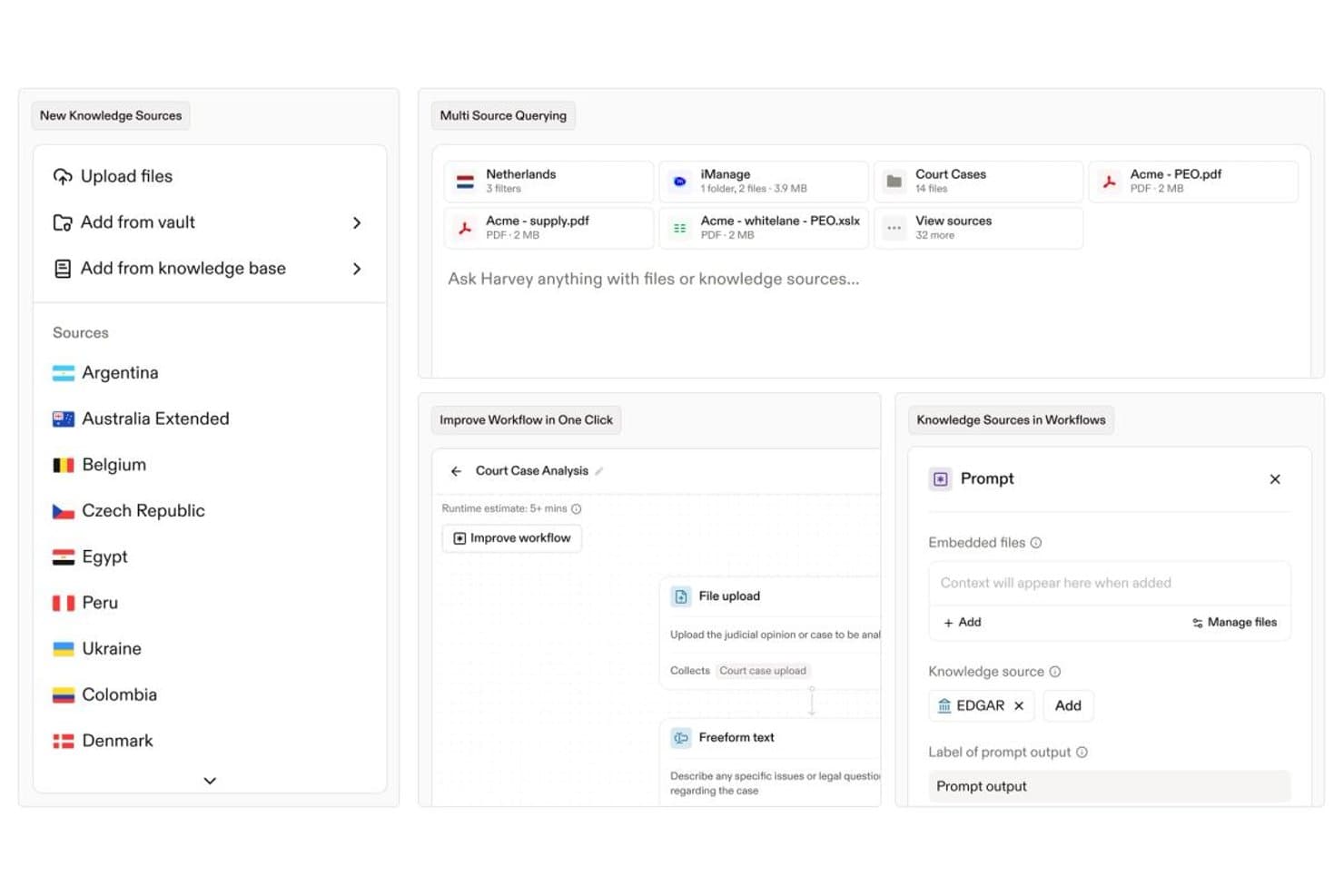
Harvey offers multi-source knowledge querying, workflow automation, and embedded knowledge sources like EDGAR to streamline legal research and document analysis. Harvey is an AI-native platform built for legal teams that combines natural-language document search, contract intelligence, precedent management, and AI-assisted drafting across firm work product and external legal knowledge sources.
Who Is Harvey Best For?
Harvey is a strong fit for large law firms and enterprise in-house legal teams that need AI-assisted research, drafting, and knowledge retrieval at scale.
Why I Picked Harvey
Harvey earns its spot on my shortlist because its AI reasons through legal documents, not just retrieves them. I particularly like how Vault Knowledge Bases let firms curate proprietary precedents so attorneys can query internal work product the same way they'd query a senior partner. The Knowledge product extends that reach across 500+ jurisdictional sources, including LexisNexis and EUR-Lex, keeping cross-jurisdictional research in a single interface rather than spread across disconnected databases.
Harvey Key Features
- Command Center analytics: Surface usage patterns, adoption benchmarks, and insights across legal workflows for team leaders and knowledge managers.
- Shared Spaces collaboration: Enable real-time, secure collaboration with clients, outside counsel, and business stakeholders around shared documents and work product.
- Microsoft 365 integration: Seamlessly connect with Word and Outlook to bring drafting, review, and document analysis into attorneys' daily workflows.
- Ethical wall enforcement: Apply granular role-based permissions and matter-level access controls to protect sensitive client and cross-matter information.
Harvey Integrations
Harvey offers native integrations with iManage, NetDocuments, SharePoint, Google Drive, Box, OneDrive, Aderant, Ironclad, Microsoft 365, PitchBook, Datasite, and Intralinks. An API is available for custom integrations.
Pros and Cons
Pros:
- Vault indexes firm-specific precedents for attorney queries
- Cross-border regulatory research depth is unmatched
- Strongest M&A diligence tooling in the category
Cons:
- No self-serve free trial or published accuracy benchmarks
- Priced out of reach for small and mid-size firms
Learn more about Harvey: Best for legal research knowledge
- Free demo available
- Pricing upon request
Visit WebsiteCustomer Rating:3.5/5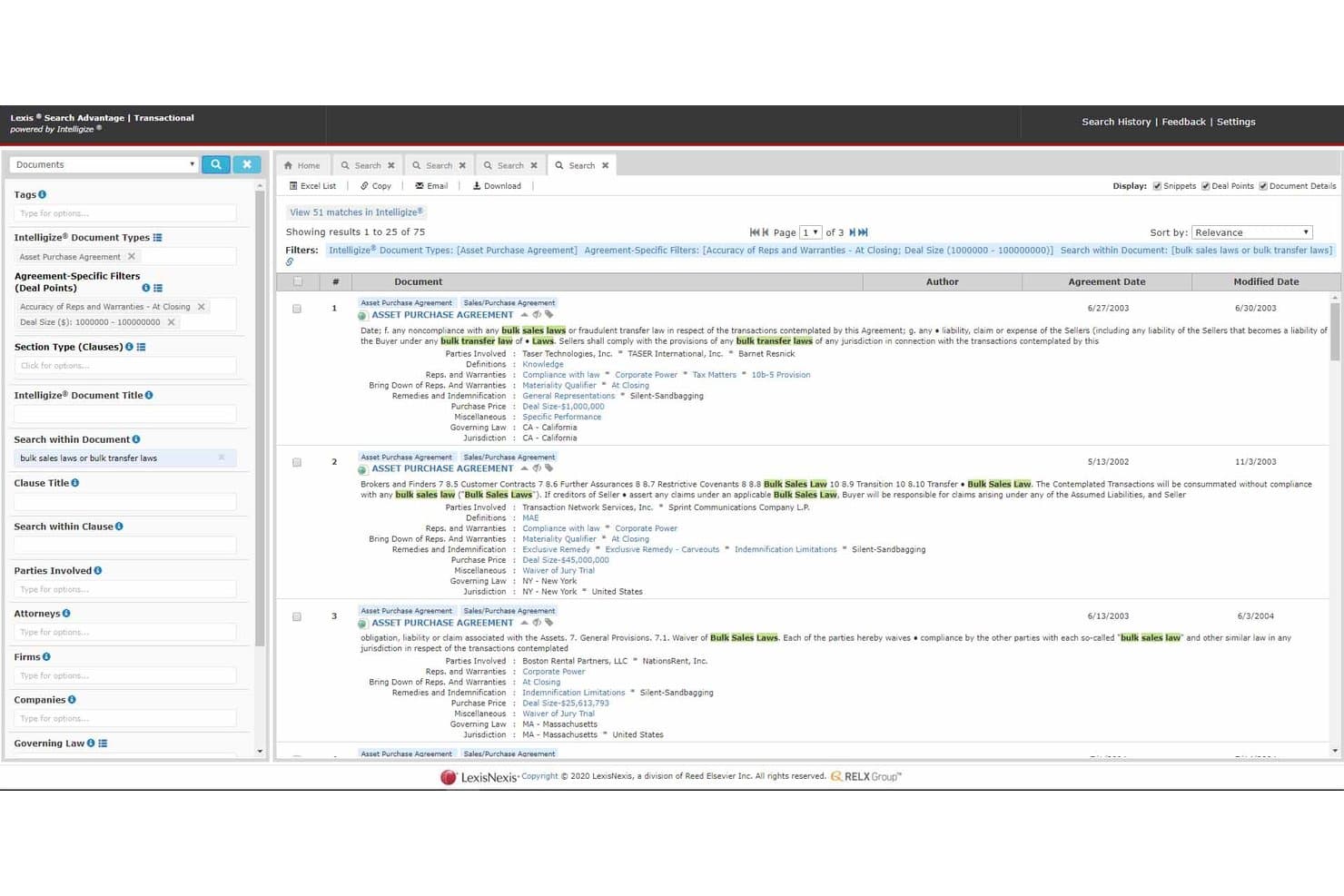
LexisNexis Search Advantage offers transactional document search with deal point filters, clause-level search, and ranked asset purchase agreement results. LexisNexis is a legal research and knowledge platform that gives legal professionals access to case law, legislation, precedents, AI-powered drafting tools, and firm document search through an integrated suite of products.
Who Is LexisNexis Best For?
It's a strong fit for law firms and in-house legal teams that need authoritative UK and international legal research alongside AI-assisted drafting in a single platform.
Why I Picked LexisNexis
LexisNexis earns its spot on my shortlist because its legal content library is genuinely unmatched. I use Lexis+ with Protégé to run AI-powered research grounded in Halsbury's Laws of England and the All England Law Reports, so every answer is anchored to authoritative primary sources. Case Signals then validates those citations in real time, which is something I rely on before any work product leaves my desk.
LexisNexis Key Features
- Secure Vault document repository: Store, organize, and search firm documents in encrypted vaults with legal-specific categorization.
- DMS integration: Connect with iManage, NetDocuments, and SharePoint to ground AI and search in firm work product.
- Clause library in Lexis Create+: Build a custom library of approved contract clauses directly within Microsoft Word.
- Role-based permissions: Assign user access levels to restrict document visibility according to practice area or matter.
LexisNexis Integrations
LexisNexis offers native integrations with iManage, NetDocuments, SharePoint, Microsoft 365, Outlook, Word, Excel, and DocuSign. An API is available for custom integrations.
Pros and Cons
Pros:
- Real-time citation validation via Case Signals
- AI research grounded in authoritative sources
- Unmatched primary legal content library depth
Cons:
- Firm knowledge features lag pure KM vendors
- Interface feels dated versus newer KM platforms
Learn more about LexisNexis: Best for research and legal intelligence
- Free demo available
- Pricing upon request
Visit WebsiteCustomer Rating:4.1/5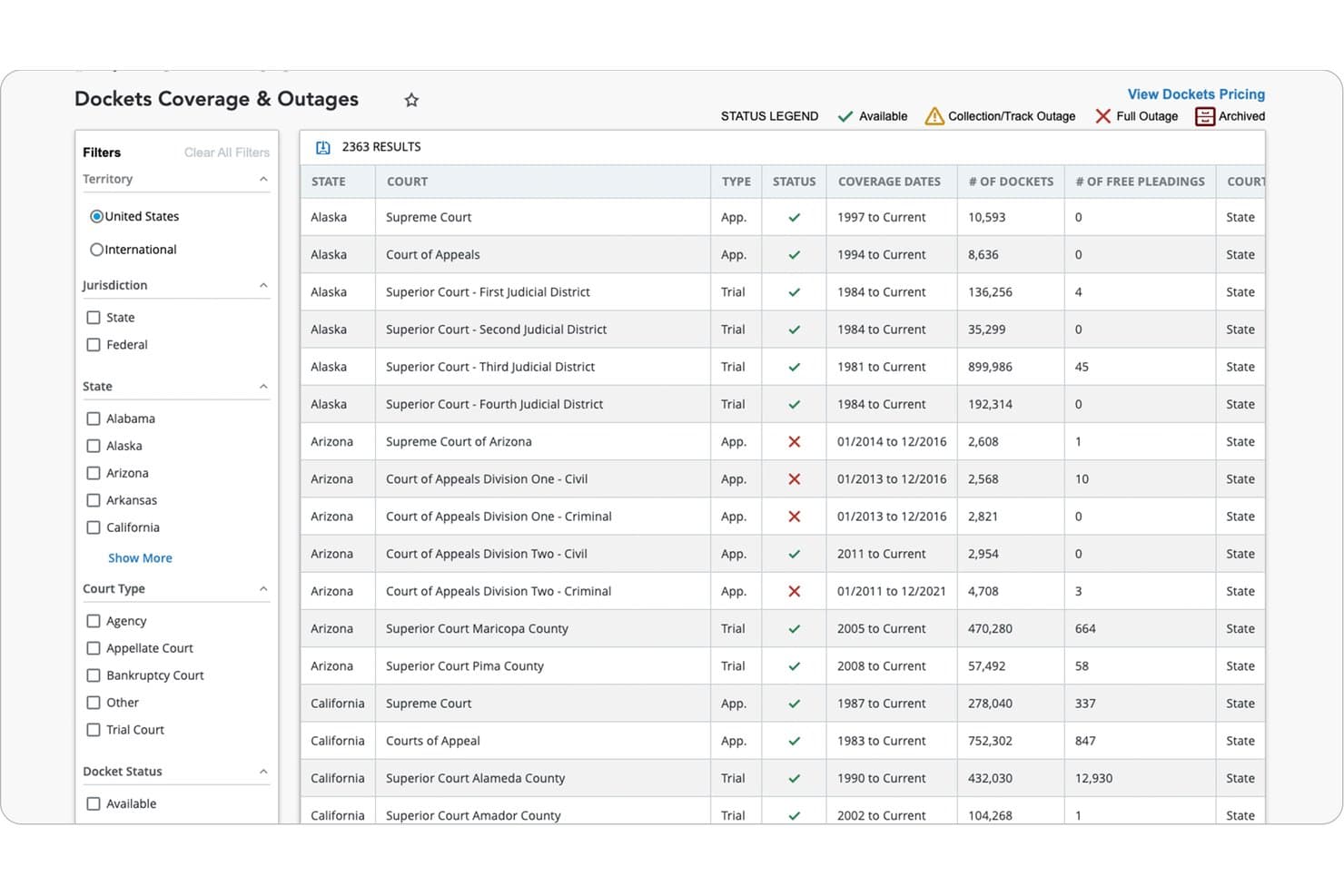
Bloomberg Law offers a Dockets Coverage & Outages dashboard that allows legal professionals to filter and browse court docket data by state, jurisdiction, court type, and status across 2,363 results. Bloomberg Law is a legal research and intelligence platform that combines primary and secondary source research, AI-powered case law tools, practical guidance documents, precedent forms, and contract drafting capabilities for law firm attorneys.
Who Is Bloomberg Law Best For?
Bloomberg Law is a strong fit for attorneys at law firms whose practice areas center on business law, transactions, litigation, health law, or tax.
Why I Picked Bloomberg Law
I've included Bloomberg Law in my top picks because its depth of external legal intelligence directly feeds the research and drafting workflows that knowledge management is meant to support. Points of Law uses AI to surface the specific legal principle from a case, so I can locate the exact precedent I need without reading through entire opinions. I also rely heavily on Draft Analyzer, which benchmarks contract language against millions of EDGAR-filed agreements to show how a clause compares to market standard, giving me an evidence-based foundation for every negotiating position.
Bloomberg Law Key Features
- Litigation Intelligence Center: Consolidates dockets, case law, news, and AI-powered research for litigation management.
- Transactional Intelligence Center: Provides access to thousands of practical guidance documents and sample forms for transactional work.
- Docket Key: Uses AI to quickly find and classify docket filings across major courts.
- Dashboard Legal integration: Connects with iManage, NetDocuments, and Outlook to unify work product, tasks, and document access.
Bloomberg Law Integrations
Bloomberg Law offers native integrations with iManage, NetDocuments, and Outlook. An API is also available for custom integrations.
Pros and Cons
Pros:
- Draft Analyzer benchmarks clauses against market data
- Deep primary source coverage across all jurisdictions
- AI-powered Points of Law surfaces precise precedents
Cons:
- Not built for organizing internal knowledge assets
- Limited internal firm work product repository
Learn more about Bloomberg Law: Best for document-based knowledge access
- Free demo available
- Pricing upon request
Visit WebsiteCustomer Rating:4/5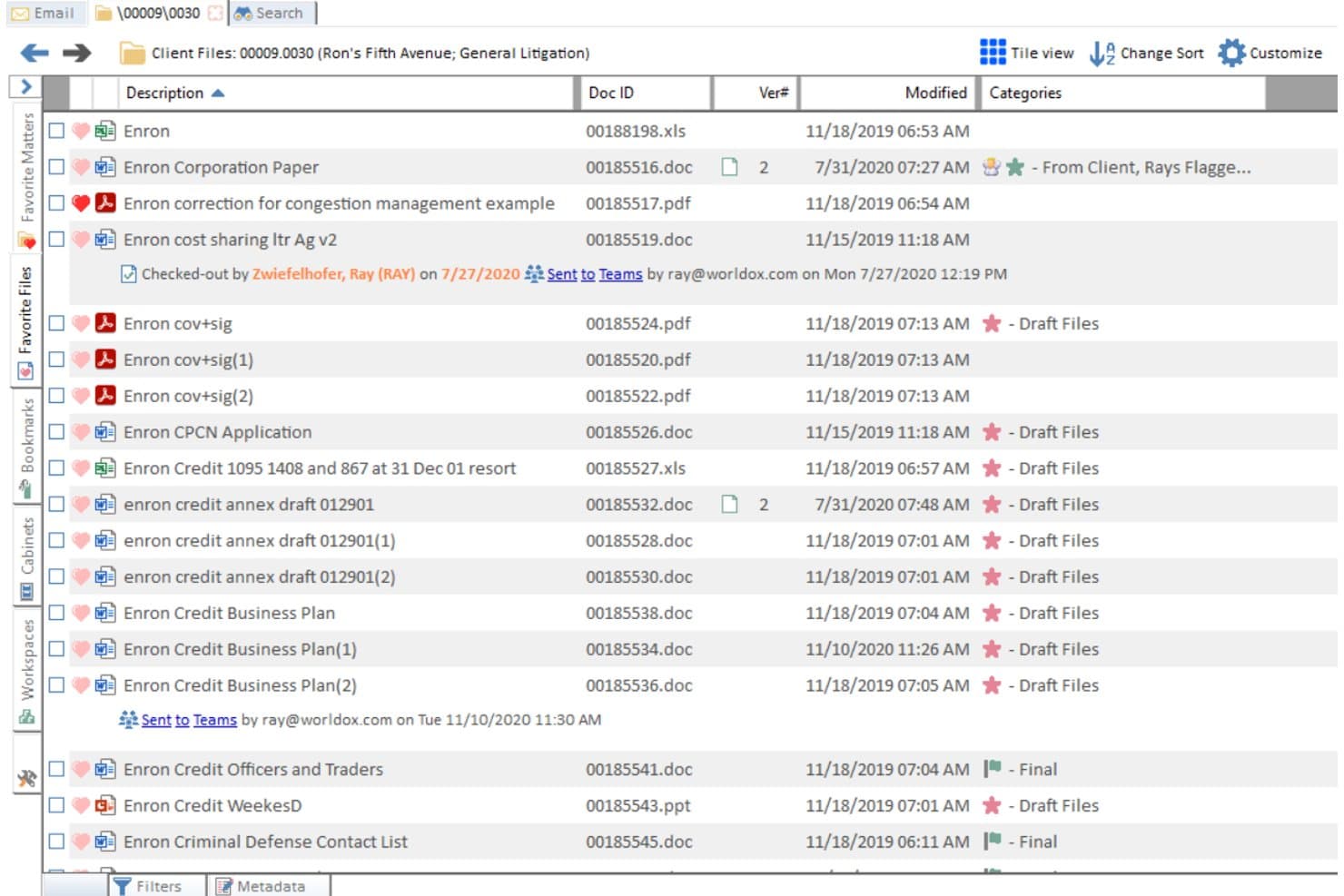
Worldox offers a document list view with file descriptions, Doc IDs, version numbers, modification dates, and category tags for organized legal file management. Worldox is a legal document management system built around client/matter-based organization, full-text search, version control, and access controls including ethical walls.
Who Is Worldox Best For?
Worldox is a strong fit for small to mid-sized law firms that need structured, matter-based document organization without moving to a fully cloud-native platform.
Why I Picked Worldox
I've included Worldox in my top picks because its Active Profiling® Technology automatically tags documents by client and matter as you save them, keeping firm work product organized without relying on attorneys to file things manually. I also like its boilerplate library, which stores approved precedents accessible directly from Microsoft Office. Version control with timestamped history means you can trace every change to a document across its entire lifecycle.
Worldox Key Features
- Ethical walls and legal holds: Control document visibility and editing rights at the matter or user level for conflict management.
- Outlook and Office integration: Access, save, and manage documents directly from Outlook and Microsoft Office applications.
- Centralized audit trail: Track each action taken on a document for compliance and internal governance.
- Batch archiving tools: Archive inactive or completed matters using bulk workflows that streamline document retention.
Worldox Integrations
Worldox offers native integrations across the Microsoft ecosystem, including Microsoft 365, Outlook, and Word, as well as Clio, Tabs3, PracticeMaster, LawToolBox, and NetDocuments. An API is available for custom integrations.
Pros and Cons
Pros:
- Active Profiling® automates document classification at save
- Flat-file database limits search speed at scale
- Strong matter-based document organization out of the box
Cons:
- Interface has not meaningfully modernized in years
- No native subfolder structure within matter folders
Learn more about Worldox: Best for secure legal knowledge search
- Free demo available
- Pricing upon request
Visit WebsiteCustomer Rating:4.3/5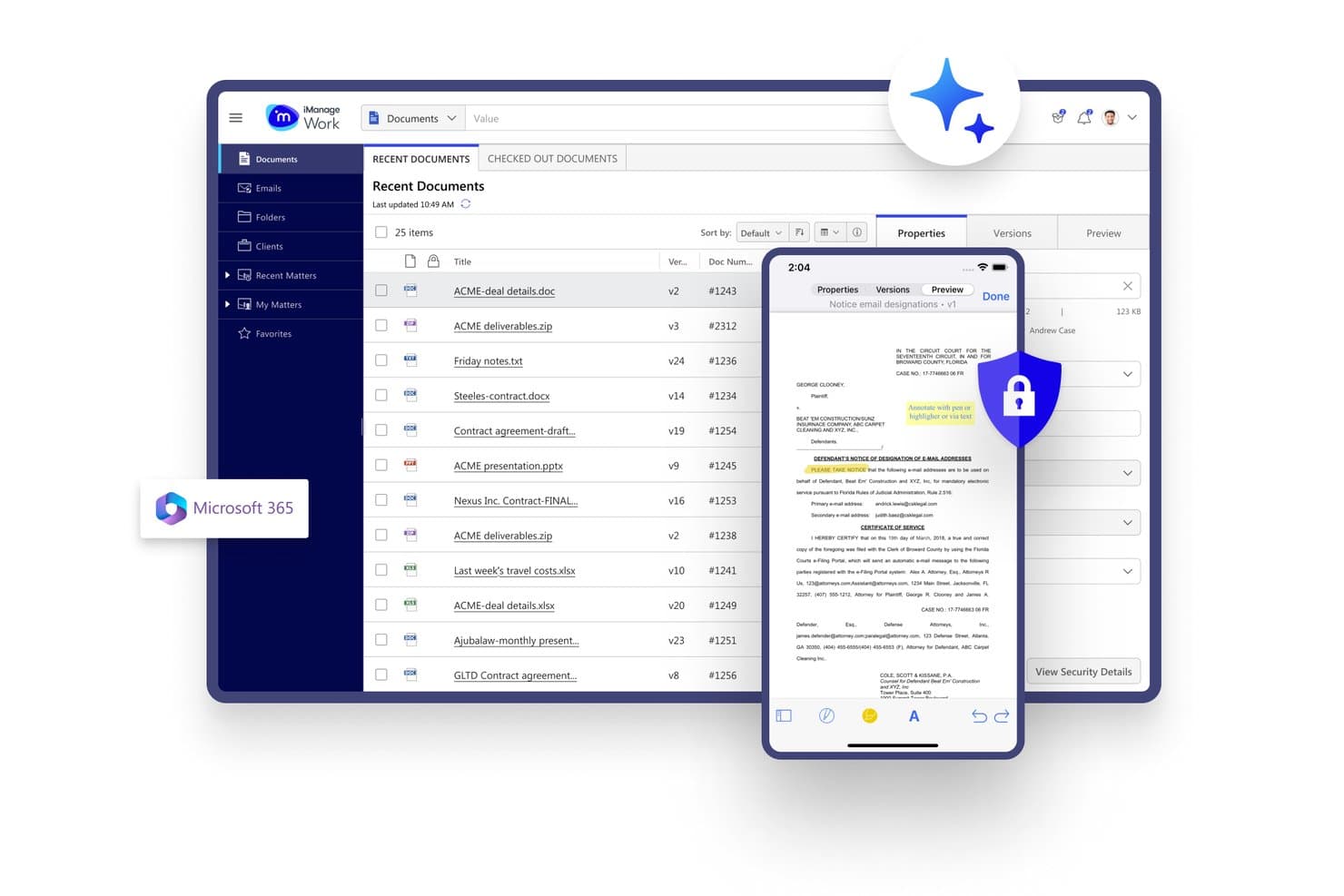
iManage offers a secure document management interface with mobile access, annotation tools, and Microsoft 365 integration for legal teams. iManage is a legal knowledge work platform that combines matter-centric document and email management, AI-powered knowledge search via Insight+, and security and governance tools built for law firms and corporate legal departments.
Who Is iManage Best For?
iManage is a strong fit for mid-to-large law firms and corporate legal departments that need enterprise-grade document governance alongside knowledge search.
Why I Picked iManage
iManage earns its spot on my shortlist because knowledge search and security governance work together at the platform level, not as separate layers. I particularly like Insight+, which surfaces precedents, matter insights, and internal experts in the context of active work. Ask iManage lets my team query across document sets using natural language and get cited answers, all while Security Policy Manager enforces granular ethical walls throughout.
iManage Key Features
- Microsoft 365 integration: Connects Outlook, Teams, and Word directly to the document management system for streamlined daily workflows.
- Security policy manager: Enables detailed access controls, role permissions, and ethical wall enforcement at the workspace and document level.
- Closing Folders integration: Manages legal transaction closings, signatures, and checklists within the iManage platform.
- AI enrichment: Automatically tags, classifies, and profiles documents and emails for faster knowledge categorization and retrieval.
iManage Integrations
iManage offers native integrations across the Microsoft ecosystem, including Microsoft 365 and Azure, as well as native integrations with Salesforce, NetDocuments, HighQ, Box, and SeeUnity Echo. An API is available for custom integrations.
Pros and Cons
Pros:
- Granular ethical wall enforcement at document level
- AI-powered knowledge search across closed matters
- Matter-centric document organization built for legal
Cons:
- Admin configuration is complex and time-consuming
- Attorney adoption historically slow and difficult
Learn more about iManage: Best for cloud legal knowledge management
- Free demo available
- Pricing upon request
Visit WebsiteCustomer Rating:4.1/5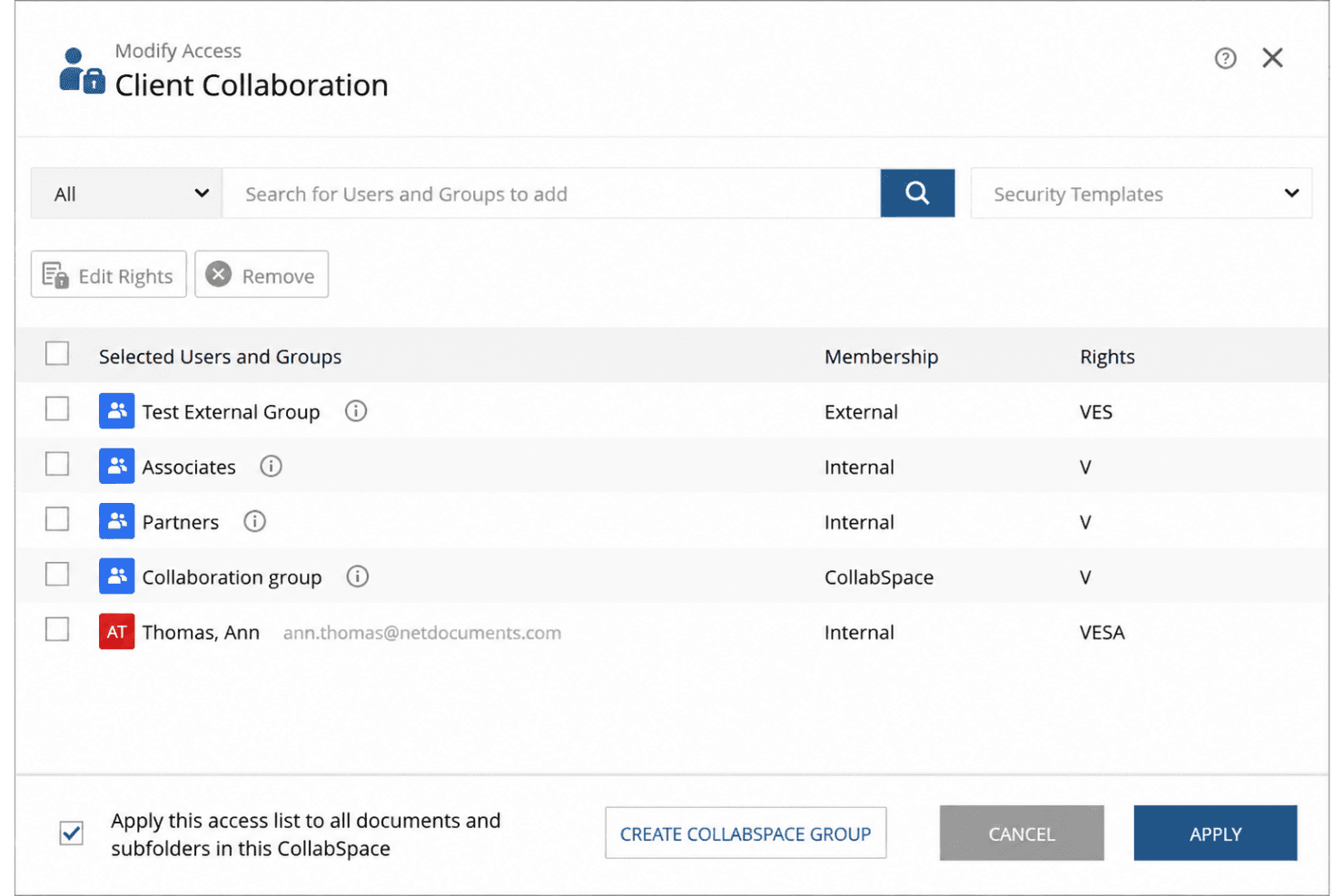
NetDocuments' granular permissions help secure sensitive legal documents. NetDocuments is a cloud-native legal DMS that combines matter-centric document organization, AI-powered search across firm work product, precedent management, and ethical wall controls in a single governed platform.
Who Is NetDocuments Best For?
NetDocuments is a strong fit for mid-to-large law firms and corporate legal departments that need enterprise-grade document governance, AI-powered knowledge management, and deep Microsoft 365 integration.
Why I Picked NetDocuments
NetDocuments earns its spot on my shortlist because its legal context graph is unlike anything else in the DMS space. It continuously maps relationships across matters, documents, and communications firm-wide, so when I search for prior work on a specific issue, I'm pulling from the firm's full institutional memory. I also rely on ndMAX to run AI queries across entire document sets and get tabular answers with cited sources, which changes how I approach matter research entirely.
NetDocuments Key Features
- PatternBuilder MAX: Lets you create custom AI workflows and legal apps without coding.
- Email management: Auto-files emails by client, matter, and topic to keep records organized.
- Document bundling: Assembles closing binders and litigation packets into single, indexed files.
- Permission-aware external collaboration: Supports controlled document sharing via CollabSpaces and matter-centric access links.
NetDocuments Integrations
NetDocuments offers native integrations with Clio, iManage, Aderant, Actionstep, DocuSign, Thomson Reuters HighQ, LexisNexis, FileTrail, and has native integrations across the Microsoft ecosystem, including Microsoft 365 and Azure. An API is available for custom integrations.
Pros and Cons
Pros:
- Ethical walls enforced automatically at matter level
- AI search retrieves clause-level precedents accurately
- Matter-centric document organization built for legal workflows
Cons:
- Mobile experience lags behind the desktop version
- Attorney adoption historically slow without dedicated support
Learn more about NetDocuments: Best for centralized knowledge sharing
- Free demo available
- Pricing upon request
Visit WebsiteCustomer Rating:4.3/5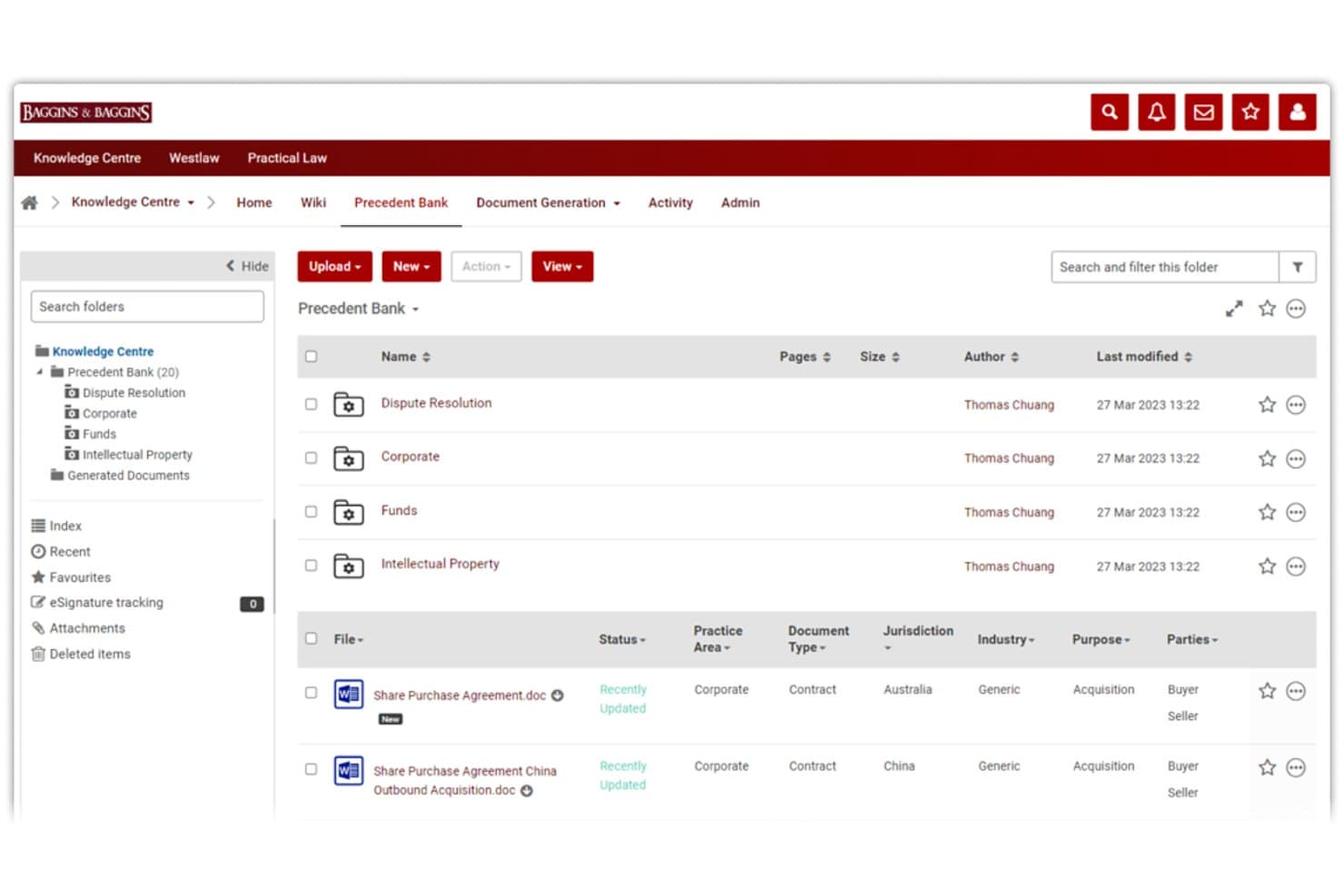
Thomson Reuters HighQ offers a structured Precedent Bank with categorized folders, metadata tagging, and document status tracking for legal knowledge management. Thomson Reuters HighQ is a cloud-based legal knowledge management platform that combines document management, precedent libraries, expertise location, and AI-powered search for law firms and corporate legal departments.
Who Is Thomson Reuters HighQ Best For?
HighQ is a strong fit for mid-to-large law firms and in-house legal teams that manage high volumes of sensitive matters across multiple practice areas.
Why I Picked Thomson Reuters HighQ
HighQ earns its spot on my shortlist because of how it handles centralized knowledge sharing across a firm's entire work product. I particularly like the knowledge hub, which lets attorneys search precedents, link directly to Westlaw and Practical Law resources, and follow internal subject matter experts, all from one place. The AI layer pulling from live matter data means my team can surface answers without manually uploading files or switching between platforms.
Thomson Reuters HighQ Key Features
- iSheets data management: Manage legal data with configurable, spreadsheet-like databases for tracking and sharing structured information.
- Rule-based workflow automation: Automate document routing, approvals, and notifications using customizable rules and triggers for legal processes.
- Granular access controls: Set detailed permissions and ethical walls at the user, matter, or client level for document confidentiality.
- Audit trails and reporting: Track all document activity, version history, and user actions for compliance, risk, and internal oversight.
Thomson Reuters HighQ Integrations
HighQ offers native integrations across the Thomson Reuters ecosystem, including Practical Law, Westlaw, Legal Tracker, Document Intelligence, and CoCounsel Legal. An API is also available for custom integrations.
Pros and Cons
Pros:
- Automated tagging reduces manual knowledge curation effort
- AI search surfaces precedents across closed matters
- Deep Thomson Reuters legal research connectivity
Cons:
- Attorney adoption requires dedicated change management effort
- Steep implementation timeline for large firms
Learn more about Thomson Reuters HighQ: Best for law firm knowledge workflows
- Free demo available
- Pricing upon request
Visit WebsiteCustomer Rating:3.5/5
Aderant offers a professional dashboard interface displaying time tracking, aged WIP, AR balance, and case tasks for legal professionals. Aderant is a law firm knowledge management platform that surfaces documents, precedents, and expertise from across your firm's systems through enterprise search, intranet portals, and 40+ line-of-business integrations.
Who Is Aderant Best For?
Aderant is a strong fit for midsize-to-large law firms, particularly those operating across multiple practice groups who need a unified layer over existing DMS and PMS systems.
Why I Picked Aderant
Aderant earns its spot as one of the best on my shortlist because Handshake's Universal Search pulls from 40+ line-of-business systems in a single query, so attorneys aren't toggling between iManage, Expert, and legal research platforms to locate prior work product. I also like the KM Analytics layer, which tracks abandoned searches and underused resources, giving KM teams a concrete picture of where knowledge gaps actually live across the firm's practice groups.
Aderant Key Features
- SharePoint and Teams integration: Connects firm knowledge directly to Microsoft SharePoint and Teams for in-context access.
- KM analytics: Tracks resource usage, adoption trends, and knowledge gaps within your firm’s workflows.
- Client collaboration portals: Provides secure, scalable portals built on Office 365 for always-on client document sharing.
- Role-based access controls: Configures permissions at matter or client level to enforce confidentiality and ethical walls.
Aderant Integrations
Aderant offers 40+ native integrations, including iManage, NetDocuments, Elite 3E, Aderant Expert, SharePoint, Microsoft Teams, Westkm, Lexis Search Advantage, CompuLaw, LawPay, and Harvey. An API is available for custom integrations.
Pros and Cons
Pros:
- Built specifically for law firm workflows
- KM analytics surfaces firm-wide knowledge gaps
- Universal Search spans 40+ legal systems
Cons:
- Attorney adoption requires significant change management
- Steep implementation complexity for smaller firms
Learn more about Aderant:
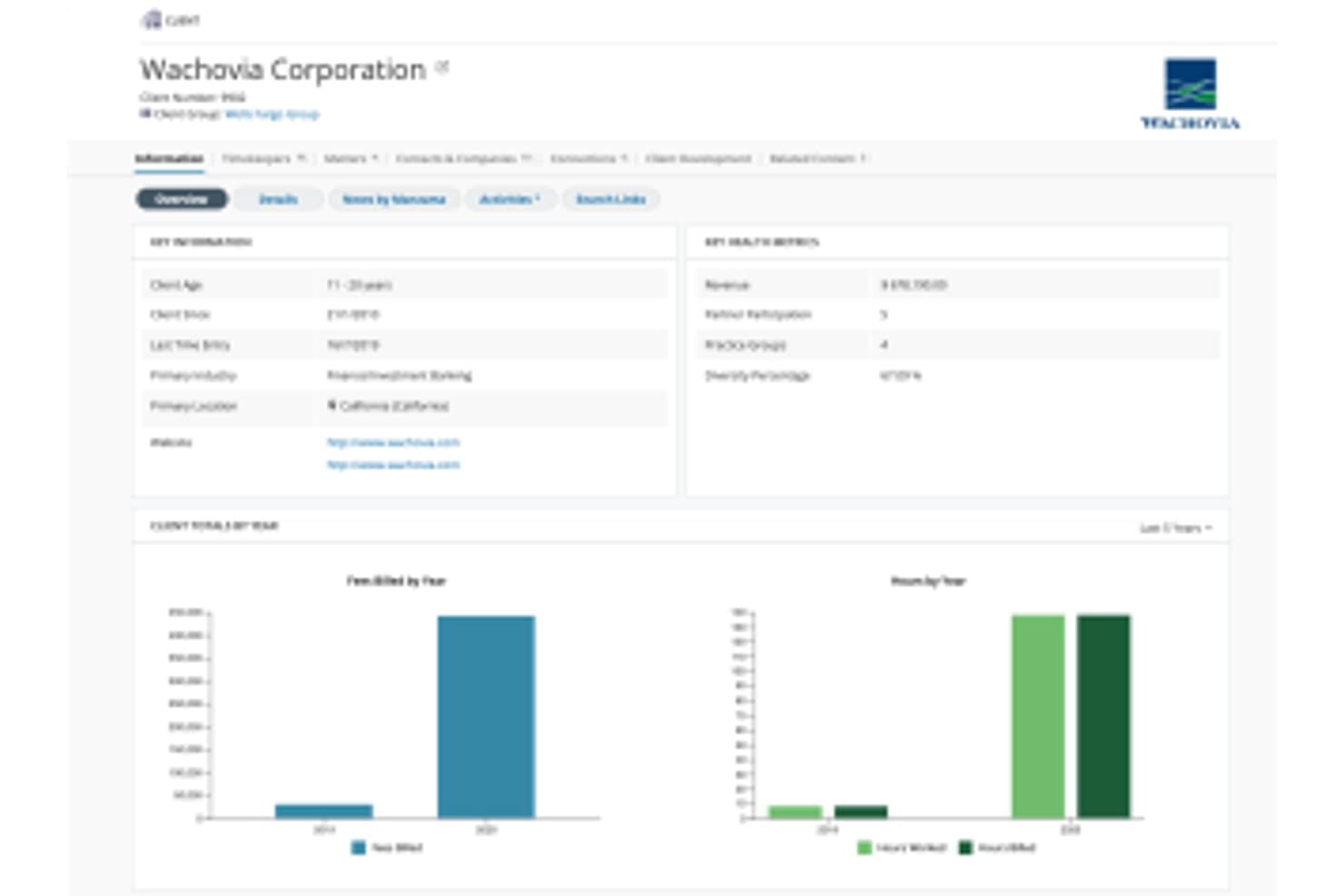
Litera offers a client overview dashboard that centralizes key client information, billing trends, and matter analytics for legal knowledge management. Litera is a legal AI platform that centralizes firm knowledge through experience management, expertise location, precedent libraries, contract analysis, and matter-based search across a firm's documents, clients, and work product.
Who Is Litera Best For?
Litera is a strong fit for large and mid-size law firms where knowledge management officers and practice group leaders need to operationalize firm experience data at scale.
Why I Picked Litera
I picked Litera as one of the best because its Foundation platform turns scattered matter data into a structured intelligence layer across clients, matters, and lawyers. I particularly like Foundation Insights, which uses GenAI to answer deal-point questions like "what's market?" in seconds. The Expertise Location application auto-populates lawyer profiles from actual work product, not self-reported bios, giving you a real picture of who knows what across the firm.
Litera Key Features
- Matter-centric knowledge repository: All client, matter, and work product data is organized and searchable in one centralized platform.
- Native DMS and PMS integrations: Direct connections to iManage, NetDocuments, SharePoint, Elite, and Aderant synchronize files and matter information.
- Clause and template library management: Maintain, tag, and version approved clauses and templates for ready attorney access.
- Access controls and ethical walls: Apply detailed user, role, and matter-based permissions to enforce confidentiality and compliance.
Litera Integrations
Litera offers native integrations with iManage, NetDocuments, SharePoint, OpenText eDOCS, Elite, and Aderant. An API is available for custom integrations.
Pros and Cons
Pros:
- Deep coverage across AmLaw 100 firm workflows
- GenAI answers are grounded in firm-owned precedents
- Auto-populates attorney profiles from real work history
Cons:
- Steep ramp-up time for attorney adoption
- Implementation complexity is high for smaller firms
Learn more about Litera:
Outro software de gestão do conhecimento jurídico
Eis algumas opções adicionais de software de gestão do conhecimento jurídico que não integraram a minha lista final, mas que vale a pena conhecer:
- 11Thomson ReutersBest for legal research and know-how
- 12LexWorkplaceBest for cloud document knowledge
- 13KnowmaxBest for structured legal knowledge bases
- 14ThoughtFarmerBest for law firm intranet knowledge
- 15GuruBest for searchable team knowledge bases
- 16Legal101Best for internal legal knowledge sharing
Related Reviews
How I Evaluate Legal Knowledge Management Software
I split my evaluation into baseline requirements—like ethical walls and matter-based search—and differentiators that separate a great KM tool from a merely functional one.
Core Functionality (Table Stakes for This List)
When I'm selecting tools for my list, I rank each one on a scale from 0 (does not offer the functionality) to 5 (excels in this area) for each core functionality listed below. Then, I calculate the tool's total score into a percentage. Each tool needs to achieve a minimum total score of 65% to be considered for inclusion.
- Legal Document Repository: I look for matter-centric folder structures and legal-specific metadata fields—like practice area, jurisdiction, and client—rather than generic file storage.
- Advanced Legal Search: Full-text and natural language search with filters for matter type, jurisdiction, and author help attorneys find relevant briefs or memos fast.
- Precedent & Template Management: I evaluate whether the tool supports versioned, approved templates with clause-level tagging so attorneys can reuse vetted language confidently.
- Expertise Location: A good KM platform surfaces who in the firm has handled similar matters or topics, so I check for auto-populated profiles based on work history.
- DMS & PMS Integration: Native connectors to platforms like iManage, NetDocuments, or Aderant matter because attorneys won't adopt a KM tool that lives outside their daily workflow.
- Access Controls & Ethical Walls: I evaluate matter-level permissions and ethical wall enforcement to confirm the tool can protect client confidentiality across practice groups.
Once I have a list of tools that meet the criteria, I consider what sets each platform apart.
Differentiating Factors (What Sets Vendors Apart)
Here's how I compare and contrast different vendors:
Standout Features
AI-powered search is a big differentiator—I look for platforms that use semantic and concept-based retrieval to surface relevant precedents, not just keyword matches. Matter and precedent profiling matters just as much when it automates tagging of closed matters, saving attorneys from manually cataloging work product. I also evaluate generative AI drafting capabilities that pull from the firm's own knowledge base. A first-pass memo grounded in your approved precedents is far more useful than output drawn from public data alone.
Beyond Features
AI governance is top of mind—I check whether vendor models are tenant-isolated and whether client data stays out of shared training sets. Implementation support also carries weight. Attorney adoption of KM tools has historically been a challenge, so I look for vendors that offer dedicated legal consultants and change management resources. Firm size and practice fit round out my evaluation; a platform built for AmLaw 100 firms with global offices has different taxonomy and scalability needs than one designed for mid-size corporate legal departments.
Como escolher software de gestão do conhecimento jurídico
É fácil perder-se em listas extensas de funcionalidades e estruturas de preços complexas. Para o ajudar a manter o foco enquanto percorre o seu processo único de seleção de software, eis uma lista de fatores a ter em conta:
| Fator | O que considerar |
| Escalabilidade | A plataforma conseguirá lidar com o volume futuro de documentos, utilizadores e novas áreas de prática à medida que cresce? |
| Integrações | A ferramenta liga-se nativamente ao seu DMS, PMS, e-mail e Microsoft 365, ou exige soluções alternativas? |
| Capacidade de personalização | Pode adaptar taxonomias, modelos e etiquetas ao fluxo de trabalho e à estrutura das áreas de prática da sua sociedade? |
| Facilidade de utilização | Os advogados e colaboradores utilizarão efetivamente o software no dia a dia, ou é provável que a formação e a adoção fiquem comprometidas? |
| Implementação e integração inicial | Quanto esforço por parte da sociedade e apoio do fornecedor são necessários para a implementação, migração de dados e adoção pelos utilizadores? |
| Medidas de segurança | As barreiras éticas, a confidencialidade dos clientes e as normas regulamentares são asseguradas através de definições granulares e registos de auditoria? |
| Custo | Os escalões de preços e o número mínimo de licenças são transparentes? Os custos aumentam ou diminuem de acordo com a utilização efetiva? |
| Disponibilidade do apoio | O fornecedor disponibiliza apoio rápido e recursos quando os advogados precisam de ajuda urgente ou de orientação sobre os fluxos de trabalho? |
O que é o software de gestão do conhecimento jurídico?
O software de gestão do conhecimento jurídico permite às sociedades de advogados e às equipas jurídicas internas centralizar, organizar e consultar o trabalho produzido pela sociedade, precedentes e conhecimentos especializados numa única plataforma segura. Estas ferramentas promovem uma prática consistente, reduzem o trabalho repetitivo e preservam o conhecimento institucional à medida que as equipas mudam. As equipas utilizam-nas para pesquisar assuntos encerrados, redigir a partir de modelos previamente aprovados e contactar especialistas internos, assegurando simultaneamente barreiras éticas e a confidencialidade dos clientes em todas as etapas.
Funcionalidades do software de gestão do conhecimento jurídico
Ao selecionar um software de gestão do conhecimento jurídico, procure as seguintes funcionalidades essenciais:
- Repositório de documentos jurídicos: Centraliza e organiza peças processuais, contratos, modelos e trabalho produzido, utilizando estruturas específicas para o setor jurídico, facilitando o armazenamento e a consulta de materiais essenciais.
- Pesquisa jurídica em texto integral: Permite aos advogados pesquisar ficheiros e documentos de assuntos por palavras-chave, filtros ou metadados associados à área de prática, ao cliente ou à jurisdição.
- Gestão de precedentes e modelos: Suporta o controlo de versões, a aplicação de etiquetas e a seleção de cláusulas previamente aprovadas e documentos-modelo para uma redação rápida e a reutilização do conhecimento.
- Localizador de especialistas: Ajuda os advogados a identificar colegas com experiência relevante em assuntos ou conhecimentos especializados em toda a sociedade, melhorando a colaboração e as referências internas.
- Controlos de acesso baseados em funções: Impõe permissões de utilizador com base na função, no cliente e no assunto, com opções para criar barreiras éticas destinadas a proteger a confidencialidade dos clientes.
- Registos de auditoria: Regista quem acedeu, modificou ou partilhou documentos — uma funcionalidade indispensável para a conformidade e para monitorizar potenciais conflitos ou violações de dados.
- Organização centrada no assunto: Alinha documentos e conhecimentos com casos ou operações específicos, tornando a navegação intuitiva e reduzindo a perda de conhecimento quando os advogados entram ou saem das equipas.
- Integrações nativas com DMS e PMS: Liga-se aos principais sistemas de gestão documental e de gestão da prática jurídica, para que os advogados não tenham de tratar os ficheiros duas vezes nem alternar entre plataformas.
- Análise da utilização: Disponibiliza relatórios sobre o acesso ao repositório e a reutilização de modelos, ajudando os responsáveis pela gestão do conhecimento a perceber que documentos geram valor e onde existem lacunas.
Funcionalidades comuns de IA no software de gestão do conhecimento jurídico
Para além das funcionalidades padrão do software de gestão do conhecimento jurídico acima referidas, muitas destas soluções estão a incorporar IA com funcionalidades como:
- Pesquisa semântica: Utiliza IA para compreender o contexto e a intenção, apresentando documentos, cláusulas ou assuntos relevantes mesmo quando os utilizadores não conhecem as palavras-chave exatas.
- Criação automática de perfis de documentos: A IA aplica etiquetas, categoriza e enriquece novos trabalhos produzidos ou assuntos encerrados, criando uma biblioteca de precedentes pesquisável sem introdução manual por parte dos advogados.
- Identificação de conhecimentos especializados: Analisa o historial de trabalho, os documentos elaborados e o envolvimento em assuntos para mapear automaticamente especialistas internos, permitindo referências internas mais rápidas.
- Assistência generativa à redação: Utiliza a base de conhecimentos proprietária da sociedade para redigir cláusulas, memorandos ou respostas iniciais fundamentadas em precedentes reais da sociedade.
- Extração e comparação de cláusulas: A IA identifica, extrai e compara cláusulas em grandes conjuntos de documentos, ajudando os advogados a detetar variações e a uniformizar a linguagem.
Vantagens do software de gestão do conhecimento jurídico
A implementação de um software de gestão do conhecimento jurídico proporciona várias vantagens à sua equipa e à sua empresa. Eis algumas das que pode esperar:
- Recuperação mais rápida de documentos: a pesquisa avançada e a etiquetagem automatizada ajudam os advogados a localizar rapidamente precedentes, modelos e trabalho jurídico em toda a base de conhecimento do escritório.
- Maior retenção do conhecimento: os repositórios centralizados e a organização centrada nos processos captam o conhecimento institucional, preservando a experiência mesmo quando os membros da equipa mudam.
- Redação consistente e de elevada qualidade: o acesso a cláusulas pré-aprovadas, modelos e ferramentas de redação generativa garante que os advogados utilizam sempre materiais validados e atualizados.
- Colaboração melhorada: os localizadores de especialistas e os diretórios internos facilitam a ligação dos advogados aos especialistas certos em determinadas áreas para processos complexos.
- Conformidade e segurança reforçadas: os controlos de acesso granulares, as barreiras éticas e os registos de auditoria ajudam a garantir a confidencialidade dos clientes e a reduzir o risco de partilha não autorizada de informações.
- Melhor afetação de recursos: as análises de utilização identificam os modelos e precedentes mais utilizados, apoiando uma seleção mais estratégica do conhecimento e um planeamento de recursos mais eficaz.
- Integração simplificada: os novos advogados têm acesso, desde o primeiro dia, ao conhecimento organizado e pesquisável do escritório, reduzindo o tempo de adaptação a novos processos.
Custos e preços do software de gestão do conhecimento jurídico
A seleção de software de gestão do conhecimento jurídico requer uma compreensão dos vários modelos de preços e planos disponíveis. Os custos variam consoante as funcionalidades, a dimensão da equipa, os complementos, entre outros fatores. A tabela abaixo resume os planos comuns, os respetivos preços médios e as funcionalidades normalmente incluídas nas soluções de software de gestão do conhecimento jurídico:
Tabela de comparação de planos de software de gestão do conhecimento jurídico
| Tipo de plano | Preço médio | Funcionalidades comuns |
| Plano gratuito | $0 | Armazenamento básico de documentos, funcionalidade de pesquisa limitada, espaço de trabalho único e controlos de acesso básicos. |
| Plano pessoal | $10-$30/utilizador/mês | Organização individual de documentos, armazenamento de modelos, integrações limitadas, suporte prioritário e opções de exportação de dados. |
| Plano empresarial | $35-$75/utilizador/mês | Organização centrada nos processos, pesquisa jurídica avançada, gestão de modelos e precedentes, localizadores de especialistas e integração com plataformas DMS e PMS populares. |
| Plano empresarial avançado | $80-$150/utilizador/mês | Integrações completas com DMS/PMS, controlos de segurança granulares, escalabilidade para vários escritórios, funcionalidades baseadas em IA, integração dedicada e registos de auditoria. |
Perguntas frequentes sobre software de gestão do conhecimento jurídico
Eis algumas respostas a perguntas comuns sobre software de gestão do conhecimento jurídico:
De que forma o software de gestão do conhecimento jurídico apoia a conformidade e as barreiras éticas?
O software de gestão do conhecimento jurídico garante a conformidade ao permitir definir permissões de utilizador granulares e barreiras éticas ao nível do assunto ou do cliente. Isto ajuda a impedir o acesso não autorizado a materiais confidenciais e apoia as obrigações de responsabilidade profissional da sua sociedade.
O software de gestão do conhecimento jurídico pode integrar-se com os meus sistemas atuais de gestão documental e de gestão da prática?
Sim, a maioria das plataformas oferece integrações nativas com os principais sistemas de gestão documental e de gestão da prática. Antes de escolher uma ferramenta, confirme que esta se liga de forma integrada ao seu DMS, PMS e ferramentas de produtividade, para evitar a duplicação do trabalho com ficheiros ou a criação de silos de dados.
O que devo ter em consideração ao migrar repositórios de conhecimento legados?
Planeie o mapeamento dos dados, a acessibilidade e a formação dos utilizadores. Procure fornecedores com apoio à integração específico para o setor jurídico e serviços de migração que o ajudem a transferir modelos, precedentes e etiquetas, com uma interrupção mínima dos fluxos de trabalho diários.
De que forma a IA melhora o software de gestão do conhecimento jurídico?
A IA aumenta a eficiência ao automatizar a classificação de documentos, melhorar a relevância das pesquisas, sugerir especialistas e, por vezes, redigir memorandos ou cláusulas com base no conhecimento da sociedade. Verifique sempre se os seus dados estão isolados dos dados de outros clientes e não são agregados para o treino de modelos de IA de terceiros.
O software de gestão do conhecimento jurídico é adequado para sociedades boutique ou apenas para grandes empresas?
Muitas soluções oferecem planos e opções de configuração escaláveis. As sociedades de menor dimensão podem beneficiar de uma gestão centralizada do conhecimento e dos modelos, enquanto as organizações de maior dimensão podem precisar de funcionalidades avançadas, como escalabilidade global, taxonomias personalizadas ou IA integrada.