

With 20 years reviewing legal technology, I dug into 18 top iManage alternatives hands-on. If your practice needs tighter Microsoft 365 integration or more flexible workflow automation than iManage, look for strong document security and efficient client communication here.
The best iManage alternatives offer secure, matter-centric document management, seamless integration with Microsoft 365, and tools that support modern legal workflows. If you're looking for alternatives to iManage, you're likely after a solution that better fits your firm’s way of working, supports remote or hybrid teams, or gives more control over automation and client communication. This guide will help you quickly compare leading iManage alternatives from a legal operations perspective, so you can identify the option that matches your practice’s needs and goals.
What is iManage?
iManage is a legal document and email management platform built for law firms and corporate legal teams. It centralizes matter files, emails, and sensitive documents while offering advanced search, version control, and permissions. iManage stands out with its security features, collaboration tools, and deep integration with Microsoft 365. Legal professionals use iManage to organize, protect, and access client work product efficiently from anywhere, supporting both compliance and productivity standards.
iManage Alternative Comparison Table
This comparison table summarizes pricing details for my iManage alternative selections.
| Tool | Best For | Trial Info | Price | ||
|---|---|---|---|---|---|
| 1 | Best for automatic time and activity tracking | Not available | Pricing upon request | Website | |
| 2 | Best for client portal communication tools | 10-day free trial | From $50/user/month (billed annually) | Website | |
| 3 | Best for legal practice management integration | 7-day free trial + free demo available | From $49/user/month | Website | |
| 4 | Best for small firm Microsoft 365 users | Free demo available | From $210/month (billed annually) | Website | |
| 5 | Best for seamless Outlook document filing | Free demo available | Pricing upon request | Website | |
| 6 | Best for Microsoft 365 workflow integration | 30-day free trial | From $5.00/user/month (billed annually) | Website | |
| 7 | Best for matter-centric security controls | Free demo available | Pricing upon request | Website | |
| 8 | Best for AI-powered contract automation | Free demo available | Pricing upon request | Website | |
| 9 | Best for on-premises legal document storage | Free demo available | Pricing upon request | Website | |
| 10 | Best for native email management in Outlook | 7-day free trial | From $395/month | Website |


Why Trust Our Software Recommendations
6,700+
Reviews
20
Industry experts
16+
Evaluation factors
14
Years
Our team has been testing and reviewing software since 2012. As legal practice leaders ourselves, we know how difficult—and important—it is to choose the right software.
For this guide, we evaluated tools using hands-on testing and independent research, scoring tools using our selection criteria.
Our reviews reflect our human editorial judgment, not a sales pitch.
 Best for automatic time and activity tracking
- Not available
- Pricing upon request
Visit WebsiteCustomer Rating:4.8/5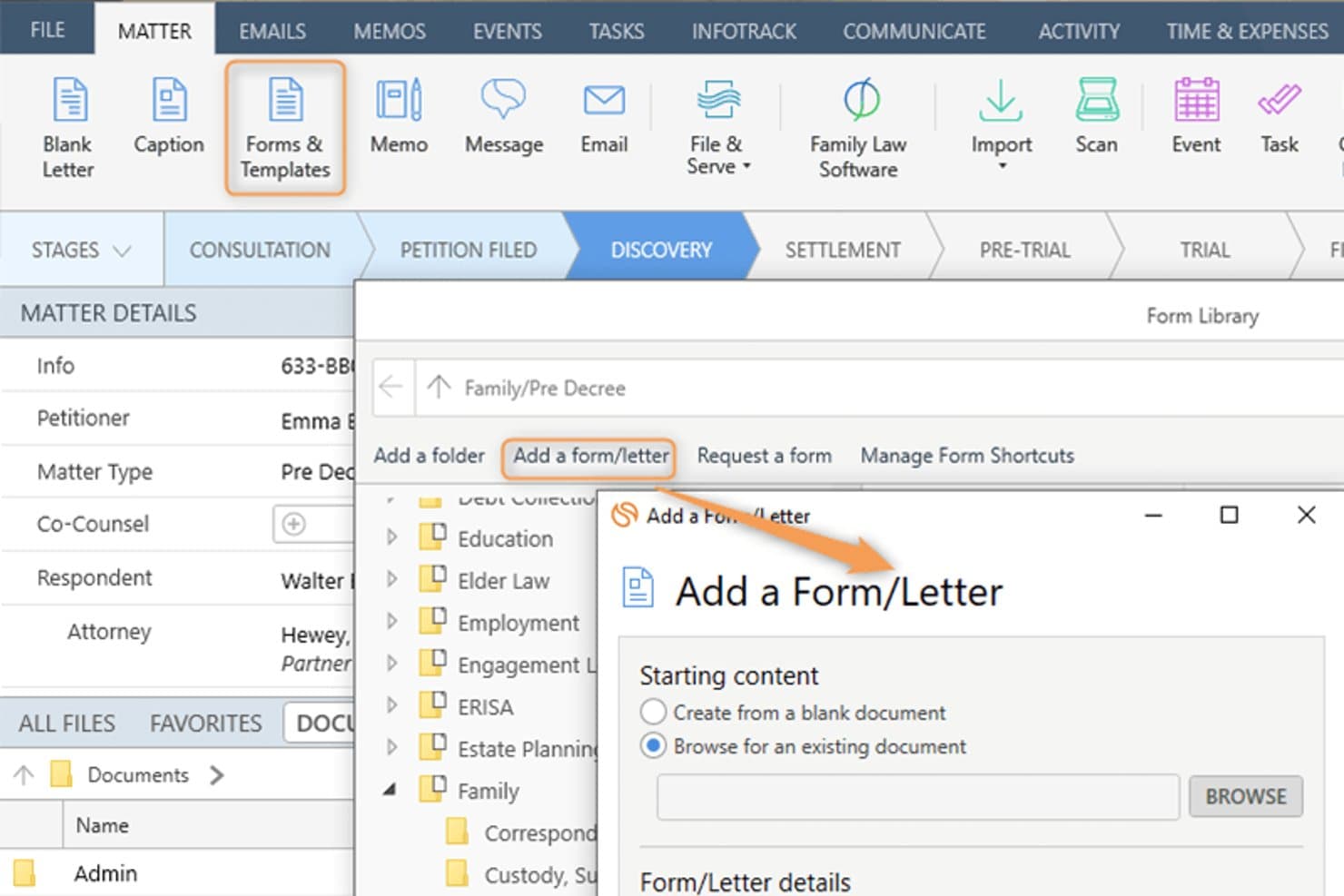
Smokeball lets users add custom forms and letters to a legal matter. Smokeball is an all-in-one legal practice management platform built for solo, small, and mid-size law firms that need matter-centric document management, email filing, billing, and Microsoft 365 integration consolidated into a single system.
Who Is Smokeball Best For?
Smokeball is a strong fit for managing partners at small private-practice law firms who handle high document volumes across multiple practice areas.
Why Smokeball Is a Good iManage Alternative
I've included Smokeball in my top picks because AutoTime is genuinely unlike anything iManage offers. It automatically captures time spent on emails, documents, calls, and tasks inside the platform, so nothing goes unbilled. I also like that matter-centric email filing works natively inside Outlook, meaning I can link emails directly to matters without ever leaving my inbox.
Smokeball Key Features
- Matter-centric document management: Store and organize legal files, templates, and forms by matter for easy retrieval.
- Custom practice area templates: Access 200+ built-in, configurable matter and document templates tailored to different legal areas.
- Native Microsoft 365 integration: Link Outlook emails and Word documents directly to matters without leaving those applications.
- Firm insights reporting: Track productivity, case progress, staff activity, and profitability with built-in dashboards and metrics.
Smokeball Integrations
Smokeball has native integrations across the Microsoft ecosystem, including Microsoft 365 and Outlook. An API is available for custom integrations.
Pros and Cons
Pros:
- Native email filing within Microsoft Outlook
- Matter-centric file organization built in
- AutoTime captures billable hours automatically
Cons:
- Better suited to smaller law firms
- Search lacks advanced metadata filtering
Learn more about Smokeball: Best for client portal communication tools
- 10-day free trial
- From $50/user/month (billed annually)
Visit WebsiteCustomer Rating:4.6/5
MyCase auto-generates task lists and deadlines directly from court rules. MyCase is a cloud-based practice management platform for small and mid-sized law firms that centralizes case management, billing, and client communication in one place.
Who Is MyCase Best For?
MyCase suits solo practitioners and small firm managing partners who handle their own billing, client intake, and day-to-day case administration.
Why MyCase Is a Good iManage Alternative
I've included MyCase in my top picks because its client portal is genuinely best-in-class for secure client communication. Clients can view case documents, send messages, and pay invoices directly through the portal, without calling or emailing the firm. The 2-way texting feature with a dedicated firm number keeps every client conversation logged and searchable inside the case record.
MyCase Key Features
- Matter-centric document storage: Organize documents within specific case folders for easy retrieval and management.
- Integrated time and expense tracking: Log billable hours and expenses directly to each matter with Smart Time Finder.
- Automated billing and invoicing: Generate and send invoices automatically based on tracked time and case activities.
- Customizable financial reporting: Access real-time analytics on payments, AR, and case profitability through built-in report tools.
MyCase Integrations
MyCase offers native integrations with QuickBooks Online, LawPay, Google Calendar, Google Drive, Dropbox, Outlook, Gmail, and CalendarRules, and provides an API for custom integrations.
Pros and Cons
Pros:
- Built-in invoicing tied directly to matters
- Two-way texting logged within case records
- Dedicated client-facing portal for secure messaging
Cons:
- No ethical wall or matter-level access controls
- Limited document version control and check-in/out
 3Best for legal practice management integration
Clio
- 7-day free trial + free demo available
- From $49/user/month
Visit WebsiteCustomer Rating:4.5/5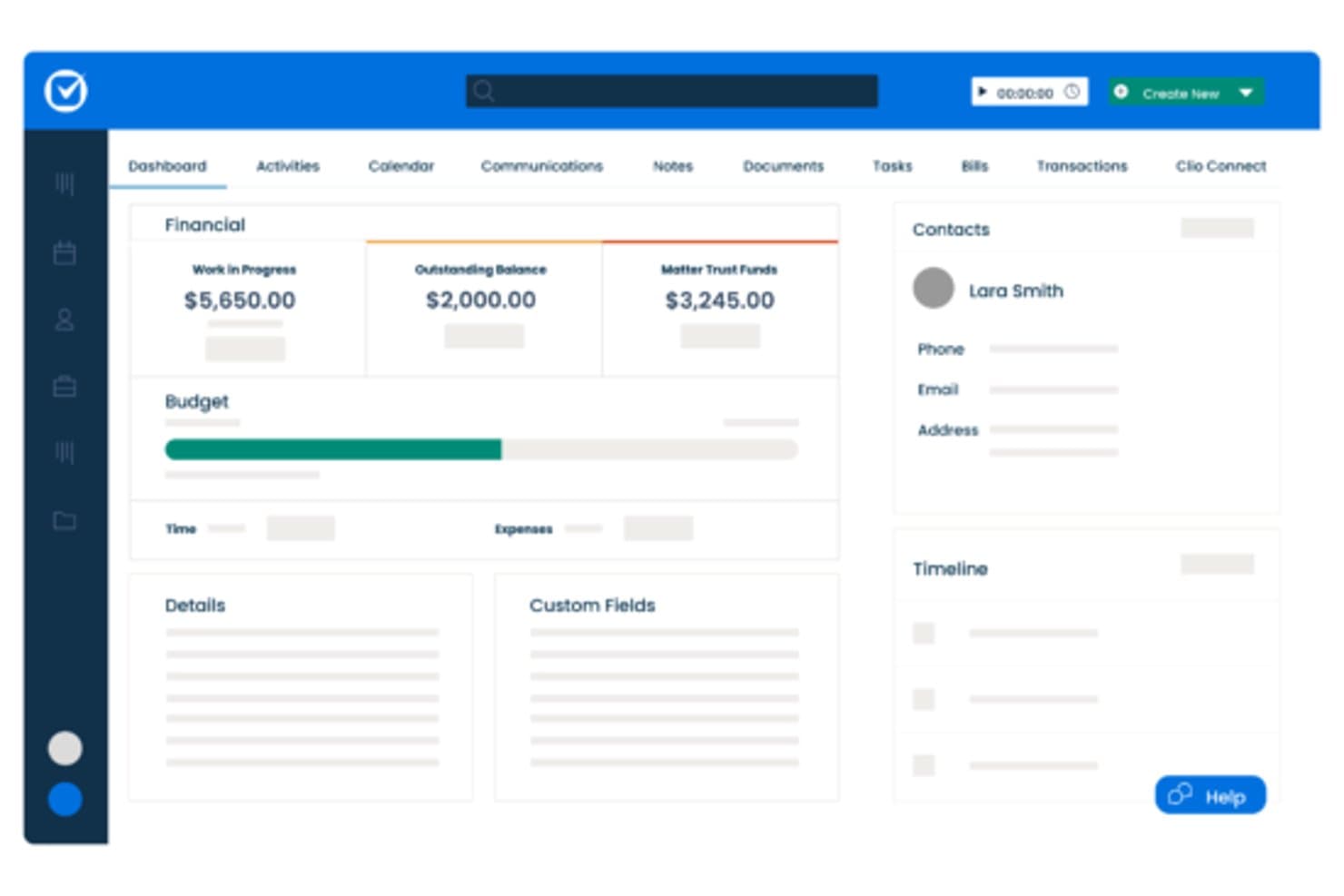
Clio centralizes matter financials, contacts, and timelines in one dashboard. Clio Manage is a cloud-based legal practice management platform built for small-to-mid-size law firms that need matter organization, billing, document storage, and client communication in one place—without the complexity of enterprise DMS tools like iManage.
Who Is Clio Best For?
Clio Manage is a natural fit for solo attorneys and small-to-mid-size law firms that want a single platform to manage matters, billing, and client files.
Why Clio Is a Good iManage Alternative
I've included Clio Manage in my top picks because it connects matter management, billing, and document storage in a single workspace that actually reflects how law firms operate day to day. I particularly like that Clio's AI can convert court documents into calendar events and turn tracked time entries into draft invoices automatically. That tight loop between case activity and billing is something iManage, as a document-only platform, simply doesn't offer.
Clio Key Features
- Matter-centric document storage: Store and organize all case files in structured, searchable matter folders.
- Integrated time and expense tracking: Track billable hours and expenses directly within each matter for accurate billing.
- Client portal for secure communication: Exchange documents and updates with clients through a dedicated, secure portal.
- Role-based access permissions: Control who can view, edit, or manage specific matters and documents throughout your firm.
Clio Integrations
Clio Manage offers native integrations with Microsoft 365, Google Workspace, DocuSign, QuickBooks Online, Dropbox, NetDocuments, Xero, Zoom, LawPay, and CalendarRules. An API is available for custom integrations.
Pros and Cons
Pros:
- AI converts court documents into calendar events
- Built-in client portal for secure file sharing
- Connects billing directly to matter activity
Cons:
- Limited version control for document-heavy workflows
- Document management less robust than iManage
Learn more about Clio: Best for small firm Microsoft 365 users
- Free demo available
- From $210/month (billed annually)
Visit WebsiteCustomer Rating:4.6/5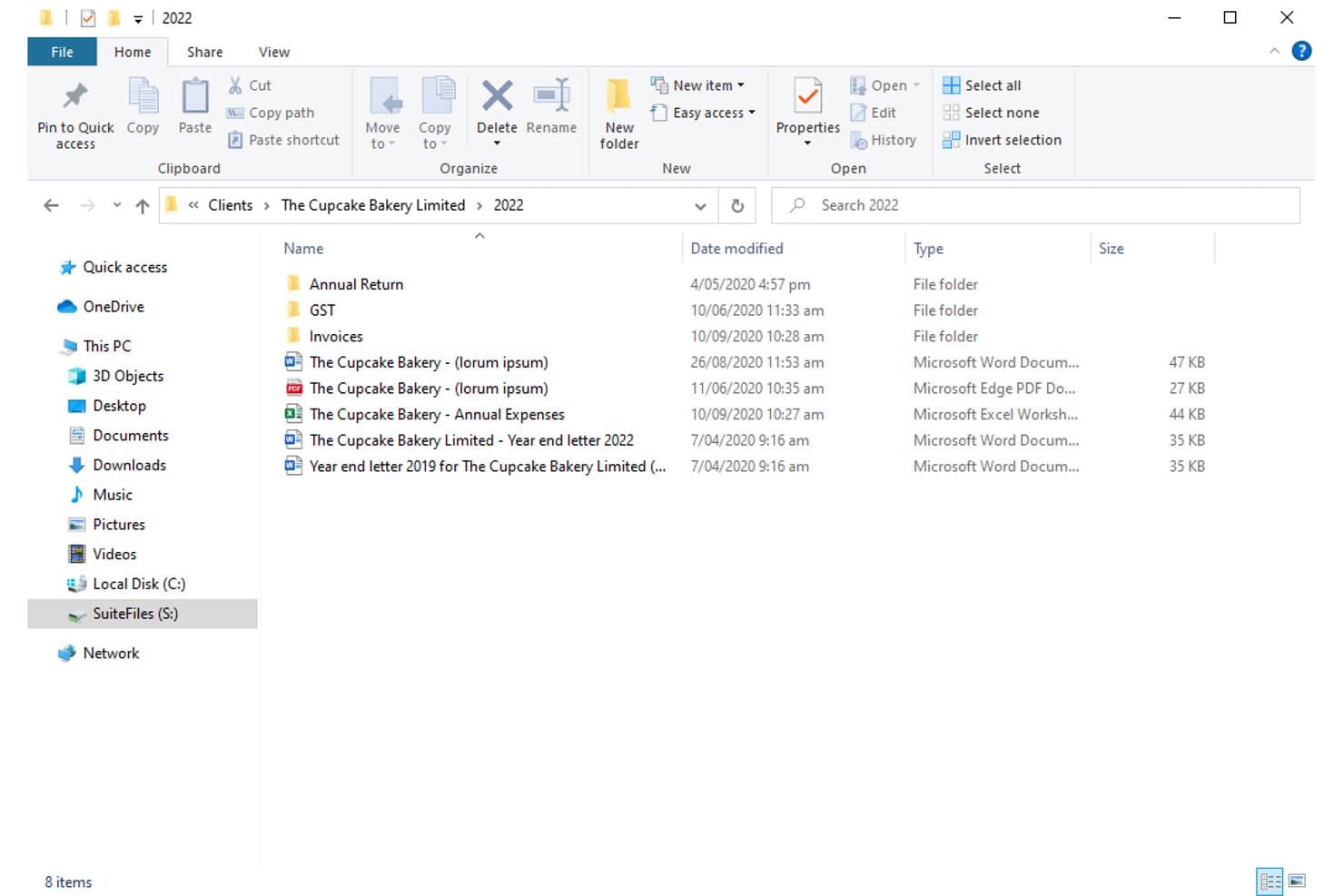
SuiteFiles organizes client documents in structured folders by year. For small law firms already deep in the Microsoft 365 ecosystem, SuiteFiles offers an all-in-one document management workspace that combines email filing, unlimited e-signing, and a secure client portal without needing separate tools.
Who Is SuiteFiles Best For?
SuiteFiles is a strong fit for small law firms that run on Microsoft 365 and want a single platform for document, email, and client file management.
Why SuiteFiles Is a Good iManage Alternative
I've included SuiteFiles in my top picks because its Microsoft 365 integration isn't an add-on, it's the foundation the whole product is built on. I can file emails directly from Outlook into client folders, co-author documents live in Word, and share finalized files through the SuiteFiles Connect portal without switching to a separate tool. Small firm teams that already run on M365 don't need to retrain staff or rebuild workflows to use it.
SuiteFiles Key Features
- Client portal (SuiteFiles Connect): Share documents securely with clients and collaborate without relying on unencrypted email.
- Task management: Assign tasks to team members and track progress alongside your documents and emails.
- PDF annotation tools: Annotate, merge, and organize PDFs directly within the SuiteFiles workspace.
- Template-driven document creation: Use customizable templates for automated client letters, proposals, and agreements.
SuiteFiles Integrations
SuiteFiles has native integrations across the Microsoft ecosystem, including Microsoft 365 and Azure. It also offers native integrations with Xero, QuickBooks Online, and Karbon, and provides an API for custom integrations.
Pros and Cons
Pros:
- SharePoint used as the underlying file storage
- Email filing directly from Outlook into matters
- Built-in e-signing without a third-party tool
Cons:
- Not suited for large or enterprise firms
- Limited advanced search versus enterprise DMS platforms
Learn more about SuiteFiles: Best for seamless Outlook document filing
- Free demo available
- Pricing upon request
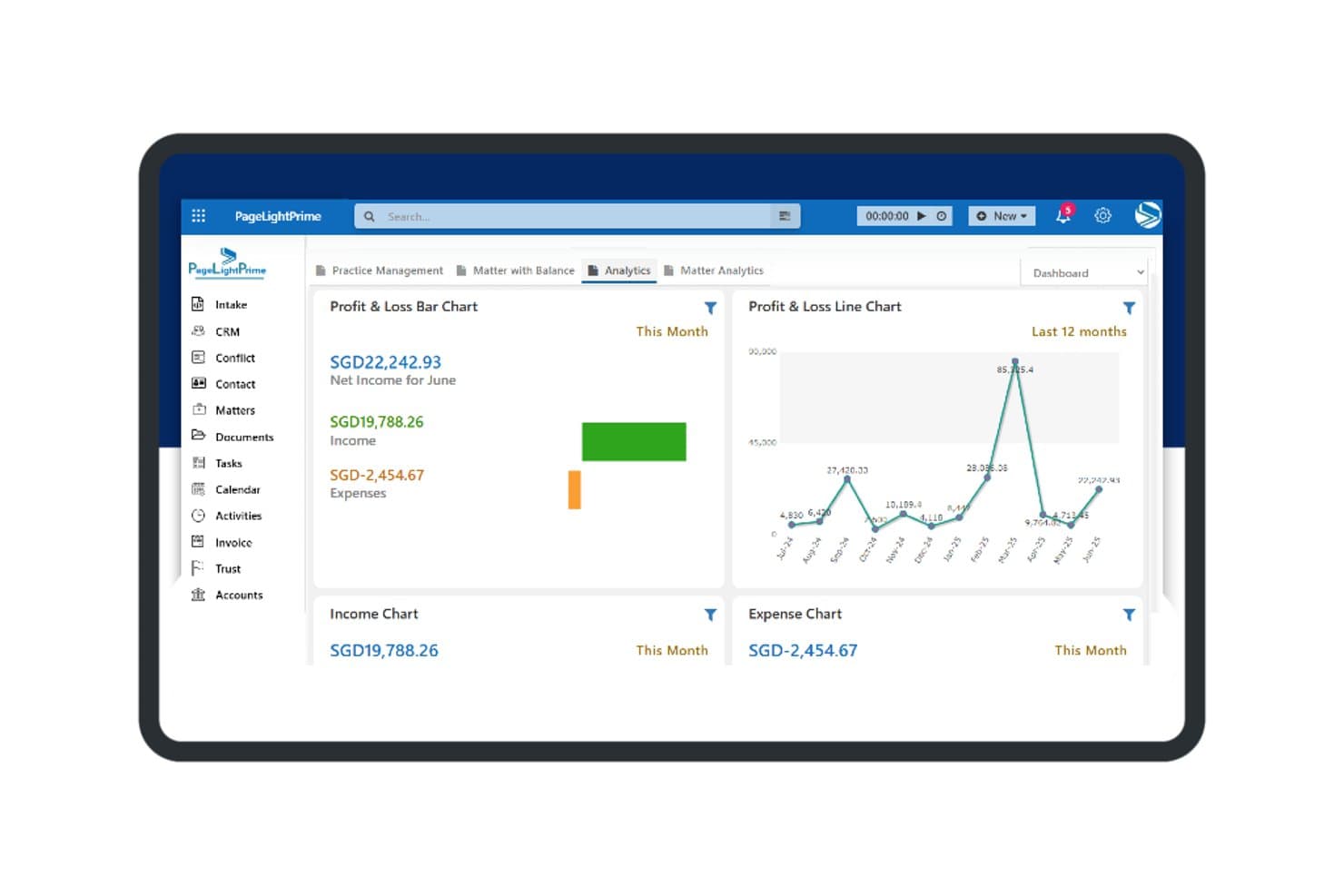
PageLightPrime offers a financial analytics dashboard with profit and loss charts, income tracking, and expense summaries for law firm management. PageLightPrime is a Microsoft 365-native legal practice management platform built for law firms that want to consolidate document management, matter tracking, and billing without stepping outside their existing Microsoft environment.
Who Is PageLightPrime Best For?
It's a strong fit for small to mid-sized law firms already running Microsoft 365 that want to replace iManage or a legacy DMS without adopting an entirely new technology stack.
Why PageLightPrime Is a Good iManage Alternative
I've included PageLightPrime in my top picks because of how it handles email filing from Outlook directly into matter workspaces. When a new matter is created, the platform auto-provisions a SharePoint folder structure with metadata already applied, so emails filed from Outlook land in the right place without manual sorting. I also appreciate that version control and audit trails run automatically alongside this, so every filed document has a tracked history from day one.
PageLightPrime Key Features
- Matter-centric SharePoint structure: Auto-generates folders and metadata for each new client and matter.
- Integrated law firm accounting: Handles billing, trust accounting, and multi-currency management within the platform.
- Client portal: Allows clients to securely access shared documents, billing information, and case updates online.
- Legal CRM and intake forms: Captures leads through web intake and links client interactions directly to matters.
PageLightPrime Integrations
PageLightPrime has native integrations across the Microsoft ecosystem, including Microsoft 365 and Azure. An API is available for custom integrations.
Pros and Cons
Pros:
- Single platform covers intake, billing, and document management
- Built-in trust accounting with IOLTA compliance support
- Runs entirely within Microsoft 365 and SharePoint
Cons:
- Smaller vendor with less established enterprise credibility
- Limited third-party ecosystem beyond Microsoft tools
Learn more about PageLightPrime: Best for Microsoft 365 workflow integration
- 30-day free trial
- From $5.00/user/month (billed annually)
Visit WebsiteCustomer Rating:4.4/5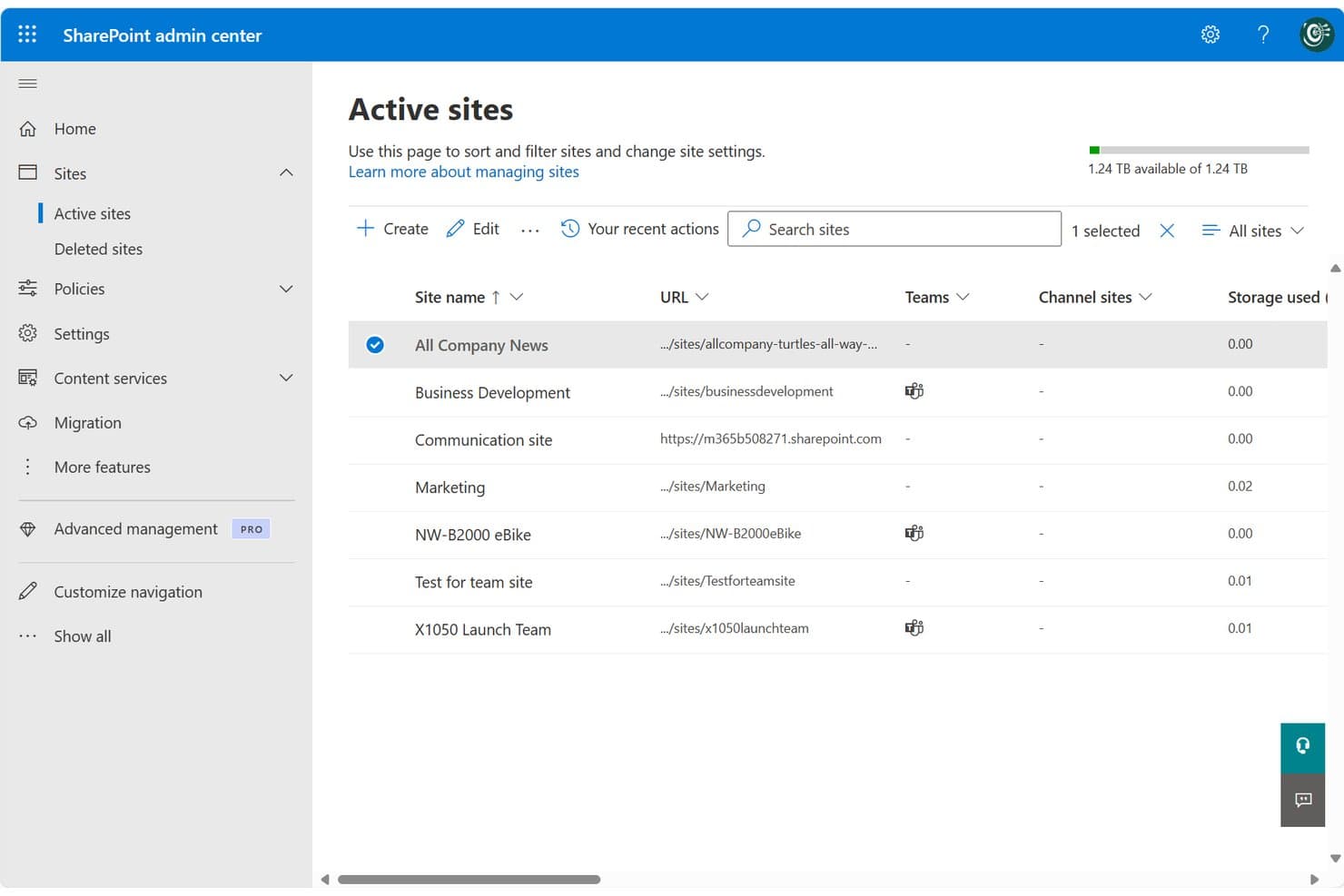
SharePoint centralizes site management across teams and projects in one admin view. SharePoint is Microsoft's cloud-based collaboration and document management platform, well-suited for legal teams and law firms already running on Microsoft 365 who want centralized file storage, version control, and access management without adopting a separate DMS.
Who Is SharePoint Best For?
SharePoint fits small-to-mid-sized law firms and in-house corporate legal teams that are already standardized on Microsoft 365 and want to avoid managing a separate DMS.
Why SharePoint Is a Good iManage Alternative
I've included SharePoint in my top picks because it's the only iManage alternative here that's natively embedded in Microsoft 365. Your legal team can co-author Word documents, manage matter libraries, and file directly from Outlook without switching tools. I particularly appreciate the check-in/check-out versioning system, which locks documents during active review and keeps a clean, restorable version history across matters.
SharePoint Key Features
- Matter library templates: Prebuilt site and folder structures you can use to organize documents by matter, client, or team.
- Granular permissions controls: Assign access based on matter, team, or document type to help protect privileged information.
- Full-text and metadata search: Search for documents or emails using keywords, tags, or custom filters to quickly find files.
- Audit trails and activity logs: Track all document views, edits, downloads, and sharing actions across your SharePoint environment.
SharePoint Integrations
SharePoint has native integrations across the Microsoft ecosystem, including Microsoft 365 and Azure. An API is available for custom integrations.
Pros and Cons
Pros:
- Matter-level permissions configurable without extra modules
- Built-in version history with document restore
- Native Microsoft 365 co-authoring without switching apps
Cons:
- Email filing requires manual setup and configuration
- No dedicated legal matter workspace out-of-the-box
Learn more about SharePoint: Best for matter-centric security controls
- Free demo available
- Pricing upon request
Visit WebsiteCustomer Rating:4.1/5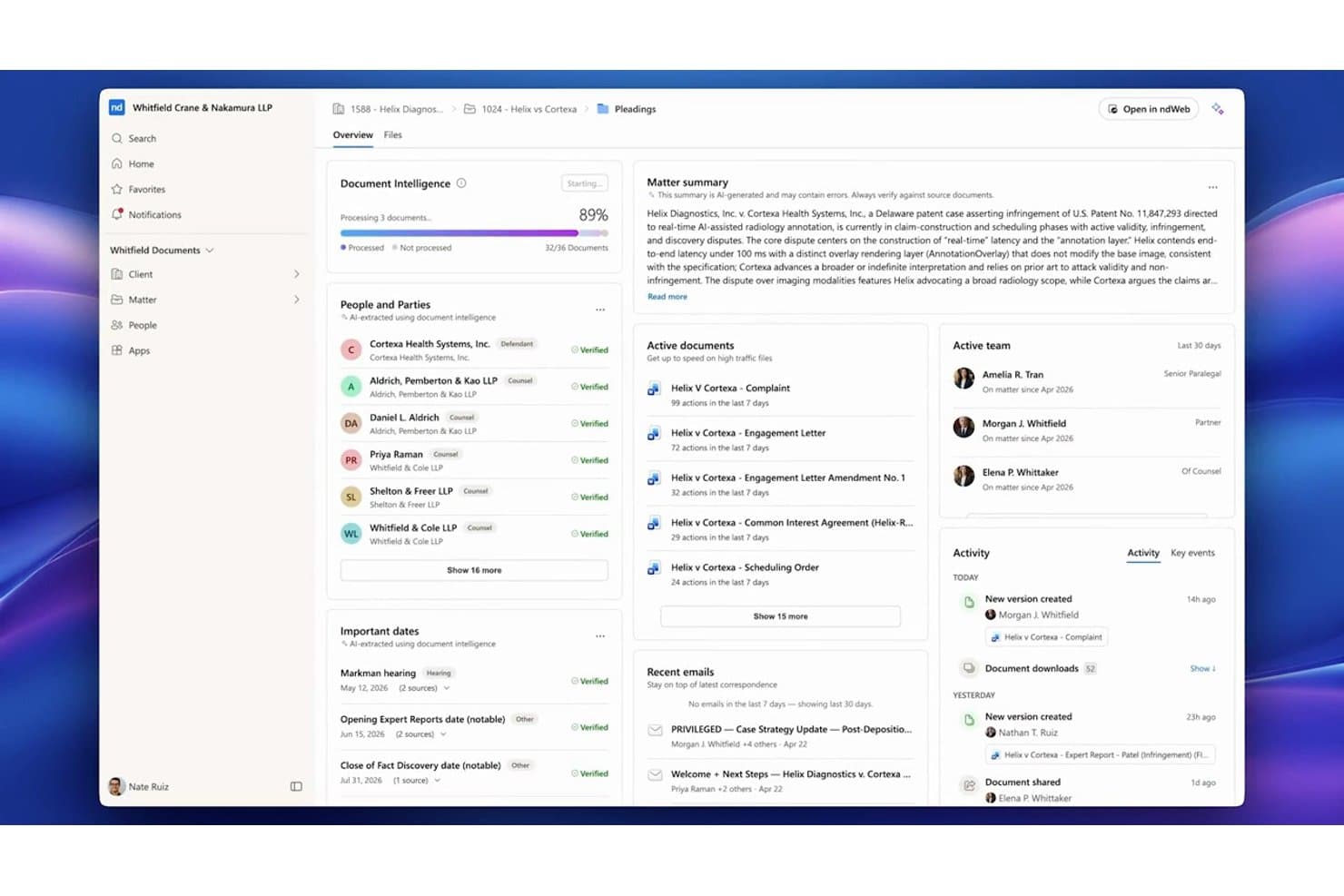
NetDocuments centralizes matter documents, parties, and key dates in one dashboard. NetDocuments is a cloud-native document management system built for law firms and corporate legal teams that need a fully hosted alternative to on-premises platforms like iManage, with matter-centric organization, AI-powered search, and enterprise-grade security controls.
Who Is NetDocuments Best For?
NetDocuments is a strong fit for mid-to-large law firms and enterprise legal departments whose IT and legal operations teams are ready to move away from on-premises infrastructure.
Why NetDocuments Is a Good iManage Alternative
NetDocuments earns its spot on my shortlist because of how precisely it handles matter-level security. I particularly like the granular ethical wall controls, which let you restrict access at the user, document, or workspace level independently. On top of that, customer-managed encryption keys and geo-aware content storage give legal teams direct control over where their data lives and who can decrypt it, which is something iManage's on-prem setup handles very differently.
NetDocuments Key Features
- AI-powered document search: Search documents and emails using natural language queries and receive answers with citations.
- Unified matter workspace: View, manage, and collaborate on all matter documents, emails, and notes from one interface.
- Built-in document bundling: Assemble and organize closing sets or litigation binders directly within the platform.
- Native Microsoft Teams integration: Access, preview, and collaborate on NetDocuments content right inside Microsoft Teams.
NetDocuments Integrations
NetDocuments offers native integrations across the Microsoft ecosystem, including Microsoft 365 and Azure, and connects directly with Clio, DocuSign, Litera, LexisNexis, Thomson Reuters, and iManage. An API is available for custom integrations.
Pros and Cons
Pros:
- AI search surfaces relevant documents without manual filtering
- Granular ethical walls built into the platform
- Strong cloud-native security for legal matter files
Cons:
- Admin configuration requires significant initial setup time
- Mobile app experience lags behind the desktop
Learn more about NetDocuments: Best for AI-powered contract automation
- Free demo available
- Pricing upon request
Visit WebsiteCustomer Rating:4.3/5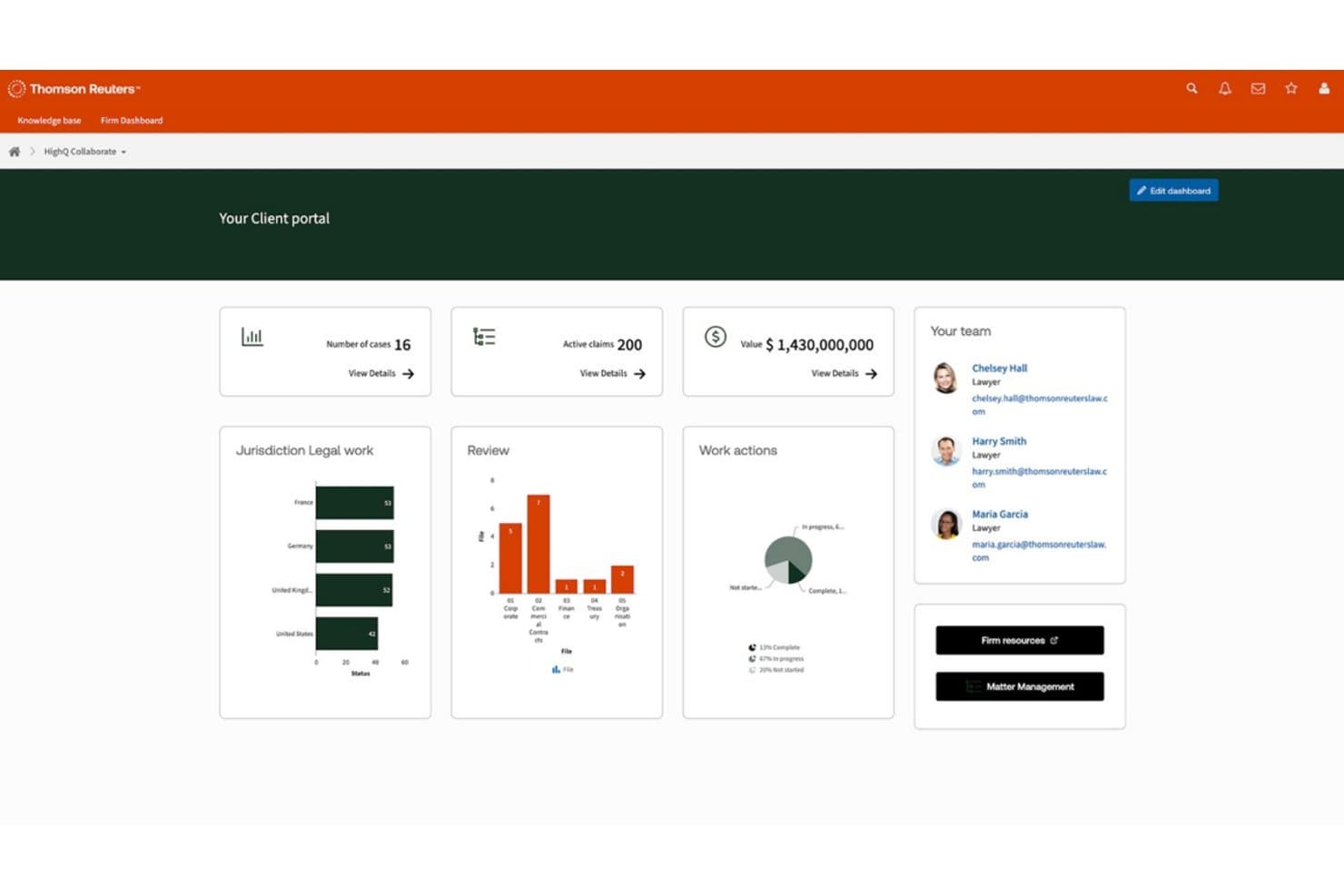
HighQ centralizes case data, team contacts, and legal workflows in one portal. HighQ is a Thomson Reuters cloud platform built for law firms and corporate legal teams that need secure document collaboration, workflow automation, and AI-powered contract tools in a single, client-facing workspace.
Who Is HighQ Best For?
HighQ is a strong fit for large law firms and enterprise legal departments managing high volumes of transactions, due diligence, or complex client matters.
Why HighQ Is a Good iManage Alternative
I picked HighQ as one of the best because its CoCounsel-powered Document Insights goes well beyond basic document storage. It automatically extracts risks, summarizes contract terms, and populates iSheets with AI-generated data during due diligence. I also like that HighQ supports the Model Context Protocol, letting AI tools like Claude and ChatGPT work securely inside your legal workspaces without manual data transfer.
HighQ Key Features
- Matter-centric workspaces: Organize documents, tasks, and discussions by matter for easy cross-team access.
- Granular access controls: Set permissions and ethical walls at the matter, folder, or document level to protect sensitive data.
- Workflow automation designer: Build multi-step legal processes using visual tools for intake, approvals, or project management.
- Microsoft 365 integration: Edit documents collaboratively in Word, Excel, and PowerPoint directly within HighQ’s secure environment.
HighQ Integrations
HighQ offers native integrations across the Microsoft ecosystem, including Microsoft 365 and Azure, as well as with DocuSign, Adobe Sign, and Legal Tracker. An API is available for custom integrations.
Pros and Cons
Pros:
- iSheets auto-populate from AI document extraction
- Client portals included out of the box
- AI-powered contract review built in natively
Cons:
- Email filing lags behind iManage's capabilities
- Less mature as a dedicated DMS
Learn more about HighQ: Best for on-premises legal document storage
- Free demo available
- Pricing upon request
Visit WebsiteCustomer Rating:4/5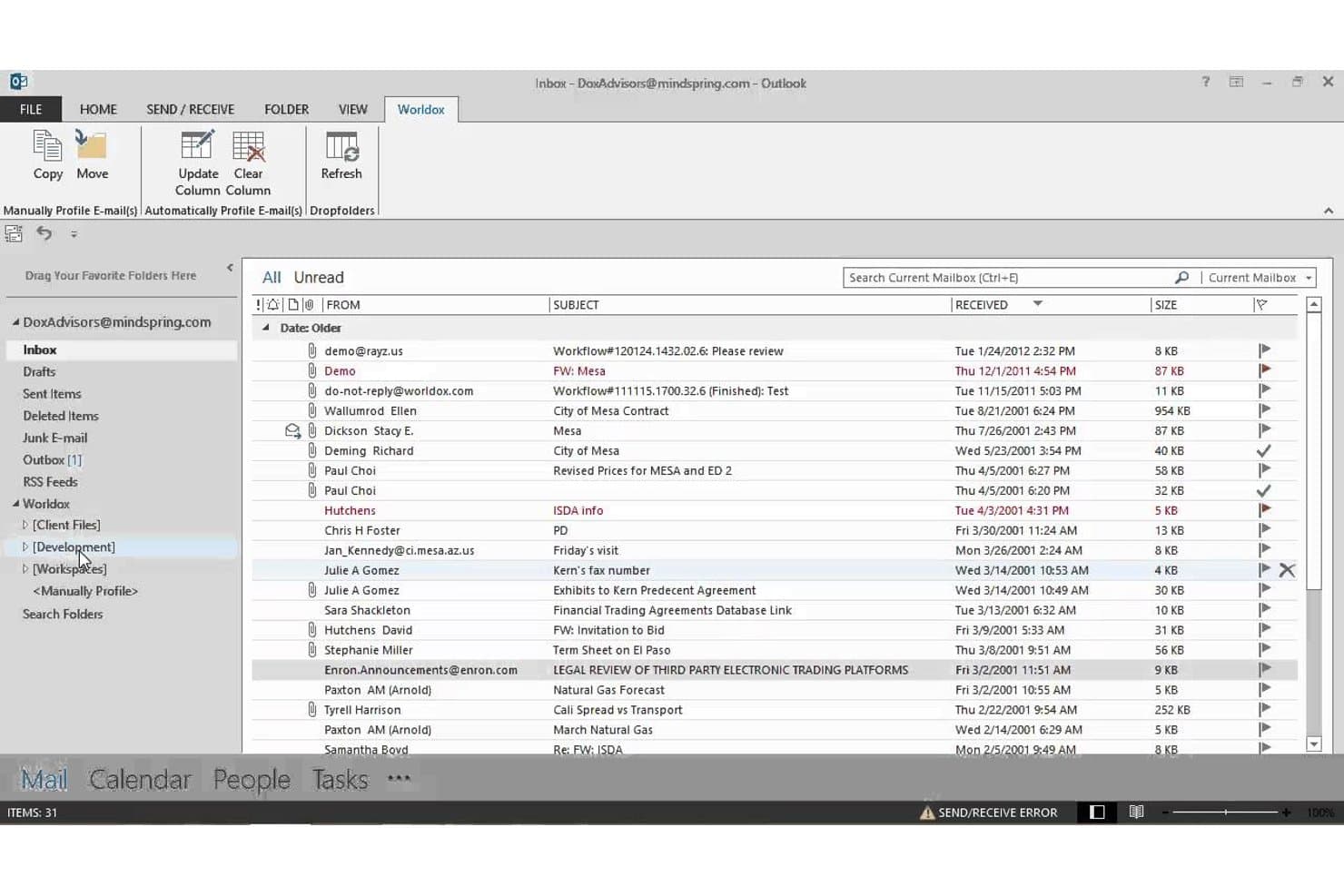
Worldox integrates directly into Outlook for seamless email filing. Worldox is a long-standing legal document management system built for law firms and corporate legal departments that need matter-centric document organization, advanced search, and email filing without moving to a cloud-based infrastructure.
Who Is Worldox Best For?
It's a strong fit for small-to-midsize law firms running Windows-based infrastructure that prefer on-premises document control over cloud-hosted alternatives.
Why Worldox Is a Good iManage Alternative
I've included Worldox in my top picks because it gives firms complete control over where their data lives. Unlike iManage, which has shifted heavily toward cloud-hosted deployments, Worldox keeps documents on your own servers, which matters when compliance obligations make cloud storage a non-starter. I particularly like the matter-centric profiling system, where every document is tagged with client, matter, and document type metadata at the point of filing, making retrieval fast and consistent across the firm.
Worldox Key Features
- Customizable metadata fields: Tag documents by client, matter, and document type for granular organization.
- Full-text and metadata search: Locate documents and emails using powerful filters tailored for legal workflows.
- Audit trail reporting: Track document access and activity for security, compliance, and accountability needs.
- Office suite integration: Work with Microsoft Word, Excel, and Outlook directly from your document management interface.
Worldox Integrations
Worldox has native integrations across the Microsoft ecosystem, including Microsoft 365 and Outlook. It also offers integrations with Tabs3 and PracticeMaster. An API is available for custom integrations.
Pros and Cons
Pros:
- Strong compatibility with Windows-based firm infrastructure
- Matter-centric profiling built for legal workflows
- True on-premises deployment for data sovereignty
Cons:
- Dated interface compared to cloud-first competitors
- No mobile app for remote document access
Learn more about Worldox: Best for native email management in Outlook
- 7-day free trial
- From $395/month
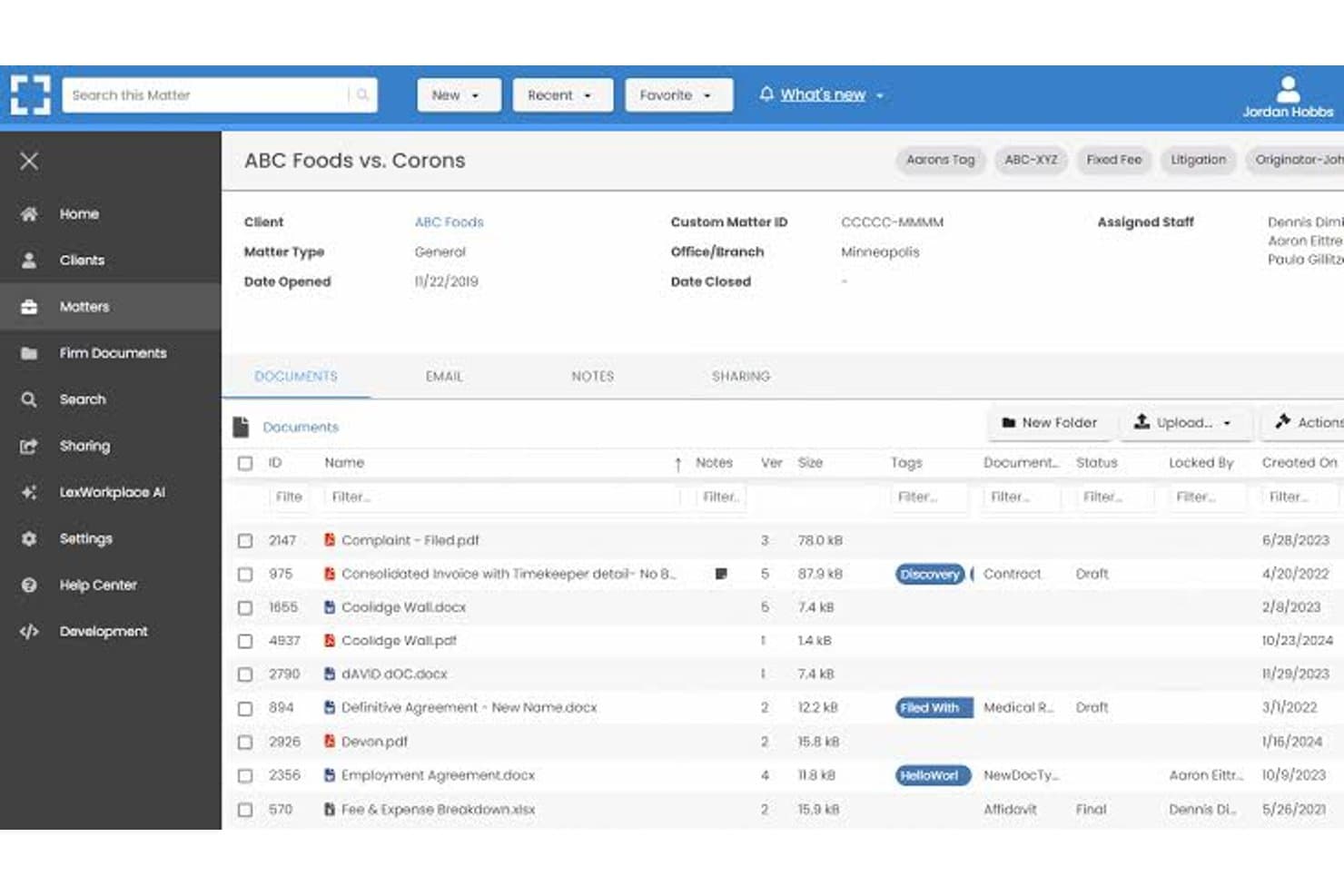
LexWorkplace dashboard for managing legal matters, documents, email, and file sharing. LexWorkplace is a cloud-based document and email management system built for small-to-midsize law firms that want matter-centric organization, full-text search, and secure cloud storage without the enterprise complexity of iManage.
Who Is LexWorkplace Best For?
LexWorkplace is a natural fit for law firms with 5–50 users that need a structured legal DMS without dedicating IT resources to deployment and maintenance.
Why LexWorkplace Is a Good iManage Alternative
I've included LexWorkplace in my top picks because its Outlook email management is genuinely best-in-class for small law firms. Smart File suggests the correct matter automatically when you're filing an email, and Multi Select lets you bulk-file entire threads in one action. Both features matter most during active litigation or transactions, where email volume spikes and misfiled messages create real compliance exposure.
LexWorkplace Key Features
- Matter-centric document management: Organize files, notes, and correspondence by client and legal matter in secure cloud workspaces.
- Integrated document versioning: Track, compare, and restore previous versions of documents, with full audit trails for all changes.
- Document AI assistant: Use built-in AI to summarize, query, and extract information from legal documents without leaving the platform.
- Full-text and metadata search: Find documents and emails instantly with full-text OCR, advanced filters, and matter-based search options.
LexWorkplace Integrations
LexWorkplace offers native integrations with Microsoft 365, including Outlook and Word, as well as Clio Manage. An API is available for custom integrations.
Pros and Cons
Pros:
- Full-text OCR search across all matter files
- Matter-centric workspaces designed for law firms
- Smart email filing natively within Outlook
Cons:
- Smaller user community than enterprise-grade alternatives
- No ethical wall automation for practice groups
Learn more about LexWorkplace:
Other iManage Alternatives
Here are some additional iManage alternatives options that didn’t make it onto my shortlist, but are still worth checking out:
- 11Epona DMSBest for advanced metadata-driven filing
- 12PracticePantherBest for workflow automation customization
- 13LEAPBest for integrated legal form automation
- 14FilevineBest for customizable document workflows
- 15Rocket MatterBest for matter-based document timers
- 16CosmoLexBest for built-in trust accounting compliance
- 17CenterbaseBest for template-based document assembly
- 18DocsvaultBest for hybrid cloud and on-premise deployment
How I Evaluate iManage Alternatives
I look at two layers: what any iManage-comparable DMS must offer—matter-centric filing, email management, and version control—and what sets tools apart. Differentiators like ethical walls, AI drafting, and deployment options guide my picks.
Core Functionality (Table Stakes For This List)
When I'm selecting tools for my list, I rank each one on a scale from 0 (does not offer the functionality) to 5 (excels in this area) for each core functionality listed below. I then calculate the tool's total score into a percentage, using 65% as a benchmark to help assess its overall fit for the list.
- Document Management: I evaluate how each tool organizes files around matters, checking for configurable folder structures, profiling cards, and workspace templates that mirror how attorneys actually open and manage client engagements.
- Version Control: Each tool's approach to tracking drafts matters—I look for check-in/check-out, version comparison, and rollback so attorneys can collaborate on briefs without overwriting each other's edits.
- Email Management: I check whether the platform files emails and attachments from Outlook directly into matter workspaces, including features like auto-filing suggestions and thread deduplication that reduce manual sorting.
- Advanced Search: Finding a memo buried across thousands of matters is a daily reality, so I evaluate full-text and metadata search with matter-specific filters that return relevant results fast.
- Security & Access Controls: I look for matter-level permissions, ethical wall enforcement, encryption, and audit trails—especially important when a firm handles opposing-party matters simultaneously.
- Microsoft 365 Integration: Most attorneys live in Word, Outlook, and Teams, so I evaluate how deeply each tool connects with Microsoft 365 for document co-authoring, email filing, and mobile access.
Once I have a list of tools that meet the criteria, I consider what sets each platform apart.
Differentiating Factors (What Sets Vendors Apart)
Here's how I compare and contrast different vendors:
Standout Features
AI-powered document drafting is a key differentiator—I look for platforms where attorneys can summarize or compare clauses directly inside the DMS without switching to a third-party tool. Unified matter workspaces also carry weight because pulling documents, emails, and notes into one view saves real time when prepping for a hearing or client call. Built-in redlining and version comparison let attorneys mark up drafts without exporting to Word, which I evaluate closely in document-heavy practices.
Beyond Features
Deployment flexibility matters a lot when firms are migrating off iManage—I check whether a vendor supports on-premise, private cloud, or hybrid models so active matters aren't disrupted mid-transition. Compliance certifications like SOC 2 Type II and ISO 27001 tell me whether a platform can handle privileged client data with the rigor firms expect. I also evaluate migration support, including whether the vendor preserves metadata when moving files from legacy systems or shared drives.
Why Look For iManage Alternatives?
While iManage is a good choice of legal document management software alternatives, there are a number of reasons why some users seek out alternative solutions. You might be looking for iManage alternatives because…
- Need support for hybrid or on-premise deployments
- Want more transparent or flexible pricing
- Prefer deeper Microsoft 365 or Teams integration
- Require granular ethical wall or client confidentiality controls
- Seek platforms with easier migration and change management
- Need more responsive customer support across regions
If any of these sound like you, you’ve come to the right place. My list contains several iManage alternatives options that are better suited for teams facing these challenges with iManage and looking for alternative solutions.
iManage Key Features
Here are some of the key features of iManage, to help you contrast and compare what alternative solutions offer:
- Matter-centric organization: Store, organize, and access documents and emails around legal matters, making it easier for teams to keep everything tied to the right case or project.
- Automatic version control: Track document changes by automatically saving and labeling every version, supporting check-in/check-out, comparison, and rollback to reduce errors from accidental overwrites.
- Outlook email management: File, tag, and organize emails and attachments directly from Microsoft Outlook into the correct matter workspace, streamlining records and correspondence management.
- Advanced search and filters: Search documents, emails, and metadata using legal-specific filters and full-text search, helping users quickly find the files they need from vast repositories.
- Granular security and ethical walls: Enforce matter-level permissions, client confidentiality, and ethical wall policies to control document access and meet compliance requirements, even across dispersed teams.
- Microsoft 365 integration: Work directly in Word, Outlook, Excel, and Teams with native integrations, letting users create, edit, and co-author documents within iManage’s secure environment.
- Audit trails and activity logs: Track document access and actions with detailed logs that meet legal and client audit requirements, supporting transparency and accountability.
- Mobile access: Review, edit, and share documents securely from smartphones and tablets, making it easier for attorneys to work remotely or while traveling.
- Collaboration tools: Share documents and bundle files with internal and external parties, including features for secure link sharing and real-time annotation.
- Automated retention policies: Apply rules to retain, archive, or destroy documents based on client or regulatory requirements, supporting information governance practices.