

Programele de preluare a clienților pentru drept imobiliar captează și califică potențialii clienți, urmăresc recomandările și transferă detaliile esențiale în dosarele juridice. Instrumentele din acest ghid variază de la sisteme dedicate preluării clienților și gestionării potențialilor clienți până la platforme pentru cabinete juridice care sprijină fluxurile de lucru pentru transferul proprietății și finalizarea tranzacțiilor.
Compară funcțiile de preluare a clienților, urmărire ulterioară, monitorizare a recomandărilor și transfer al dosarelor pentru a găsi o soluție potrivită pentru cabinetul tău. Păstrarea detaliilor despre proprietate și tranzacție conectate de la solicitarea inițială până la finalizare poate ajuta echipa să evite omisiunile atunci când un potențial client devine client.
Why Trust Our Software Recommendations
6,700+
Reviews
20
Industry experts
16+
Evaluation factors
14
Years
Our team has been testing and reviewing software since 2012. As legal practice leaders ourselves, we know how difficult—and important—it is to choose the right software.
For this guide, we evaluated tools using hands-on testing and independent research, scoring tools using our selection criteria.
Our reviews reflect our human editorial judgment, not a sales pitch.
Tabel comparativ pentru cele mai bune programe de preluare a clienților pentru drept imobiliar
Compară prețurile și specificațiile alăturat pentru programele de preluare a clienților pentru drept imobiliar care au ajuns pe lista mea scurtă.
Score legend (out of 5)
- Excellent4.5–5
- Good4–4.4
- Average3–3.9
- Below average2–2.9
- Poor1–1.9
Sorted by: Default
| Tool | Starting Price | Website | |||||||
|---|---|---|---|---|---|---|---|---|---|
Best for managing leads and real estate funds | 3.2 out of 5 | 4 | 4 | 4 | 2 | 2 | 3 | $60/user/month Free demo + 10-day free trial available | Website |
Best for carrying lead details into closing work | Not rated | 4 | 4 | 3 | Not rated | 2 | 3 | Pricing upon request Free trial available | Website |
Best for property details in matter handoffs | 3.8 out of 5 | 4 | 4 | 4 | 4 | 4 | 3 | Pricing upon request Free demo available | Website |
Best for intake alongside existing case systems | 4.2 out of 5 | 4 | 5 | 4 | 3 | 5 | 4 | Pricing upon request Free demo available | Website |
Best for real estate matters through closing | 2.3 out of 5 | 2 | 4 | 3 | 1 | 2 | 2 | Pricing upon request Free demo available | Website |
Best for measuring lead and referral ROI | 3.5 out of 5 | 4 | 4 | 3 | 2 | 4 | 4 | Pricing upon request Free demo available | Website |
Best for intake into conveyancing matters | 2.8 out of 5 | 3 | 4 | 3 | 2 | 3 | 2 | Pricing upon request Free demo available | Website |
Best for AI phone intake and lead follow-up | 3.3 out of 5 | 4 | 3 | 3 | 3 | 3 | 4 | Pricing upon request Free demo available | Website |
Best for linking leads to closing workflows | 3.2 out of 5 | 4 | 5 | 3 | 2 | 4 | 1 | $49/user/month 14-day free trial | Website |
Best for marketing and referral ROI tracking | 3.7 out of 5 | 4 | 3 | 4 | 3 | 4 | 4 | Pricing upon request Free demo available | Website |


Recenzii ale programelor de preluare a clienților pentru drept imobiliar
Mai jos sunt rezumatele mele ale celor mai bune programe de preluare a clienților pentru drept imobiliar care au ajuns pe lista mea scurtă. Recenziile mele acoperă funcțiile de preluare a clienților, monitorizarea recomandărilor și transferul dosarelor pentru fiecare opțiune, pentru a te ajuta să găsești soluția potrivită.
 Best for managing leads and real estate funds
- Free demo + 10-day free trial available
- From $60/user/month
Visit WebsiteCustomer Rating:4.6/5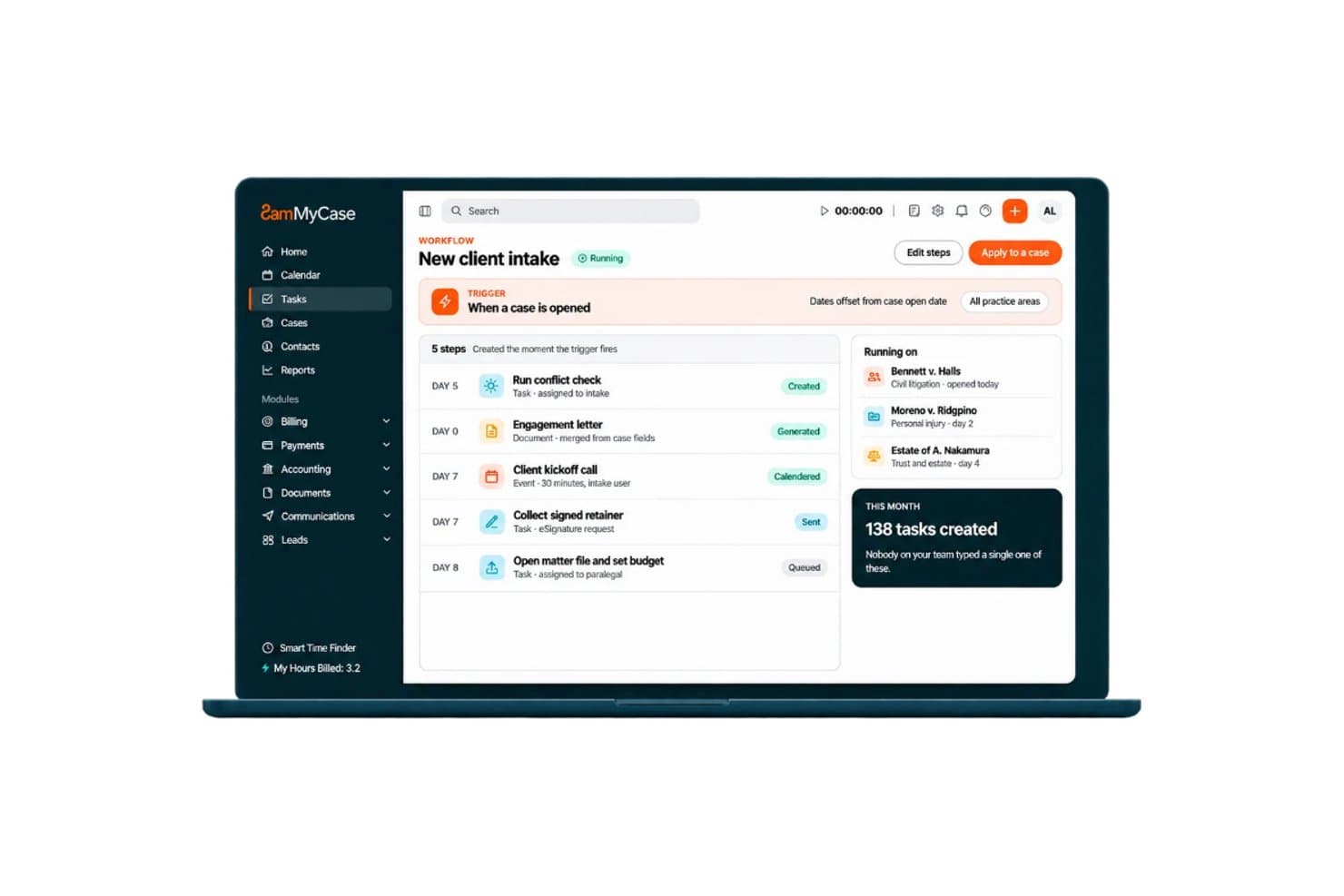
MyCase tracks real estate leads, collects intake details, and manages escrow funds. MyCase is a legal practice management platform that combines client intake forms, lead tracking, real estate funds management, document generation, and billing tools for law firms handling real estate matters.
Who Is MyCase Best For?
MyCase works well for real estate law firms that need to manage the full client journey—from lead capture and intake forms through funds management and billing—in a single platform.
Why I Picked MyCase
I picked MyCase as one of the best because it's the only tool on this list that combines lead capture with real estate funds management in a single platform. I love how the legal CRM tracks leads from first contact through conversion, while dynamic intake forms with conditional logic collect property and transaction details upfront. For real estate matters specifically, the funds management tools handle escrow accounts, earnest money deposits, and settlement costs alongside standard trust accounting.
MyCase Key Features
- Real estate document templates: Generate purchase agreements, lease contracts, and mortgage documents using matter data already stored in MyCase.
- eSignature: Send documents for electronic signature directly from the platform without switching to a separate tool.
- Two-way texting: Send and receive client text messages, including images, through MyCase to keep transaction communication on the record.
- Automated workflows: Configure workflows to trigger task lists, case documents, and calendar deadlines when intake forms are submitted.
MyCase Integrations
MyCase lists 70+ integrations, including marketplace integrations with Lawmatics, Intaker, Lawbrokr, Answering Legal, CallRail, Google Calendar, and Microsoft Outlook. It also supports Zapier and an Open API for custom connections.
Pros and Cons
Pros:
- Earnest money and escrow tracking support closings
- Conditional forms capture property and transaction details
- Lead pipeline organizes prospective real estate clients
Cons:
- Intake conversion and referral analytics remain limited
- Returning-client leads can create duplicate contacts
 Best for carrying lead details into closing work
- Free trial available
- Pricing upon request
Visit WebsiteCustomer Rating:4.8/5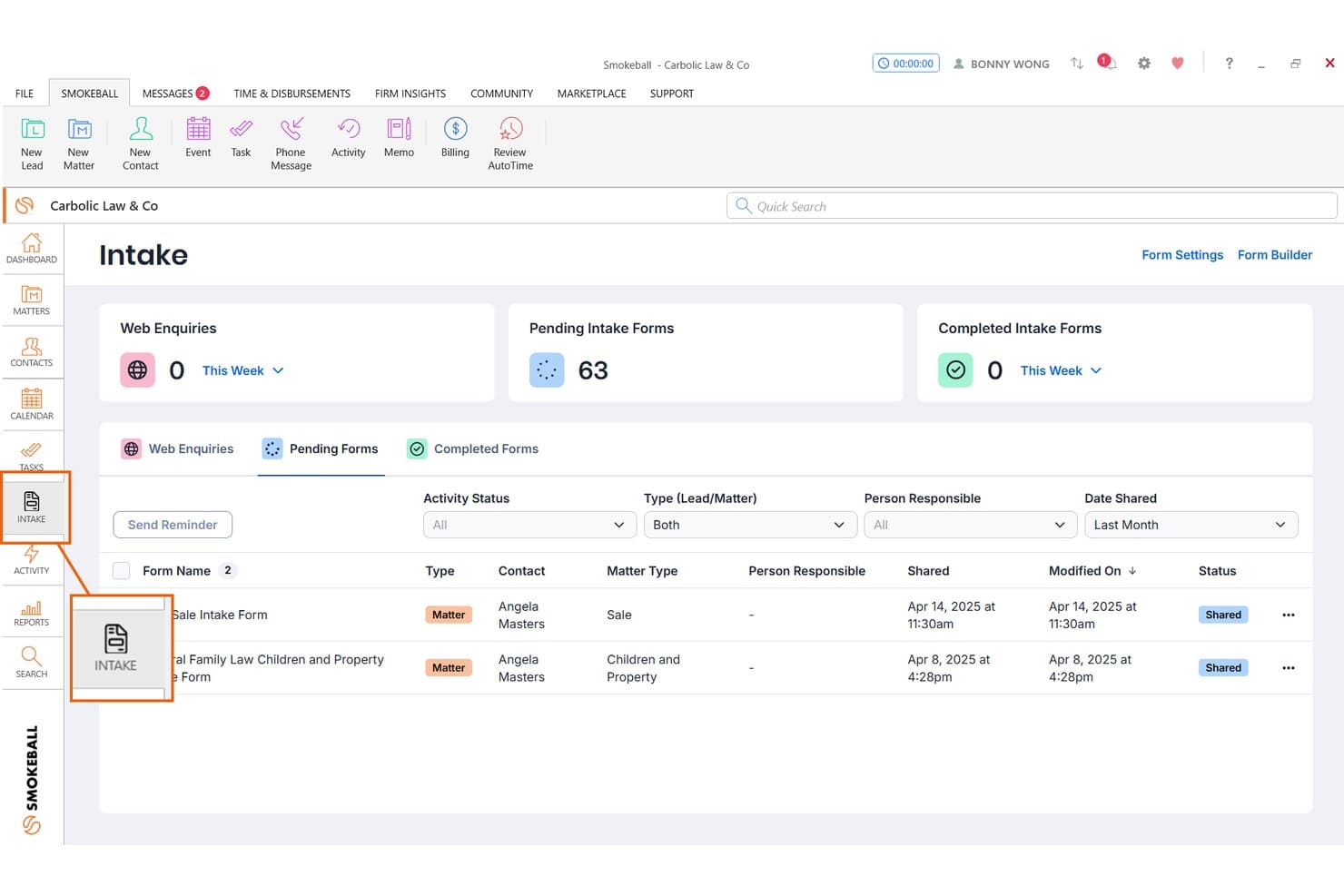
Smokeball tracks pending client intake forms for real estate matters. Smokeball is a legal practice management platform with dedicated real estate law features, including automated closing documents, deadline tracking, built-in transaction calculations, and client intake forms for lead capture and matter onboarding.
Who Is Smokeball Best For?
Smokeball is a good fit for real estate law firms that want lead intake forms connected directly to closing documents and matter workflows.
Why I Picked Smokeball
I picked Smokeball as one of the best because it's the only tool on my list that carries lead details directly into closing work without manual re-entry. When a prospect fills out a real estate intake form, their information flows into the matter file and auto-populates closing documents like deeds, disclosures, and settlement statements. I also like that deadline tracking flags financing, inspection, and closing dates tied to that same matter.
Smokeball Key Features
- Consultation scheduling and payment: Leads can book and pay for a consultation directly through the intake flow, before a matter is opened.
- Multilingual intake forms: Forms can be enabled in languages including Spanish, French, Arabic, Chinese, and others, with responses saved to the matter in the language used.
- Custom form builder: Firm owners can build lead or matter intake forms with conditional sections, grouped fields, and embeddable URLs for website placement.
- Matter stage tracking: Matters move through customizable stages, with automatic client portal messages sent when a matter reaches a new stage.
Smokeball Integrations
Smokeball offers native integrations with Microsoft 365 Outlook, calendar, and Word, plus a QuickBooks Online marketplace integration and InfoTrack support for eSignatures. An API isn’t documented.
Pros and Cons
Pros:
- Custom forms capture property and party details
- Matter deadlines support real estate closing workflows
- Closing documents draw on captured intake data
Cons:
- No automated multi-step prospect follow-ups
- No documented conflict or referral tracking
Learn more about Smokeball: Best for property details in matter handoffs
- Free demo available
- Pricing upon request
Visit WebsiteCustomer Rating:4.7/5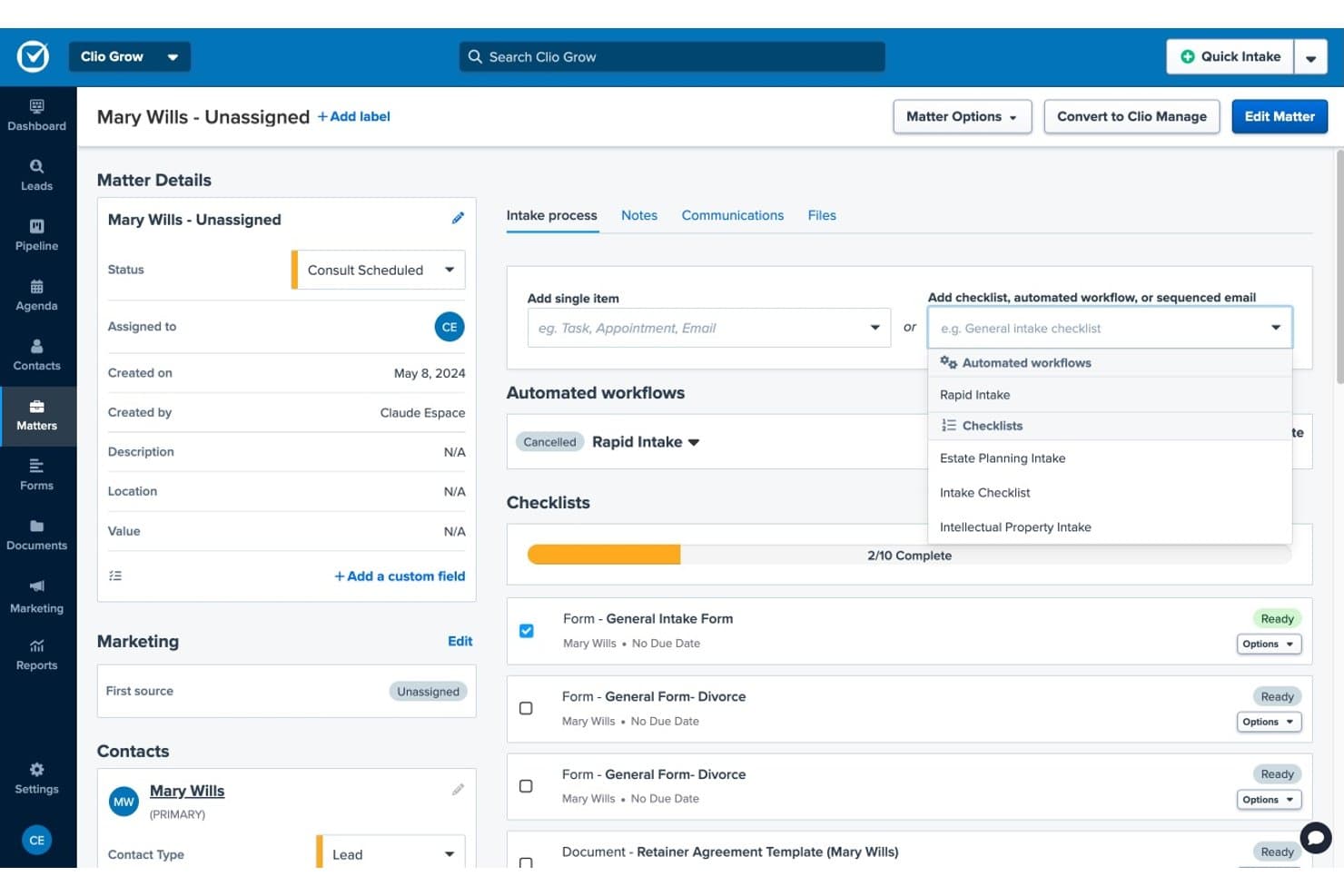
Clio Grow streamlines client intake with checklists and workflows. Clio Grow is a legal CRM and client intake platform that handles lead capture, intake form collection, conflict screening, consultation scheduling, and lead-to-matter conversion for law firms.
Who Is Clio Grow Best For?
Clio Grow is a strong fit for law firms that handle real estate matters alongside other practice areas and want intake, CRM, and matter handoff managed in one platform.
Why I Picked Clio Grow
I've included Clio Grow in my top picks because of how cleanly intake answers carry into new matter records when a prospect is hired. Custom fields like Property Address, Closing Date, and Escrow Amount populate directly into the matter, so nothing gets re-entered manually during handoff. I also like that Grow AI qualifies incoming inquiries by practice area and runs conflict checks before anyone books a consultation.
Clio Grow Key Features
- Lead Inbox: Collects leads from referrals, web forms, marketing services, and calls into one centralized inbox for staff review and follow-up.
- Conditional intake forms: Intake forms adapt follow-up questions based on a prospect's previous answers, with support for practice-area-specific fields like Property Address and Closing Date.
- Automated appointment reminders: Clio sends up to five automated text reminders before a scheduled consultation, plus email confirmations to both the firm and the client.
- Lead and referral reporting: Reports track lead sources, referral sources, retained referrals, and incoming value by practice area.
Clio Grow Integrations
Clio Grow has native integrations with Google Calendar, Microsoft Outlook, Google Local Services Ads, and Google Business Profile. Clio’s broader app ecosystem lists 300+ apps, and Grow offers a REST API v2 for custom integrations.
Pros and Cons
Pros:
- Centralized leads support intake follow-up
- Conditional forms capture closing details
- Property details carry into matter handoffs
Cons:
- No title-search or escrow workflows
- Grow–Manage updates may be unreliable
Learn more about Clio Grow: Best for intake alongside existing case systems
- Free demo available
- Pricing upon request
Visit WebsiteCustomer Rating:4.6/5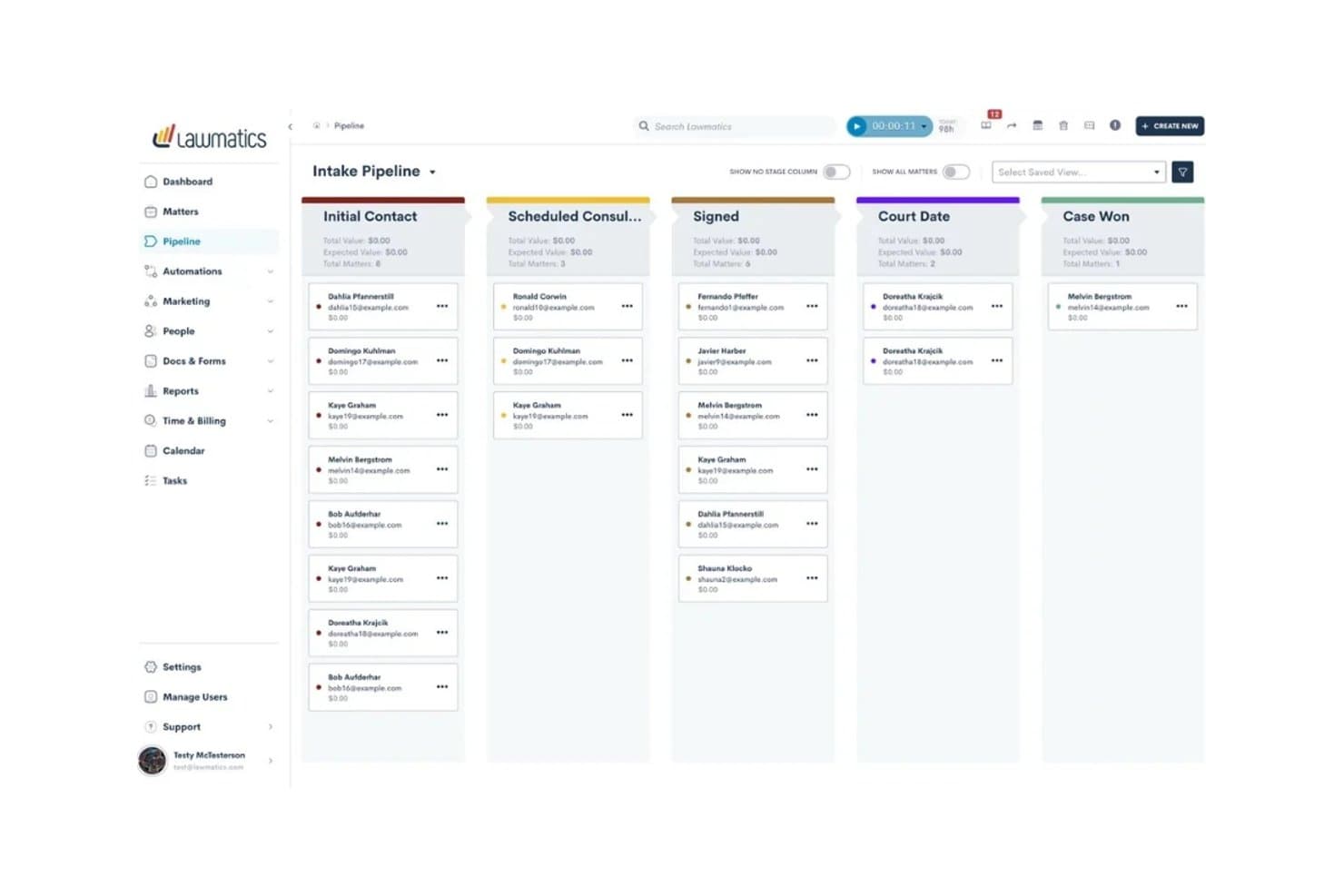
Lawmatics organizes client intake stages in a visual pipeline board. Lawmatics is a legal CRM and client intake platform that handles lead capture, pipeline management, automated follow-up, customizable intake forms, and matter conversion across practice areas including real estate law.
Who Is Lawmatics Best For?
Lawmatics works well for law firms that already use a practice management tool like Clio or Smokeball and need a dedicated intake and CRM layer to sit in front of it.
Why I Picked Lawmatics
I've included Lawmatics in my top picks because it sits cleanly in front of your existing practice management tools, handling intake without replacing what your firm already uses. I particularly like how its branching intake forms let you build real estate-specific question paths, so a client inquiry about a residential closing follows a different form flow than a property dispute. Merlin Qualify then evaluates those incoming leads against your criteria before they ever reach your desk.
Lawmatics Key Features
- Pipeline management: Tracks leads through customizable stages so your team can see where each real estate matter stands and what needs follow-up.
- Automated email and SMS follow-up: Sends multi-step, behavior-triggered messages to prospects via email and text without manual outreach.
- Conflict checking: Searches your firm's existing records for potential conflicts before a new real estate matter is formally opened.
- Practice management integrations: Syncs converted matter data directly to tools like Clio, Smokeball, and LEAP, reducing duplicate data entry at conversion.
Lawmatics Integrations
Lawmatics offers marketplace integrations with Clio, Smokeball, CARET Legal, LEAP, Filevine, and PracticePanther for lead or matter handoffs. It also provides a REST API with OAuth 2.0 and webhooks for custom integrations.
Pros and Cons
Pros:
- Pipeline stages clarify lead follow-up status
- Automated follow-ups keep closing inquiries moving
- Branching forms capture property-specific details
Cons:
- Live automation changes need careful testing
- Setup can take substantial staff time
Learn more about Lawmatics: Best for real estate matters through closing
- Free demo available
- Pricing upon request
Visit WebsiteCustomer Rating:4.4/5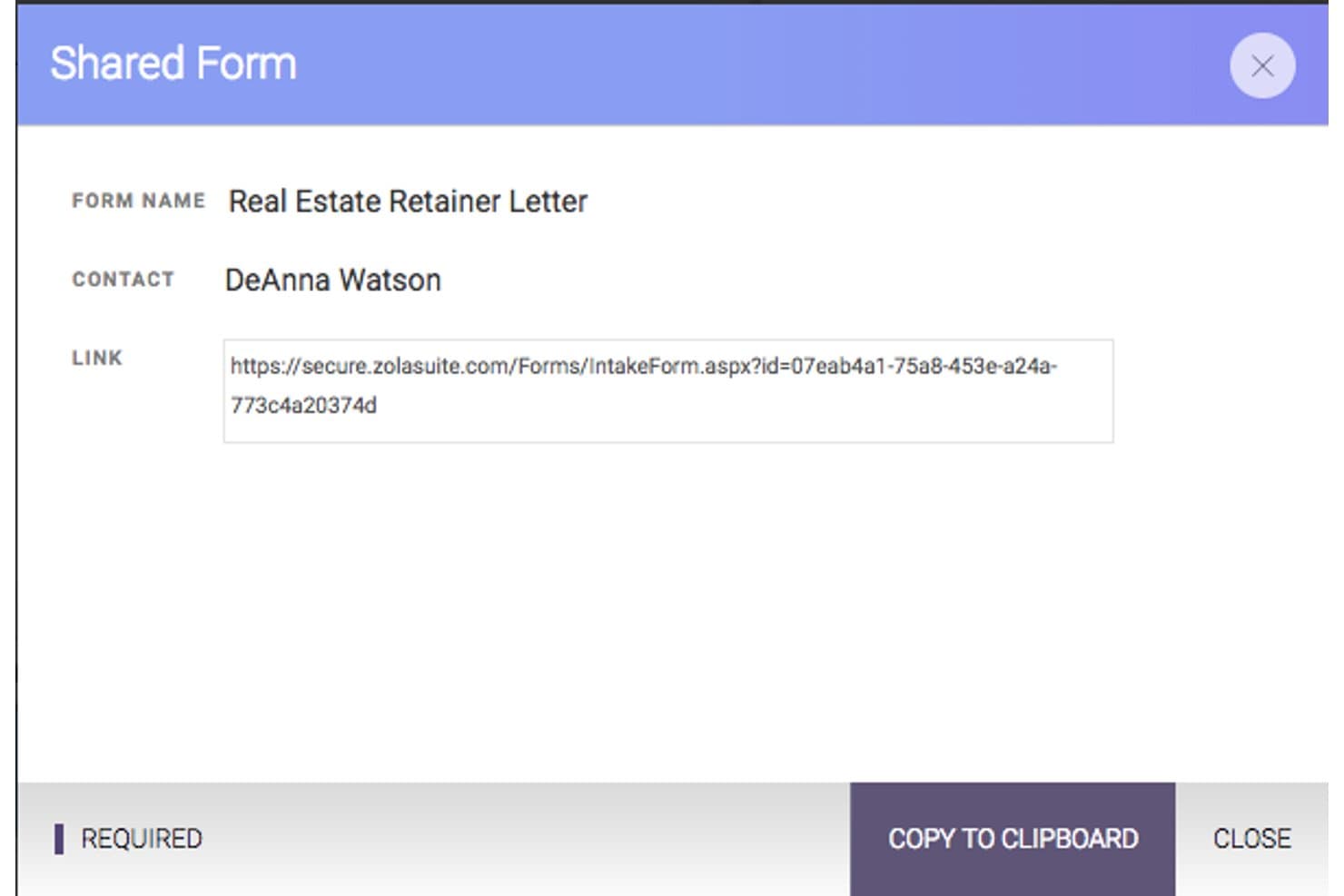
CARET Legal generates shareable intake form links for clients. CARET Legal is a legal practice management platform that covers matter management, document automation, billing, trust accounting, and client intake for real estate law firms handling work from consultations through closing.
Who Is CARET Legal Best For?
CARET Legal is a strong fit for real estate law firms that want to manage the full matter lifecycle—from client intake through closing—in a single platform.
Why I Picked CARET Legal
I picked CARET Legal because it's one of the few practice management platforms built to handle real estate matters from the first client consultation all the way through closing. I love that it ships with matter templates specifically for closings, 1031 exchanges, and leases, and that its document automation tools generate deeds, contracts, and closing documents directly from intake form data. The intake forms feed merge fields into those templates, so information collected from a new client actually travels through the matter.
CARET Legal Key Features
- Trust and escrow accounting: Manage IOLTA-compliant trust accounts with matter-linked deposit and disbursement tracking built directly into the platform.
- Client portal: Give clients a secure space to exchange documents, communicate, and view matter updates without relying on email.
- Two-way texting: Send and receive text messages with clients directly within CARET Legal as part of the matter communication record.
- Automated workflow scheduling: Trigger tasks and meetings based on matter activity to keep closing timelines and recurring processes on track.
CARET Legal Integrations
CARET Legal integrates with Lawmatics to sync lead and contact information, plus Google Workspace and Microsoft 365 for two-way email and calendar syncing. It also offers an API for custom integrations.
Pros and Cons
Pros:
- Matter records keep documents and billing together
- Real estate templates cover closing workflows
- Intake answers populate document merge fields
Cons:
- No intake-specific conversion or referral reporting
- Shared intake forms require an existing matter
Learn more about CARET Legal: Best for measuring lead and referral ROI
- Free demo available
- Pricing upon request
Visit WebsiteCustomer Rating:4.7/5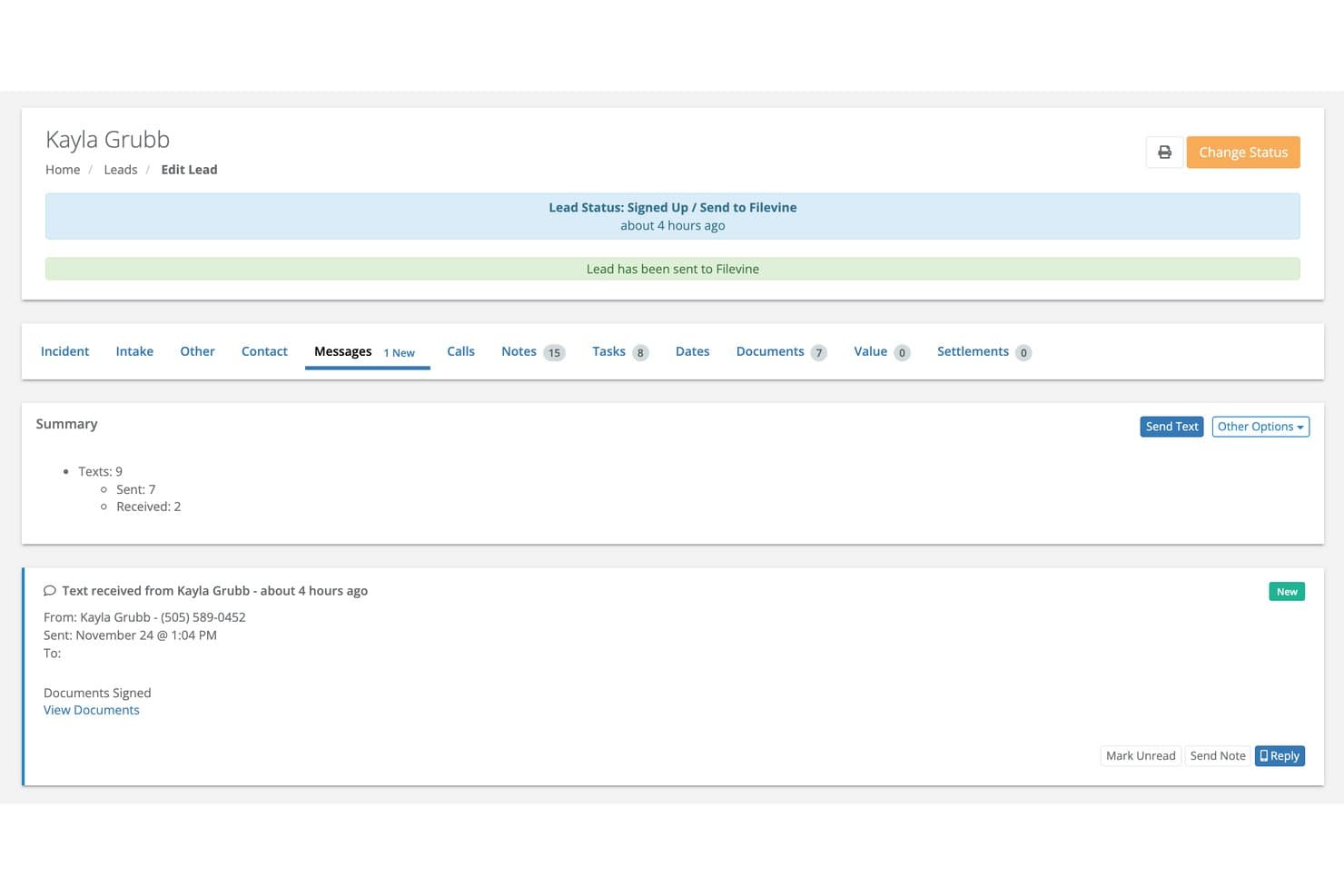
Lead Docket tracks client messages and document signing status in one place. Lead Docket is a legal intake platform built around lead capture, pipeline tracking, automated follow-up messaging, referral tracking, and marketing ROI reporting for law firms.
Who Is Lead Docket Best For?
Lead Docket is a strong fit for law firms with active marketing budgets that need to track where leads come from and whether that spend is paying off.
Why I Picked Lead Docket
I've included Lead Docket in my top picks because it gives law firms a genuinely clear picture of which marketing channels and referral sources are actually generating signed cases. I like how the campaign and revenue measurement tools let you log your marketing spend and then trace it directly to conversion rates and revenue by source, so you can see, for example, whether your Google Ads budget or a referral partner brought in a real estate matter that settled. The referral-fee tracking with automated partner check-ins is a feature I find particularly useful for real estate practices that run active referral networks.
Lead Docket Key Features
- Custom intake scripts: Build intake forms with configurable fields to collect property details and qualifying case information from prospective real estate clients.
- Automated messaging: Send follow-up messages to prospective clients automatically at set points during the intake process.
- LeadsAI case-success prediction: Get an AI-generated assessment of lead viability and case-success likelihood when a new lead enters the pipeline.
- Payment request links: Send clients links to pay consultation fees or retainers online via credit card or ACH transfer directly from the platform.
Lead Docket Integrations
Lead Docket has a documented native integration with Filevine for transferring signed-case files and mapping custom fields. It also lists CallRail and Google Ads among its integrations and provides an API for custom connections.
Pros and Cons
Pros:
- Custom intake fields capture property details
- Automated follow-ups keep prospects moving
- Tracks referrals through signed-case outcomes
Cons:
- Report figures can vary across reports
- No title or escrow intake workflows
Learn more about Lead Docket: Best for intake into conveyancing matters
- Free demo available
- Pricing upon request
Visit WebsiteCustomer Rating:4.2/5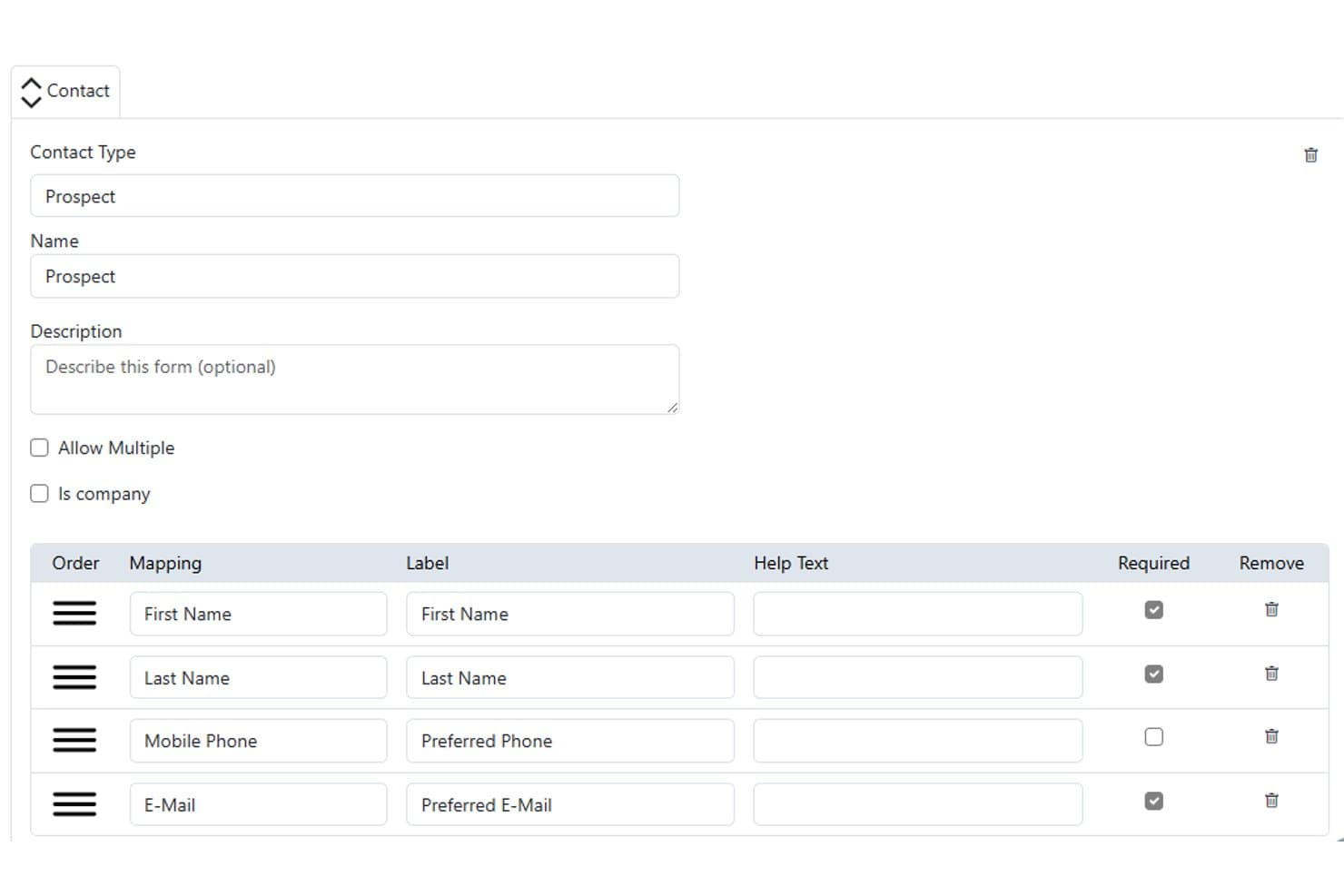
Actionstep lets users configure prospect contact intake forms with required fields. Actionstep is a law firm practice management platform with matter workflows, customizable Capture web forms, document automation, and client communications tools built for legal intake and matter management.
Who Is Actionstep Best For?
Actionstep is a strong fit for law firms that handle conveyancing matters and want to manage the full matter lifecycle—from intake form to file close—within a single platform.
Why I Picked Actionstep
I picked Actionstep as one of the best because its Capture web forms are built to feed directly into conveyancing matter workflows, which is exactly what real estate intake demands. I've set up forms with property address fields that map to matter-specific data in Actionstep, so when a prospect submits, staff can review and sync the data to open a matter with contacts already assigned. The conditional logic in Capture forms also lets me tailor what a prospective client sees based on their answers, keeping the intake experience clean for property transactions.
Actionstep Key Features
- Conflict check tool: Runs conflict-of-interest checks against existing contacts and matters before opening a new conveyancing file.
- Matter-specific document automation: Generates letters, contracts, and forms by pulling data directly from the associated matter record.
- Client portal: Lets you share matter updates, documents, and invoices with clients without leaving the platform.
- InfoTrack integration: Connects to InfoTrack to order property searches, certificates, and contracts and receive property information alerts.
Actionstep Integrations
Actionstep lists 50+ integrations and add-ons, including InfoTrack Australia, InfoTrack New Zealand, First AML, and Outlook for Office 365. It also supports Zapier and a REST API with REST Hooks and event notifications for custom integrations.
Pros and Cons
Pros:
- Custom matter types support tailored conveyancing processes
- Capture forms map property details into matters
- Conveyancing workflows organize checks, deadlines, and documents
Cons:
- Intake conversion reporting remains limited
- Form setup requires technical field configuration
Learn more about Actionstep: Best for AI phone intake and lead follow-up
- Free demo available
- Pricing upon request
Visit WebsiteCustomer Rating:4.2/5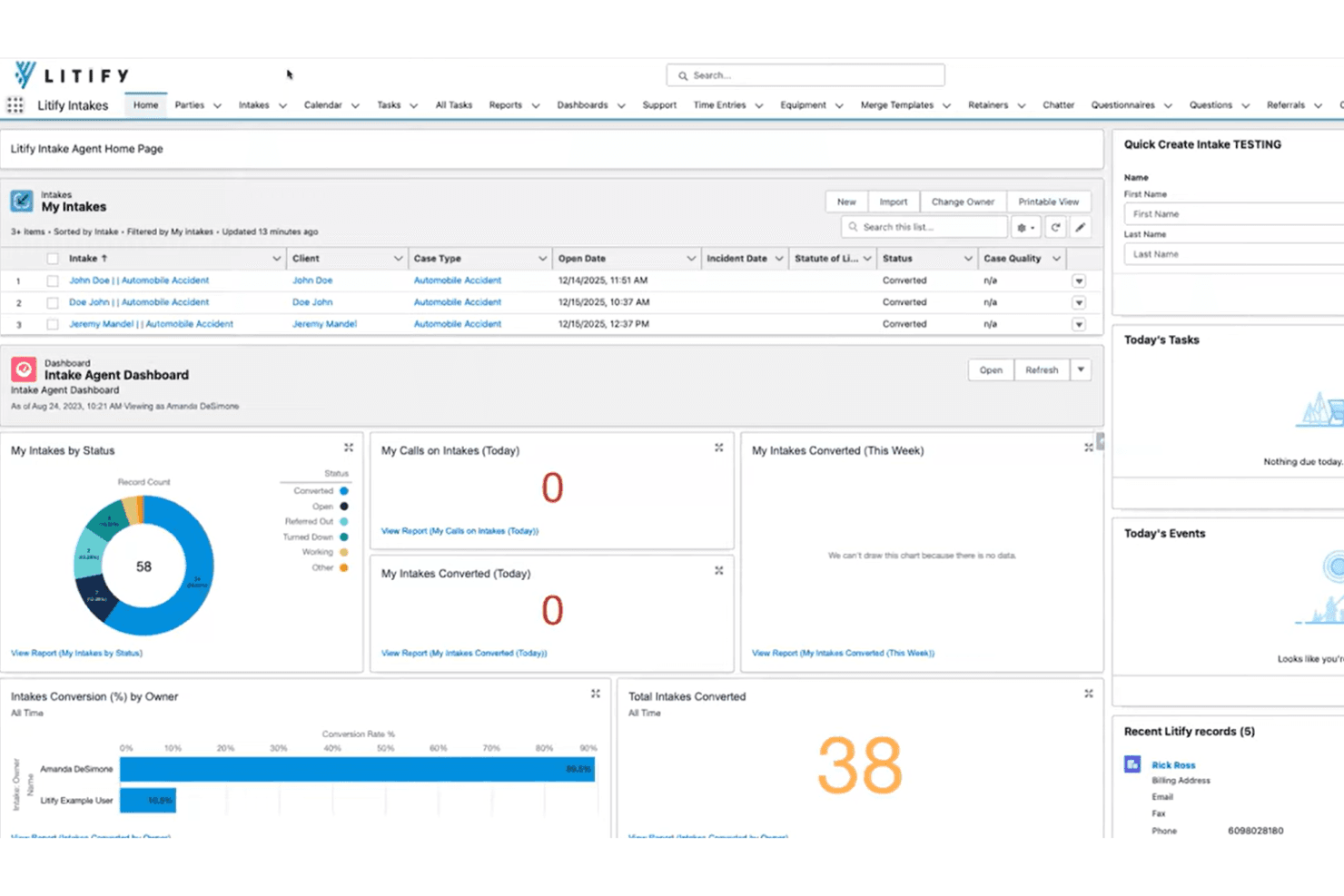
Litify centralizes client intake tracking and conversion metrics in one dashboard. Litify is a legal case management platform built on Salesforce that covers client intake, matter management, document handling, time and billing, and reporting—with AI-driven call intelligence, intake qualification, and lead routing across practice areas including real estate law.
Who Is Litify Best For?
Litify works well for multi-practice law firms that handle high call volumes and want AI-driven phone intake, lead scoring, and automated follow-up built into their case management platform.
Why I Picked Litify
I picked Litify as one of the best because its AI phone intake capabilities are genuinely hard to replicate in a single platform. LitifyAI Call Intelligence captures incoming calls, transcribes conversations, pre-fills intake questionnaires with cited answers, and automatically creates follow-up tasks, so no real estate inquiry slips through after a missed call. The Intake Qualifier Agent then screens each prospective matter against firm criteria before routing it to the right attorney.
Litify Key Features
- Dynamic intake questionnaires: Build adaptive intake forms that surface different questions based on a contact's earlier answers, so you can collect property and matter details without a fixed script.
- Conflict Check Agent: Screen prospective real estate matters against your firm's existing client database to flag conflicts before opening a new file.
- Configurable matter plans: Set up templated task lists by practice area and case type to track real estate matters from initial inquiry through resolution.
- Personalized dashboards: Monitor lead conversion, case activity, and team productivity in real time through no-code, role-specific dashboards.
Litify Integrations
Litify offers a native Outlook integration and connects with RingCentral, Dialpad, Aircall, Zoom, CallRail, Twilio, and Five9 through Call Intelligence. It’s built on Salesforce and provides an API for custom integrations.
Pros and Cons
Pros:
- Dashboards track intake conversion and referrals
- Follow-up tasks capture missed inquiries
- AI call summaries prefill intake questionnaires
Cons:
- Busy screens can slow intake workflows
- No documented property-specific intake templates
Learn more about Litify: Best for linking leads to closing workflows
- 14-day free trial
- From $49/user/month (billed annually)
Visit WebsiteCustomer Rating:3.7/5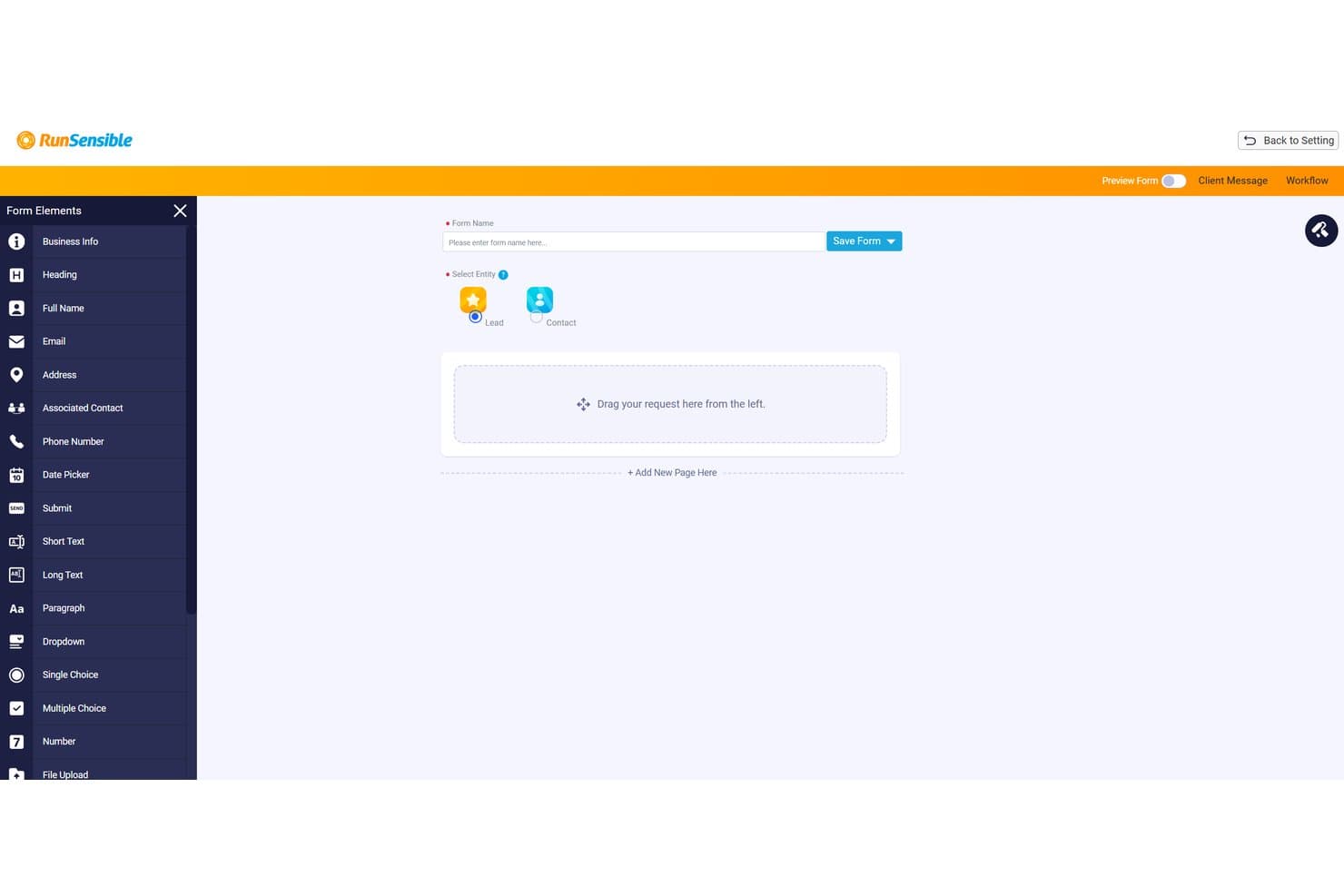
RunSensible lets users build intake forms with drag-and-drop fields. RunSensible is a legal practice management platform with real-estate-specific intake forms, matter workflows, client scheduling, and document automation built for law firms handling property transactions.
Who Is RunSensible Best For?
RunSensible is a strong fit for real estate law firms that want to connect client intake directly to matter workflows, billing, and scheduling in one platform.
Why I Picked RunSensible
I picked RunSensible as one of the best because it's the only tool on my list that's explicitly built to carry a lead from first contact all the way through to a closing workflow. The intake forms collect real estate-specific details upfront, including property address, MLS number, closing date, and lender information, so nothing needs to be re-entered when a lead converts to a matter. I also like that conditional logic keeps those forms short without sacrificing the data you actually need to open a file.
RunSensible Key Features
- Real-estate matter workflows: Dedicated workflows for residential purchase, sale, and refinance track milestones, document requirements, and signing readiness within a single matter record.
- Client portal with intake form access: Clients log in via email OTP to view and complete intake forms the firm shares, with the portal displaying creation and completion dates.
- Booking page with property-specific fields: The scheduling page collects closing date, MLS/roll number, lender, agent, and condo details at the time a client books an appointment.
- Trust accounting and billing: Built-in legal and trust accounting, online payments, and time and expense tracking are included from the Advanced plan up.
RunSensible Integrations
RunSensible offers native integrations with Google Calendar, Outlook, iCal, LawPay, Clio Manage, Zoom, and Microsoft Teams. API availability isn't documented.
Pros and Cons
Pros:
- Intake connects with matters and client communications
- Property and closing fields reduce re-entry
- Website forms create structured lead records
Cons:
- No intake conversion or referral analytics documented
- No documented conflict screening for new leads
Learn more about RunSensible: 10Best for marketing and referral ROI tracking
Captorra
- Free demo available
- Pricing upon request
Visit WebsiteCustomer Rating:4/5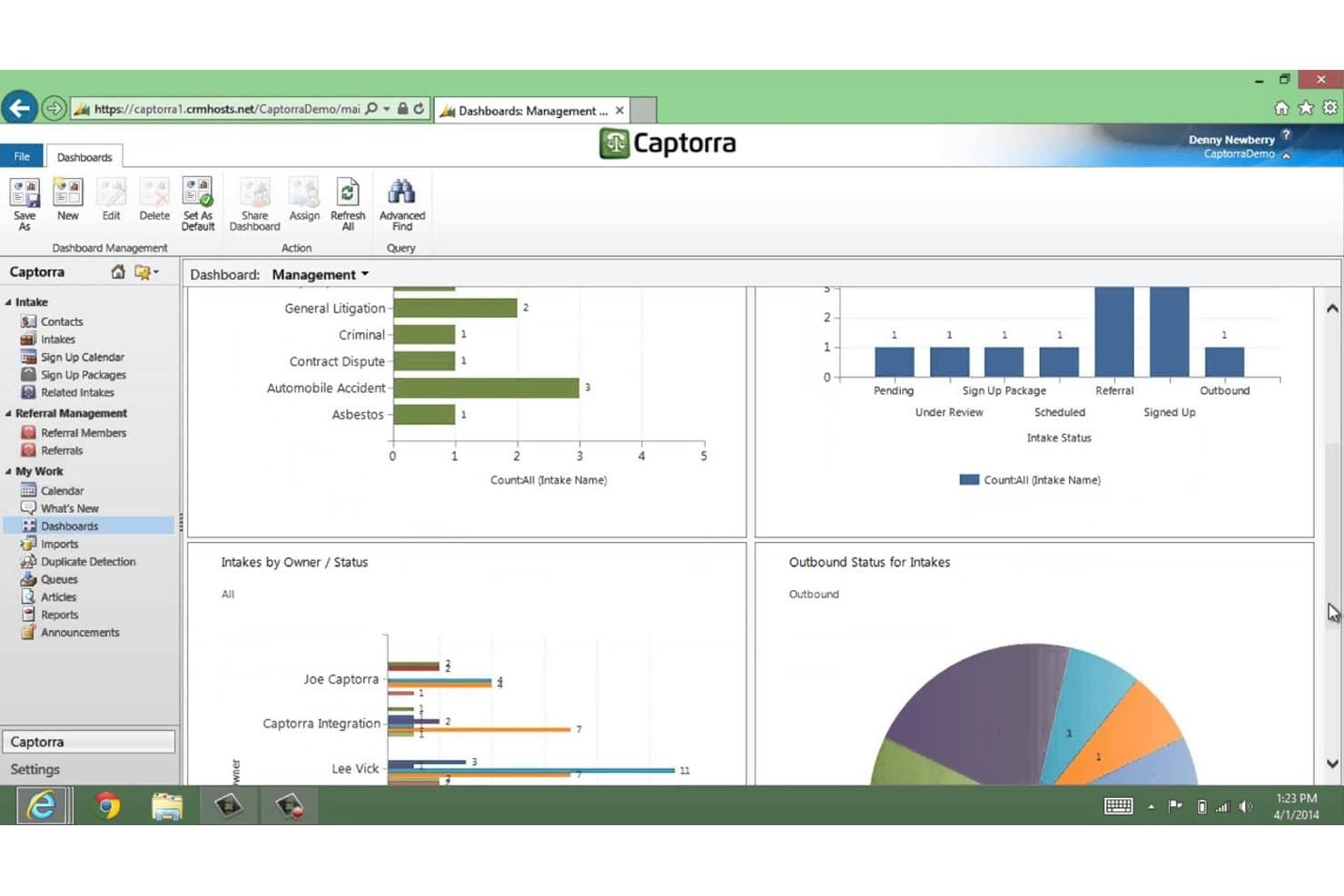
Captorra tracks intake status and case types via management dashboards. Captorra is a law firm intake platform that handles lead capture, prospect qualification, automated follow-up communication, referral tracking, and marketing ROI reporting across the full client conversion pipeline.
Who Is Captorra Best For?
Captorra is a strong fit for law firms that run active marketing campaigns and need clear visibility into which lead sources and referral partners are actually driving conversions.
Why I Picked Captorra
I picked Captorra as one of the best because its referral tracking and marketing ROI reporting are genuinely hard to replicate in a single platform. The dedicated referral portal lets outside partners log status updates without needing a license, so you can see exactly which referral sources convert to signed clients. Campaign-level cost-per-lead and conversion dashboards then show which marketing channels justify their spend.
Captorra Key Features
- Custom intake fields: Add unlimited custom fields to capture property-specific details, client information, and matter types relevant to real estate inquiries.
- Automated turn-down emails: Generate turn-down emails or merge letters for prospects who don't meet your firm's qualification criteria.
- E-sign integration: Send and collect signatures on fee agreements and other documents directly within the intake workflow.
- Call tracking integration: Connect CallRail or Call Tracking Metrics to post phone-tracking data into intake records for source attribution.
Captorra Integrations
Captorra documents 45+ partners, including native integrations with Needles, TrialWorks, Filevine, ProLaw, and TimeMatters, plus Microsoft Teams, SharePoint, OneDrive, and eSign. It supports custom connections through a JSON lead-posting API and Zapier.
Pros and Cons
Pros:
- Automates prospect follow-up and intake tracking
- Reviewers praise marketing source attribution
- Tracks referral sources and conversion rates
Cons:
- Reviewers report unreliable or difficult reports
- No documented property transaction workflows
Learn more about Captorra:
Alte programe de preluare a clienților pentru drept imobiliar
Iată câteva opțiuni suplimentare care nu au ajuns pe lista mea scurtă, dar merită totuși verificate:
- 11LexriaBest for real estate offer and agent details
- 12PracticePantherBest for intake-to-matter handoffs
- 13CosmoLexBest for intake linked to closing workflows
- 14CasePeerBest for PI firms connecting intake to cases
- 15CloudLexBest for PI firms' intake-to-case workflow
- 16LawcusBest for carrying leads into closing workflows
- 17Rocket MatterBest for leads with legal practice management
- 18DocketWiseBest for multilingual immigration form prep
- 19Law RulerBest for intake and lead-nurture workflows
- 20IntakerBest for after-hours lead-to-call handoffs
Related Reviews
How I Evaluate Client Intake Software for Real Estate Law
I split my evaluation into three parts. Core functionality carries the most weight: a tool must capture leads from multiple channels and convert qualified intakes into matters without re-entering data. I then look for standout features like e-signature for engagement letters, and consider support quality and onboarding value beyond the feature set.
Core Functionality (Table Stakes for This List)
When I'm selecting tools for my list, I score each one on a scale from 0 (does not offer the functionality) to 5 (excels in this area) for each core functionality listed below. I then convert the total into a percentage to help assess each tool's overall fit, with extra weight on any functionalities I've deemed essential.
- Lead and Intake Capture (Essential): I check whether leads from web forms, phone, and email land in one pipeline without manual entry or duplicate records.
- Intake-to-Matter Conversion (Essential): I look for how much client and property data carries over when a qualified lead becomes an active matter in the system.
- Customizable Intake Forms: Real estate matters need fields for property address, transaction type, and closing date. I evaluate whether forms support conditional logic for different matter types.
- Automated Client Communication: I look at follow-up sequences, appointment scheduling, and whether messages adjust based on a prospect's status or response.
- Conflict and Referral Tracking: Firms need to screen new leads against existing clients and trace which referral sources send viable work. I check both capabilities together.
- Reporting on Intake Performance: I evaluate whether dashboards show conversion rates, source performance, and pipeline status rather than just raw lead counts.
Once I have a list of tools that meet the criteria, I consider what sets each platform apart.
Differentiating Factors (What Sets Vendors Apart)
Here's how I compare and contrast different vendors:
Standout Features
E-signature for engagement letters is a big one. I look for tools that let prospects sign retainers and disclosures inside the intake flow, not through a separate app. Multi-party intake coordination matters just as much in real estate, where a single transaction can involve buyers, sellers, lenders, and agents. I check whether the platform can collect information from all parties into one matter record without creating duplicates. I also evaluate mobile field capture, since attorneys often need to log leads or grab signatures on-site at closings.
Beyond Features
I check how well each tool connects to the case management, document assembly, and title systems a firm already runs. A broken integration between intake and your practice management platform means someone re-enters property and client data by hand, which defeats the purpose. I also evaluate onboarding support and template availability, since intake coordinators at smaller firms often need vendor-provided real estate form templates and guided setup to get value quickly. Vendor uptime and support responsiveness matter too, especially around closing deadlines when a downed intake form can mean a lost client.
Cum să alegi un program de preluare a clienților pentru drept imobiliar
Alege un sistem testând dacă detaliile despre preluarea clienților din domeniul imobiliar rămân corecte pe măsură ce potențialii clienți trec de la solicitarea inițială la dosar și finalizare.
| Dacă prioritatea ta este… | Caută… |
|---|---|
| Dacă prioritatea ta este…Capturarea detaliilor despre proprietate și tranzacție | Caută…Câmpuri pentru adresă, tipul tranzacției și data finalizării |
| Dacă prioritatea ta este…Evitarea înregistrărilor duplicate | Caută…O modalitate clară de a asocia mai multe părți unei singure tranzacții |
| Dacă prioritatea ta este…Păstrarea activității de preluare la deschiderea dosarului | Caută…Transferul detaliilor despre client și proprietate fără reintroducerea datelor |
| Dacă prioritatea ta este…Înțelegerea calității recomandărilor | Caută…Rapoarte care conectează sursele recomandărilor cu rezultatele potențialilor clienți |
Cum să îți evaluezi lista scurtă
- Rulează o tranzacție de test: Într-o perioadă de testare, introdu un cumpărător, un vânzător, adresa proprietății și data finalizării, apoi transformă potențialul client într-un dosar.
- Testează coordonarea părților: Folosește o tranzacție fictivă cu trei părți și confirmă că fiecare persoană este asociată aceluiași dosar, fără înregistrări duplicate.
- Solicită o mapare a câmpurilor: Cere un document care să arate ce câmpuri de preluare se transferă în dosare și care necesită introducere manuală.
- Verifică raportarea recomandărilor: Folosește cinci potențiali clienți de test cu surse diferite și verifică dacă un raport diferențiază solicitările inițiale de dosarele create în urma conversiei.
- Alege compromisul potrivit: Preferă un instrument dedicat pentru preluarea clienților atunci când monitorizarea recomandărilor și calificarea determină fluxul tău de lucru; preferă o platformă pentru cabinete juridice atunci când este mai important să păstrezi detaliile dosarului conectate până la finalizare.
Ce este un program de preluare a clienților pentru drept imobiliar?
Programele de preluare a clienților pentru drept imobiliar captează și califică potențialii clienți, urmăresc recomandările și transferă detaliile relevante în dosarele juridice. Acestea pot colecta informații precum adresele proprietăților, tipurile de tranzacții și datele finalizării. Aceste înregistrări ajută echipa să gestioneze solicitările și să conecteze detaliile despre client și proprietate la activitatea care urmează.
Funcțiile programelor de preluare a clienților pentru drept imobiliar
Iată principalele funcții pe care le caut la un program de preluare a clienților pentru drept imobiliar:
- Colectarea și distribuirea solicitărilor: Colectați solicitările din surse precum formulare web, apeluri telefonice și e-mail într-un singur flux. Atribuiți fiecare solicitare membrului potrivit al echipei pentru analiză și urmărire.
- Formulare de preluare personalizabile: Colectați detalii precum adresa proprietății, tipul tranzacției, data încheierii și informațiile de contact ale clientului. Câmpurile condiționale pot afișa întrebări relevante pentru fiecare tip de speță.
- Comunicarea automatizată cu clienții: Trimiteți mesaje de urmărire, mementouri pentru programări sau răspunsuri bazate pe stadiu după primirea unei solicitări. Acest lucru ajută echipa să țină potențialii clienți informați, urmărindu-le în același timp răspunsurile.
- Urmărirea conflictelor și a recomandărilor: Verificați potențialii clienți în raport cu evidențele existente și înregistrați persoana care a recomandat fiecare solicitare. Urmăriți rezultatele solicitărilor în funcție de sursă pentru a vedea care recomandări duc la spețe.
- Conversia solicitării în speță: Transferați detaliile relevante despre client și proprietate de la o solicitare calificată într-o speță nouă. Verificați ce câmpuri sunt preluate, astfel încât personalul să nu fie nevoit să reintroducă informații sau să corecteze date lipsă.
- Coordonarea mai multor părți: Asociați cumpărătorii, vânzătorii, creditorii, agenții și alte persoane de contact cu o singură înregistrare a tranzacției. Astfel, informațiile fiecărei persoane rămân asociate proprietății și speței relevante.
- Semnătură electronică pentru documentele de angajament: Trimiteți scrisori de angajament sau declarații pentru semnare electronică în cadrul procesului de preluare. Urmăriți starea semnăturii înainte de deschiderea sau avansarea unei spețe.
- Raportarea performanței procesului de preluare: Analizați starea fluxului, ratele de conversie și rezultatele surselor de recomandări în rapoarte sau tablouri de bord. Aceste valori vă ajută să identificați unde se blochează solicitările și care surse generează clienți care își păstrează relația cu firma.
Beneficiile software-ului de preluare a clienților pentru dreptul imobiliar
Iată câteva beneficii frecvente pe care le puteți obține de la software-ul de preluare a clienților pentru dreptul imobiliar:
- Colectarea centralizată a solicitărilor: Introducerea solicitărilor din formulare web, apeluri telefonice și e-mail într-un singur flux oferă echipei un loc comun pentru analizarea și atribuirea solicitărilor.
- Preluare specifică proprietății: Formularele personalizabile colectează detalii precum adresa proprietății, tipul tranzacției și data încheierii, cu întrebări condiționale pentru diferite spețe.
- Transferuri mai clare ale spețelor: Conversia unei solicitări calificate într-o speță poate transfera detaliile despre client și proprietate, reducând introducerea duplicată a datelor.
- Evidențe coordonate ale tranzacțiilor: Asocierea cumpărătorilor, vânzătorilor, creditorilor și agenților cu o singură tranzacție păstrează informațiile fiecărei persoane legate de speța relevantă.
- Urmărire promptă: Mesajele automatizate, mementourile și programarea întâlnirilor ajută echipa să revină către potențialii clienți în funcție de starea sau răspunsul acestora.
- Verificări mai timpurii ale conflictelor: Verificarea noilor potențiali clienți în raport cu evidențele existente ajută echipa să semnaleze eventualele conflicte înainte de deschiderea unei spețe.
- Informații despre sursele recomandărilor: Urmărirea surselor și rezultatelor solicitărilor în rapoartele procesului de preluare ajută echipa să vadă care recomandări duc la spețe convertite.
Costurile și prețurile software-ului de preluare a clienților pentru dreptul imobiliar
Prețurile variază în funcție de funcționalități, dimensiunea echipei și suplimente. Aceste intervale tipice vă pot ajuta să comparați software-ul de preluare a clienților pentru dreptul imobiliar.
Tabel comparativ al planurilor pentru software-ul de preluare a clienților pentru dreptul imobiliar
| Tipul planului | Preț mediu | Funcționalități frecvente |
|---|---|---|
| Tipul planuluiPlan personal | Preț mediu$20–$50 per utilizator/lună | Funcționalități frecventeFormulare personalizate de preluare, urmărirea solicitărilor, programarea întâlnirilor și mesaje de bază pentru urmărire. |
| Tipul planuluiPlan pentru companii | Preț mediu$50–$150 per utilizator/lună | Funcționalități frecventeUrmăriri automatizate, urmărirea recomandărilor, semnături electronice, raportare și transferuri ale spețelor. |
| Tipul planuluiPlan pentru întreprinderi | Preț mediu$150–$300+ per utilizator/lună | Funcționalități frecventeFluxuri de lucru personalizate, permisiuni pentru mai multe birouri, raportare avansată, asistență pentru integrări și configurare inițială dedicată. |
Întrebări frecvente
Câteva răspunsuri la întrebările frecvente despre software-ul de preluare a clienților pentru drept imobiliar:
Depunerea unui formular online de preluare a datelor face ca o persoană să devină client?
De obicei, nu: simpla depunere a unui formular online nu confirmă faptul că firma reprezintă persoana respectivă. Existența unei relații avocat-client poate depinde de normele locale și de comunicările dintre părți. Afișați lângă formular o notificare clară prin care precizați că depunerea acestuia nu creează o relație de reprezentare și că firma trebuie să confirme acceptarea. Informați solicitanții când se pot aștepta să primească un răspuns și oferiți o modalitate separată pentru termenele urgente. Solicitați unui avocat să verifice formularea pentru jurisdicțiile în care își desfășoară activitatea firma dumneavoastră.
Ce informații ar trebui să colecteze un formular de preluare a datelor înainte de verificarea conflictelor?
Înainte de verificarea conflictelor, solicitați numele necesare pentru identificarea clientului potențial, a celorlalte părți și a entităților relevante. Colectați date de contact de bază, adresa proprietății, tipul tranzacției și orice avocat al părții adverse cunoscut. Evitați să solicitați în această etapă o descriere detaliată, documente, numere de cont sau poziții sensibile de negociere. Normele privind informațiile despre clienții potențiali diferă în funcție de jurisdicție, așa că solicitați unui avocat să stabilească domeniul de aplicare al formularului și controalele de acces. După finalizarea verificării, invitați persoana să furnizeze informații complete printr-un canal aprobat.
Poate o firmă de avocatură să utilizeze sistemul său de gestionare a activității în locul unui software dedicat pentru preluarea datelor?
Da, dacă acesta poate gestiona activitățile de dinaintea deschiderii unui dosar. Testați dacă preia solicitările din canalele utilizate efectiv de dumneavoastră, atribuie verificarea, urmărește sursele recomandărilor și transferă într-un dosar detaliile despre proprietate și părți. Rugați personalul să deruleze o tranzacție de test și verificați dacă există contacte duplicate sau câmpuri care nu sunt transferate corect. Dacă sistemului îi lipsesc etapele de gestionare a potențialilor clienți, formularele de preluare a datelor sau urmărirea acțiunilor ulterioare, un software dedicat pentru preluarea datelor poate acoperi acest deficit. Comparați costurile, permisiunile și întreținerea înainte de a adăuga un alt sistem.