

Legal operations software gives your legal team one place to track matters, control spending, manage documents, and automate workflows. If you’re tired of work slipping through the cracks or systems that don’t fit your firm’s needs, you know that the right tool can make or break how your practice handles growth, compliance, and collaboration. In this list, I’ll break down what matters—from workflow automation and reporting to integrations with platforms like ServiceNow or LexisNexis—so you can pick software that fits your operations, budget, and the realities of running a legal department today.
Why Trust Our Software Recommendations
6,700+
Reviews
20
Industry experts
16+
Evaluation factors
14
Years
Our team has been testing and reviewing software since 2012. As legal practice leaders ourselves, we know how difficult—and important—it is to choose the right software.
For this guide, we evaluated tools using hands-on testing and independent research, scoring tools using our selection criteria.
Our reviews reflect our human editorial judgment, not a sales pitch.
Best Legal Operations Software
This comparison chart summarizes pricing details for my top legal operations software selections to help you find the best one for your budget and practice needs.
| Tool | Best For | Trial Info | Price | ||
|---|---|---|---|---|---|
| 1 | Best for matter and CLM-led in-house legal ops | Free trial + free demo available | Pricing upon request | Website | |
| 2 | Best for e-billing and spend analytics at scale | Free demo available | Pricing upon request | Website | |
| 3 | Best for legal ops built on a TR ecosystem | Free demo available | Pricing upon request | Website | |
| 4 | Best for LexisNexis-integrated legal ops | Free demo available | Pricing upon request | Website | |
| 5 | Best for small legal teams managing matters in-house | 14-day free trial | From $100/user/month | Website | |
| 6 | Best for AI-driven invoice review and spend control | Free demo available | Pricing upon request | Website | |
| 7 | Best for unified legal ops with AI-native intake | Free demo available | Pricing upon request | Website | |
| 8 | Best for global corporate legal departments | Free demo available | Pricing upon request | Website | |
| 9 | Best for Fortune 100-scale legal ops | Not available | Pricing upon request | Website | |
| 10 | Best for enterprises on ServiceNow managing legal ops | Free demo available | Pricing upon request | Website |


Legal Operations Software Reviews
Below are my detailed summaries of the best legal operations software that made it onto my shortlist. My reviews offer a detailed look at the features, best use cases, and integrations of each platform to help you find the best one for you.
 Best for matter and CLM-led in-house legal ops
- Free trial + free demo available
- Pricing upon request
Visit WebsiteCustomer Rating:4.5/5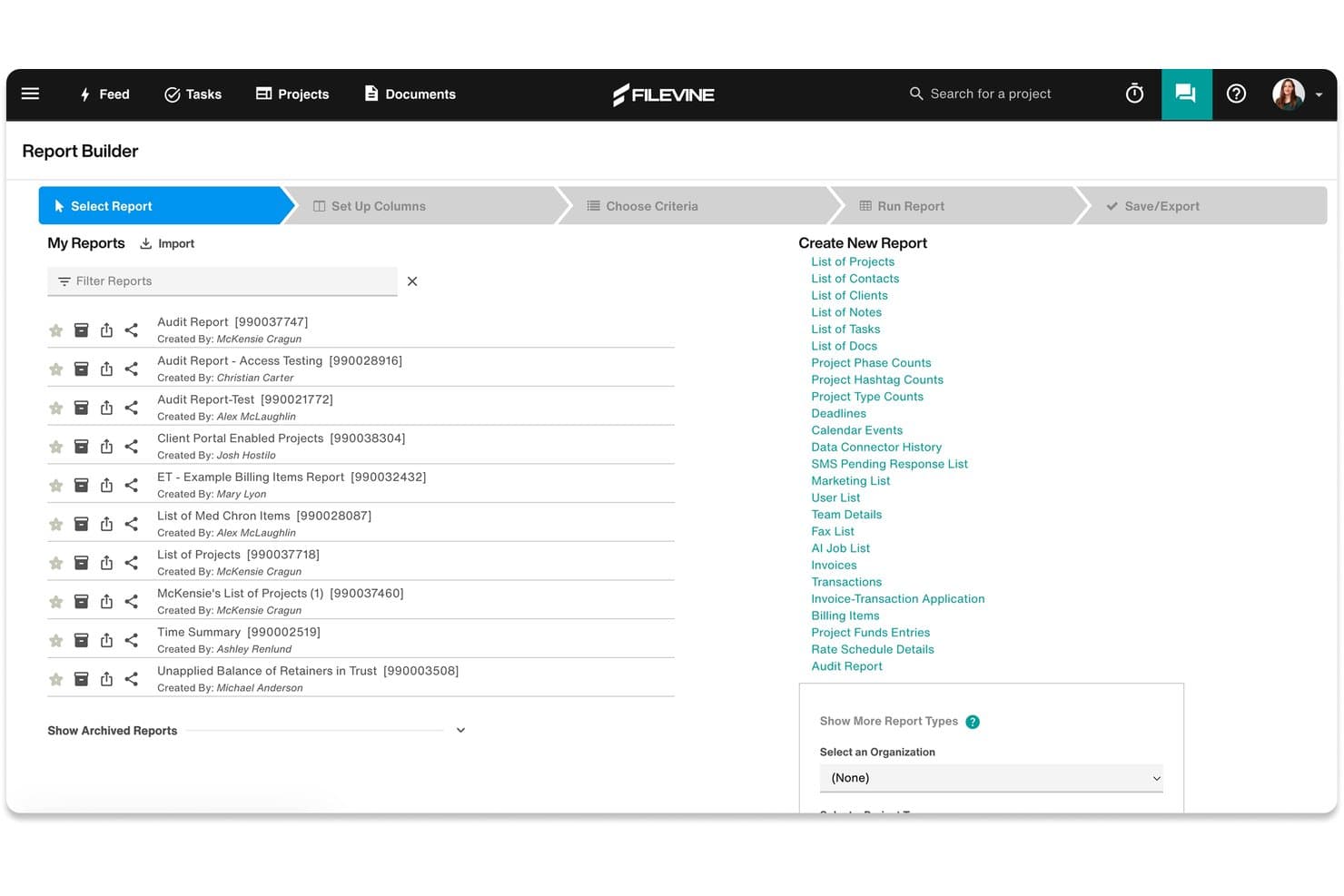
Filevine's Report Builder lets users create and manage custom legal reports. Filevine is a legal operations platform for in-house counsel that covers matter management, contract lifecycle management, legal holds, task tracking, and outside counsel collaboration in a single interface.
Who Is Filevine Best For?
Filevine is a strong fit for in-house legal teams that need to manage matters and contracts in one place, particularly those handling high contract volumes or complex outside counsel relationships.
Why I Picked Filevine
Filevine earns its spot on my shortlist because of how tightly it connects matter management with contract lifecycle management in a single platform. I particularly like the contract clause analytics feature, which flags negotiation risks by analyzing clause-level data across your contract portfolio—something most standalone CLM tools don't do at this depth. The automated legal hold management is also genuinely useful, handling notifications and follow-ups without manual tracking.
Filevine Key Features
- Vinesign e-signature: Send contracts for signature directly within the platform using Filevine's built-in e-signature tool, without routing documents to a separate signing service.
- Outside counsel guest access: Assign customized roles and permissions to external counsel or vendors so they can collaborate on matters without accessing unrelated files.
- Matter budgeting and cost tracking: Set budgets at the matter level and track spend against them, giving you visibility into outside counsel costs and project expenses.
- AI data mapping: Upload documents and let FilevineAI extract and map relevant data into structured fields across your matter records automatically.
Filevine Integrations
Filevine offers 40+ native and partner integrations, including Microsoft 365, Outlook, Gmail, Google Calendar, Microsoft Teams, Slack, QuickBooks, RingCentral, Dialpad, and Domo, and it connects with Zapier. An API is also available for custom integrations, and Workato is supported for building additional workflow automations.
Pros and Cons
Pros:
- Contract clause analytics highlights negotiation risks
- Automated legal hold notifications and tracking
- Matter and contract management in one interface
Cons:
- High-volume users may face performance lags
- Workflow customization sometimes requires vendor support
Learn more about Filevine: Best for e-billing and spend analytics at scale
- Free demo available
- Pricing upon request
Visit WebsiteCustomer Rating:4.5/5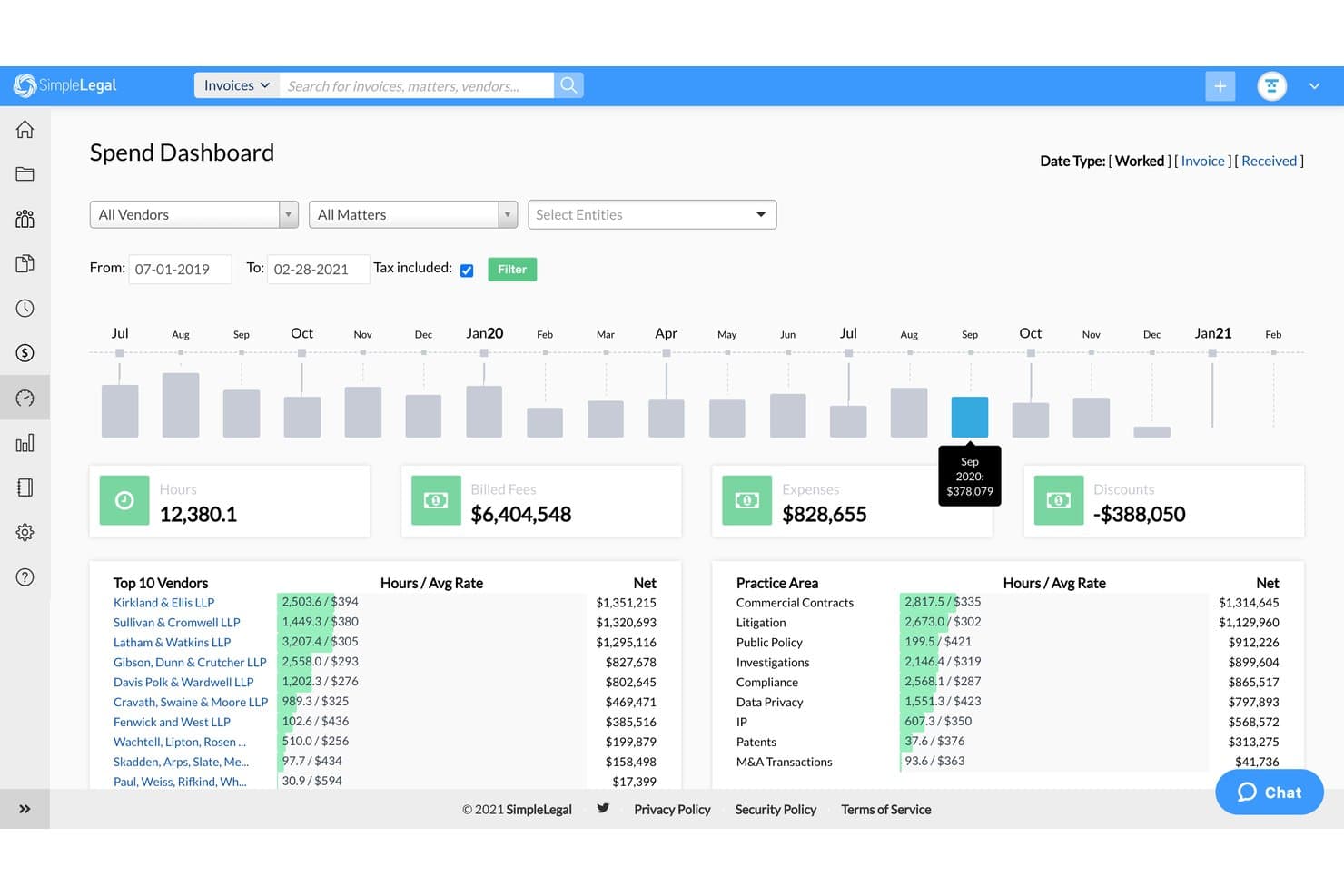
SimpleLegal's Spend Dashboard tracks legal spend, hours, and vendor costs. SimpleLegal is an enterprise legal management (ELM) platform that covers e-billing, matter management, vendor management, and spend analytics for corporate legal departments.
Who Is Onit SimpleLegal Best For?
SimpleLegal is built for corporate legal departments that manage significant outside counsel spend and need full visibility into invoices, budgets, and vendor performance at scale.
Why I Picked Onit SimpleLegal
I picked SimpleLegal as one of the best because the depth of its e-billing and spend analytics features is unlike most ELM tools I've seen. It manages over $5.2 billion in annual legal spend across its user base, and the rules-based invoice review catches billing non-compliance before it ever reaches approval. I also like that the reporting layer goes beyond basic dashboards, letting you benchmark vendor performance across matters and set Alternative Fee Arrangements directly from spend data.
Onit SimpleLegal Key Features
- Matter management: Track internal and external matters with standardized intake, task templates, and workflow tools that keep every matter progressing.
- CounselGO vendor portal: A dedicated portal for outside counsel that reduces billing back-and-forth and clarifies expectations between your legal team and law firms.
- Timekeeper management: Track and report on timekeeper rates and activity across matters to keep billing accurate and audit-ready.
- AP/ERP integrations: Connect SimpleLegal to your finance and accounting systems via APIs, prebuilt connectors, or flat file imports to eliminate duplicate data entry.
Onit SimpleLegal Integrations
SimpleLegal supports integrations with AP, ERP, IP management, and document management systems, including NetSuite, Oracle, SAP Concur, Microsoft Dynamics GP, Workday Financial, Coupa, iManage, Anaqua, IPfolio, and eBillingHub. It connects through prebuilt connectors, flat file imports, and an open API for custom integrations.
Pros and Cons
Pros:
- Supports benchmarking vendor performance across matters
- CounselGO portal simplifies outside counsel billing
- Rules-based invoice review prevents billing errors
Cons:
- Limited matter intake customization options
- Reporting setup can require vendor assistance
Learn more about Onit SimpleLegal: Best for legal ops built on a TR ecosystem
- Free demo available
- Pricing upon request
Visit WebsiteCustomer Rating:4.3/5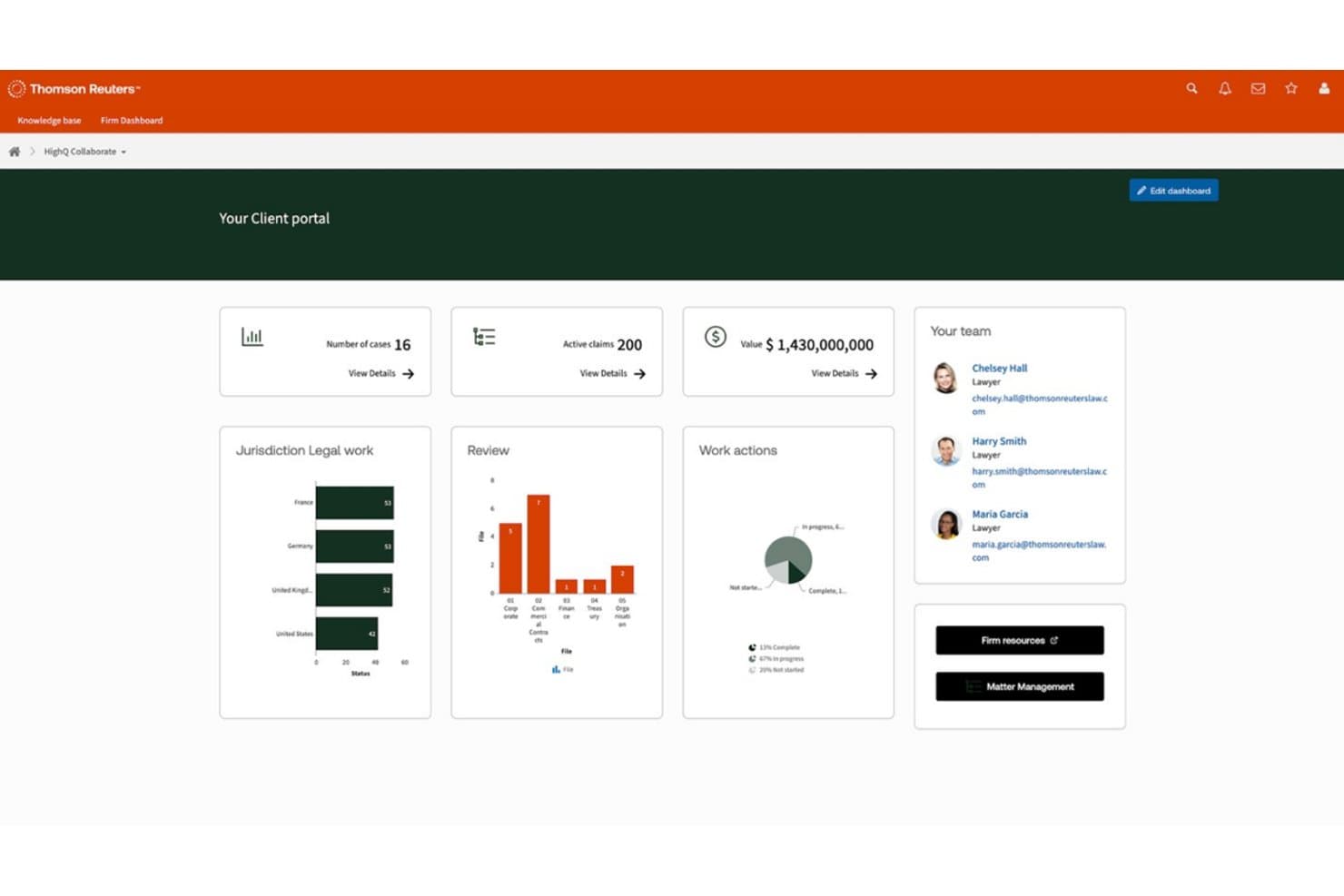
HighQ centralizes case metrics, team contacts, and work actions in one client portal. HighQ is a cloud-based legal operations and collaboration platform from Thomson Reuters that covers document sharing, client portals, workflow automation, and legal project management for law firms, corporate legal departments, and government organizations.
Who Is HighQ Best For?
HighQ is a strong fit for legal teams already using Thomson Reuters products who want document collaboration, client portals, and workflow tools within a connected TR environment.
Why I Picked HighQ
HighQ earns its spot on my list because of how naturally it fits into a Thomson Reuters environment. If your team already runs on Legal Tracker for e-billing or uses Practical Law for research, HighQ connects directly to those tools rather than operating in isolation. I particularly like its iSheets feature, which lets legal ops teams build structured data trackers inside the platform for things like matter status dashboards or regulatory deadline logs. The client portal functionality is also genuinely useful, giving clients self-service document access and e-signature workflows without leaving the TR ecosystem.
HighQ Key Features
- Matter management dashboard: Track matter workload, activity, spend, and risk from a centralized view that pulls all matter data into one place.
- Legal intake and triage: Route incoming legal service requests to the right subject matter experts using automated intake forms and assignment rules.
- Legal project management tools: Manage tasks, timelines, budgets, and risk trackers across matters, with real-time spend vs. budget dashboards and automated alerts.
- Microsoft 365 integration: Connect directly with Outlook, Microsoft Teams, and Word to capture metadata and collaborate without switching between applications.
HighQ Integrations
HighQ offers native integrations with iManage, NetDocuments, Microsoft SharePoint, Microsoft 365, Google Workspace, DocuSign, Adobe Sign, Kira Systems, Workshare, and Thomson Reuters products like Legal Tracker, Practical Law, and CoCounsel. Additional connectivity is available through the Syncly-powered Integration Hub, SAML 2.0 SSO, Active Directory/LDAP sync, a SQL database connector for iSheets, and an API for custom integrations.
Pros and Cons
Pros:
- Includes legal intake and triage features
- Supports building custom matter trackers with iSheets
- Connects directly to Thomson Reuters legal tools
Cons:
- Performance may slow with large data sets
- Navigation can feel complex for new users
Learn more about HighQ: Best for LexisNexis-integrated legal ops
- Free demo available
- Pricing upon request
Visit WebsiteCustomer Rating:3.8/5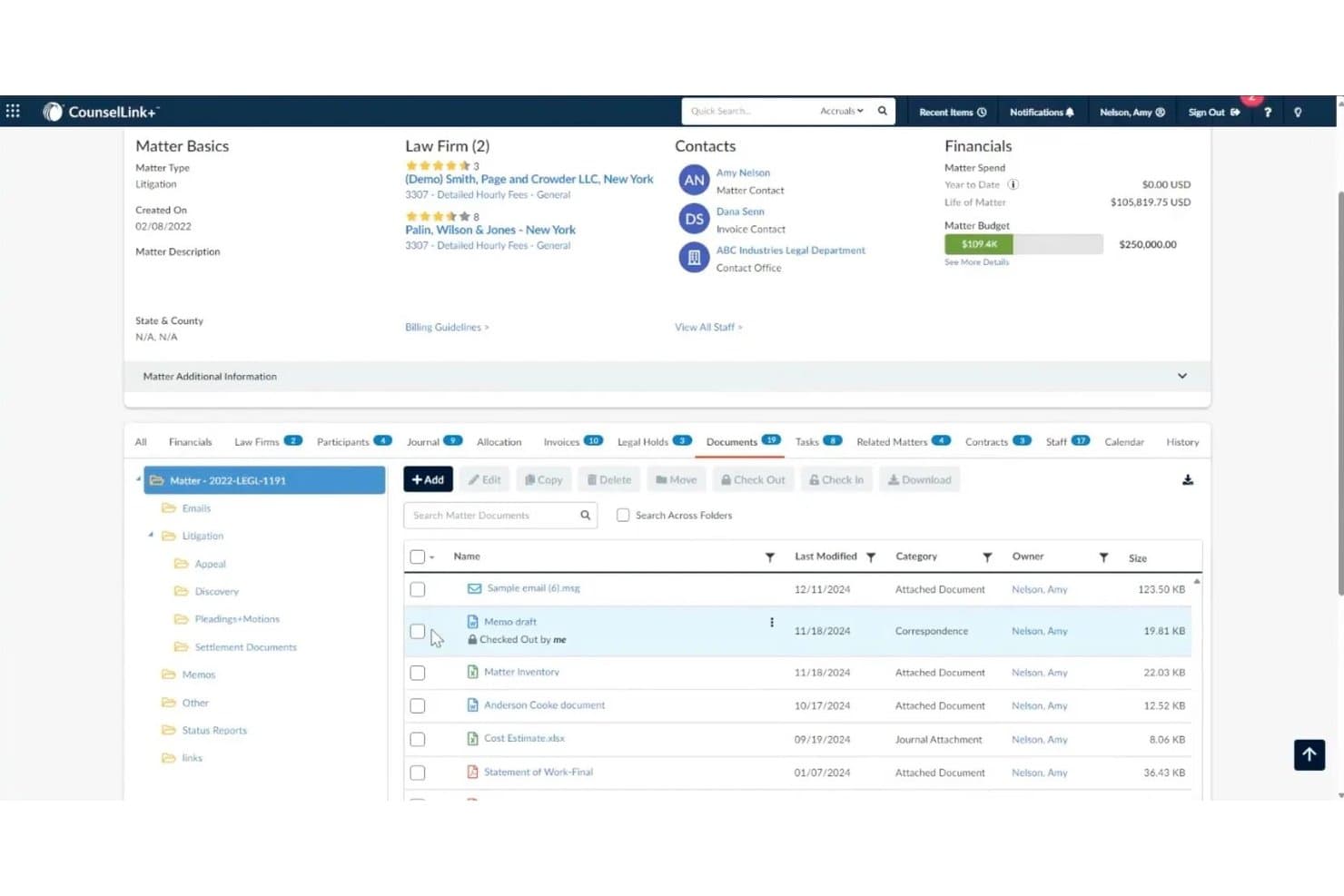
LexisNexis CounselLink+ centralizes matter documents with folder organization and version control. LexisNexis CounselLink+ is an enterprise legal management platform for corporate legal departments that covers matter management, legal e-billing, contract lifecycle management, vendor management, and AI-powered analytics through its built-in Protégé assistant.
Who Is LexisNexis CounselLink+ Best For?
CounselLink+ is a strong fit for corporate legal departments that already rely on LexisNexis research tools and want their matter management, e-billing, and contract lifecycle workflows in one connected ecosystem.
Why I Picked LexisNexis CounselLink+
I picked CounselLink+ as one of the best because the LexisNexis ecosystem integration is genuinely hard to replicate elsewhere: you get one-click access to Lex Machina, Practical Guidance, and the Protégé AI assistant without ever leaving your matter management workflow. Protégé is worth calling out specifically, as it generates real-time invoice summaries, flags billing anomalies, and delivers predictive insights on legal spend directly inside the platform. I also think the built-in contract lifecycle management, paired with AI-driven contract analysis that extracts key terms automatically, gives in-house legal ops teams a tighter loop between outside counsel spend and contract obligations.
LexisNexis CounselLink+ Key Features
- Timekeeper rate benchmarking: Benchmark outside counsel hourly rates against industry data by firm size, geography, practice area, and timekeeper role.
- Vendor scorecards: Track law firm performance with comparative reporting dashboards and in-house counsel feedback tools across matters.
- SmartReview® billing guideline enforcement: AI flags invoice line items that violate your billing guidelines automatically before payment processing.
- Legal spend allocation tracking: Assign and monitor legal costs across cost centers, departments, and GL codes for financial oversight.
LexisNexis CounselLink+ Integrations
LexisNexis CounselLink+ offers native integrations with Microsoft Word, Microsoft Outlook, Microsoft Teams, iManage, and across the LexisNexis ecosystem, including Lex Machina, Practical Guidance, Lexis+, and Law360. A CounselLink Integration API (CL-INT-API) is available for custom integrations and partner-built connections.
Pros and Cons
Pros:
- AI assistant delivers spend and contract insights
- SmartReview enforces billing guideline compliance
- Direct access to LexisNexis research tools
Cons:
- Reporting dashboards offer limited customization options
- Initial setup for workflows can be complex
Learn more about LexisNexis CounselLink+: Best for small legal teams managing matters in-house
- 14-day free trial
- From $100/user/month
Visit WebsiteCustomer Rating:4.8/5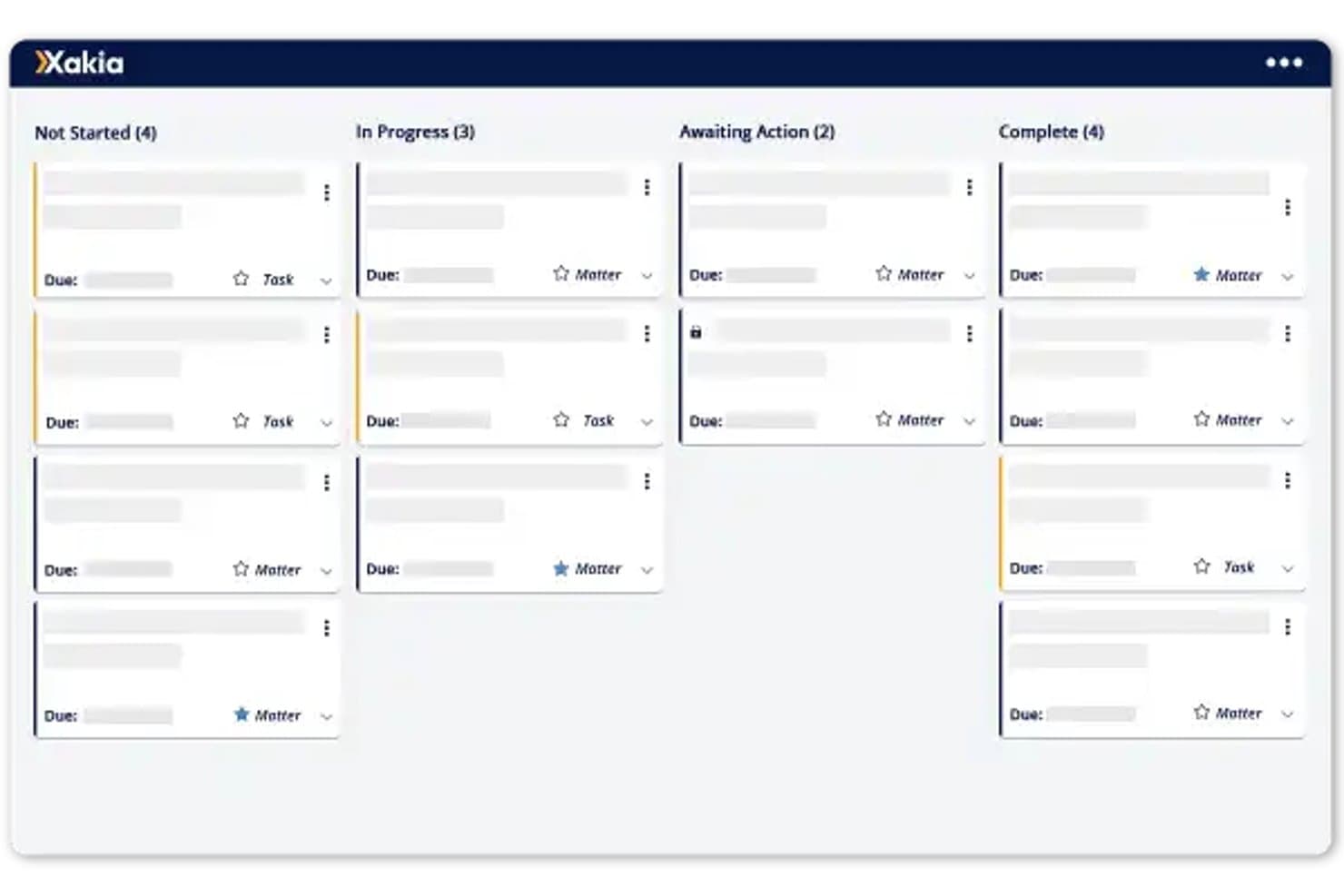
Xakia organizes legal matters into Kanban-style status columns for easy tracking. Xakia is a legal operations platform for in-house legal teams that covers matter management, legal intake, contract lifecycle management, spend management, document management, and reporting.
Who Is Xakia Best For?
Xakia works well for small in-house legal teams that need a dedicated matter management system without the complexity of an enterprise-grade platform.
Why I Picked Xakia
I've included Xakia in my top picks because its matter management is purpose-built for small in-house legal teams, not scaled-down versions of enterprise tools. I particularly like the intake and triage module, which gives the business a single front door to submit legal requests that get routed, tagged, and assigned without relying on email. The built-in dashboards also let you surface workload and spend data without building reports from scratch, which is exactly what a lean legal team needs.
Xakia Key Features
- Contract lifecycle management: Generate contracts from templates and track agreements through review and signature stages.
- Xakia AI: Reviews third-party contracts against your playbook, extracts key terms with confidence scores, and flags potential invoice billing issues.
- Spend management: Track legal budgets against forecasts and monitor outside counsel costs in one place.
- Document management: Store, search, and retrieve legal documents linked directly to their associated matters.
Xakia Integrations
Xakia offers native integrations with NetDocuments, iManage, SharePoint, Microsoft Outlook, Gmail, Microsoft Word, DocuSign, Josef, Ironclad, Brightflag, Salesforce, Slack, Microsoft Entra, Okta, and ADFS, and provides an open API for custom integrations.
Pros and Cons
Pros:
- Dashboards show workload and spend insights instantly
- Contract tracking includes templates and review workflows
- Intake and triage module reduces email reliance
Cons:
- Not ideal for large, enterprise legal departments
- Reporting options are limited for complex needs
Learn more about Xakia: Best for AI-driven invoice review and spend control
- Free demo available
- Pricing upon request
Visit WebsiteCustomer Rating:4.6/5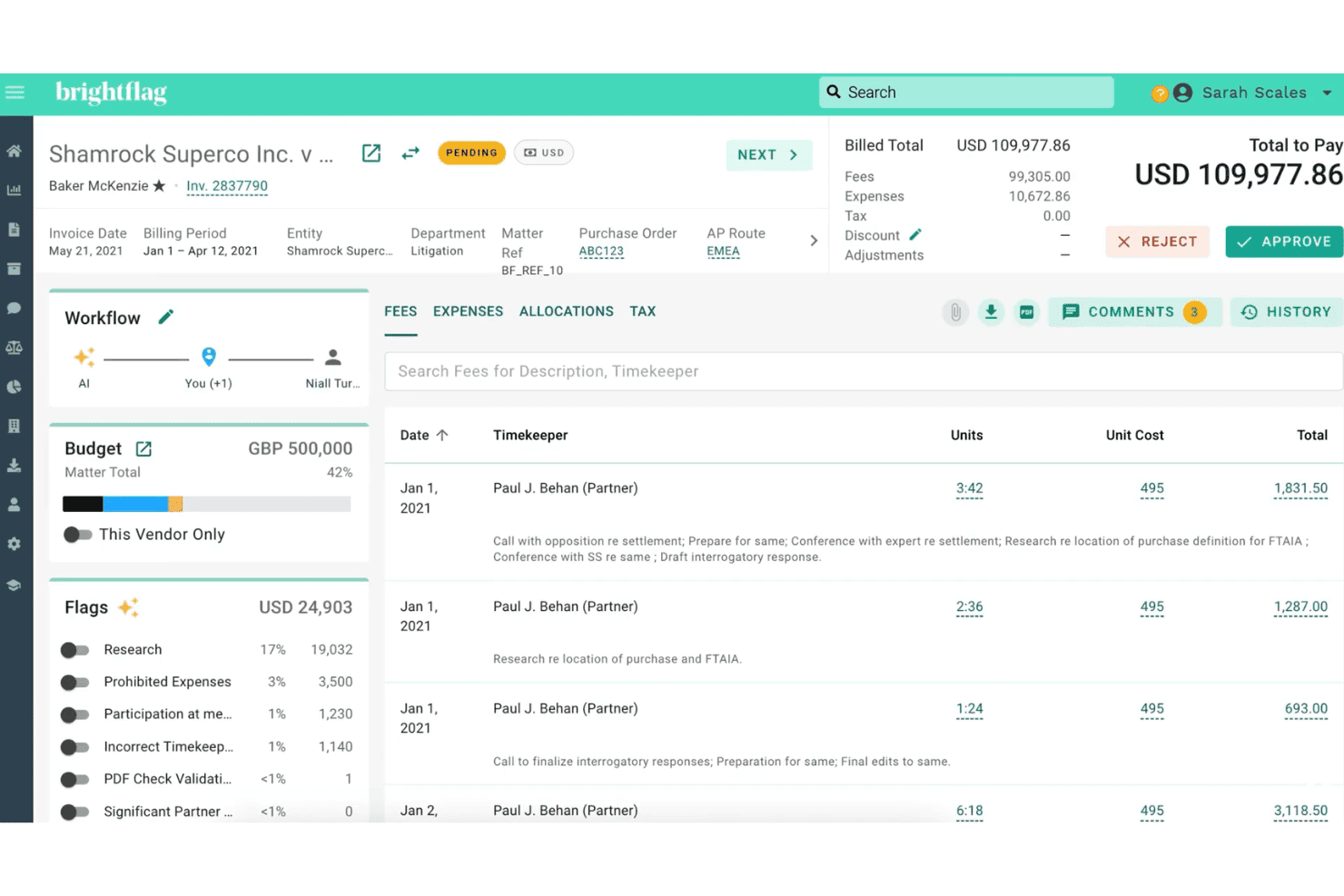
Brightflag lets users review, flag, and approve legal invoices with AI insights. Brightflag is an AI-powered enterprise legal management (ELM) platform that centralizes matter management, e-billing and invoice review, vendor management, and outside counsel spend tracking for in-house legal teams.
Who Is Brightflag Best For?
Brightflag is a strong fit for in-house legal and legal operations teams at mid-to-large enterprises that manage significant outside counsel spend and need tighter visibility into e-billing, invoice review, and vendor performance.
Why I Picked Brightflag
Brightflag earns its spot on my shortlist because of how its patented AI handles invoice review at scale. The AI reads every invoice line, catches billing guideline violations automatically, and emails reviewers a plain-language summary with a single-click approval option directly from their inbox. On top of that, the e-billing module layers in controlled approval workflows and full audit trails, so your team has end-to-end visibility into legal spend without manually chasing every line item.
Brightflag Key Features
- Matter management workspace: Centralizes matter data, tracks deliverables and milestones, and gives your team and outside counsel a shared space to collaborate and collect progress updates.
- Vendor RFP and panel management: Runs RFPs directly within the platform and uses AI-generated vendor profiles to help you select the right firm for each matter.
- Budget management: Sets and monitors budgets at both the cost center and individual matter level, with automatic tracking against actual spend.
- Configurable reporting dashboards: Builds custom reports and dashboards without needing a BI analyst, with direct integrations to external BI tools for deeper analysis.
Brightflag Integrations
Brightflag offers native integrations across accounts payable, IP management, BI, and identity systems, including NetSuite, SAP Ariba, Coupa, QuickBooks, Workday, Anaqua AQX, iManage, NetDocuments, Jira, Okta, and BI tools like Power BI, Tableau, and Snowflake, plus AI workspace connections to ChatGPT, Claude, and Microsoft Copilot. It also provides an API and MCP server for custom integrations, along with iPaaS support through Boomi, MuleSoft, and Workato.
Pros and Cons
Pros:
- Customizable matter and vendor workspaces
- Sends plain-language invoice summaries to reviewers
- AI flags billing violations automatically
Cons:
- Reports may require manual adjustments for accuracy
- Initial setup for invoice rules takes time
Learn more about Brightflag: Best for unified legal ops with AI-native intake
- Free demo available
- Pricing upon request
Visit WebsiteCustomer Rating:4.5/5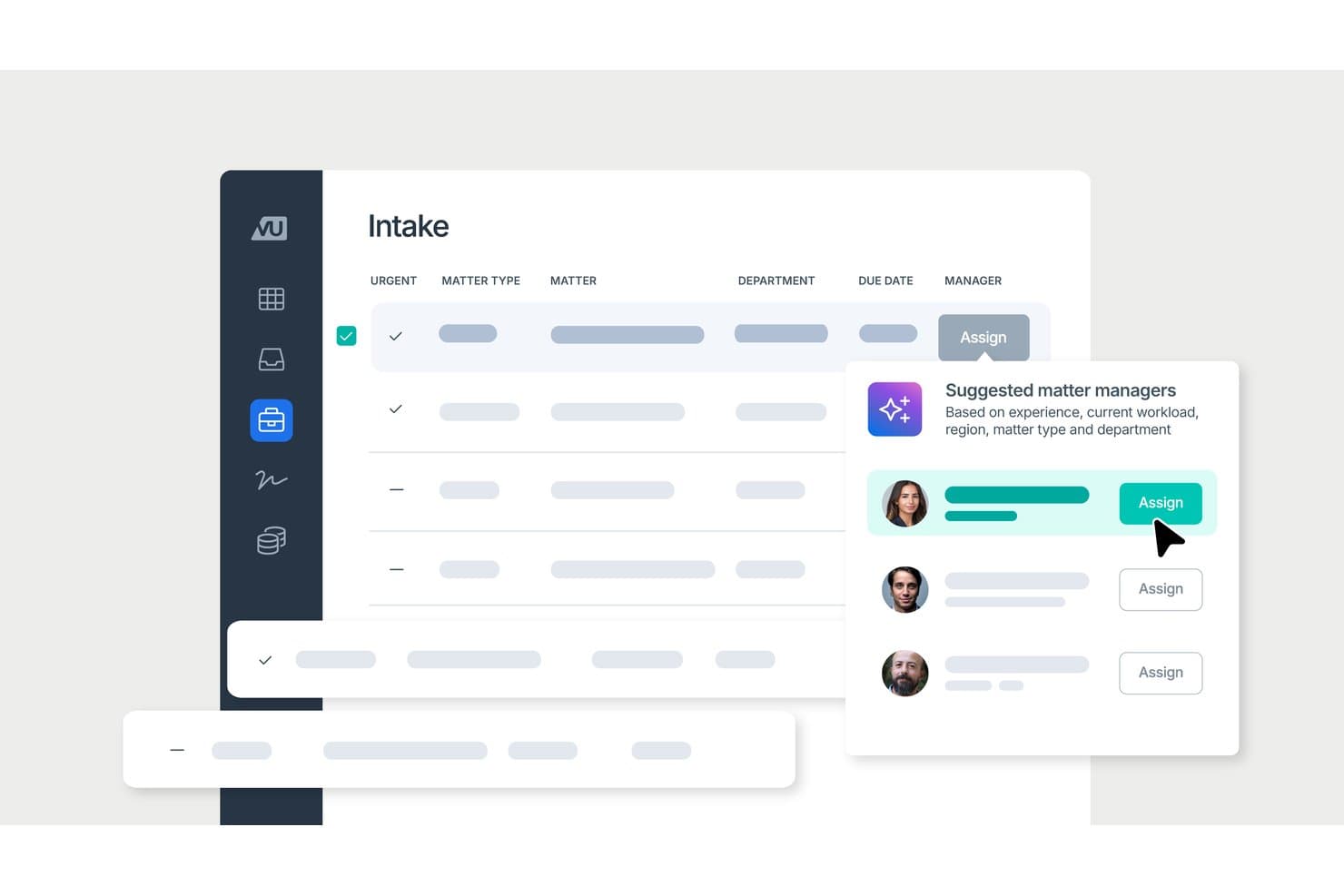
LawVu uses AI to suggest matter managers during legal intake. LawVu is an AI-native legal operating system for in-house legal teams that unifies matter management, contract lifecycle management, intake, spend management, and AI-assisted workflows in a single platform.
Who Is LawVu Best For?
LawVu is a strong fit for in-house legal teams that need a single platform to manage matters, contracts, intake, and outside counsel spend without stitching together multiple tools.
Why I Picked LawVu
LawVu earns its spot on my shortlist because of how it handles intake: instead of a basic ticketing form, it uses AI to triage and route incoming requests automatically, so nothing gets lost in an inbox or a shared spreadsheet. I also like that the agentic framework ties intake directly to matter creation, which means a request from a business team can trigger a fully structured matter without manual setup. That connection between intake, matter management, contracts, and spend in a single data layer is what makes LawVu genuinely different from tools that bolt these modules together.
LawVu Key Features
- AI contract drafting and review: Draft and review contracts directly in Microsoft Word using LawVu's embedded AI, with full context from your existing legal data.
- E-billing and outside counsel management: Submit, review, and approve invoices from external counsel within the platform, with workflow automation and spend reporting built in.
- Searchable document knowledge base: Store, organize, and search legal documents and precedents in a centralized repository accessible to your whole team.
- Visual reporting dashboards: Track matter, contract, and spend data through configurable dashboards that surface workload, risk, and budget insights in one view.
LawVu Integrations
LawVu offers native integrations with Salesforce, Microsoft 365, SharePoint, Microsoft Teams, Outlook, Gmail, Google Drive, Slack, Box, DocuSign, Adobe Acrobat Sign, Dropbox Sign, Formstack, Litera Compare, BlackBoiler, and Okta for SSO. A LawVu connector for Microsoft Power Platform and a public API are available for custom integrations and workflow automation.
Pros and Cons
Pros:
- Visual dashboards show matter and spend insights
- Single data layer ties modules together
- AI-native intake automates request triage
Cons:
- Occasional delays with larger data uploads
- Platform can feel complex to set up
Learn more about LawVu: Best for global corporate legal departments
- Free demo available
- Pricing upon request
Visit WebsiteCustomer Rating:4.3/5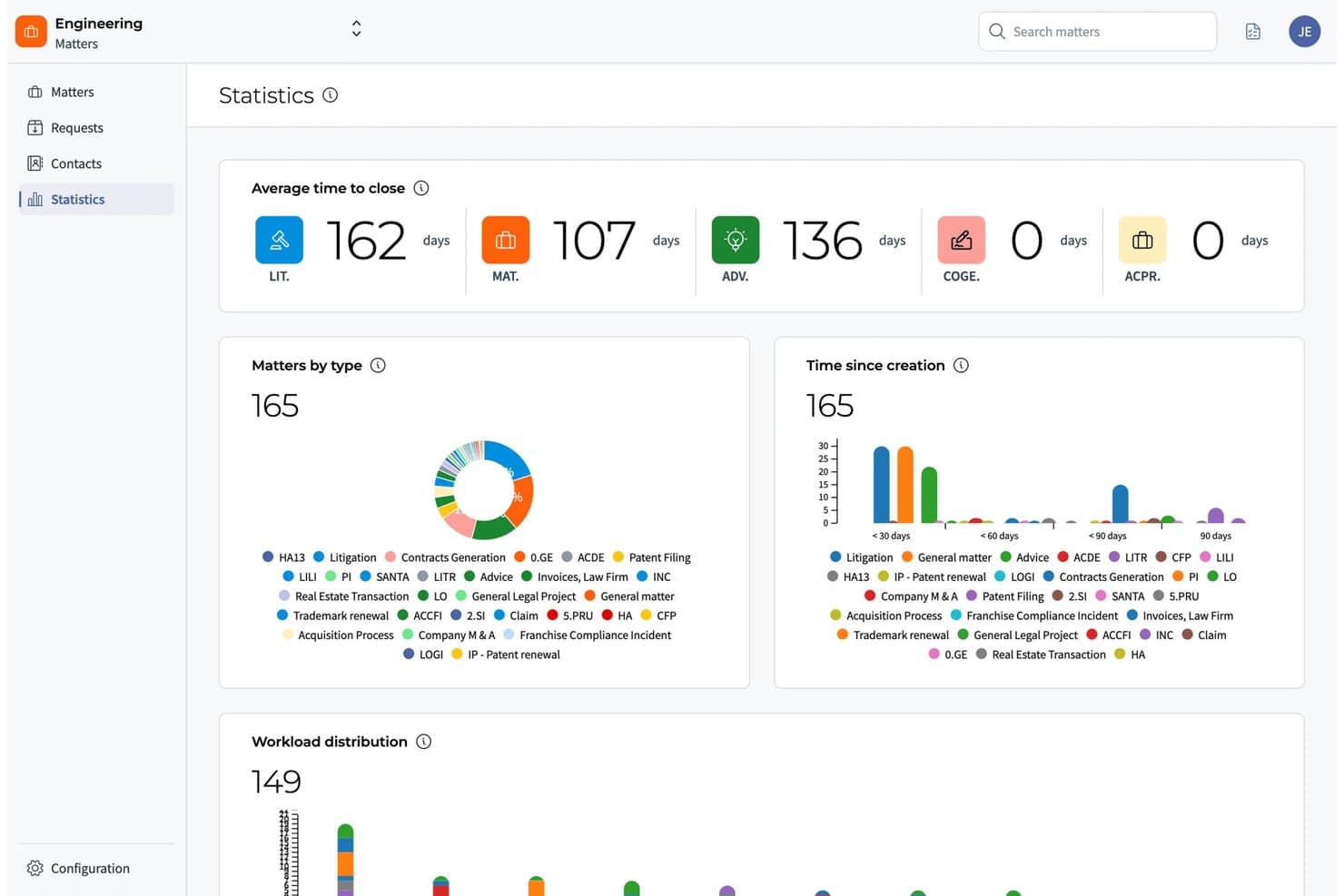
DiliTrust surfaces matter stats and workload trends in one dashboard. DiliTrust is a legal operations and corporate governance platform that brings contract lifecycle management, matter management, entity management, board portal, and secure document storage into a single AI-native suite.
Who Is DiliTrust Best For?
DiliTrust is a strong fit for in-house legal teams and corporate secretaries managing multiple legal entities across jurisdictions.
Why I Picked DiliTrust
I've included DiliTrust in my top picks because it's the only platform I've come across that genuinely unifies entity management, board governance, contract lifecycle management, and matter management in a single AI-native suite. For legal departments managing entities across multiple jurisdictions, the entity management module gives you real-time corporate structure visibility and centralizes compliance reporting without toggling between tools. I also think the board portal is worth noting: it handles agenda prep, document sharing, vote management, and automatic minute generation all in one place, which is exactly what corporate secretaries supporting international boards need.
DiliTrust Key Features
- Dataroom: A secure, centralized document repository with granular access controls and full audit trails for both internal and external sharing.
- Integrated e-signature: Sign documents directly within the platform without routing them to a third-party tool.
- No-code workflow customization: Customize workflows, fields, and layouts to match your team's processes without involving IT or technical resources.
- ISO 27001, ISO 27701, and SOC 2 Type II certification: The platform stores and transmits data with full encryption, two-factor authentication, and independently audited security standards.
DiliTrust Integrations
DiliTrust offers native integrations with Salesforce, HubSpot, Microsoft Dynamics 365, Microsoft Word, Microsoft Teams, Outlook, Google Docs, Gmail, DocuSign, and Adobe Sign, plus third-party eSignature connections to Dropbox Sign, BoxSign, YouSign, UniverSign, and SignaturIt. An API is available for custom integrations.
Pros and Cons
Pros:
- Real-time compliance visibility across jurisdictions
- Secure audit trails for sensitive documents
- Centralizes board, entity, and contract management
Cons:
- Custom reporting features are limited
- Workflow automation options are basic
Learn more about DiliTrust: Best for Fortune 100-scale legal ops
- Not available
- Pricing upon request
Visit WebsiteCustomer Rating:4.7/5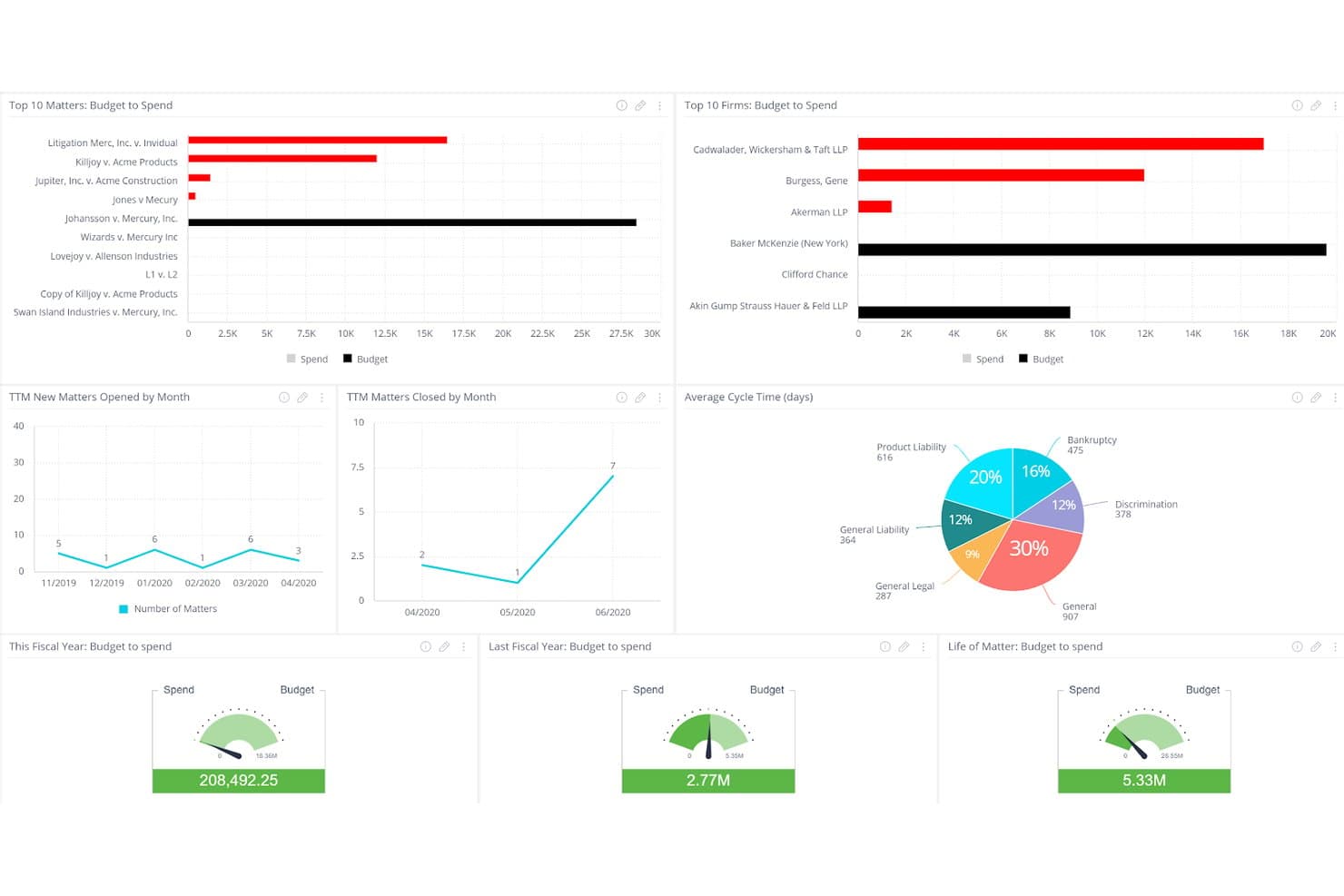
Mitratech TeamConnect tracks legal spend, budgets, and matter cycle times in one dashboard. Mitratech TeamConnect is an enterprise legal management platform built for in-house legal departments, covering matter management, e-billing, contract lifecycle management, compliance intake, and legal spend analytics in a single configurable system.
Who Is Mitratech TeamConnect Best For?
TeamConnect is built for large enterprise legal departments—think Fortune 100 in-house teams—that need a single system to manage matters, outside counsel billing, contracts, and compliance at scale.
Why I Picked Mitratech TeamConnect
Mitratech TeamConnect earns its spot on my shortlist because it's trusted by 60% of the Fortune 100, which tells you everything about its ability to handle legal operations at the most demanding scale. I'm particularly impressed by its AI-powered Invoice IQ, which automates billing guideline enforcement across 14,000+ outside counsel firms and flags invoice discrepancies in real time. Matter creation triggered directly from Outlook or service of process feeds is the kind of automation that makes a genuine difference when your team is handling high volumes daily.
Mitratech TeamConnect Key Features
- Contract lifecycle management: Build contracts from templates, run automated approval workflows, collect e-signatures, and store all contract data in a centralized repository.
- Custom reporting and analytics dashboards: Configure dashboards to track matter volume, legal spend trends, and capacity gaps across your department.
- Global compliance configuration: Support multi-country invoicing mandates with built-in tax authority fields, pro-forma invoice workflows, and country-specific validation rules.
- Native document management: Store documents directly inside case files rather than in a separate system, keeping all matter records in one place.
Mitratech TeamConnect Integrations
Mitratech TeamConnect offers native integrations with Microsoft Outlook, Microsoft Teams, Salesforce, and Slack, plus connections to HR and finance systems used across the enterprise. An API is available for custom integrations, and the platform supports service of process feeds for automated matter intake.
Pros and Cons
Pros:
- Real-time invoice discrepancy flagging
- Enterprise-grade contract management workflows
- AI-powered billing guideline enforcement
Cons:
- Designed for large enterprise legal teams
- Complex setup for custom reporting
Learn more about Mitratech TeamConnect: Best for enterprises on ServiceNow managing legal ops
- Free demo available
- Pricing upon request
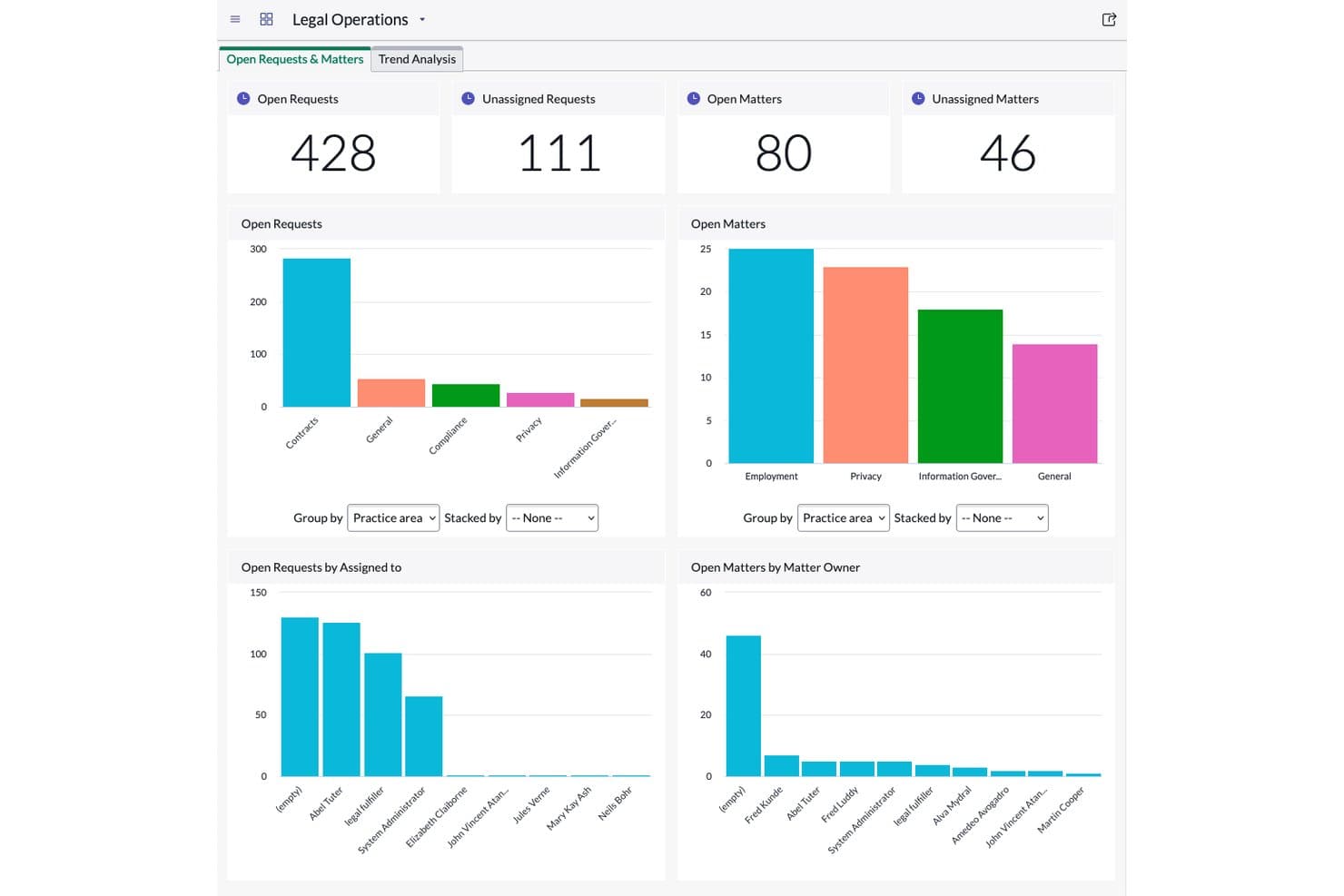
ServiceNow Legal Service Delivery tracks open requests and matters via dashboard. ServiceNow Legal Service Delivery is a legal operations module built on the ServiceNow platform that covers legal request management, matter management, contract workflows, legal investigations, and practice-specific apps.
Who Is ServiceNow Legal Service Delivery Best For?
It's the right fit for large enterprises that already run on ServiceNow and want to bring legal request management, matter tracking, and contract workflows into that same platform.
Why I Picked ServiceNow Legal Service Delivery
I've included ServiceNow Legal Service Delivery in my top picks because it's the only legal ops tool that lives natively inside the ServiceNow platform, which means legal request management and matter tracking plug directly into the same system your IT, HR, and finance teams already use. I particularly like the Legal Request Management portal, which routes incoming requests to the right legal team automatically, cutting out the back-and-forth email chains. The practice apps let you turn complex, practice-specific workflows into configurable digital processes without building from scratch.
ServiceNow Legal Service Delivery Key Features
- Legal matter management: Track and escalate ongoing legal matters in a centralized system, replacing manual spreadsheet-based tracking.
- Legal knowledge management: Share legal resources and collaborate on documents across the legal team from a single repository.
- Virtual agent: An AI-powered chatbot handles routine legal questions, freeing your team to focus on complex matters.
- Document integrations: Connect directly with iManage, Box, Google Drive, and Microsoft OneDrive to manage files and permissions within legal workflows.
ServiceNow Legal Service Delivery Integrations
ServiceNow Legal Service Delivery offers native integrations with iManage, Box, Google Drive, and Microsoft OneDrive for document management, and connects natively across the ServiceNow ecosystem, including IT Service Management, HR Service Delivery, and Source-to-Pay Operations. It also provides REST and SOAP APIs for custom integrations, plus access to the ServiceNow Store for additional partner-built connectors.
Pros and Cons
Pros:
- Centralized matter and knowledge management
- Legal requests auto-routed to right team
- Native to ServiceNow with workflow automation
Cons:
- Configuration requires ServiceNow platform expertise
- Not suitable for organizations without ServiceNow
Learn more about ServiceNow Legal Service Delivery:
Other Legal Operations Software
Here are some additional legal operations software options that didn’t make it onto my shortlist, but are still worth checking out:
- 11LawcadiaBest for APAC legal ops and no-code workflows
- 12SirionBest for AI-native contract ops in legal teams
- 13CheckboxBest for AI-powered legal intake and triage
- 14AgiloftBest for no-code CLM and contract-led legal ops
- 15Legal TrackerBest for corporate legal spend and benchmarking
- 16Legal FilesBest for matter and intake ops in gov and higher-ed
- 17TyMetrix 360°Best for spend benchmarking against outside counsel
- 18LegiswayBest for CLM-led legal ops in mid-size teams
- 19Acuity ELMBest for mid-market e-billing and spend oversight
Related Reviews
How I Evaluate Legal Operations Software
I split every evaluation into baseline functionality a platform must cover—matter tracking, e-billing, intake, CLM, documents, and reporting—and the differentiators that separate a tool worth recommending from one that just checks boxes.
Core Functionality (Table Stakes For This List)
When I'm selecting tools for my list, I rank each one on a scale from 0 (does not offer the functionality) to 5 (excels in this area) for each core functionality listed below. I then calculate the tool's total score into a percentage, using 75% as a benchmark to help assess its overall fit for the list.
- Matter management: I evaluate how each tool handles matter creation, assignment, status tracking, and lifecycle workflows—including whether it links matters to related spend, contracts, and documents.
- Legal spend management: I look for LEDES-compatible e-billing, invoice review automation, budget tracking, and outside counsel spend analysis, since these are the levers legal departments actually use to control costs.
- Legal intake and workflow: Each platform's intake forms, routing rules, and triage logic get close attention. Tools like ServiceNow Legal Service Delivery and LawVu approach intake differently, so I check whether the workflow fits real request volumes.
- Contract lifecycle management: I check for contract creation with templates, approval routing, renewal tracking, and clause management—not just a place to store PDFs.
- Document and knowledge repository: A searchable, permission-controlled repository with version control matters here. I look at how well the tool organizes templates, playbooks, and precedent documents for day-to-day reuse.
- Reporting and analytics: Dashboards covering matters, spend, cycle times, and workload distribution are table stakes. I evaluate whether reports are customizable and whether the platform supports cross-module analytics that connect spend data to matter outcomes.
Once I have a list of tools that meet the criteria, I consider what sets each platform apart.
Differentiating Factors (What Sets Vendors Apart)
Here's how I compare and contrast different vendors:
Standout Features
I look for AI-powered invoice review that catches block billing, rate violations, and guideline breaches at the line-item level before a human reviewer ever sees them. Platforms like Brightflag and Onit SimpleLegal handle this differently, so I check how each flags exceptions and routes approvals. A legal front door portal is just as important—I evaluate whether business users can submit requests, track status, and find self-help resources without emailing the legal team. No-code workflow builders round out the picture. I look at whether legal ops can configure intake forms, approval chains, and matter playbooks without filing IT tickets or paying for vendor professional services.
Beyond Features
Total cost of ownership matters more than sticker price. I check whether vendors charge per-user, per-matter, or per-module, and I factor in implementation, data migration, and e-billing onboarding fees that can rival first-year subscription costs. Integration depth is just as important—I look for native connectors to Microsoft 365, iManage, DocuSign, and ERP systems like SAP or Oracle, plus open APIs for BI tools like Power BI. Security posture rounds out the picture: SOC 2 Type II, ethical walls, matter-level access controls, and clear AI data isolation policies are non-negotiable for protecting privileged information.
How to Choose a Legal Operations Software
When picking legal operations software, focus on a tool that actually matches your firm’s workflows, data security needs, and integration stack—not just what looks impressive on a feature list.
| If your priority is... | Look for... |
| Flexible workflow automation | No-code workflow and intake form builders |
| Strong spend and invoice control | AI-powered invoice review with line-item flagging |
| Deep ecosystem integration | Native connectors for Microsoft 365, DocuSign, iManage |
| Supporting global compliance | Multi-region data residency and access controls |
| User-friendly reporting | Customizable dashboards spanning matters and spend |
How to Vet Your Shortlist
- Test workflow configuration speed: Set up a custom intake form or approval route in under 30 minutes during your demo.
- Validate spend controls: Run a real or sample invoice through the platform and check for flagging of block billing or guideline violations.
- Confirm integrations first-hand: Request a working demo that pushes a document or matter into Microsoft 365, DocuSign, or your firm’s DMS.
- Request compliance documentation: Ask for SOC 2 Type II and a signed data privacy policy before moving forward.
- Tradeoff: No-code flexibility vs. deep legacy integration: Decide if you need broad configurability and automation out of the box, or if your environment requires tight coupling with legacy platforms even if it means less agility.
What Is Legal Operations Software?
Legal operations software is a digital platform that helps legal teams organize matters, control spend, automate workflows, manage documents, and improve visibility across their processes. These tools bring structure to legal work by centralizing matter information, tracking budgets, enabling reporting, and supporting compliance. Legal professionals use legal operations software to reduce manual tasks, maintain data security, and create efficiency in handling day-to-day legal department activities.
Features of Legal Operations Software
When selecting legal operations software, keep an eye out for the following key features:
- Matter management: Tracks all legal matters in one place, with assignment, status updates, deadlines, and related documents linked for easy reference. Supports the entire lifecycle from intake through resolution.
- Legal spend management: Handles e-billing, invoice approvals, budget tracking, and spend analysis. Lets you measure legal costs, compare outside counsel, and maintain compliance with billing guidelines.
- Legal intake and workflow: Captures legal service requests via forms or portals, applies rules for routing and triage, and helps teams prioritize and respond efficiently.
- Contract lifecycle management: Manages contract creation, approval, renewal, and archiving with version control and automated reminders, ensuring compliance and minimizing manual follow-up.
- Document and knowledge repository: Stores, organizes, and secures legal documents, templates, policies, and historical agreements. Provides search tools and controls access based on user roles.
- Reporting and analytics: Offers customizable dashboards and reports covering matters, spending, workloads, and cycle times. Provides insights to improve operations and support resource planning.
- Integration capabilities: Connects with tools like Microsoft 365, DocuSign, ERP systems, and document management software, letting your legal operations software fit into existing tech stacks.
- Role-based access controls: Sets permissions and access levels by user or group, protecting sensitive and privileged information from unauthorized viewing or editing.
- Compliance management: Tracks regulatory requirements, holds necessary documentation, and maintains audit trails to support internal, client, or regulatory compliance.
- Task and deadline tracking: Assigns action items and deadlines to team members, with notifications and calendars to reduce risk of missed obligations and delays.
Common Legal Operations Software AI Features
Beyond the standard legal operations software features listed above, many of these solutions are incorporating AI with features like:
- AI invoice review: Uses machine learning to automatically flag block billing, rate violations, and non-compliant entries in legal invoices before they reach a human reviewer. This helps your team catch errors and enforce billing guidelines without manual line-by-line checks.
- AI contract analysis: Applies natural language processing to scan contracts for risky clauses, missing terms, or non-standard language. The tool highlights issues and suggests edits, making it easier to review large volumes of agreements and maintain compliance.
- AI matter triage: Automatically categorizes and routes incoming legal requests based on content, urgency, and historical patterns. This reduces manual intake work and ensures requests reach the right team member quickly.
- AI document summarization: Generates concise summaries of lengthy legal documents, contracts, or case files. This feature helps your team get up to speed faster and focus on key points without reading every page.
- AI-powered legal research: Searches case law, statutes, and internal knowledge bases to suggest relevant precedents or guidance for specific matters. This saves time and helps your team find answers without leaving the platform.
Benefits of Legal Operations Software
Implementing legal operations software provides several benefits for your team and your business. Here are a few you can look forward to:
- Centralized matter tracking: Keep all your legal matters, assignments, statuses, and related documents organized in one place so you never lose track of critical information.
- Automated spend controls: Use features like e-billing, AI invoice review, and budget tracking to enforce billing guidelines and gain oversight into legal spending.
- Streamlined intake and workflows: Capture and triage legal service requests through configurable intake forms and workflow automation, reducing manual follow-up and email reliance.
- Improved contract management: Manage the lifecycle of contracts with creation templates, approval routing, and renewal reminders, supported by contract analysis tools that flag risky clauses and missing terms.
- Secure document repository: Store, control, and search legal documents, templates, and playbooks in a permission-based repository that protects privileged information.
- Actionable reporting and analytics: Access customizable dashboards and cross-module reports that connect matter outcomes with spend and performance data, helping with resource planning.
- Deep integration capabilities: Connect with essential business systems like Microsoft 365, DocuSign, iManage, and ERP platforms, making legal operations software a central part of your team’s tech stack.
Costs and Pricing of Legal Operations Software
Selecting legal operations software requires an understanding of the various pricing models and plans available. Costs vary based on features, team size, add-ons, and more. The table below summarizes common plans, their average prices, and typical features included in legal operations software solutions:
Plan Comparison Table for Legal Operations Software
| Plan Type | Average Price | Common Features |
| Free Plan | $0/user/month | Basic matter tracking, simple document storage, limited user access, and basic reporting. |
| Personal Plan | $20–$50/user/month | Matter management, legal intake forms, document repository, standard reporting, and role-based permissions. |
| Business Plan | $50–$120/user/month | E-billing and spend management, advanced workflow automation, contract lifecycle management, integration capabilities, and customizable dashboards. |
| Enterprise Plan | $120–$250/user/month | Custom workflows, AI-powered features, advanced analytics, premium integrations, enhanced compliance management, and dedicated support. |
Legal Operations Software FAQs
Here are some answers to common questions about legal operations software:
How do I compare different legal operations software platforms?
Start by mapping your team’s workflow and listing must-have features like matter management, spend tracking, intake, and contract management. Then, score each product based on how well it addresses those tasks in real-life situations—not just on its features list. Test intake forms, invoice review, and integrations during demos. Consider total cost of ownership, including support, onboarding, and any extra fees, as well as integration with your existing tech stack.
What integrations should I prioritize when choosing legal operations software?
Focus on connecting your legal operations software with Microsoft 365, DocuSign, iManage, your document management system (DMS), and your ERP platform like SAP or Oracle. These integrations help your team work faster by keeping documents, contracts, and financial data linked across the business. Check if the platform offers native connectors and open APIs for the systems you already use.
Can legal operations software help with global compliance and data security?
Yes, many legal operations platforms offer compliance and security features like SOC 2 Type II certification, audit trails, encrypted storage, multi-region data residency, and granular access controls. This helps you support regulatory requirements, protect privileged documents, and demonstrate compliance to clients or auditors. Always request documentation and confirm these capabilities before committing.
How do AI features actually help in legal operations software?
AI-powered legal operations software can flag billing issues, spot risky contract clauses, and route legal requests to the right person automatically. For example, AI invoice review can catch block billing or guideline breaches before a human needs to review the invoice. AI-driven contract analysis highlights missing or dangerous terms in agreements, saving you time and reducing risk.
What’s the difference between no-code and low-code workflow automation in legal ops tools?
No-code workflow tools let legal teams build intake forms, approval routes, and playbooks through drag-and-drop interfaces without needing any technical skills. Low-code options offer more complex customization but may require some IT or development know-how. If you want to stay agile and make quick changes yourself, prioritize true no-code capabilities.