

Legal request tracking software helps your team manage, assign, and monitor legal service requests from start to finish in one place. If you’re searching for ways to tame intake chaos, ensure every matter gets handled, or build a system that scales with growing legal work, you’re in the right spot.
I know just how tough it is to stay organized while juggling compliance, deadlines, and shifting priorities. In this guide, you’ll find tools that make request tracking easier—so you can keep your process transparent, consistent, and measurable, no matter your practice size or industry.
Why Trust Our Software Recommendations
6,700+
Reviews
20
Industry experts
16+
Evaluation factors
14
Years
Our team has been testing and reviewing software since 2012. As legal practice leaders ourselves, we know how difficult—and important—it is to choose the right software.
For this guide, we evaluated tools using hands-on testing and independent research, scoring tools using our selection criteria.
Our reviews reflect our human editorial judgment, not a sales pitch.
Legal Request Tracking Software Comparison Table
This comparison table highlights pricing details for my top legal request tracking software selections.
| Tool | Best For | Trial Info | Price | ||
|---|---|---|---|---|---|
| 1 | Best for no-code legal request workflows | Free demo available | Pricing upon request | Website | |
| 2 | Best with enterprise system integrations | Free demo available | Pricing upon request | Website | |
| 3 | Best for fast, scalable legal intake deployment | Free demo available | Pricing upon request | Website | |
| 4 | Best for contract request tracking | Free demo available | Pricing upon request | Website | |
| 5 | Best for end-to-end legal request tracking | Free trial available | Pricing upon request | Website | |
| 6 | Best for no-code custom intake workflows | Free demo available | Pricing upon request | Website | |
| 7 | Best for teams seeking end-to-end legal operations | Free demo available | Pricing upon request | Website | |
| 8 | Best for real-time intake analytics and reporting | 14-day free trial | From $100/user/month | Website | |
| 9 | Best for legal ticketing with contract workflows | Free demo available | Pricing upon request | Website | |
| 10 | Best for custom legal request workflows | Free demo available | Pricing upon request | Website |


Best Legal Request Tracking Software Reviews
Below are my detailed summaries of the best legal request tracking software that made it onto my shortlist. My reviews offer a detailed look at the features, integrations, and best use cases of each platform to help you find the best one for you.
 Best for no-code legal request workflows
- Free demo available
- Pricing upon request
Visit WebsiteCustomer Rating:4.2/5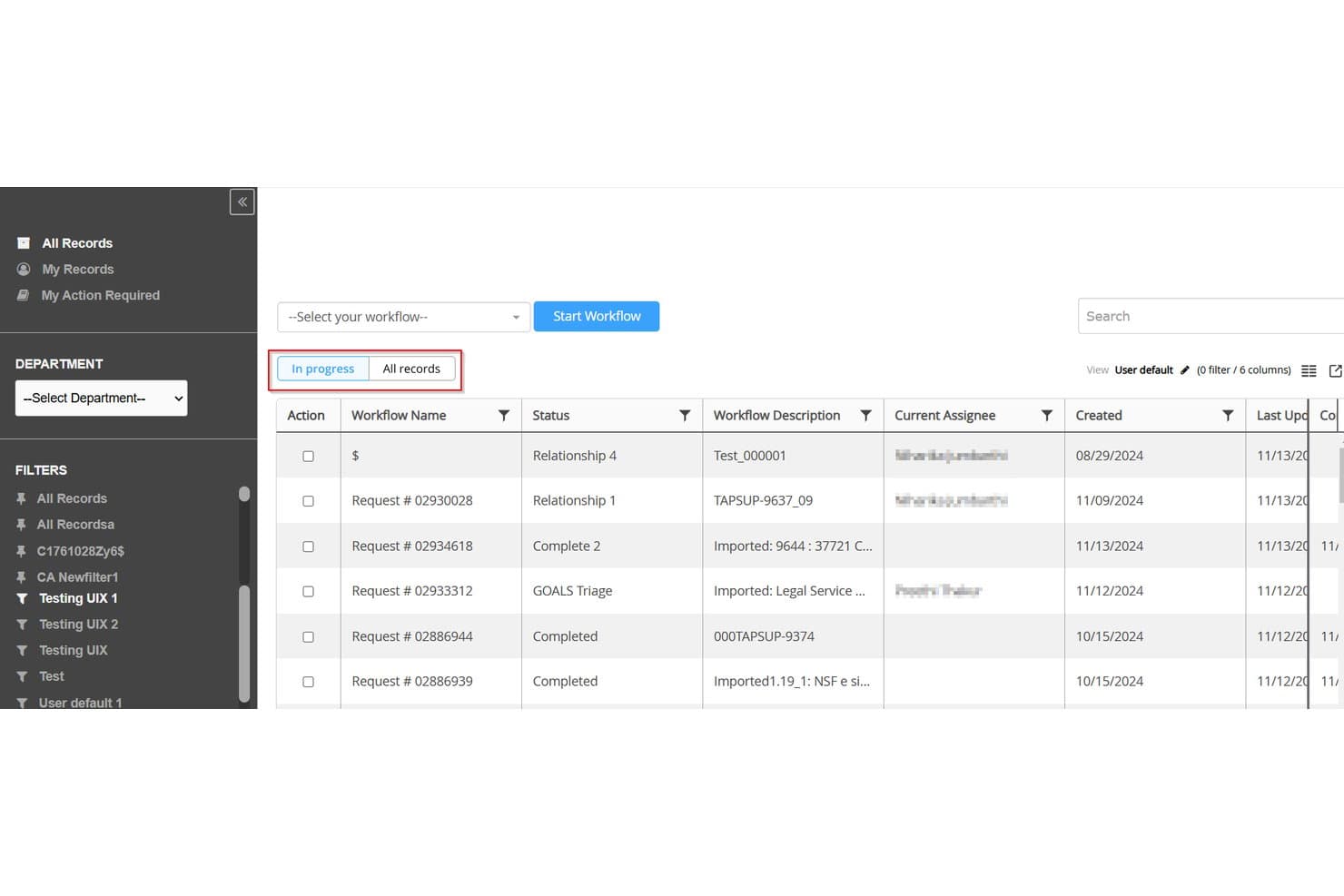
Mitratech TAP Workflow Automation offers a legal request tracking dashboard displaying workflow names, statuses, assignees, and creation dates with filtering options. Mitratech TAP Workflow Automation is a no-code legal workflow and intake platform that lets legal teams build dynamic request forms, route incoming matters, track status across workflows, and manage approvals without developer support.
Who Is Mitratech TAP Workflow Automation Best For?
TAP is a strong fit for corporate legal departments and in-house legal ops teams at mid-to-large enterprises managing high volumes of structured intake and approval workflows.
Why I Picked Mitratech TAP Workflow Automation
I picked Mitratech TAP Workflow Automation because the no-code workflow designer genuinely removes the bottleneck that slows most legal intake rollouts: dependence on IT or developers. I can build a contract intake form with conditional branching, configure routing rules, and publish it the same day. The ARIES™ AI agent also means business colleagues find the right intake form on their own, which cuts the volume of misdirected requests my team has to sort through.
Mitratech TAP Workflow Automation Key Features
- Configurable status dashboards: Centralized dashboards show request progress, workload, and workflow status for legal and business stakeholders.
- Governed approval process: Request and escalation workflows can be assigned role-based approvals for audit-ready compliance.
- Integrated e-signature support: Connect DocuSign or Adobe Sign to automate signature steps in matter and contract workflows.
- Searchable request repository: All requests, communications, and document attachments are stored in a searchable, centralized system.
Mitratech TAP Workflow Automation Integrations
Mitratech TAP Workflow Automation offers native integrations with DocuSign, Adobe Sign, iManage, SharePoint, Box, TeamConnect, NetDocuments, and Microsoft 365. An API is available for custom integrations.
Pros and Cons
Pros:
- Configurable approval chains for any matter type
- AI triage routes requests without manual sorting
- No-code form builder with conditional branching logic
Cons:
- Reporting dashboards lack deep legal analytics
- Complex workflows require significant initial configuration time
Learn more about Mitratech TAP Workflow Automation: Best with enterprise system integrations
- Free demo available
- Pricing upon request
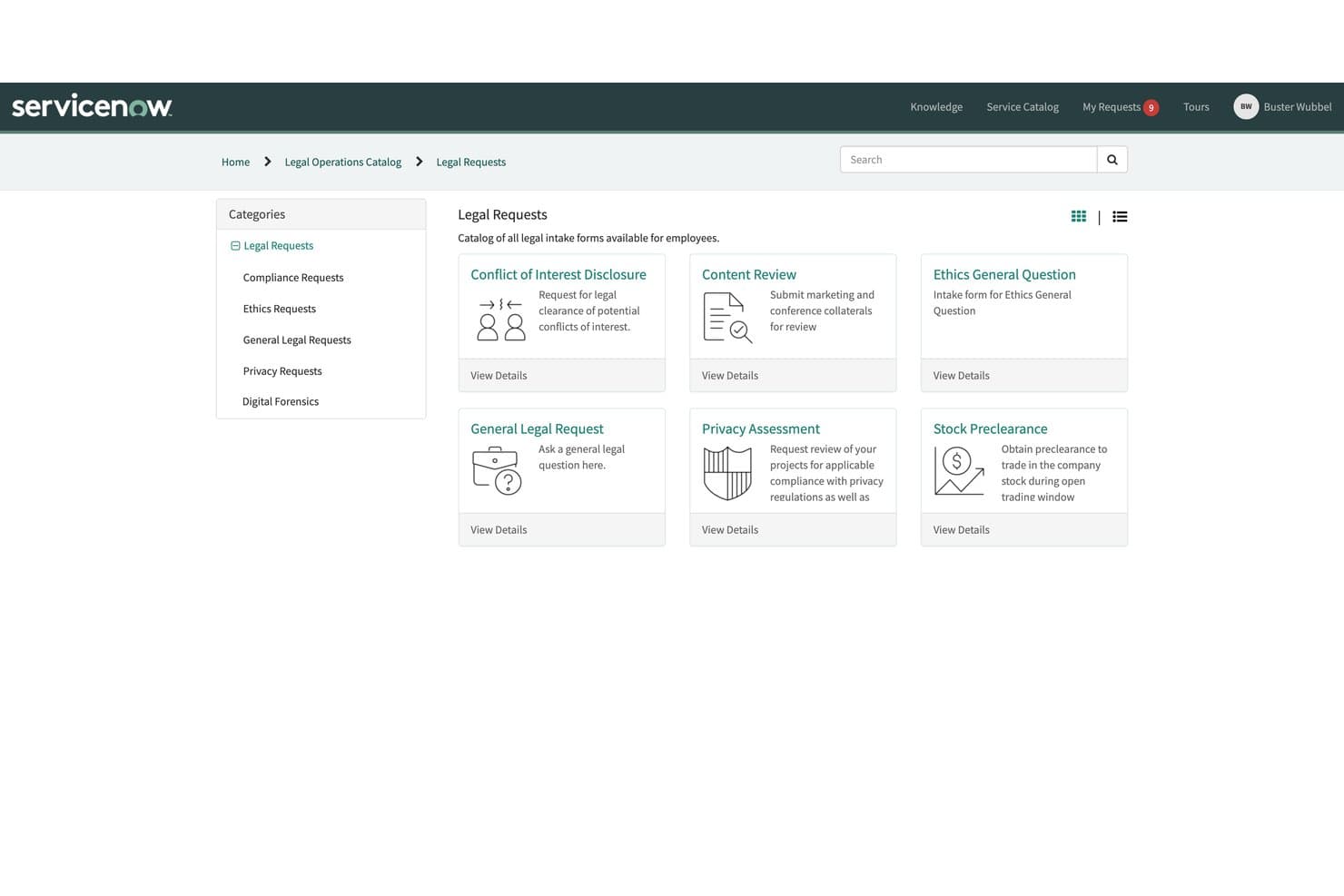
ServiceNow tracks legal requests, routing, matters, contracts, and reporting. ServiceNow Legal Service Management is an enterprise legal request tracking platform that centralizes intake, routing, matter tracking, contract workflows, and legal reporting across corporate legal teams.
Who Is ServiceNow Legal Service Management Best For?
It's a strong fit for large enterprises with in-house legal teams that already run other business operations on the ServiceNow platform.
Why I Picked ServiceNow Legal Service Management
ServiceNow Legal Service Management earns its spot on my shortlist because of how deeply it connects legal workflows to the rest of the enterprise. I like that a legal request tied to an HR case or a procurement contract doesn't live in isolation, it's tracked and resolved through the same platform those teams already use. I've also found the DocuSign and Adobe Sign integrations genuinely practical, as contract signature workflows run inside the same system where the original legal request was submitted.
ServiceNow Legal Service Management Key Features
- AI-powered triage and routing: Incoming legal requests are automatically categorized and assigned using AI based on topic, urgency, and type.
- Customizable legal intake forms: Legal teams can build branded, multi-step intake forms with conditional fields for specific matter types.
- Centralized document repository: All legal requests, documents, and communication history are stored in a searchable, permission-controlled portal.
- Configurable SLA tracking: Legal teams can set deadlines, trigger escalations, and monitor SLA adherence for every request and matter.
ServiceNow Legal Service Management Integrations
Native integrations include DocuSign, Adobe Sign, Microsoft Outlook, and the ServiceNow platform suite. An API is available for custom integrations.
Pros and Cons
Pros:
- Configurable SLA tracking with automated escalations
- AI-assisted triage speeds incoming request classification
- Connects legal intake to existing enterprise workflows
Cons:
- Not purpose-built for standalone legal teams
- Heavy setup process for non-ServiceNow organizations
Learn more about ServiceNow Legal Service Management: Best for fast, scalable legal intake deployment
- Free demo available
- Pricing upon request
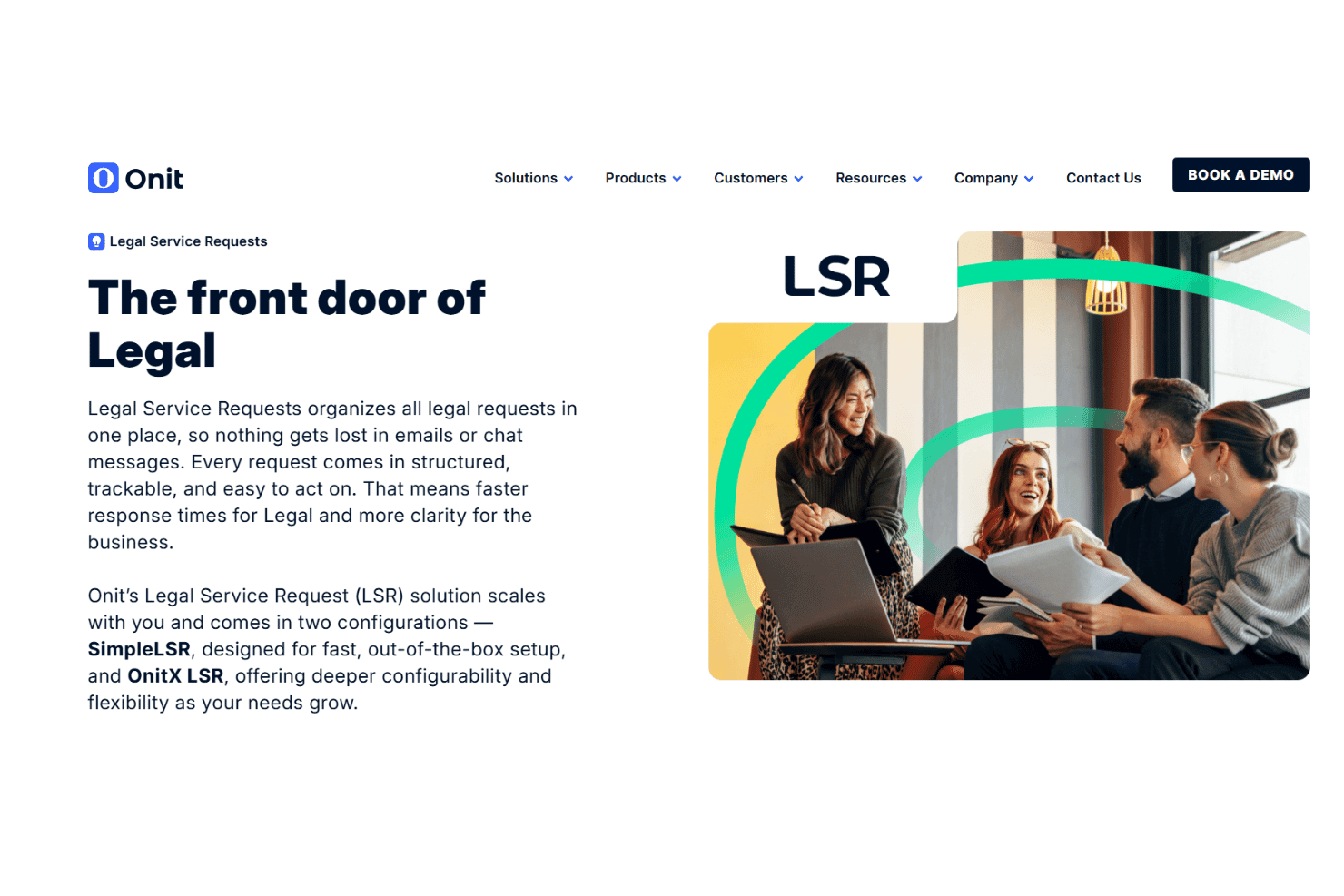
Onit tracks legal requests, routing, assignments, and workflow progress. Onit Legal Service Requests is a legal intake platform that centralizes incoming requests, routes them to the right attorneys or teams, and tracks each matter through a structured, configurable workflow lifecycle.
Who Is Onit Legal Service Requests Best For?
Onit LSR suits enterprise legal operations teams that handle high volumes of intake requests across large, complex organizations.
Why I Picked Onit Legal Service Requests
I picked Onit Legal Service Requests as one of the best because its two-tier deployment model is genuinely practical. SimpleLSR gets legal teams live in weeks with structured forms and clear dashboards out of the box, while OnitX LSR adds AI-guided intake triage and a configurable five-phase matter lifecycle when complexity grows. I like that both tiers capture structured request details upfront, so attorneys aren't chasing missing information after a request lands.
Onit Legal Service Requests Key Features
- Role-based views: Each user sees only the matters, tasks, and deadlines assigned to them.
- Centralized communication history: All document versions, comments, and updates for a request are captured in one place.
- Conditional intake forms: Custom forms adapt questions based on request type or business unit input.
- Request status dashboards: Visual dashboards show real-time progress of all requests and assignments.
Onit Legal Service Requests Integrations
Native integrations are not clearly documented. The tool supports integrations via API for custom connections.
Pros and Cons
Pros:
- Two deployment tiers suit varied team needs
- Structured intake captures request details upfront
- Configurable matter lifecycle for complex workflows
Cons:
- Reporting customization needs admin-level configuration
- Implementation requires significant technical involvement
Learn more about Onit Legal Service Requests:
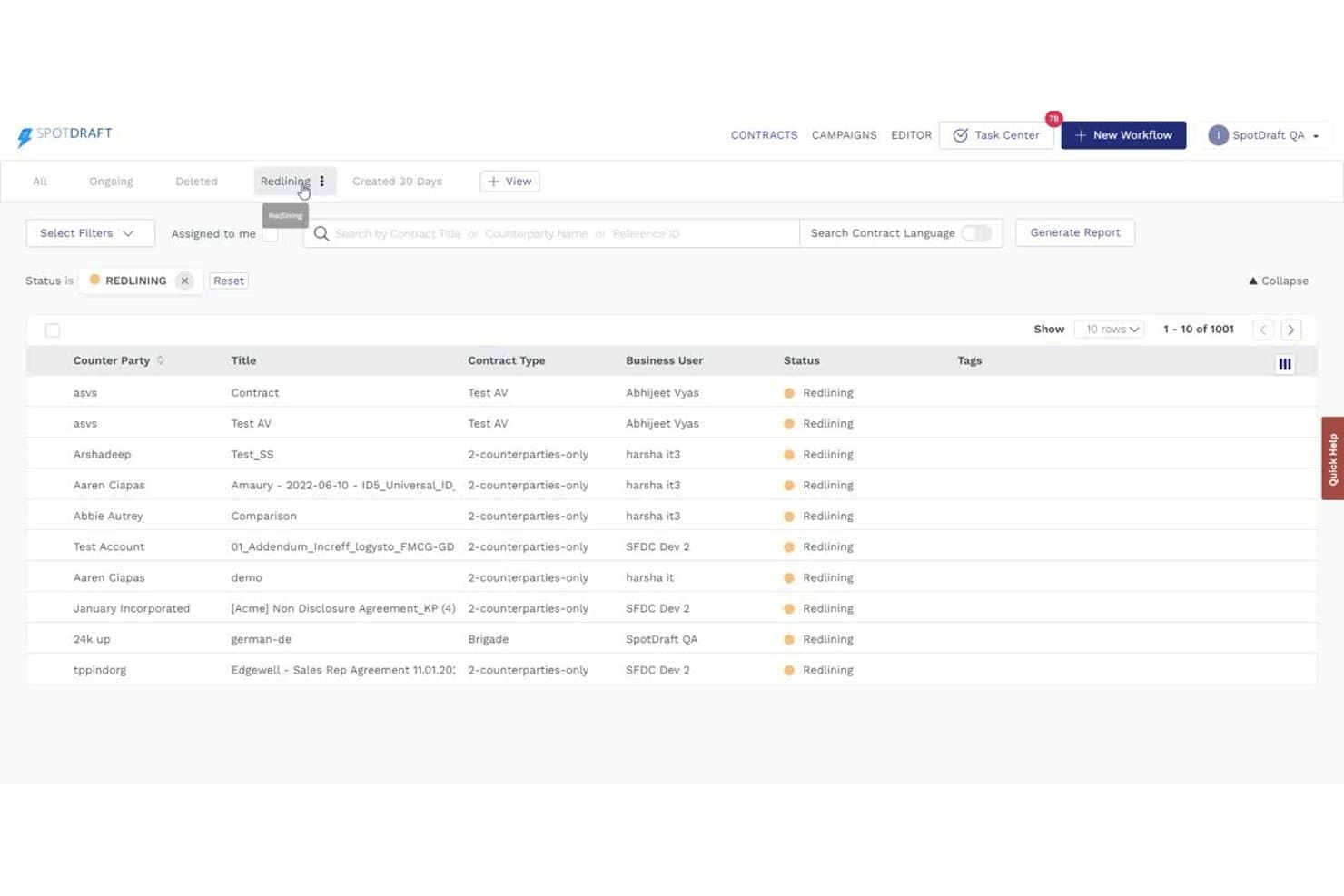
SpotDraft offers a contract list view with redlining status filters, sortable columns, and report generation for tracking contract activity. SpotDraft is a CLM platform with a dedicated legal intake module that lets in-house legal teams capture, prioritize, assign, and track both contractual and non-contractual requests from a centralized queue.
Who Is SpotDraft Best For?
It's a strong fit for in-house legal teams at scaling companies that are outgrowing ad hoc email and Slack-based request management and need a structured system to manage growing contract volume.
Why I Picked SpotDraft
SpotDraft earns its spot on my shortlist because of how tightly it connects the intake request to the contract itself. When a business unit submits a contract request, that record follows the matter all the way through, so nothing gets lost between intake and execution. I also like that each intake workflow supports its own custom form fields, meaning a sales contract request looks different from an NDA or a compliance review from the start.
SpotDraft Key Features
- Unified intake dashboard: Centralizes all types of legal requests from Slack or intake forms into one streamlined queue.
- Role-based access controls: Lets admins set granular permissions for legal team members and requesters.
- Real-time analytics dashboard: Tracks workload, status, and bottlenecks across both contract and non-contract matters.
- Integrated activity log: Automatically records every assignment, status change, and update for auditability.
SpotDraft Integrations
SpotDraft offers native integrations with Slack and DocuSign, and provides an API for custom integrations.
Pros and Cons
Pros:
- Request forms are configurable per matter type
- Supports both contract and non-contract requests
- Intake connects directly to contract lifecycle
Cons:
- Analytics depth lags pure matter management tools
- Intake module works best alongside SpotDraft CLM
Learn more about SpotDraft: Best for end-to-end legal request tracking
- Free trial available
- Pricing upon request
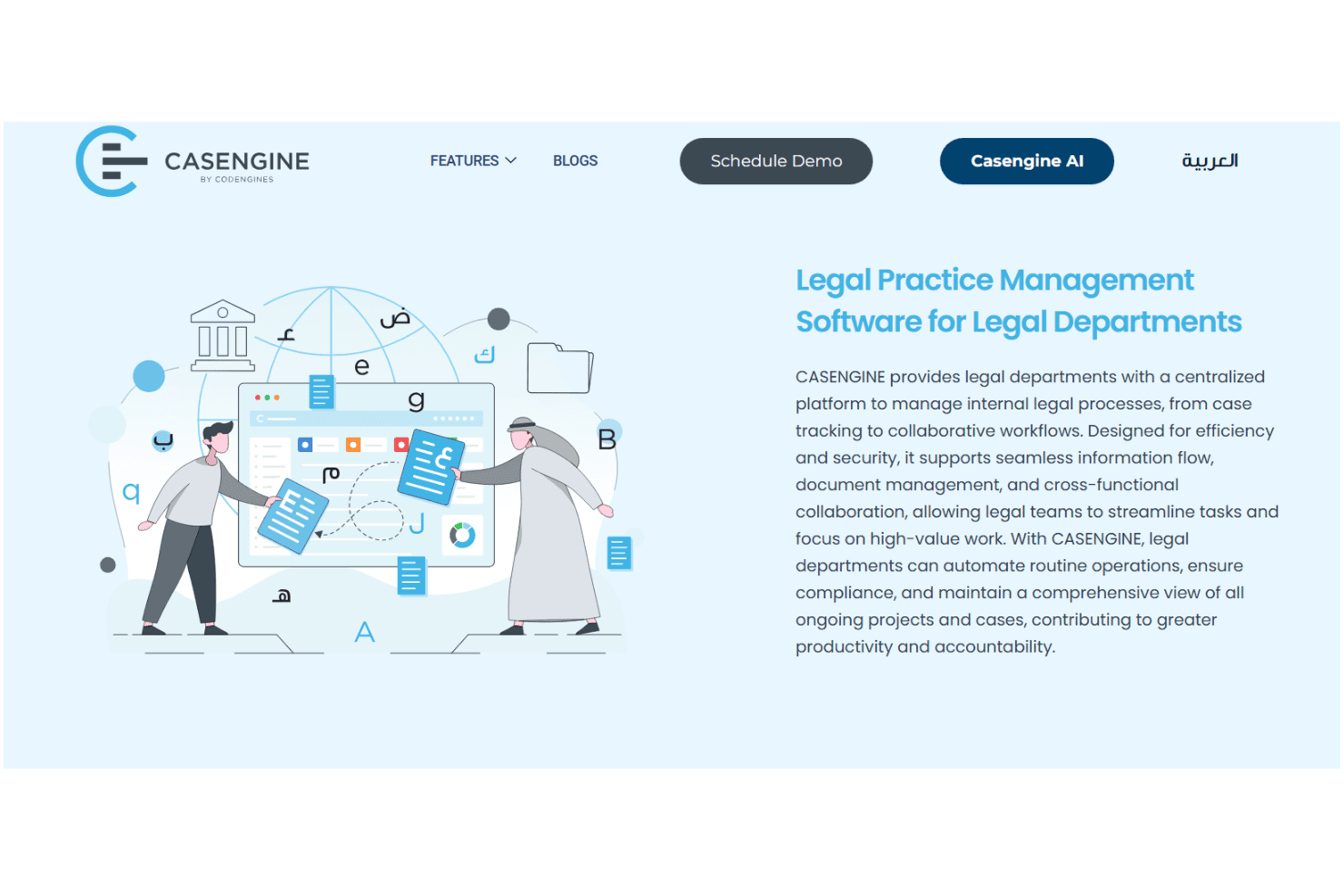
Casengine tracks legal requests, SLAs, matters, documents, and outside counsel. Casengine is a legal practice management platform for in-house legal departments and law firms, combining legal service request intake, SLA-based routing, request tracking, document management, matter tracking and external counsel oversight.
Who Is Casengine Best For?
Casengine is a strong fit for in-house legal teams and law firms operating across the Middle East that require bilingual Arabic/English legal request management.
Why I Picked Casengine
I've included Casengine in my top picks because it's one of the few platforms that treats Legal Service Requests from internal business units as a core, first-class feature rather than an afterthought. I like that SLA-based routing is built directly into request handling, so incoming requests are automatically assigned deadlines and tracked against performance targets. The Open Matters view gives my team a real-time picture of every active request moving through the queue.
Casengine Key Features
- Bilingual interface: Lets users manage data, requests, and documents in both Arabic and English.
- External counsel collaboration: Provides controlled access and performance monitoring for multiple outside law firms.
- Corporate project workflow templates: Supports predefined templates and customizable workflows for different legal matter types.
- Integration with Microsoft Outlook and Active Directory: Connects legal workflows with essential business tools and directory services.
Casengine Integrations
Casengine offers native integrations with Microsoft Outlook and Active Directory. An API is available for custom integrations.
Pros and Cons
Pros:
- Real-time matter tracking across all open requests
- Bilingual Arabic/English interface out of the box
- Built-in SLA tracking with automated escalations
Cons:
- Primarily designed for Middle East market needs
- Limited third-party ecosystem compared to competitors
Learn more about Casengine: Best for no-code custom intake workflows
- Free demo available
- Pricing upon request
Visit WebsiteCustomer Rating:4.7/5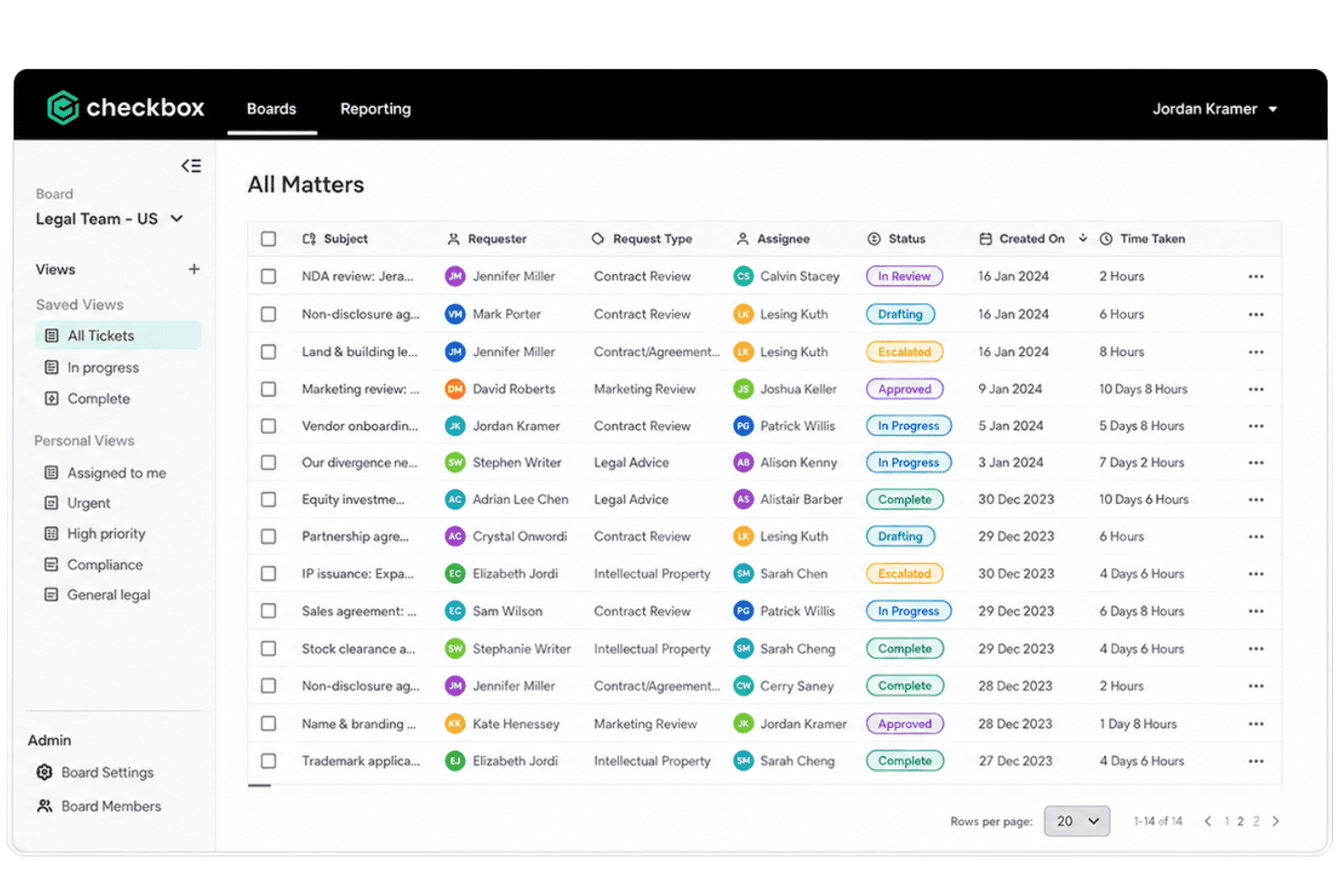
Checkbox tracks legal requests, routing, matters, resolution, and workload. Checkbox is a no-code legal operations platform that centralizes intake, automates request routing and triage, tracks matters through resolution, and provides dashboards for legal workload visibility.
Who Is Checkbox Best For?
Checkbox is a strong fit for in-house legal teams at mid-to-large enterprises managing high volumes of requests across multiple business units.
Why I Picked Checkbox
Checkbox earns its spot as one of the best on my shortlist because no-code workflow building is genuinely central to how the platform works. I can design intake forms with conditional logic, set up auto-routing rules based on matter type or team capacity, and deploy the whole thing without writing a line of code. What I find particularly impressive is the visual process mapper, which lets me build parallel and trigger-based workflows that mirror how legal requests actually move through an organization.
Checkbox Key Features
- Email and messaging channel intake: Business users can submit legal requests directly from email, Slack, Microsoft Teams, and web forms.
- Centralized matter repository: All legal requests, documents, tasks, and conversations are organized in a single searchable workspace.
- Customizable dashboards: Legal teams get configurable dashboards to visualize matter status, request types, cycle times, and team workload.
- Audit trails and history: Every legal request maintains a complete record of status changes, communications, and document versions for compliance.
Checkbox Integrations
Checkbox offers native integrations with Microsoft Teams, Slack, Salesforce, Jira, and DocuSign, and provides an API for custom integrations.
Pros and Cons
Pros:
- Visual process mapper mirrors real legal workflows
- Conditional intake logic handles complex matter types
- No-code workflow builder requires no IT involvement
Cons:
- Analytics lag behind dedicated matter management platforms
- Complex workflow setup takes considerable configuration time
Learn more about Checkbox: Best for teams seeking end-to-end legal operations
- Free demo available
- Pricing upon request
Visit WebsiteCustomer Rating:4.2/5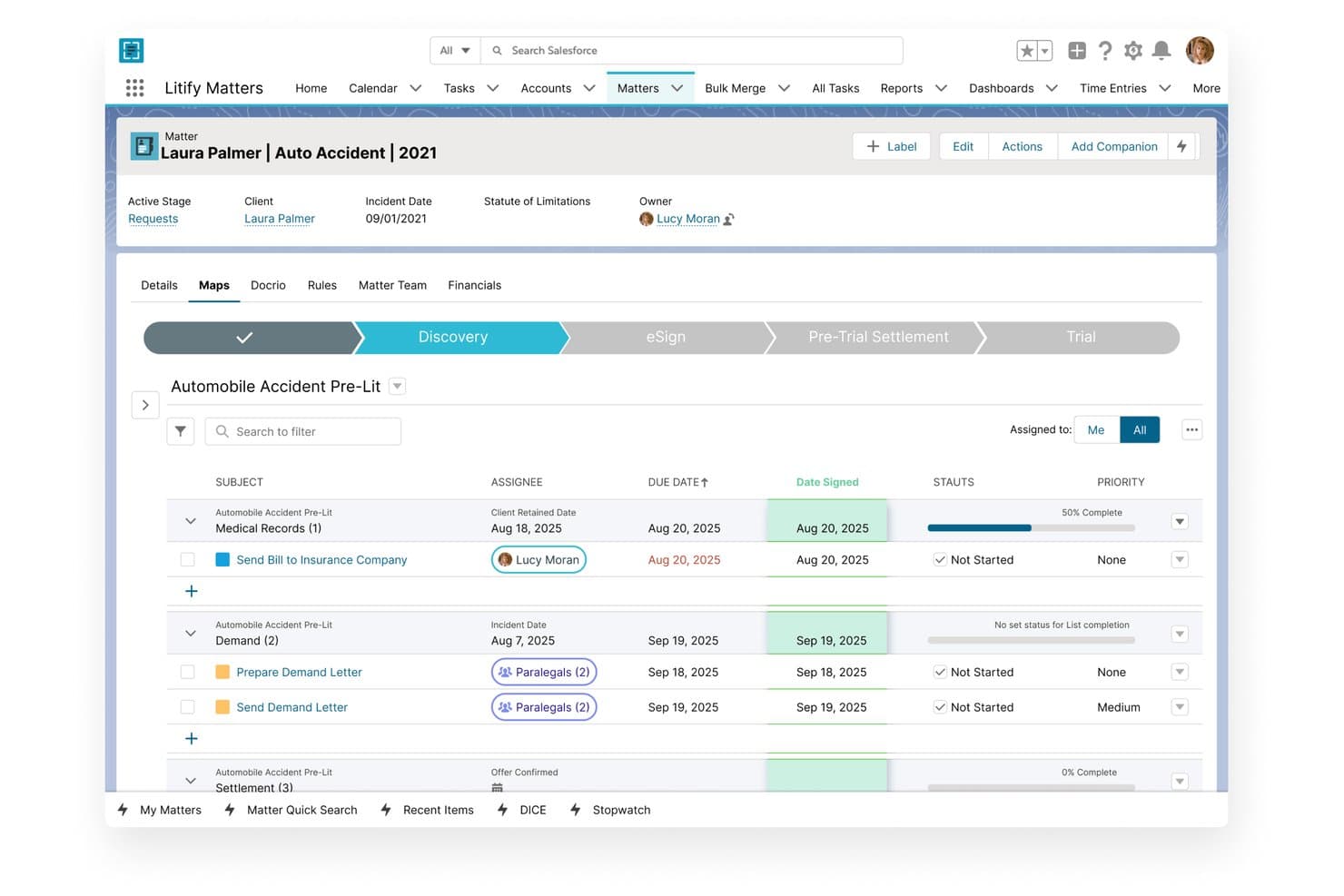
Litify offers a matter management view with task tracking, assignees, due dates, statuses, and stage progression for legal cases. Litify is an AI-native legal operations platform built on Salesforce that covers legal service request intake, matter management, automated routing, document handling, time and billing, and reporting for law firms and corporate legal departments.
Who Is Litify Best For?
Litify is a strong fit for mid-market to enterprise law firms and corporate legal departments that need a single platform to manage the full lifecycle of legal work.
Why I Picked Litify
I picked Litify as one of the best because it covers the full legal request lifecycle, from dynamic intake through automated triage, matter management, and reporting, all in one Salesforce-based environment. I particularly like Litify ACE, the agentic AI layer that autonomously handles administrative case tasks so attorneys aren't bogged down in queue management. The no-code reporting engine also surfaces legal-specific KPIs like request volume, cycle times, and team workload in real time.
Litify Key Features
- Conflict check agent: Uses AI-powered fuzzy matching to identify conflicts across all historical cases and creates a permanent report.
- Document generation and editing: Generates legal documents and allows advanced PDF editing directly within the platform.
- Client portal: Provides business users with a self-service portal to submit legal requests and track status updates.
- Customizable matter plans: Offers automated, templatized task lists tailored to practice area, case type, and specific team processes.
Litify Integrations
Litify offers native integrations with NetDocuments, DocuSign, DocuSign CLM, Docrio, and has native connectivity with the Salesforce ecosystem. An API is available for custom integrations.
Pros and Cons
Pros:
- Handles intake through matter closure in one platform
- Salesforce-native reporting gives granular workload visibility
- Highly customizable matter plans by practice area
Cons:
- Platform load times slow noticeably with high file volumes
- Initial implementation is a large undertaking
Learn more about Litify: Best for real-time intake analytics and reporting
- 14-day free trial
- From $100/user/month
Visit WebsiteCustomer Rating:4.8/5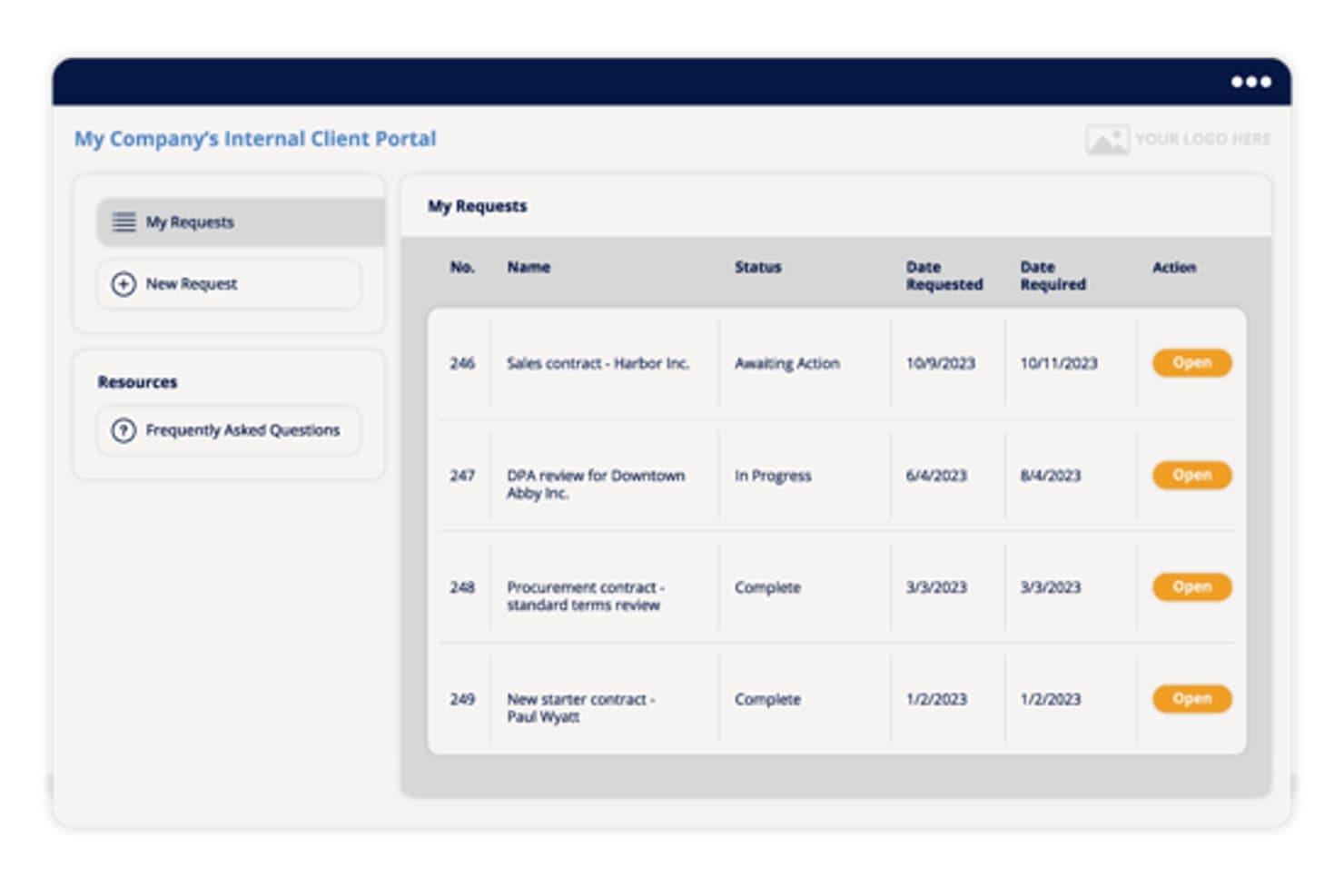
Xakia offers an internal client portal where users can track legal requests by status, date requested, and date required in a structured table view. Xakia is a legal matter management platform built exclusively for in-house legal teams that combines customizable intake forms, priority-based request triage, matter tracking, spend management, and real-time analytics dashboards.
Who Is Xakia Best For?
Xakia is a good fit for in-house legal teams of 2–200 people who need a dedicated legal operations platform without the complexity of enterprise-grade systems.
Why I Picked Xakia
I picked Xakia as one of the best because its real-time analytics dashboard gives legal teams a live view of intake volume, request types, and turnaround times, turning capacity planning into something you can actually act on. I also like that the searchable FAQ intercept feature reduces noise at the intake stage, so the reporting data reflects genuine legal demand rather than questions that didn't need a lawyer. On Professional and above, Pro Analytics layers in legal-specific KPIs that go deeper than simple volume counts.
Xakia Key Features
- Internal client portal: Lets business users submit requests through categorized intake forms tailored for contracts, NDAs, procurement, marketing, or HR.
- Document automation: AutoDocs enables generation of standard legal documents from intake submissions with zero-touch processing.
- Customizable approval workflows: Supports multi-step contract approval and signing with stage tracking for each approver.
- External counsel collaboration: Xakia Connect allows outside counsel to work on matters, share updates, and submit invoices without extra licensing.
Xakia Integrations
Xakia offers native integrations with NetDocuments, iManage, SharePoint, Outlook, Google Workspace, and DocuSign, and has an API for custom integrations.
Pros and Cons
Pros:
- Outside counsel collaboration without extra licensing
- FAQ intercept reduces unnecessary intake submissions
- Live intake analytics with legal-specific KPIs
Cons:
- Matter workflow configuration requires admin setup time
- Advanced analytics locked to higher-tier plans
Learn more about Xakia: Best for legal ticketing with contract workflows
- Free demo available
- Pricing upon request
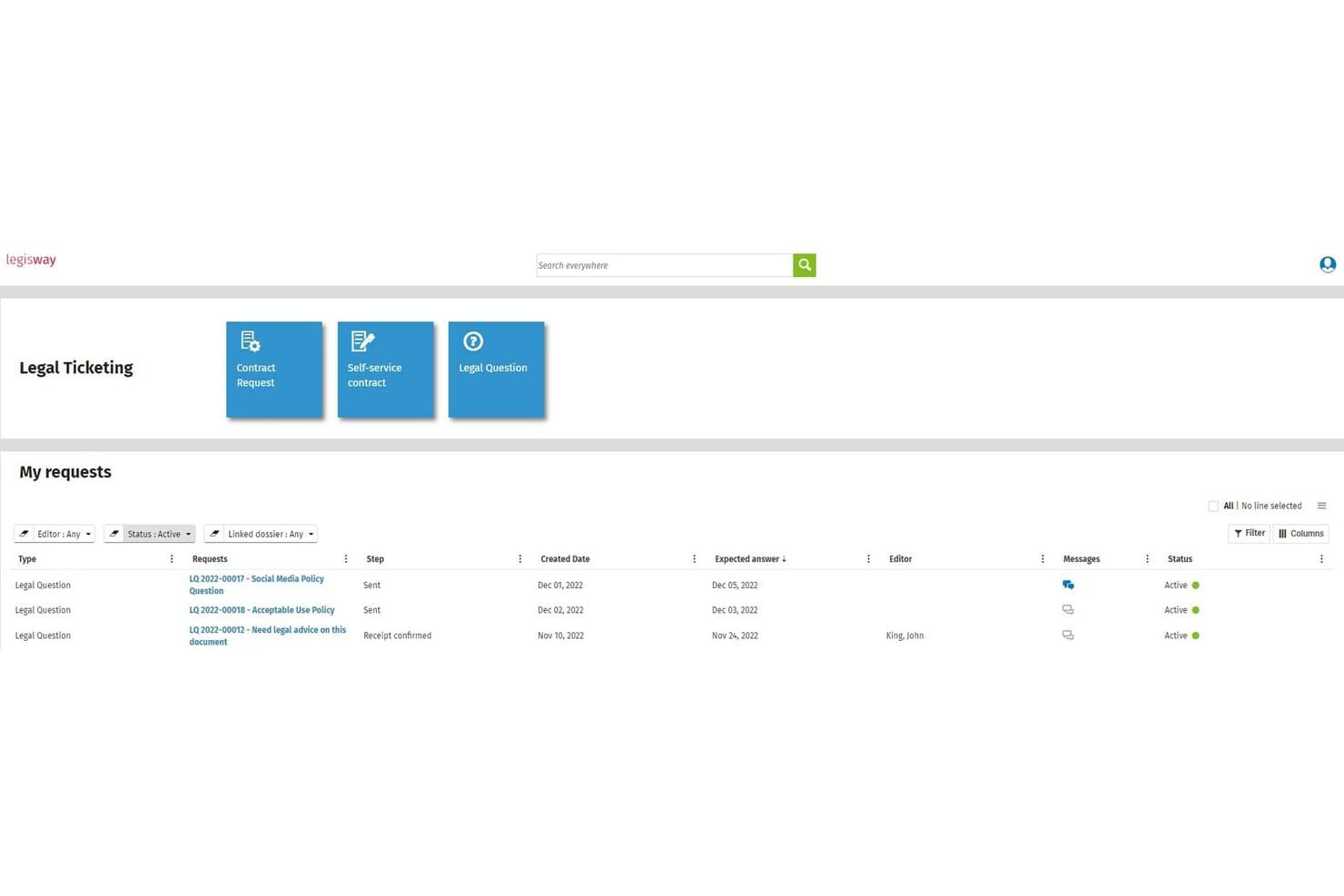
Wolters Kluwer Legisway offers a Legal Ticketing dashboard where users can submit and track legal requests such as contract requests, self-service contracts, and legal questions with statuses and expected answer dates. Wolters Kluwer Legisway is a legal management platform for corporate legal departments that combines legal ticketing, contract lifecycle management, matter tracking, and automated request routing in a single system.
Who Is Wolters Kluwer Legisway Best For?
Legisway is a strong fit for in-house legal teams at mid-to-large enterprises managing high volumes of requests from business units like finance, HR, and procurement.
Why I Picked Wolters Kluwer Legisway
I've included Legisway in my top picks because it connects legal tickets directly to contract records. When a business unit submits an amendment request, my team can track it through approval without switching systems or losing document context. The guided intake forms also enforce structured submission from the start, which cuts the back-and-forth I'd otherwise spend clarifying what the requester actually needs.
Wolters Kluwer Legisway Key Features
- Centralized matter repository: Store all requests, documents, and related communications in a single searchable database.
- Customizable dashboard analytics: Visualize request volumes, matter types, and team workload with configurable dashboards and KPIs.
- Workflow and approval management: Define structured processes and approval paths for legal requests and matters.
- Automated notifications and reminders: Trigger alerts for deadlines, updates, and pending actions throughout the matter lifecycle.
Wolters Kluwer Legisway Integrations
Native integrations are not clearly documented. An API is available for custom integrations.
Pros and Cons
Pros:
- Scales well for large-volume contract management
- Highly configurable fields, alerts, and reports
- Tracks requests alongside related contract records
Cons:
- Initial data migration into the system is time-consuming
- Slow support response during technical or upgrade issues
Learn more about Wolters Kluwer Legisway: Best for custom legal request workflows
- Free demo available
- Pricing upon request
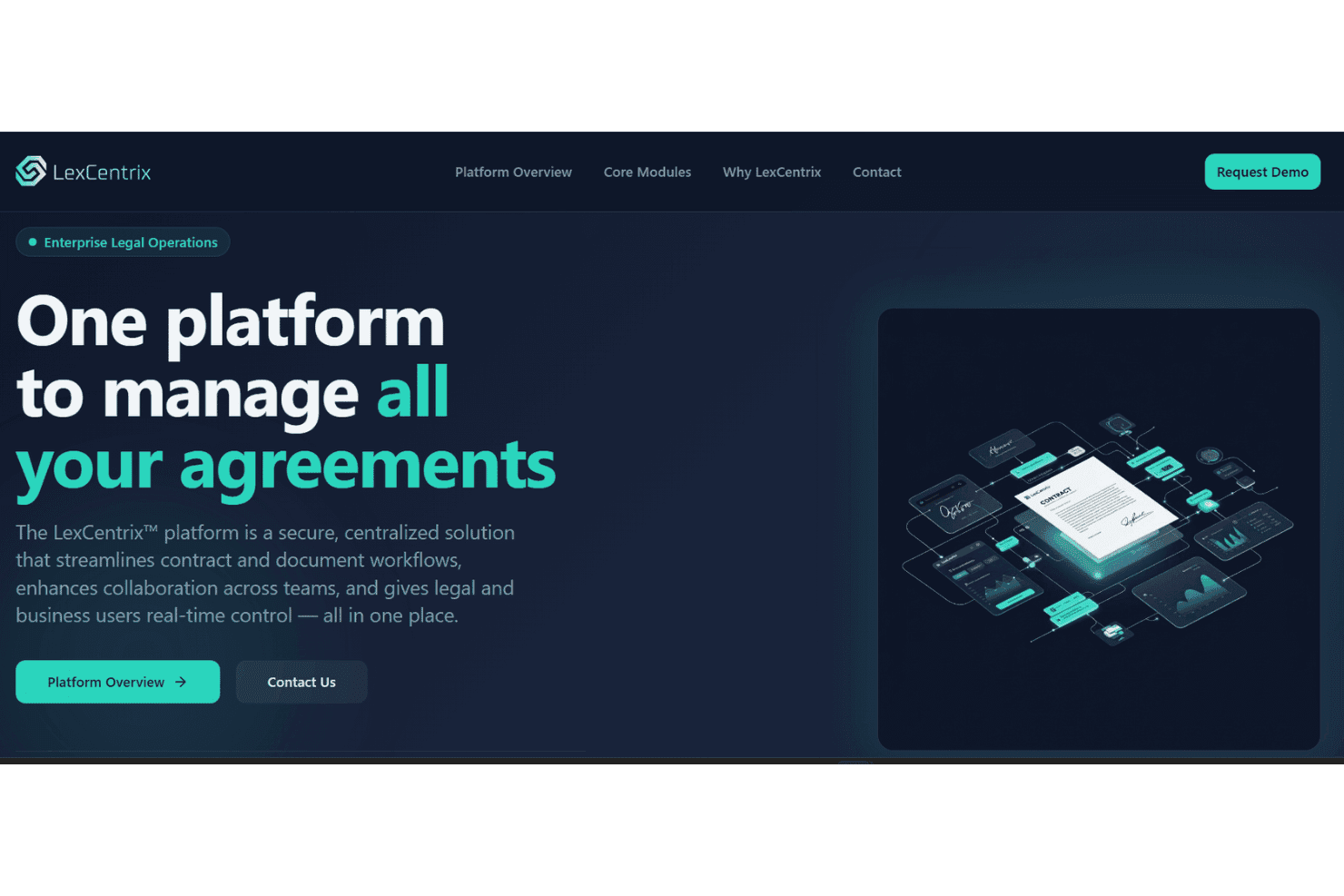
LexCentrix tracks legal requests, matters, contracts, workflows, and documents. LexCentrix is a cloud-based legal operations platform that centralizes request intake, matter management, contract workflows, request tracking and document management for in-house legal teams.
Who Is LexCentrix Best For?
LexCentrix is a good fit for in-house legal teams at mid-to-large enterprises that need structured, customizable workflows to manage high volumes of cross-departmental legal requests.
Why I Picked LexCentrix
LexCentrix earns its spot on my shortlist because of how far it lets you customize the intake experience for different request types. I particularly like that you can build separate guided forms for NDAs, contract reviews, and employment matters, each with its own step-by-step workflow. Paired with the Workflow Stages module, my team can route and track every request through a defined lifecycle without relying on generic task management workarounds.
LexCentrix Key Features
- Role-based dashboards: Real-time, customizable dashboards provide workload and status visibility for different legal roles across the team.
- Matter lifecycle tracking: Every request passes through defined status stages with timestamps and audit trails for compliance.
- Document management: Version control, metadata tagging, and file permissions support secure collaboration on legal documents.
- Configurable approval flows: Legal teams can define review and sign-off steps for contracts or matters before completion.
LexCentrix Integrations
Native integrations are not clearly documented. An API is available for custom integrations.
Pros and Cons
Pros:
- Role-based dashboards give team-wide request visibility
- Audit trails built into every matter stage
- Intake forms customizable by legal matter type
Cons:
- Better suited for large teams than small ones
- No clearly documented out-of-the-box reporting templates
Learn more about LexCentrix:
Other Legal Request Tracking Software
Here are some additional legal request tracking software options that didn’t make it onto my shortlist, but are still worth checking out:
- 11LawcadiaBest for regulated teams needing audit controls
- 12DazychainBest for end-to-end request visibility
- 13Clio ManageBest for practice-wide matter and task tracking
- 14LegalOnBest for AI contract review in request tracking
- 15LexisNexis CounselLink+Best for integrated spend and matter oversight
- 16Dashboard LegalBest for communication-focused legal collaboration
- 17LegistifyBest for managing global legal requests
- 18LuplBest for cross-firm matter collaboration
- 19ServiceNow Legal Service DeliveryBest for enterprise-wide workflow integration
- 20JosefBest for automating legal intake workflows
Related Reviews
How to Choose Legal Request Tracking Software
It’s easy to get distracted by broad legal operations features when evaluating tools. To stay focused on request tracking, use this checklist to compare how well each platform captures, routes, monitors, and reports on legal requests from submission through resolution:
| Factor | What to Consider |
|---|---|
| FactorScalability | What to ConsiderCan the system handle increasing request volumes, users, departments, and legal teams as your organization grows? Consider whether workflows remain manageable as request complexity increases. |
| FactorIntegrations | What to ConsiderWhich tools need to exchange request data with the platform? Check compatibility with email, Microsoft Teams, Slack, document management systems, contract tools, and other legal operations software. |
| FactorCustomizability | What to ConsiderCan you configure request forms, statuses, categories, routing rules, workflows, and dashboards without extensive technical support or coding? |
| FactorEase of use | What to ConsiderHow easily can employees submit requests and legal teams track their progress? Evaluate navigation, request updates, search capabilities, and status visibility for both requesters and legal staff. |
| FactorImplementation and onboarding | What to ConsiderHow much time and internal effort will setup require? Ask about workflow configuration, data migration, user training, request-form creation, and launch support. |
| FactorCost | What to ConsiderCan you estimate the full cost based on users, request volume, features, and additional modules? Check for extra charges tied to implementation, reporting, support, or advanced workflow capabilities. |
| FactorRequest tracking capabilities | What to ConsiderCan the platform track each request from submission through assignment, review, escalation, and resolution? Look for status histories, ownership tracking, due dates, SLA monitoring, and request-level audit trails. |
| FactorReporting and visibility | What to ConsiderCan legal teams monitor request volume, turnaround times, overdue requests, workloads, and recurring request types? Check whether dashboards and reports can be filtered by team, status, requester, or category. |
| FactorSecurity safeguards | What to ConsiderHow does the platform protect confidential legal information? Review encryption, access permissions, authentication controls, audit logs, data retention settings, and relevant security certifications. |
| FactorSupport availability | What to ConsiderWhat support is available when workflows, routing rules, or tracking processes fail? Review support channels, response times, technical assistance, and escalation options for urgent issues. |
What Is Legal Request Tracking Software?
Legal request tracking software is a digital system that manages legal requests from submission through assignment, review, and resolution. It centralizes request intake, status tracking, ownership, deadlines, and communication in one place.
Legal request tracking systems give legal teams better visibility into workloads, response times, pending requests, and completed work. This software supports more consistent request handling, clearer accountability, and organized legal operations across departments.
Features
When selecting legal request tracking software, keep an eye out for the following key features:
- Request tracking: Tracks each legal request from submission through assignment, review, completion, and closure, giving teams clear visibility into current status and progress.
- Request ownership: Assigns requests to specific attorneys, teams, or departments so responsibility remains clear throughout the request lifecycle.
- Status management: Uses configurable statuses to show whether requests are new, assigned, in progress, waiting for information, completed, or overdue.
- Deadline and SLA tracking: Monitors due dates, response targets, and service-level commitments while flagging requests that are approaching or exceeding deadlines.
- Notifications and reminders: Sends alerts for new assignments, status changes, approaching deadlines, overdue work, and other request activity.
- Requester portal: Gives requesters a central place to check progress, provide additional information, and review updates without repeatedly contacting the legal team.
- Audit trails: Records status changes, assignments, comments, approvals, and other activity to maintain a clear history of each request.
- Search and filtering: Allows teams to locate requests by status, owner, department, request type, date, priority, or other criteria.
- Reporting and dashboards: Displays request volume, completion times, overdue work, workload distribution, and other performance metrics for legal operations reporting.
- Role-based permissions: Controls who can view, edit, assign, or manage requests based on roles, teams, or departments.
Common Legal Request Tracking Software AI Features
Beyond standard tracking capabilities, some legal request tracking platforms are adding AI features for monitoring and managing request activity.
- Request summarization: Creates concise summaries of lengthy requests and related activity so legal teams can review context more quickly.
- SLA risk prediction: Identifies requests that may miss deadlines based on workload, request history, and current progress.
- Duplicate request detection: Identifies potentially repetitive or closely related requests so teams can avoid managing the same issue separately.
- Workload forecasting: Analyzes historical request data to predict changes in demand and identify periods when workloads may increase.
- AI-powered reporting: Analyzes request data to surface patterns in volume, completion times, workloads, and recurring legal needs.
Benefits
Implementing legal request tracking software provides several benefits for legal teams and their organizations. Here are a few you can expect:
- Better request visibility: Centralized tracking shows which requests are pending, active, overdue, or completed without relying on spreadsheets or email threads.
- Clearer accountability: Ownership and status records make it easier to identify who is responsible for each request and what action comes next.
- Fewer missed requests: Notifications, deadlines, and centralized records reduce the risk of requests being overlooked or forgotten.
- Faster response times: Status tracking and deadline monitoring allow legal teams to identify stalled requests and address delays earlier.
- Improved requester communication: Requesters can view updates and progress without repeatedly contacting legal staff for status checks.
- More consistent processes: Defined statuses, workflows, and tracking rules create a repeatable process for managing legal requests.
- Stronger performance reporting: Request data gives legal leaders clearer insight into workload, turnaround times, demand patterns, and team capacity.
- Better auditability: Activity histories preserve records of assignments, updates, decisions, and completion for future review.
Costs and Pricing
Selecting legal request tracking software requires an understanding of how vendors structure their pricing. Costs can depend on user count, request volume, workflow complexity, reporting requirements, implementation services, and additional legal operations modules.
Plan Comparison Table for Legal Request Tracking Software
| Plan Type | Average Price | Common Features |
|---|---|---|
| Plan Type Free Plan | Average Price$0 | Common FeaturesBasic request submission, status tracking, limited workflows, notifications, and basic reporting. |
| Plan Type Starter Plan | Average Price$40-$100/user/month | Common FeaturesRequest tracking, ownership, configurable statuses, reminders, dashboards, and standard workflows. |
| Plan Type Business Plan | Average Price$100-$400/user/month | Common FeaturesAdvanced workflows, SLA tracking, custom dashboards, permissions, reporting, and broader integrations. |
| Plan Type Enterprise Plan | Average Price$400+/user/month | Common FeaturesHigh request volumes, advanced configuration, AI capabilities, enterprise security controls, custom reporting, implementation support, and dedicated account management. |
Legal Request Tracking Software FAQs
Here are some answers to common questions about legal request tracking software:
How does legal request tracking software improve request visibility?
It gives legal teams a central view of open, pending, overdue, and completed requests. Status updates, ownership records, deadlines, and activity histories make it easier to see where each request stands and what action is required next.
Can I customize request statuses and workflows?
Yes, many platforms allow teams to configure request categories, statuses, assignment rules, approval steps, deadlines, and escalation paths. This makes it possible to match the software to existing legal processes without relying on a fixed workflow.
What reporting capabilities should legal request tracking software provide?
Look for dashboards and reports covering request volume, status, turnaround time, overdue requests, workload distribution, and completion trends. These metrics give legal teams clearer insight into demand and operational performance.
What integrations should I look for with legal request tracking software?
Look for connections with tools your legal team already uses, such as Microsoft Outlook, Teams, Slack, document management systems, contract platforms, and reporting tools. These connections can reduce duplicate data entry and keep request activity easier to track.
Can legal request tracking software monitor deadlines and SLAs?
Yes, many platforms track due dates, response targets, and service-level agreements. Notifications and escalation rules can flag requests that are approaching deadlines or have remained unresolved for too long.
How secure is legal request tracking software?
Security features often include role-based permissions, encryption, audit logs, single sign-on, and configurable access controls. These protections restrict sensitive legal request information to authorized users and preserve a record of activity.