

Rules based legal calendaring software automatically calculates deadlines and key dates using court rules, keeping your firm on track without manual calculations. Legal professionals who need more reliable compliance and fewer missed deadlines turn to these tools to handle complex, ever-changing court requirements. In this list, you’ll find the best options for 2026, plus guidance to help you choose the right system for your practice area, jurisdiction, and workflow.
Why Trust Our Software Recommendations
6,700+
Reviews
20
Industry experts
16+
Evaluation factors
14
Years
Our team has been testing and reviewing software since 2012. As legal practice leaders ourselves, we know how difficult—and important—it is to choose the right software.
For this guide, we evaluated tools using hands-on testing and independent research, scoring tools using our selection criteria.
Our reviews reflect our human editorial judgment, not a sales pitch.
Rules Based Legal Calendaring Software Comparison Table
This comparison table summarizes pricing, trial, and demo details for my top rules based legal calendaring software selections.
| Tool | Best For | Trial Info | Price | ||
|---|---|---|---|---|---|
| 1 | Best for small firm legal calendaring features | Free plan available | From $39/user/month (billed annually) | Website | |
| 2 | Best for law firm malpractice risk mitigation | Free demo available | Pricing upon request | Website | |
| 3 | Best for customizable matter-centric calendaring | Free demo available | Pricing upon request | Website | |
| 4 | Best for court document-driven event creation | 30-day free trial + free demo available | From $39/month | Website | |
| 5 | Best for integrated time and billing calendaring | Not available | Pricing upon request | Website | |
| 6 | Best for multi-jurisdiction deadline automation | Free demo available | From $19/user/month (billed annually) | Website | |
| 7 | Best for enterprise-grade workflow integration | Free demo available | Pricing upon request | Website | |
| 8 | Best for integration with legal research platforms | Not available | Pricing upon request | Website | |
| 9 | Best for comprehensive court rule coverage | Free demo available | Pricing upon request | Website | |
| 10 | Best for real-time court data syncing | Free demo available | Pricing upon request | Website |


Best Rules Based Legal Calendaring Software Reviews
Below are my detailed summaries of the best rules based legal calendaring software that made it onto my shortlist. My reviews offer a detailed look at the features, integrations, and best use cases of each software to help you find the best one for you.
 Best for small firm legal calendaring features
- Free plan available
- From $39/user/month (billed annually)
Visit WebsiteCustomer Rating:4.4/5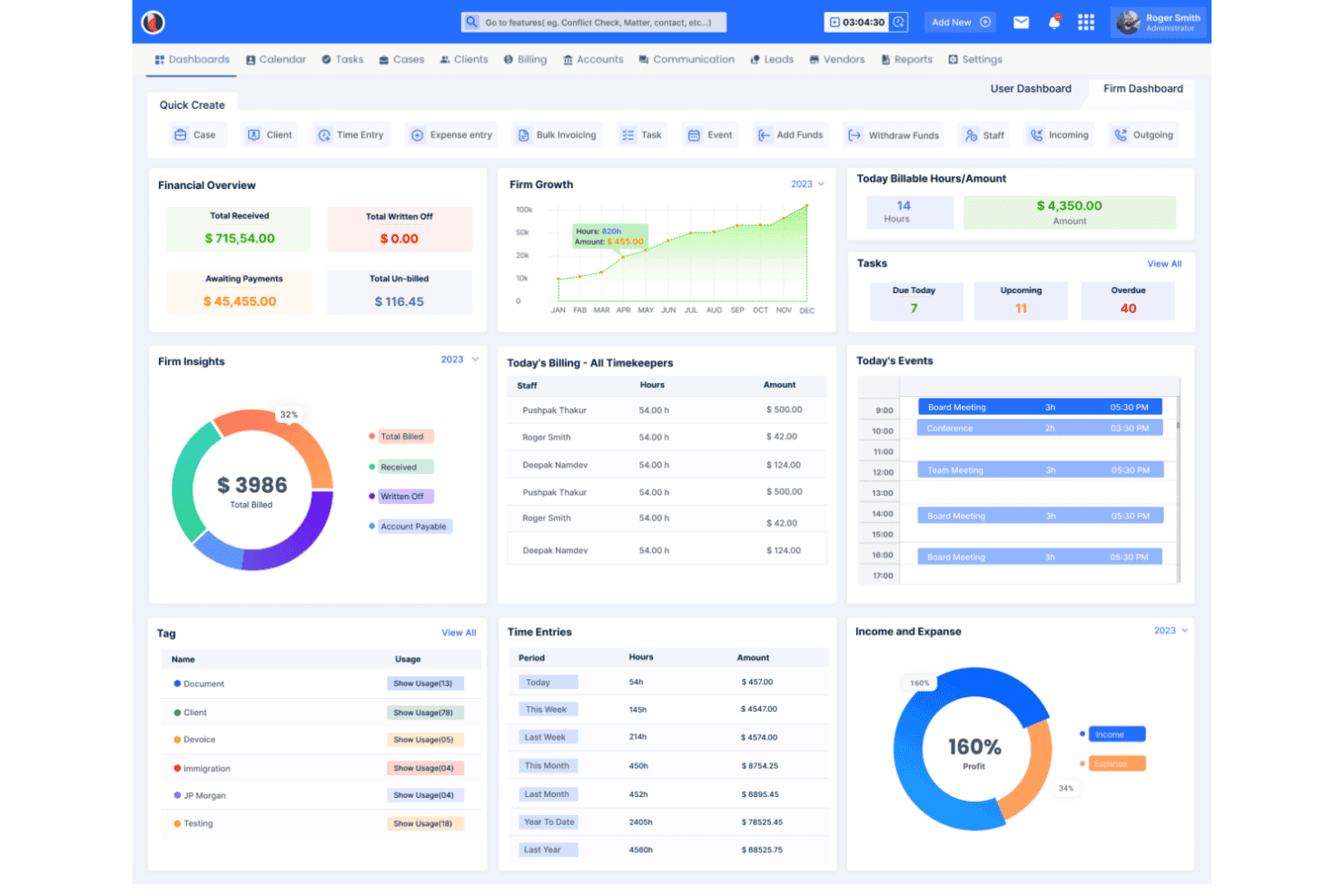
CaseFox provides a law firm dashboard with financial overview, billing tracking, task management, and time entries in one view. CaseFox is a cloud-based legal practice management platform for small firms that combines rule-based court calendaring, case-linked deadline tracking, and two-way calendar sync with Outlook and Google Calendar.
Who Is CaseFox Best For?
CaseFox suits solo practitioners and small law firms that need integrated court calendaring alongside billing, case management, and client tracking in one platform.
Why I Picked CaseFox
I've included CaseFox in my top picks because its rule-based calendaring is built directly into case records, meaning court dates, motions, and filing deadlines are always tied to a specific matter rather than floating on a general calendar. I also like the Note Calendar, which lets me log billable time against a calendar event, so nothing slips through when a solo practitioner or small team is managing docketing and billing at the same time.
CaseFox Key Features
- Rules-based court date tracking: Lets you build calendar rules for deadlines, motions, and hearings tied to each matter.
- Two-way calendar sync: Syncs deadlines and events between CaseFox, Outlook, and Google Calendar in real time.
- Automated email deadline reminders: Sends configurable reminders for upcoming court dates, tasks, and filing deadlines.
- Role-based calendar permissions: Allows firms to restrict or grant access to different calendars based on user roles.
CaseFox Integrations
CaseFox offers native integrations with Outlook, Google Calendar, Microsoft 365, Microsoft Teams, and Google Workspace. An API is available for custom integrations.
Pros and Cons
Pros:
- Free data migration included for new firm onboarding
- Rule-based deadline sets generate from a single trigger date
- Calendar events link directly to billable matter records
Cons:
- Reporting tools lack advanced deadline audit customization
- Mobile app receives low ratings and infrequent updates
Learn more about CaseFox: Best for law firm malpractice risk mitigation
- Free demo available
- Pricing upon request
Visit WebsiteCustomer Rating:4.4/5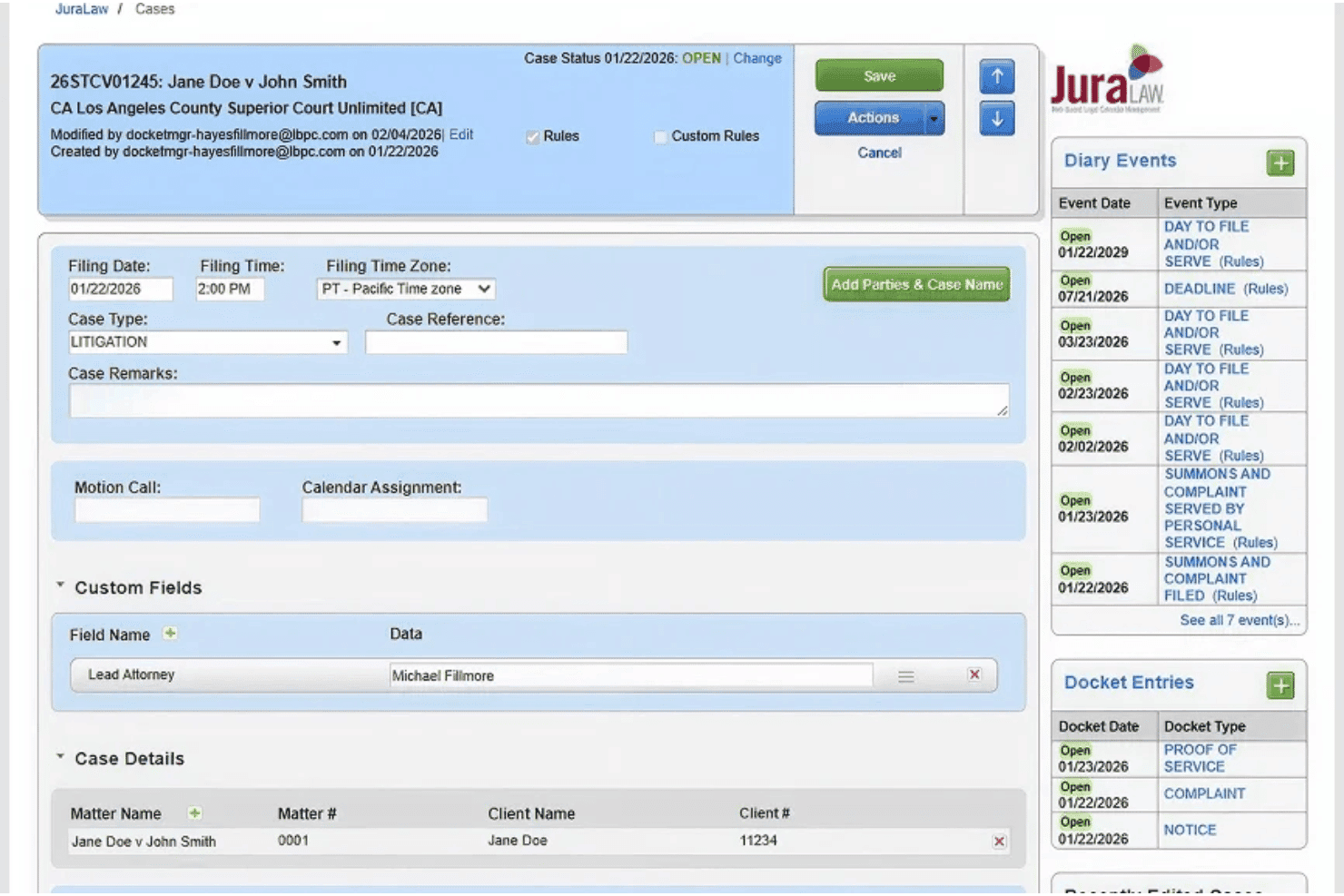
JuraLaw includes a litigation case management screen with diary events, docket entries, filing details, and custom fields for tracking legal deadlines. JuraLaw is a web-based rules-based legal calendaring platform that automates court deadline calculation across 2,600+ jurisdictions, with court data integration, audit trail reporting, automated ECF email capture, and Outlook sync built specifically for law firms.
Who Is JuraLaw Best For?
JuraLaw is a strong fit for mid-size to large law firms with dedicated docketing departments managing high volumes of litigation across multiple jurisdictions.
Why I Picked JuraLaw
JuraLaw earns its spot on my shortlist because of how seriously it treats the audit side of deadline management. I particularly like the rule acceptance workflow: when a court rule updates, the system requires your team to document that they've reviewed and accepted the change before applying it. That paper trail is what makes JuraLaw's approach to malpractice risk genuinely different from standard calendaring tools, where rule changes can slip through unnoticed.
JuraLaw Key Features
- Nationwide jurisdiction rule library: Maintains automated court rules for over 2,600 federal, state, and local jurisdictions.
- Outlook and iManage integration: Syncs deadlines and events with Outlook calendars and links documents from iManage.
- Automated ECF email capture: Processes PACER ECF emails and calendars events automatically from federal court notices.
- JuraLawyer mobile app: Lets attorneys view critical case deadlines and communicate updates from their mobile devices.
JuraLaw Integrations
JuraLaw offers native integrations with Microsoft Outlook, NetDocuments, iManage, and PACER ECF. An API is available for custom integrations.
Pros and Cons
Pros:
- Detailed docketing audit trail for every calendar entry
- Pulls deadline data directly from court systems
- Continuously updated, attorney-monitored court rule sets
Cons:
- Calendaring a complex order (e.g., Rule 16) can be time-consuming
- Individual user settings can only be changed globally, not per user
Learn more about JuraLaw: Best for customizable matter-centric calendaring
- Free demo available
- Pricing upon request
Visit WebsiteCustomer Rating:4/5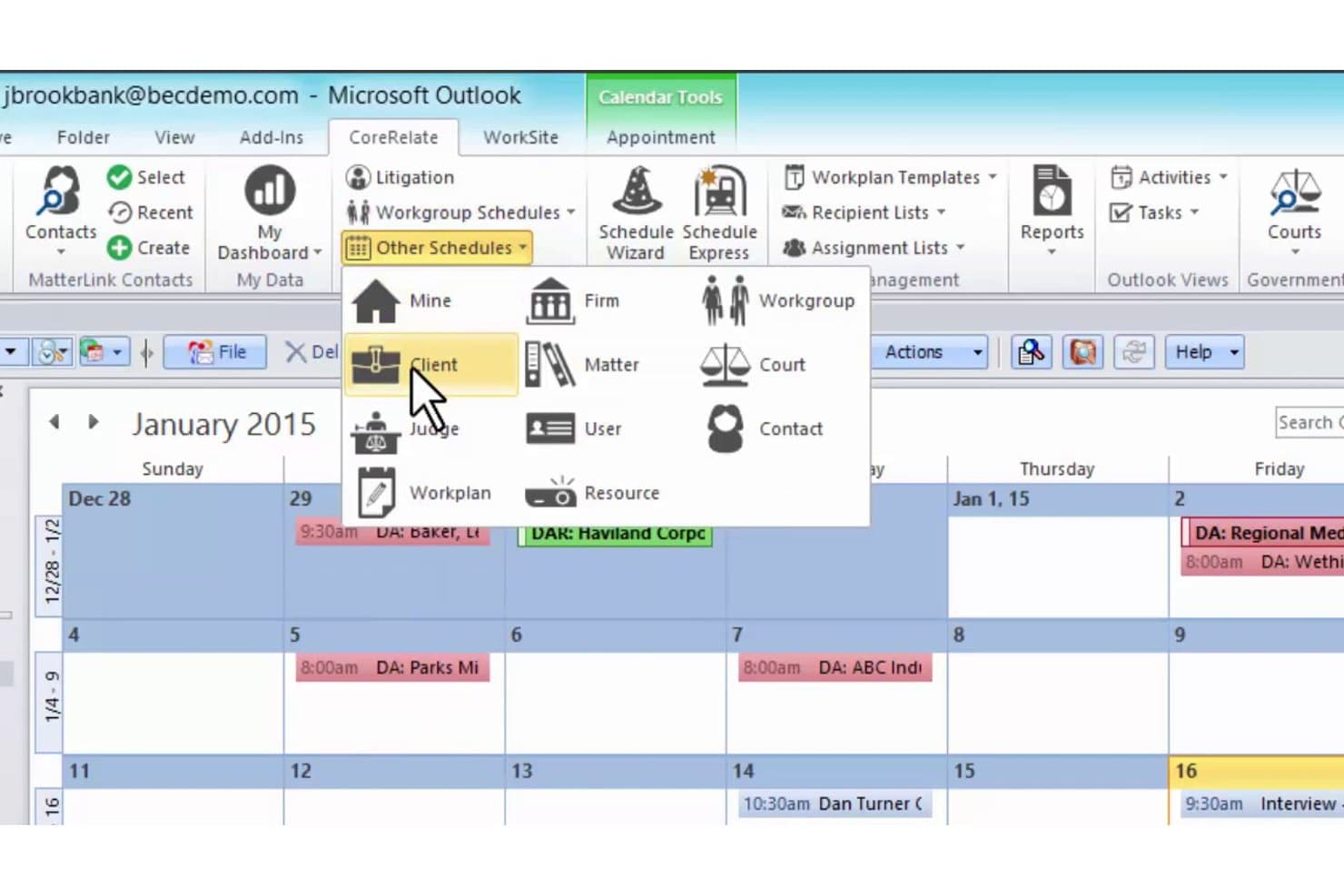
BEC CoreRelate offers a rules-based calendar scheduling menu with schedule types including Client, Matter, Court, Judge, User, Workgroup, and Resource views within Microsoft Outlook. BEC CoreRelate is a rules-based legal calendaring and docketing platform that pairs formula-driven deadline calculation with CalendarRules jurisdiction integration and matter-centric Outlook sync for law firms.
Who Is BEC CoreRelate Best For?
It's a strong fit for mid-size to large litigation-focused law firms that need enterprise-grade docketing with deep Outlook integration and multi-office scheduling control.
Why I Picked BEC CoreRelate
I picked BEC CoreRelate because it lets you build scheduling templates at the practice-group level with formula-driven date logic that goes well beyond simple forward/backward offsets. When a trigger date shifts, the entire matter schedule recalculates automatically, and every change is logged in an audit trail. I like that event types and date formulas are fully customizable per matter type, so litigation and transactional groups each work from templates built for their docket.
BEC CoreRelate Key Features
- CalendarRules subscription integration: Access an up-to-date, jurisdiction-specific library of court rules for automated deadline calculation.
- Outlook and iManage sync: Synchronize matter-centric schedules and deadlines with Outlook calendars and iManage document management.
- Centralized audit trail: Track every scheduling action in a permanent, searchable record for compliance and internal review.
- Role-based access controls: Configure granular permissions and security templates to manage user access firm-wide.
BEC CoreRelate Integrations
BEC CoreRelate offers native integrations with Outlook, CalendarRules, iManage, PacerPro, UniCourt, and MatterLink. An API is available for custom integrations.
Pros and Cons
Pros:
- CalendarRules integration keeps jurisdiction rules updated
- Cascading recalculation with immutable audit logging
- Fully customizable matter-level scheduling templates
Cons:
- Not suited for small or solo firms
- Configuration requires significant IT setup time
Learn more about BEC CoreRelate: Best for court document-driven event creation
- 30-day free trial + free demo available
- From $39/month
Visit WebsiteCustomer Rating:5/5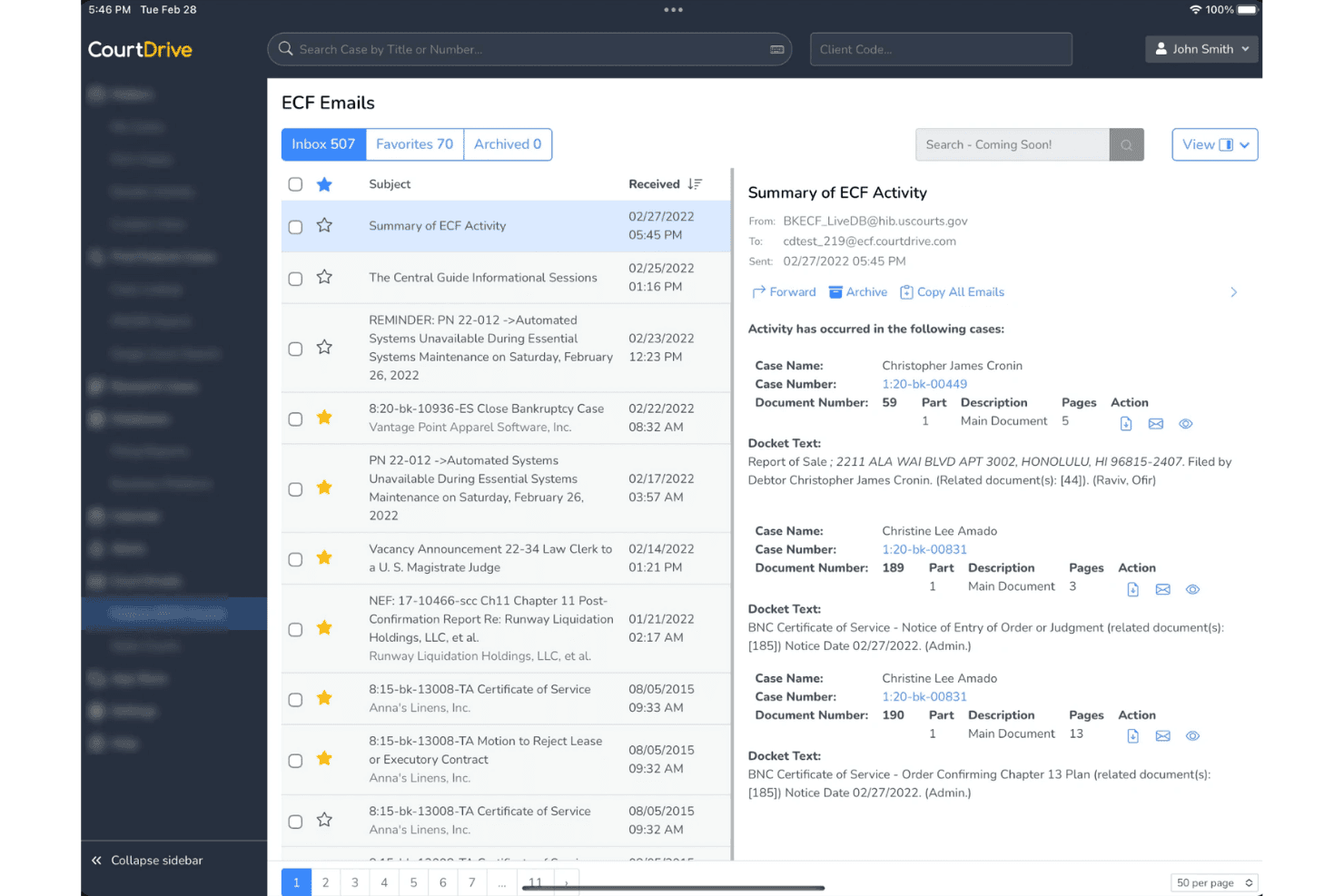
CourtDrive provides an ECF email split-view inbox with case summaries, docket text, and document actions. CourtDrive is an AI docketing assistant that automates court eNotice handling, rules-based deadline calculation, and calendar sync for law firms managing federal and state court matters.
Who Is CourtDrive Best For?
CourtDrive is a strong fit for small to mid-sized litigation firms where docketing staff manage high volumes of federal court filings and PACER notices.
Why I Picked CourtDrive
CourtDrive earns its spot on my shortlist because of how it handles the document-to-deadline pipeline. When a new ECF notice arrives, CourtDrive automatically downloads it, routes it to the case team, and queues calculated deadlines for review before they ever hit the calendar. That approval workflow, powered by Calendar Rules and Clio Court Rules, means docketing staff review a pre-built event set rather than building one from scratch.
CourtDrive Key Features
- PACER and court portal integration: Access federal court dockets, filings, and case updates directly within the platform.
- Firm-wide document management sync: Connects with NetDocuments, iManage, Dropbox, and other DMS providers for storing court records.
- Role-based user management: Assigns docketing, approval, and access permissions based on custom user roles.
- Custom distribution lists: Routes eNotices and deadline notifications to specific attorneys, paralegals, and case teams.
CourtDrive Integrations
CourtDrive offers native integrations with Outlook, Google Calendar, Clio, Rocket Matter, NetDocuments, iManage, Dropbox, Google Drive, OneDrive, Box, SharePoint, and Zapier. An API is available for custom integrations.
Pros and Cons
Pros:
- Broad federal and state court coverage nationwide
- Deadline approval workflow before calendar entry
- Auto-retrieves ECF notices directly from PACER
Cons:
- Limited state court rules depth versus established competitors
- No publicly available G2 or Capterra reviews
Learn more about CourtDrive: Best for integrated time and billing calendaring
- Not available
- Pricing upon request
Visit WebsiteCustomer Rating:3/5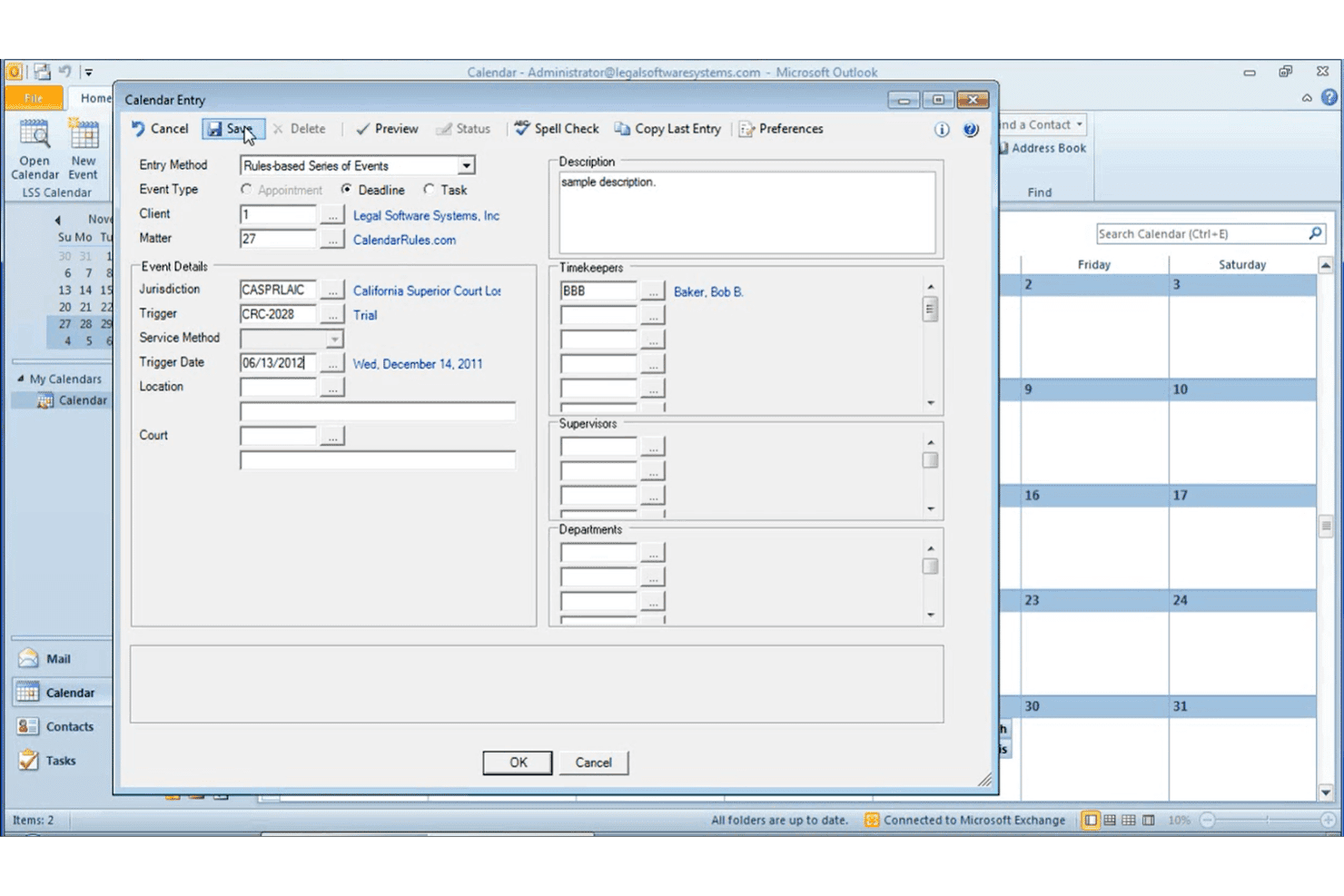
LSSe64’s Calendar Entry dialog in Microsoft Outlook uses rules-based deadline scheduling for legal case management. LSSe64 is an integrated law office management system that pairs rules-based legal calendaring—powered by CalendarRules.com—with time and billing, client accounting, and case management in a single platform.
Who Is LSSe64 Best For?
LSSe64 suits small to mid-size law firms that want docketing, time tracking, and billing managed within a single system rather than across separate tools.
Why I Picked LSSe64
I picked LSSe64 because no other tool on my list connects rules-based docketing directly to time and billing in one system. When a CalendarRules.com rule changes and affects an existing event, LSSe64 emails admins and lets them reschedule with a few clicks, without jumping between platforms. That same event also maps to the responsible timekeeper's billing record, so nothing falls through the gap between the calendar and the invoice.
LSSe64 Key Features
- Outlook, Office 365, and Exchange integration: Syncs calendars and events between LSSe64 and Microsoft platforms for consistent scheduling.
- Matter-based permissions: Lets you assign calendar access by client, matter, or timekeeper for granular control.
- Attachment support: Allows you to link Word, PDF, Excel, and other documents directly to calendar events.
- Full-text search and favorites: Quickly locate deadlines by criteria like event type, matter, jurisdiction, or description and save frequent queries.
LSSe64 Integrations
LSSe64 offers native integrations with Microsoft Outlook, Office 365, and Exchange for calendar sync. Native integrations with other case management platforms or Google Workspace are not documented.
Pros and Cons
Pros:
- Admin alerts fire when rule changes occur
- Billing entries link directly to calendar events
- CalendarRules.com powers jurisdiction-specific deadline sets
Cons:
- Sparse third-party practice management connections
- Calendar sync limited to Microsoft platforms only
Learn more about LSSe64: Best for multi-jurisdiction deadline automation
- Free demo available
- From $19/user/month (billed annually)
Visit WebsiteCustomer Rating:4.1/5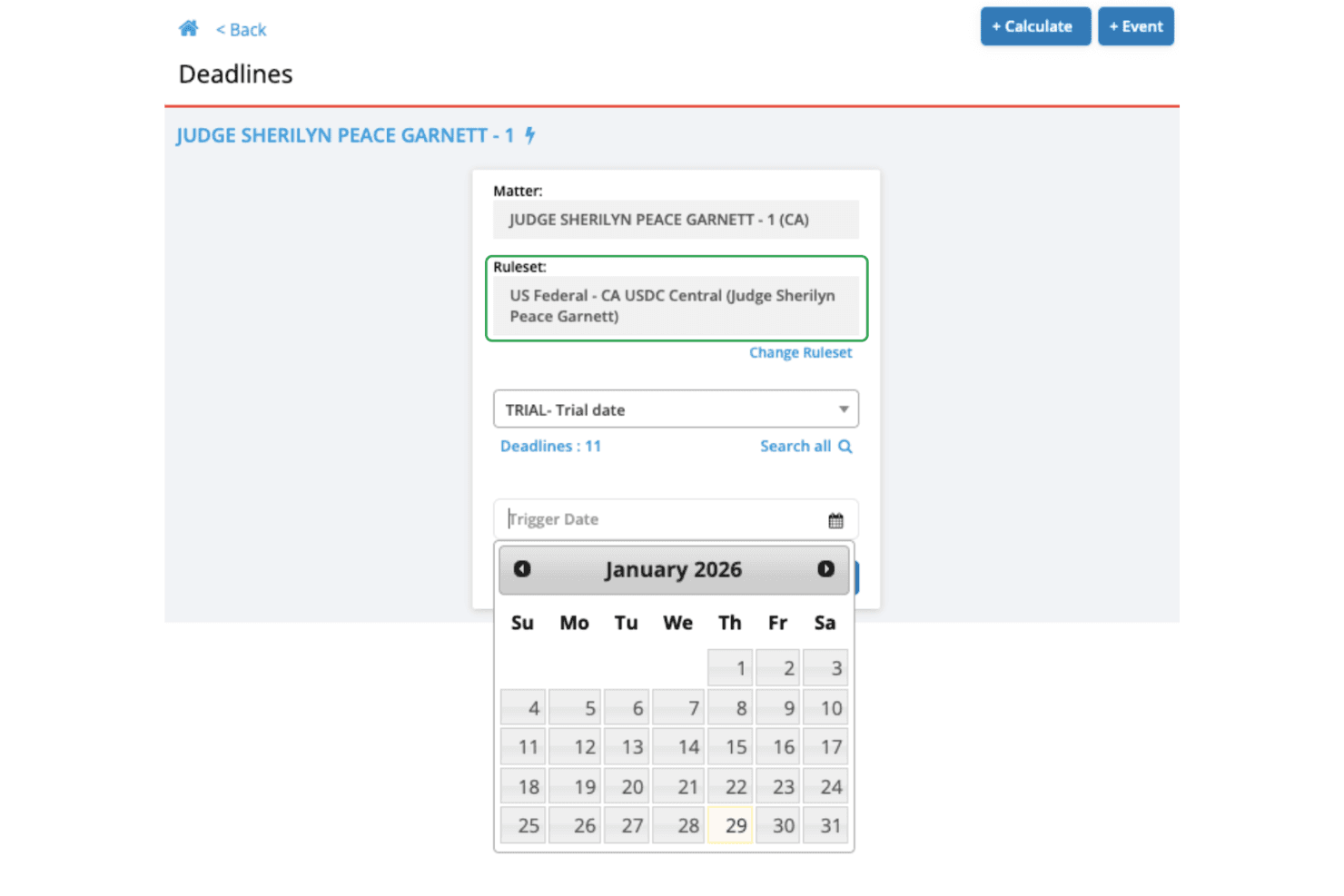
LawToolBox offers a deadline calculator with judge-specific rulesets, allowing users to select a trial date and automatically generate court deadlines. LawToolBox is a rules-based legal calendaring platform that auto-calculates court deadlines across thousands of state, federal, and international jurisdictions and syncs them directly into Microsoft 365, Outlook, and leading case management systems.
Who Is LawToolBox Best For?
LawToolBox is a strong fit for mid-size to large litigation firms already running on Microsoft 365 that handle cases across multiple state and federal jurisdictions.
Why I Picked LawToolBox
LawToolBox earns its spot on my shortlist because no other tool I've tested matches its depth of jurisdiction coverage. I particularly like how the rule database is updated daily by a team of attorneys, so when a local court amends its procedural rules, my deadlines recalculate without me having to catch the change manually. The AI deadline extraction also reads handwritten court orders and pulls dates directly into Outlook, with the source document auto-saved to the correct SharePoint matter folder.
LawToolBox Key Features
- Court holiday and closure awareness: Recognizes court holidays, weekend rollovers, and emergency closures in deadline calculations.
- Bi-directional calendar sync: Maintains real-time two-way sync with Outlook, Google Calendar, and Microsoft 365.
- Docketing audit trail: Tracks all calendar entries, user actions, and rule applications for each matter.
- Matter-level linking: Associates every deadline with specific cases, clients, and attorneys within integrated case management systems.
LawToolBox Integrations
LawToolBox offers native integrations across the Microsoft ecosystem, including Microsoft 365 and SharePoint, along with legal platforms like Clio, iManage, NetDocuments, MyCase, Rocket Matter, LEAP, Centerbase, Actionstep, Filevine, Neos, and PracticePanther. An API is available for custom integrations.
Pros and Cons
Pros:
- AI extracts deadlines directly from court orders
- Covers federal, state, and local court rules
- Daily attorney-monitored rule updates across jurisdictions
Cons:
- Setup requires significant onboarding for larger firms
- Heavily Microsoft-centric ecosystem limits non-Microsoft firms
Learn more about LawToolBox: Best for enterprise-grade workflow integration
- Free demo available
- Pricing upon request
Visit WebsiteCustomer Rating:3.5/5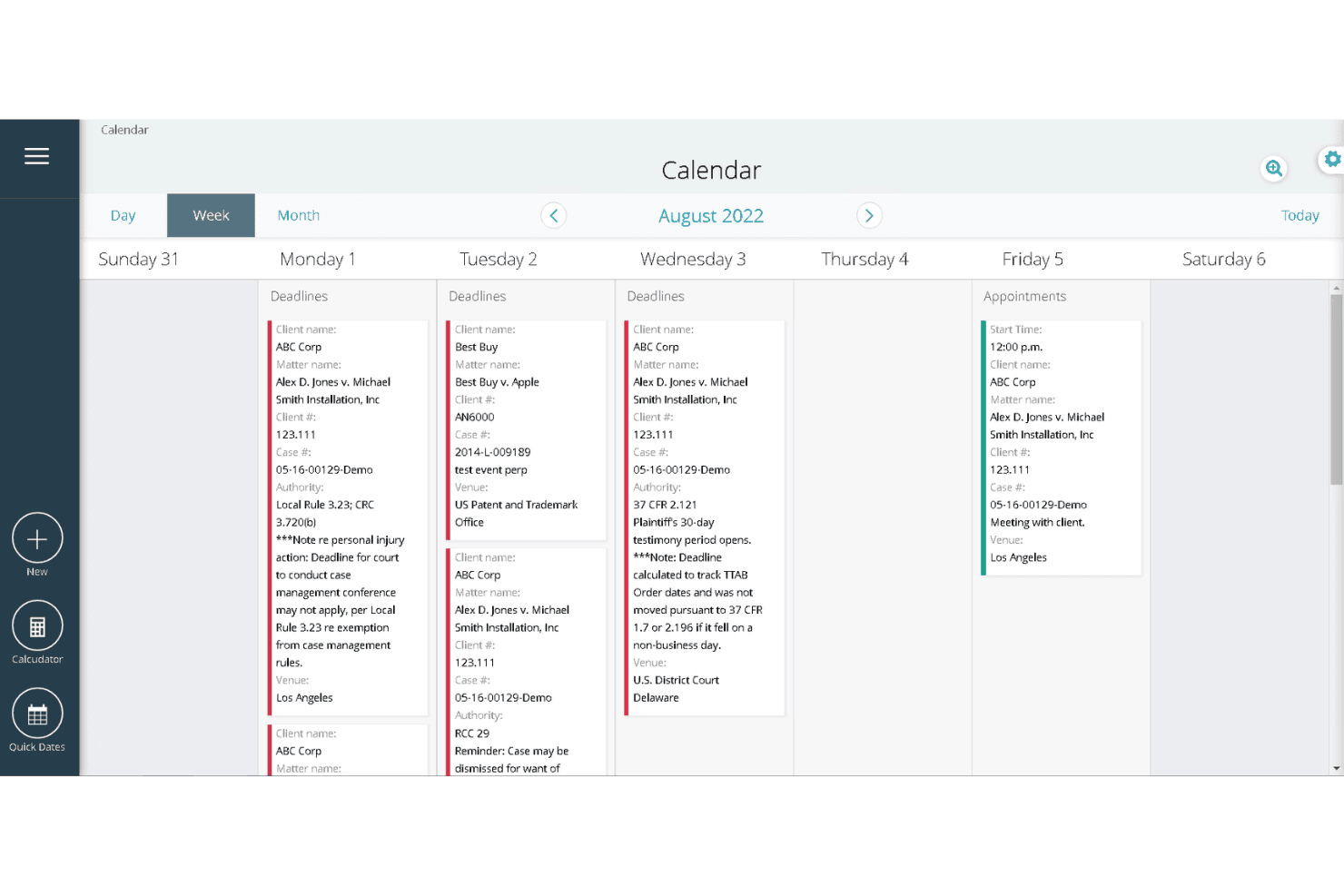
Aderant offers a weekly calendar view displaying legal deadlines and appointments organized by client, matter, and case details. Aderant Milana is a cloud-based rules-based legal calendaring and docketing platform that combines a 3,000+ rule set court rules library with automated deadline chain generation, ECF reconciliation, and deep integrations with enterprise practice management and document management systems.
Who Is Aderant Best For?
Aderant Milana is built for large law firms — particularly those in the Am Law 200 — where litigation docketing teams manage high-volume, multi-jurisdictional caseloads at scale.
Why I Picked Aderant
I picked Aderant as one of the best because of how deeply Milana connects to the systems large litigation teams already run on. Auto Docket Pro pulls ECF notices directly from PACER and dockets them automatically, eliminating the manual receipt processing that slows high-volume docket teams. The CompuLaw rules engine then cascades those trigger dates across 3,000+ rule sets, pushing the resulting deadline chains into Outlook and syncing with iManage or NetDocuments in the same step.
Aderant Key Features
- Comprehensive rules library: Covers 3,000+ federal, state, local, and administrative jurisdictions across the US.
- Court holiday and closure awareness: Built-in logic identifies and adjusts deadlines for court holidays, weekends, and emergency closures.
- Docketing audit trail: Maintains immutable records of all user actions, rule applications, edits, and calendar entries.
- Matter-level calendar sync: Links deadlines and events directly to case files and attorney calendars for full context and traceability.
Aderant Integrations
Aderant Milana offers native integrations with Outlook, iManage, NetDocuments, Aderant Expert, 3E, and PACER. An API is also available for custom integrations.
Pros and Cons
Pros:
- Attorney-monitored rules library with ongoing updates
- ECF receipts auto-docketed via AutoDocket Pro
- Covers 3,000+ court jurisdictions out of the box
Cons:
- Complex navigation that requires significant onboarding time
- No native mobile app for remote deadline access
Learn more about Aderant: Best for integration with legal research platforms
- Not available
- Pricing upon request
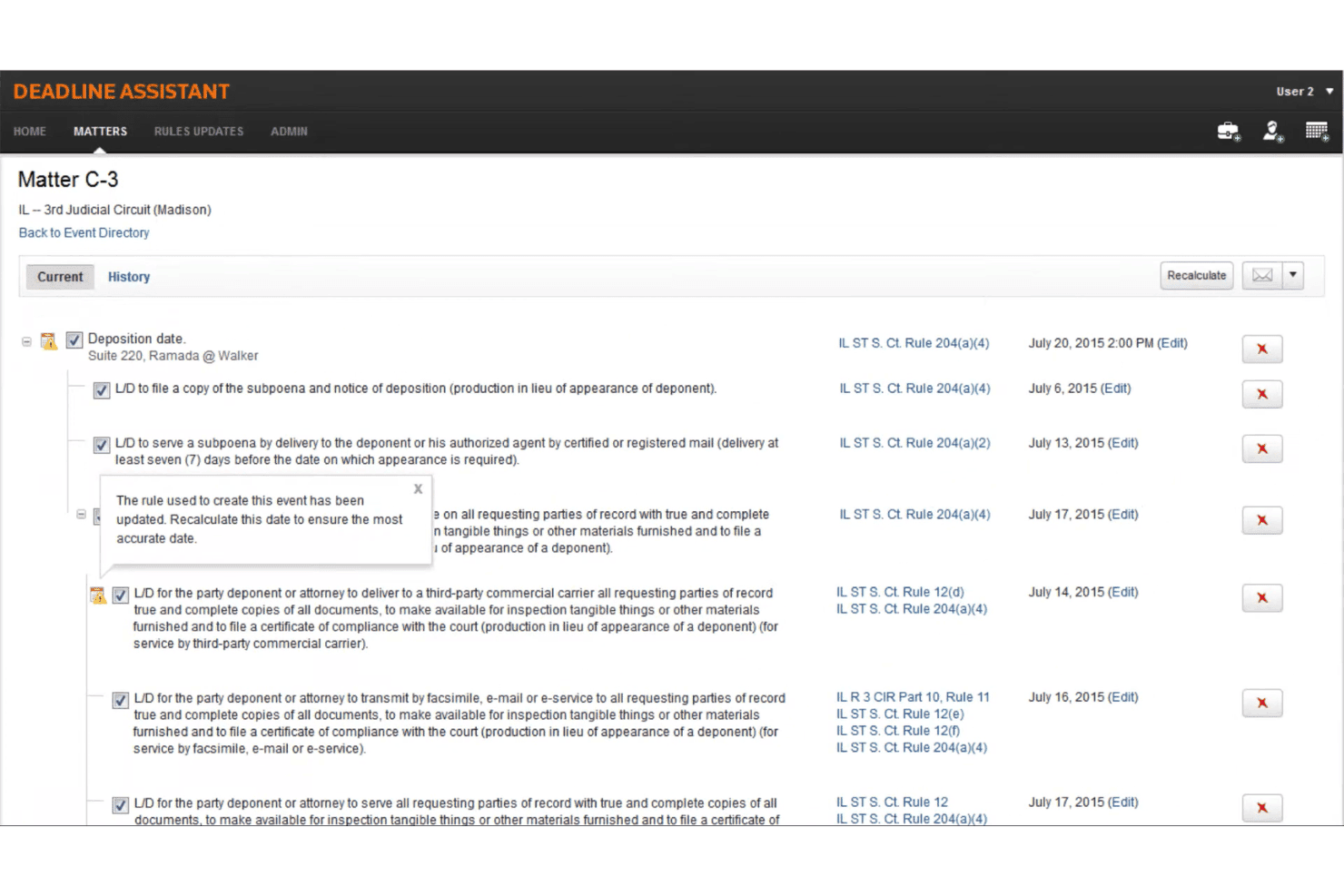
Thomson Reuters Deadline Assistant calculates legal deadlines with associated court rules and dates for a deposition matter. Thomson Reuters Deadline Assistant is a rules-based legal calendaring tool that auto-calculates court deadlines from federal, state, and local court rules, syncs with Microsoft Outlook, and centralizes firm-wide deadline management across matters and teams.
Who Is Thomson Reuters Deadline Assistant Best For?
It's a strong fit for litigation-focused law firms that are already embedded in the Thomson Reuters ecosystem and need court-rules-based deadline management at scale.
Why I Picked Thomson Reuters Deadline Assistant
Deadline Assistant earns its spot on my shortlist because of how tightly it connects court rules calculation to the Thomson Reuters research ecosystem. When a rule changes, attorney-editors flag it and push alerts directly into Deadline Assistant, so I'm recalculating from verified, up-to-date procedural rules rather than static databases. I also like the custom rules set feature, which lets my team build firm-specific deadline templates that sit alongside the published court rules.
Thomson Reuters Deadline Assistant Key Features
- Jurisdiction rule library: Includes extensive, continuously updated databases of federal, state, local, and administrative court rules.
- Centralized calendar management: Allows users to view, edit, and manage all deadline entries from a single Outlook-integrated calendar.
- Customizable deadline templates: Lets firms create and save custom templates for case types, transactional matters, and unique scheduling orders.
- Matter-level permission controls: Supports granular user access settings so teams can restrict or share deadlines by case, department, or user.
Thomson Reuters Deadline Assistant Integrations
Thomson Reuters Deadline Assistant offers native integrations with Microsoft Outlook and Firm Central. An API is available for custom integrations.
Pros and Cons
Pros:
- Docketing audit trail supports malpractice defense
- Court holiday handling built into calculations
- Attorney-edited rules reduce calculation errors
Cons:
- Setup requires existing Thomson Reuters subscription
- Locked into the Thomson Reuters ecosystem
Learn more about Thomson Reuters Deadline Assistant: Best for comprehensive court rule coverage
- Free demo available
- Pricing upon request
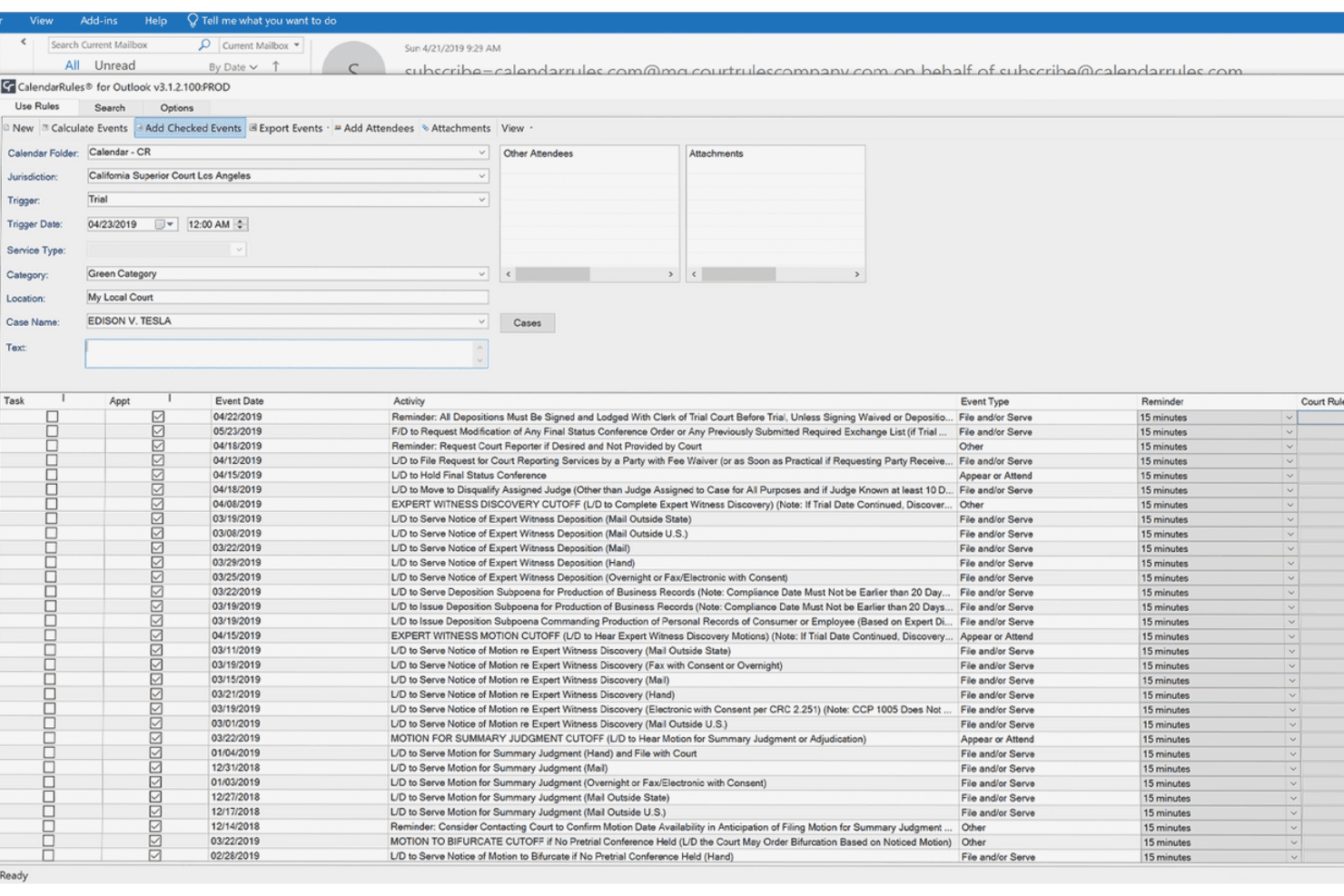
CalendarRules automatically calculates and displays court deadlines and litigation events based on a trial trigger date within Microsoft Outlook. CalendarRules is a legal calendaring rules engine that automates court deadline calculations across federal, state, local, and specialty court jurisdictions throughout the U.S. and Canada.
Who Is CalendarRules Best For?
CalendarRules is a strong fit for litigation-focused law firms whose docketing teams manage deadline schedules across multiple courts and jurisdictions.
Why I Picked CalendarRules
CalendarRules earns its spot on my shortlist because its court rule library is genuinely unmatched in depth. I'm talking roughly 2,500 jurisdictions: federal, state, local, and specialty courts, including judges' standing orders. Every rule set is built and peer-reviewed by licensed attorneys before release, which I find reassuring. If my team needs a jurisdiction not yet covered, CalendarRules builds it for free once we subscribe.
CalendarRules Key Features
- Comprehensive holiday management: Built-in tracking of federal, state, and local court holidays and closures that impact deadline calculations.
- Deep practice management integrations: Connects with platforms like Clio, MyCase, Litify, and Tabs3 for seamless deadline syncing and matter association.
- Automated service offset adjustments: Applies jurisdiction-specific rules for service by mail, e-service, or personal delivery to trigger correct deadline timelines.
- Audit-ready docketing logs: Maintains immutable records of every rule application, calendar edit, and user action for compliance and accountability.
CalendarRules Integrations
CalendarRules offers over 20 native integrations, including Clio, MyCase, Litify, Tabs3, SmartAdvocate, PracticeMaster, LawBase, MerusCase, Legal Files, and BEC Docket Enterprise. An API is available for custom integrations.
Pros and Cons
Pros:
- Cascading recalculation when trigger dates change
- Attorney-reviewed rules updated continuously
- Widest jurisdiction coverage of any competitor
Cons:
- Limited reporting dashboards for deadline tracking
- No standalone mobile app for docketing
Learn more about CalendarRules: Best for real-time court data syncing
- Free demo available
- Pricing upon request
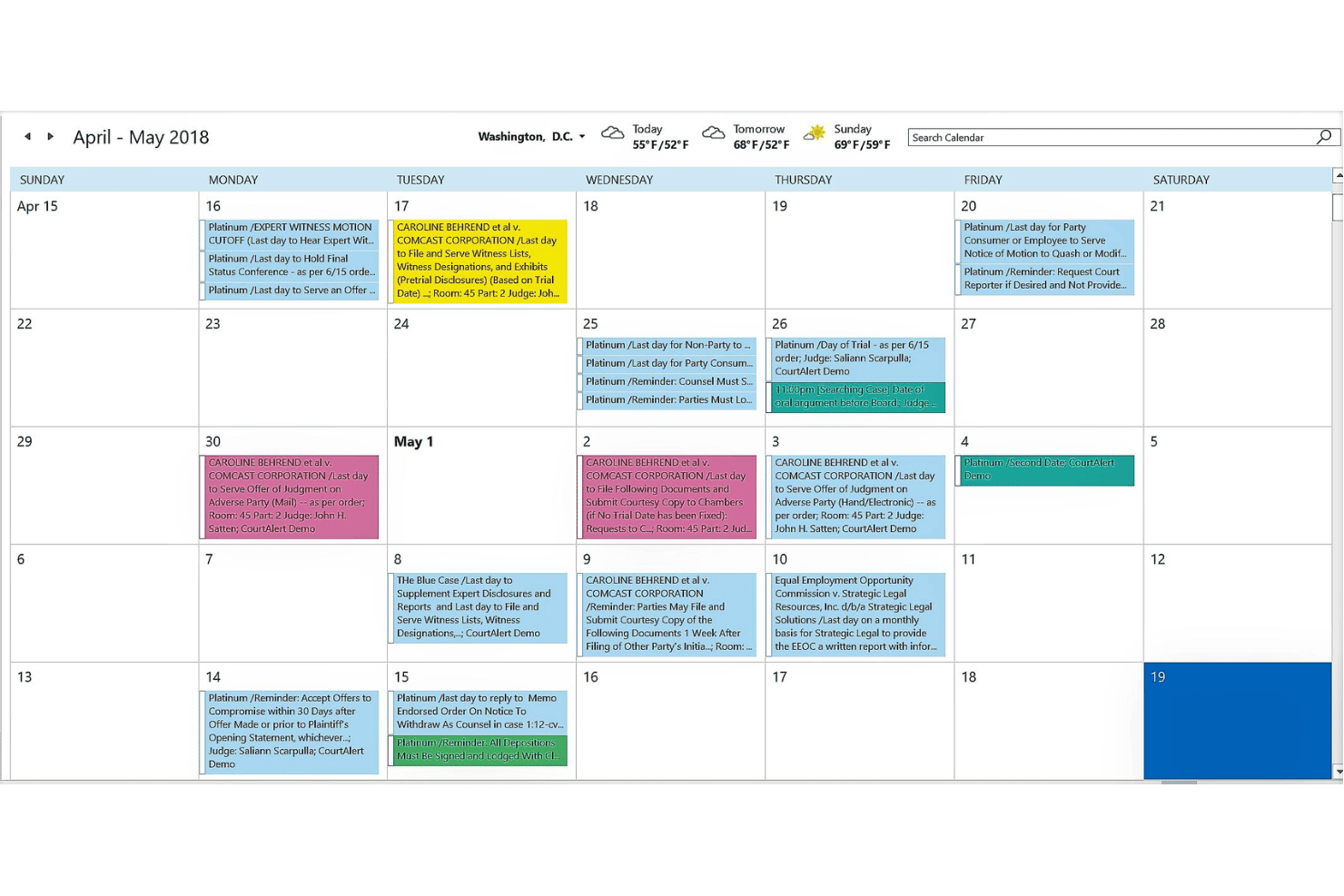
CourtAlert includes a legal calendar with color-coded court deadlines, trial dates, and case reminders spanning April–May 2018. CourtAlert is a docketing and rules-based legal calendaring platform that uses patented ECF reconciliation and a CalendarRules® integration to auto-calculate deadlines across 2,500+ federal, state, and local court jurisdictions.
Who Is CourtAlert Best For?
CourtAlert is a strong fit for mid-size to large law firms with dedicated docketing teams managing high-volume federal and multi-state litigation.
Why I Picked CourtAlert
I've included CourtAlert in my top picks because its patented Reconciliation technology automatically captures ECF email notices, downloads linked PDFs, and routes them into a review inbox in three clicks. What sets it apart is the real-time CalendarRules® API sync, which means any rule update across 2,500+ jurisdictions is reflected immediately without manual intervention. I also like that when a filing comes in, the system can surface AI-suggested deadlines directly from the document itself.
CourtAlert Key Features
- Native iManage and NetDocuments integration: Link court documents directly to matter-centric document management.
- Configurable multi-tier email reminders: Set reminders at intervals like 1, 7, or 14 days before each deadline.
- Firm-wide, office-wide, or group calendars: Publish legal calendars to selected groups for universal deadline visibility.
- SOC 2 Type 2 certified security: Ensure protection of client and firm data with audited controls and encryption.
CourtAlert Integrations
CourtAlert offers native integrations with Outlook, iManage, NetDocuments, and Microsoft Exchange. An API is available for custom integrations.
Pros and Cons
Pros:
- Immutable docketing audit trail supports malpractice defense
- CalendarRules® updates push across 2,500+ jurisdictions automatically
- Patented ECF reconciliation catches real-time filing changes
Cons:
- Mobile app has limited functionality compared to the desktop version
- No publicly available pricing makes budget comparisons difficult
Learn more about CourtAlert:
Other Rules Based Legal Calendaring Software
Here are some additional rules based legal calendaring software options that didn’t make it onto my shortlist, but are still worth checking out:
- 11MatterAlertBest for workflow-driven docket alerts
- 12DocketCalendarBest for two-way Outlook and Google Calendar sync
- 13MyCaseBest for case-linked deadline tracking
- 14CARET LegalBest for customized workflow-driven calendaring
- 15CosmoLexBest for compliance-focused event audit trails
- 16FilevineBest for project-style litigation timeline views
- 17SmokeballBest for firm-wide synchronized event scheduling
- 18PracticePantherBest for automated statute of limitations alerts
- 19Clio ManageBest for integrated matter and calendar management
Related Reviews
How I Evaluate Rules Based Legal Calendaring Software
I split my evaluation into baseline functionality a tool must cover—like auto-recalculating deadlines when a hearing date shifts—and the differentiators that set vendors apart.
Core Functionality (Table Stakes for This List)
When I'm selecting tools for my list, I rank each one on a scale from 0 (does not offer the functionality) to 5 (excels in this area) for each core functionality listed below. Then, I calculate the tool's total score into a percentage. Each tool needs to achieve a minimum total score of 55% to be considered for inclusion.
- Jurisdiction Rule Library: I check how many federal, state, and local court rule sets ship out of the box—and whether administrative tribunals are covered too.
- Automated Deadline Calculation: A single trigger date should generate a full chain of dependent deadlines, not just one event at a time.
- Rule Updates & Maintenance: I look for vendor-managed updates pushed by legal research teams, with change alerts so docketing staff can verify what shifted.
- Calendar Sync & Integration: Two-way sync with Outlook or Google Calendar is the baseline, but I also evaluate connectors to practice management platforms.
- Trigger Event Recalculation: When a hearing date moves, every downstream filing deadline should cascade automatically with a clear change log.
- Deadline Alerts & Reminders: I evaluate whether reminders support multi-tier escalation—like notifying a paralegal at 14 days and the lead attorney at 3 days.
Once I have a list of tools that meet the criteria, I consider what sets each platform apart.
Differentiating Factors (What Sets Vendors Apart)
Here's how I compare and contrast different vendors:
Standout Features
Court holiday and closure handling is a major differentiator. Tools that account for weekend rollovers and emergency court closures—not just standard holidays—prevent miscalculated deadlines that could slip through. I also look for a docketing audit trail that logs every rule application and edit. This matters if your firm ever needs to defend a deadline calculation in a malpractice claim. Bi-directional calendar sync that preserves matter associations and priority flags goes well beyond a basic Outlook connection.
Beyond Features
Malpractice risk mitigation is a big one—I check whether a vendor partners with insurance carriers to offer premium discounts, since missed deadlines remain the top driver of legal malpractice claims. Practice area fit matters too. A firm handling bankruptcy and immigration needs rule sets tailored to those specific workflows, not just general civil litigation. I also evaluate security posture, including SOC 2 Type II certification and compliance with bar ethics opinions on cloud computing, because deadline data is tied directly to confidential client matters.
How to Choose Rules Based Legal Calendaring Software
It’s easy to get bogged down in long feature lists and complex pricing structures. To help you stay focused as you work through your unique software selection process, here’s a checklist of factors to keep in mind:
| Factor | What to Consider |
|---|---|
| FactorScalability | What to ConsiderWill this solution keep up as your firm grows, especially with more matters, users, or jurisdictions? Ask about data limits, pricing tiers, and upgrade paths. |
| FactorIntegrations | What to ConsiderDoes the tool connect with your case management, email, and calendar systems? Confirm supported platforms and whether integration requires IT resources. |
| FactorCustomizability | What to ConsiderCan you tailor rule sets, notifications, and workflows to your firm's specific needs and practice areas? Beware systems with rigid, one-size-fits-all setups. |
| FactorEase of use | What to ConsiderIs the interface intuitive for both tech-savvy and less-experienced staff? Request a demo and have daily users walk through deadline entry or recalculation. |
| FactorImplementation and onboarding | What to ConsiderHow long does it take to migrate and train staff? Check if the vendor offers onboarding support and what’s involved moving your existing data and calendars. |
| FactorCost | What to ConsiderUnderstand how vendors quote pricing—by user, matter, or feature. Factor in ongoing costs like updates, integrations, or increased storage as your needs evolve. |
| FactorSecurity safeguards | What to ConsiderAsk about SOC 2 Type II certification, encryption, and access controls. Will this give you peace of mind with client deadline and case data? |
| FactorSupport availability | What to ConsiderIs responsive support available when you need it—such as before a key filing? Find out about the hours, channels, and quality of vendor support resources. |
What Are Rules Based Legal Calendaring Software?
Rules based legal calendaring software automatically calculates legal deadlines using built-in court rules across various jurisdictions. These platforms update deadlines, recalculate timelines when trigger events change, and sync schedules across your team’s calendars. Legal professionals use these tools to reduce malpractice risks, eliminate manual date entry, and improve coordination for litigation and court-driven matters.
Features of Rules Based Legal Calendaring Software
When selecting rules based legal calendaring software, keep an eye out for the following key features:
- Jurisdiction rule library: Provides pre-built, regularly updated court rule sets for federal, state, and local jurisdictions, so users can auto-calculate deadlines without manual research.
- Automated deadline calculation: Generates complete schedules of dependent dates from a single court trigger event, saving time and preventing missed obligations.
- Trigger event recalculation: Automatically updates all linked deadlines if a key event—like a hearing or trial date—changes, preventing overlooked timeline shifts.
- Court holiday awareness: Adjusts deadlines for court holidays, weekends, and emergency closures, protecting the firm from non-compliance issues due to calendar surprises.
- Bi-directional calendar sync: Ensures matter deadlines are visible on firm-wide calendars (like Outlook or Google) with updates reflected both ways in real time.
- Multi-level deadline alerts: Sends customizable reminders to attorneys, staff, or teams so no one misses approaching critical deadlines.
- Audit trails: Keeps an immutable log of edits, user actions, and rule applications for malpractice defense, ethics audits, and compliance reviews.
- Practice area customization: Lets firms tailor rules and workflows to accommodate litigation, bankruptcy, IP, or other specialized practice requirements.
- Integration with case management: Connects directly to common legal case management systems, so calendar events appear within client matters without double entry.
- Role-based access controls: Restricts access to sensitive matter and deadline data according to user roles, supporting confidentiality and internal governance.
Benefits of Rules Based Legal Calendaring Software
Implementing rules based legal calendaring software provides several benefits for your team and your business. Here are a few you can look forward to:
- Reduced malpractice risk: Automated deadline calculations and audit trails help prevent missed court dates and provide documentation to defend your processes.
- Firm-wide visibility: Bi-directional calendar sync brings every deadline into shared calendars, keeping everyone aligned on upcoming obligations.
- Increased efficiency: Automatic rule updates, deadline generation, and integration with case management systems eliminate repetitive data entry and manual tracking.
- Consistent compliance: Court holiday and jurisdictional rule handling ensures that every matter stays on track with the right deadlines, regardless of venue changes.
- Easy adaptation to change: Trigger event recalculation instantly updates schedules firm-wide when a key hearing or filing date moves.
- Greater accountability: User-specific alerts and role-based controls mean every stakeholder knows their responsibilities and sensitive information stays protected.
- Custom fit for specialty practices: Practice area customization and tailored rule sets let you support litigation, bankruptcy, IP, or any other area your firm covers.
Costs and Pricing of Rules Based Legal Calendaring Software
Selecting rules based legal calendaring software requires an understanding of the various pricing models and plans available. Costs vary based on features, team size, add-ons, and more. The table below summarizes common plans, their average prices, and typical features included in rules based legal calendaring software solutions:
Plan Comparison Table for Rules Based Legal Calendaring Software
| Plan Type | Average Price | Common Features |
|---|---|---|
| Plan TypeFree Plan | Average Price$0 | Common FeaturesLimited access to rule sets, manual deadline entry, basic reminders, and one-way calendar export. |
| Plan TypePersonal Plan | Average Price$30-$50/user/month | Common FeaturesFull jurisdiction library for one user, automated deadline calculation, email alerts, and single calendar sync. |
| Plan TypeBusiness Plan | Average Price$50-$80/user/month | Common FeaturesMulti-user access, advanced rule coverage, two-way calendar sync, role-based controls, and deadline recalculation. |
| Plan TypeEnterprise Plan | Average Price$80-$120/user/month | Common FeaturesNationwide jurisdiction updates, audit trails, admin controls, integrations with case management, and priority support. |
Rules Based Legal Calendaring Software FAQs
Here are some answers to common questions about rules based legal calendaring software:
How do rules based legal calendaring tools update court rules?
Vendors maintain a dedicated legal research team or partner with authorities to monitor court rule changes. Updates are pushed directly to your system, so your deadline calculations always reflect the latest statutory requirements without manual intervention.
Can these tools handle multi-jurisdictional matters?
Yes, most solutions include rule sets for multiple federal, state, and local jurisdictions. You can assign different rules to complex cases spanning several courts and the software will calculate all deadlines accordingly.
What happens if a hearing or filing date moves?
The software instantly recalculates and cascades every dependent deadline, updating all matter calendars and sending notifications to affected users, which helps avoid missed deadlines due to schedule changes.
Are there options for integrating with our case management or document platforms?
Yes, most vendors offer native integrations with popular case management and document management systems. This ensures deadlines sync with matter files, reducing double entry and saving staff time.
How secure is my confidential case data?
Leading tools apply SOC 2 Type II standards, encrypt data at rest and in transit, and use role-based access to restrict sensitive matter details, aligning with most state bar ethics requirements for cloud security.
Do these systems provide defensible records for malpractice defense?
Yes, rules based calendaring software creates immutable audit trails documenting every event, edit, and rule applied, which can be crucial if you ever need to defend how a deadline was calculated.