

10 Best Legal Knowledge Management Software in 2026

10 Best Legal Knowledge Management Software Shortlist


Legal knowledge management software lets your team capture, organize, and access institutional insight, documents, research, and expertise—all in one place. Legal professionals searching for these tools need a reliable way to overcome information silos, reduce repeat work, and preserve know-how as teams and matters change. In this list, you’ll find trusted platforms I think you’ll want to explore, each picked for their track record supporting busy legal teams who need to share knowledge with confidence and control. Keep reading to see which software best suits your legal department or firm’s needs this 2026.
Why Trust Our Software Recommendations
Our team has been testing and reviewing software since 2012. As legal practice leaders ourselves, we know how difficult—and important—it is to choose the right software.
For this guide, we evaluated tools using hands-on testing and independent research, scoring tools using our selection criteria.
Our reviews reflect our human editorial judgment, not a sales pitch.
Legal Knowledge Management Software Comparison Table
| Tool | Best For | Trial Info | Price | ||
|---|---|---|---|---|---|
| 1 | Best for enterprise content management | Not available | Pricing upon request | Website | |
| 2 | Best for AI-assisted legal knowledge work | Free demo available | Pricing upon request | Website | |
| 3 | Best for legal research knowledge | Free demo available | Pricing upon request | Website | |
| 4 | Best for research and legal intelligence | Free demo available | Pricing upon request | Website | |
| 5 | Best for document-based knowledge access | Free demo available | Pricing upon request | Website | |
| 6 | Best for secure legal knowledge search | Free demo available | Pricing upon request | Website | |
| 7 | Best for cloud legal knowledge management | Free demo available | Pricing upon request | Website | |
| 8 | Best for centralized knowledge sharing | Free demo available | Pricing upon request | Website | |
| 9 | Best for law firm knowledge workflows | Free demo available | Pricing upon request | Website | |
| 10 | Best for firm-wide experience intelligence | Free demo available | Pricing upon request | Website |
Best Legal Knowledge Management Software Reviews
Below are my detailed summaries of the best legal knowledge management software that made it onto my shortlist. My reviews offer a detailed look at the features, best use cases, and integrations of each platform to help you find the best one for you.

OpenText
Best for enterprise content management
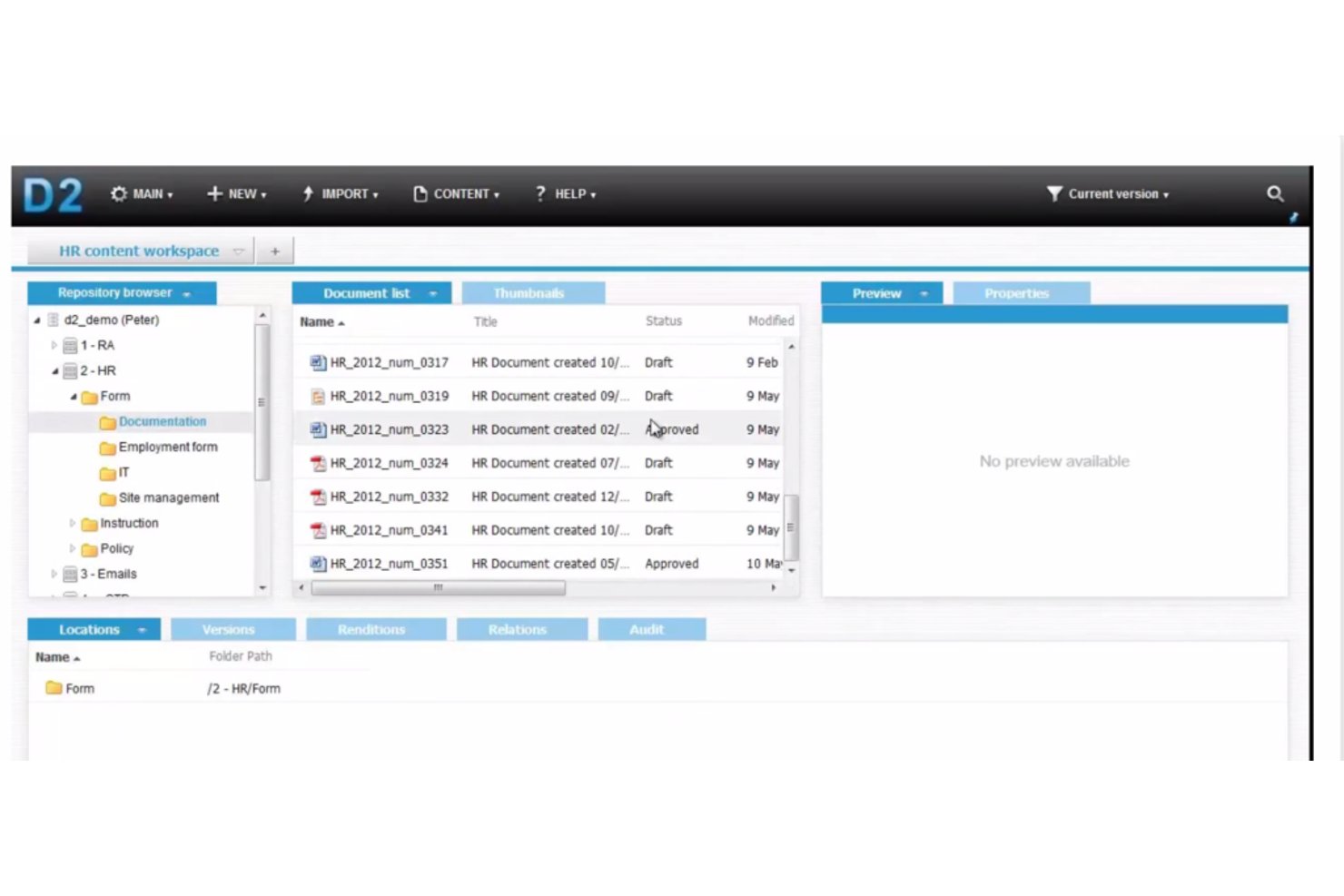
OpenText Legal Knowledge Management is an enterprise search and insights platform that uses AI-powered predictive search, automated document classification, and expertise location to surface legal work product across large, multi-system content environments.
Who Is OpenText Best For?
OpenText is a strong fit for large law firms and enterprise legal departments already running OpenText eDOCS or SharePoint as their primary document management infrastructure.
Why I Picked OpenText
OpenText earns its spot on my shortlist because of how it handles knowledge retrieval across large, siloed enterprise content environments. I particularly like MindServer-powered predictive search, which uses concept analysis and supervised machine learning to surface relevant prior matters rather than simple keyword matches. The automated document classification layer tags incoming content with metadata without manual input, keeping large repositories organized as content volumes grow.
OpenText Key Features
- Secure integration and SSO: Connects with enterprise systems like SharePoint for unified access using single sign-on.
- Data visualization of search results: Organizes search outputs into charts to highlight experience and relevance in context.
- Automated data classification: Applies metadata tags to new documents using rules-based engines for easier retrieval.
- Text-mining integration: Filters large document volumes and extracts legal knowledge insights without manual review.
OpenText Integrations
OpenText offers native integrations with OpenText Legal Content Management (eDOCS) and SharePoint for centralized document access, and provides an API for custom integrations. Native integrations with third-party platforms like iManage or NetDocuments are not documented.
Pros and Cons
Pros:
- Supervised machine learning improves search relevance over time
- Data visualization surfaces knowledge patterns across large matter sets
- Handles Boolean and concept searches across document repositories
Cons:
- Steep implementation complexity for non-OpenText environments
- Struggles to execute granular, highly detailed search queries

Harvey
Best for AI-assisted legal knowledge work
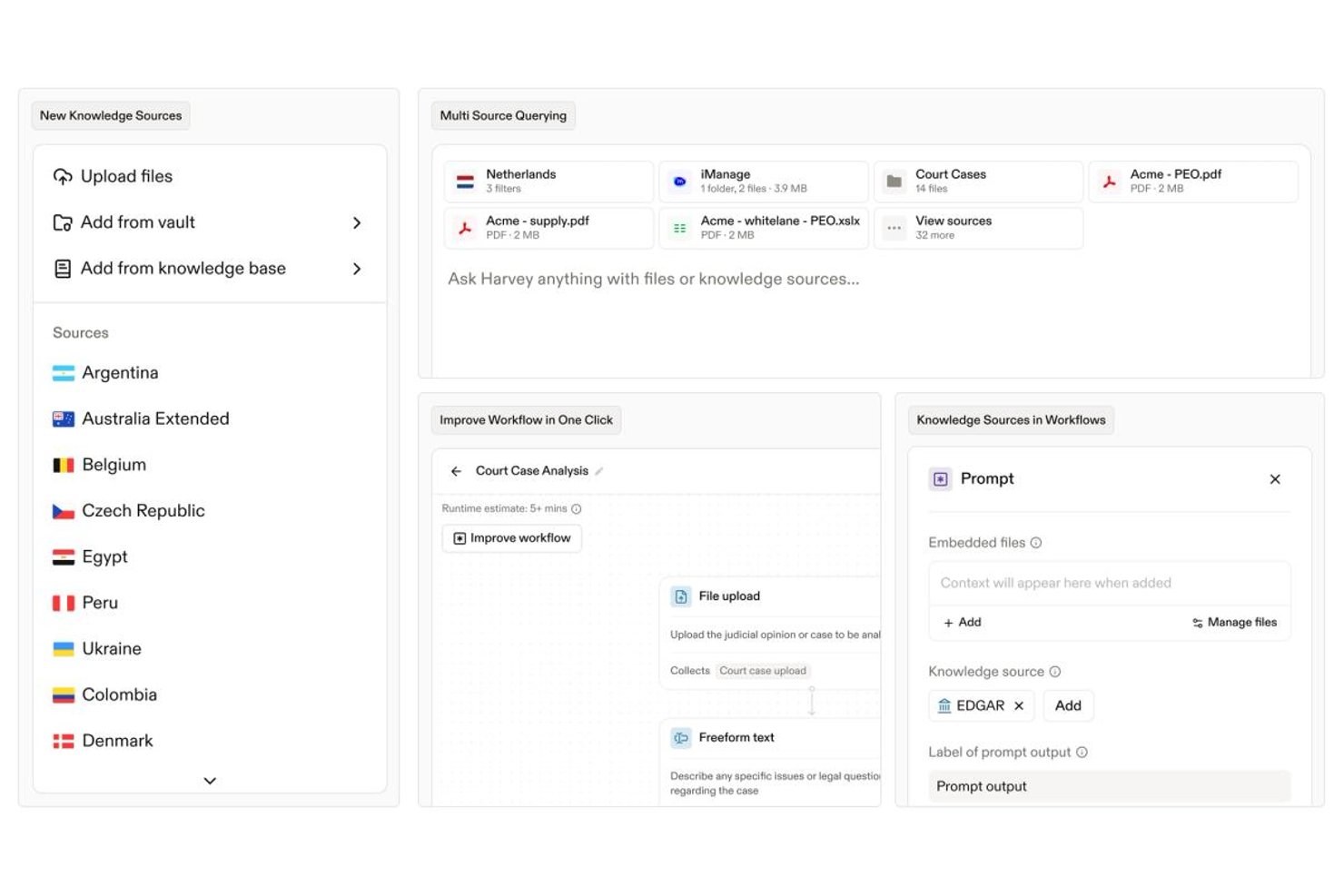
Harvey is an AI-native platform built for legal teams that combines natural-language document search, contract intelligence, precedent management, and AI-assisted drafting across firm work product and external legal knowledge sources.
Who Is Harvey Best For?
Harvey is a strong fit for large law firms and enterprise in-house legal teams that need AI-assisted research, drafting, and knowledge retrieval at scale.
Why I Picked Harvey
Harvey earns its spot on my shortlist because its AI reasons through legal documents, not just retrieves them. I particularly like how Vault Knowledge Bases let firms curate proprietary precedents so attorneys can query internal work product the same way they'd query a senior partner. The Knowledge product extends that reach across 500+ jurisdictional sources, including LexisNexis and EUR-Lex, keeping cross-jurisdictional research in a single interface rather than spread across disconnected databases.
Harvey Key Features
- Command Center analytics: Surface usage patterns, adoption benchmarks, and insights across legal workflows for team leaders and knowledge managers.
- Shared Spaces collaboration: Enable real-time, secure collaboration with clients, outside counsel, and business stakeholders around shared documents and work product.
- Microsoft 365 integration: Seamlessly connect with Word and Outlook to bring drafting, review, and document analysis into attorneys' daily workflows.
- Ethical wall enforcement: Apply granular role-based permissions and matter-level access controls to protect sensitive client and cross-matter information.
Harvey Integrations
Harvey offers native integrations with iManage, NetDocuments, SharePoint, Google Drive, Box, OneDrive, Aderant, Ironclad, Microsoft 365, PitchBook, Datasite, and Intralinks. An API is available for custom integrations.
Pros and Cons
Pros:
- Vault indexes firm-specific precedents for attorney queries
- Cross-border regulatory research depth is unmatched
- Strongest M&A diligence tooling in the category
Cons:
- No self-serve free trial or published accuracy benchmarks
- Priced out of reach for small and mid-size firms

Best for legal research knowledge
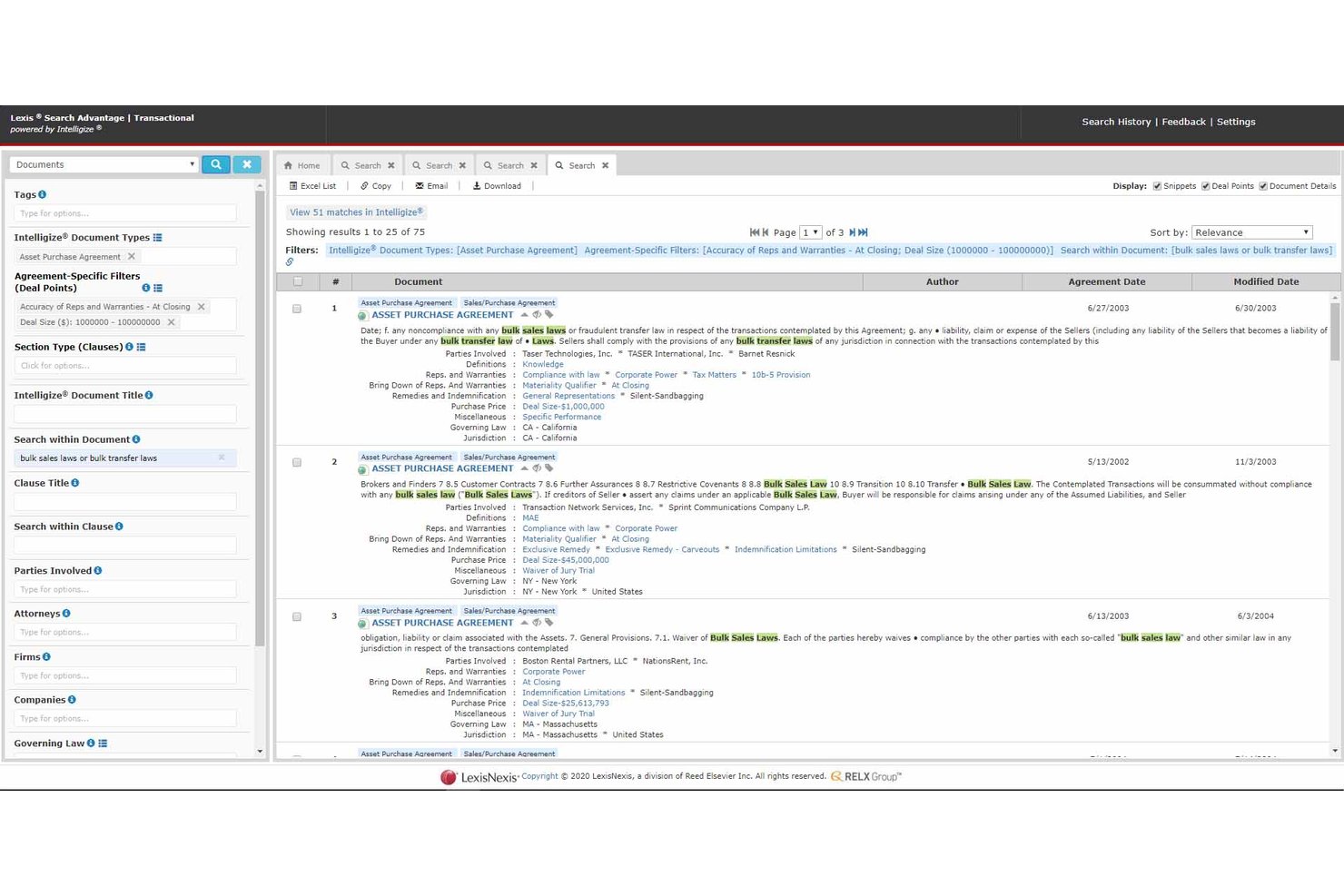
LexisNexis is a legal research and knowledge platform that gives legal professionals access to case law, legislation, precedents, AI-powered drafting tools, and firm document search through an integrated suite of products.
Who Is LexisNexis Best For?
It's a strong fit for law firms and in-house legal teams that need authoritative UK and international legal research alongside AI-assisted drafting in a single platform.
Why I Picked LexisNexis
LexisNexis earns its spot on my shortlist because its legal content library is genuinely unmatched. I use Lexis+ with Protégé to run AI-powered research grounded in Halsbury's Laws of England and the All England Law Reports, so every answer is anchored to authoritative primary sources. Case Signals then validates those citations in real time, which is something I rely on before any work product leaves my desk.
LexisNexis Key Features
- Secure Vault document repository: Store, organize, and search firm documents in encrypted vaults with legal-specific categorization.
- DMS integration: Connect with iManage, NetDocuments, and SharePoint to ground AI and search in firm work product.
- Clause library in Lexis Create+: Build a custom library of approved contract clauses directly within Microsoft Word.
- Role-based permissions: Assign user access levels to restrict document visibility according to practice area or matter.
LexisNexis Integrations
LexisNexis offers native integrations with iManage, NetDocuments, SharePoint, Microsoft 365, Outlook, Word, Excel, and DocuSign. An API is available for custom integrations.
Pros and Cons
Pros:
- Real-time citation validation via Case Signals
- AI research grounded in authoritative sources
- Unmatched primary legal content library depth
Cons:
- Firm knowledge features lag pure KM vendors
- Interface feels dated versus newer KM platforms

Best for research and legal intelligence
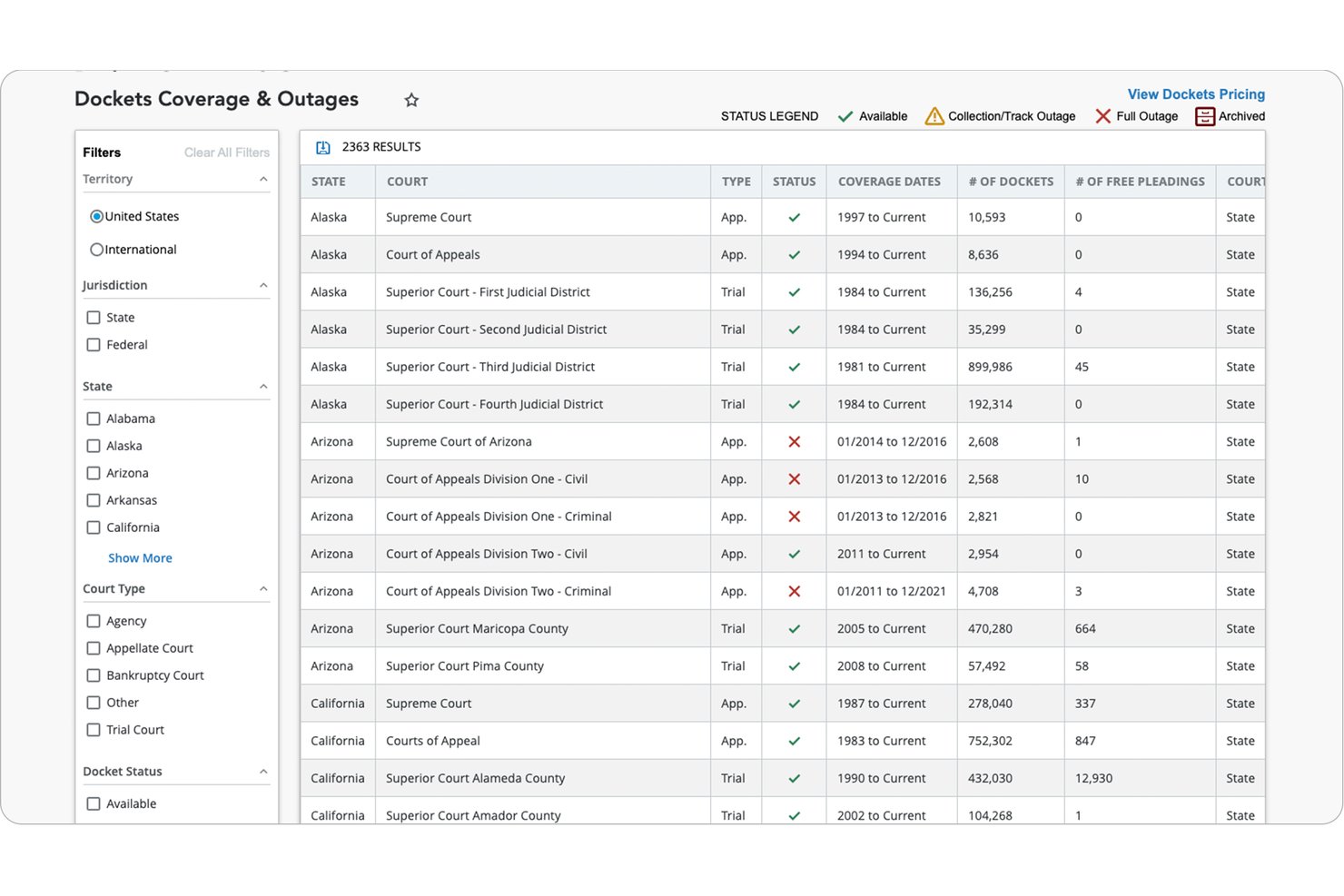
Bloomberg Law is a legal research and intelligence platform that combines primary and secondary source research, AI-powered case law tools, practical guidance documents, precedent forms, and contract drafting capabilities for law firm attorneys.
Who Is Bloomberg Law Best For?
Bloomberg Law is a strong fit for attorneys at law firms whose practice areas center on business law, transactions, litigation, health law, or tax.
Why I Picked Bloomberg Law
I've included Bloomberg Law in my top picks because its depth of external legal intelligence directly feeds the research and drafting workflows that knowledge management is meant to support. Points of Law uses AI to surface the specific legal principle from a case, so I can locate the exact precedent I need without reading through entire opinions. I also rely heavily on Draft Analyzer, which benchmarks contract language against millions of EDGAR-filed agreements to show how a clause compares to market standard, giving me an evidence-based foundation for every negotiating position.
Bloomberg Law Key Features
- Litigation Intelligence Center: Consolidates dockets, case law, news, and AI-powered research for litigation management.
- Transactional Intelligence Center: Provides access to thousands of practical guidance documents and sample forms for transactional work.
- Docket Key: Uses AI to quickly find and classify docket filings across major courts.
- Dashboard Legal integration: Connects with iManage, NetDocuments, and Outlook to unify work product, tasks, and document access.
Bloomberg Law Integrations
Bloomberg Law offers native integrations with iManage, NetDocuments, and Outlook. An API is also available for custom integrations.
Pros and Cons
Pros:
- Draft Analyzer benchmarks clauses against market data
- Deep primary source coverage across all jurisdictions
- AI-powered Points of Law surfaces precise precedents
Cons:
- Not built for organizing internal knowledge assets
- Limited internal firm work product repository

Worldox
Best for document-based knowledge access
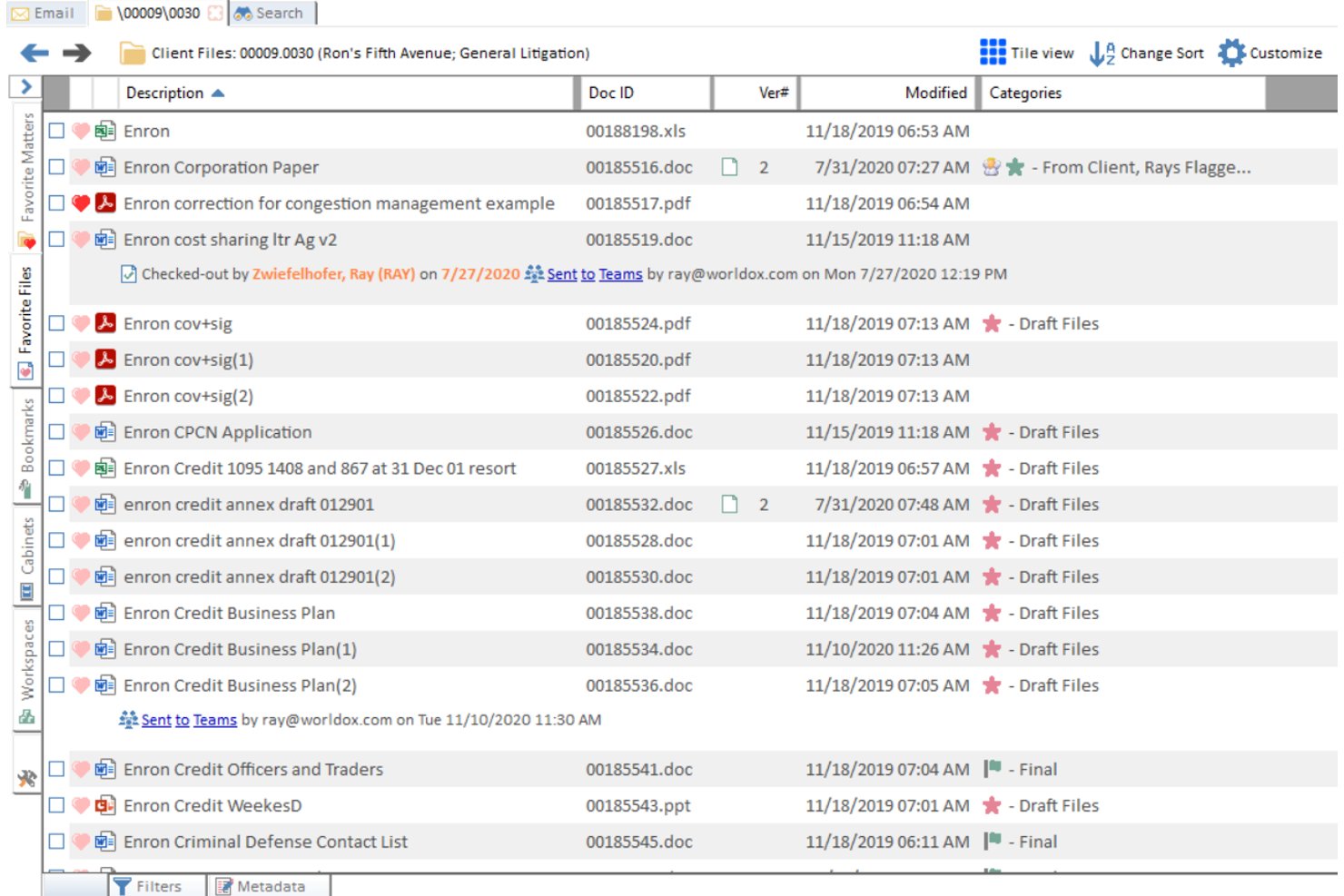
Worldox is a legal document management system built around client/matter-based organization, full-text search, version control, and access controls including ethical walls.
Who Is Worldox Best For?
Worldox is a strong fit for small to mid-sized law firms that need structured, matter-based document organization without moving to a fully cloud-native platform.
Why I Picked Worldox
I've included Worldox in my top picks because its Active Profiling® Technology automatically tags documents by client and matter as you save them, keeping firm work product organized without relying on attorneys to file things manually. I also like its boilerplate library, which stores approved precedents accessible directly from Microsoft Office. Version control with timestamped history means you can trace every change to a document across its entire lifecycle.
Worldox Key Features
- Ethical walls and legal holds: Control document visibility and editing rights at the matter or user level for conflict management.
- Outlook and Office integration: Access, save, and manage documents directly from Outlook and Microsoft Office applications.
- Centralized audit trail: Track each action taken on a document for compliance and internal governance.
- Batch archiving tools: Archive inactive or completed matters using bulk workflows that streamline document retention.
Worldox Integrations
Worldox offers native integrations across the Microsoft ecosystem, including Microsoft 365, Outlook, and Word, as well as Clio, Tabs3, PracticeMaster, LawToolBox, and NetDocuments. An API is available for custom integrations.
Pros and Cons
Pros:
- Active Profiling® automates document classification at save
- Flat-file database limits search speed at scale
- Strong matter-based document organization out of the box
Cons:
- Interface has not meaningfully modernized in years
- No native subfolder structure within matter folders

iManage
Best for secure legal knowledge search
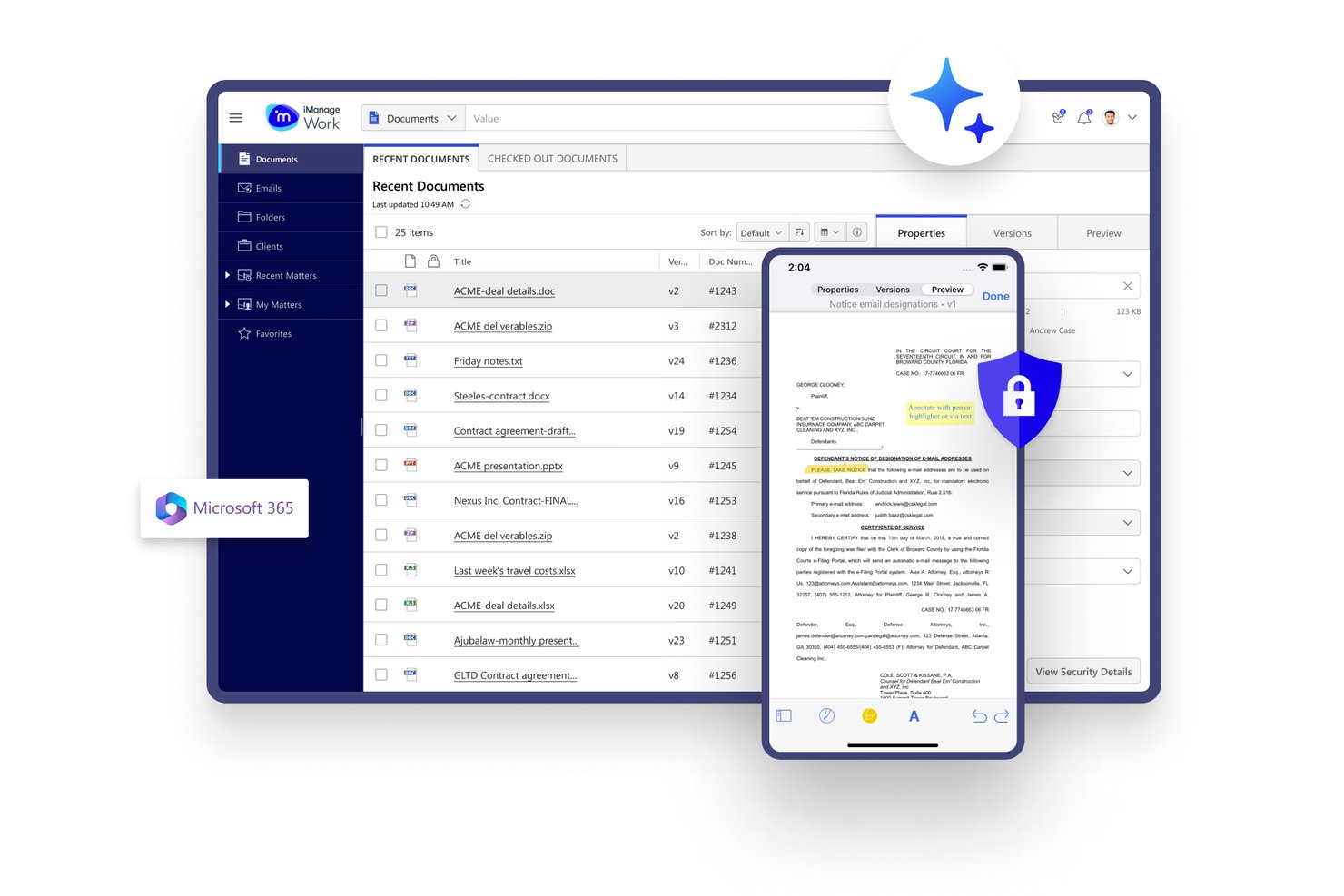
iManage is a legal knowledge work platform that combines matter-centric document and email management, AI-powered knowledge search via Insight+, and security and governance tools built for law firms and corporate legal departments.
Who Is iManage Best For?
iManage is a strong fit for mid-to-large law firms and corporate legal departments that need enterprise-grade document governance alongside knowledge search.
Why I Picked iManage
iManage earns its spot on my shortlist because knowledge search and security governance work together at the platform level, not as separate layers. I particularly like Insight+, which surfaces precedents, matter insights, and internal experts in the context of active work. Ask iManage lets my team query across document sets using natural language and get cited answers, all while Security Policy Manager enforces granular ethical walls throughout.
iManage Key Features
- Microsoft 365 integration: Connects Outlook, Teams, and Word directly to the document management system for streamlined daily workflows.
- Security policy manager: Enables detailed access controls, role permissions, and ethical wall enforcement at the workspace and document level.
- Closing Folders integration: Manages legal transaction closings, signatures, and checklists within the iManage platform.
- AI enrichment: Automatically tags, classifies, and profiles documents and emails for faster knowledge categorization and retrieval.
iManage Integrations
iManage offers native integrations across the Microsoft ecosystem, including Microsoft 365 and Azure, as well as native integrations with Salesforce, NetDocuments, HighQ, Box, and SeeUnity Echo. An API is available for custom integrations.
Pros and Cons
Pros:
- Granular ethical wall enforcement at document level
- AI-powered knowledge search across closed matters
- Matter-centric document organization built for legal
Cons:
- Admin configuration is complex and time-consuming
- Attorney adoption historically slow and difficult

Best for cloud legal knowledge management
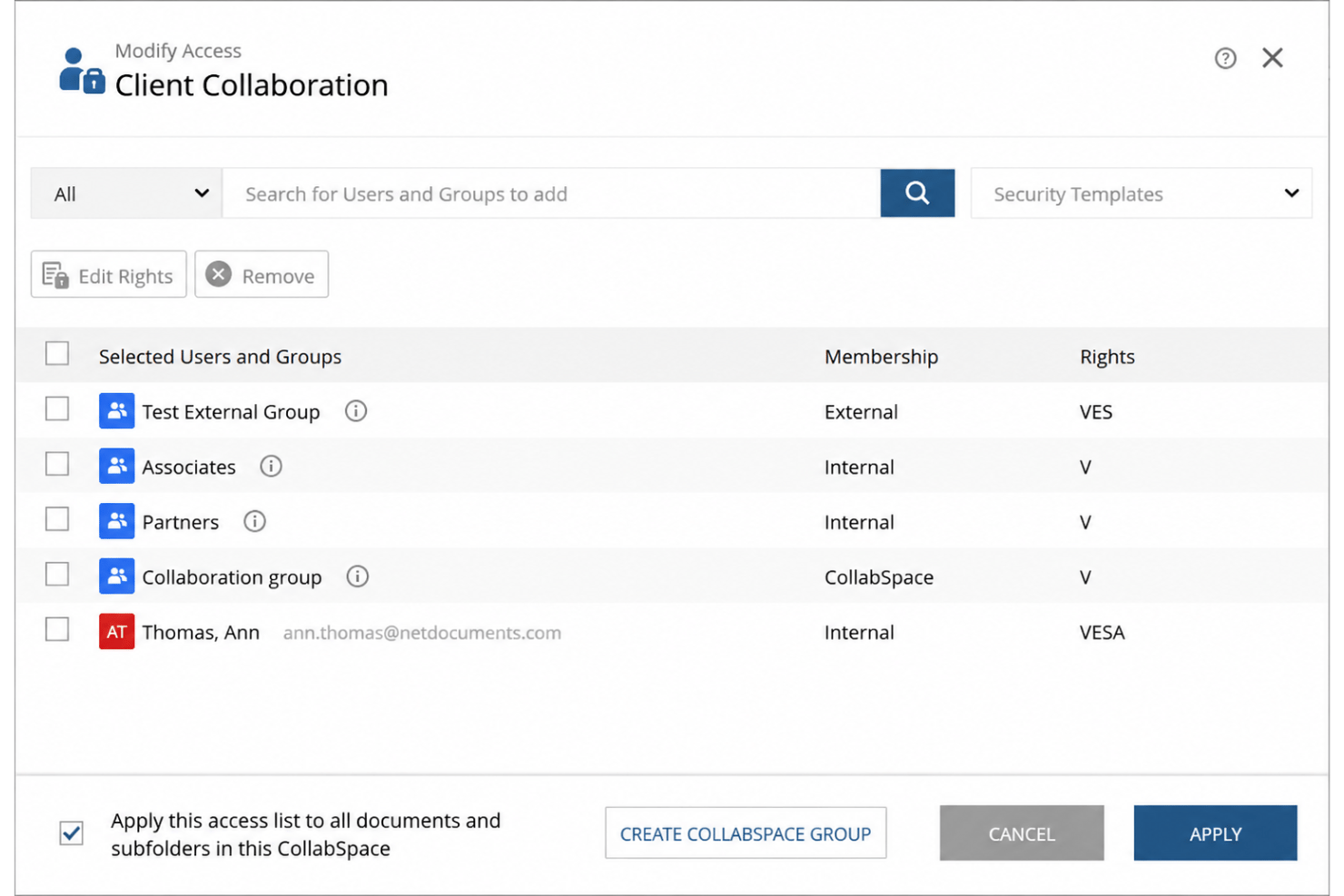
NetDocuments is a cloud-native legal DMS that combines matter-centric document organization, AI-powered search across firm work product, precedent management, and ethical wall controls in a single governed platform.
Who Is NetDocuments Best For?
NetDocuments is a strong fit for mid-to-large law firms and corporate legal departments that need enterprise-grade document governance, AI-powered knowledge management, and deep Microsoft 365 integration.
Why I Picked NetDocuments
NetDocuments earns its spot on my shortlist because its legal context graph is unlike anything else in the DMS space. It continuously maps relationships across matters, documents, and communications firm-wide, so when I search for prior work on a specific issue, I'm pulling from the firm's full institutional memory. I also rely on ndMAX to run AI queries across entire document sets and get tabular answers with cited sources, which changes how I approach matter research entirely.
NetDocuments Key Features
- PatternBuilder MAX: Lets you create custom AI workflows and legal apps without coding.
- Email management: Auto-files emails by client, matter, and topic to keep records organized.
- Document bundling: Assembles closing binders and litigation packets into single, indexed files.
- Permission-aware external collaboration: Supports controlled document sharing via CollabSpaces and matter-centric access links.
NetDocuments Integrations
NetDocuments offers native integrations with Clio, iManage, Aderant, Actionstep, DocuSign, Thomson Reuters HighQ, LexisNexis, FileTrail, and has native integrations across the Microsoft ecosystem, including Microsoft 365 and Azure. An API is available for custom integrations.
Pros and Cons
Pros:
- Ethical walls enforced automatically at matter level
- AI search retrieves clause-level precedents accurately
- Matter-centric document organization built for legal workflows
Cons:
- Mobile experience lags behind the desktop version
- Attorney adoption historically slow without dedicated support

Best for centralized knowledge sharing
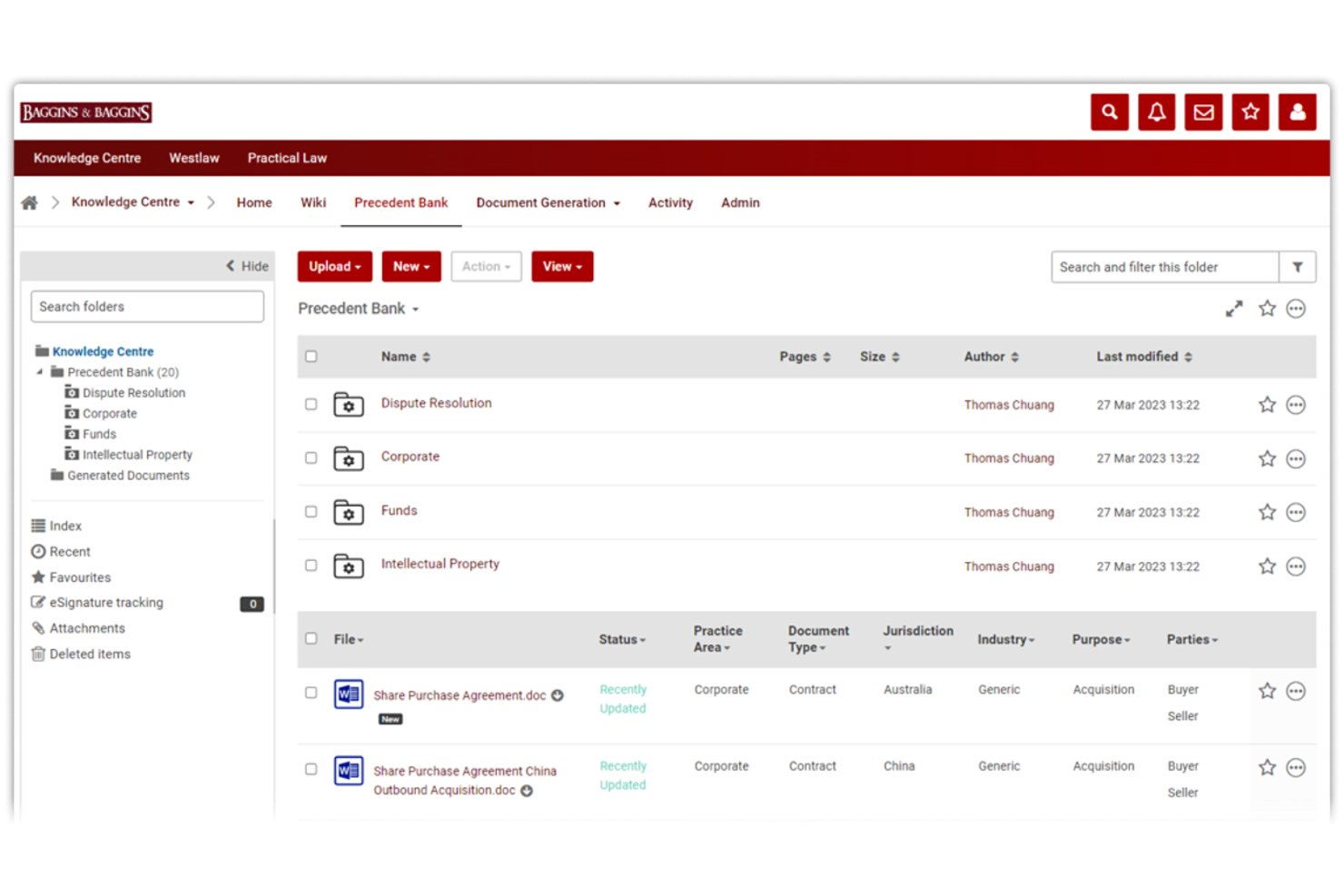
Thomson Reuters HighQ is a cloud-based legal knowledge management platform that combines document management, precedent libraries, expertise location, and AI-powered search for law firms and corporate legal departments.
Who Is Thomson Reuters HighQ Best For?
HighQ is a strong fit for mid-to-large law firms and in-house legal teams that manage high volumes of sensitive matters across multiple practice areas.
Why I Picked Thomson Reuters HighQ
HighQ earns its spot on my shortlist because of how it handles centralized knowledge sharing across a firm's entire work product. I particularly like the knowledge hub, which lets attorneys search precedents, link directly to Westlaw and Practical Law resources, and follow internal subject matter experts, all from one place. The AI layer pulling from live matter data means my team can surface answers without manually uploading files or switching between platforms.
Thomson Reuters HighQ Key Features
- iSheets data management: Manage legal data with configurable, spreadsheet-like databases for tracking and sharing structured information.
- Rule-based workflow automation: Automate document routing, approvals, and notifications using customizable rules and triggers for legal processes.
- Granular access controls: Set detailed permissions and ethical walls at the user, matter, or client level for document confidentiality.
- Audit trails and reporting: Track all document activity, version history, and user actions for compliance, risk, and internal oversight.
Thomson Reuters HighQ Integrations
HighQ offers native integrations across the Thomson Reuters ecosystem, including Practical Law, Westlaw, Legal Tracker, Document Intelligence, and CoCounsel Legal. An API is also available for custom integrations.
Pros and Cons
Pros:
- Automated tagging reduces manual knowledge curation effort
- AI search surfaces precedents across closed matters
- Deep Thomson Reuters legal research connectivity
Cons:
- Attorney adoption requires dedicated change management effort
- Steep implementation timeline for large firms

Aderant
Best for law firm knowledge workflows
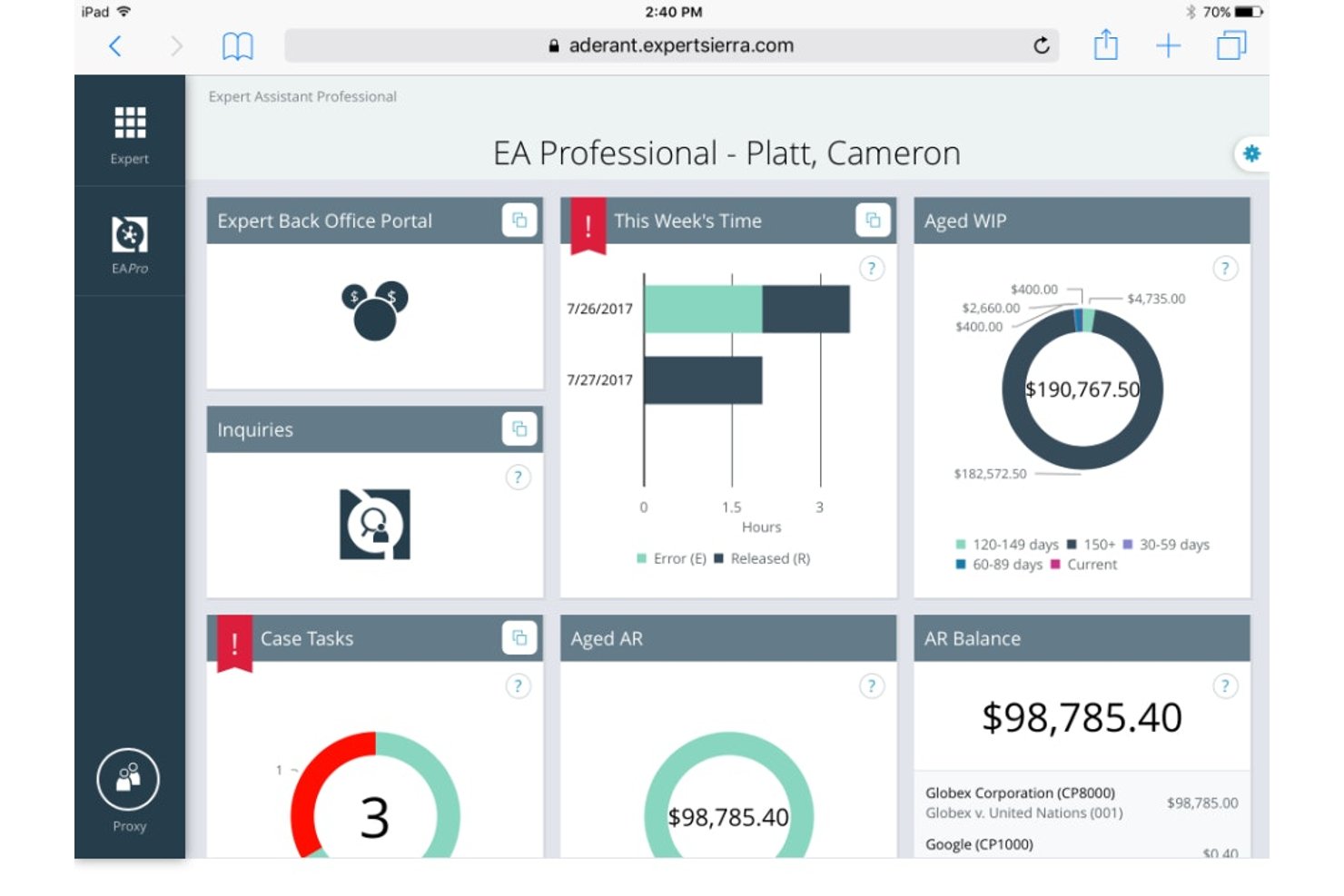
Aderant is a law firm knowledge management platform that surfaces documents, precedents, and expertise from across your firm's systems through enterprise search, intranet portals, and 40+ line-of-business integrations.
Who Is Aderant Best For?
Aderant is a strong fit for midsize-to-large law firms, particularly those operating across multiple practice groups who need a unified layer over existing DMS and PMS systems.
Why I Picked Aderant
Aderant earns its spot as one of the best on my shortlist because Handshake's Universal Search pulls from 40+ line-of-business systems in a single query, so attorneys aren't toggling between iManage, Expert, and legal research platforms to locate prior work product. I also like the KM Analytics layer, which tracks abandoned searches and underused resources, giving KM teams a concrete picture of where knowledge gaps actually live across the firm's practice groups.
Aderant Key Features
- SharePoint and Teams integration: Connects firm knowledge directly to Microsoft SharePoint and Teams for in-context access.
- KM analytics: Tracks resource usage, adoption trends, and knowledge gaps within your firm’s workflows.
- Client collaboration portals: Provides secure, scalable portals built on Office 365 for always-on client document sharing.
- Role-based access controls: Configures permissions at matter or client level to enforce confidentiality and ethical walls.
Aderant Integrations
Aderant offers 40+ native integrations, including iManage, NetDocuments, Elite 3E, Aderant Expert, SharePoint, Microsoft Teams, Westkm, Lexis Search Advantage, CompuLaw, LawPay, and Harvey. An API is available for custom integrations.
Pros and Cons
Pros:
- Built specifically for law firm workflows
- KM analytics surfaces firm-wide knowledge gaps
- Universal Search spans 40+ legal systems
Cons:
- Attorney adoption requires significant change management
- Steep implementation complexity for smaller firms

Litera is a legal AI platform that centralizes firm knowledge through experience management, expertise location, precedent libraries, contract analysis, and matter-based search across a firm's documents, clients, and work product.
Who Is Litera Best For?
Litera is a strong fit for large and mid-size law firms where knowledge management officers and practice group leaders need to operationalize firm experience data at scale.
Why I Picked Litera
I picked Litera as one of the best because its Foundation platform turns scattered matter data into a structured intelligence layer across clients, matters, and lawyers. I particularly like Foundation Insights, which uses GenAI to answer deal-point questions like "what's market?" in seconds. The Expertise Location application auto-populates lawyer profiles from actual work product, not self-reported bios, giving you a real picture of who knows what across the firm.
Litera Key Features
- Matter-centric knowledge repository: All client, matter, and work product data is organized and searchable in one centralized platform.
- Native DMS and PMS integrations: Direct connections to iManage, NetDocuments, SharePoint, Elite, and Aderant synchronize files and matter information.
- Clause and template library management: Maintain, tag, and version approved clauses and templates for ready attorney access.
- Access controls and ethical walls: Apply detailed user, role, and matter-based permissions to enforce confidentiality and compliance.
Litera Integrations
Litera offers native integrations with iManage, NetDocuments, SharePoint, OpenText eDOCS, Elite, and Aderant. An API is available for custom integrations.
Pros and Cons
Pros:
- Deep coverage across AmLaw 100 firm workflows
- GenAI answers are grounded in firm-owned precedents
- Auto-populates attorney profiles from real work history
Cons:
- Steep ramp-up time for attorney adoption
- Implementation complexity is high for smaller firms
Other Legal Knowledge Management Software
Here are some additional legal knowledge management software options that didn’t make it onto my shortlist, but are still worth checking out:
- Thomson Reuters
For legal research and know-how
- LexWorkplace
For cloud document knowledge
- Knowmax
For structured legal knowledge bases
- ThoughtFarmer
For law firm intranet knowledge
- Guru
For searchable team knowledge bases
- Legal101
For internal legal knowledge sharing


How I Evaluate Legal Knowledge Management Software
I split my evaluation into baseline requirements—like ethical walls and matter-based search—and differentiators that separate a great KM tool from a merely functional one.
Core Functionality (Table Stakes for This List)
When I'm selecting tools for my list, I rank each one on a scale from 0 (does not offer the functionality) to 5 (excels in this area) for each core functionality listed below. Then, I calculate the tool's total score into a percentage. Each tool needs to achieve a minimum total score of 65% to be considered for inclusion.
- Legal Document Repository: I look for matter-centric folder structures and legal-specific metadata fields—like practice area, jurisdiction, and client—rather than generic file storage.
- Advanced Legal Search: Full-text and natural language search with filters for matter type, jurisdiction, and author help attorneys find relevant briefs or memos fast.
- Precedent & Template Management: I evaluate whether the tool supports versioned, approved templates with clause-level tagging so attorneys can reuse vetted language confidently.
- Expertise Location: A good KM platform surfaces who in the firm has handled similar matters or topics, so I check for auto-populated profiles based on work history.
- DMS & PMS Integration: Native connectors to platforms like iManage, NetDocuments, or Aderant matter because attorneys won't adopt a KM tool that lives outside their daily workflow.
- Access Controls & Ethical Walls: I evaluate matter-level permissions and ethical wall enforcement to confirm the tool can protect client confidentiality across practice groups.
Once I have a list of tools that meet the criteria, I consider what sets each platform apart.
Differentiating Factors (What Sets Vendors Apart)
Here's how I compare and contrast different vendors:
Standout Features
AI-powered search is a big differentiator—I look for platforms that use semantic and concept-based retrieval to surface relevant precedents, not just keyword matches. Matter and precedent profiling matters just as much when it automates tagging of closed matters, saving attorneys from manually cataloging work product. I also evaluate generative AI drafting capabilities that pull from the firm's own knowledge base. A first-pass memo grounded in your approved precedents is far more useful than output drawn from public data alone.
Beyond Features
AI governance is top of mind—I check whether vendor models are tenant-isolated and whether client data stays out of shared training sets. Implementation support also carries weight. Attorney adoption of KM tools has historically been a challenge, so I look for vendors that offer dedicated legal consultants and change management resources. Firm size and practice fit round out my evaluation; a platform built for AmLaw 100 firms with global offices has different taxonomy and scalability needs than one designed for mid-size corporate legal departments.
How to Choose Legal Knowledge Management Software
It’s easy to get bogged down in long feature lists and complex pricing structures. To help you stay focused as you work through your unique software selection process, here’s a checklist of factors to keep in mind:
| Factor | What to Consider |
| Scalability | Will the platform handle your future document volume, users, and new practice areas as you grow? |
| Integrations | Does the tool natively connect with your DMS, PMS, email, and Microsoft 365, or require workarounds? |
| Customizability | Can you adapt taxonomies, templates, and tags to your firm’s workflow and practice area structure? |
| Ease of use | Will attorneys and staff actually use the software day-to-day, or is training and adoption likely to stall? |
| Implementation and onboarding | How much firm-side effort and vendor support is needed for deployment, data migration, and user adoption? |
| Security safeguards | Are ethical walls, client confidentiality, and regulatory standards addressed with granular settings and audit trails? |
| Cost | Are pricing tiers and minimum seat counts transparent? Will costs scale up or down based on actual usage? |
| Support availability | Does the vendor offer responsive support and resources when attorneys need urgent help or workflow guidance? |
What Are Legal Knowledge Management Software?
Legal knowledge management software lets law firms and in-house teams centralize, organize, and retrieve firm work product, precedents, and expertise in one secure platform. These tools support consistent practice, reduce repeat work, and preserve institutional know-how as teams change. Teams use them to search across closed matters, draft from pre-approved templates, and connect with in-house experts, all while enforcing ethical walls and client confidentiality every step of the way.
Features of Legal Knowledge Management Software
When selecting legal knowledge management software, keep an eye out for the following key features:
- Legal document repository: Centralizes and organizes briefs, contracts, templates, and work product with legal-specific structures, making it easy to store and retrieve vital materials.
- Full-text legal search: Enables attorneys to search matter files and documents by keywords, filters, or metadata tied to practice area, client, or jurisdiction.
- Precedent and template management: Supports versioning, tagging, and curation of pre-approved clauses and model documents for quick drafting and knowledge reuse.
- Expertise locator: Helps attorneys identify peers with relevant matter experience or specialist knowledge across the firm to improve collaboration and internal referrals.
- Role-based access controls: Enforces user permissions based on role, client, and matter with options to create ethical walls for client confidentiality.
- Audit trails: Tracks who accessed, modified, or shared documents—a must-have for compliance and monitoring potential conflicts or data breaches.
- Matter-centric organization: Aligns documents and knowledge to specific cases or deals, making navigation intuitive and reducing lost knowledge as attorneys join or leave teams.
- Native DMS and PMS integrations: Connects with leading document and practice management systems so attorneys don’t have to double-handle files or jump between platforms.
- Usage analytics: Offers reporting on repository access and template reuse, helping KM officers see what documents drive value and where gaps exist.
Common Legal Knowledge Management Software AI Features
Beyond the standard legal knowledge management software features listed above, many of these solutions are incorporating AI with features like:
- Semantic search: Uses AI to understand context and intent, surfacing relevant documents, clauses, or matters even when users don’t know the exact keywords.
- Automated document profiling: AI tags, categorizes, and enriches new work product or closed matters, building a searchable precedent library without manual input from attorneys.
- Expertise identification: Analyzes work history, authored documents, and matter involvement to automatically map internal subject-matter experts for faster internal referrals.
- Generative drafting assistance: Leverages the firm’s proprietary knowledge base to draft clauses, memos, or first-pass responses grounded in actual firm precedents.
- Clause extraction and comparison: AI identifies, extracts, and compares clauses across large sets of documents, helping attorneys spot variations and standardize language.
Benefits of Legal Knowledge Management Software
Implementing legal knowledge management software provides several benefits for your team and your business. Here are a few you can look forward to:
- Faster document retrieval: Advanced search and automated tagging help attorneys quickly locate precedents, templates, and work product across the firm’s knowledge base.
- Stronger knowledge retention: Centralized repositories and matter-centric organization capture institutional know-how, preserving expertise even as team members change.
- Consistent, high-quality drafting: Access to pre-approved clauses, templates, and generative drafting tools ensures attorneys work from vetted, up-to-date materials every time.
- Improved collaboration: Expertise locators and internal directories make it easy to connect attorneys with the right subject-matter experts for complex matters.
- Enhanced compliance and security: Granular access controls, ethical walls, and audit trails help enforce client confidentiality and reduce the risk of unauthorized information sharing.
- Better resource allocation: Usage analytics identify which templates and precedents see the most use, supporting smarter knowledge curation and resource planning.
- Streamlined onboarding: New attorneys gain access to organized, searchable firm knowledge from day one, reducing ramp-up time on new matters.
Costs and Pricing of Legal Knowledge Management Software
Selecting legal knowledge management software requires an understanding of the various pricing models and plans available. Costs vary based on features, team size, add-ons, and more. The table below summarizes common plans, their average prices, and typical features included in legal knowledge management software solutions:
Plan Comparison Table for Legal Knowledge Management Software
| Plan Type | Average Price | Common Features |
| Free Plan | $0 | Basic document storage, limited search functionality, single workspace, and basic access controls. |
| Personal Plan | $10-$30/user/month | Individual document organization, template storage, limited integrations, priority support, and data export options. |
| Business Plan | $35-$75/user/month | Matter-centric organization, advanced legal search, template and precedent management, expertise locators, and integration with popular DMS and PMS platforms. |
| Enterprise Plan | $80-$150/user/month | Full DMS/PMS integrations, granular security controls, multi-office scalability, AI-powered features, dedicated onboarding, and audit trails. |
Legal Knowledge Management Software FAQs
Here are some answers to common questions about legal knowledge management software:
How does legal knowledge management software support compliance and ethical walls?
Legal knowledge management software enforces compliance by letting you set granular user permissions and ethical walls at the matter or client level. This helps prevent unauthorized access to confidential materials and supports your firm’s professional responsibility obligations.
Can legal knowledge management software integrate with my existing document management and practice management systems?
Yes, most platforms offer native integrations with leading document and practice management systems. Before choosing a tool, confirm it connects seamlessly with your DMS, PMS, and productivity tools to avoid double-handling files or data silos.
What should I consider when migrating legacy knowledge repositories?
Plan for data mapping, accessibility, and user training. Look for vendors with legal-specific onboarding support and migration services to help you move templates, precedents, and tagging over with minimal disruption to daily workflows.
How does AI enhance legal knowledge management software?
AI boosts efficiency by automating document classification, improving search relevance, suggesting experts, and sometimes drafting memos or clauses based on firm knowledge. Always check whether your data is tenant-isolated and not pooled for third-party AI model training.
Is legal knowledge management software suitable for boutique firms or only large enterprises?
Many solutions offer scalable plans and configuration options. Smaller firms can benefit from centralized knowledge and template management, while larger organizations may need advanced features like global scalability, custom taxonomies, or integrated AI.