

Hukuk büroları için uyumluluk yazılımları, ekiplerin çıkar çatışmaları, son tarihler, müvekkil fonları, faturalandırma ve büro politikalarıyla ilgili yükümlülükleri yönetmesine yardımcı olur. Doğru seçim; çalışma alanlarınıza, yargı bölgelerinize, müvekkil gereksinimlerinize ve mevcut sistemlerinize bağlıdır. Bu kılavuz, dava yönetimi platformlarını ve uzmanlaşmış araçları karşılaştırır, her birinin desteklediği özellikleri açıklar ve büronuzun günlük dosya kontrollerine, politika denetimine veya özel taramaya ihtiyaç duyup duymadığına karar vermenize yardımcı olur.
Why Trust Our Software Recommendations
6,700+
Reviews
20
Industry experts
16+
Evaluation factors
14
Years
Our team has been testing and reviewing software since 2012. As legal practice leaders ourselves, we know how difficult—and important—it is to choose the right software.
For this guide, we evaluated tools using hands-on testing and independent research, scoring tools using our selection criteria.
Our reviews reflect our human editorial judgment, not a sales pitch.
Karşılaştırma Tablosu: Hukuk Büroları İçin Uyumluluk Yazılımları
Kısa listeme giren hukuk büroları için uyumluluk yazılımlarının fiyatlarını ve teknik özelliklerini yan yana karşılaştırın.
Score legend (out of 5)
- Excellent4.5–5
- Good4–4.4
- Average3–3.9
- Below average2–2.9
- Poor1–1.9
Sorted by: Default
| Tool | Starting Price | Website | |||||||
|---|---|---|---|---|---|---|---|---|---|
Best for practice management-led compliance | Not rated | 3 | 3 | 3 | Not rated | 2 | 3 | Pricing upon request Free trial available | Website |
Best for court-rule calendaring and conflict logs | 2.8 out of 5 | 4 | 3 | 3 | 2 | 3 | 2 | $49/user/month Free demo + 7-day free trial available | Website |
Best for jurisdiction-based deadline tracking | Not rated | 3 | 2 | 3 | 2 | 3 | Not rated | Pricing upon request Free demo available | Website |
Best for public-safety policy attestation workflows | Not rated | 3 | 2 | Not rated | 4 | 2 | Not rated | Pricing upon request Free demo available | Website |
Best for trust accounting compliance oversight | 2.3 out of 5 | 3 | 3 | 3 | 2 | 2 | 1 | $49/user/month 10-day free trial + free demo available | Website |
Best for billing-integrated conflict checks | Not rated | 2 | 3 | 3 | 2 | 2 | Not rated | $59/user/month 10-day free trial + free demo available | Website |
Best for conflict checks within a matter workflow | Not rated | 2 | 3 | 3 | 1 | Not rated | 2 | Pricing upon request Free demo available | Website |
Best for California court-form updates | Not rated | 2 | Not rated | 2 | 1 | 2 | Not rated | Pricing upon request Free demo available | Website |
Best for AML screening across 40+ countries | Not rated | 4 | 1 | Not rated | Not rated | 2 | 5 | Pricing upon request Free demo available | Website |
Best for built-in trust accounting and conflict checks | Not rated | 3 | 3 | 3 | 2 | 3 | Not rated | $60/user/month Free demo + 10-day free trial available | Website |


Hukuk Büroları İçin Uyumluluk Yazılımları İncelemeleri
Aşağıda, kısa listeme giren hukuk büroları için en iyi uyumluluk yazılımlarına ilişkin ayrıntılı özetlerimi bulabilirsiniz. İncelemelerim, doğru seçimi bulmanıza yardımcı olmak için her yazılım seçeneğinin özelliklerini, uyumluluk yeteneklerini ve en uygun kullanım alanlarını ele alır.
 Best for practice management-led compliance
- Free trial available
- Pricing upon request
Visit WebsiteCustomer Rating:4.8/5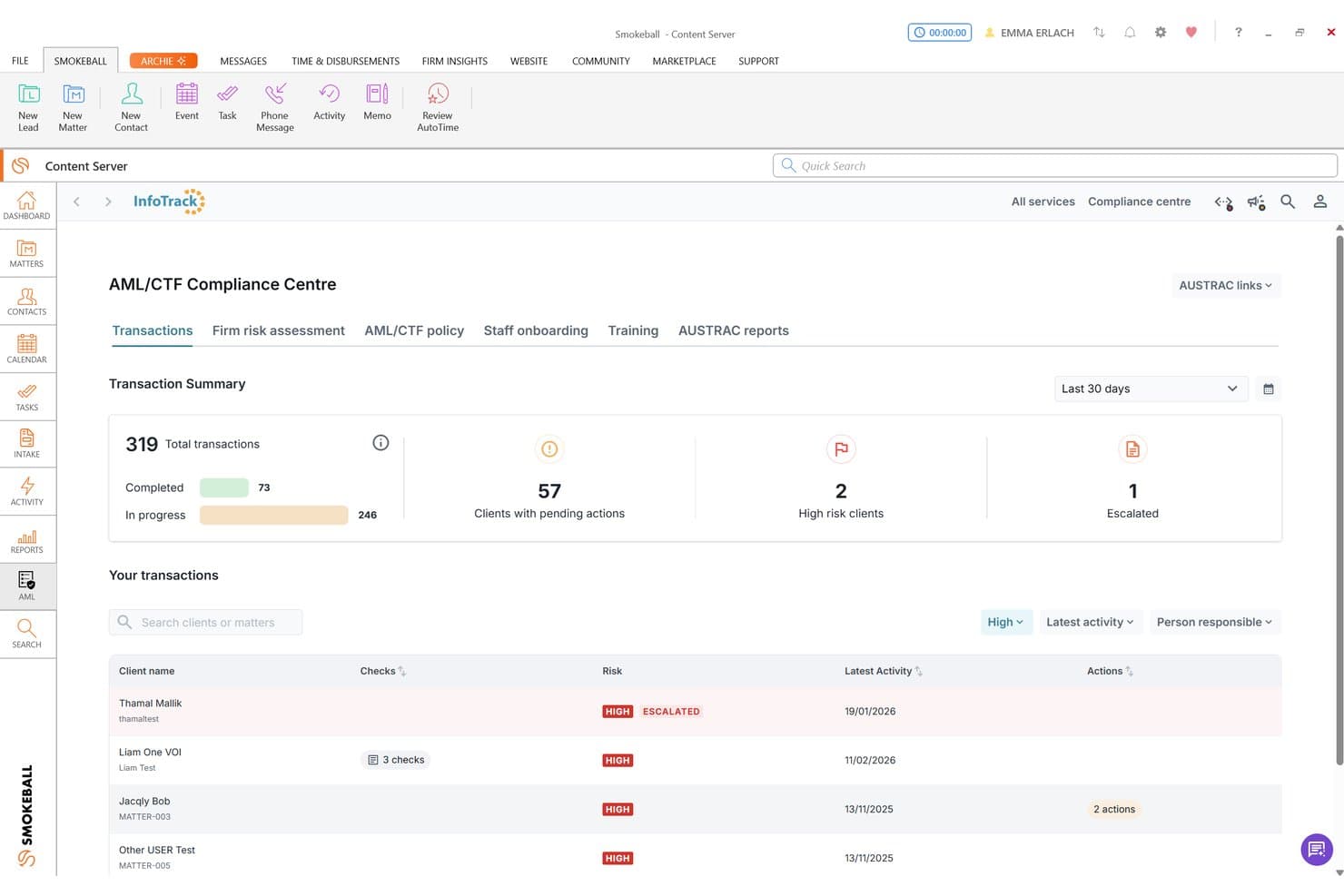
Smokeball tracks AML/CTF compliance with risk ratings and client transaction summaries. Smokeball is a legal practice management platform that combines matter management, trust accounting, conflict checks, document automation, and AML/CTF compliance reporting for law firms.
Who Is Smokeball Best For?
Smokeball suits small to mid-sized law firms that want compliance-adjacent features—conflict checks, trust accounting, and AML reporting—built into their core practice management system.
Why I Picked Smokeball
I've included Smokeball in my top picks because it weaves compliance-adjacent tools directly into the practice management workflow rather than treating them as a bolt-on. I particularly like how conflict checks use Advanced Search to scan across matters, contacts, events, tasks, and documents, then save a timestamped PDF record of the search to the matter file. Its AML/CTF Compliance Centre, powered via InfoTrack, also lets firms capture risk-status data, PEP status, and source-of-funds information without leaving the platform.
Smokeball Key Features
- Matter-level permission controls: Restrict specific staff from accessing, editing, or assigning items within a matter, with changes logged to the matter's history.
- Trust accounting reports: Generate trust statements, trial balance, and overdrawn reports to support reconciliation and client fund oversight.
- AML/CTF Compliance Centre: Capture PEP status, source of funds, CDD type, and financial-sanctions status for each contact via InfoTrack integration.
- Audit Logs report: Record creations, amendments, additions, and deletions to client and matter information in Smokeball Billing, filterable by reporting period.
Smokeball Integrations
Smokeball offers native integrations with Microsoft Word, Microsoft Outlook, and Outlook calendar, plus integrations with QuickBooks Online and InfoTrack. Custom API access is available to qualifying Prosper+ firms.
Pros and Cons
Pros:
- Trust reports support client-fund oversight
- Matter permissions support ethical walls with history
- Reviewers praise task tracking and deadline reminders
Cons:
- No centralized policy or attestation tools
- No continuous jurisdiction-aware regulatory monitoring
Learn more about Smokeball: Best for court-rule calendaring and conflict logs
- Free demo + 7-day free trial available
- From $49/user/month
Visit WebsiteCustomer Rating:4.7/5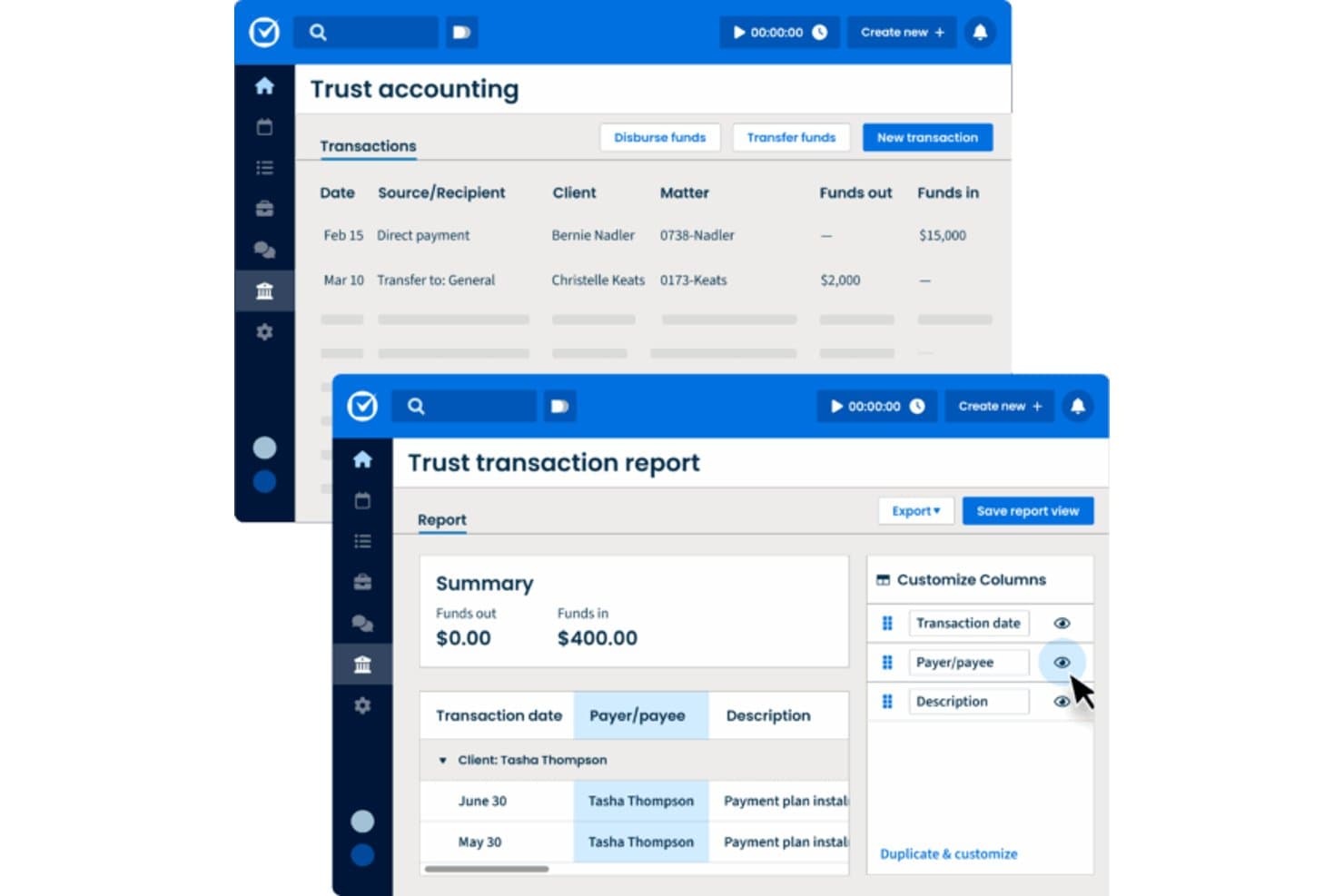
Clio Manage tracks trust accounting transactions and generates detailed reports. Clio Manage is a cloud-based legal practice management platform that centralizes matter management, conflict checks, court-rule calendaring, trust accounting, audit logging, and KYC/KYB documentation for law firms.
Who Is Clio Manage Best For?
Clio Manage is a strong fit for law firm partners and practice managers who need court-rule calendaring, conflict checks, and trust accounting in one cloud-based system.
Why I Picked Clio Manage
I've included Clio Manage in my top picks because its Court Rules engine is genuinely impressive: select a jurisdiction from a library of 2,200 U.S. jurisdictions, set your trigger event, and Clio auto-generates every related deadline with calendar assignments and reminders attached. I also like that conflict checks let you run up to 10 Flex or Exact searches in one report, log statuses and notes, and export a PDF record tied directly to the matter, which is exactly the kind of documented paper trail ethics rules demand.
Clio Manage Key Features
- KYC/KYB record fields: Log identity, AML, source-of-funds check dates, risk ratings, and assessment reasons directly on contact and matter records.
- Audit Log: View a filterable, searchable log of actor, event, time, and before-and-after changes across firm activity, exportable as CSV.
- Matter-level access permissions: Restrict matter visibility to specific users or groups, with bulk permission updates across up to 200 matters at once.
- Trust account reconciliation: Compare trust ledger transactions against bank statements and export completed reconciliation reports as PDF.
Clio Manage Integrations
Clio Manage lists 300+ integrations, including native QuickBooks, Xero, and TrustBooks connections, plus marketplace integrations such as Legl and InfoTrack. It also supports REST API v4, webhooks, OAuth 2.0, and Zapier.
Pros and Cons
Pros:
- Searchable matter files support organized records
- Conflict reports document searches, statuses, and notes
- Court deadlines generate reminders from rule triggers
Cons:
- No policy attestations or CLE tracking
- No automated sanctions screening or monitoring
Learn more about Clio Manage: Best for jurisdiction-based deadline tracking
- Free demo available
- Pricing upon request
Visit WebsiteCustomer Rating:4.5/5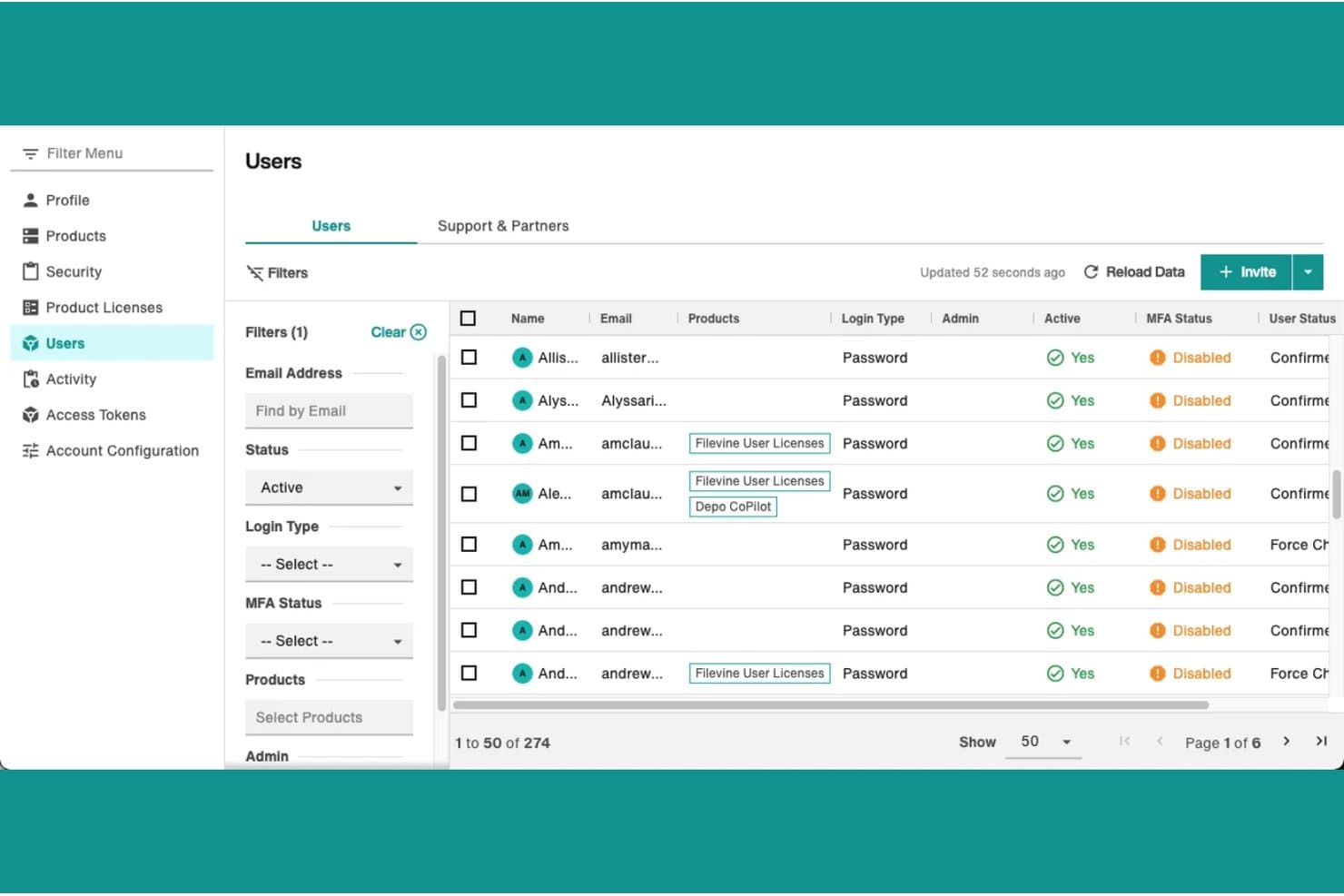
Filevine governs account security by auditing user licenses, active statuses, and MFA settings. Filevine is a legal matter management platform that combines case management, document organization, conflict checking, deadline tracking, and audit reporting in a single workspace.
Who Is Filevine Best For?
Filevine suits litigation and personal-injury firms that need jurisdiction-based deadline tracking built into their matter management workflow.
Why I Picked Filevine
I've included Filevine in my top picks because its Timely add-on generates jurisdiction-specific deadlines directly from statutes and court rules, which is exactly what litigation teams need when managing matters across multiple jurisdictions. You select a jurisdiction and triggering event, review the generated deadlines, and sync your chosen dates straight into Filevine's project calendar. The built-in conflict check also searches across all project contacts with fuzzy matching, so you can catch potential issues before a matter opens.
Filevine Key Features
- Conflict check search: Searches across all project contacts and org contacts by name, with fuzzy matching and syntax options for narrowing or exact results.
- Audit report filtering: Filters user activity logs by action type, project, document, or time range, then exports or schedules them as recurring auto-reports.
- Document version history: Lets teams view, rename, and annotate prior document versions within a matter's file.
- Advanced permissions: Controls user access to sensitive matter data at a granular level, with team assignments and staff-productivity reporting built in.
Filevine Integrations
Filevine lists over 2,000 potential integrations, including Outlook, Gmail, Workato, Domo, and Dialpad. Its API documentation references webhooks for custom connectivity.
Pros and Cons
Pros:
- Conflict searches span projects and contacts
- Reviewers praise configurable case document workflows
- Jurisdiction-based deadlines map rules to matters
Cons:
- Audit reports omit field-level changes
- Conflict checks require manual review and status
Learn more about Filevine: Best for public-safety policy attestation workflows
- Free demo available
- Pricing upon request
Visit WebsiteCustomer Rating:4.7/5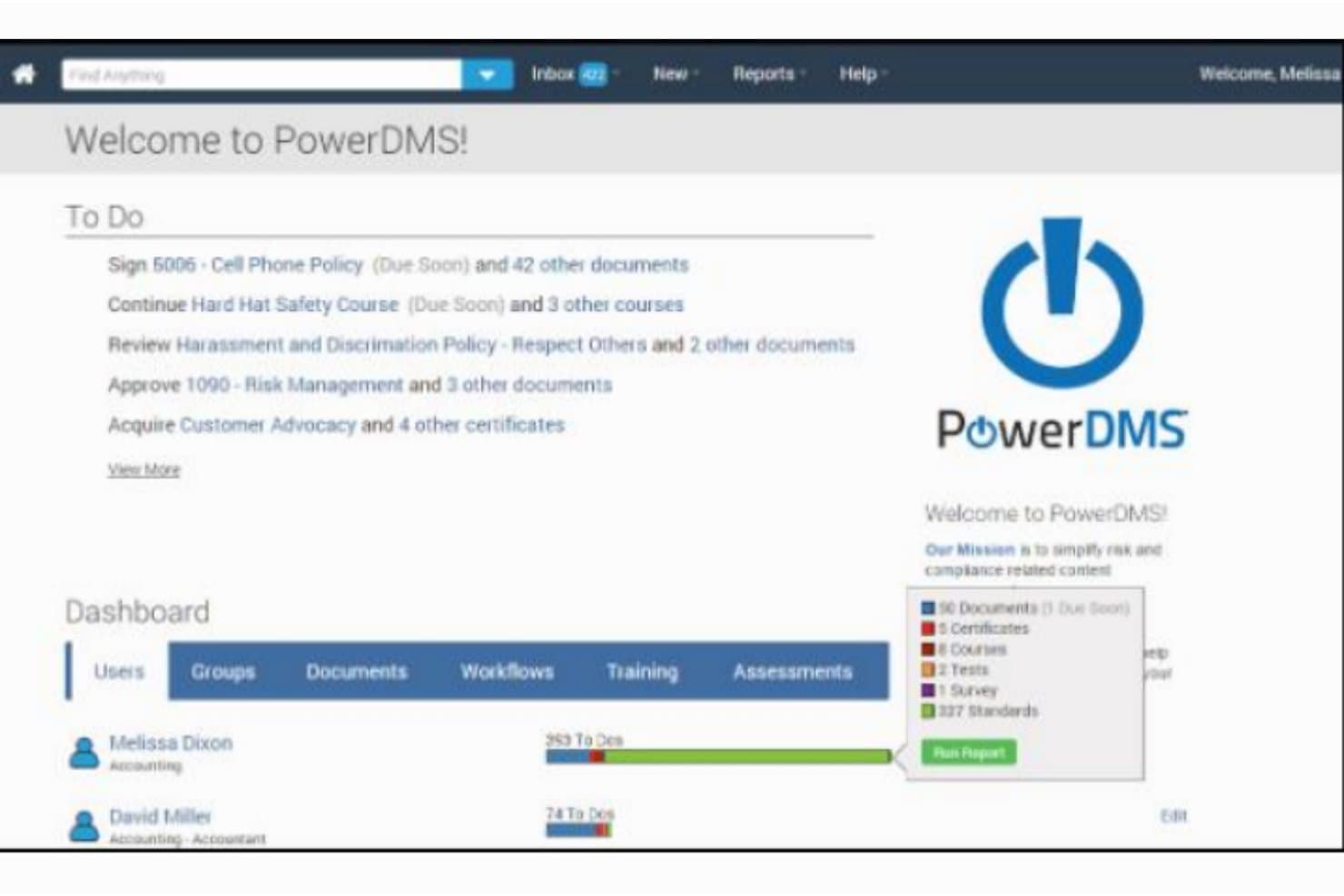
PowerDMS fortifies workforce compliance by tracking policy sign-offs, training, and certifications. PowerDMS is a public-safety compliance platform built around policy management, staff attestation tracking, and accreditation standard mapping.
Who Is PowerDMS Best For?
PowerDMS is built for public-safety agencies that need to manage policy attestation, staff acknowledgments, and accreditation workflows across large operational teams.
Why I Picked PowerDMS
I picked PowerDMS as one of the best because its policy attestation workflow is genuinely hard to replicate: PowerPolicy lets you assign acknowledgments to individuals or entire organizational units, set completion deadlines, and track outstanding sign-offs through live dashboards. I also like that PowerStandards maps your internal policies directly to accreditation standards from 40+ bodies and fires alerts the moment a standard changes, so nothing slips between review cycles. That combination of centralized attestation tracking and standards-linked policy management is what earns it a spot here.
PowerDMS Key Features
- Version control and revision history: PowerPolicy archives earlier document versions when a new version is published, retaining a full revision history and audit trail.
- Role-based access controls: Administrators control document access by user, role, group, or organizational unit to limit visibility of sensitive materials.
- Scheduled report delivery: Document activity and staff compliance reports can be exported or set to deliver automatically on a recurring email schedule.
- Mobile policy sign-off: Staff can view and sign off on policies directly in the PowerDMS mobile app and receive push notifications when a new acknowledgment is required.
PowerDMS Integrations
PowerDMS offers documented native integrations with Microsoft Office, OneDrive, Google Drive, Active Directory, and Okta. Its beta API may support custom integrations, but no legal practice-management or billing integrations are documented.
Pros and Cons
Pros:
- Accreditation evidence mapping organizes compliance documentation
- Reviewers praise responsive support for document workflows
- Centralizes policy acknowledgments and revision histories
Cons:
- Accreditation alerts don’t track legal obligations
- No client or matter conflict screening
Learn more about PowerDMS: Best for trust accounting compliance oversight
- 10-day free trial + free demo available
- From $49/user/month (billed annually)
Visit WebsiteCustomer Rating:4.3/5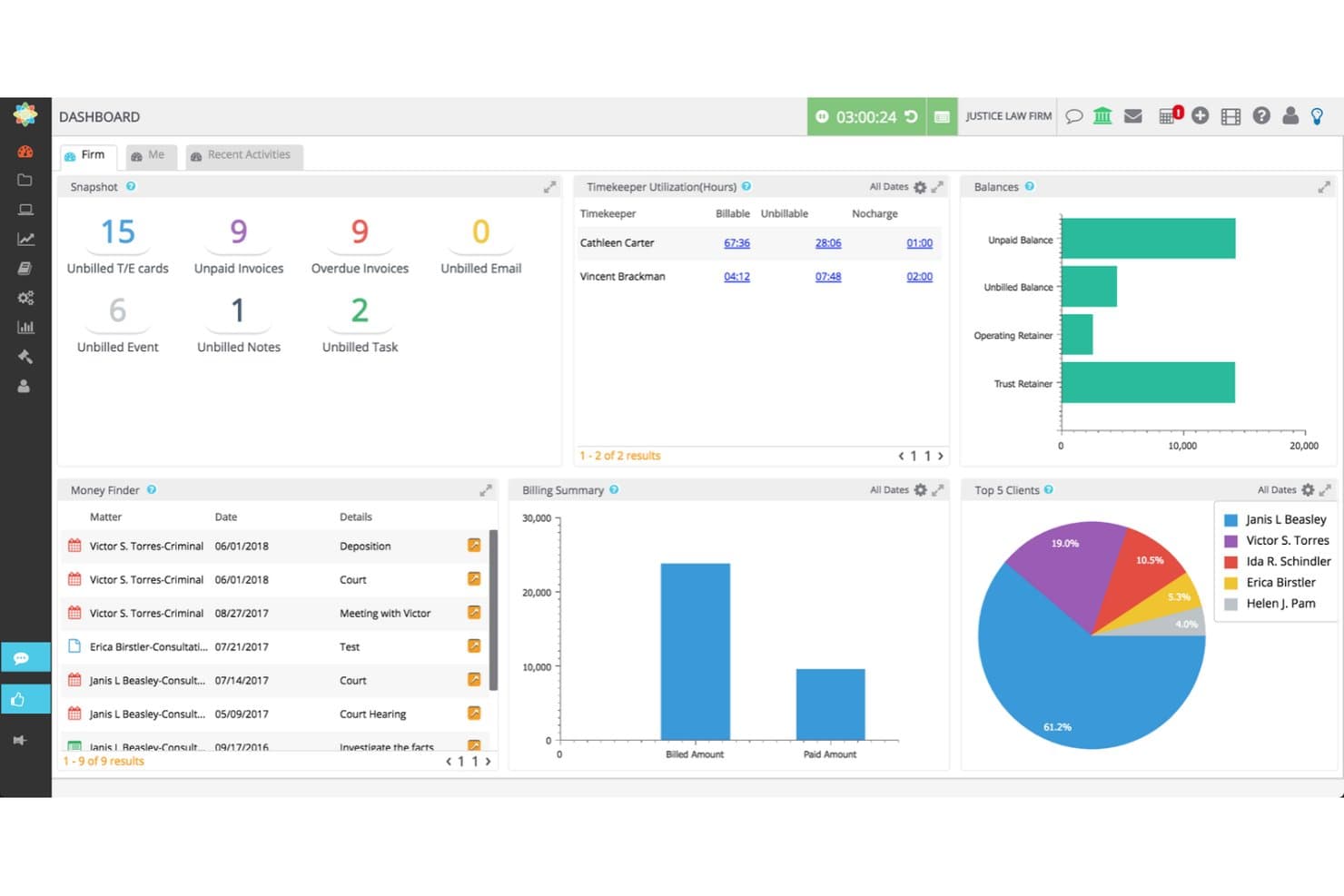
CosmoLex boosts firm profitability by capturing unbilled activities, trust balances, and utilization. CosmoLex is a legal practice management platform that combines matter management, trust accounting, billing, conflict checks, document management, and financial reporting in one system.
Who Is CosmoLex Best For?
CosmoLex is a strong fit for small to mid-sized law firms that need trust accounting and billing compliance built into their practice management system.
Why I Picked CosmoLex
I picked CosmoLex as one of the best because trust accounting compliance is where it genuinely pulls ahead. The built-in three-way reconciliation runs against your trust ledger automatically, and the system includes safeguards that block ledger overdrafts and fund commingling before they happen. I also like that Canadian firms get Law Society Compliance Docs as a native report category, which removes a manual step that trips up a lot of practices.
CosmoLex Key Features
- Conflict check report: Search clients, matters, and CRM contacts for potential conflicts, then export results as Excel or PDF.
- Ethical wall configuration: Restrict matter-level access for selected users, hiding client names and files across reports and activities.
- Matter-based document storage: Store, organize, and version documents linked to individual matters with permission controls.
- Role-based permissions: Assign matter-level and firm-wide access rights to control what each team member can view or edit.
CosmoLex Integrations
CosmoLex lists integrations with Microsoft 365, QuickBooks Online, Dropbox, OneDrive, Google Drive, NetDocuments, Box, and LawPay, plus Zapier. It also offers a REST API for custom integrations.
Pros and Cons
Pros:
- Accounting connects with matter workflows
- Trust reports support financial oversight
- Integrated trust ledgers and three-way reconciliation
Cons:
- No regulatory feeds or client screening
- Conflict checks require manual initiation
Learn more about CosmoLex: Best for billing-integrated conflict checks
- 10-day free trial + free demo available
- From $59/user/month (billed annually)
Visit WebsiteCustomer Rating:4.4/5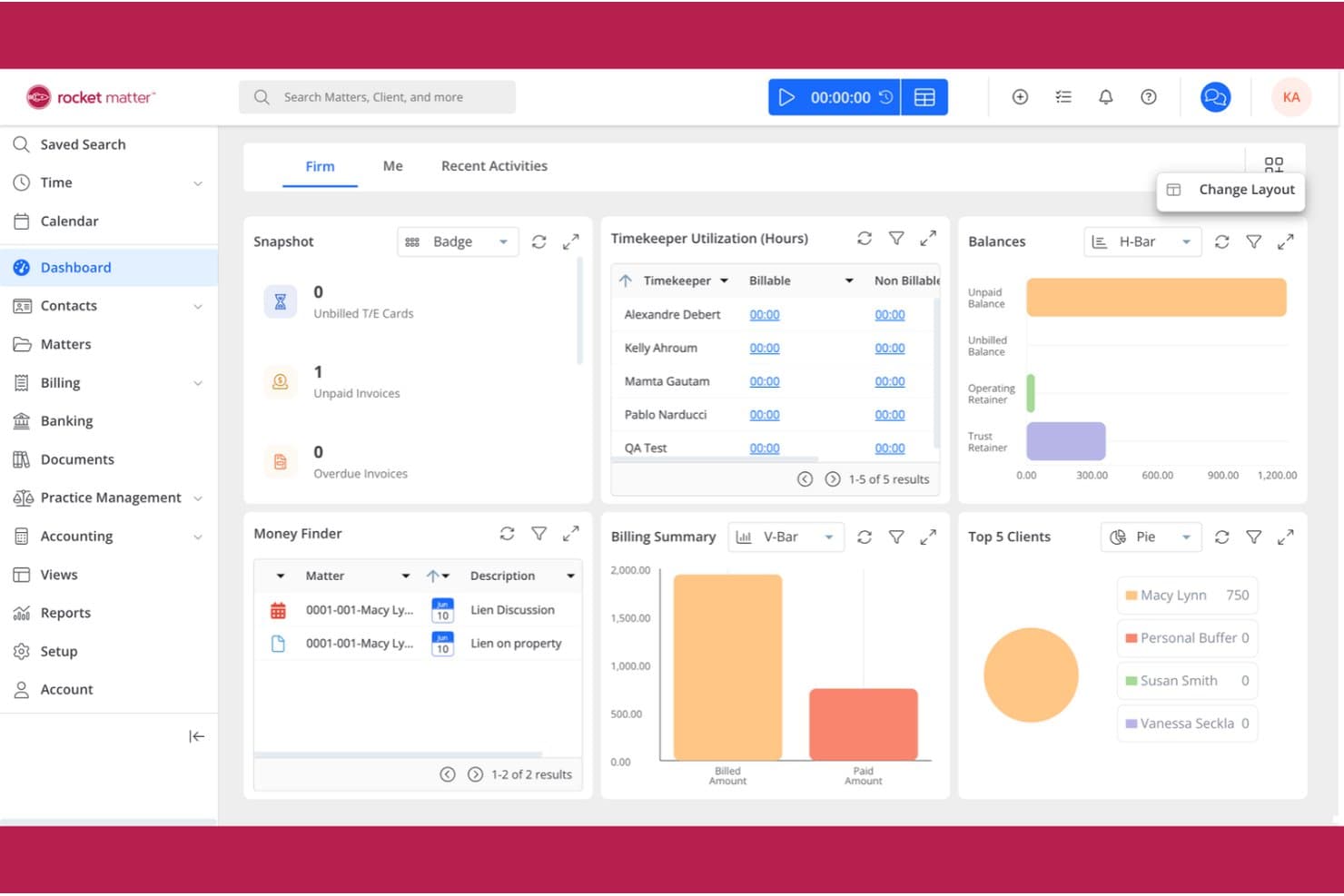
Rocket Matter elevates legal billing by monitoring firm balances, timekeeper hours, and retainers. Rocket Matter is a legal practice management platform that combines matter management, time tracking, billing, trust accounting, conflict checking, and document storage.
Who Is Rocket Matter Best For?
Rocket Matter suits small to mid-sized law firms that want conflict checks and trust accounting built into the same billing platform they use every day.
Why I Picked Rocket Matter
I picked Rocket Matter as one of the best because its conflict-check tool searches across clients, matters, contacts, custom fields, and activities in a single run, then exports results to Excel for review. That kind of billing-integrated setup means a potential conflict surfaces in the same platform where you're opening matters and generating invoices. I also like that matter-level role restrictions let you limit visibility to specific user roles, giving you a manual but functional ethical wall alongside your billing workflow.
Rocket Matter Key Features
- Trust accounting: Manage matter-based trust accounts, evergreen retainers, and automatic trust transfers with dedicated trust and operating account separation.
- Role-based matter access: Restrict matter visibility to specific user roles, giving administrators manual control over who can view sensitive matters.
- Document assembly: Generate legal documents automatically from templates populated with client and matter data.
- Matter workflow automation: Automate matter status changes and workflow steps using configurable templates tied to practice area needs.
Rocket Matter Integrations
Rocket Matter offers native integrations with QuickBooks Online, Microsoft Office 365, Microsoft Outlook, OneDrive, NetDocuments, Google Calendar, Dropbox, and Box. Zapier is also listed, but API availability isn’t stated.
Pros and Cons
Pros:
- Reviewers value trust-account and IOLTA bookkeeping
- Matter-level role restrictions support manual ethical walls
- Conflict searches cover clients, matters, contacts, activities
Cons:
- Compliance-specific audit reporting remains undocumented
- Conflict checks require manual entry and review
Learn more about Rocket Matter: Best for conflict checks within a matter workflow
- Free demo available
- Pricing upon request
Visit WebsiteCustomer Rating:4.2/5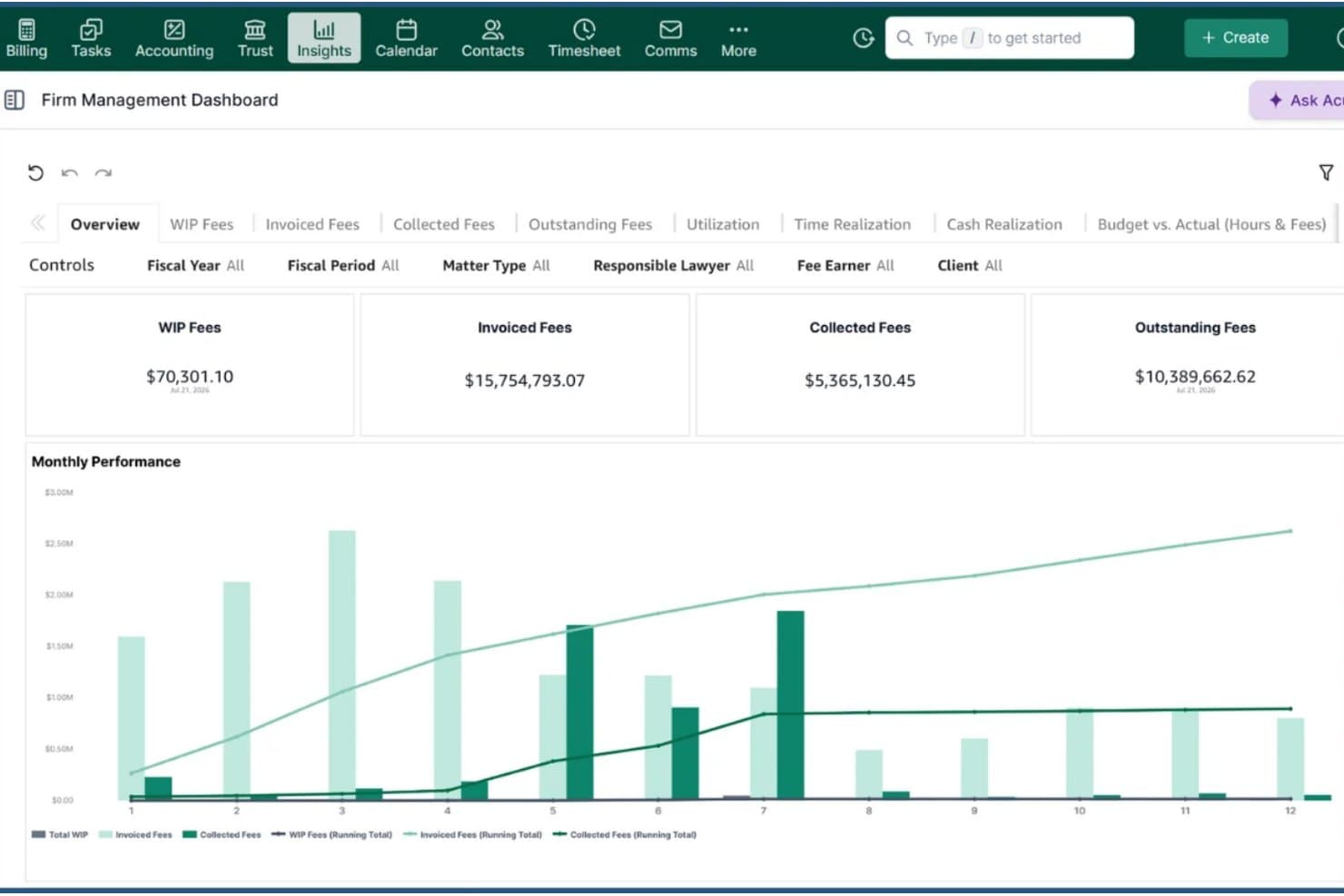
Actionstep illuminates firm finances by tracking WIP, invoiced fees, and monthly collections. Actionstep is a law firm practice management platform that brings together matter management, workflow automation, billing, trust accounting, conflict checking, and AML status tracking in one system.
Who Is Actionstep Best For?
Actionstep is a strong fit for law firms that want conflict checks woven directly into their matter workflow rather than managed as a separate process.
Why I Picked Actionstep
I picked Actionstep as one of the best because conflict checking is built directly into matter workflows rather than bolted on as an afterthought. When you run a Conflict Check Report, it searches across matters, contacts, file notes, the firm knowledge base, and emails simultaneously, using Boolean and wildcard operators. The results can be saved as a timestamped PDF and recorded straight to the matter, giving you a clear trail of who ran the check and when.
Actionstep Key Features
- AML status tracking: Administrators can enable AML review status for specific matter types, update it through workflow steps, and restrict who can change it using role-based permissions.
- Restricted Matter List: Admins can view, filter, and export a list of all restricted matters, showing each matter's assignee and which users have access.
- Trust/client account audit log: Generates a filterable report of trust and client account activity, logging each operation with the date, participant, and associated matter.
- Knowledge Center: A centralized repository for storing internal policies, HR documents, and client service processes accessible across the firm.
Actionstep Integrations
Actionstep offers a native Outlook add-in for Office 365 and a marketplace integration with First AML, available in the UK, Australia, and New Zealand. It also supports REST APIs, REST hooks, and Zapier.
Pros and Cons
Pros:
- AML status appears in configurable matter workflows
- Conflict reports attach timestamped evidence to matters
- Workflow checklists help prevent missed steps
Cons:
- Audit logs cover limited compliance activities
- Regulatory deadline alerts aren’t documented
Learn more about Actionstep: Best for California court-form updates
- Free demo available
- Pricing upon request
Visit WebsiteCustomer Rating:4/5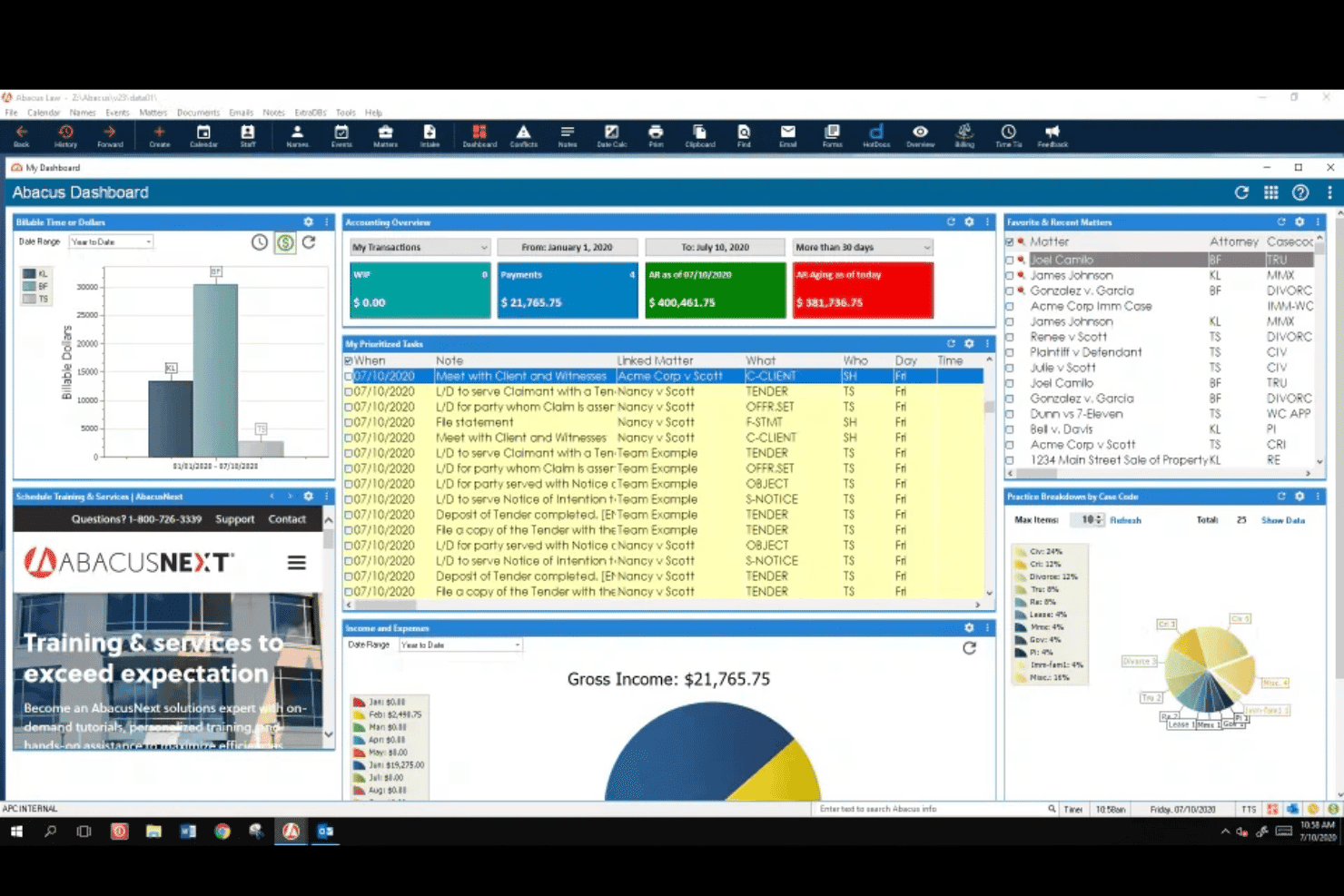
AbacusLaw dashboard showing billing, accounting, tasks, matters, and practice performance. AbacusLaw is a legal practice management platform by CARET that combines case management, built-in accounting, trust accounting, legal calendaring, document automation, and court forms into a single system for law firms.
Who Is AbacusLaw Best For?
AbacusLaw is a strong fit for California-based law firms that need an all-in-one practice management system with built-in accounting and up-to-date state court forms.
Why I Picked AbacusLaw
I picked AbacusLaw as one of the best because its California State Court Forms pack is kept current with court-form changes, so your team isn't manually tracking Judicial Council updates or hunting down revised county forms. You can populate templates directly from existing database records and track form modifications as they happen. The built-in calendaring also surfaces case deadlines and filing alerts in one place, which matters when California court schedules shift.
AbacusLaw Key Features
- Built-in trust accounting: Manages client trust accounts with tools the vendor says meet or exceed Bar Association requirements.
- Practice area customization: Lets firms tailor input screens, automation rules, documents, and terminology to match their specific practice areas.
- Shared legal calendar with change notifications: Displays schedules to relevant team members or clients and sends alerts when appointments or deadlines are updated.
- HotDocs document assembly: Uses client, calendar, and case data already in AbacusLaw to generate completed legal documents in one click.
AbacusLaw Integrations
AbacusLaw offers documented integrations with Microsoft Outlook, Abacus Payment Exchange (APX), and HotDocs. Outlook tracks emails, calls, and client interactions; APX handles payments; HotDocs assembles documents from case data. API availability isn’t stated.
Pros and Cons
Pros:
- Trust accounting centralizes firm records
- Calendar helps surface filing deadlines
- California court forms track updates
Cons:
- No policy attestations or ethical walls
- No documented AML or sanctions screening
Learn more about AbacusLaw: Best for AML screening across 40+ countries
- Free demo available
- Pricing upon request
Visit WebsiteCustomer Rating:4/5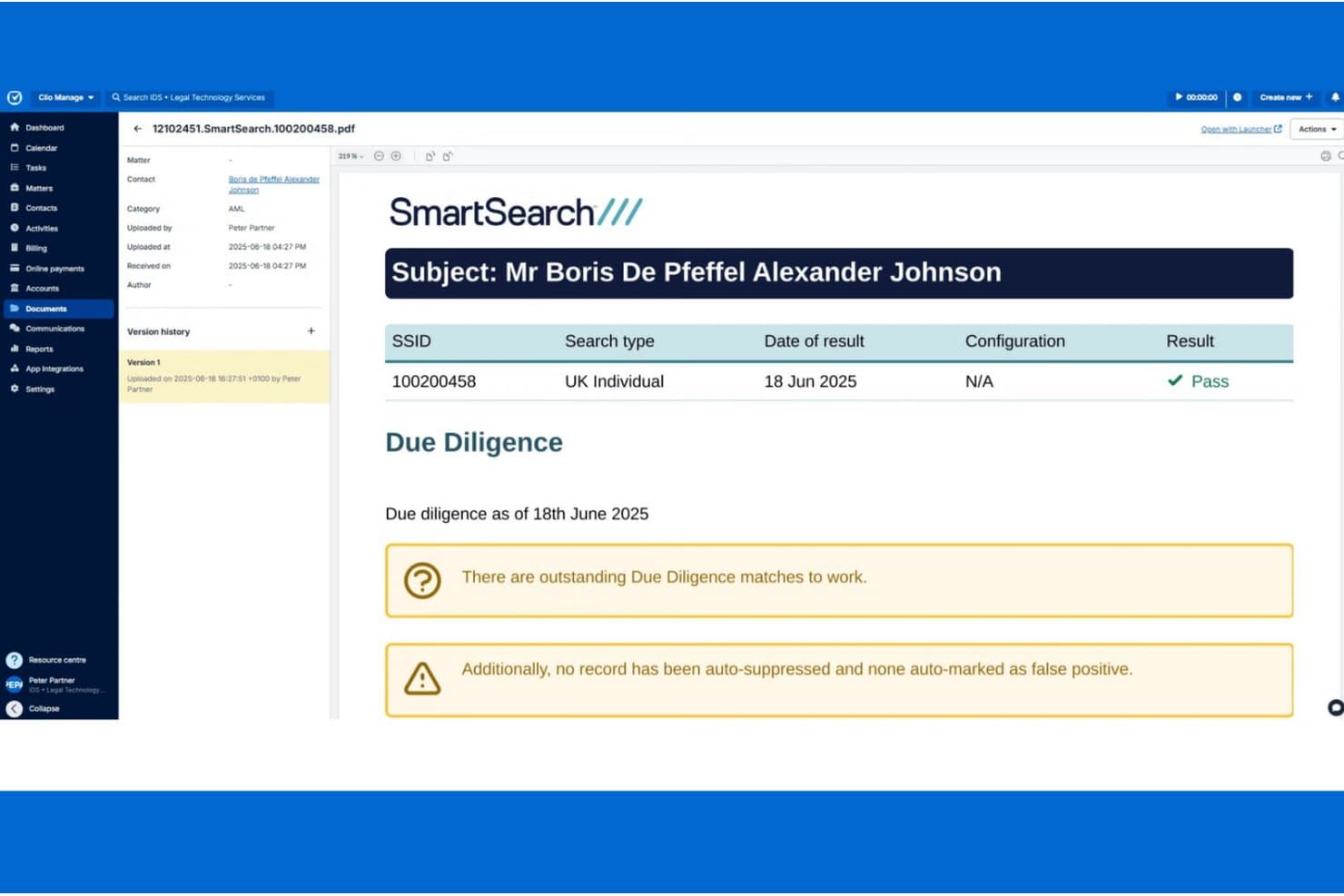
SmartSearch automates AML compliance by verifying identities and flagging due diligence matches. SmartSearch is an AML and digital compliance platform that covers client identity verification, KYC/KYB checks, sanctions and PEP screening, risk assessment, and ongoing monitoring for law firms handling regulated transactional work.
Who Is SmartSearch Best For?
SmartSearch suits law firms that handle regulated transactional work and need thorough AML and client due diligence screening across multiple jurisdictions.
Why I Picked SmartSearch
I picked SmartSearch as one of the best because its AML screening reach across 40+ countries is genuinely difficult to match in a single platform. When a law firm onboards an international client, SmartSearch pulls from over 200 global data sources to run sanctions, PEP, RCA, and adverse media checks simultaneously, then triggers enhanced due diligence automatically if a match surfaces. I also like that ongoing monitoring runs nightly against the Dow Jones Factiva Watchlist, covering over 1,100 sanctions and PEP lists, so your client risk picture stays current well past the initial onboarding check.
SmartSearch Key Features
- Client and matter risk assessment: Configurable risk scoring classifies clients as low, standard, or high risk using factors like client type, matter purpose, transaction size, and geography.
- Source of Funds verification: Collects and reviews evidence about the origin of funds via secure open banking, with ongoing refresh available for enterprise-tier clients.
- Automated AML report generation: Date-stamped compliance reports are generated automatically after each due diligence check and stored for later access.
- RESTful API integration: Connects SmartSearch to practice management and CRM systems, including Clio and Advanced, with client data transferring automatically to avoid repeated entry.
SmartSearch Integrations
SmartSearch has a native Clio integration and documented integrations with Advanced, Alto, Wealth Dynamix, Salesforce, and Worxinfo. It also offers a RESTful API for custom connections and supports single sign-on.
Pros and Cons
Pros:
- Creates date-stamped AML reports for audits
- Monitors sanctions and PEP status after onboarding
- Screens international clients across 40+ countries
Cons:
- No conflict checks or matter-level ethical walls
- Some users report failed document and facial checks
Learn more about SmartSearch: 10Best for built-in trust accounting and conflict checks
MyCase
- Free demo + 10-day free trial available
- From $60/user/month
Visit WebsiteCustomer Rating:4.6/5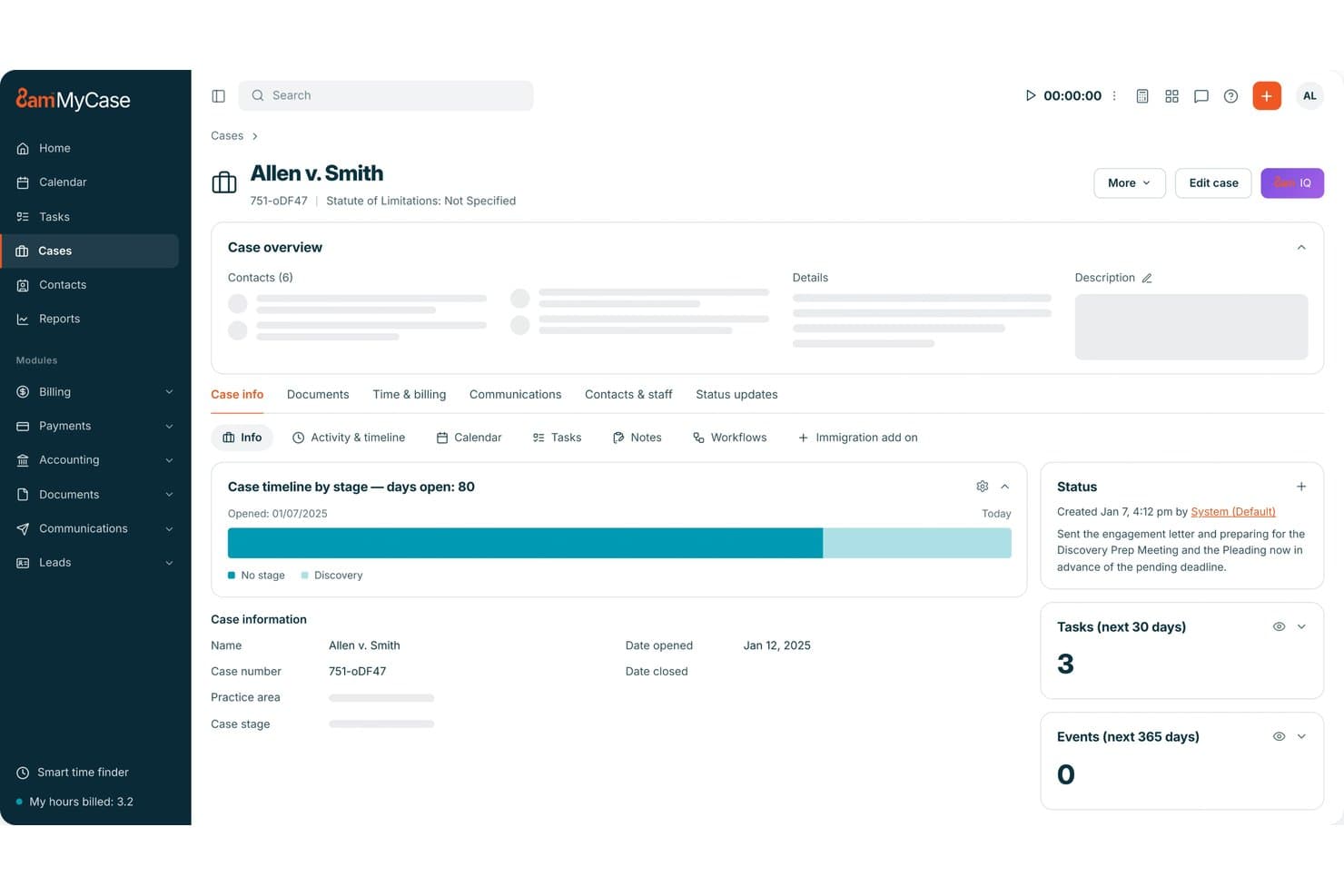
MyCase centralizes case status, tasks, and deadlines in one dashboard. MyCase is a legal practice management platform that centralizes case management, client communications, billing, trust accounting, and conflict check tracking for law firms.
Who Is MyCase Best For?
MyCase is a strong fit for small to mid-sized law firms that want trust accounting and conflict check tracking built into their core case management workflow.
Why I Picked MyCase
I picked MyCase as one of the best because trust accounting and conflict checks are baked directly into the case management workflow, not bolted on as an afterthought. On the trust side, I like that it enforces client-level fund allocation, blocks overdrafts, and runs three-way reconciliation across the client ledger, bank activity, and related transactions. For conflicts, the Advanced plan lets you search across cases, contacts, and documents, then mark a matter as conflict-checked with notes and export the result as a PDF for your records.
MyCase Key Features
- Role-based access controls: Restrict case file and document access by user role, so team members only see the matters they're permitted to view.
- LawToolBox integration: Calculate court, statutory, and administrative deadlines across 50 states and add rule-based events directly to the MyCase calendar.
- Audit trail tracking: Log activity across matters, communications, and financial transactions to maintain a searchable record of case-level actions.
- Workflow automation: Trigger automated task sequences, events, and document workflows based on case activity to reduce manual follow-up.
MyCase Integrations
MyCase connects with 75+ solutions, including native integrations with Google Calendar, Microsoft Outlook, QuickBooks, and LawPay, plus marketplace integrations with LawToolBox, Dropbox, and NetDocuments. The Advanced plan includes an Open API, and Zapier is supported.
Pros and Cons
Pros:
- Case deadlines and follow-ups stay visible
- Conflict searches cover cases, contacts, and documents
- Three-way trust reconciliation flags discrepancies
Cons:
- No AML screening or policy attestations
- Conflict screening requires manual review and recording
Hukuk Büroları İçin Diğer Uyumluluk Yazılımları
Bu ek seçenekler kısa listeme girmedi, ancak belirli uyumluluk iş akışları için değerlendirmeye değer:
- 11NetDocumentsBest for document security and ethical walls
- 12PracticePantherBest for all-in-one legal practice management
- 13AderantBest for OCG compliance embedded in billing workflows
- 14ComplyAdvantageBest for AML screening at client intake
- 15NAVEX OneBest for enterprise GRC policy attestation workflows
How I Evaluate Compliance Software for Law Firms
I split my evaluation into three parts. First, core functionality: tools must screen matters for conflicts and track regulatory deadlines automatically—this carries the most weight. Second, standout features like integrated trust accounting oversight. Third, what's offered beyond features: onboarding support, configurability, and pricing fit for firm size.
Core Functionality (Table Stakes for This List)
When I'm selecting tools for my list, I score each one on a scale from 0 (does not offer the functionality) to 5 (excels in this area) for each core functionality listed below. I then convert the total into a percentage to help assess each tool's overall fit, with extra weight on any functionalities I've deemed essential.
- Conflict of Interest Checks (Essential): I evaluate how each tool screens new matters against client, party, and entity records—looking for configurable matching rules and workflow routing rather than simple name searches.
- Regulatory Tracking & Alerts (Essential): Each tool should surface jurisdiction-specific deadlines and rule changes automatically, similar to how Clio Manage and MyCase handle court-rule calendaring across multiple jurisdictions.
- Audit Trail & Reporting: I look for exportable logs that cover conflict checks, deadline actions, and trust transactions—details you'd need for a bar audit or client compliance review.
- Client Due Diligence & Screening: Tools should support KYC, AML, or sanctions screening during intake and on an ongoing basis, with risk scoring that flags changes in a client's status over time.
- Policy & Document Management: I check whether the platform tracks policy versions, distributes updates to staff, and logs acknowledgments—essential for firms that need to prove attestation during audits.
- Ethical Wall Enforcement: The tool should restrict matter-level access with system-enforced barriers, not just informal agreements, and log any exceptions for later review.
Once I have a list of tools that meet the criteria, I consider what sets each platform apart.
Differentiating Factors (What Sets Vendors Apart)
Here's how I compare and contrast different vendors:
Standout Features
I look for integrated trust accounting oversight that flags IOLTA discrepancies before they become bar complaints—Clio Manage and MyCase handle this differently, and the details matter. Matter intake risk flagging is equally important: I evaluate whether the tool applies automated risk scoring at intake or just runs a basic name search. Multi-jurisdictional rule mapping separates strong options from average ones, especially for firms spanning multiple states or countries where bar rules overlap and conflict.
Beyond Features
I evaluate how well each tool connects to existing practice management and billing systems. A platform like Smokeball or Clio that keeps conflict and trust data in sync across matter workflows prevents the blind spots that appear when compliance lives in a separate silo. I also check vendor onboarding support and training resources, since a compliance tool only works if attorneys actually use it. Customization matters too—I look for configurable risk thresholds and reporting templates that fit a firm's practice areas and internal audit requirements.
Hukuk Büroları İçin Uyumluluk Yazılımı Nasıl Seçilir?
Bir sistemi, kontrollerini büronuzun doğrulaması gereken risklerle eşleştirerek seçin ve ardından bu kontrolleri gerçek dosya ve faturalandırma iş akışlarıyla test edin.
| Önceliğiniz Şuysa | Şunları Arayın |
| Çıkar çatışması taraması | Taraflar, kuruluşlar ve diğer adlar için eşleştirme kurallarının yanı sıra bir inceleme kaydı |
| Mahkeme son tarihleri | Yargı bölgesine özgü kural kaynakları ve kural güncellemelerine ilişkin belgelenmiş bir süreç |
| Emanet hesabı muhasebesi | Dosya düzeyinde emanet kayıtları, mutabakat adımları ve işlem denetim günlükleri |
| Müvekkil durum tespiti | Tarama kapsamı ayrıntıları, risk işaretleri ve tarama tarihlerinin kaydı |
| Politika onayları | Sürüm geçmişi, personel onayları ve dışa aktarılabilir tamamlama kayıtları |
Kısa Listenizi Nasıl Değerlendirmelisiniz?
- Çıkar çatışması yönetimini test edin: Deneme sürümünde, bir diğer ad ve ilişkili kuruluş da dahil olmak üzere beş örnek taraf girin, ardından eşleşme sonuçlarını ve yönlendirme kaydını inceleyin.
- Son tarih kurallarını doğrulayın: Yargı bölgesine özgü bir son tarih içeren bir test dosyası oluşturun ve kural kaynağıyla birlikte kural değişikliklerinin nasıl ele alındığını açıklayan bir belge isteyin.
- Bir emanet işlemini izleyin: Deneme ortamında bir yatırma ve ödeme kaydedin, ardından işlem günlüğünü ve mutabakat kaydını dışa aktarın.
- Kanıt isteyin: Örnek bir politika onayı dışa aktarımı veya tarama kapsamı belgesi isteyin ve belgede tarihlerin ve inceleme durumunun yer aldığını doğrulayın.
- Karar ölçütünü belirleyin: Seçim notunuzda, entegre bir dosya platformunu daha kapsamlı politika, tarama veya etik duvarı kontrolleri sunan uzman bir araçla karşılaştırarak değerlendirin.
Hukuk Büroları İçin Uyumluluk Yazılımı Nedir?
Hukuk büroları için uyumluluk yazılımları, hukuk ekiplerinin müvekkil dosyaları ve büro operasyonlarıyla ilgili yükümlülükleri takip etmesine, belgelemesine ve yönetmesine yardımcı olur. Platforma bağlı olarak çıkar çatışması kontrollerini, mahkeme son tarihlerini, emanet hesabı muhasebesini, müvekkil taramasını, politika onaylarını veya etik duvarlarını destekleyebilir. Yetenekler farklılık gösterir; bu nedenle bürolar bir aracın kontrollerini çalışma alanları, yargı bölgeleri ve denetim gereksinimleriyle eşleştirmelidir.
Özellikler
Hukuk büroları için uyumluluk yazılımlarında aradığım başlıca özellikler şunlardır:
- Çıkar çatışması kontrolleri: Yeni işleri; diğer adlar ve ilişkili kuruluşlar da dâhil olmak üzere müvekkil, taraf ve kuruluş kayıtlarıyla karşılaştırın. Bir inceleme ve eskalasyon kaydı, ekibinizin olası çatışmaların nasıl ele alındığını belgelemesine yardımcı olur.
- Mevzuat takibi ve uyarıları: Desteklendiği durumlarda, ilgili son tarihleri ve kural değişikliklerini yargı bölgesine göre takip edin. Uyarılar, personeli yaklaşan yükümlülükleri incelemeye ve geçerli kural kaynağını doğrulamaya yönlendirebilir.
- Denetim izleri ve raporlama: Çıkar çatışması incelemeleri, son tarih güncellemeleri ve emanet hesap işlemleri gibi eylemleri kaydedin. Aranabilir veya dışa aktarılabilir günlükler, ekibinizin denetimler ve müvekkil incelemeleri için kayıtlar hazırlamasına yardımcı olur.
- Müvekkil durum tespiti: İlk kabul sırasında ve mevcutsa sonraki incelemelerde kimlik, yaptırım veya diğer tarama kontrollerini destekleyin. Tarama tarihleri ve risk işaretleri, ekibinize değerlendirme ve takip için bir kayıt sağlar.
- Emanet hesap kontrolleri: Mevduatların, ödemelerin ve mutabakatların kaydedilmesine yönelik araçlarla müvekkil fonlarını ve iş düzeyindeki işlemleri takip edin. İşlem geçmişleri, personelin hesap hareketlerini incelemesine ve tutarsızlıkları belirlemesine yardımcı olur.
- Politika ve belge yönetimi: Politika sürümlerini saklayın, güncellemeleri dağıtın ve personel onaylarını kaydedin. Bu kayıtlar, hangi rehberliğin yayımlandığını ve kimin beyanı tamamladığını doğrulamanıza yardımcı olur.
- Etik duvarlar: Belirlenen kullanıcıların belirtilen iş bilgilerine erişimini kısıtlayın. İzin ayarları ve istisna günlükleri, hukuk büronuzun bilgi engellerinin nasıl uygulandığını belgelemesine yardımcı olur.
- İş akışı entegrasyonu: Uyumluluk görevlerini iş kabulü, faturalandırma veya uygulama yönetimi iş akışlarıyla bağlayın. Ortak kayıtlar, yinelenen veri girişini azaltabilir ve rutin çalışmalar sırasında uyumluluk adımlarının kontrol edilmesini kolaylaştırabilir.
Faydalar
Hukuk büroları için uyumluluk yazılımının sağlayabileceği bazı pratik faydalar şunlardır:
- Çıkar çatışması görünürlüğü: İş taraması, müvekkil, taraf ve kuruluş kayıtlarını karşılaştırırken inceleme iş akışları olası eşleşmelerin nasıl ele alındığını belgeler.
- Son tarih takibi: Yargı bölgesine özgü takvimler ve uyarılar, ekibinizin geçerli son tarihleri izlemesine ve desteklendiği durumlarda kural değişikliklerini incelemesine yardımcı olur.
- Denetim kayıtları: Aranabilir veya dışa aktarılabilir günlükler, denetimler veya müvekkil incelemeleri için çıkar çatışması incelemelerini, son tarih işlemlerini ve emanet hesap işlemlerini belgeleyebilir.
- Müvekkil taraması: İlk kabul ve devam eden kimlik, yaptırım veya AML kontrolleri, takip amacıyla tarama tarihlerini ve risk işaretlerini kaydedebilir.
- Emanet hesap gözetimi: İş düzeyindeki işlem kayıtları ve mutabakat araçları, personelin mevduatları, ödemeleri ve hesap hareketlerini incelemesine yardımcı olur.
- Erişim kontrolleri: Etik duvar izinleri, belirlenen iş bilgilerine erişimi sınırlayabilir ve istisnaları daha sonra incelenmek üzere kaydedebilir.
- Politika takibi: Sürüm geçmişleri ve personel onayları, hangi rehberliğin dağıtıldığını ve kimin teslim aldığını doğrulamaya yardımcı olabilir.
Maliyetler ve Fiyatlandırma
Maliyetler özelliklere, ekip büyüklüğüne ve eklentilere göre değişir. Hukuk büroları için uyumluluk yazılımında tipik fiyat aralıkları şunlardır.
Hukuk Büroları için Uyumluluk Yazılımı Plan Karşılaştırma Tablosu
| Plan Türü | Ortalama Fiyat | Yaygın Özellikler |
| Bireysel Plan | $20–$60/kullanıcı/ay | Çıkar çatışması kontrolleri, son tarih takibi, denetim günlükleri ve temel raporlama. |
| İşletme Planı | $60–$150/kullanıcı/ay | Yapılandırılabilir çıkar çatışması iş akışları, emanet hesap araçları, müvekkil taraması ve politika takibi. |
| Kurumsal Plan | $150–$300+/kullanıcı/ay | Gelişmiş erişim kontrolleri, çoklu yargı bölgesi kural takibi, özel raporlama ve özel destek. |
Sık Sorulan Sorular
Hukuk firmaları için uyum yazılımı hakkında sık sorulan birkaç sorunun yanıtlarını burada bulabilirsiniz:
Uyum yazılımı, bir firmanın uyum görevlisinin yerini alır mı?
Hayır. Bir platform görevleri işaretleyebilir, incelemeleri ilgili kişilere yönlendirebilir ve kayıtları saklayabilir; ancak her hukuki veya etik soruya karar veremez. Personelin hâlâ geçerli kuralları yorumlaması, uyarıların ilgili dosyaya uygun olduğunu doğrulaması ve istisnaları çözmesi gerekir. Örneğin, bir takvim hatırlatıcısı seçilen son tarih kuralının geçerli olduğunu ortaya koymaz. Her iş akışının sorumluluğunu üstlenecek birini görevlendirin, çözümlenmemiş uyarıları inceleyin ve kurallar veya firma uygulamaları değiştiğinde prosedürleri güncelleyin. Yazılımı, mesleki muhakemenin yerine geçen bir araç olarak değil, bir kontrol ve kayıt tutma desteği olarak değerlendirin.
Tek bir platform, bir hukuk firmasının tüm uyum iş akışlarını yönetebilir mi?
Bazen, ancak kapsam satıcıya ve ürün katmanına göre değişir. Bir uygulama yönetim sistemi; dosya kabulü, çıkar çatışması kontrolleri, takvim yönetimi ve emanet hesaplarının muhasebesini bir araya getirebilirken, politika beyanları veya yaptırım taraması için ayrı araçlar gerekebilir. Seçim yapmadan önce bir iş akışı haritası oluşturun: her kontrol için sorumlu rolü, kayıt sistemi, gerekli kanıtları ve devir noktalarını belirtin. Ardından istisnalar ve dışa aktarma işlemleri de dâhil olmak üzere platformu bu adımlara göre test edin. Uzmanlaşmış araçları kullanmaya devam ederseniz, her kaydın hangi sisteme ait olduğunu ve personelin yinelenen veya eksik verileri nasıl uzlaştıracağını doğrulayın.
Bir hukuk firması, müvekkil verilerini bir uyum platformunda saklamadan önce neleri kontrol etmelidir?
Müvekkil bilgilerini yüklemeden önce satıcının güvenlik belgelerini, sözleşmesini ve veri işleme koşullarını kontrol edin. Hizmetin verileri aktarım sırasında ve depolama hâlinde nasıl koruduğunu, kullanıcı erişimini nasıl denetlediğini, yönetici faaliyetlerini nasıl kaydettiğini ve yedekleme, saklama ve silme işlemlerini nasıl yönettiğini doğrulayın. Olay bildirim sürelerini, alt işleyenleri ve hizmet sona erdiğinde firmanızın kayıtları dışa aktarıp aktaramayacağını sorun. Ardından ayarları gizlilik yükümlülükleriniz ve iç politikalarınızla karşılaştırın. Etik duvarı izinleri erişimi sınırlayabilir; ancak daha geniş kapsamlı erişim ve veri işleme kontrollerinin incelenmesinin yerini tutmaz.
Bir firma, uyum yazılımı yapılandırmasını ne zaman incelemelidir?
Yapılandırmayı kullanıma alırken, düzenli aralıklarla ve firmanın çalışmaları veya personeli değiştiğinde inceleyin. Kullanıcı izinlerini, dosya açma alanlarını, çıkar çatışması eşleştirme kurallarını, üst makama iletme yollarını, yargı bölgesi ayarlarını ve raporlama erişimini kontrol edin. Birleşme, yeni bir uygulama alanı, başka bir yargı bölgesine genişleme veya personel ayrılığından sonra bunları yeniden değerlendirin. İnceleme tarihini, kararları ve takip görevlerini kaydetmesi için bir sorumlu görevlendirin. Kısa ve belgelenmiş bir inceleme, artık firmanın dosyaları ele alma biçimiyle örtüşmeyen ayarların tespit edilmesine yardımcı olabilir.