
Matter management is how legal teams track, organize, and execute every legal matter from intake to resolution. Doing it well is the difference between a reactive legal function and a strategic one. Without a structured approach, work gets lost in email threads, deadlines slip, and spend spirals without visibility.
I've seen teams transform their legal operations by getting this right. This guide walks you through the full lifecycle, key benefits, and common challenges of matter management.
What Is Matter Management?
Matter management is the structured process of capturing, organizing, and tracking every legal matter a team handles—from initial request to resolution. A "legal matter" is any discrete unit of legal work: a contract negotiation, a regulatory inquiry, a dispute, an employment issue, or an M&A transaction.

Every matter has a lifecycle. It involves people, documents, deadlines, costs, and decisions. Matter management gives all of that a home—so nothing falls through the cracks and everything is traceable.
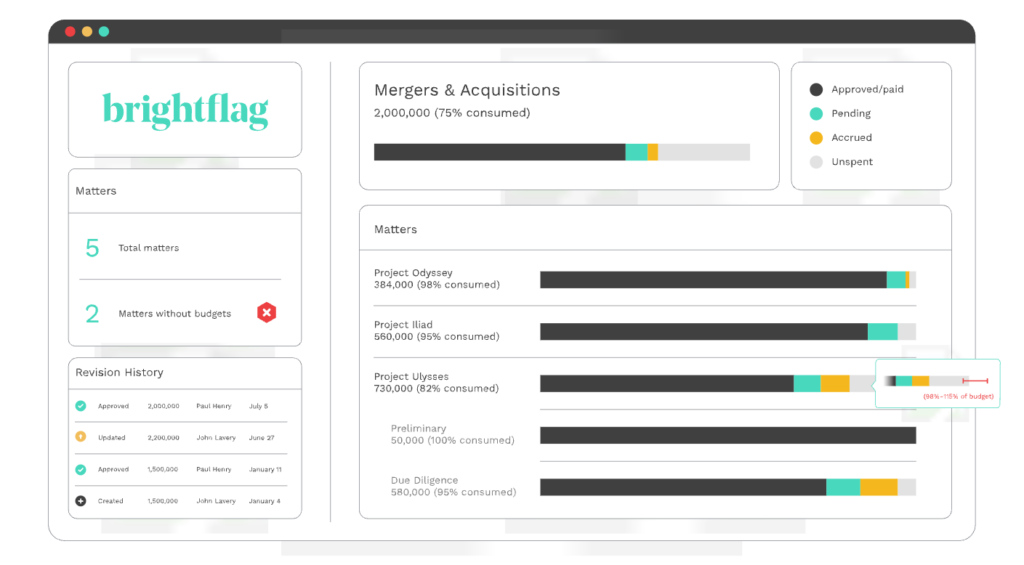
Examples of Matter Management Software
Here are some visual examples of matter management software interfaces to show you what these tools typically look like:

10 Top Matter Management Software to Consider
Here are my top matter management software picks for organizing legal matters, workflows, documents, deadlines, and spend. You’ll also find guidance on how to evaluate matter management software and the KPIs you need to prove impact.
Why Matter Management Matters: The Cost of Disconnected Tools
Most legal teams don't fail because of bad lawyers. They fail because of bad systems. Email inboxes, shared drives, and spreadsheets can't scale with legal work volume. I've seen in-house teams lose track of active matters, duplicate work, and miss renewal deadlines—simply because there was no single source of truth.
| Without Matter Management | With Matter Management |
|---|---|
| Without Matter ManagementRequests scattered across email and chat | With Matter ManagementRequests captured through structured intake |
| Without Matter ManagementMatter status is difficult to track | With Matter ManagementCentralized matter status and ownership |
| Without Matter ManagementDocuments stored in separate folders | With Matter ManagementDocuments linked directly to each matter |
| Without Matter ManagementDeadlines tracked manually | With Matter ManagementAutomated task and deadline tracking |
| Without Matter ManagementLimited visibility into legal spend | With Matter ManagementMatter-level budgets and spend reporting |
| Without Matter ManagementKnowledge disappears after closure | With Matter ManagementSearchable matter history and precedents |
The business impact is real. Disconnected tools create three problems that compound over time:
- Invisibility: No one knows the full scope of active legal work.
- Inconsistency: Every matter is handled differently, making quality control impossible.
- Inefficiency: Teams spend time chasing updates instead of doing legal work.
For law firms, the stakes are similar. Missed deadlines, poor matter budgeting, and weak client communication all trace back to fragmented matter tracking. Whether you're running an in-house legal department or a mid-size firm, the absence of structure costs you—in time, money, and risk exposure.
The Matter Management Lifecycle: How It Works End-to-End
A matter moves through six core stages. Understanding each one helps you spot where your current process breaks down.

Stage 1: Intake
A business stakeholder submits a legal request. Without a structured intake process, these requests arrive via email, Slack, or a hallway conversation—meaning key information is missing and prioritization is guesswork.
Stage 2: Triage
The legal team reviews the request, assigns a matter type, determines urgency, and decides who handles it. This is where a lot of teams lose time. Triage without a system is reactive.
Stage 3: Matter Creation & Assignment
The matter is formally opened, assigned a unique identifier, and linked to a responsible attorney or team. Relevant documents, contacts, and deadlines are attached from the start.
Stage 4: Execution
Legal work happens here. This includes drafting, negotiation, outside counsel coordination, and document management. Good matter management keeps all activity centralized and auditable.
Stage 5: Spend & Billing Management
Legal spend management software helps teams review invoices, track budgets, validate outside counsel billing, and monitor costs at the matter level. This stage is where legal operations earns its keep. Without matter-level spend data, budgets are based on gut feel.
Stage 6: Resolution & Knowledge Capture
The matter closes. Outcomes, decisions, and documents are stored in a way that's actually retrievable. I'd argue this stage is the most underused—most teams close matters and immediately lose the institutional knowledge they just created.
Key Benefits of Effective Matter Management
The benefits of matter management software extend across visibility, cost control, risk reduction, productivity, and collaboration. Done well, matter management delivers measurable value across each of these areas:
| Dimension | What Improves |
|---|---|
| DimensionVisibility | What ImprovesReal-time view of all active matters, workload distribution, and status |
| DimensionCost control | What ImprovesSpend tracked at the matter level; outside counsel budgets enforced |
| DimensionRisk reduction | What ImprovesDeadlines tracked, compliance requirements visible, nothing slipping through |
| DimensionProductivity | What ImprovesLess time chasing updates; more time on legal work |
| DimensionCollaboration | What ImprovesLegal and business stakeholders work from the same information |
The benefit I see teams underestimate most is knowledge capture. When matters are closed with structured data and linked documents, that becomes a searchable precedent library. That's a real operational asset.
Core Capabilities & Features of Modern Matter Management Software
The right software should do more than store matter records. Look for these core capabilities:
- Matter intake forms: Structured request capture that routes work automatically.
- Matter dashboard & portfolio view: A live overview of all open matters by type, status, assignee, or business unit.
- Document management: Version control, central storage, and matter-linked file organization.
- Task & deadline tracking: Assigned tasks, due dates, and escalation alerts baked into each matter.
- Outside counsel management: Budgets, invoice review, and rate card enforcement at the matter level.
- Reporting & analytics: Matter volume, cycle time, spend by type, and workload distribution.
- Integrations: Connections to contract lifecycle management (CLM), eBilling, and enterprise tools like Slack or Microsoft Teams.
- Role-based access: Granular permissions that protect confidential matter data.
I'd put reporting near the top of your requirements list. If the software can't tell you where legal spend is going and how long matters are taking, you're flying blind.
The Role of Intake, Triage & Workflow Automation
Intake is the entry point for all legal work. If it's unstructured, everything downstream suffers. A proper intake process captures the right information upfront—matter type, requestor, urgency, business unit, relevant documents—so triage is fast and assignment is accurate. Then, legal request tracking software can keep each request visible as it moves through assignment, review, and resolution.
Legal workflow software takes structured intake further by automatically routing requests and triggering predefined actions. For example, a contract above a certain value can go to senior counsel, an employment matter can trigger an HR notification, and a regulatory inquiry can open a predefined task checklist.
Here's what structured intake and automation actually do for your team:
- Eliminate the "who's handling this?" email chain.
- Ensure every matter type follows a consistent process.
- Reduce time-to-assignment from days to minutes.
- Create a complete audit trail from first request to closure.
From my experience, intake is where the most time is lost in legal teams that don't have a system. Fixing it has an immediate impact on capacity—even before you optimize anything else.
Common Matter Management Challenges (and How to Overcome Them)
These are the obstacles I see most often, along with practical ways to address them:
- Siloed information: Legal work lives across email, shared drives, and individual folders. A legal practice management software platform can centralize matters, documents, tasks, billing, and communication so teams aren't working across disconnected systems.
- Inconsistent processes: Different attorneys handle similar matters differently, making reporting impossible. Fix this with standardized matter templates and intake workflows.
- Low adoption: Teams revert to old habits if new tools add friction. Fix this by involving attorneys in software selection and keeping the UI simple.
- Security and access control: Sensitive matters need granular permissions. Fix this by mapping access levels before implementation, not after.
- Resistance from outside counsel: Law firms don't always play nicely with in-house systems. Fix this by selecting software with eBilling integration and clear outside counsel onboarding protocols.
Adoption is the challenge I'd flag most. The best system fails if people don't use it. Buy-in has to come before rollout.
Matter Management & AI: Building the Foundation for Intelligent Legal Work
AI can only be as useful as the data underneath it. This is where matter management becomes foundational. When your legal work is structured—tagged by matter type, tracked through lifecycle stages, linked to spend and outcomes—AI has something meaningful to work with.
Here's what AI can do inside a mature matter management environment:
- Matter classification: Automatically categorize incoming requests by type and priority.
- Drafting support: Surface relevant precedents and prior matter documents at the point of drafting.
- Spend anomaly detection: Flag outside counsel invoices that deviate from matter budgets or historical benchmarks.
- Predictive insights: Estimate matter duration and cost based on historical data from similar matters.
- Workload forecasting: Identify capacity bottlenecks before they become bottlenecks.
Teams that haven't structured their matter data yet will get limited value from AI. I think of matter management as the infrastructure investment that makes AI worth having. Without it, you're adding intelligence to noise.
How to Evaluate & Choose the Right Matter Management Software
Use these criteria to compare your options before committing:
- Ease of use: If attorneys won't use it without IT support, it won't stick.
- Intake & triage capabilities: Structured intake should be a core feature, not a workaround.
- Integrations: Does it connect to your CLM, eBilling, and communication tools?
- Reporting depth: Can you pull matter-level spend, cycle time, and workload data without custom development?
- AI-readiness: Does the vendor have a credible AI roadmap, or is "AI" just a marketing label?
- Security & compliance: Role-based access, audit logs, and data residency options matter.
- Vendor support & implementation resources: A good implementation partner changes the outcome significantly.
I'd also recommend requesting a structured demo with your own use cases—not a generic walkthrough. Put the intake workflow in front of an attorney who didn't choose the software and watch what happens. That's your real usability test.
More Articles
Implementing Matter Management: A Rollout & Adoption Roadmap
Follow this phased approach to get matter management live without disrupting your team:
- Audit your current state: Map how matters are currently tracked, where data lives, and what's broken. This gives you a baseline and a priority list.
- Define your matter taxonomy: Agree on matter types, naming conventions, and required fields before you configure anything.
- Configure intake & templates: Build intake forms and matter templates for your highest-volume matter types first.
- Run a pilot: Launch with one practice group or matter type. Collect feedback before scaling.
- Train & communicate: Train users on the why, not just the how. Attorneys adopt tools they trust.
- Go live & enforce the process: Designate a legal ops lead to monitor adoption and close the loop on matters that fall outside the system.
- Iterate based on data: Use your first 90 days of reporting to identify gaps and adjust workflows.
Don't try to boil the ocean in phase one. A working system that covers 70% of your matters is more valuable than a perfect system no one uses.
KPIs & Metrics to Measure Matter Management Success
Track these metrics to demonstrate the value of your matter management program:
| KPI | What It Measures |
|---|---|
| KPIMatter volume by type | What It MeasuresWorkload distribution and demand trends |
| KPICycle time per matter | What It MeasuresHow long matters take from intake to resolution |
| KPITime to triage/assign | What It MeasuresSpeed of response after a matter is submitted |
| KPISLA adherence rate | What It Measures% of matters resolved within defined timeframes |
| KPICost per matter | What It MeasuresFully loaded spend at the matter level |
| KPIOutside counsel spend ratio | What It MeasuresInternal vs. external legal spend by matter type |
| KPIMatter budget variance | What It MeasuresActual vs. budgeted spend per matter |
| KPILegal team utilization | What It MeasuresWorkload per attorney across active matters |
Start by tracking three or four of these consistently before expanding your reporting. Incomplete data reported consistently is more useful than comprehensive data reported inconsistently.
Ready to Choose the Right Tool for Your Team?
Once you understand how matter management works, the next step is finding software that fits. Our independently reviewed guide to the best matter management software breaks down the top tools by use case, pricing, and key features so you can make a confident call.