

Una alternativa sólida a MyCase ofrece un software de gestión de casos jurídicos con seguimiento flexible de asuntos, facturación, comunicación y gestión de documentos, sin las limitaciones que encuentras en MyCase. Si buscas una alternativa a MyCase, probablemente necesites mejores funciones, precios diferentes o flujos de trabajo optimizados que se adapten a la forma en que trabaja tu equipo. Te presentaré las mejores opciones en 2026, para que puedas comparar rápidamente las plataformas y encontrar la opción adecuada para tu bufete.
¿Qué es MyCase?
MyCase es un software de gestión de casos jurídicos basado en la nube que ayuda a los bufetes a organizar asuntos, facturación, documentos y comunicaciones con los clientes en un solo lugar. Está diseñado para agilizar los flujos de trabajo jurídicos diarios y mantener los detalles de los casos accesibles para todo tu equipo. MyCase incluye funciones como calendarios, seguimiento del tiempo y pagos en línea, lo que lo convierte en una plataforma popular e integral para despachos jurídicos que quieren centralizar la gestión de casos y clientes.
Tabla comparativa: alternativas a MyCase
Esta tabla comparativa resume los detalles de precios de mis selecciones de alternativas a MyCase.
| Tool | Best For | Trial Info | Price | ||
|---|---|---|---|---|---|
| 1 | Mejor para gestión de casos de lesiones personales | Demo gratuita disponible | Desde $79/usuario/mes | Website | |
| 2 | Ideal para prácticas jurídicas con alto volumen documental | Demostración gratuita disponible | Precio a consultar | Website | |
| 3 | Ideal para facturación legal y productividad | Prueba gratuita de 10 días + demo gratis disponible | Desde $59/usuario/mes (facturación anual) | Website | |
| 4 | Ideal para despachos jurídicos orientados a flujos de trabajo | Demo gratuita disponible | Precios a consultar | Website | |
| 5 | Mejor para despachos legales consolidados | Demostración gratuita disponible | Precio bajo consulta | Website | |
| 6 | Ideal para flujos de trabajo de casos automatizados | Demostración gratuita disponible | Precios bajo solicitud | Website | |
| 7 | Mejor opción para la gestión de casos personalizable | Prueba gratuita + demostración gratis disponible | Precio bajo pedido | Website | |
| 8 | Mejor opción para una gestión jurídica integral | Prueba gratuita de 7 días + demostración gratuita disponible | Desde $69CAD/usuario/mes (facturación anual) | Website | |
| 9 | La mejor para contabilidad legal integrada | Prueba gratuita de 10 días | Desde $109/usuario/mes (facturado anualmente) | Website | |
| 10 | Ideal para flujos de trabajo intuitivos en la gestión de casos y facturación | Prueba gratuita de 7 días + demo gratuita disponible | Desde $49/usuario/mes (facturado anualmente) | Website |


Por qué confiar en nuestras recomendaciones de software
6,700+
Reviews
20
Industry experts
16+
Evaluation factors
14
Years
Nuestro equipo lleva probando y evaluando software desde 2012. Como líderes de despachos jurídicos, sabemos lo difícil —y lo importante— que es elegir el software adecuado.
Para esta guía, evaluamos las herramientas mediante pruebas prácticas e investigación independiente, puntuando las herramientas según nuestros criterios de selección.
Nuestras reseñas reflejan nuestro criterio editorial humano, no un discurso de ventas.
Análisis de las mejores alternativas a MyCase
A continuación encontrarás mis resúmenes detallados de las mejores alternativas a MyCase que llegaron a mi lista de preselección. En mis análisis examino en detalle las funciones, los precios y los casos de uso más adecuados de cada plataforma de gestión de casos jurídicos para ayudarte a encontrar la mejor opción para ti.
 Mejor para gestión de casos de lesiones personales
- Demo gratuita disponible
- Desde $79/usuario/mes
Visit WebsiteCustomer Rating:4.8/5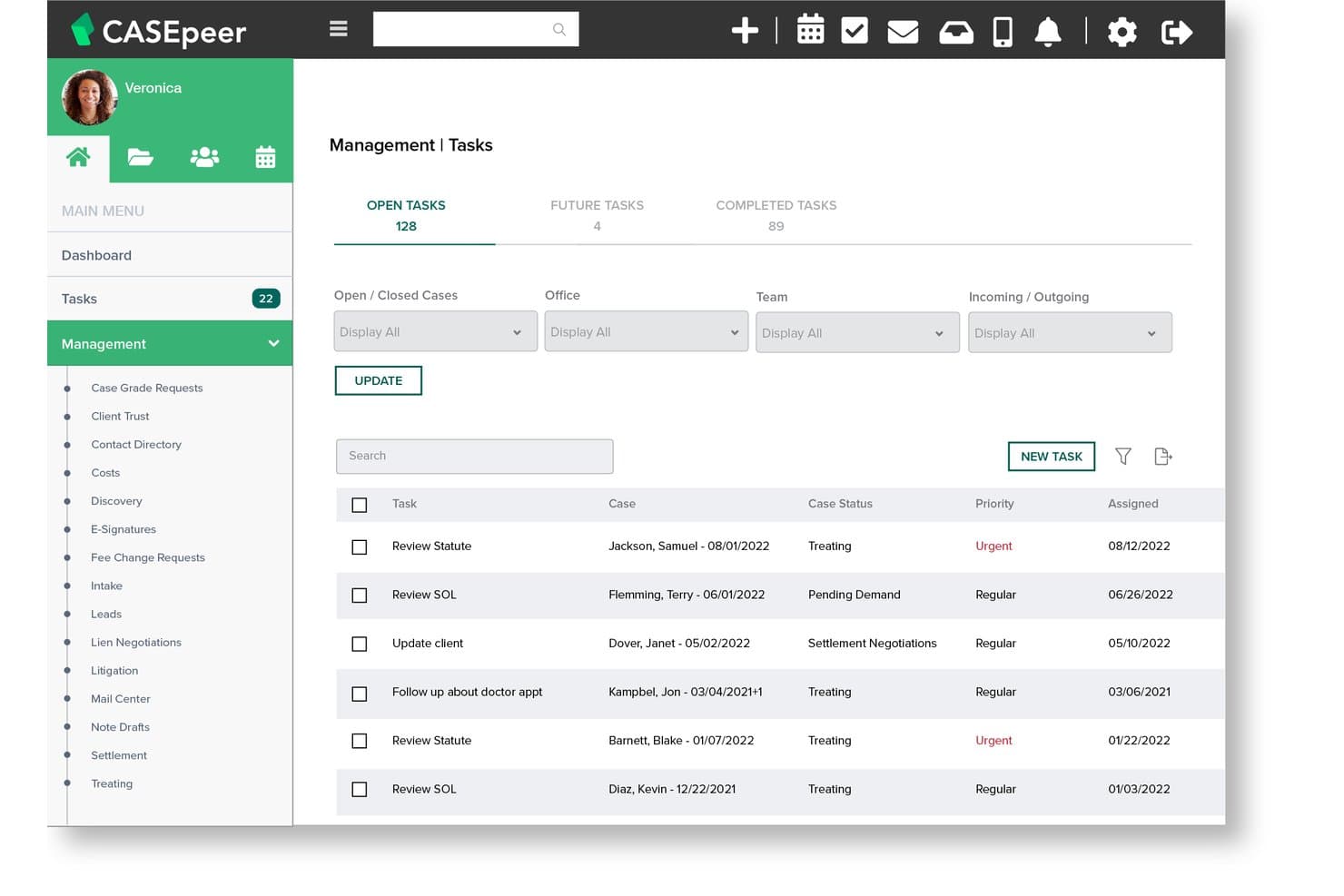
CasePeer ofrece un panel de Tareas de Gestión que muestra tareas abiertas, futuras y completadas con niveles de prioridad, estado del caso y fechas de asignación. CasePeer es una plataforma de gestión de despachos basada en la nube creada exclusivamente para bufetes de abogados especializados en lesiones personales, cubriendo el seguimiento de casos, registros de tratamientos médicos, negociaciones de acuerdos y alertas automáticas de vencimiento de plazos legales en un sistema diseñado para este propósito.
¿Para quién es más adecuado CasePeer?
CasePeer es una excelente opción para despachos de abogados de cualquier tamaño enfocados en lesiones personales que desean un sistema diseñado específicamente para ellos, en lugar de una herramienta genérica que requeriría adaptaciones.
Por qué CasePeer es una buena alternativa a MyCase
Elegí CasePeer como uno de los mejores porque es la única herramienta de esta lista construida desde cero para lesiones personales. Mientras que MyCase requiere configuración para gestionar los flujos de trabajo de PI, CasePeer ya incluye calculadoras de acuerdos, rastreadores de demandas y alertas automáticas de vencimiento de plazos. Me gusta especialmente el seguimiento de tratamientos médicos, que permite a tu equipo registrar visitas a proveedores, monitorear saldos de gravámenes y señalar brechas de tratamiento sin necesidad de ninguna configuración personalizada.
Características clave de CasePeer
- Redactor legal con IA: Genera y edita correspondencia, paquetes de demandas y resúmenes directamente en tus expedientes.
- Mensajería bidireccional con imágenes: Comunícate con los clientes mediante SMS integrados y rastreables que soportan archivos adjuntos.
- Integración de pagos con LawPay: Acepta pagos de clientes y gestiona depósitos fiduciarios compatibles con IOLTA desde la plataforma.
- Integración con CalendarRules: Calcula y aplica plazos judiciales basados en reglas y fechas gatillo específicas de la jurisdicción.
Integraciones de CasePeer
CasePeer ofrece integraciones nativas con QuickBooks Online, Dropbox, Microsoft 365, CalendarRules, LawPay, EvenUp y Case Status. Hay disponible una API para integraciones personalizadas.
Pros and Cons
Pros:
- La pestaña específica de acuerdos para PI centraliza todas las finanzas
- Ciclo completo desde la toma del caso hasta el acuerdo rastreado en un solo lugar
- Equipo de soporte al cliente muy receptivo con chat en vivo
Cons:
- Las opciones de personalización son limitadas para flujos de trabajo no estándar
- Los límites de almacenamiento de documentos pueden bloquear paquetes de demandas grandes
 Ideal para prácticas jurídicas con alto volumen documental
- Demostración gratuita disponible
- Precio a consultar
Visit WebsiteCustomer Rating:4.4/5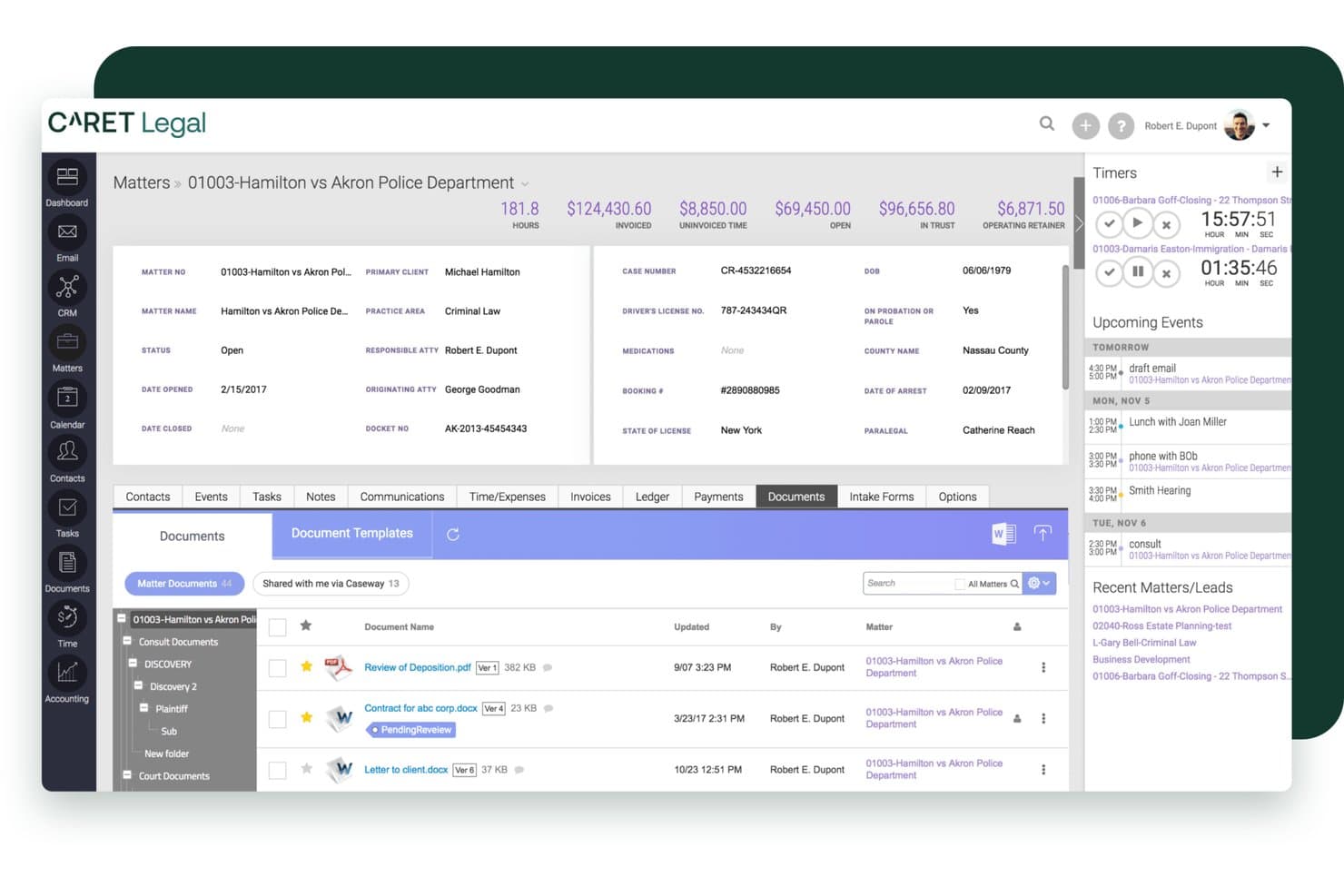
CARET Legal ofrece una interfaz integral de gestión de asuntos con seguimiento de documentos, resúmenes de facturación, temporizadores y próximos eventos en una única vista de tablero. CARET Legal es una plataforma de gestión de despachos jurídicos basada en la nube, diseñada para pequeños y medianos bufetes que necesitan una gestión de casos, contabilidad fiduciaria y gestión documental estrechamente integradas, sin tener que unir múltiples herramientas.
¿Para quién es mejor CARET Legal?
CARET Legal es ideal para socios gestores y administradores jurídicos en bufetes pequeños o medianos que manejan grandes volúmenes de documentos en asuntos complejos y con múltiples partes.
Por qué CARET Legal es una buena alternativa a MyCase
Elegí CARET Legal porque su gestión documental va mucho más allá de lo que ofrece MyCase. Cada archivo cargado se indexa de inmediato para búsquedas dentro del documento, por lo que localizar una cláusula específica entre cientos de archivos de asuntos toma solo segundos. El OCR habilitado por IA extrae texto de notas manuscritas y tablas de datos, y el Resumen Rápido con IA condensa contratos extensos en vistas previas digeribles sin tener que salir de la plataforma.
Características clave de CARET Legal
- Portal de clientes integrado: Permite a los clientes enviar mensajes, compartir documentos y realizar pagos en línea de manera segura, todo en un solo lugar.
- Contabilidad fiduciaria compatible con IOLTA: Mantén libros de clientes separados y conformes con la normativa, con conciliación triple integrada y registros de auditoría.
- Integración con calendario de reglas judiciales: Aplica automáticamente reglas de plazos para jurisdicciones seleccionadas usando la conectividad integrada de LawToolBox.
- Flujos de trabajo y permisos personalizables: Crea automatizaciones en varios pasos para procesos recurrentes y establece permisos de acceso específicos para cada usuario en tu despacho.
Integraciones de CARET Legal
CARET Legal ofrece integraciones nativas con NetDocuments, Worldox, HotDocs, LawToolBox, RPost, LawPay y Microsoft 365. Hay una API disponible para integraciones personalizadas.
Pros and Cons
Pros:
- Integración nativa de correo electrónico etiqueta automáticamente la correspondencia en los asuntos
- Contabilidad legal y fiduciaria integrada en una sola plataforma
- Herramientas de IA redactan, resumen y extraen información de los documentos subidos
Cons:
- Los reportes personalizados requieren asistencia del proveedor para su elaboración
- Los tiempos de respuesta del soporte son inconsistentes tras la escalada de tickets
Learn more about CARET Legal: Ideal para facturación legal y productividad
- Prueba gratuita de 10 días + demo gratis disponible
- Desde $59/usuario/mes (facturación anual)
Visit WebsiteCustomer Rating:4.4/5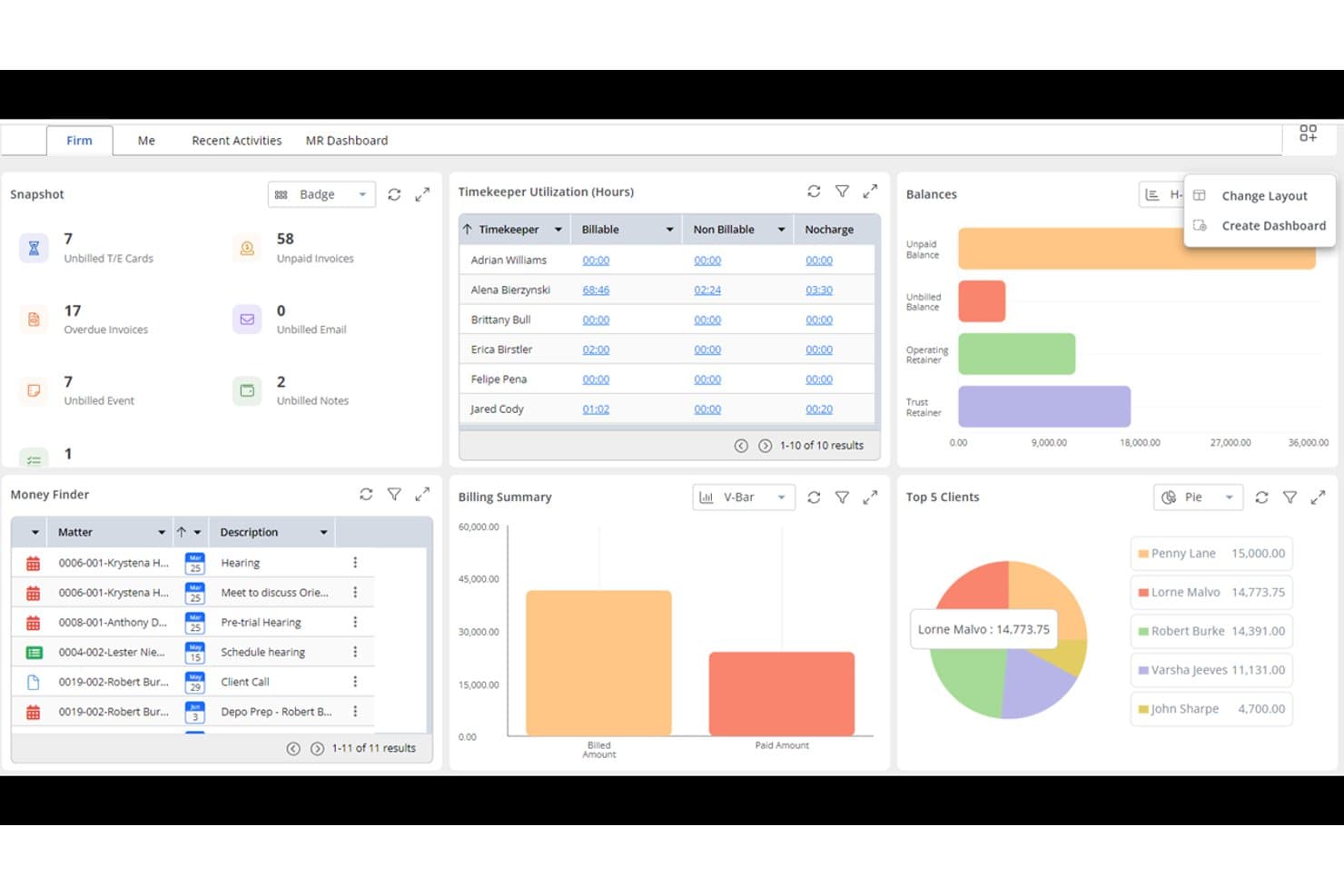
Rocket Matter ofrece un panel de control integral con utilización de responsables de tiempo, resumen de facturación, los 5 principales clientes, saldos y un panel de búsqueda de dinero para una gestión eficiente del despacho. Rocket Matter es una plataforma de gestión de despachos jurídicos basada en la nube, diseñada en torno al seguimiento de tiempo, la facturación y la contabilidad fiduciaria; por lo que resulta ideal para abogados individuales y pequeños despachos que desean un mayor control sobre sus operaciones financieras que el que ofrece MyCase.
¿Para Quién es Mejor Rocket Matter?
Rocket Matter es muy adecuada para despachos pequeños y medianos donde la precisión en la facturación y el cumplimiento en la contabilidad de fondos fiduciarios son las máximas prioridades operativas.
Por Qué Rocket Matter Es una Buena Alternativa a MyCase
Elegí Rocket Matter como una de las mejores alternativas a MyCase porque su profundidad en facturación es realmente difícil de replicar. Permite facturación LEDES, facturación distribuida entre varias partes y facturación por lotes con edición masiva en un solo flujo de trabajo. El nivel Elite va más allá, sustituyendo QuickBooks con contabilidad jurídica integrada, que incluye un plan de cuentas específico para abogados y conexión automática a bancos para la conciliación de fondos.
Características Clave de Rocket Matter
- Plantillas de asuntos: Crea nuevos casos en segundos con flujos de trabajo, listas de tareas y campos personalizados predefinidos.
- Gestión de proyectos estilo Kanban: Visualiza el progreso de los asuntos y gestiona tareas utilizando una interfaz de arrastrar y soltar.
- Automatización nativa de documentos: Genera documentos legales a partir de plantillas y campos combinados directamente en la plataforma.
- Sincronización bidireccional de calendarios: Sincroniza todas las fechas límite y eventos del despacho con Google Calendar y Office 365 para una programación coherente.
Integraciones de Rocket Matter
Rocket Matter ofrece integraciones nativas con LawPay, NetDocuments, OneDrive, Dropbox, Box, QuickBooks Online, Office 365 y Google Workspace. Hay una API disponible para integraciones personalizadas.
Pros and Cons
Pros:
- Sólido soporte para LEDES y facturación por lotes
- Contabilidad jurídica incorporada en planes superiores
- Detallado seguimiento del tiempo con múltiples tipos de tarifa
Cons:
- La gestión documental está menos desarrollada que la facturación
- La app móvil tiene funcionalidad limitada fuera de la oficina
Learn more about Rocket Matter: Ideal para despachos jurídicos orientados a flujos de trabajo
- Demo gratuita disponible
- Precios a consultar
Visit WebsiteCustomer Rating:4.2/5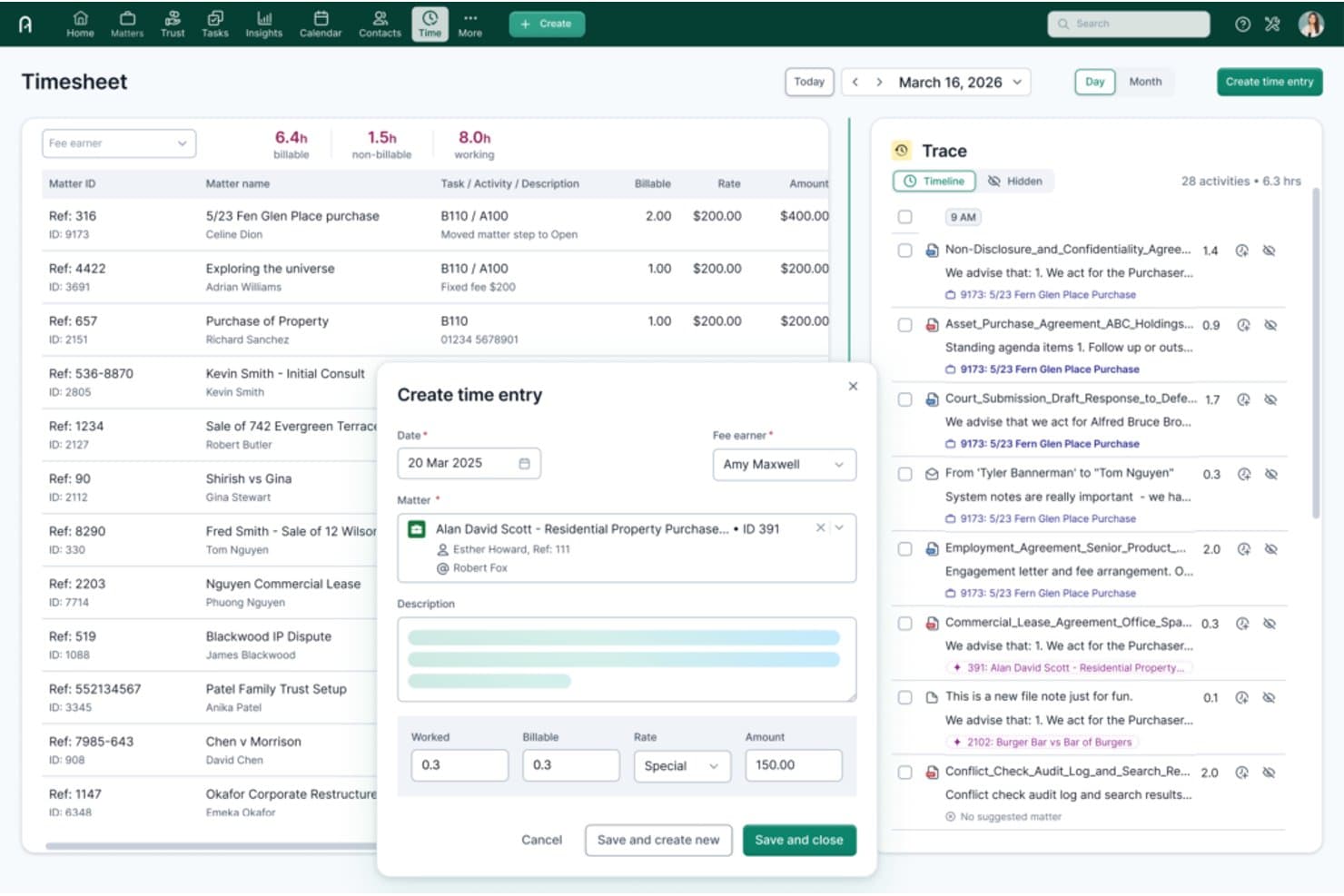
Actionstep ofrece una línea de tiempo Trace potenciada por IA y un modal de Creación de Registro de Tiempo con vinculación de asuntos, horas facturables y campos de tarifas para un seguimiento del tiempo eficiente. Actionstep es una plataforma de gestión de despachos jurídicos basada en la nube, diseñada para firmas pequeñas y medianas que desean gestionar todas las etapas de un asunto—desde la captación hasta la facturación—dentro de un único sistema impulsado por flujos de trabajo.
¿Para Quién es Mejor Actionstep?
Actionstep es ideal para despachos jurídicos con procesos maduros que gestionan asuntos de alto volumen y múltiples pasos, y que necesitan flujos de trabajo configurables en lugar de un sistema fijo y prediseñado.
Por Qué Actionstep es una Buena Alternativa a MyCase
He incluido Actionstep en mis principales elecciones porque su motor de flujos de trabajo para asuntos va mucho más allá de lo que ofrece MyCase. Puedo crear flujos de trabajo por etapas que asignan automáticamente tareas, activan plazos y generan documentos a medida que avanza el asunto. El complemento Builder añade automatización dinámica de documentos, extrayendo los datos del asunto directamente en plantillas de Word, aplicando lógica condicional en cada paso.
Características Clave de Actionstep
- Portal para clientes: Permite a los clientes ver de forma segura documentos, mensajes y actualizaciones del caso en un único centro online personalizado.
- Contabilidad fiduciaria: Ofrece contabilidad fiduciaria compatible con IOLTA con conciliación automática triple y reportes de auditoría.
- Control de versiones de documentos en la aplicación: Realiza un seguimiento del historial y las ediciones de todos los documentos, para que los equipos puedan restaurar o comparar cambios.
- Calendario avanzado: Se sincroniza con los calendarios de Microsoft y Google, y admite recordatorios y la gestión de plazos legales complejos.
Integraciones de Actionstep
Actionstep ofrece integraciones nativas con Xero, QuickBooks Online, NetDocuments, InfoTrack, Microsoft 365 y LawPay. Hay una API disponible para integraciones personalizadas.
Pros and Cons
Pros:
- Motor de flujo de trabajo para asuntos altamente configurable
- Sólida contabilidad fiduciaria con conciliación triple
- Soporta automatización documental en múltiples pasos de forma nativa
Cons:
- La configuración requiere un tiempo de ajuste significativo
- Las herramientas de informes son anticuadas en comparación con la competencia
Learn more about Actionstep: Mejor para despachos legales consolidados
- Demostración gratuita disponible
- Precio bajo consulta
Visit WebsiteCustomer Rating:4/5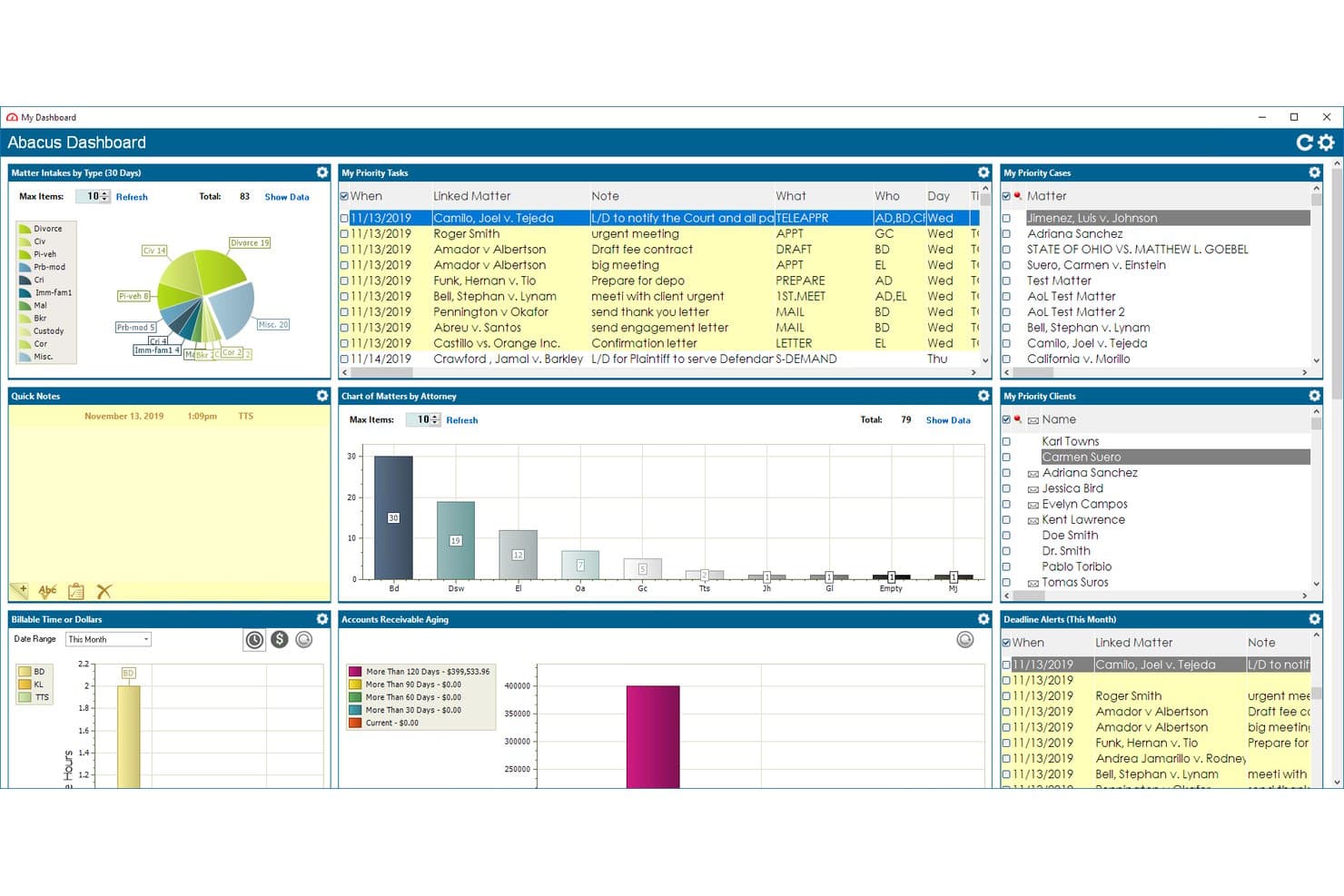
AbacusLaw ofrece un panel integral con tareas prioritarias, gráficos de casos, facturación y paneles de cuentas por cobrar para la gestión de despachos legales. AbacusLaw es una plataforma híbrida de gestión de despachos jurídicos diseñada para firmas legales pequeñas y consolidadas que necesitan calendario de tribunal basado en reglas, contabilidad fiduciaria y gestión de asuntos en un solo sistema personalizable.
¿Para quién es mejor AbacusLaw?
AbacusLaw es especialmente adecuado para despachos pequeños que manejan litigios de alto volumen, derecho familiar o lesiones personales y requieren una profunda personalización por área de práctica.
Por qué AbacusLaw es una buena alternativa a MyCase
AbacusLaw se gana su lugar en mi lista corta gracias a su motor de calendario basado en reglas, que genera automáticamente cadenas de plazos a partir de las normas judiciales en lugar de necesitar ingreso manual. También valoro los elementos esenciales por área de práctica, que incluyen formularios de admisión preconfigurados, reglas de automatización y terminología específica para áreas como derecho familiar y lesiones personales. A diferencia del modelo solo en la nube de MyCase, AbacusLaw admite implementación en nube privada para despachos con estrictos requisitos de gobernanza de datos.
Características clave de AbacusLaw
- Espacio de trabajo personalizable para asuntos: Personaliza bases de datos, formularios y pantallas de ingreso para cada tipo de caso o flujo de trabajo.
- Gestión documental integrada: Organiza, almacena y versiona documentos directamente dentro del expediente de cada asunto.
- Verificación de conflicto integrada: Verifica al instante cualquier posible conflicto de intereses en todos los contactos y asuntos.
- Despliegue en nube privada o autohospedaje: Elige entre un alojamiento seguro en nube privada o instalación en un servidor propio para el máximo control.
Integraciones de AbacusLaw
AbacusLaw ofrece integraciones nativas con Microsoft Outlook, Microsoft 365, QuickBooks Online, DocuSign y HotDocs. Hay una API disponible para integraciones personalizadas.
Pros and Cons
Pros:
- El calendario basado en reglas genera plazos automáticamente
- Nube privada y alojamiento propio disponibles
- Plantillas preconfiguradas para varias áreas de práctica
Cons:
- La interfaz se siente anticuada frente a alternativas modernas
- Aplicación móvil limitada en comparación con competidores
Learn more about AbacusLaw: Ideal para flujos de trabajo de casos automatizados
- Demostración gratuita disponible
- Precios bajo solicitud
Visit WebsiteCustomer Rating:4.8/5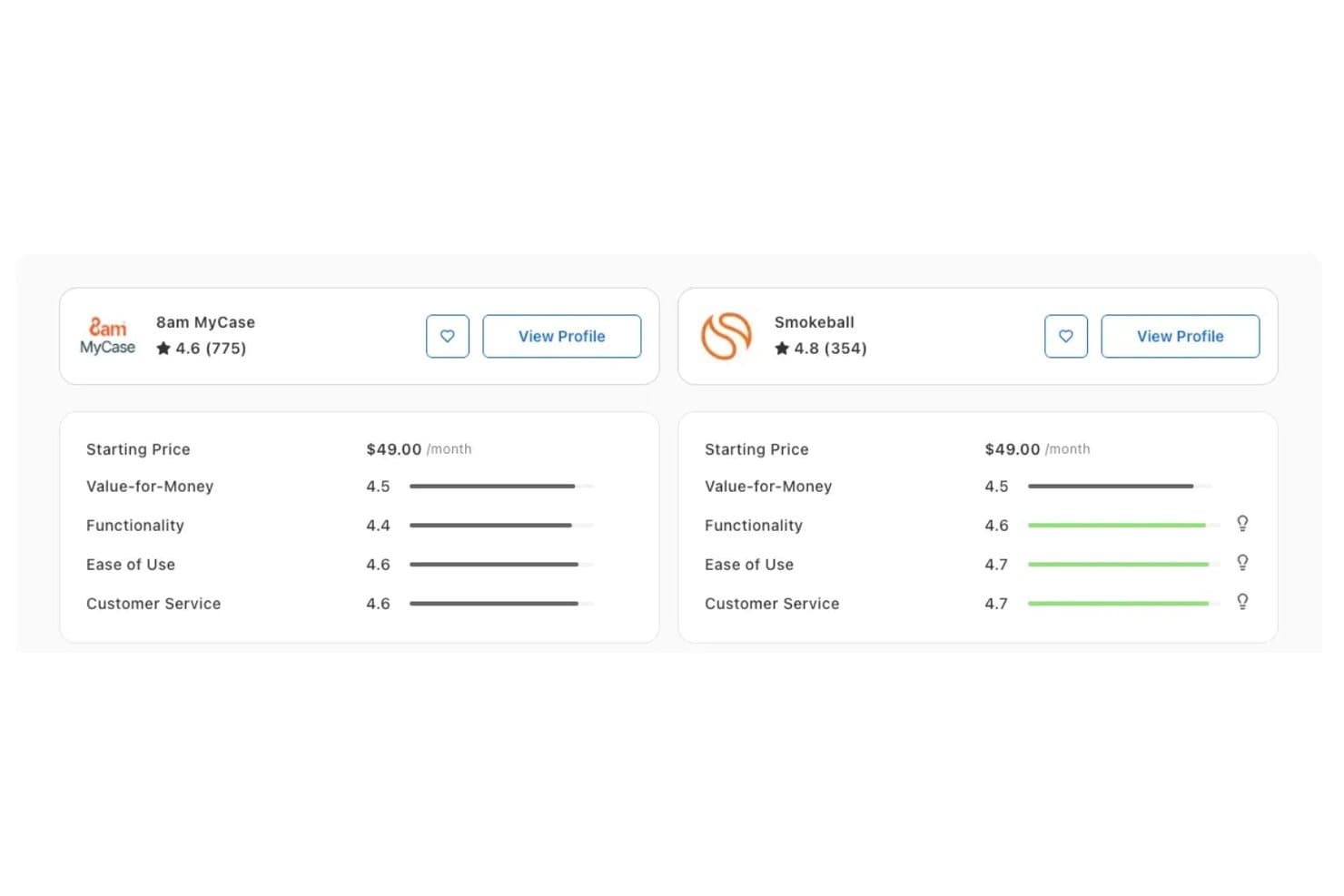
Smokeball supera a 8am MyCase en Funcionalidad (4.6 vs 4.4), Facilidad de Uso (4.7 vs 4.6) y Atención al Cliente (4.7 vs 4.6) según las valoraciones de Capterra. Smokeball es una plataforma de gestión de despachos basada en la nube, diseñada para abogados individuales y pequeños bufetes que desean reemplazar los flujos de trabajo manuales por seguimiento automático del tiempo, automatización de documentos y contabilidad fiduciaria integrada.
¿Para Quién es Mejor Smokeball?
Smokeball es una excelente opción para pequeños bufetes de abogados y abogados particulares que gestionan volúmenes elevados de trabajo repetitivo en áreas específicas como derecho de familia, bienes raíces o lesiones personales.
Por Qué Smokeball es una Buena Alternativa a MyCase
Elegí Smokeball como uno de los mejores porque su función AutoTime captura el tiempo facturable de manera pasiva en segundo plano, asignando la actividad en Word, Outlook y archivos del caso al asunto correcto sin necesidad de intervención manual. Esto supone un avance considerable frente a los temporizadores manuales de MyCase. También destaco la capa de automatización de documentos: TemplateLab utiliza lógica condicional para generar documentos específicos de cada asunto a partir de una biblioteca de más de 20,000 formularios jurisdiccionales, lo que reduce significativamente el tiempo de redacción en trabajos repetitivos y de alto volumen.
Características Clave de Smokeball
- Informes de análisis del despacho: Supervise la rentabilidad de los asuntos y la actividad del personal con paneles de análisis integrados.
- Plantillas por área de práctica: Utilice plantillas preconstruidas y personalizables diseñadas para campos legales comunes como derecho de familia y bienes raíces.
- Portal de clientes con marca personalizada: Ofrezca mensajería segura, intercambio de archivos y opciones de pago bajo la imagen del despacho.
- Contabilidad fiduciaria compatible con IOLTA: Gestione libros fiduciarios segregados y realice conciliaciones de tres vías para cumplir con la normativa.
Integraciones de Smokeball
Smokeball ofrece integraciones nativas con Microsoft 365, LawPay, Xero, InfoTrack, CalendarRules, QuickBooks y DocuSign. Hay una API disponible para integraciones personalizadas.
Pros and Cons
Pros:
- Contabilidad fiduciaria IOLTA integrada en la plataforma
- Portal de clientes con marca y pagos integrados
- Las cadenas de plazos basadas en reglas judiciales se calculan automáticamente
Cons:
- El diseño enfocado en Windows limita la flexibilidad multiplataforma
- La app móvil tiene funcionalidad limitada respecto a la plataforma completa
Learn more about Smokeball: Mejor opción para la gestión de casos personalizable
- Prueba gratuita + demostración gratis disponible
- Precio bajo pedido
Visit WebsiteCustomer Rating:4.5/5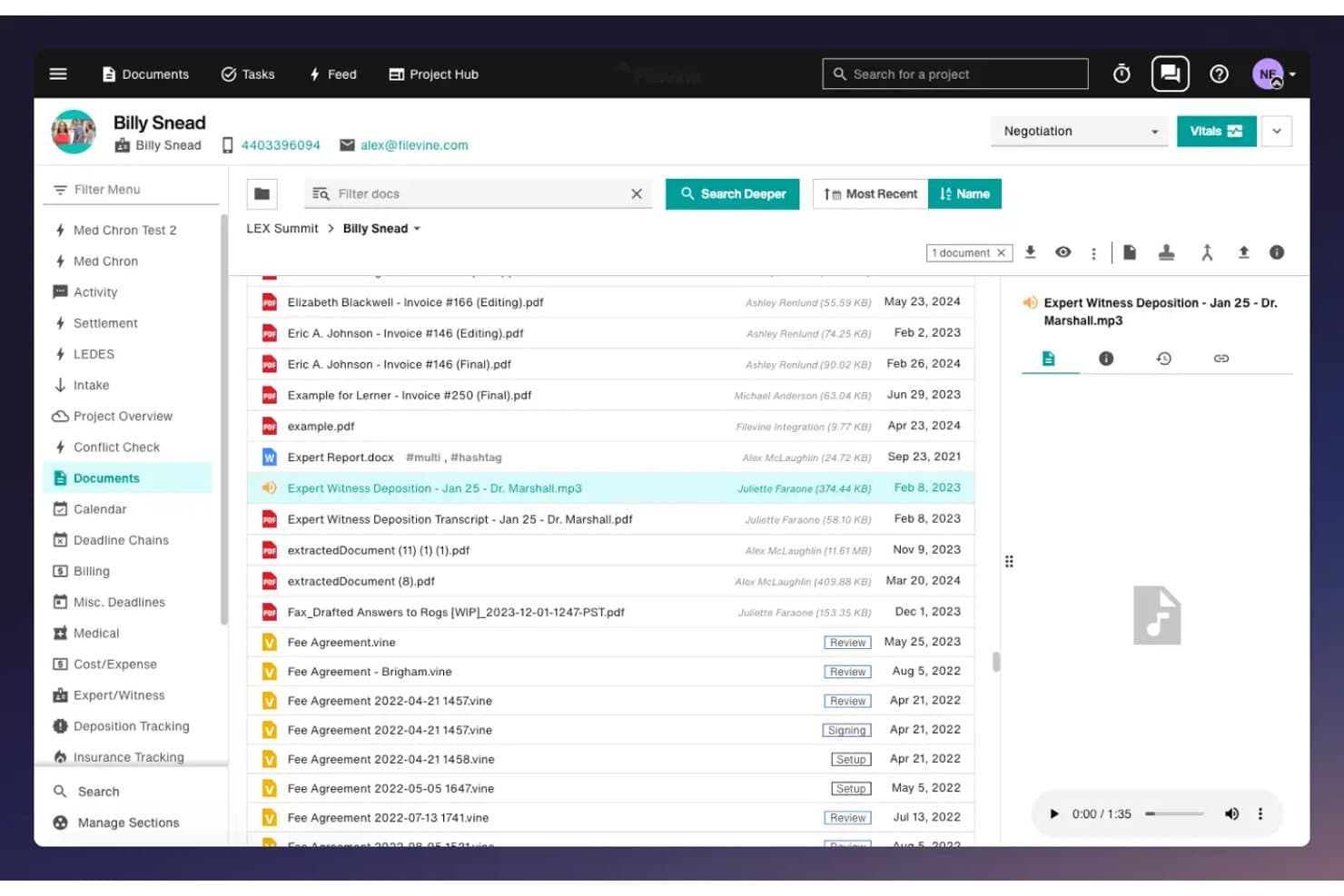
Filevine ofrece una interfaz de gestión de documentos con vista previa de archivos, reproducción de audio y carpetas organizadas para seguimiento de casos legales. Filevine es un sistema operativo legal impulsado por IA, diseñado para despachos con alta carga de litigios que necesitan una gestión de expedientes profundamente personalizable, ensamblaje automatizado de documentos y flujos de trabajo de admisión de clientes en una sola plataforma.
¿Para quién es mejor Filevine?
Filevine es adecuado para despachos de litigio pequeños y medianos—especialmente prácticas de lesiones personales y litigios civiles—que requieren flujos de trabajo adaptados a sus tipos de casos específicos.
Por qué Filevine es una buena alternativa a MyCase
Elegí Filevine como uno de los mejores porque su nivel de personalización realmente lo distingue. Mientras que MyCase te da una estructura fija, Filevine te permite crear campos personalizados, flujos de trabajo personalizados y cadenas de fechas límite que se ajustan a cómo realmente funciona tu práctica. Me gusta especialmente AIBlocks, que gestiona el ensamblaje automatizado de documentos usando tus propias plantillas y campos de fusión, y Lead Docket, que convierte la admisión de clientes en una línea de flujo totalmente automática con seguimiento de referencias integrado.
Funciones clave de Filevine
- Panel de análisis Periscope: Genera informes en tiempo real y visualiza métricas clave directamente en tu espacio de trabajo Filevine.
- Integración de firma electrónica Vinesign: Recoge firmas electrónicas en documentos usando una herramienta nativa de firmas con envío por texto y correo electrónico.
- Mensajería bidireccional con clientes: Comunícate con los clientes mediante mensajes de texto enviados y recibidos directamente dentro de cada expediente.
- Sincronización de correo electrónico de Outlook: Guarda correos electrónicos como parte del expediente mediante una integración fluida con Microsoft Outlook.
Integraciones de Filevine
Filevine ofrece integraciones nativas con Vinesign, Lead Docket, Microsoft Outlook, Google Calendar y QuickBooks Online. Hay una API disponible para integraciones personalizadas.
Pros and Cons
Pros:
- Campos y flujos de trabajo de expedientes altamente personalizables
- IA nativa para redacción y resúmenes de documentos
- Admisión automatizada de clientes con seguimiento de referencias
Cons:
- La configuración requiere un trabajo inicial considerable
- Las funciones de reporte están por detrás de las herramientas de gestión de casos
Learn more about Filevine: 8Mejor opción para una gestión jurídica integral
Clio
- Prueba gratuita de 7 días + demostración gratuita disponible
- Desde $69CAD/usuario/mes (facturación anual)
Visit WebsiteCustomer Rating:4.5/5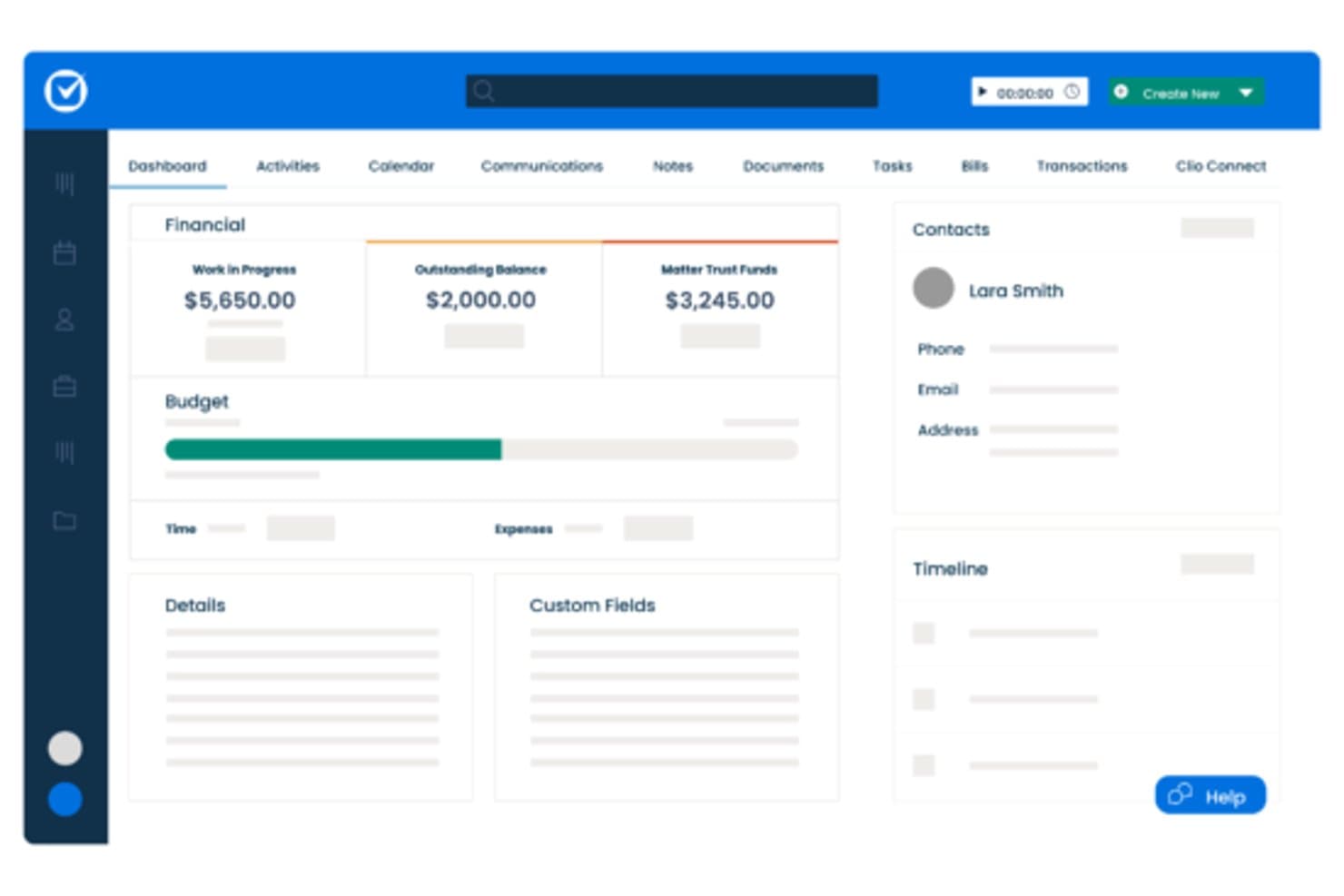
Clio ofrece un panel de asuntos con resúmenes financieros, seguimiento de presupuestos, detalles de contacto y vistas de línea de tiempo para la gestión de casos. Clio es una plataforma de gestión de despachos jurídicos basada en la nube para abogados independientes y bufetes pequeños y medianos, que combina gestión de asuntos, facturación LEDES, contabilidad fiduciaria, automatización de documentos y un portal para clientes con más de 300 integraciones de terceros.
¿Para Quién es Mejor Clio?
Clio es ideal para despachos en crecimiento que necesitan una única plataforma para gestionar la facturación, el cumplimiento normativo y la comunicación con clientes sin tener que usar múltiples herramientas.
Por Qué Clio es una Buena Alternativa a MyCase
Clio se gana su lugar en mi lista porque su capacidad integral supera la de MyCase. Me gusta que la facturación LEDES/UTBMS y la conciliación triple de fondos fiduciarios estén disponibles en el plan inicial Starter. En la práctica, mi equipo genera narrativas de facturación conformes a los tribunales y concilia los libros fiduciarios desde un solo panel. La generación de facturas redactadas por IA en el plan Core y superiores también elimina una parte significativa del trabajo de narrativas de facturación de mi equipo.
Funciones Clave de Clio
- Actualizaciones para clientes redactadas por IA: Genera automáticamente actualizaciones sobre el estado del caso listas para el cliente usando información contextual de los expedientes.
- Automatización de captación de clientes: Formularios en línea configurables recopilan datos de prospectos, activan seguimientos y dan inicio a la creación del asunto.
- Constructor de plantillas de documentos: Crea y reutiliza plantillas personalizadas de documentos legales directamente desde la plataforma.
- Integración de presentación electrónica en tribunales: Presenta documentos ante los tribunales electrónicamente a través de conexiones integradas de socios con pago por envío.
Integraciones de Clio
Clio ofrece más de 300 integraciones nativas, incluyendo QuickBooks Online, Xero, Microsoft 365, Google Workspace, NetDocuments, Dropbox, Box, LawPay, Zoom y CalendarRules. Está disponible una API para integraciones personalizadas.
Pros and Cons
Pros:
- Firma electrónica nativa en todos los planes de pago
- Asuntos, facturación y fondos fiduciarios comparten un solo panel
- Más de 300 integraciones verificadas de terceros disponibles
Cons:
- El módulo de captación Clio Grow se vende como complemento independiente
- La búsqueda de contenido de documentos devuelve resultados inconsistentes
Learn more about Clio: La mejor para contabilidad legal integrada
- Prueba gratuita de 10 días
- Desde $109/usuario/mes (facturado anualmente)
Visit WebsiteCustomer Rating:4.4/5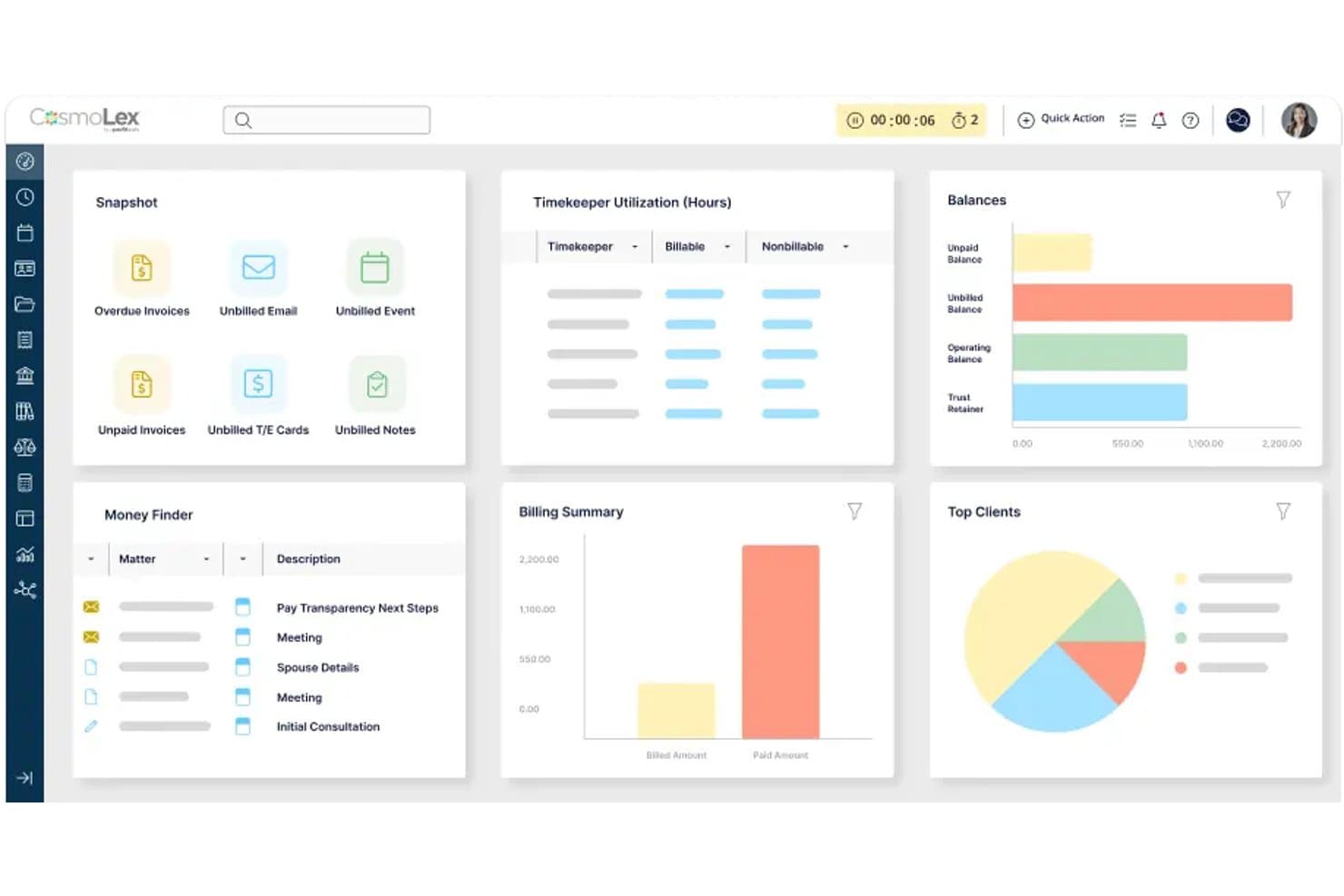
CosmoLex ofrece un panel de control integral con resúmenes de facturación, utilización de responsables de tiempo, saldos de clientes y seguimiento de asuntos como alternativa a MyCase. CosmoLex es una plataforma de gestión de despachos jurídicos basada en la nube, diseñada para abogados independientes y pequeños despachos, que combina la gestión de casos, la facturación y la contabilidad legal completa en un solo sistema, eliminando la necesidad de software de contabilidad separado como QuickBooks.
¿Para Quién es Mejor CosmoLex?
Abogados independientes y socios administradores de pequeños despachos que desean gestionar la administración del despacho y la contabilidad legal en un solo lugar, sin tener que unir herramientas separadas.
Por Qué CosmoLex es una Buena Alternativa a MyCase
He elegido CosmoLex para esta lista porque su contabilidad fiduciaria se encuentra en el mismo sistema que la facturación y la gestión de casos. Eso significa que la conciliación triple, los libros fiduciarios por cliente y las transferencias de fiduciaria a operativa se realizan sin cambiar de herramienta ni sincronizar datos en diferentes plataformas. MyCase requiere QuickBooks para la funcionalidad contable completa, lo que crea vacíos de conciliación que CosmoLex evita completamente por diseño.
Características Clave de CosmoLex
- Gestión de documentos: Almacene, organice y comparta documentos con firma electrónica integrada y acceso seguro al portal del cliente.
- Flujos de trabajo de asuntos: Automatice tareas y actualizaciones de estado utilizando flujos de trabajo personalizables por tipo de caso.
- Informes personalizados: Genere más de 100 informes financieros y de productividad para una visibilidad total sobre casos y facturación.
- Sincronización de calendario integrada: Conecte con Outlook, Google Calendar e iCal para sincronizar plazos y citas de todo el despacho.
Integraciones de CosmoLex
CosmoLex ofrece integraciones nativas con NetDocuments, OneDrive, Google Drive, Dropbox, Box y QuickBooks Online, además de sincronización de calendario con Outlook, Office 365, Google Calendar e iCal. Se dispone de una API para integraciones personalizadas.
Pros and Cons
Pros:
- Contabilidad legal completa integrada en la plataforma
- Conciliación fiduciaria triple cumple con los requisitos del colegio estatal de abogados
- No se necesita software de contabilidad aparte
Cons:
- La funcionalidad de la app móvil es inferior a la de los competidores
- Las herramientas de automatización de documentos son menos avanzadas
Learn more about CosmoLex: Ideal para flujos de trabajo intuitivos en la gestión de casos y facturación
- Prueba gratuita de 7 días + demo gratuita disponible
- Desde $49/usuario/mes (facturado anualmente)
Visit WebsiteCustomer Rating:4.3/5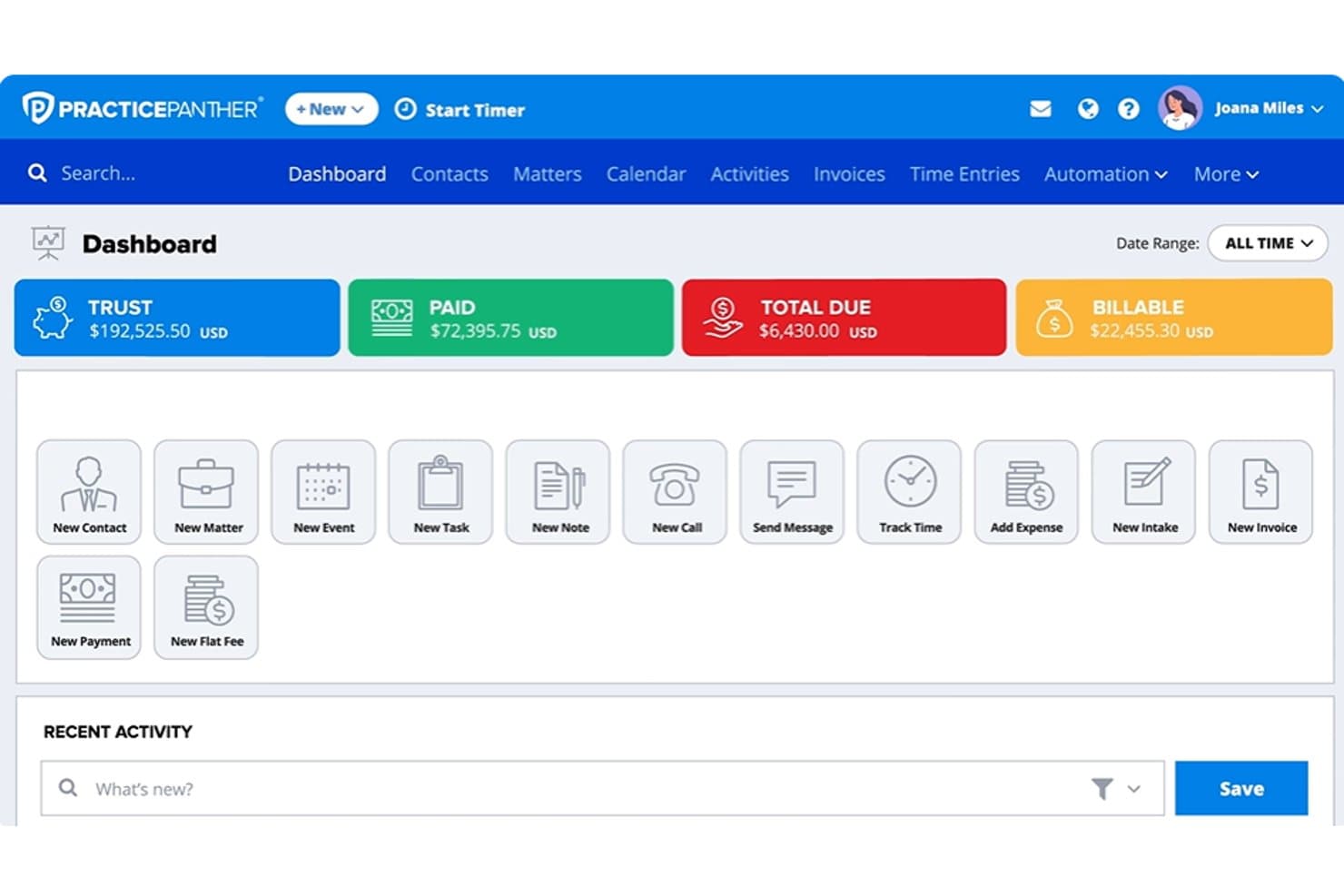
Panel de PracticePanther mostrando saldos fiduciarios, pagos, importes facturables, asuntos y herramientas de facturación jurídica PracticePanther es una plataforma de gestión jurídica en la nube diseñada para abogados independientes y pequeños despachos que necesitan facturación nativa, contabilidad fiduciaria, admisión de clientes y gestión de casos sin tener que unir herramientas de terceros.
¿Para quién es mejor PracticePanther?
PracticePanther es ideal para despachos jurídicos en crecimiento con entre dos y quince abogados que buscan una sola plataforma para gestionar admisión de clientes, facturación y contabilidad fiduciaria sin una configuración informática compleja.
Por qué PracticePanther es una buena alternativa a MyCase
Elegí PracticePanther como uno de los mejores porque su flujo de trabajo de facturación está verdaderamente integrado, no añadido a posteriori. Mientras que MyCase procesa los pagos a través de LawPay (una suscripción aparte), el sistema nativo PantherPayments de PracticePanther gestiona directamente los cobros con tarjeta de crédito, ACH y eCheck dentro de la plataforma. También valoro los flujos de trabajo condicionales de tareas y eventos que se activan automáticamente cuando cambia el estado de un asunto, manteniendo el avance de los casos sin la necesidad de intervención manual.
Características clave de PracticePanther
- Formularios de admisión personalizados ilimitados: Crea formularios de admisión dinámicos con lógica condicional para automatizar la incorporación de clientes y la calificación de leads.
- Mensajería nativa bidireccional por texto: Comunícate de manera segura con los clientes a través de la plataforma usando un número telefónico empresarial dedicado.
- Contabilidad fiduciaria completa: Gestiona libros fiduciarios compatibles con IOLTA con conciliación triple y auditorías detalladas.
- Calendario de plazos legales con LawToolBox: Calcula automáticamente las fechas límite y sincroniza los calendarios judiciales por jurisdicción para una gestión total de plazos.
Integraciones de PracticePanther
PracticePanther ofrece integraciones nativas con LawToolBox, QuickBooks Online, Google Workspace, Microsoft 365, Dropbox, Box y OneDrive. También están disponibles Zapier y una API para integraciones personalizadas.
Pros and Cons
Pros:
- Contabilidad fiduciaria nativa que cumple requisitos de IOLTA
- Firma electrónica integrada para cartas de compromiso de clientes
- Los flujos de trabajo se activan automáticamente al cambiar el estado de un asunto
Cons:
- Las herramientas de reportes carecen de profundidad y flexibilidad
- La generación de documentos es menos avanzada que la de la competencia
Learn more about PracticePanther:
Otras alternativas a MyCase
Estas son algunas opciones adicionales de alternativas a MyCase que no llegaron a mi lista de preselección, pero que aun así merece la pena tener en cuenta:
- 11CenterbaseIdeal para operaciones de despachos jurídicos medianos
- 12Bill4timeLa mejor opción para el seguimiento del tiempo y la facturación jurídica
- 13LEAPIdeal para documentos legales y gestión de casos
- 14SmartAdvocateMejor para la gestión de casos de litigio
- 15Tabs3Ideal para facturación y contabilidad legal
- 16NeosMejor para la gestión de casos legales basada en la nube
- 17MerusCaseMejor para flujos de trabajo legales automatizados
- 18PCLaw®Ideal para contabilidad y facturación jurídica
Cómo evalúo las alternativas a MyCase
Primero verifico si una plataforma cubre lo que MyCase ya gestiona: seguimiento de asuntos, facturación a clientes, manejo de cuentas fiduciarias y compartición de documentos a través de un portal. Luego reviso los diferenciadores que distinguen a una herramienta de otra.
Funcionalidad principal (requisitos básicos para esta lista)
Cuando selecciono herramientas para mi lista, califico cada una en una escala del 0 (no ofrece la funcionalidad) al 5 (destaca en esta área) para cada funcionalidad principal que se menciona a continuación. Después, calculo el puntaje total de cada herramienta en porcentaje. Cada herramienta debe alcanzar una puntuación mínima total del 75% para ser considerada para su inclusión.
- Gestión de casos: Busco registros estructurados de asuntos con campos personalizados, contactos vinculados y seguimiento de plazos—para que nada se pase por alto durante un litigio activo.
- Gestión de documentos: Aquí son importantes las bibliotecas de plantillas con campos combinados, especialmente para despachos que generan un gran volumen de cartas de compromiso o escritos judiciales.
- Control de tiempo y facturación: Evalúo la flexibilidad para registrar tiempos, opciones de facturación y compatibilidad con distintos tipos de honorarios como tarifa fija, contingencia y facturación por hora.
- Portal del cliente: Los portales seguros donde los clientes pueden ver actualizaciones de su caso, compartir documentos y comunicarse con su abogado reducen los correos electrónicos innecesarios.
- Contabilidad fiduciaria: Compruebo que tengan libros contables conformes a IOLTA, con seguimiento por cliente e informes de conciliación que cumplan con los requisitos de auditoría del colegio de abogados.
- Calendario y plazos: Es clave que el calendario esté basado en reglas de los tribunales—plataformas como Clio y Smokeball ofrecen cadenas de plazos que se ajustan automáticamente cuando se cambia la fecha de una audiencia.
Una vez que tengo una lista de herramientas que cumplen con los criterios, considero lo que diferencia a cada plataforma.
Factores diferenciadores (lo que distingue a los proveedores)
Así es como comparo y contrasto los diferentes proveedores:
Funciones destacadas
Los flujos de trabajo de firma electrónica nativos evitan que tu despacho tenga que gestionar una suscripción aparte de DocuSign o Adobe Sign para cartas de compromiso y contratos de servicios. También evalúo si una plataforma incluye herramientas de inteligencia artificial específicas para el sector legal—resumir documentos de casos o redactar correspondencia directamente dentro del expediente realmente ahorra tiempo. La automatización de la admisión de clientes es otra área que reviso en detalle, especialmente los formularios con lógica condicional y verificación de conflictos que permiten convertir un contacto inicial en cliente firmado sin seguimientos manuales.
Más allá de las funciones
La migración de datos es importante al dejar MyCase—verifico si los proveedores ofrecen servicios de migración que incluyan asuntos, contactos, documentos e historial de facturación. La conformidad es otro aspecto que considero cuidadosamente, incluyendo certificación SOC 2 Tipo II, cifrado y registros de auditoría que respaldan tus deberes bajo la Regla Modelo 1.6 de la ABA. El costo total de propiedad también cuenta, ya que los cargos extra por pagos, firmas electrónicas o portales para clientes pueden hacer que una plataforma supere con creces el precio anunciado por usuario.
¿Por qué buscar una alternativa a MyCase?
Aunque MyCase es una buena opción de software de gestión de casos jurídicos, hay varias razones por las que algunos usuarios buscan soluciones alternativas. Es posible que estés buscando una alternativa a MyCase porque…
- Necesitas una automatización de documentos más avanzada
- Quieres una contabilidad fiduciaria IOLTA completa con conciliación de tres vías
- Necesitas integraciones más profundas con tus herramientas de correo electrónico o contabilidad actuales
- Consideras que los precios de MyCase no se ajustan a tu presupuesto o al tamaño de tu bufete
- Trabajas en un área de práctica que necesita flujos de trabajo más especializados
- Necesitas mejores funciones de incorporación de clientes o gestión de clientes potenciales
Si alguna de estas situaciones te resulta familiar, has llegado al lugar adecuado. Mi lista contiene varias opciones de software de gestión de casos jurídicos más adecuadas para equipos que afrontan estos desafíos con MyCase y buscan soluciones alternativas.
Características principales de MyCase
Estas son algunas de las características principales de MyCase, para ayudarte a contrastar y comparar lo que ofrecen las soluciones alternativas:
- Gestión de casos: Centraliza todos los detalles de los expedientes, contactos, notas y plazos para facilitar el acceso y el seguimiento, de modo que tu equipo siempre esté alineado sobre el progreso de cada caso.
- Gestión de documentos: Te permite almacenar, organizar, editar y compartir documentos legales de forma segura con control de versiones, para que nada importante se pierda ni se sobrescriba.
- Seguimiento del tiempo: Te permite registrar las horas facturables directamente en cada expediente, lo que ayuda a contabilizar cada minuto de trabajo y aumentar la precisión de la facturación.
- Facturación y emisión de facturas: Genera y envía facturas automáticamente, admite distintos tipos de tarifas y se integra con procesadores de pagos en línea para facilitar los cobros.
- Portal del cliente: Ofrece un portal seguro y personalizado con la marca de la firma donde los clientes pueden consultar documentos, mensajes y facturas, haciendo que la comunicación y el intercambio de información sean sencillos.
- Contabilidad fiduciaria: Proporciona una gestión de fondos fiduciarios conforme a IOLTA, separando automáticamente los fondos de los clientes y realizando un seguimiento de los saldos para garantizar el cumplimiento y la preparación para auditorías.
- Calendario y plazos: Incluye un calendario basado en las normas de los tribunales y un seguimiento de los plazos para que tu equipo pueda estar al tanto de las fechas y tareas críticas.
- Admisión de clientes: Te permite crear formularios de admisión personalizados, automatizar el seguimiento y gestionar en un solo lugar los contactos de nuevos clientes para agilizar el proceso de incorporación.
- Flujos de trabajo de firma electrónica: Agiliza la firma de cartas de encargo, contratos de servicios y otros documentos directamente desde la plataforma, sin necesidad de herramientas de terceros.
- Informes y análisis: Te permite realizar un seguimiento del rendimiento de la firma, las horas facturables, los cobros y los expedientes abiertos para que puedas tomar decisiones empresariales fundamentadas.