

Un buen software de gestión de clientes en el sector jurídico puede actuar como tu eficiente asistente digital, gestionando los detalles de los casos, la facturación, la gestión de documentos y mucho más, todo en una sola plataforma.
Si te enfrentas a tareas administrativas que consumen mucho tiempo, información de casos desorganizada o al seguimiento de las horas facturables, el software adecuado puede abordar estos desafíos de frente. He evaluado varias opciones y te presento las mejores, con la esperanza de que encuentres la opción perfecta para tu bufete.
Por qué confiar en nuestras recomendaciones de software
6,700+
Reviews
20
Industry experts
16+
Evaluation factors
14
Years
Nuestro equipo lleva probando y evaluando software desde 2012. Como líderes de despachos jurídicos, sabemos lo difícil —y lo importante— que es elegir el software adecuado.
Para esta guía, evaluamos las herramientas mediante pruebas prácticas e investigación independiente, puntuando las herramientas según nuestros criterios de selección.
Nuestras reseñas reflejan nuestro criterio editorial humano, no un discurso de ventas.
Tabla comparativa de software de gestión de clientes para bufetes de abogados
Esta tabla comparativa resume los detalles de precios de mis principales selecciones de software de gestión de clientes para bufetes de abogados:
| Tool | Best For | Trial Info | Price | ||
|---|---|---|---|---|---|
| 1 | Mejor para facturación y pagos integrados | Demo gratuita disponible | Precio a consultar | Website | |
| 2 | Mejor para la gestión sin esfuerzo de casos, contactos y facturación | Prueba gratuita de 7 días + demo gratis disponible | $39/usuario/mes | Website | |
| 3 | Ideal para firmas que necesitan productividad legal automatizada basada en la nube | Demostración gratuita disponible | $69/usuario/mes (facturado anualmente) | Website | |
| 4 | Mejor para despachos que priorizan funciones centradas en el cliente | Prueba gratuita de 7 días + demostración gratuita disponible | $39/usuario/mes (facturado anualmente) | Website | |
| 5 | Ideal para gestión avanzada de casos con énfasis en automatización | Demostración gratuita disponible | Según cotización | Website | |
| 6 | Ideal para quienes buscan una gestión financiera adaptada para despachos de abogados | Prueba gratuita de 30 días | $25/usuario/mes | Website | |
| 7 | Mejor para eficiencia en facturación detallada y contabilidad | Prueba gratuita + demostración disponible | $32/usuario/mes (facturado anualmente) | Website | |
| 8 | Ideal para despachos jurídicos que requieren un sistema de gestión integral | Prueba gratuita de 10 días | $89/usuario/mes | Website | |
| 9 | Ideal para optimizar procesos con herramientas basadas en la nube | Prueba gratuita de 10 días + demostración gratuita disponible | $65/usuario/mes | Website | |
| 10 | Mejor para gestión de casos con interfaz intuitiva | Prueba gratuita de 15 días | $65/user/month | Website |


Reseña del mejor software de gestión de clientes para bufetes de abogados
A continuación encontrarás mis resúmenes detallados del mejor software de gestión de clientes para bufetes de abogados que llegó a mi lista de preseleccionados. Mis reseñas ofrecen un análisis detallado de las características principales, ventajas y desventajas, integraciones y casos de uso ideales de cada herramienta para ayudarte a encontrar la mejor opción para ti.
 1Mejor para facturación y pagos integrados
8am
- Demo gratuita disponible
- Precio a consultar
Visit WebsiteCustomer Rating:4.6/5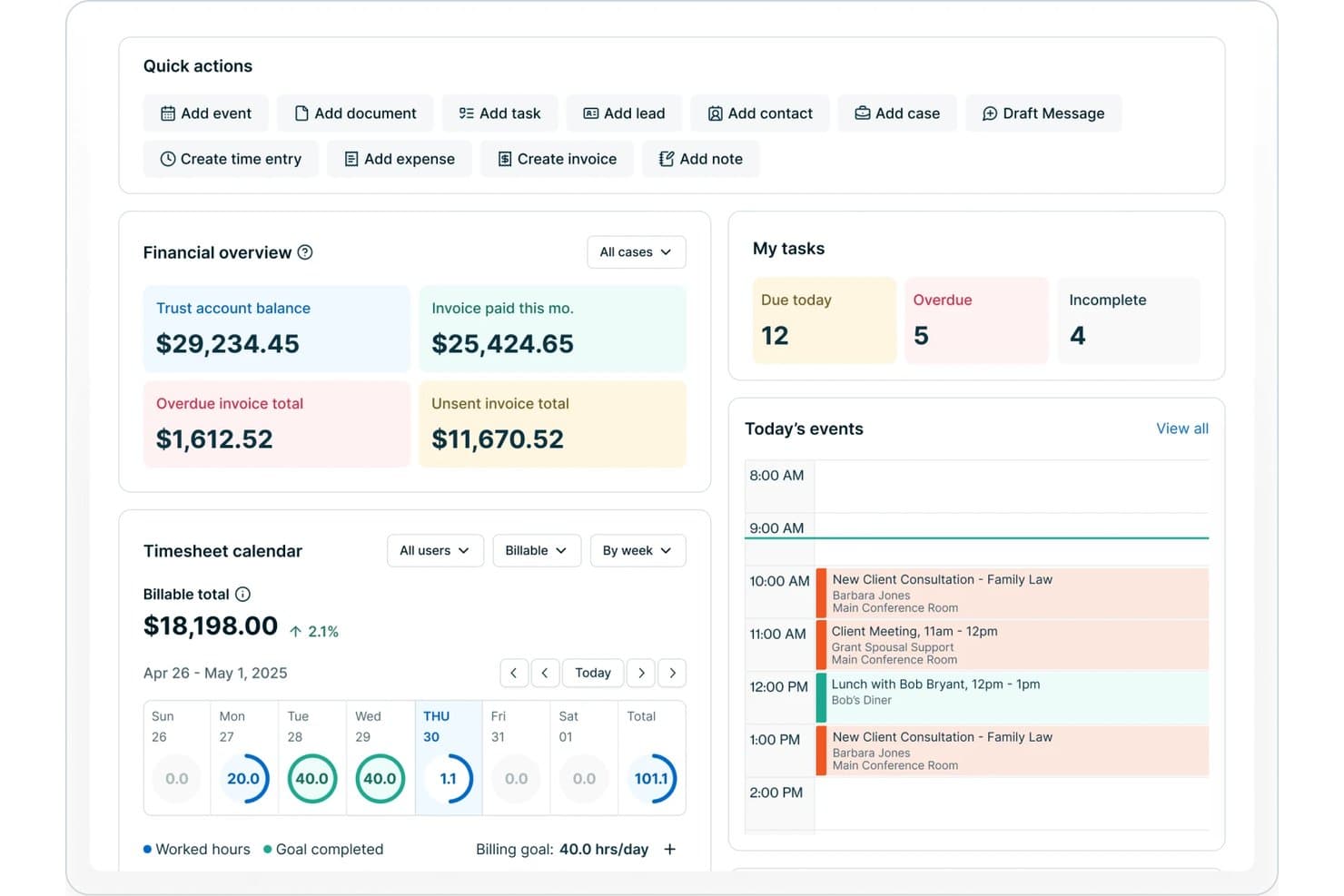
8am ofrece un panel para despachos jurídicos con resumen financiero, seguimiento de tareas, calendario de hojas de tiempo y los eventos del día, incluyendo consultas y reuniones con clientes. 8am es una solución de gestión de clientes para despachos de abogados, diseñada para profesionales legales que necesitan herramientas integradas para registros de clientes, gestión de asuntos, almacenamiento de documentos, facturación, pagos y comunicaciones seguras en una sola plataforma.
¿Para Quién es Mejor 8am?
Para despachos de abogados medianos y en crecimiento que necesitan una gestión unificada de casos, facturación y pagos entre el personal en múltiples roles.
Por Qué Elegí 8am
Elegí 8am como uno de los mejores porque sus herramientas integradas de pagos y facturación me permiten gestionar la facturación, la recaudación de pagos y el cumplimiento de cuentas fiduciarias/IOLTA desde un solo panel de control. Puedo procesar pagos de clientes de forma segura y registrar cada hora facturable dentro de la misma plataforma.
Características Clave de 8am
- CRM centrado en asuntos: Supervisa toda la información del cliente, los detalles de los casos y las comunicaciones en archivos de asuntos organizados.
- Gestión de documentos: Sube, almacena y organiza documentos legales confidenciales con permisos basados en roles.
- Admisión automatizada de clientes: Usa formularios online personalizables y flujos de trabajo para incorporar nuevos clientes de manera eficiente.
- Sistema de verificación de conflictos: Busca en los registros de la firma posibles conflictos durante la admisión del cliente y la creación de asuntos.
Integraciones de 8am
Las integraciones nativas no se encuentran publicadas de forma pública.
Pros and Cons
Pros:
- Conciliación rápida de cuentas fiduciarias y IOLTA
- Flujos de admisión robustos para nuevos clientes
- El portal de clientes incluye firma electrónica y pagos
Cons:
- Algunas funciones pueden resultar abrumadoras para abogados individuales
- Las opciones avanzadas de automatización de documentos son limitadas
Learn more about 8am: Mejor para la gestión sin esfuerzo de casos, contactos y facturación
- Prueba gratuita de 7 días + demo gratis disponible
- $39/usuario/mes
Visit WebsiteCustomer Rating:4.3/5
Vista del panel de gestión de facturación de PracticePanther PracticePanther es una solución de software para la gestión de casos legales y despachos jurídicos. PracticePanther ofrece herramientas para gestionar casos, registrar el tiempo, facturar a clientes y simplificar muchos otros aspectos de la administración de un despacho jurídico. Por su carácter integral y facilidad de uso, resulta adecuada como la 'Mejor para la Gestión Integral de Casos Legales'.
Por qué elegí PracticePanther:
Al seleccionar PracticePanther, el aspecto que la hizo destacar fue su extenso conjunto de funciones combinadas con la facilidad de uso. Entre las distintas plataformas que comparé, PracticePanther surgió como una fuerte candidata debido a sus completas capacidades que cubren casi todos los aspectos de la gestión de casos legales. Por eso considero que es la 'Mejor para la Gestión Integral de Casos Legales'.
Funciones destacadas e integraciones:
PracticePanther ofrece una variedad de funciones esenciales, como la gestión de asuntos, el seguimiento del tiempo, la facturación y gestión de documentos. También proporciona capacidades de integración con numerosas aplicaciones populares como Google Workspace, Microsoft 365, QuickBooks y Dropbox, lo que permite un flujo de trabajo más eficiente.
Pros and Cons
Pros:
- Conjunto integral de funciones para la gestión de casos
- Interfaz fácil de usar
- Se integra con una amplia variedad de aplicaciones populares
Cons:
- Precio inicial relativamente más alto
- Opciones de personalización limitadas en algunas áreas
- Algunos usuarios informan fallos ocasionales del software
Learn more about PracticePanther: Ideal para firmas que necesitan productividad legal automatizada basada en la nube
- Demostración gratuita disponible
- $69/usuario/mes (facturado anualmente)
Visit WebsiteCustomer Rating:4.8/5
Vista del panel de información general de la firma en Smokeball. Smokeball es un software de gestión de casos altamente avanzado diseñado para pequeñas firmas de abogados. La herramienta se especializa en automatización y ofrece soluciones integrales que mejoran la eficiencia y la productividad. Es ideal para firmas legales que desean optimizar sus procesos y mejorar la calidad de su servicio.
Por qué elegí Smokeball:
Seleccioné Smokeball por sus excepcionales capacidades de automatización y su amplia gama de funciones. El enfoque de la herramienta en pequeñas firmas jurídicas la hace única, ya que aborda directamente los retos y necesidades de este sector específico. En mi opinión, Smokeball destaca por su capacidad para optimizar los procesos en los despachos, lo que lo convierte en el 'Mejor para la Eficiencia en Pequeñas Firmas de Abogados'.
Características destacadas e integraciones:
Smokeball es muy apreciado por sus funciones de automatización, que permiten a los despachos automatizar tareas diarias y gestionar los casos de forma más eficiente. También ofrece una completa generación de documentos, aumentando la productividad. El software cuenta con integraciones importantes con Microsoft Office, lo que permite a los usuarios trabajar directamente desde Word, Outlook o Excel y capturar cada minuto para una facturación precisa.
Pros and Cons
Pros:
- Excelentes capacidades de automatización
- Función integral de generación de documentos
- Integración efectiva con Microsoft Office
Cons:
- Alto coste inicial debido a la tarifa única de incorporación
- La interfaz de usuario puede requerir un tiempo de adaptación
- Está dirigido específicamente a despachos de abogados, limitando su uso en otros sectores
Learn more about Smokeball: 4Mejor para despachos que priorizan funciones centradas en el cliente
Clio
- Prueba gratuita de 7 días + demostración gratuita disponible
- $39/usuario/mes (facturado anualmente)
Visit WebsiteCustomer Rating:4.7/5
Aquí se muestra un panel financiero de ejemplo en Clio. Clio es una solución integral de gestión de despachos jurídicos que combina la gestión de casos, la captación de clientes y la facturación legal en una sola plataforma. Gracias a su completa gama de funciones y facilidad de uso, Clio puede optimizar las operaciones de los despachos de abogados, por lo que es considerado el 'Mejor para la Gestión Integral de Casos'.
Por qué elegí Clio:
Al determinar qué herramienta incluir, elegí Clio por su amplio alcance de funciones y su interfaz fácil de usar. Su plataforma integrada, que combina la gestión de casos, la captación de clientes y la facturación legal, no se encuentra comúnmente en otras herramientas, lo que hace que Clio se destaque en el mercado. Por eso creo que es el 'Mejor para la Gestión Integral de Casos'.
Características destacadas e integraciones:
Clio ofrece funciones como gestión de documentos, gestión de tareas, seguimiento del tiempo y facturación. Clio también proporciona una amplia gama de integraciones, incluyendo Microsoft 365, Google Workspace y QuickBooks, lo que ayuda a los despachos jurídicos a optimizar sus procesos y mejorar su eficiencia general.
Pros and Cons
Pros:
- Conjunto completo de funcionalidades, incluyendo gestión de casos, captación de clientes y facturación
- Integración con herramientas comúnmente utilizadas como Microsoft 365, Google Workspace y QuickBooks
- Interfaz fácil de usar, lo que reduce la curva de aprendizaje
Cons:
- El precio podría ser elevado para despachos de abogados más pequeños
- Algunas funciones avanzadas pueden requerir un coste adicional
- La facturación es anual, lo que puede suponer un compromiso financiero para algunos despachos
Learn more about Clio: Ideal para gestión avanzada de casos con énfasis en automatización
- Demostración gratuita disponible
- Según cotización
Visit WebsiteCustomer Rating:4.7/5
Aquí hay una captura de pantalla de SmartAdvocate que muestra el panel de análisis SmartAdvocate es un sistema de gestión de casos potente y totalmente integrado, diseñado principalmente para prácticas de litigios por lesiones personales y demandas colectivas. Al implementar esta plataforma, los despachos de abogados pueden gestionar todos los aspectos del manejo de casos de manera más eficiente, lo que la convierte en la 'Mejor para prácticas de Litigios por Lesiones Personales y Demandas Colectivas'.
Por qué elegí SmartAdvocate:
Elegí SmartAdvocate tras una evaluación exhaustiva de varios programas de gestión de prácticas legales. La especialización de la plataforma en litigios por lesiones personales y demandas colectivas la diferencia de la competencia. Dada su sólida gama de funciones adaptadas a estas áreas específicas de práctica, decidí que era la más adecuada para 'Prácticas de Litigios por Lesiones Personales y Demandas Colectivas'.
Características destacadas e integraciones:
Las características clave de SmartAdvocate incluyen gestión de documentos, gestión de tareas, calendario e informes avanzados. También destaca por sus potentes integraciones, como con Microsoft Word, Outlook, QuickBooks y varios de los principales sistemas telefónicos, que ayudan a optimizar los flujos de trabajo y mejorar la comunicación.
Pros and Cons
Pros:
- Características especializadas para litigios por lesiones personales y demandas colectivas
- Ofrece potentes integraciones con herramientas esenciales de productividad
- Capacidades sólidas de informes
Cons:
- No tiene información pública sobre precios
- Puede ser abrumador para despachos pequeños debido a su amplio conjunto de funciones
- Algunos usuarios informan una curva de aprendizaje pronunciada
Learn more about SmartAdvocate: Ideal para quienes buscan una gestión financiera adaptada para despachos de abogados
- Prueba gratuita de 30 días
- $25/usuario/mes
Visit WebsiteCustomer Rating:4.4/5
Aquí está la captura de pantalla de la función de seguimiento de tiempo de QuickBooks. QuickBooks es un software de gestión financiera y contabilidad muy conocido. QuickBooks ofrece una versión especializada para despachos de abogados, proporcionando funcionalidades para rastrear ingresos y gastos, facturar a clientes, gestionar facturas y cuentas por pagar, y más. Se destaca como una opción práctica para firmas legales que necesitan una solución robusta y específica del sector para la gestión financiera.
Por qué elegí QuickBooks:
Elegí QuickBooks por su amplio reconocimiento y fiabilidad en el ámbito de la gestión financiera. Su personalización única para despachos de abogados fue un factor clave en mi decisión. En mi comparación, QuickBooks apareció como el 'Mejor para la gestión financiera de despachos de abogados' debido a su versión especializada para el sector legal y a sus completas funciones de gestión financiera.
Funciones destacadas e integraciones:
Entre las funciones más valiosas de QuickBooks para despachos de abogados se encuentran su capacidad de seguimiento de tiempo y facturación, el seguimiento de ingresos y gastos, y la gestión de cuentas por pagar. Sus integraciones con aplicaciones como PayPal, Square y LawPay amplían su funcionalidad, facilitando a los despachos la gestión de transacciones y pagos.
Pros and Cons
Pros:
- Funciones de gestión financiera robustas y completas
- Versión personalizada para despachos de abogados
- Se integra con aplicaciones de pago populares como PayPal y LawPay
Cons:
- Puede ser complejo de navegar para principiantes
- Algunas funciones específicas del sector legal pueden requerir integraciones de terceros
- En función del número de usuarios, el coste puede aumentar rápidamente
Learn more about QuickBooks: Mejor para eficiencia en facturación detallada y contabilidad
- Prueba gratuita + demostración disponible
- $32/usuario/mes (facturado anualmente)
Visit WebsiteCustomer Rating:4.5/5
Aquí tienes un ejemplo del panel analítico en Tabs3. Tabs3 es un software robusto de gestión de despachos jurídicos, equipado para manejar la facturación, la gestión de casos y los informes para despachos de abogados. Esta herramienta ha sido diseñada para permitir que los despachos gestionen eficientemente sus operaciones diarias y la facturación, demostrando ser excelente para la facturación detallada y los informes.
Por qué elegí Tabs3:
Elegí Tabs3 por su naturaleza integral, que permite a los despachos de abogados gestionar una multitud de operaciones dentro de una sola plataforma. Al compararlo con otras herramientas, Tabs3 destaca especialmente en la facturación detallada y los informes, lo cual es esencial para los bufetes de abogados. Por ello, determiné que es el «Mejor para facturación detallada e informes».
Características e integraciones destacadas:
Tabs3 ofrece una potente gama de características, incluyendo herramientas de facturación e informes en profundidad que proporcionan una visión detallada de la salud financiera del despacho y la facturación a los clientes. El software también ofrece capacidades efectivas de gestión de casos, permitiendo a los usuarios rastrear convenientemente información crítica de los casos. Tabs3 se integra con software popular como QuickBooks y LawPay, incrementando así su eficiencia operativa.
Pros and Cons
Pros:
- Características completas de informes y facturación
- Capacidades efectivas de gestión de casos
- Integraciones con QuickBooks y LawPay
Cons:
- Alto costo inicial debido a la facturación anual
- Costos adicionales para las funciones premium
- Puede tomar tiempo comprender y utilizar plenamente todas las funciones
Learn more about Tabs3: Ideal para despachos jurídicos que requieren un sistema de gestión integral
- Prueba gratuita de 10 días
- $89/usuario/mes
Visit WebsiteCustomer Rating:4.4/5
Aquí se muestra un panel de control detallado en CosmoLex. CosmoLex es un software de gestión de despachos jurídicos basado en la nube. CosmoLex ofrece funciones completas que abarcan el seguimiento del tiempo, la facturación, la contabilidad empresarial, la contabilidad fiduciaria (IOLTA) y la gestión de casos. Es especialmente valioso para los despachos que buscan una solución integral que incluya contabilidad jurídica incorporada.
¿Por qué elegí CosmoLex?
Seleccioné CosmoLex para esta lista debido a su funcionalidad todo en uno, que incluye contabilidad jurídica incorporada, un atributo que lo diferencia de la mayoría de las demás soluciones de gestión de despachos jurídicos. Determiné que CosmoLex es el 'Mejor como Solución Integral con Contabilidad Jurídica' gracias a su enfoque holístico para satisfacer las necesidades de los despachos.
Características destacadas e integraciones:
CosmoLex destaca por su conjunto de funciones integrales, incluyendo la gestión de casos, la gestión documental, el seguimiento de tiempo y gastos, la facturación y los cobros, así como la contabilidad empresarial y fiduciaria integrada. Esta herramienta se integra con LawPay para el procesamiento de tarjetas de crédito, lo que la hace aún más conveniente para que los despachos gestionen sus finanzas.
Pros and Cons
Pros:
- Solución todo en uno con contabilidad jurídica integrada
- Amplia gama de funciones para una gestión integral del despacho
- Integraciones con plataformas útiles como LawPay
Cons:
- El precio puede ser elevado para despachos más pequeños
- Puede ofrecer más funciones de las que algunos despachos necesitan
- La interfaz puede requerir tiempo para navegar de manera eficiente debido a la naturaleza integral de la herramienta
Learn more about CosmoLex: Ideal para optimizar procesos con herramientas basadas en la nube
- Prueba gratuita de 10 días + demostración gratuita disponible
- $65/usuario/mes
Visit WebsiteCustomer Rating:4.4/5
Captura de pantalla que muestra el panel de control de clientes de Rocket Matter. Rocket Matter es un software de gestión de despachos jurídicos basado en la nube. La herramienta ofrece una amplia gama de servicios, desde la gestión de casos hasta el control del tiempo y la facturación, lo que la hace especialmente útil para bufetes de abogados que buscan soluciones en la nube y movilidad.
Por qué elegí Rocket Matter:
Al elegir Rocket Matter, los factores principales fueron su naturaleza basada en la nube y la movilidad que ofrece. Este aspecto distingue a Rocket Matter de muchos otros, ofreciendo a los usuarios la comodidad de acceder a sus datos y herramientas desde cualquier ubicación. Según mi análisis, considero que es 'Ideal para soluciones en la nube y movilidad'.
Características destacadas e integraciones:
Las características clave de Rocket Matter incluyen una sólida gestión de casos, control eficiente del tiempo y un sistema de facturación intuitivo. Ofrece una aplicación móvil, asegurando que los usuarios tengan acceso a su trabajo independientemente de su ubicación. Además, Rocket Matter se integra bien con software como Dropbox, QuickBooks y Evernote, aumentando su utilidad para los usuarios.
Pros and Cons
Pros:
- Naturaleza basada en la nube y movilidad
- Gestión integral de casos, control del tiempo y sistema de facturación
- Integraciones eficaces con software popular
Cons:
- El costo mensual es elevado
- Las extensas funciones pueden suponer una curva de aprendizaje para algunos usuarios
- La interfaz puede parecer anticuada en comparación con algunas alternativas modernas
Learn more about Rocket Matter: 10Mejor para gestión de casos con interfaz intuitiva
Canopy
- Prueba gratuita de 15 días
- $65/user/month
Visit WebsiteCustomer Rating:4.6/5
Vista del panel de control de clientes de Canopy Canopy es una solución integral de gestión de despachos jurídicos diseñada para simplificar la administración de casos en bufetes de abogados. Con su interfaz de usuario intuitiva y su conjunto de funciones sólidas, se adapta fácilmente a las necesidades de una práctica jurídica dinámica.
Por qué elegí Canopy:
En mi búsqueda por el mejor software de gestión de clientes para despachos de abogados, Canopy destacó por su combinación única de facilidad de uso y potencia. Su punto fuerte es la gestión de casos, lo que lo convierte en una opción principal para despachos que buscan una herramienta intuitiva sin sacrificar funcionalidad.
Funciones destacadas e integraciones:
Las fortalezas de Canopy residen en su extensa lista de características que incluyen seguimiento de tareas, gestión de documentos y herramientas de comunicación eficaces. Destaca especialmente por su bien diseñado portal para clientes, que mejora las interacciones entre cliente y abogado. En cuanto a integraciones, Canopy es compatible con herramientas comúnmente utilizadas como QuickBooks, Gmail y Office 365, permitiendo a los despachos mantener sus flujos de trabajo actuales.
Pros and Cons
Pros:
- Conjunto de funciones completo
- Integración eficiente con herramientas de uso común
- Portal de clientes para mejorar la interacción
Cons:
- Menos opciones de personalización
- Puede presentar una curva de aprendizaje para algunos usuarios
- Las funciones de informes pueden ser limitadas
Learn more about Canopy:
Otros programas de gestión de clientes para bufetes de abogados
Estas son algunas opciones adicionales de software de gestión de clientes para bufetes de abogados que no llegaron a mi lista de preseleccionados, pero que aun así merece la pena consultar:
- 11Mitratech CasecloudIdeal para despachos de abogados que ya utilizan Salesforce
- 12CenterbaseLa mejor para una plataforma legal integral y personalizada
- 13LegalFilesIdeal por su sólida gestión de documentos y correos electrónicos
Cómo evalúo el software de gestión de clientes para bufetes de abogados
Divido mi evaluación en dos niveles: los elementos imprescindibles como la comprobación de conflictos, la contabilidad de fideicomisos y la gestión de asuntos, y los diferenciadores que hacen destacar a ciertas plataformas.
Funcionalidad básica (requisitos indispensables para esta lista)
Al seleccionar herramientas para mi lista, califico cada una en una escala del 0 (no ofrece la funcionalidad) al 5 (sobresale en esta área) por cada funcionalidad básica que se detalla a continuación. Después, calculo la puntuación total de la herramienta y la convierto en un porcentaje. Cada herramienta debe alcanzar una puntuación total mínima del 65% para ser considerada para su inclusión.
- Gestión de clientes y asuntos: Busco perfiles centralizados de clientes vinculados a asuntos individuales, para que los abogados puedan consultar el historial completo del caso de un cliente, los contactos relacionados y las notas sin tener que buscar en sistemas separados.
- Captación de clientes y comprobación de conflictos: Cada herramienta debe admitir flujos de trabajo estructurados de captación y búsquedas automatizadas de conflictos, algo especialmente importante cuando un bufete gestiona partes contrarias en asuntos de derecho de familia o litigios.
- Gestión de documentos legales: Evalúo cómo organiza, versiona y protege la plataforma los documentos a nivel de asunto, incluida la posibilidad de que los abogados apliquen plantillas para escritos comunes, como cartas de compromiso o solicitudes de pruebas.
- Control de tiempo y facturación legal: El seguimiento de horas facturables por asunto y la generación de facturas compatibles con LEDES son expectativas básicas. Reviso si los responsables pueden registrar entradas desde la vista del asunto y aplicar distintas estructuras de tarifas.
- Contabilidad de fideicomisos y IOLTA: El manejo adecuado de fondos de clientes es un requisito central. Busco libros de fideicomisos de clientes por separado, conciliación triple y salvaguardas que eviten la mezcla de fondos operativos con fondos de fideicomiso.
- Portal seguro de comunicación con el cliente: Verifico si la plataforma ofrece a los clientes un espacio cifrado para intercambiar mensajes, revisar documentos y consultar el estado del caso, funciones que reducen llamadas innecesarias y mantienen protegida la información privilegiada.
Una vez que tengo una lista de herramientas que cumplen con estos criterios, considero qué diferencia a cada plataforma.
Factores diferenciadores (lo que distingue a los proveedores)
Así es como comparo y contrasto diferentes proveedores:
Funciones destacadas
Los flujos de trabajo automatizados para clientes marcan una gran diferencia en despachos que gestionan grandes volúmenes de captación: busco plataformas capaces de desencadenar correos de seguimiento, generar cartas de compromiso y asignar nuevos asuntos al abogado adecuado sin intervenciones manuales. El procesamiento de pagos integrado es otro factor que valoro, ya que permitir que los clientes paguen facturas o repongan depósitos directamente a través de un portal elimina fricciones en las cobranzas. También evalúo las aplicaciones móviles, especialmente si los abogados pueden acceder a los expedientes de los clientes y registrar tiempos entre audiencias.
Más allá de las funciones
El cumplimiento normativo y la seguridad de los datos son prioritarios: compruebo la certificación SOC 2 y los estándares de cifrado, ya que los datos de los clientes conllevan obligaciones de confidencialidad. El soporte de integraciones también es importante: una plataforma que sincroniza con herramientas como Westlaw, QuickBooks y Microsoft 365 se adapta a los flujos de trabajo existentes sin obligar al bufete a reconstruir su infraestructura tecnológica. También considero el ajuste según el tamaño del despacho, porque las necesidades de un profesional independiente son muy diferentes a las de un estudio con 50 abogados que gestiona asuntos en varias oficinas y jurisdicciones.
Cómo elegir un software de gestión de clientes para bufetes de abogados
Es fácil perderse entre largas listas de funciones y complejas estructuras de precios. Para ayudarte a mantener la concentración mientras avanzas en tu proceso único de selección de software, aquí tienes una lista de factores que debes tener en cuenta:
| Factor | Qué debes considerar |
|---|---|
| FactorEscalabilidad | Qué debes considerar¿El software crecerá junto con tu bufete? Comprueba si admite usuarios adicionales y más almacenamiento de datos a medida que creces, sin un aumento significativo del precio. |
| FactorIntegraciones | Qué debes considerar¿Se conecta con tus herramientas actuales? Busca compatibilidad con el correo electrónico, los calendarios y los sistemas de gestión de documentos para evitar introducir datos redundantes. |
| FactorPersonalización | Qué debes considerar¿Puedes adaptarlo a tus necesidades? Asegúrate de poder ajustar los flujos de trabajo y las interfaces de usuario para que coincidan con los procesos de tu bufete sin una intervención significativa de los desarrolladores. |
| FactorFacilidad de uso | Qué debes considerar¿Es fácil de usar? Evalúa la rapidez con la que tu equipo puede aprender a utilizar el sistema. Una interfaz sencilla reduce el tiempo de formación y los errores. |
| FactorImplementación e incorporación | Qué debes considerar¿Es fluida la transición? Ten en cuenta el tiempo y los recursos necesarios para la configuración. Busca herramientas que ofrezcan demostraciones, formación y asistencia durante la fase de incorporación. |
| FactorCoste | Qué debes considerar¿Se ajusta a tu presupuesto? Analiza el modelo de precios, incluidas las tarifas ocultas o los costes por nivel, y asegúrate de que se ajusta a tu plan financiero. |
| FactorMedidas de seguridad | Qué debes considerar¿Están protegidos los datos y documentos de los clientes? Verifica los estándares de cifrado, los controles de acceso y el cumplimiento de la normativa legal sobre protección de datos. |
¿Qué es el software de gestión de clientes para bufetes de abogados?
El software de gestión de clientes para bufetes de abogados es una herramienta que ayuda a los profesionales del derecho a gestionar las interacciones con los clientes, los detalles de los casos y las tareas administrativas. Los abogados, asistentes jurídicos y auxiliares jurídicos suelen utilizar estas herramientas para mejorar la eficiencia y la organización.
Funciones como la gestión de contactos, el seguimiento de casos y el almacenamiento seguro de documentos ayudan con las operaciones diarias y la comunicación con los clientes. En general, estas herramientas ahorran tiempo y mejoran la productividad en los despachos de abogados.
Funciones
Al seleccionar un software de gestión de clientes para despachos de abogados, presta atención a las siguientes funciones clave:
- Gestión de contactos: Organiza la información de los clientes en un solo lugar, facilitando el acceso y la actualización de los datos.
- Seguimiento de casos: Supervisa el progreso y los plazos de los casos, ayudando a los profesionales jurídicos a mantener el control de su carga de trabajo.
- Almacenamiento de documentos: Proporciona un almacenamiento seguro para los documentos jurídicos, garantizando una recuperación sencilla y el cumplimiento de la normativa de protección de datos.
- Facturación y emisión de facturas: Automatiza los procesos de facturación y genera facturas, simplificando la gestión financiera.
- Integración del calendario: Se sincroniza con los calendarios para gestionar citas y plazos, reduciendo los conflictos de programación.
- Portal del cliente: Ofrece a los clientes acceso a la información y los documentos de sus casos, mejorando la comunicación y la transparencia.
- Gestión de tareas: Asigna y realiza un seguimiento de las tareas dentro del equipo, mejorando la colaboración y la eficiencia.
- Herramientas de generación de informes: Genera informes sobre diversas métricas, ayudando en la toma de decisiones y la evaluación del rendimiento.
- Funciones de seguridad: Garantiza la protección de los datos mediante cifrado y controles de acceso, protegiendo la información confidencial.
- Flujos de trabajo personalizables: Permite a los despachos adaptar los procesos a sus necesidades específicas, aumentando la flexibilidad operativa.
Ventajas
Implementar un software de gestión de clientes para despachos de abogados proporciona varias ventajas para tu equipo y tu negocio. Estas son algunas de las que puedes esperar:
- Mejor organización: Centraliza la información de los clientes y los casos, facilitando la gestión y la recuperación de datos.
- Comunicación mejorada: Facilita una mejor interacción con los clientes mediante herramientas de comunicación integradas y portales del cliente.
- Mayor eficiencia: Automatiza tareas rutinarias como la facturación y la programación, liberando tiempo para trabajos más importantes.
- Mejor colaboración: Apoya el trabajo en equipo con la gestión de tareas y los calendarios compartidos, garantizando que todos estén informados.
- Seguridad de los datos: Protege la información confidencial con medidas de seguridad avanzadas, manteniendo la confidencialidad de los clientes.
- Toma de decisiones informada: Ofrece herramientas de generación de informes que proporcionan información sobre el rendimiento del despacho y el progreso de los casos.
- Procesos personalizables: Permite a los despachos adaptar los flujos de trabajo a sus necesidades específicas, mejorando la flexibilidad operativa.
Costes y precios
Seleccionar un software de gestión de clientes para despachos de abogados requiere comprender los distintos modelos de precios y planes disponibles. Los costes varían en función de las funciones, el tamaño del equipo, los complementos y otros factores. La tabla siguiente resume los planes habituales, sus precios medios y las funciones típicas incluidas en las soluciones de software de gestión de clientes para despachos de abogados:
Tabla comparativa de planes de software de gestión de clientes para despachos de abogados
| Tipo de plan | Precio medio | Funciones habituales |
|---|---|---|
| Tipo de planPlan gratuito | Precio medio$0 | Funciones habitualesGestión básica de contactos, seguimiento limitado de casos y almacenamiento mínimo de documentos. |
| Tipo de planPlan personal | Precio medio$10-$30/usuario/mes | Funciones habitualesSeguimiento avanzado de casos, integración del calendario y herramientas básicas de generación de informes. |
| Tipo de planPlan empresarial | Precio medio$40-$70/usuario/mes | Funciones habitualesAlmacenamiento completo de documentos, facturación y emisión de facturas, y acceso al portal del cliente. |
| Tipo de planPlan corporativo | Precio medio$80-$150/usuario/mes | Funciones habitualesFlujos de trabajo personalizables, funciones de seguridad mejoradas y asistencia especializada. |
Preguntas frecuentes sobre el software de gestión de clientes para bufetes de abogados
Aquí tienes algunas respuestas a preguntas frecuentes sobre el software de gestión de clientes para bufetes de abogados:
¿Cómo organizan los bufetes de abogados los archivos con un software de gestión?
Con un software de gestión, puedes organizar los archivos mediante un sistema centralizado que permite acceder a ellos y recuperarlos fácilmente. El software clasifica los documentos por cliente, caso o tipo, lo que reduce el tiempo dedicado a buscar archivos. También garantiza que tus documentos se almacenen de forma segura y cumpliendo las normas legales.
¿Cómo automatizo mi bufete de abogados mediante un software de gestión?
El software de gestión ayuda a automatizar tareas repetitivas como la facturación, la programación y la gestión de documentos. Puedes configurar flujos de trabajo que activen acciones específicas cuando se cumplan determinados criterios, como enviar facturas o recordatorios. Esta automatización reduce el trabajo manual y minimiza los errores, liberando tiempo para tareas más complejas.
¿Cómo puede el software de gestión mejorar la comunicación con los clientes?
El software de gestión mejora la comunicación con los clientes al ofrecer herramientas como portales de clientes, actualizaciones automatizadas y mensajería integrada. Estas funciones mantienen a los clientes informados sobre el progreso de sus casos y les permiten acceder a los documentos de forma segura. Una comunicación mejorada se traduce en una mayor satisfacción de los clientes y una mayor confianza en tus servicios.
¿Qué debo tener en cuenta al elegir entre soluciones todo en uno y soluciones especializadas?
Al decidir entre soluciones todo en uno y soluciones especializadas, ten en cuenta las necesidades específicas de tu bufete. Las soluciones todo en uno ofrecen una amplia variedad de funciones en una única plataforma, mientras que las soluciones especializadas destacan en áreas concretas. Evalúa qué enfoque se adapta mejor a tus flujos de trabajo y presupuesto para tomar la mejor decisión.
¿Cómo mejora el software de gestión el cumplimiento de las normas legales?
El software de gestión mejora el cumplimiento al proporcionar herramientas para el almacenamiento seguro de documentos, los registros de auditoría y la contabilidad de fondos fiduciarios. Te ayuda a cumplir las normas del sector y del colegio de abogados estatal, garantizando que los datos de los clientes se gestionen correctamente. Este cumplimiento reduce el riesgo de problemas legales y mantiene la reputación de tu bufete.