

Un buon software di gestione dei clienti per il settore legale può fungere da efficiente assistente digitale, gestendo dettagli dei casi, fatturazione, gestione dei documenti e molto altro, tutto su un'unica piattaforma.
Se ti trovi alle prese con pratiche burocratiche che richiedono molto tempo, informazioni sui casi disorganizzate o il monitoraggio delle ore fatturabili, il software giusto può affrontare direttamente queste sfide. Ho valutato diverse opzioni e ti presento le migliori, nella speranza che tu possa trovare quella perfetta per il tuo studio.
Perché fidarsi dei nostri consigli sui software
6,700+
Reviews
20
Industry experts
16+
Evaluation factors
14
Years
Il nostro team testa e recensisce software dal 2012. In quanto leader di studi legali noi stessi, sappiamo quanto sia difficile — e importante — scegliere il software giusto.
Per questa guida, abbiamo valutato gli strumenti attraverso test pratici e ricerche indipendenti, assegnando un punteggio agli strumenti in base ai nostri criteri di selezione.
Le nostre recensioni riflettono il nostro giudizio editoriale umano, non un discorso di vendita.
Tabella comparativa dei software di gestione dei clienti per studi legali
Questa tabella comparativa riassume i dettagli dei prezzi delle mie migliori selezioni di software di gestione dei clienti per studi legali:
| Tool | Best For | Trial Info | Price | ||
|---|---|---|---|---|---|
| 1 | Ideale per pagamenti e fatturazione integrati | Demo gratuita disponibile | Prezzo su richiesta | Website | |
| 2 | Ideale per una gestione semplice di casi, contatti e fatturazione | Prova gratuita di 7 giorni + demo gratuita disponibile | $39/utente/mese | Website | |
| 3 | Ideale per studi che necessitano di una produttività legale automatizzata e basata su cloud | Demo gratuita disponibile | $69/utente/mese (fatturato annualmente) | Website | |
| 4 | Ideale per studi che danno priorità alle funzionalità incentrate sul cliente | Prova gratuita di 7 giorni + demo gratuita disponibile | $39/utente/mese (fatturazione annuale) | Website | |
| 5 | Ideale per la gestione avanzata dei casi con enfasi sull'automazione | Demo gratuita disponibile | Prezzo su richiesta | Website | |
| 6 | Ideale per chi cerca una gestione finanziaria su misura per studi legali | Prova gratuita di 30 giorni | $25/user/month | Website | |
| 7 | Ideale per la fatturazione dettagliata e l'efficienza contabile | Prova gratuita + demo disponibile | $32/utente/mese (fatturazione annuale) | Website | |
| 8 | Ideale per studi legali che richiedono un sistema di gestione dello studio tutto-in-uno | Prova gratuita di 10 giorni | $89/utente/mese | Website | |
| 9 | Ideale per ottimizzare i processi con strumenti basati su cloud | Prova gratuita di 10 giorni + demo gratuita disponibile | $65/utente/mese | Website | |
| 10 | Ideale per la gestione dei casi con un'interfaccia utente intuitiva | Prova gratuita di 15 giorni | $65/utente/mese | Website |


Recensione dei migliori software di gestione dei clienti per studi legali
Di seguito trovi le mie descrizioni dettagliate dei migliori software di gestione dei clienti per studi legali inclusi nel mio elenco. Le mie recensioni offrono un’analisi approfondita delle funzionalità principali, dei vantaggi e svantaggi, delle integrazioni e dei casi d’uso ideali di ciascuno strumento, per aiutarti a trovare quello più adatto a te.
 1Ideale per pagamenti e fatturazione integrati
8am
- Demo gratuita disponibile
- Prezzo su richiesta
Visit WebsiteCustomer Rating:4.6/5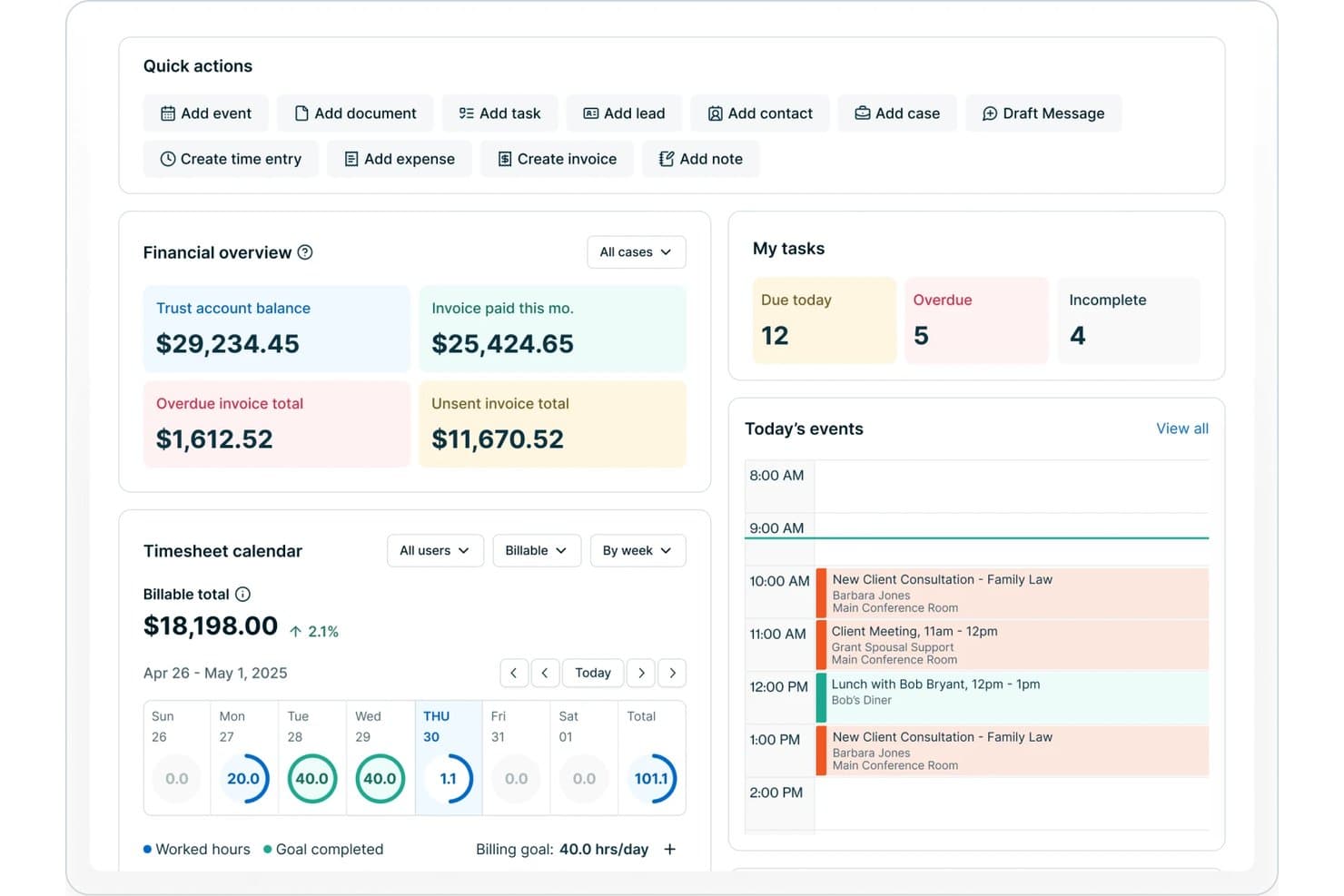
8am offre una dashboard per studi legali con panoramica finanziaria, monitoraggio delle attività, calendario delle ore lavorate e gli eventi di oggi tra cui consultazioni e riunioni con i clienti. 8am è una soluzione di gestione clienti per studi legali, progettata per i professionisti del settore che necessitano di strumenti integrati per gestire dati dei clienti, gestione delle pratiche, archiviazione documenti, fatturazione, pagamenti e comunicazioni sicure in un'unica piattaforma.
Per chi è ideale 8am?
Studi legali di medie dimensioni e in crescita che necessitano di una gestione unificata di pratiche, fatturazione e pagamenti attraverso membri dello staff con diversi ruoli.
Perché ho scelto 8am
Ho scelto 8am tra i migliori perché i suoi strumenti integrati di fatturazione e pagamenti mi permettono di gestire l'emissione delle fatture, la riscossione dei pagamenti e la conformità ai conti fiduciari/IOLTA da un'unica dashboard. Posso elaborare i pagamenti dei clienti in modo sicuro e monitorare ogni ora fatturabile all'interno della stessa piattaforma.
Caratteristiche principali di 8am
- CRM incentrato sulla pratica: Tieni traccia di tutte le informazioni sui clienti, dettagli delle pratiche e comunicazioni in file di pratica organizzati.
- Gestione documentale: Carica, archivia e organizza documenti legali riservati con permessi basati sui ruoli.
- Acquisizione clienti automatizzata: Usa moduli online personalizzabili e flussi di lavoro per accogliere nuovi clienti in modo efficiente.
- Sistema di verifica conflitti: Cerca tra tutti gli archivi dello studio eventuali conflitti in fase di onboarding e creazione pratica.
Integrazioni di 8am
Le integrazioni native non sono elencate pubblicamente.
Pros and Cons
Pros:
- Riconciliazione rapida di conti fiduciari e IOLTA
- Solidi flussi di onboarding per i nuovi clienti
- Il portale clienti include firma elettronica e pagamenti
Cons:
- Alcune funzionalità possono risultare troppo complesse per i liberi professionisti
- Le opzioni avanzate di automazione documentale sono limitate
Learn more about 8am: Ideale per una gestione semplice di casi, contatti e fatturazione
- Prova gratuita di 7 giorni + demo gratuita disponibile
- $39/utente/mese
Visit WebsiteCustomer Rating:4.3/5
Una vista della dashboard di gestione della fatturazione di PracticePanther PracticePanther è una soluzione software per la gestione di casi e studi legali. PracticePanther offre strumenti per gestire i casi, monitorare le ore lavorative, fatturare i clienti e semplificare molti altri aspetti della gestione di uno studio legale. Grazie alla sua completezza e facilità d'uso, si distingue come la "Migliore per la Gestione Completa dei Casi Legali".
Perché ho scelto PracticePanther:
Nella selezione di PracticePanther, l'aspetto che mi ha colpito di più è stato il suo ampio set di funzionalità combinato con una grande semplicità d'uso. Tra le diverse piattaforme che ho confrontato, PracticePanther si è distinto come un forte concorrente grazie alle sue capacità complete che coprono praticamente ogni aspetto della gestione dei casi legali. È per questo che lo considero la 'Migliore per la Gestione Completa dei Casi Legali'.
Funzionalità e integrazioni principali:
PracticePanther offre una varietà di funzionalità essenziali come la gestione delle pratiche, il monitoraggio del tempo, la fatturazione e la gestione dei documenti. Offre inoltre capacità di integrazione con numerose applicazioni popolari come Google Workspace, Microsoft 365, QuickBooks e Dropbox, permettendo un flusso di lavoro più efficiente.
Pros and Cons
Pros:
- Set completo di funzionalità per la gestione dei casi
- Interfaccia intuitiva
- Si integra con una vasta gamma di applicazioni popolari
Cons:
- Prezzo di partenza relativamente più alto
- Opzioni di personalizzazione limitate in alcune aree
- Alcuni utenti segnalano occasionali bug del software
Learn more about PracticePanther: Ideale per studi che necessitano di una produttività legale automatizzata e basata su cloud
- Demo gratuita disponibile
- $69/utente/mese (fatturato annualmente)
Visit WebsiteCustomer Rating:4.8/5
Una visualizzazione della dashboard delle informazioni dello studio in Smokeball. Smokeball è un software di gestione dei casi altamente avanzato, progettato su misura per piccoli studi legali. Lo strumento si specializza nell'automazione e offre soluzioni complete che aumentano efficienza e produttività. È l'ideale per quegli studi legali che desiderano ottimizzare i propri processi e migliorare la qualità del servizio offerto.
Perché ho scelto Smokeball:
Ho selezionato Smokeball per le sue eccezionali capacità di automazione e per l'ampiezza delle sue funzionalità. L'attenzione rivolta agli studi legali di piccole dimensioni lo rende unico, in quanto risponde direttamente alle sfide e alle esigenze di questo settore specifico. Secondo il mio giudizio, Smokeball si distingue per la capacità di ottimizzare i processi negli studi legali, meritando il titolo di 'Migliore per l'efficienza nei piccoli studi legali.'
Funzionalità e integrazioni principali:
Smokeball è molto apprezzato per le sue funzionalità di automazione, che permettono agli studi di automatizzare le attività quotidiane e gestire i casi in modo più efficiente. Offre inoltre un completo sistema di composizione documentale che favorisce ulteriormente la produttività. Il software si integra efficacemente con Microsoft Office, permettendo agli utenti di lavorare direttamente da Word, Outlook o Excel, registrando ogni minuto per una fatturazione precisa.
Pros and Cons
Pros:
- Eccellenti capacità di automazione
- Funzionalità completa di composizione documentale
- Integrazione efficace con Microsoft Office
Cons:
- Costo d'ingresso elevato causa una quota di onboarding una tantum
- L'interfaccia utente potrebbe richiedere un po' di tempo per essere assimilata
- È progettato specificamente per studi legali, limitandone l'utilizzo in altri settori
Learn more about Smokeball: 4Ideale per studi che danno priorità alle funzionalità incentrate sul cliente
Clio
- Prova gratuita di 7 giorni + demo gratuita disponibile
- $39/utente/mese (fatturazione annuale)
Visit WebsiteCustomer Rating:4.7/5
Ecco un esempio di dashboard finanziaria in Clio. Clio è una soluzione completa per la gestione degli studi legali che combina la gestione dei casi, l'acquisizione dei clienti e la fatturazione legale in un'unica piattaforma. Grazie alla sua suite di funzionalità complete e alla facilità d'uso, Clio può ottimizzare le operazioni degli studi legali, rendendolo il 'Migliore per la Gestione Completa dei Casi'.
Perché ho scelto Clio:
Quando ho dovuto decidere quale strumento includere, ho scelto Clio per l'ampia gamma di funzionalità e l'interfaccia intuitiva. La sua piattaforma integrata che unisce gestione dei casi, acquisizione dei clienti e fatturazione legale non è comunemente presente in altri strumenti, rendendo Clio unico sul mercato. Per questo credo sia il 'Migliore per la Gestione Completa dei Casi'.
Funzionalità e integrazioni principali:
Clio offre funzioni come la gestione dei documenti, la gestione delle attività, il monitoraggio del tempo e la fatturazione. Clio fornisce inoltre un set completo di integrazioni, tra cui Microsoft 365, Google Workspace e QuickBooks, che aiutano gli studi legali a semplificare i processi e a migliorare l'efficienza complessiva.
Pros and Cons
Pros:
- Set completo di funzionalità tra cui gestione dei casi, acquisizione clienti e fatturazione
- Integrazione con strumenti comunemente utilizzati come Microsoft 365, Google Workspace e QuickBooks
- Interfaccia intuitiva, che riduce i tempi di apprendimento
Cons:
- I prezzi potrebbero essere elevati per studi legali di piccole dimensioni
- Alcune funzionalità avanzate possono richiedere costi aggiuntivi
- La fatturazione è annuale: per alcuni studi potrebbe essere un impegno finanziario
Learn more about Clio: Ideale per la gestione avanzata dei casi con enfasi sull'automazione
- Demo gratuita disponibile
- Prezzo su richiesta
Visit WebsiteCustomer Rating:4.7/5
Ecco uno screenshot di SmartAdvocate che mostra la dashboard di analisi SmartAdvocate è un potente sistema di gestione dei casi completamente integrato, progettato principalmente per studi legali che si occupano di lesioni personali e contenziosi di massa. Implementando questa piattaforma, gli studi legali possono gestire tutti gli aspetti della gestione dei casi in modo più efficiente, rendendolo il 'Migliore per studi legali di lesioni personali e contenziosi di massa'.
Perché ho scelto SmartAdvocate:
Ho scelto SmartAdvocate dopo un'attenta valutazione di vari software di gestione per studi legali. La specializzazione della piattaforma in lesioni personali e contenziosi di massa la distingue dalla concorrenza. Dato il suo potente set di funzionalità pensato per queste aree specifiche di pratica, ho deciso che fosse il più adatto a 'studi legali di lesioni personali e contenziosi di massa'.
Funzionalità e integrazioni principali:
Le caratteristiche chiave di SmartAdvocate includono la gestione dei documenti, la gestione delle attività, il calendario e una reportistica avanzata. Si distingue anche per le sue potenti integrazioni, ad esempio con Microsoft Word, Outlook, QuickBooks e diversi sistemi telefonici leader del settore, che aiutano ad ottimizzare i flussi di lavoro e a migliorare la comunicazione.
Pros and Cons
Pros:
- Funzionalità specializzate per lesioni personali e contenziosi di massa
- Offre potenti integrazioni con strumenti di produttività essenziali
- Capacità di reportistica avanzata
Cons:
- Mancanza di informazioni pubbliche sui prezzi
- Potrebbe risultare complesso per studi più piccoli a causa del suo ampio set di funzionalità
- Alcuni utenti segnalano una curva di apprendimento ripida
Learn more about SmartAdvocate: Ideale per chi cerca una gestione finanziaria su misura per studi legali
- Prova gratuita di 30 giorni
- $25/user/month
Visit WebsiteCustomer Rating:4.4/5
Ecco la schermata della funzione di monitoraggio del tempo in QuickBooks. QuickBooks è un noto software di gestione finanziaria e contabilità. QuickBooks offre una versione specializzata per studi legali, dotata di funzionalità per monitorare entrate e uscite, fatturare i clienti, gestire le fatture e i conti da pagare e altro ancora. Si distingue come una scelta pratica per gli studi legali che necessitano di una soluzione finanziaria solida e specifica per il settore.
Perché ho scelto QuickBooks:
Ho scelto QuickBooks per la sua diffusa riconoscibilità e affidabilità nell’ambito della gestione finanziaria. La sua personalizzazione unica per gli studi legali è stata un fattore determinante nella mia decisione. Nel mio confronto, QuickBooks si è distinto come 'Migliore per gestione finanziaria degli studi legali' grazie alla sua versione dedicata e alle funzionalità complete di gestione finanziaria.
Funzionalità e integrazioni principali:
Tra le caratteristiche più preziose di QuickBooks per gli studi legali figurano il monitoraggio del tempo e la fatturazione, il tracciamento di entrate e spese e la gestione dei conti da pagare. Le sue integrazioni con app come PayPal, Square e LawPay ne ampliano le funzionalità, rendendo più semplice per gli studi gestire transazioni e pagamenti.
Pros and Cons
Pros:
- Funzionalità di gestione finanziaria robuste e complete
- Versione personalizzata per studi legali
- Si integra con app di pagamento popolari come PayPal e LawPay
Cons:
- Può essere complesso da utilizzare per i principianti
- Alcune funzionalità specifiche per studi legali possono richiedere integrazioni di terze parti
- A seconda del numero di utenti, il costo può aumentare rapidamente
Learn more about QuickBooks: Ideale per la fatturazione dettagliata e l'efficienza contabile
- Prova gratuita + demo disponibile
- $32/utente/mese (fatturazione annuale)
Visit WebsiteCustomer Rating:4.5/5
Ecco un esempio di dashboard analitica in Tabs3. Tabs3 è un robusto software di gestione per studi legali, dotato di funzionalità per la fatturazione, la gestione dei casi e la reportistica. Questo strumento è stato progettato per permettere agli studi di gestire in modo efficiente le operazioni quotidiane e la fatturazione, rivelandosi eccellente per la fatturazione dettagliata e la creazione di report.
Perché ho scelto Tabs3:
Ho scelto Tabs3 per la sua natura completa, che permette agli studi legali di gestire molteplici operazioni all'interno di un'unica piattaforma. Rispetto ad altri strumenti, Tabs3 si distingue particolarmente per la fatturazione dettagliata e la reportistica, elementi fondamentali per gli studi legali. Per questo motivo l'ho considerato 'Il migliore per la fatturazione dettagliata e la reportistica.'
Funzionalità e integrazioni principali:
Tabs3 offre una potente suite di funzionalità, tra cui strumenti avanzati di reportistica e fatturazione che forniscono una visione dettagliata della salute finanziaria dello studio e della fatturazione ai clienti. Il software offre anche efficaci sistemi di gestione dei casi, consentendo agli utenti di tenere traccia comodamente delle informazioni critiche dei casi. Tabs3 si integra con software popolari come QuickBooks e LawPay, aumentando l'efficienza operativa.
Pros and Cons
Pros:
- Funzionalità complete di reportistica e fatturazione
- Efficaci funzionalità di gestione dei casi
- Integrazione con QuickBooks e LawPay
Cons:
- Costo d'ingresso elevato a causa della fatturazione annuale
- Costi aggiuntivi per le funzionalità premium
- Può richiedere tempo per comprendere e utilizzare appieno tutte le funzionalità
Learn more about Tabs3: Ideale per studi legali che richiedono un sistema di gestione dello studio tutto-in-uno
- Prova gratuita di 10 giorni
- $89/utente/mese
Visit WebsiteCustomer Rating:4.4/5
Ecco un dashboard dettagliato in CosmoLex. CosmoLex è un software di gestione dello studio legale basato su cloud. CosmoLex offre funzionalità complete che coprono il monitoraggio del tempo, la fatturazione, la contabilità aziendale, la contabilità fiduciaria (IOLTA) e la gestione dei casi. È particolarmente prezioso per gli studi legali che cercano una soluzione tutto-in-uno che includa la contabilità legale integrata.
Perché ho scelto CosmoLex:
Ho selezionato CosmoLex per questa lista grazie alla sua funzionalità all-inclusive, che comprende la contabilità legale integrata—una caratteristica che lo differenzia dalla maggior parte delle altre soluzioni di gestione degli studi legali. Ho determinato che CosmoLex è il “Migliore come soluzione tutto-in-uno con contabilità legale integrata” per il suo approccio olistico nel soddisfare le esigenze degli studi legali.
Caratteristiche principali e integrazioni:
CosmoLex si distingue per il suo ampio set di funzionalità, che include gestione dei casi, gestione dei documenti, monitoraggio di tempo e spese, fatturazione ed emissione di fatture, oltre a contabilità aziendale e fiduciaria integrate. Questo strumento si integra con LawPay per l'elaborazione delle carte di credito, rendendo ancora più semplice per gli studi legali gestire le proprie finanze.
Pros and Cons
Pros:
- Soluzione tutto-in-uno con contabilità legale integrata
- Ampia gamma di funzionalità per la gestione completa dello studio
- Integrazioni con piattaforme utili come LawPay
Cons:
- Il prezzo può essere elevato per studi più piccoli
- Potrebbe offrire più funzionalità di quante ne necessitino alcuni studi
- L'interfaccia potrebbe richiedere del tempo per essere navigata in modo efficiente a causa della completezza dello strumento
Learn more about CosmoLex: Ideale per ottimizzare i processi con strumenti basati su cloud
- Prova gratuita di 10 giorni + demo gratuita disponibile
- $65/utente/mese
Visit WebsiteCustomer Rating:4.4/5
Uno screenshot che mostra la dashboard client di Rocket Matter. Rocket Matter è un software di gestione dello studio legale basato su cloud. Lo strumento offre una gamma di servizi che va dalla gestione dei casi al monitoraggio del tempo e alla fatturazione, rendendolo particolarmente utile per studi legali che cercano soluzioni basate su cloud e mobilità.
Perché ho scelto Rocket Matter:
Nella selezione di Rocket Matter, i fattori principali sono stati la sua natura cloud e la mobilità che offre. Questo aspetto distingue Rocket Matter da molte altre soluzioni, offrendo agli utenti la comodità di accedere ai propri dati e strumenti da qualsiasi luogo. Dalla mia analisi, credo che sia 'Ideale per soluzioni cloud e mobilità.'
Caratteristiche e integrazioni principali:
Le caratteristiche chiave di Rocket Matter includono una solida gestione dei casi, monitoraggio del tempo efficiente e un sistema di fatturazione intuitivo. Offre un'applicazione mobile, garantendo agli utenti l'accesso al proprio lavoro ovunque si trovino. Inoltre, Rocket Matter si integra bene con software come Dropbox, QuickBooks ed Evernote, aumentando la sua utilità per gli utenti.
Pros and Cons
Pros:
- Natura cloud e mobilità
- Gestione casi, monitoraggio tempo e sistema di fatturazione completi
- Integrazioni efficaci con software popolari
Cons:
- Il costo mensile è relativamente alto
- Le numerose funzionalità possono presentare una curva di apprendimento per alcuni utenti
- L'interfaccia può sembrare datata rispetto ad alcune alternative moderne
Learn more about Rocket Matter: 10Ideale per la gestione dei casi con un'interfaccia utente intuitiva
Canopy
- Prova gratuita di 15 giorni
- $65/utente/mese
Visit WebsiteCustomer Rating:4.6/5
Uno sguardo al cruscotto clienti di Canopy Canopy è una soluzione completa per la gestione degli studi legali, progettata per semplificare la gestione dei casi. Grazie alla sua interfaccia utente intuitiva e al robusto insieme di funzionalità, si adatta facilmente alle esigenze di uno studio legale dinamico.
Perché ho scelto Canopy:
Nella mia ricerca del miglior software di gestione clienti per studi legali, Canopy si è distinto per la sua combinazione unica di facilità d'uso e potenza. Il suo punto di forza principale è la gestione dei casi, che lo rende la scelta ideale per gli studi che cercano uno strumento intuitivo senza rinunciare alla funzionalità.
Caratteristiche distintive e integrazioni:
I punti di forza di Canopy risiedono nell'ampio elenco di funzionalità che includono tracciamento delle attività, gestione dei documenti e strumenti di comunicazione efficaci. Brilla particolarmente grazie al suo portale clienti ben progettato, che migliora le interazioni tra cliente e avvocato. Sul fronte delle integrazioni, Canopy si integra con gli strumenti più utilizzati come QuickBooks, Gmail e Office 365, permettendo agli studi di mantenere i loro flussi di lavoro esistenti.
Pros and Cons
Pros:
- Set di funzionalità completo
- Integrazione efficiente con strumenti comunemente utilizzati
- Portale clienti per un'interazione migliorata
Cons:
- Opzioni di personalizzazione ridotte
- Potrebbe presentare una curva di apprendimento per alcuni utenti
- Le funzionalità di reportistica possono essere limitate
Learn more about Canopy:
Altri software di gestione dei clienti per studi legali
Ecco alcune altre opzioni di software di gestione dei clienti per studi legali che non sono state incluse nel mio elenco, ma che vale comunque la pena valutare:
- 11Mitratech CasecloudIdeale per studi legali che già utilizzano Salesforce
- 12CenterbaseIdeale per una piattaforma legale personalizzata e completa
- 13LegalFilesIdeale per la gestione avanzata di documenti ed e-mail
Come Valuto i Software di Gestione Clienti per Studi Legali
Divido la mia valutazione in due livelli: i requisiti di base imprescindibili come il controllo dei conflitti, la contabilità dei fondi fiduciari e la gestione delle pratiche, e i fattori differenzianti che distinguono alcune piattaforme dalle altre.
Funzionalità Principali (Requisiti Minimi per Questa Lista)
Quando seleziono gli strumenti da includere nella mia lista, valuto ciascuno su una scala da 0 (non offre la funzionalità) a 5 (eccelle in quest'area) per ogni funzionalità principale elencata di seguito. Poi, calcolo il punteggio totale dello strumento come percentuale. Ogni strumento deve raggiungere un punteggio minimo totale del 65% per essere preso in considerazione.
- Gestione di Clienti & Pratiche: Cerco profili cliente centralizzati collegati a singole pratiche, in modo che gli avvocati possano visualizzare la cronologia completa dei casi del cliente, i contatti correlati e le note senza dover cercare in sistemi separati.
- Accoglienza Clienti & Controlli dei Conflitti: Ogni strumento dovrebbe supportare flussi di lavoro strutturati per l'accoglienza e ricerche automatizzate dei conflitti—particolarmente importante quando uno studio gestisce parti avverse in ambiti di diritto di famiglia o contenzioso.
- Gestione Documentale Legale: Valuto come la piattaforma organizza, versiona e protegge i documenti a livello di pratica, incluso se gli avvocati possono applicare modelli per atti comuni come lettere di incarico o richieste di discovery.
- Rilevazione del Tempo & Fatturazione Legale: Rilevare le ore fatturabili per pratica e generare fatture compatibili con LEDES sono aspettative di base. Verifico se chi registra il tempo può inserire voci direttamente dalla vista pratica e applicare strutture tariffarie multiple.
- Contabilità dei Fondi Fiduciari & IOLTA: La corretta gestione dei fondi dei clienti è un requisito fondamentale. Cerco registri fiduciari separati per cliente, riconciliazione a tre vie e garanzie che prevengano il mescolamento tra fondi operativi e fiduciari.
- Portale di Comunicazione Sicura con il Cliente: Verifico se la piattaforma offre ai clienti uno spazio crittografato dove scambiare messaggi, consultare documenti e controllare lo stato della pratica—funzionalità che riducono le chiamate superflue e proteggono le informazioni coperte da segreto professionale.
Una volta che ho una lista di strumenti che soddisfano questi criteri, considero cosa distingue ciascuna piattaforma.
Fattori Differenzianti (Cosa Distingue i Fornitori)
Ecco come confronto e valuto i vari fornitori:
Funzionalità Extra
I flussi di lavoro automatizzati per i clienti fanno davvero la differenza per gli studi che gestiscono alti volumi di accoglienze—cerco piattaforme che possano inviare automaticamente email di follow-up, generare lettere di incarico e indirizzare nuove pratiche all’avvocato giusto senza passaggi manuali. Un altro fattore che considero è l’integrazione del sistema di pagamento, poiché permettere ai clienti di saldare fatture o ricaricare anticipi direttamente dal portale riduce le difficoltà legate alle riscossioni. Valuto anche le app mobili, in particolare se gli avvocati possono accedere ai dati dei clienti e rilevare il tempo tra un’udienza e l’altra.
Oltre le Funzionalità
La conformità normativa e la sicurezza dei dati sono priorità assolute—verifico la certificazione SOC 2 e gli standard di crittografia, dato che i dati dei clienti sono soggetti a vincoli di riservatezza. Anche il supporto per le integrazioni è importante: una piattaforma che si sincronizza con strumenti come Westlaw, QuickBooks e Microsoft 365 si inserisce nei flussi di lavoro già esistenti senza costringere lo studio a rinnovare completamente la propria infrastruttura tech. Considero anche la compatibilità con la dimensione dello studio, perché le esigenze di un avvocato singolo sono molto diverse da quelle di uno studio con 50 professionisti che gestisce pratiche su più sedi o giurisdizioni.
Come scegliere un software di gestione dei clienti per studi legali
È facile perdersi in lunghi elenchi di funzionalità e strutture tariffarie complesse. Per aiutarti a rimanere concentrato mentre affronti il tuo esclusivo processo di selezione del software, ecco un elenco di fattori da tenere a mente:
| Fattore | Cosa considerare |
|---|---|
| FattoreScalabilità | Cosa considerareIl software crescerà insieme al tuo studio? Verifica che supporti utenti e spazio di archiviazione aggiuntivi man mano che l'attività si espande, senza un aumento significativo del prezzo. |
| FattoreIntegrazioni | Cosa considerareSi collega agli strumenti che già utilizzi? Cerca la compatibilità con sistemi di posta elettronica, calendari e gestione dei documenti per evitare l'inserimento ridondante dei dati. |
| FattorePersonalizzazione | Cosa considerarePuoi adattarlo alle tue esigenze? Assicurati di poter modificare i flussi di lavoro e le interfacce utente in base ai processi del tuo studio senza un coinvolgimento significativo degli sviluppatori. |
| FattoreFacilità d'uso | Cosa considerareÈ intuitivo? Valuta la rapidità con cui il tuo team può imparare a utilizzare il sistema. Un'interfaccia semplice riduce i tempi di formazione e gli errori. |
| FattoreImplementazione e avvio | Cosa considerareQuanto è fluida la transizione? Considera il tempo e le risorse necessari per la configurazione. Cerca strumenti che offrano dimostrazioni, formazione e assistenza durante la fase di avvio. |
| FattoreCosto | Cosa considerareRientra nel tuo budget? Analizza il modello tariffario, comprese eventuali commissioni nascoste o i costi dei diversi livelli, assicurandoti che sia in linea con il tuo piano finanziario. |
| FattoreMisure di sicurezza | Cosa considerareI dati e i documenti dei clienti sono protetti? Verifica gli standard di crittografia, i controlli degli accessi e la conformità alle normative sulla protezione dei dati in ambito legale. |
Che cos'è un software di gestione dei clienti per studi legali?
Il software di gestione dei clienti per studi legali è uno strumento che aiuta i professionisti del settore legale a gestire le interazioni con i clienti, i dettagli dei casi e le attività amministrative. Avvocati, paralegali e assistenti legali utilizzano comunemente questi strumenti per migliorare l'efficienza e l'organizzazione.
Funzionalità come la gestione dei contatti, il monitoraggio dei casi e l'archiviazione sicura dei documenti aiutano nelle operazioni quotidiane e nella comunicazione con i clienti. Nel complesso, questi strumenti fanno risparmiare tempo e migliorano la produttività negli studi legali.
Funzionalità
Quando si sceglie un software per la gestione dei clienti di uno studio legale, è importante prestare attenzione alle seguenti funzionalità chiave:
- Gestione dei contatti: Organizza le informazioni sui clienti in un unico luogo, rendendo facile accedere ai dati e aggiornarli.
- Monitoraggio dei casi: Tiene sotto controllo i progressi e le scadenze dei casi, aiutando i professionisti legali a gestire efficacemente il proprio carico di lavoro.
- Archiviazione dei documenti: Fornisce uno spazio sicuro per l'archiviazione dei documenti legali, garantendo un facile recupero e la conformità alle normative sulla protezione dei dati.
- Fatturazione e gestione delle fatture: Automatizza i processi di fatturazione e genera le fatture, semplificando la gestione finanziaria.
- Integrazione del calendario: Sincronizza i calendari per gestire appuntamenti e scadenze, riducendo i conflitti di programmazione.
- Portale clienti: Offre ai clienti l'accesso alle informazioni e ai documenti relativi ai loro casi, migliorando la comunicazione e la trasparenza.
- Gestione delle attività: Assegna e monitora le attività all'interno del team, migliorando la collaborazione e l'efficienza.
- Strumenti di reportistica: Genera report su diverse metriche, facilitando il processo decisionale e la valutazione delle prestazioni.
- Funzionalità di sicurezza: Garantisce la protezione dei dati tramite crittografia e controlli degli accessi, salvaguardando le informazioni sensibili.
- Flussi di lavoro personalizzabili: Consente agli studi di adattare i processi alle proprie esigenze specifiche, aumentando la flessibilità operativa.
Vantaggi
L'implementazione di un software per la gestione dei clienti di uno studio legale offre diversi vantaggi al team e all'attività. Ecco alcuni dei benefici che si possono ottenere:
- Organizzazione migliorata: Centralizza le informazioni sui clienti e sui casi, rendendo più facile gestire e recuperare i dati.
- Comunicazione migliorata: Facilita interazioni migliori con i clienti attraverso strumenti di comunicazione integrati e portali clienti.
- Maggiore efficienza: Automatizza le attività di routine come la fatturazione e la programmazione, liberando tempo per il lavoro più importante.
- Collaborazione migliore: Supporta il lavoro di squadra con la gestione delle attività e i calendari condivisi, assicurando che tutti siano informati.
- Sicurezza dei dati: Protegge le informazioni sensibili con misure di sicurezza avanzate, preservando la riservatezza dei clienti.
- Processo decisionale informato: Offre strumenti di reportistica che forniscono informazioni sulle prestazioni dello studio e sui progressi dei casi.
- Processi personalizzabili: Consente agli studi di adattare i flussi di lavoro alle proprie esigenze specifiche, migliorando la flessibilità operativa.
Costi & prezzi
La scelta di un software per la gestione dei clienti di uno studio legale richiede la comprensione dei diversi modelli e piani tariffari disponibili. I costi variano in base alle funzionalità, alle dimensioni del team, ai componenti aggiuntivi e ad altri fattori. La tabella seguente riepiloga i piani comuni, i relativi prezzi medi e le funzionalità tipicamente incluse nelle soluzioni software per la gestione dei clienti degli studi legali:
Tabella comparativa dei piani per il software di gestione dei clienti degli studi legali
| Tipo di piano | Prezzo medio | Funzionalità comuni |
|---|---|---|
| Tipo di pianoPiano gratuito | Prezzo medio$0 | Funzionalità comuniGestione di base dei contatti, monitoraggio limitato dei casi e archiviazione minima dei documenti. |
| Tipo di pianoPiano personale | Prezzo medio$10-$30/user/month | Funzionalità comuniMonitoraggio avanzato dei casi, integrazione del calendario e strumenti di reportistica di base. |
| Tipo di pianoPiano aziendale | Prezzo medio$40-$70/user/month | Funzionalità comuniArchiviazione completa dei documenti, fatturazione e gestione delle fatture e accesso al portale clienti. |
| Tipo di pianoPiano aziendale avanzato | Prezzo medio$80-$150/user/month | Funzionalità comuniFlussi di lavoro personalizzabili, funzionalità di sicurezza avanzate e assistenza dedicata. |
Domande frequenti sul software di gestione dei clienti degli studi legali
Ecco alcune risposte alle domande più comuni sul software di gestione dei clienti degli studi legali:
Come organizzano gli studi legali i file con il software gestionale?
Con il software gestionale, è possibile organizzare i file utilizzando un sistema centralizzato che ne consente l’accesso e il recupero in modo semplice. Il software classifica i documenti per cliente, pratica o tipologia, riducendo il tempo dedicato alla ricerca dei file. Garantisce inoltre che i documenti siano archiviati in modo sicuro e in conformità con gli standard legali.
Come posso automatizzare il mio studio legale utilizzando un software gestionale?
Il software gestionale aiuta ad automatizzare attività ripetitive come la fatturazione, la pianificazione e la gestione dei documenti. È possibile configurare flussi di lavoro che attivano azioni specifiche al verificarsi di determinati criteri, come l’invio di fatture o promemoria. Questa automazione riduce il lavoro manuale e minimizza gli errori, lasciando più tempo per le attività più complesse.
In che modo il software gestionale può migliorare la comunicazione con i clienti?
Il software gestionale migliora la comunicazione con i clienti offrendo strumenti come portali per i clienti, aggiornamenti automatici e messaggistica integrata. Queste funzionalità mantengono i clienti informati sull’avanzamento della loro pratica e consentono loro di accedere ai documenti in modo sicuro. Una comunicazione più efficace porta a una maggiore soddisfazione dei clienti e a una maggiore fiducia nei vostri servizi.
Cosa dovrei considerare quando scelgo tra soluzioni tutto-in-uno e soluzioni specializzate?
Quando si deve scegliere tra soluzioni tutto-in-uno e soluzioni specializzate, è importante considerare le esigenze specifiche del proprio studio. Le soluzioni tutto-in-uno offrono un’ampia gamma di funzionalità in un’unica piattaforma, mentre le soluzioni specializzate eccellono in aree specifiche. Valutate quale approccio si adatta meglio ai vostri flussi di lavoro e al vostro budget per compiere la scelta migliore.
In che modo il software gestionale migliora la conformità agli standard legali?
Il software gestionale migliora la conformità fornendo strumenti per l’archiviazione sicura dei documenti, i registri di controllo e la contabilità fiduciaria. Aiuta a rispettare gli standard di settore e quelli degli ordini professionali, garantendo che i dati dei clienti siano gestiti correttamente. Questa conformità riduce il rischio di problemi legali e preserva la reputazione dello studio.