

Una valida alternativa a MyCase offre un software per la gestione dei casi legali con monitoraggio flessibile delle pratiche, fatturazione, comunicazione e gestione dei documenti, senza i limiti che stai riscontrando in MyCase. Se stai cercando un’alternativa a MyCase, probabilmente hai bisogno di funzionalità migliori, prezzi diversi o flussi di lavoro più efficienti, adatti al modo in cui lavora il tuo team. Ti illustrerò le migliori opzioni nel 2026, così potrai confrontare rapidamente le piattaforme e individuare quella più adatta al tuo studio.
Che cos'è MyCase?
MyCase è un software cloud per la gestione dei casi legali che aiuta gli studi legali a organizzare pratiche, fatturazione, documenti e comunicazioni con i clienti in un unico luogo. È progettato per semplificare i flussi di lavoro legali quotidiani e mantenere accessibili i dettagli dei casi per tutto il team. MyCase include funzionalità come la gestione del calendario, il monitoraggio del tempo e i pagamenti online, rendendolo una piattaforma popolare e completa per gli studi legali che desiderano centralizzare la gestione dei casi e dei clienti.
Tabella comparativa: alternative a MyCase
Questa tabella comparativa riassume i dettagli sui prezzi delle mie selezioni di alternative a MyCase.
| Tool | Best For | Trial Info | Price | ||
|---|---|---|---|---|---|
| 1 | Ideale per la gestione di pratiche di infortunistica | Demo gratuita disponibile | Da $79/utente/mese | Website | |
| 2 | Ideale per studi legali con grandi quantità di documenti | Demo gratuita disponibile | Prezzo su richiesta | Website | |
| 3 | Ideale per fatturazione legale e produttività | Prova gratuita di 10 giorni + demo gratuita disponibile | Da $59/utente/mese (fatturazione annuale) | Website | |
| 4 | Ideale per studi legali guidati da workflow | Demo gratuita disponibile | Prezzo su richiesta | Website | |
| 5 | Ideale per studi legali affermati | Demo gratuita disponibile | Prezzo su richiesta | Website | |
| 6 | Ideale per flussi di lavoro automatizzati nelle pratiche | Demo gratuita disponibile | Prezzo su richiesta | Website | |
| 7 | Ideale per la gestione delle pratiche personalizzabile | Prova gratuita + demo gratuita disponibili | Prezzo su richiesta | Website | |
| 8 | Ideale per la gestione legale tutto-in-uno | Prova gratuita di 7 giorni + demo gratuita disponibile | A partire da $69CAD/utente/mese (fatturato annualmente) | Website | |
| 9 | Ideale per contabilità legale integrata | Prova gratuita di 10 giorni | Da $109/utente/mese (fatturato annualmente) | Website | |
| 10 | Ideale per flussi di lavoro intuitivi nelle pratiche e nella fatturazione | Prova gratuita di 7 giorni + demo gratuita disponibile | A partire da $49/utente/mese (fatturazione annuale) | Website |


Perché fidarsi dei nostri consigli sui software
6,700+
Reviews
20
Industry experts
16+
Evaluation factors
14
Years
Il nostro team testa e recensisce software dal 2012. In quanto leader di studi legali noi stessi, sappiamo quanto sia difficile — e importante — scegliere il software giusto.
Per questa guida, abbiamo valutato gli strumenti attraverso test pratici e ricerche indipendenti, assegnando un punteggio agli strumenti in base ai nostri criteri di selezione.
Le nostre recensioni riflettono il nostro giudizio editoriale umano, non un discorso di vendita.
Recensioni delle migliori alternative a MyCase
\u003cspan style=\u0022font-weight: 400\u0022\u003eDi seguito trovi i miei riepiloghi dettagliati delle migliori alternative a MyCase che sono entrate nella mia selezione. Le mie recensioni offrono una panoramica dettagliata delle funzionalità, dei prezzi e dei casi d’uso più adatti di ciascuna piattaforma per la gestione dei casi legali, per aiutarti a trovare quella migliore per te.\u003c/span\u003e
 Ideale per la gestione di pratiche di infortunistica
- Demo gratuita disponibile
- Da $79/utente/mese
Visit WebsiteCustomer Rating:4.8/5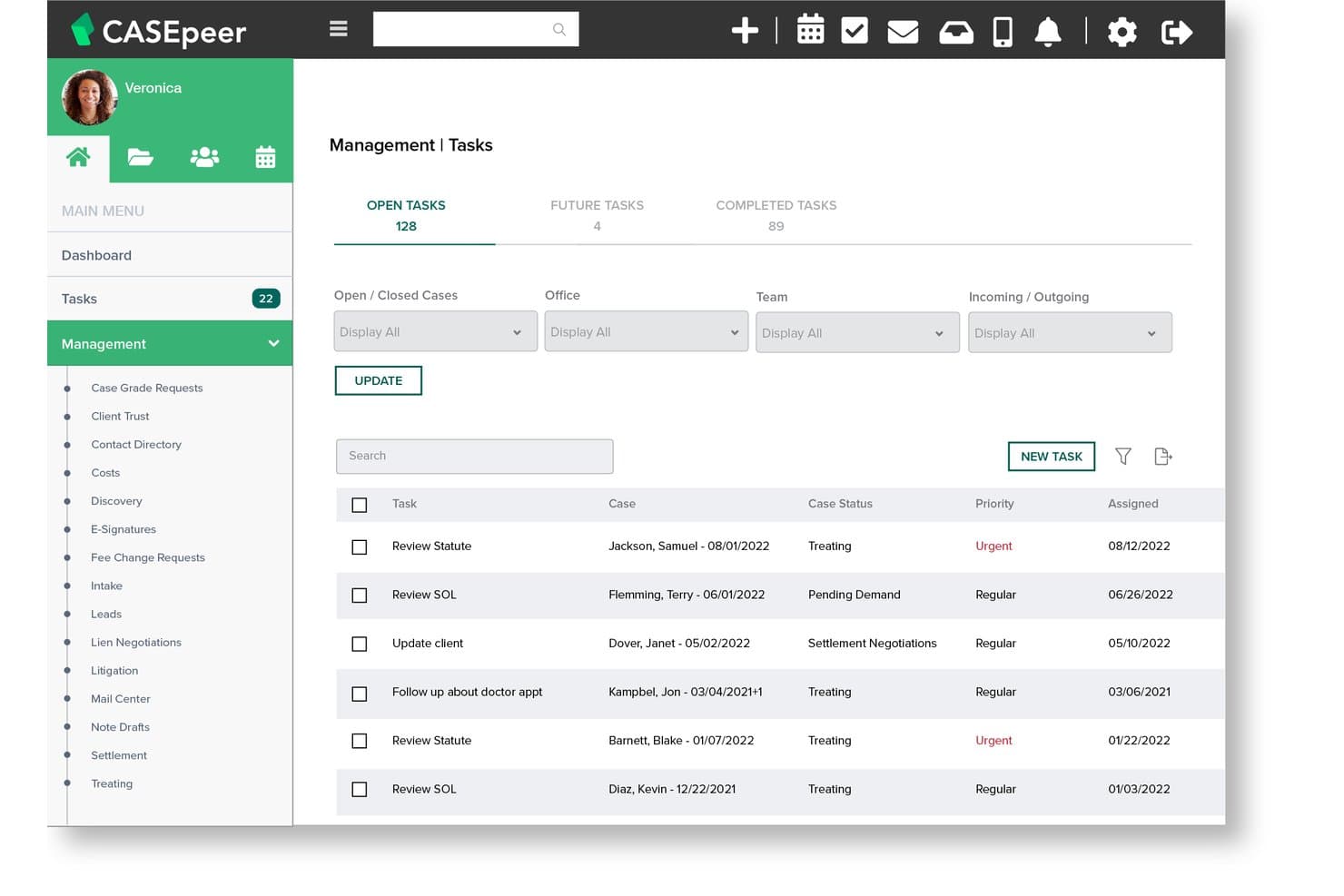
CasePeer offre una dashboard delle Attività di Gestione che mostra le attività aperte, future e completate con i livelli di priorità, lo stato del caso e le date di assegnazione. CasePeer è una piattaforma di gestione dello studio legale basata su cloud, creata esclusivamente per studi legali di infortunistica stradale, che include in un unico sistema appositamente progettato la gestione dei casi, dei registri delle terapie mediche, delle trattative di risarcimento e degli avvisi automatici sulle scadenze legali.
Per chi è ideale CasePeer?
CasePeer è particolarmente adatto agli studi legali di infortunistica di qualsiasi dimensione che desiderano una soluzione pensata appositamente per il settore, invece di uno strumento generico che richiederebbe adattamenti.
Perché CasePeer è una valida alternativa a MyCase
Ho scelto CasePeer come una delle migliori soluzioni perché è l’unico strumento in questa lista pensato fin dall’inizio per i casi di infortunistica. MyCase richiede una configurazione specifica per seguire i flussi di lavoro PI, mentre CasePeer integra già calcolatori di risarcimenti, strumenti di tracciamento delle richieste di danni e avvisi automatici sulle scadenze. In particolare, apprezzo molto la gestione delle terapie mediche: consente al tuo team di registrare le visite ai fornitori, monitorare il saldo dei vincoli e segnalare eventuali interruzioni delle cure senza bisogno di alcuna configurazione personalizzata.
Caratteristiche principali di CasePeer
- Redattore legale IA: Genera e modifica la corrispondenza, i pacchetti di richieste e i riepiloghi direttamente all’interno delle pratiche.
- Messaggistica bidirezionale con immagini: Comunica con i clienti tramite SMS integrati e tracciabili che consentono l’invio di allegati.
- Integrazione con pagamenti LawPay: Accetta pagamenti dai clienti e gestisci depositi fiduciari conformi IOLTA direttamente dalla piattaforma.
- Integrazione con CalendarRules: Calcola e applica le scadenze processuali in base alle regole e ai trigger specifici della giurisdizione.
Integrazioni di CasePeer
CasePeer offre integrazioni native con QuickBooks Online, Dropbox, Microsoft 365, CalendarRules, LawPay, EvenUp e Case Status. È disponibile un'API per integrazioni personalizzate.
Pros and Cons
Pros:
- La sezione riservata al risarcimento PI centralizza tutti gli aspetti finanziari
- Ciclo di lavoro dalla presa in carico alla chiusura seguito in un unico luogo
- Team di supporto clienti reattivo con chat dal vivo
Cons:
- Le opzioni di personalizzazione sono limitate per flussi di lavoro non standard
- I limiti di archiviazione documentale possono bloccare pacchetti di richieste di grandi dimensioni
 Ideale per studi legali con grandi quantità di documenti
- Demo gratuita disponibile
- Prezzo su richiesta
Visit WebsiteCustomer Rating:4.4/5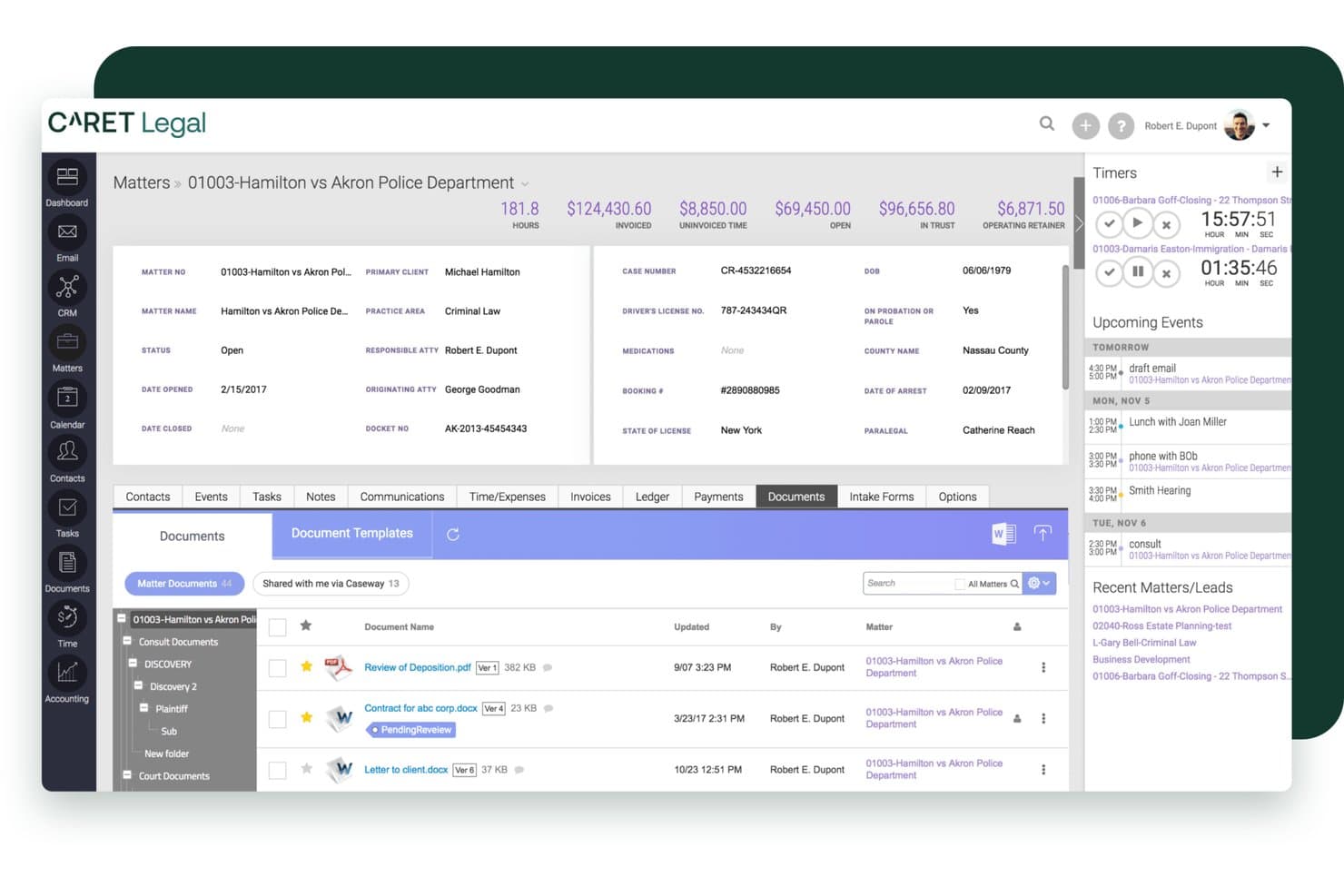
CARET Legal offre un’interfaccia completa per la gestione delle pratiche, con monitoraggio dei documenti, riepiloghi di fatturazione, timer ed eventi imminenti in una singola vista dashboard. CARET Legal è una piattaforma cloud per la gestione degli studi legali, realizzata per studi di piccole e medie dimensioni che necessitano di una gestione integrata di casi, contabilità fiduciaria e gestione documentale, senza dover collegare diversi strumenti tra loro.
Per chi è più adatto CARET Legal?
CARET Legal si adatta a soci amministratori e amministratori legali di studi piccoli e medi che gestiscono grandi volumi di documenti su pratiche complesse e con molte parti coinvolte.
Perché CARET Legal è una valida alternativa a MyCase
Ho scelto CARET Legal perché la sua gestione documentale va ben oltre ciò che offre MyCase. Ogni file caricato viene immediatamente indicizzato per la ricerca nel documento, così trovare una clausola specifica tra centinaia di documenti richiede solo pochi secondi. L'OCR potenziato dall'IA estrae testo da appunti manoscritti e tabelle, e la funzione AI Quick Summary condensa lunghi contratti in anteprime leggibili senza mai dover lasciare la piattaforma.
Funzionalità chiave di CARET Legal
- Portale clienti integrato: Permette ai clienti di inviare messaggi in modo sicuro, condividere documenti e effettuare pagamenti online tutto in un unico posto.
- Contabilità fiduciaria conforme a IOLTA: Mantieni registri separati e conformi con riconciliazione triplice integrata e log di audit.
- Integrazione con regole del calendario giudiziario: Applica automaticamente le scadenze per alcune giurisdizioni grazie alla connettività integrata con LawToolBox.
- Flussi di lavoro e autorizzazioni personalizzati: Crea automazioni a più fasi per processi ricorrenti e imposta diritti di accesso specifici per utente in tutto lo studio.
Integrazioni di CARET Legal
CARET Legal offre integrazioni native con NetDocuments, Worldox, HotDocs, LawToolBox, RPost, LawPay e Microsoft 365. È disponibile un'API per integrazioni personalizzate.
Pros and Cons
Pros:
- Integrazione nativa dell’email che associa automaticamente la corrispondenza alle pratiche
- Gestione legale e contabilità fiduciaria integrate in un’unica piattaforma
- Strumenti IA redigono, sintetizzano ed estraggono informazioni dai documenti caricati
Cons:
- I report personalizzati richiedono l’intervento del fornitore per essere creati
- I tempi di risposta dell’assistenza sono variabili dopo l’escalation del ticket
Learn more about CARET Legal: Ideale per fatturazione legale e produttività
- Prova gratuita di 10 giorni + demo gratuita disponibile
- Da $59/utente/mese (fatturazione annuale)
Visit WebsiteCustomer Rating:4.4/5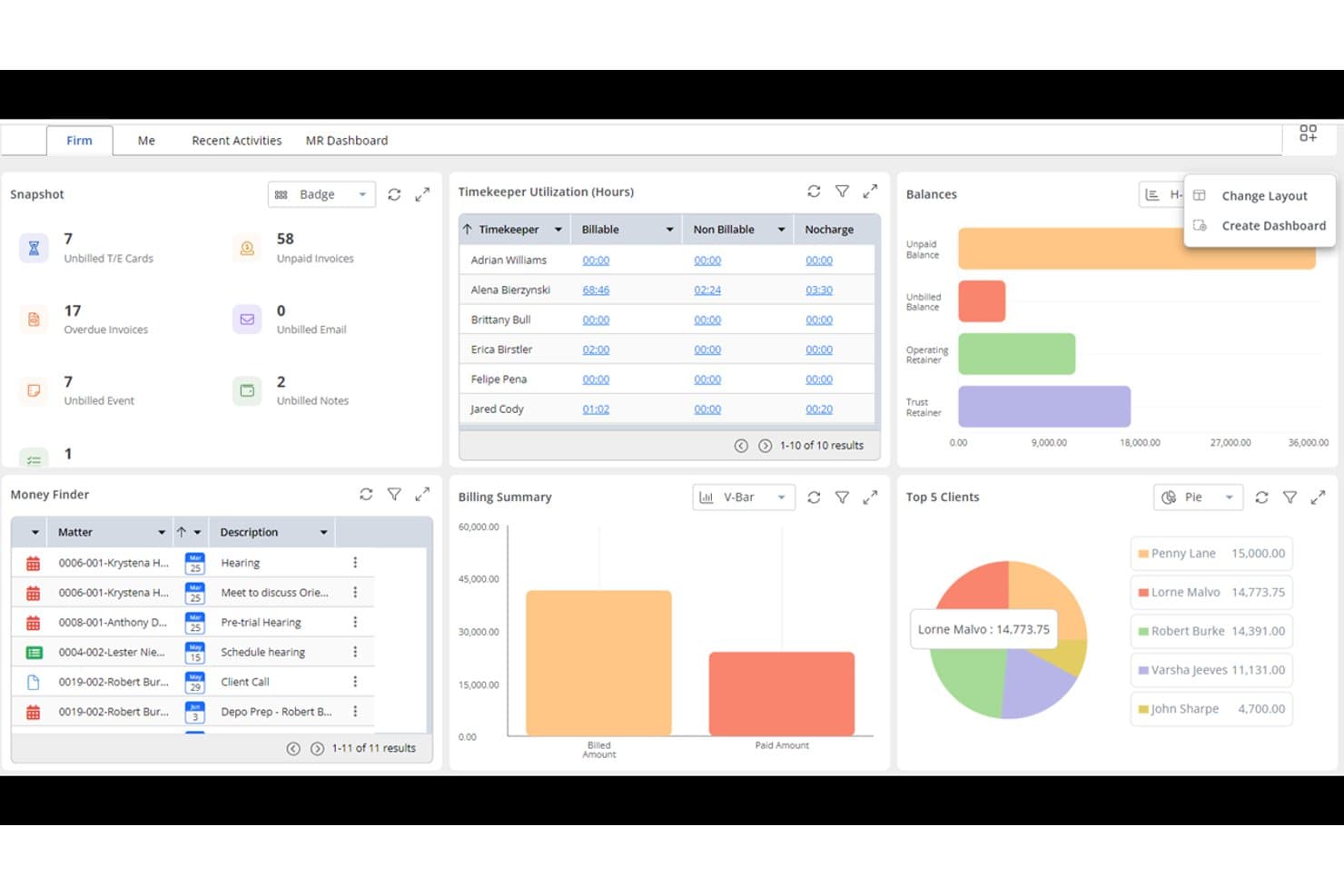
Rocket Matter offre una dashboard completa con visualizzazione dell’utilizzo dei collaboratori, riepilogo della fatturazione, top 5 clienti, saldi e un pannello per la ricerca dei fondi per una gestione efficiente dello studio legale. Rocket Matter è una piattaforma di gestione dello studio legale basata sul cloud, progettata attorno a rilevazione del tempo, fatturazione e contabilità fiduciaria—rendendola una scelta naturale per avvocati singoli e piccoli studi che desiderano un controllo più stretto sulle operazioni finanziarie rispetto a quanto offerto da MyCase.
Per chi è migliore Rocket Matter?
Rocket Matter è particolarmente adatta a studi legali di piccole e medie dimensioni in cui l’accuratezza della fatturazione e la conformità nella gestione dei fondi fiduciari sono le principali priorità operative.
Perché Rocket Matter è una buona alternativa a MyCase
Ho scelto Rocket Matter come una delle migliori alternative a MyCase perché la sua profondità nella fatturazione è davvero difficile da replicare. Supporta la fatturazione LEDES, la suddivisione delle fatture tra più parti e la fatturazione in batch con modifica collettiva in un unico workflow. Il livello Elite va oltre, sostituendo QuickBooks con una contabilità legale integrata, incluso un piano dei conti specifico per studi legali e l’importazione automatica dei dati bancari per la riconciliazione dei fondi fiduciari.
Funzionalità principali di Rocket Matter
- Modelli di pratica: Crea nuovi casi in pochi secondi con flussi di lavoro preimpostati, elenchi di attività e campi personalizzati.
- Gestione dei progetti in stile Kanban: Visualizza l’avanzamento delle pratiche e gestisci le attività tramite un’interfaccia drag and drop.
- Automazione documentale nativa: Genera documenti legali da modelli e campi uniti direttamente all’interno della piattaforma.
- Sincronizzazione bidirezionale del calendario: Sincronizza tutte le scadenze e gli eventi dello studio con Google Calendar e Office 365 per una pianificazione coerente.
Integrazioni Rocket Matter
Rocket Matter offre integrazioni native con LawPay, NetDocuments, OneDrive, Dropbox, Box, QuickBooks Online, Office 365 e Google Workspace. È disponibile una API per integrazioni personalizzate.
Pros and Cons
Pros:
- Ottimo supporto per fatturazione LEDES e in batch
- Contabilità legale integrata nei piani avanzati
- Rilevazione dettagliata del tempo con diversi tipi di tariffa
Cons:
- La gestione documentale è meno sviluppata rispetto alla parte di fatturazione
- La app mobile ha funzionalità limitate in mobilità
Learn more about Rocket Matter: Ideale per studi legali guidati da workflow
- Demo gratuita disponibile
- Prezzo su richiesta
Visit WebsiteCustomer Rating:4.2/5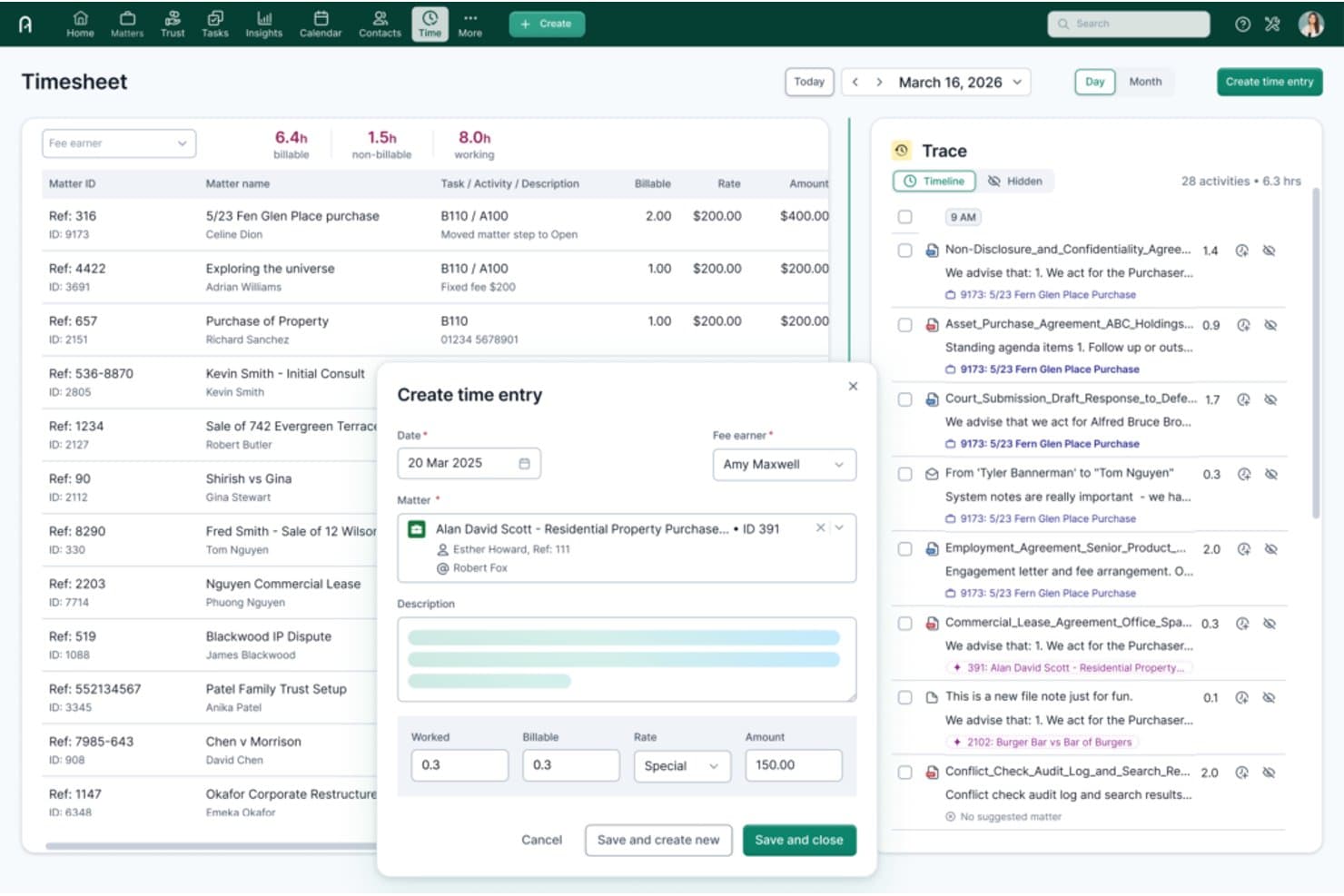
Actionstep offre una cronologia Trace alimentata dall'IA e un modulo di creazione delle registrazioni di tempo con collegamento alle pratiche, ore fatturabili e campi per la tariffa per un monitoraggio del tempo ottimizzato. Actionstep è una piattaforma per la gestione degli studi legali basata su cloud, progettata per studi di piccole e medie dimensioni che desiderano gestire ogni fase di una pratica—dall'acquisizione del cliente alla fatturazione—all'interno di un unico sistema guidato da workflow.
Per chi è ideale Actionstep?
Actionstep è adatto a studi legali con processi ben strutturati che gestiscono volumi elevati di pratiche multi-fase e necessitano di workflow configurabili anziché un sistema fisso pronto all'uso.
Perché Actionstep è una valida alternativa a MyCase
Ho incluso Actionstep tra le mie scelte principali perché il suo motore di workflow per le pratiche va ben oltre quanto offerto da MyCase. Posso costruire flussi di lavoro fase per fase che assegnano automaticamente i compiti, attivano scadenze e generano documenti man mano che la pratica avanza. L'add-on Builder aggiunge un'automazione dinamica dei documenti, estraendo i dati della pratica direttamente nei modelli Word con logica condizionale applicata a ogni passaggio.
Funzionalità principali di Actionstep
- Portale clienti: consente ai clienti di visualizzare in modo sicuro documenti, messaggi e aggiornamenti sul caso in un unico hub online personalizzato.
- Contabilità fiduciaria: offre contabilità fiduciaria conforme a IOLTA con riconciliazione automatica tripla e report di audit.
- Versionamento documenti in-app: traccia la cronologia e le modifiche di tutti i documenti, consentendo ai team di annullare o confrontare i cambiamenti.
- Calendario avanzato: si sincronizza con i calendari Microsoft e Google e supporta promemoria e la gestione di scadenze legali complesse.
Integrazioni di Actionstep
Actionstep offre integrazioni native con Xero, QuickBooks Online, NetDocuments, InfoTrack, Microsoft 365 e LawPay. È disponibile un'API per integrazioni personalizzate.
Pros and Cons
Pros:
- Motore workflow delle pratiche altamente configurabile
- Solida contabilità fiduciaria con riconciliazione tripla
- Supporta l'automazione documentale multi-fase in modo nativo
Cons:
- L'implementazione richiede un significativo tempo di configurazione
- Gli strumenti di reportistica appaiono datati rispetto ai concorrenti
Learn more about Actionstep: Ideale per studi legali affermati
- Demo gratuita disponibile
- Prezzo su richiesta
Visit WebsiteCustomer Rating:4/5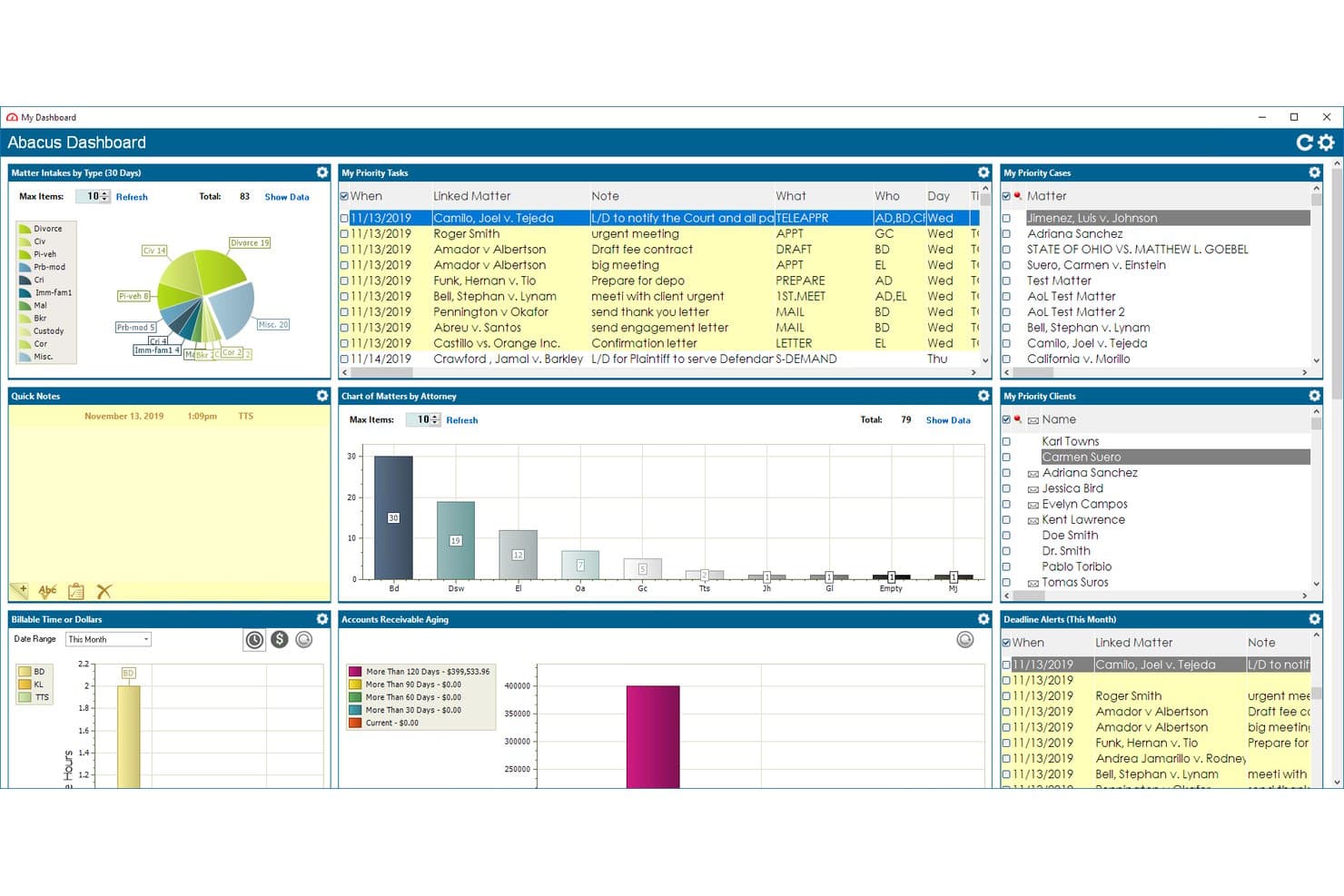
AbacusLaw offre una dashboard completa con attività prioritarie, grafici delle pratiche, pannelli di fatturazione e di crediti per la gestione dello studio legale. AbacusLaw è una piattaforma ibrida per la gestione degli studi legali, progettata per piccoli studi e studi affermati che necessitano di calendari giudiziari basati su regole, contabilità fiduciaria e gestione delle pratiche in un unico sistema personalizzabile.
Per Chi È AbacusLaw?
AbacusLaw è particolarmente adatto a piccoli studi legali che gestiscono un elevato volume di contenziosi, diritto di famiglia o pratiche di lesioni personali e che necessitano di una profonda personalizzazione dell'area di pratica.
Perché AbacusLaw È una Buona Alternativa a MyCase
AbacusLaw merita di essere nella mia lista grazie al suo motore di calendari basato su regole, che genera automaticamente catene di scadenze a partire dalle regole dei tribunali invece di richiedere l'inserimento manuale. Apprezzo anche Practice Area Essentials, che include moduli di raccolta dati predefiniti, regole di automazione e terminologia specifica per aree come diritto di famiglia e lesioni personali. A differenza del modello solo cloud di MyCase, AbacusLaw supporta il deployment su cloud privato per studi con forti esigenze di governance dei dati.
Funzionalità Chiave di AbacusLaw
- Area di lavoro pratiche personalizzabile: Personalizza database, moduli e schermate di inserimento per ogni tipo di pratica o flusso di lavoro.
- Gestione documentale integrata: Organizza, archivia e gestisci le versioni dei documenti direttamente all'interno di ogni fascicolo.
- Verifica conflitti integrata: Verifica istantaneamente potenziali conflitti di interesse tra tutti i contatti e le pratiche.
- Deployment su cloud privato o interno: Scegli tra hosting sicuro su cloud privato o installazione su server locale per il massimo controllo.
Integrazioni di AbacusLaw
AbacusLaw offre integrazioni native con Microsoft Outlook, Microsoft 365, QuickBooks Online, DocuSign e HotDocs. È disponibile un'API per integrazioni personalizzate.
Pros and Cons
Pros:
- Calendari basati su regole che generano automaticamente le scadenze
- Disponibilità di hosting su cloud privato e installazione locale
- Modelli predefiniti per diverse aree di pratica
Cons:
- Interfaccia datata rispetto ad alternative moderne
- App mobile limitata rispetto ai concorrenti
Learn more about AbacusLaw: Ideale per flussi di lavoro automatizzati nelle pratiche
- Demo gratuita disponibile
- Prezzo su richiesta
Visit WebsiteCustomer Rating:4.8/5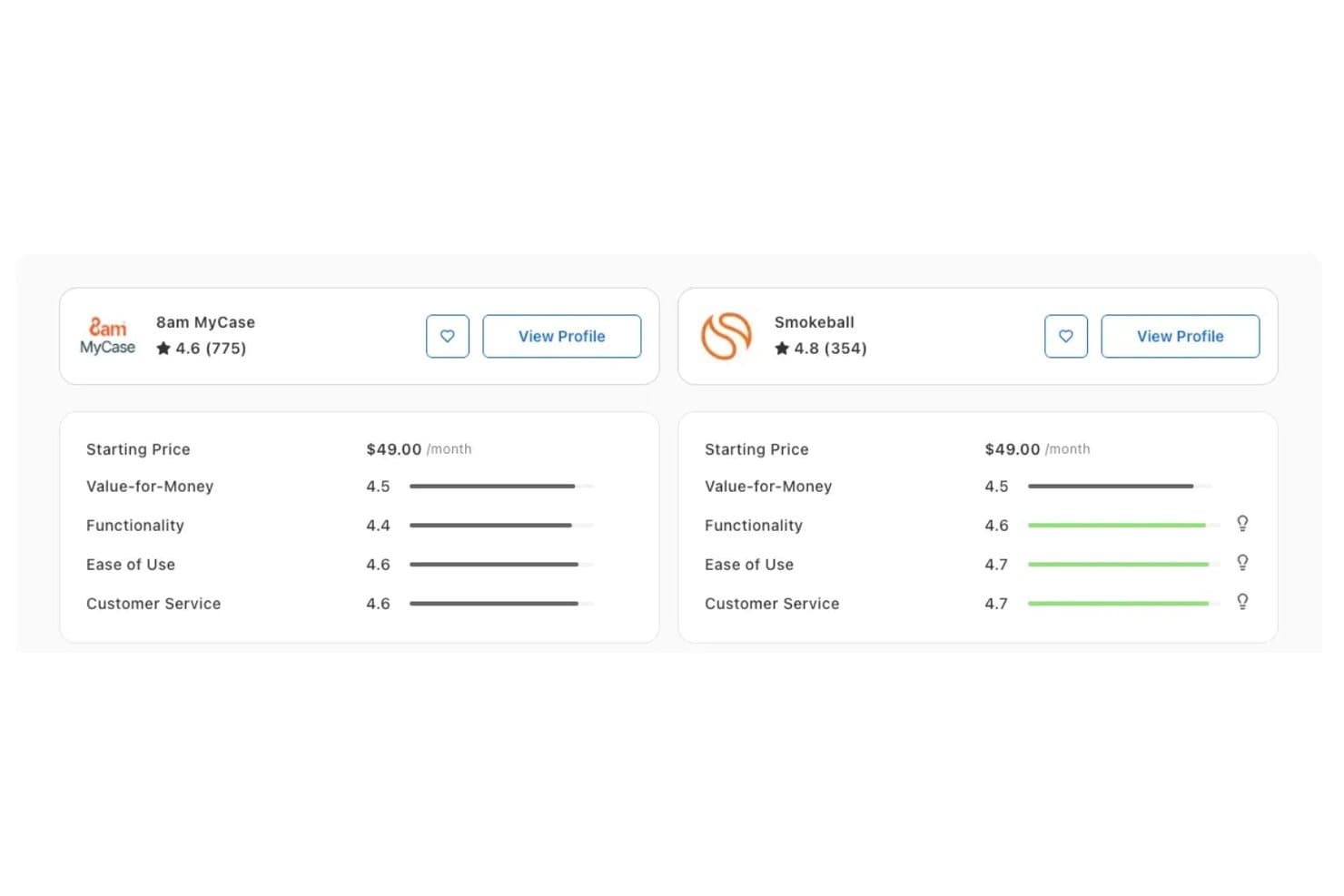
Smokeball supera 8am MyCase in Funzionalità (4.6 vs 4.4), Facilità d'uso (4.7 vs 4.6) e Assistenza clienti (4.7 vs 4.6) secondo le valutazioni di Capterra. Smokeball è una piattaforma di gestione dello studio legale basata su cloud pensata per avvocati singoli e piccoli studi legali che desiderano sostituire i flussi di lavoro manuali con il monitoraggio automatico del tempo, l'automazione dei documenti e la contabilità fiduciaria integrata.
Per chi è più adatto Smokeball?
Smokeball è particolarmente indicato per piccoli studi legali e professionisti autonomi che gestiscono alti volumi di lavoro ripetitivo in ambiti ben definiti come diritto di famiglia, immobiliare o lesioni personali.
Perché Smokeball è una valida alternativa a MyCase
Ho scelto Smokeball tra i migliori perché la sua funzionalità AutoTime rileva in modo passivo il tempo fatturabile in background, mappando le attività svolte su Word, Outlook e file di caso direttamente sulla pratica corretta senza alcun inserimento manuale. È un passo significativo oltre i timer manuali di MyCase. Apprezzo anche il livello di automazione documentale: TemplateLab utilizza logiche condizionali per generare documenti specifici per la pratica da una libreria di oltre 20.000 moduli giurisdizionali, riducendo drasticamente i tempi di redazione nei lavori ripetitivi e ad alto volume.
Caratteristiche principali di Smokeball
- Report sugli insight dello studio: Monitora la redditività delle pratiche e l'attività del personale con dashboard di analisi integrate.
- Modelli per aree di pratica: Utilizza modelli predefiniti e personalizzabili concepiti per ambiti legali comuni come diritto di famiglia e immobiliare.
- Portale clienti con branding personalizzato: Offri ai clienti messaggistica sicura, condivisione di file e opzioni di pagamento con il marchio dello studio.
- Contabilità fiduciaria conforme a IOLTA: Gestisci registri fiduciari separati ed esegui la riconciliazione a tre vie per la conformità.
Integrazioni di Smokeball
Smokeball offre integrazioni native con Microsoft 365, LawPay, Xero, InfoTrack, CalendarRules, QuickBooks e DocuSign. È disponibile un'API per integrazioni personalizzate.
Pros and Cons
Pros:
- Contabilità fiduciaria IOLTA integrata nella piattaforma
- Portale clienti personalizzato con pagamenti integrati
- Le catene di scadenze basate su regole processuali si calcolano automaticamente
Cons:
- Il design orientato a Windows limita la flessibilità cross-platform
- L'app mobile ha funzionalità limitate rispetto alla piattaforma completa
Learn more about Smokeball: Ideale per la gestione delle pratiche personalizzabile
- Prova gratuita + demo gratuita disponibili
- Prezzo su richiesta
Visit WebsiteCustomer Rating:4.5/5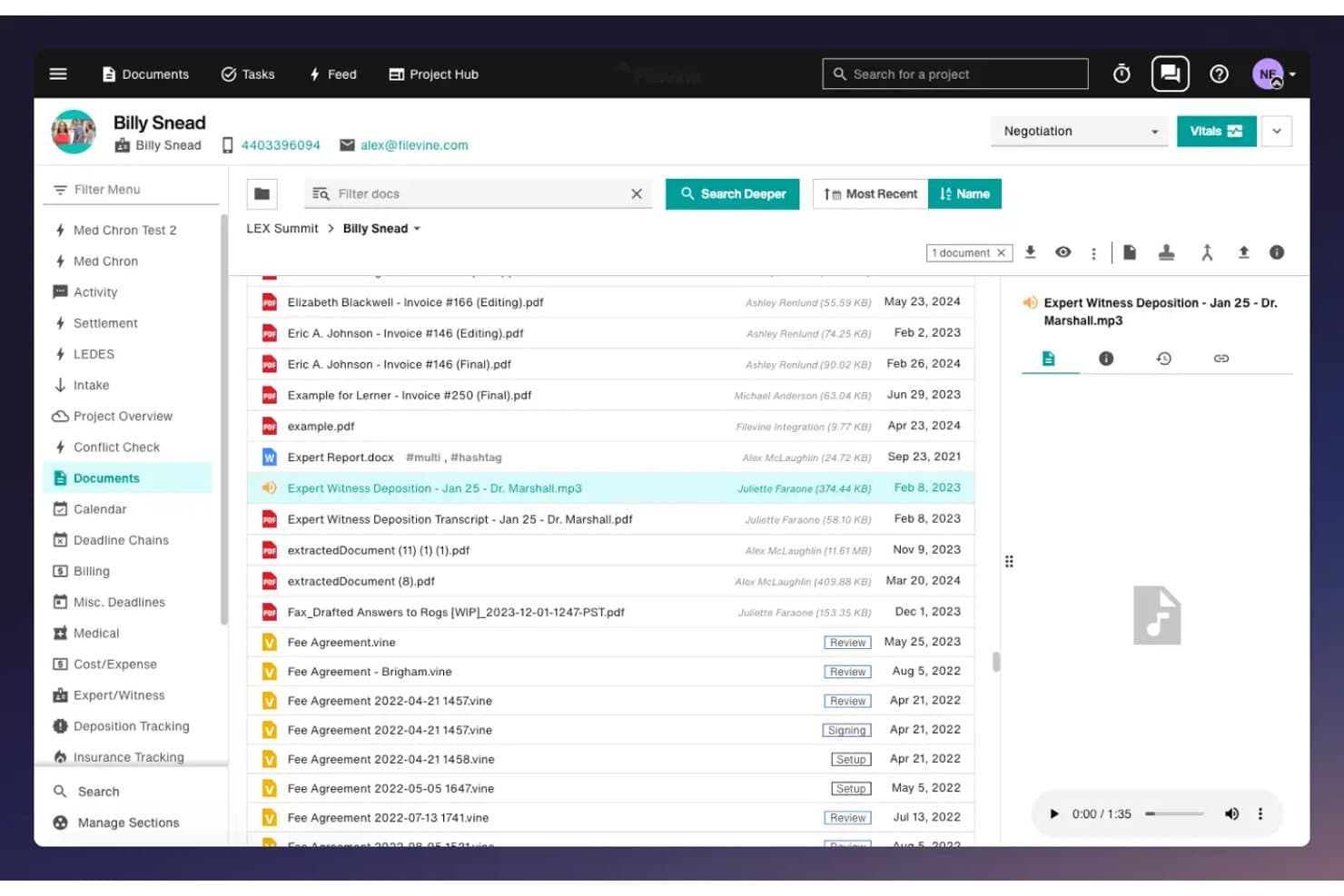
Filevine offre un'interfaccia di gestione documentale con anteprima dei file, riproduzione audio e cartelle di casi organizzate per il tracciamento delle pratiche legali. Filevine è un sistema operativo legale potenziato dall'AI, progettato per studi legali con un alto volume di contenziosi che necessitano di una gestione delle pratiche altamente personalizzabile, assemblaggio automatico di documenti e flussi di lavoro di acquisizione clienti in un'unica piattaforma.
Per chi è Filevine?
Filevine è adatto a studi legali di piccole e medie dimensioni specializzati in contenzioso — in particolare pratiche di lesioni personali e contenziosi civili — che richiedono flussi di lavoro adattati ai loro specifici tipi di casi.
Perché Filevine è una buona alternativa a MyCase
Ho scelto Filevine tra i migliori perché la sua profondità di personalizzazione lo distingue davvero. Mentre MyCase offre una struttura fissa, Filevine consente di creare campi personalizzati, flussi di lavoro su misura e catene di scadenze che rispecchiano realmente il modo in cui opera il vostro studio. Mi piace in particolare AIBlocks, che gestisce l’assemblaggio automatico di documenti utilizzando i vostri modelli e campi di unione, e Lead Docket, che trasforma l’acquisizione dei clienti in un processo completamente automatizzato con il monitoraggio dei referral integrato.
Funzionalità principali di Filevine
- Dashboard di analisi Periscope: Genera report in tempo reale e visualizza metriche chiave direttamente nella tua area di lavoro Filevine.
- Integrazione firma elettronica Vinesign: Raccogli firme elettroniche sui documenti utilizzando uno strumento nativo con invio tramite testo ed email.
- Messaggistica bidirezionale con i clienti: Comunica con i clienti tramite SMS inviati e ricevuti direttamente all'interno di ciascun fascicolo.
- Sincronizzazione email Outlook: Archivia le email come parte della pratica grazie a una perfetta integrazione con Microsoft Outlook.
Integrazioni Filevine
Filevine offre integrazioni native con Vinesign, Lead Docket, Microsoft Outlook, Google Calendar e QuickBooks Online. È disponibile un’API per integrazioni personalizzate.
Pros and Cons
Pros:
- Campi delle pratiche e flussi di lavoro altamente personalizzabili
- AI nativa per la redazione di documenti e riepiloghi
- Acquisizione clienti automatizzata con monitoraggio dei referral
Cons:
- La configurazione iniziale richiede un impegno significativo
- Le funzionalità di reportistica sono inferiori rispetto ad altri strumenti di gestione casi
Learn more about Filevine: 8Ideale per la gestione legale tutto-in-uno
Clio
- Prova gratuita di 7 giorni + demo gratuita disponibile
- A partire da $69CAD/utente/mese (fatturato annualmente)
Visit WebsiteCustomer Rating:4.5/5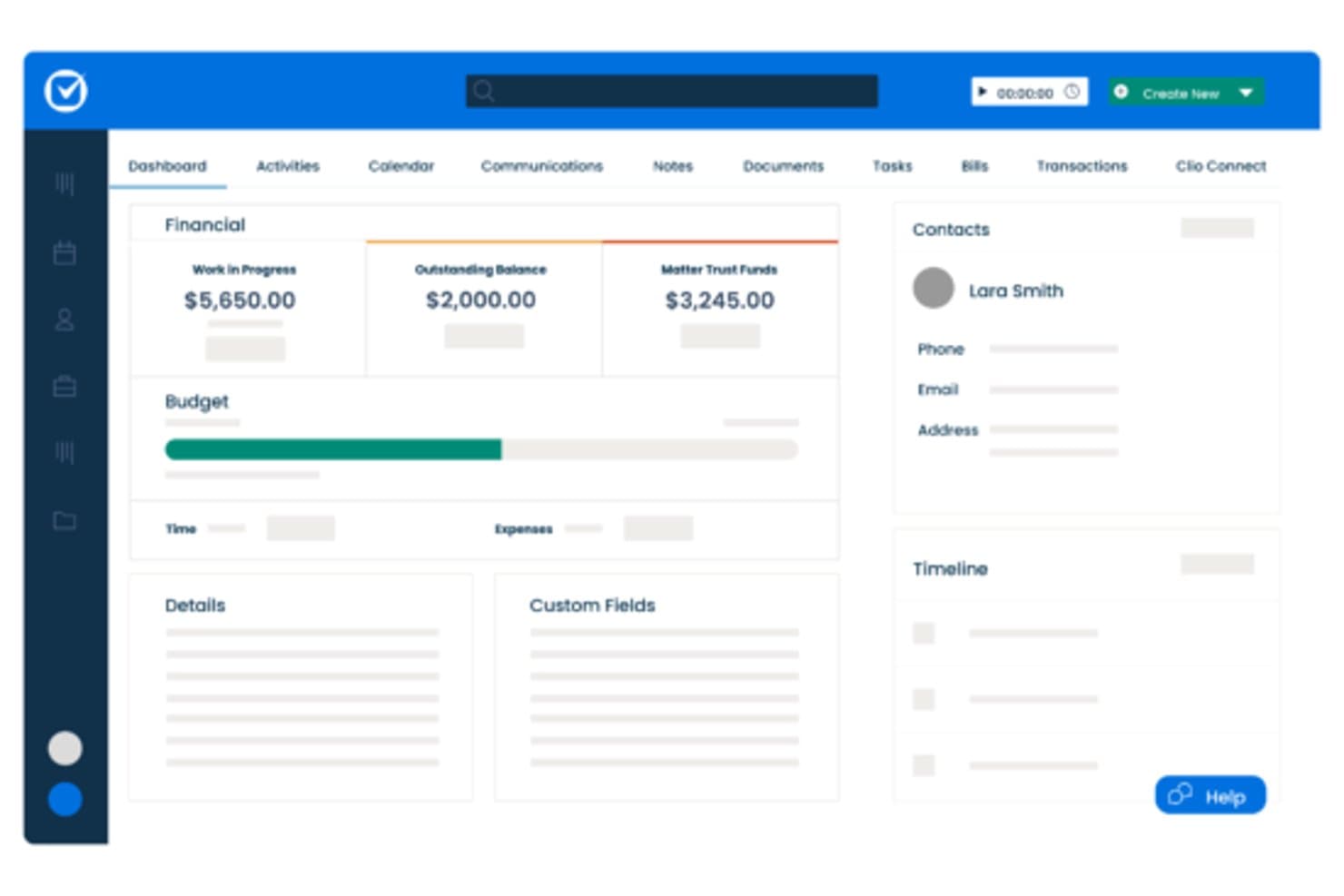
Clio offre una dashboard delle pratiche con riepiloghi finanziari, monitoraggio del budget, dettagli di contatto e visualizzazioni della timeline per la gestione dei casi. Clio è una piattaforma di gestione dello studio legale basata sul cloud pensata per avvocati individuali e studi legali di piccole e medie dimensioni, che combina la gestione delle pratiche, la fatturazione LEDES, la contabilità fiduciaria, l'automazione dei documenti e un portale clienti con oltre 300 integrazioni di terze parti.
Per chi è più indicato Clio?
Clio è adatto a studi legali in crescita che necessitano di una piattaforma unica per gestire fatturazione, conformità e comunicazione con i clienti senza dover ricorrere a più strumenti separati.
Perché Clio è una valida alternativa a MyCase
Clio merita il suo posto nella mia lista perché offre una profondità all-in-one che va oltre quella di MyCase. Apprezzo che la fatturazione LEDES/UTBMS e la riconciliazione a tre vie dei fondi fiduciari siano incluse già nel piano Starter di base. In pratica, il mio team genera narrazioni di fatturazione conformi ai tribunali e riconcilia i registri fiduciari da un’unica dashboard. La generazione di fatture tramite AI nei piani Core e superiori elimina inoltre una parte significativa del lavoro di redazione delle narrazioni di fatturazione dal carico del mio team.
Funzionalità chiave di Clio
- Aggiornamenti ai clienti redatti dall’AI: Genera automaticamente aggiornamenti sullo stato della pratica pronti per il cliente utilizzando il contesto dei fascicoli.
- Automazione dell’accettazione clienti: Moduli online configurabili raccolgono i dati dei potenziali clienti, avviano follow-up e danno inizio alla creazione delle pratiche.
- Costruttore di modelli di documenti: Crea e riutilizza modelli di documenti legali personalizzati direttamente all’interno della piattaforma.
- Integrazione con il deposito telematico in tribunale: Invia documenti ai tribunali elettronicamente tramite connessioni integrate a pagamento per deposito.
Integrazioni di Clio
Clio offre oltre 300 integrazioni native tra cui QuickBooks Online, Xero, Microsoft 365, Google Workspace, NetDocuments, Dropbox, Box, LawPay, Zoom e CalendarRules. È disponibile un’API per integrazioni personalizzate.
Pros and Cons
Pros:
- Firma elettronica nativa su tutti i piani a pagamento
- Pratiche, fatturazione e fondi fiduciari condividono un’unica dashboard
- Oltre 300 integrazioni verificate di terze parti disponibili
Cons:
- Clio Grow per l’acquisizione clienti è venduto come componente aggiuntivo separato
- La ricerca nel contenuto dei documenti restituisce risultati non sempre coerenti
Learn more about Clio: Ideale per contabilità legale integrata
- Prova gratuita di 10 giorni
- Da $109/utente/mese (fatturato annualmente)
Visit WebsiteCustomer Rating:4.4/5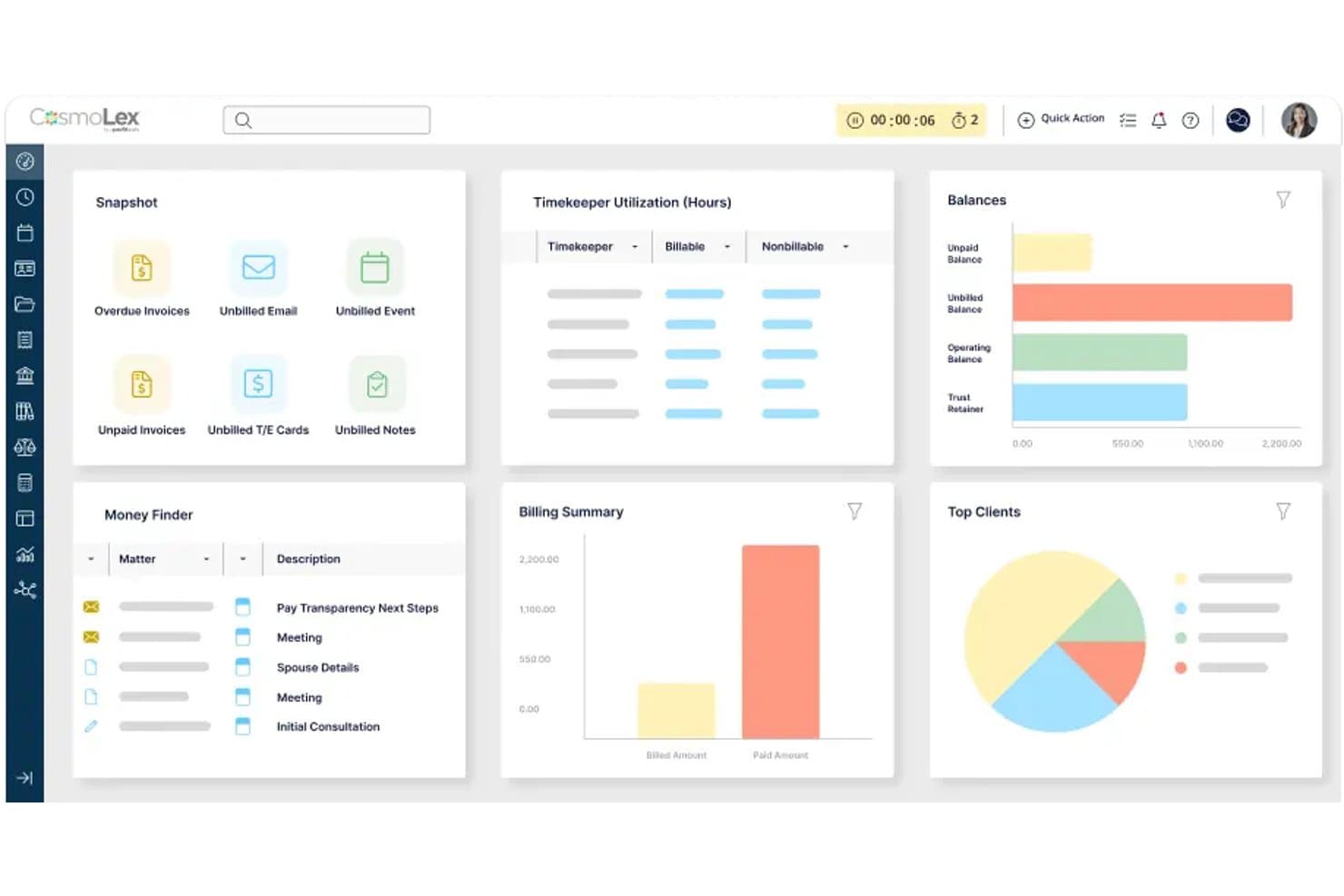
CosmoLex offre una dashboard completa con riepiloghi di fatturazione, utilizzo dei collaboratori, saldi clienti e monitoraggio delle pratiche come alternativa a MyCase. CosmoLex è una piattaforma cloud di gestione dello studio legale pensata per avvocati singoli e piccoli studi che combina gestione dei casi, fatturazione e contabilità legale completa in un unico sistema — eliminando la necessità di software di contabilità separati come QuickBooks.
Per chi è ideale CosmoLex?
Avvocati singoli e soci amministratori di piccoli studi che desiderano gestire la pratica e la contabilità legale in un unico luogo, senza dover integrare strumenti separati.
Perché CosmoLex è una valida alternativa a MyCase
Ho scelto CosmoLex per questa lista perché la sua gestione dei fondi fiduciari è integrata nello stesso sistema della fatturazione e della gestione dei casi. Questo significa che riconciliazione tripla, registri fiduciari per cliente e trasferimenti da fondo fiduciario a operativo avvengono tutti nello stesso posto, senza dover cambiare strumenti o sincronizzare dati tra piattaforme. MyCase richiede QuickBooks per tutte le funzionalità contabili, creando lacune nella riconciliazione che CosmoLex evita per progettazione.
Funzionalità chiave di CosmoLex
- Gestione documentale: Archivia, organizza e condividi documenti con firma elettronica integrata e accesso sicuro al portale clienti.
- Workflow delle pratiche: Automatizza attività e aggiornamenti di stato tramite workflow personalizzabili per ogni tipologia di caso.
- Report personalizzati: Genera oltre 100 report finanziari e di produttività per una visibilità completa su pratiche e fatturazione.
- Sincronizzazione calendario integrata: Connettiti con Outlook, Google Calendar e iCal per sincronizzare scadenze e appuntamenti a livello di studio.
Integrazioni CosmoLex
CosmoLex offre integrazioni native con NetDocuments, OneDrive, Google Drive, Dropbox, Box e QuickBooks Online, oltre alla sincronizzazione del calendario con Outlook, Office 365, Google Calendar e iCal. È disponibile un'API per integrazioni personalizzate.
Pros and Cons
Pros:
- Contabilità legale completa integrata nella piattaforma
- Riconciliazione tripla dei fondi fiduciari conforme ai requisiti dell'albo
- Non serve software di contabilità separato
Cons:
- Le funzionalità dell'app mobile sono inferiori rispetto ai concorrenti
- Gli strumenti di automazione documentale sono meno avanzati
Learn more about CosmoLex: Ideale per flussi di lavoro intuitivi nelle pratiche e nella fatturazione
- Prova gratuita di 7 giorni + demo gratuita disponibile
- A partire da $49/utente/mese (fatturazione annuale)
Visit WebsiteCustomer Rating:4.3/5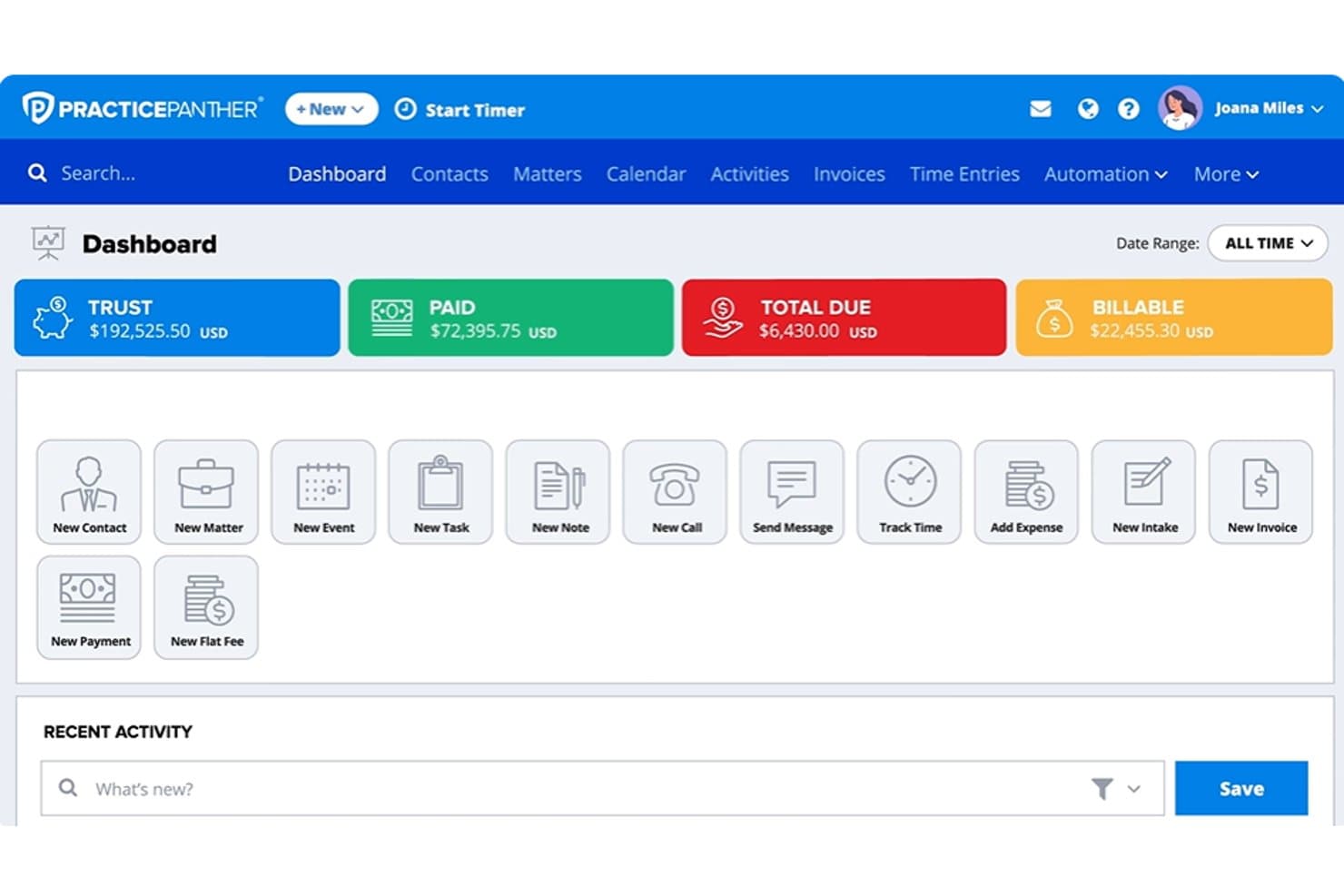
Dashboard di PracticePanther che mostra saldi fiduciari, pagamenti, importi fatturabili, pratiche e strumenti di fatturazione legale PracticePanther è una piattaforma di gestione dello studio legale basata su cloud, creata per avvocati singoli e piccoli studi legali che necessitano di fatturazione nativa, contabilità fiduciaria, acquisizione clienti e gestione delle pratiche senza dover integrare strumenti di terze parti.
Per chi è più indicato PracticePanther?
PracticePanther è adatto agli studi legali in crescita con due-quindici avvocati che desiderano una piattaforma unica per gestire acquisizione clienti, fatturazione e contabilità fiduciaria senza configurazioni IT complesse.
Perché PracticePanther è una buona alternativa a MyCase
Ho scelto PracticePanther tra i migliori perché il suo flusso di fatturazione è veramente integrato e non un'aggiunta successiva. Mentre MyCase gestisce i pagamenti tramite LawPay (un abbonamento separato), PantherPayments offre la gestione nativa dei pagamenti con carta di credito, ACH ed eCheck direttamente all'interno della piattaforma. Apprezzo anche i flussi di lavoro condizionali per attività ed eventi che attivano automaticamente le fasi successive quando lo stato di una pratica cambia, facendo avanzare i casi senza interventi manuali.
Caratteristiche principali di PracticePanther
- Moduli di acquisizione illimitati e personalizzati: crea moduli dinamici con logica condizionale per automatizzare la profilazione dei nuovi clienti e la qualificazione dei lead.
- Messaggistica bidirezionale nativa: comunica in modo sicuro con i clienti attraverso la piattaforma utilizzando un numero telefonico aziendale dedicato.
- Contabilità fiduciaria completa: gestisci registri fiduciari conformi IOLTA con riconciliazione a tre vie e audit trail dettagliati.
- Calendario scadenze processuali con LawToolBox: calcolo automatico delle scadenze e sincronizzazione dei calendari giudiziari per competenza, per una gestione completa dei termini.
Integrazioni PracticePanther
PracticePanther offre integrazioni native con LawToolBox, QuickBooks Online, Google Workspace, Microsoft 365, Dropbox, Box e OneDrive. Sono disponibili anche Zapier e API per integrazioni personalizzate.
Pros and Cons
Pros:
- La contabilità fiduciaria nativa è conforme ai requisiti IOLTA
- Firma elettronica integrata per le lettere d'incarico con i clienti
- I flussi di lavoro si attivano automaticamente al cambio dello stato di una pratica
Cons:
- Gli strumenti di reportistica non sono approfonditi né flessibili
- L'assembly documentale è meno avanzato rispetto ai concorrenti
Learn more about PracticePanther:
Altre alternative a MyCase
\u003cspan style=\u0022font-weight: 400\u0022\u003eEcco alcune ulteriori alternative a MyCase che non sono entrate nella mia selezione, ma che vale comunque la pena prendere in considerazione:\u003c/span\u003e
- 11CenterbaseIdeale per la gestione degli studi legali di medie dimensioni
- 12Bill4timeIdeale per il monitoraggio del tempo e la fatturazione legali
- 13LEAPIdeale per documenti legali e gestione dei casi
- 14SmartAdvocateIdeale per la gestione dei casi di contenzioso
- 15Tabs3Ideale per la fatturazione e la contabilità legale
- 16NeosIdeale per la gestione dei casi legali su cloud
- 17MerusCaseIdeale per flussi di lavoro legali automatizzati
- 18PCLaw®Ideale per la contabilità e la fatturazione degli studi legali
Come Valuto le Alternative a MyCase
Per prima cosa verifico se una piattaforma copre ciò che già gestisce MyCase—monitoraggio delle pratiche, fatturazione dei clienti, gestione dei fondi fiduciari e condivisione documenti tramite un portale. Poi esamino gli elementi distintivi che differenziano uno strumento dall'altro.
Funzionalità di Base (Requisiti Minimi per Questa Lista)
Quando seleziono gli strumenti per la mia lista, valuto ciascuno su una scala da 0 (non offre la funzionalità) a 5 (eccelle in quest'area) per ognuna delle funzionalità di base elencate qui sotto. Successivamente, trasformo il punteggio totale dello strumento in una percentuale. Ogni strumento deve ottenere un punteggio minimo totale del 75% per essere incluso.
- Gestione delle Pratiche: Cerco archivi strutturati delle pratiche con campi personalizzati, contatti collegati e monitoraggio delle scadenze—così nulla sfugge durante il contenzioso attivo.
- Gestione Documentale: Le librerie di modelli con campi unione sono fondamentali qui, specialmente per gli studi che generano grandi volumi di lettere di incarico o atti giudiziari.
- Rilevazione Tempo e Fatturazione: Valuto la flessibilità nell'inserimento delle ore, le opzioni di fatturazione e il supporto per diversi tipi di tariffe come forfettarie, a risultato e a ore.
- Portale Clienti: Portali sicuri dove i clienti possono visualizzare aggiornamenti delle pratiche, condividere documenti e messaggiare con il proprio avvocato riducono lo scambio di email superflue.
- Contabilità dei Fondi Fiduciari: Verifico la presenza di registri conformi IOLTA con monitoraggio per cliente e report di riconciliazione che soddisfano i requisiti di audit delle associazioni forensi.
- Calendario e Scadenze: La pianificazione basata sulle regole dei tribunali è fondamentale—piattaforme come Clio e Smokeball offrono catene di scadenze che si aggiornano automaticamente se cambia la data di un'udienza.
Una volta che ho una lista di strumenti che soddisfano i criteri, considero cosa distingue ciascuna piattaforma.
Fattori Differenzianti (Cosa Distingue i Fornitori)
Ecco come confronto e metto a fuoco le differenze tra i vari fornitori:
Funzionalità Distintive
I flussi nativi di firma elettronica evitano allo studio di dover gestire un abbonamento separato a DocuSign o Adobe Sign solo per lettere di incarico e mandati. Valuto anche se una piattaforma include strumenti di AI specifici per il settore legale—la sintesi di atti processuali o la bozza di corrispondenza direttamente nella pratica fanno risparmiare tempo. L'automazione dell'accettazione dei clienti è un'altra area che analizzo attentamente, soprattutto i moduli con logica condizionale e controllo dei conflitti che permettono di far passare un potenziale cliente dal primo contatto alla firma senza seguito manuale.
Oltre le Funzionalità
La migrazione dei dati è rilevante quando si lascia MyCase—verifico se i fornitori offrono servizi di migrazione che coprono pratiche, contatti, documenti e storico fatturazione. La conformità è un altro aspetto che valuto bene, inclusa la certificazione SOC 2 Tipo II, la cifratura e i registri di audit che supportano i vostri doveri secondo la Regola Modello 1.6 dell'ABA. Anche il costo totale di proprietà è decisivo, poiché i costi aggiuntivi per pagamenti, firme elettroniche o portali clienti possono facilmente far lievitare il prezzo per utente oltre quello pubblicizzato.
Perché cercare un'alternativa a MyCase?
Sebbene MyCase sia una buona scelta come software per la gestione dei casi legali, ci sono diversi motivi per cui alcuni utenti cercano soluzioni alternative. Potresti cercare un’alternativa a MyCase perché…
- Hai bisogno di un'automazione dei documenti più avanzata
- Desideri una contabilità fiduciaria IOLTA completa con riconciliazione a tre vie
- Richiedi integrazioni più approfondite con gli strumenti di posta elettronica o contabilità esistenti
- Ritieni che i prezzi di MyCase non siano adatti al tuo budget o alle dimensioni del tuo studio
- Lavori in un'area di pratica che richiede flussi di lavoro più specializzati
- Hai bisogno di funzionalità migliori per l'acquisizione dei clienti o la gestione dei contatti
Se ti riconosci in una di queste situazioni, sei nel posto giusto. Il mio elenco contiene diverse opzioni di software per la gestione dei casi legali più adatte ai team che affrontano queste difficoltà con MyCase e cercano soluzioni alternative.
Funzionalità principali di MyCase
Ecco alcune delle funzionalità principali di MyCase, per aiutarti a confrontare ciò che offrono le soluzioni alternative:
- Gestione delle pratiche: Centralizza tutti i dettagli delle pratiche, i contatti, le note e le scadenze per facilitarne l'accesso e il monitoraggio, così la tua squadra rimane sempre allineata sull'avanzamento di ogni pratica.
- Gestione dei documenti: Consente di archiviare, organizzare, modificare e condividere in modo sicuro i documenti legali con il controllo delle versioni, così nulla di importante viene perso o sovrascritto.
- Monitoraggio del tempo: Permette di registrare le ore fatturabili direttamente all'interno di ogni pratica, aiutando a contabilizzare ogni minuto di lavoro e a migliorare la precisione della fatturazione.
- Fatturazione ed emissione delle fatture: Genera e invia automaticamente le fatture, supporta diversi tipi di tariffa e si integra con i sistemi di pagamento online per semplificare la riscossione.
- Portale clienti: Offre un portale sicuro e personalizzato con il marchio dello studio, dove i clienti possono visualizzare documenti, messaggi e fatture, rendendo semplici la comunicazione e la condivisione delle informazioni.
- Contabilità fiduciaria: Fornisce una gestione fiduciaria conforme alle IOLTA, separando automaticamente i fondi dei clienti e monitorando i saldi per garantire la conformità e la preparazione alle verifiche.
- Calendario e scadenze: Include la gestione del calendario basata sulle norme dei tribunali e il monitoraggio delle scadenze, per aiutare la tua squadra a tenere sotto controllo date e attività importanti.
- Acquisizione dei clienti: Consente di creare moduli personalizzati per l'acquisizione, automatizzare i solleciti e gestire in un unico luogo i potenziali nuovi clienti, per un processo di inserimento più efficiente.
- Flussi di lavoro per la firma elettronica: Semplifica la firma di lettere d'incarico, mandati e altri documenti direttamente dalla piattaforma, senza strumenti di terze parti.
- Resoconti e analisi: Permette di monitorare le prestazioni dello studio, le ore fatturabili, gli incassi e le pratiche aperte, così puoi prendere decisioni aziendali consapevoli.