

Skybasert CRM for advokatpraksiser viser til programvare som hjelper advokatfirmaer med å administrere klientforhold, automatisere inntak og samle viktige prosesser – alt tilgjengelig overalt med en internettforbindelse. Hvis du ser etter løsninger som kan organisere saksmapper, spore klientkommunikasjon og støtte veksten din uten ekstra manuelt arbeid, har du kommet til rett sted. Denne veiledningen går gjennom hva som er viktigst når du velger spesialutviklede plattformer for advokatpraksiser, slik at du kan finne den riktige løsningen for effektivt samarbeid, etterlevelse og klientservice.
Hvorfor du kan stole på våre programvareanbefalinger
6,700+
Reviews
20
Industry experts
16+
Evaluation factors
14
Years
Teamet vårt har testet og anmeldt programvare siden 2012. Vi leder selv advokatfirmaer, så vi vet hvor vanskelig og hvor viktig det er å velge riktig programvare.
I denne guiden har vi vurdert verktøyene gjennom praktisk testing og uavhengig research og gitt dem poeng ut fra våre utvelgelseskriterier.
Anmeldelsene våre bygger på vår egen redaksjonelle vurdering. De er ikke et salgsargument.
Sammenligningstabell for skybaserte CRM-systemer for advokatpraksiser
Tabellen nedenfor sammenligner prisopplysninger for mine beste utvalgte skybaserte CRM-systemer for advokatpraksiser.
| Tool | Best For | Trial Info | Price | ||
|---|---|---|---|---|---|
| 1 | Best for automated legal document generation | Not available | Pricing upon request | Website | |
| 2 | Best for comprehensive referral source tracking | Free demo available | Pricing upon request | Website | |
| 3 | Best for centralized conflict checks | Free demo available | Pricing upon request | Website | |
| 4 | Best for configurable matter pipelines | Free demo available | From $150/user/month | Website | |
| 5 | Best for unified billing and case management | 10-day free trial | From $49/user/month (billed annually) | Website | |
| 6 | Best for automated legal intake workflows | 7-day free trial | From $49/user/month (billed annually) | Website | |
| 7 | Best for built-in e-signature and document sharing | 10-day free trial | From $50/user/month (billed annually) | Website | |
| 8 | Best for advanced client engagement automation | Free demo available | Pricing upon request | Website | |
| 9 | Best for multi-device legal team collaboration | Free trial available | From $49/user/month (billed annually) | Website | |
| 10 | Best for integrated text and call tracking | Free demo available | Pricing upon request | Website |


Anmeldelser av skybaserte CRM-systemer for advokatpraksiser
\u003cspan style=\u0022font-weight: 400;\u0022\u003eNedenfor finner du mine detaljerte sammendrag av de beste skybaserte CRM-systemene for advokatpraksiser som kom med på kortlisten min. Anmeldelsene mine gir en detaljert gjennomgang av funksjonene, de beste bruksområdene og integrasjonene til hver plattform, slik at du kan finne den som passer best for deg.\u003c/span\u003e
 Best for automated legal document generation
- Not available
- Pricing upon request
Visit WebsiteCustomer Rating:4.8/5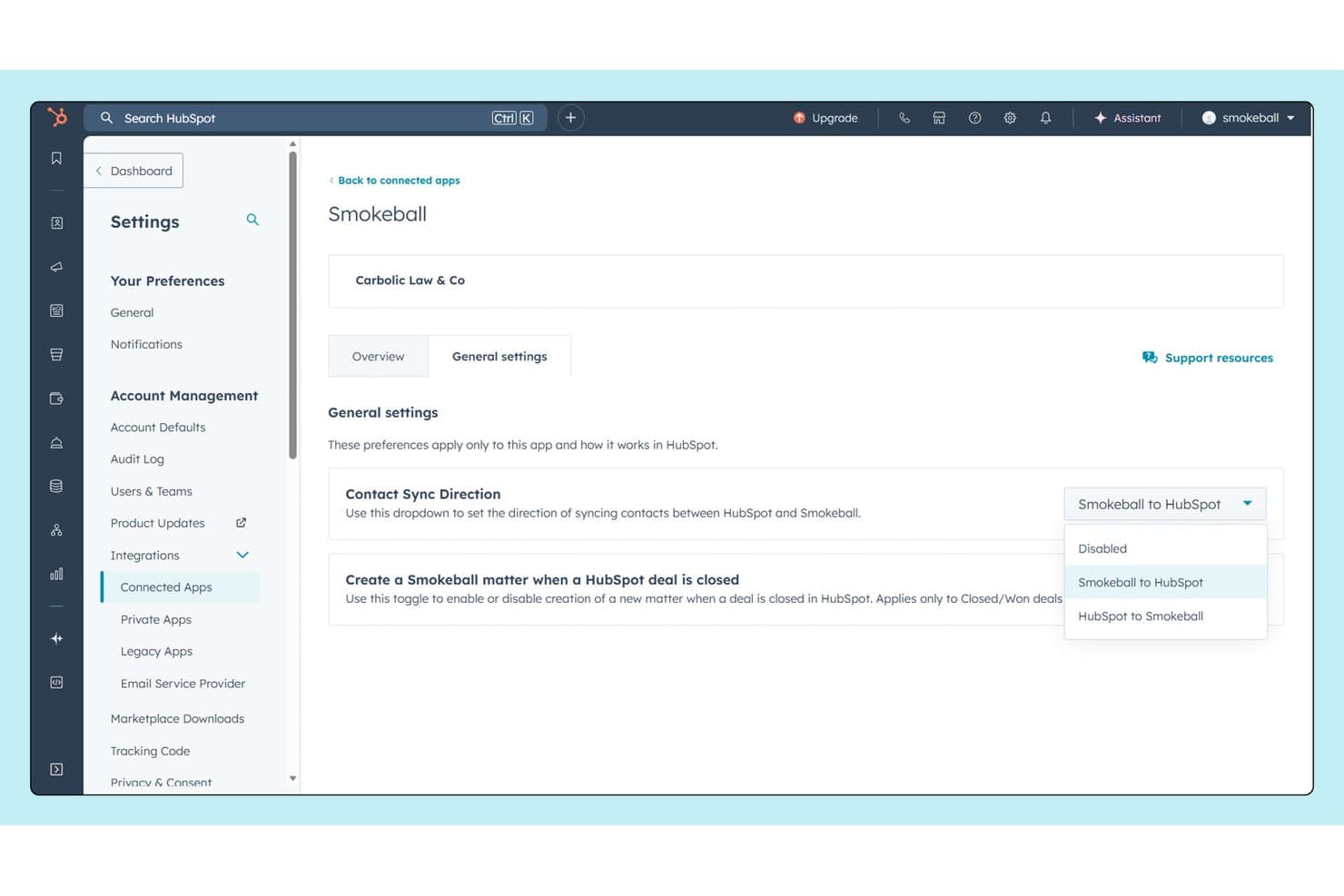
Smokeball syncs contacts bidirectionally with HubSpot CRM. Smokeball is a cloud-based legal practice management platform for small and mid-size law firms, combining matter management, client intake, document automation, automatic time tracking, and billing in one system.
Who Is Smokeball Best For?
Smokeball suits solo attorneys and small firm partners who handle high document volumes across practice areas like family law, real estate, and litigation.
Why I Picked Smokeball
Smokeball earns its spot on my shortlist because of its TemplateLab library, which gives firms access to 20,000+ pre-built court forms and templates across 250+ practice areas. I love that documents auto-populate with matter data directly inside Microsoft Word, cutting manual entry on high-volume files like real estate closings or family law petitions. AutoTime then passively logs the time spent in those documents without any manual input.
Smokeball Key Features
- Lead management and inquiry intake: Track leads and manage new client inquiries directly within the platform.
- Conflict check automation: Run automated searches against contacts, matters, and related parties before onboarding new clients.
- Customizable workflow templates: Set up standardized processes and task lists for different matter types and practice areas.
- Integrated firm insights reporting: Access real-time dashboards and customizable reports for billing, client, and profitability analysis.
Smokeball Integrations
Smokeball offers native integrations with Microsoft 365, LawPay, QuickBooks Online, Xero, InfoTrack, RingCentral, CEB Essential Forms, Zoom, LAWCLERK, and Thomson Reuters CoCounsel Legal. An API is available for custom integrations.
Pros and Cons
Pros:
- Passive matter activity tracking built in
- Deep document library across 250+ practice areas
- Automatic time capture without manual input
Cons:
- CRM pipeline features thinner than dedicated tools
- Windows-dependent desktop app limits true mobility
Learn more about Smokeball: Best for comprehensive referral source tracking
- Free demo available
- Pricing upon request
Visit WebsiteCustomer Rating:4.7/5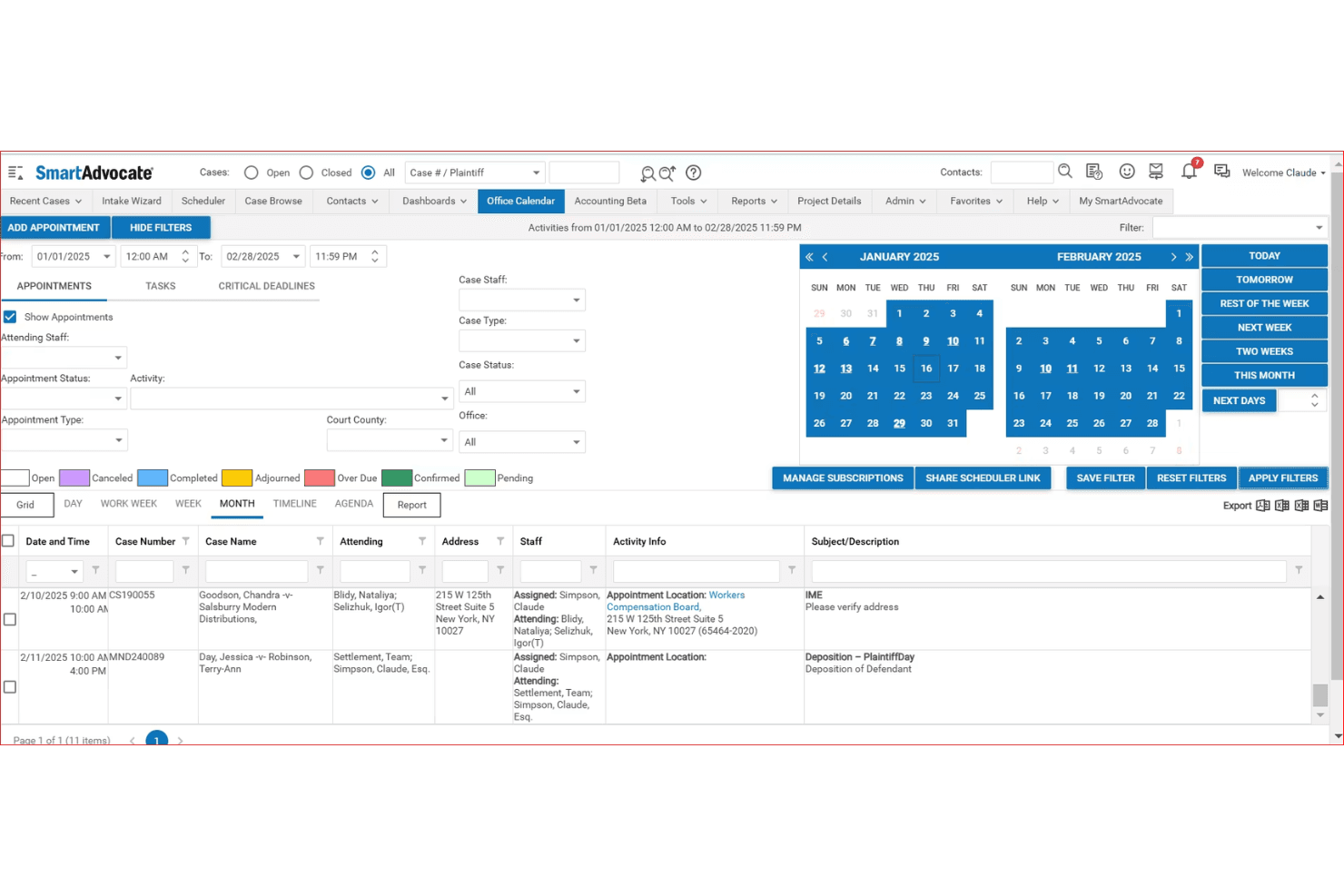
SmartAdvocate centralizes case appointments and deadlines in one calendar view. SmartAdvocate is a cloud-based legal case management and CRM platform built for plaintiff-side law firms, combining client intake, matter tracking, workflow automation, document management, and referral source reporting in one system.
Who Is SmartAdvocate Best For?
It's a strong fit for personal injury and mass tort law firms managing high case volumes across multiple practice locations or staff teams.
Why I Picked SmartAdvocate
I picked SmartAdvocate as one of the best because its referral source tracking goes deeper than any other platform I've seen in this space. The Intake Wizard captures referral data at the point of intake, and configurable dashboards let me see which referral sources are converting, at what rate, and what revenue they're generating. I can score and rank intake leads by source, which makes it easy to identify which attorney relationships or marketing channels are actually driving signed cases.
SmartAdvocate Key Features
- AI-powered document summarization: Automatically generates concise summaries of motions, medical records, and depositions for each matter.
- Automated conflict checks: Searches all contacts, parties, and previous matters to flag potential conflicts before onboarding a client.
- WorkPlans and automated procedures: Lets you design case workflows that trigger tasks and reminders based on customizable rules.
- Unlimited cloud storage: Stores all documents, communications, and client records in a browser-based platform with no storage limits.
SmartAdvocate Integrations
SmartAdvocate offers native integrations with QuickBooks, Docubee, NotaryLive, Lexitas, eLaw, EvenUp, Supio, Eve Legal, and Outlook, and provides an API for custom integrations.
Pros and Cons
Pros:
- Handles mass tort case volumes at scale
- Built-in billing and time tracking on one platform
- Deep referral source attribution tied to case revenue
Cons:
- Setup and configuration require significant onboarding time
- Primarily built for plaintiff-side firms only
Learn more about SmartAdvocate: Best for centralized conflict checks
- Free demo available
- Pricing upon request
Visit WebsiteCustomer Rating:4.4/5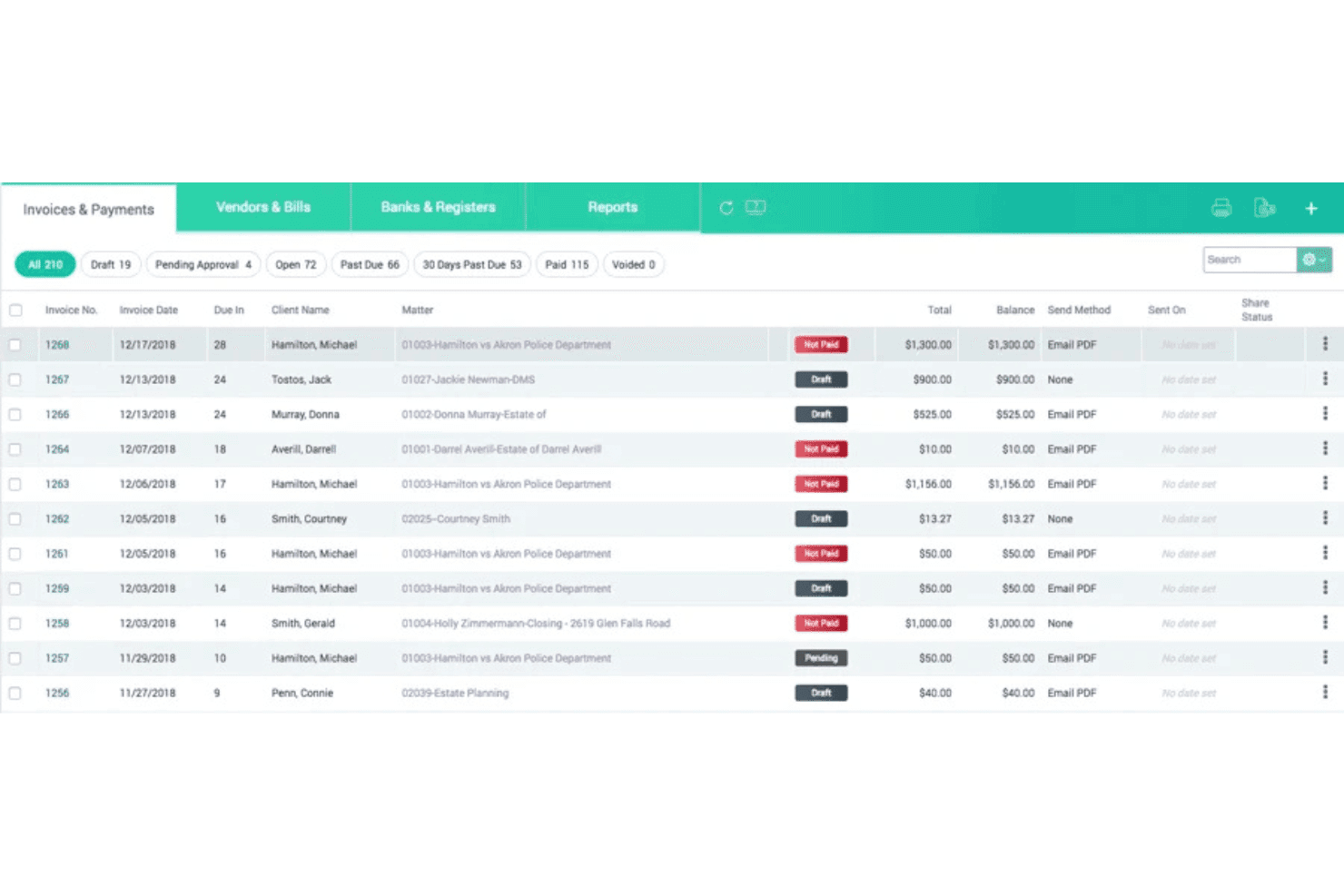
CARET Legal combines accounting, trust reconciliation, and LEDES billing tools. CARET Legal is a cloud-based legal practice management platform that combines matter-centric workflows, built-in billing and accounting, document management, client intake, and conflict checking in one system.
Who Is CARET Legal Best For?
Small to mid-sized law firms that need a single platform to manage intake, billing, and conflict checks without stitching together separate tools.
Why I Picked CARET Legal
I picked CARET Legal because its Enhanced Conflict Check goes well beyond a basic name search. I can run queries using AND, OR, NOT operators and wildcards across contacts, matters, and related parties at the same time. The results export as a formatted PDF or CSV audit report, which my team uses to document due diligence before onboarding any new client.
CARET Legal Key Features
- Built-in email client: Manage, send, and track emails directly from within each matter without external plugins.
- Native document management: Upload, organize, and edit legal documents in a centralized, searchable repository.
- Integrated accounting and billing: Track time, create LEDES invoices, manage trust accounts, and handle payments in one system.
- Mobile app access: View matters, track time, and communicate with clients securely from mobile devices.
CARET Legal Integrations
CARET Legal offers native integrations with Lawmatics, HotDocs, NetDocuments, LawToolBox, RMail, QuickBooks Online, and has native integrations across the Microsoft and Google Workspace ecosystems. An API is available for custom integrations.
Pros and Cons
Pros:
- Handles billing, accounting, and payments natively
- Conflict checks exportable as formatted audit reports
- SOC 2 Type II certified with 99.99% uptime
Cons:
- Steeper setup time for firms migrating legacy data
- Built exclusively for the U.S. market
Learn more about CARET Legal: Best for configurable matter pipelines
- Free demo available
- From $150/user/month
Visit WebsiteCustomer Rating:4.2/5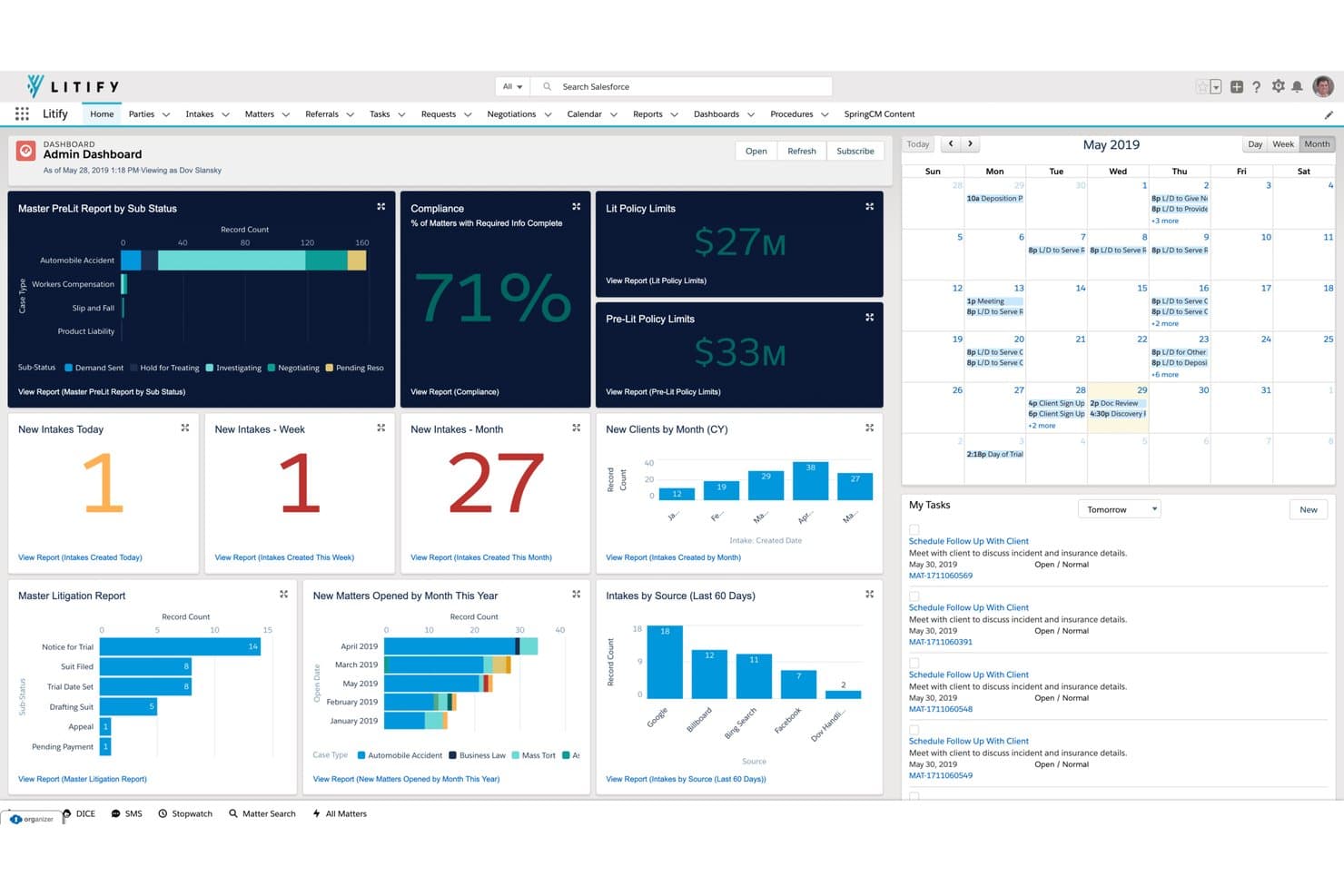
Litify centralizes case metrics, intakes, and tasks in one dashboard. Built natively on Salesforce, Litify is a cloud-based legal CRM that covers client intake, matter management, conflict checks, document handling, and time and billing across 15+ practice areas.
Who Is Litify Best For?
Litify is a strong fit for mid-market and enterprise law firms that need a highly configurable platform built to scale across multiple practice areas.
Why I Picked Litify
Litify earns its spot on my shortlist because of how deeply you can configure matter pipelines to match specific practice areas. I like that Matter Plans let you build templatized task lists per case type, so a personal injury matter and an immigration matter each follow their own structured workflow rather than a generic checklist. The Case Activity Timeline pulls emails, files, and calendar events into a single view per matter, which means I'm never hunting across systems mid-case.
Litify Key Features
- LitifyAI Draft & Ask: Use AI to search, summarize, and query across your entire document repository in real time.
- Time entry automation: Capture suggested billable time entries based on user activity and communications linked to each matter.
- Integrated e-billing: Manage invoices with line-item review, co-counsel recommendations, and compliance safeguards directly within the platform.
- Conflict check agent: Run automated, fuzzy-matching conflict checks across contacts, matters, and parties before onboarding clients.
Litify Integrations
Litify offers native integrations with DocuSign, Adobe Sign, QuickBooks, NetDocuments, Sage Intacct, Accounting Seed, ECFX, Case Status, Vonage, Twilio, and Microsoft 365. It runs on Salesforce and supports additional integrations through the Salesforce AppExchange and a custom API.
Pros and Cons
Pros:
- Intake-to-matter automation reduces manual data entry
- Native Salesforce foundation enables deep reporting
- Highly configurable matter pipelines per practice area
Cons:
- Steep ramp-up for non-Salesforce-familiar staff
- Implementation requires significant time and technical resources
Learn more about Litify: Best for unified billing and case management
- 10-day free trial
- From $49/user/month (billed annually)
Visit WebsiteCustomer Rating:4.4/5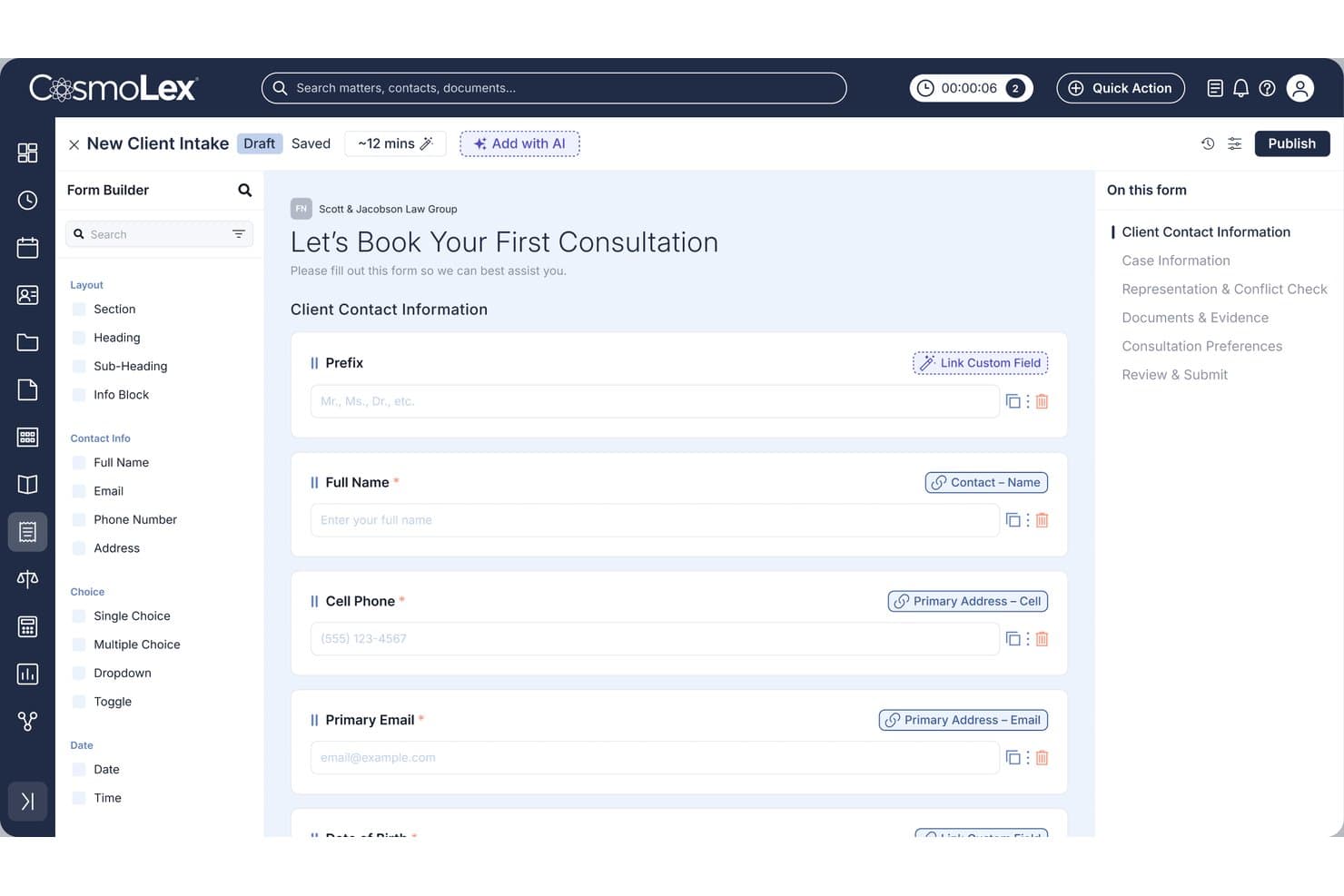
CosmoLex lets users build custom client intake forms with linked CRM fields. CosmoLex is a cloud-based legal practice management platform that combines client intake, matter management, billing, and built-in trust accounting in a single system purpose-built for law firms.
Who Is CosmoLex Best For?
CosmoLex is a strong fit for solo attorneys and small law firms that want practice management, accounting, and client intake handled in one platform.
Why I Picked CosmoLex
CosmoLex earns its spot on my shortlist because trust accounting and billing live in the same system as client and matter data. I like that I can run three-way trust reconciliations and track per-client IOLTA ledgers without switching platforms. Generating LEDES invoices from the same interface where I manage matters means billing stays tied to actual case activity.
CosmoLex Key Features
- Custom intake forms: Build intake questionnaires and online forms that collect client data and feed it directly into the system.
- Conflict check tool: Run conflict-of-interest searches across contacts and matters before opening a new case.
- Cloud document storage: Store, organize, and retrieve case files and documents securely from anywhere using the cloud.
- Mobile access: Log in to manage contacts, matters, and case status from a web browser or mobile device.
CosmoLex Integrations
CosmoLex offers native integrations with Microsoft 365, QuickBooks Online, Dropbox, LawPay, and provides access through Zapier. An API is also available for custom integrations.
Pros and Cons
Pros:
- Conflict checks run directly within the platform
- Billing and matter data stay in one place
- Built-in trust accounting meets bar compliance
Cons:
- Mobile app less capable than desktop version
- Reporting tools offer limited customization options
Learn more about CosmoLex: Best for automated legal intake workflows
- 7-day free trial
- From $49/user/month (billed annually)
Visit WebsiteCustomer Rating:4.7/5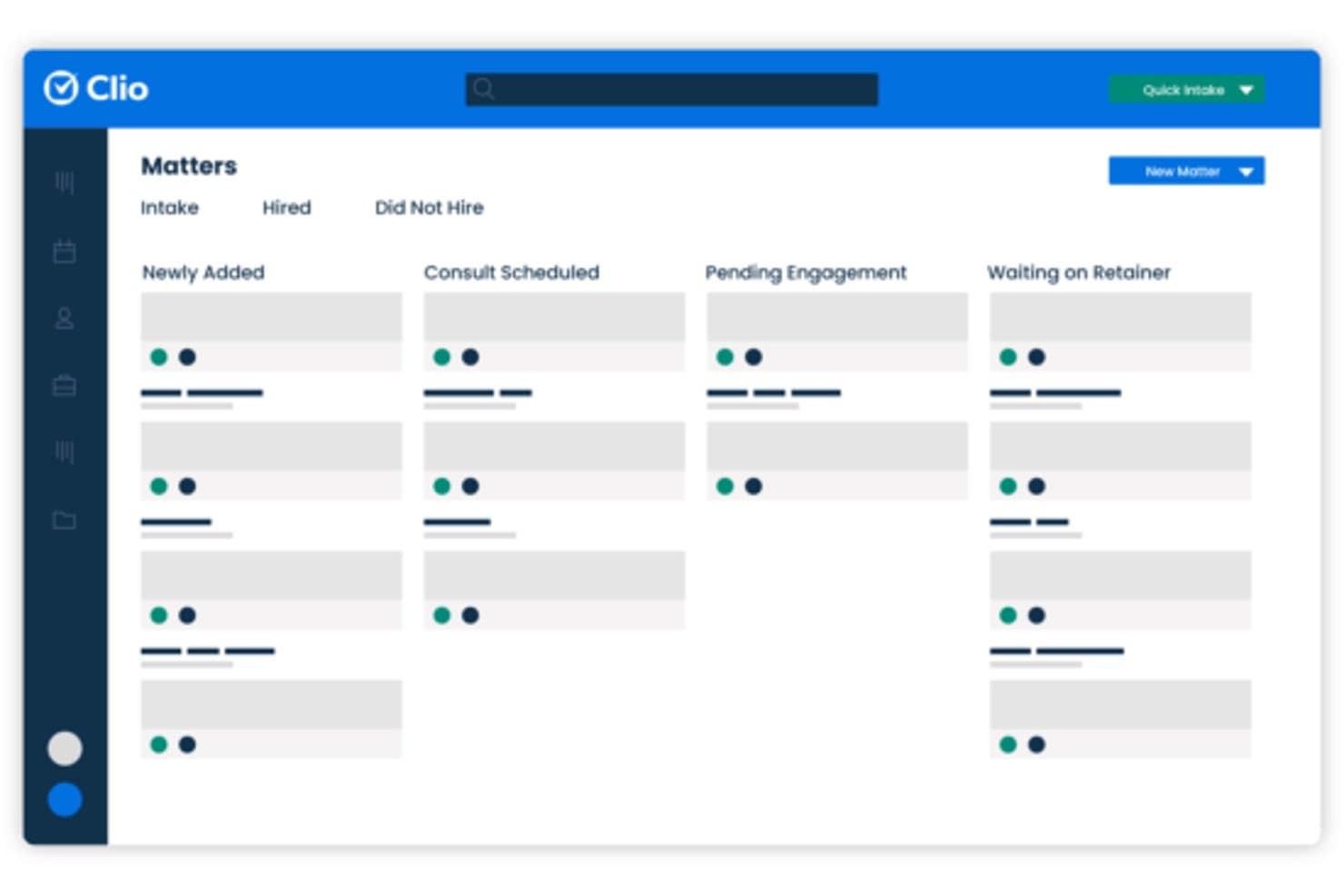
Clio Grow organizes client matters into a visual pipeline by stage. Clio Grow is a cloud-based legal CRM and client intake platform that combines customizable intake forms, lead pipeline tracking, automated client communications, and e-signature workflows built specifically for law firms.
Who Is Clio Grow Best For?
Clio Grow is a natural fit for solo attorneys and small firm partners who already use or plan to use Clio Manage for practice management.
Why I Picked Clio Grow
I've included Clio Grow in my top picks because its intake automation goes well beyond basic form-building. The Matter Pipeline gives you a visual, stage-by-stage view of every prospect, while Grow AI qualifies leads, runs conflict checks, and sends follow-up nudges when a client stalls mid-intake. I particularly like how appointment reminders fire automatically, cutting no-show rates without any manual follow-up from your team.
Clio Grow Key Features
- Legal-specific pipeline dashboard: Visualize and manage prospective and retained clients in a pipeline designed for legal workflows.
- Native e-signature for engagement letters: Send and collect e-signatures on fee agreements and engagement documents directly from the CRM.
- Referral source attribution: Track referral sources and tie them to converted clients and revenue for ROI visibility.
- Two-way sync with Clio Manage: Automatically sync contacts, matters, and payments between Clio Grow and Clio Manage for a unified workflow.
Clio Grow Integrations
Clio Grow offers native integrations with Clio Manage, Lawyaw, LawPay, QuickBooks Online, Google Workspace, Microsoft 365, DocuSign, Zoom, and Dropbox, and it connects with Zapier. An API is available for custom integrations.
Pros and Cons
Pros:
- E-signature built directly into engagement letter workflows
- Automated conflict checks during new matter intake
- Pre-built legal intake stages out of box
Cons:
- Reporting depth limited for high-volume intake firms
- Requires Clio Manage subscription for full value
Learn more about Clio Grow: Best for built-in e-signature and document sharing
- 10-day free trial
- From $50/user/month (billed annually)
Visit WebsiteCustomer Rating:4.6/5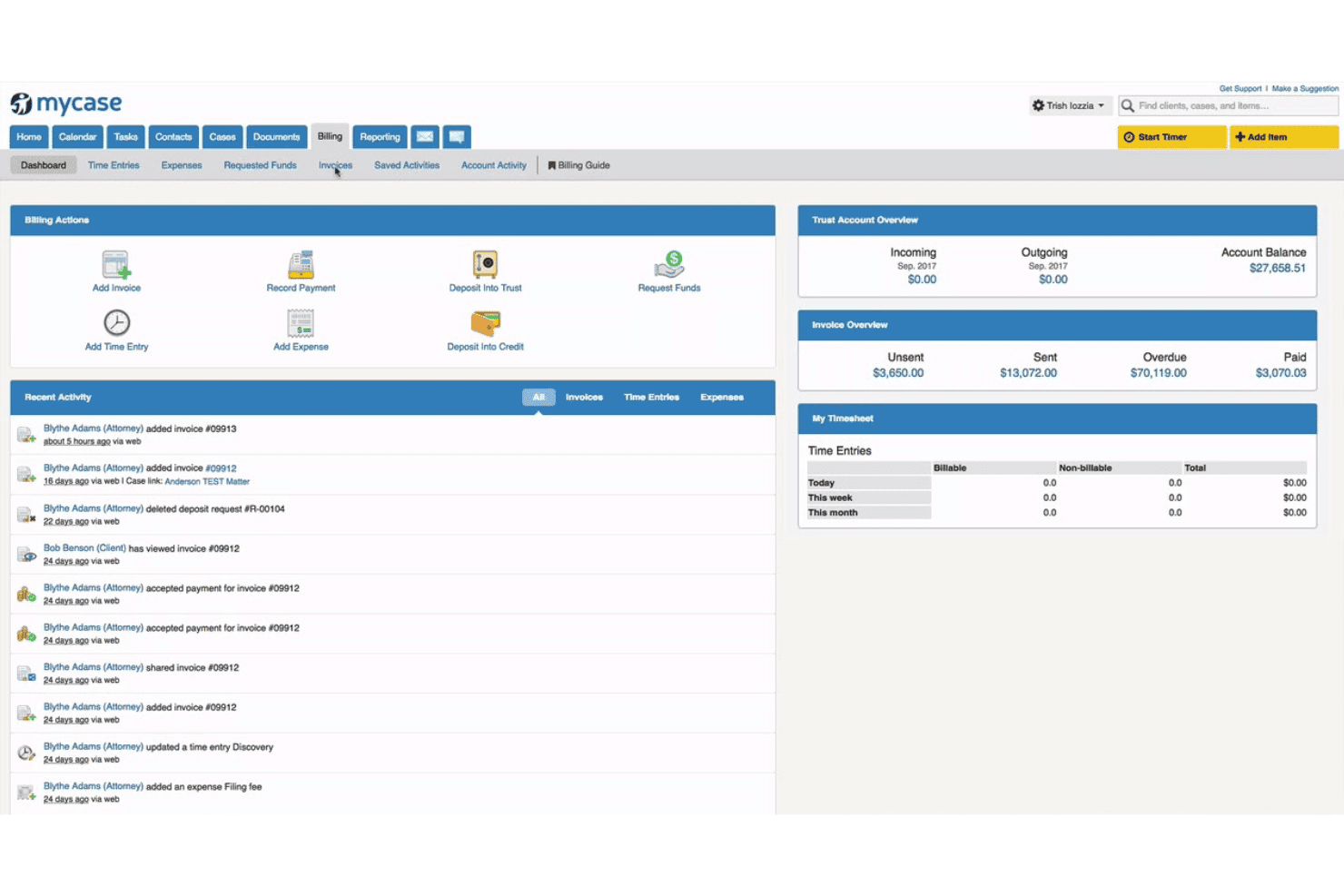
MyCase combines case management, billing, trust accounting, and client communication. MyCase is a cloud-based legal practice management platform that combines client intake, CRM, case management, document handling, billing, and client communication tools built specifically for law firms.
Who Is MyCase Best For?
MyCase is a strong fit for solo attorneys and small to mid-sized law firms that want a single platform to manage cases, clients, and billing.
Why I Picked MyCase
I picked MyCase as one of the best because the e-signature and document sharing tools are built directly into the platform, not bolted on via a third-party integration. At the Pro tier, I can generate client-ready documents auto-populated with case data and send them for signature without leaving the system. Clients sign and return documents through the secure client portal, which also serves as the central hub for all shared files and matter communications.
MyCase Key Features
- Dynamic client intake forms: Build conditional online forms that adapt based on client responses for streamlined data collection.
- Legal AI assistants: Use tools like the AI Writing Assistant and Document Assistant to summarize, draft, and analyze documents within the platform.
- Automated workflow actions: Set up rule-based task assignments, follow-ups, and reminders tied to matter stages and intake forms.
- Conflict check tracking: Run automated searches against clients, contacts, and matters before onboarding new work to help identify conflicts.
MyCase Integrations
MyCase offers 58+ native integrations, including LawPay, NetDocuments, Dropbox, QuickBooks, LawToolBox, InfoTrack, Lawmatics, DecisionVault, OneDrive, and Google Calendar. An API is available for custom integrations.
Pros and Cons
Pros:
- Intake forms auto-populate contact and matter records
- Client portal centralizes all matter communications
- Native e-signature built into intake workflow
Cons:
- Mobile app missing some desktop-only features
- Reporting tools lack depth for business development tracking
 Best for advanced client engagement automation
- Free demo available
- Pricing upon request
Visit WebsiteCustomer Rating:4.6/5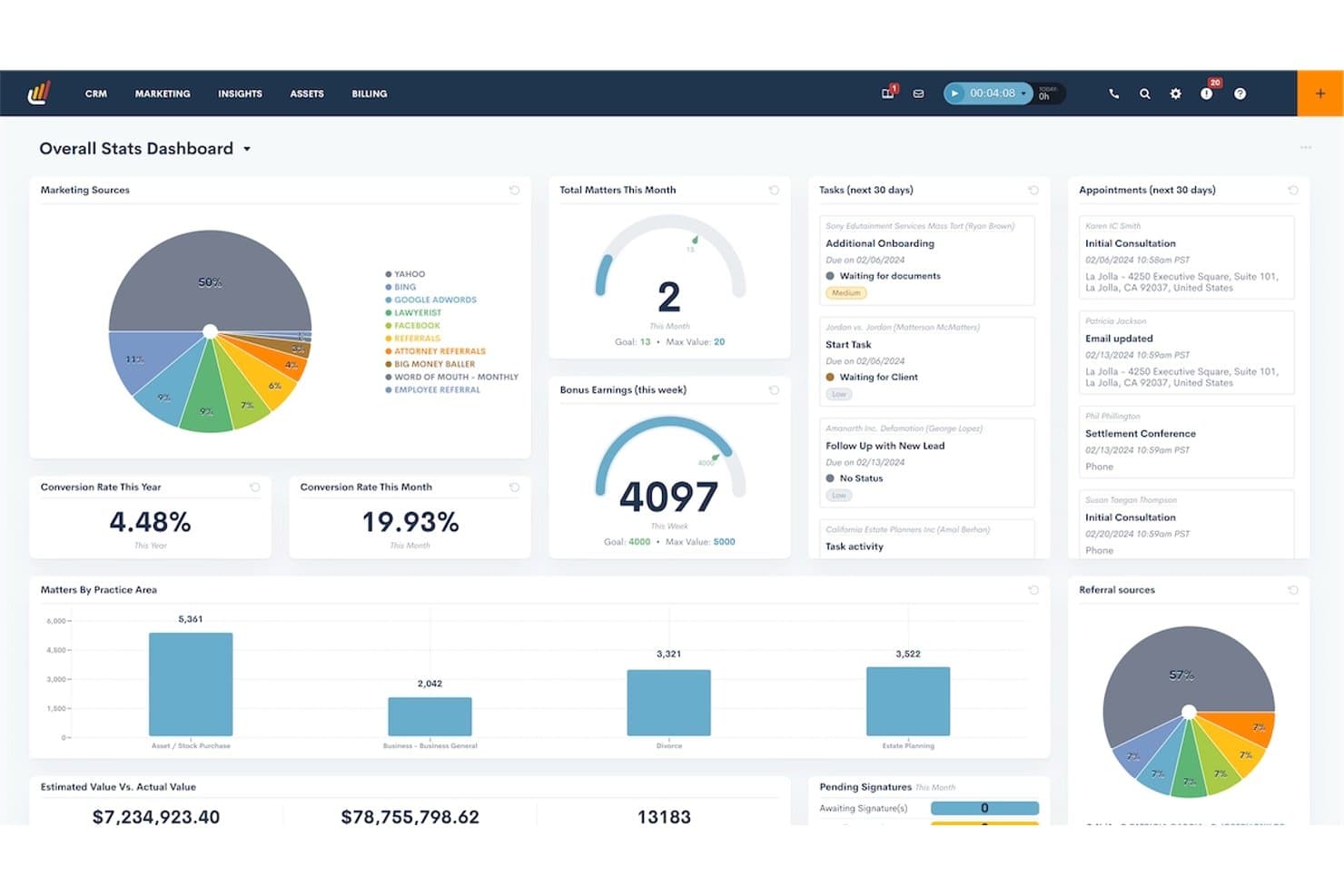
Lawmatics centralizes firm performance metrics in one dashboard. Lawmatics is a cloud-based legal CRM built around client intake automation, lead pipeline management, marketing automation, and data reporting for law firms.
Who Is Lawmatics Best For?
It's a strong fit for small to midsize law firms with three or more attorneys running high-volume intake across practice areas like personal injury, immigration, or family law.
Why I Picked Lawmatics
Lawmatics earns its spot as one of the best on my shortlist because of how far its automation goes beyond basic follow-up reminders. I particularly like QualifyAI, which routes and qualifies incoming leads automatically, and the unlimited conditional workflow automation on the Premium plan that lets me trigger different email and SMS sequences based on practice area, lead source, or pipeline stage. I also find the referral source tracking and marketing ROI dashboards genuinely useful for understanding which channels are converting.
Lawmatics Key Features
- Matter-contact linking: Connects matters with multiple contacts and related parties for unified relationship management.
- Native e-signature: Lets you send, receive, and track client engagement agreements with built-in electronic signature tools.
- Legal conflict checks: Automates searching for conflicts of interest across contacts, matters, and related parties before onboarding.
- Marketing attribution reporting: Ties leads and matters back to their original marketing source for ROI analysis.
Lawmatics Integrations
Lawmatics offers native integrations with Clio, MyCase, Filevine, Smokeball, PracticePanther, LEAP, QuickBooks, Outlook, Google Calendar, Zoom, Smith.ai, CallRail, and Zapier. An API is available for custom integrations.
Pros and Cons
Pros:
- Highly rated customer support from legal-focused team
- Strong pipeline management specifically for legal stages
- Configurable conditional automation workflows for legal intake
Cons:
- Reporting and analytics ratings lag behind core features
- Complex automation setup without prior CRM experience
Learn more about Lawmatics: Best for multi-device legal team collaboration
- Free trial available
- From $49/user/month (billed annually)
Visit WebsiteCustomer Rating:4.3/5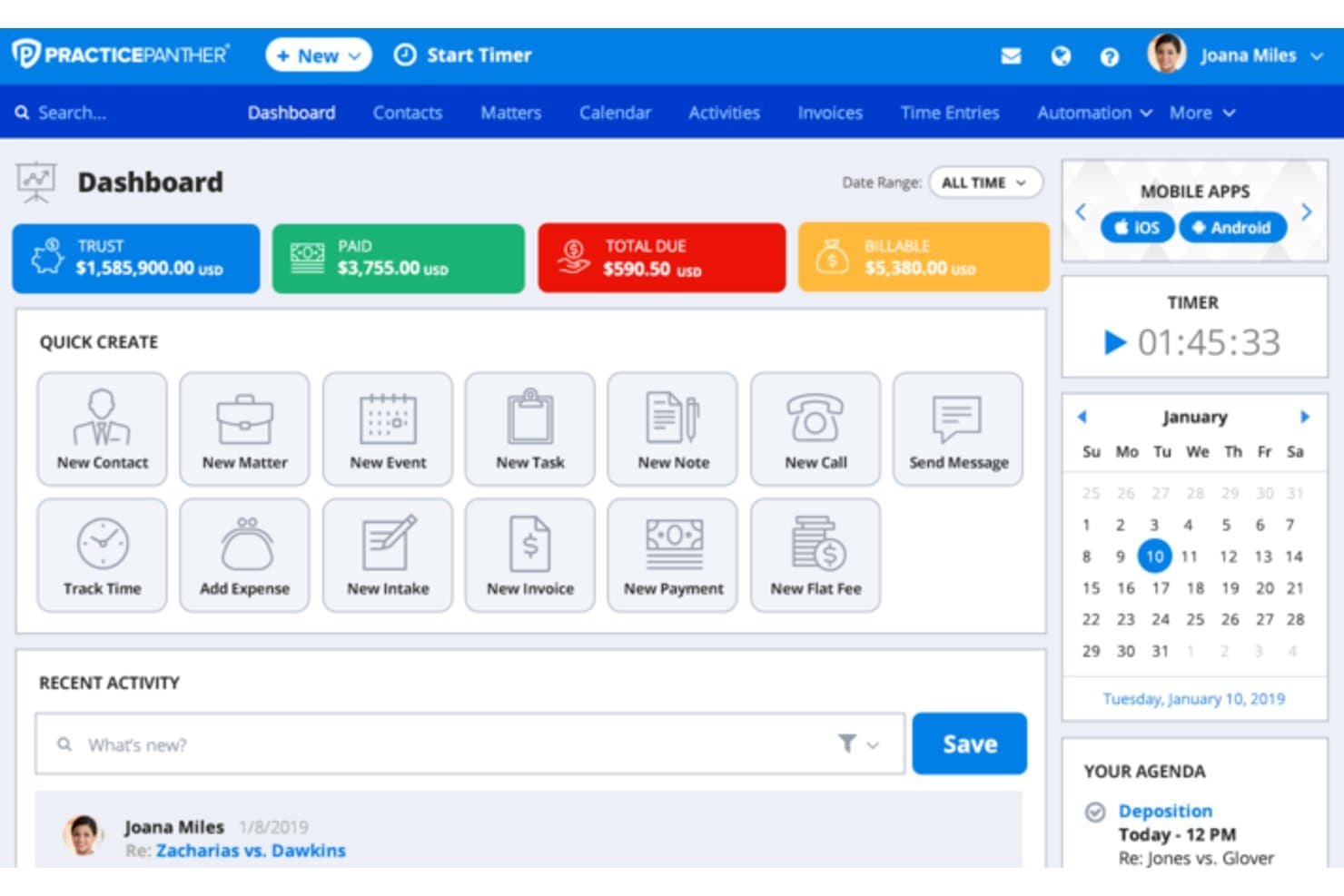
PracticePanther manages cases, court calendars, billing, trusts, and documents. PracticePanther is a cloud-based legal practice management platform that combines CRM, client intake, matter management, billing, trust accounting, and workflow automation in a single system built for law firms.
Who Is PracticePanther Best For?
PracticePanther is a strong fit for solo attorneys and small law firms that need a single platform to handle client intake, matters, and billing without juggling multiple tools.
Why I Picked PracticePanther
I picked PracticePanther as one of the best because it includes native iOS and Android apps on every plan, not just premium tiers. I particularly like the built-in internal chat and real-time notifications, which keep attorneys and support staff connected across devices without needing a separate messaging tool. In practice, that means my team can log time, update matters, and communicate from a phone, tablet, or browser, all synced in real time.
PracticePanther Key Features
- Customizable intake forms: Create branded online forms that capture new client data directly into matters.
- Automated conflict checks: Run searches across contacts and related parties before new client onboarding.
- Batch document creation: Generate and send multiple legal documents from templates in one workflow.
- Legal billing and trust accounting: Manage LEDES billing, invoice status, and three-way trust reconciliation in one place.
PracticePanther Integrations
PracticePanther offers native integrations with QuickBooks Online, Google Drive, Dropbox, Box, LawToolBox, Outlook, Gmail, Mailchimp, and Zapier. An open API is available for custom integrations.
Pros and Cons
Pros:
- Built-in trust accounting meets legal requirements
- Intake forms auto-populate matters and contacts
- Native mobile apps across iOS and Android
Cons:
- Calendar sync with court deadlines needs improvement
- Reporting lacks depth for multi-matter analysis
Learn more about PracticePanther: Best for integrated text and call tracking
- Free demo available
- Pricing upon request
Visit WebsiteCustomer Rating:4.6/5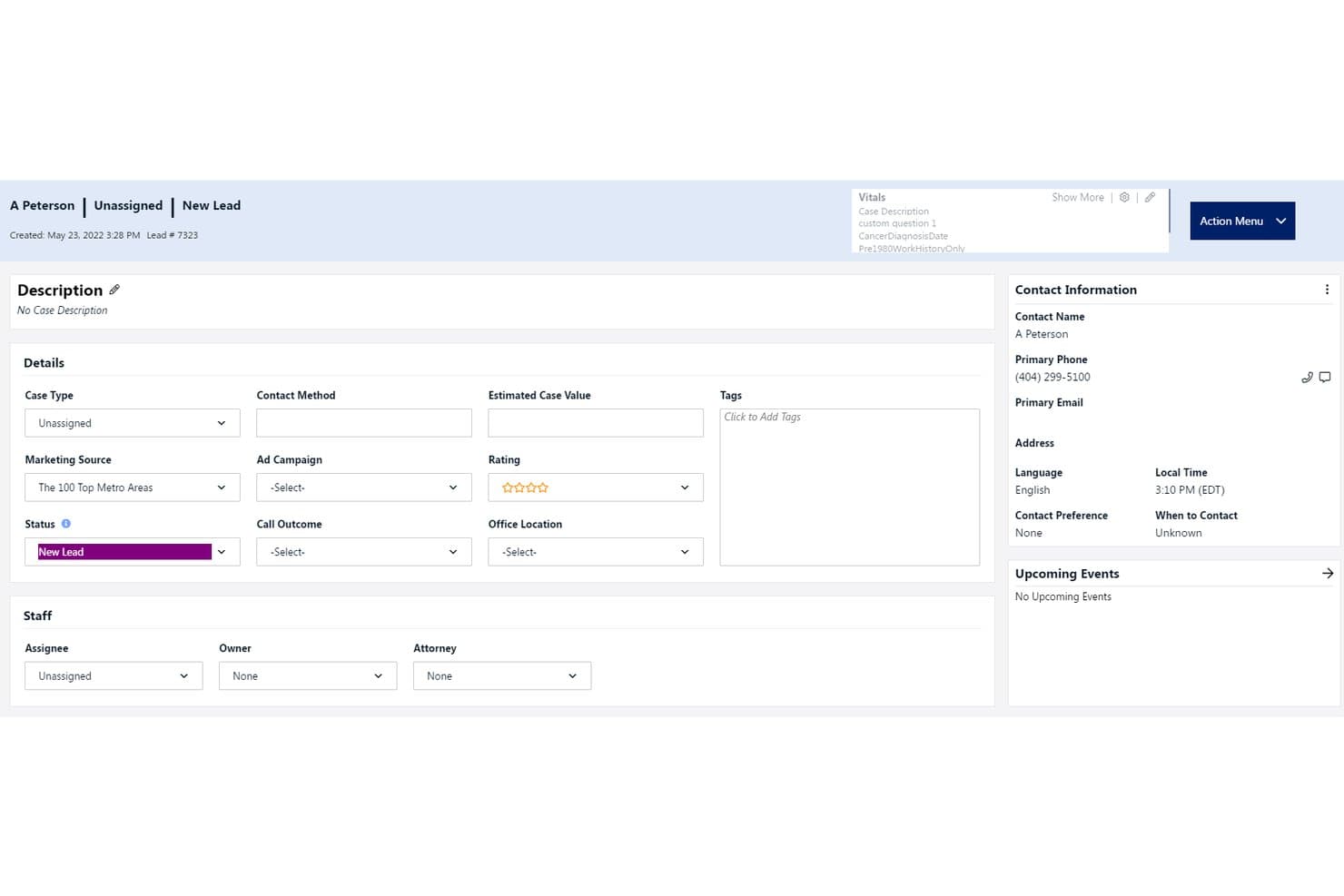
Law Ruler centralizes lead intake and contact details in one view. Law Ruler is a cloud-based legal CRM with built-in client intake management, marketing automation, a softphone dialer, two-way SMS/MMS, and document automation for law firms.
Who Is Law Ruler Best For?
Law Ruler is a strong fit for small law firms in high-volume practice areas like personal injury, mass tort, and immigration that need structured intake pipelines.
Why I Picked Law Ruler
Law Ruler earns its spot on my shortlist because its call and text capabilities go far beyond basic messaging. The built-in softphone dialer includes Local Presence Dialing, which matches the outbound area code to the recipient's location to lift answer rates on intake calls. I also like that you can send e-signature requests directly by text, so clients sign intake documents from their phones without accessing a separate portal.
Law Ruler Key Features
- Custom intake form builder: Create mobile-friendly intake forms with custom logic and document requests.
- CRM platform with pipeline tracking: Track prospects, matters, and their progress through configurable legal pipeline stages.
- Referral source attribution: Attribute leads and matters to specific referral sources or marketing campaigns for reporting.
- Document automation for legal templates: Automate fee agreements and document assembly using Word, PDF, or Excel templates.
Law Ruler Integrations
Law Ruler offers native integrations with CosmoLex, Rocket Matter, Tabs3, TimeSolv, Clio, Filevine, Prevail, LawPay, Microsoft Outlook, QuickBooks, and Zapier. An API is available for custom integrations.
Pros and Cons
Pros:
- Pre-configured legal pipeline stages out of the box
- E-signature sent directly via text message
- Built-in softphone with one-click dialing
Cons:
- No free trial available before committing
- Enterprise plan requires a minimum of ten users
Learn more about Law Ruler:
Andre skybaserte CRM-systemer for advokatpraksiser
- 11InterAction+Best for large firm relationship management
- 12CoCounselorBest for plaintiff-focused law firm workflows
- 13LEAPBest for pre-built legal document forms
- 14ActionstepBest for workflow automation customization
- 15LawcusBest for kanban-style pipeline management
- 16Rocket MatterBest for time tracking with batch billing
How I Evaluate Cloud Based Legal Practice CRMs
I evaluate these platforms in two layers: baseline functionality every tool must cover—like intake automation and conflict checks—and the factors that distinguish tools for different firm types.
Core Functionality (Table Stakes For This List)
When I'm selecting tools for my list, I rank each one on a scale from 0 (does not offer the functionality) to 5 (excels in this area) for each core functionality listed below. I then calculate the tool's total score into a percentage, using 65% as a benchmark to help assess its overall fit for the list.
- Client Intake Management: I look for customizable intake forms with pipeline stages that move leads from initial consultation requests through to signed retainers automatically.
- Matter-Contact Linking: Each tool should connect contacts to matters with role assignments, so you can see every party tied to a case at a glance.
- Cloud-Based Access: I check for native mobile apps alongside browser access, since attorneys often need to pull up client details between court appearances.
- Legal Workflow Automation: Automated follow-ups and task triggers are key—like sending a retainer reminder three days after a consultation with no response.
- Conflict Check Capabilities: I evaluate whether a platform searches across contacts, matters, and related parties to flag potential conflicts before onboarding.
- Legal Software Integrations: Strong connections to practice management, billing, and e-signature tools matter—especially two-way sync that keeps data consistent.
Once I have a list of tools that meet the criteria, I consider what sets each platform apart.
Differentiating Factors (What Sets Vendors Apart)
Here's how I compare and contrast different vendors:
Standout Features
Client intake automation with conditional logic is a major differentiator. The best platforms auto-create matters and trigger conflict checks the moment a prospect submits a form, which saves hours of duplicate data entry. I also evaluate two-way communication sync—every email, text, and call should log directly to the relevant contact and matter record without manual effort. Referral source tracking matters too, since it lets you tie closed matters back to the specific channel or partner that generated the lead.
Beyond Features
Practice area fit matters a lot here. A personal injury firm processing hundreds of leads monthly needs very different intake workflows than a boutique corporate practice. I also evaluate how well each platform integrates with the broader legal tech stack—native sync with tools like LawPay or Clio keeps billing and matter data aligned without manual exports. Compliance and data security round out my evaluation, where I look for SOC 2 certification and audit logs that help firms meet their confidentiality obligations.
Slik velger du et skybasert CRM-system for advokatpraksiser
Lurer du på hvordan du kan begrense utvalget til det beste skybaserte CRM-systemet for advokatpraksis, basert på firmaets faktiske arbeidsflyter og databehov? Bruk de viktigste prioriteringene dine som utgangspunkt:
| Hvis prioriteten din er … | Se etter … |
| Automatisert inntak fra nettsted eller e-post | Tilpassbare skjemaer og ruting av inntak |
| Komplekse interessekonfliktsjekker | Søk på tvers av kontakter, saker og relaterte roller |
| Administrasjon av klientkommunikasjon i stor skala | Toveis SMS, e-post og samtalelogging |
| Sporing av henvisningskilder | Innebygd attribusjonsrapportering per kanal |
| Tilgang eksternt og fra mobil | Opprinnelige mobilapper med sikker pålogging |
Slik vurderer du kortlisten din
- Test fleksibiliteten i inntaksskjemaet: Opprett og publiser et nytt nettbasert inntaksskjema for en testsak innen 24 timer.
- Be om en eksempelrapport for interessekonfliktsjekk: Be leverandøren om å gi deg et eksempel eller en mal som viser kryssreferanser mellom parter, saker og relaterte kontakter.
- Bekreft integrasjonene i praksis: Send et testdokument for elektronisk signering eller en faktura fra saksbehandlingssystemet ditt for å bekrefte problemfri synkronisering.
- Gå gjennom dokumentasjonen for etterlevelse: Be skriftlig om SOC 2 Type II-sertifisering eller en personvernerklæring som gjelder for den aktuelle jurisdiksjonen.
- Beslutningsfilter – tilpasset løsning eller alt-i-ett: Velg mellom verktøy med svært tilpassbare arbeidsflyter og løsninger med enkle, samlede funksjonssett for raskere oppstart.
Hva er skybaserte CRM-systemer for advokatpraksiser?
Skybaserte CRM-systemer for advokatpraksiser er spesialiserte plattformer som hjelper advokatfirmaer med å spore klientforhold, administrere saksinntak, automatisere kommunikasjon og sentralisere kontakt- og saksdata på en sikker måte i skyen. Disse systemene lar advokater og ansatte samarbeide og få tilgang til viktig informasjon fra hvor som helst, samtidig som de støtter arbeidsflyter for inntak, interessekonfliktsjekker og juridisk spesifikke integrasjoner som er tilpasset firmaets drift og regulatoriske forpliktelser.
Funksjoner
Når du velger et skybasert CRM-system for juridisk praksis, bør du se etter følgende nøkkelfunksjoner:
- Håndtering av klientinntak: Tilpassbare nettbaserte skjemaer, registrering av potensielle klienter og automatiserte inntaksprosesser som fører potensielle klienter fra forespørsel til signert oppdragsavtale.
- Kobling mellom saker og kontakter: Muligheten til å knytte sammen kontakter, saker og relaterte parter, slik at du kan se alle tilknyttede relasjoner og all kommunikasjon på ett sted.
- Skybasert tilgang: Sikker, nettleserbasert eller mobil tilgang som gjør det mulig for teamet å administrere saker og klientinformasjon hvor som helst og på alle enheter.
- Automatisering av juridiske arbeidsprosesser: Verktøy som automatiserer rutinemessig kommunikasjon, oppfølginger, oppgavetildelinger og inntakstrinn tilpasset juridiske prosesser.
- Funksjoner for konfliktsjekk: Automatiserte søk på tvers av kontakter, saker og relaterte parter for å identifisere potensielle interessekonflikter før en klient tas inn.
- Integrasjon med dokumenthåndtering: Synkronisering med dokumentplattformer, slik at du kan lagre, dele og hente klientfiler i CRM-systemet.
- Kalender- og fristsporing: Integrerte kalendere og fristvarsler som hjelper teamet med å holde oversikt over viktige juridiske datoer og forpliktelser.
- Støtte for elektroniske signaturer: Innebygde eller integrerte verktøy for innhenting av digitale signaturer på oppdragsavtaler, salæravtaler og andre dokumenter direkte fra CRM-systemet.
- Sporing av henvisningskilder: Attribusjonsverktøy som identifiserer hvilke markedsføringskanaler, kontakter eller partnere som genererer potensielle klienter og nye saker.
- Tilgjengelig mobilapp: Opprinnelige mobilapplikasjoner som lar advokater sjekke saksoppdateringer, gjennomgå kontakter og loggføre kommunikasjon på farten.
Fordeler
Implementering av skybaserte CRM-systemer for juridisk praksis gir flere fordeler for teamet og virksomheten din. Her er noen du kan se frem til:
- Sentraliserte klientdata: Lagre alle kontakt-, saks- og kommunikasjonsopplysninger i én sikker skyplattform, slik at hele teamet får enkel tilgang.
- Effektivisert inntak og innføring: Konverter potensielle klienter til klienter raskt med tilpassbare skjemaer, automatiserte arbeidsprosesser og elektroniske oppdragsavtaler.
- Fjern- og mobiltilgang: Få tilgang til klientinformasjon, oppdater saker og kommuniser med klienter hvor som helst ved hjelp av sikre nettleser- eller mobilapper.
- Automatiserte samsvarskontroller: Reduser risikoen for etiske brudd ved å gjennomføre automatiserte konfliktsjekker på tvers av kontakter, saker og relaterte parter.
- Effektiv håndtering av arbeidsprosesser: Automatiser kommunikasjon, oppgavetildelinger og oppfølginger for å holde sakene i fremdrift uten manuell sporing.
- Handlingsrettet virksomhetsinnsikt: Spor henvisningskilder, saksfremdrift og klientkommunikasjon for å identifisere muligheter og forbedre virksomhetens resultater.
- Sikker dokumenthåndtering: Samle inn, del og signer dokumenter på en sikker måte gjennom integrerte funksjoner for elektroniske signaturer og dokumenthåndtering.
Kostnader og priser
Valg av skybaserte CRM-systemer for juridisk praksis krever en forståelse av de ulike prismodellene og abonnementene som er tilgjengelige. Kostnadene varierer basert på funksjoner, teamstørrelse, tillegg og mer. Tabellen nedenfor oppsummerer vanlige abonnementer, gjennomsnittsprisene deres og typiske funksjoner som er inkludert i skybaserte CRM-løsninger for juridisk praksis:
Sammenligningstabell for abonnementer for skybasert CRM for juridisk praksis
| Abonnementstype | Gjennomsnittspris | Vanlige funksjoner |
| Gratis abonnement | $0 | Grunnleggende kontaktadministrasjon, begrensede inntaksskjemaer, manuelle konfliktsjekker og begrenset dokumentlagring. |
| Personlig abonnement | $25-$40/bruker/måned | Tilpassbare inntaksskjemaer, standard konfliktsjekk, mobiltilgang og grunnleggende oppgaveautomatisering. |
| Bedriftsabonnement | $50-$80/bruker/måned | Avansert automatisering av arbeidsprosesser, integrasjoner med juridiske verktøy, elektroniske signaturer, konfliktrapportering og analyse. |
| Foretaksabonnement | $90-$150/bruker/måned | Avanserte samsvarsverktøy, revisjonslogger, API-tilgang, prioritert brukerstøtte, alternativer for datalagringssted og hjelp med innføring. |
Vanlige spørsmål om skybasert CRM for juridisk praksis
\u003cspan style=\u0022font-weight: 400;\u0022\u003eHer er noen svar på vanlige spørsmål om skybasert CRM for juridisk praksis:\u003c/span\u003e
Hva skiller et juridisk CRM fra et generisk CRM-system?
\u003cspan style=\u0022font-weight: 400;\u0022\u003eEt juridisk CRM støtter saksbehandling, interessekonfliktsjekker, arbeidsflyter for klientinntak og samsvarsbehov som er spesifikke for advokatfirmaer, noe generiske CRM-systemer vanligvis ikke dekker.\u003c/span\u003e
Kan skybaserte CRM-systemer for juridisk praksis integreres med fakturerings- eller praksisadministrasjonsprogramvaren min?
\u003cspan style=\u0022font-weight: 400;\u0022\u003eJa, de fleste ledende verktøy tilbyr integrasjoner med populære plattformer for juridisk fakturering og praksisadministrasjon, med støtte for toveis datasynkronisering av kontakter, saker og dokumenter.\u003c/span\u003e
Hvor sikre er skybaserte CRM-systemer for juridisk praksis når det gjelder konfidensielle klientdata?
\u003cspan style=\u0022font-weight: 400;\u0022\u003eDe fleste leverandører bruker kryptering, SOC 2-sertifisering og tilgangskontroller for å oppfylle kravene til juridisk konfidensialitet. Be alltid om dokumentasjon og gjennomgå sikkerhetsinnstillingene.\u003c/span\u003e
Er det mulig å automatisere klientinntaksprosessen med disse CRM-systemene?
\u003cspan style=\u0022font-weight: 400;\u0022\u003eJa, du kan automatisere inntaket ved hjelp av tilpassbare nettbaserte skjemaer, automatiserte interessekonfliktsjekker og arbeidsflyter for elektronisk signering tilpasset juridiske tjenester.\u003c/span\u003e
Hvilken type støtte og opplæring tilbyr leverandørene ved innføring i et nytt firma?
\u003cspan style=\u0022font-weight: 400;\u0022\u003eLeverandører tilbyr vanligvis spesialister på innføring, datamigrering fra eldre systemer, direktesendte opplæringsøkter og løpende tilgang til et juridisk spesialisert kundestøtteteam.\u003c/span\u003e