

Et godt klienthåndteringssystem i juridisk sektor kan fungere som din effektive digitale assistent, som håndterer saksdetaljer, fakturering, dokumenthåndtering og mer – alt på én plattform.
Hvis du sliter med tidkrevende papirarbeid, uorganisert saksinformasjon eller sporing av fakturerbare timer, kan riktig programvare løse disse utfordringene direkte. Jeg har vurdert ulike alternativer og samlet de beste for deg, i håp om at du finner det perfekte alternativet for firmaet ditt.
Why Trust Our Software Recommendations
6,700+
Reviews
20
Industry experts
16+
Evaluation factors
14
Years
Our team has been testing and reviewing software since 2012. As legal practice leaders ourselves, we know how difficult—and important—it is to choose the right software.
For this guide, we evaluated tools using hands-on testing and independent research, scoring tools using our selection criteria.
Our reviews reflect our human editorial judgment, not a sales pitch.
Sammenligningstabell for klienthåndteringsprogramvare for advokatfirmaer
Denne sammenligningstabellen oppsummerer prisdetaljene for mine beste utvalg av klienthåndteringsprogramvare for advokatfirmaer:
| Tool | Best For | Trial Info | Price | ||
|---|---|---|---|---|---|
| 1 | Best for integrated payment and billing | Free trial available | Pricing upon request | Website | |
| 2 | Best for effortless case, contact, and billing management | 7-day free trial | From $59/user/month | Website | |
| 3 | Best for firms needing cloud-based automated legal productivity | Not available | Pricing upon request | Website | |
| 4 | Best for firms prioritizing client-centric features | Free trial available | From £79/user/month | Website | |
| 5 | Best for advanced case management with an emphasis on automation | Free demo available | Pricing upon request | Website | |
| 6 | Best for those seeking tailored financial management for law firms | 30-day free trial | From $38/month | Website | |
| 7 | Best for detailed billing and accounting efficiency | 10-day free trial | From $69/user/month | Website | |
| 8 | Best for law firms requiring an all-in-one practice management system | 10-day free trial | From $49/user/month (billed annually) | Website | |
| 9 | Best for streamlining processes with cloud-based tools | 10-day free trial | From $59/user/month (billed annually) | Website | |
| 10 | Best for case management with intuitive UI | 15-day free trial | From $22/user/month | Website |


Anmeldelse av den beste klienthåndteringsprogramvaren for advokatfirmaer
Nedenfor finner du mine detaljerte sammendrag av den beste klienthåndteringsprogramvaren for advokatfirmaer som kom med på kortlisten min. Anmeldelsene mine gir et detaljert innblikk i de viktigste funksjonene, fordelene & ulempene, integrasjonene og ideelle bruksområdene for hvert verktøy, slik at du kan finne det beste alternativet for deg.
 1Best for integrated payment and billing
8am
- Free trial available
- Pricing upon request
Visit WebsiteCustomer Rating:4.6/5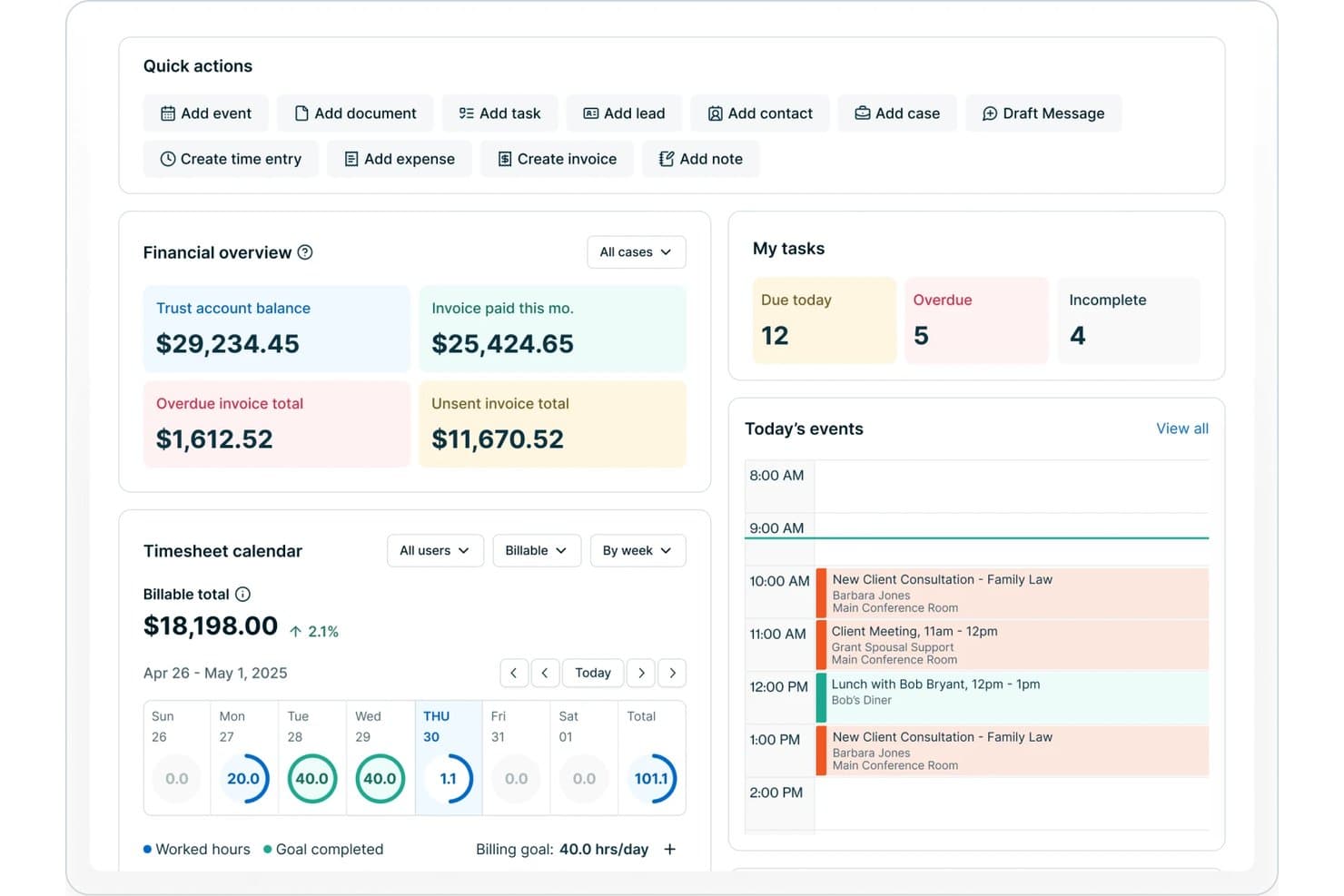
8am offers a legal practice dashboard with financial overview, task tracking, timesheet calendar, and today's events including client consultations and meetings. 8am is a law firm client management solution designed for legal professionals who need integrated tools for client records, matter management, document storage, billing, payments, and secure communications in one platform.
Who Is 8am Best For?
Mid-sized and growing law firms that need unified case, billing, and payment management across staff in multiple roles.
Why I Picked 8am
I picked 8am as one of the best because its integrated payment and billing tools let me manage invoicing, payment collection, and trust/IOLTA compliance from a single dashboard. I can process client payments securely and track every billable hour within the same platform.
8am Key Features
- Matter-centric CRM: Track all client information, case details, and communications in organized matter files.
- Document management: Upload, store, and organize confidential legal documents with role-based permissions.
- Automated client intake: Use customizable online forms and workflows to onboard new clients efficiently.
- Conflict check system: Search firmwide records for potential conflicts during client intake and matter creation.
8am Integrations
Native integrations are not publicly listed.
Pros and Cons
Pros:
- Client portal includes e-signature and payments
- Robust intake workflows for new clients
- Fast trust and IOLTA account reconciliation
Cons:
- Advanced document automation options are limited
- Some features can feel overwhelming for solos
Learn more about 8am: Best for effortless case, contact, and billing management
- 7-day free trial
- From $59/user/month
Visit WebsiteCustomer Rating:4.3/5
A view of the PracticePanther's billing management dashboard PracticePanther is a legal case and practice management software solution. PracticePanther offers tools to manage cases, track time, invoice clients, and simplify many other aspects of running a law practice. Given its comprehensiveness and user-friendliness, it fits well as the "Best for Comprehensive Legal Case Management".
Why I Picked PracticePanther:
In selecting PracticePanther, the aspect that made it stand out was its extensive set of features combined with ease of use. Among the various platforms I compared, PracticePanther emerged as a strong contender due to its comprehensive capabilities that cover nearly every aspect of legal case management. That's why I believe it's "Best for Comprehensive Legal Case Management".
Standout Features and Integrations:
PracticePanther offers a variety of essential features such as matter management, time tracking, billing and invoicing, and document management. It also provides integration capabilities with numerous popular applications like Google Workspace, Microsoft 365, QuickBooks, and Dropbox, allowing for a more streamlined workflow.
Pros and Cons
Pros:
- Integrates with a wide variety of popular applications
- User-friendly interface
- Comprehensive set of case management features
Cons:
- Some users report occasional software glitches
- Limited customization options in some areas
- Relatively higher starting price
Learn more about PracticePanther: Best for firms needing cloud-based automated legal productivity
- Not available
- Pricing upon request
Visit WebsiteCustomer Rating:4.8/5
A view of the firm insights dashboard in Smokeball. Smokeball is a highly advanced case management software tailored for small law firms. The tool specializes in automation and provides comprehensive solutions that enhance efficiency and productivity. It's best for law firms that desire to streamline their processes and improve their service delivery.
Why I Picked Smokeball:
I selected Smokeball for its exceptional automation capabilities and extensive features. The tool's focus on small law firms makes it unique as it directly addresses the challenges and needs of this niche. In my judgment, Smokeball stands out for its ability to streamline processes in law firms, making it "Best for Efficiency in Small Law Firms."
Standout Features and Integrations:
Smokeball is highly valued for its automation features, enabling firms to automate daily tasks and manage their cases more efficiently. It also provides comprehensive document assembly, further promoting productivity. The software has meaningful integrations with Microsoft Office, enabling users to work directly from Word, Outlook, or Excel while capturing every minute for accurate billing.
Pros and Cons
Pros:
- Effective integration with Microsoft Office
- Comprehensive document assembly feature
- Excellent automation capabilities
Cons:
- It's tailored specifically for law firms, limiting its use to other industries
- The user interface might require some time to get used to
- High entry cost due to the one-time onboarding fee
Learn more about Smokeball: 4Best for firms prioritizing client-centric features
Clio
- Free trial available
- From £79/user/month
Visit WebsiteCustomer Rating:4.7/5
Here's a financial sample dashboard in Clio. Clio is an all-encompassing legal practice management solution that combines case management, client intake, and legal billing into one platform. Because of its comprehensive suite of features and ease of use, Clio can streamline the operations of law firms, making it the "Best for Comprehensive Case Management".
Why I Picked Clio:
When I was determining which tool to include, Clio was my choice because of its broad scope of features and user-friendly interface. Its integrated platform that combines case management, client intake, and legal billing is not commonly found in other tools, making Clio distinct in the market. This is why I believe it's "Best for Comprehensive Case Management".
Standout Features and Integrations:
Clio offers features such as document management, task management, time tracking, and billing. Clio also provides a comprehensive set of integrations, including Microsoft 365, Google Workspace, and QuickBooks, which helps law firms streamline their processes and improve their overall efficiency.
Pros and Cons
Pros:
- User-friendly interface, reducing the learning curve
- Integration with commonly used tools like Microsoft 365, Google Workspace, and QuickBooks
- Comprehensive set of features, including case management, client intake, and billing
Cons:
- Billing is annual, which could be a financial commitment for some firms
- Some advanced features may require additional cost
- Pricing could be high for smaller law firms
Learn more about Clio: Best for advanced case management with an emphasis on automation
- Free demo available
- Pricing upon request
Visit WebsiteCustomer Rating:4.7/5
Here's a screenshot of SmartAdvocate showing the analytics dashboard SmartAdvocate is a powerful, fully integrated case management system primarily designed for personal injury and mass tort litigation practices. By implementing this platform, law firms can handle all aspects of case management more efficiently, making it the "Best for Personal Injury and Mass Tort Litigation Practices".
Why I Picked SmartAdvocate:
I chose SmartAdvocate after a thorough evaluation of various legal practice management software. The platform's specialization in personal injury and mass tort litigation set it apart from the competition. Given its strong feature set tailored to these specific areas of practice, I decided it was best suited for "Personal Injury and Mass Tort Litigation Practices".
Standout Features and Integrations:
Key features of SmartAdvocate include document management, task management, calendaring, and robust reporting. It also stands out with its powerful integrations such as with Microsoft Word, Outlook, QuickBooks, and several leading phone systems, which help optimize workflows and improve communication.
Pros and Cons
Pros:
- Robust reporting capabilities
- Offers powerful integrations with essential productivity tools
- Specialized features for personal injury and mass tort litigation
Cons:
- Some users report a steep learning curve
- Could be overwhelming for smaller firms due to its broad feature set
- Lack of public pricing information
Learn more about SmartAdvocate: Best for those seeking tailored financial management for law firms
- 30-day free trial
- From $38/month
Visit WebsiteCustomer Rating:4.4/5
Here's the QuickBooks' time tracker feature screenshot. QuickBooks is a well-known financial management and accounting software. QuickBooks offers a specialized version for law firms, providing functionalities to track income and expenses, invoice clients, manage bills and accounts payable, and more. It stands out as a practical choice for law firms that need a robust, industry-specific financial management solution.
Why I Picked QuickBooks:
I chose QuickBooks because of its widespread recognition and reliability in the field of financial management. Its unique customization for law firms was a major factor in my decision. In my comparison, QuickBooks appeared as the "Best for Law Firm Financial Management" due to its specialized law firm version and comprehensive financial management features.
Standout Features and Integrations:
Among QuickBooks' most valuable features for law firms are its time tracking and billing capabilities, income and expense tracking, and accounts payable management. Its integrations with apps like PayPal, Square, and LawPay extend its functionality, making it easier for firms to manage transactions and payments.
Pros and Cons
Pros:
- Integrates with popular payment apps like PayPal and LawPay
- Customized version for law firms
- Robust and comprehensive financial management features
Cons:
- Depending on the number of users, the cost can escalate quickly
- Some law-specific features may need third-party integrations
- Can be complex to navigate for beginners
Learn more about QuickBooks: Best for detailed billing and accounting efficiency
- 10-day free trial
- From $69/user/month
Visit WebsiteCustomer Rating:4.5/5
Here's an analytic dashboard sample in Tabs3. Tabs3 is a robust legal practice management software equipped to handle billing, case management, and reporting for law firms. This tool has been designed to enable firms to efficiently manage their day-to-day operations and billing, proving to be excellent for detailed billing and reporting.
Why I Picked Tabs3:
I picked Tabs3 for its comprehensive nature, allowing law firms to handle a multitude of operations within a single platform. When compared with other tools, Tabs3 distinctively shines in detailed billing and reporting, which is integral for law firms. Thus, I determined it to be "Best for Detailed Billing and Reporting."
Standout Features and Integrations:
Tabs3 offers a powerful suite of features, including in-depth reporting and billing tools that provide a detailed view of the firm’s financial health and client invoicing. The software also offers effective case management capabilities, allowing users to track critical case information conveniently. Tabs3 integrates with popular software like QuickBooks and LawPay, adding to its operational efficiency.
Pros and Cons
Pros:
- Integrations with QuickBooks and LawPay
- Effective case management capabilities
- Comprehensive reporting and billing features
Cons:
- It may take time to fully understand and utilize the comprehensive features
- Additional costs for premium features
- High entry cost due to annual billing
Learn more about Tabs3: Best for law firms requiring an all-in-one practice management system
- 10-day free trial
- From $49/user/month (billed annually)
Visit WebsiteCustomer Rating:4.4/5
Here's a detailed dashboard in CosmoLex. CosmoLex is a cloud-based best law practice management software. CosmoLex offers comprehensive features that cover time tracking, billing, business accounting, trust (IOLTA) accounting, and case management. It is particularly valuable for law firms looking for an all-in-one solution that includes built-in legal accounting.
Why I Picked CosmoLex:
I selected CosmoLex for this list due to its all-inclusive functionality, which includes built-in legal accounting—an attribute that differentiates it from most other law practice management solutions. I determined CosmoLex to be the "Best for All-In-One Solution with Legal Accounting" due to its holistic approach to meeting law firms' needs.
Standout Features and Integrations:
CosmoLex shines with its comprehensive feature set, including case management, document management, time and expense tracking, billing and invoicing, and built-in business and trust accounting. This tool integrates with LawPay for credit card processing, making it even more convenient for firms to manage their finances.
Pros and Cons
Pros:
- Integrations with useful platforms such as LawPay
- Broad range of features for comprehensive practice management
- All-in-one solution with built-in legal accounting
Cons:
- The interface may take some time to navigate efficiently due to the tool's comprehensive nature
- Might offer more features than some firms need
- The pricing can be high for smaller firms
Learn more about CosmoLex: Best for streamlining processes with cloud-based tools
- 10-day free trial
- From $59/user/month (billed annually)
Visit WebsiteCustomer Rating:4.4/5
A screenshot showing Rocket Matter's client dashboard. Rocket Matter is a cloud-based legal practice management software. The tool offers a range of services from case management to time tracking, and billing, making it particularly useful for law firms seeking cloud-based solutions and mobility.
Why I Picked Rocket Matter:
In selecting Rocket Matter, the primary factors were its cloud-based nature and the mobility it offers. This aspect sets Rocket Matter apart from many others, offering users the convenience of accessing their data and tools from any location. From my analysis, I believe it is "Best for Cloud-Based Solutions and Mobility."
Standout Features and Integrations:
Rocket Matter's key features include robust case management, efficient time tracking, and an intuitive billing system. It offers a mobile application, ensuring that users have access to their work irrespective of their location. Additionally, Rocket Matter integrates well with software like Dropbox, QuickBooks, and Evernote, enhancing its utility for users.
Pros and Cons
Pros:
- Effective integrations with popular software
- Comprehensive case management, time tracking, and billing system
- Cloud-based nature and mobility
Cons:
- The interface may seem dated compared to some modern alternatives
- The extensive features may present a learning curve for some users
- The monthly cost is on the higher side
Learn more about Rocket Matter: 10Best for case management with intuitive UI
Canopy
- 15-day free trial
- From $22/user/month
Visit WebsiteCustomer Rating:4.6/5
A look of the Canopy's client dashboard Canopy is a comprehensive legal practice management solution designed to simplify case management for law firms. With its intuitive user interface and robust feature set, it easily aligns with the needs of a dynamic legal practice.
Why I Picked Canopy:
In my quest for the best law firm client management software, Canopy stood out with its unique blend of user-friendliness and power. Its standout aspect is case management, which makes it a prime pick for firms seeking an intuitive tool that doesn't compromise functionality.
Standout Features and Integrations:
Canopy's strengths lie in its extensive feature list that includes task tracking, document management, and effective communication tools. It particularly shines with its well-crafted client portal, enhancing client-lawyer interactions. On the integration front, Canopy aligns with commonly used tools such as QuickBooks, Gmail, and Office 365, allowing firms to maintain their existing workflows.
Pros and Cons
Pros:
- Client portal for improved interaction
- Efficient integration with commonly used tools
- Comprehensive feature set
Cons:
- Reporting features can be limited
- May present a learning curve for some users
- Less customization options
Learn more about Canopy:
Annen klienthåndteringsprogramvare for advokatfirmaer
Her er noen flere alternativer for klienthåndteringsprogramvare for advokatfirmaer som ikke kom med på kortlisten min, men som likevel er verdt å se nærmere på:
- 11Mitratech CasecloudBest for law firms already using Salesforce
- 12CenterbaseBest for comprehensive, personalized law practice platform
- 13LegalFilesBest for its robust document and email management
- 14EverlawGood for litigation with powerful ediscovery features
- 15BQE CoreGood for firms seeking project accounting features
- 16App4LegalGood for an intuitive interface and flexible modules
- 17FilevineGood for high customization and collaboration needs
- 18ActionstepGood for full practice management with cloud-based operations
- 19LawmaticsGood for legal marketing and CRM needs
- 20DocketwiseGood for immigration firms seeking intuitive form filling
- 21LitifyGood for integrating legal matters with Salesforce
- 22LiteraGood for legal drafting and document management
- 23LawToolBoxGood for Microsoft Office 365 users seeking deadline management
- 24Assembly NEOSGood for Microsoft Dynamics 365 users
- 25Amicus AttorneyGood for automating law practice management
- 26SurePointGood for comprehensive financial and business management
- 27eIMMIGRATIONGood for immigration attorneys with case tracking needs
- 28CaseTrackerLawGood for tracking debt collection cases
- 29CoCounselorGood for personal injury law firms
- 30ProLawGood for managing legal work, compliance, and business performance
- 31backdocketGood for legacy data management and conversion
How I Evaluate Law Firm Client Management Software
I split my evaluation into two layers: the baseline must-haves like conflict checking, trust accounting, and matter management, and the differentiators that set certain platforms apart.
Core Functionality (Table Stakes For This List)
When I'm selecting tools for my list, I rank each one on a scale from 0 (does not offer the functionality) to 5 (excels in this area) for each core functionality listed below. Then, I calculate the tool's total score into a percentage. Each tool needs to achieve a minimum total score of 65% to be considered for inclusion.
- Client & Matter Management: I look for centralized client profiles linked to individual matters, so attorneys can pull up a client's full case history, related contacts, and notes without digging through separate systems.
- Client Intake & Conflict Checks: Each tool should support structured intake workflows and automated conflict searches—something especially important when a firm handles opposing parties across family law or litigation matters.
- Legal Document Management: I evaluate how the platform organizes, versions, and secures documents at the matter level, including whether attorneys can apply templates for common filings like engagement letters or discovery requests.
- Time Tracking & Legal Billing: Tracking billable hours by matter and generating LEDES-compatible invoices are baseline expectations. I check whether timekeepers can log entries from the matter view and apply multiple rate structures.
- Trust & IOLTA Accounting: Proper handling of client funds is a core requirement. I look for separate client trust ledgers, three-way reconciliation, and safeguards that prevent commingling of operating and trust funds.
- Secure Client Communication Portal: I check whether the platform offers clients an encrypted space to exchange messages, review documents, and check case status—features that reduce back-and-forth calls and keep privileged information protected.
Once I have a list of tools that meet this criteria, I consider what sets each platform apart.
Differentiating Factors (What Sets Vendors Apart)
Here's how I compare and contrast different vendors:
Standout Features
Automated client workflows make a real difference for firms handling high intake volumes—I look for platforms that can trigger follow-up emails, generate engagement letters, and route new matters to the right attorney without manual steps. Integrated payment processing is another factor I weigh, since letting clients pay invoices or replenish retainers directly through a portal removes friction from collections. I also evaluate mobile apps, particularly whether attorneys can access client records and log time between hearings.
Beyond Features
Legal compliance and data security are top of mind—I check for SOC 2 certification and encryption standards, since client data carries privilege obligations. Integration support also matters: a platform that syncs with tools like Westlaw, QuickBooks, and Microsoft 365 fits into existing workflows without forcing a firm to rebuild its tech stack. I also consider firm size fit, because a solo practitioner's needs differ vastly from a 50-attorney firm managing multi-office, multi-jurisdiction matters.
Slik velger du klienthåndteringsprogramvare for advokatfirmaer
Det er lett å gå seg vill i lange funksjonslister og komplekse prisstrukturer. For å hjelpe deg med å holde fokus mens du går gjennom den unike prosessen med å velge programvare, finner du her en sjekkliste over faktorer du bør ha i tankene:
| Faktor | Hva du bør vurdere |
|---|---|
| FaktorSkalerbarhet | Hva du bør vurdereVil programvaren vokse sammen med firmaet ditt? Kontroller om den støtter flere brukere og mer datalagring etter hvert som du utvider, uten et betydelig prishopp. |
| FaktorIntegrasjoner | Hva du bør vurdereKan den kobles til verktøyene du allerede bruker? Se etter kompatibilitet med e-post, kalendere og dokumenthåndteringssystemer for å unngå overflødig dataregistrering. |
| FaktorTilpasningsmuligheter | Hva du bør vurdereKan du tilpasse den etter behovene dine? Sørg for at du kan justere arbeidsflyter og brukergrensesnitt slik at de samsvarer med firmaets prosesser, uten omfattende involvering fra utviklere. |
| FaktorBrukervennlighet | Hva du bør vurdereEr den brukervennlig? Vurder hvor raskt teamet ditt kan lære systemet. Et enkelt grensesnitt reduserer opplæringstiden og antall feil. |
| FaktorImplementering og innføring | Hva du bør vurdereHvor smidig er overgangen? Ta hensyn til tiden og ressursene som kreves for oppsettet. Se etter verktøy som tilbyr demonstrasjoner, opplæring og støtte under innføringsfasen. |
| FaktorKostnad | Hva du bør vurderePasser den inn i budsjettet ditt? Analyser prismodellen, inkludert skjulte gebyrer eller kostnader for ulike nivåer, og sørg for at den samsvarer med den økonomiske planen din. |
| FaktorSikkerhetstiltak | Hva du bør vurdereEr klientdata og dokumenter beskyttet? Kontroller krypteringsstandarder, tilgangskontroller og samsvar med juridiske regler for databeskyttelse. |
Hva er klienthåndteringsprogramvare for advokatfirmaer?
Klienthåndteringsprogramvare for advokatfirmaer er et verktøy som hjelper juridiske fagpersoner med å håndtere klientinteraksjoner, saksdetaljer og administrative oppgaver. Advokater, advokatfullmektiger og juridiske assistenter bruker vanligvis disse verktøyene for å forbedre effektiviteten og organiseringen.
Funksjoner som kontaktadministrasjon, saksoppfølging og sikker dokumentlagring bidrar til den daglige driften og kommunikasjonen med klienter. Samlet sett sparer disse verktøyene tid og øker produktiviteten i advokatvirksomheter.
Funksjoner
Når du velger programvare for klientadministrasjon i advokatfirmaer, bør du se etter følgende viktige funksjoner:
- Kontaktadministrasjon: Organiserer klientinformasjon på ett sted, slik at det er enkelt å få tilgang til og oppdatere opplysninger.
- Saksoppfølging: Overvåker sakens fremdrift og frister, slik at juridiske fagpersoner kan holde oversikt over arbeidsmengden.
- Dokumentlagring: Gir sikker lagring av juridiske dokumenter, sikrer enkel gjenfinning og overholdelse av personvernregler.
- Fakturering og fakturaer: Automatiserer faktureringsprosesser og genererer fakturaer, noe som forenkler økonomistyringen.
- Kalenderintegrasjon: Synkroniserer med kalendere for å administrere avtaler og frister, og reduserer planleggingskonflikter.
- Klientportal: Gir klienter tilgang til saksinformasjon og dokumenter, og forbedrer kommunikasjonen og åpenheten.
- Oppgavehåndtering: Tildeler og følger opp oppgaver i teamet, noe som forbedrer samarbeidet og effektiviteten.
- Rapporteringsverktøy: Genererer rapporter om ulike nøkkeltall og bidrar til beslutningstaking og evaluering av prestasjoner.
- Sikkerhetsfunksjoner: Sikrer databeskyttelse gjennom kryptering og tilgangskontroller, og beskytter sensitiv informasjon.
- Tilpassbare arbeidsflyter: Gjør det mulig for firmaer å tilpasse prosessene til sine spesifikke behov, noe som øker den operative fleksibiliteten.
Fordeler
Implementering av programvare for klientadministrasjon i advokatfirmaer gir flere fordeler for teamet og virksomheten din. Her er noen av fordelene du kan se frem til:
- Bedre organisering: Sentraliserer klient- og saksinformasjon, slik at det blir enklere å administrere og hente frem data.
- Forbedret kommunikasjon: Legger til rette for bedre samhandling med klienter gjennom integrerte kommunikasjonsverktøy og klientportaler.
- Økt effektivitet: Automatiserer rutineoppgaver som fakturering og planlegging, slik at det frigjøres tid til viktigere arbeid.
- Bedre samarbeid: Støtter teamarbeid med oppgavehåndtering og delte kalendere, slik at alle holder seg informert.
- Datasikkerhet: Beskytter sensitiv informasjon med avanserte sikkerhetstiltak og ivaretar klientenes konfidensialitet.
- Bedre beslutningsgrunnlag: Tilbyr rapporteringsverktøy som gir innsikt i firmaets resultater og sakens fremdrift.
- Tilpassbare prosesser: Gjør det mulig for firmaer å tilpasse arbeidsflytene til sine spesifikke behov, noe som forbedrer den operative fleksibiliteten.
Kostnader og priser
Valg av programvare for klientadministrasjon i advokatfirmaer krever en forståelse av de ulike prismodellene og abonnementene som er tilgjengelige. Kostnadene varierer basert på funksjoner, teamstørrelse, tillegg og mer. Tabellen nedenfor oppsummerer vanlige abonnementer, gjennomsnittsprisene deres og typiske funksjoner som inngår i programvareløsninger for klientadministrasjon i advokatfirmaer:
Sammenligningstabell for abonnementer for programvare for klientadministrasjon i advokatfirmaer
| Abonnementstype | Gjennomsnittspris | Vanlige funksjoner |
|---|---|---|
| AbonnementstypeGratisabonnement | Gjennomsnittspris$0 | Vanlige funksjonerGrunnleggende kontaktadministrasjon, begrenset saksoppfølging og minimal dokumentlagring. |
| AbonnementstypePersonlig abonnement | Gjennomsnittspris$10-$30/bruker/måned | Vanlige funksjonerAvansert saksoppfølging, kalenderintegrasjon og grunnleggende rapporteringsverktøy. |
| AbonnementstypeBedriftsabonnement | Gjennomsnittspris$40-$70/bruker/måned | Vanlige funksjonerFull dokumentlagring, fakturering og fakturaer samt tilgang til klientportal. |
| AbonnementstypeVirksomhetsabonnement | Gjennomsnittspris$80-$150/bruker/måned | Vanlige funksjonerTilpassbare arbeidsflyter, forbedrede sikkerhetsfunksjoner og dedikert brukerstøtte. |
Vanlige spørsmål om programvare for klienthåndtering i advokatfirmaer
Her er noen svar på vanlige spørsmål om programvare for klienthåndtering i advokatfirmaer:
Hvordan organiserer advokatfirmaer filer med administrasjonsprogramvare?
Med administrasjonsprogramvare kan du organisere filer ved hjelp av et sentralisert system som gjør det enkelt å få tilgang til og hente frem dokumenter. Programvaren kategoriserer dokumenter etter klient, sak eller type, noe som reduserer tiden du bruker på å lete etter filer. Den sørger også for at dokumentene lagres sikkert og i samsvar med juridiske standarder.
Hvordan automatiserer jeg advokatfirmaet mitt ved hjelp av administrasjonsprogramvare?
Administrasjonsprogramvare bidrar til å automatisere gjentakende oppgaver som fakturering, planlegging og dokumenthåndtering. Du kan sette opp arbeidsflyter som utløser bestemte handlinger når kriteriene er oppfylt, for eksempel utsending av fakturaer eller påminnelser. Denne automatiseringen reduserer manuelt arbeid og minimerer feil, slik at du får mer tid til mer komplekse oppgaver.
Hvordan kan administrasjonsprogramvare forbedre kommunikasjonen med klientene?
Administrasjonsprogramvare forbedrer kommunikasjonen med klientene ved å tilby verktøy som klientportaler, automatiske oppdateringer og integrerte meldinger. Disse funksjonene holder klientene informert om fremdriften i saken og gir dem sikker tilgang til dokumenter. Bedre kommunikasjon fører til høyere klienttilfredshet og større tillit til tjenestene dine.
Hva bør jeg vurdere når jeg velger mellom alt-i-ett-løsninger og løsninger som er best på sitt område?
Når du skal velge mellom alt-i-ett-løsninger og løsninger som er best på sitt område, bør du ta hensyn til advokatfirmaets spesifikke behov. Alt-i-ett-løsninger tilbyr et bredt spekter av funksjoner på én plattform, mens løsninger som er best på sitt område, utmerker seg innen bestemte områder. Vurder hvilken tilnærming som passer best med arbeidsflytene og budsjettet ditt, slik at du kan ta det beste valget.
Hvordan forbedrer administrasjonsprogramvare samsvaret med juridiske standarder?
Administrasjonsprogramvare styrker samsvaret ved å tilby verktøy for sikker dokumentlagring, revisjonsspor og regnskapsføring av klientmidler. Den hjelper deg med å oppfylle bransjekrav og krav fra advokatforeninger, slik at klientdata håndteres på riktig måte. Dette reduserer risikoen for juridiske problemer og opprettholder advokatfirmaets omdømme.