

O CARET Legal abrange vários aspetos da gestão de práticas jurídicas, mas a sua sociedade pode precisar de mais flexibilidade nos fluxos de trabalho dos processos, de funcionalidades de faturação e contabilidade fiduciária mais robustas ou de um melhor controlo dos prazos judiciais. Algumas alternativas oferecem capacidades mais abrangentes de gestão de processos, enquanto outras se especializam na automatização de documentos, no registo de horas, na produção e análise de prova e na comunicação com clientes.
Comparei estas plataformas com base nas suas funcionalidades e casos de utilização prática, para mostrar como apoiam diferentes fluxos de trabalho jurídicos e necessidades de gestão de práticas jurídicas.
O que é o CARET Legal?
O CARET Legal é um software de gestão de práticas jurídicas baseado na nuvem para sociedades de advogados. Combina a gestão de casos e processos com faturação, contabilidade fiduciária, registo de horas, gestão de documentos, comunicação com clientes e elaboração de relatórios. As sociedades podem configurar fluxos de trabalho, permissões e detalhes dos processos de acordo com os seus procedimentos. O seu âmbito torna-o numa plataforma abrangente para gerir o trabalho jurídico quotidiano, em vez de uma ferramenta focada numa única função.
Tabela de comparação: alternativas ao CARET Legal
Compare lado a lado os preços e as especificações das alternativas ao CARET Legal que entraram na minha lista final.
| Tool | Best For | Trial Info | Price | ||
|---|---|---|---|---|---|
| 1 | Best for automatic time capture in Outlook | Free demo available | Pricing upon request | Website | |
| 2 | Best for automated U.S. court-rule deadlines | 7-day free trial | From $49/user/month | Website | |
| 3 | Best for AI-assisted case analysis and discovery | 10-day free trial available | From $50/user/month (billed annually) | Website | |
| 4 | Best for immigration forms and casework | Free trial + demo available | From $80/user/month (billed annually) | Website | |
| 5 | Best for deposition and medical-record review | Free demo available | Pricing upon request | Website | |
| 6 | Best for complex billing and trust accounting | 10-day free trial + demo available | Pricing upon request | Website | |
| 7 | Best for matter-linked trust accounting | 10-day free trial + free demo available | From $49/user/month (billed annually) | Website | |
| 8 | Best for firms combining legal work and accounting | 10-day free trial + free demo available | From $59/user/month (billed annually) | Website | |
| 9 | Best for standardizing matter workflows | Free demo available | Pricing upon request | Website | |
| 10 | Best for matter-based document automation | Free demo available | Pricing upon request | Website |


Why Trust Our Software Recommendations
6,700+
Reviews
20
Industry experts
16+
Evaluation factors
14
Years
Our team has been testing and reviewing software since 2012. As legal practice leaders ourselves, we know how difficult—and important—it is to choose the right software.
For this guide, we evaluated tools using hands-on testing and independent research, scoring tools using our selection criteria.
Our reviews reflect our human editorial judgment, not a sales pitch.
Avaliações das alternativas ao CARET Legal
Abaixo encontram-se os meus resumos detalhados das melhores alternativas ao CARET Legal que entraram na minha lista final. As minhas avaliações analisam as funcionalidades e os casos de utilização mais adequados de cada sistema de gestão de práticas jurídicas, para ajudar a encontrar a opção certa para a sua sociedade.
 Best for automatic time capture in Outlook
- Free demo available
- Pricing upon request
Visit WebsiteCustomer Rating:4.8/5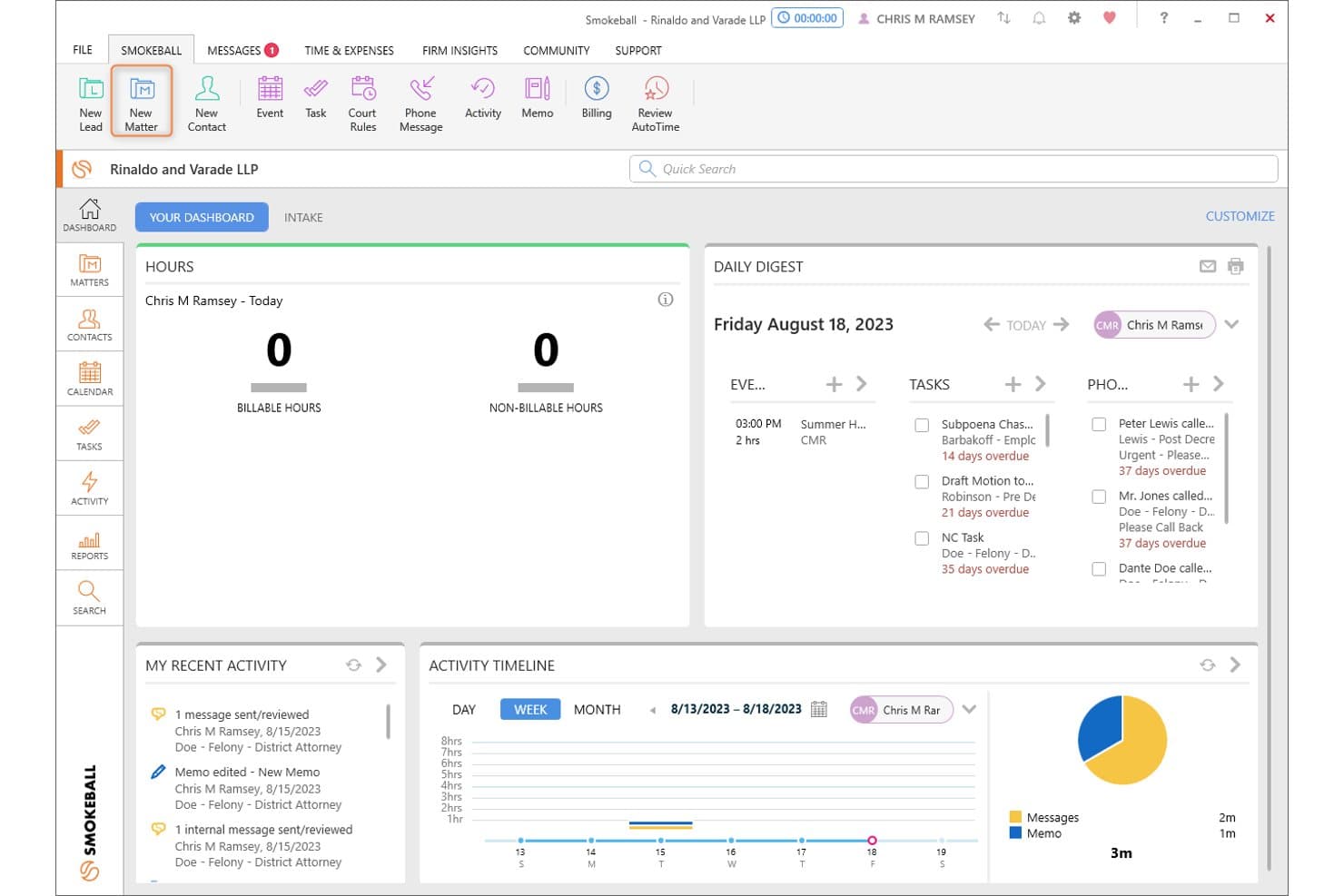
Smokeball's dashboard displays hours, tasks, and daily digest at a glance. Smokeball is a legal practice management platform built for small and solo law firms that brings together matter management, document automation, time tracking, billing, and trust accounting in a single system.
Who Is Smokeball Best For?
Smokeball is a strong fit for solo attorneys and small law firms that run their practice on Microsoft 365 and want time tracking to happen in the background without manual effort.
Why I Picked Smokeball
I picked Smokeball as one of the best because its AutoTime feature records billable activity directly inside Outlook, Word, and Smokeball itself, then assigns that work to the right matter automatically. In practice, that means every email you draft or receive in Outlook generates a time entry without you touching a timer. I also appreciate that Archie, Smokeball's AI assistant, can summarize documents and flag missing clauses from within the same Outlook and Word environment your team is already working in.
Smokeball Key Features
- TemplateLab document library: Access 20,000+ court, agency, and legal-document templates that auto-populate with matter details directly in Smokeball or Word.
- Trust accounting and bank reconciliation: Record matter-linked trust transactions across multiple accounts and reconcile them on a weekly, monthly, or quarterly schedule.
- LawToolBox court-rules integration: Calculate jurisdiction-specific deadlines by selecting a rule set, trigger, and date, then push results directly to your matter as calendar events or tasks.
- Archie Apps litigation tools: Run specialized AI tasks including bank-statement analysis, medical chronology generation, deposition summaries, and audio transcription from within Smokeball.
Smokeball Integrations
Smokeball offers native integrations with Microsoft Outlook and Microsoft Word, plus integrations with Xero and QuickBooks Online. It also provides a REST API, webhooks, and Client SDK for custom connections.
Pros and Cons
Pros:
- Intake, trust accounting, and billing in one system
- Archie builds chronologies and reviews documents
- Matter-linked templates and centralized case files
Cons:
- Large matters can load slowly
- AutoTime entries sometimes need manual correction
Learn more about Smokeball: Best for automated U.S. court-rule deadlines
- 7-day free trial
- From $49/user/month
Visit WebsiteCustomer Rating:4.7/5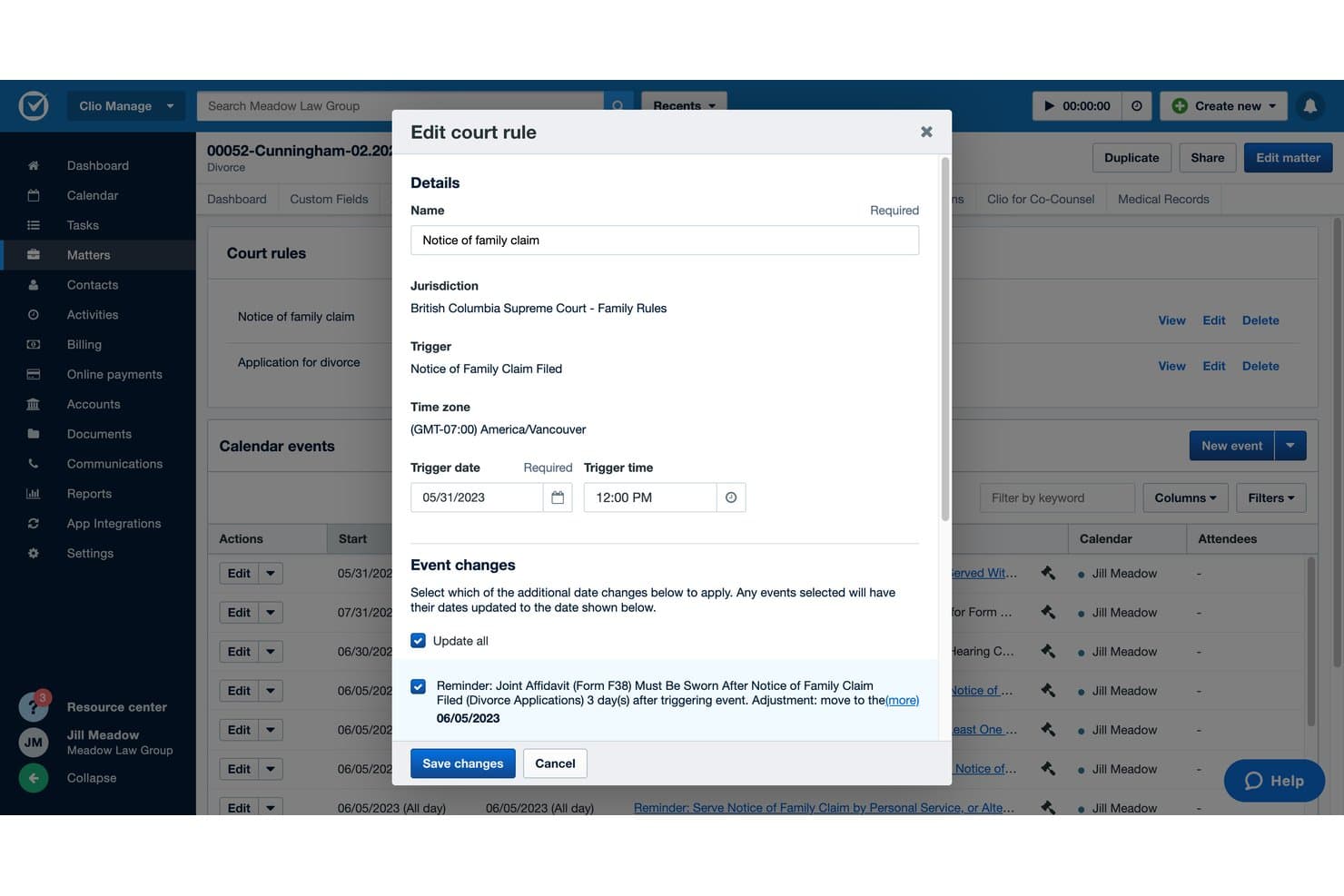
Clio Manage lets users edit court rules and update triggered calendar events. Clio Manage is a cloud-based legal practice management platform that centralizes matters, documents, billing, and court-deadline tracking for law firms of all sizes—from solo attorneys to multi-practice teams managing complex litigation workflows.
Who Is Clio Manage Best For?
Clio Manage is a strong fit for litigation teams and law firms that need court-rule deadline automation across U.S. jurisdictions built directly into their case management workflow.
Why I Picked Clio Manage
I picked Clio Manage as one of the best because its court rules engine is genuinely one of a kind: you select a jurisdiction, a trigger event, and a trigger date, and Clio auto-populates every related deadline directly on the matter. With coverage across 50 U.S. states and 2,200 jurisdictions, it's the most thorough deadline automation I've seen built natively into a case management platform. I also appreciate that when a trigger date shifts, Clio prompts you to choose which downstream events to recalculate rather than silently overwriting them.
Clio Manage Key Features
- Matter-linked time and expense tracking: Record billable time and expenses directly against a matter and push them into invoices for hourly, flat-rate, or contingency billing.
- Trust and operating account reconciliation: Reconcile trust and operating accounts within Clio and run compliance-ready reports, including general ledger, trial balance, and cash reports.
- Client portal: Give clients a secure space to exchange messages, share documents, view bills, book appointments, and make payments.
- Automated workflows: Trigger task-list assignments and document generation automatically as matters move through defined stages.
Clio Manage Integrations
Clio Manage offers 300+ integrations, including QuickBooks Online, Xero, Google Workspace, Microsoft 365, Google Drive, Dropbox, Box, and NetDocuments. It also supports Zapier, a REST v4 API, and webhooks for custom integrations.
Pros and Cons
Pros:
- Court rules calculate deadlines from trigger events
- Reviewers value connected time and billing
- Reviewers praise matter-linked case organization
Cons:
- Standard reports may lack needed detail
- Reviewers report migration data needing reconciliation
Learn more about Clio Manage: Best for AI-assisted case analysis and discovery
- 10-day free trial available
- From $50/user/month (billed annually)
Visit WebsiteCustomer Rating:4.6/5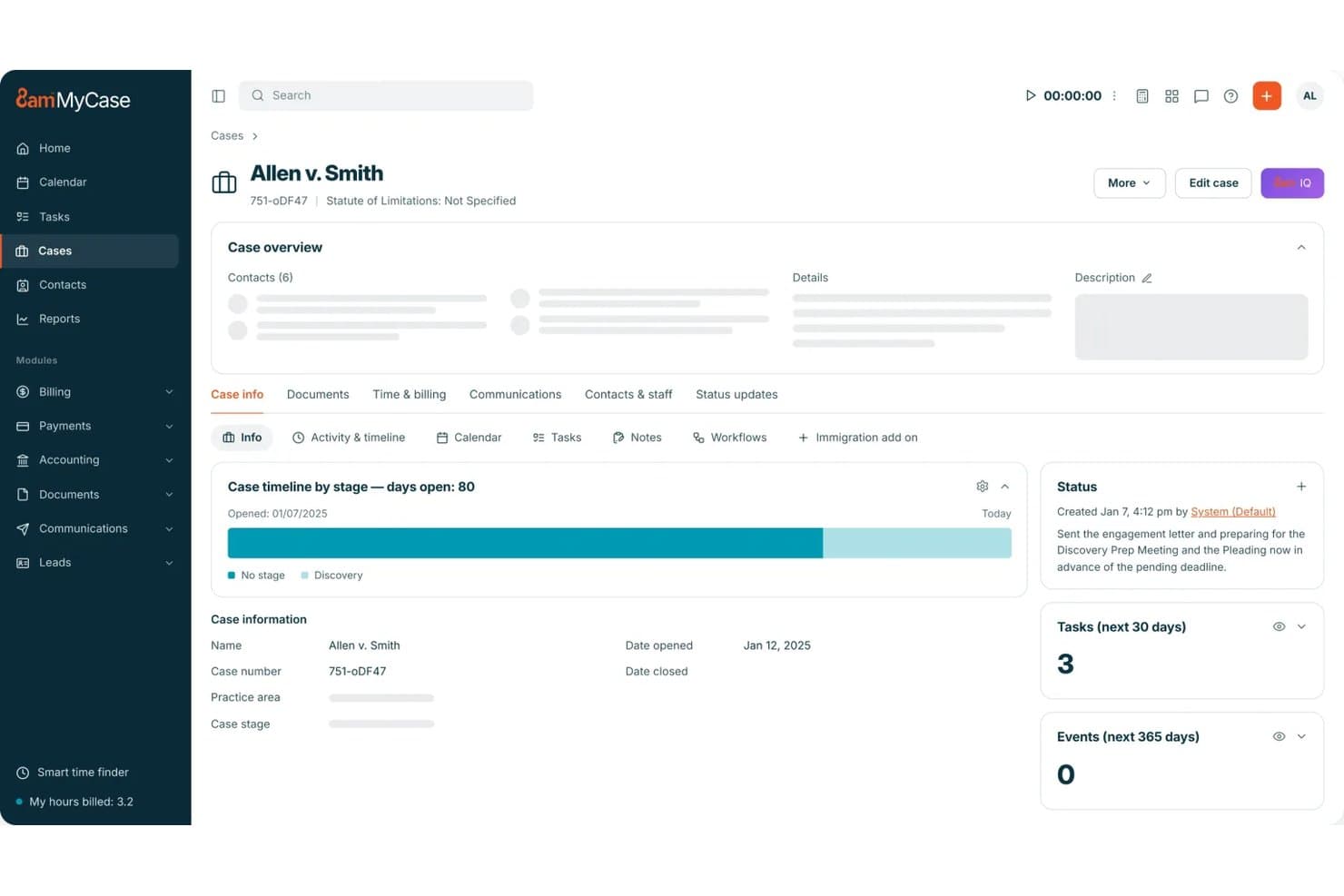
MyCase displays case timelines, tasks, and status updates in one view. MyCase is a legal practice management platform for solo attorneys and small firms that consolidates case records, billing, client communication, trust accounting, and document management in one place.
Who Is MyCase Best For?
MyCase is a strong fit for solo attorneys and small law firms that want case management, billing, client communication, and trust accounting in one place without a steep learning curve.
Why I Picked MyCase
I picked MyCase as one of the best because its AI-assisted case analysis genuinely changes how I work through complex files. The 8am IQ Case Assistant summarizes an entire matter, builds a timeline, and surfaces next steps, while the Discovery Assistant runs OCR across up to 5,000 pages per user each month to surface relevant documents fast. For discovery-heavy work, that combination cuts through the manual review that typically bogs down small teams.
MyCase Key Features
- Client portal: Give clients secure, self-serve access to their case documents, invoices, messages, tasks, and events directly from the portal.
- LawPay online payments: Accept credit cards, eCheck/ACH, and client financing through the built-in LawPay integration with next-business-day deposits.
- Automated workflows: Generate case task lists, calendar deadlines, and documents automatically based on intake and case workflow triggers.
- Trust ledger and reconciliation: Track trust balances by case, manage multiple trust and operating accounts, and reconcile trust transactions tied to receivables.
MyCase Integrations
MyCase offers 70+ integrations, including QuickBooks Online, Google Calendar, Outlook, Gmail, Dropbox, NetDocuments, and LawToolBox. It also supports Zapier and provides an open API for custom integrations on its Advanced plan.
Pros and Cons
Pros:
- Timekeeping and invoicing earn reviewer praise
- Reviewers praise centralized case and file history
- AI builds timelines and surfaces next steps
Cons:
- Billing workflows can feel inflexible to users
- Users report document sync and retrieval problems
 Best for immigration forms and casework
- Free trial + demo available
- From $80/user/month (billed annually)
Visit WebsiteCustomer Rating:4.8/5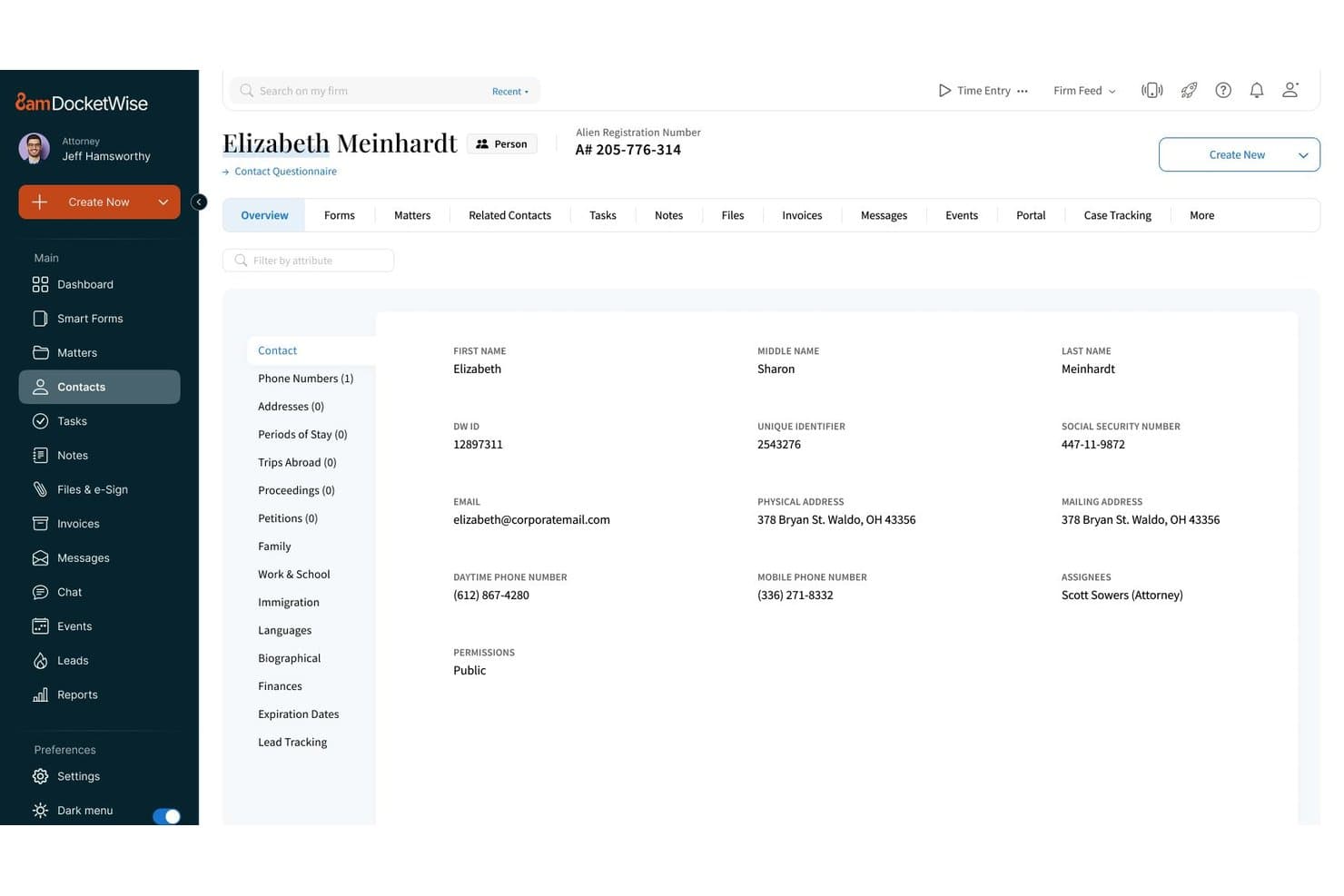
DocketWise displays detailed contact profiles for immigration clients. DocketWise is a cloud-based case management platform built specifically for immigration law firms, covering form preparation, client intake, case tracking, and billing in one place.
Who Is DocketWise Best For?
DocketWise is a strong fit for immigration law firms that need a dedicated platform for form preparation, client intake, and case tracking.
Why I Picked DocketWise
I picked DocketWise as one of the best because it's purpose-built for immigration practice in a way general case management tools simply aren't. I love how Smart Forms pull client data from multilingual intake questionnaires directly into immigration forms, cutting out the repetitive manual entry that slows down case prep. The built-in USCIS case tracking and visa bulletin monitoring mean I'm getting real-time alerts on case movement without toggling between government portals and my case management system.
DocketWise Key Features
- Client portal: Give clients a secure space to view case updates, submit documents, make payments, and exchange messages directly tied to their matter.
- Multilingual intake questionnaires: Collect client information in multiple languages through custom questionnaires, then push responses directly into immigration forms.
- Trust accounting ledger: Track trust balances at the firm, matter, and client levels, with transaction details including date, type, description, and amount.
- QuickBooks Online integration: Sync DocketWise invoices, payments, and trust-account transactions to QuickBooks Online, available on Pro and Advanced plans.
DocketWise Integrations
Native integrations include LawPay, QuickBooks Online, and Google Calendar. DocketWise also offers an Outlook add-in for saving selected emails and attachments, plus a RESTful API for approved custom integrations.
Pros and Cons
Pros:
- USCIS alerts track immigration case movement
- Client portal combines documents and messaging
- Immigration forms reuse intake answers
Cons:
- No documented court-rule deadline automation
- Matter workflows offer limited case-specific flexibility
Learn more about DocketWise: Best for deposition and medical-record review
- Free demo available
- Pricing upon request
Visit WebsiteCustomer Rating:4.5/5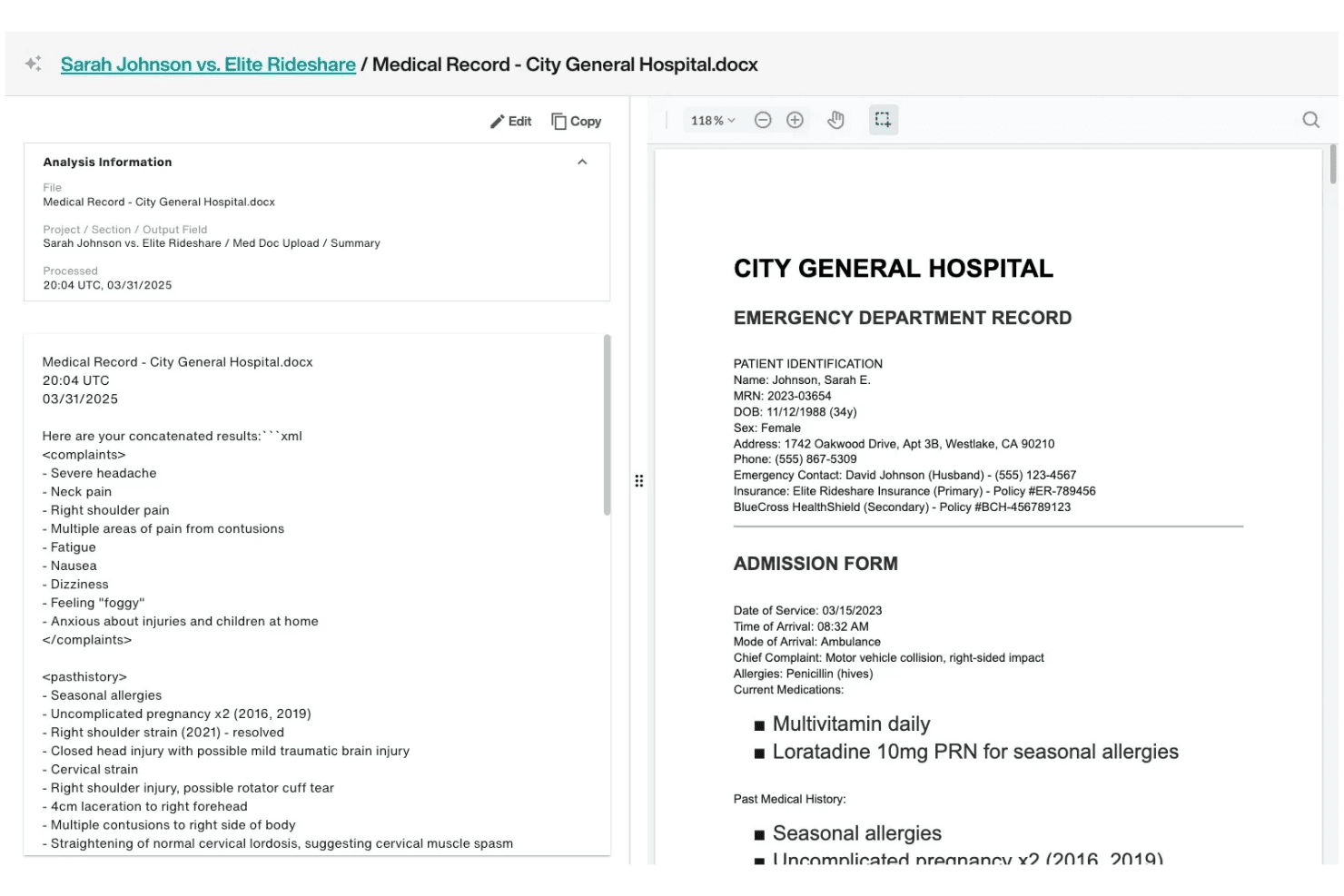
Filevine reviews medical records, transcribes depositions, and builds case timelines. Filevine is a legal case management platform built for litigation-heavy and personal-injury practices that need to centralize matter workflows, automate document assembly, track time and billing, and manage depositions and medical records alongside case files.
Who Is Filevine Best For?
Filevine is a strong fit for litigation-heavy and personal-injury firms whose teams regularly handle depositions, medical records, and high-volume case workflows.
Why I Picked Filevine
I picked Filevine as one of the best because its deposition and medical-record tools go deeper than anything else on this list. Depo Copilot provides live transcription with goal-based guidance during the deposition itself, while Depo Library stores and indexes transcripts with synced video so you can pull specific clip-level testimony later. Add MedChron's automated medical timelines, and your litigation team can build a chronology from raw records without manually sorting through every page.
Filevine Key Features
- Matter workspace: Centralizes email threads, calendar events, time entries, medical records, and case notes in a single project file.
- Taskflow automation: Triggers automatic tasks on project creation or phase changes, with deadline chains that populate later dates from a single entered date.
- AI Doc Review: Extracts, summarizes, and organizes content from OCRed or indexed documents and outputs results in PDF or DOCX format.
- Client Portal: Gives clients secure access to case updates, messaging, document sharing, and invoice payments based on firm settings.
Filevine Integrations
Filevine lists 2,000+ potential integrations, including QuickBooks, Microsoft 365, Google Calendar, Outlook, RingCentral, Slack, and Vinesign. It also offers an API and is listed on Zapier.
Pros and Cons
Pros:
- Custom workflows support litigation case stages
- Reviewers praise centralized matter information
- Depo Copilot, Depo Library, and MedChron
Cons:
- Court-rule deadlines need manual verification
- Complex configurations require administrator upkeep
Learn more about Filevine: Best for complex billing and trust accounting
- 10-day free trial + demo available
- Pricing upon request
Visit WebsiteCustomer Rating:4.5/5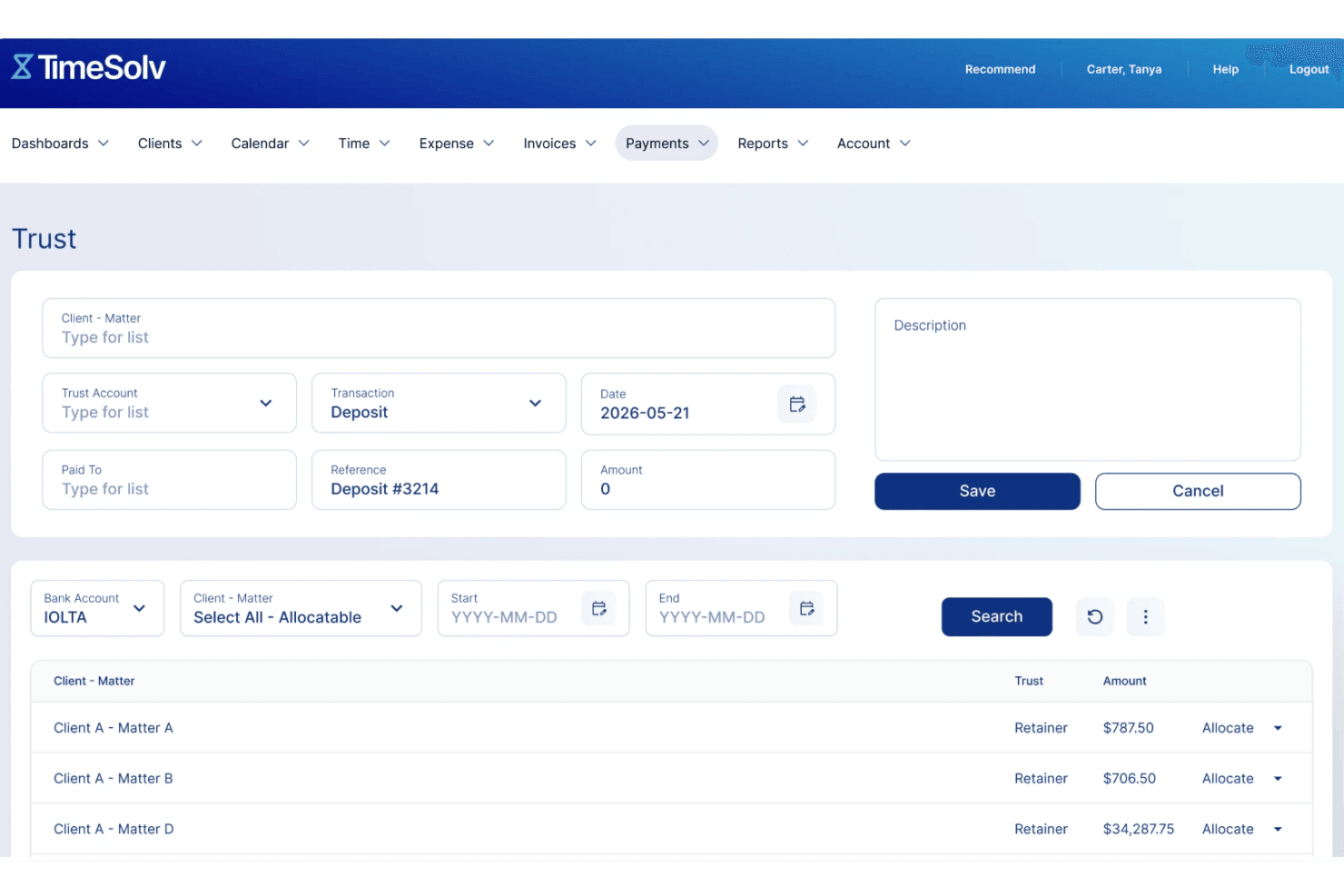
TimeSolv manages trust accounts with compliant fund tracking. TimeSolv is a cloud-based time tracking and billing platform built for attorneys and law firms that need to manage matters, invoices, trust accounting, and client payments in one place.
Who Is TimeSolv Best For?
TimeSolv is a strong fit for solo attorneys and small law firms that run high invoice volumes and need trust accounting built into their billing workflow.
Why I Picked TimeSolv
I picked TimeSolv as one of the best because its trust accounting goes deeper than most billing tools bother to go: matter-level trust balances, three-way reconciliation, timestamped audit logs, and minimum-balance alerts with automated replenishment requests. I also appreciate that clients can add trust funds directly through the portal via ACH or card, so the replenishment loop closes without a phone call. Layer in LEDES billing, split invoicing, and batch invoice delivery, and it's a genuinely capable fit for firms running high invoice volumes with strict billing compliance requirements.
TimeSolv Key Features
- Multiple billing arrangements: Configure matters to bill by the hour, flat fee, contingency, retainer, installment plan, or hybrid arrangement.
- Matter budget tracking: Set budget limits on matters and phases, compare budgeted work against actuals, and receive alerts when limits are exceeded.
- Document templates with merge fields: Build reusable document templates using more than 45 merge fields drawn from existing client and matter data.
- PointOne AI time capture: Capture billable work across email, calls, documents, and meetings, then review AI-drafted time entries matched to matters and billing codes before approving them into TimeSolv.
TimeSolv Integrations
TimeSolv integrates with Microsoft 365, Outlook, OneDrive, QuickBooks, Xero, LawPay, Dropbox, and NetDocuments. It also supports AccountEdge and LexShare/LexSign.
Pros and Cons
Pros:
- LEDES and split billing support complex invoices
- Time entries flow into client invoices
- Matter-level trust includes timestamped audit trails
Cons:
- Users report invoice payment allocation problems
- No jurisdiction-based court deadline calculations
 Best for matter-linked trust accounting
- 10-day free trial + free demo available
- From $49/user/month (billed annually)
Visit WebsiteCustomer Rating:4.3/5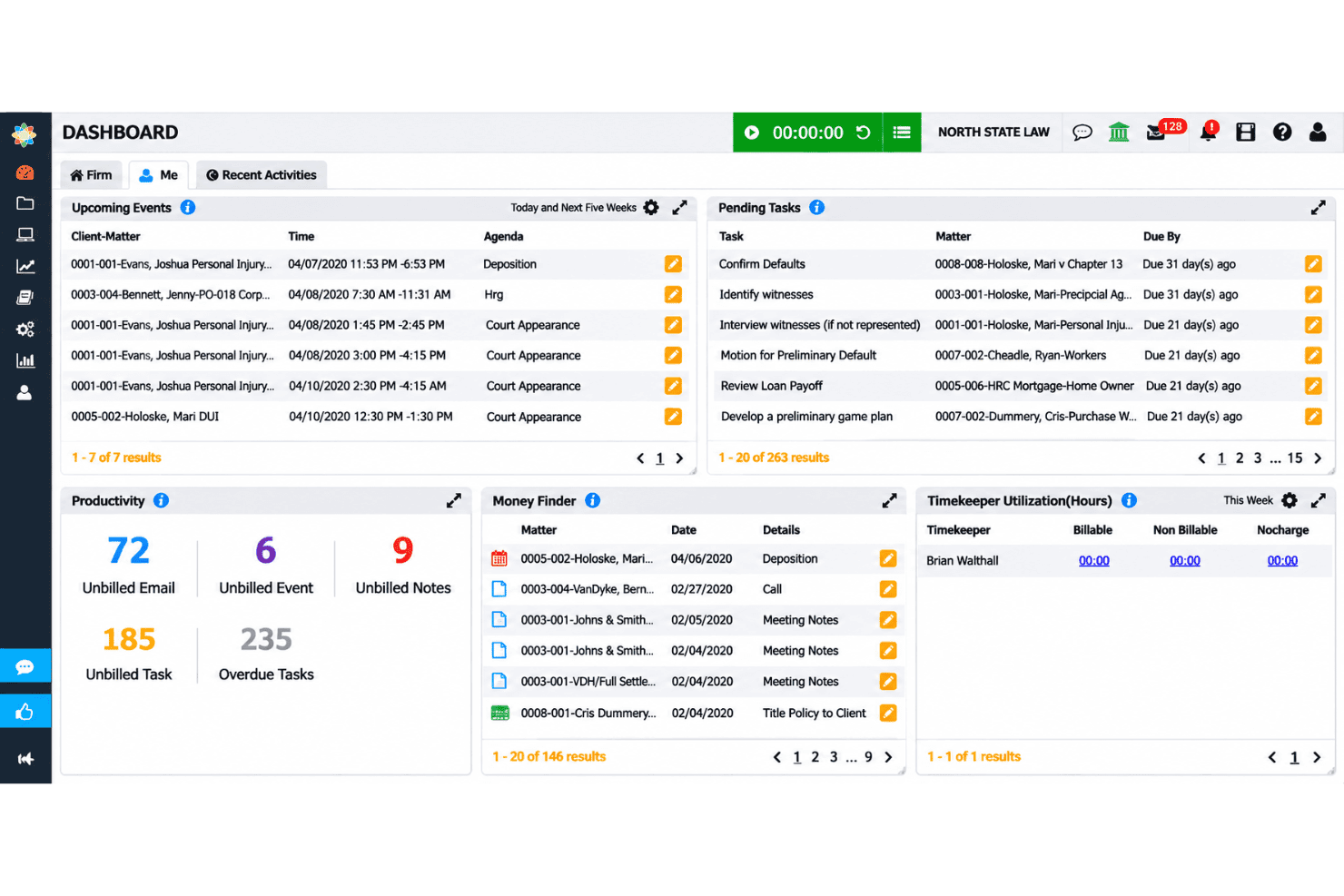
CosmoLex organizes matter tasks, events, deadlines, and trust accounting records. CosmoLex is a cloud-based legal practice management platform that combines matter management, billing, trust accounting, and firm bookkeeping in one system—making it a strong fit for solo attorneys and small firms that want to avoid managing separate accounting software.
Who Is CosmoLex Best For?
CosmoLex is a strong fit for solo attorneys and small firms that want billing, trust accounting, and matter management under one roof—without bolting on separate bookkeeping software.
Why I Picked CosmoLex
I picked CosmoLex as one of the best because it handles trust accounting the way legal practice actually demands it: linked directly to individual matters. Every client trust deposit, transfer, and reconciliation ties back to a specific matter, so there's no manual cross-referencing between a billing system and a separate accounting tool. I particularly like that three-way reconciliation reports are included from the entry-level Launch plan, not locked behind a higher tier.
CosmoLex Key Features
- Client portal: A secure space where clients can view invoices, complete intake forms, exchange messages, and share documents, all tied to their matter.
- Matter-linked time and expense tracking: Capture billable hours and expenses directly within a matter and convert them into invoices with hourly or flat-rate billing.
- Workflow automation: Build and load matter workflows into new or existing matters, with status automation to control task sequencing and assignments.
- AI document summaries: Extract key terms, deadlines, and action items from uploaded documents, with matter-level data isolation.
CosmoLex Integrations
CosmoLex offers integrations with Microsoft 365, Outlook, Google Calendar, Dropbox, OneDrive, Google Drive, NetDocuments, Box, QuickBooks Online, and LawPay. Pro includes a REST API, and Zapier connectivity is available.
Pros and Cons
Pros:
- Reviewers often praise responsive support
- Integrated billing keeps matter finances together
- Matter-linked trust reconciliation earns user praise
Cons:
- No documented jurisdiction-based deadline calculation
- Document handling draws user criticism
Learn more about CosmoLex: Best for firms combining legal work and accounting
- 10-day free trial + free demo available
- From $59/user/month (billed annually)
Visit WebsiteCustomer Rating:4.4/5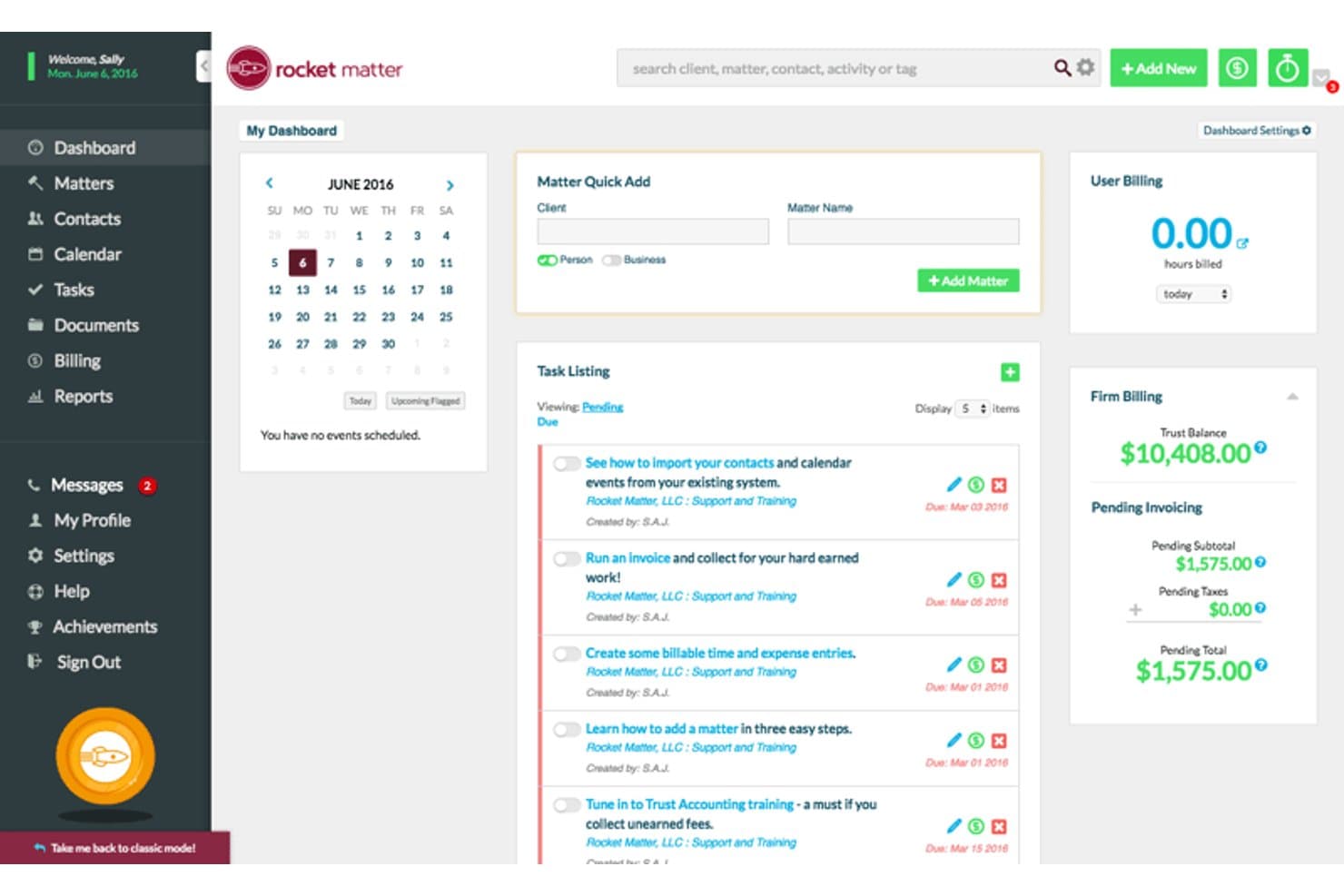
Rocket Matter's dashboard centralizes billing, tasks, and matter management. Rocket Matter is a cloud-based legal practice management platform that covers matter tracking, time and expense recording, billing, trust accounting, and document management for solo attorneys and small-to-mid-sized law firms.
Who Is Rocket Matter Best For?
Rocket Matter is a strong fit for solo attorneys and small firms that need billing, trust accounting, and matter management handled in a single platform.
Why I Picked Rocket Matter
I picked Rocket Matter as one of the best because it's one of the few legal practice management tools that folds true business accounting directly into the platform at the Elite tier, giving firms a legal-specific chart of accounts, bank data feeds, and operating, trust, and credit card reconciliation in one place. I really like that trust accounting isn't a bolted-on feature here: per-matter trust ledgers, replenishment triggers, and IOLTA-compliant reporting are available even at the Essentials level.
Rocket Matter Key Features
- Batch billing: Review, approve, and send multiple invoices in a single session directly from your matter records.
- Matter workflows: Build automated task templates that assign deadlines, reminders, and status updates when a matter reaches a set stage.
- Conflict checking: Search contacts and matters to surface potential conflicts of interest before opening a new matter.
- Rocket Matter Track: A desktop timekeeping tool that automatically tracks activity across apps and devices so you can assign time to matters after the fact.
Rocket Matter Integrations
Rocket Matter offers native integrations with QuickBooks Online, Microsoft Office 365 and Outlook, Google Calendar, NetDocuments, OneDrive, Dropbox, and Box. It also provides a JSON API with HTTP POST endpoints and an OpenAPI specification for custom integrations.
Pros and Cons
Pros:
- Matter dashboards connect files, tasks, and billing
- Trust ledgers support client-balance oversight
- Reviewers praise matter-linked time entry and batch billing
Cons:
- Reviewers describe mobile calendar tools as clunky
- Some reviewers report invoice-editing and payment friction
Learn more about Rocket Matter: Best for standardizing matter workflows
- Free demo available
- Pricing upon request
Visit WebsiteCustomer Rating:4.2/5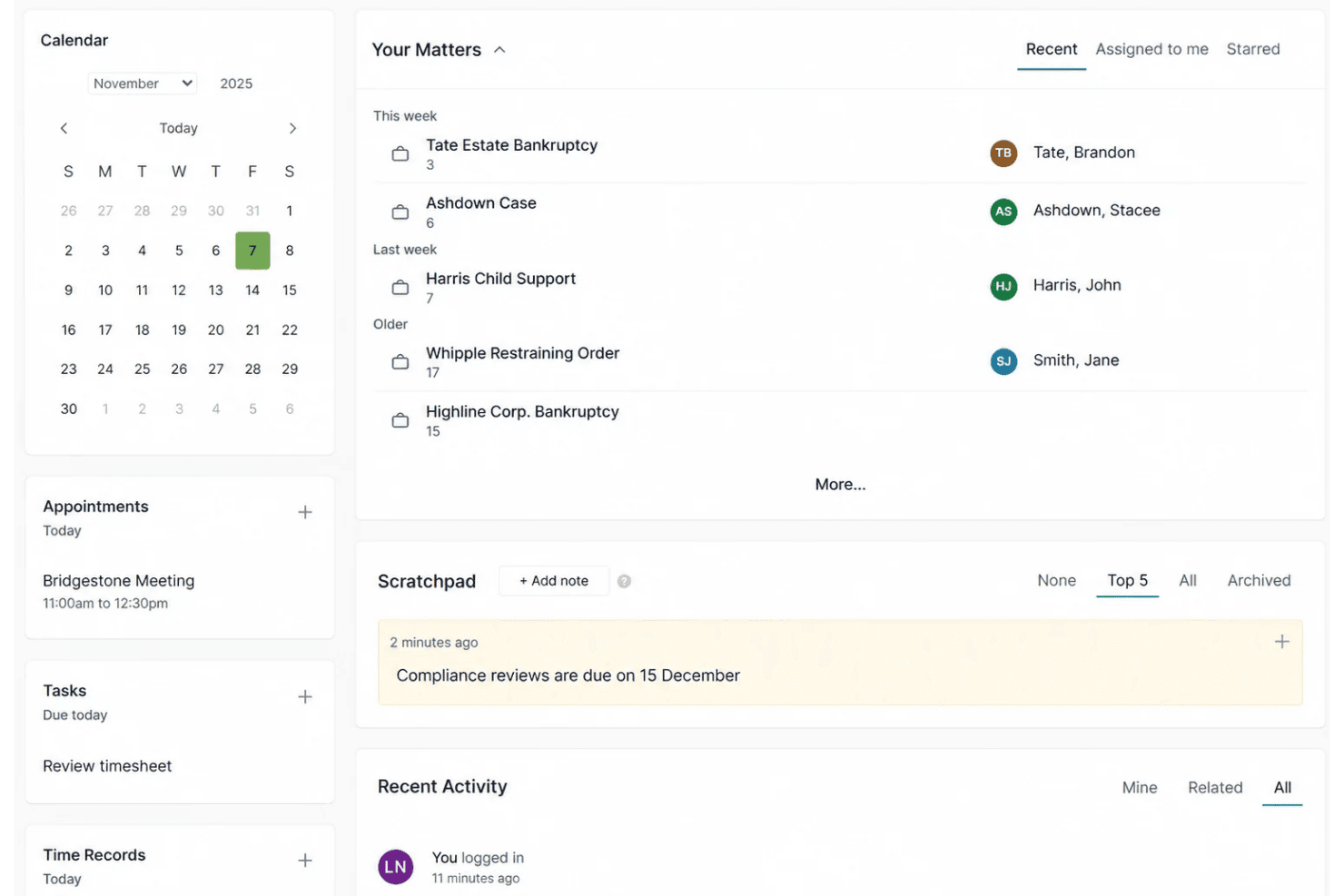
Actionstep automates matter workflows, task assignments, reminders, and case stages. Actionstep is a cloud-based practice management platform built for midsize law firms that need to bring matter tracking, document management, time and billing, and trust accounting together in one configurable system.
Who Is Actionstep Best For?
Actionstep is a strong fit for midsize law firms that need to standardize how matters move through the firm, from intake to billing, across a configurable workflow system.
Why I Picked Actionstep
I picked Actionstep as one of the best Caret Legal alternatives because of how deeply its workflow engine is wired into every matter. When a new matter opens, you can configure step-by-step workflows that automatically assign tasks, trigger reminders, and move work through defined stages, keeping every attorney and paralegal on the same page without manual follow-up. I also appreciate that time entries, documents, and client communications all live inside the matter record, so nothing slips through when billing time arrives.
Actionstep Key Features
- Client portal: Share matter updates, documents, and billing with clients through an encrypted, permission-controlled portal tied directly to each matter.
- Trust account reconciliation: Reconcile trust and client accounts manually or by uploading OFX or QIF bank statements, with locking and auditor document attachment.
- Conflict checking: Run conflict-of-interest checks directly within the platform before opening new matters.
- Mobile app: Access matters, tasks, and time tracking from iOS and Android devices.
Actionstep Integrations
Actionstep integrates with Microsoft Outlook, Gmail, InfoTrack, and Xero. It also supports Zapier, a REST API, and REST Hooks for custom connections and workflow automation.
Pros and Cons
Pros:
- Time entries feed reviewed invoices
- Matter records unite documents, deadlines, and billing
- Configurable workflows standardize matter stages
Cons:
- Trust-account needs may exceed reconciliation tools
- Workflow configuration takes substantial implementation effort
Learn more about Actionstep: 10Best for matter-based document automation
LEAP
- Free demo available
- Pricing upon request
Visit WebsiteCustomer Rating:4.3/5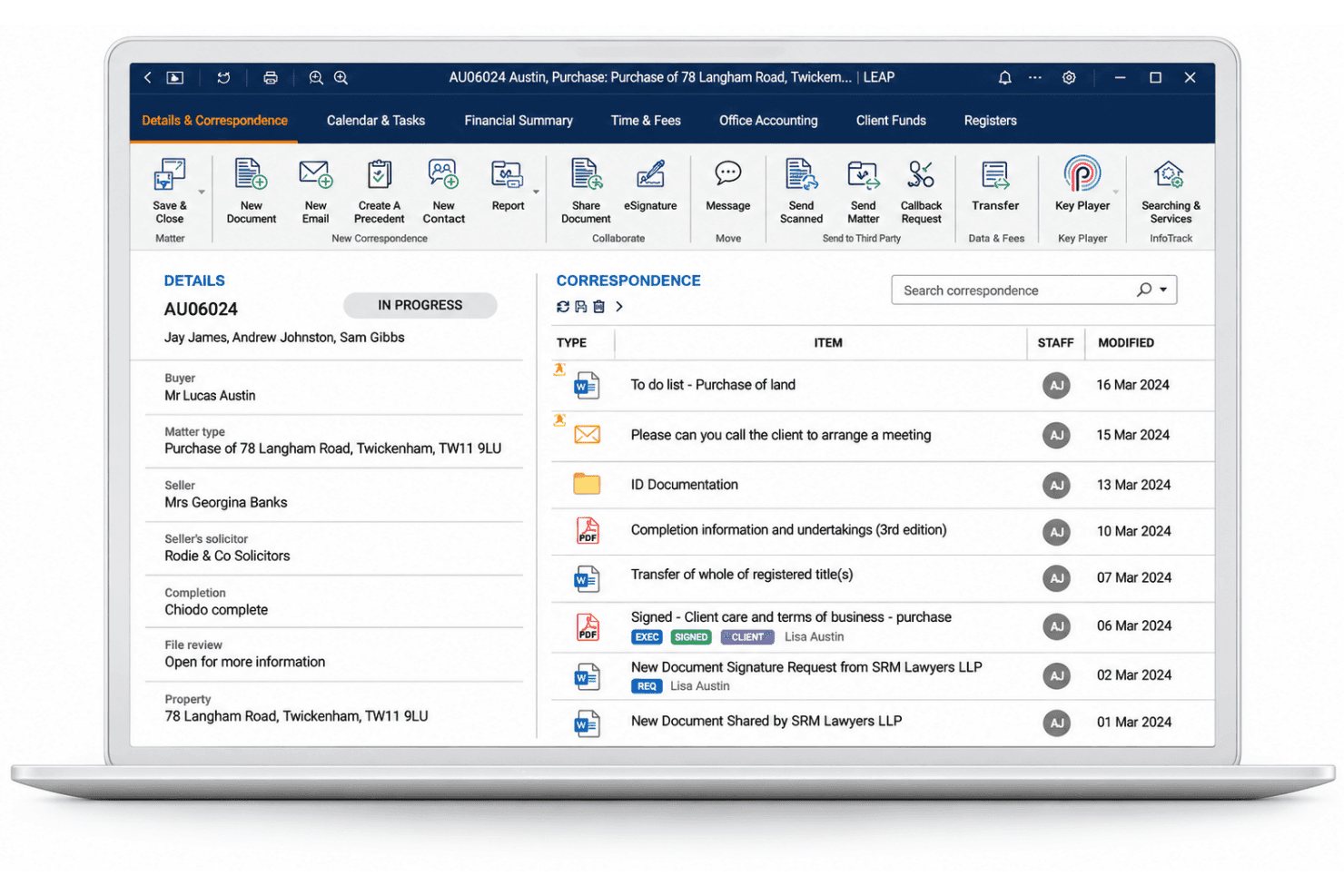
LEAP handles legal matters, document automation, client accounts, time entries, and legal aid billing. LEAP is an all-in-one legal practice management platform built for law firms that need matter management, document automation, trust accounting, and billing in a single system.
Who Is LEAP Best For?
LEAP is a strong fit for law firms that handle high volumes of document-heavy matters and need case management, document automation, trust accounting, and billing in one place.
Why I Picked LEAP
I picked LEAP as one of the best because its document automation is built directly into the matter workspace, which means templates pull client and matter data already stored in LEAP to populate forms, letters, and court documents without manual re-entry. I especially like the Workflow Builder, which lets you attach branching workflows to specific matter types, so each step from drafting through filing follows a repeatable, structured sequence. AutoTime also captures billable activity across Word, Outlook, and calls, feeding time directly into invoice generation from the same matter.
LEAP Key Features
- LawConnect client portal: Clients can access shared documents, upload files, reply to comments, view correspondence, and pay invoices through a firm-branded portal with a customized URL, logo, and colors.
- Trust reconciliation: LEAP matches trust transactions against bank statements, supports filtering by status and transaction type, and lets you save an incomplete reconciliation to return to later.
- Online payments dashboard: Firms can create payment links, schedule reminders, track transactions, save client card details, and issue refunds, with clients able to pay by card, eCheck, Apple Pay, or Google Pay.
- Conflict checks: LEAP checks clients, matters, and correspondence for potential conflicts before a new engagement is accepted.
LEAP Integrations
LEAP connects with Microsoft 365, Lawmatics, InfoTrack, LawToolBox, QuickBooks Online, Xero, and LawConnect for document management, client intake, court filing, deadline tracking, accounting, and secure file sharing. It also supports Zapier for connecting thousands of third-party applications and provides REST APIs through its developer program for custom integrations.
Pros and Cons
Pros:
- Trust accounting sits alongside matter ledgers
- Matters keep files, calendars, billing together
- Matter templates populate documents from case data
Cons:
- Financial reporting spans separate views
- Automatic time capture misclassifies billable activity
Learn more about LEAP:
Outras alternativas ao CARET Legal
Eis algumas opções adicionais que não entraram na minha lista final, mas que vale a pena conhecer:
- 11AbacusLawBest for firms needing on-premises deployment
- 12PracticePantherBest for client portals with online payments
- 13SmartAdvocateBest for switching from CARET Legal
- 14LawcusBest for staged case-system migration
- 15Bill4TimeBest for billing-first small law firms
- 16LawmaticsBest for automated client intake and lead nurturing
- 17LitifyBest for litigation teams using matter-aware AI
- 18CenterbaseBest for live law firm financial intelligence
- 19PerfectLawBest for web access with on-prem hosting
Related Reviews
How I Evaluate CARET Legal Alternatives
I split my evaluation into three parts. First, I look for tools that organize matter records with linked documents, parties, and billing, and that convert time entries into invoices across hourly, flat-fee, and contingency structures—these two capabilities carry the most weight. Second, I evaluate workflow automation engines and court rules-based calendaring as key differentiators. Third, I consider onboarding support, pricing transparency, and contract flexibility.
Core Functionality (Table Stakes For This List)
When I'm selecting tools for my list, I score each one on a scale from 0 (does not offer the functionality) to 5 (excels in this area) for each core functionality listed below. I then convert the total into a percentage to help assess each tool's overall fit, with extra weight on any functionalities I’ve deemed essential.
- Matter & Case Tracking (Essential): I check whether one matter record links parties, status, notes, documents, tasks, and billing so staff can find the file and next action together.
- Time & Billing (Essential): I look for billable and non-billable time entry tied to matters, with invoices that support the firm’s billing arrangements.
- Calendaring & Deadlines: I assess whether teams can link dates and tasks to matters and automate deadlines from applicable court rules or triggers.
- Document Management: I check how staff organize and search matter files, and whether templates or version history support document workflows.
- Trust Accounting: I evaluate whether client funds are tracked separately by client or matter, with reconciliation tools and clear reporting.
- Client Intake & Communication: I look for intake details that feed into matter creation, plus communication logs or portals for sharing messages and documents.
Once I have a list of tools that meet the criteria, I consider what sets each platform apart.
Differentiating Factors (What Sets Vendors Apart)
Here's how I compare and contrast different vendors:
Standout Features
I look for court rules-based calendaring that auto-populates deadlines from jurisdiction-specific rule sets—missing a filing date is a malpractice risk, and tools like Clio Manage and PracticePanther handle this differently in scope and rule coverage. Workflow automation engines matter just as much; I evaluate whether a platform can trigger tasks, documents, and notifications based on matter stage, since firms with repeatable case types need that structure built in rather than managed manually. I also check how each tool handles AI document summarization, because reviewing a lengthy medical record or contract brief is where time savings show up fastest.
Beyond Features
I check migration support closely because switching platforms mid-case is high-risk. Some vendors like Clio Manage and Smokeball offer dedicated implementation specialists who map your existing data fields, while others leave you with a CSV import tool and a help article. Pricing models matter just as much—a firm adding lateral hires needs to know whether per-user costs scale predictably or trigger a new pricing tier. I also evaluate integration depth with tools like QuickBooks and Microsoft 365, since a billing sync that only pushes data one way creates reconciliation headaches at month-end.
Porquê procurar alternativas ao CARET Legal?
Embora o CARET Legal seja uma boa opção para a gestão de processos jurídicos, algumas sociedades procuram alternativas para encontrar uma solução mais adequada aos seus fluxos de trabalho, orçamento ou requisitos tecnológicos. Poderá estar à procura de uma alternativa ao CARET Legal porque:
- A sua prática precisa de fluxos de trabalho de processos adaptados a uma área específica do direito
- A sua sociedade prefere uma implementação local em vez de software baseado na nuvem
- A sua equipa precisa de ferramentas especializadas para processos com elevada necessidade de produção e análise de prova
- Os seus processos de faturação e contabilidade fiduciária exigem uma configuração diferente
- A sua sociedade em crescimento precisa de preços compatíveis com os seus planos de contratação
Se alguma destas situações lhe parece familiar, veio ao lugar certo. A minha lista inclui várias opções de software de gestão de processos jurídicos mais adequadas para equipas que enfrentam estes desafios com o CARET Legal e procuram alternativas.
Principais funcionalidades do CARET Legal
Eis as principais funcionalidades do CARET Legal para ajudar a compará-lo com opções alternativas:
- Gestão de processos: A CARET Legal reúne detalhes dos processos, partes, documentos, tarefas, calendários e faturação nos registos dos processos. A sua equipa pode utilizar cada registo para consultar o estado de um processo e o trabalho relacionado.
- Registo de tempo e faturação: Os colaboradores podem registar o tempo dedicado aos processos através de temporizadores ou registos manuais e, em seguida, utilizar esses registos para preparar faturas. O registo de tempo em dispositivos móveis permite captar o trabalho realizado fora do escritório.
- Contabilidade de fundos fiduciários: As ferramentas de contabilidade integradas acompanham os fundos fiduciários dos clientes separadamente das finanças da sociedade e suportam a gestão IOLTA. Os colaboradores da sociedade podem utilizar relatórios financeiros para consultar a atividade e os saldos das contas.
- Calendário e prazos: O calendário acompanha compromissos, tarefas e prazos relacionados com os processos, com sincronização bidirecional para o Outlook e o Google Calendar. As Regras do Tribunal podem calcular os prazos judiciais a partir de datas importantes no CARET Legal.
- Gestão de documentos: Os colaboradores podem organizar e aceder a ficheiros relacionados com os processos, pré-visualizar muitos formatos de ficheiro e etiquetar ou bloquear documentos. Manter os ficheiros associados aos processos ajuda as equipas a encontrar os registos certos enquanto trabalham num caso.
- Automatização de documentos: Os modelos podem obter informações dos registos dos processos para gerar documentos como cartas de contratação, requerimentos e documentos para clientes. Isto reduz a introdução repetida de dados ao preparar documentos semelhantes.
- Automatização de fluxos de trabalho: Os modelos predefinidos podem iniciar processos e criar tarefas ou eventos de calendário associados a um fluxo de trabalho. A sua equipa pode utilizá-los para aplicar etapas repetíveis a tipos de processos recorrentes.
- Portal do cliente: O portal da CARET Legal permite às sociedades partilhar documentos e faturas com os clientes de forma segura. Os clientes podem utilizar o portal para aceder aos materiais partilhados sem depender de anexos de e-mail.
- Relatórios e análises: Os relatórios e as análises dão às sociedades uma visão das informações operacionais e financeiras. As equipas podem utilizá-los para consultar a atividade dos processos, a faturação e o desempenho da sociedade.
Custos e preços das alternativas à CARET Legal
Os preços variam consoante o plano, a dimensão da sociedade e os complementos. A maioria das alternativas à CARET Legal cobra por utilizador e muitas disponibilizam períodos de teste gratuitos em vez de planos gratuitos permanentes. Seguem-se intervalos de preços e funcionalidades típicos por nível.
Tabela de comparação de planos para alternativas à CARET Legal
| Tipo de plano | Preço médio | Funcionalidades comuns |
|---|---|---|
| Tipo de planoPlano gratuito | Preço médio$0 (apenas período de teste gratuito) | Funcionalidades comunsAcesso por tempo limitado às funcionalidades principais, fluxos de trabalho de exemplo para processos, suporte básico e ausência de subscrição gratuita contínua. |
| Tipo de planoPlano pessoal | Preço médio$49-$69/utilizador/mês | Funcionalidades comunsGestão de casos e processos, registo de tempo, faturação, armazenamento de documentos e ferramentas de calendário. |
| Tipo de planoPlano empresarial | Preço médio$69-$129/utilizador/mês | Funcionalidades comunsFerramentas principais para processos, contabilidade de fundos fiduciários, automatização de fluxos de trabalho, recolha de dados de clientes, relatórios e integrações. |
| Tipo de planoPlano empresarial avançado | Preço médio$100-$200+/utilizador/mês ou orçamento personalizado | Funcionalidades comunsPermissões avançadas, fluxos de trabalho personalizados, integrações alargadas, relatórios para toda a sociedade e apoio à implementação. |