

O software de captação de clientes para escritórios de advogados automatiza a forma como os escritórios captam, qualificam e integram potenciais clientes. Se está à procura do melhor software de captação de clientes para escritórios de advogados, já sabe que as primeiras impressões podem fazer ou desfazer um caso — acompanhamentos perdidos, formulários desorganizados e falhas entre a captação e a gestão de processos podem custar ao seu escritório tanto clientes como receitas. Neste guia, apresento-lhe as principais opções que oferecem aos escritórios de advogados fluxos de trabalho personalizáveis, acompanhamento do ROI de marketing, assinaturas eletrónicas, verificações de conflitos e integração direta com as suas ferramentas de gestão de processos. Conte com informações práticas que o ajudarão a escolher a solução certa para uma integração mais simples e relações duradouras com os clientes.
Why Trust Our Software Recommendations
6,700+
Reviews
20
Industry experts
16+
Evaluation factors
14
Years
Our team has been testing and reviewing software since 2012. As legal practice leaders ourselves, we know how difficult—and important—it is to choose the right software.
For this guide, we evaluated tools using hands-on testing and independent research, scoring tools using our selection criteria.
Our reviews reflect our human editorial judgment, not a sales pitch.
Tabela comparativa de software de captação de clientes para escritórios de advogados
Esta tabela comparativa resume os detalhes de preços das minhas principais escolhas de software de captação de clientes para escritórios de advogados:
| Tool | Best For | Trial Info | Price | ||
|---|---|---|---|---|---|
| 1 | Best for intake-to-matter sync within Clio | 7-day free trial | From $49/user/month (billed annually) | Website | |
| 2 | Best for AI-driven lead intake and follow-up | Free plan + trial available | From $49/user/month | Website | |
| 3 | Best for AI-driven intake and marketing ROI | Free demo available | Pricing upon request | Website | |
| 4 | Best for conflict checks in mid-to-large firm intake | Free demo available | Pricing upon request | Website | |
| 5 | Best for intake built into trust accounting | 10-day free trial + free demo available | From $49/user/month (billed annually) | Website | |
| 6 | Best for intake-to-matter flow in one platform | Free demo available | Pricing upon request | Website | |
| 7 | Best for all-in-one intake within your case files | 10-day free trial available | From $50/user/month (billed annually) | Website | |
| 8 | Best for CRM-grade intake and marketing ROI tracking | Free demo available | Pricing upon request | Website | |
| 9 | Best for mid-size firm intake and conflict checks | Free demo available | Pricing upon request | Website | |
| 10 | Best for e-signature via SMS at intake | Free demo available | Pricing upon request | Website |


Avaliações de software de captação de clientes para escritórios de advogados
Seguem-se os meus resumos detalhados dos melhores softwares de captação de clientes para escritórios de advogados que entraram na minha lista final. As minhas avaliações apresentam uma análise detalhada das funcionalidades, dos melhores casos de utilização e das integrações de cada plataforma, para o ajudar a encontrar a melhor opção para si.
 Best for intake-to-matter sync within Clio
- 7-day free trial
- From $49/user/month (billed annually)
Visit WebsiteCustomer Rating:4.7/5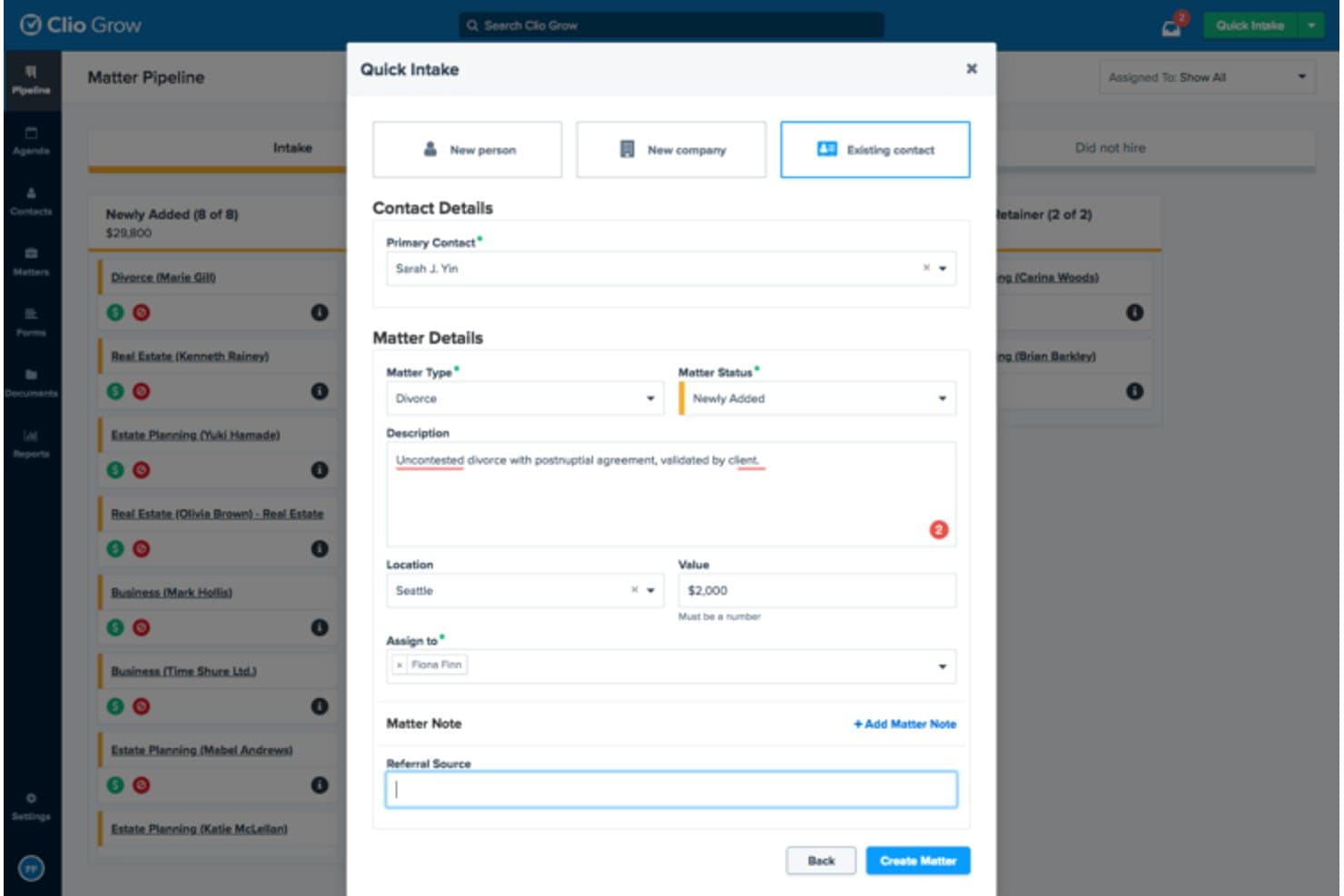
Clio Grow streamlines client intake with a quick matter creation form. Clio Grow is a cloud-based legal client intake platform that covers online intake forms, lead pipeline tracking, e-signatures, automated task generation, and direct data sync into Clio Manage.
Who Is Clio Grow Best For?
Clio Grow is a natural fit for law firms already running Clio Manage who want client intake and matter management to live in one connected system.
Why I Picked Clio Grow
I picked Clio Grow as one of the best because no other intake tool on this list converts a completed intake form directly into a matter in Clio Manage without any manual re-entry. When a prospect fills out your form, their contact details, matter information, and uploaded documents flow straight into your practice management system. I also like the pipeline view, which lets you track every lead from first inquiry through signed retainer, with automated task lists and e-signatures built into the same workflow.
Clio Grow Key Features
- Customizable intake forms: Build practice area-specific forms with custom fields to capture the exact client and matter details your firm needs.
- Lead inbox: Centralize all incoming potential client inquiries from your website, referrals, and marketing channels in one place.
- Conflict checks: Run firm-wide searches for conflicts of interest or duplicate records directly within the Clio platform.
- Appointment scheduling: Let prospective clients book consultations online, cutting out the back-and-forth of manual scheduling.
Clio Grow Integrations
Clio Grow taps into Clio's app directory of 250+ integrations, including Clio Manage, QuickBooks, Xero, Google Drive, Dropbox, Microsoft 365, Outlook, Google Calendar, Gmail, and Zapier. An API is also available for custom integrations.
Pros and Cons
Pros:
- Offers firm-wide conflict checks
- Tracks leads from inquiry to signed retainer
- Converts intake forms directly to matters
Cons:
- Reporting options can feel inflexible
- Intake automation limited outside Clio ecosystem
Learn more about Clio Grow: Best for AI-driven lead intake and follow-up
- Free plan + trial available
- From $49/user/month
Visit WebsiteCustomer Rating:4.8/5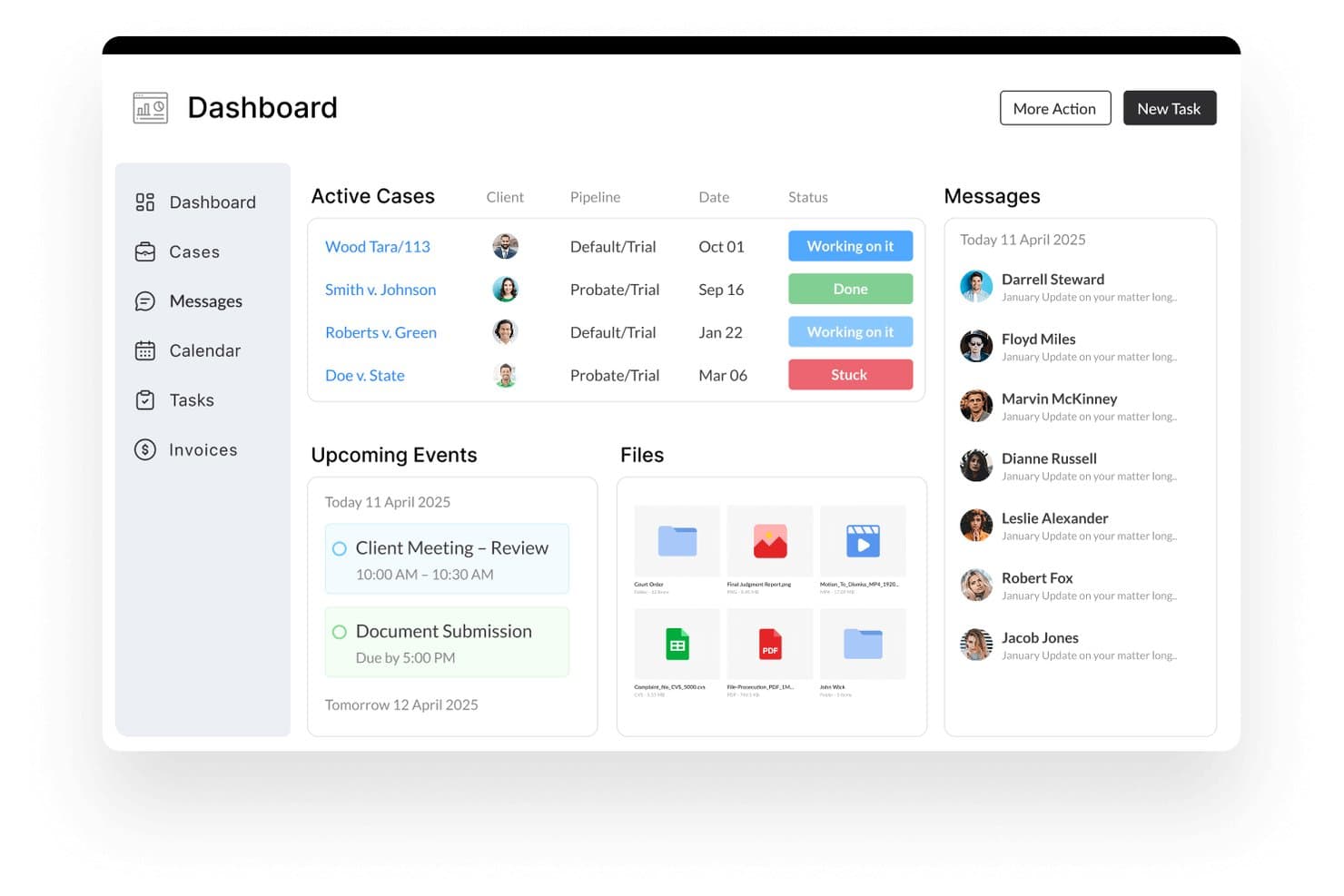
Lawcus centralizes cases, messages, and tasks in one dashboard. Lawcus is a legal practice management platform that combines client intake, CRM, matter management, billing, and AI-powered lead follow-up within a single system built for law firms.
Who Is Lawcus Best For?
Lawcus works well for small to mid-sized law firms that want AI-powered lead follow-up and client intake built into the same platform they use to manage matters, billing, and workflows.
Why I Picked Lawcus
Lawcus earns its spot as one of the best on my shortlist because of Lead Autopilot, its AI intake engine that handles full intake cycles, from call routing and lead qualification to automated questionnaire distribution, all synced directly into the Lawcus CRM. Nova AI then generates personalized follow-up emails and messages, so leads that don't convert immediately don't go cold. I like that both tools operate inside the same platform your team uses for matters, billing, and task management.
Lawcus Key Features
- Legal e-signature: Send engagement agreements for electronic signature directly from within Lawcus, letting clients sign from any device without leaving the platform.
- Two-way SMS messaging: Send and receive client text conversations through a system-generated phone number, with all messages stored in one place.
- Appointment scheduling: Book and manage consultations from within the CRM, keeping intake and scheduling connected to the same client record.
- Kanban board for matter tracking: Visualize matters and lead stages across a drag-and-drop board so your team can see the status of every active file at a glance.
Lawcus Integrations
Lawcus offers native integrations with Gmail, Microsoft 365, Microsoft Outlook, Google Drive, Dropbox, QuickBooks, Xero, LawPay, Calendly, and Mailchimp, and it connects with Zapier. An API is available for custom integrations, and Lawcus also connects with legal-specific tools like Smith.ai, LexReception, and Decision Vault for intake and reception workflows.
Pros and Cons
Pros:
- Two-way SMS keeps intake and communication connected
- Follow-up messaging personalized by built-in AI
- AI-driven intake automates lead qualification
Cons:
- Limited customization for intake workflows
- No public pricing transparency
Learn more about Lawcus: Best for AI-driven intake and marketing ROI
- Free demo available
- Pricing upon request
Visit WebsiteCustomer Rating:4.5/5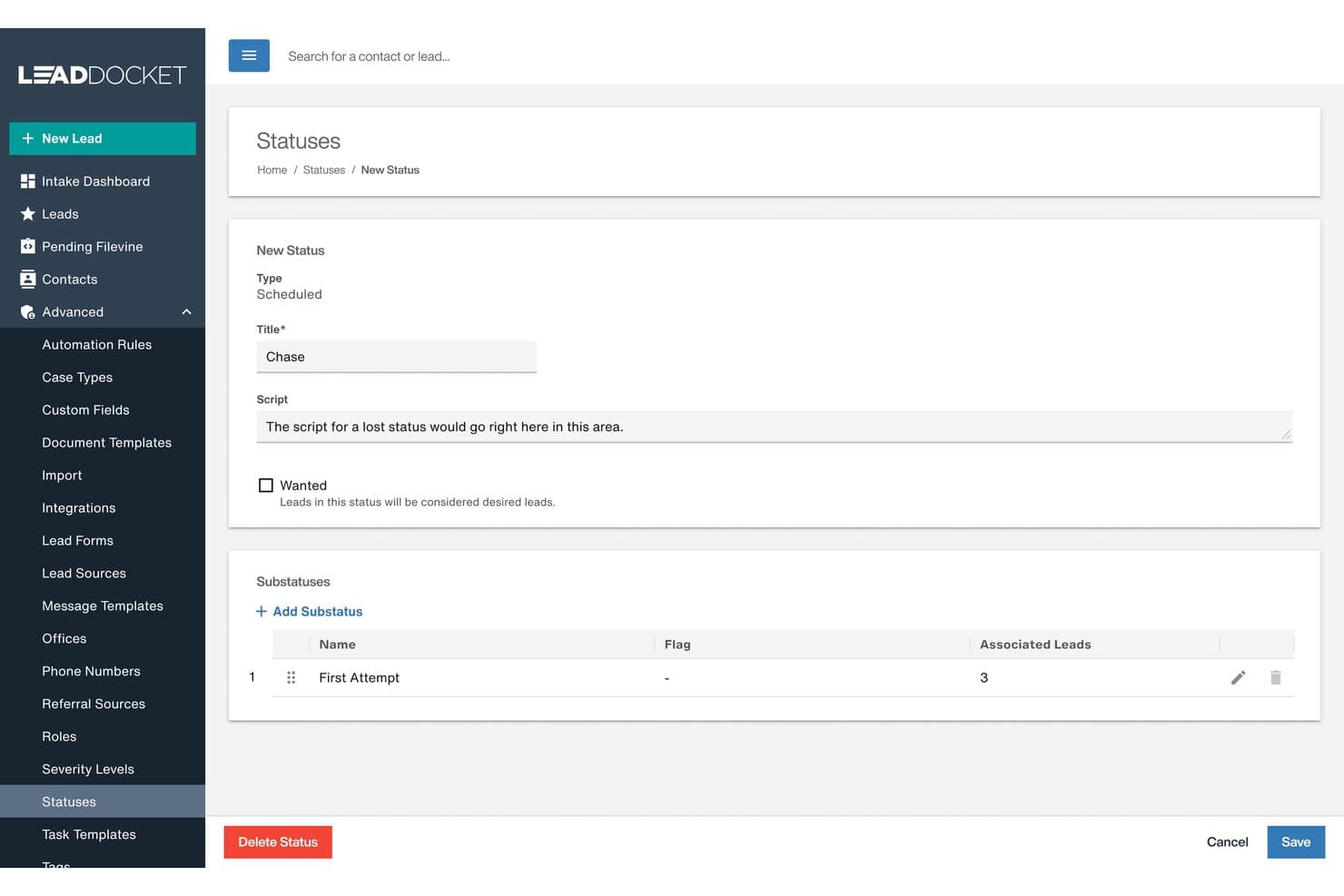
Filevine lets users customize lead statuses and substatuses for intake tracking. Filevine is an AI-powered legal practice management platform covering client intake, matter management, document automation, deadline tracking, and payment processing—with AI agents built on a purpose-built legal data foundation spanning 40M+ matters.
Who Is Filevine Best For?
Filevine is a strong fit for plaintiff-side law firms and high-volume legal practices that need to connect client intake directly to marketing attribution and matter management in one platform.
Why I Picked Filevine
I picked Filevine as one of the best because its LeadsAI tool does something most intake platforms don't: it uses AI to generate instant lead summaries and predictive case analysis, so your intake team can decide whether to accept, refer, or reject a lead without sifting through pages of intake forms. What really sets it apart is the marketing attribution layer built into Lead Docket, which connects every lead source directly to final settlement value so you can see exactly which ad campaigns are generating revenue, not just clicks.
Filevine Key Features
- Text-to-Case-File messaging: Send and receive client text messages directly within a case file, with an SMS pending response list to flag unanswered texts.
- Client portal: Give clients 24/7 access to case status, deadlines, and secure document uploads, with the option to invite outside parties like co-counsel or medical providers with restricted access.
- Vinesign e-signatures: Send forms via text or email and collect electronic signatures without leaving the platform.
- AI data mapping: Upload documents and let FilevineAI extract and map key data into designated fields automatically, cutting down manual data entry during intake.
Filevine Integrations
Filevine offers 40+ native and partner integrations, including QuickBooks, Microsoft 365, Outlook, Gmail, Google Calendar, Microsoft Teams, Slack, RingCentral, Dialpad, and Domo, and it connects with Zapier. An API is also available for custom integrations, and Workato is supported for building deeper workflow automations.
Pros and Cons
Pros:
- Connects intake directly to marketing attribution
- Predictive analysis helps qualify legal cases
- AI generates instant intake lead summaries
Cons:
- Intake tools may feel complex for small firms
- Advanced AI features require initial configuration
Learn more about Filevine: Best for conflict checks in mid-to-large firm intake
- Free demo available
- Pricing upon request
Visit WebsiteCustomer Rating:4.4/5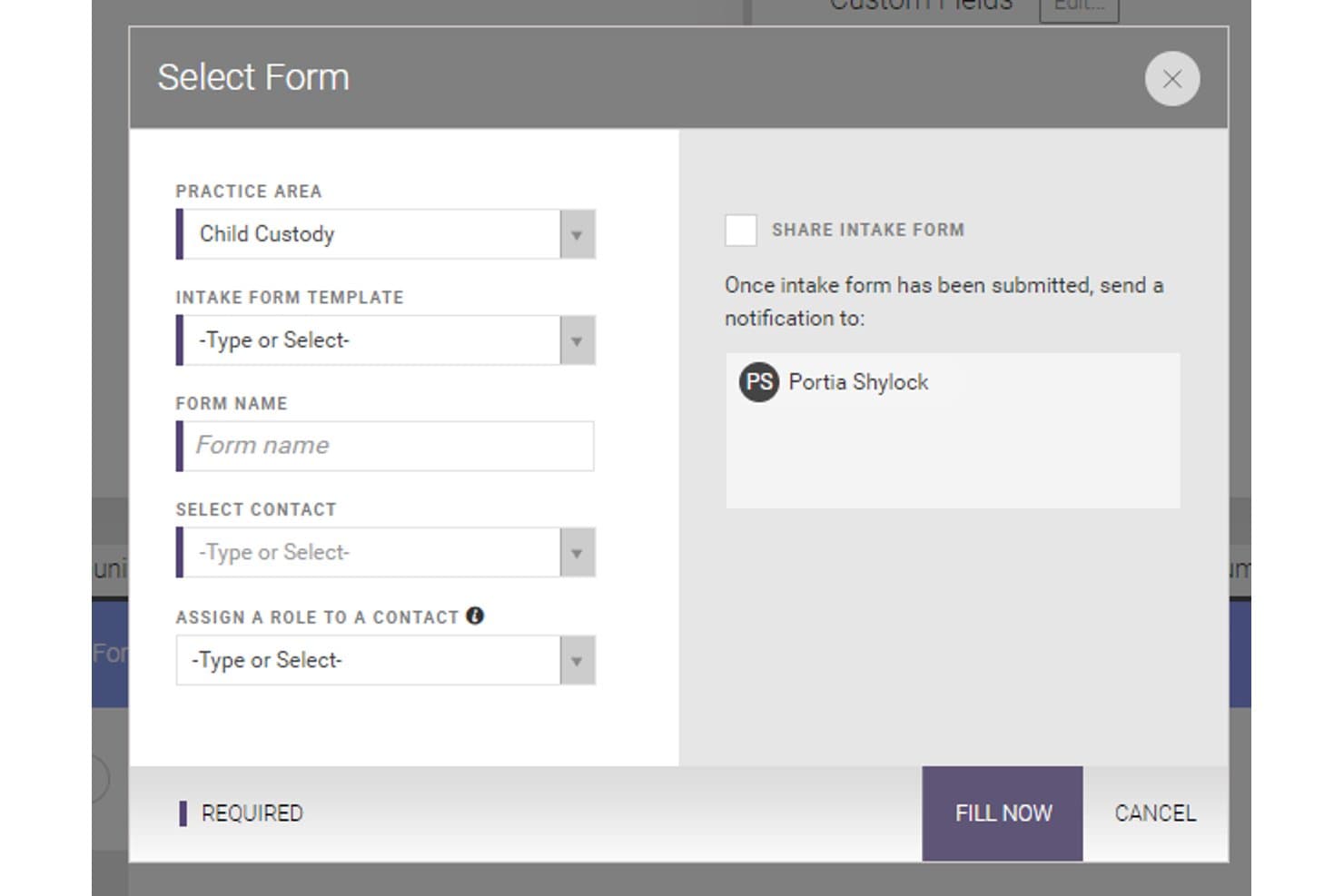
CARET Legal lets users build and send client intake forms by practice area. CARET Legal is a cloud-based legal practice management platform that covers client intake, conflict checking, matter management, billing, document management, and client communication in one system.
Who Is CARET Legal Best For?
CARET Legal is a strong fit for mid-to-large law firms that need structured conflict checking built directly into their client intake and matter management workflow.
Why I Picked CARET Legal
I picked CARET Legal as one of the best because its conflict checking is built directly into intake, not bolted on as an afterthought. When a new prospect enters the system, CARET Legal searches across active matters, archived cases, communication logs, and internal notes in one pass. That kind of reach into historical data matters most at mid-to-large firms, where manual checks across disconnected systems are where conflicts get missed. I also like that intake data automatically populates matter fields and triggers task assignments, cutting the duplicate entry that slows intake teams down.
CARET Legal Key Features
- Client portal: A built-in client portal lets clients access matter updates, exchange messages, and review documents without requiring a phone call or email thread.
- Two-way texting: Send and receive SMS messages with clients directly from within CARET Legal, keeping all communication logged against the relevant matter record.
- Document automation: Generate templated documents using matter data already in the system, reducing manual drafting time for routine client-facing paperwork.
- Time tracking and trust accounting: Log billable hours and manage trust accounts from within the same platform, with invoicing tied directly to matter records.
CARET Legal Integrations
CARET Legal offers native integrations with Microsoft 365, Google Workspace, Microsoft Outlook, Microsoft Word, OneDrive, NetDocuments, HotDocs, Lawmatics, LawToolBox, QuickBooks Online, RMail, and CARET Pay, plus IMAP support for other email accounts. Zapier support and a public API for custom integrations are not clearly documented.
Pros and Cons
Pros:
- Built-in portal supports secure client communication
- Intake populates matter records automatically
- Conflict checking scans all historical data
Cons:
- Intake workflow heavily structured for larger firms
- Public API support is not clearly documented
Learn more about CARET Legal: Best for intake built into trust accounting
- 10-day free trial + free demo available
- From $49/user/month (billed annually)
Visit WebsiteCustomer Rating:4.3/5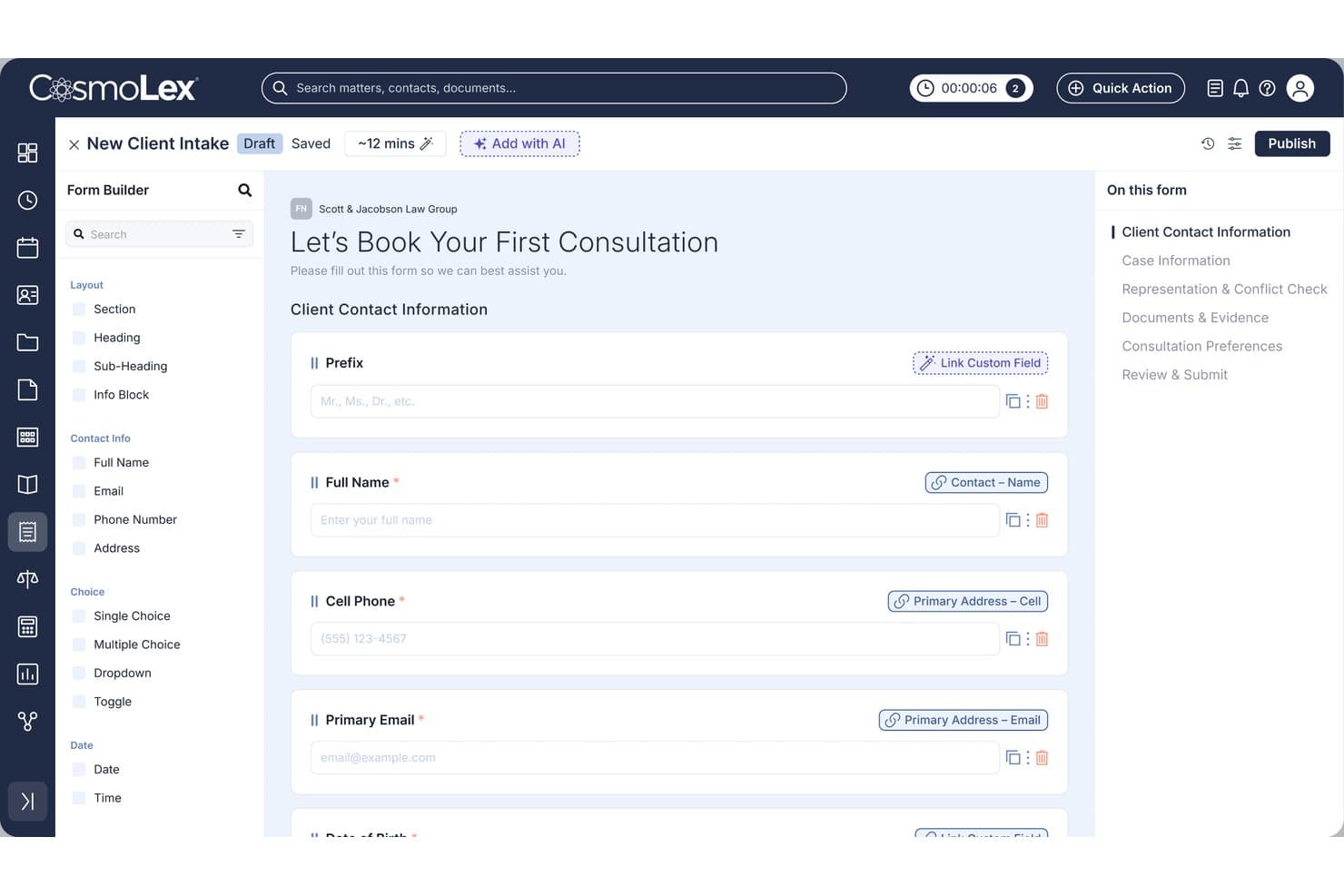
CosmoLex lets users build custom client intake forms with linked fields. CosmoLex is a cloud-based legal practice management platform that covers client intake, matter tracking, billing, and built-in trust accounting—all in one system designed for law firms.
Who Is CosmoLex Best For?
CosmoLex is a strong fit for small to mid-sized law firms that want to manage client intake and trust accounting in a single platform without juggling separate tools.
Why I Picked CosmoLex
I picked CosmoLex as one of the best because it's the only legal client intake tool I've found that connects intake directly to built-in trust accounting, not a third-party add-on. When a new client matter opens, funds collected at intake flow into a dedicated trust ledger with automatic real-time bookkeeping. I particularly like the one-click three-way reconciliation, which keeps your firm audit-ready and prevents commingling from day one of the client relationship.
CosmoLex Key Features
- AI intake form builder: Generate a custom intake form from a text prompt, or convert existing PDF and Word forms into editable digital versions.
- One-click eSignatures: Send and collect client engagement agreements directly within the platform during the intake process.
- Automated post-submission workflows: Once a client submits a form, consultations get scheduled and task assignments trigger automatically.
- Secure client portal: Clients submit documents and communicate with your firm through a branded portal that auto-files uploads to the correct matter.
CosmoLex Integrations
CosmoLex offers native integrations with Gmail, Outlook, Microsoft 365, Apple Mail, Yahoo Mail, Google Calendar, Google Drive, Dropbox, Box, OneDrive, NetDocuments, LexShare, Chrometa, LawPay, and CosmoLexPay, and it connects with Zapier for access to 4,000+ additional apps.
Pros and Cons
Pros:
- Secure portal auto-files client uploads
- Three-way reconciliation for audit readiness
- Intake connects directly to trust accounting
Cons:
- Custom field mapping limited in intake forms
- Reporting features require manual setup
Learn more about CosmoLex: Best for intake-to-matter flow in one platform
- Free demo available
- Pricing upon request
Visit WebsiteCustomer Rating:4.8/5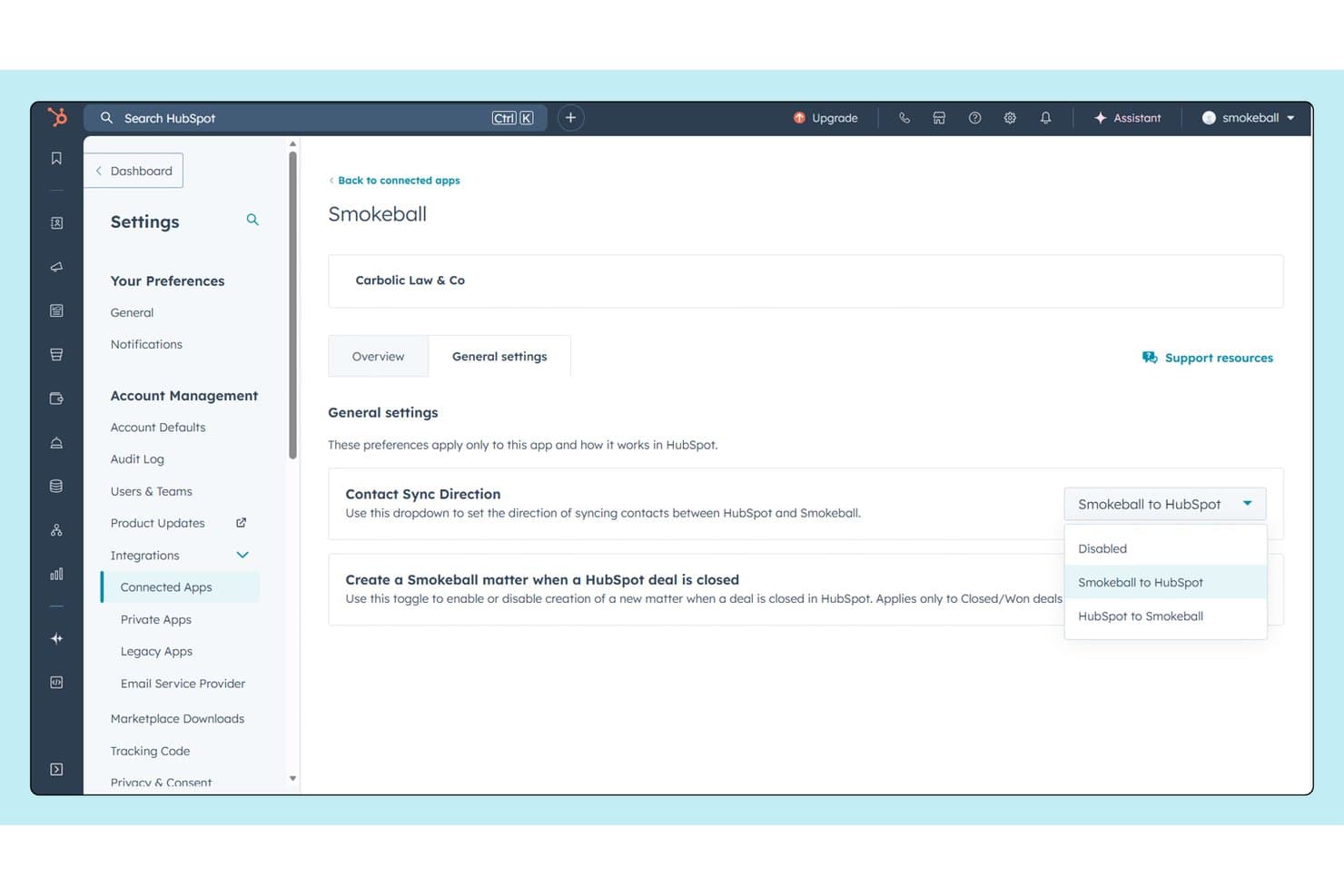
Smokeball syncs contacts bidirectionally with HubSpot for seamless CRM collaboration. Smokeball is a legal practice management platform for small and mid-sized law firms that combines client intake, matter management, document automation, automatic time tracking, and billing in one connected system.
Who Is Smokeball Best For?
Smokeball is a strong fit for small and mid-sized law firms that want client intake, matter management, and billing handled in a single connected platform rather than across multiple tools.
Why I Picked Smokeball
I picked Smokeball as one of the best because its lead management feature tracks a prospect from first contact all the way to an open matter, so nothing slips between intake and case setup. Once a matter opens, automated task workflows kick in and guide your team through the next steps without manual handoffs. I also like that AutoTime logs billable activity in the background throughout, so time captured during intake conversations isn't lost when the matter goes live.
Smokeball Key Features
- TemplateLab: Access 20,000+ automated document and form templates that pull in matter details to pre-populate fields.
- Client portal: Gives clients a dedicated space to view matter information and communicate directly with your firm.
- Email management: Automatically files client emails and attachments to the correct matter without manual sorting.
- Archie AI: An AI assistant embedded in matters that reads files, drafts documents, and surfaces next steps inside Microsoft Word and Outlook.
Smokeball Integrations
Smokeball offers 60+ native integrations through its Marketplace, including QuickBooks Online, Microsoft Outlook, Microsoft Word, Zoom, RingCentral, Smith.ai, Thomson Reuters CoCounsel, InfoTrack, EvenUp, and CiteLaw, and it connects with Zapier. A partner API is also available for custom integrations.
Pros and Cons
Pros:
- Auto-files client emails to correct matter
- Tracks billable time during intake process
- Turns intake into active matter automatically
Cons:
- No mobile intake form experience
- Intake forms require Smokeball support edits
Learn more about Smokeball: Best for all-in-one intake within your case files
- 10-day free trial available
- From $50/user/month (billed annually)
Visit WebsiteCustomer Rating:4.6/5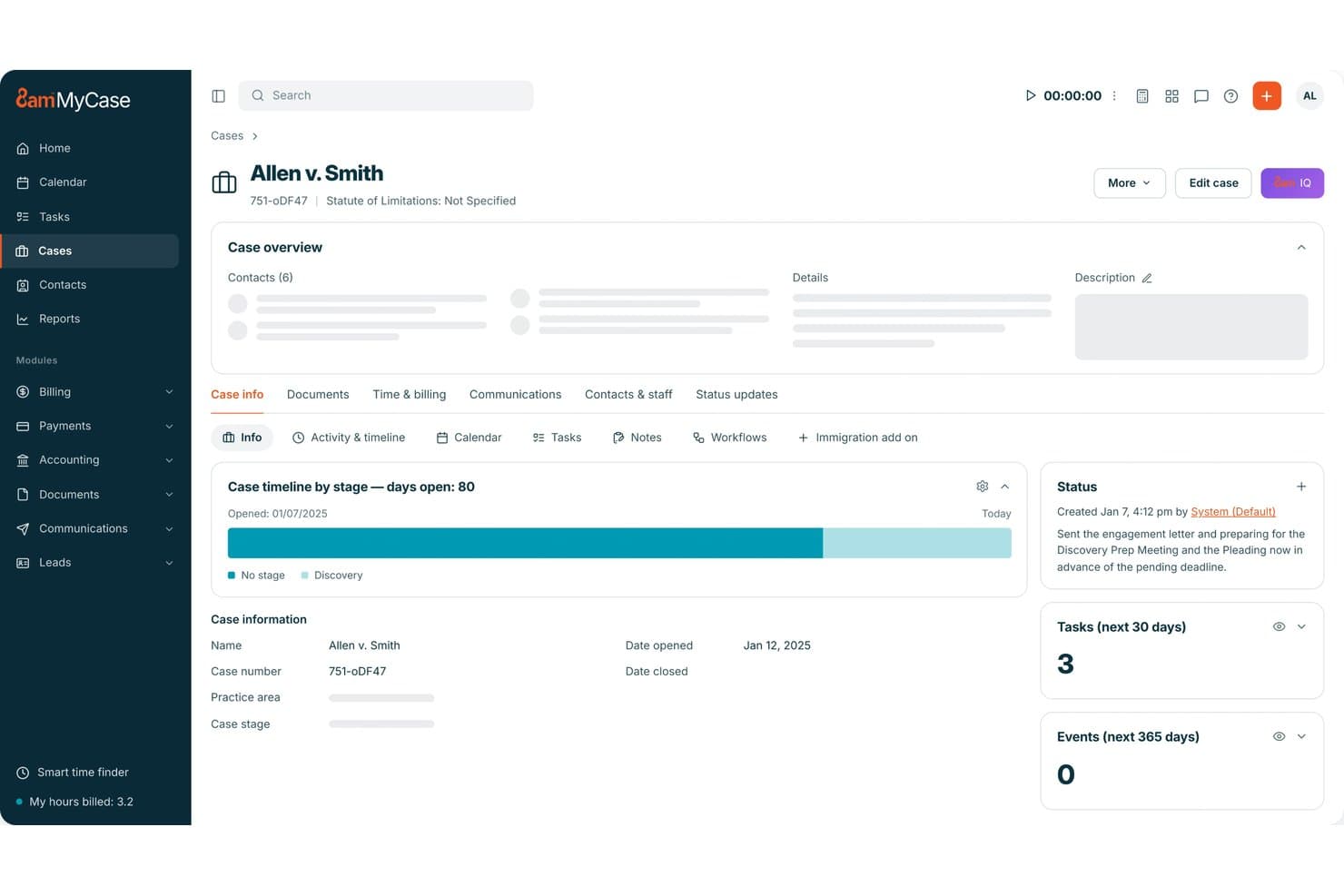
MyCase centralizes case details, tasks, and status updates in one view. MyCase is a legal practice management platform that combines customizable client intake forms, built-in CRM, case management, billing, and payment collection in one system.
Who Is MyCase Best For?
MyCase is a strong fit for small to mid-sized law firms that want intake forms, CRM, case management, billing, and payments all connected in one platform rather than spread across separate tools.
Why I Picked MyCase
I picked MyCase as one of the best because intake data flows directly into the client's case file the moment a form is submitted, which means no re-entering information across separate systems. I love that the forms use conditional logic, showing or hiding questions based on prior answers, so clients only see what's relevant to their matter. You can also collect consultation and retainer fees during intake, which keeps onboarding and payment in one step rather than two separate conversations.
MyCase Key Features
- Website embed for intake forms: Place intake forms directly on your firm's website so prospective clients can submit their information without any back-and-forth.
- eSignature: Clients can sign engagement letters and agreements from any device, with eSignature built into the platform at no extra cost.
- Built-in text messaging: Send and receive messages with clients and leads through integrated text messaging, with every conversation saved automatically to their case record.
- Workflow automation: Automatically trigger the creation of tasks, events, and documents when a new intake form is submitted, so your team's next steps are ready without manual setup.
MyCase Integrations
MyCase offers 60+ native integrations relevant to legal intake and case management, including Lawmatics, DecisionVault, Intaker, LawPay, QuickBooks, Gmail, Microsoft Outlook, Google Calendar, Dropbox, and NetDocuments. An API is available for custom integrations.
Pros and Cons
Pros:
- Collects consultation and retainer fees upfront
- Conditional logic tailors every intake form
- Intake data flows directly into case files
Cons:
- Lacks extensive granular intake reporting tools
- Limited intake form design customization options
 Best for CRM-grade intake and marketing ROI tracking
- Free demo available
- Pricing upon request
Visit WebsiteCustomer Rating:4.6/5
Lawmatics organizes client intake leads across pipeline stages visually. Lawmatics is a legal CRM and client intake platform that combines intake forms, automated follow-ups, e-signatures, conflict checking, and marketing analytics into a single system for law firms.
Who Is Lawmatics Best For?
Lawmatics is a strong fit for growth-focused law firms that want to track where clients come from and measure the return on their marketing spend alongside managing intake.
Why I Picked Lawmatics
I've included Lawmatics in my top picks because it treats intake as the front end of a full CRM pipeline, not just a form-capture tool. What sets it apart is the built-in marketing attribution tracking, which shows you exactly which campaigns, referral sources, or ad channels are generating signed clients. Pair that with automated follow-up sequences and conflict checking, and you get a system that closes the loop between marketing spend and intake conversion.
Lawmatics Key Features
- Custom intake form builder: Build intake forms tailored to specific practice areas and case types using customizable templates.
- Client self-scheduling: Let prospective clients book consultation appointments directly through calendar-synced availability links.
- Electronic signatures: Send, receive, and manage legally binding e-signatures on retainer agreements and intake documents without leaving the platform.
- Audience segmentation: Group contacts dynamically by matter type, lead status, or location to deliver targeted follow-up communications.
Lawmatics Integrations
Lawmatics offers native integrations with Clio, MyCase, PracticePanther, Rocket Matter, Smokeball, LawPay, QuickBooks, Google Ads, Microsoft Outlook, and Zoom, along with an integration marketplace covering case management, billing, reception, and communication tools. An API is available for custom integrations through the LawLink.ai universal connector.
Pros and Cons
Pros:
- Offers conflict checks within intake flow
- Automates personalized follow-up sequences
- Tracks marketing ROI linked to intake conversion
Cons:
- E-signature customization options feel limited
- Intake analytics require CRM pipeline setup
Learn more about Lawmatics: Best for mid-size firm intake and conflict checks
- Free demo available
- Pricing upon request
Visit WebsiteCustomer Rating:4.2/5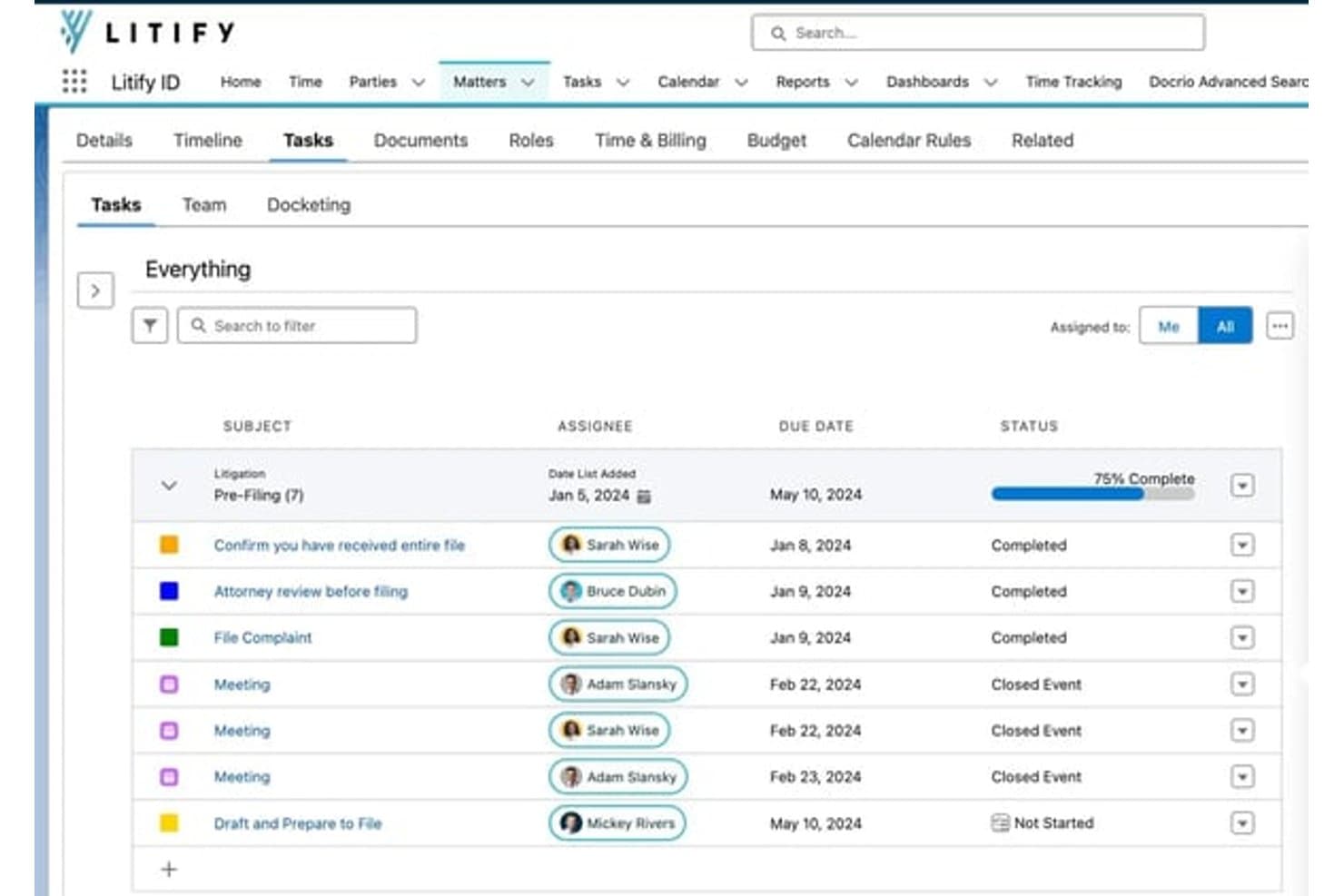
Litify organizes matter tasks with assignees, due dates, and status tracking. Litify is a Salesforce-based legal operations platform that covers client intake, matter management, document generation, time and billing, and AI-driven workflow automation across practice areas.
Who Is Litify Best For?
Litify works well for mid-size law firms that need to manage high intake volumes alongside conflict checks within a single Salesforce-native platform.
Why I Picked Litify
I picked Litify as one of the best because its Conflict Check Agent stands out for mid-size firms processing high intake volumes. It uses fuzzy matching to catch conflicts even when names or data are incomplete or inconsistent, which is exactly where manual checks tend to fail. Pair that with dynamic intake questionnaires that branch based on client responses, and your team can qualify matters faster without sacrificing accuracy.
Litify Key Features
- Matter plans: Automatically generate configurable task lists by practice area and case type when a new matter opens.
- Legal service request routing: Triage incoming requests and route contract, IP, or HR matters to the right specialist automatically.
- AI time capture: Track and recommend billing entries for activities like emails and coordination without manual input.
- No-code workflow configuration: Build and edit intake workflows, reports, and views without writing any code, directly within the Salesforce-native environment.
Litify Integrations
Litify is built natively on Salesforce and offers integrations with DocuSign, iManage, Microsoft Outlook, QuickBooks, Google Calendar, Epiq, Confido Legal, Workday, and SAP. An API is available for custom integrations, and Zapier support is not clearly documented.
Pros and Cons
Pros:
- No-code workflow tools reduce IT reliance
- Dynamic intake forms adapt to client responses
- Fuzzy matching for more accurate conflict checks
Cons:
- Customization can require advanced setup skills
- Heavy reliance on Salesforce environment
Learn more about Litify: Best for e-signature via SMS at intake
- Free demo available
- Pricing upon request
Visit WebsiteCustomer Rating:4.6/5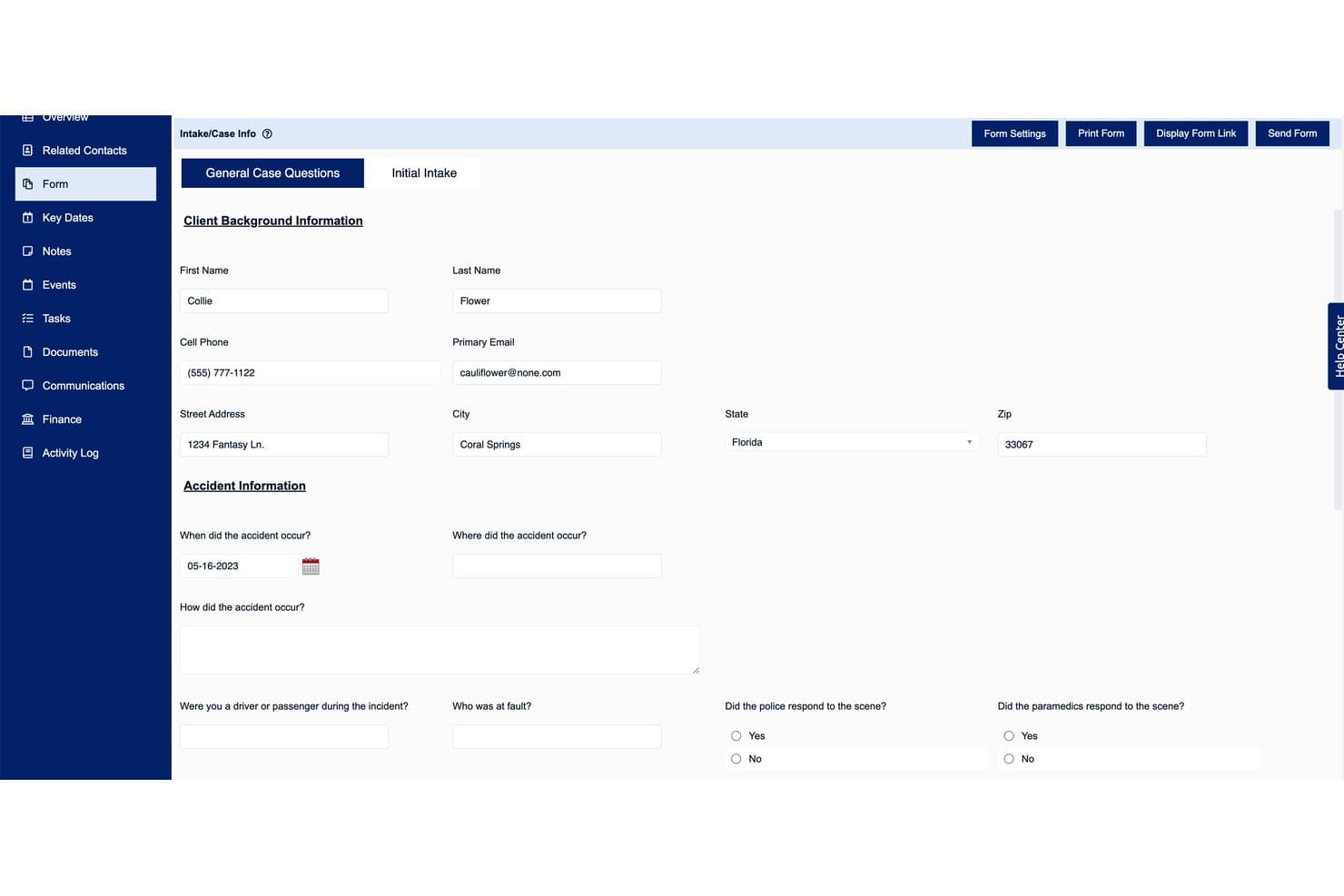
Law Ruler's intake form captures client and accident details efficiently. Law Ruler is a legal client intake platform for law firms that combines smart intake forms, lead management, automated document assembly, and e-signature collection via email or SMS.
Who Is Law Ruler Best For?
Law Ruler is a strong fit for plaintiff-side and high-volume law firms that need to capture e-signatures from prospective clients at the moment of first contact, before they walk away.
Why I Picked Law Ruler
I picked Law Ruler as one of the best because it's the only legal intake tool I've seen that lets firms send e-signature requests directly via SMS at the moment of first contact. That matters in high-volume plaintiff-side practices where a prospective client who doesn't sign right away often doesn't sign at all. Law Ruler pairs this with Smart Forms that adapt questions based on each lead's answers, so by the time the signature request lands in their text messages, the retainer is already pre-populated with their information.
Law Ruler Key Features
- Pipeline inbox: A visual dashboard that tracks each lead's status and movement through your intake-to-client conversion workflow.
- Automated appointment scheduling: Law Ruler sends email and text follow-ups to schedule consultations without manual coordination from your team.
- Lead qualification and pre-screening: The platform automatically flags and filters leads based on intake responses, so your team focuses only on cases that fit your practice.
- Automated document assembly: Client data from intake forms populates legal document templates, reducing the time spent preparing retainer agreements and other paperwork.
Law Ruler Integrations
Law Ruler offers native integrations with practice management and legal tools including TimeSolv, CosmoLex, Rocket Matter, HelloSign, Smith.AI, ApexChat, Twilio, Thomson Reuters, and Microsoft 365, and it connects with Zapier. An API is available for custom integrations at no additional fee.
Pros and Cons
Pros:
- Visual dashboard tracks lead status
- Smart intake forms adapt to client answers
- Sends e-signature requests instantly via SMS
Cons:
- Advanced automation setup can feel complex
- Intake customization requires platform support
Learn more about Law Ruler:
Outro software de captação de clientes para escritórios de advogados
Eis algumas opções adicionais de software de captação de clientes para escritórios de advogados que não entraram na minha lista final, mas que ainda vale a pena conhecer:
- 11Lead DocketBest for marketing ROI in high-volume PI intake
- 12ActionstepBest for conflict checks built into your intake flow
- 13CasePeerBest for personal injury firm intake pipelines
- 14Rocket MatterBest for intake within a practice management suite
- 15PracticePantherBest for solo firms taking intake through to billing
- 16NeosBest for PI firms scaling their intake pipeline
- 17DocketWiseBest for immigration law intake workflows
- 18RunSensibleBest for all-in-one intake and matter management
- 19IntakerBest for AI-driven lead capture across channels
How I Evaluate Legal Client Intake Software
I split my evaluation into baseline criteria every tool must meet and differentiating factors that separate good from great—from conflict check depth to how well intake data flows into matter management.
Core Functionality (Table Stakes For This List)
When I'm selecting tools for my list, I rank each one on a scale from 0 (does not offer the functionality) to 5 (excels in this area) for each core functionality listed below. I then calculate the tool's total score into a percentage, using 65% as a benchmark to help assess its overall fit for the list.
- Customizable Intake Forms: I check whether forms support conditional logic and practice-area templates, since a family law questionnaire needs very different fields than a PI intake.
- Lead & Contact Management: Pipeline stages, automated follow-ups, and activity history all factor in—I look for tools that move leads from inquiry to signed engagement without manual babysitting.
- Conflict Check Tools: I evaluate how deeply a tool searches across parties, aliases, and related matters, and whether it logs results with an audit trail your compliance team can reference later.
- E-Signature & Engagement Letters: The ability to send retainer agreements with merge fields and collect signatures natively matters here—tools like Lawmatics and Law Ruler handle this differently, so I compare workflow and delivery options.
- Practice Management Integration: I look at whether intake data syncs into your matter management system in real time, since re-keying client details from intake into platforms like Clio or Filevine defeats the purpose.
- Intake Analytics & Reporting: Tracking lead sources, conversion rates, and referral performance helps justify marketing spend, so I evaluate dashboard depth and whether reports can be filtered by campaign or practice area.
Once I have a list of tools that meet the criteria, I consider what sets each platform apart.
Differentiating Factors (What Sets Vendors Apart)
Here's how I compare and contrast different vendors:
Standout Features
I look for referral source and UTM tracking that ties marketing spend directly to signed matter revenue—not just lead counts. Tools like Lawmatics and Lead Docket handle attribution differently, so I check whether you can filter ROI by practice area or campaign. Payment collection at intake is another separator; I evaluate whether a platform supports IOLTA-compliant trust deposits at the point of signing, since collecting retainers during onboarding cuts days off your accounts receivable cycle. I also consider how well each tool handles automated client communication, from drip emails to SMS re-engagement of stalled leads.
Beyond Features
I evaluate how well each platform fits a firm's existing practice management stack. Bidirectional syncing with tools like Clio or Filevine should cover contacts, custom fields, and documents—not just names and emails. I also check onboarding support, since migrating a conflict database or building conditional intake templates without a dedicated success manager can stall adoption for weeks, especially at firms without in-house IT.
Como escolher um software de captação de clientes para escritórios de advogados
Ao escolher um software de captação de clientes para escritórios de advogados, pergunte a si próprio: que partes da integração e transferência de clientes ainda criam dificuldades no seu escritório e o que é indispensável para a conformidade ou para o ROI de marketing?
| Se a sua prioridade é… | Procure… |
| Simplificar a captação até à gestão de processos | Integração direta com a sua plataforma de prática/gestão de processos |
| Prevenir conflitos e riscos de conformidade | Funções de verificação de conflitos pesquisáveis e registadas |
| Acompanhar o ROI de marketing e as fontes de potenciais clientes | Atribuição da origem das campanhas e análise da captação |
| Recolher assinaturas e aprovações instantaneamente | Fluxos de trabalho de captação com assinatura eletrónica e SMS |
| Automatizar o acompanhamento de novos potenciais clientes | Lembretes integrados por SMS/e-mail e em sequência no fluxo de captação |
Como avaliar a sua lista final
- Teste o fluxo de integração: Crie um cliente de teste e confirme que todos os dados de captação são sincronizados com o seu sistema atual de gestão de processos no prazo de 48 horas.
- Faça uma pesquisa real de conflitos: Introduza nomes/partes de um processo encerrado e solicite o registo de auditoria pesquisável em PDF antes do terceiro dia.
- Verifique a atribuição e os relatórios: Importe 20 potenciais clientes de teste com respostas variadas à pergunta “Como ouviu falar de nós?”, depois exporte uma discriminação das fontes/campanhas.
- Solicite um fluxo de trabalho para a carta de contratação: Peça ao fornecedor que lhe envie um pedido de assinatura eletrónica de exemplo por e-mail e SMS, e assine utilizando o seu próprio dispositivo.
- Compromisso — personalização versus configuração imediata: Decida se precisa de fluxos de trabalho altamente personalizados, que exigem uma implementação mais longa, ou de utilização imediata com modelos predefinidos.
O que é o software de admissão de clientes jurídicos?
O software de admissão de clientes jurídicos é uma ferramenta digital que os escritórios de advogados utilizam para recolher, qualificar e integrar pedidos de novos clientes. Automatiza os formulários de admissão, a comunicação, as verificações de conflitos e os processos de cartas de contratação, permitindo-lhe passar do contacto inicial à abertura de um processo ativo sem introdução manual de dados ou etapas esquecidas. A utilização deste software ajuda a garantir a conformidade, reduz os erros de integração e liga diretamente os dados de admissão aos seus sistemas de gestão do escritório ou dos processos.
Funcionalidades do software de admissão de clientes jurídicos
Ao selecionar um software de admissão de clientes jurídicos, procure as seguintes funcionalidades essenciais:
- Formulários de admissão personalizáveis: Crie formulários que se adaptem a diferentes áreas de prática e utilizem lógica condicional, para poder recolher as informações certas de cada novo cliente sem duplicar esforços.
- Gestão de potenciais clientes e contactos: Acompanhe os pedidos desde o primeiro contacto até à contratação assinada com ferramentas que registam automaticamente as comunicações, gerem as fases do processo comercial e permitem efetuar acompanhamentos, para não perder o controlo dos potenciais clientes.
- Ferramentas de verificação de conflitos: Pesquise na base de dados do seu escritório potenciais conflitos de interesses através da análise das partes, dos contactos relacionados e dos processos, e gere um registo de auditoria para fins de conformidade.
- Assinatura eletrónica e cartas de contratação: Crie, envie e recolha assinaturas de contratos de avença diretamente no fluxo de admissão. Algumas ferramentas permitem o envio tanto por e-mail como por SMS.
- Integração com a gestão do escritório: Sincronize todos os dados de admissão — incluindo documentos, contactos e campos personalizados — diretamente com o seu sistema de gestão de processos ou assuntos, evitando a introdução manual de dados.
- Análise e relatórios de admissão: Acompanhe indicadores de desempenho essenciais, como taxas de conversão, fontes de referência e eficácia das campanhas, através de painéis e relatórios personalizáveis.
- Comunicação automatizada com clientes: Envie campanhas de e-mail sequenciais, lembretes por SMS e confirmações de atribuição para manter os potenciais clientes envolvidos e reduzir oportunidades perdidas.
- Cobrança de pagamentos durante a admissão: Aceite de forma segura pagamentos iniciais de avenças, depósitos fiduciários ou outras taxas durante o processo de integração, para poder começar imediatamente a trabalhar em processos remunerados.
- Gestão de documentos: Organize, armazene e consulte documentos de admissão, documentos de identificação e ficheiros de apoio, para que tudo o que necessita acompanhe o cliente de forma simples durante a integração.
- Automatização de tarefas e fluxos de trabalho: Acione ações específicas — como atribuir tarefas ou enviar notificações — quando uma admissão atingir determinadas etapas, para que nada seja esquecido durante a integração.
Vantagens do software de admissão de clientes jurídicos
A implementação de um software de admissão de clientes jurídicos proporciona várias vantagens à sua equipa e à sua empresa. Eis algumas das que pode esperar:
- Integração mais rápida dos clientes: Recolha e qualifique automaticamente potenciais clientes utilizando formulários de admissão personalizáveis, assinaturas eletrónicas e ferramentas de verificação de conflitos, para passar rapidamente do pedido à contratação assinada.
- Menos lacunas de conformidade: Utilize verificações de conflitos pesquisáveis e registadas, bem como registos de auditoria, para apoiar uma integração segura e proteger contra conflitos de interesses.
- Melhor gestão de potenciais clientes e contactos: Centralize todas as comunicações, documentos e histórico de atividades, para nunca perder o controlo de um potencial cliente nem deixar passar um acompanhamento.
- Fluxos de trabalho ligados à gestão do escritório: Sincronize os dados de admissão — incluindo campos personalizados e documentos — diretamente com o seu sistema de gestão do escritório ou dos processos, evitando a introdução manual de dados e reduzindo os erros.
- Tomada de decisões baseada em dados: Aceda a análises de admissão e relatórios de atribuição de campanhas para medir o retorno do investimento em marketing, acompanhar as taxas de conversão e otimizar o seu processo de admissão.
- Cobrança de pagamentos simplificada: Aceite de forma segura honorários de contratação e avenças durante a integração, reduzindo os atrasos entre a admissão e o trabalho remunerado.
- Comunicações automatizadas com clientes: Agende e-mails sequenciais e lembretes por SMS para manter os potenciais clientes envolvidos ao longo do processo de admissão, sem esforço manual adicional.
Custos e preços do software de admissão de clientes jurídicos
A seleção de um software de admissão de clientes jurídicos exige compreender os vários modelos de preços e planos disponíveis. Os custos variam consoante as funcionalidades, a dimensão da equipa, os complementos e outros fatores. A tabela abaixo resume os planos mais comuns, os respetivos preços médios e as funcionalidades normalmente incluídas nas soluções de software de admissão de clientes jurídicos:
Tabela comparativa de planos de software de admissão de clientes jurídicos
| Tipo de plano | Preço médio | Funcionalidades comuns |
| Plano gratuito | $0 | Formulários básicos de admissão personalizáveis, gestão limitada de potenciais clientes e contactos, verificação básica de conflitos e apoio por e-mail. |
| Plano pessoal | $30–$50/utilizador/mês | Formulários de admissão personalizáveis, gestão de potenciais clientes, ferramentas básicas de assinatura eletrónica, verificação de conflitos e integração limitada com sistemas de gestão de escritórios. |
| Plano empresarial | $60–$90/utilizador/mês | Formulários de admissão avançados, gestão alargada de contactos, fluxos de trabalho de assinatura eletrónica e modelos, verificação de conflitos aprofundada, análise e elaboração de relatórios, e integrações com sistemas de gestão de escritórios. |
| Plano empresarial avançado | $100–$150/utilizador/mês | Todas as funcionalidades empresariais, além de análise avançada, apoio prioritário, automatização de fluxos de trabalho, assistência na integração, segurança reforçada e integrações personalizadas. |
Perguntas frequentes sobre software de admissão de clientes jurídicos
\u003cspan style=\u0022font-weight: 400\u0022\u003eEis algumas respostas a perguntas frequentes sobre software de admissão de clientes jurídicos:\u003c/span\u003e
Como sei se o software de admissão de clientes jurídicos será compatível com o meu sistema atual de gestão do escritório?
\u003cspan style=\u0022font-weight: 400\u0022\u003eA maioria dos softwares de admissão de clientes jurídicos integra-se com plataformas populares de gestão de escritórios, como o Clio, o Filevine ou o MyCase. Antes de escolher uma ferramenta, teste uma integração experimental com o seu sistema atual. Certifique-se de que todos os dados relevantes da admissão — como contactos, campos personalizados e documentos — são sincronizados de forma completa e automática, e não apenas os nomes ou os endereços de e-mail. Peça ao fornecedor uma demonstração utilizando os seus próprios dados de exemplo, para perceber exatamente como funciona a integração.\u003c/span\u003e
A funcionalidade de assinatura eletrónica é normal ou tenho de pagar mais?
\u003cspan style=\u0022font-weight: 400\u0022\u003eAs ferramentas de assinatura eletrónica estão incluídas em muitos planos intermédios e empresariais, mas podem ser limitadas nas opções de preço mais baixo. Se for essencial recolher cartas de contratação ou contratos de avença durante a admissão, confirme se o plano que está a considerar permite a assinatura eletrónica nativa e se envia documentos tanto por e-mail como por SMS. Alguns fornecedores disponibilizam ferramentas de assinatura avançadas apenas como extras pagos.\u003c/span\u003e
O software de admissão de clientes jurídicos pode ajudar nas verificações de conflitos e na conformidade?
\u003cspan style=\u0022font-weight: 400\u0022\u003eSim, a maioria das principais plataformas de admissão inclui ferramentas integradas de verificação de conflitos. Estas permitem pesquisar contactos, partes e assuntos relacionados para detetar potenciais conflitos e registar os resultados como registo de auditoria para fins de conformidade. Avalie até que ponto a pesquisa analisa a sua base de dados e se pode exportar um relatório comprovativo da pesquisa para a sua equipa de conformidade.\u003c/span\u003e
Como ajuda o software de admissão a acompanhar o retorno do investimento em marketing?
\u003cspan style=\u0022font-weight: 400\u0022\u003eAs ferramentas de admissão de clientes jurídicos disponibilizam frequentemente atribuição da origem dos potenciais clientes, acompanhamento de campanhas e análise da admissão. Pode registar a forma como os potenciais clientes encontraram o seu escritório, atribuir códigos UTM e gerar relatórios para verificar quais os canais de marketing que geram potenciais clientes com maior probabilidade de conversão. Estes dados ajudam-no a tomar decisões mais informadas sobre o investimento em publicidade e as parcerias de referenciação.\u003c/span\u003e
O que acontece se precisar de personalizar os formulários de admissão para diferentes áreas de prática?
\u003cspan style=\u0022font-weight: 400\u0022\u003eA maioria dos softwares de admissão de clientes jurídicos permite criar formulários personalizados para cada área de prática, frequentemente com lógica condicional. Isto significa que pode adaptar as perguntas com base nas respostas dos clientes — por exemplo, apresentando campos específicos para direito da família em vez de danos pessoais. Verifique sempre se estão disponíveis bibliotecas de modelos e se pode lançar novos formulários sem programação.\u003c/span\u003e
Quão seguros são os dados dos clientes no software de admissão de clientes jurídicos?
\u003cspan style=\u0022font-weight: 400\u0022\u003eA segurança é uma prioridade máxima nesta categoria. A maioria das plataformas de admissão jurídicas reputadas disponibiliza funcionalidades como encriptação de dados, autenticação de dois fatores, registo de auditoria e controlos de permissões. Confirme sempre se o software cumpre as normas aplicáveis ao setor jurídico e pergunte ao fornecedor sobre opções de definições de segurança personalizadas ou alojamento regional de dados, se necessário.\u003c/span\u003e
Posso automatizar os acompanhamentos e lembretes para novos potenciais clientes?
\u003cspan style=\u0022font-weight: 400\u0022\u003eSim, os acompanhamentos automatizados estão normalmente integrados. Muitas ferramentas de admissão permitem configurar e-mails em sequência, lembretes por SMS ou atribuições de tarefas com base no estado ou nos marcos do processo de admissão. Isto ajuda a evitar o acompanhamento manual e garante que nenhum potencial cliente se perde pelo caminho. Procure plataformas que disponibilizem fluxos de trabalho baseados em modelos ou uma personalização simples para as suas jornadas habituais de clientes.\u003c/span\u003e