

O software de admissão de clientes para direito imobiliário capta e qualifica potenciais clientes, acompanha referências e transfere detalhes essenciais para os processos jurídicos. As ferramentas apresentadas neste guia vão desde sistemas dedicados à admissão e gestão de potenciais clientes até plataformas de gestão de escritórios que apoiam fluxos de trabalho de escrituras e conclusão de transações.
Compare as funcionalidades de admissão, acompanhamento, gestão de referências e transferência para processos para encontrar a solução adequada ao seu escritório. Manter os detalhes dos imóveis e das transações ligados desde o primeiro contacto até à conclusão pode ajudar a sua equipa a evitar falhas quando um potencial cliente se torna cliente.
Why Trust Our Software Recommendations
6,700+
Reviews
20
Industry experts
16+
Evaluation factors
14
Years
Our team has been testing and reviewing software since 2012. As legal practice leaders ourselves, we know how difficult—and important—it is to choose the right software.
For this guide, we evaluated tools using hands-on testing and independent research, scoring tools using our selection criteria.
Our reviews reflect our human editorial judgment, not a sales pitch.
Tabela comparativa do melhor software de admissão de clientes para direito imobiliário
Compare lado a lado os preços e as especificações do software de admissão de clientes para direito imobiliário que incluí na minha seleção.
Score legend (out of 5)
- Excellent4.5–5
- Good4–4.4
- Average3–3.9
- Below average2–2.9
- Poor1–1.9
Sorted by: Default
| Tool | Starting Price | Website | |||||||
|---|---|---|---|---|---|---|---|---|---|
Best for carrying lead details into closing work | Not rated | 4 | 4 | 3 | Not rated | 2 | 3 | Pricing upon request Free trial available | Website |
Best for property details in matter handoffs | 3.8 out of 5 | 4 | 4 | 4 | 4 | 4 | 3 | Pricing upon request Free demo available | Website |
Best for managing leads and real estate funds | 3.2 out of 5 | 4 | 4 | 4 | 2 | 2 | 3 | $50/user/month 10-day free trial available | Website |
Best for intake alongside existing case systems | 4.2 out of 5 | 4 | 5 | 4 | 3 | 5 | 4 | Pricing upon request Free demo available | Website |
Best for real estate matters through closing | 2.3 out of 5 | 2 | 4 | 3 | 1 | 2 | 2 | Pricing upon request Free demo available | Website |
Best for measuring lead and referral ROI | 3.5 out of 5 | 4 | 4 | 3 | 2 | 4 | 4 | Pricing upon request Free demo available | Website |
Best for intake into conveyancing matters | 2.8 out of 5 | 3 | 4 | 3 | 2 | 3 | 2 | Pricing upon request Free demo available | Website |
Best for AI phone intake and lead follow-up | 3.3 out of 5 | 4 | 3 | 3 | 3 | 3 | 4 | Pricing upon request Free demo available | Website |
Best for linking leads to closing workflows | 3.2 out of 5 | 4 | 5 | 3 | 2 | 4 | 1 | $49/user/month 14-day free trial | Website |
Best for marketing and referral ROI tracking | 3.7 out of 5 | 4 | 3 | 4 | 3 | 4 | 4 | Pricing upon request Free demo available | Website |


Avaliações de software de admissão de clientes para direito imobiliário
Apresento abaixo os meus resumos do melhor software de admissão de clientes para direito imobiliário que incluí na minha seleção. As minhas avaliações abrangem as funcionalidades de admissão de cada opção, a gestão de referências e a transferência para processos, para o ajudar a encontrar a solução adequada.
 Best for carrying lead details into closing work
- Free trial available
- Pricing upon request
Visit WebsiteCustomer Rating:4.8/5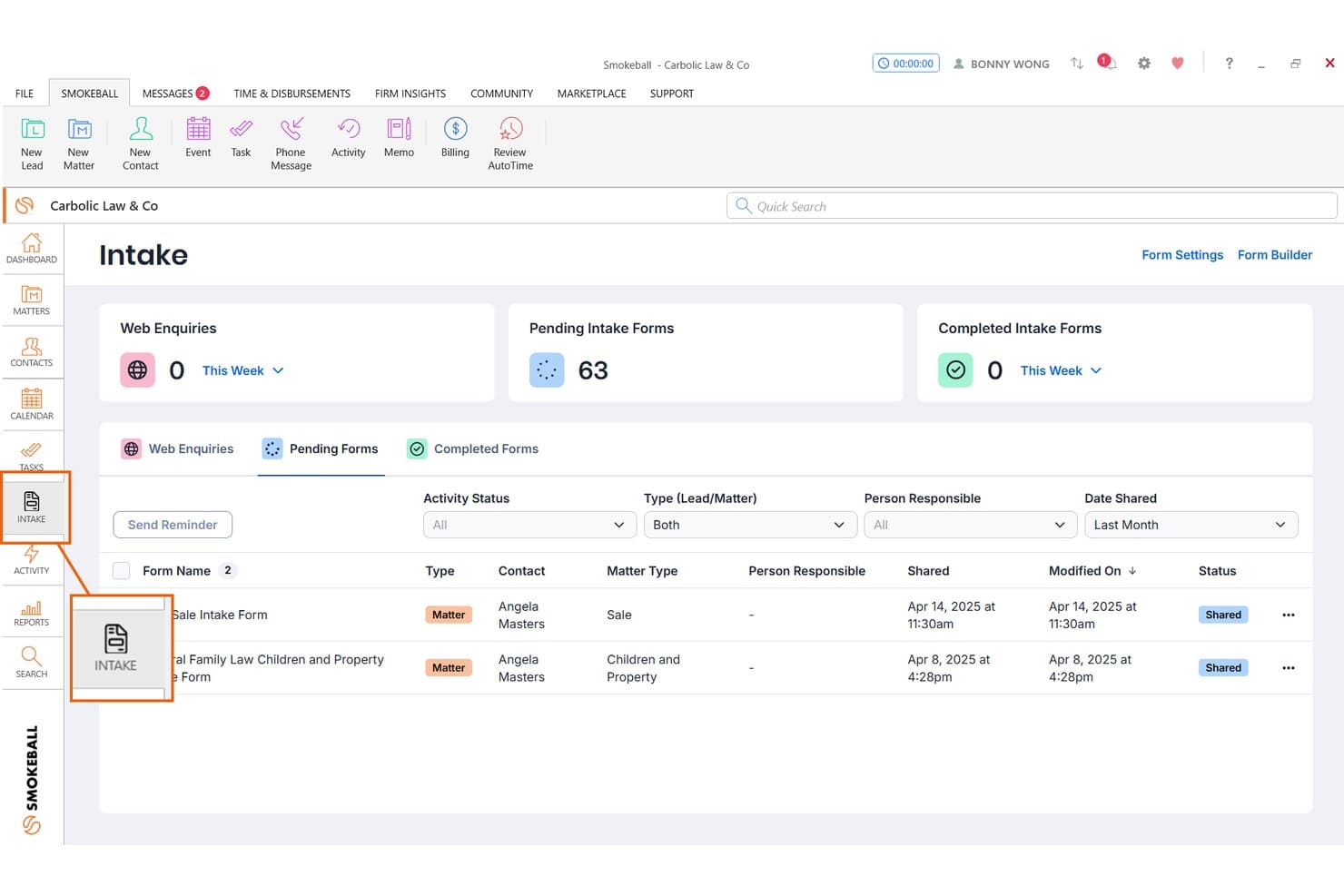
Smokeball tracks pending client intake forms for real estate matters. Smokeball is a legal practice management platform with dedicated real estate law features, including automated closing documents, deadline tracking, built-in transaction calculations, and client intake forms for lead capture and matter onboarding.
Who Is Smokeball Best For?
Smokeball is a good fit for real estate law firms that want lead intake forms connected directly to closing documents and matter workflows.
Why I Picked Smokeball
I picked Smokeball as one of the best because it's the only tool on my list that carries lead details directly into closing work without manual re-entry. When a prospect fills out a real estate intake form, their information flows into the matter file and auto-populates closing documents like deeds, disclosures, and settlement statements. I also like that deadline tracking flags financing, inspection, and closing dates tied to that same matter.
Smokeball Key Features
- Consultation scheduling and payment: Leads can book and pay for a consultation directly through the intake flow, before a matter is opened.
- Multilingual intake forms: Forms can be enabled in languages including Spanish, French, Arabic, Chinese, and others, with responses saved to the matter in the language used.
- Custom form builder: Firm owners can build lead or matter intake forms with conditional sections, grouped fields, and embeddable URLs for website placement.
- Matter stage tracking: Matters move through customizable stages, with automatic client portal messages sent when a matter reaches a new stage.
Smokeball Integrations
Smokeball offers native integrations with Microsoft 365 Outlook, calendar, and Word, plus a QuickBooks Online marketplace integration and InfoTrack support for eSignatures. An API isn’t documented.
Pros and Cons
Pros:
- Custom forms capture property and party details
- Matter deadlines support real estate closing workflows
- Closing documents draw on captured intake data
Cons:
- No automated multi-step prospect follow-ups
- No documented conflict or referral tracking
Learn more about Smokeball: Best for property details in matter handoffs
- Free demo available
- Pricing upon request
Visit WebsiteCustomer Rating:4.7/5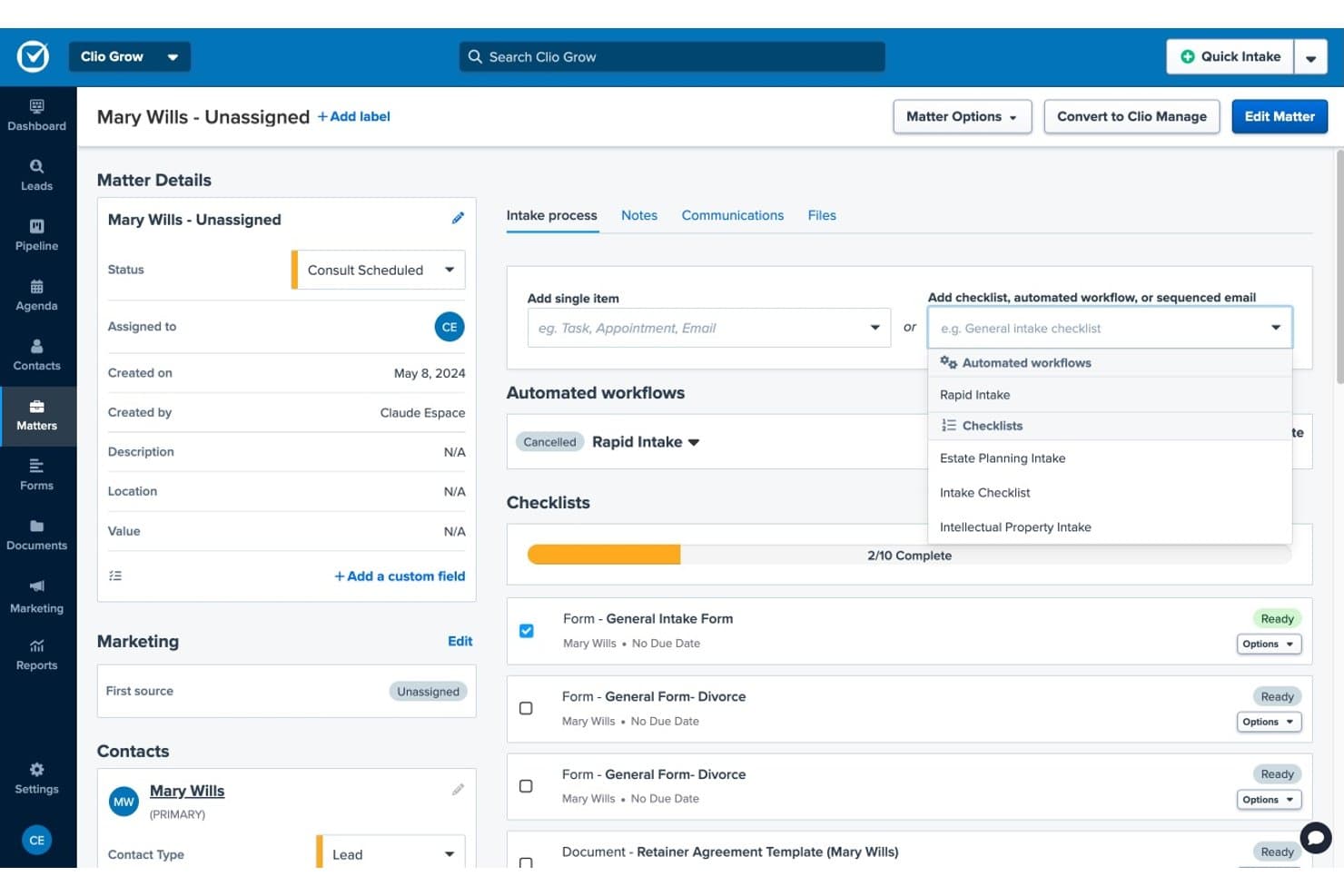
Clio Grow streamlines client intake with checklists and workflows. Clio Grow is a legal CRM and client intake platform that handles lead capture, intake form collection, conflict screening, consultation scheduling, and lead-to-matter conversion for law firms.
Who Is Clio Grow Best For?
Clio Grow is a strong fit for law firms that handle real estate matters alongside other practice areas and want intake, CRM, and matter handoff managed in one platform.
Why I Picked Clio Grow
I've included Clio Grow in my top picks because of how cleanly intake answers carry into new matter records when a prospect is hired. Custom fields like Property Address, Closing Date, and Escrow Amount populate directly into the matter, so nothing gets re-entered manually during handoff. I also like that Grow AI qualifies incoming inquiries by practice area and runs conflict checks before anyone books a consultation.
Clio Grow Key Features
- Lead Inbox: Collects leads from referrals, web forms, marketing services, and calls into one centralized inbox for staff review and follow-up.
- Conditional intake forms: Intake forms adapt follow-up questions based on a prospect's previous answers, with support for practice-area-specific fields like Property Address and Closing Date.
- Automated appointment reminders: Clio sends up to five automated text reminders before a scheduled consultation, plus email confirmations to both the firm and the client.
- Lead and referral reporting: Reports track lead sources, referral sources, retained referrals, and incoming value by practice area.
Clio Grow Integrations
Clio Grow has native integrations with Google Calendar, Microsoft Outlook, Google Local Services Ads, and Google Business Profile. Clio’s broader app ecosystem lists 300+ apps, and Grow offers a REST API v2 for custom integrations.
Pros and Cons
Pros:
- Centralized leads support intake follow-up
- Conditional forms capture closing details
- Property details carry into matter handoffs
Cons:
- No title-search or escrow workflows
- Grow–Manage updates may be unreliable
Learn more about Clio Grow: Best for managing leads and real estate funds
- 10-day free trial available
- From $50/user/month (billed annually)
Visit WebsiteCustomer Rating:4.6/5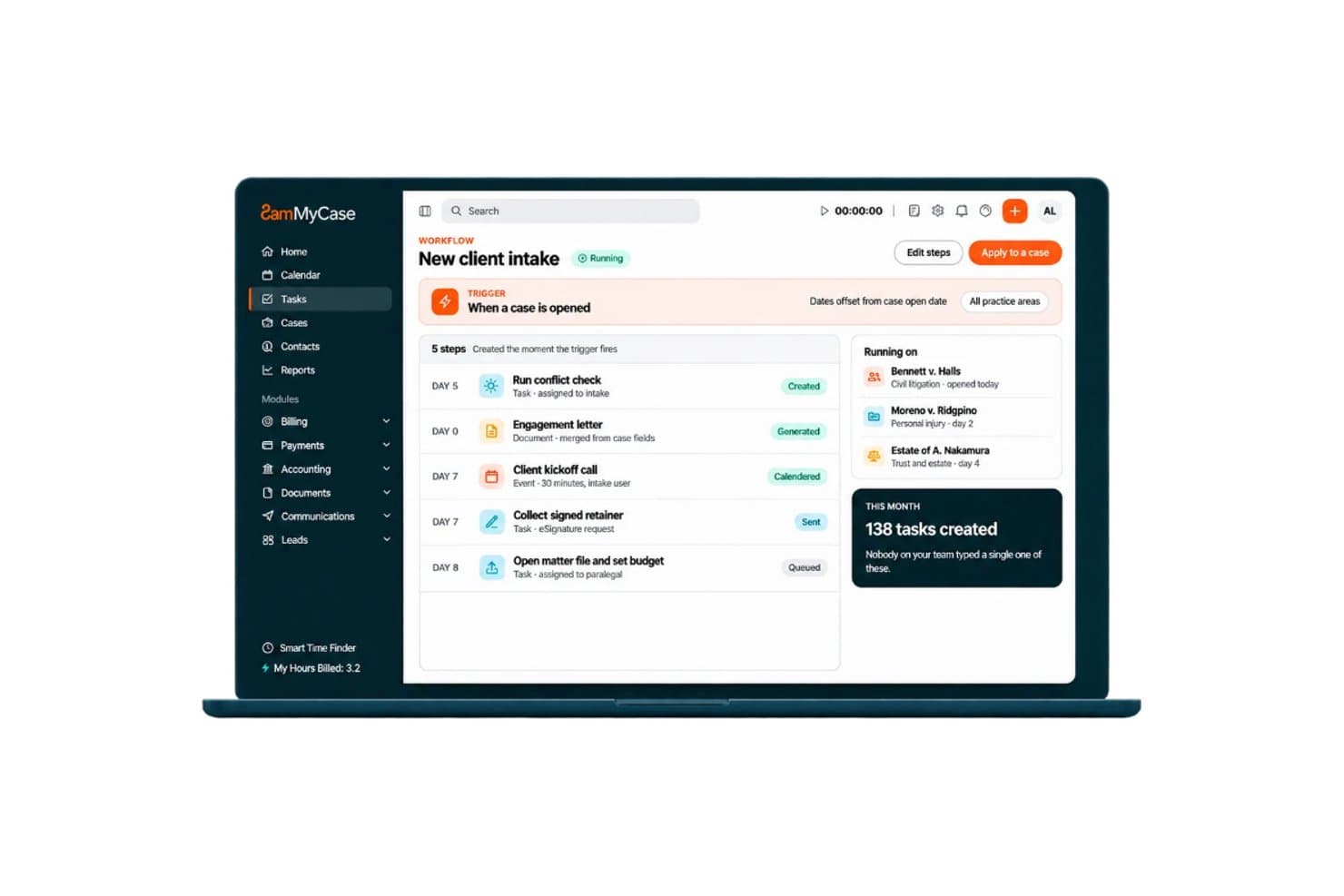
MyCase tracks real estate leads, collects intake details, and manages escrow funds. MyCase is a legal practice management platform that combines client intake forms, lead tracking, real estate funds management, document generation, and billing tools for law firms handling real estate matters.
Who Is MyCase Best For?
MyCase works well for real estate law firms that need to manage the full client journey—from lead capture and intake forms through funds management and billing—in a single platform.
Why I Picked MyCase
I picked MyCase as one of the best because it's the only tool on this list that combines lead capture with real estate funds management in a single platform. I love how the legal CRM tracks leads from first contact through conversion, while dynamic intake forms with conditional logic collect property and transaction details upfront. For real estate matters specifically, the funds management tools handle escrow accounts, earnest money deposits, and settlement costs alongside standard trust accounting.
MyCase Key Features
- Real estate document templates: Generate purchase agreements, lease contracts, and mortgage documents using matter data already stored in MyCase.
- eSignature: Send documents for electronic signature directly from the platform without switching to a separate tool.
- Two-way texting: Send and receive client text messages, including images, through MyCase to keep transaction communication on the record.
- Automated workflows: Configure workflows to trigger task lists, case documents, and calendar deadlines when intake forms are submitted.
MyCase Integrations
MyCase lists 70+ integrations, including marketplace integrations with Lawmatics, Intaker, Lawbrokr, Answering Legal, CallRail, Google Calendar, and Microsoft Outlook. It also supports Zapier and an Open API for custom connections.
Pros and Cons
Pros:
- Earnest money and escrow tracking support closings
- Conditional forms capture property and transaction details
- Lead pipeline organizes prospective real estate clients
Cons:
- Intake conversion and referral analytics remain limited
- Returning-client leads can create duplicate contacts
 Best for intake alongside existing case systems
- Free demo available
- Pricing upon request
Visit WebsiteCustomer Rating:4.6/5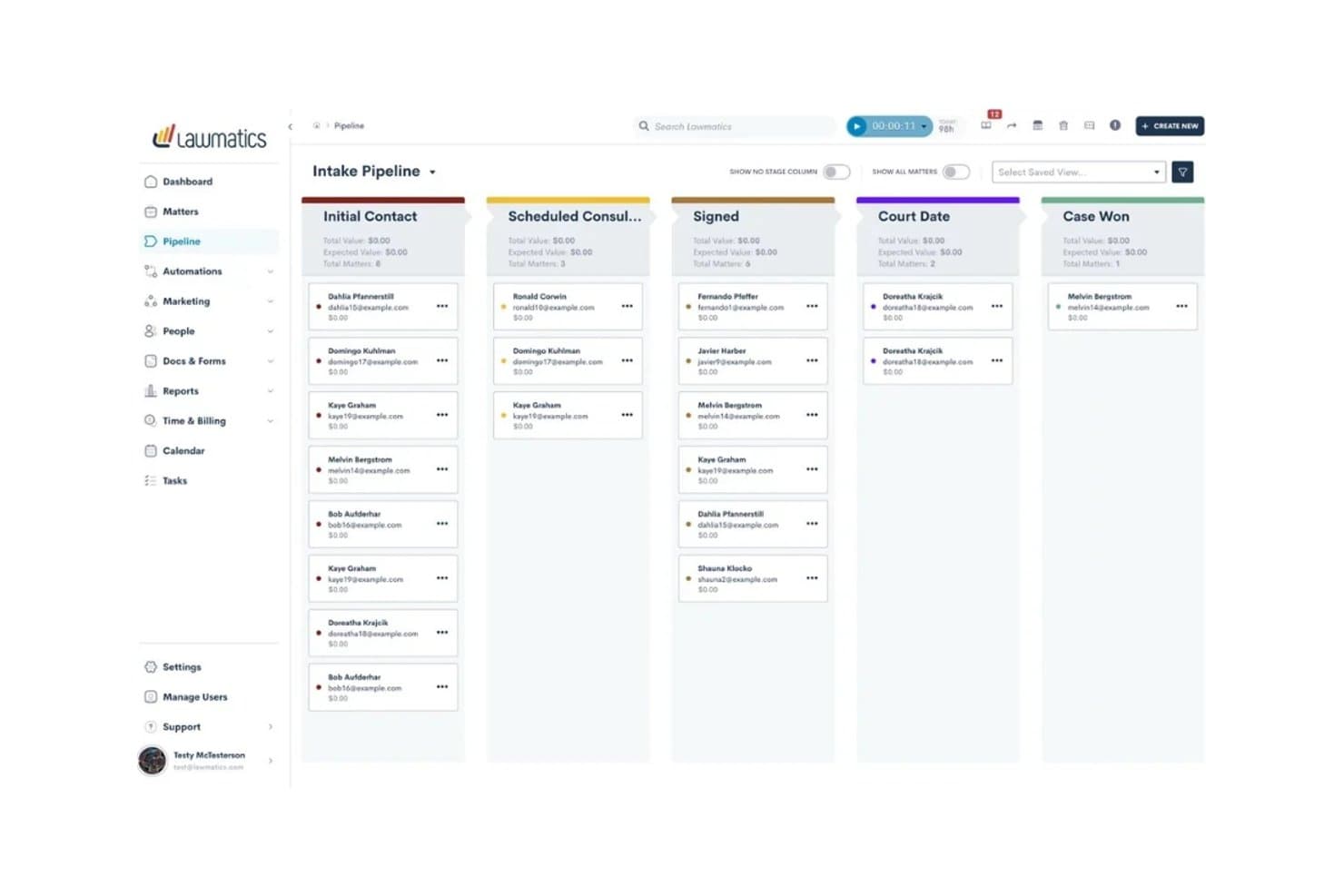
Lawmatics organizes client intake stages in a visual pipeline board. Lawmatics is a legal CRM and client intake platform that handles lead capture, pipeline management, automated follow-up, customizable intake forms, and matter conversion across practice areas including real estate law.
Who Is Lawmatics Best For?
Lawmatics works well for law firms that already use a practice management tool like Clio or Smokeball and need a dedicated intake and CRM layer to sit in front of it.
Why I Picked Lawmatics
I've included Lawmatics in my top picks because it sits cleanly in front of your existing practice management tools, handling intake without replacing what your firm already uses. I particularly like how its branching intake forms let you build real estate-specific question paths, so a client inquiry about a residential closing follows a different form flow than a property dispute. Merlin Qualify then evaluates those incoming leads against your criteria before they ever reach your desk.
Lawmatics Key Features
- Pipeline management: Tracks leads through customizable stages so your team can see where each real estate matter stands and what needs follow-up.
- Automated email and SMS follow-up: Sends multi-step, behavior-triggered messages to prospects via email and text without manual outreach.
- Conflict checking: Searches your firm's existing records for potential conflicts before a new real estate matter is formally opened.
- Practice management integrations: Syncs converted matter data directly to tools like Clio, Smokeball, and LEAP, reducing duplicate data entry at conversion.
Lawmatics Integrations
Lawmatics offers marketplace integrations with Clio, Smokeball, CARET Legal, LEAP, Filevine, and PracticePanther for lead or matter handoffs. It also provides a REST API with OAuth 2.0 and webhooks for custom integrations.
Pros and Cons
Pros:
- Pipeline stages clarify lead follow-up status
- Automated follow-ups keep closing inquiries moving
- Branching forms capture property-specific details
Cons:
- Live automation changes need careful testing
- Setup can take substantial staff time
Learn more about Lawmatics: Best for real estate matters through closing
- Free demo available
- Pricing upon request
Visit WebsiteCustomer Rating:4.4/5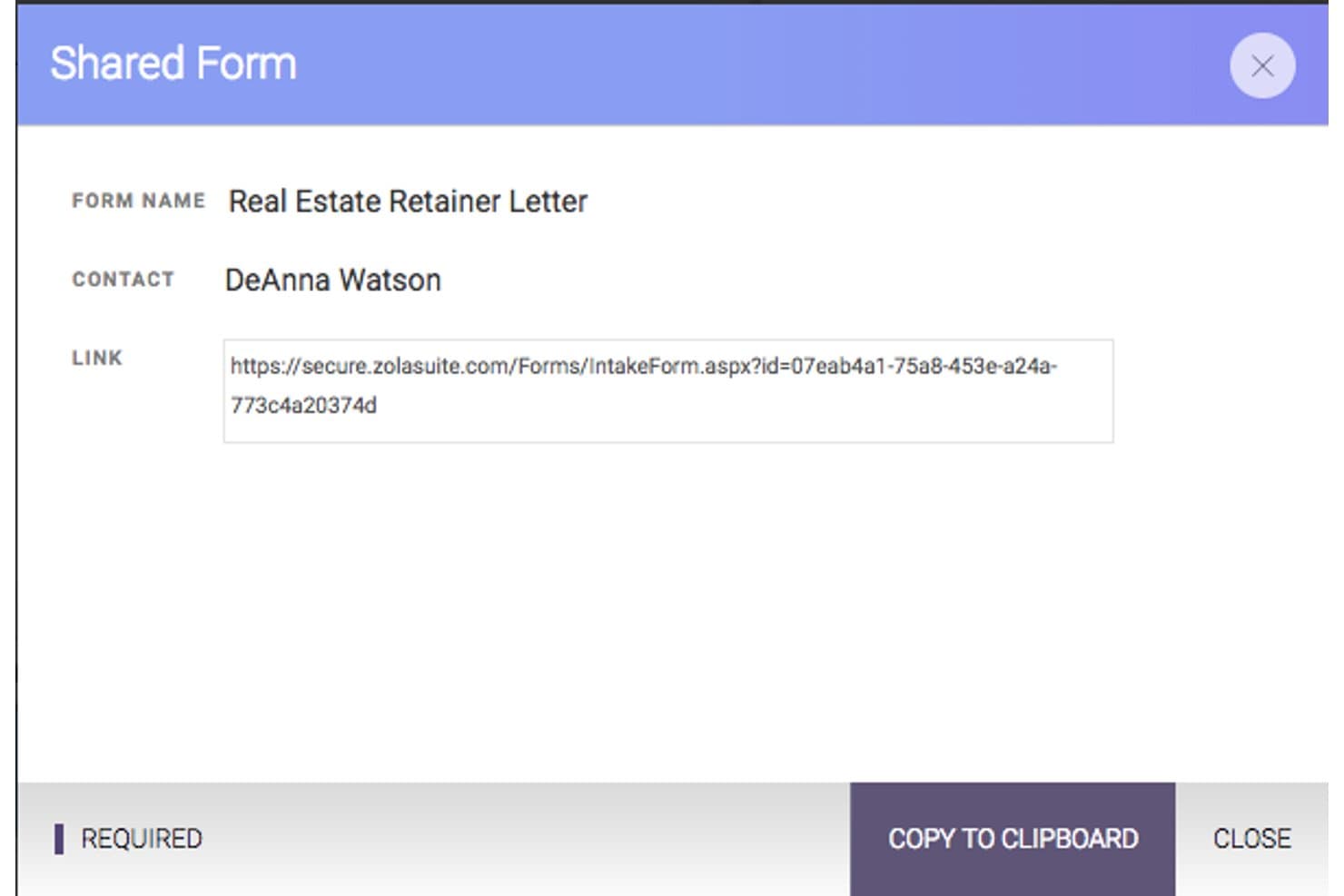
CARET Legal generates shareable intake form links for clients. CARET Legal is a legal practice management platform that covers matter management, document automation, billing, trust accounting, and client intake for real estate law firms handling work from consultations through closing.
Who Is CARET Legal Best For?
CARET Legal is a strong fit for real estate law firms that want to manage the full matter lifecycle—from client intake through closing—in a single platform.
Why I Picked CARET Legal
I picked CARET Legal because it's one of the few practice management platforms built to handle real estate matters from the first client consultation all the way through closing. I love that it ships with matter templates specifically for closings, 1031 exchanges, and leases, and that its document automation tools generate deeds, contracts, and closing documents directly from intake form data. The intake forms feed merge fields into those templates, so information collected from a new client actually travels through the matter.
CARET Legal Key Features
- Trust and escrow accounting: Manage IOLTA-compliant trust accounts with matter-linked deposit and disbursement tracking built directly into the platform.
- Client portal: Give clients a secure space to exchange documents, communicate, and view matter updates without relying on email.
- Two-way texting: Send and receive text messages with clients directly within CARET Legal as part of the matter communication record.
- Automated workflow scheduling: Trigger tasks and meetings based on matter activity to keep closing timelines and recurring processes on track.
CARET Legal Integrations
CARET Legal integrates with Lawmatics to sync lead and contact information, plus Google Workspace and Microsoft 365 for two-way email and calendar syncing. It also offers an API for custom integrations.
Pros and Cons
Pros:
- Matter records keep documents and billing together
- Real estate templates cover closing workflows
- Intake answers populate document merge fields
Cons:
- No intake-specific conversion or referral reporting
- Shared intake forms require an existing matter
Learn more about CARET Legal: Best for measuring lead and referral ROI
- Free demo available
- Pricing upon request
Visit WebsiteCustomer Rating:4.7/5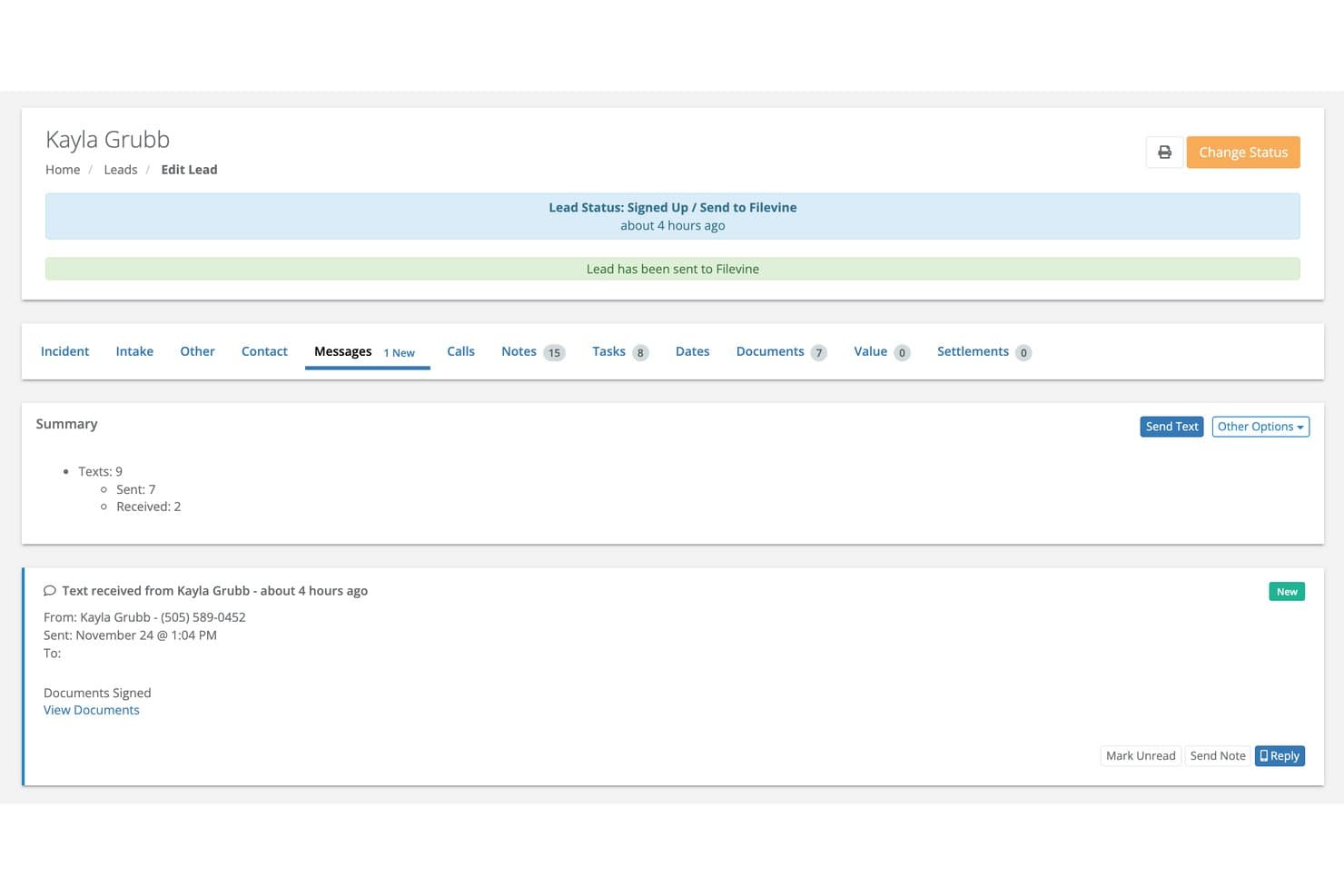
Lead Docket tracks client messages and document signing status in one place. Lead Docket is a legal intake platform built around lead capture, pipeline tracking, automated follow-up messaging, referral tracking, and marketing ROI reporting for law firms.
Who Is Lead Docket Best For?
Lead Docket is a strong fit for law firms with active marketing budgets that need to track where leads come from and whether that spend is paying off.
Why I Picked Lead Docket
I've included Lead Docket in my top picks because it gives law firms a genuinely clear picture of which marketing channels and referral sources are actually generating signed cases. I like how the campaign and revenue measurement tools let you log your marketing spend and then trace it directly to conversion rates and revenue by source, so you can see, for example, whether your Google Ads budget or a referral partner brought in a real estate matter that settled. The referral-fee tracking with automated partner check-ins is a feature I find particularly useful for real estate practices that run active referral networks.
Lead Docket Key Features
- Custom intake scripts: Build intake forms with configurable fields to collect property details and qualifying case information from prospective real estate clients.
- Automated messaging: Send follow-up messages to prospective clients automatically at set points during the intake process.
- LeadsAI case-success prediction: Get an AI-generated assessment of lead viability and case-success likelihood when a new lead enters the pipeline.
- Payment request links: Send clients links to pay consultation fees or retainers online via credit card or ACH transfer directly from the platform.
Lead Docket Integrations
Lead Docket has a documented native integration with Filevine for transferring signed-case files and mapping custom fields. It also lists CallRail and Google Ads among its integrations and provides an API for custom connections.
Pros and Cons
Pros:
- Custom intake fields capture property details
- Automated follow-ups keep prospects moving
- Tracks referrals through signed-case outcomes
Cons:
- Report figures can vary across reports
- No title or escrow intake workflows
Learn more about Lead Docket: Best for intake into conveyancing matters
- Free demo available
- Pricing upon request
Visit WebsiteCustomer Rating:4.2/5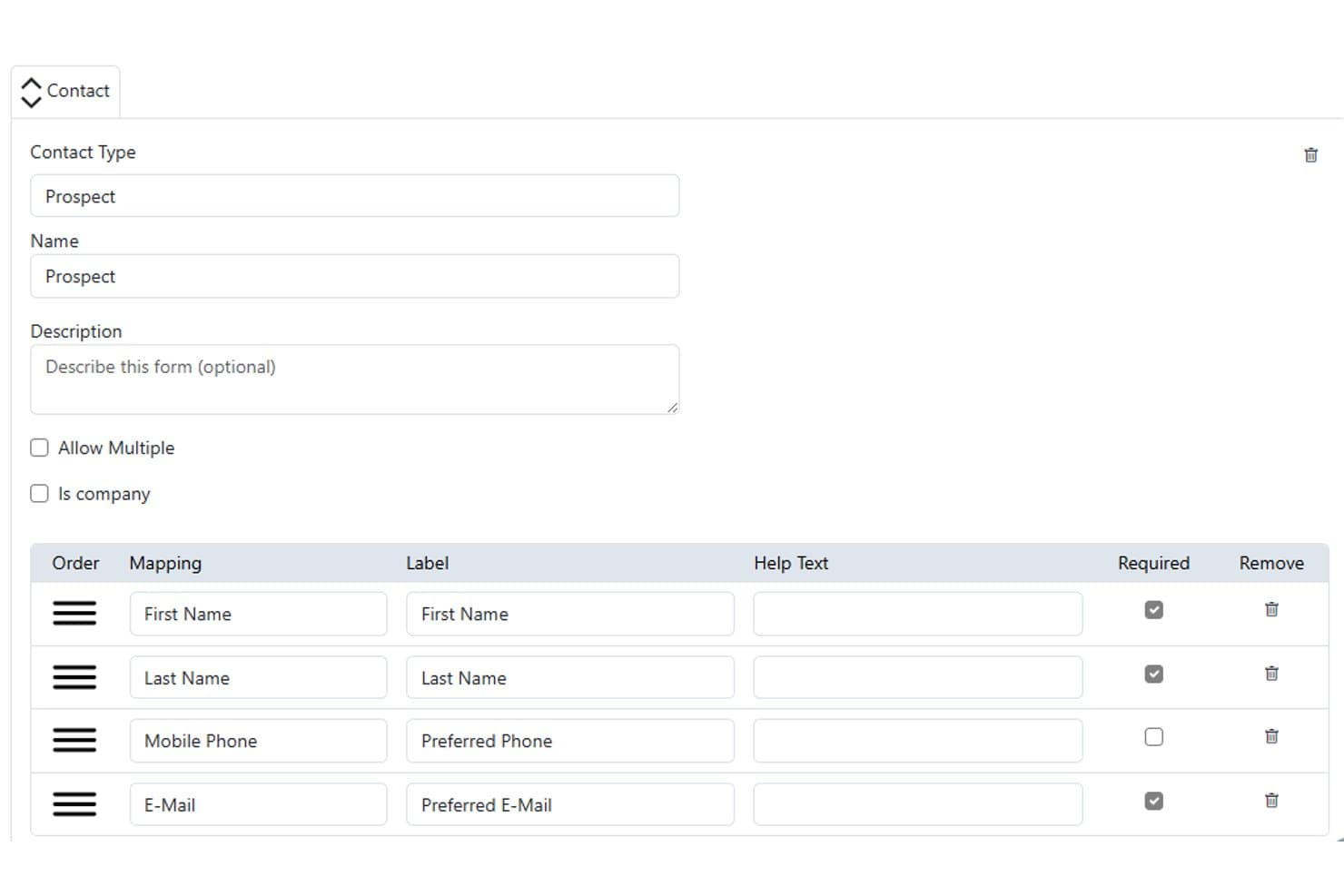
Actionstep lets users configure prospect contact intake forms with required fields. Actionstep is a law firm practice management platform with matter workflows, customizable Capture web forms, document automation, and client communications tools built for legal intake and matter management.
Who Is Actionstep Best For?
Actionstep is a strong fit for law firms that handle conveyancing matters and want to manage the full matter lifecycle—from intake form to file close—within a single platform.
Why I Picked Actionstep
I picked Actionstep as one of the best because its Capture web forms are built to feed directly into conveyancing matter workflows, which is exactly what real estate intake demands. I've set up forms with property address fields that map to matter-specific data in Actionstep, so when a prospect submits, staff can review and sync the data to open a matter with contacts already assigned. The conditional logic in Capture forms also lets me tailor what a prospective client sees based on their answers, keeping the intake experience clean for property transactions.
Actionstep Key Features
- Conflict check tool: Runs conflict-of-interest checks against existing contacts and matters before opening a new conveyancing file.
- Matter-specific document automation: Generates letters, contracts, and forms by pulling data directly from the associated matter record.
- Client portal: Lets you share matter updates, documents, and invoices with clients without leaving the platform.
- InfoTrack integration: Connects to InfoTrack to order property searches, certificates, and contracts and receive property information alerts.
Actionstep Integrations
Actionstep lists 50+ integrations and add-ons, including InfoTrack Australia, InfoTrack New Zealand, First AML, and Outlook for Office 365. It also supports Zapier and a REST API with REST Hooks and event notifications for custom integrations.
Pros and Cons
Pros:
- Custom matter types support tailored conveyancing processes
- Capture forms map property details into matters
- Conveyancing workflows organize checks, deadlines, and documents
Cons:
- Intake conversion reporting remains limited
- Form setup requires technical field configuration
Learn more about Actionstep: Best for AI phone intake and lead follow-up
- Free demo available
- Pricing upon request
Visit WebsiteCustomer Rating:4.2/5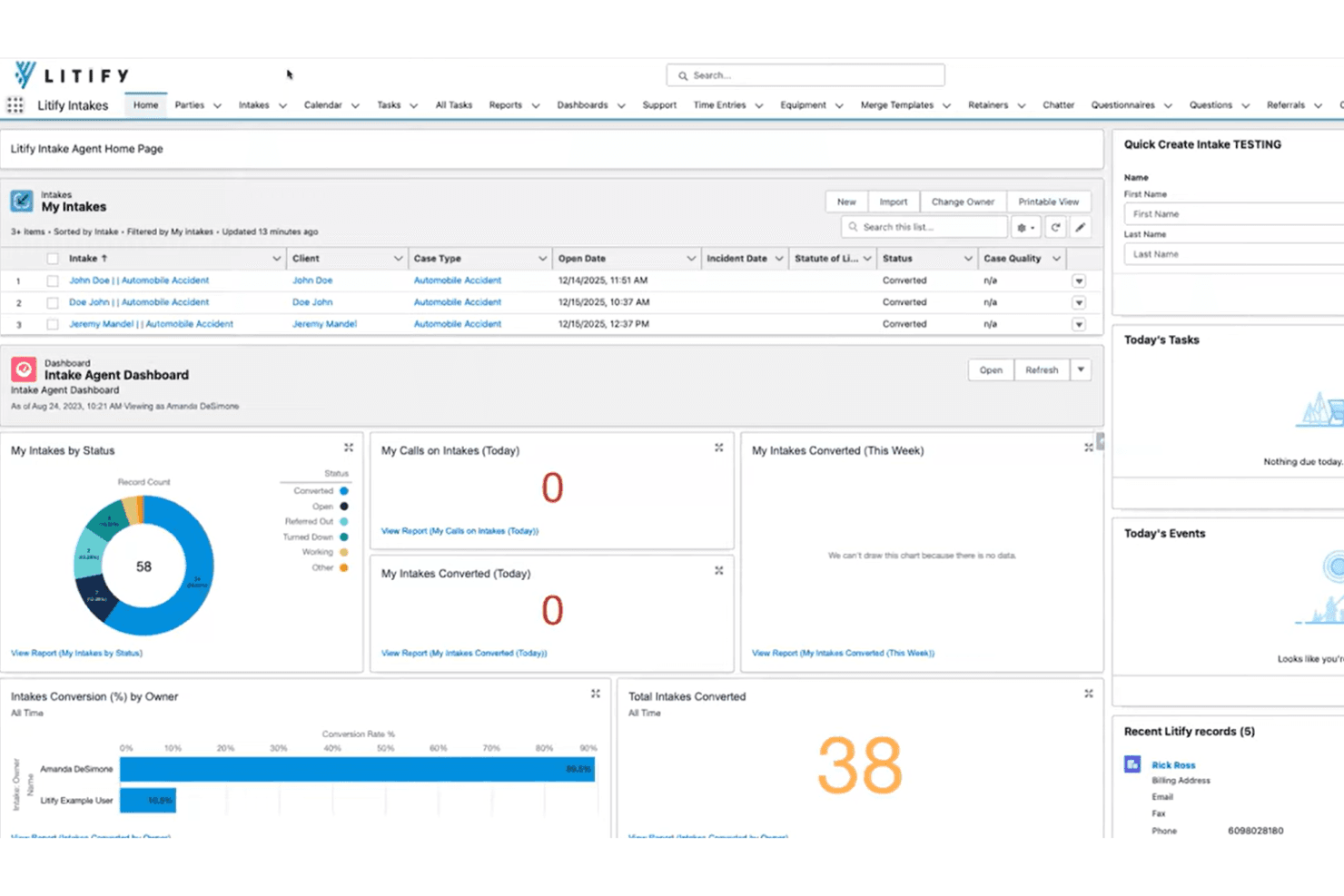
Litify centralizes client intake tracking and conversion metrics in one dashboard. Litify is a legal case management platform built on Salesforce that covers client intake, matter management, document handling, time and billing, and reporting—with AI-driven call intelligence, intake qualification, and lead routing across practice areas including real estate law.
Who Is Litify Best For?
Litify works well for multi-practice law firms that handle high call volumes and want AI-driven phone intake, lead scoring, and automated follow-up built into their case management platform.
Why I Picked Litify
I picked Litify as one of the best because its AI phone intake capabilities are genuinely hard to replicate in a single platform. LitifyAI Call Intelligence captures incoming calls, transcribes conversations, pre-fills intake questionnaires with cited answers, and automatically creates follow-up tasks, so no real estate inquiry slips through after a missed call. The Intake Qualifier Agent then screens each prospective matter against firm criteria before routing it to the right attorney.
Litify Key Features
- Dynamic intake questionnaires: Build adaptive intake forms that surface different questions based on a contact's earlier answers, so you can collect property and matter details without a fixed script.
- Conflict Check Agent: Screen prospective real estate matters against your firm's existing client database to flag conflicts before opening a new file.
- Configurable matter plans: Set up templated task lists by practice area and case type to track real estate matters from initial inquiry through resolution.
- Personalized dashboards: Monitor lead conversion, case activity, and team productivity in real time through no-code, role-specific dashboards.
Litify Integrations
Litify offers a native Outlook integration and connects with RingCentral, Dialpad, Aircall, Zoom, CallRail, Twilio, and Five9 through Call Intelligence. It’s built on Salesforce and provides an API for custom integrations.
Pros and Cons
Pros:
- Dashboards track intake conversion and referrals
- Follow-up tasks capture missed inquiries
- AI call summaries prefill intake questionnaires
Cons:
- Busy screens can slow intake workflows
- No documented property-specific intake templates
Learn more about Litify: Best for linking leads to closing workflows
- 14-day free trial
- From $49/user/month (billed annually)
Visit WebsiteCustomer Rating:3.7/5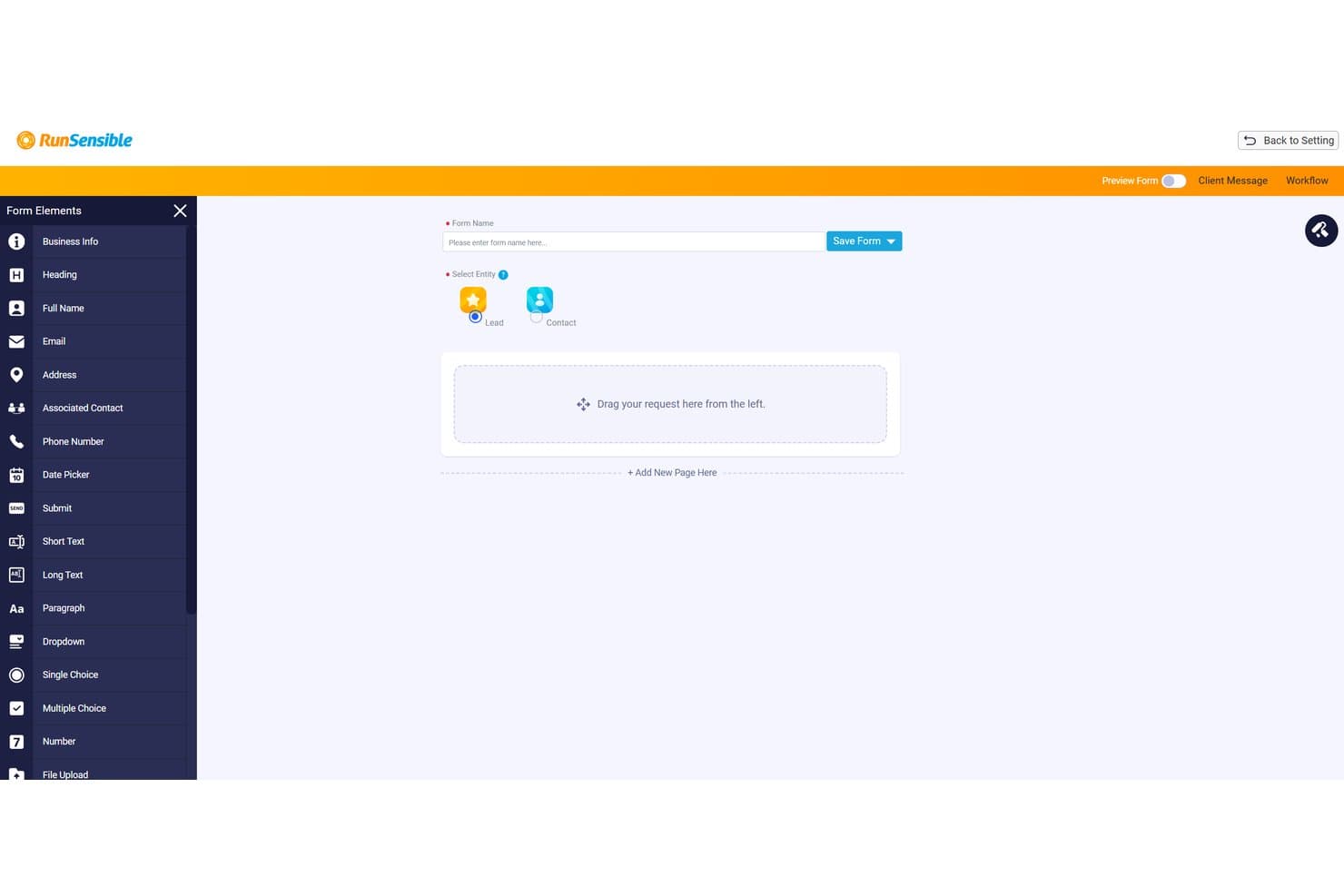
RunSensible lets users build intake forms with drag-and-drop fields. RunSensible is a legal practice management platform with real-estate-specific intake forms, matter workflows, client scheduling, and document automation built for law firms handling property transactions.
Who Is RunSensible Best For?
RunSensible is a strong fit for real estate law firms that want to connect client intake directly to matter workflows, billing, and scheduling in one platform.
Why I Picked RunSensible
I picked RunSensible as one of the best because it's the only tool on my list that's explicitly built to carry a lead from first contact all the way through to a closing workflow. The intake forms collect real estate-specific details upfront, including property address, MLS number, closing date, and lender information, so nothing needs to be re-entered when a lead converts to a matter. I also like that conditional logic keeps those forms short without sacrificing the data you actually need to open a file.
RunSensible Key Features
- Real-estate matter workflows: Dedicated workflows for residential purchase, sale, and refinance track milestones, document requirements, and signing readiness within a single matter record.
- Client portal with intake form access: Clients log in via email OTP to view and complete intake forms the firm shares, with the portal displaying creation and completion dates.
- Booking page with property-specific fields: The scheduling page collects closing date, MLS/roll number, lender, agent, and condo details at the time a client books an appointment.
- Trust accounting and billing: Built-in legal and trust accounting, online payments, and time and expense tracking are included from the Advanced plan up.
RunSensible Integrations
RunSensible offers native integrations with Google Calendar, Outlook, iCal, LawPay, Clio Manage, Zoom, and Microsoft Teams. API availability isn't documented.
Pros and Cons
Pros:
- Intake connects with matters and client communications
- Property and closing fields reduce re-entry
- Website forms create structured lead records
Cons:
- No intake conversion or referral analytics documented
- No documented conflict screening for new leads
Learn more about RunSensible: 10Best for marketing and referral ROI tracking
Captorra
- Free demo available
- Pricing upon request
Visit WebsiteCustomer Rating:4/5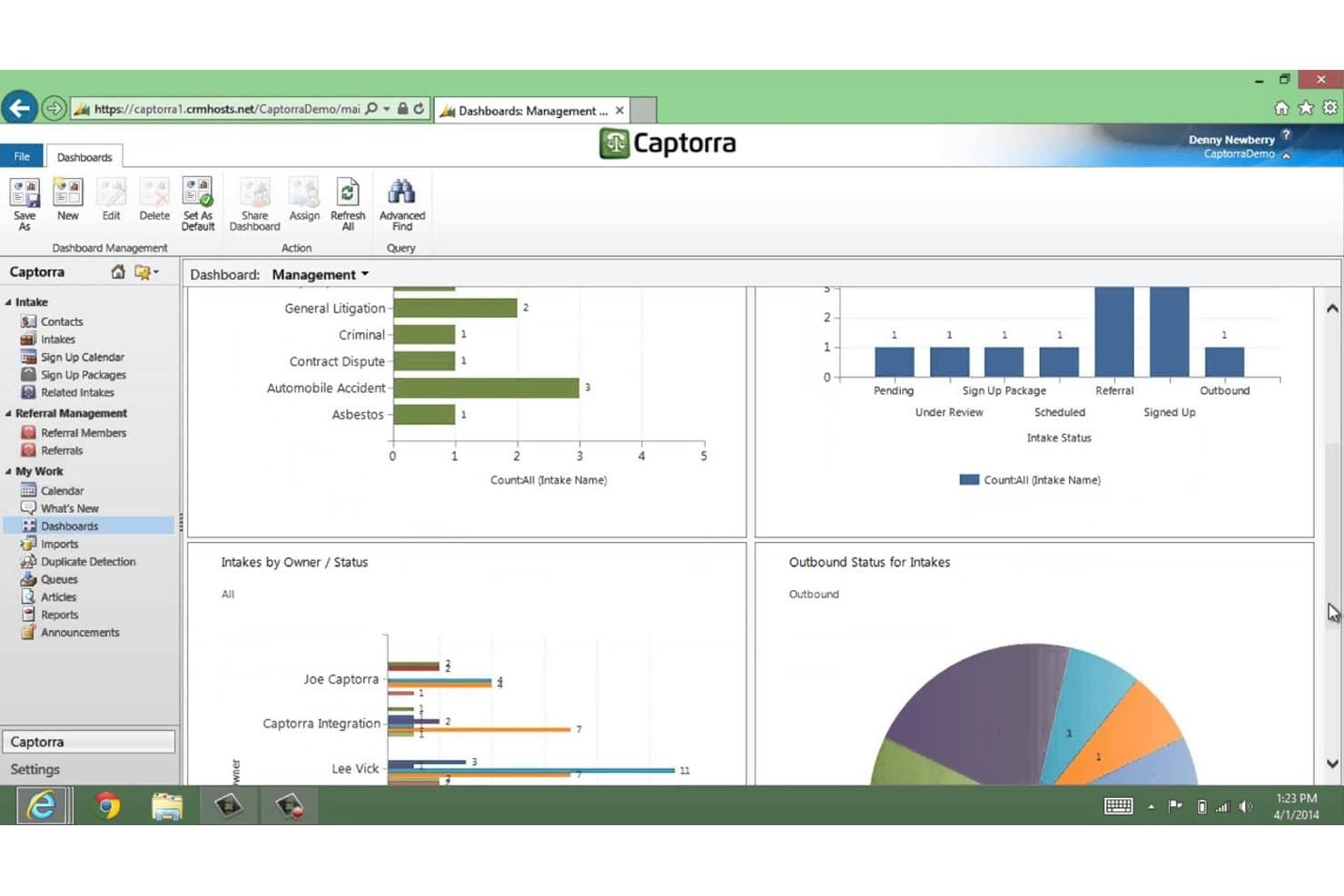
Captorra tracks intake status and case types via management dashboards. Captorra is a law firm intake platform that handles lead capture, prospect qualification, automated follow-up communication, referral tracking, and marketing ROI reporting across the full client conversion pipeline.
Who Is Captorra Best For?
Captorra is a strong fit for law firms that run active marketing campaigns and need clear visibility into which lead sources and referral partners are actually driving conversions.
Why I Picked Captorra
I picked Captorra as one of the best because its referral tracking and marketing ROI reporting are genuinely hard to replicate in a single platform. The dedicated referral portal lets outside partners log status updates without needing a license, so you can see exactly which referral sources convert to signed clients. Campaign-level cost-per-lead and conversion dashboards then show which marketing channels justify their spend.
Captorra Key Features
- Custom intake fields: Add unlimited custom fields to capture property-specific details, client information, and matter types relevant to real estate inquiries.
- Automated turn-down emails: Generate turn-down emails or merge letters for prospects who don't meet your firm's qualification criteria.
- E-sign integration: Send and collect signatures on fee agreements and other documents directly within the intake workflow.
- Call tracking integration: Connect CallRail or Call Tracking Metrics to post phone-tracking data into intake records for source attribution.
Captorra Integrations
Captorra documents 45+ partners, including native integrations with Needles, TrialWorks, Filevine, ProLaw, and TimeMatters, plus Microsoft Teams, SharePoint, OneDrive, and eSign. It supports custom connections through a JSON lead-posting API and Zapier.
Pros and Cons
Pros:
- Automates prospect follow-up and intake tracking
- Reviewers praise marketing source attribution
- Tracks referral sources and conversion rates
Cons:
- Reviewers report unreliable or difficult reports
- No documented property transaction workflows
Learn more about Captorra:
Outro software de admissão de clientes para direito imobiliário
Eis algumas opções adicionais que não incluí na minha seleção, mas que vale a pena conhecer:
- 11LexriaBest for real estate offer and agent details
- 12PracticePantherBest for intake-to-matter handoffs
- 13CosmoLexBest for intake linked to closing workflows
- 14CasePeerBest for PI firms connecting intake to cases
- 15CloudLexBest for PI firms' intake-to-case workflow
- 16LawcusBest for carrying leads into closing workflows
- 17Rocket MatterBest for leads with legal practice management
- 18DocketWiseBest for multilingual immigration form prep
- 19Law RulerBest for intake and lead-nurture workflows
- 20IntakerBest for after-hours lead-to-call handoffs
Related Reviews
How I Evaluate Client Intake Software for Real Estate Law
I split my evaluation into three parts. Core functionality carries the most weight: a tool must capture leads from multiple channels and convert qualified intakes into matters without re-entering data. I then look for standout features like e-signature for engagement letters, and consider support quality and onboarding value beyond the feature set.
Core Functionality (Table Stakes for This List)
When I'm selecting tools for my list, I score each one on a scale from 0 (does not offer the functionality) to 5 (excels in this area) for each core functionality listed below. I then convert the total into a percentage to help assess each tool's overall fit, with extra weight on any functionalities I've deemed essential.
- Lead and Intake Capture (Essential): I check whether leads from web forms, phone, and email land in one pipeline without manual entry or duplicate records.
- Intake-to-Matter Conversion (Essential): I look for how much client and property data carries over when a qualified lead becomes an active matter in the system.
- Customizable Intake Forms: Real estate matters need fields for property address, transaction type, and closing date. I evaluate whether forms support conditional logic for different matter types.
- Automated Client Communication: I look at follow-up sequences, appointment scheduling, and whether messages adjust based on a prospect's status or response.
- Conflict and Referral Tracking: Firms need to screen new leads against existing clients and trace which referral sources send viable work. I check both capabilities together.
- Reporting on Intake Performance: I evaluate whether dashboards show conversion rates, source performance, and pipeline status rather than just raw lead counts.
Once I have a list of tools that meet the criteria, I consider what sets each platform apart.
Differentiating Factors (What Sets Vendors Apart)
Here's how I compare and contrast different vendors:
Standout Features
E-signature for engagement letters is a big one. I look for tools that let prospects sign retainers and disclosures inside the intake flow, not through a separate app. Multi-party intake coordination matters just as much in real estate, where a single transaction can involve buyers, sellers, lenders, and agents. I check whether the platform can collect information from all parties into one matter record without creating duplicates. I also evaluate mobile field capture, since attorneys often need to log leads or grab signatures on-site at closings.
Beyond Features
I check how well each tool connects to the case management, document assembly, and title systems a firm already runs. A broken integration between intake and your practice management platform means someone re-enters property and client data by hand, which defeats the purpose. I also evaluate onboarding support and template availability, since intake coordinators at smaller firms often need vendor-provided real estate form templates and guided setup to get value quickly. Vendor uptime and support responsiveness matter too, especially around closing deadlines when a downed intake form can mean a lost client.
Como escolher software de admissão de clientes para direito imobiliário
Escolha um sistema testando se os detalhes da admissão imobiliária permanecem corretos à medida que os potenciais clientes passam do primeiro contacto para o processo e a conclusão da transação.
| Se a sua prioridade for… | Procure… |
|---|---|
| Se a sua prioridade for…Captar detalhes do imóvel e da transação | Procure…Campos para a morada, o tipo de transação e a data de conclusão |
| Se a sua prioridade for…Evitar registos duplicados | Procure…Uma forma clara de associar várias partes à mesma transação |
| Se a sua prioridade for…Preservar o trabalho de admissão ao abrir o processo | Procure…Transferência dos detalhes do cliente e do imóvel sem nova introdução de dados |
| Se a sua prioridade for…Compreender a qualidade das referências | Procure…Relatórios que associem as fontes das referências aos resultados dos potenciais clientes |
Como avaliar a sua seleção
- Execute uma transação de exemplo: Numa versão de avaliação, introduza um comprador, um vendedor, a morada do imóvel e a data de conclusão e, em seguida, converta o potencial cliente num processo.
- Teste a coordenação entre as partes: Utilize uma transação fictícia com três partes e confirme que cada pessoa está associada ao mesmo processo, sem registos duplicados.
- Peça um mapa de campos: Solicite um documento que mostre quais os campos de admissão transferidos para os processos e quais exigem introdução manual.
- Verifique os relatórios de referências: Utilize cinco potenciais clientes de exemplo com fontes diferentes e confirme se um relatório distingue os pedidos de informação dos processos convertidos.
- Escolha o compromisso mais adequado: Dê preferência à admissão dedicada quando a gestão e qualificação das referências orientarem o seu fluxo de trabalho; dê preferência a uma plataforma de gestão de escritórios quando for mais importante manter os detalhes do processo ligados até à conclusão.
O que é o software de admissão de clientes para direito imobiliário?
O software de recolha de dados de clientes para o direito imobiliário capta e qualifica potenciais clientes, acompanha referências e transfere os detalhes relevantes para processos jurídicos. Pode recolher informações como moradas de imóveis, tipos de transação e datas de conclusão. Estes registos ajudam a sua equipa a gerir pedidos de informação e a associar os dados dos clientes e dos imóveis ao trabalho subsequente.
Funcionalidades do Software de Recolha de Dados de Clientes para o Direito Imobiliário
Eis as principais funcionalidades que procuro num software de recolha de dados de clientes para o direito imobiliário:
- Captação e encaminhamento de potenciais clientes: Recolha pedidos de informação provenientes de fontes como formulários web, chamadas telefónicas e e-mails num único fluxo. Atribua cada potencial cliente ao membro da equipa adequado para análise e acompanhamento.
- Formulários de recolha de dados personalizáveis: Recolha detalhes como a morada do imóvel, o tipo de transação, a data de conclusão e as informações de contacto do cliente. Os campos condicionais podem apresentar perguntas relevantes para cada tipo de processo.
- Comunicação automatizada com clientes: Envie mensagens de acompanhamento, lembretes de marcações ou respostas baseadas no estado após um pedido de informação. Isto ajuda a sua equipa a manter os potenciais clientes informados enquanto acompanha as respetivas respostas.
- Acompanhamento de conflitos e referências: Verifique os potenciais clientes face aos registos existentes e registe quem encaminhou cada pedido de informação. Acompanhe os resultados dos potenciais clientes por origem para perceber quais as referências que resultam em processos.
- Conversão da recolha de dados em processo: Transfira os dados relevantes do cliente e do imóvel de um potencial cliente qualificado para um novo processo. Verifique quais os campos que são transferidos, para que a equipa não tenha de introduzir novamente as informações nem corrigir dados em falta.
- Coordenação de várias partes: Associe compradores, vendedores, credores, agentes e outros contactos a um único registo de transação. Isto mantém as informações de cada pessoa associadas ao imóvel e ao processo relevantes.
- Assinatura eletrónica de documentos de contratação: Envie cartas de contratação ou declarações para assinatura eletrónica como parte da recolha de dados. Acompanhe o estado das assinaturas antes de abrir ou fazer avançar um processo.
- Relatórios de desempenho da recolha de dados: Analise o estado do fluxo, as taxas de conversão e os resultados por origem das referências em relatórios ou painéis. Estas métricas ajudam a identificar onde os pedidos de informação ficam parados e quais as fontes que geram clientes contratados.
Benefícios do Software de Recolha de Dados de Clientes para o Direito Imobiliário
Eis alguns benefícios comuns que pode esperar de um software de recolha de dados de clientes para o direito imobiliário:
- Captação centralizada de potenciais clientes: Reunir os pedidos de informação provenientes de formulários web, telefone e e-mail num único fluxo proporciona à sua equipa um local partilhado para analisar e atribuir potenciais clientes.
- Recolha de dados específica do imóvel: Os formulários personalizáveis recolhem detalhes como a morada do imóvel, o tipo de transação e a data de conclusão, com perguntas condicionais para diferentes processos.
- Transferências de processos mais eficientes: Converter um potencial cliente qualificado num processo pode transferir os dados do cliente e do imóvel, reduzindo a introdução duplicada de dados.
- Registos de transações coordenados: Associar compradores, vendedores, credores e agentes a uma única transação mantém as informações de cada pessoa ligadas ao processo relevante.
- Acompanhamento atempado: As mensagens automatizadas, os lembretes e o agendamento de marcações ajudam a sua equipa a fazer o acompanhamento com base no estado ou na resposta de um potencial cliente.
- Verificações de conflitos antecipadas: Verificar novos potenciais clientes face aos registos existentes ajuda a sua equipa a sinalizar potenciais conflitos antes de abrir um processo.
- Informações sobre a origem das referências: Acompanhar as origens e os resultados dos potenciais clientes nos relatórios de recolha de dados ajuda a sua equipa a perceber quais as referências que resultam em processos convertidos.
Custos e Preços do Software de Recolha de Dados de Clientes para o Direito Imobiliário
Os preços variam consoante as funcionalidades, a dimensão da equipa e os complementos. Estes intervalos habituais podem ajudá-lo a comparar software de recolha de dados de clientes para o direito imobiliário.
Tabela de Comparação de Planos para Software de Recolha de Dados de Clientes para o Direito Imobiliário
| Tipo de plano | Preço médio | Funcionalidades comuns |
|---|---|---|
| Tipo de planoPlano pessoal | Preço médio$20–$50 por utilizador/mês | Funcionalidades comunsFormulários de recolha de dados personalizados, acompanhamento de potenciais clientes, agendamento de marcações e mensagens básicas de acompanhamento. |
| Tipo de planoPlano empresarial | Preço médio$50–$150 por utilizador/mês | Funcionalidades comunsAcompanhamentos automatizados, acompanhamento de referências, assinaturas eletrónicas, relatórios e transferências de processos. |
| Tipo de planoPlano empresarial de grande dimensão | Preço médio$150–$300+ por utilizador/mês | Funcionalidades comunsFluxos de trabalho personalizados, permissões para vários escritórios, relatórios avançados, suporte à integração e integração inicial dedicada. |
Perguntas frequentes
Algumas respostas a perguntas comuns sobre software de admissão de clientes para direito imobiliário:
O envio de um formulário de admissão online faz de alguém um cliente?
Normalmente, não: o simples envio de um formulário online não confirma que o escritório representa a pessoa. A existência de uma relação advogado-cliente pode depender das regras locais e das comunicações entre as partes. Coloque junto ao formulário um aviso claro indicando que o envio não cria uma relação de representação e que o escritório tem de confirmar a aceitação. Informe os candidatos sobre quando podem esperar uma resposta e disponibilize uma via separada para prazos urgentes. Peça a um advogado que reveja a redação para as jurisdições onde o seu escritório exerce atividade.
Que informações deve um formulário de admissão recolher antes da verificação de conflitos?
Antes de uma verificação de conflitos, peça os nomes necessários para identificar o potencial cliente, as outras partes e as entidades relevantes. Recolha dados básicos de contacto, o endereço do imóvel, o tipo de transação e qualquer advogado da parte contrária que seja conhecido. Evite solicitar nesta fase um relato detalhado, documentos, números de conta ou posições negociais sensíveis. As regras relativas às informações de potenciais clientes variam consoante a jurisdição, por isso peça a um advogado que defina o âmbito do formulário e os controlos de acesso. Depois de concluída a verificação, convide a pessoa a fornecer informações mais completas através de um canal aprovado.
Pode um escritório de advogados utilizar o seu sistema de gestão da prática em vez de software de admissão dedicado?
Sim, se conseguir gerir o trabalho anterior à abertura de um processo. Teste se capta pedidos provenientes dos seus canais efetivos, atribui a análise, acompanha as fontes de referenciação e transfere os dados relativos ao imóvel e às partes para um processo. Peça à equipa que execute uma transação de teste e verifique se existem contactos duplicados ou campos que não sejam transferidos. Se o sistema não tiver fases de potenciais clientes, formulários de admissão ou acompanhamento de contactos posteriores, um software de admissão dedicado poderá colmatar essa lacuna. Compare os custos, as permissões e a manutenção antes de adicionar outro sistema.