

O software de gestão de prazos processuais ajuda-o a acompanhar as datas das audiências, os prazos de entrega e os requisitos de conformidade, para que nunca falhe um prazo crítico nem ponha o seu processo em risco. A ferramenta certa simplifica o seu calendário ao automatizar lembretes e gerir prazos — o que significa que pode concentrar-se na prática da advocacia, e não na burocracia.
Depois de testar várias opções, vou apresentar-lhe os melhores softwares de gestão de prazos processuais, para que possa encontrar a solução mais adequada ao seu escritório, quer trabalhe por conta própria quer faça parte de uma equipa maior.
Why Trust Our Software Recommendations
6,700+
Reviews
20
Industry experts
16+
Evaluation factors
14
Years
Our team has been testing and reviewing software since 2012. As legal practice leaders ourselves, we know how difficult—and important—it is to choose the right software.
For this guide, we evaluated tools using hands-on testing and independent research, scoring tools using our selection criteria.
Our reviews reflect our human editorial judgment, not a sales pitch.
Tabela comparativa de software de gestão de prazos processuais
Esta tabela comparativa resume os detalhes de preços das minhas principais escolhas de software de gestão de prazos processuais:
| Tool | Best For | Trial Info | Price | ||
|---|---|---|---|---|---|
| 1 | Best for simple case and billing management | 7-day free trial + free demo available | From $59/user/month | Website | |
| 2 | Best for effortless task and project tracking | Free trial available | Pricing upon request | Website | |
| 3 | Best for matter-by-matter rule change review | Free demo available | Pricing upon request | Website | |
| 4 | Best for all-inclusive legal practice management | Free trial available | From £79/user/month | Website | |
| 5 | Best for reviewing generated dates before export | Free demo available | Pricing upon request | Website | |
| 6 | Best for easy tracking of dockets and deadlines | Free trial available | From $125/month | Website | |
| 7 | Good for deadline management for Microsoft 365 users | Free demo available | From $39/user/month (billed annually) | Website | |
| 8 | Best for attorney-reviewed rule updates | Free demo available | Pricing upon request | Website | |
| 9 | Good for comprehensive legal calendaring | Free demo available | Pricing upon request | Website | |
| 10 | Best for AI research on live dockets | Free plan + 30-day free trial + free demo available | From $9.99/month | Website |


Avaliações do melhor software de gestão de prazos processuais
Apresento abaixo os meus resumos detalhados dos melhores softwares de gestão de prazos processuais que chegaram à minha lista final. As minhas avaliações analisam detalhadamente as principais funcionalidades, vantagens & desvantagens, integrações e casos de utilização ideais de cada ferramenta, para o ajudar a encontrar a melhor opção para si.
 Best for simple case and billing management
- 7-day free trial + free demo available
- From $59/user/month
Visit WebsiteCustomer Rating:4.3/5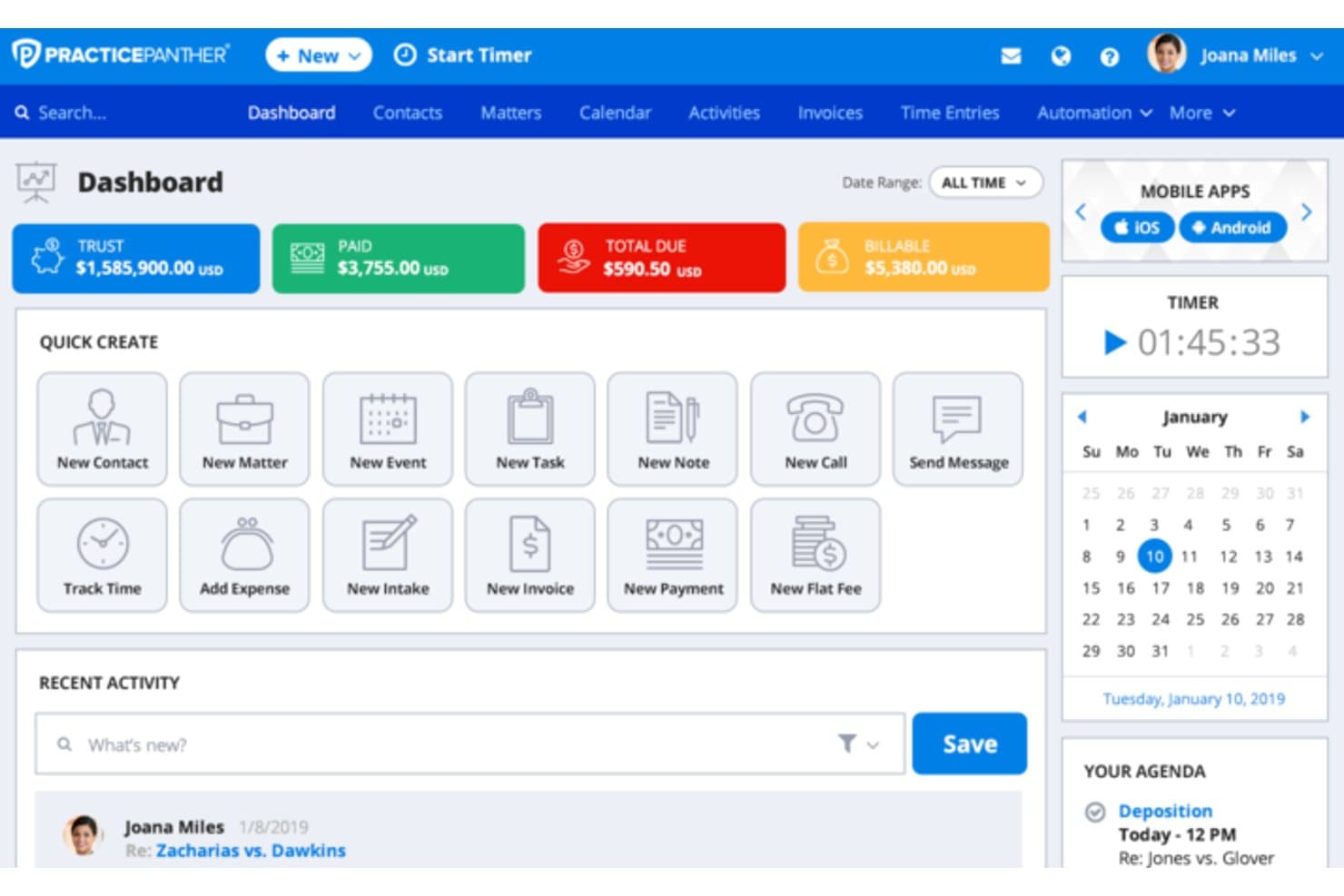
PracticePanther manages cases, court calendars, billing, trusts, and documents. PracticePanther is a cloud-based legal practice management platform that combines case management, calendaring with court-rules integration, billing, trust accounting, and document management for solo and small-to-mid-sized law firms.
Who Is PracticePanther Best For?
PracticePanther suits solo practitioners and small-to-mid-sized law firms that want basic docketing alongside case management and billing in one platform.
Why I Picked PracticePanther
PracticePanther earns its spot on my shortlist because it bundles court-rules-based deadline tracking directly into the same matter where you log billable time and generate invoices. I like that the LawToolBox integration auto-populates case deadlines by jurisdiction, so I'm not toggling between systems. The native trust accounting also ties billing records to specific matters, keeping financial and docket data aligned without extra data entry.
PracticePanther Key Features
- Color-coded matter calendar: Filter tasks, events, and court deadlines by color using custom tags for faster review and prioritization.
- Two-way calendar sync: Seamlessly integrates with Google, Outlook, Exchange, and Apple calendars to push and pull docket entries.
- Native mobile apps: Allows attorneys and staff to view matters, deadlines, and appointments via dedicated iOS and Android apps.
- Secure document management: Upload, organize, and share legal documents directly linked to specific cases and matters.
PracticePanther Integrations
PracticePanther offers native integrations with LawToolBox, QuickBooks Online, Google Drive, Dropbox, Box, OneDrive, Docketwise, and Microsoft 365. It also connects with Zapier and provides an API for custom integrations.
Pros and Cons
Pros:
- Mobile app surfaces deadlines and case events
- Billing and docket data linked per matter
- LawToolBox integration automates jurisdiction-based deadline calculation
Cons:
- Docket reporting lacks compliance-grade audit trails
- Court deadlines require the LawToolBox add-on
Learn more about PracticePanther: 2Best for effortless task and project tracking
8am
- Free trial available
- Pricing upon request
Visit WebsiteCustomer Rating:4.6/5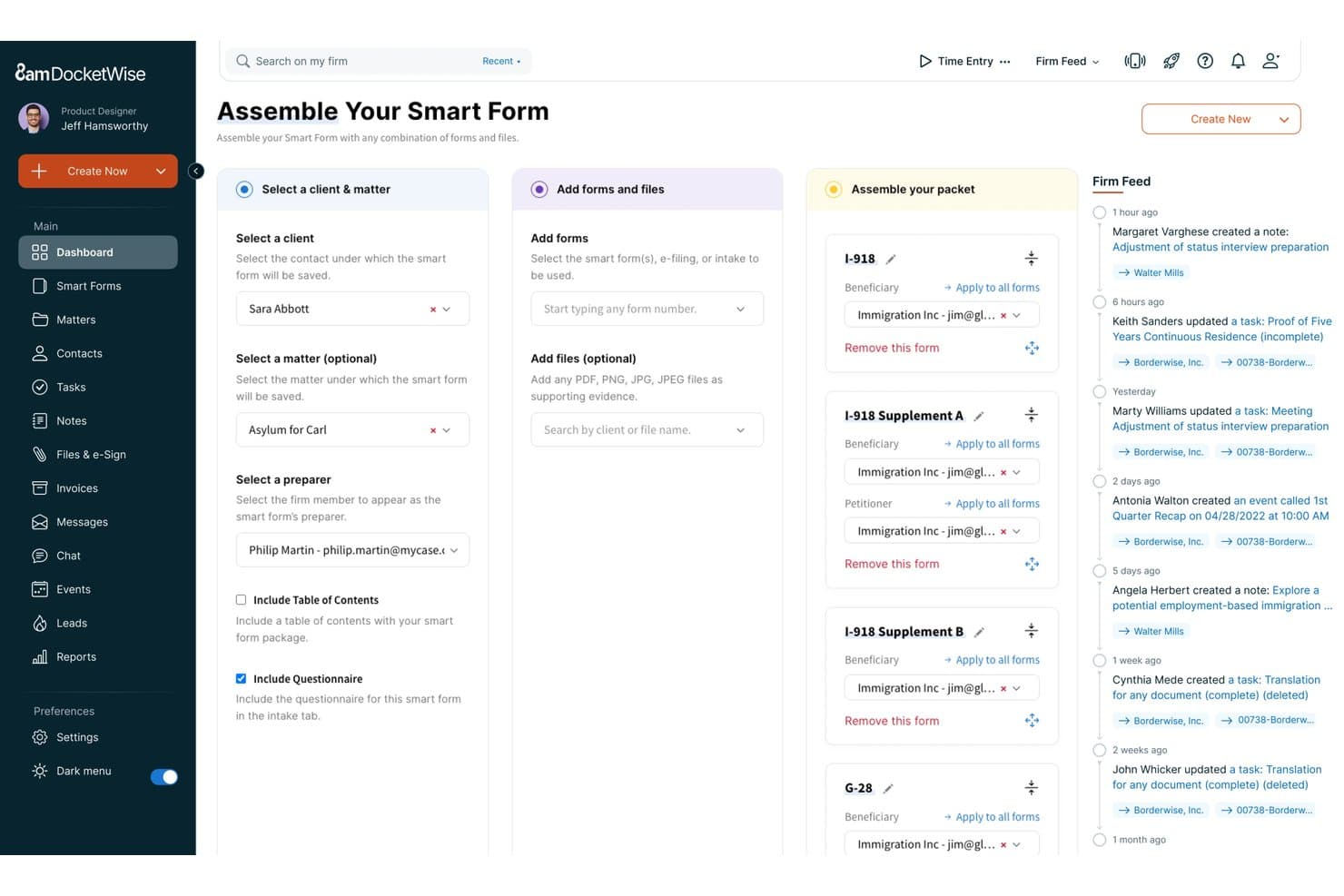
8am DocketWise offers a Smart Form assembly workflow that lets legal teams select clients, add immigration forms, and organize packet components in a structured three-step interface. 8am is a legal practice management ecosystem that unifies case tracking, deadline management, client communications, and billing across a suite of specialized tools—including MyCase, DocketWise, and CasePeer—built for law firms of all sizes.
Who Is 8am Best For?
8am suits solo practitioners and small to mid-size law firms—particularly immigration practices—that want case management, deadline tracking, and billing in one connected platform.
Why I Picked 8am
I picked 8am because its MyCase platform turns what's usually a fragmented, error-prone process into something genuinely manageable. I like how task assignments live directly inside a case record, keeping deadlines and to-dos tied to the right matter without extra admin overhead. DocketWise takes this further for immigration practices, auto-populating USCIS forms from client questionnaires and surfacing priority dates as trackable case tasks.
8am Key Features
- Integrated calendar sync: Two-way integration with Google Calendar and Microsoft Outlook keeps case dates current across platforms.
- Jurisdiction-based deadline tracking: Tracks critical deadlines and events with options to configure jurisdiction-specific entries.
- Client portal: Provides a secure portal for clients to view documents, calendar events, and status updates.
- Document automation: Generates, stores, and manages templates and case-related documents within a centralized dashboard.
8am Integrations
8am offers native integrations with Google Calendar, Microsoft Outlook, LawPay, QuickBooks, NetDocuments, Dropbox, and Microsoft 365. An API is available for custom integrations.
Pros and Cons
Pros:
- Built-in client portal for secure communications
- Immigration form auto-population through DocketWise
- Tasks tied directly to individual matter records
Cons:
- Not designed for multi-jurisdiction deadline automation
- Limited court rules engine for litigation
Learn more about 8am: Best for matter-by-matter rule change review
- Free demo available
- Pricing upon request
Visit WebsiteCustomer Rating:4.8/5
Smokeball tracks personal injury matters, client intake, billing, and settlements. Smokeball is a legal practice management platform that handles matter organization, court date calendaring, deadline calculation via LawToolBox, document automation, and billing across law firm workflows.
Who Is Smokeball Best For?
Smokeball fits small to mid-size law firms that want matter management, billing, and court deadline tracking in one place—especially those already using Microsoft 365.
Why I Picked Smokeball
I've included Smokeball in my top picks because of how it handles court rule changes at the matter level through its LawToolBox integration. When a jurisdiction updates its rules, Smokeball surfaces the affected matters alongside a side-by-side view of old and new deadline dates, so your team can accept, reject, or defer each change with full context rather than hunting for what broke. I also like that calculated deadlines can be pushed directly to attorney or staff calendars as events or tasks, keeping accountability tied to the right people from the start.
Smokeball Key Features
- Two-way Outlook calendar sync: Events created in Smokeball appear in Outlook in real time, and Outlook events can flow back into Smokeball, keeping schedules aligned across both platforms.
- Cross-matter deadline view: The Court Rule Sets screen lets you see all LawToolBox-calculated deadline sets across active matters from one place.
- InfoTrack PACER search and docket alerts: Docket Alarm searches federal and bankruptcy court records across all 50 states and sends real-time alerts when new filings or court activity appear.
- Mobile matter and calendar access: The iOS and Android app lets you review, edit, or create calendar events and tasks on the go, with changes syncing back to Smokeball automatically.
Smokeball Integrations
Smokeball offers native Microsoft Outlook and Microsoft Word integrations, plus marketplace connectivity with LawToolBox for deadline calculation. It also integrates with InfoTrack for e-filing and PACER searches; API availability isn’t documented.
Pros and Cons
Pros:
- Reviewers praise matter and deadline organization
- Cross-matter views list calculated deadline sets
- Rule changes flag affected matters for review
Cons:
- Statute-of-limitations calculations aren't documented
- Some reviewers report deadlines missing expected task views
Learn more about Smokeball: 4Best for all-inclusive legal practice management
Clio
- Free trial available
- From £79/user/month
Visit WebsiteCustomer Rating:4.7/5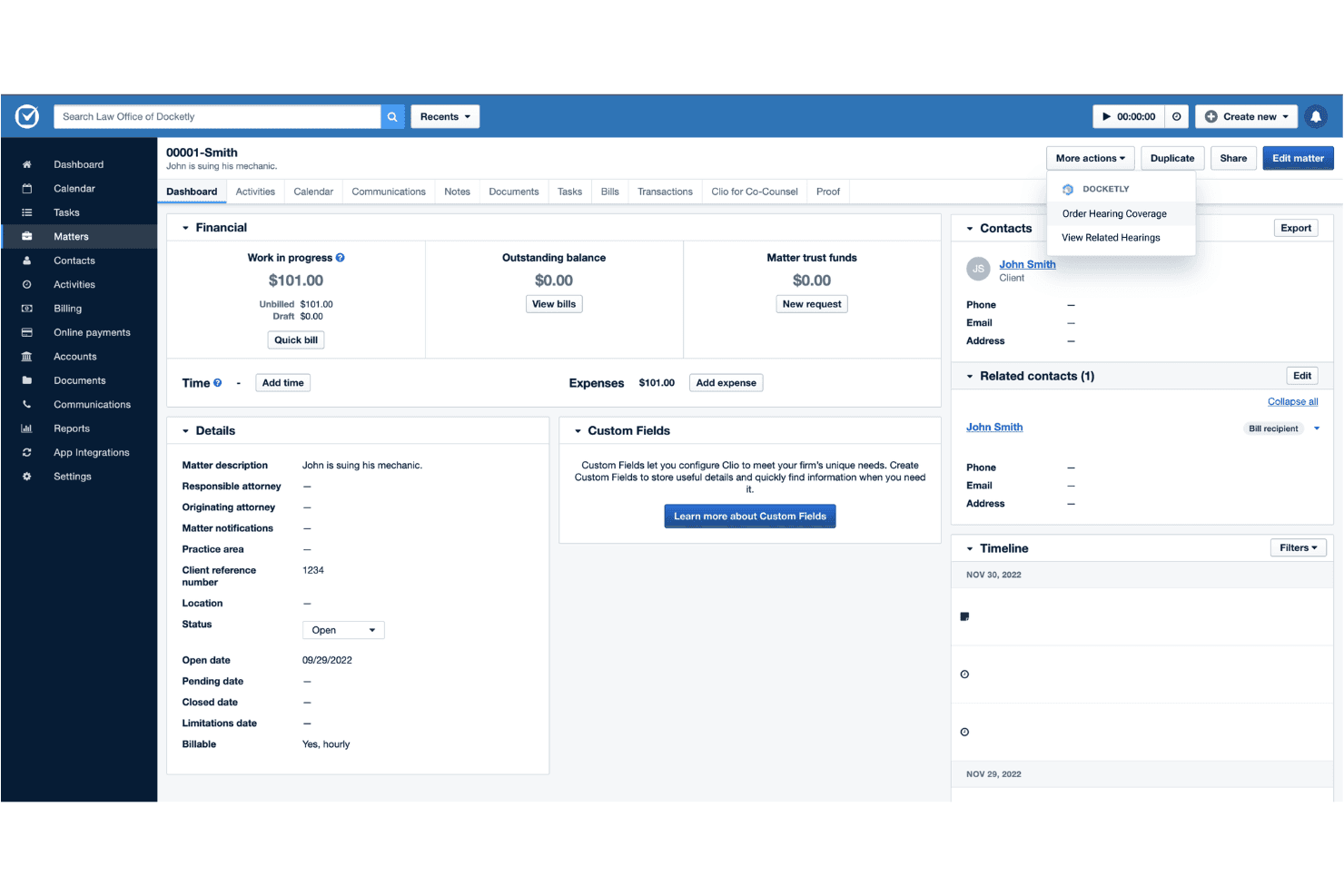
Clio manages court deadlines, matters, documents, time tracking, and billing. Clio is a legal practice management platform that combines court rules-based deadline calendaring, matter and document management, time tracking, billing, and AI-driven docketing tools into a single connected system.
Who Is Clio Best For?
Clio suits small to mid-sized law firms that want docketing, case management, billing, and client intake managed within one platform rather than across separate tools.
Why I Picked Clio
Clio earns its spot on my shortlist because it folds docketing directly into every other layer of firm operations, which no other tool on this list does quite as completely. I rely on the Court Rules engine to auto-calculate deadlines across hundreds of U.S. courts without any manual setup. Manage AI goes a step further, reading uploaded court documents, extracting key dates, and generating verified calendar events automatically.
Clio Key Features
- Native calendar integration: Syncs matter deadlines with Microsoft 365 and Google Calendar, including two-way updates for attorneys and staff.
- Document automation tools: Converts Word documents into online templates and auto-fills court forms directly within Clio Draft.
- Alt Legal integration: Connects IP docketing, contact management, and invoicing for patent and trademark prosecution.
- Role-based user permissions: Allows granular access control for confidential matters and task assignments across teams.
Clio Integrations
Clio offers 300+ native integrations, including Microsoft 365, Google Workspace, DocuSign, Xero, QuickBooks Online, Zoom, Alt Legal, Dropbox, and NetDocuments. An open API is available for custom integrations.
Pros and Cons
Pros:
- Full firm management beyond docketing alone
- Manage AI extracts key dates from documents
- Court Rules engine auto-calculates jurisdiction-specific deadlines
Cons:
- Narrower court coverage than dedicated docketing platforms
- Docketing features thinner than dedicated specialist tools
Learn more about Clio: Best for reviewing generated dates before export
- Free demo available
- Pricing upon request
Visit WebsiteCustomer Rating:4.5/5
Filevine automates case workflows, role-based task assignments, and court deadlines. Filevine includes Timely, a deadline management add-on that generates court deadlines across all 50 U.S. states from jurisdiction and trigger selections, then exports them to Filevine, Google Calendar, or an
.icsfile.Who Is Filevine Best For?
Filevine is a strong fit for litigation-focused law firms that already use Filevine's case management platform and want deadline generation built into their existing workflow.
Why I Picked Filevine
I picked Filevine as one of the best because of how Timely handles the moment between deadline generation and export. Before anything gets pushed to Filevine, Google Calendar, or an
.icsfile, you can review every generated date, deselect the ones that don't apply, and even choose service methods in supported jurisdictions to surface additional service-related deadlines. I especially like that you can run multiple triggers in a single docketing session and search the results by statute or rule right on the deadlines screen.Filevine Key Features
- All-50-states jurisdiction coverage: Timely draws on court rules for all 50 U.S. states and jurisdictions to generate deadlines from a selected trigger event.
- Service method selection: In supported jurisdictions, you can choose a service method to surface additional service-related deadline dates alongside your primary deadlines.
- Filevine Projects deadline view: Exported deadlines from all matters appear in a single cross-project view, where you can sort by column and search by criteria.
- Role-based jurisdiction access: An organization manager can invite users, assign roles, and limit each user's access to specific jurisdictions rather than the full rule set.
Filevine Integrations
Timely has documented connections to Filevine and Google Calendar, while Filevine’s product page also names Outlook as a destination. It exports
.icsfiles for calendar import, but a public API and two-way calendar sync aren’t documented.Pros and Cons
Pros:
- Cross-project deadlines with searchable sorting
- Reviewable dates before calendar export
- All-state court-rule deadline generation
Cons:
- No e-filing intake or proactive change alerts
- Subscriber must verify rules and holidays
Learn more about Filevine: Best for easy tracking of dockets and deadlines
- Free trial available
- From $125/month
Visit WebsiteCustomer Rating:4.9/5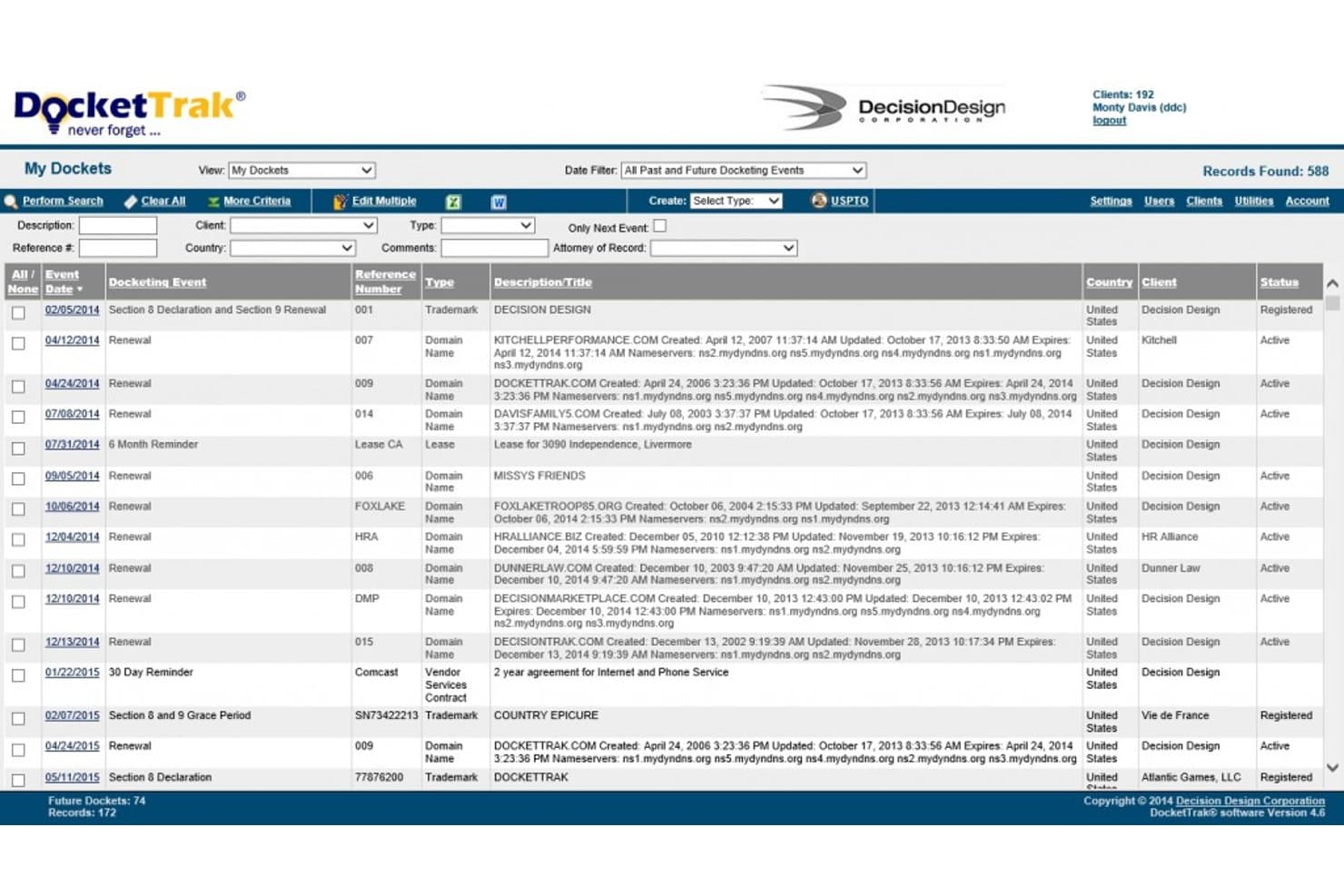
DocketTrak offers a My Dockets dashboard that displays trademark and domain name renewal events, client assignments, statuses, and filtering options for legal docket management. DocketTrak is a cloud-based IP docketing platform that tracks patents, trademarks, copyrights, and domain names, with auto-docketing directly from USPTO, CIPO, EUIPO, and other global IP offices.
Who Is DocketTrak Best For?
DocketTrak suits small to mid-sized law firms and corporate IP departments where paralegals and prosecution specialists manage patent and trademark portfolios directly.
Why I Picked DocketTrak
DocketTrak earns its spot on my shortlist because of how directly it connects deadline tracking to the source. I like that its E-Office Action Email Process automatically captures USPTO office action emails and drops the required response dates straight into the patent record, cutting out the manual entry step entirely. On top of that, daily reminder emails sort every open deadline by color-coded priority, so nothing gets buried in a long list.
DocketTrak Key Features
- Built-in rules for global patent and trademark deadlines: Manages jurisdiction-specific post-registration renewal calculations for US, Canada, EU, Australia, and other IP offices.
- Unlimited client user view access: Lets law firm clients securely view docket data with no extra user fees.
- Bulk import of IP records: Supports fast onboarding by importing large trademark and patent lists from other systems.
- Custom DocketForm document automation: Generates Word or email templates populated with case data for standardized communications.
DocketTrak Integrations
DocketTrak offers native integrations with Clio, Outlook, and Google Calendar. An API is available for custom integrations.
Pros and Cons
Pros:
- Covers post-registration renewal rules globally
- Color-coded deadline priority views built in
- Auto-dockets from USPTO and global IP offices
Cons:
- Limited reporting and analytics dashboards
- Focused on IP, not litigation docketing
Learn more about DocketTrak: Good for deadline management for Microsoft 365 users
- Free demo available
- From $39/user/month (billed annually)
Visit WebsiteCustomer Rating:4.1/5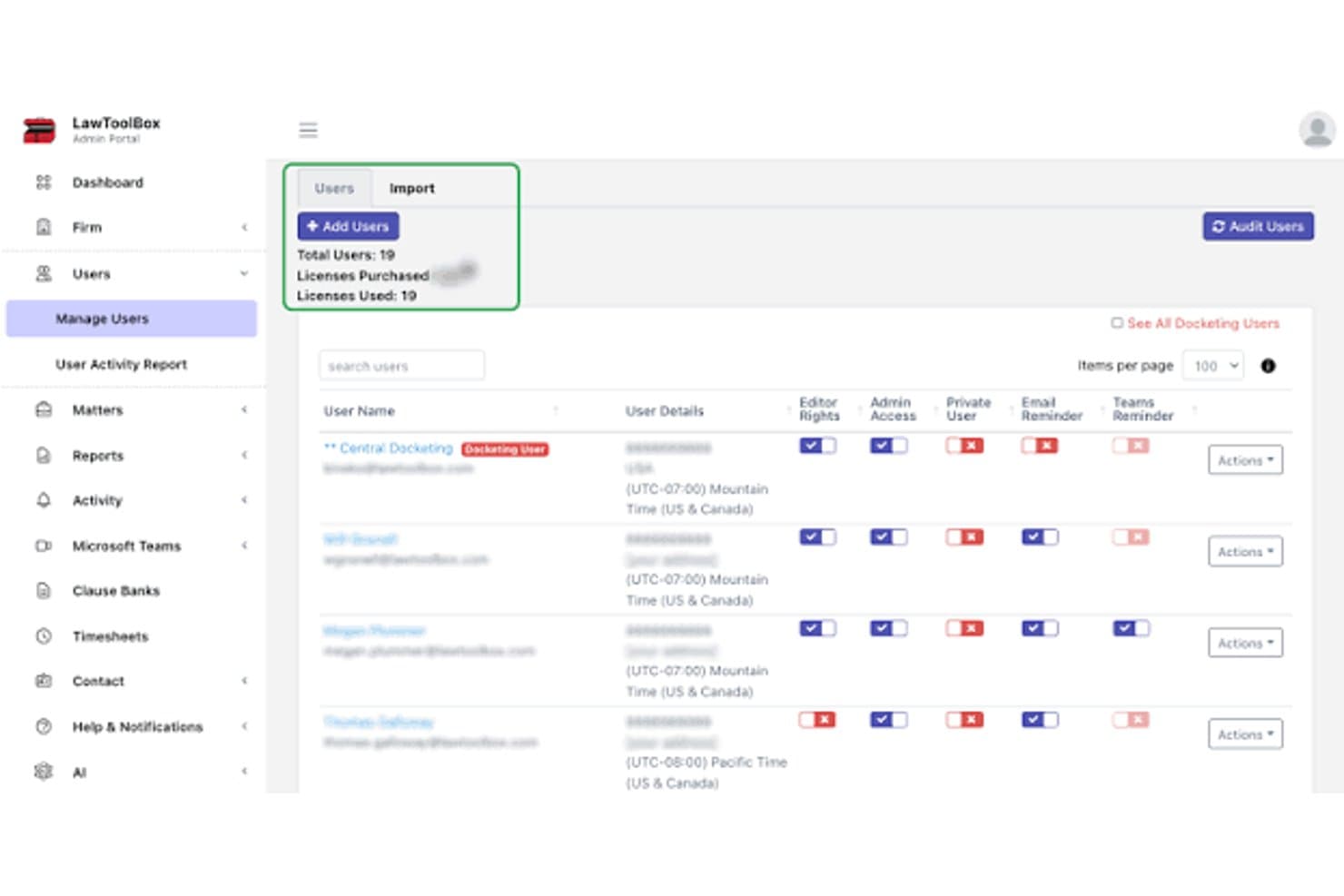
LawToolBox admin dashboard for managing legal calendaring users, permissions, and reminders LawToolBox is a legal docketing and matter management tool built on Microsoft 365 that provides rules-based court deadline calculation, automated calendaring, and deadline tracking across thousands of state and federal courts.
Who Is LawToolBox Best For?
LawToolBox is a strong fit for litigation teams and legal departments already running on Microsoft 365 that want court deadline calculation built directly into Outlook and Teams.
Why I Picked LawToolBox
LawToolBox earns its spot on my shortlist because it's built entirely inside Microsoft 365, making it a natural fit for litigation teams that live in Outlook and Teams. I like that it calculates rules-based deadlines across thousands of state and federal courts, then syncs selected entries directly to Outlook, Google, or Apple Calendar with automatic updates when rules change. The change history log, which records who moved a deadline and when, gives legal ops managers a clear audit trail without needing a separate system.
LawToolBox Key Features
- Matter workspace creation: Sets up a Microsoft 365 matter workspace with a group calendar, shared Outlook inbox, SharePoint folder structure, and optional Teams and OneNote components for each matter.
- Deadline change history log: Records who created, edited, or moved each deadline, along with the exact date of the change and updates to the deadline's date or description.
- Reusable deadline templates: Lets firms build custom templates for recurring case types, scheduling orders, and practice-specific reminders that can be applied across matters.
- Document assembly: Populates reusable Word document templates with matter-specific information pulled from the forms library.
LawToolBox Integrations
LawToolBox integrates with Microsoft 365, Outlook, Google Calendar, Apple Calendar, InfoTrack, ECFX, NetDocuments, iManage, Filevine, MyCase, and PracticePanther. It also offers a REST API for custom integrations.
Pros and Cons
Pros:
- Change logs show who edited deadlines
- Deadline charts and reports support multi-matter oversight
- Rules-based calculations account for court holidays
Cons:
- Some counties lack identified local rules
- Some reviewers reported calculation or event-description errors
Learn more about LawToolBox: Best for attorney-reviewed rule updates
- Free demo available
- Pricing upon request
Visit WebsiteCustomer Rating:3.5/5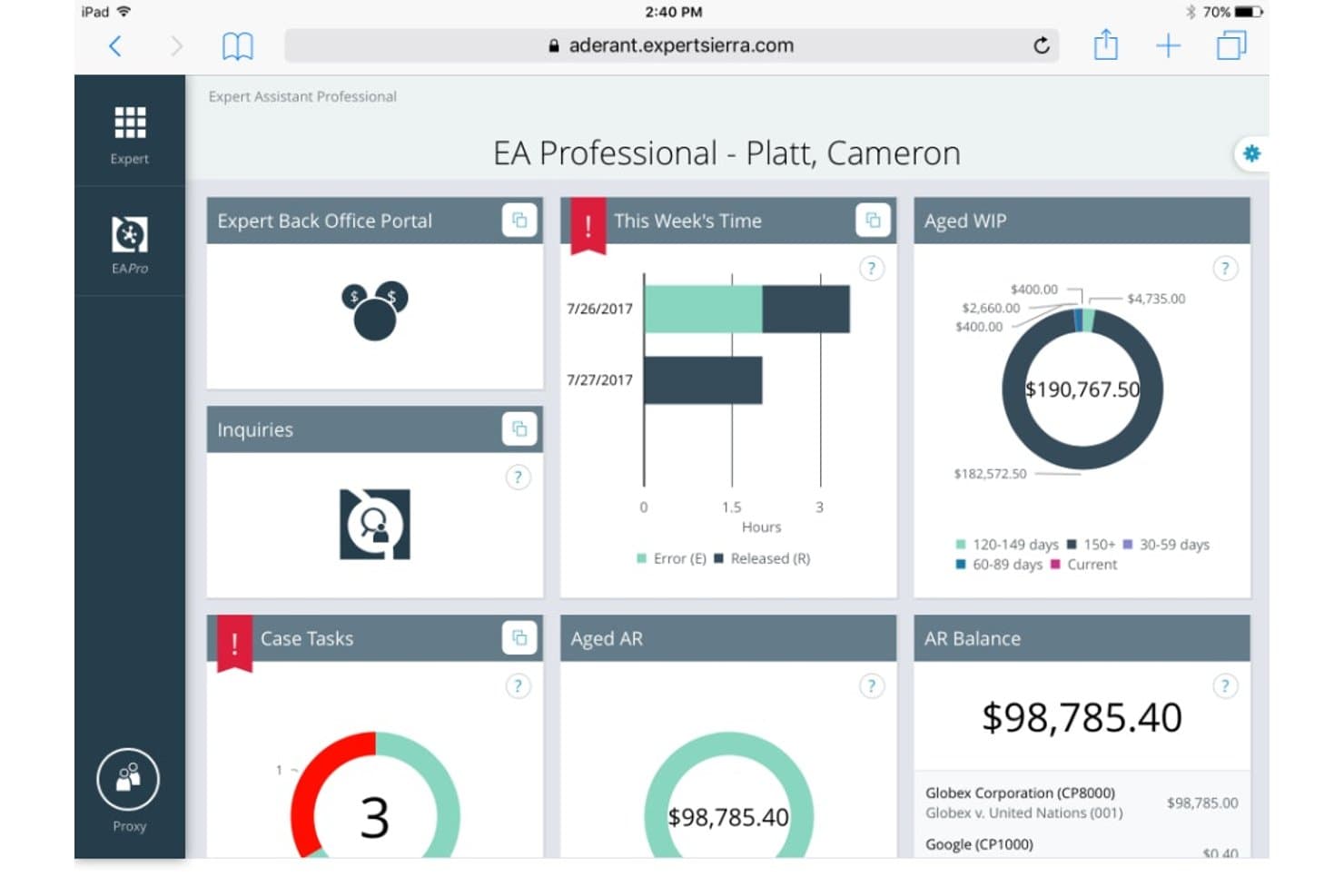
Aderant offers a professional dashboard interface displaying time tracking, aged WIP, AR balance, and case tasks for legal professionals. CompuLaw is a rules-based legal calendaring and docketing solution that calculates court deadlines, manages case dates across thousands of U.S. jurisdictions, and automates deadline reporting for litigation teams.
Who Is CompuLaw Best For?
CompuLaw is a strong fit for litigation-focused law firms that need attorney-reviewed court rules across thousands of U.S. jurisdictions to protect against missed deadlines.
Why I Picked CompuLaw
CompuLaw earns its spot on my shortlist because of how seriously Aderant treats the accuracy of its rules database. Every rule update goes through a three-review process: two attorneys review changes independently, then a supervisor conducts a final check. I also like that the monitoring team tracks court disruptions like storms and holidays, then pushes relevant changes to clients. That kind of proactive oversight is what separates CompuLaw from tools that simply maintain a static rules library.
CompuLaw Key Features
- Rules-based deadline calculation: CompuLaw uses more than 3,000 rule sets across U.S. jurisdictions to automatically calculate court deadlines from a trigger date.
- CompuLaw Vision docketing workspace: A structured interface where docketing professionals can enter, manage, and organize case data and deadlines at the matter level.
- MyView attorney access: Lawyers and timekeepers can view, filter, and report on deadlines through a browser or iPad, including a graphical view of how each date was calculated.
- Automated deadline reporting: Docketing teams can design, filter, and schedule deadline reports for automatic delivery via email to attorneys and other stakeholders.
CompuLaw Integrations
CompuLaw integrates with Microsoft Outlook, Aderant Handshake Knowledge Management, and several legal document management systems, including iManage. Aderant doesn’t specify integration direction, exchanged data, or API availability.
Pros and Cons
Pros:
- Matter-level reports share case events
- Trigger dates calculate related deadlines
- Attorney-reviewed rule updates
Cons:
- Unexpected glitches interrupt work
- Outdated interface slows docketing
Learn more about Aderant: Good for comprehensive legal calendaring
- Free demo available
- Pricing upon request

Docket Enterprise tracks critical dates and tasks and syncs them to Outlook. Docket Enterprise is an on-premise legal docketing and calendaring solution that combines scheduling templates, rule-based deadline calculation via CalendarRules, and deep Microsoft Outlook integration to help law firms track critical dates across matters and parties.
Who Is Docket Enterprise Best For?
Docket Enterprise suits law firms that run Microsoft-centric environments and need firm-wide deadline standardization across multiple practice groups and matters.
Why I Picked Docket Enterprise
Docket Enterprise earns its spot on my shortlist because of how thoroughly it handles firm-wide legal calendaring across practice groups and matters. I particularly like how scheduling templates pair with CalendarRules to auto-calculate rule-based deadlines from trigger dates, accounting for business versus calendar days, court holidays, and jurisdiction-specific extensions. When a key date shifts, every dependent deadline moves with it, which keeps multi-matter schedules accurate without manual rework.
Docket Enterprise Key Features
- Multi-party matter coordination: Maintains parent and child matter schedules and coordinates deadlines across multiple represented parties and opposing parties within a single matter.
- Outlook Meeting Organizer sync: Uses Outlook/Exchange meeting request and acceptance workflows to track attendee responses in both Outlook and Docket Enterprise.
- UniCourt and PacerPro court update surfacing: Pulls court updates into the Docket Enterprise interface so staff can review, filter by case, access related documents, and decide whether to trigger scheduling.
- Mobile schedule access: Lets users view schedules by matter, client, workgroup, or court on iOS and Android devices, with the ability to create activities and edit top-level schedule items on the go.
Docket Enterprise Integrations
Docket Enterprise integrates with Microsoft Outlook and Microsoft Teams, plus CalendarRules for court-date calculations and either UniCourt or PacerPro for surfacing court updates. API availability and other case-management integrations aren’t documented.
Pros and Cons
Pros:
- Reviewer praised setup specialist guidance
- Parent-child schedules coordinate deadlines across related matters
- Rule-based deadlines recalculate when trigger dates change
Cons:
- Court updates require staff review before scheduling action
- Reviewer reported missing overdue-item reminders and reporting
Learn more about BEC Legal: Best for AI research on live dockets
- Free plan + 30-day free trial + free demo available
- From $9.99/month
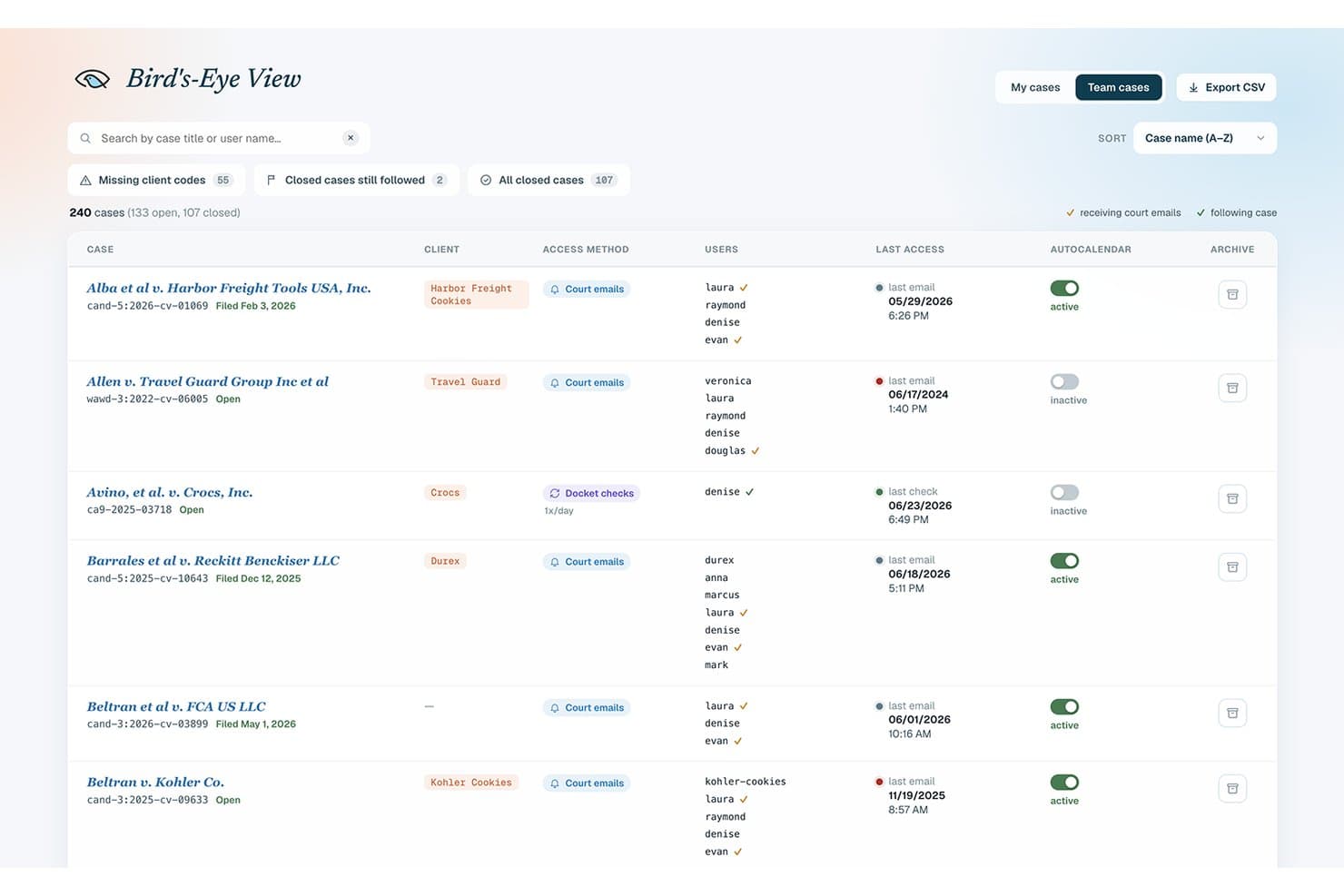
DocketBird’s Bird’s-Eye View lets docket managers review every case at once. DocketBird is a court docketing and filing-tracking platform that covers all U.S. federal courts and thousands of state courts, with tools for deadline extraction, calendar sync, and AI-assisted research on live dockets.
Who Is DocketBird Best For?
DocketBird is a good fit for paralegals and legal teams managing high volumes of federal court filings who need automated deadline extraction and calendar sync.
Why I Picked DocketBird
DocketBird earns its spot on my shortlist because of its MCP Connector, which lets you query live federal dockets directly through Claude, ChatGPT, or Gemini in plain language. I love that you can pull docket sheets, retrieve filings, and map litigation relationships without leaving your AI assistant. The Research Raven add-on also lets you dig into judge analytics and opposing-counsel history across real case data, which is genuinely useful when you're building litigation strategy.
DocketBird Key Features
- AutoCalendar deadline extraction: Automatically pulls deadlines from docket sheets and filings, then generates additional deadlines based on the Federal Rules of Civil Procedure.
- Bird's-Eye View firm administration: Gives your team a single ledger to manage cases, client codes, distribution lists, and AutoCalendar settings across your entire firm.
- PACER MFA Team Sharing: Lets team members share PACER multi-factor authentication codes with selective authorization and access audit trails.
- Real-time filing webhooks: Posts new court filings to a custom endpoint as they're processed, available on the Flow Falcon plan.
DocketBird Integrations
DocketBird offers native integrations with Clio, Dropbox, Box, Google Drive, Filevine, Google Calendar, Outlook, iManage, and NetDocuments. Flow Falcon supports custom DMS integrations, while the REST API and webhooks support custom connectivity.
Pros and Cons
Pros:
- Bulk filing downloads support paralegal workflows
- FRCP deadline extraction includes revision history
- AI research queries live federal dockets
Cons:
- Deadline accuracy still requires human review
- State-court access remains in beta
Learn more about DocketBird:
How I Evaluate Legal Docketing Software
I split my evaluation into three parts, giving the most weight to core functionality: calculate rule-based deadlines and sync dates across cases and calendars. Next, I look for differentiators such as triggering-event recalculation. Finally, I consider onboarding, rule-question support, and pricing fit.
Core Functionality (Table Stakes For This List)
When I'm selecting tools for my list, I score each one on a scale from 0 (does not offer the functionality) to 5 (excels in this area) for each core functionality listed below. I then convert the total into a percentage to help assess each tool's overall fit, with extra weight on any functionalities I’ve deemed essential.
- Automated Deadline Calculation (Essential): I check whether rules and triggering events generate linked deadlines, such as response dates after a filing, for review by staff.
- Court Rules Coverage (Essential): I assess which jurisdictions and rule sets are covered, how updates are maintained, and whether they match the firm’s matters.
- Calendar Synchronization: I look for docket dates and tasks that sync with firm calendars, with clear reminders and ownership for hearings or filings.
- Multi-Matter Tracking: I evaluate whether staff can filter deadlines across matters by date, attorney, or status when coordinating a busy caseload.
- Court Data Integration: I check whether filing or docket data can populate matter records, and how the system reflects updates from supported court sources.
- Change And Conflict Alerts: I consider whether alerts flag changed dates, overlapping obligations, or rescheduling needs after an amended filing or court order.
Once I have a list of tools that meet the criteria, I consider what sets each platform apart.
Differentiating Factors (What Sets Vendors Apart)
Here's how I compare and contrast different vendors:
Standout Features
I look for triggering-event chains that recalculate every downstream deadline when a single date shifts—a continuance that moves a trial date should instantly update pretrial motions, discovery cutoffs, and expert disclosures without manual edits. I also evaluate PACER and e-filing ingestion, since pulling docket entries directly into the system eliminates the re-keying errors I've seen cause real problems in high-volume litigation. Custom rule authoring matters too: firms handling bankruptcy or immigration need to build practice-specific deadlines that standard rule libraries don't cover.
Beyond Features
I evaluate how each tool handles malpractice risk—audit trails and confirmation workflows matter because missed-deadline claims are a leading source of bar complaints. I also check whether the vendor offers guided onboarding with jurisdiction-specific rule configuration, since a misconfigured rules database can be worse than no automation at all. Integration depth with your existing practice management stack is just as important: if docket dates don't sync cleanly with platforms like Clio or MyCase, you end up with duplicate entries and conflicting records that erode trust in the system.
Como escolher um software de gestão de prazos processuais
É fácil perder-se em listas extensas de funcionalidades e estruturas de preços complexas. Para o ajudar a manter-se concentrado enquanto avalia o software mais adequado às suas necessidades específicas, eis uma lista de fatores a ter em conta:
| Fator | O que deve considerar |
|---|---|
| FatorEscalabilidade | O que deve considerarO software acompanhará o crescimento do seu escritório? Verifique se consegue lidar com um aumento do volume de processos e do número de utilizadores sem problemas. |
| FatorIntegrações | O que deve considerarFunciona com as ferramentas que já utiliza? Garanta a compatibilidade com sistemas existentes, como software de faturação ou plataformas de gestão documental. |
| FatorPersonalização | O que deve considerarPode adaptá-lo às suas necessidades? Procure opções para ajustar os fluxos de trabalho e os painéis de controlo aos processos do seu escritório. |
| FatorFacilidade de utilização | O que deve considerarÉ fácil de utilizar? Tenha em conta a curva de aprendizagem da sua equipa e se será necessário algum tipo de formação. |
| FatorImplementação e integração inicial | O que deve considerarCom que rapidez pode começar? Avalie o tempo de configuração e os recursos necessários para uma transição tranquila do seu sistema atual. |
| FatorCusto | O que deve considerarEnquadra-se no seu orçamento? Compare os modelos de preços e considere os custos totais, incluindo formação e suporte. |
| FatorMedidas de segurança | O que deve considerarAté que ponto os seus dados estão protegidos? Verifique a conformidade com as normas legais de proteção de dados e procure funcionalidades como encriptação e atualizações de segurança regulares. |
| FatorDisponibilidade do suporte | O que deve considerarQue tipo de ajuda está disponível? Analise as opções de suporte, como chat em direto, telefone ou e-mail, e certifique-se de que correspondem às necessidades e ao horário de trabalho da sua equipa. |
O que é um software de gestão de prazos processuais?
O software de gestão de prazos processuais é uma ferramenta que acompanha as datas das audiências, os prazos dos processos e os principais documentos jurídicos. Advogados, solicitadores e assistentes jurídicos utilizam-no para se manterem organizados, evitar prazos falhados e reunir todos os detalhes importantes dos seus processos num só local. É valioso para reduzir erros, gerir lembretes e tornar o trabalho jurídico menos stressante.
Funcionalidades
Ao selecionar software de gestão de prazos jurídicos, esteja atento às seguintes funcionalidades essenciais:
- Lembretes automatizados: Envia alertas sobre prazos e datas de audiências próximas para evitar compromissos falhados.
- Gestão de documentos: Organiza e armazena documentos jurídicos de forma segura, tornando-os facilmente acessíveis à sua equipa.
- Ferramentas de agendamento: Facilita o planeamento e acompanhamento de compromissos, garantindo uma gestão eficiente do tempo.
- Fluxos de trabalho personalizáveis: Permite aos utilizadores adaptar os processos às necessidades específicas da sua prática jurídica, melhorando a eficiência.
- Capacidades de integração: Liga-se a outras ferramentas, como software de faturação e sistemas de gestão de documentos, para proporcionar um fluxo de trabalho integrado.
- Comunicação com clientes: Disponibiliza portais ou funcionalidades de mensagens para manter uma comunicação clara com os clientes.
- Ferramentas de relatórios: Fornece informações sobre o progresso dos processos e o desempenho do escritório através de relatórios detalhados.
- Medidas de segurança: Garante a proteção dos dados e a conformidade com as normas jurídicas através de encriptação e atualizações regulares.
- Acesso móvel: Permite aos utilizadores gerir tarefas e aceder a informações em movimento através de dispositivos móveis.
- Recursos de formação: Fornece tutoriais e guias para ajudar os utilizadores a aprender rapidamente a utilizar o software de forma eficaz.
Vantagens
A implementação de software de gestão de prazos jurídicos proporciona várias vantagens à sua equipa e à sua empresa. Eis algumas que pode esperar:
- Maior precisão: Os lembretes automatizados ajudam a evitar prazos falhados e reduzem o erro humano.
- Organização melhorada: As funcionalidades de gestão de documentos mantêm os seus ficheiros jurídicos organizados e facilmente acessíveis.
- Agendamento eficiente: As ferramentas de agendamento permitem uma melhor gestão do tempo e coordenação dentro da sua equipa.
- Soluções personalizadas: Os fluxos de trabalho personalizáveis permitem adaptar o software às necessidades específicas da sua prática.
- Melhor comunicação com os clientes: As ferramentas de comunicação com clientes garantem interações claras e mantêm os clientes informados.
- Maior produtividade: As ferramentas de relatórios fornecem informações sobre o desempenho, ajudando-o a tomar decisões fundamentadas.
- Gestão segura de dados: As medidas de segurança protegem informações sensíveis e garantem a conformidade com as normas jurídicas.
Custos & preços
A seleção de software de gestão de prazos jurídicos exige uma compreensão dos vários modelos de preços e planos disponíveis. Os custos variam consoante as funcionalidades, o tamanho da equipa, os complementos e outros fatores. A tabela abaixo resume os planos comuns, os seus preços médios e as funcionalidades normalmente incluídas nas soluções de software de gestão de prazos jurídicos:
Tabela de comparação de planos de software de gestão de prazos jurídicos
| Tipo de plano | Preço médio | Funcionalidades comuns |
|---|---|---|
| Tipo de planoPlano gratuito | Preço médio$0 | Funcionalidades comunsAgendamento básico, gestão de documentos e armazenamento limitado. |
| Tipo de planoPlano pessoal | Preço médio$20-$40/utilizador/mês | Funcionalidades comunsLembretes automatizados, gestão de documentos melhorada e apoio por e-mail. |
| Tipo de planoPlano empresarial | Preço médio$50-$80/utilizador/mês | Funcionalidades comunsFerramentas de agendamento avançadas, portais de comunicação com clientes e capacidades de integração. |
| Tipo de planoPlano empresarial de grande escala | Preço médio$100-$150/utilizador/mês | Funcionalidades comunsFluxos de trabalho personalizáveis, apoio prioritário, medidas de segurança avançadas e relatórios abrangentes. |
Perguntas frequentes sobre software de gestão de prazos jurídicos
Eis algumas respostas a perguntas frequentes sobre software de gestão de prazos jurídicos:
Qual é a melhor forma de organizar documentos jurídicos?
A melhor forma de organizar documentos jurídicos é utilizar um sistema estruturado e digital de gestão documental (DMS) que permita um armazenamento seguro, uma pesquisa fácil e uma categorização lógica. Comece por agrupar os documentos por cliente, assunto ou número do processo e, em seguida, divida-os por tipo de documento — como peças processuais, contratos, produção de prova, correspondência e registos de faturação.
Para maximizar a eficiência, aplique convenções de nomenclatura e etiquetas de metadados consistentes (por exemplo, data, tipo de documento, autor). Utilize pastas e subpastas que reflitam o seu fluxo de trabalho e assegure-se de que o controlo de versões está implementado para acompanhar as atualizações. A integração deste sistema com o seu software de gestão de prazos jurídicos ou de gestão de processos pode simplificar o acesso, reduzir a duplicação e garantir a conformidade com as normas legais e éticas.
Que software utiliza a maioria dos escritórios de advogados?
A maioria dos escritórios de advogados utiliza uma combinação de ferramentas de software jurídico especializadas para gerir eficazmente as suas operações diárias. As plataformas principais incluem frequentemente software de gestão de processos jurídicos para acompanhar processos e clientes, software de gestão de prazos jurídicos para gerir prazos e sistemas de gestão documental para organizar ficheiros jurídicos de forma segura.
Além disso, muitos escritórios dependem de software de faturação e de contabilidade fiduciária para tratar da faturação aos clientes e do cumprimento dos regulamentos financeiros. As soluções baseadas na Web são cada vez mais populares, oferecendo flexibilidade e acesso remoto. Os escritórios de maior dimensão podem também integrar ferramentas com funcionalidade de API para ligar diferentes sistemas — como CRM, correio eletrónico ou bases de dados de investigação — num fluxo de trabalho integrado. A combinação exata de software depende da dimensão do escritório, da área de prática e das necessidades específicas.
Que tecnologias são essenciais para um software eficaz de gestão de prazos jurídicos?
O software moderno de gestão de prazos jurídicos baseia-se numa arquitetura robusta de software jurídico que suporta funcionalidades avançadas, como acesso através da Web, integração simples com APIs e capacidades de contabilidade fiduciária. Estas tecnologias garantem que os sistemas de gestão de prazos são seguros, escaláveis e fáceis de integrar com plataformas mais abrangentes de software de gestão de processos jurídicos.
Para escritórios de advogados ou departamentos jurídicos que lidam com grandes volumes de dados processuais, dispor de uma solução de gestão de prazos baseada na Web e compatível com APIs permite obter atualizações em tempo real, fluxos de trabalho simplificados e uma melhor comunicação entre plataformas — tornando todo o processo de gestão de prazos mais eficiente e fiável.
Como apoia o software de gestão de prazos jurídicos as operações jurídicas mais abrangentes?
O software de gestão de prazos jurídicos desempenha um papel essencial no setor jurídico, ajudando os departamentos jurídicos a gerir com precisão prazos processuais importantes e a apresentação de documentos. Quer se trate de um grande departamento jurídico empresarial ou de um pequeno escritório, os sistemas de gestão de prazos podem ser adaptados a necessidades específicas, garantindo a conformidade e reduzindo o risco.
Estas ferramentas contribuem para operações mais eficientes ao alinharem-se com os processos do setor jurídico em geral e ao disponibilizarem funcionalidades que correspondem aos fluxos de trabalho de equipas jurídicas diversificadas.